Buy Sell Multiple

Buy Sell Multiple Panel - Execute Bulk Orders in a Single Click!

Description

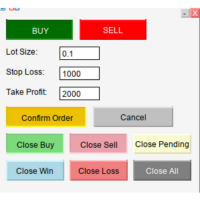
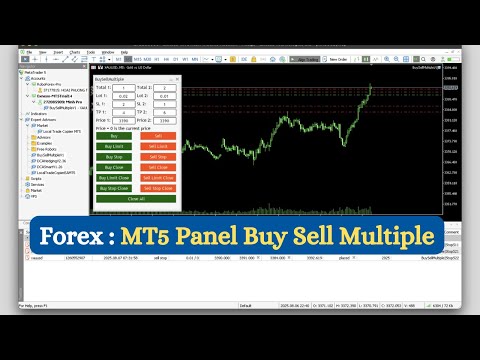
Save time and seize market opportunities instantly. This powerful panel allows you to place multiple buy or sell orders simultaneously, each with custom lot sizes, take-profit, and stop-loss levels. Perfect for sophisticated entry strategies and managing complex trades efficiently.

Key Features

  • Bulk Order Execution: Open multiple market orders at once with just one click.
  • Flexible Lot Sizing: Set individual lot sizes for each order in the batch.
  • Custom TP/SL per Order: Define unique Take-Profit and Stop-Loss levels for each position.
  • Pending Order Support: Place Buy Limit, Sell Limit, Buy Stop, and Sell Stop orders in bulk.
  • Flexible Closing: Close individual orders or all positions at once with ease.
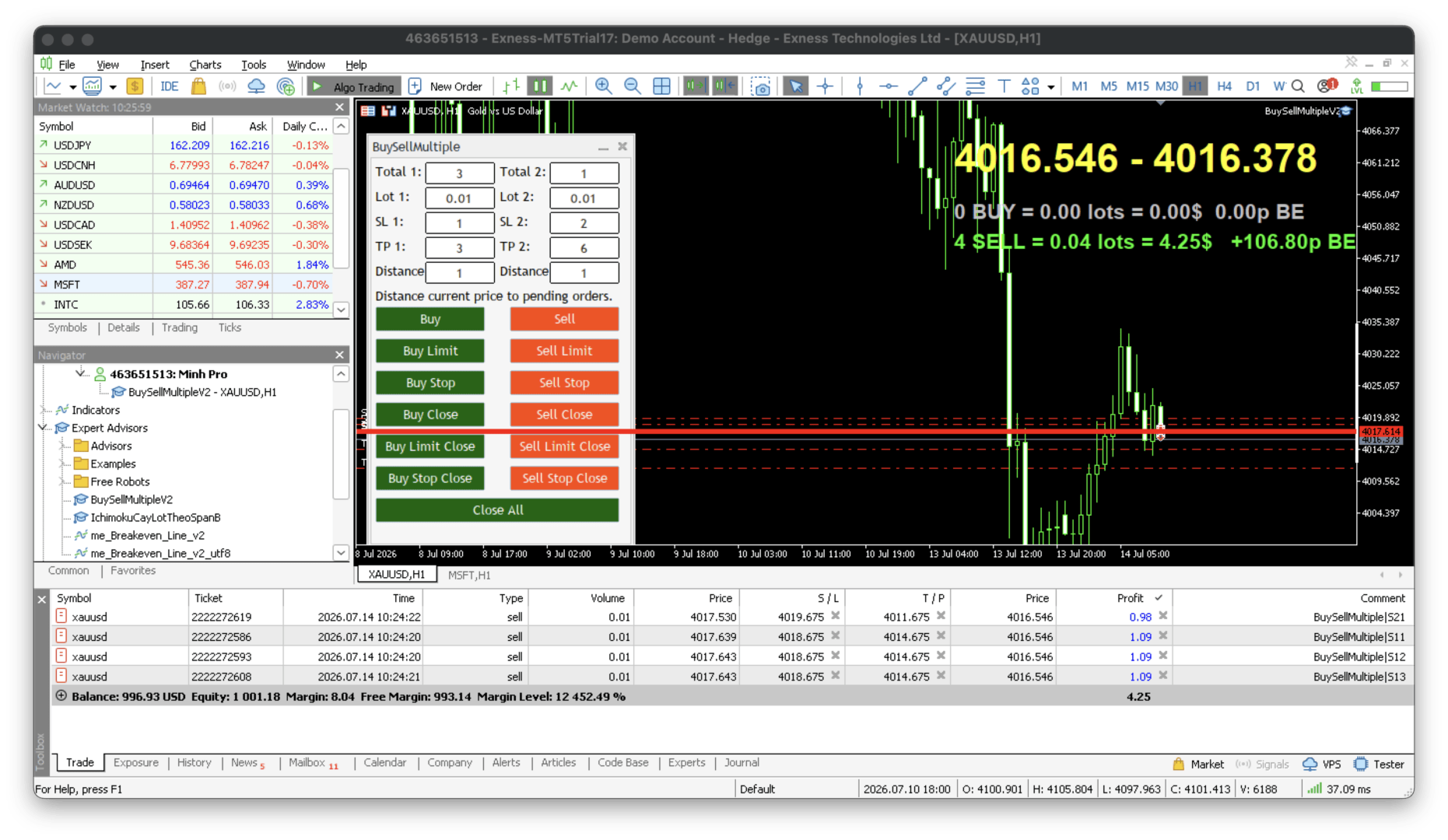
  • Dual Strategy Mode: Use Total 1 and Total 2 to execute two different sets of orders with different TP/SL parameters simultaneously.
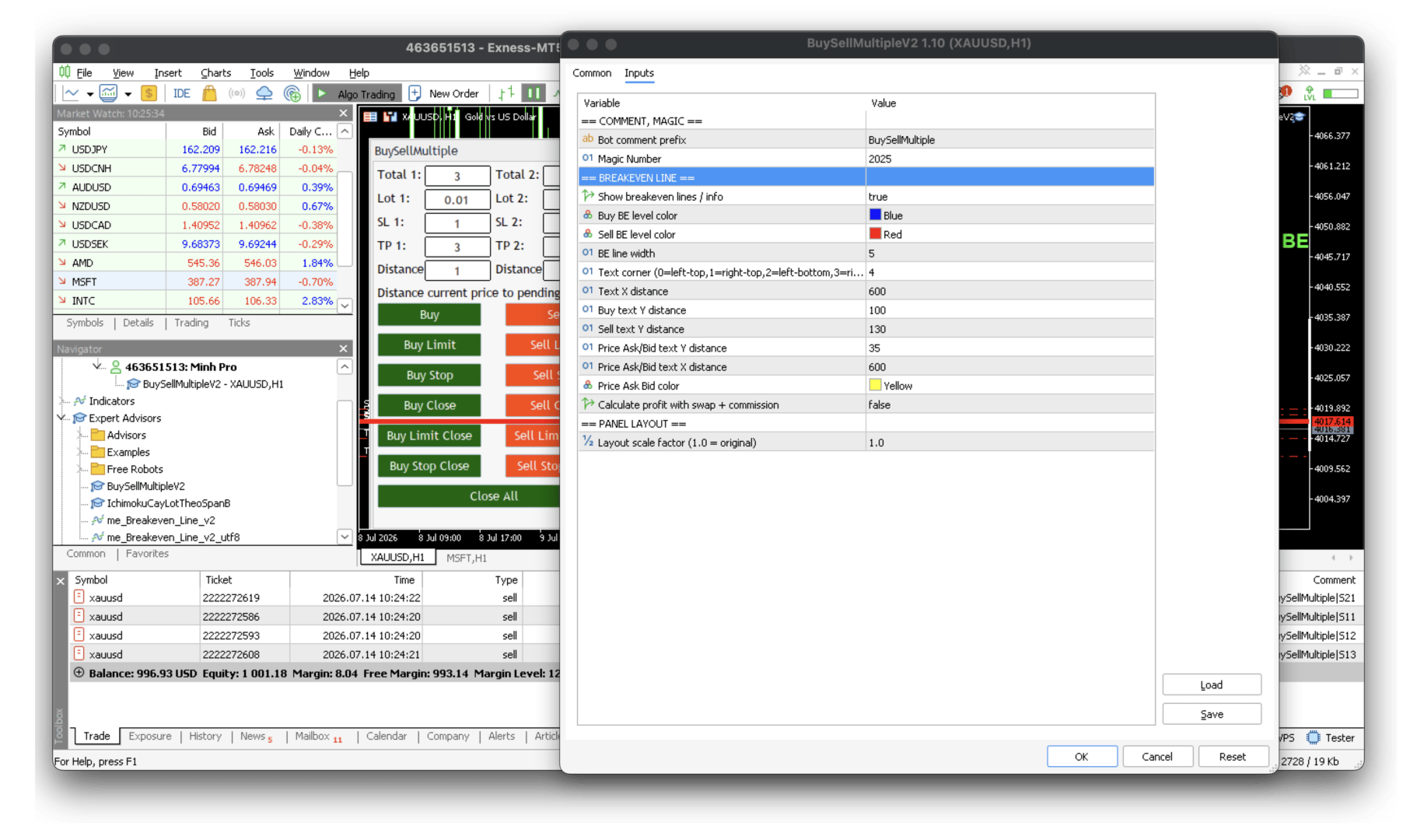
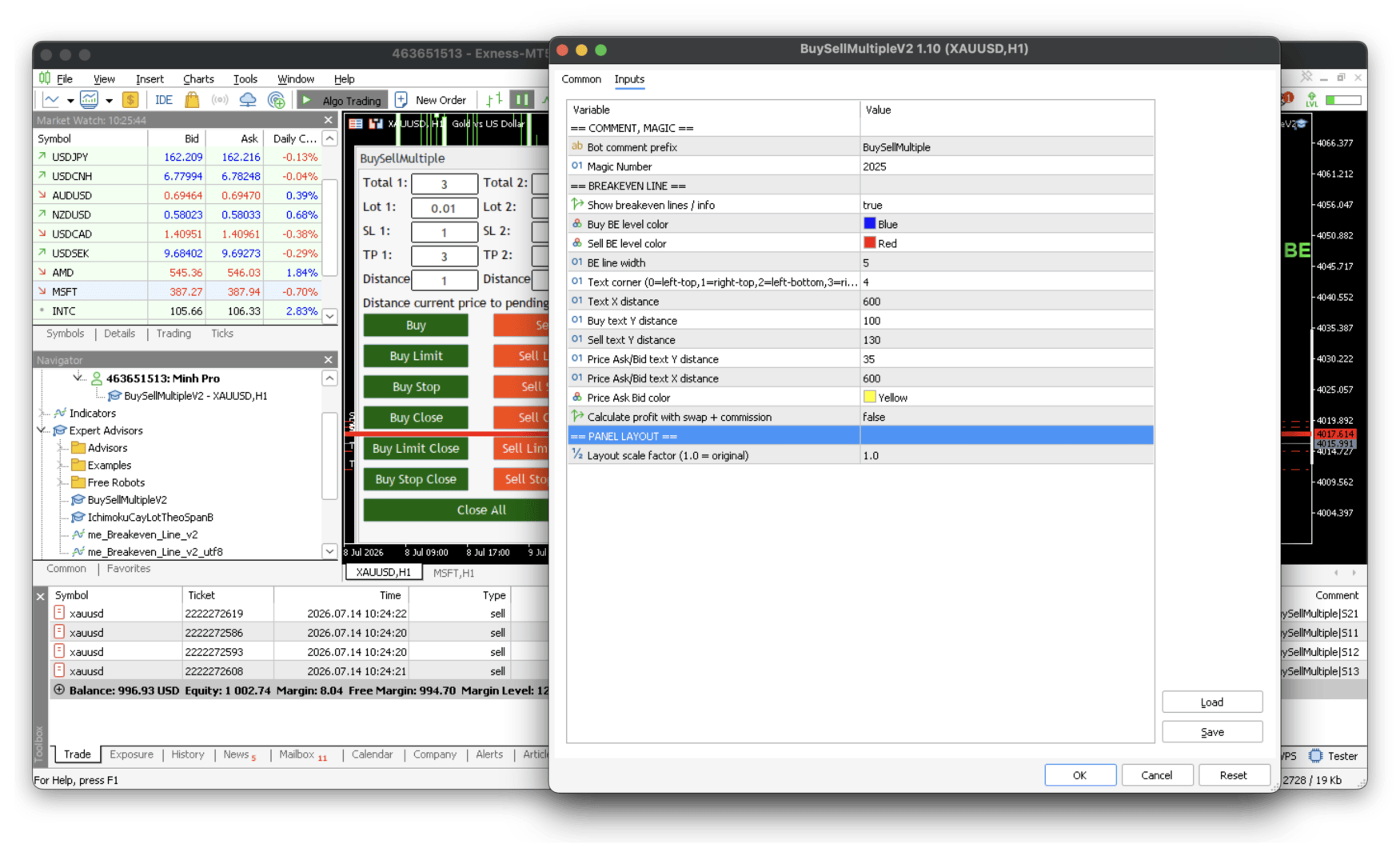
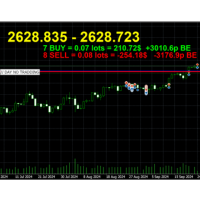
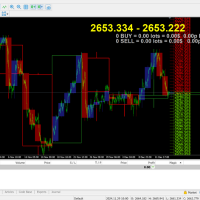
  • Integrated Breakeven Line: The panel now draws the average breakeven (BE) price line for your open Buy and Sell positions directly on the chart, along with a live readout of order count, total lots, floating profit, and the exact distance (in pips) to breakeven. Ask/Bid prices are also displayed for quick reference.
  • Adjustable Panel Size (Scale): A single Panel_Scale input lets you resize the entire panel and spacing to fit any screen or DPI. Keep it at 1.0 for the original size, or increase it (1.1, 1.2, …) to enlarge the panel and spread out the fields and buttons on high-resolution displays where text may appear cramped.

How It Works

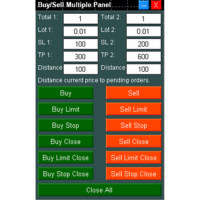
  • Total 1 & Total 2: Represent the number of orders for strategy 1 and strategy 2.
  • SL1/TP1 & SL2/TP2: The Stop-Loss and Take-Profit values for each strategy group.
  • Distance: The offset from the current market price where your pending orders will be placed (see the note below).
  • Breakeven Line & Info: Once positions are open, the blue line marks the Buy breakeven and the red line marks the Sell breakeven. The on-chart text shows, for each side, the number of orders, total volume, current profit, and pips to breakeven — updated in real time. You can toggle it on/off and freely reposition the text using the color and X/Y distance inputs.
  • Panel Scale: Set Panel_Scale to control the overall panel size. 1.0 = original layout; 1.1 = 10% larger; 1.2 = 20% larger, and so on. Both the panel and the gaps between elements scale together, so everything stays neatly aligned.

What's New

V1.20

In this update, I've integrated an on-chart Breakeven Line indicator directly into the panel — no need to attach a separate indicator. You can now see your breakeven levels, floating P/L, lot totals, and pips-to-breakeven at a glance. I've also added a Panel Scale option so the panel displays perfectly across different screens and resolutions.

V1.10

In this update, I have also replaced the specific 'Price' input for pending orders with a 'Distance' parameter.

The purpose of this change is to execute orders faster. Instead of calculating and entering a specific price, you now simply enter a distance value. This 'Distance' is the offset from the current market price where you want your Buy Limit/Sell Stop or Sell Limit/Buy Stop orders to be placed.

For example, if the current price is 3001 and you set the distance to 1:

  • A Buy Limit or Sell Stop order will be placed at 3000 (3001 - 1).
  • A Sell Limit or Buy Stop order will be placed at 3002 (3001 + 1).

Support

Encounter any issues or have questions? Please contact me directly through the private message system here on MQL5. I'm happy to assist you.

Try it now and revolutionize your trading workflow!


video tutorial: https://youtu.be/lJvTAoVR1TI
MT4 Version: https://www.mql5.com/en/market/product/146348/comments?source=Site+Profile+Seller
Recommended products
You can see Binance Spot data instantly in Metatrader 5 and it allows you to use all the features that Metatrader has provided to you. You can access the data of all symbols listed on Binance Futures. Don't forget to set the timezone. Binance it's 00:00 UTC. You need to fix it according to your own country You need to install the free Binance Spot Symbol List plugin. https://www.mql5.com/tr/market/product/83507 After loading, it automatically downloads the data of the cryptos in the market obser
Real-Time Spread Display Tool A   real-time spread display tool   is a specialized software or application designed to provide traders and investors with instant, live data on the   spread —the difference between the bid price (the price at which buyers are willing to purchase an asset) and the ask price (the price at which sellers are willing to sell it)—for various financial instruments. This tool is critical in markets such as forex (FX), stocks, futures, and cryptocurrencies, where price f
COPYLATOR – MT5 Trade Copier Key Highlights Multi-Sender / Multi-Receiver Trade Replication – supports one-to-many, many-to-one, and many-to-many configurations, with complete real-time copying of market orders, pending orders, SL, and TP. Advanced drawdown protection – closing, blocking, pending-order deletion, manual and automatic reset mechanisms. Automatic symbol mapping – finds correct symbols, alerts if missing, allows manual override. Hedging & Netting support – auto-detected, no manual s
Ping
Vagif Shabanov
Ping: Your Indispensable Tool for Reliable Trading Your internet provider and VPS promise a stable connection, but can you really trust them? In a world where every millisecond counts, a slow or unstable connection can result in missed profits or losses. Ping allows you to: Make Informed Decisions: Visually compare the speed of different VPS servers and brokers to choose the fastest and most reliable connection for your strategy. Eliminate Risks: Especially useful for scalpers and high-frequency
You have 5 positions open on XAUUSD. Net floating is +$30 - looks fine. But look closer: 3 buys, 2 sells. The buys are carrying 0.60 lots, the sells only 0.20. One of those buys has been sitting underwater for 90 minutes. Margin level is at 390% and drifting down. Stress is building - quietly, invisibly - while the terminal just shows you a list of rows. Current price: $59 - increases by $10 after every 20 purchases until reaching the final price of $119 . Next price: $69 . Complete Buyer Kit: 4
Boleta de negociação, adiciona automáticamente as ordens Take Profit e Stop Loss quando excutada uma ordem de compra ou venda. Ao apertar as teclas de atalho (A, D, ou TAB), serão inseridas duas linhas de pre-visualização, representando as futuras ordens de take profit (azul) e stop loss (vermelho), as quais irão manter o distanciamento especificado pelo usuário. Ditas ordens só serão adicionadas ao ser executada a ordem inicial. Ao operar a mercado, as ordens pendentes de take profit, e stop lo
Ritz Prime TradeCopier – Institutional Cross-Broker Sync Engine Say goodbye to lagging copy trades, mismatched broker symbols, and missed Stop Losses. Ritz Prime TradeCopier is an ultra-fast, high-frequency copy trading engine designed for professional portfolio managers and retail traders. Powered by a custom Bit-Banger JSON architecture and an advanced Global Variable (GV) mapping system, it seamlessly bridges multiple MetaTrader terminals on a single VPS/SERVER with true zero-lag performance.
AP Manager
Ardian Putra
Product Title AP Manager – Auto SL, TP, Break Even & Trailing Stop for MT5 Product Description Take full control of your risk management with AP Manager , a powerful and flexible tool designed to automatically manage Stop Loss, Take Profit, Break Even, and Trailing Stop for all your trades. This utility is perfect for traders who want to protect profits, minimize losses, and trade with discipline — without constantly monitoring the charts. Key Features Automatic Stop Loss & Take Pr
Telegram to mt5 pro
Janet Abu Khalil
4 (4)
Telegram to MT5 Pro — Advanced Telegram Signal Copier with Auto-Fix, Multi-TP, Risk Control and Full Trade Management Telegram to MT5 Pro — Professional Telegram Signal Copier Telegram to MT5 Pro is a high-performance trade copier that automatically executes signals from Telegram directly into your MetaTrader 5 account, with full control over risk, execution, and trade management. The system consists of two components: • The Expert Advisor (EA) running inside MetaTrader 5 • A companion desktop
Crypto_Forex Indicator "WPR with 2 Moving Averages" for MT5, No Repaint. - WPR itself is one of the best oscillators for scalping. - "WPR and 2 Moving Averages" Indicator allows you to see Fast and Slow Moving Averages of WPR oscillator. - Indicator gives opportunities to see the price corrections very early. - It is very easy to set up this indicator via parameters, it can be used on any time-frame. - You can see Buy and Sell entry conditions on the pictures. - With PC and Mobile alerts on WP
Telegram Sender Osw MT5
William Oswaldo Mayorga Urduy
User Manual: Telegram Sender Osw Telegram Sender Osw is an Expert Assistant (EA) designed to automate the sending of trading signals from MetaTrader to Telegram. Ideal for signal providers and account management, it sends critical data (Price, Stop Loss, Take Profit, Volume) instantly and professionally. 1. Parameter Configuration General and Connectivity Enable EA: Activates (true) or pauses (false) the system. Bot Token: Alphanumeric code obtained from @BotFather. Chat ID: Identifier of th
TradeInfoDisplay – Risk/Reward Visualiser Visualises profit/loss zones, RR ratio, Risk% and Reward% for all pending orders and positions directly on the chart. CPU-optimised. FULL DESCRIPTION TradeInfoDisplay draws colour-coded zones on the chart for every pen
PropFirm Consistency
Sandrine Claudine Laurain
Prop firms have a rule almost nobody watches until it's too late: your best day can only be a fraction of your total profit. Apex caps your best day around 30-50% of total profit. TopStep similar. FTMO 1-Step runs a "Best Day" metric. FundedNext applies consistency rules on reward requests. Exceed the ratio and your payout is denied - or the day counts as a violation on some firms. The math is simple but nobody does it live: if your best day can only be 30% of total profit, and you've already
GDS Renko Pip ST Chart - Pip-Based Renko Chart Indicator for MetaTrader 5 GDS Renko Pip ST Chart is a pip-based Renko chart indicator for MetaTrader 5. It helps traders build and study cleaner Renko price movement using a practical fixed pip or point-based brick structure. This tool is designed as a Renko chart foundation for manual analysis. It does not predict the market, does not generate buy or sell signals and does not decide whether a trade should be opened. Renko EDGE EA Golden Delta | A
Tick Chart Constant Volume Generator
Trade The Volume Waves Single Member P.C.
1. Overview   The Tick Chart Toolset is a pair of tightly coupled MQL5 files that generate and control professional Constant Volume charts inside MetaTrader 5 as custom symbols. Unlike time-based charts, each bar closes only when a target volume threshold is reached, giving you a noise-filtered, activity-proportional view of the market. Free "Tick Chart Monitor Indicator" to control the generator EA:  https://www.mql5.com/en/market/product/17104   Component Type Role Tick_Chart_Generator_AI_MT5
Advanced Trailing Stop & Break-Even Expert Advisor with Partial Profit Taking Overview Unlock the full potential of your trading strategy with this Expert Advisor that automates trade management to maximize profits and minimize losses. Designed for both novice and experienced traders, this EA offers precise control over your trades with customizable trailing stops, break-even protection, and partial profit taking — all working seamlessly to protect your capital and lock in gains. Key Features Dy
Binance Quotes Updater
Andrey Khatimlianskii
5 (1)
This service is designed to stream online cryptocurrency quotes   from the Binance exchange to your MetaTrader 5 terminal. You will find it perfectly suitable if you want to see the quotes of cryptocurrencies in real time — in the Market watch window and on the MetaTrader 5 charts. After running the service, you will have fully featured and automatically updated  cryptocurrency charts in your MetaTrader 5. You can apply templates, color schemes, technical indicators and any non-trading tools to
Ping-Monitor — Never Miss a Tick Again! Do you run EAs and worry about silent chart freezes or data feed stalls ?  This utility is your ultimate watchdog, alerting you the moment your charts stop receiving updates. Ping-Monitor is designed to detect when a chart freezes or the data feed stalls, even if MT5 still shows that the connection is active. It works by tracking the time of the last incoming tick. Every time the chart receives a new price update, the EA records the timestamp. Then, on a
OB FVG Trade Copier: Unified Master & Slave EA Version: 2.00 Type: Trade Copier / Risk Management Utility Compatibility: MetaTrader 4 & MetaTrader 5 (Cross-compatible codebase) Overview The OB FVG Trade Copier is a professional-grade, unified trade copying system designed to mirror trades between Master and Slave accounts seamlessly. Built with a unified architecture, a single EA file serves as both the sender (Master) and receiver (Slave) simply by toggling the EA Mode in the settings. It uti
FREE
Painel Nelogica ChartTrading
Tiago Silvano Souza Felipe
Painel Profit is an operational trading panel for MetaTrader 5 created to make manual execution and visual order management easier directly on the chart. The operating principle is simple: the trader selects the symbol, timeframe, volume, entry type, and exit strategy. Based on these commands, the panel sends or organizes the trade through the interface, displaying the entry, take profit, and stop loss levels on the chart for visual monitoring. This product is not a signal robot and does not mak
WASD Order
Rodrigo Lima
25R - WASD Order is a visual risk management EA for MetaTrader 5 that combines gaming-style WASD keyboard controls with interactive chart drawing for precise order placement. Designed for active traders who value speed and accuracy, it lets you visually plan trades by dragging entry and stop-loss lines directly on the chart, while automatically calculating position size based on your risk percentage. The tool displays color-coded profit/loss zones with real-time risk metrics, supports automatic
Atlas Trade Desk
Bernhard Wurzlbauer
Atlas Trade Desk MT5 Atlas Trade Desk MT5 is a visual trade panel, risk manager and lot calculator for manual MetaTrader 5 traders. Plan market and pending orders directly on the chart, calculate position size from your selected risk, adjust Entry, Stop Loss and Take Profit visually, and manage open positions from one clean dashboard. The tool is built for discretionary traders who want faster order preparation, clearer risk control and safer position management without switching between multipl
MQL5 Blogs : https://www.mql5.com/en/blogs/post/761446 MT4 Version : https://www.mql5.com/en/market/product/136790 MT5 Version : https://www.mql5.com/en/market/product/136791 Time Wizard is a professional trading assistant built for traders who need speed, timing, and execution control in one clean dashboard. This Expert Advisor is designed for event-based trading, scheduled execution, and fast semi-automatic order management. It allows you to prepare your orders in advance, define the exact
Order Book, known also as Market Book, market depth, Level 2, - is a dynamically updated table with current volumes of orders to buy and to sell specific financial instument at price levels near Bid and Ask. MetaTrader 5 provides the means for receiving market book from your broker, but in real time only, without access to its history. The indicator OrderBook Cumulative Indicator accumulates market book data online and visualizes them on the chart. In addition, the indicator can show the market
Clock Et Mt5
Andrew Tsujiguchi
Simple Eastern Time (ET) clock displayed on your chart, auto-synced with US market hours. Updates every second. Full description: ClockET — Lightweight indicator that displays the current date and time in US Eastern Time (ET) directly on your chart, so you always know exactly where the US session stands — no manual timezone math needed. What You See • Live Clock — Day, month, date and time in ET, updated every second (e.g. "Thu Jul 24  07:36:45 ET") • Centered Label — Displayed at the bottom
FREE
Tick Volume Chart is a unique tool for building charts based on tick volumes in MetaTrader 5 . With Tick Volume Chart , you can create charts where each candle is formed not by time, but by a specified number of ticks. This gives you perfect precision in analyzing market activity, which is unattainable on standard time-based charts. You can use any indicators and Expert Advisors that support custom symbols. Working with the resulting charts is just as convenient as with standard ones. Unlike sta
Overview Mirror Signals Service EA (Text only)   is a powerful monitoring Expert Advisor that automatically sends   real-time Telegram notifications   for all important trade events on your MetaTrader 5 account. It is engineered specifically for   signal providers ,   trade-copier operators ,   auditors ,   educators , and   professional trading services   that require immediate, detailed, and reliable reporting. Everything from   entries, exits, SL/TP changes, comment changes, trailing sto
Risk Sentinel
R H Blantran De Rozari
ONE DRAG SETS THE LOT SIZE - RISK STAYS WITHIN YOUR LIMIT Risk-first position sizing for traders who protect their capital Introductory offer — first 30 copies at $35, then $45. Early buyers keep the lower price forever! Also available for MT4:  https://www.mql5.com/en/market/product/185979 New on version 2.1: RR box Transparency Slider Risk Sentinel is a risk-first position sizing and risk management tool for MT5, built for prop-firm evaluation and funded traders. Drag your stop-loss and t
Expert TP SL v04
Mikhail Ostashov
Expert TP SL v04 - Professional Trading Assistant with AI Motivation System Advanced manual trading tool with automatic risk management, overtrading protection, and intelligent psychological support for disciplined trading. PRODUCT OVERVIEW Expert TP SL v04 is a comprehensive trading assistant designed for manual traders who want to maintain emotional discipline while automating risk calculations. This isn't just another order placement tool - it's a complete trading psychology system that pr
Forget about enabling templates when you launch the window. Auto Template Master Service  is a professional utility tool that runs as a system service in MetaTrader 5, and it will do it for you. Unlike traditional indicators or expert advisors (EAs), the program runs in the background of the entire terminal and doesn't require you to add it to each window individually. As soon as you open a new chart of any instrument (Forex, Stocks, Crypto), the service immediately detects the new window and a
Buyers of this product also purchase
Trade Assistant MT5
Evgeniy Kravchenko
4.43 (216)
It helps to calculate the risk per trade, the easy installation of a new order, order management with partial closing functions, trailing stop of 7 types and other useful functions. Additional materials and instructions Installation instructions - Application instructions - Trial version of the application for a demo account Line function -   shows on the chart the Opening line, Stop Loss, Take Profit. With this function it is easy to set a new order and see its additional characteristics bef
Forex Trade Manager MT5
InvestSoft
4.98 (686)
Trade Manager MT5 is an advanced position size calculator and trade management tool for MetaTrader 5, designed to help traders plan trades faster, control risk more precisely, and manage open positions directly from the chart. It combines order placement, risk based lot calculation, Stop Loss and Take Profit management, Break Even, Trailing Stop, Partial Close, Equity Protection, and external trade management in one panel. Whether you trade forex, indices, metals, commodities, crypto, or future
Local Trade Copier EA MT5
Juvenille Emperor Limited
4.94 (149)
Local Trade Copier EA MT5 is a fast and flexible trade copier for copying and managing trades between multiple MetaTrader 5 accounts on the same Windows computer or Windows VPS. It combines local trade synchronization with Receiver-side controls for lot sizing, risk management, trade filtering, symbol mapping, trade management and account protection. Set up your Transmitter and Receiver terminals in about 1 minute and copy manual or EA trades between accounts at the same or different brokers. U
Telegram to MT5 MultiChannel Copier
Sergio Marquez Uroz
4.63 (19)
Telegram to MT5 Multi-Channel Copier   automatically copies trading signals from your Telegram and Discord channels straight to MetaTrader 5. No bots, no browser extensions, no manual copying. A signal arrives in Telegram or Discord and the EA opens the trade in your terminal within seconds. And before you copy a channel, the built-in backtester shows you what that channel would have done in your account. The product has two components: a Windows application that listens to your Telegram channel
================================================================================ POC BREAKOUT - V20.72. Full Professional Grade Toolkit ================================================================================ POC Breakout is a full MetaTrader 5 trading dashboard for discretionary traders who want breakout signals, Point of Control (POC) context, volume profiles, order flow, market structure, news, alerts, and advanced trade planning in one professional workspace. Attached directly to you
TradePanel MT5
Alfiya Fazylova
4.88 (170)
Trade Panel is a multi-functional trading assistant. The app contains over 50 trading functions for manual trading and allows you to automate most trading tasks. Application instructions: https://www.mql5.com/en/blogs/post/756482 Trial version of the application for a demo account: https://www.mql5.com/en/blogs/post/750865 How to install the application: https://www.mql5.com/en/blogs/post/756239 How to test the application in visual mode: https://www.mql5.com/en/blogs/post/770277 How to install
Strategy Ledger Pro
Abdullah Uygar Tuna
5 (11)
Strategy Ledger Pro is a read-only account analysis panel for MetaTrader 5. It separates account results by Expert Advisor, strategy, symbol, and magic number, so you can see what each one really contributes. The panel is available in 11 languages: English, Français, Deutsch, Español, Italiano, Português, Русский, Türkçe, 中文, 日本語 and 한국어. Before you download the demo. The Market runs the demo of any paid product in the Strategy Tester only. This panel analyses the trades on your own account, and
The Patch
Mian Rameez Ali
The Patch It never opens a trade. It walks behind the ones that did. Every open position, every pending order — checked twice a second for the one thing that's easy to forget: a stop, a target. Found bare, it doesn't ask. It writes the missing number in, measured in points from wherever the position began, and moves on to the next. No strategy, no opinion on direction. Just the quiet assumption that nothing should ever sit on the market unprotected — not because someone decided it shouldn't,
Copy Telegram signals with your own trading rules Telegram to MT5 Signal Trader automatically copies text-based trading signals from public and private Telegram channels and groups into MetaTrader 5. Manage multiple providers and MT5 accounts from one desktop app, with individual risk and trade settings for each provider . No Telegram bot or API setup needed for copying. Simply sign in with your own Telegram account by phone or QR code and select the channels or groups you have already joined. Y
Floor Watch
Syed Tauqeer Hussain Shah
Floor Watch One number, watched every thirty seconds: how far equity has fallen since the day began — or since its highest point, if it's told to trail the peak instead of the open. Cross the line and it doesn't argue. Every open position closes, every pending order vanishes, and anything that slips through afterward gets shut the moment it appears. Not asked. Removed. The floor holds until the clock turns 5 AM Pakistan time — then, and only then, does the day start over. One rule. No except
Buy once. Get all my MT4 and MT5 indicators - available now and released in the future - at no extra cost. Contact me after purchase for instructions to receive them. The price is planned to rise by 50$ after every 10 purchases, up to 999$. The Market price at checkout applies. Keep the indicator you trust. Automate the work around it. Your signal. Your rules. Your execution. Already have an MT5 indicator you rely on, but still need to watch the chart, wait for a signal, calculate the lot, plac
Power Candles Strategy Scanner - Self-Optimizing Multi-Symbol Setup Finder Self-optimizing settings work one chart at a time, and finding where they pay off right now means opening chart after chart. Power Candles Strategy Scanner runs the same self-optimizing engine as the Power Candles indicator on every symbol in your Market Watch, side by side. One panel ranks where it pays off: the winning strategy per symbol, its optimized Stop Loss and Take Profit. An alert fires the moment a fresh signal
Grid Manual MT5
Alfiya Fazylova
4.73 (22)
Grid Manual is a trading panel for working with grid strategies. The utility is universal, has flexible settings and an intuitive interface. It works with a grid of orders not only in the direction of averaging losses, but also in the direction of increasing profits. The trader does not need to create and maintain a grid of orders, the utility will do it. It is enough to open an order and the "Grid manual" will automatically create a grid of orders for it and will accompany it until the close. F
MT5 to Telegram Signal Provider turns your trading account into a signal provider. Every trade action, whether manual, by EA or from your phone, is instantly sent as a message to Telegram. You can fully customize the format or use a ready-made template for quick setup. [ Demo ] [ Manual ] [ MT4 Version ] [ Discord Version ]     New: [ Telegram To MT5 ] Setup A step by step user guide is available. Key Features Ability to customize order details sent to subscribers You can create a tiered subs
Daily Trading Limiter
AL MOOSAWI ABDULLAH JAFFER BAQER
5 (8)
• Please test the product in the Strategy Tester before purchasing to understand how it works. • If you face any issues, contact me via private message—I’m always available to help. • After purchase, send me a screenshot of your order to receive a FREE EA as a gift. Daily Trading Limiter — the rule you cannot break Every trader knows the number. Three trades. Two percent. One bad day and stop. And every trader has watched themselves take the fourth trade anyway. The problem was never knowing th
Footprint Chart Pro — Professional OrderFlow EA for MetaTrader 5 Version 6.34 | Professional tool for real traders | Institutional-Grade Visualization DEMO USERS - PLEASE SELECT EVERY TICK / REAL TICK WHEN TESTING AND YOU HAVE DOWNLOADED HISTORICAL DATA. IF YOU SEE A WAITING SCREEN AND IT IS NOT DOWNLOADING, IT MEANS YOU HAVE LOW HISTORICAL DATA. TRY 1 MIN AND 5 MIN FIRST ON 1 DAY DATA. ONE DAY DATA SHOULD BE THE NEWEST AND MOST CURRENT DATE. PLEASE WAIT UNTIL THE MARKET HAS ROLLED OVER PERIOD.
Welcome to ENTRY IN THE ZONE with SMC MULTI TIMEFRAME SPECIAL BENEFIT / FOR OUR MQL5 CUSTOMERS FREE ACCESS TO THE NEW TOOL  — COMING SOON — Learn more on our official website  : https://www.fableedge.net Entry In The Zone with SMC Multi Timeframe is a real-time market analysis tool based on Smart Money Concepts (SMC), designed to analyze market structure, price direction, and key trading zones. It supports both Single-Timeframe and Multi-Timeframe Analysis, providing a clearer view of overall ma
VirtualTradePad PRO SE MT5 — professional trading control center for MetaTrader 5 VirtualTradePad PRO SE is a premium chart-based trading panel and trade-management workspace for MetaTrader 5 . It is designed for traders who want faster execution, clearer position control, structured trade management, visual level planning and a professional workflow directly from the chart. This is not only a BUY / SELL panel. PRO SE combines manual trading, pending orders, position management, partial exits, b
Trading Chaos Expert
Hennadii Stanilevych
5 (11)
This software has no equals in the world and represents a universal trade "console" covering trading signals, automated market entry, setting of Stop Loss and Take Profit, as well as Trailing Profit for multiple trades at the same time in a single open window. Intuitive control of the Expert Advisor in "three clicks" ensures a comprehensive use of all its functions on different computers, including tablets PCs. Interacting with additional signal indicators that mark the chart to give a real mark
Trade copier MT5
Alfiya Fazylova
4.61 (56)
Trade Copier is a professional utility designed to copy and synchronize trades between trading accounts. Copying occurs from the account / terminal of the supplier to the account / terminal of the recipient, which are installed on the same computer or VPS . Before buying, you can test the demo version on a demo account. Demo version here . Full instruction here . Main functionality and benefits: Supports copying MT5> MT5, MT4> MT5, MT5> MT4, including MT5 netting accounts. * Supports copying Dem
Copy your MT5 trades to Interactive Brokers You keep using MT5. Every order you open or close is sent to your IB account. In real time. No coding. No changes to your strategy or EA. Try it first Rent 1 month: $30. Test on a live or paper account. What it does Real-time copying: same direction, reverse, or one side only. Map any MT5 symbol to any IB symbol. Set a lot ratio for each. Forex, Futures, Stocks, CFDs, Metals and Crypto. Position sync: both accounts checked, any difference fixed. Optio
Exp COPYLOT CLIENT for MT5
Vladislav Andruschenko
3.97 (35)
Professional Trade Copier for MetaTrader 5 Fast, professional, and reliable trade copier for MetaTrader . COPYLOT allows you to copy Forex trades between MT4 and MT5 terminals with support for Hedge and Netting accounts. COPYLOT MT5 version supports: - MT5 Hedge to MT5 Hedge - MT5 Hedge to MT5 Netting - MT5 Netting to MT5 Hedge - MT5 Netting to MT5 Netting - MT4 to MT5 Hedge - MT4 to MT5 Netting MT4 version Full Description +DEMO +PDF How To Buy How To Install How to get Log Files H
Telegram To MT5 Ultra
Mirel Daniel Gheonu
5 (5)
Telegram To MT5 — Signal Copier Turn the trading calls from your Telegram channels into real MT5 orders — automatically, on as many accounts as you like, with risk and rules fully under your control. Telegram To MT5 connects the VIP / signal channels you already follow on Telegram to your MetaTrader 5 terminal. A free companion desktop app reads the messages (even from channels that block bots), and this Expert Advisor executes them on your account — applying your own risk settings, symbol mappi
HINN MagicEntry Extra
ALGOFLOW OÜ
4.74 (19)
HINN MAGIC ENTRY – the ultimate tool for entry and position management! SIMPLE. FASTEST. INTUITIVE. MAX AUTOMATED. Place orders by selecting a level directly on the chart! full description   ::  demo-version  :: 60-sec-video-description Key features: - Market, limit, and pending orders - Automatic lot size calculation - Automatic spread and commission accounting - Unlimited partitial take-profits  - Breakeven and trailing stop-loss and take-profit  functions - Invalidation leves - Intuitive, a
Trade Copier Ultimate
Janitha Sandaruwan Amaradasa Wickramasingha Arachchilage
5 (5)
Trade Copier Ultimate - Telegram to MT5 Signal Copier Trade Copier Ultimate automatically copies Telegram trading signals into MetaTrader 5. The EA can read signal messages, detect the symbol, order type, entry price, Stop Loss, Take Profit levels and selected update commands, then execute or manage the trade in MT5 using your lot and risk settings. It is more than a basic Telegram to MT5 copier. TCU also supports Bot API and user-account Bridge workflows, Discord signal routing, local MT5 to MT
Trade Manager DaneTrades
Levi Dane Benjamin
4.23 (30)
DaneTrades Trade Manager is a professional trade panel for MetaTrader 5, designed for fast, accurate execution with built‑in risk control. Place market or pending orders directly from the chart while the panel automatically calculates position size from your chosen risk, helping you stay consistent and avoid emotional decision‑making. The Trade Manager is built for manual traders who want structure: clear risk/reward planning, automation for repeatable management, and safeguards that help reduc
Premium Trade Manager - The Trade Panel With a Coach Built In Premium Trade Manager puts a trading coach inside your chart, with a full execution engine underneath it. Set the trade up the way you always do, then let Max, your AI trading coach, read that exact setup against your live account and give you a straight verdict before you commit: is the stop disciplined, is the risk sane, is a high-impact release minutes away, are you near a prop-firm limit. Below sits the engine that runs everything
Signal Trading View to MT5 Pro
Mirel Daniel Gheonu
4.5 (2)
Signal TradingView to MT5 Pro  Instant professional execution between TradingView and MetaTrader 5 Automate your trading strategy with the most robust communication bridge between TradingView alerts and real execution in MT5. Designed for traders who demand speed, flexibility, and impeccable risk management, this Expert Advisor transforms any alert message into a precise market or limit order.   Install and TEST the TRIAL version HERE STRENGTHS AND ADVANTAGES Universal Parsing Engine (Propriet
Trade Indicator Assistant   is a powerful MT5 utility designed to turn indicators into automated trading systems. Its main feature is the ability to automatically detect an indicator’s   BUY and SELL signal buffers , without requiring you to know the buffer numbers, search through indicator settings, or modify the indicator source code. Bonus Indicator:   After purchasing Trade Indicator Assistant, contact me to receive   Trade Signal Pro   completely free as a bonus indicator. [Download Demo V
Anchor Trade Manager
Kalinskie Gilliam
5 (9)
Your EAs cannot see each other, but Anchor can. Anchor gives you one place to coordinate your EAs, manage risk, and decide when trading is allowed. It works alongside the trading bots you already use without any changes to them. The Problem One EA opens a trade. Then another starts trading. The next thing you know, you wake up to multiple grids built across your account. Each EA may be doing exactly what it was designed to do, but together they can place far more risk on your account than you in
More from author
Daily Price Ruler Pro - Visual Grid for Daily Open Levels An essential visual tool that creates a dynamic, customizable "Price Ruler" anchored to the Daily Open price. Perfect for day traders to track pip/point distances from the start of the day at a glance. Full Description:   Daily Price Ruler Pro   is a lightweight, highly customizable indicator designed for precise price action and distance tracking. It automatically plots a vertical "Ruler Body" ahead of the current price action, with hor


FREE
Buy Sell Multiple Panel - Execute Bulk Orders in a Single Click! Description: Save time and seize market opportunities instantly. This powerful panel allows you to place multiple buy or sell orders simultaneously, each with custom lot sizes, take-profit, and stop-loss levels. Perfect for sophisticated entry strategies and managing complex trades efficiently. Key Features: Bulk Order Execution:   Open multiple market orders at once with just one click. Flexible Lot Sizing:   Set individual lot
DCA Hedging
Hoai Phuong Tran
DCA Hedge EA - Advanced Money Management Algorithm Overview DCA Hedge EA is a sophisticated automated trading robot, designed to effectively implement Dollar-Cost Averaging (DCA) and risk management strategies. The EA operates completely independently, eliminating subjective emotions and optimizing position averaging in volatile markets. Key Features DCA Strategy:   Calculates optimal entry points and increases volume at pre-defined price levels to lower the average cost, while simultaneously
Breakeven Line v2 Indicator   is a MetaTrader indicator that calculates breakeven level based on all open positions and displays it on your chart as a horizontal line. Additionally, it will calculate the total number trades, the total number of lots, and the distance to the breakeven line in points and profit/loss. The indicator is available for MetaTrader 5 . Why use Breakeven Line Indicator? When you have multiple trades opened on a single symbol, it can be difficult to tell where your averag
DCA Smart
Hoai Phuong Tran
DCA Smart EA - Advanced Multi-Function Algorithm Overview DCA Smart EA is a versatile automated and semi-automated trading robot. It is expertly designed to implement sophisticated Dollar-Cost Averaging (DCA), Hedging, and inter-account trade copying strategies. The EA operates independently to eliminate emotional trading and optimize position averaging in volatile markets. Through its intuitive dashboard, you can configure automatic hedging or execute manual hedging commands with a single cli
Hi Traders, Have you ever traded using the DCA (Dollar-Cost Averaging) method with limit orders and wanted to set up Take Profit automatically? This   DCA Limit Auto TP Panel   is the perfect tool to support your strategy. Key Features: Lot Size:   Configure the lot size for your pending orders. Martingale:   Automatically increase the lot size for subsequent pending orders. Take Profit:   Set your profit target in points and activate automatic Take Profit. Stop Loss:   Define your risk managem
Local Trade Copiier is a professional utility designed to copy and synchronize trades between trading accounts. With its easy 1-minute setup, this trade copier allows you to copy trades between multiple MetaTrader terminals on the same Windows computer with lightning-fast copying speeds of under 0.5 seconds. Whether you're a beginner or a professional trader, the Local Trade Copiier MT5 offers a wide range of options to customize it to your specific needs. It's the ultimate solution for anyone l
Multi TimeFrame Candle Indicator Description: Tired of switching between charts to analyze multiple timeframes? The Multi TimeFrame Candle Indicator solves this problem by displaying candlestick data from any higher time frame directly on your current chart. Gain a broader market context and make more informed trading decisions without the clutter. Key Features: View Any Timeframe: Easily display candles from any larger time period (e.g., see H1 candles on your M15 chart). Customizable Appeara
SmartLevel Panel
Hoai Phuong Tran
MQL5 SmartLevel Panel with Auto-Update Level Lines Description This SmartLevel Panel is a powerful and intuitive trading tool for MetaTrader 5, designed to help traders place orders with precision and efficiency. The panel features intelligent Level Lines that automatically update with price movements and are automatically removed if not confirmed within 1 minutes, preventing forgotten pending orders. Key Features Smart Level Line Management Auto-Update Functionality : The BuyLevelLine and Sell
Ichi Grid Lot EA
Hoai Phuong Tran
[ENGLISH] ICHIMOKU DCA PRO - Advanced Grid & Flash Crash Protection EA A premium Expert Advisor combining the power of the Ichimoku Kinko Hyo indicator with a modern DCA Grid system, fortified with the most advanced Safety Protections available on MQL5 today. This guide explains the parameters as they appear in the Inputs tab of MetaTrader 5. 1. ICHIMOKU SETUP (CORE LOGIC) •Timeframe for Trading: Timeframe used to check price position relative to Span B. •Tenkan-sen/Kijun-sen/Senkou Span B Pe
Ultimate Trade Assistant Pro: 3-in-1 Chart Tool Ultimate Trade Assistant Pro   is a powerful all-in-one chart utility designed for professional traders who want to maintain a clean chart while having access to essential trading data. By combining three highly sought-after tools into a single lightweight indicator, it helps you monitor your open positions, visualize price levels, and analyze multiple timeframes simultaneously—all without cluttering your MetaTrader 5 terminal. Whether you are a da
Filter:
No reviews
Reply to review