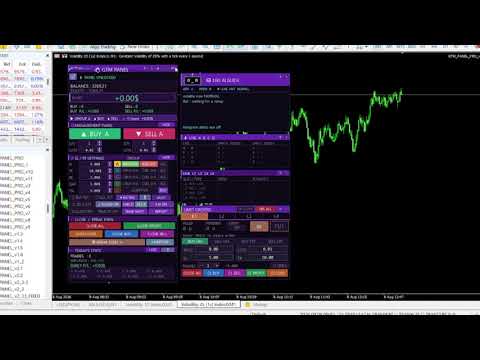
Manual trade and group management
- Yardımcı programlar
- Sürüm: 2.22
- Güncellendi: 3 Eylül 2026
- Etkinleştirmeler: 20

GTM PANEL PRO, MetaTrader 5 için manuel işlem yönetimi kontrol panelidir. Kendiliğinden işlem açmaz ve piyasa tahmini yapmaz. Size bir kokpit sunar: siz karar verirsiniz; panel ise tek tıkla uygular, korur ve raporlar.
Grafik okumada başarılı olan ancak işlem mekanikleri nedeniyle sürekli para kaybeden yatırımcılar için tasarlanmıştır: zamanında konulmayan stop, tek tek kapatılmak zorunda kalınan işlem sepeti, yanlış fiyata girilen bekleyen emir veya beş stop seviyesini elle kaydırırken zaman kaybedildiği için kârdan zarara geçen pozisyonlar.
| 🔧 ÖNCE DENEYİN — ücretsiz demo Strateji Test Cihazında çalışır MQL5 Expert Advisor demoları canlı grafiklerde çalışamaz — bu panelin değil, MQL5 Market kuralıdır. Ücretsiz demoyu test etmek için: 1. Demoyu İndir düğmesine basın ve Strateji Test Cihazını açın (Ctrl + R) Tüm düğmeler, gruplar, limit yuvaları ve AI rehberi demoda eksiksiz çalışır. |
⚡ Sürüm 2.22 — Hız için yeniden tasarlandı
İşlem panelleri hakkındaki en yaygın şikayet grafiklerde gecikmeye yol açmalarıdır. Sürüm 2.22 tam olarak bu performans sorunlarını çözmek için yeniden yazılmıştır:
| ▶ | Yenileme başına 17 yerine tek pozisyon taraması. 20 açık işlemde CPU kullanımı en aza indirilmiştir. |
| ▶ | Ekranda nesne silip yeniden oluşturmaya son. Düğmelere basıldığında nesneler silinmez; yalnızca konum ve renk değiştirir (titreme engellenmiştir). |
| ▶ | Pürüzsüz sürükleme. Grafik yenileme hızı 60 fps ile sınırlandırılmıştır. |
| ▶ | Akıllı grafik etiketleri. Yalnızca gerçek bir hareket olduğunda (açılış, kapanış, kaydırma, yakınlaştırma) güncellenir. |
| ▶ | Telegram arka planda çalışır. Ağ çağrıları arayüzün donmasına neden olmaz. |
| ▶ | Kurumun minimum stop mesafesine tam uyum sağlanır, emirlerin sessizce reddedilmesi önlenir. |
🧩 1. Tekil emirlerle değil, GRUPLAR halinde işlem yapın
GTM PANEL PRO size tamamen bağımsız 4 grup — A, B, C ve D — sunar ve her biri kendi ayarlarına sahiptir:
| 🔢 | Açıldığı andan itibaren işlemleri etiketleyen kendi Magic Number ayarı |
| 📊 | Alış ve satış için ayrı lot büyüklüğü ve işlem sayısı |
| 🛡 | Kendi Stop Loss, Take Profit, Başa Baş (BE) ve İzleyen Stop seviyeleri |
| 📈 | Grup bazında performans takibi sağlayan kendi istatistikleri |
| 🎨 | Grafikte kolayca ayırt edilmesini sağlayan kendi özel rengi |
Neden önemli? Aynı sembol üzerinde A grubunda scalping yaparken, B grubunda swing pozisyon ve C grubunda hedge işlemini birbirine karıştırmadan yönetebilirsiniz. CLOSE düğmesine bastığınızda yalnızca seçili grup etkilenir.
Kapatma düğmeleri grup bazlı sayaca sahiptir. 3 açık işlem varken sayacı 2 yapıp CLOSE basarsanız, 2 işlem kapatılır ve 1 işlem açık kalır.
🎯 2. LİMİT MASASI — 4 Adet Bekleyen Emir Yuvası
Planlı işlemleriniz için 4 bağımsız emir yuvası (L1 - L4); her biri özel emir türü, fiyat, lot, stop, hedef ve Magic Number ayarlarına sahiptir.
| ✅ | Her yuvada tüm emir türleri — BUY LIMIT, SELL LIMIT, BUY STOP, SELL STOP. |
| ✖ | Çoklu emir gönderimi. Adedi 3 yapıp PUT düğmesine bastığınızda o fiyata 3 emir birden iletilir. |
| 🔁 | OCO (One Cancels Others). Bir emir gerçekleştiğinde diğer bekleyen emirler otomatik iptal edilir. |
| ⏱ | Otomatik Zaman Aşımı. 1 dk, 30 dk, 1 saat veya 1 gün boyunca gerçekleşmeyen emirler otomatik silinir. |
| 🛡 | Emir iletilmeden önce SL ve TP otomatik eklenir. |
| 🧹 | Yuvala özel kapatma satırı. |
| 📊 | Bekleyen emir stratejinizi ölçmek için özel istatistikler. |
Fiyat Doğrulama: Panel, emri iletmeden önce fiyatı kontrol eder. Mevcut fiyatın üzerine BUY LIMIT koyarsanız panel bunu reddeder ve bilgi verir: “BUY LIMIT must sit BELOW price”.
🖱 3. Grafikte SÜRÜKLEYEREK Stop Loss ve Take Profit Ayarlama
| ● | Fiyat çizgisini tutup sürükleyin — giriş, stop, hedef ve renkli alanlar birlikte hareket eder. |
| ● | Kırmızı çizgiyi sürükleyerek Stop Loss'u, Yeşil çizgiyi sürükleyerek Take Profit'i ayarlayın. |
| ● | Sürükleme sırasında PRICE, SL ve TP kutularında canlı değerler gösterilir. |
| ● | Kırmızı ve yeşil renkli alanlar risk/ödül oranını görsel olarak sunar. |
| ● | Aktif bir bekleyen emrin çizgisini taşıdığınızda emir fiyatı anında güncellenir. |
BUY TGT ve SELL TGT Önizlemesi: Bir sonraki işleme girmeden önce SL, TP ve risk alanını grafikte önizleme olarak çizer.
🛡 4. Etkin Koruma Özellikleri
| ⚖ | Başa Baş Seviyesi (Break Even) — Tek tıkla veya belirlenen kâr hedefine ulaşıldığında otomatik stop taşıma. |
| 📉 | İzleyen Stop (Trailing Stop) — Grup bazında sessiz çalışan takip seviyesi. |
| ✂ | Seçmeli Kapatma — Sadece kârdaki veya sadece zarardaki işlemleri kapatma. |
| 💲 | $ veya % Risk — Tüm değerleri para birimi ve yüzde arasında kolayca değiştirme. |
| 🔒 | Şifre Koruması — Yanlışlıkla tıklamaları önlemek için güvenlik kilidi. |
🤖 5. Canlı AI İşlem Danışmanı
Hesabınızı sürekli analiz eder ve 36 farklı risk senaryosunda (stop loss eksikliği, yüksek çekilme, düşük teminat, aşırı lot büyüklüğü vb.) sizi uyarır. Renk kodları: Kırmızı (acil işlem), Sarı (dikkat), Mavi (bilgi), Yeşil (durum iyi).
📲 6. Telegram — Anlık Bildirimler ve Uzaktan Kontrol
| Ek bir yazılıma ihtiyaç duymadan detaylı bildirimler ve uzaktan işlem kontrolü. |
| 🔔 | İşlem açılış, kapanış, başa baş ve risk uyarılarını Telegram sohbetinize veya kanalınıza iletir. |
| 📸 | İstek üzerine grafik ekran görüntüsü ve detaylı hesap raporu gönderir. |
| 🎮 | İsteğe bağlı uzaktan kontrol ile sohbet üzerinden BUY, SELL ve CLOSE komutları gönderme. |
| ⚡ | Asenkron iletim sayesinde arayüzde donma yaşanmaz. |
📊 7. Kalıcı İstatistikler
İşlem geçmişinizden "Bugün" ve "Bu Ay" için performans verilerini otomatik oluşturur. Terminal kapatıldığında veya zaman dilimi değiştirildiğinde veriler kaybolmaz.
🖥 8. Özelleştirilebilir Arayüz
| 🎨 | 6 Renk Teması (NAVY, GOLD, EMERALD, PURPLE, CYBER, CLASSIC), gece modu ve 3 farklı boyut. |
| 🧲 | Bağımsız Taşınabilir Pencereler. Tüm modüller (AI Rehberi, Grup Monitörü, Limit Masası) ayrı ayrı taşınabilir, küçültülebilir ve ekran sınırları içinde tutulur. |
| 👁 | Grafik İşaretleri Kontrolü ile görsel kalabalığı önleme. |
| 🔗 | Diğer EA'lar ile Güvenli Çalışma (Özel Magic Number kullanımı sayesinde). |
| ⚠ Bu ürün NELERİ YAPMAZ GTM PANEL PRO otomatik işlem mantığı, sinyal veya hazır strateji içermez. Kendi kararlarını veren yatırımcılar için bir işlem yürütme ve risk yönetim aracıdır. Risk yüzdesinden otomatik lot hesabı yapmaz, tek bir pozisyonu hacimle kısmi olarak kapatmaz ve kendi Magic Number değerleri dışında açılan işlemleri yönetmez. |
🚀 3 Adımda Başlayın
1. GTM PANEL PRO'yu herhangi bir grafiğe sürükleyin. Özellikler penceresinde Algoritmik Ticarete İzin Ver'i işaretleyin, Inputs sekmesinden şifrenizi belirleyin ve OK'e basın.
2. Belirlediğiniz şifre ile panel kilidini açın. Bir grup seçin, BUY/SELL yönlerini aktif edin ve SL/TP belirleyin.
3. İşlem yapmaya başlayın! Ayarları değiştirmek için F7 tuşuna basabilirsiniz.
| 📚 Detaylı Kullanım Kılavuzu: |
🖥 Sistem Gereksinimleri
MetaTrader 5, tüm kurumlar, tüm semboller ve zaman dilimleri. Terminalde Algoritmik Ticaret etkin olmalıdır.
Telegram için: Araçlar → Seçenekler → Uzman Danışmanlar kısmından WebRequest'e İzin Ver'i seçin ve https://api.telegram.org adresini ekleyin.
⚙ GİRİŞ PARAMETRELERİ (Input Parameters)
Kimlik (Identity)
| InpMagicA / B / C / D | A, B, C ve D grupları için Magic Number (benzersiz olmalıdır). |
| InpPassword | Panel kilit açma şifresi. |
| InpSlippage | Puan cinsinden maksimum kayma (slippage). |
Panel
| InpPanelX / InpPanelY | Panelin grafikteki başlangıç koordinatları. |
| InpThemeStart / InpUISize | Başlangıç teması (0-5) ve panel boyutu (0 küçük, 1 orta, 2 büyük). |
| InpSideBoxStart / SoundStart / AnimateStart | Yan monitör gösterimi / Sesli uyarılar / Hareketli çerçeve. |
Grup Varsayılanları (A, B, C, D Ortak)
| InpA_Lots / InpA_Qty | Başlangıç lot büyüklüğü ve tek tıkla açılacak işlem sayısı. |
| InpA_SL / InpA_TP | Başlangıç Stop Loss ve Take Profit (0 = kapalı). |
| InpA_BE / Gap / TSL | Başa Baş tetikleyicisi, mesafe ve İzleyen Stop seviyesi. |
Limit Yuvaları L1 – L4
| InpMagicL | Limit yuvaları için temel Magic Number (L1=Base, L2=+1, L3=+2, L4=+3). |
| InpL_Lots / SL / TP / Expiry / OCO | Lot, SL, TP, dakika cinsinden zaman aşımı ve OCO iptal özelliği. |
Telegram
| InpTgToken / ChatID / GroupID | Bot Token, kişisel Chat ID ve Grup/Kanal ID. |
| InpTgAllowTrade / PollSec / Sinhala | Uzaktan işlem izni, sorgu aralığı ve iki dilli yanıtlar. |
Sınırlar (Limits)
| InpMinLot / MaxLot / MinQty / MaxQty | Lot ve işlem sayısı için alt ve üst sınırlar. |
📜 Sürüm Geçmişi
| 2.22 | Performans güncellemesi: Tek pozisyon taraması, nesne silip yeniden oluşturmanın kaldırılması, 60fps sürükleme, Telegram asenkron kuyruğu, kurum minimum stop mesafelerine tam uyum, ekran dışı pencere koruması. |
| 2.21 | 6 renk teması, gece modu, 3 boyut, Limit Masası ve AI Rehberi. |
| 💬 Destek Satın almadan önce sorularınız mı var? Mesaj gönderin. Açıklamalardan farklı bir durumla karşılaşırsanız güncellemeler ile hızla düzeltilir. |
⚠ Ticaret risk içerir. Bu ürün manuel bir yürütme ve risk yönetim aracıdır; kâr garantisi vermez. Her zaman önce demo hesapta test edin.
İletişim: gayanindika.rox1992@gmail.com · WhatsApp +945260626