Portfolio Command Desk

Envelope monitoring for multi-EA accounts. Each magic number is watched against its own backtest; you get a traffic light on the chart and an alert only when a state changes. Includes the full free measurement layer.

What it is

You run several Expert Advisors on one account. This utility reads their closed history, groups it by magic number, and watches every system against its own backtest: a traffic light on the chart, and an alert only when a state actually changes. Underneath sits a full measurement layer - per-system statistics, combined drawdown, correlation, Monte Carlo. It never places an order.

What this adds over the free Desk

The free Portfolio Correlation Desk measures your portfolio. This one stands guard over it.

Free edition: https://www.mql5.com/en/market/product/188832

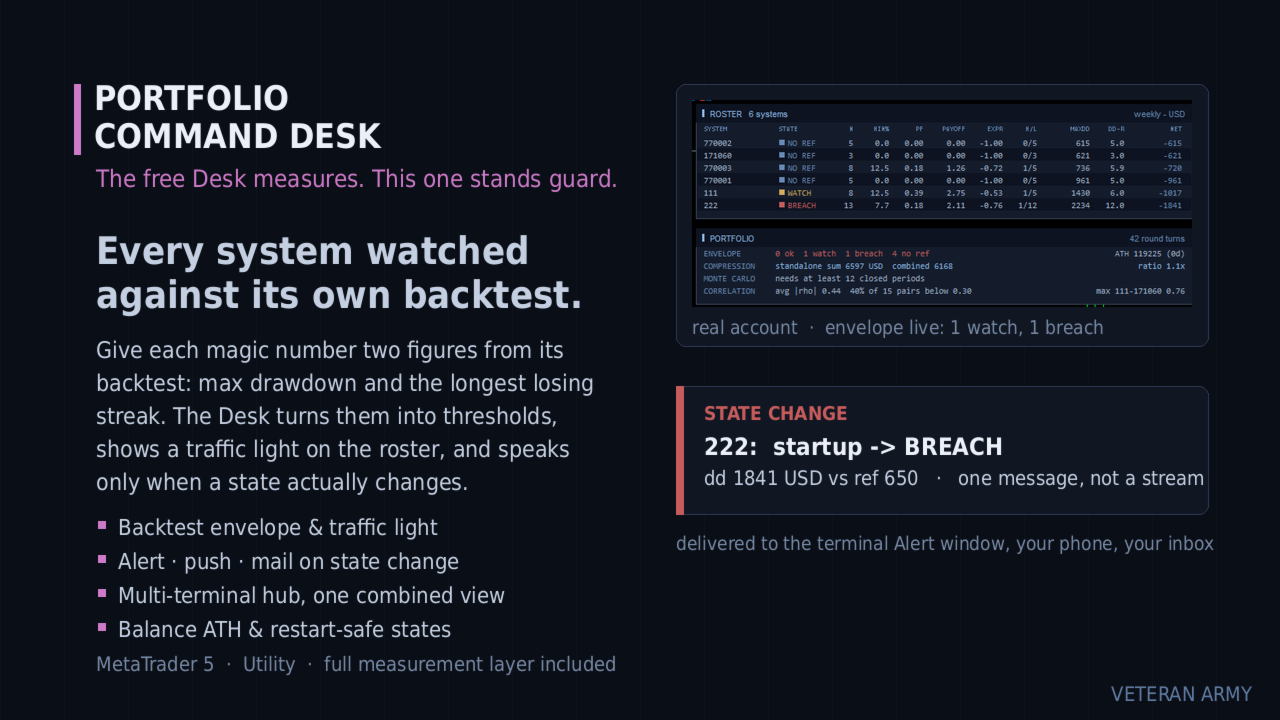
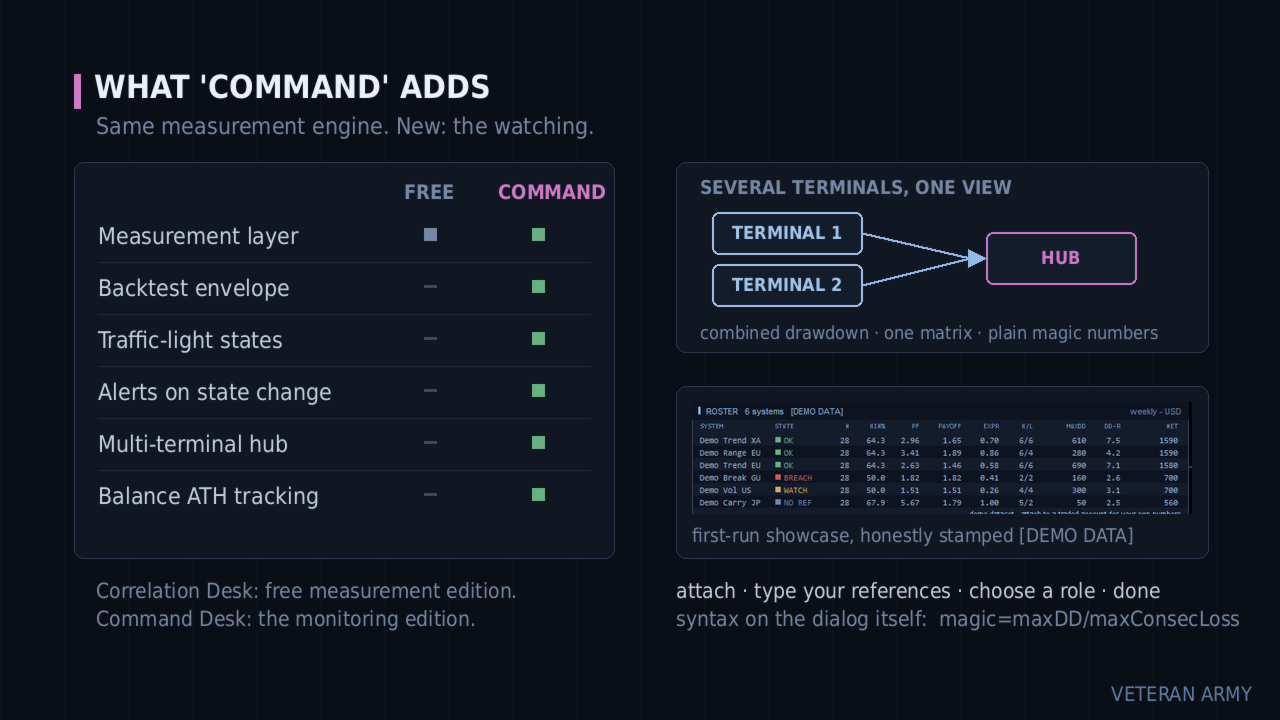
Every system is watched against its own backtest. You give each magic number two figures: the backtest maximum drawdown and the longest losing streak. The Desk turns them into thresholds and shows a traffic light on the roster - OK, WATCH, BREACH.

It speaks only when something changes. A system crossing into WATCH is one message - terminal Alert, push to your phone, e-mail, your choice. No repeats while it stays there, and one message when it recovers. Restarting the terminal does not replay old alerts.

Several terminals, one view. Run it on every MetaTrader on your VPS and let one of them aggregate the rest: one combined drawdown, one correlation matrix, one roster across all of them.

Everything the free edition measures is included and unchanged.

The envelope

The idea comes from a simple question: is this system still behaving like its backtest, or has it left that envelope?

You answer with one input line, and the syntax is printed right on the input dialog:

111=800/6;222=650/4
(magic = maxDD / maxConsecLoss)

From those two figures per system the Desk builds the thresholds:

  • WATCH when the current drawdown reaches 1.5x your reference, or the live losing streak reaches max(1.5x, +3) of your reference streak.
  • BREACH when the current drawdown reaches 2.0x the reference.
  • OK again when it comes back down - one recovery message, not a stream. A small hysteresis band keeps a value hovering at a line from flapping.

Systems without a reference simply show a grey NO REF badge. They are still measured, just not judged.

The envelope watches the CURRENT drawdown, not the all-time record - a system that recovers turns green again, which is the whole point.

It still measures

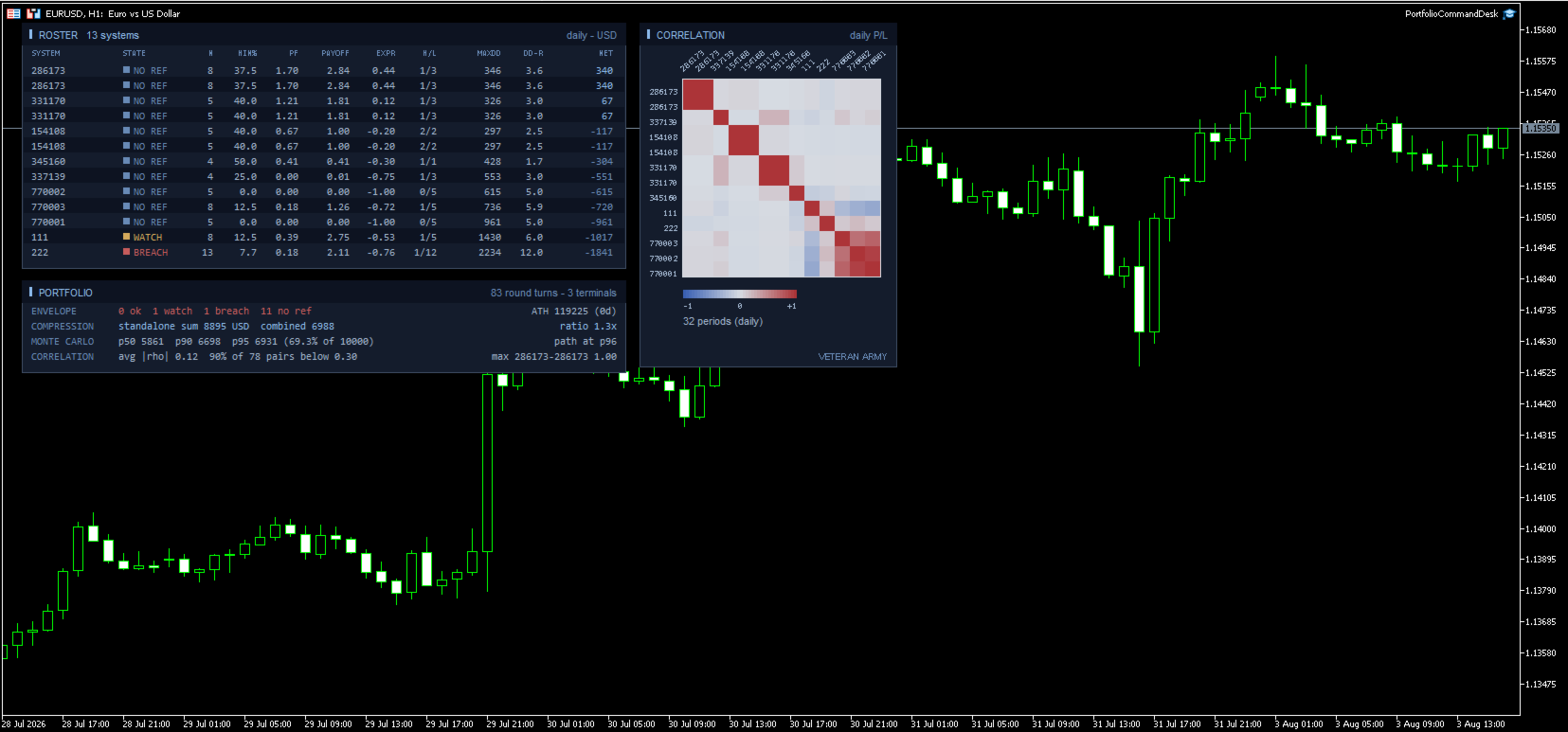
The complete free layer is inside: per-system statistics, standalone vs combined drawdown with the compression ratio, the Monte Carlo reshuffle with percentiles, and the correlation heat map on daily, weekly or monthly profit and loss. If you only want measurement, the free Portfolio Correlation Desk is that product.

Multi-terminal

Each terminal runs the same EA with a role, named in plain words on the input dialog: "this terminal only", "publish this terminal into the hub folder", or "aggregate every published terminal".

Publishers write their closed history into the shared MetaTrader folder; the hub merges every published terminal with its own trades and runs the whole analysis on the combined data. All terminals must be on the same machine or VPS - that is where the shared folder lives. The hub view refreshes within one refresh period, about 15 seconds.

The hub shows plain magic numbers, with no terminal prefix, to keep the panel readable. For efficient tracking we recommend giving EAs on different terminals different magic numbers.

Alerts always fire on the terminal that owns the system, so nothing is ever notified twice.

The panels

ROSTER - one row per system with a colored STATE cell, then the full statistics: trades, win rate, profit factor, payoff, expectancy in R, streaks, max drawdown, DD in R, net.

PORTFOLIO - the ENVELOPE line first (how many ok / watch / breach / no ref), with the balance all-time high and its age on the right. Then compression, Monte Carlo and correlation, as in the free edition.

CORRELATION - the heat map. Axis labels are drawn at a slant so full magic numbers stay readable even with forty systems on the grid.

A new balance high is one quiet notification too, with how long the previous peak stood.

Inputs

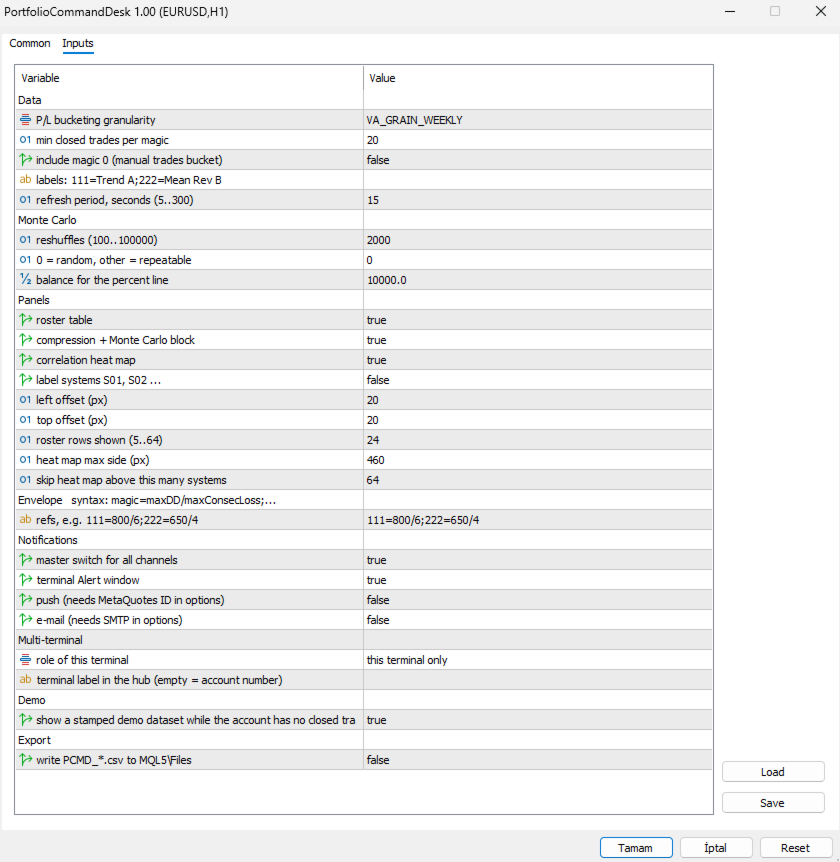
The dialog is grouped, and the envelope group carries the syntax in its own heading so you never have to look it up.

Envelope

  • refs - one line, one entry per system: 111=800/6;222=650/4 . Read it as magic = maximum drawdown / longest losing streak, both taken from that system's backtest. Spaces are fine, a trailing semicolon is fine, and a repeated magic simply overrides the earlier one. Systems you leave out are still measured; they just show a grey NO REF badge instead of being judged. Malformed entries are skipped and counted in the log so a typo never passes unnoticed.

Notifications

  • master switch for all channels - one flag to silence everything without losing your per-channel setup.
  • terminal Alert window - the pop-up inside MetaTrader.
  • push - to the MetaQuotes app on your phone. Needs your MetaQuotes ID in the terminal options; if it is missing, the log says so once.
  • e-mail - needs SMTP configured in the terminal options, same one-time note if it is not.

Multi-terminal

  • role of this terminal - three plain choices: this terminal only, publish this terminal into the hub folder, or aggregate every published terminal. Publishers write their history to the shared folder; the aggregator merges all of them with its own trades.
  • terminal label in the hub - a short name for this terminal. Left empty it uses the account number. Only used to tell published files apart, not shown on the panel.

Data

  • P/L bucketing granularity - correlate on daily, weekly or monthly results. Monthly is the default and the safest; on sparse daily buckets the empty cells pull correlations toward zero. Weekly suits accounts that trade often.
  • min closed trades per magic - systems below this count are left out of the report and out of the combined portfolio, so the comparison stays like for like. Raise it if young systems are muddying the picture.
  • include magic 0 - off by default. On most terminals that bucket holds manual trades and any EA left on its default magic.
  • labels: 111=Trend A;222=Mean Rev B - give systems names instead of numbers: 111=Trend A;222=Mean Rev B . Names appear on the roster, the heat map axis and in the alert text.
  • refresh period, seconds - how often the panel looks for new closed trades, 5 to 300. The aggregator also re-reads the published files on this beat, so it sets how fresh the combined view is.

Monte Carlo

  • reshuffles - how many times your period results are reordered, 100 to 100000. 2000 is plenty.
  • 0 = random, other = repeatable - the seed. 0 draws a random seed each run. Any other value makes the percentiles repeatable, which matters when the figure goes into a report or a comparison over time.
  • balance for the percent line - reference balance used only to express the 95th percentile drawdown as a percentage.

Panels

  • roster table, compression + Monte Carlo block, correlation heat map - turn each block on or off independently.
  • label systems S01, S02 ... - hides real magic numbers behind generic labels. Useful for screenshots and for sharing results.
  • left offset / top offset - where the panels sit on the chart, in pixels from the top left corner.
  • roster rows shown - 5 to 64. Cap it when you have more systems than you want on screen; the ones with the largest net still come first.
  • heat map max side - the largest square the grid may occupy, in pixels. The cell size follows from it.
  • skip heat map above this many systems - above this count the heat map is skipped, because the grid would need more rectangles than the chart can redraw comfortably. The other panels carry on.

Demo

  • show a stamped demo dataset while the account has no closed trades - a deterministic sample portfolio with the traffic light live on it, so you can see the product working before you have history. Every title carries [DEMO DATA]. Demo data never notifies, never writes CSV and never touches the state file. Your first real closed trade replaces it permanently.

Export

  • write PCMD_*.csv to MQL5\Files - writes the roster (including the state column) and the correlation matrix to disk on each refresh. Disabled automatically while the demo dataset is on display.

What it does not do

It never places, modifies or closes an order. It does not produce signals or predictions. It does not connect to any network or external service - the multi-terminal hub is plain files in the shared MetaTrader folder on your own machine.

Drawdowns are measured on closed trades and do not include the floating excursion of open positions. Alerts require the terminal to be running, which on a VPS it is.

Getting started

Attach to any chart. Type your references. Turn on the channels you want. If you run several terminals, pick the roles. Done - it only talks to you when a state changes.

MetaTrader 5.
추천 제품
Fvg In Fvg
Claudiu-georgian Zavera
FVG In FVG EA — From Learn to Earn. The most-watched imbalance on any chart, taken where you have not seen it before: a Fair Value Gap confirmed inside a Fair Value Gap. A GAP EVERYONE WATCHES. AN EXECUTION NO ONE ELSE HAS. The EA detects the Fair Value Gap — the 3-candle imbalance — on a higher timeframe, then requires a second FVG, formed inside the first, on the timeframes you choose. Only an overlap above your threshold validates the zone: Most Powerful Overlap FVG Zones — rigorously selec
Galaxy X Quantum Edge
Gezani Paulus Nkuna
GALAXY X [QUANTUM EDGE] is an advanced MetaTrader 5 automated trading robot designed around the Smart Money Concepts (SMC) strategy, using market structure, swing points, order blocks, Fair Value Gaps (FVG), liquidity/sweep confirmations, and trend analysis to identify potential high-quality trading opportunities. The robot is designed to adapt to changing market conditions by monitoring volatility and market regimes, adjusting its trading frequency and risk exposure accordingly, while incorpora
Ticks Charting
Mativenga Geoffrey Mativenga
Tick Copier EA — Description & Usage Guide Instead of seeing the market like everybody else using time based charts, instead view the market using ticks like an x-ray. This Expert Advisor (EA) for MetaTrader 5 copies live ticks from the chart it is attached to and sends them to a custom symbol you already created (for example EURUSD TICKS ). Each time a new market tick arrives:  EA reads the current tick data from the source symbol. It copies the tick values: time bid price ask price last price
QuantumGold Matrix
Mohammed Lamine Kasmi
QuantumXAU Matrix – Smart Gold Trading EA for MetaTrader 5 QuantumXAU Matrix is a powerful, fully automated Expert Advisor specifically designed for XAUUSD (Gold) on the MetaTrader 5 platform. It follows a smart averaging strategy with controlled risk management, aiming for consistent profits through adaptive lot sizing and precise trade timing. Symbol-specific : Trades only on XAUUSD for optimized performance Automated logic : Opens positions based on market distance and profit targets
QTS Gold Guardian AI 기관급 수준의 신경망 기반 금 스캘핑 매매 도구. 스마트 헤징, 자산 보호, 변동성 적응 기능을 제공합니다. 위험한 마틴게일 전략은 사용하지 않습니다. QTS Gold Guardian AI는 변동성이 큰 시장 상황에서도 안정적인 수익을 창출하도록 설계된 XAUUSD(금) 스캘핑을 위한 최고의 솔루션입니다. 기존 스캘핑 매매 도구와 달리, QTS는 자본 보존을 최우선으로 생각합니다. 주요 기능: 신경망 로직: 고급 로직을 사용하여 M5/H1 차트에서 미세 추세를 감지합니다. 스마트 복구: 스마트 헤징 계수를 사용하여 마진 부담 없이 손실 거래를 중화합니다. 자산 보호: 내장된 하드 스톱 메커니즘. 손실이 임계 수준에 도달하면 거래를 일시 중지하여 계좌를 보호합니다(프로프 트레이딩 회사에 필수!). 뉴스 필터: 영향력이 큰 뉴스 발표 시 자동으로 거래를 회피합니다. 다이내믹 갭: 실시간 시장 변동성(ATR)에 따라 그리드 간격을
Boom Trader
Godbless C Nygu
Join Deriv now link on my profile>>>> Boom Trader This robot is developed to trade Boom 1000 which is available on Deriv. Boom 1000 is one of other many indices which its behaviour is to form the spike of few pips, Those spikes always happen after 1000 ticks. To avoid spikes i came up with idea of develop the robot which take sells and few buys. IMPORTANT! After the purchase please send me a private message to receive the installation manual and the setup instructions. •All settings on this ro
GridTrailling
Chaianan Kraimud
Smart breakout grid EA with trailing pending orders, trailing stop, session/news filters, drawdown protection, and netting-safe execution for MT5. GridTrailingEA is a smart pending-order grid Expert Advisor with trailing pending orders, trailing stop, session filter, news-time filter, drawdown protection, and market-safe validation for MT5. GridTrailingEA is a MetaTrader 5 Expert Advisor designed for traders who want a clean and controlled grid-style pending order system. The EA places Buy Stop
Titan Backup
Elies Noah Siebenpfeiffer
Introducing Titan Backup : Are you ready to enhance your trading game with an automated system built for precision and flexibility? Meet Titan Backup , your expert trading assistant designed to capture high-profit breakouts by identifying accumulation zones . This powerful Expert Advisor (EA) excels in high-volatility markets such as the Nasdaq 100 and Crypto 10 , offering both hands-free automation and manual assistance to support your trading strategies. How Titan Backup Works: Titan Backup ru
Click Sent Order
Supanat Wiboonpanit
This program is a GUI for issuing orders that can be done more quickly. Faster TP SL setting This program is not an automated trading platform. Trading is risky, please manage your risk. We do not accept any responsibility. It should be tried with Demo before using it with Real. Normally, the setting sets the risk to 1:1 to shift manually or to enter the risk to x:1, where x can be entered and everything can move freely. Thank you to all customers who have purchased our products. We would like t
Orydax Zenvar
Pablo Orcaray Lopez
Orydax Zenvar — XAUUSD Expert Advisor for MetaTrader 5 Turn a demanding market routine into a clear, automated process. Orydax Zenvar is a daily gold level strategy for MetaTrader 5, with XAUUSD D1 as the recommended starting setup. It follows the market continuously, waits for a qualified gold level inside its daily market and risk context, and handles the trading workflow when its confirmation process is complete. It is designed for users seeking selective daily gold automation: traders who va
BlackVault AI EA
Anton Vizzhachii
5 (1)
BLACKVAULT EA — 자동화 골드 트레이딩 시스템 XAUUSD M5 | MetaTrader 5용 Expert Advisor BlackVault는 단순히 보기 좋게 포장된 또 하나의 그리드 시스템이나 마틴게일 전략이 아닙니다. 이것은 골드 시장을 위한 구조화된 트레이딩 시스템이며, 우리가 단순한 성과보다 더 중요하게 생각하는 하나의 원칙을 기반으로 설계되었습니다. 바로 성과보다 리스크 관리가 우선되어야 한다는 것입니다. EA 내부의 로직은 Opening Range Breakout(ORB) 패턴, 적응형 ATR 및 스프레드 필터링, 그리고 각 진입 후가 아니라 진입 전에 시장 상황을 평가하는 동적 리스크 모듈을 중심으로 구성되어 있습니다. 내부 구성 적응형 Opening Range 분석 — 시스템은 거래 범위가 실시간으로 형성되는 과정을 추적하며, 확인된 돌파가 발생한 경우에만 진입합니다. 단순히 시간에 기반한 맹목적인 트리거로 진입하지 않습니다. 동적 변동성 제어(ATR 필터)
Dark Gold MT5
Marco Solito
4.56 (102)
Dark Gold  is a fully automatic Expert Advisor for  Scalping   Trading on Gold , Bitcoin , Eurusd and Gbpusd. This Expert Advisor needs attention, in fact presents highly customizable. Dark Gold is based on   Dark Support Resistance mt5  indicator   (owning it is not necessary) , these Trades can be manage with some strategies. If you   Buy this Expert   Advisor you can   write a feedback   at market and   get Dark Support Resistance indicator for Free , for More info contact me The basic strate
Gann Gold EA MT5
Elif Kaya
4.5 (8)
- Final real price is 1000$ - Discount and price is 199$ (Next price is 300$),  Price will be increased after 1 purchase. Welcome, Gold GANN Expert opens automatically trade with Highly profit, Fixed small Stop loss. - Lifetime update free User Manaul No Martingale, No Grid, No Scam I am focused on help my clients, not just earn. The Gann Gold EA is High safety by small fix Stop Loss, which sets trades based on good risk to reward ratio(1:3). It is fully worked on exploiting the volatility of
평점 높은 봇들의 매끄러운 자본 곡선을 믿지 마세요. 모두 멋진 백테스트를 만들기 위해 여러 트릭을 사용하지만, 실제로 라이브 거래를 시작하면 전부 실패합니다. 몇 가지 트릭으로는: 1조 달러의 데모 자금으로 하는 DCA와 마틴게일, 최적의 파라미터로 만드는 과최적화 등이 있습니다... 최고의 시스템은 대개 몇 가지 간단한 규칙으로 이루어져 있습니다. 화려하지 않고 자본 곡선도 항상 울퉁불퉁하지만, 견고하며 실제 시장에서 살아남을 확률이 더 높습니다. 이것은 브레이크아웃 원칙을 기반으로 한 매수 전용(롱 온리) 추세추종 EA(Expert Advisor)로, ATR(Average True Range)을 이용한 변동성 기반의 동적 트레일링 스탑을 결합했습니다. 이 시스템은 철저히 봉 마감 기준으로만 작동하여 장중 가격 노이즈를 제거하고 틱 슬리피지의 영향을 최소화합니다. 기술 요구 사항 및 권장 사항 플랫폼: MetaTrader 5 (MT5). 적합한 종목: 금 (XAUUSD). 최적
Aurum BTC Matrix
Hicham Mahmoud Almoustafa
Aurum BTC Matrix is a fully automated Expert Advisor designed for trading Bitcoin (BTCUSD) . It uses market structure, price levels, and breakout opportunities to identify potential trades, place pending orders, and manage positions automatically. The EA combines four independent trading strategies with built-in trailing-stop management. Main Features 1. Four Trading Strategies Atlas – Focuses on major market structure. Pulse – Identifies shorter-term price movements. Horizon – Uses confirmed pr
Ultra Prokit Tool
Francis Muchai Waweru
ULTRA PRO TOOLKIT EA Draw it. Size it. Execute it. Most charts are buried under tools that refuse to talk to each other. You mark a level in one place, work out your lot size somewhere else, then hand-type an order and hope you remembered the stop. Ultra Pro Toolkit EA puts the entire workflow on one panel: sketch your market structure, tell it how many dollars you are willing to lose, and let it handle the arithmetic and the order routing. ️ This is a manual trading cockpit, not a signal
Trend Pyramid v5.00 | Gold XAUUSD Floating‑Profit Pyramid EA   This floating‑profit pyramid gold EA only adds positions after existing orders generate floating profit, avoiding blind position‑adding under loss conditions. It adopts EMA20 plus ADX24 dual‑indicator filter to filter false oscillation signals and reduce invalid order openings. Multiple hard risk controls are built‑in to protect your account.   Core advantages   1. Add positions only on floating profit, no position‑adding at loss: a
SuperTrend AI Clustering EA
Michael Prescott Burney
MetaTrader 5용 SuperTrend AI Clustering 전문가용 자동매매 시스템 SuperTrend AI Clustering은 변화하는 시장 환경에 맞춰 스스로를 조정하도록 설계된 추세 추종형 MetaTrader 5용 전문가용 자동매매 시스템(EA)입니다. 이 EA는 하나의 고정된 SuperTrend 배수만 사용하는 대신, 여러 배수 값을 동시에 평가하고, 각 배수의 최근 성과를 측정한 뒤 K-평균(K-Means) 클러스터링을 적용하여 현재 가장 성과가 좋은 배수 그룹을 선택합니다. 이를 통해 서로 다른 변동성 국면과 시장 구조에 대응할 수 있는 동적인 SuperTrend 모델을 구축하며, 지속적인 수동 재설정 없이도 환경 변화에 적응할 수 있습니다. 이 시스템은 높은 적응성, 체계적인 리스크 관리, 차트 상의 투명한 정보 제공을 중시하면서 추세 추종을 자동화하고 싶은 트레이더를 위해 설계되었습니다. FX 통화쌍, 금속, 지수, 암호화폐, 상품 등 MetaTrader
Drill Pump 51
Husain A M A Alasfour
Overview Drill Pump 51 is a complete, multi-system Expert Advisor for XAUUSD (gold) on the H1 timeframe in MetaTrader 5. It combines a trend-breakout growth engine (PUMP), an adaptive two-way Grid and an optional Emergency spike system, all running under layered account protection. It is designed for a 3,000 USD account and works out of the box with its default settings: attach it to one XAUUSD H1 chart, enable Algo Trading, and it manages entries, exits and protection by itself. How it works •
Harness institutional strategies with Institutional VWAP Reversal EA: Capture reversals via VWAP deviation bands, volume spikes, and 200 EMA trend filter. Targets 5% monthly profit with 5% max daily DD, including profit caps, breakeven SL, and signal reversal options—ideal for prop-trading challenges. Customize TP/SL by percentages, RR, or candles; trade with trend or both sides. Optimized for forex majors and gold, with time-restricted execution for low-risk, reliable automation in volatile mar
The Daily Ranger USTEC Ultimate EA is an intraday trading system designed to capture the full potential of the Nasdaq index's (also known as USTEC, US100, NAS100, NQ100) distinctive intraday volatility. The EA trades during the New York trading sesssion taking maximum 2 high quality intraday trades with SL and TP all the time. NO GRID, NO MARTINGALE, NO ADDING TO LOSERS The EA is tested with real tick data, the most accurate way to test an EA. Choose your preferred Risk Per Trade, and watch our
Array Breakout X Yen
Kantachart Bangngoen
Array Breakout X Yen — six breakout strategies working as one team on a single USDJPY chart. Tested on real ticks from 2016 to 2026, then locked inside the EA. You choose a risk level; the EA does the rest. Launch price 199 USD — final price 599 USD The price steps up as the product builds its track record. Whatever price you buy at, you get every update; a price rise never touches a licence already bought. START HERE — READ BEFORE USING What to expect and how to judge the results the right
NexusPilot Core is an MT5 EA Manage and Prop Firm Control tool designed for traders who run multiple Expert Advisors, manual trades, or funded account challenges. It is not a signal indicator or trading strategy. Its main purpose is to help you supervise your account, control EA activity, and reduce the risk of breaking prop firm rules. With one centralized dashboard, NexusPilot Core monitors drawdown, Magic Numbers, EA exposure, pending orders, no-SL trades, margin level, floating loss, tradi
AutoSLTP for Scalpers
Aaron Nii Amartey Donkor
SL$TPauto Expert Advisor SL$TPauto automatically manages Stop Loss (SL) and Take Profit (TP) levels for all trades on a specific symbol. This Expert Advisor scans whatever chart it's placed on and works based on that chart's symbol, functioning independently across multiple charts simultaneously. Key Features: Automatically places Stop Loss (SL) and Take Profit (TP) for all open trades on the current chart symbol Applies the same Stop Loss (SL) and Take Profit (TP) settings to any new trades as
Bogdanoff EA x Wojak
Phonephiphat Vangmeuangkhong
Bogdanoff EA x Wojak — 금(XAUUSD) 전용 완전 자동화 브레이크아웃 시스템 Bogdanoff EA x Wojak 는 금(XAUUSD) 전용으로 설계된 완전 자동화 브레이크아웃(돌파) 매매 시스템입니다. 백테스트 결과 ️ 게시하기 전에 본인이 직접 검증한 전략 테스터 리포트 내용을 이 섹션에 입력하세요 — 자세한 내용은 문서 하단의 안내를 참고하세요. 테스트 대상: XAUUSD, [테스트에 사용한 타임프레임] , 기간: [시작일] ~ [종료일] 초기 잔고: [테스트 시 초기 잔고] 최종 잔고: [테스트 결과] ( [총 수익률 %] ) 최대 낙폭(MDD): [최대 낙폭 %] 승률: [승률 %] · 손익비(Profit Factor): [손익비] · 총 거래 횟수: [거래 횟수] ️ 과거 백테스트 성과가 미래 수익을 보장하지 않습니다. 과거 데이터 테스트는 실제 슬리피지, 리퀘어트(requote), 극단적인 뉴스 이벤트를 완벽하게 재현할 수 없습니다. 구매 전 아래
VRD Guardian은 여러 EA를 운용하는 MT5 계좌에서 계좌 보호를 최우선으로 합니다. 각 EA에 자체 운용 자본과 랏 상한을 정해 두면, 해당 EA의 손실이 미리 정한 단계에 도달할 때 Guardian이 미리 정해 둔 조치를 실행합니다. 여러 EA가 하나의 잔고를 공유하면, 깊은 드로다운에 빠진 EA 하나가 계좌 전체에 피해를 줄 수 있습니다. Guardian은 각 EA를 그 EA에 배정한 자본을 기준으로 평가하므로, 부진한 EA는 직접 정한 규칙대로 처리되고 다른 EA는 계속 운용됩니다. 주요 기능 각 EA(매직 넘버)에 자체 운용 자본을 부여합니다. 손실은 그 자본 대비 실현 손익과 평가 손익의 합으로 측정합니다. 3단계로 대응: 20%에서 경고, 26%에서 해당 EA의 대기 주문 삭제, 32%에서 대기 주문 삭제 및 자동 청산을 켠 경우에만 해당 EA의 포지션 청산. 다른 EA는 계속 운용됩니다. EA별 랏 사용량: 해당 EA 최대 랏의 80%에서 경고, 100%에서
Pro Scalping Tool
Mohammad Nazmul Hassan
### **ProScalpingToolEA.mq5 Analysis & Description** **Overview:**   The `ProScalpingToolEA.mq5` script is an Expert Advisor (EA) for MetaTrader 5, designed to assist with automated trading. It includes features for placing, managing, and monitoring trades. --- ### **Key Functionalities:** 1. **Trade Execution & Management:**    - Uses the `CTrade` class from `Trade.mqh` to manage trading operations.    - Allows placing buy and sell orders with a configurable lot size.    - Trades are iden
Lions Roar Trend Strength Grid EA
AL MOOSAWI ABDULLAH JAFFER BAQER
The trading limiter that stops you from breaking your own daily loss and trade limits. • Please test the product in the Strategy Tester before purchasing to understand how it works. • If you face any issues, contact me via private message—I’m always available to help. • After purchase, send me a screenshot of your order to receive a   FREE EA   as a gift. Most grid robots start the same way: price moves two hundred points, so the first order opens. It does not ask whether the market was going
다이내믹 RSI 가디언 – 정밀 거래와 완전한 리스크 관리 다이내믹 RSI 가디언은 일관된 성과, 엄격한 리스크 관리, 유연성을 중시하는 트레이더를 위해 설계된 전문 알고리즘 거래 시스템입니다. 고급 핍 기반 계산과 RSI 기반의 지능형 필터를 바탕으로, 모든 거래가 엄격한 규칙을 준수하여 리스크를 최소화하고 기회를 극대화합니다. 주요 기능 : 스마트 진입 시스템 • RSI 기반 다중 필터 확인 • 높은 확률의 신호를 탐지하고 차트에 화살표로 시각화 완전한 리스크 관리 • 리스크 퍼센트 기반의 동적 로트 크기 계산 • 최대 포지션 수 및 거래 확인 (과도한 거래 방지) • 유효하지 않은 스탑로스 레벨 보호 고급 종료 전략 • ATR 또는 고정 핍 기반의 트레일링 스탑 • 조정 가능한 스탑로스 및 테이크프로핏 (핍 기반) • 브로커 제한에 맞춘 자동 스탑로스 수정 시각적 HUD 대시보드 • 실시간 상태 (매수, 매도, 차단) • 시장 상황 표시 • 신호 추적 및 구분선 백
FREE
이 제품의 구매자들이 또한 구매함
Trade Assistant MT5
Evgeniy Kravchenko
4.43 (216)
거래당 위험 계산, 라인을 사용한 손쉬운 신규 주문, 부분 청산 기능을 통한 주문 관리, 7가지 유형의 트레일링 스탑 및 기타 유용한 기능을 제공합니다. 추가 자료 및 지침 설치 지침   -   애플리케이션 지침   라인 기능       - 차트에 개시선, 손절매, 차익실현을 표시합니다. 이 기능을 사용하면 새로운 주문을 쉽게 하고 개봉 전에 추가 특성을 볼 수 있습니다. 위기 관리       -       위험 계산 기능은 설정된 위험과 손절매 주문의 크기를 고려하여 새 주문의 볼륨을 계산합니다. 이를 통해 손절매 크기를 설정하고 동시에 설정된 위험을 존중할 수 있습니다. 로트 계산 버튼 - 위험 계산을 활성화/비활성화합니다. 필요한 위험 값은 위험 필드에 0에서 100 사이의 백분율 또는 예금 통화로 설정됩니다. 설정 탭에서 위험 계산 옵션을 선택합니다. $ 통화, % 잔액, % 지분, % 자유 마진, % 사용자 정의, % AB 이전 일, % AB 이전 주, % AB 이전
Trade Manager EA에 오신 것을 환영합니다. 이 도구는 거래를 보다 직관적이고 정확하며 효율적으로 만들기 위해 설계된 궁극적인 리스크 관리 도구 입니다. 단순한 주문 실행 도구가 아닌, 원활한 거래 계획, 포지션 관리 및 리스크 제어를 위한 종합 솔루션입니다. 초보자부터 고급 트레이더, 빠른 실행이 필요한 스캘퍼에 이르기까지 Trade Manager EA는 외환, 지수, 상품, 암호화폐 등 다양한 시장에서 유연성을 제공합니다. Trade Manager EA를 사용하면 복잡한 계산은 이제 과거의 일이 됩니다. 시장을 분석하고 진입, 손절 및 익절 수준을 차트의 수평선으로 표시한 후 리스크를 설정하면, Trade Manager가 이상적인 포지션 크기를 즉시 계산하고 SL 및 TP 값을 실시간으로 표시합니다. 모든 거래가 간편하게 관리됩니다. 주요 기능: 포지션 크기 계산기 : 정의된 리스크에 따라 거래 크기를 즉시 결정합니다. 간단한 거래 계획 : 진입, 손절, 익절을 위한
Farmed Hedge Yield Farming | All Markets (Manual - Hybrid - Semi/Automated EA) VERIFIED TRADING RESULTS - Farmed Hedge Yield Axi Copy:  https://www.mql5.com/en/signals/2356376 - Farmed Hedge Yield Exn Copy:   https://www.mql5.com/en/signals/2356404 - Farmed Hedge Yield V Copy:  https://www.mql5.com/en/signals/2357156 IMPORTANT NOTICE: FarmedHedge is a MANUAL-FOCUSED TRADING UTILITY ,not a fully automated EA. Results shown on this Signal include manual trades and overall strategic management.
Telegram to MT5 Multi-Channel Copier   는 Telegram 및 Discord 채널의 트레이딩 시그널을 MetaTrader 5로 자동 복사합니다. 봇도, 브라우저 확장도, 수동 복사도 필요 없습니다. Telegram이나 Discord에 시그널이 도착하면 EA가 몇 초 안에 터미널에서 주문을 실행합니다. 그리고 채널을 복사하기 전에, 내장 백테스터가 그 채널이 내 계좌에서 어떤 결과를 냈을지 보여줍니다. 제품은 두 가지 구성 요소로 이루어집니다: Telegram 채널을 수신하는 Windows 애플리케이션과, MT5 터미널에서 시그널을 실행하는 본 EA입니다. MT4 버전도 제공됩니다   여기 . 구매 전에 사용해 보세요:   애플리케이션은 무료로 다운로드할 수 있습니다. 본인의 채널을 연결하고 각 시그널이 어떻게 읽히는지 확인하세요. Backtest 탭과 실제 거래에는 구매하거나 임대한 EA가 필요합니다. 이 페이지의 무료 데모는 전략 테스터에서만 실행되며
TradePanel MT5
Alfiya Fazylova
4.88 (170)
Trade Panel은 다기능 거래 도우미입니다. 이 애플리케이션에는 50개 이상의 수동 거래 기능이 포함되어 있으며 대부분의 거래 작업을 자동화할 수 있습니다. 앱 사용 설명서: https://www.mql5.com/en/blogs/post/756482 데모 계정용 앱 체험판: https://www.mql5.com/en/blogs/post/750865 앱 설치 방법: https://www.mql5.com/en/blogs/post/756239 시각 모드에서 앱 테스트 방법: https://www.mql5.com/en/blogs/post/770277 VPS MetaTrader에 앱 설치 방법: https://www.mql5.com/en/blogs/post/770190 거래. 한 번의 클릭으로 거래를 수행할 수 있습니다: 리스크 자동 계산과 함께 예약 주문 및 포지션 열기. 한 번의 클릭으로 여러 주문 및 포지션 열기. 주문 그리드 열기. 예약 주문 및 포지션을 그룹별로 닫기. 포지션
내 거래 규칙에 맞춰 Telegram 신호 복사 Telegram to MT5 Signal Trader 는 공개 및 비공개 Telegram 채널과 그룹의 텍스트 기반 거래 신호를 MetaTrader 5로 자동 복사합니다. 하나의 데스크톱 앱에서 여러 신호 제공자와 MT5 계좌를 관리하고, 제공자마다 위험 관리 및 거래 설정을 개별적으로 지정 할 수 있습니다. 신호 복사에는 Telegram 봇이나 API 설정이 필요하지 않습니다. 전화번호 또는 QR 코드로 본인의 Telegram 계정에 로그인한 후, 이미 가입한 채널이나 그룹을 선택하면 됩니다. 봇을 만들거나 Telegram API 토큰, API ID 또는 API 해시를 입력할 필요가 없습니다. 포지션 크기를 선택하고, 여러 익절 목표에 청산 물량을 배분하며, 손익분기점 이동과 트레일링 스톱을 자동화하세요. 제공자의 신호를 따르면서도 실제 거래 방식은 직접 설정할 수 있습니다. 이 제품은 MT5 Expert Advisor와 필수 Win
================================================================================ POC BREAKOUT - V20.72. Full Professional Grade Toolkit ================================================================================ POC Breakout is a full MetaTrader 5 trading dashboard for discretionary traders who want breakout signals, Point of Control (POC) context, volume profiles, order flow, market structure, news, alerts, and advanced trade planning in one professional workspace. Attached directly to you
REVDEN AI Desk: REVDEN의 시장 컨텍스트 위에서, 당신만의 AI와 나누는 하나의 대화로 트레이딩을 운영하세요 하나의 대화로 트레이딩을 운영한다고 상상해 보세요. REVDEN AI Desk 는 이를 MetaTrader 5로 가져옵니다. 당신만의 AI에게 시장을 어떻게 읽는지 물으면, AI는 당신이 거래하는 종목에 대한 REVDEN의 전체 컨텍스트, 즉 각 종목의 상태와 리스크 현황, 예정된 발표를 바탕으로 답합니다. AI의 제안은 진입, 스톱, 타겟, 리스크를 갖추고 도착하며, 맞는 제안을 당신이 승인합니다. 규칙도 같은 방식으로 바뀝니다. 무엇을 바꿀지 적으면 AI가 새 룰북의 초안을 작성하고, 받아들일지 버릴지는 당신이 정합니다. 대화를 둘러싸고 시장 전체가 하나의 화면에 펼쳐집니다. 데스크와 설정 가이드를 확인하세요. 모든 화면, 모든 설정, 그리고 당신만의 AI와 함께하는 첫 단계: stein.investments/products/revden-ai-desk 당신
The product will copy all telegram signal to MT5 ( which you are member) , also it can work as remote copier.  Easy to set up, copy order instant, can work with almost signal formats, image signal,  s upport to translate other language to English Work with all type of channel or group, even channel have "Restrict Saving Content", work with  multi channel, multi MT5 Work as remote copier: with signal have ticket number, it will copy exactly via ticket number. Support to backtest signal. How to s
News Trade EA MT5
Konstantin Kulikov
4.55 (11)
제가 몇 년 동안 사용하고 있는 유용한 로봇을 소개드립니다. 반자동뿐만 아니라 자동 모드로도 사용할 수 있습니다. >>> Chat <<< 본 프로그램에는 경제 캘린더의 뉴스별로 유연한 거래 설정이 포함되어 있습니다. 전략 테스터에서 확인할 수 없습니다. 진짜 작업뿐입니다. 최신 설정 아카이브 다운로드: https://www.mql5.com/en/blogs/post/747929 신호 모니터링: https://www.mql5.com/en/signals/author/test-standart 이 전문가를 위해 고유 설정 세트를 만들 때 블로그의 모든 매개변수에 대한 설명을 참조하십시오: https://www.mql5.com/en/blogs/post/748545 . 기본 설정 설명 작업은 한 차트에서 GBP(GBPUSD, EURGBP, GBPJPY, GBPCAD, GBPAUD, GBPCHF)와 쌍으로 이루어집니다. GBP는 가장 변동성이 큰 통화로서 거래 수행 시 거래를 성공적으로
MT5 to Telegram Signal Provider 는 사용하기 쉽고 완전히 커스터마이즈 가능한 유틸리티로, 특정 신호를 Telegram의 채팅, 채널 또는 그룹으로 전송하고, 귀하의 계정을 신호 제공자 로 만듭니다. 경쟁 제품과 달리 DLL 임포트를 사용하지 않습니다. [ 데모 ] [ 매뉴얼 ] [ MT4 버전 ] [ 디스코드 버전 ] [ 텔레그램 채널 ]  New: [ Telegram To MT5 ] 설정 단계별 사용자 가이드 가 제공됩니다. 텔레그램 API에 대한 지식은 필요하지 않습니다; 개발자가 제공하는 모든 것이 필요합니다. 주요 특징 구독자에게 보낸 주문 상세 정보를 커스터마이즈할 수 있습니다. 예를 들어, 브론즈, 실버, 골드와 같은 계층 구독 모델을 만들 수 있습니다. 골드 구독에서는 모든 신호를 받습니다. id, 심볼, 또는 코멘트로 주문을 필터링할 수 있습니다. 주문이 실행된 차트의 스크린샷이 포함됩니다 보낸 스크린샷에 닫힌 주문을 그려 추가 검증을 합니다
The Patch
Mian Rameez Ali
The Patch It never opens a trade. It walks behind the ones that did. Every open position, every pending order — checked twice a second for the one thing that's easy to forget: a stop, a target. Found bare, it doesn't ask. It writes the missing number in, measured in points from wherever the position began, and moves on to the next. No strategy, no opinion on direction. Just the quiet assumption that nothing should ever sit on the market unprotected — not because someone decided it shouldn't,
EA Overfitter
Stephen J Martret
5 (3)
That backtest looks great. But will it still be making money tomorrow, next week, next month? EA Overfitter re-runs your EA on 100 price histories it has never seen. One score tells you if the edge is real. A backtest tells you what an EA did on one price history — the one that happened to occur. What you cannot tell from it is how much of that result was the strategy and how much was the particular path. EA Overfitter answers that. It builds up to 100 synthetic price histories your EA has n
Trade Manager DaneTrades
Levi Dane Benjamin
4.13 (31)
거래 관리자는 위험을 자동으로 계산하는 동시에 거래를 빠르게 시작하고 종료하는 데 도움을 줍니다. 과잉 거래, 복수 거래 및 감정 거래를 방지하는 데 도움이 되는 기능이 포함되어 있습니다. 거래를 자동으로 관리할 수 있으며 계정 성과 지표를 그래프로 시각화할 수 있습니다. 이러한 기능은 이 패널을 모든 수동 거래자에게 이상적으로 만들고 MetaTrader 5 플랫폼을 향상시키는 데 도움이 됩니다. 다중 언어 지원. MT4 버전  |  사용자 가이드 + 데모 트레이드 매니저는 전략 테스터에서 작동하지 않습니다. 데모를 보려면 사용자 가이드로 이동하세요. 위기 관리 % 또는 $를 기준으로 위험 자동 조정 고정 로트 크기 또는 거래량과 핍을 기반으로 한 자동 로트 크기 계산을 사용하는 옵션 RR, Pips 또는 Price를 사용한 손익분기점 손실 설정 추적 중지 손실 설정 목표 달성 시 모든 거래를 자동으로 마감하는 최대 일일 손실률(%)입니다. 과도한 손실로부터 계정을 보호하고 과도한
RETAILBERG FOOTPRINT CHART PRO — Order-Flow Workspace for MetaTrader 5 Version 7.00  |  Professional System  |  31 tools  |  One chart A full 150-page illustrated User Manual is included. Please read the full manual to understand this feature packed footprint chart elements and ui. https://www.mql5.com/en/blogs/post/777982 DEMO / STRATEGY TESTER — PLEASE READ FIRST
Trade Indicator Assistant   is a powerful MT5 utility designed to turn indicators into automated trading systems. Its main feature is the ability to automatically detect an indicator’s   BUY and SELL signal buffers , without requiring you to know the buffer numbers, search through indicator settings, or modify the indicator source code. Bonus Indicator:   After purchasing Trade Indicator Assistant, contact me to receive   Trade Signal Pro   completely free as a bonus indicator. [Download Demo V
Floor Watch
Syed Tauqeer Hussain Shah
Floor Watch One number, watched every thirty seconds: how far equity has fallen since the day began — or since its highest point, if it's told to trail the peak instead of the open. Cross the line and it doesn't argue. Every open position closes, every pending order vanishes, and anything that slips through afterward gets shut the moment it appears. Not asked. Removed. The floor holds until the clock turns 5 AM Pakistan time — then, and only then, does the day start over. One rule. No except
다음 업데이트 — 버전 2.52 곧 출시! [신규] 시장 분석 및 트레이딩 워크플로를 향상시키기 위해 설계된 4가지 주요 신규 기능을 기대해 주세요. 트레이딩 요구 사항을 충족하도록 설계된 4가지 새로운 기능으로 시장 분석을 한 단계 더 발전시킵니다. 다음 기능을 소개합니다: 1. TRADE OVERVIEW DASHBOARD 2. CONFLUENCE AT ZONE 3. STRONG & WEAK HIGH/LOW 4. OTE 1. TRADE OVERVIEW DASHBOARD 시장 전체 상황을 더 쉽게 파악할 수 있도록 도와주는 대시보드입니다. 트레이딩 의사결정을 지원하는 가이드를 제공하며, 하나의 화면에서 시장을 분석하고 체계적으로 트레이딩을 계획할 수 있도록 도와줍니다. 멀티 타임프레임 시장 개요 (Multi-Timeframe Market Overview) 시장 방향과 가격 구조를 더욱 명확하게 파악 시장 상황을 빠르게 확인 체계적인 시장 분석 및 진입 계획을 위한 가이드 2. CO
MT5 Professional Copy Trading System (MT5 버전) MT5 Professional Copy Trading System은 산업급 초고속 LOCAL 트레이드 코피어 로, 전문 트레이더, 시그널 제공자, 기관 수준의 멀티 계정 운용을 위해 설계되었습니다. 일반적인 클라우드 기반 또는 리테일용 복사 도구와 달리, 본 시스템은 동일한 Windows 환경에서 여러 터미널을 실행하는 것을 전제로 한 LOCAL 아키텍처를 기반으로 구축되었습니다. 산업급 LOCAL 아키텍처 LOCAL 설계를 통해 동일한 PC 또는 동일한 Windows VPS 인스턴스에서 실행되는 터미널 간 통신이 최소 지연과 높은 안정성으로 이루어집니다. 불필요한 네트워크 의존성을 줄임으로써 더 빠른 동기화, 정확한 실행, Master와 Receiver 계정 간 높은 일관성을 제공합니다. 이는 전문 거래 환경과 24/7 무인 운용에 적합합니다. Master / Slave / Self-Copier +
Anchor Trade Manager
Kalinskie Gilliam
5 (8)
Your EAs cannot see each other, but Anchor can. Anchor gives you one place to coordinate your EAs, manage risk, and decide when trading is allowed. It works alongside the trading bots you already use without any changes to them. The Problem One EA opens a trade. Then another starts trading. The next thing you know, you wake up to multiple grids built across your account. Each EA may be doing exactly what it was designed to do, but together they can place far more risk on your account than you in
Master Your Trading Discipline   Stop losing your hard-earned gains to overtrading and emotional decisions. The Discipline Tool is your ultimate trading assistant, ensuring strict risk management in real-time. Key Protection Features: Advanced Drawdown Defense : Automatically halts trading if your daily drawdown exceeds a preset threshold (percentage or dollar amount). Real-Time Equity Lock : Safeguard profits by referencing peak equity, ensuring drawdown stays within control. Hard Profit Target
파워 캔들 전략 스캐너 - 자체 최적화 다중 종목 설정 찾기 도구 파워 캔들 전략 스캐너는 마켓 워치에 등록된 모든 종목에 대해 파워 캔들 지표와 동일한 자체 최적화 엔진을 동시에 실행합니다. 하나의 패널에서 현재 통계적으로 거래 가능한 종목, 각 종목별 최적의 전략, 최적의 손절매/익절 조합을 알려주며, 새로운 신호가 발생하면 즉시 알림을 전송합니다. 이 도구는 Stein Investments 에코시스템의 일부입니다. 18개 이상의 도구와 함께 당신의 1대1 AI 트레이딩 멘토 Max.  항상 대기 중, 모든 인디케이터를 깊이 있게 이해, 무언가를 차근차근 생각해보고 싶은 순간에 도움을 줍니다.  https://stein.investments 에서 만나보세요 완벽한 시장 모니터링. 종목당 3,000건 이상의 자동 최적화. 2가지 알림 유형. 한 번의 클릭으로 차트를 전환하고 바로 거래하세요. 이 도구가 필요한 이유 대부분의 다중 종목 스캐너는 가격 변동만 보여줍니다. 티커별
Grid Manual MT5
Alfiya Fazylova
4.74 (23)
"Grid Manual"은 주문 그리드 작업을 위한 거래 패널입니다. 이 유틸리티는 보편적이며 유연한 설정과 직관적인 인터페이스를 제공합니다. 그것은 손실을 평균화하는 방향뿐만 아니라 이익을 증가시키는 방향으로 주문 그리드와 함께 작동합니다. 거래자는 주문 그리드를 만들고 유지할 필요가 없으며 유틸리티에서 수행합니다. 거래자가 주문을 시작하는 것으로 충분하며 "Grid Manual"는 자동으로 그를 위한 주문 그리드를 생성하고 거래가 마감될 때까지 그와 동행할 것입니다. 전체 설명 및 데모 버전 여기 . 유틸리티의 주요 기능: 모바일 터미널을 포함하여 어떤 방식으로든 열린 주문과 함께 작동합니다. "제한" 및 "중지"의 두 가지 유형의 그리드와 함께 작동합니다. 고정 및 동적(ATR 표시기 기반)의 두 가지 유형의 그리드 간격 계산과 함께 작동합니다. 오픈 오더 그리드의 설정을 변경할 수 있습니다. 차트에서 각 주문 그리드의 손익분기점 수준을 표시합니다. 각 주문 그리드에 대한 이익
Dealer's Panel No signal decides anything here — a hand does. One click, and the panel calculates what's underneath: lot size from risk, target from a 30-step balance ladder that remembers exactly how far an account has climbed. Toggle between market and pending without touching an input field. Set a stop, and the take-profit can write itself — a fixed share of the balance, translated into price with no arithmetic left for the trader to get wrong. One trade live at a time; it won't let a seco
My Chart Generator
Trade The Volume Waves Single Member P.C.
5 (1)
What if your chart adapted to the market instead of the clock?   THE PROBLEM IT SOLVES   Instead of trying to find the best indicator that fits your timeframe chart, build a chart and find the most appropriate indicator.   My Chart Generator is a MetaTrader 5 background service that builds  live, fully historical three types of custom charts :1. Range/Volume Balanced chart, 2.  Range/Volume Absorption chart and 3. Constant Volume chart from any symbol — Forex pairs, crypto, indices, commodities,
Auto DCA EA
Truong Giang Hoang
5 (1)
All new interface and function Add telegram notify (you have to get Telegram bot API and chat ID). With this ea, you can earn 10-40% even more profit/month! 1. This EA is used to automatically take profit or DCA your orders on MT5 according to the parameters you set. You can enter first order on your phone or MT5 terminal on your computer and it automatically take profit or DCA your orders. 2. Enter buy/sell limit-stop price * Buy limit price/ Sell limit price/ Buy stop price/ Sell stop price:
EA Portfolio Control & Cloud Monitoring for MetaTrader 5 Your EAs manage trades. KONTROL_01 manages your EAs. A control system for traders running multiple Expert Advisors on the same account. Coordinate EA activity, manage trading risks and monitor your setup remotely. A detailed User Manual is available via DM after purchase. IN PRACTICE Multiple EAs. No coordination. Your EAs trade independently, unaware of each other's activity. KONTROL_01 coordinates them, limits simultaneous activity a
지원이 필요하신가요? 설정 방법이 궁금하신가요? 질문이 있으신가요? 여기에 고객님의 언어로 문의하세요, 빠른 답변: https://www.mql5.com/en/market/product/139088/comments 작동 데모 다운로드 Copy Cat More (카피캣) MT5 트레이드 카피어 (Trade Copier) 는 로컬 트레이드 카피어이자, 오늘날의 트레이딩 과제를 위해 설계된 완전한 리스크 관리 및 실행 프레임워크입니다. 프롭 펌 (prop firm) 챌린지부터 개인 포트폴리오 관리까지, 견고한 실행, 자본 보호, 유연한 설정, 고급 트레이드 처리의 조합으로 모든 상황에 적응합니다. 이 카피어는 마스터 (Master, 송신측) 와 슬레이브 (Slave, 수신측) 두 모드 모두에서 작동하며, 시장가 주문과 대기 주문, 트레이드 수정, 부분 청산, 상호 청산 (Close By) 작업을 실시간으로 동기화합니다. 데모 및 실거래 계좌, 트레이딩 또는 인베스터 로그인 모두와 호환
한 번 구매하면 현재 제공 중이거나 앞으로 출시할 제 모든 MT4 및 MT5 지표와 자동매매 로봇(EA)를 추가 비용 없이 받을 수 있습니다. 구매 후 수령 방법을 안내받으려면 저에게 연락해 주세요. 10회 구매마다 가격을 50$씩 인상하여 최대 999$ 까지 올릴 예정입니다. 결제 시점의 Market 가격이 적용됩니다. 신뢰하는 지표는 그대로 사용하고, 관련 작업을 자동화하세요. 당신의 신호. 당신의 규칙. 당신의 거래 실행. 신뢰하는 MT5 지표가 있지만 여전히 차트를 지켜보고, 신호를 기다리고, 랏을 계산하고, 주문을 넣고, 각 포지션을 직접 관리하고 계신가요? Stratiora Signal Engine MT5는 이러한 단계를 연결합니다. 호환되는 매수·매도 버퍼 신호를 진입, 거래량 계산, Stop Loss, Take Profit, 필터, 포지션 관리 및 계좌 보호까지 이어지는 자동화 과정으로 전환할 수 있습니다. 지표나 거래 아이디어를 바꿀 때마다 별도의 EA를 의뢰하는
Quant AI Agents
Ho Tuan Thang
5 (1)
Quant AI Agents are independent trading Expert Advisors. Instead of trading using a fixed strategy like other conventional EAs, Quant AI Agents   is a   multi-agent AI trading framework   that turns natural-language strategy prompts into live.  WANT THE SAME RESULTS AS MY LIVE SIGNAL?   Use the exact same brokers I do:   IC MARKETS , IC TRADING   .  Unlike the centralized stock market, Forex has no single, unified price feed.  Every broker sources liquidity from different providers, creating un
제작자의 제품 더 보기
Volume Trio
Seckin Erkut
Three institutional lenses. One deterministic engine. Most tools show you one dimension of the market. This indicator fuses the three that professionals cross-check constantly — and makes them talk to each other on a single chart: WHERE — Session Volume Profile. Per-session horizontal profiles with POC, VAH/VAL and a shaded Value Area, split into buying vs. selling pressure. You see the levels the market has actually accepted — and the thin air pockets it hasn't. WHEN — CVD Pressure Divergence.
FREE
Hard limits for prop firm and challenge accounts Prop firm rules are not suggestions. Breach the daily loss limit by one dollar and the account is gone, whatever the equity curve looked like an hour earlier. The problem is that the rule lives on the firm's server while your positions live in your terminal, and nothing in MetaTrader 5 connects the two. Prop Firm Circuit Breaker sits on one chart and watches the whole account. The name is literal: an exchange halts trading when a threshold is bre
FREE
Read-only analytics for accounts running several EAs. Groups your closed trades by magic number and measures how much of their combined risk actually cancels out. Free measurement edition. The monitoring and alerting edition is Portfolio Command Desk:  https://www.mql5.com/en/market/product/188884 The problem You run five Expert Advisors. Each backtest looked fine on its own. But the account does not trade five systems, it trades one portfolio, and no report in MetaTrader tells you how those sys
FREE
Volume Trio Multi is a three-layer market-structure tool for MetaTrader 5: session Volume Profile (POC, VAH/VAL, Value Area), a CVD volume-pressure histogram with a strict Regular divergence engine, and anchored VWAP with standard-deviation bands — extended with a watchlist scanner that runs all three across the symbols in your Market Watch. This is the Pro edition of my free indicator, Volume Trio. The base engine is identical, so this page describes only what Pro adds. For the three layers the
Start with the loss, not the profit. First decide how deep a drawdown you are willing to sit through — and then let the system go after returns inside that limit. That is the order Veteran Army Gold works in. And because gold does not move the way currencies move, it works the market one price level at a time, buying and selling, instead of betting the account on a single idea. The same discipline behind Veteran Army FX, applied to a single market that behaves like nothing else. At a glance Mark
Start with the loss, not the profit. First decide how deep a drawdown you are willing to sit through — 5-10%, 20-30%, or more — and then let the system go after returns inside that limit. That is the order Veteran Army Nasdaq works in. And because no one knows when the index will make its next real move — or in which direction — it stands ready on both sides of one market, with many independent systems instead of one confident bet. At a glance Market: US Tech 100 index, long and short, on the H1
필터:
리뷰 없음
리뷰 답변