Portfolio Command Desk

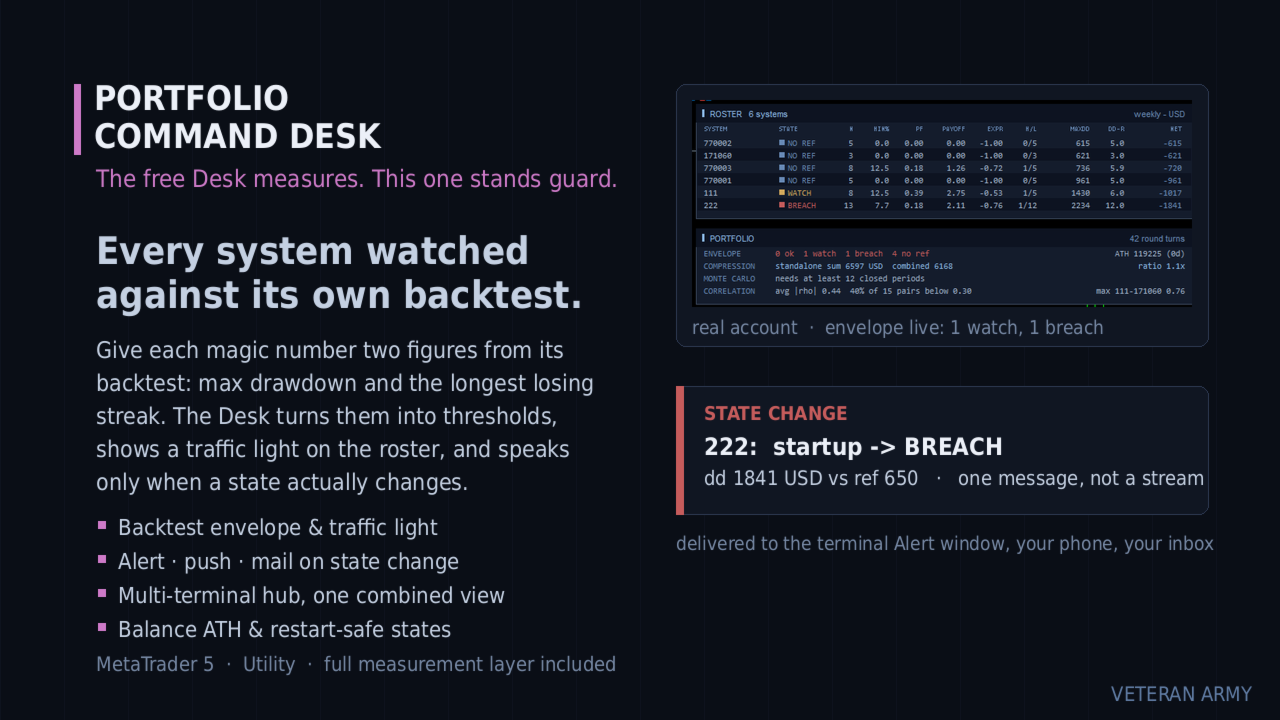
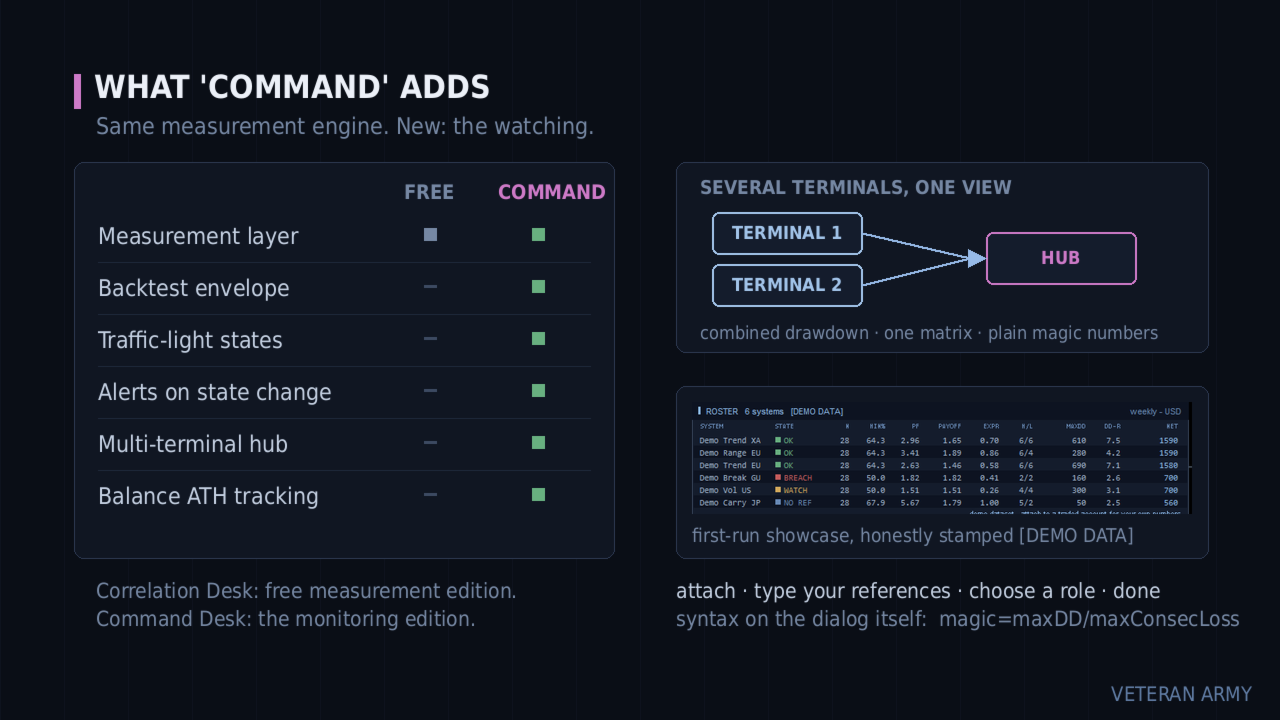
Envelope monitoring for multi-EA accounts. Each magic number is watched against its own backtest; you get a traffic light on the chart and an alert only when a state changes. Includes the full free measurement layer.

What it is

You run several Expert Advisors on one account. This utility reads their closed history, groups it by magic number, and watches every system against its own backtest: a traffic light on the chart, and an alert only when a state actually changes. Underneath sits a full measurement layer - per-system statistics, combined drawdown, correlation, Monte Carlo. It never places an order.

What this adds over the free Desk

The free Portfolio Correlation Desk measures your portfolio. This one stands guard over it.

Free edition: https://www.mql5.com/en/market/product/188832

Every system is watched against its own backtest. You give each magic number two figures: the backtest maximum drawdown and the longest losing streak. The Desk turns them into thresholds and shows a traffic light on the roster - OK, WATCH, BREACH.

It speaks only when something changes. A system crossing into WATCH is one message - terminal Alert, push to your phone, e-mail, your choice. No repeats while it stays there, and one message when it recovers. Restarting the terminal does not replay old alerts.

Several terminals, one view. Run it on every MetaTrader on your VPS and let one of them aggregate the rest: one combined drawdown, one correlation matrix, one roster across all of them.

Everything the free edition measures is included and unchanged.

The envelope

The idea comes from a simple question: is this system still behaving like its backtest, or has it left that envelope?

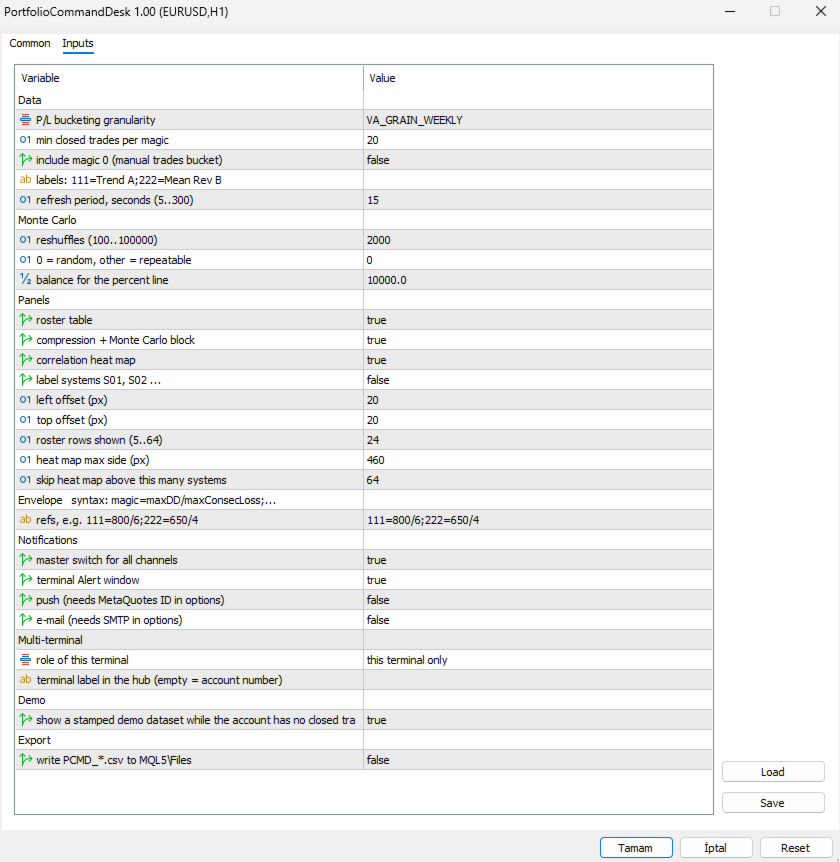
You answer with one input line, and the syntax is printed right on the input dialog:

111=800/6;222=650/4
(magic = maxDD / maxConsecLoss)

From those two figures per system the Desk builds the thresholds:

  • WATCH when the current drawdown reaches 1.5x your reference, or the live losing streak reaches max(1.5x, +3) of your reference streak.
  • BREACH when the current drawdown reaches 2.0x the reference.
  • OK again when it comes back down - one recovery message, not a stream. A small hysteresis band keeps a value hovering at a line from flapping.

Systems without a reference simply show a grey NO REF badge. They are still measured, just not judged.

The envelope watches the CURRENT drawdown, not the all-time record - a system that recovers turns green again, which is the whole point.

It still measures

The complete free layer is inside: per-system statistics, standalone vs combined drawdown with the compression ratio, the Monte Carlo reshuffle with percentiles, and the correlation heat map on daily, weekly or monthly profit and loss. If you only want measurement, the free Portfolio Correlation Desk is that product.

Multi-terminal

Each terminal runs the same EA with a role, named in plain words on the input dialog: "this terminal only", "publish this terminal into the hub folder", or "aggregate every published terminal".

Publishers write their closed history into the shared MetaTrader folder; the hub merges every published terminal with its own trades and runs the whole analysis on the combined data. All terminals must be on the same machine or VPS - that is where the shared folder lives. The hub view refreshes within one refresh period, about 15 seconds.

The hub shows plain magic numbers, with no terminal prefix, to keep the panel readable. For efficient tracking we recommend giving EAs on different terminals different magic numbers.

Alerts always fire on the terminal that owns the system, so nothing is ever notified twice.

The panels

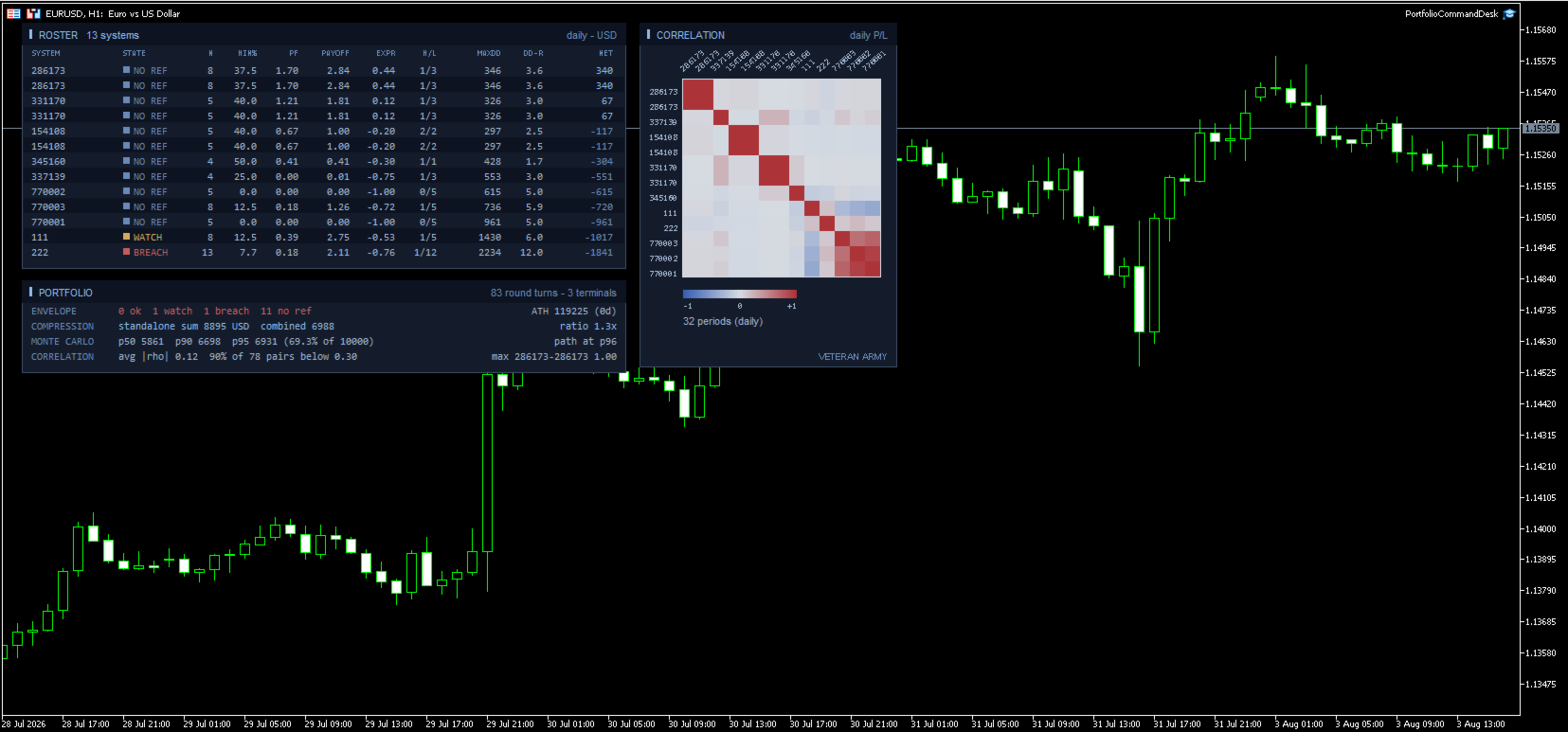
ROSTER - one row per system with a colored STATE cell, then the full statistics: trades, win rate, profit factor, payoff, expectancy in R, streaks, max drawdown, DD in R, net.

PORTFOLIO - the ENVELOPE line first (how many ok / watch / breach / no ref), with the balance all-time high and its age on the right. Then compression, Monte Carlo and correlation, as in the free edition.

CORRELATION - the heat map. Axis labels are drawn at a slant so full magic numbers stay readable even with forty systems on the grid.

A new balance high is one quiet notification too, with how long the previous peak stood.

Inputs

The dialog is grouped, and the envelope group carries the syntax in its own heading so you never have to look it up.

Envelope

  • refs - one line, one entry per system: 111=800/6;222=650/4 . Read it as magic = maximum drawdown / longest losing streak, both taken from that system's backtest. Spaces are fine, a trailing semicolon is fine, and a repeated magic simply overrides the earlier one. Systems you leave out are still measured; they just show a grey NO REF badge instead of being judged. Malformed entries are skipped and counted in the log so a typo never passes unnoticed.

Notifications

  • master switch for all channels - one flag to silence everything without losing your per-channel setup.
  • terminal Alert window - the pop-up inside MetaTrader.
  • push - to the MetaQuotes app on your phone. Needs your MetaQuotes ID in the terminal options; if it is missing, the log says so once.
  • e-mail - needs SMTP configured in the terminal options, same one-time note if it is not.

Multi-terminal

  • role of this terminal - three plain choices: this terminal only, publish this terminal into the hub folder, or aggregate every published terminal. Publishers write their history to the shared folder; the aggregator merges all of them with its own trades.
  • terminal label in the hub - a short name for this terminal. Left empty it uses the account number. Only used to tell published files apart, not shown on the panel.

Data

  • P/L bucketing granularity - correlate on daily, weekly or monthly results. Monthly is the default and the safest; on sparse daily buckets the empty cells pull correlations toward zero. Weekly suits accounts that trade often.
  • min closed trades per magic - systems below this count are left out of the report and out of the combined portfolio, so the comparison stays like for like. Raise it if young systems are muddying the picture.
  • include magic 0 - off by default. On most terminals that bucket holds manual trades and any EA left on its default magic.
  • labels: 111=Trend A;222=Mean Rev B - give systems names instead of numbers: 111=Trend A;222=Mean Rev B . Names appear on the roster, the heat map axis and in the alert text.
  • refresh period, seconds - how often the panel looks for new closed trades, 5 to 300. The aggregator also re-reads the published files on this beat, so it sets how fresh the combined view is.

Monte Carlo

  • reshuffles - how many times your period results are reordered, 100 to 100000. 2000 is plenty.
  • 0 = random, other = repeatable - the seed. 0 draws a random seed each run. Any other value makes the percentiles repeatable, which matters when the figure goes into a report or a comparison over time.
  • balance for the percent line - reference balance used only to express the 95th percentile drawdown as a percentage.

Panels

  • roster table, compression + Monte Carlo block, correlation heat map - turn each block on or off independently.
  • label systems S01, S02 ... - hides real magic numbers behind generic labels. Useful for screenshots and for sharing results.
  • left offset / top offset - where the panels sit on the chart, in pixels from the top left corner.
  • roster rows shown - 5 to 64. Cap it when you have more systems than you want on screen; the ones with the largest net still come first.
  • heat map max side - the largest square the grid may occupy, in pixels. The cell size follows from it.
  • skip heat map above this many systems - above this count the heat map is skipped, because the grid would need more rectangles than the chart can redraw comfortably. The other panels carry on.

Demo

  • show a stamped demo dataset while the account has no closed trades - a deterministic sample portfolio with the traffic light live on it, so you can see the product working before you have history. Every title carries [DEMO DATA]. Demo data never notifies, never writes CSV and never touches the state file. Your first real closed trade replaces it permanently.

Export

  • write PCMD_*.csv to MQL5\Files - writes the roster (including the state column) and the correlation matrix to disk on each refresh. Disabled automatically while the demo dataset is on display.

What it does not do

It never places, modifies or closes an order. It does not produce signals or predictions. It does not connect to any network or external service - the multi-terminal hub is plain files in the shared MetaTrader folder on your own machine.

Drawdowns are measured on closed trades and do not include the floating excursion of open positions. Alerts require the terminal to be running, which on a VPS it is.

Getting started

Attach to any chart. Type your references. Turn on the channels you want. If you run several terminals, pick the roles. Done - it only talks to you when a state changes.

MetaTrader 5.
推荐产品
Fvg In Fvg
Claudiu-georgian Zavera
FVG In FVG EA — From Learn to Earn. The most-watched imbalance on any chart, taken where you have not seen it before: a Fair Value Gap confirmed inside a Fair Value Gap. A GAP EVERYONE WATCHES. AN EXECUTION NO ONE ELSE HAS. The EA detects the Fair Value Gap — the 3-candle imbalance — on a higher timeframe, then requires a second FVG, formed inside the first, on the timeframes you choose. Only an overlap above your threshold validates the zone: Most Powerful Overlap FVG Zones — rigorously selec
Galaxy X Quantum Edge
Gezani Paulus Nkuna
GALAXY X [QUANTUM EDGE] is an advanced MetaTrader 5 automated trading robot designed around the Smart Money Concepts (SMC) strategy, using market structure, swing points, order blocks, Fair Value Gaps (FVG), liquidity/sweep confirmations, and trend analysis to identify potential high-quality trading opportunities. The robot is designed to adapt to changing market conditions by monitoring volatility and market regimes, adjusting its trading frequency and risk exposure accordingly, while incorpora
Ticks Charting
Mativenga Geoffrey Mativenga
Tick Copier EA — Description & Usage Guide Instead of seeing the market like everybody else using time based charts, instead view the market using ticks like an x-ray. This Expert Advisor (EA) for MetaTrader 5 copies live ticks from the chart it is attached to and sends them to a custom symbol you already created (for example EURUSD TICKS ). Each time a new market tick arrives:  EA reads the current tick data from the source symbol. It copies the tick values: time bid price ask price last price
QuantumGold Matrix
Mohammed Lamine Kasmi
QuantumXAU Matrix – Smart Gold Trading EA for MetaTrader 5 QuantumXAU Matrix is a powerful, fully automated Expert Advisor specifically designed for XAUUSD (Gold) on the MetaTrader 5 platform. It follows a smart averaging strategy with controlled risk management, aiming for consistent profits through adaptive lot sizing and precise trade timing. Symbol-specific : Trades only on XAUUSD for optimized performance Automated logic : Opens positions based on market distance and profit targets
QTS Gold Guardian AI 机构级黄金短线交易系统,采用神经网络驱动。具备智能对冲、资金保护和波动率适应功能。无需使用危险的马丁格尔策略。 QTS Gold Guardian AI 是 XAUUSD(黄金)短线交易的终极解决方案,旨在应对波动剧烈的市场环境。与爆仓的传统短线交易系统不同,QTS 的首要目标是保本。 主要功能: 神经网络逻辑:运用先进的逻辑技术,在 M5/H1 时间框架内检测微趋势。 智能恢复:采用智能对冲系数,在不影响保证金的情况下,有效抵消亏损交易。 资金保护:内置硬止损机制。如果回撤达到临界水平,EA 将暂停交易以保护账户(这对自营交易公司至关重要!)。 新闻过滤:自动避免在重大新闻发布期间进行交易。 动态间隙:根据实时市场波动率(ATR)调整网格间距。 ️ 推荐: 交易品种:XAUUSD(黄金)。 时间周期:M15 或 H1。 最低入金:100 美元(美分)或 1000 美元(标准)。 账户类型:推荐低点差/ECN 账户。 VPS:强烈建议使用 VPS 以实现 24/7 全天候运行。 注意:此 EA 已通过严格的
Boom Trader
Godbless C Nygu
Join Deriv now link on my profile>>>> Boom Trader This robot is developed to trade Boom 1000 which is available on Deriv. Boom 1000 is one of other many indices which its behaviour is to form the spike of few pips, Those spikes always happen after 1000 ticks. To avoid spikes i came up with idea of develop the robot which take sells and few buys. IMPORTANT! After the purchase please send me a private message to receive the installation manual and the setup instructions. •All settings on this ro
MSRLab Deriv Portfolio EA
Adebayo Oluwaseun Ojo
MSRLab Deriv Portfolio EA This is the EA running live on this account https://www.mql5.com/en/signals/2390117?source=Site+Profile+Seller A compiled, one-chart MetaTrader 5 Expert Advisor for Deriv synthetic-index accounts. The MSRLab Deriv Portfolio EA is built around a curated multi-symbol portfolio with account configuration embedded directly in the compiled product. User just need to d ownload the EA from MQL5, attach it to one chart, enable Algo Trading. The advise is to forward-test it on D
GridTrailling
Chaianan Kraimud
Smart breakout grid EA with trailing pending orders, trailing stop, session/news filters, drawdown protection, and netting-safe execution for MT5. GridTrailingEA is a smart pending-order grid Expert Advisor with trailing pending orders, trailing stop, session filter, news-time filter, drawdown protection, and market-safe validation for MT5. GridTrailingEA is a MetaTrader 5 Expert Advisor designed for traders who want a clean and controlled grid-style pending order system. The EA places Buy Stop
Titan Backup
Elies Noah Siebenpfeiffer
Introducing Titan Backup : Are you ready to enhance your trading game with an automated system built for precision and flexibility? Meet Titan Backup , your expert trading assistant designed to capture high-profit breakouts by identifying accumulation zones . This powerful Expert Advisor (EA) excels in high-volatility markets such as the Nasdaq 100 and Crypto 10 , offering both hands-free automation and manual assistance to support your trading strategies. How Titan Backup Works: Titan Backup ru
Click Sent Order
Supanat Wiboonpanit
This program is a GUI for issuing orders that can be done more quickly. Faster TP SL setting This program is not an automated trading platform. Trading is risky, please manage your risk. We do not accept any responsibility. It should be tried with Demo before using it with Real. Normally, the setting sets the risk to 1:1 to shift manually or to enter the risk to x:1, where x can be entered and everything can move freely. Thank you to all customers who have purchased our products. We would like t
Orydax Zenvar
Pablo Orcaray Lopez
Orydax Zenvar — XAUUSD Expert Advisor for MetaTrader 5 Turn a demanding market routine into a clear, automated process. Orydax Zenvar is a daily gold level strategy for MetaTrader 5, with XAUUSD D1 as the recommended starting setup. It follows the market continuously, waits for a qualified gold level inside its daily market and risk context, and handles the trading workflow when its confirmation process is complete. It is designed for users seeking selective daily gold automation: traders who va
BlackVault AI EA
Anton Vizzhachii
5 (1)
BLACKVAULT EA — 自动化黄金交易系统 XAUUSD M5 | MetaTrader 5 智能交易系统 BlackVault 并不是又一个披着漂亮外衣的网格系统或马丁格尔策略。它是一套结构化的黄金交易系统,其核心原则是我们认为比单纯追求业绩更重要的一点:风险控制优先于收益表现。 EA 内部的逻辑围绕 Opening Range Breakout(ORB,开盘区间突破)模式、动态 ATR 与点差过滤,以及动态风险模块构建。该模块会在每次入场之前评估市场条件,而不是在入场之后才进行判断。 系统内部包含什么 自适应 Opening Range 分析 — 系统会实时跟踪交易区间的形成过程,并且只有在突破得到确认后才会入场,而不是基于固定时间进行盲目触发。 动态波动率控制(ATR 过滤器)— 手数和止损水平会根据当前市场波动率重新计算,而不是始终保持固定。 点差与时间过滤器 — 当点差异常、处于新闻时间窗口或市场活跃度过低的时段,EA 不会进行交易。 净值保护 — 内置每日回撤限制,一旦达到设定阈值,系统将自动停止交易。 Trailing Stop 与 Break-Even 逻辑 —
Dark Gold MT5
Marco Solito
4.55 (101)
Dark Gold  is a fully automatic Expert Advisor for  Scalping   Trading on Gold , Bitcoin , Eurusd and Gbpusd. This Expert Advisor needs attention, in fact presents highly customizable. Dark Gold is based on   Dark Support Resistance mt5  indicator   (owning it is not necessary) , these Trades can be manage with some strategies. If you   Buy this Expert   Advisor you can   write a feedback   at market and   get Dark Support Resistance indicator for Free , for More info contact me The basic strate
不要相信排名靠前的交易机器人那些平滑的资金曲线。它们都用了各种手段来制造漂亮的回测结果,但一旦实盘交易,这些机器人全都会失败。一些常见手段包括:用一万亿美元的模拟资金做定投(DCA)和马丁格尔加仓,用最优参数进行过度拟合…… 最好的交易系统通常只包含几条简单的规则。它们看起来并不炫酷,资金曲线也总是起伏不平。但它们更稳健,在实盘市场中存活下来的几率更高。 这是一款仅做多的趋势跟踪型智能交易系统(EA),基于突破原理,并结合通过平均真实波幅(ATR)实现的动态波动性追踪止损。该系统严格按K线收盘运行,消除盘中价格噪音,并降低点差滑点带来的影响。 技术要求与建议 平台:MetaTrader 5(MT5)。 适用品种:黄金(XAUUSD)。 最佳时间周期:H2及以上。 账户要求:对冲或净额账户;建议最低余额1000美元,用于0.01手的交易规模。 运行环境:需要24/5全天候不间断的VPS运行,以确保追踪止损更新和订单执行能精确地在K线收盘时完成。
浮盈金字塔黄金EA,只在订单产生浮盈之后才加仓,杜绝亏损状态下盲目加仓;采用EMA20+ADX24双重指标过滤震荡假信号,减少无效开仓。自带多重硬性风控保护你的账户。   核心优势   1. 只浮盈加仓,不亏损加仓:避开马丁、网格越亏越加的高危模式 2. 趋势过滤机制:震荡行情自动观望,减少无意义开仓 3. 分步式加仓:不会同一毫秒批量下多张订单,降低经纪商风控风险 4. 多重独立风控:组止损、移动止损、每日最大亏损硬保护多层防护 5. 全部参数可自定义:手数、加仓门槛、止损止盈均可按需调整 6. 六年历史回测验证,参数经过实盘模拟反复打磨 7. 趋势行情下回测净值稳步向上,适合追求趋势波段收益的交易者   基本信息   1. 商城商品名称:gold trend pyramid ea 2. MT5图表内EA显示名称:trendstorm ea v8.00 3. 当前版本:8.00 4. 品种: XAUUSD(黄金) 5. 周期: M15 6. 账户模式: 仅支持锁仓(Hedging)账户。账户必须允许同一个品种持有多笔独立订单;净头寸(Netting)账户逻辑会直接失效,无法正常运行
Gann Gold EA MT5
Elif Kaya
4.5 (8)
- Final real price is 1000$ - Discount and price is 99$ (Next price is 300$),  Price will be increased after 1 purchase. Welcome, Gold GANN Expert opens automatically trade with Highly profit, Fixed small Stop loss. - Lifetime update free User Manaul No Martingale, No Grid, No Scam I am focused on help my clients, not just earn. The Gann Gold EA is High safety by small fix Stop Loss, which sets trades based on good risk to reward ratio(1:3). It is fully worked on exploiting the volatility of t
SuperTrend AI Clustering EA
Michael Prescott Burney
SuperTrend AI Clustering 自动聚类趋势跟随智能交易系统(MetaTrader 5) SuperTrend AI Clustering 是一款用于 MetaTrader 5 的自适应趋势跟随智能交易系统,旨在根据不断变化的市场环境自动调整自身参数。系统并非只使用单一固定的 SuperTrend 倍数,而是同时评估多个倍数因子,衡量其近期表现,通过 K-Means 聚类算法将其分组,并选择当前表现最优的一组因子。这样就形成了一个动态的 SuperTrend 模型,可以在不同波动率阶段和市场结构下自我适应,而无需频繁手动重新配置。 该系统适合希望采用自动化趋势跟随方式,并且重视自适应能力、结构化风险控制以及透明图表信息展示的交易者。它可用于外汇交易品种、贵金属、指数、加密货币、商品及其他在 MetaTrader 5 中可交易的品种。智能交易系统兼容多种周期,从短周期的日内交易到长周期的波段和中长期趋势交易均可应用。 核心交易理念 该智能交易系统的逻辑基础是 SuperTrend 指标,它使用基于 ATR 的波动通道来识别市场的多头和空头阶段。较低的倍数因子会形成更紧的
LetaPRO
Luis Spera Praxedes Daniel
BoletaPRO 本智能交易系统专为在 Exness 经纪商交易 BTCUSD 品种而开发。 不得用于任何其他交易品种、货币对、资产或经纪商。 BoletaPRO 是一款适用于 MetaTrader 5 的智能交易系统,配备自动执行引擎、完整交易功能和可视化结果面板。 工作原理 启用后,BoletaPRO 会持续监控市场,并根据既定配置执行其专有的内部规则。分析逻辑、入场条件和运行过滤规则均属于产品的专有技术,不予公开。 除自动执行外,EA 还提供集成交易面板,供用户进行手动干预。 主要优势 可直接在图表上开启或关闭的自动执行引擎。 支持市价单和挂单执行。 支持 Magic Number,用于识别和管理 EA 交易。 结果面板显示交易、订单、入金、出金和每日表现。 可自定义面板位置、宽度、高度和字体比例。 不兼容 MetaTrader 5 策略测试器。 输入参数 Magic Number: 用于识别和管理 EA 自身的交易。 机器人启动时启用: 定义 EA 加载到图表时自动引擎是否启动。 面板水平和垂直位置: 调整面板在图表中的位置。 面板水平和垂直比例: 调整界面尺寸。 字体比例:
Harness institutional strategies with Institutional VWAP Reversal EA: Capture reversals via VWAP deviation bands, volume spikes, and 200 EMA trend filter. Targets 5% monthly profit with 5% max daily DD, including profit caps, breakeven SL, and signal reversal options—ideal for prop-trading challenges. Customize TP/SL by percentages, RR, or candles; trade with trend or both sides. Optimized for forex majors and gold, with time-restricted execution for low-risk, reliable automation in volatile mar
The Daily Ranger USTEC Ultimate EA is an intraday trading system designed to capture the full potential of the Nasdaq index's (also known as USTEC, US100, NAS100, NQ100) distinctive intraday volatility. The EA trades during the New York trading sesssion taking maximum 2 high quality intraday trades with SL and TP all the time. NO GRID, NO MARTINGALE, NO ADDING TO LOSERS The EA is tested with real tick data, the most accurate way to test an EA. Choose your preferred Risk Per Trade, and watch our
NexusPilot Core is an MT5 EA Manage and Prop Firm Control tool designed for traders who run multiple Expert Advisors, manual trades, or funded account challenges. It is not a signal indicator or trading strategy. Its main purpose is to help you supervise your account, control EA activity, and reduce the risk of breaking prop firm rules. With one centralized dashboard, NexusPilot Core monitors drawdown, Magic Numbers, EA exposure, pending orders, no-SL trades, margin level, floating loss, tradi
AutoSLTP for Scalpers
Aaron Nii Amartey Donkor
SL$TPauto Expert Advisor SL$TPauto automatically manages Stop Loss (SL) and Take Profit (TP) levels for all trades on a specific symbol. This Expert Advisor scans whatever chart it's placed on and works based on that chart's symbol, functioning independently across multiple charts simultaneously. Key Features: Automatically places Stop Loss (SL) and Take Profit (TP) for all open trades on the current chart symbol Applies the same Stop Loss (SL) and Take Profit (TP) settings to any new trades as
Forex Strike EA
Abderrahmane Benali
FOREX Strike EA – Discipline Meets Opportunity FOREX Strike EA is an intelligent automated trading system built to bring structure, control, and consistency to the Forex market. Designed with modern MQL5 standards, it focuses on precision execution and disciplined awareness rather than aggressive exposure. By combining smart order placement with adaptive money management, the system engages the market only when conditions align—allowing you to trade with confidence, not emotion. Operating withi
Bogdanoff EA x Wojak
Phonephiphat Vangmeuangkhong
Bogdanoff EA x Wojak —— 专为黄金(XAUUSD)打造的全自动突破交易系统 Bogdanoff EA x Wojak 是一款专为**黄金(XAUUSD)**设计的全自动突破(breakout)交易系统。 回测结果 ️ 请在发布前,使用您自己经过验证的策略测试器报告填写本节内容——详见文档末尾说明。 测试品种: XAUUSD,[测试所用周期] ,测试区间: [开始日期] 至 [结束日期] 起始资金: [您的测试起始资金] 结束资金: [测试结果] ( [总收益率] ) 最大回撤: [最大回撤百分比] 胜率: [胜率] · 盈利因子: [盈利因子] · 总交易笔数: [交易笔数] ️ 历史回测表现不代表未来收益。 历史测试无法完全还原实盘中的滑点、拒单(requote)或极端新闻行情。购买前请务必阅读下方完整的风险声明。 推荐设置 设置项 建议 交易品种 XAUUSD(黄金) 周期 M1 账户类型 最低点差 / Raw / ECN 账户 —— 在 M1 周期上运行的跨式突破策略对点差非常敏感,因为点差会直接侵蚀入场缓冲区和实际止损距离。使用点差较高的标准账户会显著
Pro Scalping Tool
Mohammad Nazmul Hassan
### **ProScalpingToolEA.mq5 Analysis & Description** **Overview:**   The `ProScalpingToolEA.mq5` script is an Expert Advisor (EA) for MetaTrader 5, designed to assist with automated trading. It includes features for placing, managing, and monitoring trades. --- ### **Key Functionalities:** 1. **Trade Execution & Management:**    - Uses the `CTrade` class from `Trade.mqh` to manage trading operations.    - Allows placing buy and sell orders with a configurable lot size.    - Trades are iden
Lions Roar Trend Strength Grid EA
AL MOOSAWI ABDULLAH JAFFER BAQER
The trading limiter that stops you from breaking your own daily loss and trade limits. • Please test the product in the Strategy Tester before purchasing to understand how it works. • If you face any issues, contact me via private message—I’m always available to help. • After purchase, send me a screenshot of your order to receive a   FREE EA   as a gift. Most grid robots start the same way: price moves two hundred points, so the first order opens. It does not ask whether the market was going
动态RSI卫士 – 精准交易与全面风险管理 动态RSI卫士是一款专为重视稳定性能、严格风险控制和灵活性的交易者设计的专业算法交易系统。基于先进的点差计算和智能RSI驱动的过滤器,它确保每笔交易遵循严格的规则,以最小化风险,同时最大化机会。 主要功能 : 智能入场系统 • 基于RSI的多重过滤器确认 • 检测高概率信号并在图表上以箭头可视化 全面风险管理 • 基于风险百分比的动态手数计算 • 最大持仓量和交易检查(防止过度交易) • 无效止损水平保护 高级退出策略 • 基于ATR或固定点差的追踪止损 • 可调止损和止盈(基于点差) • 自动调整止损以适应经纪商限制 可视化HUD仪表板 • 实时状态(买入、卖出、阻止) • 市场条件显示 • 信号跟踪和分隔线 支持回测与优化 • 专为剥头皮和日内交易设计 • 适用于多个交易对和时间框架 • 易于优化以适应不同策略 策略与使用 : 动态RSI卫士在低延迟环境(ECN/STP经纪商)中表现最佳。 推荐使用: 交易对 :EURUSD、GBPUSD、XAUUSD(黄金)、US30 时间框架 :M1 – M15 低点差经纪商以获
FREE
Bitcoin White Hat Hacker
Thomas Bradley Butler
Optimize before use in back test or live for better results for you  and don't forget to account for spreads and slippage in optimization. This Expert is for 1 minute charts trading BTC/USD.  Bitcoin on 1 minute use MACD, CCI and RSI for entry and exit logic.  This EA was back tested and traded out of sample.  Each trade has a stop loss and take profit.   BTC compared to the indexes and Gold have huge differences, look at the example of traditional investing vs. Bitcoin.  Yellow line represents
XAU NINE PALACE CHI MATRIX  Ancient Martial Arts Spatial Geometry Applied to Gold Trading XAU Nine Palace Chi Matrix is an elite algorithmic trading system built exclusively for Gold (XAUUSD). Based on the profound Nine-Palace Chi Mapping Theory, the EA divides the market into a dynamic 3x3 spatial grid. It reads the "Chi" (Volume & Momentum Flow) in real-time.  If the central palace faces a heavy onslaught, the AI instantly dodges the impact and ambushes the market from its blind spots (Bac
该产品的买家也购买
Trade Assistant MT5
Evgeniy Kravchenko
4.43 (216)
它有助于计算每笔交易的风险,容易安装新的订单,具有部分关闭功能的订单管理, 7 种类型的追踪止损和其他有用的功能。   附加材料和说明 安装说明   -   应用程序说明   -   模拟账户应用程序的试用版 线条功能  - 在图表上显示开仓线、止损线、止盈线。 有了这个功能,就可以很容易地设置一个新的订单,并在开仓前看到它的附加特性。   风险管理  - 风险计算功能在考虑到设定的风险和止损单的大小的情况下,计算新订单的成交量。它允许你设置任何大小的止损,同时观察设定的风险。 批量计算按钮 - 启用 / 禁用风险计算。 在 " 风险 " 一栏中设置必要的风险值,从 0 到 100 的百分比或存款的货币。 在 " 设置 " 选项卡上选择风险计算的变量: $ 货币, % 余额, % 资产, % 自由保证金, % 自定义, %AB 前一天, %AB 前一周, %AB 前一个月。   R/TP 和 R/SL - 设置止盈和止损的关系。 这允许你设置相对于损失的利润大小。 例如, 1 : 1 - 这决定了 TP = SL 的大小。 2 : 1 - 这意味着 TP 是 SL 的两倍。 RR -
欢迎来到 Trade Manager EA——这是一个终极风险管理工具,旨在使交易变得更直观、精准和高效。它不仅仅是一个下单工具,而是一个用于无缝交易计划、仓位管理和风险控制的全面解决方案。不论您是新手交易员、资深交易员,还是需要快速执行的剥头皮交易员,Trade Manager EA 都可以满足您的需求,适用于外汇、指数、大宗商品、加密货币等各种市场。 借助 Trade Manager EA,复杂的计算已成过去。只需分析市场,在图表上用水平线标记入场、止损和止盈,设置您的风险水平,Trade Manager 就会立即计算出理想的头寸规模,并实时显示以点、账户货币计价的止损和止盈。每笔交易都得以轻松管理。 主要功能: 头寸规模计算器 :根据定义的风险瞬间确定交易规模。 简单的交易计划 :在图表上用可拖动的水平线直接计划交易,设置入场、止损和止盈。 实时显示 SL 和 TP :以账户货币、点或分显示止损和止盈,便于分析。 高级保护工具 盈亏平衡选项 : 基本盈亏平衡 :当您的交易达到设定水平时自动保护利润。 多级盈亏平衡 :设置多达 4 个级别以逐步保护利润。 尾随止损选项 : 基本尾随
Telegram to MT5 Multi-Channel Copier   可将您 Telegram 频道中的交易信号自动复制到 MetaTrader 5。无需机器人、无需浏览器扩展、无需手动复制。信号一到 Telegram,EA 几秒内就在您的终端开仓。 在复制某个频道之前,内置回测器还能告诉您该频道在您的账户上会有怎样的表现。 产品包含两个组件:一个监听您 Telegram 频道的 Windows 应用程序,以及在 MT5 终端执行信号的本 EA。同时提供 MT4 版本   点此 . 设置指南与应用下载:   https://www.mql5.com/en/blogs/post/768988 了解如何 回测任何 Telegram 信号频道 。 当前价格将来会上调。 工作原理 应用通过您自己的 Telegram 账号连接,因此能看到您关注的所有频道、群组、话题和机器人,包括私密和 VIP 频道。信号到达时,应用读取它,EA 按您的手数和设置在终端中开仓。 整个过程全自动,无需守在电脑前。专为 24/7 无人值守运行设计:Telegram 连接断开时,应用会自动重连。 打开应用并登录
================================================================================ POC BREAKOUT - V20.72. Full Professional Grade Toolkit ================================================================================ POC Breakout is a full MetaTrader 5 trading dashboard for discretionary traders who want breakout signals, Point of Control (POC) context, volume profiles, order flow, market structure, news, alerts, and advanced trade planning in one professional workspace. Attached directly to you
TradePanel MT5
Alfiya Fazylova
4.88 (170)
交易面板是一款多功能交易助手。该应用包含超过50种手动交易功能,并允许您自动执行大多数交易任务。 应用程序说明 : https://www.mql5.com/zh/blogs/post/761102 用于模拟账户的应用程序试用版: https://www.mql5.com/zh/blogs/post/762579 如何安装应用程序: https://www.mql5.com/zh/blogs/post/762580 如何在可视化模式下测试应用程序: https://www.mql5.com/zh/blogs/post/770278 如何在VPS MetaTrader上安装应用程序: https://www.mql5.com/zh/blogs/post/770196 贸易. 只需单击一下即可执行交易操作: 打開掛單和頭寸,並自動計算風險。 一鍵打開多個訂單和頭寸。 打開訂單網格。 按組別關閉掛單和頭寸。 反轉頭寸方向(關閉買入>打開賣出,關閉賣出>打開買入)。 鎖定頭寸(通過開啟缺少的頭寸,使買入和賣出頭寸的數量相等)。 一鍵部分關閉所有頭寸。 將所有頭寸的止盈和止損設置在同一價格水平。
按照自己的交易规则复制 Telegram 信号 Telegram to MT5 Signal Trader 可将 Telegram 公开及私密频道和群组中的文字交易信号自动复制到 MetaTrader 5。通过一个桌面应用管理多个信号提供者和 MT5 账户,并为 每个提供者单独设置风险和交易参数 。 复制信号无需 Telegram 机器人,也无需配置 API。 只需通过手机号或二维码登录您自己的 Telegram 账户,然后选择您已加入的频道或群组。您无需创建机器人,也无需提供 Telegram API 令牌、API ID 或 API hash。 自行选择仓位大小,将平仓分配到多个止盈价位,并自动执行保本止损和移动止损。在跟随信号提供者的同时,掌握信号的实际交易方式。 本产品由这款 MT5 EA 和必须配合使用的 Windows 桌面应用组成。请参阅 安装指南及应用下载 。 管理多个信号提供者和账户 为每个提供者单独设置: 为每个频道设置专属的仓位计算方式、入场规则、止损、止盈和交易管理参数。 灵活分配至不同账户: 将同一提供者的信号复制到多个已连接的 MT5 账户,并为每个账户使用不
Power Candles 策略扫描器——自优化多符号设置查找器 Power Candles策略扫描器 采用与Power Candles指标相同的自优化引擎,可同时扫描您“市场观察”中的所有交易品种。一个面板即可显示当前哪些品种在统计上具备交易价值、每种策略的最佳应用方向、最优止损/止盈组合,并在新信号触发时立即向您发送提醒。 本工具是 Stein Investments 生态系统的一部分 - 18+ 款工具,加上 Max,您的一对一 AI 交易导师。  随时在线,深入了解每一款指标,在您需要梳理思路的那一刻就在那里。  立即认识他: https://stein.investments 您的全面市场监控。每个交易品种超过3,000次自动优化。2种警报类型。一键切换图表并采取行动。 为何您需要此工具 大多数多标的扫描器仅展示价格 波动 。每只股票的波动率、百分比变化、RSI。您仍需自行摸索正确的策略、合适的止损位以及理想的入场阈值。Power Candles策略扫描器针对每只股票自动解答这些问题,仅在数学验证过的交易设置中触发实际入场信号时才会向您发出提示。这就是全部卖点。 自动
Farmed Hedge Yield Farming | All Markets (Manual - Hybrid - Semi/Automated EA) VERIFIED TRADING RESULTS - Farmed Hedge Yield Axi Copy:  https://www.mql5.com/en/signals/2356376 - Farmed Hedge Yield Exn Copy:   https://www.mql5.com/en/signals/2356404 - Farmed Hedge Yield V Copy:  https://www.mql5.com/en/signals/2357156 IMPORTANT NOTICE: FarmedHedge is a MANUAL-FOCUSED TRADING UTILITY ,not a fully automated EA. Results shown on this Signal include manual trades and overall strategic management.
Grid Manual MT5
Alfiya Fazylova
4.73 (22)
Grid Manual是一个交易面板,用于处理订单网格。 该实用程序是通用的,具有灵活的设置和直观的界面。 它不仅可以在亏损方向上设置订单网格,还可以在盈利方向上设置订单网格。 交易者不需要创建和维护订单网格,实用程序会这样做。 打开一个订单就足够了,Grid manual会自动为它创建一个订单网格,并伴随它直到非常关闭。 完整说明和演示版 此處 。 该实用程序的主要特性和功能: 伴隨以任何方式打開的訂單,包括從移動終端打開的訂單。 適用於兩種類型的網格:“限制”和“停止”。 使用兩種方法計算網格間距:固定和動態(基於 ATR 指標)。 允許您更改未結訂單網格的設置。 顯示圖表上每個網格的盈虧平衡水平。 顯示每個網格的利潤率。 允許您一鍵關閉網格中的盈利訂單。 讓您一鍵關閉每個訂單網格。 允許您對訂單網格應用追踪止損功能。 允許您在訂單網格上應用將訂單網格的止損轉移到盈虧平衡水平的功能。 相對於訂單網格的盈虧平衡水平自動重新排列止盈(僅在限價網格模式下,距離取決於所選的計算類型:“保守”或“激進”)。 最多可管理 20 個訂單網格,每個網格最多可包含 100 個訂單。 計算初始手數時,
Footprint Chart Pro — Professional OrderFlow EA for MetaTrader 5 Version 6.34 | Professional tool for real traders | Institutional-Grade Visualization DEMO USERS - PLEASE SELECT EVERY TICK / REAL TICK WHEN TESTING AND YOU HAVE DOWNLOADED HISTORICAL DATA. IF YOU SEE A WAITING SCREEN AND IT IS NOT DOWNLOADING, IT MEANS YOU HAVE LOW HISTORICAL DATA. TRY 1 MIN AND 5 MIN FIRST ON 1 DAY DATA. ONE DAY DATA SHOULD BE THE NEWEST AND MOST CURRENT DATE. PLEASE WAIT UNTIL THE MARKET HAS ROLLED OVER PERIOD.
Welcome to ENTRY IN THE ZONE AND SMC MULTI TIMEFRAME /  Official Website :   https://www.fableedge.net Entry In The Zone and SMC Multi Timeframe is a real-time market analysis tool based on Smart Money Concepts (SMC), designed to analyze market structure, price direction, and key trading zones. It supports both Single-Timeframe Analysis and Multi-Timeframe Analysis, providing a clearer view of the overall market structure across multiple timeframes, with real-time BUY / SELL signals that do not
MT5 to Telegram Signal Provider 是一个易于使用且完全可自定义的工具,它允许向 Telegram 的聊天室、频道或群组发送 指定 的信号,将您的账户变为一个 信号提供商 。 与大多数竞争产品不同,它不使用 DLL 导入。 [ 演示 ] [ 手册 ] [ MT4 版本 ] [ Discord 版本 ] [ Telegram 频道 ]  New: [ Telegram To MT5 ] 设置 提供了逐步的 用户指南 。 不需要了解 Telegram API;开发者提供了您所需的一切。 关键特性 能够自定义发送给订阅者的订单详情 您可以创建分层的订阅模型,例如铜、银、金。其中金订阅获得所有信号等。 通过 id、符号或评论过滤订单 包括执行订单的图表截图 在发送的截图上绘制已关闭的订单,以便额外核实 延迟发送新订单消息的可能性,以便在发送前对位置进行调整 订单详情完全透明: 新的市场订单*带截图 订单修改(止损、获利) 已关闭的订单*带截图 部分关闭的订单** 新的挂单 修改的挂单(进场价格) 挂单激活(作为新的市场订单附加) 已删除的挂单 历史订单报告
Premium Trade Manager - 内置交易导师的图表面板 Premium Trade Manager 将一位交易导师嵌入您的图表,并在其下搭载完整的执行引擎。像往常一样建立交易,然后让您的 AI 交易导师 Max 读取这笔具体的交易,结合您的实时账户给出直接判断,再由您决定是否下单:止损是否符合纪律化交易的要求、风险规模是否合理、高影响新闻事件是否即将发布、您是否接近资金盘限额。其下是完整的执行引擎,负责点击之后的一切:一键按风险下单、您在图表上拖动规划且交易进行中仍可随时调整的计划、最多四个分批止盈级别、七种移动止损方式、实时资金盘合规检查、新闻屏蔽保护,以及对自身成本进行评级的点差功能。决策由您做出。Max 给出第二次审视。面板负责此后的一切。 购买前先亲手体验。 直接在浏览器中点击实时面板,这是在购买前感受其工作方式的最快途径。 stein.investments/products/premium-trade-manager Max 是您的一对一 AI 交易导师,他直接内置于面板之中。  他了解您的账户、您的设置和您的规则,用您自己的语言回答,并在每笔交易下单前进
Anchor Trade Manager
Kalinskie Gilliam
5 (9)
Your EAs cannot see each other, but Anchor can. Anchor gives you one place to coordinate your EAs, manage risk, and decide when trading is allowed. It works alongside the trading bots you already use without any changes to them. The Problem One EA opens a trade. Then another starts trading. The next thing you know, you wake up to multiple grids built across your account. Each EA may be doing exactly what it was designed to do, but together they can place far more risk on your account than you in
Trade Indicator Assistant   is a powerful MT5 utility designed to turn indicators into automated trading systems. Its main feature is the ability to automatically detect an indicator’s   BUY and SELL signal buffers , without requiring you to know the buffer numbers, search through indicator settings, or modify the indicator source code. Bonus Indicator:   After purchasing Trade Indicator Assistant, contact me to receive   Trade Signal Pro   completely free as a bonus indicator. [Download Demo V
Quant Panel
Kevin Craig E Gittins
量化面板专业版 量化交易者的终极多EA性能仪表盘 无需再在多个图表或外部工具之间切换来监控您的算法策略!Quant Panel Pro 通过一个简洁专业的界面,为您提供机构级的投资组合监控体验。 核心功能 触手可及的量化分析 所有智能交易顾问(EA)的实时盈亏汇总 带有交易频率指标的胜率统计分析 高级回撤跟踪(已实现和未实现) 风险回报分析——最佳盈利与最大亏损对比 连续亏损监控及警报 专业量化界面 无限滚动——同时监控无限制策略 彩色编码性能矩阵——即时可视化投资组合健康状况 完全可定制布局——适应您的分析流程 现代金融风格设计——专为专业交易者打造 机构级功能 实时数据流——毫秒级精准更新 魔术编号策略筛选——按算法类型组织 多品种性能跟踪——跨市场分析 投资组合级统计——全面的绩效总结 完全可定制 专业配色方案和排版 可调整的刷新率和显示行数 可配置的列布局和指标 个性化仪表盘偏好 改变您的交易操作方式 之前: 手动表格、分散的MT4窗口、延迟分析 之后: 实时投资组合仪表盘、自动化分析、专业报告 “我的量化交易系统中缺失的一环——终于有了机构级的监控工具!” 简单设置流程 将
YuClusters
Yury Kulikov
4.93 (43)
Attention: You can view the program operation in the free version  YuClusters DEMO .  YuClusters is a professional market analysis system. The trader has unique opportunities to analyze the flow of orders, trade volumes, price movements using various charts, profiles, indicators, and graphical objects. YuClusters operates on data based on Time&Sales or ticks information, depending on what is available in the quotes of a financial instrument. YuClusters allows you to build graphs by combining da
Trade Manager DaneTrades
Levi Dane Benjamin
4.23 (30)
交易管理器可帮助您快速进入和退出交易,同时自动计算风险。 包括帮助您防止过度交易、报复性交易和情绪化交易的功能。 交易可以自动管理,账户绩效指标可以在图表中可视化。 这些功能使该面板成为所有手动交易者的理想选择,并有助于增强 MetaTrader 5 平台。多语言支持。 MT4版本  |  用户指南+演示 交易经理在策略测试器中不起作用。 如需演示,请参阅用户指南 风险管理 根据%或$自动调整风险 可选择使用固定手数或根据交易量和点自动计算手数 使用 RR、点数或价格设置盈亏平衡止损 追踪止损设置 最大每日损失百分比,在达到目标时自动平仓所有交易。 保护账户免遭过多提款并阻止您过度交易 最大每日损失(以美元为单位)在达到目标时自动关闭所有交易。 保护账户免遭过多提款并阻止您过度交易 一键实现所有交易的盈亏平衡 自动计算从手机/电话发送的交易的风险 OCO 在设置中可用 交易和头寸管理 通过设置每月、每周、每天、每小时或每分钟的最大交易次数,停止过度交易和报复性交易。 高级挂单管理。 调整何时关闭挂单的规则 追踪挂单 支持市价订单和挂单 每日最大利润目标(以美元为单位)以确保头寸并停止
DrawDown Limiter
Haidar Lionel Haj Ali
5 (23)
DrawDown Limiter v5.0 — 高级账户保护控制器 DrawDown Limiter v5.0 是一款运行于客户端的交易账户保护控制器,用于监控您的交易账户,并在达到您所设定的风险、盈利、新闻、时间计划、Rollover 或持仓数量限制时自动采取相应措施。 它可以通过一个独立图表监控 手动交易、自动化策略、多个 EA、挂单以及浮动持仓 。它既可以保护整个交易账户,也可以通过 Magic Number 仅监控特定 EA 或一组 EA。 DrawDown Limiter 的目的不仅仅是显示回撤,而是 主动执行您设定的交易规则 ,并在保护条件保持有效期间持续执行这些规则。 DrawDown Limiter v5.0 不仅用于监控您的亏损程度,还用于控制策略何时可以继续运行、哪些风险敞口可以保留、何时必须停止交易,以及自动化交易环境何时可以安全恢复运行。 需要帮助或有任何问题?  请查看   DrawDown Limiter 用户指南 我是  Lio ,欢迎随时联系我!  我们始终愿意为您解答问题、提供帮助并持续改进产品。 统一的保护系统 DrawDown Limiter v
Smart Stop Scanner – 多品种结构化止损扫描系统 概述 Smart Stop Scanner 为交易者提供跨市场的专业止损结构监控。系统基于真实市场结构、关键突破点以及价格行为逻辑,自动识别最有意义的止损区域,并在统一的、高度清晰、DPI 自适应面板中展示所有信息。 适用于 Forex、黄金、指数、金属、加密货币等多种资产。 止损如何计算 本系统并未使用传统指标或任意公式,而是通过纯价格行为识别 突破、更高高点、更低低点 等结构事件。 止损位置基于这些结构节点生成,因此更加真实、自然,并与实际市场行为紧密吻合。 核心功能亮点 • 多品种精准兼容 完整支持外汇、黄金、指数、金属、加密资产及其他工具,自动处理不同的点值和小数位。 • 即时结构识别 实时检测新的、失效的和当前有效的止损结构,并提供方向、形成时间、距离等关键信息。 • SL %ADR – 自适应止损质量评估 每个止损都会与该品种历史的结构性止损事件进行统计对比。 自适应颜色区间清晰显示止损是 极紧、紧、适中、宽、非常宽 。 基于真实波动率,而非固定阈值。 • Dist % – 实时止损距离
Binance Quotes Updater
Andrey Khatimlianskii
5 (1)
This service is designed to stream online cryptocurrency quotes   from the Binance exchange to your MetaTrader 5 terminal. You will find it perfectly suitable if you want to see the quotes of cryptocurrencies in real time — in the Market watch window and on the MetaTrader 5 charts. After running the service, you will have fully featured and automatically updated  cryptocurrency charts in your MetaTrader 5. You can apply templates, color schemes, technical indicators and any non-trading tools to

The Expert Advisor will help you forward all alert from  MetaTrader 5 to Telegram channel/ group.  All alert must save to folder <Data folder>MQL5\Files\Alerts\ , text file with format *.txt and screenshot with format *.gif or *.png. Parameters: - Telegram Bot Token: - create bot on Telegram and get token. - Telegram Chat ID:  - input your Telegram user ID,  group / channel ID - Forward Alert: - default true, to forward alert. - Send message as caption of Screenshot: - default false, set true t
Prop Guardian Risk Manager MT5 – Drawdown, Risk & Hedge Protection for Prop Firm and Managed Accounts Prop Guardian Risk Manager is a professional risk-control utility for MetaTrader 5, designed for prop firm traders, money managers and anyone who wants strict account-level risk protection. It does not generate trading signals, strategy entries or trading decisions. Instead, it runs in the background, monitors your account risk and can automatically block new exposure, close managed positions or
Mentfx Mmanage mt5
Anton Jere Calmes
4.25 (8)
The added video will showcase all functionality, effectiveness, and uses of the trade manager. Drag and Drop Trade Manager. Draw your entry and have the tool calculate the rest. Advanced targeting and close portions of a trade directly available in tool (manage trades while you sleep). Market order or limit order on either side with factored spread. Just draw the entry, the tool does the rest. Hotkey setup to make it simple. Draw where you want to enter, and the stop loss, the tool calculates al
The product will copy all telegram signal to MT5 ( which you are member) , also it can work as remote copier.  Easy to set up, copy order instant, can work with almost signal formats, image signal,  s upport to translate other language to English Work with all type of channel or group, even channel have "Restrict Saving Content", work with  multi channel, multi MT5 Work as remote copier: with signal have ticket number, it will copy exactly via ticket number. Support to backtest signal. How to s
Trade Manager DashPlus
Henry Lyubomir Wallace
4.85 (13)
DashPlus 是一款先进的交易管理工具,旨在提升您在 MetaTrader 5 平台上的交易效率和效果。它提供一整套功能,包括风险计算、订单管理、先进的网格系统、基于图表的工具和绩效分析。 主要功能 1. 恢复网格 实施一个平均和灵活的网格系统,以在不利的市场条件下管理交易。 允许设置战略性进出点,以优化交易恢复。 2. 叠加网格 通过在强劲的市场波动中增加仓位,最大化有利交易的潜在回报。 帮助您通过扩展获利交易来利用趋势市场。 3. 盈亏线 在图表上直接提供潜在利润和损失场景的可视化表示。 调整设置并拖动盈亏线,以在执行之前评估各种交易结果。 4. 篮子模式 简化同一交易品种的多仓位管理,将它们合并为一个聚合仓位。 基于平均价格,便于监控和应用止损、止盈以及其他订单修改。 5. 图表上的新闻 将预定的经济新闻事件整合到您的交易图表中。 帮助您随时掌握可能影响市场波动的即将发生的事件,从而更好地规划交易。 6. 警报 设置基于时间或价格的警报,通知会显示在 MT5 中,或通过 MT5 应用发送到您的移动设备。 对监控关键价格水平或重要的交易时段非常有用。 7. 绩效统计 提供详细的
EA Overfitter
Stephen J Martret
5 (1)
回测看起来很漂亮。但它明天、下周、下个月还能继续赚钱吗? EA Overfitter 让您的 EA 在 100 段它从未见过的价格历史上重新运行。一个分数告诉您这个优势是否真实。 回测告诉您的,是 EA 在某一段价格历史上的表现——那段恰好发生过的历史。您无法从中判断,这个结果有多少来自策略本身,又有多少只是那一条特定路径带来的。 EA Overfitter 回答的正是这个问题。它构建最多 100 段您的 EA 从未交易过的合成价格历史,让策略在全部这些历史上重新运行,并展示它所产生的完整结果区间。您得到的不再是一条幸运或不幸路径上的单个数字,而是一幅真实的图景:策略在陌生数据上多久能赚钱、典型结果是什么样(而不是最好的那一次),以及您的回测离它有多远。 这些世界是由您自己的近期历史重建而成,因此这不是预测——任何从历史数据出发的检验都不可能是预测。它告诉您的是:这个优势是否依赖于价格的某一种特定排列,以及回测数字距离典型结果有多远。在投入资金之前,这才是值得回答的问题。 三个步骤 1. 构建。在图表上选择时间区间和世界数量,然后按 Build。EA Overfitter 会
EasyInsight AIO MT5
Alain Verleyen
4.92 (12)
EASY Insight AIO – 全能智能交易一站式解决方案 概述 想象一下,您可以在几秒钟内扫描整个市场——外汇、黄金、加密货币、指数,甚至股票——无需手动筛选图表、繁琐安装或配置指标。 EASY Insight AIO 是您专为 AI 交易打造的即装即用数据导出工具。它将整个市场快照一次性输出为简洁的 CSV 文件,直接支持 ChatGPT、Claude、Gemini、Perplexity 等各类 AI 平台的即时分析。 无需窗口切换,无需图表叠加,也没有任何杂乱。只需纯净、结构化的数据自动导出,让您专注于基于数据的高效决策,无需再盯盘耗时。 为什么选择 EASY Insight AIO? 真正的一体化 • 无需设置,无需安装指标,无图表叠加。只需安装、运行并导出——就是这么简单。 多资产全覆盖 • 扫描分析外汇、金属、加密货币、指数、股票——您的券商所能提供的一切市场。 AI 专属数据导出 • 高度结构化、针对 AI 优化的 CSV 文件,直接适配主流智能工具和平台。 完整导出内容: • 三个可选周期的货币强度分析 • 净多头头寸变化体现市场情绪 • 成交量变化、
MT5 Trading Deck
Manuel Michiels
5 (2)
One button. One trade. MT5 Trading Deck is a hotkey trading panel for MetaTrader 5 that turns the platform into a keyboard-driven execution cockpit. Stop loss, take profit and lot size are pre-calculated for every key; the moment you press, a market order is live on the broker. A complete technical user manual is attached in the product Comments section. It documents every input parameter, the full hotkey map, the recommended Stream Deck XL layout, and the advanced workflows for Pre-Limit orders
VERON LINK MASTER MT5 — Real-time Multi-Account Dashboard & Sync Controller Veron Link Master is a high-performance, centralized monitoring and synchronization control center designed for MetaTrader 5. Built specifically for traders managing multiple accounts, prop firm portfolios, grid/martingale EAs, or client networks, Veron Link Master provides a seamless, ultra-modern dark-themed GUI dashboard directly on your MT5 terminal. ️ Important Requirement / System Usage: To use this system, yo
作者的更多信息
Volume Trio
Seckin Erkut
Three institutional lenses. One deterministic engine. Most tools show you one dimension of the market. This indicator fuses the three that professionals cross-check constantly — and makes them talk to each other on a single chart: WHERE — Session Volume Profile. Per-session horizontal profiles with POC, VAH/VAL and a shaded Value Area, split into buying vs. selling pressure. You see the levels the market has actually accepted — and the thin air pockets it hasn't. WHEN — CVD Pressure Divergence.
FREE
Read-only analytics for accounts running several EAs. Groups your closed trades by magic number and measures how much of their combined risk actually cancels out. Free measurement edition. The monitoring and alerting edition is Portfolio Command Desk:  https://www.mql5.com/en/market/product/188884 The problem You run five Expert Advisors. Each backtest looked fine on its own. But the account does not trade five systems, it trades one portfolio, and no report in MetaTrader tells you how those sys
FREE
Hard limits for prop firm and challenge accounts Prop firm rules are not suggestions. Breach the daily loss limit by one dollar and the account is gone, whatever the equity curve looked like an hour earlier. The problem is that the rule lives on the firm's server while your positions live in your terminal, and nothing in MetaTrader 5 connects the two. Prop Firm Circuit Breaker sits on one chart and watches the whole account. The name is literal: an exchange halts trading when a threshold is bre
FREE
Start with the loss, not the profit. First decide how deep a drawdown you are willing to sit through — 5-10%, 20-30%, or more — and then let the system go after returns inside that limit. That is the order Veteran Army FX works in. And because no one knows which pair will produce the next real move, it keeps watch over eleven of them at once on the H4 timeframe, both directions, instead of betting the account on a single chart. At a glance Markets: 13 FX pairs, long and short, on the H4 timefram
Volume Trio Multi is a three-layer market-structure tool for MetaTrader 5: session Volume Profile (POC, VAH/VAL, Value Area), a CVD volume-pressure histogram with a strict Regular divergence engine, and anchored VWAP with standard-deviation bands — extended with a watchlist scanner that runs all three across the symbols in your Market Watch. This is the Pro edition of my free indicator, Volume Trio. The base engine is identical, so this page describes only what Pro adds. For the three layers the
Start with the loss, not the profit. First decide how deep a drawdown you are willing to sit through — and then let the system go after returns inside that limit. That is the order Veteran Army Gold works in. And because gold does not move the way currencies move, it works the market one price level at a time, buying and selling, instead of betting the account on a single idea. The same discipline behind Veteran Army FX, applied to a single market that behaves like nothing else. At a glance Mark
Start with the loss, not the profit. First decide how deep a drawdown you are willing to sit through — 5-10%, 20-30%, or more — and then let the system go after returns inside that limit. That is the order Veteran Army Nasdaq works in. And because no one knows when the index will make its next real move — or in which direction — it stands ready on both sides of one market, with many independent systems instead of one confident bet. At a glance Market: US Tech 100 index, long and short, on the H1
筛选:
无评论
回复评论