Portfolio Command Desk

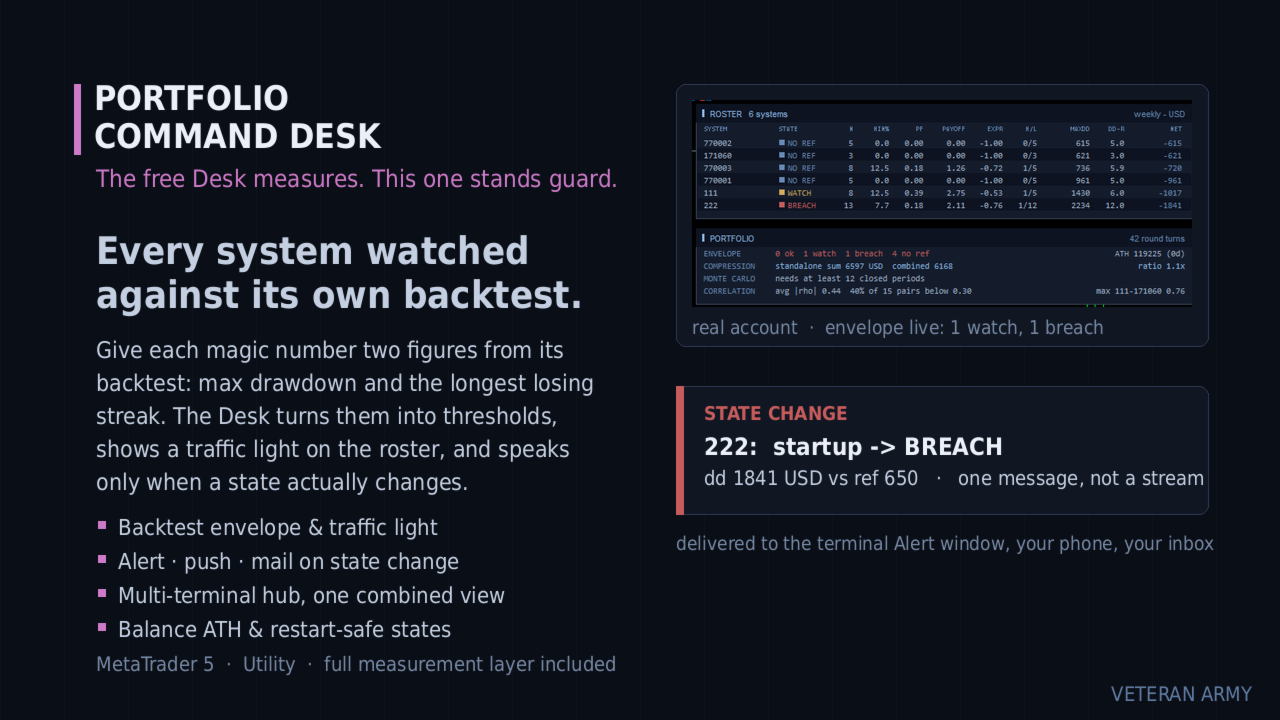
Envelope monitoring for multi-EA accounts. Each magic number is watched against its own backtest; you get a traffic light on the chart and an alert only when a state changes. Includes the full free measurement layer.

What it is

You run several Expert Advisors on one account. This utility reads their closed history, groups it by magic number, and watches every system against its own backtest: a traffic light on the chart, and an alert only when a state actually changes. Underneath sits a full measurement layer - per-system statistics, combined drawdown, correlation, Monte Carlo. It never places an order.

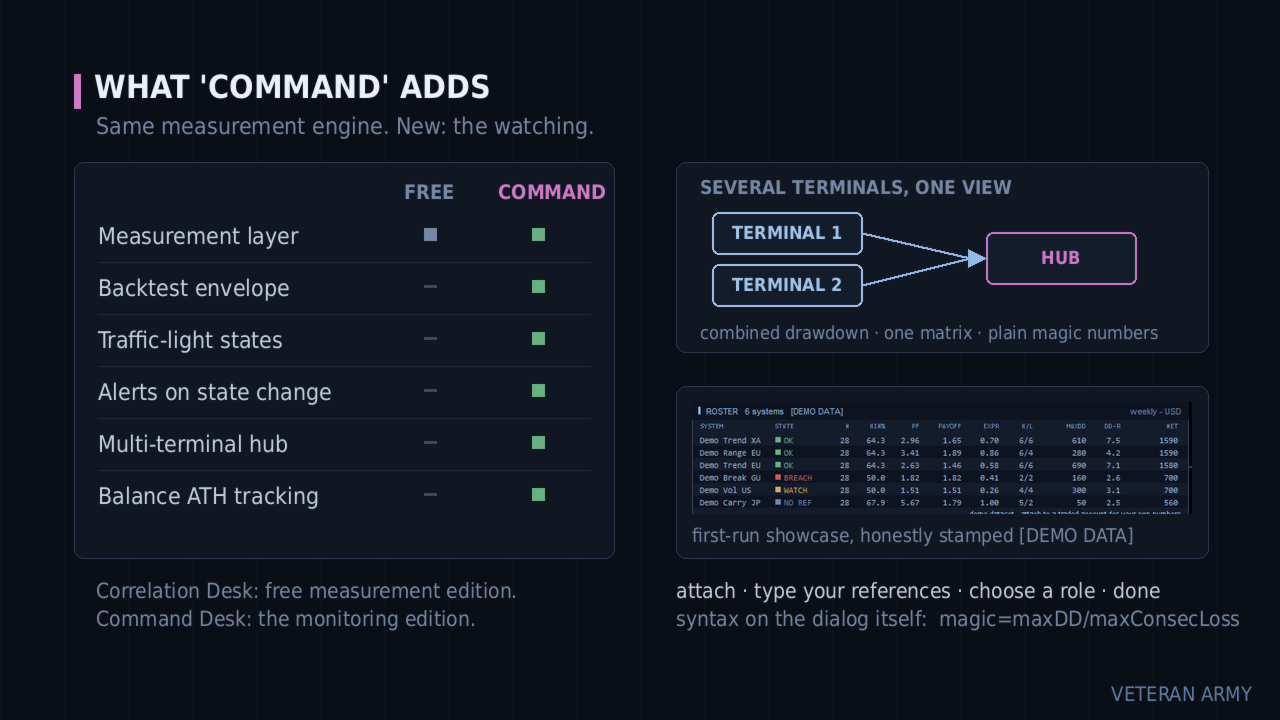
What this adds over the free Desk

The free Portfolio Correlation Desk measures your portfolio. This one stands guard over it.

Free edition: https://www.mql5.com/en/market/product/188832

Every system is watched against its own backtest. You give each magic number two figures: the backtest maximum drawdown and the longest losing streak. The Desk turns them into thresholds and shows a traffic light on the roster - OK, WATCH, BREACH.

It speaks only when something changes. A system crossing into WATCH is one message - terminal Alert, push to your phone, e-mail, your choice. No repeats while it stays there, and one message when it recovers. Restarting the terminal does not replay old alerts.

Several terminals, one view. Run it on every MetaTrader on your VPS and let one of them aggregate the rest: one combined drawdown, one correlation matrix, one roster across all of them.

Everything the free edition measures is included and unchanged.

The envelope

The idea comes from a simple question: is this system still behaving like its backtest, or has it left that envelope?

You answer with one input line, and the syntax is printed right on the input dialog:

111=800/6;222=650/4
(magic = maxDD / maxConsecLoss)

From those two figures per system the Desk builds the thresholds:

  • WATCH when the current drawdown reaches 1.5x your reference, or the live losing streak reaches max(1.5x, +3) of your reference streak.
  • BREACH when the current drawdown reaches 2.0x the reference.
  • OK again when it comes back down - one recovery message, not a stream. A small hysteresis band keeps a value hovering at a line from flapping.

Systems without a reference simply show a grey NO REF badge. They are still measured, just not judged.

The envelope watches the CURRENT drawdown, not the all-time record - a system that recovers turns green again, which is the whole point.

It still measures

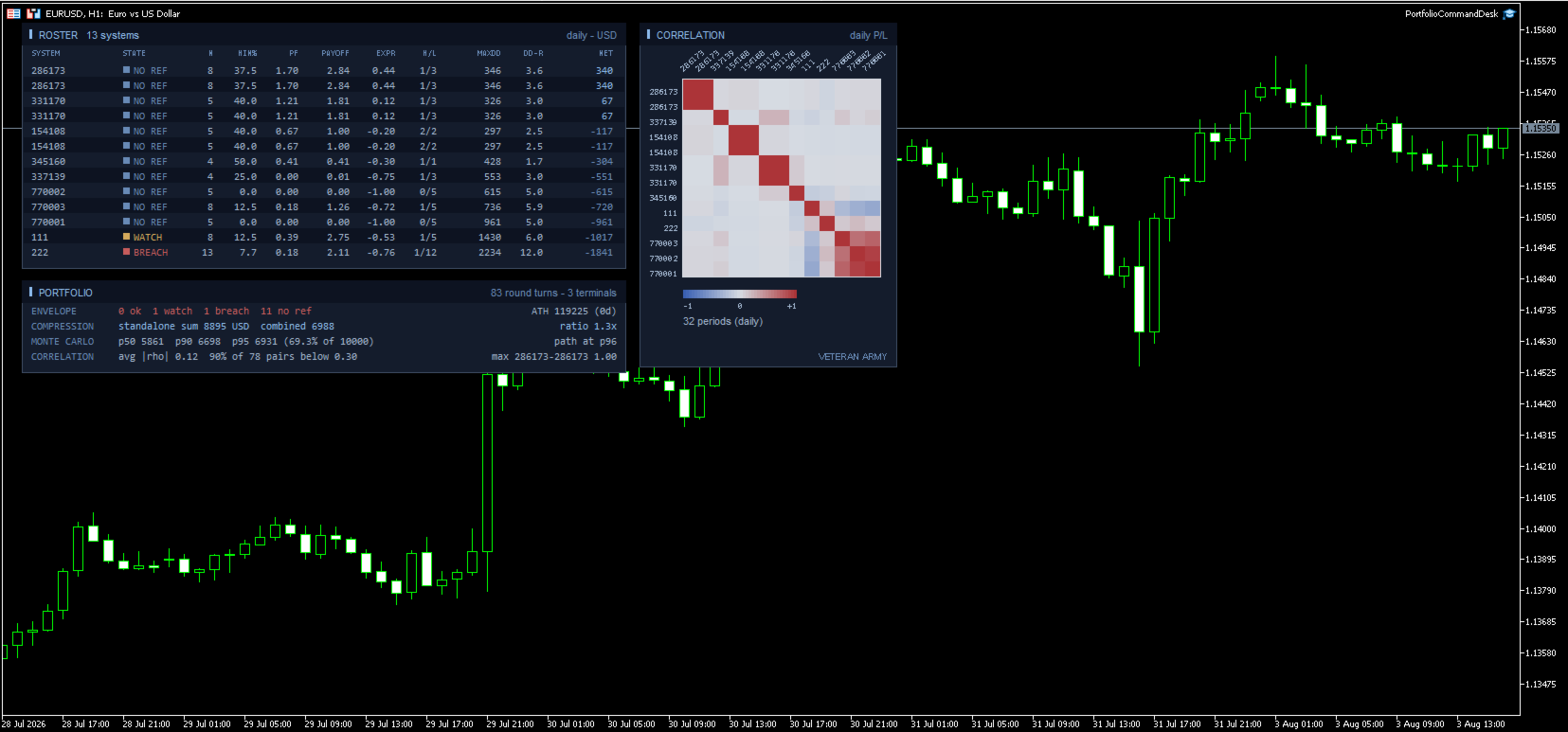
The complete free layer is inside: per-system statistics, standalone vs combined drawdown with the compression ratio, the Monte Carlo reshuffle with percentiles, and the correlation heat map on daily, weekly or monthly profit and loss. If you only want measurement, the free Portfolio Correlation Desk is that product.

Multi-terminal

Each terminal runs the same EA with a role, named in plain words on the input dialog: "this terminal only", "publish this terminal into the hub folder", or "aggregate every published terminal".

Publishers write their closed history into the shared MetaTrader folder; the hub merges every published terminal with its own trades and runs the whole analysis on the combined data. All terminals must be on the same machine or VPS - that is where the shared folder lives. The hub view refreshes within one refresh period, about 15 seconds.

The hub shows plain magic numbers, with no terminal prefix, to keep the panel readable. For efficient tracking we recommend giving EAs on different terminals different magic numbers.

Alerts always fire on the terminal that owns the system, so nothing is ever notified twice.

The panels

ROSTER - one row per system with a colored STATE cell, then the full statistics: trades, win rate, profit factor, payoff, expectancy in R, streaks, max drawdown, DD in R, net.

PORTFOLIO - the ENVELOPE line first (how many ok / watch / breach / no ref), with the balance all-time high and its age on the right. Then compression, Monte Carlo and correlation, as in the free edition.

CORRELATION - the heat map. Axis labels are drawn at a slant so full magic numbers stay readable even with forty systems on the grid.

A new balance high is one quiet notification too, with how long the previous peak stood.

Inputs

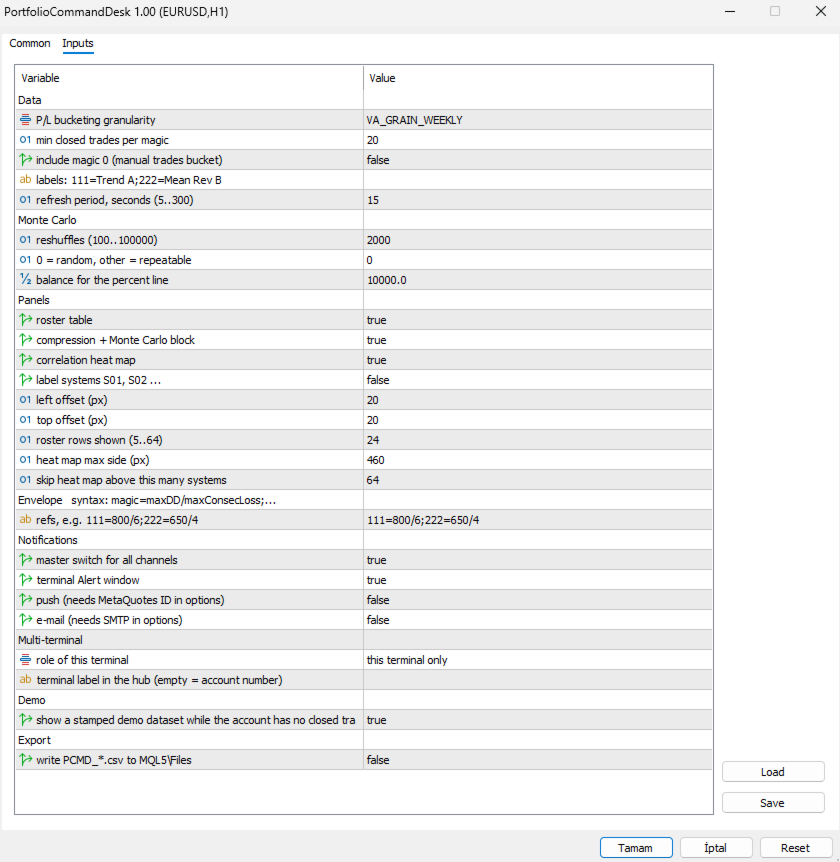
The dialog is grouped, and the envelope group carries the syntax in its own heading so you never have to look it up.

Envelope

  • refs - one line, one entry per system: 111=800/6;222=650/4 . Read it as magic = maximum drawdown / longest losing streak, both taken from that system's backtest. Spaces are fine, a trailing semicolon is fine, and a repeated magic simply overrides the earlier one. Systems you leave out are still measured; they just show a grey NO REF badge instead of being judged. Malformed entries are skipped and counted in the log so a typo never passes unnoticed.

Notifications

  • master switch for all channels - one flag to silence everything without losing your per-channel setup.
  • terminal Alert window - the pop-up inside MetaTrader.
  • push - to the MetaQuotes app on your phone. Needs your MetaQuotes ID in the terminal options; if it is missing, the log says so once.
  • e-mail - needs SMTP configured in the terminal options, same one-time note if it is not.

Multi-terminal

  • role of this terminal - three plain choices: this terminal only, publish this terminal into the hub folder, or aggregate every published terminal. Publishers write their history to the shared folder; the aggregator merges all of them with its own trades.
  • terminal label in the hub - a short name for this terminal. Left empty it uses the account number. Only used to tell published files apart, not shown on the panel.

Data

  • P/L bucketing granularity - correlate on daily, weekly or monthly results. Monthly is the default and the safest; on sparse daily buckets the empty cells pull correlations toward zero. Weekly suits accounts that trade often.
  • min closed trades per magic - systems below this count are left out of the report and out of the combined portfolio, so the comparison stays like for like. Raise it if young systems are muddying the picture.
  • include magic 0 - off by default. On most terminals that bucket holds manual trades and any EA left on its default magic.
  • labels: 111=Trend A;222=Mean Rev B - give systems names instead of numbers: 111=Trend A;222=Mean Rev B . Names appear on the roster, the heat map axis and in the alert text.
  • refresh period, seconds - how often the panel looks for new closed trades, 5 to 300. The aggregator also re-reads the published files on this beat, so it sets how fresh the combined view is.

Monte Carlo

  • reshuffles - how many times your period results are reordered, 100 to 100000. 2000 is plenty.
  • 0 = random, other = repeatable - the seed. 0 draws a random seed each run. Any other value makes the percentiles repeatable, which matters when the figure goes into a report or a comparison over time.
  • balance for the percent line - reference balance used only to express the 95th percentile drawdown as a percentage.

Panels

  • roster table, compression + Monte Carlo block, correlation heat map - turn each block on or off independently.
  • label systems S01, S02 ... - hides real magic numbers behind generic labels. Useful for screenshots and for sharing results.
  • left offset / top offset - where the panels sit on the chart, in pixels from the top left corner.
  • roster rows shown - 5 to 64. Cap it when you have more systems than you want on screen; the ones with the largest net still come first.
  • heat map max side - the largest square the grid may occupy, in pixels. The cell size follows from it.
  • skip heat map above this many systems - above this count the heat map is skipped, because the grid would need more rectangles than the chart can redraw comfortably. The other panels carry on.

Demo

  • show a stamped demo dataset while the account has no closed trades - a deterministic sample portfolio with the traffic light live on it, so you can see the product working before you have history. Every title carries [DEMO DATA]. Demo data never notifies, never writes CSV and never touches the state file. Your first real closed trade replaces it permanently.

Export

  • write PCMD_*.csv to MQL5\Files - writes the roster (including the state column) and the correlation matrix to disk on each refresh. Disabled automatically while the demo dataset is on display.

What it does not do

It never places, modifies or closes an order. It does not produce signals or predictions. It does not connect to any network or external service - the multi-terminal hub is plain files in the shared MetaTrader folder on your own machine.

Drawdowns are measured on closed trades and do not include the floating excursion of open positions. Alerts require the terminal to be running, which on a VPS it is.

Getting started

Attach to any chart. Type your references. Turn on the channels you want. If you run several terminals, pick the roles. Done - it only talks to you when a state changes.

MetaTrader 5.
おすすめのプロダクト
Fvg In Fvg
Claudiu-georgian Zavera
FVG In FVG EA — From Learn to Earn. The most-watched imbalance on any chart, taken where you have not seen it before: a Fair Value Gap confirmed inside a Fair Value Gap. A GAP EVERYONE WATCHES. AN EXECUTION NO ONE ELSE HAS. The EA detects the Fair Value Gap — the 3-candle imbalance — on a higher timeframe, then requires a second FVG, formed inside the first, on the timeframes you choose. Only an overlap above your threshold validates the zone: Most Powerful Overlap FVG Zones — rigorously selec
GALAXY X [QUANTUM EDGE] is an advanced MetaTrader 5 automated trading robot designed around the Smart Money Concepts (SMC) strategy, using market structure, swing points, order blocks, Fair Value Gaps (FVG), liquidity/sweep confirmations, and trend analysis to identify potential high-quality trading opportunities. The robot is designed to adapt to changing market conditions by monitoring volatility and market regimes, adjusting its trading frequency and risk exposure accordingly, while incorpora
Ticks Charting
Mativenga Geoffrey Mativenga
Tick Copier EA — Description & Usage Guide Instead of seeing the market like everybody else using time based charts, instead view the market using ticks like an x-ray. This Expert Advisor (EA) for MetaTrader 5 copies live ticks from the chart it is attached to and sends them to a custom symbol you already created (for example EURUSD TICKS ). Each time a new market tick arrives:  EA reads the current tick data from the source symbol. It copies the tick values: time bid price ask price last price
QuantumXAU Matrix – Smart Gold Trading EA for MetaTrader 5 QuantumXAU Matrix is a powerful, fully automated Expert Advisor specifically designed for XAUUSD (Gold) on the MetaTrader 5 platform. It follows a smart averaging strategy with controlled risk management, aiming for consistent profits through adaptive lot sizing and precise trade timing. Symbol-specific : Trades only on XAUUSD for optimized performance Automated logic : Opens positions based on market distance and profit targets
QTS Gold Guardian AI ニューラルネットワークを搭載した機関投資家レベルのゴールドスキャルパー。スマートヘッジ、エクイティ保護、ボラティリティ適応機能を搭載。危険なマーチンゲール法は使用しません。 QTS Gold Guardian AIは、XAUUSD(ゴールド)スキャルピングの究極のソリューションであり、ボラティリティの高い市場環境にも対応できるよう設計されています。口座を破綻させる従来のスキャルパーとは異なり、QTSはまず元本の保全に重点を置いています。 主な機能: ニューラルネットワークロジック:高度なロジックを用いて、M5/H1の時間枠でミクロトレンドを検出します。 スマートリカバリー:スマートヘッジ係数を用いて、証拠金に負担をかけずに不利な取引を中和します。 エクイティガーディアン:ハードストップメカニズムを内蔵。ドローダウンが危機的な水準に達した場合、EAは取引を一時停止して口座を保護します(プロップ取引会社にとって非常に重要です!)。 ニュースフィルター:影響力の大きいニュースが配信されている時間帯には、自動的に取引を回避します。
Join Deriv now link on my profile>>>> Boom Trader This robot is developed to trade Boom 1000 which is available on Deriv. Boom 1000 is one of other many indices which its behaviour is to form the spike of few pips, Those spikes always happen after 1000 ticks. To avoid spikes i came up with idea of develop the robot which take sells and few buys. IMPORTANT! After the purchase please send me a private message to receive the installation manual and the setup instructions. •All settings on this ro
Smart breakout grid EA with trailing pending orders, trailing stop, session/news filters, drawdown protection, and netting-safe execution for MT5. GridTrailingEA is a smart pending-order grid Expert Advisor with trailing pending orders, trailing stop, session filter, news-time filter, drawdown protection, and market-safe validation for MT5. GridTrailingEA is a MetaTrader 5 Expert Advisor designed for traders who want a clean and controlled grid-style pending order system. The EA places Buy Stop
Titan Backup
Elies Noah Siebenpfeiffer
Introducing Titan Backup : Are you ready to enhance your trading game with an automated system built for precision and flexibility? Meet Titan Backup , your expert trading assistant designed to capture high-profit breakouts by identifying accumulation zones . This powerful Expert Advisor (EA) excels in high-volatility markets such as the Nasdaq 100 and Crypto 10 , offering both hands-free automation and manual assistance to support your trading strategies. How Titan Backup Works: Titan Backup ru
This program is a GUI for issuing orders that can be done more quickly. Faster TP SL setting This program is not an automated trading platform. Trading is risky, please manage your risk. We do not accept any responsibility. It should be tried with Demo before using it with Real. Normally, the setting sets the risk to 1:1 to shift manually or to enter the risk to x:1, where x can be entered and everything can move freely. Thank you to all customers who have purchased our products. We would like t
Orydax Zenvar — XAUUSD Expert Advisor for MetaTrader 5 Turn a demanding market routine into a clear, automated process. Orydax Zenvar is a daily gold level strategy for MetaTrader 5, with XAUUSD D1 as the recommended starting setup. It follows the market continuously, waits for a qualified gold level inside its daily market and risk context, and handles the trading workflow when its confirmation process is complete. It is designed for users seeking selective daily gold automation: traders who va
BlackVault AI EA
Anton Vizzhachii
5 (1)
BLACKVAULT EA — 自動ゴールド取引システム XAUUSD M5 | MetaTrader 5用エキスパートアドバイザー BlackVaultは、美しい外見で飾られた単なるグリッドシステムやマーチンゲールではありません。これはゴールド市場向けに構築された、構造化された取引システムです。そして私たちは、単純なパフォーマンスよりも重要な原則を最優先しています。それは、パフォーマンスよりもリスク管理を優先することです。 EA内部のロジックは、Opening Range Breakout(ORB)パターン、適応型ATRおよびスプレッドフィルタリング、そして各エントリー後ではなく、エントリー前に市場状況を評価する動的リスクモジュールを中心に構築されています。 内部に含まれるもの 適応型Opening Range分析 — システムはレンジがリアルタイムで形成される過程を追跡し、確認されたブレイクアウトが発生した場合にのみエントリーします。固定時間だけを基準とした盲目的なトリガーでエントリーすることはありません。 動的ボラティリティ管理(ATRフィルター)— ロットサイズとストップレベル
Dark Gold MT5
Marco Solito
4.56 (102)
Dark Gold  is a fully automatic Expert Advisor for  Scalping   Trading on Gold , Bitcoin , Eurusd and Gbpusd. This Expert Advisor needs attention, in fact presents highly customizable. Dark Gold is based on   Dark Support Resistance mt5  indicator   (owning it is not necessary) , these Trades can be manage with some strategies. If you   Buy this Expert   Advisor you can   write a feedback   at market and   get Dark Support Resistance indicator for Free , for More info contact me The basic strate
- Final real price is 1000$ - Discount and price is 199$ (Next price is 300$),  Price will be increased after 1 purchase. Welcome, Gold GANN Expert opens automatically trade with Highly profit, Fixed small Stop loss. - Lifetime update free User Manaul No Martingale, No Grid, No Scam I am focused on help my clients, not just earn. The Gann Gold EA is High safety by small fix Stop Loss, which sets trades based on good risk to reward ratio(1:3). It is fully worked on exploiting the volatility of
評価の高いボットの滑らかなエクイティカーブを信じてはいけません。どのボットも美しいバックテスト結果を作るためにトリックを使っていますが、実際にライブ取引をすると全て失敗します。よくあるトリックとしては、1兆ドルものデモ資金を使ったDCAやマーチンゲール、可能な限り最適なパラメータへの過剰最適化などがあります…… 優れたシステムは大抵、少数のシンプルなルールで構成されています。見た目は地味で、エクイティカーブは常に上下しますが、堅牢で実際の市場で生き残る可能性が高いのです。 これはブレイクアウトの原則に基づいたロングオンリー(買いのみ)のトレンドフォロー型エキスパートアドバイザー(EA)で、ATR(平均真実範囲)によるボラティリティ連動型の動的トレーリングストップを組み込んでいます。システムは厳密にバーの終値ベースで動作し、日中の価格ノイズを排除し、ティックスリッページの影響を軽減します。 技術要件と推奨事項 プラットフォーム:MetaTrader 5(MT5)。 適したペア:ゴールド(XAUUSD)。 最適な時間足:H2以上。 口座要件:ヘッジまたはネッティング口座。0.01ロットの取
Aurum BTC Matrix
Hicham Mahmoud Almoustafa
Aurum BTC Matrix is a fully automated Expert Advisor designed for trading Bitcoin (BTCUSD) . It uses market structure, price levels, and breakout opportunities to identify potential trades, place pending orders, and manage positions automatically. The EA combines four independent trading strategies with built-in trailing-stop management. Main Features 1. Four Trading Strategies Atlas – Focuses on major market structure. Pulse – Identifies shorter-term price movements. Horizon – Uses confirmed pr
ULTRA PRO TOOLKIT EA Draw it. Size it. Execute it. Most charts are buried under tools that refuse to talk to each other. You mark a level in one place, work out your lot size somewhere else, then hand-type an order and hope you remembered the stop. Ultra Pro Toolkit EA puts the entire workflow on one panel: sketch your market structure, tell it how many dollars you are willing to lose, and let it handle the arithmetic and the order routing. ️ This is a manual trading cockpit, not a signal
Trend Pyramid v5.00 | Gold XAUUSD Floating‑Profit Pyramid EA   This floating‑profit pyramid gold EA only adds positions after existing orders generate floating profit, avoiding blind position‑adding under loss conditions. It adopts EMA20 plus ADX24 dual‑indicator filter to filter false oscillation signals and reduce invalid order openings. Multiple hard risk controls are built‑in to protect your account.   Core advantages   1. Add positions only on floating profit, no position‑adding at loss: a
MetaTrader 5 用 SuperTrend AI Clustering エキスパートアドバイザー SuperTrend AI Clustering は、変化するマーケット環境に合わせて自動調整されるトレンドフォロー型の MetaTrader 5 用エキスパートアドバイザーです。固定の SuperTrend 乗数を 1 つだけ使うのではなく、複数の係数を同時に評価し、それぞれの直近の成績を測定し、K-Means クラスタリングを適用したうえで、現在もっともパフォーマンスが良い係数グループを選択します。これにより、ボラティリティの regime や相場構造の変化に対応できるダイナミックな SuperTrend モデルが構築され、頻繁な手動再設定なしで環境に順応することができます。 本システムは、適応性・体系的なリスク管理・チャート上の透明な情報表示を重視しながら、トレンドフォローを自動化したいトレーダー向けに設計されています。FX 通貨ペア、貴金属、株価指数、暗号資産、商品など、MetaTrader 5 上で利用可能なシンボルに対応しています。エキスパートアドバイザーは複数の時間足
Drill Pump 51
Husain A M A Alasfour
Overview Drill Pump 51 is a complete, multi-system Expert Advisor for XAUUSD (gold) on the H1 timeframe in MetaTrader 5. It combines a trend-breakout growth engine (PUMP), an adaptive two-way Grid and an optional Emergency spike system, all running under layered account protection. It is designed for a 3,000 USD account and works out of the box with its default settings: attach it to one XAUUSD H1 chart, enable Algo Trading, and it manages entries, exits and protection by itself. How it works •
Harness institutional strategies with Institutional VWAP Reversal EA: Capture reversals via VWAP deviation bands, volume spikes, and 200 EMA trend filter. Targets 5% monthly profit with 5% max daily DD, including profit caps, breakeven SL, and signal reversal options—ideal for prop-trading challenges. Customize TP/SL by percentages, RR, or candles; trade with trend or both sides. Optimized for forex majors and gold, with time-restricted execution for low-risk, reliable automation in volatile mar
The Daily Ranger USTEC Ultimate EA is an intraday trading system designed to capture the full potential of the Nasdaq index's (also known as USTEC, US100, NAS100, NQ100) distinctive intraday volatility. The EA trades during the New York trading sesssion taking maximum 2 high quality intraday trades with SL and TP all the time. NO GRID, NO MARTINGALE, NO ADDING TO LOSERS The EA is tested with real tick data, the most accurate way to test an EA. Choose your preferred Risk Per Trade, and watch our
Array Breakout X Yen — six breakout strategies working as one team on a single USDJPY chart. Tested on real ticks from 2016 to 2026, then locked inside the EA. You choose a risk level; the EA does the rest. Launch price 199 USD — final price 599 USD The price steps up as the product builds its track record. Whatever price you buy at, you get every update; a price rise never touches a licence already bought. START HERE — READ BEFORE USING What to expect and how to judge the results the right
NexusPilot Core is an MT5 EA Manage and Prop Firm Control tool designed for traders who run multiple Expert Advisors, manual trades, or funded account challenges. It is not a signal indicator or trading strategy. Its main purpose is to help you supervise your account, control EA activity, and reduce the risk of breaking prop firm rules. With one centralized dashboard, NexusPilot Core monitors drawdown, Magic Numbers, EA exposure, pending orders, no-SL trades, margin level, floating loss, tradi
SL$TPauto Expert Advisor SL$TPauto automatically manages Stop Loss (SL) and Take Profit (TP) levels for all trades on a specific symbol. This Expert Advisor scans whatever chart it's placed on and works based on that chart's symbol, functioning independently across multiple charts simultaneously. Key Features: Automatically places Stop Loss (SL) and Take Profit (TP) for all open trades on the current chart symbol Applies the same Stop Loss (SL) and Take Profit (TP) settings to any new trades as
Bogdanoff EA x Wojak
Phonephiphat Vangmeuangkhong
Bogdanoff EA x Wojak — ゴールド(XAUUSD)向け完全自動ブレイクアウトシステム Bogdanoff EA x Wojak は、**ゴールド(XAUUSD)**専用に設計された、完全自動のブレイクアウト型トレーディングシステムです。 バックテスト結果 ️ 公開前に、ご自身で検証済みのストラテジーテスターレポートの内容をこのセクションに記入してください — 詳細は本文書末尾の注記をご覧ください。 テスト対象: XAUUSD、[テストに使用した時間足] 、期間: [開始日] ~ [終了日] 初期残高: [テスト時の初期残高] 最終残高: [テスト結果] ( [総リターン %] ) 最大ドローダウン: [最大ドローダウン %] 勝率: [勝率 %] ・プロフィットファクター: [プロフィットファクター] ・総取引数: [取引数] ️ 過去のバックテスト成績は将来の結果を保証するものではありません。 過去データによるテストでは、実際のスリッページ、リクオート、極端なニュースイベントを完全に再現することはできません。購入前に、下記のリスク開示を必ずお読みください。 推
VRD Guardian は、複数の EA を稼働させる MT5 口座で口座保護を最優先にします。各 EA に専用の運用資金とロット上限を設定すると、その EA の損失があらかじめ決めた段階に達したときに、Guardian が決めておいた対応を実行します。 複数の EA が 1 つの残高を共有していると、大きなドローダウンに陥った1 つの EA が口座全体に影響することがあります。Guardian は各 EA を、その EA に割り当てた資金を基準に評価します。そのため不調な EA はあなたが決めたルールで処理され、他の EA は稼働を続けます。 できること 各 EA(マジックナンバー)に専用の運用資金を割り当てます。損失は、その資金に対する確定損益と含み損益の合計で測ります。 3 段階で対応:20% で警告、26% でその EA の指値・逆指値注文を削除、32% で指値・逆指値注文を削除し、自動決済をオンにした場合のみその EA のポジションを決済します。他の EA は稼働を続けます。 EA ごとのロット使用量:その EA の最大ロットの 80% で警告、100% で Guardia
### **ProScalpingToolEA.mq5 Analysis & Description** **Overview:**   The `ProScalpingToolEA.mq5` script is an Expert Advisor (EA) for MetaTrader 5, designed to assist with automated trading. It includes features for placing, managing, and monitoring trades. --- ### **Key Functionalities:** 1. **Trade Execution & Management:**    - Uses the `CTrade` class from `Trade.mqh` to manage trading operations.    - Allows placing buy and sell orders with a configurable lot size.    - Trades are iden
The trading limiter that stops you from breaking your own daily loss and trade limits. • Please test the product in the Strategy Tester before purchasing to understand how it works. • If you face any issues, contact me via private message—I’m always available to help. • After purchase, send me a screenshot of your order to receive a   FREE EA   as a gift. Most grid robots start the same way: price moves two hundred points, so the first order opens. It does not ask whether the market was going
ダイナミックRSIガーディアン – 精密な取引と完全なリスク管理 ダイナミックRSIガーディアンは、一貫したパフォーマンス、厳格なリスク管理、柔軟性を重視するトレーダーのためのプロフェッショナルなアルゴリズム取引システムです。高度なピップベースの計算とRSI駆動のインテリジェントなフィルターを基盤としており、すべての取引が厳格なルールに従い、リスクを最小限に抑えつつ機会を最大化します。 主な機能 : スマートエントリーシステム • RSIに基づく多層フィルター確認 • 高確率シグナルの検出とチャート上での矢印視覚化 完全なリスク管理 • リスクパーセンテージに基づく動的手数計算 • 最大ポジション数と取引チェック(過剰取引防止) • 無効なストップロスレベルの保護 高度な出口戦略 • ATRまたは固定ピップに基づくトレーリングストップ • 調整可能なストップロスとテイクプロフィット(ピップベース) • ブローカーの制限に対応した自動ストップロス修正 ビジュアルHUDダッシュボード • リアルタイムステータス(買い、売り、ブロック) • 市場状況の表示 • シグナル追跡と分
FREE
このプロダクトを購入した人は以下も購入しています
Trade Assistant MT5
Evgeniy Kravchenko
4.43 (216)
取引 ごとのリスクの 計算、新規注文 の 簡単 な 設置、部分的 な 決済機能 を 持 つ 注文管理、 7 種類 のトレーリングストップなど 、便利 な 機能 を 備 えています 。 追加の資料と説明書 インストール手順   -   アプリケーションの手順   ライン機能 チャート上にオープニングライン、ストップロス、テイクプロフィットを表示します。この機能により、新規注文を簡単に設定することができ、注文を出す前にその特徴を確認することができます。   リスク計算 リスク計算機能は、設定されたリスクとストップロス注文のサイズを考慮して、新規注文のボリュームを計算します。ストップロスの大きさを自由に設定できると同時に、設定したリスクを守ることができます。 Lot calc ボタン - リスク 計算 を 有効 / 無効 にします 。 Risk フィールドでは 、必要 なリスクの 値 を 0 から 100 までのパーセンテージまたは 預金通貨 で 設定 します 。 設定」 タブで 、 リスク 計算 の 種類 を 選択 します :「 $ 通貨」、「 % 残高」、「 % エクイティ 」、「
Trade Manager EAへようこそ。これは、取引をより直感的、正確、そして効率的にするために設計された究極の リスク管理ツール です。これは単なるオーダー実行ツールではなく、包括的な取引計画、ポジション管理、リスク管理のためのソリューションです。初心者から上級者、迅速な実行を必要とするスキャルパーまで、Trade Manager EAはあらゆるニーズに対応し、為替、指数、商品、暗号通貨などさまざまな市場で柔軟に対応します。 Trade Manager EAを使用すると、複雑な計算が過去のものになります。市場を分析し、エントリーポイント、ストップロス、テイクプロフィットのレベルをチャート上のラインでマークし、リスクを設定するだけで、Trade Managerが最適なポジションサイズを即座に計算し、SLとTPをピップ、ポイント、口座通貨でリアルタイムに表示します。すべての取引が簡単かつ効果的に管理されます。 主な機能: ポジションサイズ計算機 :定義されたリスクに基づいて取引サイズを瞬時に決定します。 簡単な取引計画 :エントリー、ストップロス、テイクプロフィットを設定するためのド
Farmed Hedge Yield Farming | All Markets (Manual - Hybrid - Semi/Automated EA) VERIFIED TRADING RESULTS - Farmed Hedge Yield Axi Copy:  https://www.mql5.com/en/signals/2356376 - Farmed Hedge Yield Exn Copy:   https://www.mql5.com/en/signals/2356404 - Farmed Hedge Yield V Copy:  https://www.mql5.com/en/signals/2357156 IMPORTANT NOTICE: FarmedHedge is a MANUAL-FOCUSED TRADING UTILITY ,not a fully automated EA. Results shown on this Signal include manual trades and overall strategic management.
Telegram to MT5 Multi-Channel Copier   は、 Telegram と Discord チャンネルのトレードシグナルを MetaTrader 5 へ自動コピーします。ボット不要、ブラウザ拡張不要、手動コピー不要。Telegram や Discord にシグナルが届くと、EA が数秒であなたのターミナルに注文を出します。 さらに、チャンネルをコピーする前に、内蔵バックテスターでそのチャンネルがあなたの口座でどう動いたかを確認できます。 製品は 2 つのコンポーネントで構成されます:Telegram チャンネルを監視する Windows アプリと、MT5 ターミナルでシグナルを執行する本 EA です。MT4 版もあります   こちら . 購入前にお試しください:   アプリは無料でダウンロードできます。ご自身のチャンネルを接続し、各シグナルがどのように読み取られるかをご確認ください。Backtest タブと実際の取引には、購入またはレンタルした EA が必要です。このページの無料デモはストラテジーテスターでのみ動作し、テスターでは Telegram と D
TradePanel MT5
Alfiya Fazylova
4.88 (170)
Trade Panelは多機能なトレーディングアシスタントです。アプリには手動取引用の50以上のトレーディング機能が搭載されており、ほとんどの取引作業を自動化することができます。 アプリの説明書: https://www.mql5.com/en/blogs/post/756482 デモ口座用アプリの試用版: https://www.mql5.com/en/blogs/post/750865 アプリのインストール方法: https://www.mql5.com/en/blogs/post/756239 アプリをビジュアルモードでテストする方法: https://www.mql5.com/en/blogs/post/770277 VPSのMetaTraderにアプリをインストールする方法: https://www.mql5.com/en/blogs/post/770190 取引。 ワンクリックで取引操作を行うことができます: リスクを自動計算して指値注文やポジションを開く。 複数の注文やポジションをワンクリックで開く。 注文のグリッドを開く。 保留中の注文やポジションをグループごとに閉じる
自分の取引ルールで Telegram のシグナルをコピー Telegram to MT5 Signal Trader は、Telegram の公開・非公開チャンネルやグループから、テキスト形式の取引シグナルを MetaTrader 5 へ自動でコピーします。1つのデスクトップアプリで複数の配信者と MT5 口座を管理し、 配信者ごとにリスクと取引設定を個別に指定 できます。 シグナルのコピーに Telegram ボットや API 設定は必要ありません。 電話番号または QR コードでご自身の Telegram アカウントにログインし、すでに参加しているチャンネルやグループを選ぶだけです。ボットの作成や、Telegram API トークン、API ID、API hash の入力は不要です。 ポジションサイズを選び、複数の利確水準に分けて決済し、建値へのストップ移動やトレーリングストップを自動化できます。配信者のシグナルを受け取りながら、実際の取引方法は自分で管理できます。 本製品は、この MT5 エキスパートアドバイザ(EA)と、必須の Windows 連携アプリで構成されます。 インス
================================================================================ POC BREAKOUT - V20.72. Full Professional Grade Toolkit ================================================================================ POC Breakout is a full MetaTrader 5 trading dashboard for discretionary traders who want breakout signals, Point of Control (POC) context, volume profiles, order flow, market structure, news, alerts, and advanced trade planning in one professional workspace. Attached directly to you
REVDEN AI Desk:あなた自身の AI との一つの会話で、REVDEN のマーケットコンテキストをもとにトレードを運営する トレードのすべてを一つの会話で運営する姿を想像してみてください。 REVDEN AI Desk はそれを MetaTrader 5 にもたらします。あなた自身の AI に相場をどう読んでいるかを尋ねると、AI はあなたが取引する銘柄について REVDEN の完全なコンテキストをもとに答えます。銘柄の状態、リスク像、今後の指標発表まで含めてです。AI の提案はエントリー、ストップ、ターゲット、リスクとともに届き、合うものをあなたが承認します。ルールの変更も同じ方法です。変えたい点を書けば、AI が新しいルールブックの草案を作り、採用するかどうかはあなたが決めます。会話の周りには、マーケット全体が一つの画面にまとまっています。 デスクとセットアップガイドをご覧ください。 すべての画面、すべての設定、そしてあなた自身の AI との最初のステップ: stein.investments/products/revden-ai-desk AI との一つの会話、マーケッ
The product will copy all telegram signal to MT5 ( which you are member) , also it can work as remote copier.  Easy to set up, copy order instant, can work with almost signal formats, image signal,  s upport to translate other language to English Work with all type of channel or group, even channel have "Restrict Saving Content", work with  multi channel, multi MT5 Work as remote copier: with signal have ticket number, it will copy exactly via ticket number. Support to backtest signal. How to s
News Trade EA MT5
Konstantin Kulikov
4.55 (11)
僕自身が数年間使っている便利なロボットをご紹介します。半自動モードでも完全自動モードでもお使いいただけます。 >>> Chat <<< 当プログラムは経済指標カレンダーで発表されるニュースをもとにした取引の柔軟な設定が可能です。戦略テスターでは確認不可です。実際の取引のみです。 最新の設定アーカイブをダウンロードしてください: https://www.mql5.com/en/blogs/post/747929 シグナルモニタリング: https://www.mql5.com/en/signals/author/test-standart 当該エキスパート・アドバイザーのためのカスタマイズ設定セットを作る場合は、ブログの全パラメータの説明を参照してください :   https://www.mql5.com/en/blogs/post/748545 。 基本的なデフォルト設定について 一つのチャートからGBPとの通貨ペア(GBPUSD、EURGBP、GBPJPY、GBPCAD、GBPAUD、GBPCHF)で取引をします。GBPは最もボラティリティの高い通貨のため、取引が成功するチ
MT5 to Telegram Signal Provider は、Telegramのチャット、チャンネル、またはグループに 指定された シグナルを送信することができる、完全にカスタマイズ可能な簡単なユーティリティです。これにより、あなたのアカウントは シグナルプロバイダー になります。 競合する製品とは異なり、DLLのインポートは使用していません。 [ デモ ] [ マニュアル ] [ MT4版 ] [ Discord版 ] [ Telegramチャンネル ]  New: [ Telegram To MT5 ] セットアップ ステップバイステップの ユーザーガイド が利用可能です。 Telegram APIの知識は必要ありません。必要な全ては開発者から提供されます。 主な特長 購読者に送信する注文の詳細をカスタマイズする機能 例えば、Bronze、Silver、Goldといった階層型のサブスクリプションモデルを作成できます。Goldサブスクリプションでは、すべてのシグナルが提供されます。 id、シンボル、またはコメントによって注文をフィルターできます 注文が実行されたチャート
The Patch It never opens a trade. It walks behind the ones that did. Every open position, every pending order — checked twice a second for the one thing that's easy to forget: a stop, a target. Found bare, it doesn't ask. It writes the missing number in, measured in points from wherever the position began, and moves on to the next. No strategy, no opinion on direction. Just the quiet assumption that nothing should ever sit on the market unprotected — not because someone decided it shouldn't,
EA Overfitter
Stephen J Martret
5 (3)
That backtest looks great. But will it still be making money tomorrow, next week, next month? EA Overfitter re-runs your EA on 100 price histories it has never seen. One score tells you if the edge is real. A backtest tells you what an EA did on one price history — the one that happened to occur. What you cannot tell from it is how much of that result was the strategy and how much was the particular path. EA Overfitter answers that. It builds up to 100 synthetic price histories your EA has n
Trade Manager は、リスクを自動的に計算しながら、取引を迅速に開始および終了するのに役立ちます。 過剰取引、復讐取引、感情的な取引を防止する機能が含まれています。 取引は自動的に管理され、アカウントのパフォーマンス指標はグラフで視覚化できます。 これらの機能により、このパネルはすべてのマニュアル トレーダーにとって理想的なものとなり、MetaTrader 5 プラットフォームの強化に役立ちます。多言語サポート。 MT4バージョン  |  ユーザーガイド + デモ Trade Manager はストラテジー テスターでは機能しません。 デモについてはユーザーガイドをご覧ください。 危機管理 % または $ に基づくリスクの自動調整 固定ロットサイズを使用するか、ボリュームとピップに基づいた自動ロットサイズ計算を使用するオプション RR、Pips、または価格を使用した損益分岐点ストップロス設定トレーリングストップロス設定 目標に達したときにすべての取引を自動的に終了するための 1 日あたりの最大損失 (%)。 過度のドローダウンからアカウントを保護し、オーバートレードを防ぎます
RETAILBERG FOOTPRINT CHART PRO — Order-Flow Workspace for MetaTrader 5 Version 7.00  |  Professional System  |  31 tools  |  One chart A full 150-page illustrated User Manual is included. Please read the full manual to understand this feature packed footprint chart elements and ui. https://www.mql5.com/en/blogs/post/777982 DEMO / STRATEGY TESTER — PLEASE READ FIRST
Trade Indicator Assistant   is a powerful MT5 utility designed to turn indicators into automated trading systems. Its main feature is the ability to automatically detect an indicator’s   BUY and SELL signal buffers , without requiring you to know the buffer numbers, search through indicator settings, or modify the indicator source code. Bonus Indicator:   After purchasing Trade Indicator Assistant, contact me to receive   Trade Signal Pro   completely free as a bonus indicator. [Download Demo V
Floor Watch
Syed Tauqeer Hussain Shah
Floor Watch One number, watched every thirty seconds: how far equity has fallen since the day began — or since its highest point, if it's told to trail the peak instead of the open. Cross the line and it doesn't argue. Every open position closes, every pending order vanishes, and anything that slips through afterward gets shut the moment it appears. Not asked. Removed. The floor holds until the clock turns 5 AM Pakistan time — then, and only then, does the day start over. One rule. No except
次回アップデート — バージョン 2.52 近日公開!【新機能】 市場分析とトレードワークフローを強化する、4つの主要な新機能にご期待ください 皆様のトレードニーズに応える4つの新機能により、市場分析を次のレベルへと引き上げます。新機能をご紹介します: 1. TRADE OVERVIEW DASHBOARD 2. CONFLUENCE AT ZONE 3. STRONG & WEAK HIGH/LOW 4. OTE 1. TRADE OVERVIEW DASHBOARD 市場全体の状況をより簡単に把握できるダッシュボードです。トレード判断をサポートするガイダンスを提供し、市場分析とトレード計画を体系的に行えるよう支援します。すべてを1つの画面で確認できます。 マルチタイムフレーム市場概要(Multi-Timeframe Market Overview) 市場の方向性と価格構造をより明確に把握 市場状況をすばやく確認 体系的な市場分析とエントリー計画のためのガイダンス 2. CONFLUENCE AT ZONE 価格が重要なゾーンに入るとき…いくつのサポート要因が一致しているかを確認で
MT5 Professional Copy Trading System(MT5版) MT5 Professional Copy Trading System は、工業レベルの超高速 LOCAL トレードコピア であり、プロトレーダー、シグナル提供者、機関レベルのマルチアカウント運用のために設計されています。一般的なクラウド型やリテール向けコピーシステムとは異なり、本システムは同一 Windows 環境で動作することを前提とした LOCAL アーキテクチャに基づいて構築されています。 工業級 LOCAL アーキテクチャ LOCAL 設計により、同一 PC または同一 Windows VPS 上で稼働する複数のターミナル間で、低遅延かつ高い安定性を実現します。不要なネットワーク依存を減らすことで、より高速な同期、正確な約定、Master と Receiver 間の高い一貫性を確保できます。これは高頻度取引や 24/7 無人運用に適した環境を提供します。 Master / Slave / Self-Copier + Cross Copy(MT4 ↔ MT5) MT5 版は Master
Your EAs cannot see each other, but Anchor can. Anchor gives you one place to coordinate your EAs, manage risk, and decide when trading is allowed. It works alongside the trading bots you already use without any changes to them. The Problem One EA opens a trade. Then another starts trading. The next thing you know, you wake up to multiple grids built across your account. Each EA may be doing exactly what it was designed to do, but together they can place far more risk on your account than you in
Master Your Trading Discipline   Stop losing your hard-earned gains to overtrading and emotional decisions. The Discipline Tool is your ultimate trading assistant, ensuring strict risk management in real-time. Key Protection Features: Advanced Drawdown Defense : Automatically halts trading if your daily drawdown exceeds a preset threshold (percentage or dollar amount). Real-Time Equity Lock : Safeguard profits by referencing peak equity, ensuring drawdown stays within control. Hard Profit Target
Power Candles Strategy Scanner - 自動最適化型マルチシンボル設定ファインダー パワーキャンドル・ストラテジー・スキャナーは 、パワーキャンドル・インジケーターを駆動するのと全く同じ自己最適化エンジンを、マーケットウォッチに登録されているすべての銘柄に対して並行して実行します。1つのパネルで、現在統計的に取引可能な銘柄、各銘柄で勝率の高い戦略、最適なストップロス/テイクプロフィットの組み合わせが表示され、新たなシグナルが発生した瞬間に通知が届きます。 このツールは、Stein Investmentsのエコシステムの一部です。  18種類以上のツールをすべて閲覧し、AIを活用したセットアップの推奨を受け取り、  https://stein.investments でコミュニティに参加しましょう 市場動向を網羅。銘柄ごとに3,000件以上の自動最適化。2種類のアラート。ワンクリックでチャートを切り替えて即座にアクション。 なぜこれが必要なのか 多くのマルチ銘柄スキャナーは、 価格の動き (ボラティリティ、変動率、銘柄ごとのRSI)を表示するだけです。それ
Grid Manual MT5
Alfiya Fazylova
4.74 (23)
「Grid Manual」は、注文のグリッドを操作するための取引パネルです。 ユーティリティはユニバーサルで、柔軟な設定と直感的なインターフェイスを備えています。 それは、損失を平均化する方向だけでなく、利益を増やす方向でも注文のグリッドで機能します。 トレーダーは注文のグリッドを作成して維持する必要はありません。 すべてが「Grid Manual」によって行われます。 注文を開くだけで十分であり、「Grid Manual」は注文のグリッドを自動的に作成し、非常に閉じるまでそれに付随します。 完全な説明とデモバージョン ここ。 ユーティリティの主な機能と機能 ユーティリティは、モバイル端末から開かれた注文を含め、あらゆる方法で開かれた注文を処理します。 「制限」と「停止」の2種類のグリッドで機能します。 グリッド間隔の計算には、固定と動的(ATRインジケーターに基づく)の2つの方法で機能します。 オープンオーダーグリッドの設定を変更できます。 チャート上の各注文グリッドの損益分岐点を表示します。 各注文グリッドの利益率を表示します。 ワンクリックでグリッドから収益性の高い注文を閉じるこ
Dealer's Panel No signal decides anything here — a hand does. One click, and the panel calculates what's underneath: lot size from risk, target from a 30-step balance ladder that remembers exactly how far an account has climbed. Toggle between market and pending without touching an input field. Set a stop, and the take-profit can write itself — a fixed share of the balance, translated into price with no arithmetic left for the trader to get wrong. One trade live at a time; it won't let a seco
My Chart Generator
Trade The Volume Waves Single Member P.C.
5 (1)
What if your chart adapted to the market instead of the clock?   THE PROBLEM IT SOLVES   Instead of trying to find the best indicator that fits your timeframe chart, build a chart and find the most appropriate indicator.   My Chart Generator is a MetaTrader 5 background service that builds  live, fully historical three types of custom charts :1. Range/Volume Balanced chart, 2.  Range/Volume Absorption chart and 3. Constant Volume chart from any symbol — Forex pairs, crypto, indices, commodities,
Auto DCA EA
Truong Giang Hoang
5 (1)
All new interface and function Add telegram notify (you have to get Telegram bot API and chat ID). With this ea, you can earn 10-40% even more profit/month! 1. This EA is used to automatically take profit or DCA your orders on MT5 according to the parameters you set. You can enter first order on your phone or MT5 terminal on your computer and it automatically take profit or DCA your orders. 2. Enter buy/sell limit-stop price * Buy limit price/ Sell limit price/ Buy stop price/ Sell stop price:
EA Portfolio Control & Cloud Monitoring for MetaTrader 5 Your EAs manage trades. KONTROL_01 manages your EAs. A control system for traders running multiple Expert Advisors on the same account. Coordinate EA activity, manage trading risks and monitor your setup remotely. A detailed User Manual is available via DM after purchase. IN PRACTICE Multiple EAs. No coordination. Your EAs trade independently, unaware of each other's activity. KONTROL_01 coordinates them, limits simultaneous activity a
サポートが必要ですか?設定方法は?ご質問は?こちらでお客様の言語でどうぞ、迅速に返信します: https://www.mql5.com/en/market/product/139088/comments 動作デモ版ダウンロード Copy Cat More (コピーキャット・モア) MT5 トレードコピー (Trade Copier) は、ローカルのトレードコピーであり、今日のトレード課題のために設計された完全なリスク管理・執行フレームワークです。プロップファーム (prop firm) のチャレンジから個人のポートフォリオ管理まで、堅牢な執行、資金保護、柔軟な設定、高度なトレード処理の組み合わせによって、あらゆる状況に適応します。 このコピーは、マスター (Master、送信側) とスレーブ (Slave、受信側) の両モードで動作し、成行注文・指値注文、トレードの変更、部分決済、両建て決済 (Close By) 操作をリアルタイムで同期します。デモ口座と実口座、トレード用ログインと投資家ログインの両方に対応し、永続的トレードメモリ (Persistent Trade Memory
一度の購入で、現在提供中および今後リリースする私のすべての MT4・MT5 インジケーターと自動売買ロボット(EA)を追加料金なしで受け取れます。 購入後、受け取り方法について私にお問い合わせください。 10 件の購入ごとに 50$ ずつ、最大 999$ まで値上げする予定です。購入手続き時に Market に表示される価格が適用されます。 信頼するインジケーターをそのままに。周辺の取引作業を自動化。 あなたのシグナル。あなたのルール。あなたの取引執行。 信頼する MT5 インジケーターはあるのに、チャートの監視、シグナル待ち、ロット計算、発注、各ポジションの管理を手作業で行っていませんか? Stratiora Signal Engine MT5 は、これらの作業をつなぎます。対応する買い・売りバッファのシグナルを、エントリー、取引量計算、Stop Loss、Take Profit、フィルター、ポジション管理、口座保護までの自動処理に変換できます。 インジケーターや取引アイデアを変えるたびに別の EA を依頼する代わりに、柔軟な一つのエンジンで各シグナルの取引方法を決められます。 あ
Quant AI Agents are independent trading Expert Advisors. Instead of trading using a fixed strategy like other conventional EAs, Quant AI Agents   is a   multi-agent AI trading framework   that turns natural-language strategy prompts into live.  WANT THE SAME RESULTS AS MY LIVE SIGNAL?   Use the exact same brokers I do:   IC MARKETS , IC TRADING   .  Unlike the centralized stock market, Forex has no single, unified price feed.  Every broker sources liquidity from different providers, creating un
作者のその他のプロダクト
Three institutional lenses. One deterministic engine. Most tools show you one dimension of the market. This indicator fuses the three that professionals cross-check constantly — and makes them talk to each other on a single chart: WHERE — Session Volume Profile. Per-session horizontal profiles with POC, VAH/VAL and a shaded Value Area, split into buying vs. selling pressure. You see the levels the market has actually accepted — and the thin air pockets it hasn't. WHEN — CVD Pressure Divergence.
FREE
Hard limits for prop firm and challenge accounts Prop firm rules are not suggestions. Breach the daily loss limit by one dollar and the account is gone, whatever the equity curve looked like an hour earlier. The problem is that the rule lives on the firm's server while your positions live in your terminal, and nothing in MetaTrader 5 connects the two. Prop Firm Circuit Breaker sits on one chart and watches the whole account. The name is literal: an exchange halts trading when a threshold is bre
FREE
Read-only analytics for accounts running several EAs. Groups your closed trades by magic number and measures how much of their combined risk actually cancels out. Free measurement edition. The monitoring and alerting edition is Portfolio Command Desk:  https://www.mql5.com/en/market/product/188884 The problem You run five Expert Advisors. Each backtest looked fine on its own. But the account does not trade five systems, it trades one portfolio, and no report in MetaTrader tells you how those sys
FREE
Volume Trio Multi is a three-layer market-structure tool for MetaTrader 5: session Volume Profile (POC, VAH/VAL, Value Area), a CVD volume-pressure histogram with a strict Regular divergence engine, and anchored VWAP with standard-deviation bands — extended with a watchlist scanner that runs all three across the symbols in your Market Watch. This is the Pro edition of my free indicator, Volume Trio. The base engine is identical, so this page describes only what Pro adds. For the three layers the
Start with the loss, not the profit. First decide how deep a drawdown you are willing to sit through — and then let the system go after returns inside that limit. That is the order Veteran Army Gold works in. And because gold does not move the way currencies move, it works the market one price level at a time, buying and selling, instead of betting the account on a single idea. The same discipline behind Veteran Army FX, applied to a single market that behaves like nothing else. At a glance Mark
Start with the loss, not the profit. First decide how deep a drawdown you are willing to sit through — 5-10%, 20-30%, or more — and then let the system go after returns inside that limit. That is the order Veteran Army Nasdaq works in. And because no one knows when the index will make its next real move — or in which direction — it stands ready on both sides of one market, with many independent systems instead of one confident bet. At a glance Market: US Tech 100 index, long and short, on the H1
フィルタ:
レビューなし
レビューに返信