TapTrade

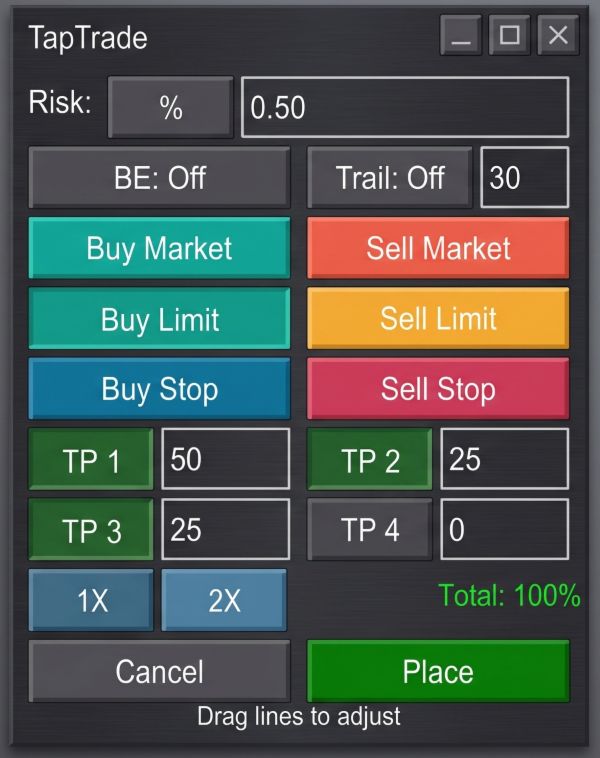
TapTrade is a MetaTrader 5 chart trading assistant (Expert Advisor). It provides an on-chart control panel and draggable lines for Entry, Stop Loss, Take Profit, and Break-Even so you can place market and pending orders with clear risk control. Semi-manual: you decide when to click Place. No trading signals and no guaranteed profit.

What it does

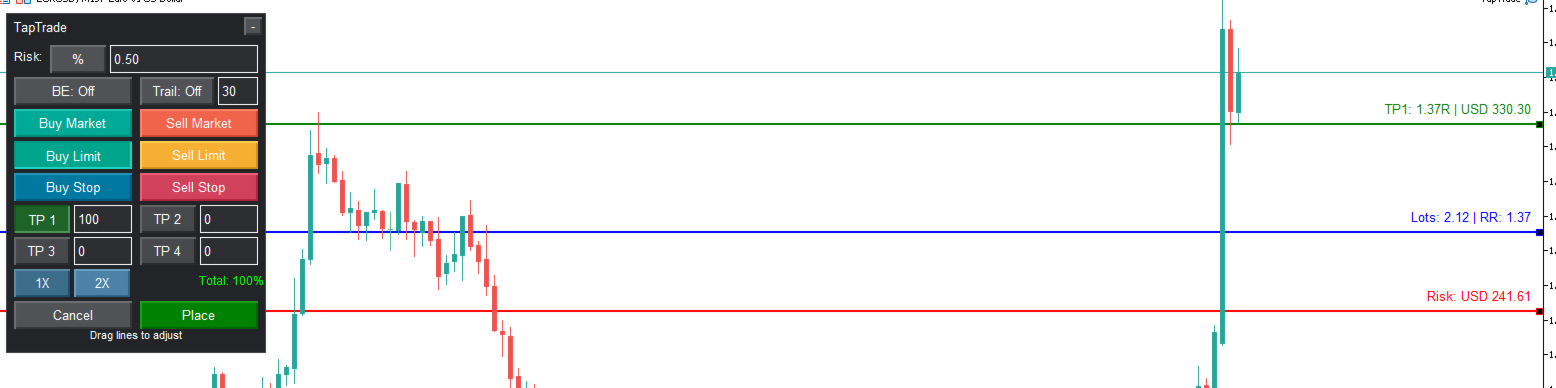
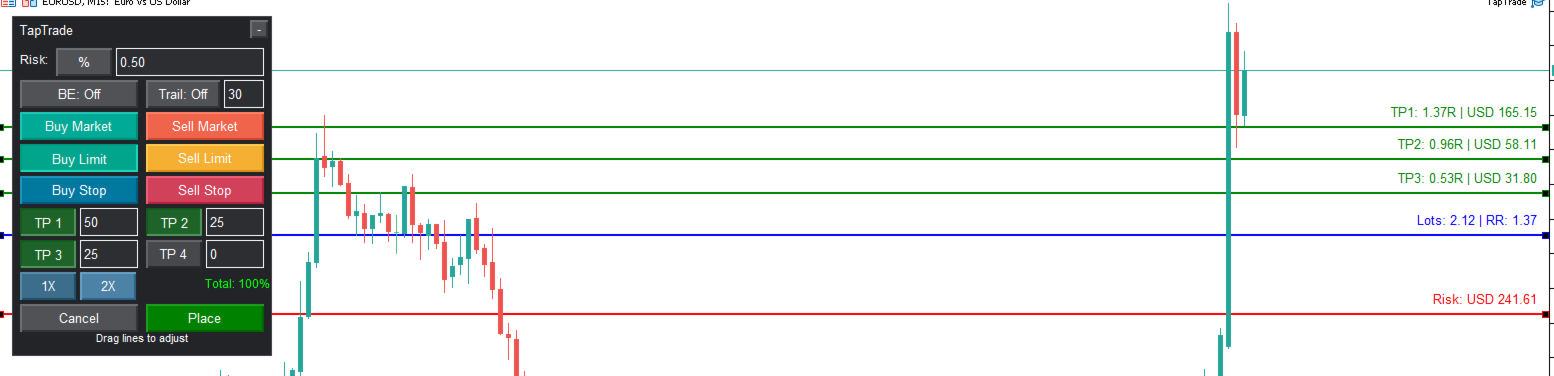
Attach TapTrade to any chart. Choose order type (Buy/Sell Market, Limit, Stop), set risk mode and value, drag the chart lines to your levels, select TP splits, then press Place. Cancel clears the current setup without touching existing positions.

Key features

  • Interactive panel: risk mode, risk value, Break-Even toggle, six order buttons, four TP slots, Cancel / Place
  • Draggable chart lines: Entry (blue), SL (red), TP (green), BE (orange)
  • Multi-TP split by how many TP levels are enabled:
    • 1 TP: 100%
    • 2 TP: 50% / 50%
    • 3 TP: 50% / 25% / 25%
    • 4 TP: 25% / 25% / 25% / 25%
  • Risk modes: $ fixed money, % of equity, L fixed lots
  • Break-Even: after trigger, move SL to open (optional spread cover)
  • Optional trailing stop inputs
  • Panel minimize to a small tab
  • Per-chart settings saved and restored
  • Pending entry protection when Entry is too close to market price
  • Manages only its own Magic Number orders

How to use

  1. Attach TapTrade to the chart and enable Algo Trading.
  2. Select direction/type: Buy/Sell Market, Limit, or Stop.
  3. Set risk: $, %, or L, then enter the value.
  4. Drag lines: Entry, SL, TP, and optional BE.
  5. Enable TP1–TP4 as needed (volume split is automatic).
  6. Click Place to send the order from the line prices.
  7. Click Cancel to clear the setup (does not close open trades).

Main inputs

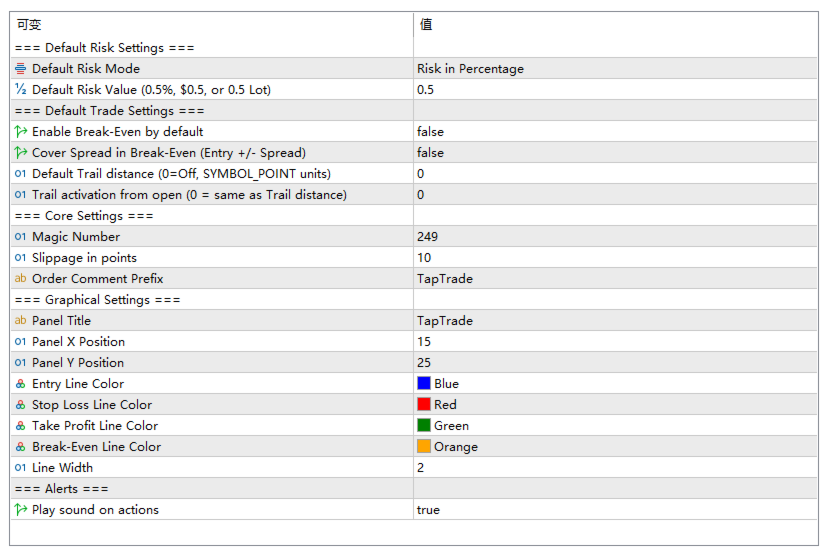
  • Default Risk — mode and value
  • Default Trade — BE on/off, cover spread in BE, trail settings
  • Core — Magic Number, Slippage, Order comment prefix
  • Graphical — Panel title, position, line colors and width
  • Alerts — Sound on actions

Notes

  • Chart line prices are the source of truth for order placement.
  • Market orders use current Bid/Ask.
  • Test thoroughly on a demo account before live use.
  • Trading involves risk. This tool does not guarantee results.

Version 1.00 — Initial release.
Recommended products
Noetrix Guard
Julien Jeremy Rodrigue Gazagnaire
# Noetrix Guard Noetrix Guard is a native MetaTrader 5 account-risk dashboard. It presents daily trading P/L, configurable loss limits, EOD trailing loss, account drawdown, position risk and margin exposure in one on-chart interface. The Expert Advisor does not generate signals and never opens a speculative position. Monitoring works with Algo Trading disabled. Optional protective actions are locked by default and require both an explicit input change and an on-chart confirmation. ## Main fu
FREE
This is a RISK MANAGER utility for MetaTrader. To activate it, after downloading it, you must enable all autotrading controls on MetaTrader, as with EXPERT ADVISORS. The user must enter control settings as indicated in the indicator properties, which initially have default data. RISK MANAGER will perform checks and display pop-up alerts when certain behaviors exceed the user-entered settings. It's free; use it, try it, develop it, or contribute ideas. It's just a utility; the programmer assumes
FREE
Risk Manager - Equity and Trade Protection Risk Manager is a utility Expert Advisor for MetaTrader 5 that monitors open positions and account equity and closes trades when predefined risk limits are reached. The EA does not open trades. It can run alongside manual trading, signal services, or other Expert Advisors and manages risk by closing positions when defined thresholds are reached. The program operates using two independent modules. Per-trade profit and loss monitoring Account equity monit
FREE
RR Trade Assistant
Calvin Andile Mahlangu
5 (1)
RR Trade Assistant is a utility Expert Advisor for MetaTrader 5 designed to help traders visually define trades and manage risk efficiently. This tool combines a graphical risk-reward interface with manual trade execution, allowing traders to easily set trade parameters directly on the chart. Users can define Entry, Stop-Loss, and Take-Profit levels, calculate lot size based on risk percentage, and execute trades directly from the control panel. Key Features Visual Risk-Reward Tool Drag rectang
FREE
DynamicTrader 1
Markus Christer Ekengren
Smart Trade Manager EA – Simple, Visual, and Risk-Based Trading Take control of your trades with ease! This free Expert Advisor is designed for traders who want a fast, intuitive, and risk-based way to manage entries directly from the chart. Risk-Based Position Sizing – Just set your preferred % risk in the EA settings, and lot size is calculated automatically. One-Click Trading – Place trades instantly with two simple buttons: BUY or SELL . Interactive SL & TP Lines – Drag and drop stop-
FREE
NAS100 Auto Sl And TP MT5
Moustapha Boulouz
5 (2)
Introducing NAS100 Auto SL and TP Maker for MT5: Never miss setting StopLoss and TakeProfit again with our NAS100 Auto SL and TP Maker, an indispensable assistant for traders navigating the Nasdaq 100 market on MetaTrader 5. This tool is designed for those who seek a seamless solution to automate the management of StopLoss and TakeProfit levels. Key Features: Effortless Automation: Automatically monitors Nasdaq 100 trades without StopLoss and/or TakeProfit. Dynamically adjusts levels based on u
FREE
HotkeyTrader Pro — Expert Advisor for MetaTrader 5 HotkeyTrader Pro is an Expert Advisor that allows executing and managing trades through configurable keyboard shortcuts, with integrated risk management tools and position tracking. Keyboard execution The EA includes 11 predefined keyboard shortcuts for opening buy and sell orders, managing open positions, and executing partial or full closes. It is compatible with external macro software such as AutoHotKey and with programmable input devices. R
FREE
GOM Trade Manager
Wannapach Chinnaprapa
GOM Trade Manager helps you execute trades the way you want it. Works on all instruments Forex, Commodities, & Crypto. It helps you with lot calculations, spread addition and balance calculations so you can just focus on actual trading. For full automatic planned management, stackable triggers and spread widening protection >> check out GOM Trade Manager Pro . ------------------------------------------NOTABLE FEATURES------------------------------------------ You set everything based on bid
FREE
StatsMood Position Sizer Short Description Calculate position size instantly based on your risk and stop loss distance. Simple, fast and precise. Full Description Position sizing is one of the most important aspects of risk management. StatsMood Position Sizer is a free MT4/MT5 indicator that helps you calculate the appropriate lot size in real time based on your account balance, selected risk percentage and stop loss distance. It removes the need for manual calculations and helps maintain cons
FREE
SuperTrend Signals
Quang Huy Quach
5 (1)
The Supertrend indicator is a trend-following technical analysis tool designed to help traders identify the direction of market trends and potential entry/exit points. It operates based on price data and Average True Range (ATR) to create a dynamic signal line that changes color depending on the current trend. Green color: Indicates an uptrend. Red color: Indicates a downtrend. Supertrend is a useful indicator for both short-term and long-term trading, helping to filter out market noise and focu
FREE
Imagine flying a real aircraft without ever stepping into a flight simulator. That's what trading is like. You have to simulate your strategy before you can take it to a live market. It is good if you can simulate things speedily before even stepping into any live market, or before coming up with an automated system.  People don't have all day to stare at a higher timeframe chart until the entry signal finally arrives. That's why I built this so that you can simulate your strategy with speed. Th
FREE
Introduction Welcome to the world of Forex trading, where every tick of the market can be influenced by news events. Introducing our expert advisor for MetaTrader, your ultimate tool for navigating the complexities of news trading. This innovative advisor is specifically designed to automate your trading strategy during key macroeconomic releases, ensuring you never miss an opportunity.  When important indicators are announced, volatility often spikes, creating potential for profit. Our expert
FREE
How it works –   Base-departure detection — algorithmically finds consolidation bases (overlapping range with compressed volatility) followed by displacement departures. Patterns: Drop-Base-Rally, Rally-Base-Drop, Rally-Base-Rally, Drop-Base-Drop — detected structurally, not by candle names. –   Strength score (0–100) — from departure velocity, time-at-base, freshness (each revisit decays the score), higher-timeframe confluence and origin volume. –   Lifecycle — Fresh, Tested (decaying), Broken
FREE
Look Back My Trading History MT5
Sa No Tsuyoshi Kokorozashi
5 (2)
Description This is a utility tool for MT5 reminding traders of all the entry points by highlighting trading history. For those who just started to learn trading, one of the most efficient tips to improve their trading skill is to look back their own trading history. However, trade history arrow shown on MT5 chart is simply too small to find out, which will keep traders away from reviewing their trade, especially stupid mistakes like overtrading. By clearly showing their trade history and face i
FREE
IMPORTANT NOTE: This is a professional Trade Management Utility and on-chart assistant. It is NOT an automated trading robot. It does not open trades on its own. The UltraFast Trade Manager MT5 is the ultimate execution and risk-management suite designed to give you absolute control over your manual and algorithmic trades. When managing multiple positions, calculating complex net break-even points, or constantly monitoring the economic calendar, hesitation can lead to costly mistakes. This utili
FREE
ClickDesk Trader
Tommy De Jesus Rosario Santiago
ClickDesk Trader is a fast, manual trade-management desk for MetaTrader 5. Open, close and protect your trades in one click — or with keyboard hotkeys — while a clean HUD keeps your P&L, risk and market pressure in view. It does not decide for you; you stay in full control. One-click desk & hotkeys - Buy / Sell, Close All, Close Buys, Close Sells — buttons and hotkeys   (B, S, C, Q, W). - Lot stepping on the fly (L / K) with a hard lot cap. Glowing toggle tools (press again to undo) - SL/T
FREE
Easy GOLD MT5
Franck Martin
3.87 (45)
Easy Gold is the latest addition to the BotGPT family. It is surprising and very powerful. It is ideal for beginners due to its simplicity.  There is absolutely nothing to do, it's 100% automated, simply indicate the percentage of risk you want to take per trade and the EA is ready. Whatever your capital, the EA takes care of everything. Optimized on (XAUUSD).  Unleash all the power with the professional version (AGI Gold) and its connection to the neural network, available in my store. My othe
FREE
Ultima Breakout Pro – Advanced Range Breakout EA with Multi-TP & Trend Filter Account Type: Recommended: ECN/Raw Spread Accounts   (low spreads preferred) Minimum Balance:   $200 (for 0.01 lots) Leverage:   1:30 or higher Not Recommended: High-spread accounts (avoid brokers with >20 pips spread) Micro accounts with high commission Expert Advisor Type: Type: Breakout Trading System Category: Trend & Range Trading Timeframes: M5 (Best Performance), Any Timeframes Symbols: EURUS
FREE
Very often there are situations when you need to quickly close all open positions or close only under a certain condition... The Positions Close script closes open positions according to the selected settings. You can choose to close All positions , only Buy, only Sell You can also choose by which symbols to close positions: by all symbols or only by the current one, on the chart of which the script was thrown There is a filter for closing profitable or unprofitable positions, as well as bo
FREE
This tool for the MetaTrader 5 trading platform allows setting the stop loss of open positions to breakeven (entry price) plus an adjustable distance in points. The stop loss is only adjusted if the position is already in profit. Main functions: Button: A button is displayed on the chart with the text "StopLoss to BreakEven". The color of the button can be customized, by default it is red. User interaction: When you click the button, for all open positions that are in profit, the stop loss i
FREE
Inverse Liquidity Grab Ultimate EA
Stephen Muriithi Muraguri
5 (1)
This EA finds Fair Value Liquidity (FVL) on the chart, tracks when they get mitigated , and then looks for an inversion signal (price “fails” through the zone). When that inversion happens, it places a trade in the opposite direction of the original Liquidity gap (an Inverse FVG approach). It also lets you control when it trades using market sessions , and it can auto-close positions at New York open (all positions or profitable-only). Key advantages Clear, rule-based entries (no guessing): trad
FREE
PROMETHEUS TECHNICAN VERSION Free | By THE SONS A gift from The Sons — no strings, no trial, no expiry. Every trader deserves access to professional-grade market intelligence. That belief is why Prometheus Technical Version exists, and why it costs nothing. Consider it our handshake to the trading community. What You're Getting This is not a simplified tool dressed up as a gift. Prometheus Technican Version is a fully built, institutional-quality technical analysis indicator running a dual-model
FREE
Main Trading Info for MT5
Sergey Batudayev
5 (1)
MetaTrader utility MTI (Main Trading Info) – shows the basic trading information for a trader, namely: average and current spread size Swap size for short and long positions Cost of 1 pip for 1 trading lot Stop Level size (minimum distance for placing pending orders) Time until the end of the current (red) and time until the start of the next (gray) trading session Recommended Robot Scalper -   https://www.mql5.com/en/market/product/77108 The time until the end of the current trading session is
FREE
Xiao Dan Kuai Pao is a fast and clean one-click order panel for MetaTrader 5. Open and manage your trades instantly, with Stop Loss and Take Profit placed automatically — no more typing TP distances by hand. Key features: - One-click buttons: BUY, SELL, CLOSE, BREAK EVEN - Custom Stop Loss and Take Profit (in points) — set any distance you want - Flexible risk/reward — combine SL and TP freely to build any ratio, such as 1:1, 1:2, 1:3, 1:4 or 1:5 - Real-time price display (Bid) - Bar countdown t
Backtesting PRO
Raul Benjamin Correa Reyes
Backtesting PRO: Make a review of the market based on the available history of your broker. Practice your strategies and verify them in seconds. Remember to maintain excellent risk management, check your days and hours of operation. R emember to start it in the shortest period to operate. Any questions or suggestions can be sent to this email: autoeducacion0110@gmail.com
FREE
Free automatic Fibonacci is an indicator that automatically plots a Fibonacci retracement based on the number of bars you select on the BarsToScan setting in the indicator. The Fibonacci is automatically updated in real time as new highest and lowest values appears amongst the selected bars. You can select which level values to be displayed in the indicator settings. You can also select the color of the levels thus enabling the trader to be able to attach the indicator several times with differe
FREE
The CandleStick Scanner is a tool that allow you to perform a   market scan   and search any candlestick pattern that you already created in the current chart, You can perform a quick search in the current chart (500 bars will be scanned),  This is a lite version of  CandleStick Factory for MT5 . The   full version   video can be found here :  https://www.youtube.com/watch?v=fq7pLXqVO94 The  full version  can be purchased here:   https://www.mql5.com/en/market/product/75434 How it works You can
FREE
Telegram Trade Notify
Aleh Piatrenka
5 (7)
Automatically sends real-time  notifications about trade opening, closing, partial closing and modification of MT5 trades to Telegram. The utility supports 16 languages : English, French, German, Indian (Hindi), Indonesian, Italian, Kazakh, Korean, Dutch, Polish, Portuguese, Russian, Spanish, Turkish, Ukrainian, and Vietnamese. You can also use any other language by customizing the notification text. The product is designed for traders who need to receive Telegram notifications without constantl
FREE
J2T Hot Keys
Ivan Pyatkov
5 (4)
Утилита Горячие Клавиши. Работает только на неттинговых типах счетов. Позволяет совершать торговые операции без мыши. Удобно использовать для акций, фьючерсов, валютных пар, криптовалют. В совокупности со стаканом получается полноценный скальперский привод. Реализованные команды : ·          покупка по рынку; ·          продажа по рынку; ·          выставление лимитного ордера на покупку с заданным отступом (может быть отрицательным) от цены Бид; ·          выставление лимитного ордера на прода
FREE
no Trade operation, Robot Set auto SL to every manually Trade from a Phone Automatic Phone TradeManager Need just Set on 1 Symbol Auto BE Trigger is added that immediately sets a stop-loss for every () But does NOT calculate position size based on risk, allows the fixed  SL to   adjusted dynamically drag on Chart or Menu. It protects capital around the clock, reduces emotional mistakes, and ensures consistent risk management.
FREE
Buyers of this product also purchase
Trade Assistant MT5
Evgeniy Kravchenko
4.41 (216)
It helps to calculate the risk per trade, the easy installation of a new order, order management with partial closing functions, trailing stop of 7 types and other useful functions. Additional materials and instructions Installation instructions - Application instructions - Trial version of the application for a demo account Line function -   shows on the chart the Opening line, Stop Loss, Take Profit. With this function it is easy to set a new order and see its additional characteristics bef
Forex Trade Manager MT5
InvestSoft
4.98 (676)
Trade Manager MT5 is an advanced position size calculator and trade management tool for MetaTrader 5, designed to help traders plan trades faster, control risk more precisely, and manage open positions directly from the chart. It combines order placement, risk based lot calculation, Stop Loss and Take Profit management, Break Even, Trailing Stop, Partial Close, Equity Protection, and external trade management in one panel. Whether you trade forex, indices, metals, commodities, crypto, or future
FarmedHedge Pair Trading Dashboard
Tanapisit Tepawarapruek
5 (4)
Farmed Hedge Yield Farming | All Markets (Manual - Hybrid - Semi/Automated EA) VERIFIED TRADING RESULTS - Farmed Hedge Yield Axi Copy:  https://www.mql5.com/en/signals/2356376 - Farmed Hedge Yield Exn Copy:   https://www.mql5.com/en/signals/2356404 - Farmed Hedge Yield V Copy:  https://www.mql5.com/en/signals/2357156 IMPORTANT NOTICE: FarmedHedge is a MANUAL-FOCUSED TRADING UTILITY ,not a fully automated EA. Results shown on this Signal include manual trades and overall strategic management.
Beta Release The Telegram to MT5 Signal Trader is nearly at the official alpha release. Some features are still under development and you may encounter minor bugs. If you experience issues, please report them, your feedback helps improve the software for everyone. Telegram to MT5 Signal Trader is a powerful tool that automatically copies trading signals from Telegram channels or groups directly to your MetaTrader 5 account. It supports both public and private Telegram channels, and you can conn

Local Trade Copier EA MT5
Juvenille Emperor Limited
4.94 (148)
Local Trade Copier EA MT5 is a fast and flexible trade copier for copying and managing trades between multiple MetaTrader 5 accounts on the same Windows computer or Windows VPS. It combines local trade synchronization with Receiver-side controls for lot sizing, risk management, trade filtering, symbol mapping, trade management and account protection. Set up your Transmitter and Receiver terminals in about 1 minute and copy manual or EA trades between accounts at the same or different brokers. U
Telegram to MT5 MultiChannel Copier
Sergio Marquez Uroz
4.46 (13)
Telegram to MT5 Multi-Channel Copier   automatically copies trading signals from your Telegram channels straight to MetaTrader 5. No bots, no browser extensions, no manual copying. A signal arrives in Telegram and the EA opens the trade in your terminal within seconds. And before you copy a channel, the built-in backtester shows you what that channel would have done in your account. The product has two components: a Windows application that listens to your Telegram channels, and this Expert Advi
TradePanel MT5
Alfiya Fazylova
4.88 (167)
Trade Panel is a multi-functional trading assistant. The app contains over 50 trading functions for manual trading and allows you to automate most trading tasks. Application instructions + video instructions: https://www.mql5.com/en/blogs/post/772292 Trial version of the application for a demo account: https://www.mql5.com/en/blogs/post/750865 How to install the application: https://www.mql5.com/en/blogs/post/756239 How to test the application in visual mode: https://www.mql5.com/en/blogs/post/7
================================================================================ POC BREAKOUT - V20.72. Full Professional Grade Toolkit ================================================================================ POC Breakout is a full MetaTrader 5 trading dashboard for discretionary traders who want breakout signals, Point of Control (POC) context, volume profiles, order flow, market structure, news, alerts, and advanced trade planning in one professional workspace. Attached directly to you
Astro Trade MT5
Indra Maulana
5 (7)
25% discount on the release of the tool: only for the next 3 buyers Send a message to receive a demo version. AstroTrade Trading Assistant AstroTrade is a comprehensive multi-functional trading utility developed for the MetaTrader 5 platform. It integrates essential tools for trade execution, risk management, and technical monitoring into a single unified interface. The application is designed to assist traders in managing their daily operations through a visual and structured environment. Vi
Exp COPYLOT CLIENT for MT5
Vladislav Andruschenko
3.97 (35)
Professional Trade Copier for MetaTrader 5 Fast, professional, and reliable trade copier for MetaTrader . COPYLOT allows you to copy Forex trades between MT4 and MT5 terminals with support for Hedge and Netting accounts. COPYLOT MT5 version supports: - MT5 Hedge to MT5 Hedge - MT5 Hedge to MT5 Netting - MT5 Netting to MT5 Hedge - MT5 Netting to MT5 Netting - MT4 to MT5 Hedge - MT4 to MT5 Netting MT4 version Full Description +DEMO +PDF How To Buy How To Install How to get Log Files H
EA Overfitter
Stephen J Martret
5 (1)
That backtest looks great. But will it still be making money tomorrow, next week, next month? EA Overfitter re-runs your EA on 100 price histories it has never seen. One score tells you if the edge is real. A backtest tells you what an EA did on one price history — the one that happened to occur. What you cannot tell from it is how much of that result was the strategy and how much was the particular path. EA Overfitter answers that. It builds up to 100 synthetic price histories your EA has n
HINN MagicEntry Extra
ALGOFLOW OÜ
4.74 (19)
HINN MAGIC ENTRY – the ultimate tool for entry and position management! SIMPLE. FASTEST. INTUITIVE. MAX AUTOMATED. Place orders by selecting a level directly on the chart! full description   ::  demo-version  :: 60-sec-video-description Key features: - Market, limit, and pending orders - Automatic lot size calculation - Automatic spread and commission accounting - Unlimited partitial take-profits  - Breakeven and trailing stop-loss and take-profit  functions - Invalidation leves - Intuitive, a
Telegram To MT5 Ultra
Mirel Daniel Gheonu
5 (5)
Telegram To MT5 — Signal Copier Turn the trading calls from your Telegram channels into real MT5 orders — automatically, on as many accounts as you like, with risk and rules fully under your control. Telegram To MT5 connects the VIP / signal channels you already follow on Telegram to your MetaTrader 5 terminal. A free companion desktop app reads the messages (even from channels that block bots), and this Expert Advisor executes them on your account — applying your own risk settings, symbol mappi
Strategy Ledger Pro
Abdullah Uygar Tuna
5 (2)
Strategy Ledger Pro is a read-only account analysis panel for MetaTrader 5. It separates account results by Expert Advisor, strategy, symbol, and magic number. Detailed manual  with every feature explained. MetaTrader shows one balance for the whole account. When several Expert Advisors trade together, that balance does not show what each one contributed. Strategy Ledger Pro reads the account history, rebuilds closed positions, assigns them to strategies, and presents the results in one panel.
Premium Trade Manager - The Trade Panel With a Coach Built In Series price: 89 USD until Sunday, 13 September 2026, then 111 USD again. The setup was the easy part. By the third order of the morning the lot size gets worked out in your head, the stop lands where the hand stops, and the numbers due in forty minutes sit in a tab you closed at breakfast. Premium Trade Manager takes that off you: one click sends the order at the size your risk allows, entry, stop and target as draggable lines and th
Signal Trading View to MT5 Pro
Mirel Daniel Gheonu
4.5 (2)
Signal TradingView to MT5 Pro  Instant professional execution between TradingView and MetaTrader 5 Automate your trading strategy with the most robust communication bridge between TradingView alerts and real execution in MT5. Designed for traders who demand speed, flexibility, and impeccable risk management, this Expert Advisor transforms any alert message into a precise market or limit order.   Install and TEST the TRIAL version HERE STRENGTHS AND ADVANTAGES Universal Parsing Engine (Propriet
Power Candles Strategy Scanner - Self-Optimizing Multi-Symbol Setup Finder Power Candles Strategy Scanner runs the same self-optimizing engine that powers the Power Candles indicator - on every symbol in your Market Watch, side by side. One panel tells you which symbols are statistically tradable right now, which strategy wins on each, the optimal Stop Loss / Take Profit pair, and pings you the moment a fresh signal fires. This tool is part of the Stein Investments ecosystem - 18+ tools plus Max
Anchor Trade Manager
Kalinskie Gilliam
5 (9)
Your EAs cannot see each other, but Anchor can. Anchor gives you one place to coordinate your EAs, manage risk, and decide when trading is allowed. It works alongside the trading bots you already use without any changes to them. The Problem One EA opens a trade. Then another starts trading. The next thing you know, you wake up to multiple grids built across your account. Each EA may be doing exactly what it was designed to do, but together they can place far more risk on your account than you in
MT5 to Telegram Signal Provider turns your trading account into a signal provider. Every trade action, whether manual, by EA or from your phone, is instantly sent as a message to Telegram. You can fully customize the format or use a ready-made template for quick setup. [ Demo ] [ Manual ] [ MT4 Version ] [ Discord Version ]     New: [ Telegram To MT5 ] Setup A step by step user guide is available. Key Features Ability to customize order details sent to subscribers You can create a tiered subs
Welcome to ENTRY IN THE ZONE WITH SMC MULTI TIMEFRAME Entry In The Zone and SMC Multi Timeframe is a real-time market analysis tool based on Smart Money Concepts (SMC), designed to analyze market structure, price direction, and key trading zones. It supports both Single-Timeframe Analysis and Multi-Timeframe Analysis, providing a clearer view of the overall market structure across multiple timeframes, with real-time BUY / SELL signals that do not repaint. It is designed to help filter trading op
Seconds Chart MT5
Boris Sedov
4.61 (18)
Seconds Chart is a unique tool for creating second-based charts in MetaTrader 5 . With Seconds Chart , you can construct charts with timeframes set in seconds, providing unparalleled flexibility and precision in analysis that is unavailable with standard minute or hourly charts. For example, the S15 timeframe indicates a chart with candles lasting 15 seconds. You can use any indicators and Expert Advisors that support custom symbols. Working with them is just as convenient as on standard charts.
Trade Dashboard MT5
Fatemeh Ameri
4.95 (132)
Trade Dashboard simplifies how you open, manage, and control your trades, with built-in lot size calculation. It allows you to execute trades, manage risk, and control positions directly on the chart, with tools such as partial close, breakeven, and trailing stop. Designed to reduce manual work and help you stay focused on your trading decisions. A demo version is available for testing. Detailed explanations of features are provided within the MQL5 platform. Installation instructions are include
Footprint Chart Pro — Professional OrderFlow EA for MetaTrader 5 Version 6.34 | Professional tool for real traders | Institutional-Grade Visualization DEMO USERS - PLEASE SELECT EVERY TICK / REAL TICK WHEN TESTING AND YOU HAVE DOWNLOADED HISTORICAL DATA. IF YOU SEE A WAITING SCREEN AND IT IS NOT DOWNLOADING, IT MEANS YOU HAVE LOW HISTORICAL DATA. TRY 1 MIN AND 5 MIN FIRST ON 1 DAY DATA. ONE DAY DATA SHOULD BE THE NEWEST AND MOST CURRENT DATE. PLEASE WAIT UNTIL THE MARKET HAS ROLLED OVER PERIOD.
Grid Manual MT5
Alfiya Fazylova
4.73 (22)
Grid Manual is a trading panel for working with grid strategies. The utility is universal, has flexible settings and an intuitive interface. It works with a grid of orders not only in the direction of averaging losses, but also in the direction of increasing profits. The trader does not need to create and maintain a grid of orders, the utility will do it. It is enough to open an order and the "Grid manual" will automatically create a grid of orders for it and will accompany it until the close. F

Timeless Charts
Samuel Manoel De Souza
5 (8)
Timeless Charts is an all-in-one trading utility for professional traders. It combines custom chart types such as Seconds Charts and Renko with advanced order flow analysis using Footprints , Clusters , Volume Profiles , VWAP studies, and anchored analysis tools for deeper market insight. Trading and position management are handled directly from the chart through an integrated trade management panel , while Market Replay and Virtual Accounts provide environments for practicing trading skills and
FUTURES ORDERFLOW FOOTPRINT CHART Professional OrderFlow EA for MetaTrader 5 Version 1.01| Professional tool for real traders | Institutional-Grade Visualization STRATEGY TESTER USERS - PLEASE SELECT EVERY REAL TICK WHEN TESTING AND YOU HAVE DOWNLOADED HISTORICAL DATA. IF YOU SEE A WAITING SCREEN AND IT IS NOT DOWNLOADING, IT MEANS YOU HAVE LOW HISTORICAL DATA. TRY 1 MIN AND 5 MIN FIRST ON 1 DAY DATA. ONE DAY DATA SHOULD BE THE NEWEST AND MOST CURRENT DATE. PLEASE WAIT UNTIL THE MARKET HAS ROL
Risk Manager Pro MT5
Roman Zhitnik
5 (8)
Risk Manager Pro MT5 is an account protection Expert Advisor for traders who want strict risk control inside MetaTrader 5. The utility monitors your account equity, daily and weekly results, drawdown, open positions, trade count, consecutive losses, and trading hours. When a configured limit is reached, it can automatically close positions, cancel pending orders, stop other EAs, send notifications, or close the terminal. Instead of relying on discipline during a stressful trading session, you de
Trade copier MT5
Alfiya Fazylova
4.6 (55)
Trade Copier is a professional utility designed to copy and synchronize trades between trading accounts. Copying occurs from the account / terminal of the supplier to the account / terminal of the recipient, which are installed on the same computer or VPS . PROMOTION - If you have already purchased the "Trade Copier MT5," you can receive the "Trade Copier MT4" for free (for copying MT4 > MT5 and MT4 < MT5). For more detailed information about the conditions, please contact us via private message
Ultimate Extractor
Clifton Creath
5 (8)
Ultimate Extractor - Professional Trading Analytics for MT5 *****this is the local HTML version of Ultimate Extractor. !!!!!it is not compatible with Cloud!!!! For the online version please reach out to me directly****** Ultimate EA manager also now available when you use cloud pro and above for free!! Ultimate Extractor transforms your MetaTrader 5 trading history into actionable insights with comprehensive analytics, interactive charts, and real-time performance tracking. What It Does Automa
Telegram To MT5 Receiver
Levi Dane Benjamin
4.53 (15)
Copy trade signals from Telegram channels you already belong to (including private and restricted channels) directly into MetaTrader 5. Set your risk rules once, monitor execution, and manage positions with built-in protections designed to reduce mistakes and overtrading. Fast setup : configure your channels, select what to copy, and start within minutes using a clean on-chart interface. User Guide + Demo | MT4 Version Who this is for Traders who follow one or more signal providers and want cons
More from author
HTF Candles PO3
Hao Min
4.83 (6)
Your valuable feedback and ratings are the driving force behind our ongoing efforts to improve. Product Name:   HTF PO3 - Higher Timeframe Candle Display Description HTF PO3 is a powerful visualization tool designed for MetaTrader 5. Its primary function is to draw Higher Timeframe (HTF) candles directly on your main chart, cleanly positioned in the right-hand margin. This allows traders to conduct multi-timeframe analysis without switching charts, providing a clear view of the larger market st
FREE
Easy Timezone is a MetaTrader 5 chart indicator for marking trading time windows (ICT killzones, sessions, or any custom range) with automatic timezone conversion. Default windows follow common New York killzone hours. Visual only — no signals and no trading. What it does Mark up to 8 independent time windows on the chart. Each window has its own name, start/end time, color, and on/off switch. Enter times in the timezone you choose (New York by default); the indicator converts them to your broke
FREE
Filter:
No reviews
Reply to review