NEXA Ha Pullback System
- Experts
-
Park Seongcheon
 Hello,
My name is Park Sung Chan, a developer specializing in MetaTrader 5 algorithmic trading systems.
I design and research long-term, reliable automated trading models based on the structural characteristics and statistical patterns of financial markets. - Version: 1.0
- Activations: 5
Product Description
NEXA Ha Pullback System is an automated trading Expert Advisor for MetaTrader 5.
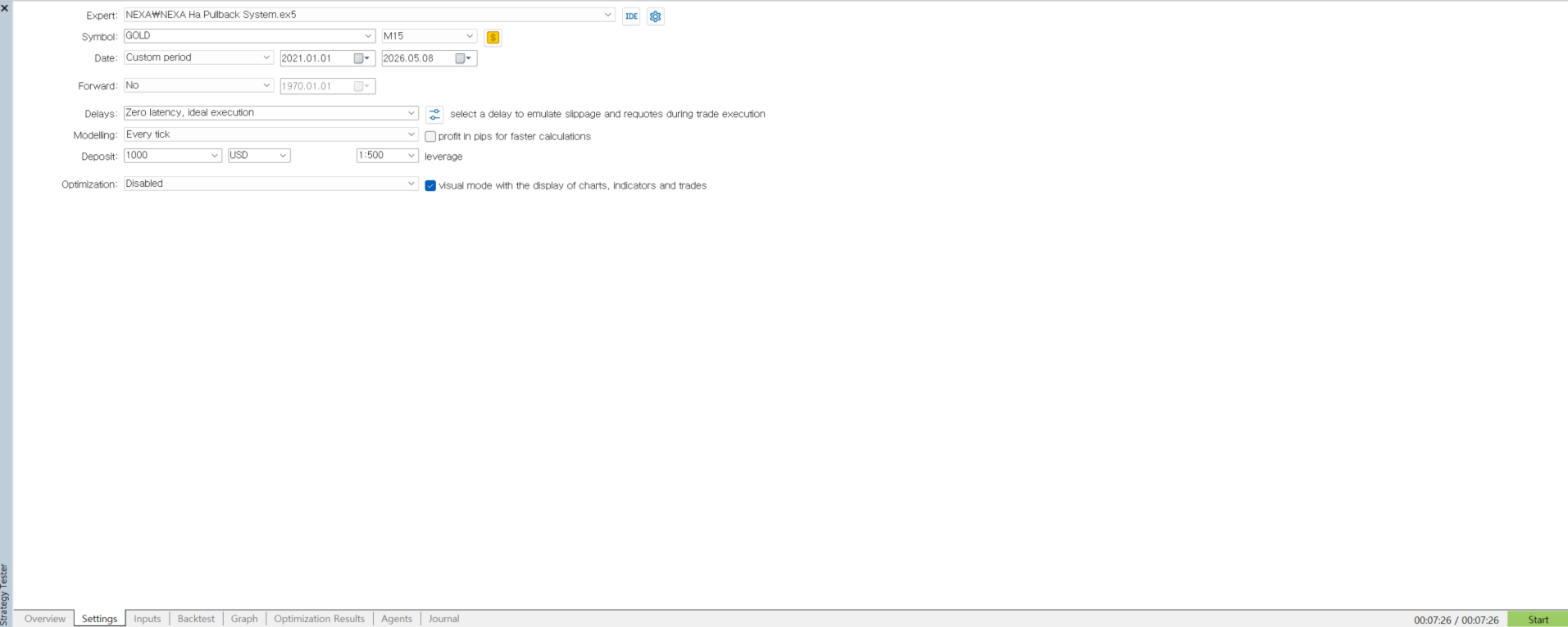
The EA is designed for GOLD M15 trading conditions. It uses a multi-timeframe structure based on D1 and H4 market regime filtering, H1 trend confirmation, and M15 Heiken Ashi pullback triggers.
The main purpose of the system is to reduce random entries and only look for trade setups when the higher timeframe direction and the lower timeframe pullback structure are aligned.
This product does not guarantee profit. Trading results may vary depending on market conditions, spread, execution speed, broker settings, and user configuration.
Main Concept
NEXA Ha Pullback System combines trend direction, pullback structure, volatility, and execution filters.
The EA checks the broader market condition first. D1 and H4 are used to define the market regime. H1 is used to confirm trend direction. M15 is used to detect Heiken Ashi pullback conditions, RSI recovery, candle quality, and ATR-based volatility.
SELL entries include additional filtering to reduce weak sell signals and late sell entries after an extended downward move.
Strategy Structure
The EA follows this general process before opening a trade:
- Check the D1 and H4 market regime.
- Confirm the H1 trend direction with EMA-based conditions.
- Detect a valid M15 Heiken Ashi pullback.
- Confirm RSI recovery or continuation conditions.
- Check candle quality and recent price behavior.
- Apply ATR, ADX, spread, time, and cooldown filters.
- Calculate SL and TP based on the current market structure.
- Send the order only when all required conditions are valid.
The EA does not try to trade every market condition. If the market environment does not meet the required filters, no new position will be opened.
Key Features
NEXA Ha Pullback System includes the following functions:
- Multi-timeframe market regime filtering
- H1 trend direction confirmation
- M15 Heiken Ashi pullback detection
- RSI-based trigger confirmation
- ATR volatility filter
- ADX trend quality filter
- Spread filter
- Trading time filter
- Fixed lot and risk-based lot modes
- Minimum and maximum lot protection
- Minimum and maximum stop distance protection
- StopLevel and FreezeLevel handling
- Same-symbol position limitation
- Break Even management
- Trailing Stop management
- Order execution checks
- Diagnostic counters for testing and analysis
Recommended Environment
Recommended default environment:
Symbol: GOLD
Timeframe: M15
Platform: MetaTrader 5
Trading Mode: Automated trading
Lot Mode: Fixed lot or risk-based lot
The EA may be tested on other symbols or timeframes, but the default design is based on GOLD M15 conditions. Additional testing is required before using other markets.
Input Parameters
General Settings
InpSymbol
Defines the trading symbol. If empty, the EA uses the current chart symbol.
InpMagicNumber
Unique identifier for EA orders.
InpAllowBuy
Allows or disables BUY entries.
InpAllowSell
Allows or disables SELL entries.
Lot & Risk
InpLotMode
Selects the lot calculation method. The EA supports fixed lot and risk-based lot modes.
InpRiskValue
Defines the fixed lot value or the risk percentage, depending on the selected lot mode.
InpMinLot
Minimum allowed lot size.
InpMaxLot
Maximum allowed lot size.
SL / TP
InpSL_ATR_Mult
ATR multiplier used for stop-loss buffer and risk distance calculation.
InpRewardRisk
Reward-to-risk value used for take-profit calculation.
InpMinSLPoints
Minimum allowed stop-loss distance in points.
InpMaxSLPoints
Maximum reference stop-loss distance in points.
Entry Filters
InpMinADX
Minimum ADX value required for entry filtering.
InpMinATRPoints
Minimum ATR value in points.
InpMaxSpreadPoints
Maximum allowed spread in points.
InpCooldownBars
Number of trigger timeframe bars to wait before allowing another entry.
Trading Time Filter
InpUseTimeFilter
Enables or disables the trading time filter.
InpTradeStartHour
Start hour for new trade entries.
InpTradeEndHour
End hour for new trade entries.
InpAllowMonday
Allows trading on Monday.
InpAllowTuesday
Allows trading on Tuesday.
InpAllowWednesday
Allows trading on Wednesday.
InpAllowThursday
Allows trading on Thursday.
InpAllowFriday
Allows trading on Friday.
Execution
InpDeviationPoints
Maximum allowed price deviation in points.
BreakEven
InpUseBreakEven
Enables or disables Break Even management.
InpBETriggerPoints
Legacy input retained for compatibility.
InpBELockPoints
Defines the protection distance after Break Even is applied.
Trailing Stop
InpUseTrailingStop
Enables or disables Trailing Stop management.
InpTrailingStartPoints
Legacy input retained for compatibility.
InpTrailingStepPoints
Minimum trailing distance in points.
How to Use
- Open a GOLD M15 chart in MetaTrader 5.
- Attach the EA to the chart.
- Enable automated trading.
- Check the symbol name, lot settings, spread settings, and trading time settings.
- Test the EA in the Strategy Tester before using it on a live account.
- Start with a low lot size or a demo account when testing a new configuration.
Operational Notes
The EA may stay inactive for a long period if market conditions do not match its filters. This is normal behavior and does not necessarily indicate an error.
Broker conditions may differ between accounts. GOLD symbol names, spread, StopLevel, FreezeLevel, contract size, and tick value can vary depending on the broker. Users should check these conditions before using the EA.
The EA is designed to run without DLL calls or external WebRequest-based services. It does not require an external licensing system, third-party update system, or personal data collection.
Risk Notice
Automated trading involves risk. Past market behavior and Strategy Tester results do not guarantee future performance.
Market volatility, widened spreads, execution delays, low liquidity, and broker restrictions may affect order execution and trading results.
Users should test the EA carefully and choose settings according to their own risk tolerance.
Short Description
NEXA Ha Pullback System is an automated trading Expert Advisor for MetaTrader 5. It uses D1 and H4 regime filtering, H1 trend confirmation, and M15 Heiken Ashi pullback triggers. The EA includes volatility, spread, time, stop distance, Break Even, and Trailing Stop management features.