RSI Trend Pyramid
- Experts
- Version: 1.1
- Activations: 5

RSI Trend Pyramid is a trend-following basket Expert Advisor for MetaTrader 5. It reads the RSI trend on M15, opens a small basket in that direction, adds at most one new level per H1 bar while the trend still agrees and closes the whole basket at a small money target per 0.01 lot. It was built and tested for gold (XAUUSD) on real ticks and can be adjusted for other symbols.
HOW A BASKET WORKS
- Trend: BUY when the M15 RSI is rising and above its average, SELL when it is falling and below it, otherwise the EA waits.
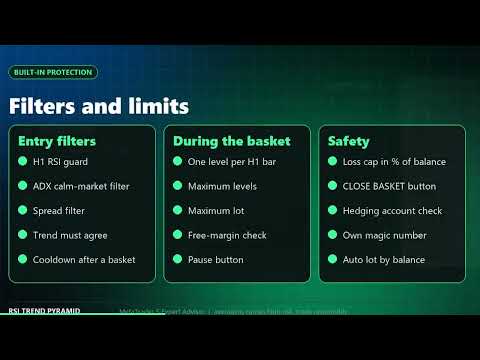
- Entry: a new basket opens on a new H1 bar only when the trend is clear, the H1 RSI is not stretched and the market is calm (ADX).
- Levels: while the trend still agrees, one more position is added per H1 bar. Each level can be a little larger than the previous one (lot multiplier).
- Exit: the whole basket closes together when its profit reaches a money target per 0.01 lot of total volume.
BUILT-IN PROTECTION
- RSI guard: no BUY when the H1 RSI is above 75 and no SELL when it is below 25.
- Calm-market filter (ADX), spread filter, free-margin check, maximum levels and maximum lot.
- Basket loss cap: the basket is closed if the floating loss reaches a percent of the balance (25 percent by default).
- Cooldown after a closed basket and a pause button that stops new levels.
LOT SIZE
- Base lot scales with your balance (auto lot) so the strategy keeps the same proportions on small and large accounts.
- Lot multiplier, maximum levels and maximum lot are inputs.
CONTROL PANEL
- Trend, level, total lots, basket result with a progress bar to the target, today's result and floating drawdown.
- Activity log, PAUSE and CLOSE BASKET buttons, dark and light themes.
12 INTERFACE LANGUAGES
- English, Lithuanian, Russian, Chinese, Spanish, Portuguese, Japanese, German, Korean, French, Italian and Turkish.
- Switch the language with one click on the panel.
IMPORTANT RISK INFORMATION
- This is an averaging strategy. Single positions have no stop loss, so a strong one-way move can create a deep floating drawdown and large losses.
- Use only money you can afford to lose, start on a demo account and use the default settings on a gold chart first.
- A hedging account is required. The EA does nothing on a netting account.
- Past tests do not guarantee future results. No profit is guaranteed.
- The default settings were chosen using recent gold data and may not work in other market conditions. In our own longer tests the floating drawdown reached about 38 percent of the balance.
- You alone are responsible for your trading decisions, the settings you use and any losses. The developer is not liable for losses.
SETUP
- Open a XAUUSD chart (any timeframe), attach the EA and enable Algo Trading.
- Keep the default inputs for the first tests. The base lot is meant for a 10 000 account and scales with the balance.
- Support and updates: we keep improving the product according to customer needs and always take customer feedback into account. Questions are answered within 48 hours.
INPUT PARAMETERS
- Inp_BaseLot / Inp_AutoLot / Inp_AutoLotRef - base lot and balance scaling.
- Inp_LotMult - lot multiplier for each next level.
- Inp_MaxLevels - maximum positions in one basket.
- Inp_TrendTF / Inp_RsiPeriod / Inp_RsiMaPeriod - trend timeframe and RSI settings.
- Inp_CycleTF - timeframe that limits new levels to one per bar.
- Inp_RsiHigh / Inp_RsiLow - H1 RSI limits of the guard.
- Inp_UseAdx / Inp_AdxMax - calm-market filter.
- Inp_MaxSpreadPts / Inp_CooldownSec - spread filter and pause after a closed basket.
- Inp_ProfitPer001 - basket profit target per 0.01 lot.
- Inp_UseLossCap / Inp_LossCapPct - basket loss cap in percent of the balance.
- Inp_Language / Inp_Theme - panel language and theme.
NOTES
- Hedging account required. The EA manages positions of its own magic number on the chart symbol.
- The strategy is designed for gold. Other symbols need their own testing and adjusted settings.
- Trading involves risk and you are responsible for your decisions. Please test on a demo account first.