Copy Trades
- Utilities
-
Aleh Piatrenka
 MQL4/MQL5 developer specializing in Expert Advisors and trading utilities.
Experienced in trade copying (master/slave systems) and trading notification services.
All products are designed and personally used in real trading environments. - Version: 1.0
- Activations: 10
Get full access for just $1.67/month with the 1-year rental. Quick support is available for any questions or assistance you may need.
Copy Trades allows trades to be copied between MT5 accounts located on different computers or VPS servers. Automatically copies BUY/SELL trade openings from one trading account (Master) to another account (Slave) with full SL and TP synchronization, partial close support, and selectable position closing behavior. The terminals do not need to run on the same device.
The utility is suitable for traders using multiple accounts to replicate manual or automated trading, test strategies on different account types, as well as for prop traders, trading teams, and VPS users who require stable and synchronized trade copying without manual intervention. It reduces the need for constant monitoring and saves time.
The Slave account fully mirrors the actions of the Master account and does not make independent trading decisions.
How it works:
The utility operates in real time. Account 1 (Master) opens a BUY position on EURUSD and sets Stop Loss and Take Profit. Within a few seconds, Account 2 (Slave) automatically opens the same position with synchronized SL and TP. Lot size can be calculated proportionally based on the Slave account balance, or set to a fixed 1:1 ratio - this parameter can be configured in the input settings. If the Master account modifies SL or TP on existing positions, or partially or fully closes a position, the Slave repeats these actions. An optional setting allows the Slave to ignore Master close signals and manage position exits independently using its own TP/SL.
Setup:
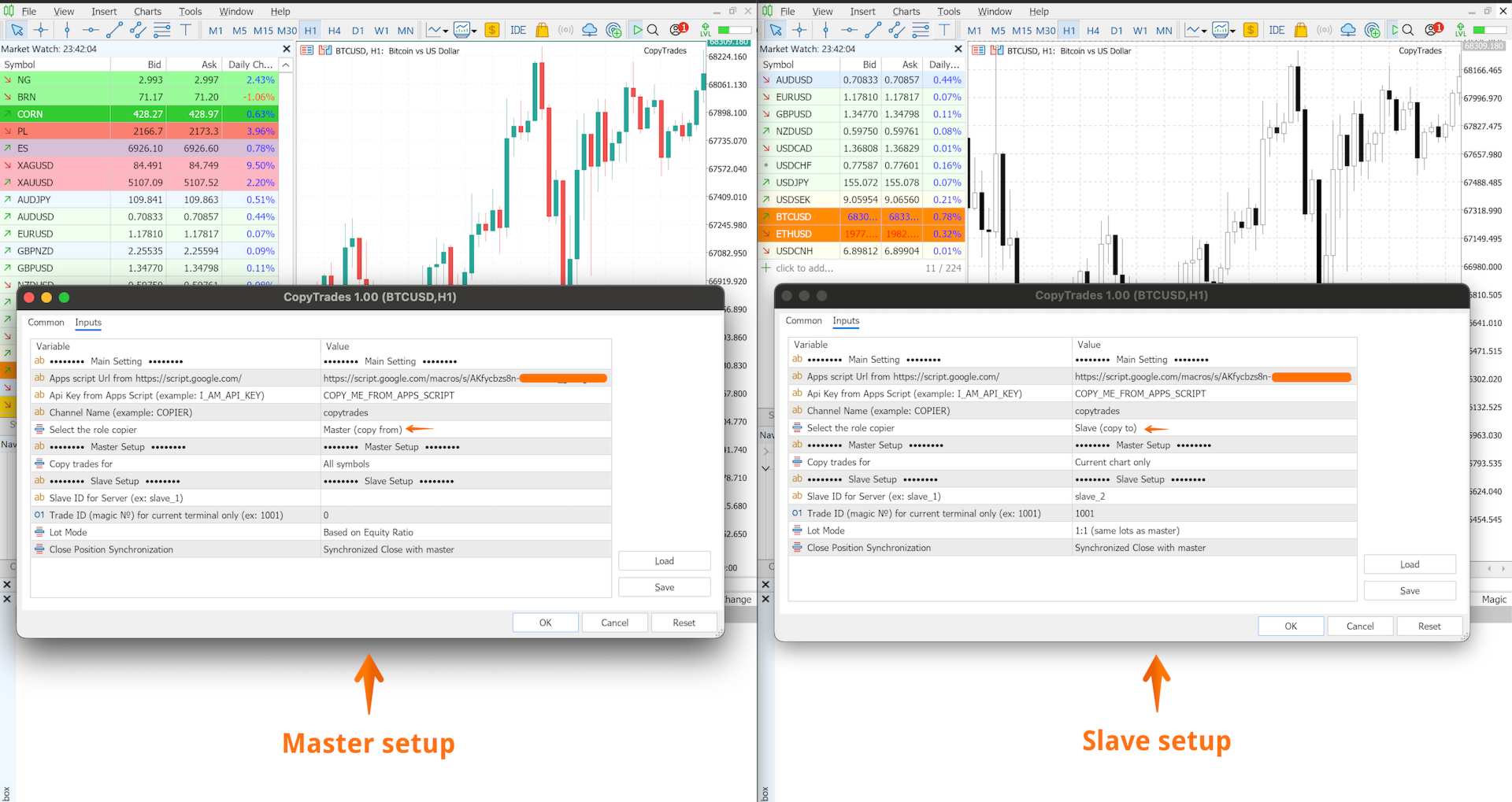
- To copy all trades from the Master account to the Slave account regardless of the trading instrument, attach the utility to any chart, select the Master role, set a Channel Name, and enable the All Symbols parameter. On the Slave account, attach the utility to any chart, select the Slave role, and enter the same Channel Name - trades will automatically be copied for all symbols.
- To copy specific instruments only (for example EURUSD and XAUUSD), attach the utility to each corresponding chart on the Master account and enable the Current Chart Only parameter for each Master instance. On the Slave account, attach the utility to charts of the same instruments (EURUSD and XAUUSD). Use a separate Channel Name for each Master–Slave pair.
Important:
- Only one Slave account is supported per Channel Name
- Pending order copying is not supported
- Recommended timeframe: M5 and higher
- If the market on the Slave account is closed when a trade is opened on the Master account, the trade may not be copied (depends on broker conditions)
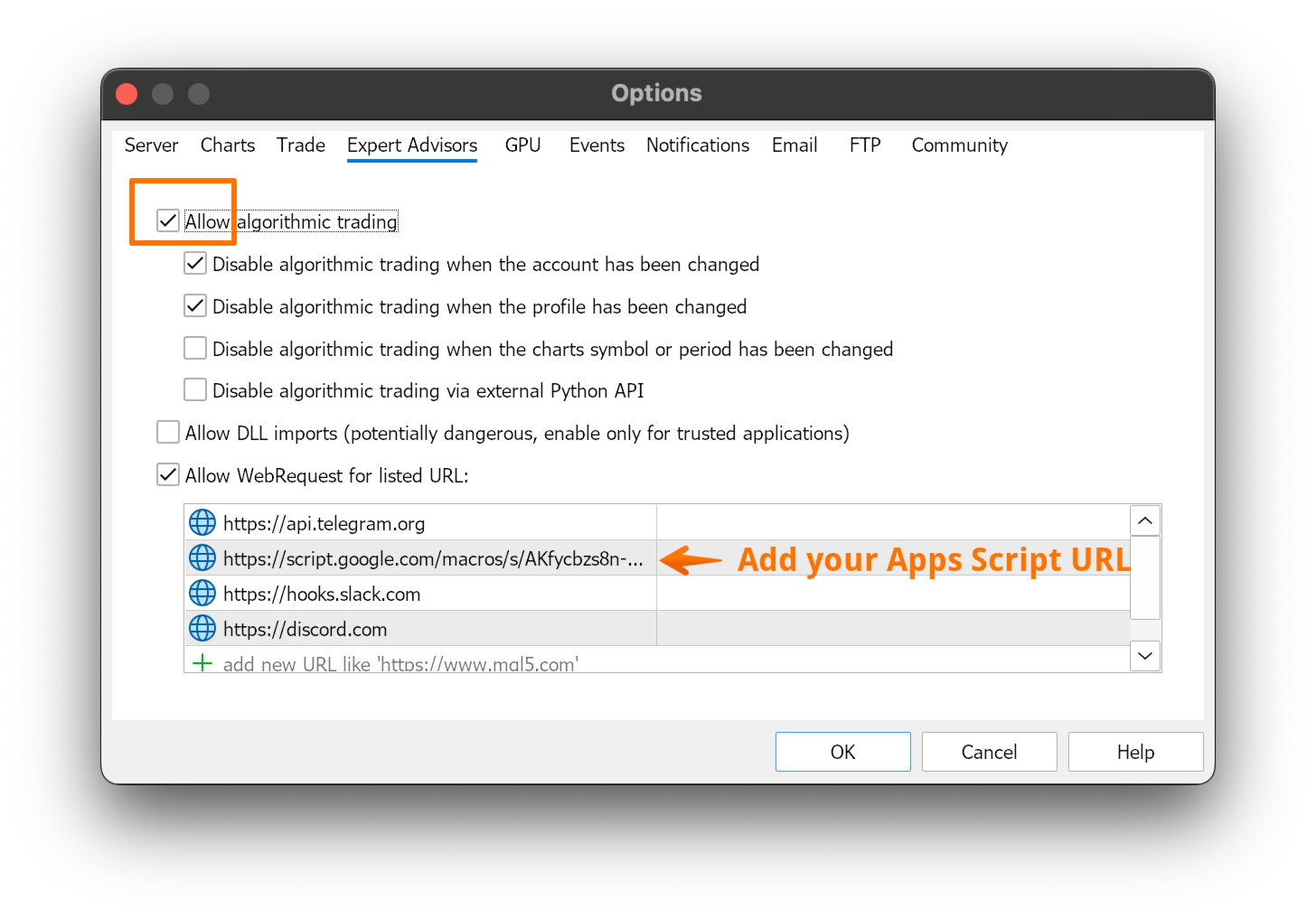
Detailed setup instructions are available in the Blog section on MQL5
If you have any difficulties during the setup, feel free to send me a private message. I will be happy to help you configure the utility step by step.If you find this tool useful, a review would be greatly appreciated.
Note: Pricing may change in the future.