Copy Trades
- 유틸리티
-
Aleh Piatrenka
 MQL4/MQL5 developer specializing in Expert Advisors and trading utilities.
Experienced in trade copying (master/slave systems) and trading notification services.
All products are designed and personally used in real trading environments. - 버전: 1.0
- 활성화: 10
참고: 현재 이 제품은 무료로 제공됩니다. 향후 버전은 유료로 전환될 수 있습니다.
이 유틸리티는 한 거래 계좌(Master)에서 다른 계좌(Slave)로 BUY/SELL 거래 개시를 자동으로 복사하며, SL 및 TP의 완전한 동기화, 부분 청산 지원, 그리고 선택 가능한 포지션 종료 동작을 제공합니다. Copy Trades는 서로 다른 컴퓨터나 VPS 서버에서 실행 중인 MT5 계좌 간 거래 복사를 가능하게 합니다. 터미널은 동일한 장치에서 실행될 필요가 없습니다.
이 유틸리티는 여러 계좌를 사용하여 수동 또는 자동 매매를 복제하려는 트레이더, 다양한 계좌 유형에서 전략을 테스트하려는 트레이더뿐만 아니라 안정적이고 동기화된 거래 복사가 필요한 프로프 트레이더, 트레이딩 팀 및 VPS 사용자에게 적합합니다. 지속적인 모니터링의 필요성을 줄이고 시간을 절약할 수 있습니다.
Slave 계좌는 Master 계좌의 동작을 완전히 그대로 반영하며 독립적으로 거래 결정을 내리지 않습니다.
작동 방식:
이 유틸리티는 실시간으로 작동합니다. 계좌 1(Master)이 EURUSD에서 BUY 포지션을 열고 Stop Loss와 Take Profit을 설정하면, 몇 초 내에 계좌 2(Slave)가 동일한 포지션을 자동으로 열고 SL 및 TP가 동기화됩니다. 로트 크기는 Slave 계좌 잔액에 비례하여 계산하거나 고정된 1:1 비율로 설정할 수 있습니다. 이 параметр는 입력 설정에서 구성할 수 있습니다.
Master 계좌가 기존 포지션의 SL 또는 TP를 수정하거나 포지션을 부분 또는 전체 청산할 경우, Slave 계좌는 동일한 동작을 반복합니다. 선택적 설정을 통해 Slave가 Master의 청산 신호를 무시하고 자체 TP/SL을 사용하여 포지션 종료를 독립적으로 관리할 수도 있습니다.
설정 방법:
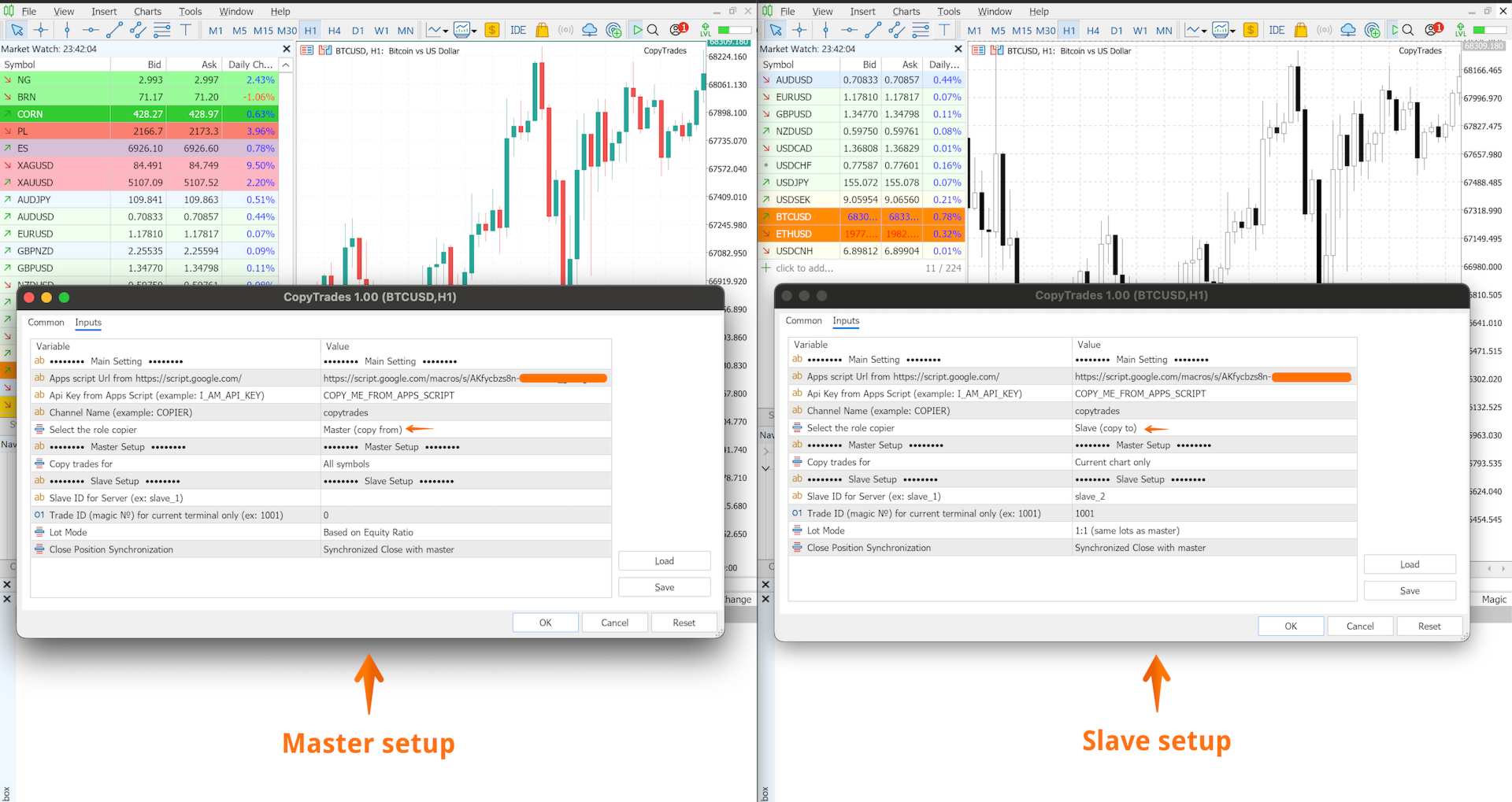
- 거래 상품과 관계없이 Master 계좌의 모든 거래를 Slave 계좌로 복사하려면, 임의의 차트에 유틸리티를 추가하고 Master 역할을 선택한 후 Channel Name을 설정하고 All Symbols 파라미터를 활성화합니다. Slave 계좌에서는 임의의 차트에 유틸리티를 추가하고 Slave 역할을 선택한 뒤 동일한 Channel Name을 입력합니다. 그러면 모든 심볼의 거래가 자동으로 복사됩니다.
- 특정 상품만 복사하려는 경우(예: EURUSD 및 XAUUSD), Master 계좌의 각 해당 차트에 유틸리티를 추가하고 각 Master 인스턴스에서 Current Chart Only 파라미터를 활성화합니다. Slave 계좌에서는 동일한 상품(EURUSD 및 XAUUSD)의 차트에 유틸리티를 추가합니다. 각 Master–Slave 쌍마다 별도의 Channel Name을 사용해야 합니다.
중요:
• 하나의 Channel Name에는 하나의 Slave 계좌만 지원됩니다
• 대기 주문(Pending Orders) 복사는 지원되지 않습니다
• 권장 시간 프레임: M5 이상
• Master 계좌에서 거래가 열릴 때 Slave 계좌의 시장이 닫혀 있는 경우, 거래가 복사되지 않을 수 있습니다(브로커 조건에 따라 다름)
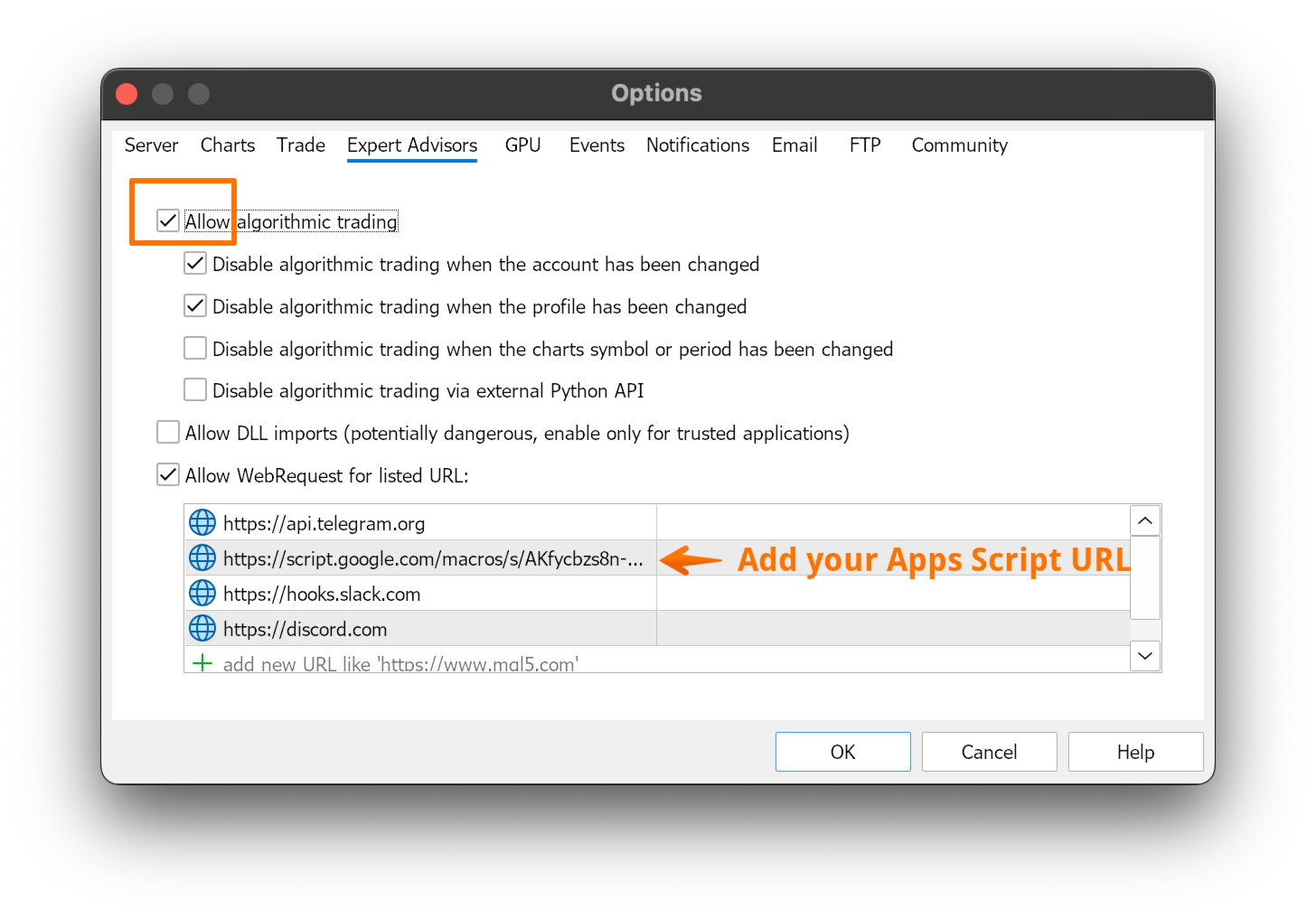
자세한 설정 방법은 MQL5의 Blog 섹션에서 확인할 수 있습니다.
설정 중 어려움이 있다면 언제든지 개인 메시지를 보내 주세요. 유틸리티를 단계별로 설정할 수 있도록 기꺼이 도와드리겠습니다.
이 도구가 유용하다고 생각되시면 리뷰를 남겨주시면 감사하겠습니다.
참고: 이 제품은 현재 무료로 제공되고 있습니다. 향후 가격이 변경될 수 있습니다.