Copy Trades
- Yardımcı programlar
-
Aleh Piatrenka
 MQL4/MQL5 developer specializing in Expert Advisors and trading utilities.
Experienced in trade copying (master/slave systems) and trading notification services.
All products are designed and personally used in real trading environments. - Sürüm: 1.0
- Etkinleştirmeler: 10
NOT! Bu ürün şu anda ücretsiz olarak sunulmaktadır. Gelecekteki sürümler ücretli olabilir.
Copy Trades, farklı bilgisayarlarda veya VPS sunucularında bulunan MT5 hesapları arasında işlemlerin kopyalanmasına olanak tanır. Bir işlem hesabından (Master) başka bir hesaba (Slave) BUY/SELL işlemlerinin açılışını otomatik olarak kopyalar. SL ve TP tam senkronizasyonu, kısmi kapatma desteği ve seçilebilir pozisyon kapatma davranışı sunar. Terminallerin aynı cihaz üzerinde çalışması gerekmez.
Bu araç, manuel veya otomatik işlemleri çoğaltmak için birden fazla hesap kullanan traderlar, farklı hesap türlerinde stratejileri test etmek isteyenler, ayrıca manuel müdahale olmadan stabil ve senkronize işlem kopyalama ihtiyacı olan prop traderlar, trading ekipleri ve VPS kullanıcıları için uygundur. Sürekli izleme ihtiyacını azaltır ve zaman kazandırır.
Slave hesabı, Master hesabının işlemlerini tamamen yansıtır ve bağımsız işlem kararları almaz.
Nasıl çalışır:
Araç gerçek zamanlı olarak çalışır. Hesap 1 (Master) EURUSD üzerinde bir BUY pozisyonu açar ve Stop Loss ile Take Profit belirler. Birkaç saniye içinde Hesap 2 (Slave) aynı pozisyonu otomatik olarak açar ve SL ile TP senkronize edilir. Lot büyüklüğü Slave hesabının bakiyesine orantılı olarak hesaplanabilir veya sabit 1:1 oranına ayarlanabilir - bu parametre giriş ayarlarında yapılandırılabilir. Master hesabı mevcut pozisyonların SL veya TP değerlerini değiştirdiğinde ya da pozisyonu kısmen veya tamamen kapattığında, Slave hesabı bu işlemleri tekrarlar. İsteğe bağlı bir ayar sayesinde Slave, Master’ın kapatma sinyallerini görmezden gelebilir ve pozisyon çıkışlarını kendi TP/SL değerlerine göre bağımsız olarak yönetebilir.
Kurulum:
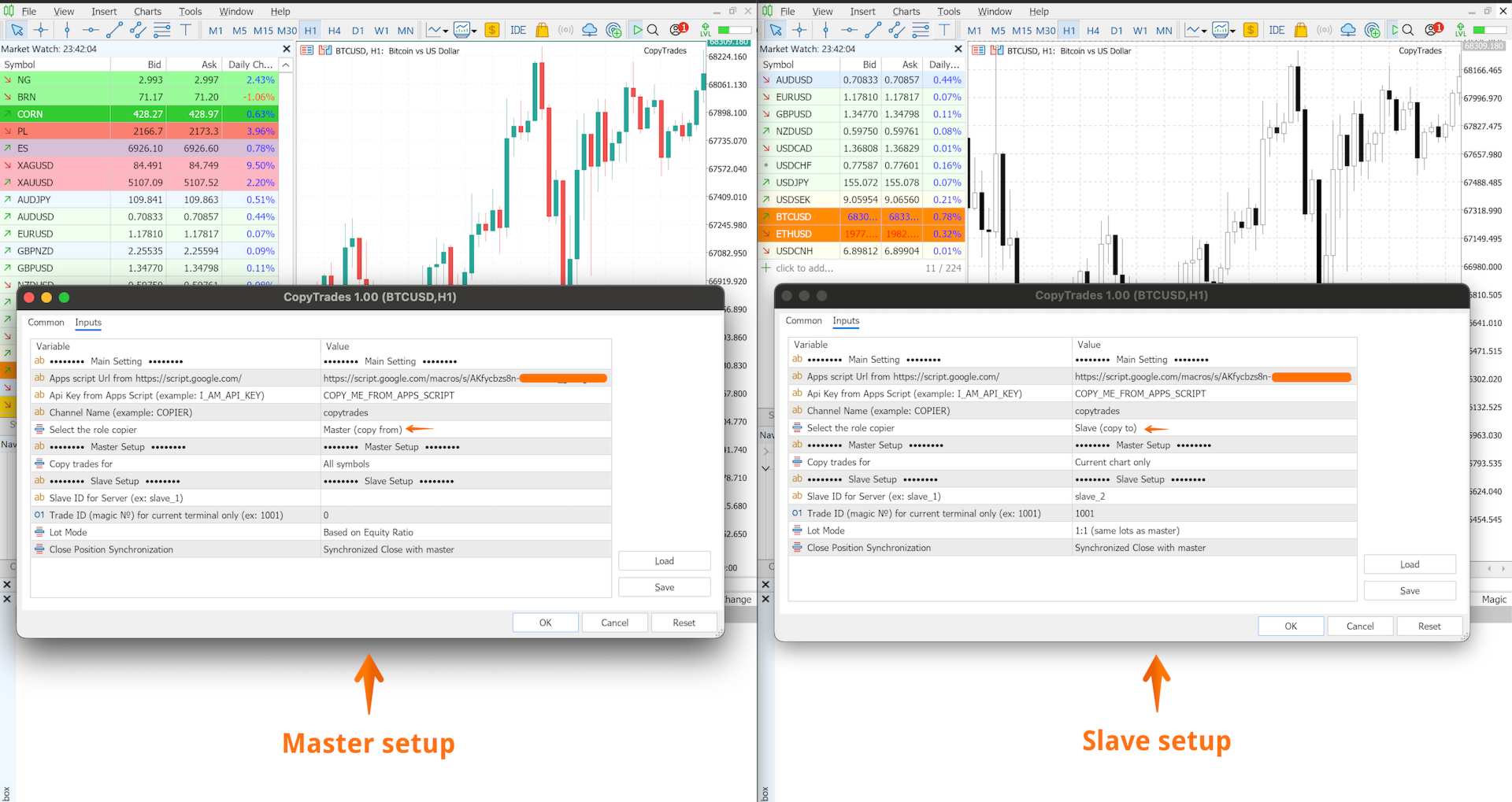
- Master hesabındaki tüm işlemleri işlem enstrümanından bağımsız olarak Slave hesabına kopyalamak için, aracı herhangi bir grafiğe ekleyin, Master rolünü seçin, bir Channel Name belirleyin ve All Symbols parametresini etkinleştirin. Slave hesabında ise aracı herhangi bir grafiğe ekleyin, Slave rolünü seçin ve aynı Channel Name değerini girin - işlemler otomatik olarak tüm semboller için kopyalanacaktır.
- Sadece belirli enstrümanları kopyalamak için (örneğin EURUSD ve XAUUSD), aracı Master hesabında ilgili her grafiğe ekleyin ve her Master örneği için Current Chart Only parametresini etkinleştirin. Slave hesabında ise aracı aynı enstrümanların (EURUSD ve XAUUSD) grafiklerine ekleyin. Her Master–Slave çifti için ayrı bir Channel Name kullanın.
Önemli:
- Her Channel Name için yalnızca bir Slave hesabı desteklenir
- Bekleyen emirlerin (Pending Orders) kopyalanması desteklenmez
- Önerilen zaman dilimi: M5 ve üzeri
- Master hesabında işlem açıldığında Slave hesabında piyasa kapalıysa işlem kopyalanmayabilir (aracı kurum koşullarına bağlıdır)
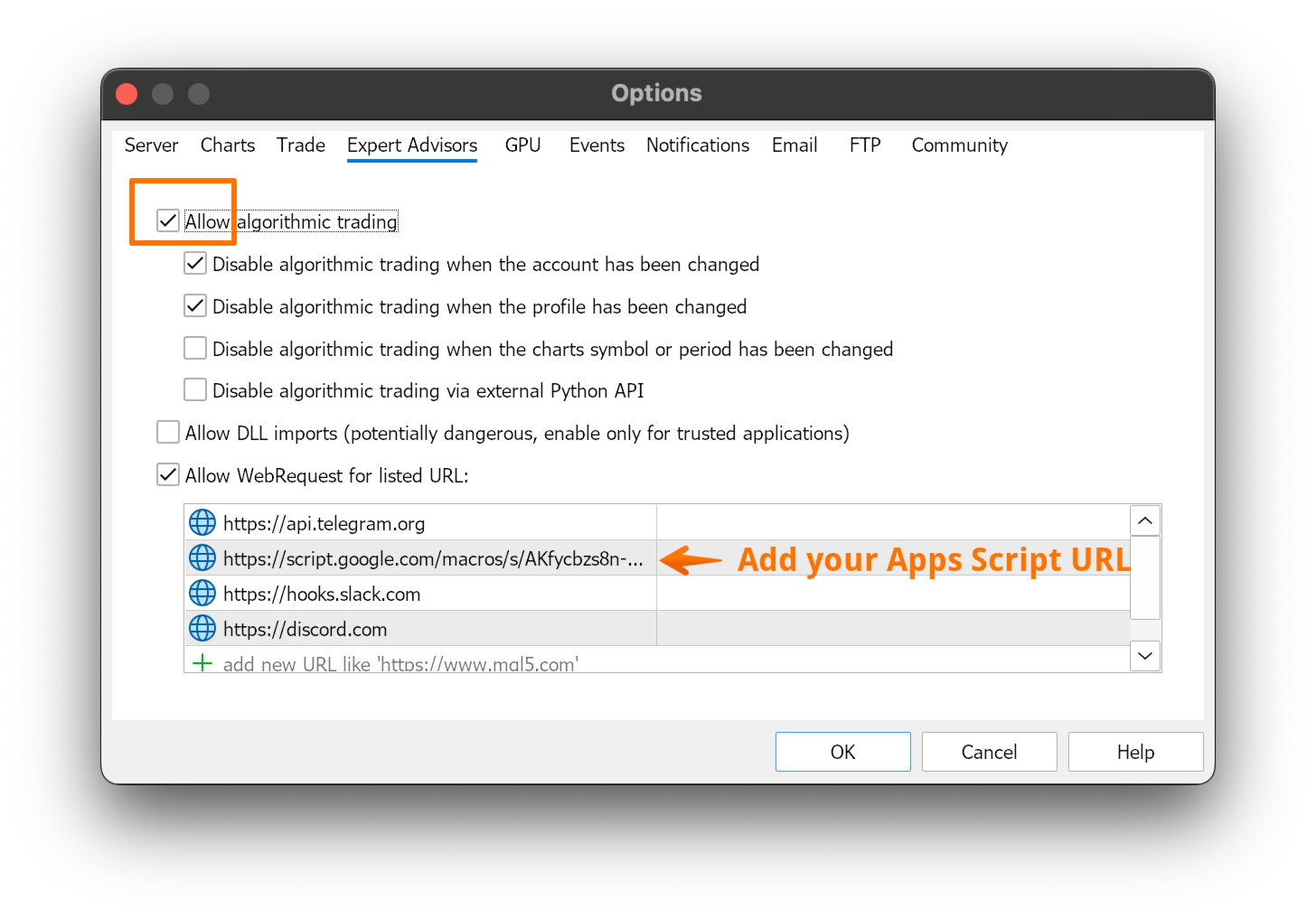
Detaylı kurulum talimatları MQL5 Blog bölümünde mevcuttur.
Kurulum sırasında herhangi bir sorun yaşarsanız, bana özel mesaj göndermekten çekinmeyin. Aracı adım adım yapılandırmanıza yardımcı olmaktan memnuniyet duyarım.Bu aracı faydalı bulursanız, bir değerlendirme bırakmanız çok memnuniyet verici olacaktır.
Not: Bu ürün şu anda ücretsiz olarak sunulmaktadır. Fiyat gelecekte değişebilir.