KP Trade Panel

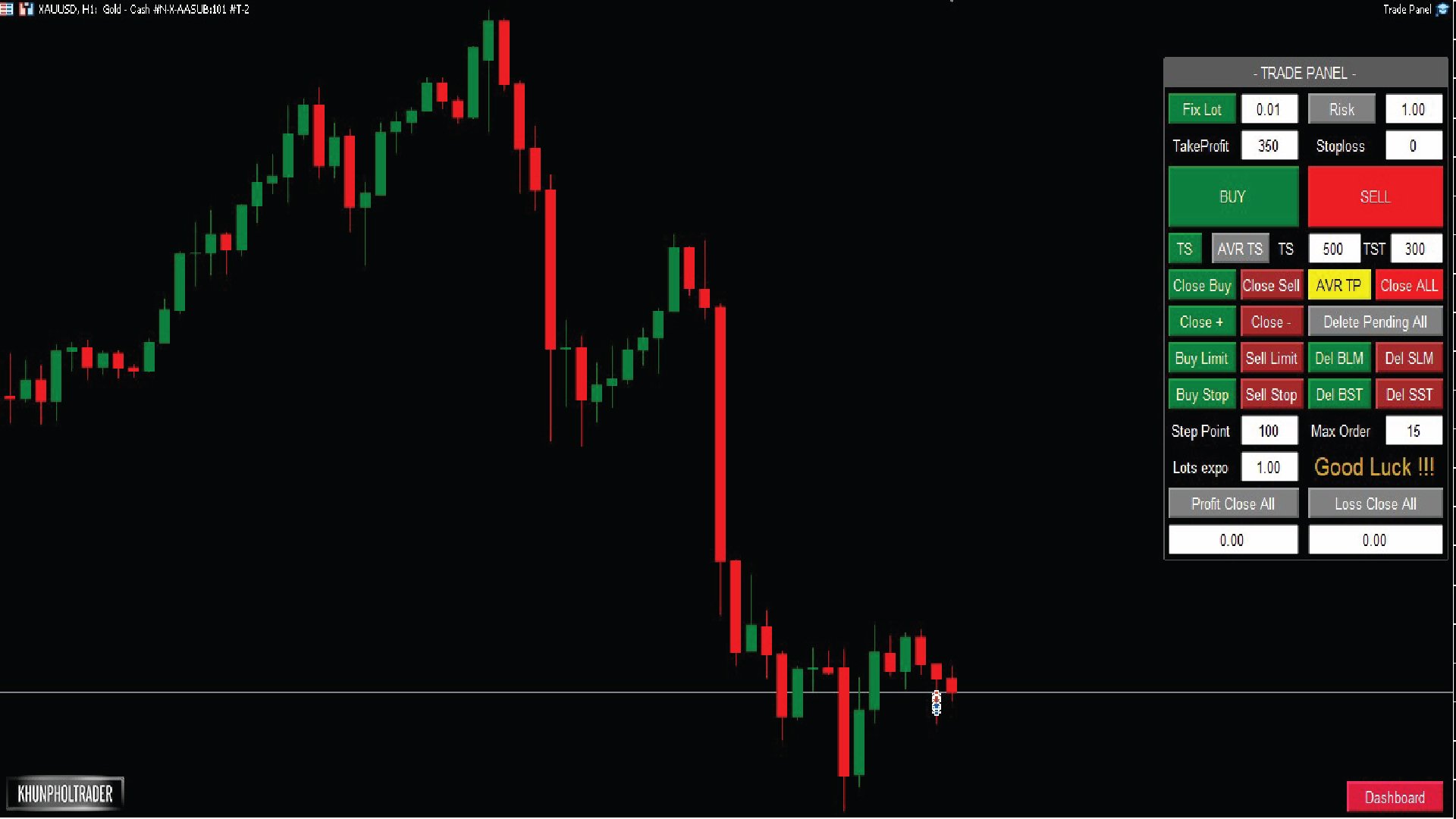
KP TRADE PANEL EA is an EA MT5 facilitates various menus. KP TRADE PANEL EA is an EA skin care in MT5 is an EA that puts the system automatically in download EA MT5 to test with demo account from my profile page while some Trailing Stop Stop Loss require more than 0 features EA determines lot or money management calculates lot from known and Stop loss TS = Trailing stop with separate stop loss order Buy more AVR TS = Trailing stop plus
Recommended products
MT4/5通用交易库(  一份代码通用4和5 ) #ifdef __MQL5__      #define KOD_TICKET ulong      #define KOD_MAGIC   long #else        #define KOD_TICKET long      #define KOD_MAGIC   int #endif class ODLIST; #import "K Trade Lib Pro 5.ex5"       //祝有个美好开始,运行首行加入    void StartGood() ;    //简单开单    long OrderOpen( int type, double volume, int magic, string symbol= "" , string comment= "" , double opprice= 0 , double sl= 0 , double tp= 0 , int expiration= 0 , bool slsetmode= false , bool tpsetmode= false );    //复杂开单
MT5 to Delta Exchange API Bridge EA Connector allows your expert advisor with mq5 file to integrate and communicate with Delta Exchange using API Keys You can place order, check balance and other order managements using Delta Exchange API - Place Limit, SL Limit and Take Profit Limit Orders - Place Market, SL-Market, TP-Market orders - Cancel Order - Query Orders - Change Leverage, margin - Get Position info and many more, details available at demo script Script Documentation 
This indicator is especially for the binary trading. Time frame is 1 minutes and exp time 5 or 3 minutes only. You must be use martingale 3 step. So you must put lots size is 10 % at most. You should use Mt2 trading platform to connect with my indicator to get more signal without human working. This indicator wining rate is over 80% but you may get 100% of profit by using martingale 3 step. You should use MT2 Trading Platform to connect meta trader platform and binary platform . You can get mt2
FREE
Pionex API EA Connector for MT5 – Seamless MT5 Integration Overview The Pionex API EA Connector for MT5 allows seamless integration between MetaTrader 5 (MT5) using the Pionex API. This powerful tool enables traders to execute and manage trades, retrieve balance information, and track order history—all directly from MT5. Key Features & Functions Account & Balance Management Get_Balance(); – Retrieves the current account balance from Pionex Order Execution & Management orderLimit(string sy
INTRODUCING MML Data Bridge The demand for bridging external data and machine learning with trading platforms is higher than ever. MetaTrader 5 is a powerful environment for trading and back testing, but without a data bridge, MT5 is largely isolated from using any external data. MML Bridge is a developer tool that allows users to bridge external data into MT5 for back testing, live trading, and optimization. It's built for ease of use, providing users with a simple function API that drip-feeds
FREE
*****The main trading is XAUUSD. If testing, it is recommended to adjust to XAUUSD. Other trading targets cannot guarantee profitability********* If you need to test, please leave a message (I will reply as soon as I see it). In order to protect the work results, specific parameters need to be entered. The default parameters of the system cannot achieve the effect shown in the screenshot pullback! If you need to test, please leave a message (I will reply as soon as I see it). In order to prot
MarketPro toolkit
Johannes Hermanus Cilliers
Start earning profits by copying All trades are sent by our successful Forex trader & are extremely profitable. You can earn profits by copying trades daily Trial Period included You'll also get access to extremely powerful trading education which is designed in a simple way for you to become a profitable trader, even if you have no trading experience. https://ec137gsj1wp5tp7dbjkdkxfr4x.hop.clickbank.net/?cbpage=vip
FREE
Native Websocket
Racheal Samson
5 (6)
An   easy to use, fast,  asynchronous   WebSocket library  for MQL5. It supports: ws://   and   wss://  (Secure "TLS" WebSocket) text   and   binary   data It handles: fragmented message  automatically (large data transfer) ping-pong   frames  automatically (keep-alive handshake) Benefits: No DLL required. No OpenSSL installation required. Up to 128 Web Socket Connections from a single program. Various Log Levels for error tracing Can be synchronized to MQL5 Virtual Hosting . Completely native t
Stamina HUD
Michele Todesco
STAMINA HUD – Advanced Market & Trend Dashboard (MT5) STAMINA HUD   is a professional   market information panel   designed for traders who want   clarity, speed, and control   directly on the chart. It provides a   clean heads-up display (HUD)   with essential market data and   multi-timeframe trend direction , without cluttering the chart or generating trading signals. What STAMINA HUD Shows   Current Price   Spread (in real pips)   Today High–Low range (pips)   Average D
FREE
ShreeFx Trade Manager
Dhiraj Shivprabhu Pattewar
️ 1. Interactive User Interface (UI) Dual-Tab System: Cleanly separates execution tools (TRADE) from configuration (️ SETTINGS) to keep the chart clutter-free. Dark/Light Mode: Instantly switch between themes using the ️/ emoji button to match your chart background. Live P&L Dashboard: Real-time display of Account Balance, Equity, Floating Profit/Loss (in USD and %), Total Positions (Buys/Sells), Total Lot Exposure, and current Spread. On-Chart Direct Editing: Change any setting (Lot Size,
Enhanced FVG Enhanced FVG is a technical indicator for MetaTrader 5 that identifies Fair Value Gaps on the chart and measures the buyer-to-seller volume ratio within each detected gap. Volume classification is performed using M1 timeframe tick volume data, applying the same methodology used in standard Volume Profile analysis. How It Works The indicator scans three consecutive candlesticks to detect Fair Value Gaps. A Bullish FVG is identified when the high of the first candle does not overlap w
FREE
RSI Currency Strength Meter is a powerful and elegant multi-currency indicator that measures the real-time relative strength of the 8 major currencies using RSI logic. By calculating the smoothed performance of each currency across its major pairs and applying the RSI formula, it delivers clean and responsive strength lines that make it easy to spot which currencies are truly strong or weak at any moment. This indicator is particularly useful for visualizing currency correlations and divergence
VFI Quantum
Nikita Berdnikov
5 (1)
Introducing VFI (Volume Flow Indicator) – a trading indicator that analyzes the relationship between volume and price movement to identify key trading opportunities. The indicator displays the strength and direction of volume flow, providing clear signals about potential entry and exit points. Signals are formed based on zero line crossovers, crossovers between the VFI line and its exponential moving average (EMA), and when the indicator exits overbought and oversold zones. Attention! This stra
FREE
Premium level is a unique indicator with more than 80% accuracy of correct predictions! This indicator has been tested for more than two months by the best Trading Specialists! The author's indicator you will not find anywhere else! From the screenshots you can see for yourself the accuracy of this tool! 1 is great for trading binary options with an expiration time of 1 candle. 2 works on all currency pairs, stocks, commodities, cryptocurrencies Instructions: As soon as the red arrow app
SignalXpert
Steve Rosenstock
5 (3)
CLICK HERE TO SEE ALL MY FREE PRODUCTS The SignalXpert was developed by me to provide traders who use the indicator RangeXpert with a powerful analysis tool. RangeXpert serves as the foundation of the system – it detects precise market areas and provides the data that SignalXpert evaluates in real time to generate clear, actionable signals. This enables the simultaneous monitoring of up to 25 different assets in various timeframes and detects the most important market movements in real time. T
FREE
Brent Trend Bot
Maksim Kononenko
4.5 (16)
The Brent Trend Bot special feature is simple basic tools and logic of operation. There are no many strategies and dozens of settings, like other EAs, it works according to one algorithm. The operating principle is a trend-following strategy with an attempt to get the maximum profitability adjusted for risk. Therefore, it can be recommended for beginners. Its strong point is the principle of closing transactions. Its goal is not to chase profits, but to minimize the number of unprofitable trans
FREE
RSI Cortex Ai
Michael Prescott Burney
RSI Cortex AI for MT5 RSI Cortex AI is a MetaTrader 5 indicator designed to help traders analyze momentum using a multi-factor ranking model instead of relying only on a fixed RSI threshold approach. It combines momentum features, directional ranking, confidence scoring, and adaptive filtering into a clean TradingView-style workspace for chart-based analysis. What the indicator does RSI Cortex AI evaluates momentum using a broader feature set than a standard RSI line. It is designed to help trad
FREE
Overview Mirror Signals Service EA (Text only)   is a powerful monitoring Expert Advisor that automatically sends   real-time Telegram notifications   for all important trade events on your MetaTrader 5 account. It is engineered specifically for   signal providers ,   trade-copier operators ,   auditors ,   educators , and   professional trading services   that require immediate, detailed, and reliable reporting. Everything from   entries, exits, SL/TP changes, comment changes, trailing sto
Evo Max
Joseph Saeidian
Combination of years of experience!  Spartan — EVO MAX Edition : T rend, Reversal and Exhaustion Indicator Time Frame M1 only. Any Pair The multi-timeframe RSI confluence  system that only fires when the market actually agrees with you. Most indicators scream "BUY!" every time a single line wiggles. "Evo Max" is built on the opposite philosophy: a signal only appears when multiple timeframes line up at once. No noise. No hero trades. Just high-conviction arrows. Why traders love it Multi-timef
Scan a fixed list of assets (Ibovespa) in the chosen timeframe (TimeFrame). For each pair and for various periods. Calculate a regression model between the two assets (and, if desired, using the bova11 index as a normalizer). Generate the spread of this relationship, its mean, standard deviation, speculative deviation, and betas (B1 and B2). Apply an ADF test without exclusion (cointegration/stationarity). Calculate the Z-score of the current exclusion (how many standard deviations are away from
FREE
GOM Trade Manager
Wannapach Chinnaprapa
GOM Trade Manager helps you execute trades the way you want it. Works on all instruments Forex, Commodities, & Crypto. It helps you with lot calculations, spread addition and balance calculations so you can just focus on actual trading. For automatic planned management and protection >> check out GOM Trade Manager Pro . ------------------------------------------NOTABLE FEATURES------------------------------------------ You set everything based on bid price, which is the price of the candles
FREE
TradeVision Pro
Ian Nganga Comba
TradeVisonPro Forex Analyzer Pro MT5 Trading Account Analytics and Monitoring Dashboard TradeVisonPro Forex Analyzer Pro is a trading analytics and account monitoring solution designed for MetaTrader 5 users. The product organizes MT5 trading data in a structured web-based dashboard, allowing traders to review account information, monitor open positions, analyze trading history, track strategies, maintain a trading journal, and review performance statistics. TradeVisonPro Forex Analyzer Pro is d
FREE
FiT Panel Pro
Thonglak Janyakorn
Overview FiT Panel Pro is a professional-grade trade management panel designed for MetaTrader 5 traders who demand speed, precision, and full control over their trades. Built with a modern dark-theme UI, it combines one-click execution with advanced risk management, visual SL/TP drag lines, automatic Fibonacci-based levels, and comprehensive order management — all in a single, compact panel. Whether you are a scalper, day trader, or swing trader, FiT Panel Pro gives you the edge you need to exec
FREE
Quantum Dow Jones
Marco Brugali
3 (2)
Quantum Dow Jones Quantum Dow Jones Settings Symbol: US30 Timeframe: 5M Lots: Lots Average Trade Profit Maximum Drawdown (MAX DD) Net Profit in 2 Years 0.01 $0.20 $2.76 $240 0.10 $2.00 $27.6 $2,400 1.00 $20.0 $276 $24,000 10.0 $200 $2,760 $240,000 Overview The Quantum Dow Jones is a sophisticated automated trading tool, specifically designed to operate on the Dow Jones. With an average frequency of 45-50 trades a week, this bot combines advanced machine learning algorithms with price action tec
FREE
Pip Calculator
Breneer Jacinto
1 (1)
Pip Value Calculator - Instant Risk Assessment on Your Chart This powerful and lightweight utility instantly calculates the precise monetary value for any pip movement, displaying it directly on your chart so you can assess risk and potential profit at a glance. At its core, the indicator's sophisticated calculation engine runs silently with every price tick, ensuring the information you see is always up-to-date. It automatically detects the instrument you are trading—whether it's a Forex pair,
FREE
Easy Correlations Indicator The Easy Correlations Indicator is designed to help traders analyze the relationship between two correlated instruments. By monitoring the distance between their Relative Strength Index (RSI) values, the indicator highlights situations where one instrument has moved significantly further than the other. This creates potential trading opportunities: Sell the stronger instrument (overstretched RSI) Buy the weaker instrument (lagging RSI) Because the positions are opened
FREE
IMPORTANT NOTE: This is a professional Trade Management Utility and on-chart assistant. It is NOT an automated trading robot. It does not open trades on its own. The UltraFast Trade Manager MT5 is the ultimate execution and risk-management suite designed to give you absolute control over your manual and algorithmic trades. When managing multiple positions, calculating complex net break-even points, or constantly monitoring the economic calendar, hesitation can lead to costly mistakes. This utili
FREE
1. What is this The MT5 system comes with very few optimization results. Sometimes we need to study more results. This library allows you to output more results during backtest optimization. It also supports printing more strategy results in a single backtest. 2. Product Features The results of the optimized output are quite numerous. CustomMax can be customized. The output is in the Common folder. It is automatically named according to the name of the EA, and the name of the same EA will be au
SafePair Manual Trader Pro MultiPairs SafePair Manual Trader Pro MultiPairs is an advanced MetaTrader 5 Expert Advisor designed to support professional manual trading, semi-automatic trade management, multi-symbol monitoring, risk planning, and intelligent market analysis from one powerful dashboard. This EA is built for traders who want fast manual execution, structured risk control, smart trade assistance, and clear on-chart decision support without relying on random signals or slow dashboard
Volume profile CVD Frato
Francisco Felipe Alves Da Silva Rocha
5 (2)
Frato Volume Profile Pro v7.5 Developed by Frato Academy This indicator displays the price volume profile for MetaTrader 5. It calculates the distribution of traded volume by price level over a configurable period and presents the results directly on the main chart. Features: Volume profile with color gradient The indicator divides the price range into levels and assigns a corresponding volume to each level. The color of each level varies in a continuous gradient according to the volume: low
FREE
Buyers of this product also purchase
WalkForwardOptimizer MT5
Stanislav Korotky
3.78 (9)
WalkForwardOptimizer library allows you to perform rolling and cluster walk-forward optimization of expert advisers (EA) in MetaTrader 5. To use the library include its header file WalkForwardOptimizer.mqh into your EA source code, add call provided functions as appropriate. Once the library is embedded into EA, you may start optimization according to the procedure described in the User guide . When it's finished, intermediate results are saved into a CSV file and some special global variables.
ModernUI Library
Levi Dane Benjamin
ModernUI Library for MetaTrader 5 ModernUI is a chart-hosted user interface library for MetaTrader 5. It helps MQL5 developers build cleaner EA panels, dashboards, settings windows, forms, tables, dialogs, drawers and compact trade-style interfaces inside the MT5 chart environment. It is built for developers who want a more professional interface layer than scattered chart objects, while still keeping full control over their own EA, indicator or utility logic. Modern UI - User Guide   | EA Examp
Binance Library MetaTrader 5 connects your Expert Advisors, indicators, and scripts to Binance.com and Binance.US directly from MetaTrader 5. It is a developer library for building custom Binance integrations inside MT5, not a standalone trading robot or copier. The library helps you add Binance instruments to Market Watch, read symbol specifications, load current and historical market data, check wallet balances, manage orders, and track open positions. It supports Spot, USD-M futures, and COI
MetaCOT 2 CFTC ToolBox MT5
Vasiliy Sokolov
3.4 (5)
Friends, join us! Ask questions and connect with like-minded traders: MetaCOT Public Group MetaCOT Information Channel: news, CFTC reports, and signals: MetaCOT Channel Here’s to successful trading and new profitable signals for us all! Attention! Recently, certain countries have been blocking access to the cftc.gov website. As a result, users in these countries are giving the product low ratings. MetaCOT has always adhered to the highest quality standards and is in no way associated with th
This library will allow you to manage trades using any of your EA and its very easy to integrate on any EA which you can do yourself with the script code which is mentioned in description and also demo examples on video which shows the complete process. This product allows trading operations via API For chart : Renting Crypto Charting for OHLC data or Crypto Ticks with Order Book Depth is optional If your EA is HFT and operations on seconds chart, You may be interested in converting charts to se
The library is dedicated to help manage your trades, calculate lot, trailing, partial close and other functions. Lot Calculation Mode 0: Fixed Lot. Mode 1: Martingale Lot (1,3,5,8,13) you can use it in different way calculate when loss=1 ,when profit=0. Mode 2: Multiplier Lot (1,2,4,8,16) you can use it in different way calculate when loss=1 ,when profit=0. Mode 3: Plus Lot (1,2,3,4,5) you can use it in different way calculate when loss=1 ,when profit=0. Mode 4: SL/Risk Lot calculate based on s

This is a simplified and effective version of the library for walk forward analysis of trading experts. It collects data about the expert's trade during the optimization process in the MetaTrader tester and stores them in intermediate files in the "MQL5\Files" directory. Then it uses these files to automatically build a cluster walk forward report and rolling walk forward reports that refine it (all of them in one HTML file). Using the WalkForwardBuilder MT5 auxiliary script allows building othe
OrderBook History Library
Stanislav Korotky
3 (2)
Order Book, known also as Market Book, market depth, Level 2, - is a dynamically updated table with current volumes of orders to buy and to sell specific financial instument at price levels near Bid and Ask. MetaTrader 5 provides the means for receiving market book from your broker, but in real time only, without access to its history. The library OrderBook History Library reads market book state in the past from archive files, created by OrderBook Recorder . The library can be embedded into you
BitMEX Trading API
Romeu Bertho
5 (1)
Cryptocurrency analysis has never been easier with Crypto Charts for MetaTrader 5. Now, trading on BitMEX has never been easier with BitMEX Trading API for MetaTrader 5. BitMEX Trading API library was built to be as easy to use as possible. Just include the library into your Expert Advisor or Script, call the corresponding methods and start trading! Features Trade on BitMEX and BitMEX Testnet. Build and automate your strategies. Concern more with the trading strategy logic and less with the co
Goliath Mt5
Nicolokondwani Biscaldi
Goliath MT5 - scalper fully automated Expert Advisor for medium-volatile forex markets P roperties: The Library trades 10 currency pairs (USDCHF, EURCHF, EURGBP, AUDUSD, USDCAD, GBPUSD, EURUSD, NZDUSD, CADCHF, EURAUD, EURCAD, AUDJPY) The Library does not use martingale The Library sets a fixed stop loss and take profit for all orders The Library only trades a user input volume The Library can be installed on any currency pair and any timeframe Recommendations: Before using on a real account, t
Binance Library
Hadil Mutaqin SE
5 (1)
The library is used to develop automatic trading on Binance Spot Market from MT5 platform. Support all order types: Limit, Market, StopLimit and StopMarket Support Testnet mode Automatically display the chart on the screen Usage: 1. Open MQL5 demo account 2. Download Header   file and EA sample   https://drive.google.com/uc?export=download&id=1kjUX7Hyy02EiwTLgVi8qdaCNvNzazjln Copy Binance.mqh to folder \MQL5\Include Copy  BinanceEA-Sample.mq5 to folder \MQL5\Experts 3. Allow WebRequest from MT5
Gold plucking machine   Gold plucking machine is an Expert Advisor designed specifically for trading gold. The operation is based on opening orders using the Fast and Slow lines indicator, thus the EA works according to the "Trend Follow" strategy, which means following the trend. Use grid strategy to place orders without stop loss operation, so please make sure the account has sufficient funds. magic number      -  is a special number that the EA assigns to its orders. Lot Multiplier        - 


The library is used to develop automatic trading on Binance Futures Market from MT5 platform. Support Binance Futures USD-M and COIN-M Support Testnet mode Support all order types: Limit, Market, StopLimit, StopMarket, StopLoss and TakeProfit Automatically display the chart on the screen Usage: 1. Open MQL5 demo account 2. Download Header file and EA sample https://drive.google.com/uc?export=download&id=17fWrZFeMZoSvH9-2iv4WDJhcyxG2eW17 Copy BinanceFutures.mqh to folder \MQL5\Include Copy  Bina
AO Core
Andrey Dik
3.67 (3)
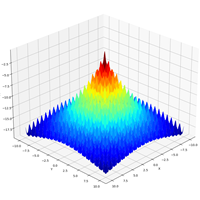
AO Core is the core of the optimization algorithm, it is a library built on the author's HMA (hybrid metaheuristic algorithm) algorithm. Pay attention to the MT5 Optimization Booster product , which makes it very easy to manage the regular MT5 optimizer . An example of using AO Core is described in the article: https://www.mql5.com/ru/articles/14183 https://www.mql5.com/en/blogs/post/756510 This hybrid algorithm is based on a genetic algorithm and contains the best qualities and properties of p
EA Toolkit
Esteban Thevenon
EA Toolkit is a library that allows any developer to quickly and easily program Advisor experts. It includes many functions and enumerations such as trailing stop, lot, stop loss management, market trading authorisations, price table updates, trading conditions and many more. Installation + Documentation : You will find all the information to install this library and the documentation of its functions on this GitHub : https://github.com/Venon282/Expert-Advisor-Toolkit WARNING : The installation
Hello everyone! I am a professional MQL programmer , Making EAs, Indicators and Trading Tools for my clients all over the world. I build 3-7 programs every week but I seldomly sell any ready-made Robots. Because I am fastidious and good strategy is so few...  this EA is the only one so far I think its good enough to be published here.  As we all know, the Ichimoku indicator has become world popular for decades, but still, only few people knows the right way of using it, and if we check the clo
Applying these methods, I managed to arrive at a nuanced conclusion that is crucial to understanding the importance of unique strategies in contemporary trading. Although the neural network advisor showed impressive efficiency in the initial stages, it proved to be highly unstable in the long run. Various factors such as market fluctuations, trend changes, external events, etc. cause its operation to be chaotic and eventually lead to instability. With these experiences, I accepted the challenge
Introducing "TG Risk Service Manager" — your comprehensive toolkit for swift and precise risk management and lot size calculations in the dynamic world of trading. Designed to streamline development processes and enhance trading strategies, this indispensable library equips developers with essential tools for optimizing risk assessment and trade profitability. Metatrader4 Version |  All Products  |  Contact   Key Features: Efficient Lot Size Calculation : Harness the power of precise lot size c
Introducing "TG Trade Service Manager" — your all-in-one solution for seamless trade management in both MQL4 and MQL5 environments. With a focus on speed, reliability, and convenience, this powerful library simplifies the complexities of trade execution and management, empowering developers with a single interface for enhanced efficiency. Metatrader4 Version   |   All Products   |   Contact   Key Features: Unified Interface : TG Trade Service Manager" provides a unified interface for   MQL4   an
OpenAI Library MT5
VitalDefender Inc.
The following library is proposed as a means of being able to use the OpenAI API directly on the metatrader, in the simplest way possible. For more on the library's capabilities, read the following article: https://www.mql5.com/en/blogs/post/756098 The files needed to use the library can be found here: Manual IMPORTANT: To use the EA you must add the following URL to allow you to access the OpenAI API as shown in the attached images In order to use the library, you must include the following Hea
Here   is   the   English translation   of   your   description   for   the EA   (Expert   Advisor): --- This   is a   time -based   automatic trading   EA . It allows   you   to   set the   exact   time   for trading , down   to   the   second , and   specify the   maximum number   of   orders . You   can choose   to   place   either   buy   or   sell   orders . It   is possible to   set take   profit and   stop   loss   points . Additionally , you can   specify   how   long after   placing  
Molo kumalo
James Ngunyi Githemo
Trading Forex with our platform offers several key advantages and features: Real-time Data : Stay updated with live market data to make informed decisions. User-Friendly Interface : Easy-to-navigate design for both beginners and experienced traders. Advanced Charting Tools : Visualize trends with interactive charts and technical indicators. Risk Management : Set stop-loss and take-profit levels to manage your risk. Multiple Currency Pairs : Access a wide range of forex pairs to diversify your tr
Kaseki
Ben Mati Mulatya
The Hybrid Metaheuristic Algorithm (HMA) is a cutting-edge optimization approach that combines the strengths of genetic algorithms with the best features of population-based algorithms. Its high-speed computation ensures unparalleled accuracy and efficient search capabilities, significantly reducing the total time required for optimization while identifying optimal solutions in fewer iterations. HMA outperforms all known population optimization algorithms in both speed and accuracy. Use Cases AO
This product has been on development for the past 3 years, It is the most advanced codebase for working with all kinds of Artificial intelligence and machine learning code in MQL5 programming language. It has been used to create many AI powered trading robots and indicators in MetaTrader 5. This is a premium version of the free and open source project on machine learning for MQL5, linked here:  https://github.com/MegaJoctan/MALE5 . The free version has fewer features, less documented, and poorly
Shawrie
Kevin Kipkoech
This Pine Script implements a Gaussian Channel + Stochastic RSI Strategy for TradingView . It calculates a Gaussian Weighted Moving Average (GWMA) and its standard deviation to form an upper and lower channel. A Stochastic RSI is also computed to determine momentum. A long position is entered when the price closes above the upper Gaussian band and the Stoch RSI K-line crosses above D-line . The position is exited when the price falls back below the upper band. The script includes commission, cap
Bookeepr
Marvellous Peace Kiragu
Bookeepr is an advanced MQL5 trading bookkeeping software that automates trade logging, tracks real-time P&L, and integrates a ledger-style financial system for deposits, withdrawals, and expenses. It supports multi-currency assets , generates detailed performance reports , and provides risk management tools to help traders optimize their strategies. With secure cloud storage, exportable reports, and seamless MetaTrader 5 integration , Bookeepr ensures accurate, transparent, and hassle-free fina
Ai Prediction MT5
Mochamad Alwy Fauzi
A free indicator for those who purchase the full version This indicator is created by this Ai, with your desired settings Artificial Intelligence at your service Have a complete artificial intelligence and use it in your codes This artificial intelligence is trained to tell you on each candle whether the market is moving up or down. In general, artificial intelligence can be used in all markets, all timeframes and all symbols However, due to the increasing complexity and decreasing accuracy of
快速关仓,无需任何操作。 当前版本的一键关仓主要针对的是来不及手动关仓的情况,目前是不分交易标的类别,是对所有的持仓进行关仓。 未来可能升级的方向: 1、分类别、分标的关仓。 适用场景:开了多个标的的仓位,并且波动不一,快速频繁的波动影响了整体的判断。 2、增加只关闭盈利仓位、只关闭亏损仓位。 适用场景:持仓较多,趋势发生变化。 个人建议:一般建议选择一键全部关仓,因为如果行情与持仓方向一致,只关闭盈利仓位无形就是扩大了亏损。如果行情方向与持仓方向相反,只关闭亏损仓位,当前已盈利的后面又会变为亏损,盈利无法变现。 3、按照仓位顺序由大到小关仓、按照仓位顺序由小到大关仓。 适用 场景:行情发生波动,对于未来行情判断把握不确定的,可根据自己需求选择仓位关仓顺序,由大到小关仓的话,可以避免亏损的进一步扩大。 4、减小仓位量,保持绝对的安全距离。 适用 场景:对未来趋势相对确定,不想错过当前行情,但是认为当前持仓体量又有点大,想降低仓位。
BlitzGeist Telegram Notifier – Stay Connected to Your Trades Anywhere! BlitzGeist Telegram Notifier is a powerful tool that instantly connects your MetaTrader 5 account with Telegram . No matter where you are – you will always receive real-time notifications about your trading activity directly on your phone, PC, or any device with Telegram installed. Perfect for traders who want professional trade reporting, transparency, and risk management monitoring . ️ Key Features Easy Configuratio
Close All Trades - MT5 UI Tool Features - Trading Executions Simplified! One-Click Buy/Sell Buttons : Instantly place buy or sell orders for trades with a single click, streamlining order execution from the desktop. Customizable Lot Size & Parameters : Enter desired lot size, stop-loss (in decimal places e.g. 7 SL Units for 0.7 below or above for buy or sell), take-profit ( in decimal places ), and the number of trades before submitting (1,2,3,4,5 etc.), allowing precise control over each trade
More from author
Advanced Trading Tools for Smarter Decision Making Our cutting-edge trading tools allow traders to seamlessly execute buy and sell orders, while providing robust planning capabilities to optimize their trading strategies. Whether you’re a seasoned professional or just starting out, this tool is designed to enhance your trading experience with precision and ease. Key Features: Real-time Buy and Sell Execution: Easily place orders instantly and take advantage of market opportunities without del
Filter:
No reviews
Reply to review