Master Control via Telegram

Master Control via Telegram can help you perform some management tasks on MT4/MT5 remotely via your Telegram by one click, easy to set up & use. Demo here

(see more Master Close   Master Notify )

************************************************************************************

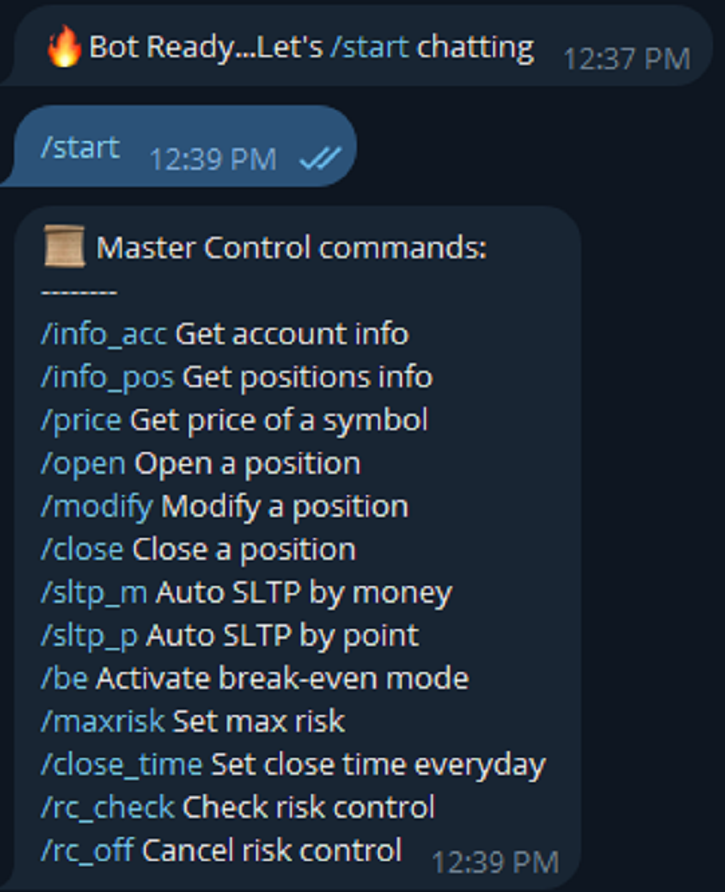
LIST OF COMMANDS:

info_acc Get account info

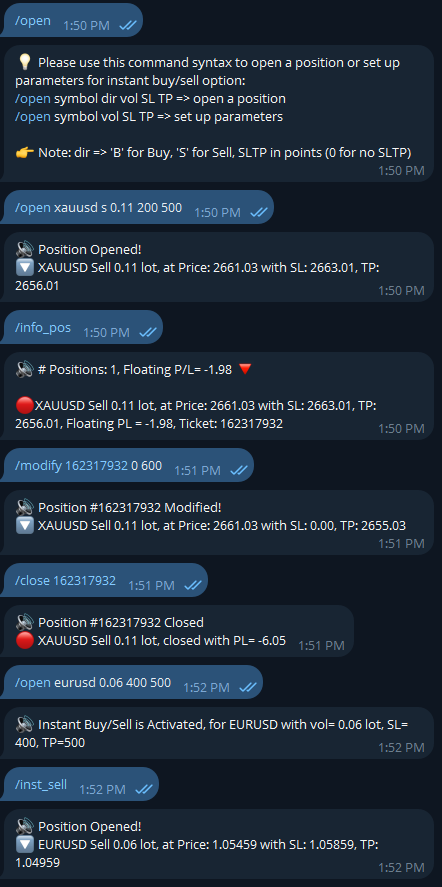
info_pos - Get positions details

price - Get symbol price

buy - Open a buy position

sell - Open a sell position

inst_set - Set parameters for instant trade

inst_buy - Instant buy

inst_sell - Instant sell

modify - Modify a position

close - Close a position

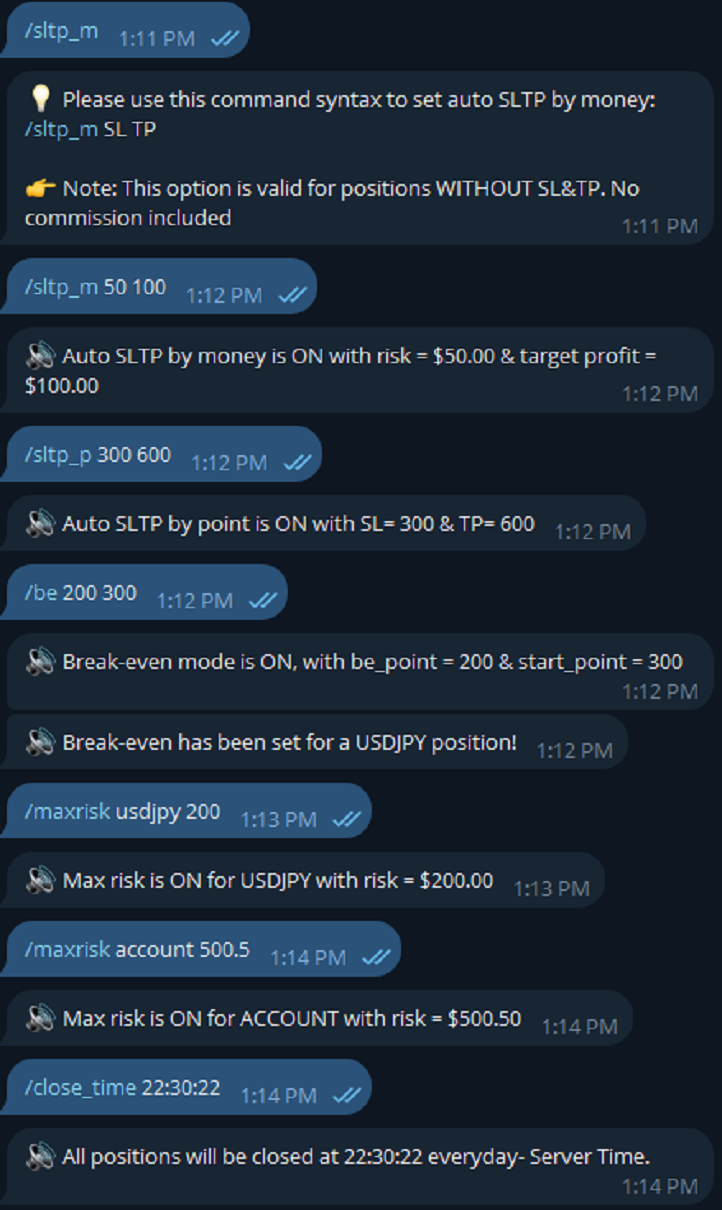
sltp_m - Auto SLTP by money

sltp_p - Auto SLTP by point 

be - Activate Break-even mode

maxrisk - Set max risk

close_time - Set close time everyday

rc_check -Check risk control modes 

rc_off - Cancel risk control modes

********************************************************************************************

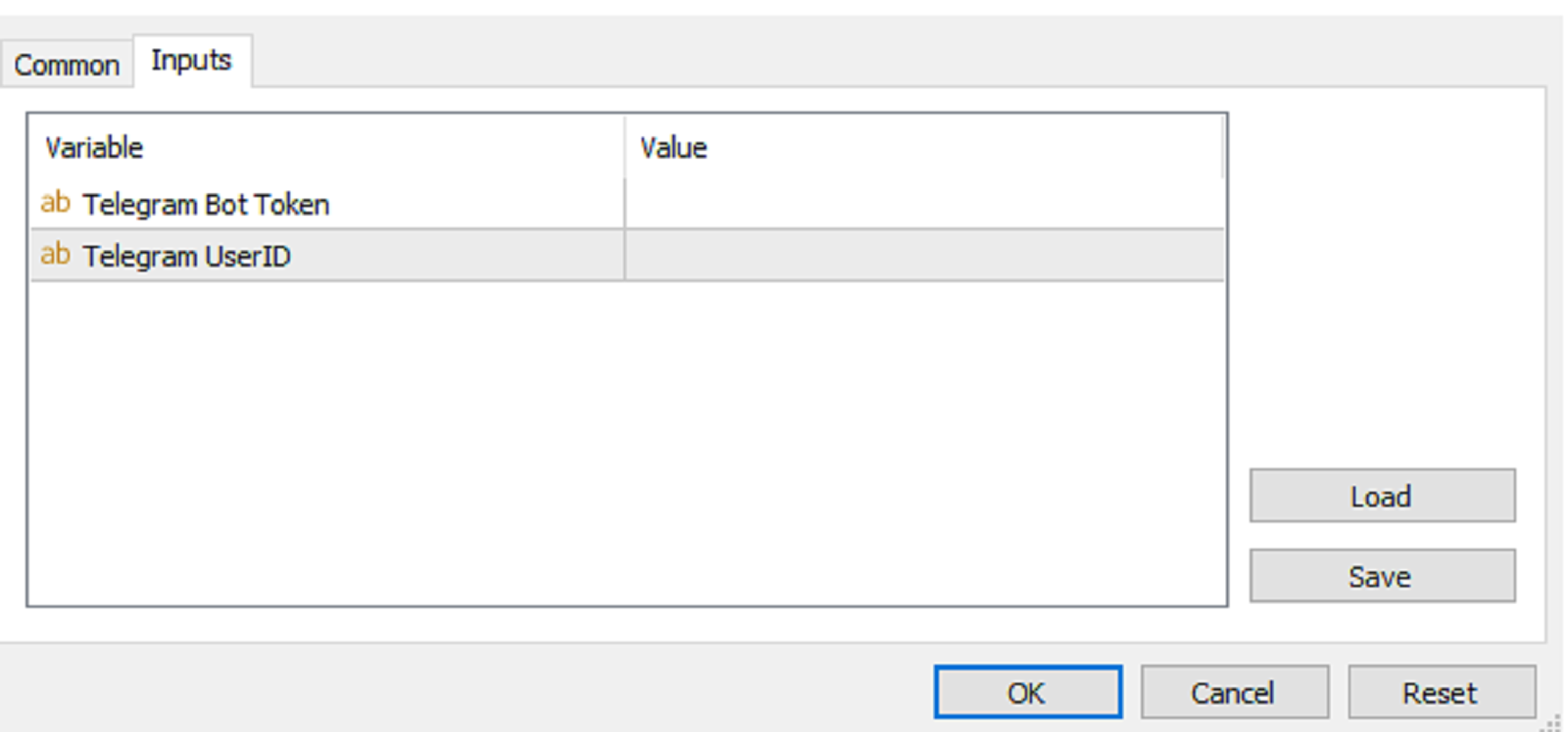
INPUTS:

Telegram Bot Token

Telegram User ID

*********************************************************************************************

HOW TO SET UP?

* Get inputs for EA:

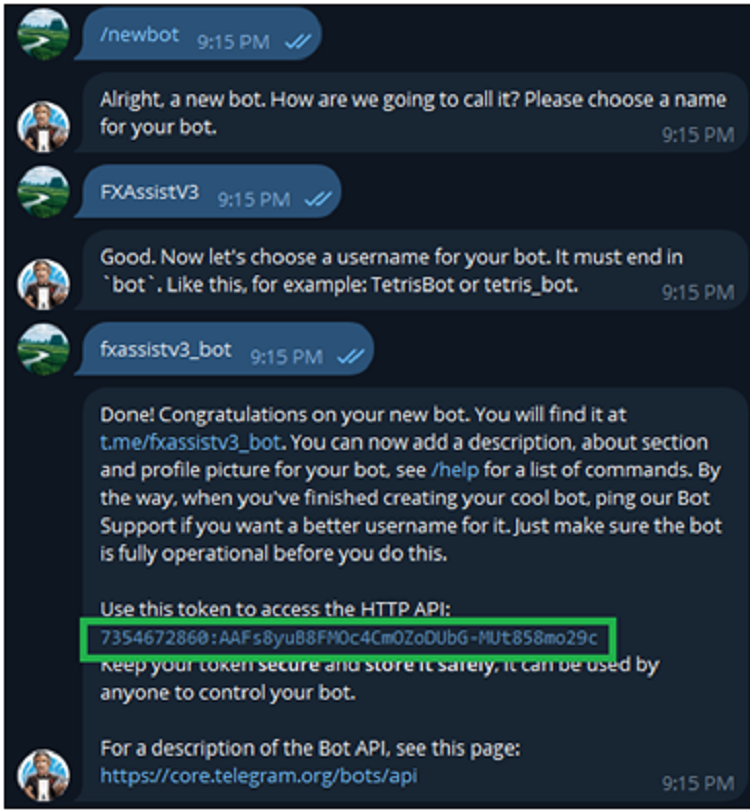
- Create a Telegram bot by @BotFather , and save your Bot Token. Find your bot by username & press "start".

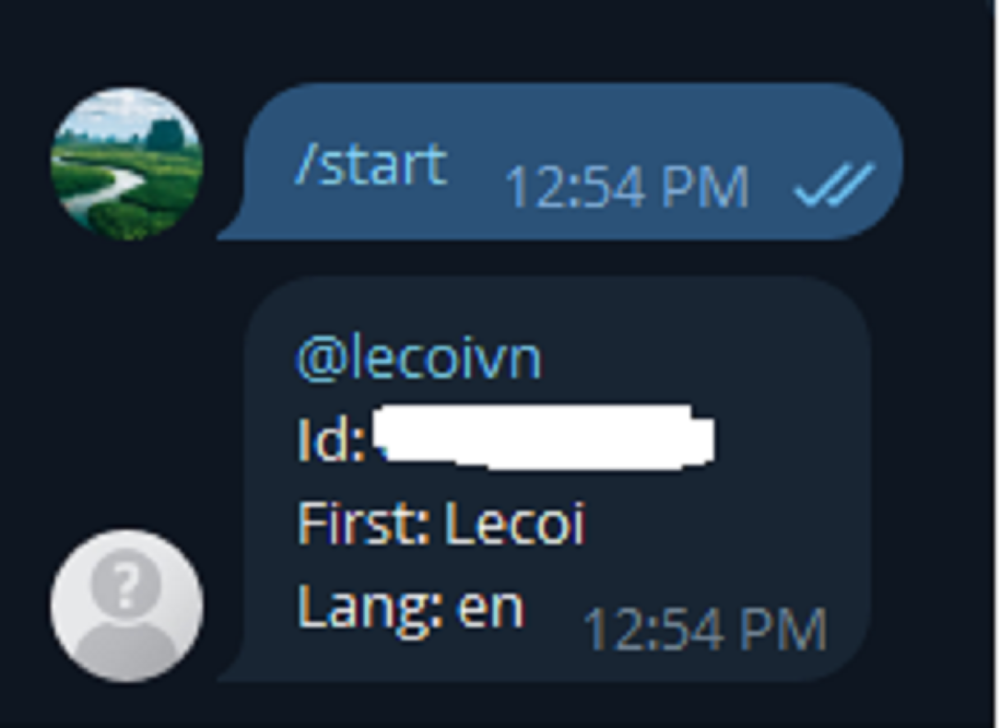
- Get your Telegram User ID by chatting with @userinfobot 

* Setup on your MT4/MT5:

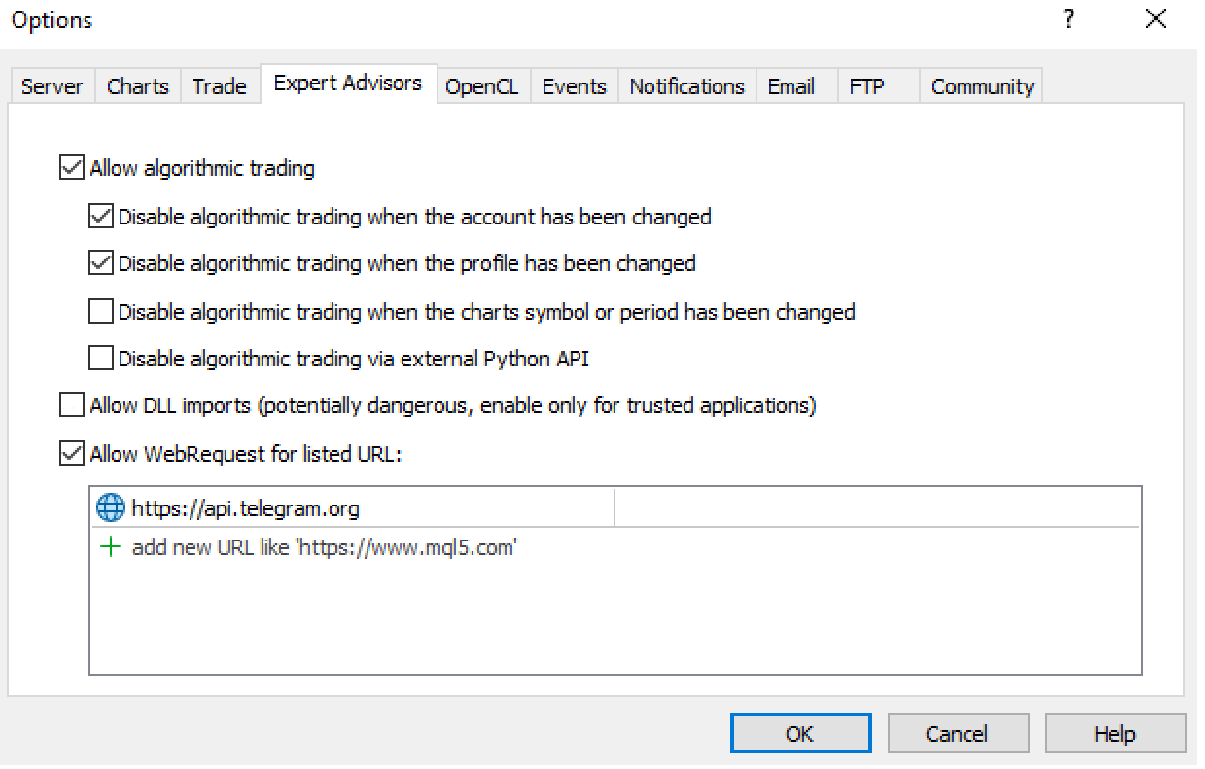
- MT4/MT5 => Tools => Options => Expert Advisors => Tick on Allow Algo Trading & Allow WebRequest, add  API Telegram to WebRequest

- Allow Algo Trading on EA 

* Create a command menu for your Telegram bot:

- Chat with @BotFather => /mybots => Select your bot => Edit Bot => Edit Commands => Copy/Paste command list above (You can set all the commands or just some common commands like start, info_acc, info_pos)
Recommended products
Position Tool Position Tool is a manual trading assistant for MetaTrader 5, designed to help traders visualize positions, manage risk, and plan trades clearly on the chart . This product does not perform automated trading and does not provide trading signals . It is intended for traders who prefer full control over their trading decisions . Key Features Draw Long and Short positions directly on the chart Automatic Risk/Reward (R:R) visualization Adjustable entry, stop-loss, and take-profit level
This tool can help you close all open orders with one click, just click "Close all". If you only want to close profitable orders, click the "Close profitable" button. After clicking, all floating orders will be closed; If you only want to close the orders with floating losses, click the "Close losable" button. After clicking, all orders with floating losses will be closed. This tool has been tested for a year. The one-click position closing function is very complete, the position closing is time
Master Close via Telegram can help you perform some management tasks on MT4/MT5 remotely via your Telegram by one click, easy to set up & use. Demo here (see more Master Notify   Master Control ) ************************************************************************************ LIST OF COMMANDS: info_acc -  Get account info info_pen -   Get pending orders details info_pos -   Get positions details info_pos_sum -   Get positions summary close_pen -   Delete all pending orders close_pos_all -  
This utility sends notification to trader’s MT5 (for MT4 version, checkout this link ) mobile app, to remind traders about their open positions. Super useful for part time traders to keep track and not forget any positions. To turn on notification, please visit   this link   (https://www.metatrader4.com/en/trading-platform/help/setup/settings_notifications) Features Keep track on open orders (pending orders, running orders) Customize time to send notification Customize notification interval (se

Risk Control Utility MT5 designed for manual trading. It helps to calculate and control your risks, transfer transactions to breakeven and accompany positions with trailing stop. Easy to set up and use. It can be used for calculating a trading lot, calculating stop loss and take profit levels. Works with currency pairs, CFDs, stocks, indices, futures, cryptocurrencies Displays   volume,   potential loss and profit before   placing an order Ability to set the expiration time of a pending order Tr
StopLoss and TakeProfit Utility MT5 for automatic setting of stop loss and take profit levels. Created by a professional trader for traders.   The utility   works with any market orders opened by a trader manually or using advisors. Can filter trades by magic number. The utility can work with any number of orders simultaneously. WHAT THE UTILITY CAN DO: Set virtual stop loss and take profit from 1 pip Real   stop loss and take profit W ork with each order separately (   stop loss and take prof
T Manager for Price action Traders
Haidar Lionel Haj Ali
4.5 (10)
T Manager, the ultimate trade management solution designed by traders for traders. If you are searching for a simple and efficient trade panel, trade manager, or trade assistant, you are at the right place.   The market contains a diverse number of those tools , but this one is designed by traders for traders . I designed this tool, and I am using it daily. Take my advice and stop buying tools blended with un-useful features that you will never use,   T Manager provides you with the essential y
Forget about enabling templates when you launch the window. Auto Template Master Service  is a professional utility tool that runs as a system service in MetaTrader 5, and it will do it for you. Unlike traditional indicators or expert advisors (EAs), the program runs in the background of the entire terminal and doesn't require you to add it to each window individually. As soon as you open a new chart of any instrument (Forex, Stocks, Crypto), the service immediately detects the new window and a
Manual trading panel — opens one test trade for validation only. fRC Trade Assistant — Smart Manual Trading Panel fRC Trade Assistant is an intelligent trading panel designed for manual traders. It allows you to open positions with one click, calculate lot size based on your predefined risk, and automatically place Stop Loss (SL) and Take Profit (TP) levels. For example, if your balance is $1000 and you set a 1% risk , the panel automatically calculates the appropriate lot size. When the trad
One Click Trader  is a tool designed for MetaTrader 4 platform, which enables you to take your trading to the next level. It enables you to open, manage and close your trades in simple an efficient way by just one click of your mouse button. "-"   ,  "+"  change OCT window size  Up arrow minimizes the OCT panel Down arrow maximizes the OCT panel Right arrow displays the next panel with additional features Left arrow hides the panel with additional features Red  SELL  button enables you to open s
SAB Advance Assistant is a manual trade-management panel for MetaTrader 5. Build every trade visually on the chart, control your exact risk, and let the built-in engine handle partial take-profits, break-even and trailing — all from one clean, resizable panel. Designed for discretionary and ICT/SMC traders who want precision without spreadsheets. KEY FEATURES - Draggable Entry, Stop Loss, TP1-TP5 and Final TP lines with live labels   (pips, cash amount, R:R, % and price) - Automatic lot sizin
AW Metatrader to Telegram MT5
AW Trading Software Limited
5 (1)
An automated system for sending notifications so that none of your subscribers miss your trading events from your trading terminal. A utility that sends notifications to the Telegram messenger about any trading operations on your account. Step-by-step instructions for connecting the utility to a channel in Telegram ->  HERE  / MT4 -> HERE  Advantages: Easy setup and detailed instructions, Possibility to send adjustable screenshots, Customizable notification text using emoji, Adjustment of notifi
Horizontal Line Trade Assistant EA  Semi-Automated Trading Assistant      IMPORTANT :     On the main/purchased program a user can click on the Horizontal line and change it to Buy or Sell, and drag by double clicking on it. Please keep in mind that this option is not available on demo version, due to some restrictions/limitations of Strategy Tester, some Object related operations are not available in the  Strategy Tester. But, it will not prevent you from Testing, please drop an Object to chart
Guardian Magic GT
Carlos Eduardo Rivas Istacuy
Guardian Magic GT - Risk Management Expert Advisor for MetaTrader 5 PROTECT YOUR TRADING CAPITAL WITH INTELLIGENT RISK MANAGEMENT Guardian Magic GT is a professional-grade Expert Advisor designed to safeguard your trading operations by implementing sophisticated risk control mechanisms. Whether you run a single bot or manage multiple automated trading systems simultaneously, Guardian Magic GT provides real-time monitoring and automatic position management to ensure your account stays within your
Bring the TradingView experience to your MetaTrader 5! Magic Entry Pro is a professional visual trading assistant designed for manual traders, scalpers, and Prop Firm funded traders. It allows you to execute trades with lightning speed, calculate risk automatically, and visually project your Stop Loss and Take Profit zones directly on the chart before you open a position. Tired of manually calculating lot sizes or guessing your Risk-to-Reward (RR) ratio? Magic Entry does it all in seconds! KE
This utility tool helps us to open trades and set orders very simply by just double-clicking on the chart. The volume of the positions and orders can be a constant lot size or determined based on a risk of equity. Take profit limit of the positions can be determined based on a Risk to Reward Ratio or simply by just a double-click.  For Positions: 1- At first, you need to double-click on the SL price. (For a buy position, you need to click on a price below the live price, and for a sell positio
Superior Telegram Signals Multi-Platform Trade Copier & Notification System   Available for MetaTrader 4 and MetaTrader 5 Superior Telegram Signals   is a utility that connects a trading terminal to the Telegram application. It is designed to send automated trade notifications, chart screenshots, and account status updates to a specified Telegram chat, channel, or group. Use Cases This tool can be used by: Signal Providers:   To automate the broadcasting of trade signals, modifications, and clos
News Telegram MT5 is a smart MetaTrader 5 utility that sends economic calendar news alerts directly to your Telegram in a clear, fast, and organized format. This product is designed for traders who want to stay informed about important market events without watching the terminal all day. It helps you monitor upcoming releases, receive pre-news alerts before scheduled events, and get automatic updates when actual values become available in the MetaTrader 5 Economic Calendar. To improve readabilit
This EA trails your stops based on percentage of current TP, for both manually and auto-opened trades.   You can edit the percentage value in the inputs. Trailing stop   is a more flexible variation of a normal exit order. T railing stop  is the practice of moving the stop-loss level closer to the current price when the price moves in your favor. Trailing the stop-loss allows traders to limit their losses and safeguard their positive trades. It is a very popular practice. This EA will manage you
Simple Telegram Notification – Stay Informed on Your MT5 Trading Activity! Stay connected with your MetaTrader 5 trading activity using Simple Telegram Notification , the Expert Advisor that sends real-time notifications to your Telegram app whenever orders are opened, modified, or closed . Whether you're at your desk or on the move, you’ll always be up-to-date with critical trading information. Key Features: Order Notifications : Receive instant Telegram alerts whenever an order is opened, mod
Risk Controller Expert Advisor, a program that allows you to control the total risk of your trading advisors on your account. With this program, you can control the maximum risk that will be allowed on the account for all advisors. For example, you set the risk of 30% of the maximum drawdown, which means that if your equity trading robots exceed the risk of 30%, the Risk Controller will close all positions of advisers, and can also close all open charts, thereby preventing advisers from working
Good Simple Risk Manager
Seti Gautama Adi Nugroho
️ GOOD SIMPLE RISK MANAGER The Ultimate Utility for Precise Trading & Risk Management in MetaTrader 5. Are you tired of manual lot calculations and slow executions? GOOD SIMPLE RISK MANAGER is a powerful all-in-one execution panel designed for professional traders who prioritize risk control and speed. Key Features: Dynamic Auto-Lot Calculation : Never calculate lots manually again. Simply enter your Risk % and Stop Loss , and the tool instantly calculates the appropriate lot size based on
Live Forex Signals is designed for trading on site signals   https://live-forex-signals.com/en and  https://foresignal.com/en . Live Forex Signal for MetaTrader 4   https://www.mql5.com/en/market/product/81445 Parameters Username   and   Password   if you have a subscription to the sites live-forex-signals.com/foresignal.com , then you should fill in these parameters with your credentials; if there is no subscription, then leave the fields empty; Comment   comment on the deals being opened Ris
Utility TimeLs Close Positions is a tool for managing and automating trade closing operations in MetaTrader 5. It provides flexible control over when and how open positions are closed based on time, symbol, direction, magic number, and comment filters. You can disable trading on specific days of the week You can set a specific time to close all open positions You can filter closing operations by symbol, direction (Buy/Sell), magic number, or comment You can execute up to three one-time scheduled
What this dashboard does The panel displays: Current Ichimoku signal per symbol Current Ichimoku signal per timeframe Key Ichimoku line values Signal direction summary Instead of switching charts manually, you can analyze the market structure in seconds. Available Ichimoku values Each cell may display: Tenkan-Sen Kijun-Sen Senkou Span A Senkou Span B Chikou Span Span A – Span B difference This allows detailed analysis or quick signal filtering. Signal types The dashboard can detect:
Anchor Trade Manager
Kalinskie Gilliam
5 (5)
Anchor: The EA Manager Run your full EA portfolio without conflicts, without stacked risk, and without watching every chart yourself. Anchor coordinates up to 64 Expert Advisors on a single account, including daily loss protection built for prop firm rules. Attach Anchor to any chart. Type your EA names and magic numbers in one line. Click OK. Anchor begins coordinating immediately. Built for portfolios. Built for prop firms. Built for discipline. The Problem Running multiple EAs on the same acc
SavdogarAI
Sardorbek Sirojiddinov
SavdogarAI v2.60: EURUSD Adaptive Momentum Grid SavdogarAI v2.60 is a professional fully automated trading system for MetaTrader 5, specifically re-engineered for the EURUSD pair. This version combines high-precision RSI momentum filtering with a mathematically optimized grid recovery system that adapts to current market volatility via ATR. RealTrades login MetaTrader 5: 20739374 Investor (read-only) password: Partners$2 Сервер: EGlobal-Classic-MT5 Strategy Logic & Execution RSI Mean Rever
FREE
AIP – MT4/MT5 To Telegram 1         Main features of MT4/MT5 EA To Telegram: Send all types of orders (Open Order/Close Order/Modify Order/Pending Order/Delete Order) Close and Modify Order with replies to the corresponding Open Order Support sending to both private, public channels and group, topic group Support sending to multiple channels simultaneously Send Chart Screenshots Manage all symbols with a single EA on one terminal Automatic loading of templates, logos, and screenshots Support sen
Overview of KS Multiple Independent Strategies Auto Trading 1.9 EA This is a professional-grade MQL5 Expert Advisor (EA) designed primarily for gold trading (XAUUSD) on MetaTrader 5. It supports multiple independent trading strategies, advanced risk management, and various filters to optimize performance. The EA emphasizes automation, profit protection, and integration with external tools like Telegram and Discord. It operates on any timeframe but is configurable for specific sessions and news
Virtual TP SL TS
Andrei Sviatlichny
Make your Take Profit, Stop Loss, and Trailing Stop levels invisible to the broker! Main option: STEALTH MODE Virtual Trailing Stop Virtual Take Profit Virtual Breakeven Virtual Stop Loss Virtual Orders Lifetime WARNING: The Expert Advisor does not place orders by itself. You must open orders yourself (including through the Expert panel) or use a third-party Expert on another chart of the same currency pair. Please specify the Magic number "-1" in the Expert settings for the Expert to process th
Buyers of this product also purchase
Trade Assistant MT5
Evgeniy Kravchenko
4.43 (214)
It helps to calculate the risk per trade, the easy installation of a new order, order management with partial closing functions, trailing stop of 7 types and other useful functions. Additional materials and instructions Installation instructions - Application instructions - Trial version of the application for a demo account Line function -   shows on the chart the Opening line, Stop Loss, Take Profit. With this function it is easy to set a new order and see its additional characteristics bef
Forex Trade Manager MT5
InvestSoft
4.98 (668)
Trade Manager MT5 is an advanced position size calculator and trade management tool for MetaTrader 5, designed to help traders plan trades faster, control risk more precisely, and manage open positions directly from the chart. It combines order placement, risk based lot calculation, Stop Loss and Take Profit management, Break Even, Trailing Stop, Partial Close, Equity Protection, and external trade management in one panel. Whether you trade forex, indices, metals, commodities, crypto, or future
Local Trade Copier EA MT5
Juvenille Emperor Limited
4.96 (142)
Experience exceptionally fast trade copying with the   Local Trade Copier EA MT5 . With its easy 1-minute setup, this trade copier allows you to copy trades between multiple MetaTrader terminals on the same Windows computer or Windows VPS with lightning-fast copying speeds of under 0.5 seconds. Whether you're a beginner or a professional trader, the   Local Trade Copier EA MT5   offers a wide range of options to customize it to your specific needs. It's the ultimate solution for anyone looking t
TradePanel MT5
Alfiya Fazylova
4.88 (162)
Trade Panel is a multi-functional trading assistant. The app contains over 50 trading functions for manual trading and allows you to automate most trading tasks. Before making a purchase, you can test the demo version on a demo account. Download the trial version of the application for a demonstration account: https://www.mql5.com/en/blogs/post/750865 . Full instructions here . Trade. Allows you to perform trading operations in one click: Open pending orders and positions with automatic risk cal
Beta Release The Telegram to MT5 Signal Trader is nearly at the official alpha release. Some features are still under development and you may encounter minor bugs. If you experience issues, please report them, your feedback helps improve the software for everyone. Telegram to MT5 Signal Trader is a powerful tool that automatically copies trading signals from Telegram channels or groups directly to your MetaTrader 5 account. It supports both public and private Telegram channels, and you can conn
FarmedHedge Pair Trading Dashboard
Tanapisit Tepawarapruek
5 (3)
Farmed Hedge Yield Farming | All Markets (Manual - Hybrid - Semi/Automated EA) MULTI-ASSET SUPPORT Trade any asset available on your broker - Forex: Major, Minor, Exotic pairs - Crypto: BTC, ETH, XRP, SOL, BNB - Stocks: Apple, Tesla, Amazon, Google, etc. - Commodities: Gold, Silver, Oil, Gas - Indices: US30, NAS100, SPX500, DAX40 - Any CFD your broker offers VERIFIED TRADING RESULTS - Farmed Hedge Yield Axi Copy:  https://www.mql5.com/en/signals/2356376 - Farmed Hedge Yield Exn Copy:   https:/
================================================================================ POC BREAKOUT - V20.72. Full Professional Grade Toolkit ================================================================================ POC Breakout is a full MetaTrader 5 trading dashboard for discretionary traders who want breakout signals, Point of Control (POC) context, volume profiles, order flow, market structure, news, alerts, and advanced trade planning in one professional workspace. Attached directly to you
Telegram to MT5 Multi-Channel Copier automatically copies trading signals from your Telegram channels directly into MetaTrader 5. No bots, no browser extensions, no manual copying. You receive a signal on Telegram and the EA opens the trade on your terminal in a few seconds. The product includes two components: a Windows application that listens to your Telegram channels, and this Expert Advisor that executes the signals on your MT5 terminal. An MT4 version is also available. Setup guide and app
Power Candles Strategy Scanner - Self-Optimizing Multi-Symbol Setup Finder Power Candles Strategy Scanner runs the same self-optimizing engine that powers the Power Candles indicator - on every symbol in your Market Watch, side by side. One panel tells you which symbols are statistically tradable right now, which strategy wins on each, the optimal Stop Loss / Take Profit pair, and pings you the moment a fresh signal fires. This tool is part of the Stein Investments ecosystem - 18+ tools plus Max
YuClusters
Yury Kulikov
4.93 (43)
Attention: You can view the program operation in the free version  YuClusters DEMO .  YuClusters is a professional market analysis system. The trader has unique opportunities to analyze the flow of orders, trade volumes, price movements using various charts, profiles, indicators, and graphical objects. YuClusters operates on data based on Time&Sales or ticks information, depending on what is available in the quotes of a financial instrument. YuClusters allows you to build graphs by combining da
Footprint Chart Pro — Professional OrderFlow EA for MetaTrader 5 Version 6.34 | Professional tool for real traders | Institutional-Grade Visualization DEMO USERS - PLEASE SELECT EVERY TICK / REAL TICK WHEN TESTING AND YOU HAVE DOWNLOADED HISTORICAL DATA. IF YOU SEE A WAITING SCREEN AND IT IS NOT DOWNLOADING, IT MEANS YOU HAVE LOW HISTORICAL DATA. TRY 1 MIN AND 5 MIN FIRST ON 1 DAY DATA. ONE DAY DATA SHOULD BE THE NEWEST AND MOST CURRENT DATE. PLEASE WAIT UNTIL THE MARKET HAS ROLLED OVER PERIOD.
The product will copy all telegram signal to MT5 ( which you are member) , also it can work as remote copier.  Easy to set up, copy order instant, can work with almost signal formats, image signal,  s upport to translate other language to English Work with all type of channel or group, even channel have "Restrict Saving Content", work with  multi channel, multi MT5 Work as remote copier: with signal have ticket number, it will copy exactly via ticket number. Support to backtest signal. How to s
Trade Manager DaneTrades
Levi Dane Benjamin
4.28 (29)
DaneTrades Trade Manager is a professional trade panel for MetaTrader 5, designed for fast, accurate execution with built‑in risk control. Place market or pending orders directly from the chart while the panel automatically calculates position size from your chosen risk, helping you stay consistent and avoid emotional decision‑making. The Trade Manager is built for manual traders who want structure: clear risk/reward planning, automation for repeatable management, and safeguards that help reduc
EA Auditor
Stephen J Martret
5 (4)
EA Auditor is an independent analysis tool for traders evaluating Expert Advisors and trading signals on MetaTrader 5. It audits backtest reports, reviews posted developer signals, and cross-verifies the two against each other to help traders assess strategies before committing capital. The MQL5 market offers a wide range of Expert Advisors from many developers, with varying approaches, quality, and transparency. EA Auditor provides a consistent, data-driven framework for reviewing them, answer
Seconds Chart MT5
Boris Sedov
4.61 (18)
Seconds Chart is a unique tool for creating second-based charts in MetaTrader 5 . With Seconds Chart , you can construct charts with timeframes set in seconds, providing unparalleled flexibility and precision in analysis that is unavailable with standard minute or hourly charts. For example, the S15 timeframe indicates a chart with candles lasting 15 seconds. You can use any indicators and Expert Advisors that support custom symbols. Working with them is just as convenient as on standard charts.
Trade Dashboard MT5
Fatemeh Ameri
4.95 (131)
Trade Dashboard simplifies how you open, manage, and control your trades, with built-in lot size calculation. It allows you to execute trades, manage risk, and control positions directly on the chart, with tools such as partial close, breakeven, and trailing stop. Designed to reduce manual work and help you stay focused on your trading decisions. A demo version is available for testing. Detailed explanations of features are provided within the MQL5 platform. Installation instructions are include
HINN Lazy Trader
ALGOFLOW OÜ
5 (1)
LIMITED SUMMER SALE -40% ! ONLY $470 insead of $790!  Maximum real discount! ONLY UNTIL 08/22 The core idea: using the user interface, you configure the parameters the chart must meet before entering a position (or positions), choose which entry models to use, and set the rules for when trading and planning should end. Lazy Trader  handles the rest: it  takes over all the routine chart watching and execution! full description  :: 3 key videos [1] ->  [2]   ->  [3] What can it do? - Understand
Quant AI Agents
Ho Tuan Thang
5 (1)
Quant AI Agents are independent trading Expert Advisors. Instead of trading using a fixed strategy like other conventional EAs, Quant AI Agents   is a   multi-agent AI trading framework   that turns natural-language strategy prompts into live.  WANT THE SAME RESULTS AS MY LIVE SIGNAL?   Use the exact same brokers I do:   IC MARKETS , IC TRADING   .  Unlike the centralized stock market, Forex has no single, unified price feed.  Every broker sources liquidity from different providers, creating un
EasyInsight AIO MT5
Alain Verleyen
4.92 (12)
EASY Insight AIO – All-In-One Power for AI-Driven Trading Want to skip the setup and start scanning the entire market – Forex, Gold, Crypto, Indices, and even Stocks – in seconds? EASY Insight AIO is the complete plug-and-play solution for AI-powered trade analysis. It includes all core Stein Investments indicators built-in and automatically exports clean, structured CSV files – perfect for backtesting, AI prompts, and live market decision-making. No need to install or configure indicators manu
The News Filter MT5
Leolouiski Gan
4.78 (23)
This product filters   all expert advisors and manual charts   during news time.  It is able to remove any of your EA during news and automatically reattach them after news ends. This product also comes with a complete  order management system   that can handle your open positions and pending orders before the release of any news. Once you purchase   The News Filter , you will no longer need to rely on built-in news filters for future expert advisors, as this product can filter them all from her
Welcome to ENTRY IN THE ZONE WITH SMC MULTI TIMEFRAME Entry In The Zone with  SMC Multi Timeframe  is a professional trading indicator built on Smart Money Concepts (SMC), combining market structure analysis with a No Repaint BUY / SELL signal system in a single indicator. It helps traders understand market structure more clearly, identify key price zones, and focus on higher-quality trading opportunities. By combining Multi-Timeframe Analysis, Points of Interest (POIs), and real-time signals, t
Trader Evolution
Siarhei Vashchylka
5 (7)
" Trader Evolution " - A utility designed for traders who use wave and technical analysis in their work. One tab of the utility is capable of money management and opening orders, and the other can help in making Elliott wave and technical analysis. Manual (Be sure to read before purchasing) | Version for MT4 Advantages 1. Trading in a few clicks. Immediate and pending orders are available in the panel 2. Money management. The program automatically selects the appropriate lot size 3. Simplifies
EA Performance Tracker
Russell Leeon Tan
5 (3)
EA Performance Tracker (AESTracker) A clean, modern dashboard that shows exactly how your trades and EAs are performing — right on your chart. It reads your full account history automatically and breaks down the numbers by magic number / strategy. Display only — it does not place any trades. What it shows - Account header: live Balance, Equity, and Open (floating) P/L - Profit summary: gross profit, net profit, and the exact commission & swap deducted - Key stats: win rate, profit factor, exp
Premium Trade Manager - The Trade Panel With a Coach Built In Premium Trade Manager puts a trading coach inside your chart, with a full execution engine underneath it. Set the trade up the way you always do, then let Max, your AI trading coach, read that exact setup against your live account and give you a straight verdict before you commit: is the stop disciplined, is the risk sane, is a high-impact release minutes away, are you near a prop-firm limit. Below sits the engine that runs everything
Timeless Charts
Samuel Manoel De Souza
5 (7)
Timeless Charts is an all-in-one trading utility for professional traders. It combines custom chart types such as Seconds Charts and Renko with advanced order flow analysis using Footprints , Clusters , Volume Profiles , VWAP studies, and anchored analysis tools for deeper market insight. Trading and position management are handled directly from the chart through an integrated trade management panel , while Market Replay and Virtual Accounts provide environments for practicing trading skills and
FXTools
Bahramirad
FxTools This is an all-in-one MT5 trading dashboard. It helps calculate risk per trade, open orders quickly, manage positions with partial close, trailing stop, grid, martingale, recovery, and breakeven, plus indicator analysis and other useful tools. Demo version Link Additional materials and instructions Dashboard & Indicators Guide – Open, Close & Filters Guide – Trail, Grid & Martingale Guide – Recovery & Breakeven Guide ________________________________________ Levels on Chart Shows Entry,
FUTURES ORDERFLOW FOOTPRINT CHART Professional OrderFlow EA for MetaTrader 5 Version 1.01| Professional tool for real traders | Institutional-Grade Visualization STRATEGY TESTER USERS - PLEASE SELECT EVERY REAL TICK WHEN TESTING AND YOU HAVE DOWNLOADED HISTORICAL DATA. IF YOU SEE A WAITING SCREEN AND IT IS NOT DOWNLOADING, IT MEANS YOU HAVE LOW HISTORICAL DATA. TRY 1 MIN AND 5 MIN FIRST ON 1 DAY DATA. ONE DAY DATA SHOULD BE THE NEWEST AND MOST CURRENT DATE. PLEASE WAIT UNTIL THE MARKET HAS ROL
Working Demo Download Copy Cat More Trade Copier MT5 is a local trade copier and a complete risk management and execution framework designed for today’s trading challenges. From prop firm challenges to personal portfolio management, it adapts to every situation with a blend of robust execution, capital protection, flexible configuration, and advanced trade handling. The copier works in both Master (sender) and Slave (receiver) modes, with real-time synchronization of market and pending orders,
Telegram To MT5 Receiver
Levi Dane Benjamin
4.53 (15)
Copy trade signals from Telegram channels you already belong to (including private and restricted channels) directly into MetaTrader 5. Set your risk rules once, monitor execution, and manage positions with built-in protections designed to reduce mistakes and overtrading. Fast setup : configure your channels, select what to copy, and start within minutes using a clean on-chart interface. User Guide + Demo | MT4 Version Who this is for Traders who follow one or more signal providers and want cons
Auto Trade Copier for MT5
Vu Trung Kien
4.41 (27)
Auto Trade Copier is designed to copy trades to multiple MT4, MT5 and cTrader accounts/terminals with 100% accuracy. The provider and receiver accounts must be on the same PC/VPS. With this tool, you can copy trades to receiver accounts on the same PC/VPS. All trading actions will be copied from provider to receiver perfectly. This version can be used on MT5 accounts only. For MT4 accounts, you must use Auto Trade Copier (for MT4). Reference: - For MT4 receiver, please download Trade Receiver Fr
More from author
Auto SLTP Pro
Tuan Nghia Phan
5 (1)
Auto SLTP Pro can help you setSL & TP automatically for positions & pending orders * 2 modes: - Points - USD * Symbol Filter:  Select All or a specific symbol * For pending orders: Select true to set SLTP for pending orders Note: Only valid for positions (pending orders) without SL&TP! Join my channel here for more useful management tools: * Remote Tools via Telegram: Super Assistant, Master Close, Master Control, Master Notify * Free Tools: Tele Notify, Price Alert, Quick Close
FREE
Price Aler t can help you send notifications to your personal Telegram when the price crosses a preset value. Additionally, you can check your MT4/5 account info anytime from your Telegram by simple command: /check.  Get more free useful EAs  here ! HOW TO SET UP?   * Get inputs for EA: - Telegram Bot Token: Create a Telegram bot by   @BotFather   ,   and save your Bot Token. Find your bot by username & press "start". - Telegram User ID: Use your User ID by chatting with @ userinfobot   * Setup
FREE
Equity Aler t can help you send notifications to your personal Telegram when your account equity reaches/ drops below a preset value. Additionally,   you can check your MT4/5 account info anytime from your Telegram by simple command: /check .    Get more free useful EAs  here ! HOW TO SET UP?   * Get inputs for EA: - Telegram Bot Token: Create a Telegram bot by   @BotFather   ,   and save your Bot Token. Find your bot by username & press "start". - Telegram User ID: Use your User ID by chatting
FREE
Auto SLTP Pro for MT4
Tuan Nghia Phan
3.33 (3)
Auto SLTP Pro can help you setSL & TP automatically for positions & pending orders * 2 modes: - Points - USD * Symbol Filter:  Select All or a specific symbol * For pending orders: Select true to set SLTP for pending orders Note: Only valid for positions (pending orders) without SL&TP! Join my channel   here   for more useful management tools: * Remote Tools via Telegram: Super Assistant, Master Close, Master Control, Master Notify * Free Tools: Tele Notify, Price Alert, Quick Close 
FREE
Quick Close Pro by one click: * Close Buy positions * Close Sell positions * Close Win positions * Close All positions * Close All pending orders To close all positions by one click from your Telegram, please refer  Master Close . Thank you! Join my channel   here   for more useful EAs: - Tele Notify, Price Alert, Equity Alert, Remote Algo OnOff - Auto SLTP, Close Timer
FREE
Quick Close Pro by one click: * Close Buy positions * Close Sell positions * Close Win positions * Close All positions * Close All pending orders * Close All by Mobile: Select true to close all positions quicky from your Mobile by closing any position on Mobile. To close all positions by one click from your Telegram, please refer  Master Close . Join my channel here for more useful EAs.  Thank you!
FREE
Price Aler t can help you send notifications to your personal Telegram when the price crosses a preset value. Additionally,   you can check your MT4/5 account info anytime from your Telegram by simple command: /check .    Get more free useful EAs  here ! HOW TO SET UP?   * Get inputs for EA: - Telegram Bot Token: Create a Telegram bot by   @BotFather   ,   and save your Bot Token. Find your bot by username & press "start". - Telegram User ID: Use your User ID by chatting with @ userinfobot   *
FREE
Tele Notify
Tuan Nghia Phan
Tele Notify can help you send notifications for opened & closed trades to a Telegram channel or your personal Telegram. (see Master Notify for full options of notifications/alerts: indicator data, price, news, etc. Get more EAs  here ) Update: Now you can check your account info anytime from your Telegram by simple command: /check. This option is only valid when you use your Telegram User ID on EA inputs *******************************************************************************************
FREE
BreakEvenPro
Tuan Nghia Phan
Break-Even Pro  * 3 BE modes:    - RewardRisk_Single for single trade (only valid for positions with SL)    - Points_Single for single trade    - Points_DCA for multiple DCA trade * Start Value: value of RR or # points to start SL moving * Offset: distance in points between BE level & entry  * Symbol Filter: Select All or a specific symbol * Partial Close (%): Close % initial volume when moving SL to BE (0 for no partial close) Join my telegram channel here  for more useful free EAs. Thank you!
FREE
Tele Notify can help you send notifications for opened & closed trades to a Telegram channel or your personal Telegram. (see Master Notify for more options of notifications: price, equity, profit, etc. Get more EAs here ) Update: Now you can check your account info anytime from your Telegram by simple command: /check. This option is only valid when you use your Telegram User ID on EA inputs ******************************************************************************************** HOW TO SET U
FREE
IndiSig by Buffer Detect Signals from a Custom Indicator by Buffer & Send notifications to Telegram Channel or Open orders * Buy/Sell Buffer: You may get this info on MT4/5 Data Window (CTRL + D) * MT5 version: Add the indicator first, then the EA * MT4 version: Only works properly with default settings of the indicator Join https://t.me/fxassistant_vn for more useful EAs!
FREE
IndiSig by Buffer Detect Signals from a Custom Indicator by Buffer & Send notifications to Telegram Channel or Open orders * Buy/Sell Buffer: You may get this info on MT4/5 Data Window (CTRL + D) * MT5 version: Add the indicator first, then the EA * MT4 version: Only works properly with default settings of the indicator Join  https://t.me/fxassistant_vn for more useful EAs!
FREE
Equity Aler t can help you send notifications to your personal Telegram when your account equity reaches/ drops below a preset value. Additionally,   you can check your MT4/5 account info anytime from your Telegram by simple command:   /check .    Get more free useful EAs  here ! HOW TO SET UP?   * Get inputs for EA: - Telegram Bot Token: Create a Telegram bot by   @BotFather   ,   and save your Bot Token. Find your bot by username & press "start". - Telegram User ID: Use your User ID by chatti
FREE
Master Close via Telegram can help you perform some management tasks on MT4/MT5 remotely via your Telegram by one click, easy to set up & use. Demo here (see more Master Notify   Master Control  ) ************************************************************************************ LIST OF COMMANDS: info_acc -  Get account info info_pen -   Get pending orders details info_pos -   Get positions details info_pos_sum -   Get positions summary close_pen -   Delete all pending orders close_pos_all -
Master Notify via Telegram can help you perform some management tasks on MT4/MT5 remotely via your Telegram by one click, easy to set up & use. Demo here (see more Master Close   Master Control ) ************************************************************************************ LIST OF COMMANDS: info_acc -  Get account info info_pos -   Get positions details price -   Get symbol price noti_price   - Set price alert  noti_pl   - Set floating PL alert noti_equity - Set equity alert  noti_margin
Master Control via Telegram can help you perform some management tasks on MT4/MT5 remotely via your Telegram by one click, easy to set up & use. Demo here (see more Master Close   Master Notify  ) ************************************************************************************ LIST OF COMMANDS: info_acc -   Get account info info_pos -   Get positions details price -   Get symbol price buy  -   Open a buy position sell  -   Open a sell position inst_set  -   Set parameters for instant trade i
Break-Even Pro   * 3 BE modes:    - RewardRisk_Single for single trade (only valid for positions with SL)    - Points_Single for single trade    - Points_DCA for multiple DCA trade * Start Value: value of RR or # points to start SL moving * Offset: distance in points between BE level & entry  * Symbol Filter: Select All or a specific symbol * Partial Close (%): Close % initial volume when moving SL to BE (0 for no partial close) Join my telegram channel   here  for more useful free EAs. Thank yo
FREE
* Super Assistant   is an useful management tool that helps traders perform management tasks on MT4/MT5 account remotely via  Telegram  such as: - Get info (account, details of positions, pending orders, floating PL, price, economic news, etc) - Open trade (open instantly with preset parameters) - Manage trade (set SLTP automatically, break-even mode, max risk, close time every day, etc) - Close trade (close all, buy, sell, win positions by one click, set awaiting close by PL, time) - Set up no
Copy signals from Telegram channel to MT4/MT5 (Telegram bot must be added as an Admin in the channel)  Input * Telegram bot token: Get your bot token by chatting with @BotFather * Multi- order for multi-tp signals * Signals filter by "not included text" * Option to Modify/Close by Reply message * Range Entry Mode: No open order if the price is out of range  Setup on your MT4/MT5: - MT4/MT5 => Tools => Options => Expert Advisors => Tick on Allow Algo Trading & Allow WebRequest, add  API Telegram
Master Close via Telegram can help you perform some management tasks on MT4/MT5 remotely via your Telegram by one click, easy to set up & use. Demo here (see more Master Notify   Master Control ) ************************************************************************************ LIST OF COMMANDS: info_acc -  Get account info info_pen -   Get pending orders details info_pos -   Get positions details info_pos_sum -   Get positions summary close_pen -   Delete all pending orders close_pos_all -  
Master Notify via Telegram can help you perform some management tasks on MT4/MT5 remotely via your Telegram by one click, easy to set up & use. Especially now this tool can work with indicator & send alert to Telegram. Demo here (see more Master Close   Master Control ) ************************************************************************************ LIST OF COMMANDS: info_acc -  Get account info info_pos -   Get positions details price -   Get symbol price news -   Get economic news noti_pri
* Super Assistant is an useful management tool that helps traders perform management tasks on MT4/MT5 account remotely via Telegram such as: - Get info (account, details of positions, pending orders, floating PL, price, economic news, etc) - Open trade (open instantly with preset parameters) - Manage trade (set SLTP automatically, break-even mode, max risk, close time every day, etc) - Close trade (close all, buy, sell, win positions by one click, set awaiting close by PL, time) - Set up notifi
TeleCopy
Tuan Nghia Phan
Copy signals from Telegram channel to MT4/MT5 (Telegram bot must be added as an Admin in the channel) Input * Telegram bot token: Get your bot token by chatting with @BotFather * Multi- order for multi-tp signals * Signals filter by "not included text" * Option to Modify/Close by Reply message * Range Entry Mode: No open order if the price is out of range  Setup on your MT4/MT5: - MT4/MT5 => Tools => Options => Expert Advisors => Tick on Allow Algo Trading & Allow WebRequest, add  API Telegram  
Filter:
No reviews
Reply to review