Master Control via Telegram

Master Control via Telegram can help you perform some management tasks on MT4/MT5 remotely via your Telegram by one click, easy to set up & use. Demo here

(see more Master Close   Master Notify )

************************************************************************************

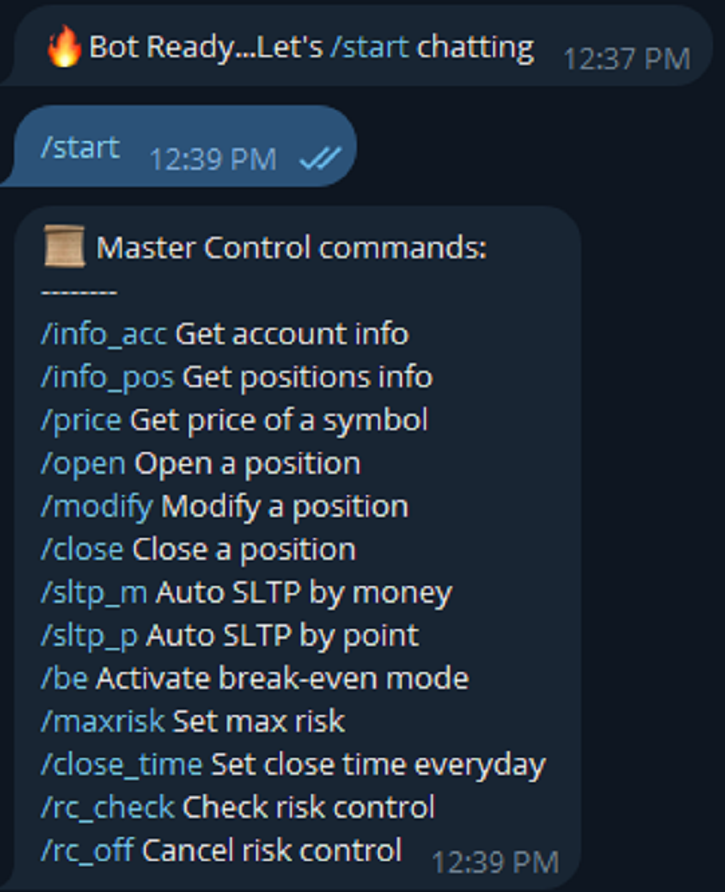
LIST OF COMMANDS:

info_acc - Get account info

info_pos - Get positions details

price - Get symbol price

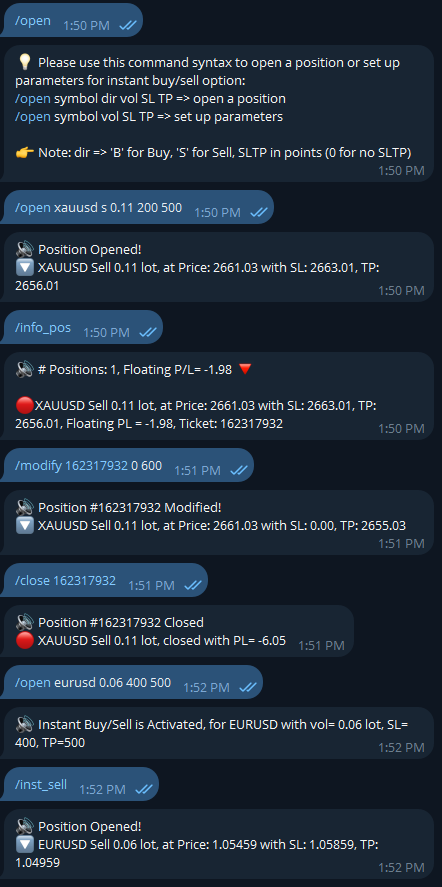
buy - Open a buy position

sell - Open a sell position

inst_set - Set parameters for instant trade

inst_buy - Instant buy

inst_sell - Instant sell

modify - Modify a position

close - Close a position

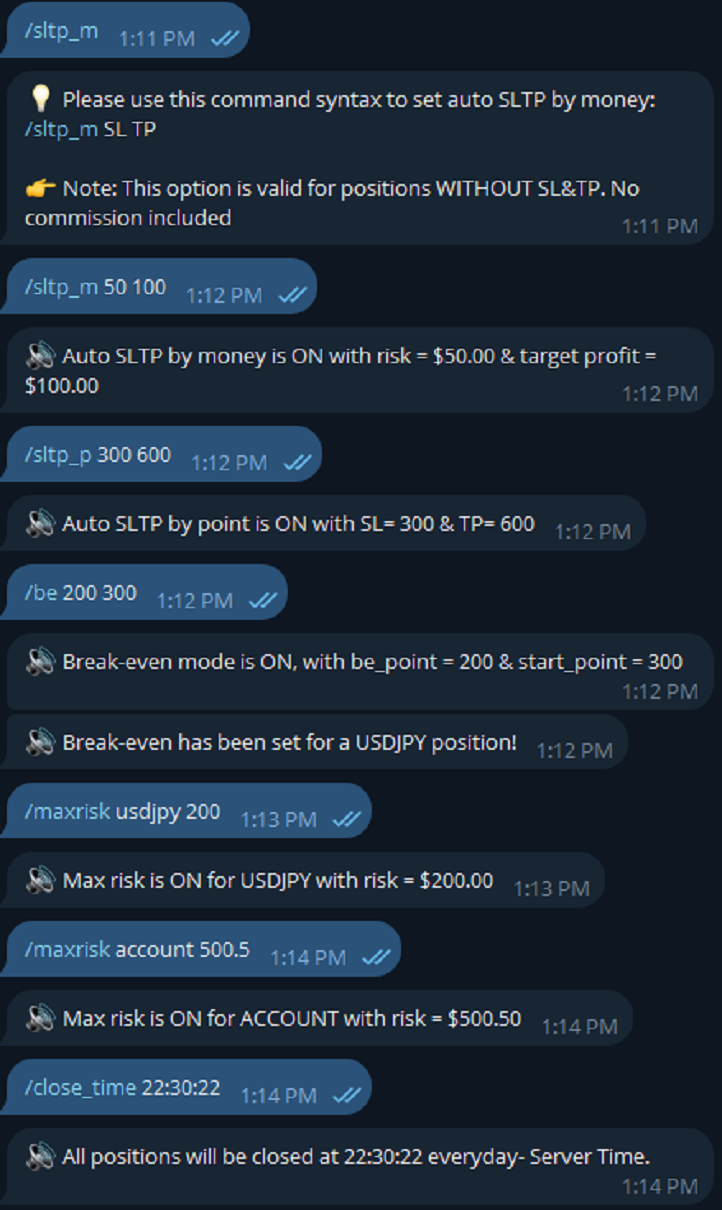
sltp_m - Auto SLTP by money

sltp_p - Auto SLTP by point 

be - Activate Break-even mode

maxrisk - Set max risk

close_time - Set close time everyday

rc_check -Check risk control modes 

rc_off - Cancel risk control modes

********************************************************************************************

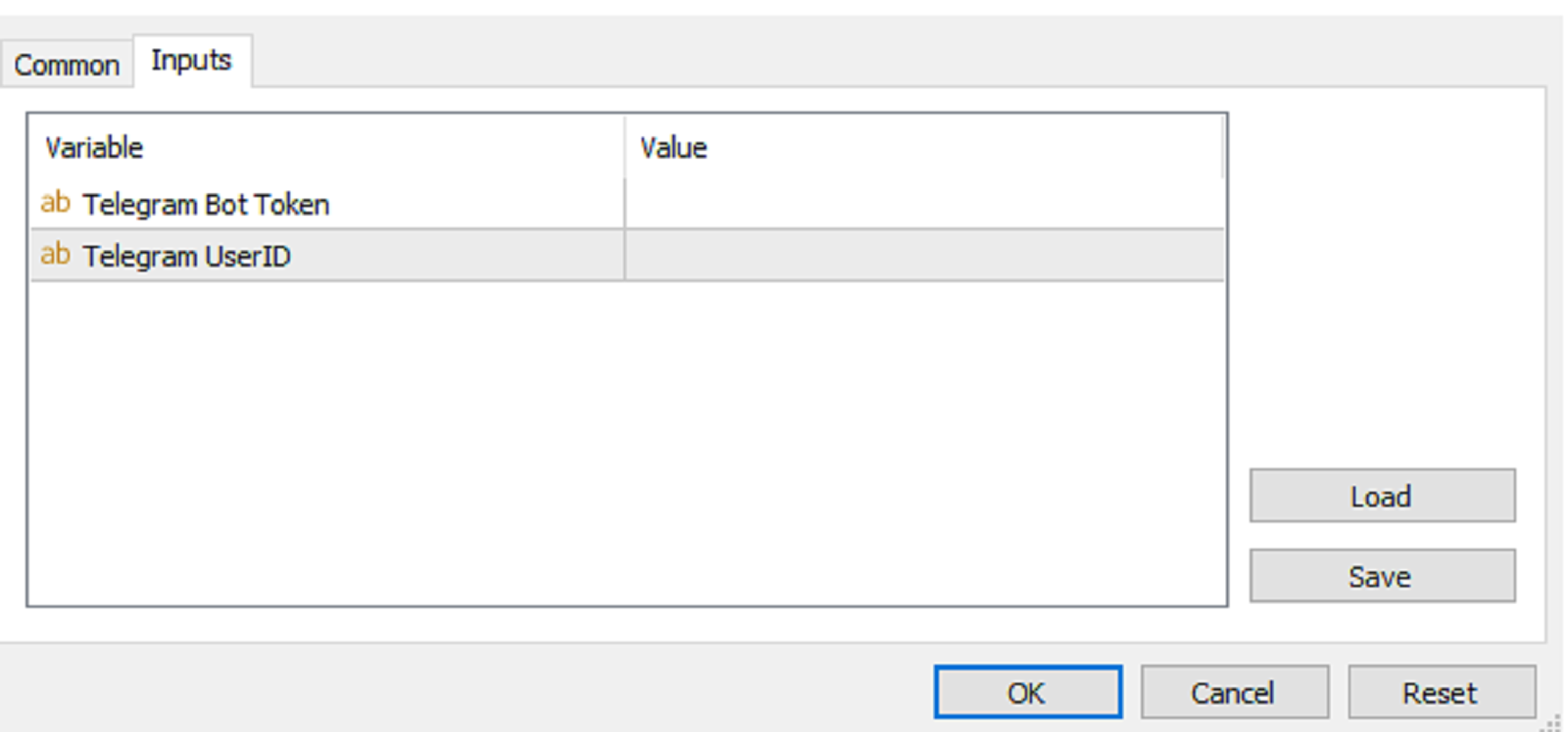
INPUTS:

Telegram Bot Token

Telegram User ID

*********************************************************************************************

HOW TO SET UP?

* Get inputs for EA:

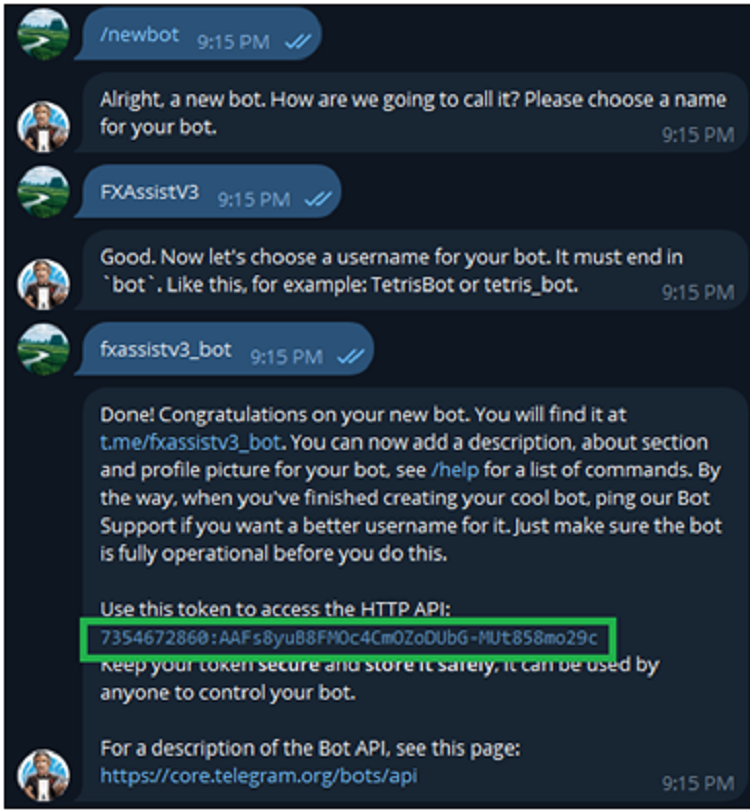
- Create a Telegram bot by @BotFather , and save your Bot Token. Find your bot by username & press "start".

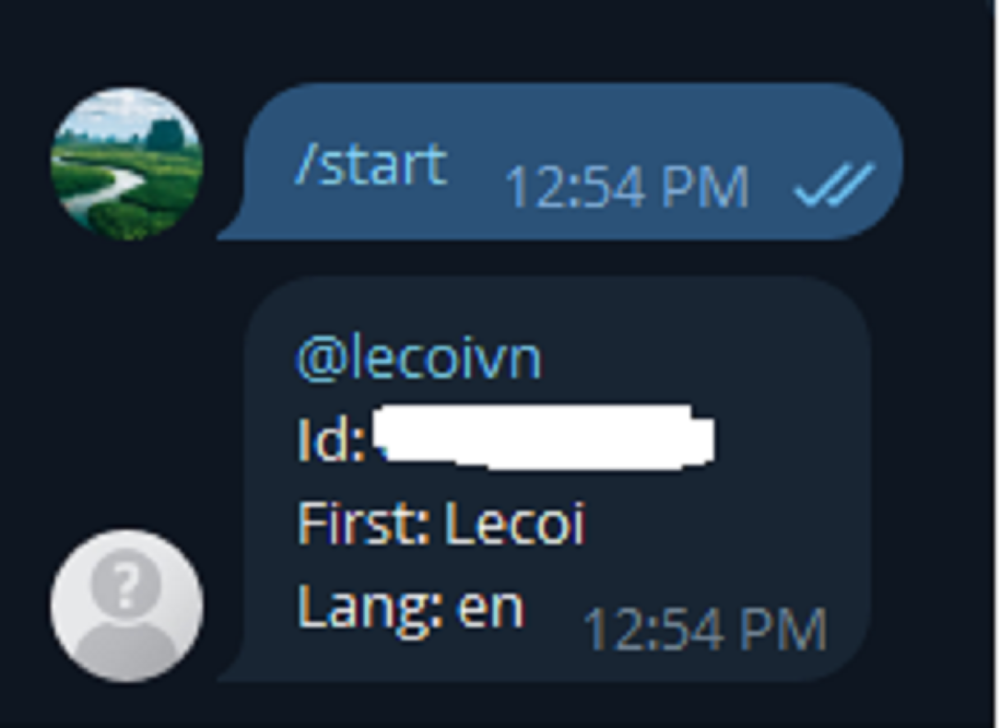
- Get your Telegram User ID by chatting with @userinfobot 

* Setup on your MT4/MT5:

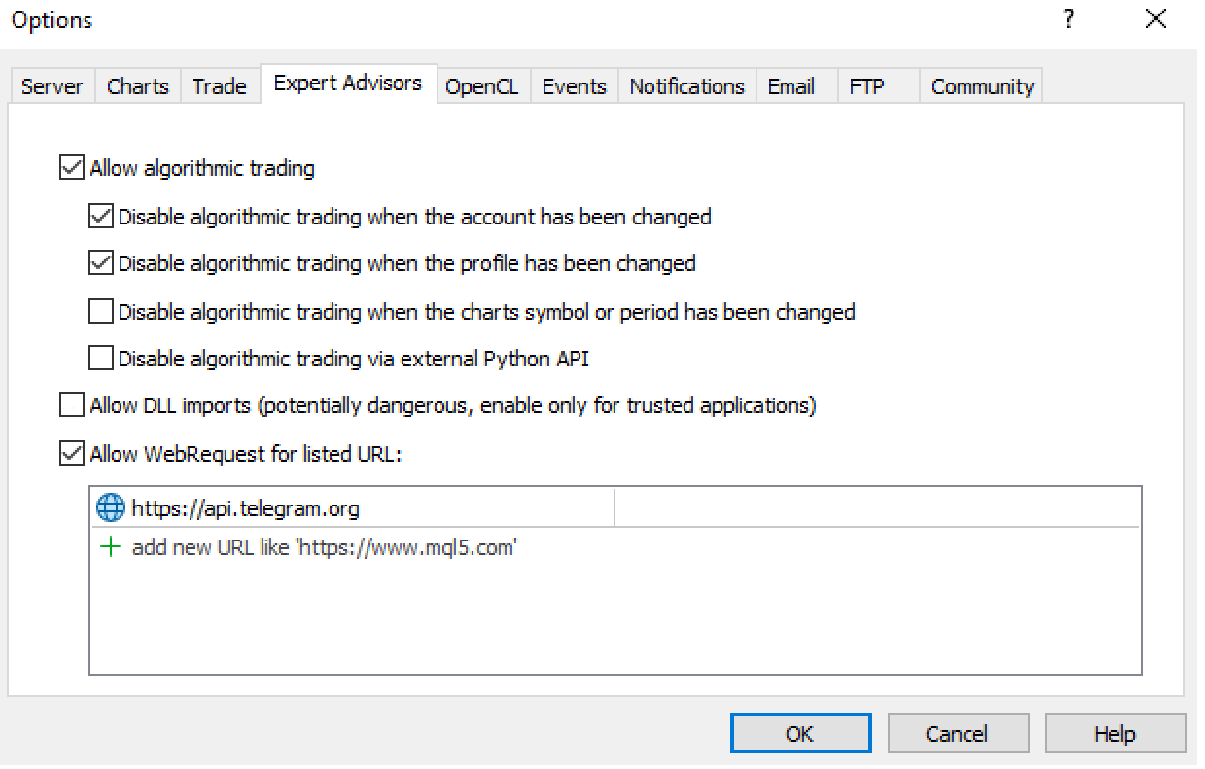
- MT4/MT5 => Tools => Options => Expert Advisors => Tick on Allow Algo Trading & Allow WebRequest, add  API Telegram to WebRequest

- Allow Algo Trading on EA 

* Create a command menu for your Telegram bot:

- Chat with @BotFather => /mybots => Select your bot => Edit Bot => Edit Commands => Copy/Paste command list above (You can set all the commands or just some common commands like start, info_acc, info_pos)
Produits recommandés
Position Tool Position Tool is a manual trading assistant for MetaTrader 5, designed to help traders visualize positions, manage risk, and plan trades clearly on the chart . This product does not perform automated trading and does not provide trading signals . It is intended for traders who prefer full control over their trading decisions . Key Features Draw Long and Short positions directly on the chart Automatic Risk/Reward (R:R) visualization Adjustable entry, stop-loss, and take-profit level
Cet outil peut vous aider à clôturer toutes les commandes ouvertes en un seul clic, cliquez simplement sur « Tout fermer ». Si vous souhaitez uniquement clôturer les ordres rentables, cliquez sur le bouton « Fermer les ordres rentables ». Après avoir cliqué, tous les ordres flottants seront fermés ; Si vous souhaitez uniquement clôturer les ordres avec des pertes flottantes, cliquez sur le bouton « Fermer les ordres perdants ». Après avoir cliqué, tous les ordres avec des pertes flottantes seron
Master Close via Telegram can help you perform some management tasks on MT4/MT5 remotely via your Telegram by one click, easy to set up & use. Demo here (see more Master Notify   Master Control ) ************************************************************************************ LIST OF COMMANDS: info_acc -  Get account info info_pen -   Get pending orders details info_pos -   Get positions details info_pos_sum -   Get positions summary close_pen -   Delete all pending orders close_pos_all -  
This utility sends notification to trader’s MT5 (for MT4 version, checkout this link ) mobile app, to remind traders about their open positions. Super useful for part time traders to keep track and not forget any positions. To turn on notification, please visit   this link   (https://www.metatrader4.com/en/trading-platform/help/setup/settings_notifications) Features Keep track on open orders (pending orders, running orders) Customize time to send notification Customize notification interval (se

WEALE Price List | Utilitaire de scan du capital Wealth Engine pour MetaTrader 5 WEALE Price List est un script utilitaire MetaTrader 5 (MT5) qui indique le capital nécessaire pour remplir l'échelle DCA complète du Wealth Engine sur chaque symbole présent dans votre Market Watch. Cet utilitaire est le compagnon de planification de l'Expert Advisor FJ Universe Wealth Engine (WEALE). Là où le Wealth Engine exécute la stratégie, le WEALE Price List vous aide à décider où l'exécuter. Le script analy
Détecteur de Marge Élevée Requise (HMR) pour MT5 Détectez les événements de Marge Élevée Requise (HMR) d'Exness et choisissez quoi faire de vos trades ouverts. Le Détecteur HMR est un utilitaire MetaTrader 5 conçu pour surveiller les conditions HMR liées à Exness sur votre compte et répondre automatiquement selon vos paramètres. Qu'est-ce que le HMR ? Le HMR est une condition liée à la marge qui s'applique à certains instruments et périodes nécessitant des exigences de marge plus élevées. Si vou
Risk Control Utility MT5 designed for manual trading. It helps to calculate and control your risks, transfer transactions to breakeven and accompany positions with trailing stop. Easy to set up and use. It can be used for calculating a trading lot, calculating stop loss and take profit levels. Works with currency pairs, CFDs, stocks, indices, futures, cryptocurrencies Displays   volume,   potential loss and profit before   placing an order Ability to set the expiration time of a pending order Tr
ApexForge Economic Calendar Safety Dashboard Calendrier économique MT5 | Calendrier économique Forex | News Filter | Alertes des annonces économiques majeures | Compte à rebours des événements économiques | Clôture d'urgence | Close All | Alertes jours fériés | Alertes de clôture anticipée | KTimer | Compte à rebours des bougies | Notifications Push mobiles | 12 langues + Auto ApexForge Economic Calendar Safety Dashboard est un tableau de bord complet pour MetaTrader 5 intégrant le calendrier éc
Lot Architect
Do Thi Phuong Anh
Lot Architect — Trade Panel & Risk-Based Position Size Calculator for MT5 Lot Architect is a one-click trade panel and risk-based position size calculator for MetaTrader 5. It works out your exact lot size from the risk you choose, shows risk, reward and risk-to-reward (R:R) before you enter, and places Market, Limit or Stop orders in a single click. In short: position sizing, risk management and fast trade execution in one clean panel on your chart. The problem every trader knows Most accounts
StopLoss and TakeProfit Utility MT5 for automatic setting of stop loss and take profit levels. Created by a professional trader for traders.   The utility   works with any market orders opened by a trader manually or using advisors. Can filter trades by magic number. The utility can work with any number of orders simultaneously. WHAT THE UTILITY CAN DO: Set virtual stop loss and take profit from 1 pip Real   stop loss and take profit W ork with each order separately (   stop loss and take prof
Trading Utility Panel Pro – V4.00 Live Risk Lot Calculator & Trade Manager for MetaTrader 5 Overview Trading Utility Panel is a lightweight, fully collapsible, on-chart control panel for manual traders who want fast, accurate trade execution with built-in risk management. There are no automated strategies, just a clean, responsive interface with the tools you actually need one click away. What’s New in V4.00 V4 makes lot sizing fully live. The Calculate button is gone: your lot size now updates
T Manager for Price action Traders
Haidar Lionel Haj Ali
4.5 (10)
Maximisez votre succès en trading avec T Manager, la solution ultime de gestion du commerce conçue par des traders pour les traders. Avec son interface conviviale et ses fonctionnalités avancées, vous pouvez planifier, exécuter et gérer rapidement et facilement vos opérations de trading. Expérimentez un contrôle sans égal en ayant la possibilité de définir vos opérations de prix, vos stop loss et vos bénéfices avec facilité. Gérez votre risque avec précision et calculez la valeur monétaire de vo
Forget about enabling templates when you launch the window. Auto Template Master Service  is a professional utility tool that runs as a system service in MetaTrader 5, and it will do it for you. Unlike traditional indicators or expert advisors (EAs), the program runs in the background of the entire terminal and doesn't require you to add it to each window individually. As soon as you open a new chart of any instrument (Forex, Stocks, Crypto), the service immediately detects the new window and a
Manual trading panel — opens one test trade for validation only. fRC Trade Assistant — Smart Manual Trading Panel fRC Trade Assistant is an intelligent trading panel designed for manual traders. It allows you to open positions with one click, calculate lot size based on your predefined risk, and automatically place Stop Loss (SL) and Take Profit (TP) levels. For example, if your balance is $1000 and you set a 1% risk , the panel automatically calculates the appropriate lot size. When the trad
One Click Trader  is a tool designed for MetaTrader 4 platform, which enables you to take your trading to the next level. It enables you to open, manage and close your trades in simple an efficient way by just one click of your mouse button. "-"   ,  "+"  change OCT window size  Up arrow minimizes the OCT panel Down arrow maximizes the OCT panel Right arrow displays the next panel with additional features Left arrow hides the panel with additional features Red  SELL  button enables you to open s
SAB Advance Assistant est un panneau de gestion de trades manuel pour MetaTrader 5. Construisez chaque trade visuellement sur le graphique, maîtrisez votre risque au centime près, et laissez le moteur intégré gérer les prises de profit partielles, le break-even et le trailing — le tout depuis un panneau clair et redimensionnable. Conçu pour les traders discrétionnaires et ICT/SMC qui veulent de la précision sans tableur. FONCTIONNALITÉS CLÉS - Lignes Entrée, Stop Loss, TP1-TP5 et TP Final dép
Trade Panel HotKey – MT5 Scalping Utility Fast Trade Panel HotKey is a lightweight MT5 trading utility designed for traders who need to open, manage, and close positions as quickly as possible . The main purpose of this tool is to reduce the time between a trading decision and execution. Instead of moving the mouse, opening order windows, or manually modifying multiple positions, most important actions can be performed instantly through customizable keyboard hotkeys or directly from the compact
Horizontal Line Trade Assistant EA  Semi-Automated Trading Assistant      IMPORTANT :     On the main/purchased program a user can click on the Horizontal line and change it to Buy or Sell, and drag by double clicking on it. Please keep in mind that this option is not available on demo version, due to some restrictions/limitations of Strategy Tester, some Object related operations are not available in the  Strategy Tester. But, it will not prevent you from Testing, please drop an Object to chart
Guardian Magic GT
Carlos Eduardo Rivas Istacuy
Guardian Magic GT - Risk Management Expert Advisor for MetaTrader 5 PROTECT YOUR TRADING CAPITAL WITH INTELLIGENT RISK MANAGEMENT Guardian Magic GT is a professional-grade Expert Advisor designed to safeguard your trading operations by implementing sophisticated risk control mechanisms. Whether you run a single bot or manage multiple automated trading systems simultaneously, Guardian Magic GT provides real-time monitoring and automatic position management to ensure your account stays within your
Bring the TradingView experience to your MetaTrader 5! Magic Entry Pro is a professional visual trading assistant designed for manual traders, scalpers, and Prop Firm funded traders. It allows you to execute trades with lightning speed, calculate risk automatically, and visually project your Stop Loss and Take Profit zones directly on the chart before you open a position. Tired of manually calculating lot sizes or guessing your Risk-to-Reward (RR) ratio? Magic Entry does it all in seconds! KE
SIMBA Manual Assistant Pro You Already Know How to Enter. Now Manage the Trade With a Plan. You already have a trading strategy. Maybe you trade support and resistance. Maybe breakouts, price action, moving averages, market structure, supply and demand, or something completely different. You know how you want to enter. But what happens after you enter? Should you move your stop-loss to break-even? Should you take partial profit? Should you let the trade run? Is that pullback normal, or is the m
This utility tool helps us to open trades and set orders very simply by just double-clicking on the chart. The volume of the positions and orders can be a constant lot size or determined based on a risk of equity. Take profit limit of the positions can be determined based on a Risk to Reward Ratio or simply by just a double-click.  For Positions: 1- At first, you need to double-click on the SL price. (For a buy position, you need to click on a price below the live price, and for a sell positio
News Telegram MT5 is a smart MetaTrader 5 utility that sends economic calendar news alerts directly to your Telegram in a clear, fast, and organized format. This product is designed for traders who want to stay informed about important market events without watching the terminal all day. It helps you monitor upcoming releases, receive pre-news alerts before scheduled events, and get automatic updates when actual values become available in the MetaTrader 5 Economic Calendar. To improve readabilit
This EA trails your stops based on percentage of current TP, for both manually and auto-opened trades.   You can edit the percentage value in the inputs. Trailing stop   is a more flexible variation of a normal exit order. T railing stop  is the practice of moving the stop-loss level closer to the current price when the price moves in your favor. Trailing the stop-loss allows traders to limit their losses and safeguard their positive trades. It is a very popular practice. This EA will manage you
Simple Telegram Notification – Stay Informed on Your MT5 Trading Activity! Stay connected with your MetaTrader 5 trading activity using Simple Telegram Notification , the Expert Advisor that sends real-time notifications to your Telegram app whenever orders are opened, modified, or closed . Whether you're at your desk or on the move, you’ll always be up-to-date with critical trading information. Key Features: Order Notifications : Receive instant Telegram alerts whenever an order is opened, mod
TAQ Magic Keys v6.0 Auto Trade Manager is an advanced trade management tool for MetaTrader 5 (MT5) , featuring one-click trade management functions and an integrated Position Size Calculator . New Feature In V6.0 — FNR1R1 Function Key The new FNR1R1 Function Key provides an automated 1:3 Risk Reward trade management system , allowing traders to manage an open position through three predefined profit targets. Set your initial Stop Loss, and the system automatically calculates: TP1 = 1:1 Risk R
Risk Controller Expert Advisor, un programme qui vous permet de contrôler le risque total de vos conseillers en trading sur votre compte. Avec ce programme, vous pouvez contrôler le risque maximum qui sera autorisé sur le compte pour tous les conseillers. Par exemple, vous définissez le risque de 30% du drawdown maximum, ce qui signifie que si vos robots de trading actions dépassent le risque de 30%, le Risk Controller fermera toutes les positions des conseillers, et pourra également fermer tou
Good Simple Risk Manager
Seti Gautama Adi Nugroho
️ GOOD SIMPLE RISK MANAGER The Ultimate Utility for Precise Trading & Risk Management in MetaTrader 5. Are you tired of manual lot calculations and slow executions? GOOD SIMPLE RISK MANAGER is a powerful all-in-one execution panel designed for professional traders who prioritize risk control and speed. Key Features: Dynamic Auto-Lot Calculation : Never calculate lots manually again. Simply enter your Risk % and Stop Loss , and the tool instantly calculates the appropriate lot size based on
Live Forex Signals est conçu pour le commerce sur les signaux du site   https://live-forex-signals.com/en et https://foresignal.com/en . Live Forex Signal for MetaTrader 4   https://www.mql5.com/en/market/product/81445 Paramètres Username   et   Password   si vous avez un abonnement aux sites live-forex-signals.com/foresignal.com. ensuite, vous devez remplir ces paramètres avec vos informations d'identification; s'il n'y a pas d'abonnement, laissez les champs vides; Comment   commentaire sur l
Utility TimeLs Close Positions est un outil de gestion et d'automatisation de la clôture des positions dans MetaTrader 5. Il permet de contrôler de manière flexible quand et comment les positions ouvertes sont fermées, en fonction de l'heure, du symbole, de la direction, du numéro magique et du commentaire. Vous pouvez désactiver le trading certains jours de la semaine Vous pouvez définir une heure spécifique pour clôturer toutes les positions ouvertes Vous pouvez filtrer les clôtures par symbol
Les acheteurs de ce produit ont également acheté
Trade Assistant MT5
Evgeniy Kravchenko
4.43 (216)
It helps to calculate the risk per trade, the easy installation of a new order, order management with partial closing functions, trailing stop of 7 types and other useful functions. Additional materials and instructions Installation instructions - Application instructions Line function -   shows on the chart the Opening line, Stop Loss, Take Profit. With this function it is easy to set a new order and see its additional characteristics before opening.   Risk management  - The risk calculation
Bienvenue sur Trade Manager EA, l’outil ultime de gestion des risques conçu pour rendre le trading plus intuitif, précis et efficace. Ce n’est pas seulement un outil d’exécution d’ordres ; c’est une solution complète pour la planification des trades, la gestion des positions et le contrôle des risques. Que vous soyez débutant, trader expérimenté ou scalpeur ayant besoin d’une exécution rapide, Trade Manager EA s’adapte à vos besoins, offrant une flexibilité sur tous les marchés, des devises et i
Local Trade Copier EA MT5
Juvenille Emperor Limited
4.94 (149)
Local Trade Copier EA MT5 est un copieur de trades rapide et flexible permettant de copier et de gérer des trades entre plusieurs comptes MetaTrader 5 sur le même ordinateur Windows ou Windows VPS. Il combine la synchronisation locale des trades avec des contrôles côté Receiver pour la taille des lots, la gestion du risque, le filtrage des trades, le mappage des symboles, la gestion des trades et la protection du compte. Configurez vos terminaux Transmitter et Receiver en environ 1 minute et co
Telegram to MT5 Multi-Channel Copier   copie automatiquement les signaux de trading de vos canaux Telegram et Discord directement vers MetaTrader 5. Pas de bots, pas d'extensions de navigateur, pas de copie manuelle. Un signal arrive sur Telegram ou Discord et l'EA ouvre le trade dans votre terminal en quelques secondes. Et avant de copier un canal, le backtester intégré vous montre ce que ce canal aurait fait sur votre compte. Le produit comprend deux composants : une application Windows qui éc
Farmed Hedge Yield Farming | All Markets (Manual - Hybrid - Semi/Automated EA) VERIFIED TRADING RESULTS - Farmed Hedge Yield Axi Copy:  https://www.mql5.com/en/signals/2356376 - Farmed Hedge Yield Exn Copy:   https://www.mql5.com/en/signals/2356404 - Farmed Hedge Yield V Copy:  https://www.mql5.com/en/signals/2357156 IMPORTANT NOTICE: FarmedHedge is a MANUAL-FOCUSED TRADING UTILITY ,not a fully automated EA. Results shown on this Signal include manual trades and overall strategic management.
Copiez les signaux Telegram avec vos propres règles de trading Telegram to MT5 Signal Trader copie automatiquement les signaux de trading au format texte provenant de canaux et de groupes Telegram publics et privés vers MetaTrader 5. Gérez plusieurs fournisseurs et comptes MT5 depuis une seule application de bureau, avec des paramètres de risque et de trading propres à chaque fournisseur . Aucun bot Telegram ni configuration d'API n'est nécessaire pour copier les signaux. Connectez-vous simpleme
TradePanel MT5
Alfiya Fazylova
4.88 (170)
Trade Panel est un assistant commercial multifonction. L'application contient plus de 50 fonctions de trading pour le trading manuel et permet d'automatiser la plupart des tâches commerciales. Instructions d'utilisation : https://www.mql5.com/fr/blogs/post/762589 Version d'essai de l'application pour un compte démo : https://www.mql5.com/fr/blogs/post/762644 Comment installer l'application : https://www.mql5.com/fr/blogs/post/762645 Comment tester l'application en mode visuel : https://www.mql5.
================================================================================ POC BREAKOUT - V20.72. Full Professional Grade Toolkit ================================================================================ POC Breakout is a full MetaTrader 5 trading dashboard for discretionary traders who want breakout signals, Point of Control (POC) context, volume profiles, order flow, market structure, news, alerts, and advanced trade planning in one professional workspace. Attached directly to you
News Trade EA MT5
Konstantin Kulikov
4.55 (11)
Je voudrais vous présenter un robot efficace que j'utilise depuis plusieurs années. Il peut être utilisé en mode semi-automatique, comme en mode totalement automatique. >>> Chat <<< Le programme comporte des paramètres souples pour le commerce sur les nouvelles du calendrier économique. Il est impossible de le vérifier dans le testeur des stratégies. Ce qu’il faut, c’est le travail réel. Il faut ajouter à la liste des URL autorisées, dans les paramètres du terminal, un site d'actualités. Cliqu
Master Your Trading Discipline   Stop losing your hard-earned gains to overtrading and emotional decisions. The Discipline Tool is your ultimate trading assistant, ensuring strict risk management in real-time. Key Protection Features: Advanced Drawdown Defense : Automatically halts trading if your daily drawdown exceeds a preset threshold (percentage or dollar amount). Real-Time Equity Lock : Safeguard profits by referencing peak equity, ensuring drawdown stays within control. Hard Profit Target
Entry In The Zone with SMC Multi Timeframe is a real-time market analysis tool based on Smart Money Concepts (SMC), designed to analyze market structure, price direction, and key trading zones. It supports both Single-Timeframe and Multi-Timeframe Analysis, providing a clearer view of overall market structure across multiple timeframes, with real-time BUY / SELL signals designed with a strict focus on No-Repaint principles.   The signals are designed to help filter unclear setups and evaluate tr
The product will copy all telegram signal to MT5 ( which you are member) , also it can work as remote copier.  Easy to set up, copy order instant, can work with almost signal formats, image signal,  s upport to translate other language to English Work with all type of channel or group, even channel have "Restrict Saving Content", work with  multi channel, multi MT5 Work as remote copier: with signal have ticket number, it will copy exactly via ticket number. Support to backtest signal. How to s
Exp COPYLOT CLIENT for MT5
Vladislav Andruschenko
3.97 (35)
Copieur professionnel de trades pour MetaTrader 5 Un copieur de trades rapide, professionnel et fiable pour MetaTrader . COPYLOT permet de copier des trades Forex entre les terminaux MT4 et MT5 avec prise en charge des comptes Hedge et Netting . La version MT5 de COPYLOT prend en charge : - MT5 Hedge → MT5 Hedge - MT5 Hedge → MT5 Netting - MT5 Netting → MT5 Hedge - MT5 Netting → MT5 Netting - MT4 → MT5 Hedge - MT4 → MT5 Netting Version MT4 Description complète + DEMO + PDF Comment acheter Comme
EasyInsight AIO MT5
Alain Verleyen
4.92 (12)
EASY Insight AIO – La solution tout-en-un pour un trading intelligent et sans effort Présentation Imaginez pouvoir analyser l’ensemble du marché — Forex, Or, Crypto, Indices et même Actions — en quelques secondes, sans aucune analyse manuelle de graphiques, sans installation complexe ni configuration d’indicateurs. EASY Insight AIO est votre outil d’exportation ultime, prêt à l’emploi, pour un trading alimenté par l’IA. Il fournit une vue d’ensemble du marché dans un fichier CSV propre — prêt
Besoin d'aide ? Comment le configurer ? Des questions ? Demandez ici dans votre langue, réponse rapide : https://www.mql5.com/en/market/product/139088/comments Télécharger la démo fonctionnelle Copy Cat More (Chat Copieur) — Copieur de Trades (Trade Copier) MT5 est un copieur de trades local et un cadre complet de gestion du risque et d'exécution, conçu pour les défis du trading d'aujourd'hui. Des challenges de prop firm à la gestion de portefeuille personnel, il s'adapte à chaque situation gr
MT5 to Telegram Signal Provider est un utilitaire facile à utiliser et entièrement personnalisable qui permet l'envoi de signaux spécifiés vers un chat, un canal ou un groupe Telegram, transformant ainsi votre compte en fournisseur de signaux. Contrairement à la plupart des produits concurrents, il n'utilise pas d'importations DLL. [ Démonstration ] [ Manuel ] [ Version MT4 ] [ Version Discord ] [ Canal Telegram ]  New: [ Telegram To MT5 ] Configuration Un guide utilisateur étape par étape est
Signal Trading View to MT5 Pro
Mirel Daniel Gheonu
4.5 (2)
Signal TradingView to MT5 Pro Automator Exécution professionnelle instantanée entre TradingView et MetaTrader 5 Automatisez votre stratégie de trading avec le pont de communication le plus robuste entre les alertes TradingView et l'exécution réelle sur MT5. Conçu pour les traders qui exigent vitesse, flexibilité et une gestion des risques impeccable, cet Expert Advisor transforme tout message d'alerte en un ordre au marché ou à cours limité précis. POINTS FORTS ET AVANTAGES Moteur d'analyse univ
Power Candles Strategy Scanner - Outil de recherche de configurations multi-symboles à optimisation automatique Le Power Candles Strategy Scanner utilise le même moteur d'auto-optimisation que celui qui alimente l'indicateur Power Candles, pour chaque symbole de votre Market Watch, en parallèle. Un panneau vous indique quels symboles sont statistiquement négociables à l'instant, quelle stratégie est la plus performante pour chacun, la paire Stop Loss / Take Profit optimale, et vous alerte dès qu
The Patch
Mian Rameez Ali
The Patch It never opens a trade. It walks behind the ones that did. Every open position, every pending order — checked twice a second for the one thing that's easy to forget: a stop, a target. Found bare, it doesn't ask. It writes the missing number in, measured in points from wherever the position began, and moves on to the next. No strategy, no opinion on direction. Just the quiet assumption that nothing should ever sit on the market unprotected — not because someone decided it shouldn't,
Panneau de trading pour MetaTrader 5 — contrôle professionnel du trading en un clic depuis le graphique et le clavier Un panneau de trading avancé conçu pour les traders actifs, afin d’ouvrir, gérer et clôturer des positions bien plus rapidement qu’avec l’interface standard de MetaTrader. Cette solution s’adresse à ceux qui veulent contrôler positions, ordres en attente, profit global et exécution depuis un seul espace de travail professionnel. Il ne s’agit pas d’un simple utilitaire. C’est un
Grid Manual MT5
Alfiya Fazylova
4.73 (22)
Grid Manual est un panneau de trading permettant de travailler avec une grille d'ordres. L'utilitaire est universel, possède des paramètres flexibles et une interface intuitive. Il fonctionne avec une grille d'ordres non seulement dans le sens des pertes, mais aussi dans le sens de l'augmentation des profits. Le commerçant n'a pas besoin de créer et de maintenir une grille d'ordres, l'utilitaire le fera. Il suffit d'ouvrir une ordre et "Grid Manual" créera automatiquement une grille de ordres po
Anchor Trade Manager
Kalinskie Gilliam
5 (9)
Your EAs cannot see each other, but Anchor can. Anchor gives you one place to coordinate your EAs, manage risk, and decide when trading is allowed. It works alongside the trading bots you already use without any changes to them. The Problem One EA opens a trade. Then another starts trading. The next thing you know, you wake up to multiple grids built across your account. Each EA may be doing exactly what it was designed to do, but together they can place far more risk on your account than you in
RETAILBERG FOOTPRINT CHART PRO — Order-Flow Workspace for MetaTrader 5 Version 7.00  |  Professional System  |  31 tools  |  One chart A full 150-page illustrated User Manual is included. Please read the full manual to understand this feature packed footprint chart elements and ui. https://www.mql5.com/en/blogs/post/777982 DEMO / STRATEGY TESTER — PLEASE READ FIRST
Telegram to MT5 Coppy
Sergey Batudayev
5 (10)
Télégramme vers MT5 :   la solution ultime pour copier des signaux Simplifiez votre trading avec Telegram vers MT5, l'outil moderne qui copie les signaux de trading directement des canaux et chats Telegram vers votre plateforme MetaTrader 5, sans DLL. Cette solution puissante garantit une exécution précise des signaux, de nombreuses options de personnalisation, un gain de temps et une efficacité accrue. [ Instructions and DEMO ] Caractéristiques principales Intégration directe de l'API Telegram
The News Filter MT5
Leolouiski Gan
4.79 (24)
Ce produit filtre tous les conseillers experts et les graphiques manuels pendant les heures de publication des actualités, de sorte que vous n'avez pas à vous soucier des pics de prix soudains qui pourraient détruire vos configurations de trading manuelles ou les transactions entrées par d'autres conseillers experts. Ce produit est également livré avec un système de gestion des ordres complet qui peut gérer vos positions ouvertes et vos ordres en attente avant la publication de toute actualité.
Trade Indicator Assistant   is a powerful MT5 utility designed to turn indicators into automated trading systems. Its main feature is the ability to automatically detect an indicator’s   BUY and SELL signal buffers , without requiring you to know the buffer numbers, search through indicator settings, or modify the indicator source code. Bonus Indicator:   After purchasing Trade Indicator Assistant, contact me to receive   Trade Signal Pro   completely free as a bonus indicator. [Download Demo V
Floor Watch
Syed Tauqeer Hussain Shah
Floor Watch One number, watched every thirty seconds: how far equity has fallen since the day began — or since its highest point, if it's told to trail the peak instead of the open. Cross the line and it doesn't argue. Every open position closes, every pending order vanishes, and anything that slips through afterward gets shut the moment it appears. Not asked. Removed. The floor holds until the clock turns 5 AM Pakistan time — then, and only then, does the day start over. One rule. No except
Seconds Chart MT5
Boris Sedov
4.61 (18)
Seconds Chart - un outil unique pour créer des graphiques en secondes dans MetaTrader 5 . Grâce à Seconds Chart , vous pouvez créer un graphique avec une période définie en secondes, offrant une flexibilité et une précision idéales pour l'analyse, indisponibles sur les graphiques standards en minutes ou en heures. Par exemple, la période S15 indique un graphique avec des bougies d'une durée de 15 secondes. Vous pouvez utiliser n'importe quels indicateurs et experts advisors compatibles avec les
Un seul achat. Tous mes indicateurs MT4 et MT5, disponibles aujourd’hui et publiés à l’avenir, sans frais supplémentaires. Contactez-moi après l’achat pour connaître la procédure de réception. Il est prévu d’augmenter le prix de 50$ toutes les 10 ventes, jusqu’à 999$. Le prix du Market au moment du paiement fait foi. Gardez l’indicateur auquel vous faites confiance. Automatisez les tâches qui l’entourent. Votre signal. Vos règles. Votre exécution. Vous utilisez déjà un indicateur MT5 fiable, ma
Les signaux de vos canaux Telegram, copiés sur MetaTrader 4 et MetaTrader 5 en quelques secondes. TradingMind Signal Bridge lit les canaux et les groupes que vous choisissez, reconnaît chaque signal grâce à des règles intégrées rapides, confie les messages confus à un modèle d'IA, y compris les signaux publiés sous forme de captures d'écran, et transmet l'ordre à un expert advisor sur votre terminal. Un filtre news, une protection pour les comptes de prop firm et un bot Telegram de contrôle à di
Plus de l'auteur
Auto SLTP Pro
Tuan Nghia Phan
5 (1)
Auto SLTP Pro can help you setSL & TP automatically for positions & pending orders * 2 modes: - Points - USD * Symbol Filter:  Select All or a specific symbol * For pending orders: Select true to set SLTP for pending orders Note: Only valid for positions (pending orders) without SL&TP! Join my channel here for more useful management tools: * Remote Tools via Telegram: Super Assistant, Master Close, Master Control, Master Notify * Free Tools: Tele Notify, Price Alert, Quick Close
FREE
Master Close via Telegram can help you perform some management tasks on MT4/MT5 remotely via your Telegram by one click, easy to set up & use. Demo here (see more Master Notify   Master Control  ) ************************************************************************************ LIST OF COMMANDS: info_acc -  Get account info info_pen -   Get pending orders details info_pos -   Get positions details info_pos_sum -   Get positions summary close_pen -   Delete all pending orders close_pos_all -
Auto SLTP Pro for MT4
Tuan Nghia Phan
3.33 (3)
Auto SLTP Pro can help you setSL & TP automatically for positions & pending orders * 2 modes: - Points - USD * Symbol Filter:  Select All or a specific symbol * For pending orders: Select true to set SLTP for pending orders Note: Only valid for positions (pending orders) without SL&TP! Join my channel   here   for more useful management tools: * Remote Tools via Telegram: Super Assistant, Master Close, Master Control, Master Notify * Free Tools: Tele Notify, Price Alert, Quick Close 
FREE
Equity Aler t can help you send notifications to your personal Telegram when your account equity reaches/ drops below a preset value. Additionally,   you can check your MT4/5 account info anytime from your Telegram by simple command: /check .    Get more free useful EAs  here ! HOW TO SET UP?   * Get inputs for EA: - Telegram Bot Token: Create a Telegram bot by   @BotFather   ,   and save your Bot Token. Find your bot by username & press "start". - Telegram User ID: Use your User ID by chatting
FREE
Equity Aler t can help you send notifications to your personal Telegram when your account equity reaches/ drops below a preset value. Additionally,   you can check your MT4/5 account info anytime from your Telegram by simple command:   /check .    Get more free useful EAs  here ! HOW TO SET UP?   * Get inputs for EA: - Telegram Bot Token: Create a Telegram bot by   @BotFather   ,   and save your Bot Token. Find your bot by username & press "start". - Telegram User ID: Use your User ID by chatti
FREE
Quick Close Pro by one click: * Close Buy positions * Close Sell positions * Close Win positions * Close All positions * Close All pending orders * Close All by Mobile: Select true to close all positions quicky from your Mobile by closing any position on Mobile. To close all positions by one click from your Telegram, please refer  Master Close . Join my channel here for more useful EAs.  Thank you!
FREE
Price Aler t can help you send notifications to your personal Telegram when the price crosses a preset value. Additionally, you can check your MT4/5 account info anytime from your Telegram by simple command: /check.  Get more free useful EAs  here ! HOW TO SET UP?   * Get inputs for EA: - Telegram Bot Token: Create a Telegram bot by   @BotFather   ,   and save your Bot Token. Find your bot by username & press "start". - Telegram User ID: Use your User ID by chatting with @ userinfobot   * Setup
FREE
IndiSig by Buffer Detect Signals from a Custom Indicator by Buffer & Send notifications to Telegram Channel or Open orders * Buy/Sell Buffer: You may get this info on MT4/5 Data Window (CTRL + D) * MT5 version: Add the indicator first, then the EA * MT4 version: Only works properly with default settings of the indicator Join https://t.me/fxassistant_vn for more useful EAs!
FREE
Tele Notify
Tuan Nghia Phan
Tele Notify can help you send notifications for opened & closed trades to a Telegram channel or your personal Telegram. (see Master Notify for full options of notifications/alerts: indicator data, price, news, etc. Get more EAs  here ) Update: Now you can check your account info anytime from your Telegram by simple command: /check. This option is only valid when you use your Telegram User ID on EA inputs *******************************************************************************************
FREE
BreakEvenPro
Tuan Nghia Phan
Break-Even Pro  * 3 BE modes:    - RewardRisk_Single for single trade (only valid for positions with SL)    - Points_Single for single trade    - Points_DCA for multiple DCA trade * Start Value: value of RR or # points to start SL moving * Offset: distance in points between BE level & entry  * Symbol Filter: Select All or a specific symbol * Partial Close (%): Close % initial volume when moving SL to BE (0 for no partial close) Join my telegram channel here  for more useful free EAs. Thank you!
FREE
Quick Close Pro by one click: * Close Buy positions * Close Sell positions * Close Win positions * Close All positions * Close All pending orders To close all positions by one click from your Telegram, please refer  Master Close . Thank you! Join my channel   here   for more useful EAs: - Tele Notify, Price Alert, Equity Alert, Remote Algo OnOff - Auto SLTP, Close Timer
FREE
Tele Notify can help you send notifications for opened & closed trades to a Telegram channel or your personal Telegram. (see Master Notify for more options of notifications: price, equity, profit, etc. Get more EAs here ) Update: Now you can check your account info anytime from your Telegram by simple command: /check. This option is only valid when you use your Telegram User ID on EA inputs ******************************************************************************************** HOW TO SET U
FREE
IndiSig by Buffer Detect Signals from a Custom Indicator by Buffer & Send notifications to Telegram Channel or Open orders * Buy/Sell Buffer: You may get this info on MT4/5 Data Window (CTRL + D) * MT5 version: Add the indicator first, then the EA * MT4 version: Only works properly with default settings of the indicator Join  https://t.me/fxassistant_vn for more useful EAs!
FREE
Break-Even Pro   * 3 BE modes:    - RewardRisk_Single for single trade (only valid for positions with SL)    - Points_Single for single trade    - Points_DCA for multiple DCA trade * Start Value: value of RR or # points to start SL moving * Offset: distance in points between BE level & entry  * Symbol Filter: Select All or a specific symbol * Partial Close (%): Close % initial volume when moving SL to BE (0 for no partial close) Join my telegram channel   here  for more useful free EAs. Thank yo
FREE
Price Aler t can help you send notifications to your personal Telegram when the price crosses a preset value. Additionally,   you can check your MT4/5 account info anytime from your Telegram by simple command: /check .    Get more free useful EAs  here ! HOW TO SET UP?   * Get inputs for EA: - Telegram Bot Token: Create a Telegram bot by   @BotFather   ,   and save your Bot Token. Find your bot by username & press "start". - Telegram User ID: Use your User ID by chatting with @ userinfobot   *
FREE
Master Notify via Telegram can help you perform some management tasks on MT4/MT5 remotely via your Telegram by one click, easy to set up & use. Demo here (see more Master Close   Master Control ) ************************************************************************************ LIST OF COMMANDS: info_acc -  Get account info info_pos -   Get positions details price -   Get symbol price noti_price   - Set price alert  noti_pl   - Set floating PL alert noti_equity - Set equity alert  noti_margin
Master Control via Telegram can help you perform some management tasks on MT4/MT5 remotely via your Telegram by one click, easy to set up & use. Demo here (see more Master Close   Master Notify  ) ************************************************************************************ LIST OF COMMANDS: info_acc -   Get account info info_pos -   Get positions details price -   Get symbol price buy  -   Open a buy position sell  -   Open a sell position inst_set  -   Set parameters for instant trade i
* Super Assistant   is an useful management tool that helps traders perform management tasks on MT4/MT5 account remotely via  Telegram  such as: - Get info (account, details of positions, pending orders, floating PL, price, economic news, etc) - Open trade (open instantly with preset parameters) - Manage trade (set SLTP automatically, break-even mode, max risk, close time every day, etc) - Close trade (close all, buy, sell, win positions by one click, set awaiting close by PL, time) - Set up no
Copy signals from Telegram channel to MT4/MT5 (Telegram bot must be added as an Admin in the channel)  Input * Telegram bot token: Get your bot token by chatting with @BotFather * Multi- order for multi-tp signals * Signals filter by "not included text" * Option to Modify/Close by Reply message * Range Entry Mode: No open order if the price is out of range  Setup on your MT4/MT5: - MT4/MT5 => Tools => Options => Expert Advisors => Tick on Allow Algo Trading & Allow WebRequest, add  API Telegram
Master Close via Telegram can help you perform some management tasks on MT4/MT5 remotely via your Telegram by one click, easy to set up & use. Demo here (see more Master Notify   Master Control ) ************************************************************************************ LIST OF COMMANDS: info_acc -  Get account info info_pen -   Get pending orders details info_pos -   Get positions details info_pos_sum -   Get positions summary close_pen -   Delete all pending orders close_pos_all -  
Master Notify via Telegram can help you perform some management tasks on MT4/MT5 remotely via your Telegram by one click, easy to set up & use. Especially now this tool can work with indicator & send alert to Telegram. Demo here (see more Master Close   Master Control ) ************************************************************************************ LIST OF COMMANDS: info_acc -  Get account info info_pos -   Get positions details price -   Get symbol price news -   Get economic news noti_pri
* Super Assistant is an useful management tool that helps traders perform management tasks on MT4/MT5 account remotely via Telegram such as: - Get info (account, details of positions, pending orders, floating PL, price, economic news, etc) - Open trade (open instantly with preset parameters) - Manage trade (set SLTP automatically, break-even mode, max risk, close time every day, etc) - Close trade (close all, buy, sell, win positions by one click, set awaiting close by PL, time) - Set up notifi
TeleCopy
Tuan Nghia Phan
Copy signals from Telegram channel to MT4/MT5 (Telegram bot must be added as an Admin in the channel) Input * Telegram bot token: Get your bot token by chatting with @BotFather * Multi- order for multi-tp signals * Signals filter by "not included text" * Option to Modify/Close by Reply message * Range Entry Mode: No open order if the price is out of range  Setup on your MT4/MT5: - MT4/MT5 => Tools => Options => Expert Advisors => Tick on Allow Algo Trading & Allow WebRequest, add  API Telegram  
Filtrer:
Aucun avis
Répondre à l'avis