

Download the Demo version to test on a live demo account before purchase:
Where you work
FxTools is one Expert Advisor with four places to work. They are not four separate products. Nested lists below are the map (MQL5.com cannot show a drawing).
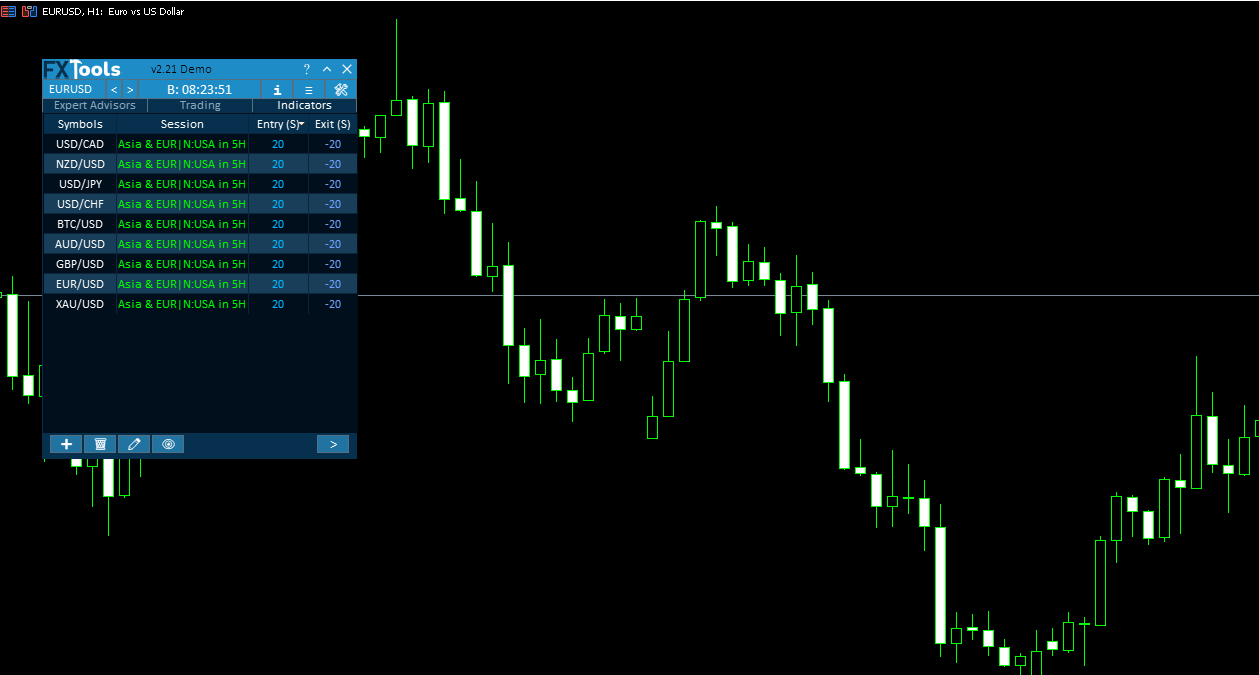
| 1. Nested dashboard — main tabs: Indicators, Trading, and Expert Advisors. Trading has sub-tabs Open, Close, Manage, and Filters, then a leaf. |
| 2. Shortcut bar — always on the panel: Help, minimize, symbol, clock, settings, trade lines, info. Minimize collapses to a compact bar (screenshot lives there). |
| 3. Overlay windows — opened from the shortcut bar, not a main tab: Settings, Info, Pending Positions, add-indicator dialogs. |
| 4. Chart — Easy Position Manager (pills on trades) and Easy Trade Deck (drag entry / SL / TP). EPM uses EA input Show Easy Position Manager. Deck opens from Open tab Levels on chart. |
Inputs (F7)
Set these when you attach FxTools. Right-click the chart, then Expert Advisors, then Properties, or press F7, then open the Inputs tab. The names below are the F7 comments.
Symbols
Symbols source — Input symbols (the comma list) or All Market Watch.
Symbols (comma-separated) — used when source is Input symbols, for example EURUSD, XAUUSD.
Automatic suffix/prefix detection — maps EURUSD to the broker’s EURUSD.p / prefix form.
Management
Auto Resuming Managements (default true) — Enabled trail / grid / martingale / recovery / breakeven / partial come back with the attach. Off: they do not resume by themselves.
Reset whole dashboard to defaults (default false) — this run does not load or write autosave; the panel starts empty. Set it back to false on the next attach to resume autosave. Named Settings Save / Load still work.
Save files in Common folder (default false) — dashboard files (logs, Combined HTML, experts cards, indicators, management) go in this terminal’s MQL5\Files. On: Common Files.
Indicators tab settings
Display indicator signals history on chart and Number of bars to display signal history — history marks on the chart (Part 3).
Minimum entry score for alerts / Minimum exit score for alerts — alert floors for the watch table.
Logging
Write log to file, Also Print to Experts journal, Minimum level to record (Debug / Info / Warn / Error). For support, the file log is enough. Same folder as Save files in Common folder.
Tab visibility
Main tab order — six permutations; default Indicators, Trading, Expert Advisors. The leftmost visible tab is selected on attach.
Indicators / Trading / Expert Advisors, then Open / Close / Manage / Filters, then the leaves (Instant, Pending, By Time, Manual, Auto, Partial, TrailStop, Grid, Martingale, Recovery, Breakeven, News, Prop Firm, Time). true = that strip is created. Hidden = not created.
⚠️ Important: changing Main tab order or any show-tab input on a live chart does not rebuild the panel. Remove the EA and attach it again with those settings.
Chart
Show Easy Position Manager — pills only. Easy Trade Deck is still Open / shortcut Levels on chart, not this switch. See Part 12 Chart.
Chart colors — Easy Position Manager, Easy Trade Deck, the price lines, the Expert Advisors graph and card text, and the indicator marks — are on Settings → Theme.
Nested dashboard
- Indicators
- Watch table (symbols, session, entry / exit scores)
- Add / edit / delete / hide — Load tab; Calculations and Display exist in that window but are thin in the app
- Market presets
- Trading
- Open
- Instant (lots, SL/TP). Hide SL/TP checkbox is not on Instant Open; Virtual SL/TP is on Easy Position Manager (Chart guide).
- Pending
- By Time — coming soon. The leaf shows an overlay; calendar widgets are not on.
- Close — Manual, Auto, Partial
- Manage — Trail, Grid, Martingale, Recovery, Breakeven
- Filters — News, Prop firm, Time
- Open
- Expert Advisors
- One card per EA or manual strategy, matched by magic
- Live vs imported tester report; apply Trail / Grid / Martingale / Recovery / Breakeven from the card
Shortcut bar
- Help (question mark) — tooltips, QR footer when Help is on
- Minimize / close
- Symbol dropdown and previous / next
- Market clock (server / local / candle countdown)
- Settings, Info, Quick trade lines
- Min bar also has screenshot
Overlay windows
- Settings — Themes, magic, zoom, alerts, profiles, position-manager scope
- Info — Statistics, Account, Symbol
- Pending Positions window — pending list and Remove (not a full open-trade table)
- Add / edit / hide indicator dialogs
Chart tools
EPM pills use EA input Show Easy Position Manager. Easy Trade Deck is turned on from Open → Levels on chart, not that input. EPM and Deck stay off in the Strategy Tester.
The same job can exist on two surfaces. Example: Trail on the Manage tab and Trail on an EPM pill. Write-up lives in the Trail guide and the Chart guide; they point at each other.
Words that must not mix
Enabled = dashboard ready to Apply / auto-arm. On / Off = this ticket is running the method. Enable on Apply = draft on the EPM flyout until Apply.
Topic guides
- Part 0 Overall Guide — four work places (dashboard, shortcut bar, overlays, chart)
- Part 1 Shortcut bar — shortcut bar and min mode
- Part 2 Overlays — Info and Settings
- Part 3 Indicators — watch table and add indicator
- Part 4 Open — Instant, Pending, By Time (coming soon)
- Part 5 Close — Manual, Auto, Partial
- Part 6 Filters — News, Prop firm, Time
- Part 7 Trail — TrailStop and shared distance modes
- Part 8 Grid — same-direction legs after price moves in favor
- Part 9 Martingale — extra legs as the trade moves into loss
- Part 10 Recovery — Recovery Zone hedge channel
- Part 11 Breakeven — move SL toward the open once in profit
- Part 12 Chart — Easy Position Manager and Easy Trade Deck
- Part 13 Expert Advisors — strategy cards by magic, live vs backtest




