

Trail (Manage tab)

The first Manage sub-tab is TrailStop. This post is the dashboard trailing tab. Easy Position Manager has its own trail row on the ticket (Chart guide): there On/Off is this ticket; Enable on Apply is the draft until Apply.
On the dashboard, the master button is Disabled / Enabled — Enabled means the filter is ready; click Apply Settings to put it on matching tickets.
Per ticket: Trail and Breakeven may both be On. Partial may stay with Trail or Breakeven. Grid, Martingale, and Recovery cannot share a ticket with Trail, Breakeven, or Partial, or with each other.
1. What is TrailStop?
Moves Stop Loss with price in the trade’s favor, using the Modes dropdown. Trail modes here are not the same list as Grid distance modes (those six are at the end of this post).
________________________________________
- Disabled – dashboard trail is not armed.
- Enabled – dashboard trail is ready; Apply Settings writes it onto matching tickets (On for those tickets).
________________________________________
3. Symbol Dropdown
• Current Symbol (default) or All Symbols.
________________________________________
4. Magic Number Filter
• Checkbox list. Default: FxTools Orders. Also: All Bot Orders, Manual Orders, All Orders.
________________________________________
5. Modes – Select the Trailing Method
• Caption Modes. Items: Fixed Distance, ATR, MA, Parabolic SAR, Candles High/Low, By Profit.
________________________________________
6. Remove TP after Trail Started
• Checkbox label: Remove TP after trail started. When ticked, TP is cleared once trail is moving.
________________________________________
7. Start – When to Begin Trailing
• Spin Start (also on ATR / MA / PSAR / Candles). Trail waits until profit covers this Start, in the unit from the type button.
________________________________________
• Cycles Pips, Price %, SL %, TP %.
________________________________________
9. Distance – The Trailing Gap
• Spin Distance (Fixed Distance mode). SL stays this far behind once trailing.
________________________________________
• Same cycle: Pips, Price %, SL %, TP %.
________________________________________
11. Step – Price Change Step
• Spin Step (Fixed Distance). SL moves only after price advances by this step.
________________________________________
• Same Pips / Price % / SL % / TP % cycle.
________________________________________
• Label: Apply Settings. Pushes the current dashboard trail setup onto tickets in the Symbol/Magic filter.
________________________________________
Magic Number Options Table
| Option | Meaning |
|---|---|
| FxTools Orders (default) | This dashboard’s magic |
| All Bot Orders | Any magic > 0 |
| Manual Orders | Magic 0 / manual |
| All Orders | Every trade |
Trailing Modes Table
| Mode | Explanation |
|---|---|
| Fixed Distance | Start, Distance, Step (each with a unit button). |
| ATR | Start + Timeframe, Scan Bars, Multiplier. |
| MA | Start + Timeframe, Period, Method, Applied Price, Shift. |
| Parabolic SAR | Start + Timeframe, Step:, Maximum, Shift. |
| Candles High/Low | Start + Timeframe. Buy uses candle low; sell uses candle high. |
| By Profit | Basket profit trail: Balance % / Equity % / Currency, Value, Trail Negative Profit. |
Value Type Options Table
| Option | Meaning |
|---|---|
| Pips | Pip distance. |
| Price % | Percent of price. |
| SL % | Percent of original SL distance. |
| TP % | Percent of original TP distance. |
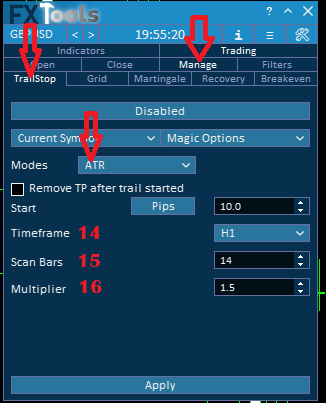
ATR Mode Settings
Mode ATR shows extra fields (plus Start).
14. Timeframe
• Dropdown Timeframe for ATR.
________________________________________
15. Scan Bars
• Spin Scan Bars (ATR period; default 14).
________________________________________
16. Multiplier
• Spin Multiplier (default 1.5). Distance uses ATR × this value.
________________________________________

MA Mode Settings
Mode MA (not the Grid name “Moving Average”).
17. Timeframe
• Timeframe for the MA.
________________________________________
18. Period
• Spin Period.
________________________________________
19. Method
• Simple, Exponential, Smoothed, Linear Weighted.
________________________________________
20. Applied Price
• Open, High, low, Close (default), Median, Typical, Weighted — labels as in the list, including lowercase low.
________________________________________
21. Shift
• Spin Shift.
________________________________________

Parabolic SAR (PSAR) Mode Settings
Mode item is Parabolic SAR.
22. Timeframe
• Timeframe for SAR.
________________________________________
23. Step
• Spin caption Step: (colon in the UI). Default 0.02.
________________________________________
24. Maximum
• Spin Maximum. Default 0.2.
________________________________________
25. Shift
• Spin Shift.
________________________________________
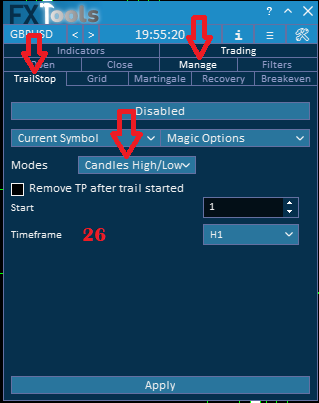
Candles High/Low Mode Settings
26. Timeframe
• Timeframe of the candle. Buy trails from the low; sell from the high. Start still applies.
________________________________________

Profit Mode Settings
Mode By Profit trails from combined profit of tickets in the Symbol/Magic filter.
• Cycles Balance %, Equity %, Currency.
________________________________________
28. Value
• Spin Value for that unit.
________________________________________
29. Trail Negative Profit
• Checkbox Trail Negative Profit.
________________________________________
Profit Trailing Mode Table
| Mode | Meaning |
|---|---|
| Balance % | Percent of account balance. |
| Equity % | Percent of equity. |
| Currency | Account-currency amount. |
Trail Negative Profit Options
| Setting | Behavior |
|---|---|
| Checked | By Profit may trail while the basket is still negative. |
| Unchecked | By Profit does not trail negative baskets. |
Shared distance modes (Grid, Martingale, Recovery)
Grid, Martingale, and Recovery use the same six Distance items: Fixed Distance, ATR, Moving Average, Bollinger Bands, Time, Manual. That list is not the Trail Modes list (Trail has PSAR, Candles, By Profit; no BB/Time/Manual). Extra Grid-only rows (Max Loss, SL, Ignore Filters, Open next) stay in the Grid guide.
| Mode | Fields on Grid / MG / Recovery |
|---|---|
| Fixed Distance | Pips between legs |
| ATR | Period, Timeframe, Multiplier |
| Moving Average | Period, Shift, Timeframe, Method, Applied Price |
| Bollinger Bands | Period, Deviation, Timeframe, Applied Price, Shift |
| Time | Minutes, Min Distance pips |
| Manual | You open the next leg from that tab (order picker, distance, next lot). Details in Grid / Martingale / Recovery. |
Links
- Part 0 Overall Guide — four work places (dashboard, shortcut bar, overlays, chart)
- Part 1 Shortcut bar — shortcut bar and min mode
- Part 2 Overlays — Info and Settings
- Part 3 Indicators — watch table and add indicator
- Part 4 Open — Instant, Pending, By Time (coming soon)
- Part 5 Close — Manual, Auto, Partial
- Part 6 Filters — News, Prop firm, Time
- Part 7 Trail — TrailStop and shared distance modes
- Part 8 Grid — same-direction legs after price moves in favor
- Part 9 Martingale — extra legs as the trade moves into loss
- Part 10 Recovery — Recovery Zone hedge channel
- Part 11 Breakeven — move SL toward the open once in profit
- Part 12 Chart — Easy Position Manager and Easy Trade Deck
- Part 13 Expert Advisors — strategy cards by magic, live vs backtest




