

Creating Custom Indicators in MQL5 (Part 10): Enhancing the Footprint Chart with Per-Bar Volume Sentiment Information Box
 3 187
3 187
 0
0

Introduction
A footprint chart shows volume at every price level inside each bar. Without a bar-level summary, you must manually aggregate levels to judge which side dominated, estimate how lopsided participation was, and compare sentiment across bars — a step that slows both human interpretation and algorithmic decision-making. This article is for MetaQuotes Language 5 (MQL5) developers and systematic traders looking to extend an existing footprint indicator with a per-bar sentiment box updated on every tick, kept lightweight at render time through cached bar metrics, and drawn with rounded geometry and alpha blending so the price level detail beneath remains fully legible.
In our previous article (Part 9), we built an order flow footprint chart indicator in MQL5 that tracked tick-by-tick volume at quantized price levels, separated buying and selling activity into bid versus ask and delta display modes, and rendered volume-colored text labels on a canvas overlay alongside trend line candles with real-time updates. In Part 10, we add a per-bar sentiment box above each candle showing net delta, total volume, and buy and sell percentages with delta-intensity color coding, supersampled rendering for anti-aliased output, rounded corners via arc and quadrilateral rasterization, and alpha compositing to blend the box cleanly over the canvas. We will cover the following topics:
- Reading the Bar Story — What Per-Bar Volume Sentiment Reveals at a Glance
- Implementation in MQL5
- Backtesting
- Conclusion
By the end, you'll have an enhanced MQL5 footprint chart indicator with a per-bar volume sentiment information box that summarizes delta, volume, and participation at a glance above every candle, ready for customization — let's dive in!
Reading the Bar Story — What Per-Bar Volume Sentiment Reveals at a Glance
A completed bar contains information that price level rows do not summarize well. Net delta shows which side was more aggressive in aggregate, total volume shows whether that aggression happened on meaningful participation or thin activity, and the buy and sell split reveals the degree of imbalance. When these three numbers are visible above every candle in a compact, color-coded box, a trader can scan across dozens of bars in seconds and immediately identify which bars were dominated by one side, which were balanced, and whether the dominance was backed by high or low volume, without reading a single price level row.
In live trading, use the net delta displayed in the sentiment box as a first filter — a bar closing higher with a strongly negative delta is a warning that sellers were absorbing the move, making it a weaker long candidate than a bar with a matching positive delta. Watch for consecutive bars where the delta direction conflicts with the price direction, as persistent delta divergence often precedes reversals. Use the total volume figure to separate conviction bars from noise — a large delta on low total volume carries less weight than the same delta on high participation. The percentage split is particularly useful at key levels: an 80 percent buy bar rejecting a support level confirms strong absorption, while a near-50-50 split at the same level suggests indecision rather than conviction. Use the color intensity of the information box itself as a visual heatmap across the chart — a sequence of progressively deeper colors in one direction signals building momentum, while a sudden color shift signals a potential regime change.
We extend the footprint structure with bar-level delta, percentages, and cached colors, compute these values on every tick via a dedicated function, implement rounded corner geometry and precise arc drawing utilities, add a supersampled render-and-downsample pipeline for anti-aliased output, and composite the finished box onto the main canvas using per-pixel alpha blending. In brief, here is a visual representation of what we intend to build.

Implementation in MQL5
Building on the foundation from the previous part, we now extend the inputs and the "BarFootprintData" structure to support the new per-bar information box. The inputs introduce configurable spacing, box dimensions, transparency, font sizing, and rounded corner parameters, while the structure gains new fields that cache the computed colors, delta, and volume percentages so they do not need to be recalculated on every redraw.
//+------------------------------------------------------------------+
//|                                   OrderFlow FootPrint PART 2.mq5 |
//|                           Copyright 2026, Allan Munene Mutiiria. |
//|                                   https://t.me/Forex_Algo_Trader |
//+------------------------------------------------------------------+
#property copyright "Copyright 2026, Allan Munene Mutiiria."
#property link      "https://t.me/Forex_Algo_Trader"
#property version   "1.00"
#property indicator_chart_window

#property indicator_buffers 0
#property indicator_plots   0

#include <Canvas\Canvas.mqh>

//---

input double               minPriceLevelSpacing    = 1.1;   // Min Spacing Between Price Levels

input group "Info Box (Above Each Candle)"
input bool showInfoBox                  = true; // Show Info Box
input int  infoBoxPaddingWidthPixels    = 2;    // Info Box Padding Width (pixels)
input int  infoBoxPaddingHeightPixels   = 1;    // Info Box Padding Height (pixels)

input group "Info Box Fonts"
input int infoBoxBaseFontSize = 5; // Info Box Font Size (base for all labels)

input group "Info Box Style"
input int backgroundTransparencyPercent = 15;  // Background Transparency (0=opaque, 100=invisible)
input int borderTransparencyPercent     = 20;  // Border Transparency (0=opaque, 100=invisible)
input int infoBoxGapPixels              = 10;  // Gap Above Candle High (pixels)

input group "Info Box Rounded Corners"
input bool enableRoundedCorners    = true; // Enable Rounded Corners
input int  cornerRadiusPixels      = 4;    // Corner Radius (pixels)
input int  borderThicknessPixels   = 1;    // Border Thickness (pixels)
input int  supersamplingFactor     = 4;    // Supersampling Level (1=off, 2=2x, 4=4x)

struct BarFootprintData
  {
   datetime            time;                 // Bar open time
   FootprintPriceLevel priceLevels[];        // Array of price levels for this bar
   double              totalUpVolume;        // Cumulative buy volume for the bar
   double              totalDownVolume;      // Cumulative sell volume for the bar
   double              maxDeltaValue;        // Max absolute delta across levels
   double              maxTotalVolumeValue;  // Max combined volume across levels
   double              maxAskValue;          // Max ask volume across levels
   double              maxBidValue;          // Max bid volume across levels
   color               boxColor;             // Computed info box background color
   color               textColor;            // Computed info box text color
   double              delta;                // Net delta (up minus down) for the bar
   double              upPercentage;         // Buy volume as percentage of total
   double              downPercentage;       // Sell volume as percentage of total
  };
First, we add "minPriceLevelSpacing" to the settings group to give finer control over the minimum vertical distance between adjacent price level labels, replacing the previous fixed font-size multiplier with a configurable factor. We then introduce four new input groups dedicated to the information box. The first group adds "showInfoBox" as a toggle, "infoBoxPaddingWidthPixels", and "infoBoxPaddingHeightPixels" to control the internal spacing between the box edge and its text content. The font group adds "infoBoxBaseFontSize" as the base size that scales with chart zoom.
The style group introduces "backgroundTransparencyPercent" and "borderTransparencyPercent" to independently control how opaque the fill and border are, and "infoBoxGapPixels" to set the vertical clearance between the box bottom and the candle height. The rounded corners group adds "enableRoundedCorners" as a toggle, "cornerRadiusPixels" for the arc size at each corner, "borderThicknessPixels" for the stroke width, and "supersamplingFactor" to set the rendering resolution multiplier used during anti-aliased box drawing.
In the "BarFootprintData" structure, we retain all existing fields from the previous part and add five new ones to support the information box. We add "boxColor" and "textColor" as pre-computed color values so the rendering loop can apply them directly without recalculating on every frame. We add "delta" to store the net difference between total up and total down volume for the whole bar, and "upPercentage" and "downPercentage" to store the rounded buy and sell participation percentages. We have highlighted them for clarity. Caching these values in the structure means the heavy calculation happens once per tick in a dedicated function rather than inside the rendering loop, keeping the redraw path as lightweight as possible. With the structure extended, we now extend the helper functions so we can gain more control over color rendering.
Darkening Colors and Computing Per-Bar Sentiment Colors and Percentages
Before the information box can be drawn, we need two supporting functions: one that produces a darker shade of any given color for use as the box border, and one that computes and caches all the per-bar sentiment values — delta, volume percentages, box background color, and text color — so the rendering loop has everything it needs without performing any calculations at draw time.
//+------------------------------------------------------------------+
//| Darken color by a given factor                                   |
//+------------------------------------------------------------------+
color DarkenColor(color baseColor, double darkenFactor = 0.5)
  {
   //--- Scale the red channel by the darkening factor
   uchar red   = uchar((baseColor & 0xFF) * darkenFactor);
   //--- Scale the green channel by the darkening factor
   uchar green = uchar(((baseColor >> 8)  & 0xFF) * darkenFactor);
   //--- Scale the blue channel by the darkening factor
   uchar blue  = uchar(((baseColor >> 16) & 0xFF) * darkenFactor);
   //--- Reassemble and return the darkened color in BGR format
   return (color)((blue << 16) | (green << 8) | red);
  }

//+------------------------------------------------------------------+
//| Calculate bar info box colors and volume percentages             |
//+------------------------------------------------------------------+
void CalculateBarColorsAndPercentages(BarFootprintData &footprint)
  {
   //--- Compute the net delta for the full bar
   footprint.delta = footprint.totalUpVolume - footprint.totalDownVolume;
   //--- Compute the combined volume for percentage calculations
   double totalVolume = footprint.totalUpVolume + footprint.totalDownVolume;

   if(totalVolume == 0)
     {
      //--- Default to neutral colors and zero percentages when no volume exists
      footprint.boxColor      = upColor1;
      footprint.textColor     = upColor1;
      footprint.upPercentage  = 0;
      footprint.downPercentage = 0;
      return;
     }

   //--- Round percentages to whole numbers for display
   footprint.upPercentage   = MathRound(100 * footprint.totalUpVolume   / totalVolume);
   footprint.downPercentage = MathRound(100 * footprint.totalDownVolume / totalVolume);

   if(footprint.delta > 0)
     {
      //--- Derive box color from bullish delta intensity
      double ratio = MathAbs(footprint.delta / totalVolume);
      footprint.boxColor = GetVolumeColor(true, ratio);
     }
   else if(footprint.delta < 0)
     {
      //--- Derive box color from bearish delta intensity
      double ratio = MathAbs(footprint.delta / totalVolume);
      footprint.boxColor = GetVolumeColor(false, ratio);
     }
   else
     {
      //--- Assign neutral color when delta is exactly zero
      footprint.boxColor = upColor1;
     }

   //--- Identify the dominant side percentage for text color derivation
   double winningPercentage = (footprint.delta > 0) ? footprint.upPercentage : footprint.downPercentage;
   //--- Compute how far the dominant side exceeds 50%
   double percentAbove50 = winningPercentage - 50;
   //--- Clamp to zero so values below 50% do not produce negative ratios
   if(percentAbove50 < 0) percentAbove50 = 0;
   //--- Scale the excess to a 0–1 ratio for color intensity
   double textRatio = MathCeil(percentAbove50) / 50.0;
   //--- Assign the text color matching the dominant direction and intensity
   footprint.textColor = GetVolumeColor(footprint.delta > 0, textRatio);
  }
We define the "DarkenColor" function to produce a darker variant of any color by scaling each of its three channels independently. It extracts the red, green, and blue components from the input color using bitwise operations, multiplies each by "darkenFactor," which defaults to 0.5 for a half-brightness result, and reassembles them back into a color value in the correct byte order. This is used when computing the border color for the information box, where a darkened version of the box fill color produces a natural-looking outline without requiring a separate border color input.
The "CalculateBarColorsAndPercentages" function is the core sentiment computation that runs once per tick after volume is updated. It first computes the bar's net delta by subtracting total down volume from total up volume and stores it in the "delta" field. It then computes the combined total volume and, if zero, defaults all fields to neutral values and returns early. When volume exists, it rounds the buy and sell percentages to whole numbers using MathRound and stores them in "upPercentage" and "downPercentage".
For the box background color, it computes the absolute ratio of delta to total volume and passes it to "GetVolumeColor" with the direction flag set to true for positive delta and false for negative, producing a color whose intensity reflects how dominant one side was relative to the total activity. A zero delta assigns the neutral weakest shade directly.
The text color derivation follows a different approach. Rather than using the delta-to-total ratio, it takes the dominant side's percentage, subtracts 50 to find how far above an even split it sits, clamps any negative result to zero, then divides by 50 to scale the excess into a zero-to-one ratio using the MathCeil function. This means a perfectly even 50-50 bar produces the weakest text color, while a heavily one-sided bar produces the strongest, making the text itself carry a visual signal about the degree of imbalance. With both colors and percentages cached in the structure, we can now build the geometry utilities that the rounded corner rendering depends on.
Converting Colors to ARGB, Downsampling High-Resolution Canvases, and Normalizing Angles
The information box rendering pipeline depends on three foundational utilities: a function that converts a color and an opacity percentage into a full ARGB value for semi-transparent drawing, a downsampling function that averages a high-resolution canvas down to screen resolution for anti-aliased output, and two angle functions that the rounded corner arc renderer relies on to determine which pixels fall within a given arc segment.
//+------------------------------------------------------------------+
//| Convert color to ARGB with opacity percent                       |
//+------------------------------------------------------------------+
uint ColorToArgbWithOpacity(color clr, int opacityPercent)
  {
   //--- Extract the individual RGB channels from the color value
   uchar redComponent   = (uchar)((clr >> 0)  & 0xFF);
   uchar greenComponent = (uchar)((clr >> 8)  & 0xFF);
   uchar blueComponent  = (uchar)((clr >> 16) & 0xFF);
   //--- Map the 0–100 opacity percent to a 0–255 alpha value
   uchar alphaComponent = (uchar)((opacityPercent * 255) / 100);
   //--- Assemble and return the ARGB value with the computed alpha
   return ((uint)alphaComponent << 24) | ((uint)redComponent << 16) |
          ((uint)greenComponent << 8)  | (uint)blueComponent;
  }

//+------------------------------------------------------------------+
//| Downsample high-res canvas to target using box filter            |
//+------------------------------------------------------------------+
void DownsampleBicubic(CCanvas &targetCanvas, CCanvas &highResCanvas, int downsampleFactor)
  {
   //--- Get target canvas dimensions for iteration bounds
   int targetWidth  = targetCanvas.Width();
   int targetHeight = targetCanvas.Height();

   //--- Iterate over every pixel in the target (low-res) canvas
   for(int pixelY = 0; pixelY < targetHeight; pixelY++)
     {
      for(int pixelX = 0; pixelX < targetWidth; pixelX++)
        {
         //--- Map the target pixel back to its source region in the high-res canvas
         double sourceX = pixelY * downsampleFactor;
         double sourceY = pixelX * downsampleFactor;

         //--- Accumulate weighted channel sums across the source region
         double sumAlpha = 0, sumRed = 0, sumGreen = 0, sumBlue = 0;
         double weightSum = 0;

         //--- Loop over all source pixels that map to this target pixel
         for(int deltaY = 0; deltaY < downsampleFactor; deltaY++)
           {
            for(int deltaX = 0; deltaX < downsampleFactor; deltaX++)
              {
               int sourcePixelX = (int)(sourceX + deltaX);
               int sourcePixelY = (int)(sourceY + deltaY);

               //--- Skip source pixels that fall outside the high-res canvas bounds
               if(sourcePixelX >= 0 && sourcePixelX < highResCanvas.Width() &&
                  sourcePixelY >= 0 && sourcePixelY < highResCanvas.Height())
                 {
                  //--- Read the source pixel ARGB value
                  uint pixelValue = highResCanvas.PixelGet(sourcePixelX, sourcePixelY);

                  //--- Unpack individual channels from the ARGB pixel
                  uchar alpha = (uchar)((pixelValue >> 24) & 0xFF);
                  uchar red   = (uchar)((pixelValue >> 16) & 0xFF);
                  uchar green = (uchar)((pixelValue >> 8)  & 0xFF);
                  uchar blue  = (uchar)(pixelValue & 0xFF);

                  //--- Use uniform weight of 1.0 for simple box-filter averaging
                  double weight = 1.0;
                  sumAlpha += alpha * weight;
                  sumRed   += red   * weight;
                  sumGreen += green * weight;
                  sumBlue  += blue  * weight;
                  weightSum += weight;
                 }
              }
           }

         if(weightSum > 0)
           {
            //--- Average the accumulated channel values across the sample region
            uchar finalAlpha = (uchar)(sumAlpha / weightSum);
            uchar finalRed   = (uchar)(sumRed   / weightSum);
            uchar finalGreen = (uchar)(sumGreen / weightSum);
            uchar finalBlue  = (uchar)(sumBlue  / weightSum);

            //--- Reassemble the averaged ARGB value and write it to the target canvas
            uint finalColor = ((uint)finalAlpha << 24) | ((uint)finalRed << 16) |
                              ((uint)finalGreen << 8)  | (uint)finalBlue;
            targetCanvas.PixelSet(pixelX, pixelY, finalColor);
           }
        }
     }
  }

//+------------------------------------------------------------------+
//| Normalize angle to 0–2π range                                    |
//+------------------------------------------------------------------+
double NormalizeAngle(double angle)
  {
   //--- Define the full-circle constant
   double twoPi = 2.0 * M_PI;
   //--- Wrap the angle into the 0–2π range using modulo
   angle = MathMod(angle, twoPi);
   //--- Shift negative results back into the positive range
   if(angle < 0) angle += twoPi;
   return angle;
  }

//+------------------------------------------------------------------+
//| Check if angle falls between start and end angles                |
//+------------------------------------------------------------------+
bool IsAngleBetween(double angle, double startAngle, double endAngle)
  {
   //--- Normalize all three angles to the 0–2π range
   angle      = NormalizeAngle(angle);
   startAngle = NormalizeAngle(startAngle);
   endAngle   = NormalizeAngle(endAngle);

   //--- Compute the arc span from start to end going clockwise
   double span          = NormalizeAngle(endAngle   - startAngle);
   //--- Compute how far the test angle is from the start going clockwise
   double relativeAngle = NormalizeAngle(angle - startAngle);

   //--- Return true if the test angle falls within the span
   return relativeAngle <= span;
  }
We define the "ColorToArgbWithOpacity" function to assemble a full ARGB value from a color and an integer opacity percentage. It extracts the red, green, and blue channels from the color using bitwise operations, converts the opacity from the zero to one hundred range to a zero to 255 alpha byte by multiplying by 255 and dividing by 100, then assembles all four channels into a single unsigned integer in ARGB order. This is used when preparing the fill and border colors for the information box, where the background and border transparencies are configured separately as percentages rather than raw alpha values.
To produce smooth anti-aliased box edges, we implement the "DownsampleBicubic" function to reduce a high-resolution canvas to screen resolution using a uniform box filter. It is important to note that despite the function name, the filter applies equal weight to every source pixel within each target pixel's coverage region, making it a true box average rather than a bicubic interpolation. The name is retained from the original implementation but the behavior is a standard box filter average.
For each pixel in the target canvas, it maps back to the corresponding block of source pixels in the high-resolution canvas by multiplying the target X coordinate by the downsample factor to get the source X origin, and the target Y coordinate by the downsample factor to get the source Y origin, accumulates the alpha, red, green, and blue channel values weighted equally across all source pixels in the block using PixelGet, divides by the total weight, and writes the averaged result back to the target with the PixelSet method. This averaging is what produces the smooth edges — sharp pixel transitions in the high-resolution canvas become gradual blends in the downsampled result, giving the rounded corners and border strokes a clean appearance at any zoom level.
To support arc rendering for the rounded corners, we define the "NormalizeAngle" function to wrap any angle value into the zero to two pi range. It applies MathMod to bring the angle within the circle, then adds two pi if the result is negative to ensure the output is always non-negative. Building on that, the "IsAngleBetween" function determines whether a given angle falls within an arc defined by a start and end angle. It normalizes all three values, computes the total arc span as the normalized difference between end and start, computes the relative position of the test angle from the start the same way, and returns true if the relative angle is within the span. This correctly handles arcs that wrap across the zero boundary without requiring special-case logic, which is essential for the corner arcs on the information box where different corners span different quadrants of the unit circle. With these utilities ready, we can now build the quadrilateral fill and rounded rectangle rendering functions.
Building the Geometry Rendering Pipeline — Quadrilateral Fill, Rounded Rectangles, Arc Strokes, and Alpha Compositing
With the color and downsampling utilities in place, we now need the complete set of geometry functions that the information box drawing depends on: a scanline rasterizer for filling arbitrary convex quadrilaterals, a rounded rectangle fill that combines rectangular strips with circle quadrant fills, a border renderer that draws thick straight edges and precise corner arcs, and a per-pixel alpha compositing function that blends the finished box onto the main canvas without overwriting existing content.
//+------------------------------------------------------------------+
//| Fill convex quadrilateral using scanline rasterization           |
//+------------------------------------------------------------------+
void FillConvexQuadrilateral(CCanvas &canvas, double &verticesX[], double &verticesY[], uint fillColor)
  {
   //--- Find the vertical extents of the quadrilateral
   double minY = verticesY[0], maxY = verticesY[0];
   for(int i = 1; i < 4; i++)
     {
      if(verticesY[i] < minY) minY = verticesY[i];
      if(verticesY[i] > maxY) maxY = verticesY[i];
     }

   //--- Determine the inclusive scanline row range
   int yStart = (int)MathCeil(minY);
   int yEnd   = (int)MathFloor(maxY);

   //--- Process each horizontal scanline within the bounding box
   for(int y = yStart; y <= yEnd; y++)
     {
      //--- Sample the scanline at the pixel centre to avoid boundary artifacts
      double scanlineY        = (double)y + 0.5;
      double xIntersections[8];
      int    intersectionCount = 0;

      //--- Compute edge–scanline intersections for all four edges
      for(int i = 0; i < 4; i++)
        {
         int    nextIndex = (i + 1) % 4;
         double x0 = verticesX[i],       y0 = verticesY[i];
         double x1 = verticesX[nextIndex], y1 = verticesY[nextIndex];

         //--- Determine the edge's vertical span
         double edgeMinY = (y0 < y1) ? y0 : y1;
         double edgeMaxY = (y0 > y1) ? y0 : y1;

         //--- Skip edges that do not cross this scanline
         if(scanlineY < edgeMinY || scanlineY > edgeMaxY) continue;
         //--- Skip degenerate horizontal edges
         if(MathAbs(y1 - y0) < 1e-12) continue;

         //--- Linearly interpolate to find the X crossing
         double interpolationFactor = (scanlineY - y0) / (y1 - y0);
         if(interpolationFactor < 0.0 || interpolationFactor > 1.0) continue;

         //--- Record the intersection X coordinate
         xIntersections[intersectionCount++] = x0 + interpolationFactor * (x1 - x0);
        }

      //--- Sort intersections left to right using bubble sort
      for(int a = 0; a < intersectionCount - 1; a++)
         for(int b = a + 1; b < intersectionCount; b++)
            if(xIntersections[a] > xIntersections[b])
              {
               double temp          = xIntersections[a];
               xIntersections[a]    = xIntersections[b];
               xIntersections[b]    = temp;
              }

      //--- Fill horizontal spans between each pair of intersections
      for(int pairIndex = 0; pairIndex + 1 < intersectionCount; pairIndex += 2)
        {
         int xLeft  = (int)MathCeil(xIntersections[pairIndex]);
         int xRight = (int)MathFloor(xIntersections[pairIndex + 1]);
         //--- Paint every pixel in this horizontal span
         for(int x = xLeft; x <= xRight; x++)
            canvas.PixelSet(x, y, fillColor);
        }
     }
  }

//+------------------------------------------------------------------+
//| Render rounded rectangle fill region                             |
//+------------------------------------------------------------------+
void RenderRoundedRectangleFill(CCanvas &canvas, int positionX, int positionY, int width, int height, int radius, uint fillColor)
  {
   //--- Fill the horizontal center strip spanning the full width minus corners
   canvas.FillRectangle(positionX + radius, positionY,
                        positionX + width - radius, positionY + height, fillColor);
   //--- Fill the left vertical strip between the top and bottom corner arcs
   canvas.FillRectangle(positionX, positionY + radius,
                        positionX + radius, positionY + height - radius, fillColor);
   //--- Fill the right vertical strip between the top and bottom corner arcs
   canvas.FillRectangle(positionX + width - radius, positionY + radius,
                        positionX + width, positionY + height - radius, fillColor);

   //--- Fill the four corner quadrants with the matching circle segment
   FillCircleQuadrant(canvas, positionX + radius,         positionY + radius,          radius, fillColor, 2); // TL
   FillCircleQuadrant(canvas, positionX + width - radius, positionY + radius,          radius, fillColor, 1); // TR
   FillCircleQuadrant(canvas, positionX + radius,         positionY + height - radius, radius, fillColor, 3); // BL
   FillCircleQuadrant(canvas, positionX + width - radius, positionY + height - radius, radius, fillColor, 4); // BR
  }

//+------------------------------------------------------------------+
//| Fill one quadrant of a circle at given center                    |
//+------------------------------------------------------------------+
void FillCircleQuadrant(CCanvas &canvas, int centerX, int centerY, int radius, uint fillColor, int quadrant)
  {
   //--- Cast radius to double for distance comparisons
   double radiusDouble = (double)radius;

   //--- Iterate over the bounding box of the quadrant including a 1-pixel border
   for(int deltaY = -radius - 1; deltaY <= radius + 1; deltaY++)
     {
      for(int deltaX = -radius - 1; deltaX <= radius + 1; deltaX++)
        {
         //--- Determine whether this pixel lies in the requested quadrant
         bool inQuadrant = false;
         if(quadrant == 1 && deltaX >= 0 && deltaY <= 0) inQuadrant = true; // TR
         else if(quadrant == 2 && deltaX <= 0 && deltaY <= 0) inQuadrant = true; // TL
         else if(quadrant == 3 && deltaX <= 0 && deltaY >= 0) inQuadrant = true; // BL
         else if(quadrant == 4 && deltaX >= 0 && deltaY >= 0) inQuadrant = true; // BR

         //--- Skip pixels outside the requested quadrant
         if(!inQuadrant) continue;

         //--- Paint the pixel only if it lies within the circle radius
         double distance = MathSqrt(deltaX * deltaX + deltaY * deltaY);
         if(distance <= radiusDouble)
            canvas.PixelSet(centerX + deltaX, centerY + deltaY, fillColor);
        }
     }
  }

//+------------------------------------------------------------------+
//| Render rounded rectangle border strokes                          |
//+------------------------------------------------------------------+
void RenderRoundedRectangleBorder(CCanvas &canvas, int positionX, int positionY, int width, int height, int radius, int thickness, uint borderColorArgb)
  {
   //--- Draw the four straight edges connecting the corner arcs
   RenderRectangleStraightEdge(canvas, positionX + radius,         positionY,
                               positionX + width - radius,         positionY,             thickness, borderColorArgb); // Top
   RenderRectangleStraightEdge(canvas, positionX + width - radius, positionY + height - 1,
                               positionX + radius,                 positionY + height - 1, thickness, borderColorArgb); // Bottom
   RenderRectangleStraightEdge(canvas, positionX,                  positionY + height - radius,
                               positionX,                          positionY + radius,     thickness, borderColorArgb); // Left
   RenderRectangleStraightEdge(canvas, positionX + width - 1,      positionY + radius,
                               positionX + width - 1,              positionY + height - radius, thickness, borderColorArgb); // Right

   //--- Draw the four corner arcs connecting the straight edges
   RenderRectangleCornerArcPrecise(canvas, positionX + radius,         positionY + radius,
                                   radius, thickness, borderColorArgb, M_PI,       M_PI * 1.5);  // TL
   RenderRectangleCornerArcPrecise(canvas, positionX + width - radius, positionY + radius,
                                   radius, thickness, borderColorArgb, M_PI * 1.5, M_PI * 2.0);  // TR
   RenderRectangleCornerArcPrecise(canvas, positionX + radius,         positionY + height - radius,
                                   radius, thickness, borderColorArgb, M_PI * 0.5, M_PI);         // BL
   RenderRectangleCornerArcPrecise(canvas, positionX + width - radius, positionY + height - radius,
                                   radius, thickness, borderColorArgb, 0.0,        M_PI * 0.5);   // BR
  }

//+------------------------------------------------------------------+
//| Render a thick straight edge segment as a filled quadrilateral   |
//+------------------------------------------------------------------+
void RenderRectangleStraightEdge(CCanvas &canvas, double startX, double startY, double endX, double endY, int thickness, uint borderColor)
  {
   //--- Compute the direction vector of the edge
   double deltaX    = endX - startX;
   double deltaY    = endY - startY;
   double edgeLength = MathSqrt(deltaX * deltaX + deltaY * deltaY);
   //--- Skip degenerate zero-length edges
   if(edgeLength < 1e-6) return;

   //--- Compute the unit perpendicular vector for thickness expansion
   double perpendicularX = -deltaY / edgeLength;
   double perpendicularY =  deltaX / edgeLength;

   //--- Compute the unit direction vector along the edge
   double edgeDirectionX = deltaX / edgeLength;
   double edgeDirectionY = deltaY / edgeLength;

   //--- Use half-thickness for symmetric expansion on both sides
   double halfThickness = (double)thickness / 2.0;

   //--- Extend endpoints slightly to avoid gaps at arc–edge junctions
   double extensionLength  = 1.5;
   double extendedStartX   = startX - edgeDirectionX * extensionLength;
   double extendedStartY   = startY - edgeDirectionY * extensionLength;
   double extendedEndX     = endX   + edgeDirectionX * extensionLength;
   double extendedEndY     = endY   + edgeDirectionY * extensionLength;

   //--- Build the four corners of the thick edge rectangle
   double verticesX[4], verticesY[4];
   verticesX[0] = extendedStartX - perpendicularX * halfThickness;
   verticesY[0] = extendedStartY - perpendicularY * halfThickness;
   verticesX[1] = extendedStartX + perpendicularX * halfThickness;
   verticesY[1] = extendedStartY + perpendicularY * halfThickness;
   verticesX[2] = extendedEndX   + perpendicularX * halfThickness;
   verticesY[2] = extendedEndY   + perpendicularY * halfThickness;
   verticesX[3] = extendedEndX   - perpendicularX * halfThickness;
   verticesY[3] = extendedEndY   - perpendicularY * halfThickness;

   //--- Rasterize the quadrilateral with the border color
   FillConvexQuadrilateral(canvas, verticesX, verticesY, borderColor);
  }

//+------------------------------------------------------------------+
//| Render a precise anti-aliased corner arc segment                 |
//+------------------------------------------------------------------+
void RenderRectangleCornerArcPrecise(CCanvas &canvas, int centerX, int centerY, int radius, int thickness, uint borderColor,
                                     double startAngle, double endAngle)
  {
   //--- Compute the half-thickness offset for the arc band
   int    halfThickness = thickness / 2;
   double outerRadius   = (double)radius + halfThickness;
   double innerRadius   = (double)radius - halfThickness;
   //--- Clamp inner radius to zero for very thin radii
   if(innerRadius < 0) innerRadius = 0;

   //--- Determine the pixel scan range from the outer radius
   int pixelRange = (int)(outerRadius + 2);

   //--- Test each pixel in the bounding box for arc membership
   for(int deltaY = -pixelRange; deltaY <= pixelRange; deltaY++)
     {
      for(int deltaX = -pixelRange; deltaX <= pixelRange; deltaX++)
        {
         //--- Skip pixels outside the annular band
         double distance = MathSqrt(deltaX * deltaX + deltaY * deltaY);
         if(distance < innerRadius || distance > outerRadius) continue;

         //--- Compute the pixel's angle from the arc center
         double angle = MathArctan2((double)deltaY, (double)deltaX);

         //--- Paint the pixel only if its angle falls within the arc span
         if(IsAngleBetween(angle, startAngle, endAngle))
            canvas.PixelSet(centerX + deltaX, centerY + deltaY, borderColor);
        }
     }
  }

//+------------------------------------------------------------------+
//| Blend source pixel over existing canvas pixel (alpha composite)  |
//+------------------------------------------------------------------+
void BlendPixelSet(CCanvas &canvas, int x, int y, uint src)
  {
   //--- Reject pixels outside the canvas boundaries
   if(x < 0 || x >= canvas.Width() || y < 0 || y >= canvas.Height()) return;

   //--- Read the destination pixel currently on the canvas
   uint dst = canvas.PixelGet(x, y);

   //--- Unpack source ARGB channels and normalise to 0–1 range
   double sa = ((src >> 24) & 0xFF) / 255.0;
   double sr = ((src >> 16) & 0xFF) / 255.0;
   double sg = ((src >> 8)  & 0xFF) / 255.0;
   double sb = (src & 0xFF)          / 255.0;

   //--- Unpack destination ARGB channels and normalise to 0–1 range
   double da = ((dst >> 24) & 0xFF) / 255.0;
   double dr = ((dst >> 16) & 0xFF) / 255.0;
   double dg = ((dst >> 8)  & 0xFF) / 255.0;
   double db = (dst & 0xFF)          / 255.0;

   //--- Compute the composited alpha using the Porter–Duff over formula
   double out_a = sa + da * (1 - sa);
   if(out_a == 0)
     {
      //--- Write full transparency when both source and destination are clear
      canvas.PixelSet(x, y, 0);
      return;
     }

   //--- Composite each colour channel weighted by the respective alphas
   double out_r = (sr * sa + dr * da * (1 - sa)) / out_a;
   double out_g = (sg * sa + dg * da * (1 - sa)) / out_a;
   double out_b = (sb * sa + db * da * (1 - sa)) / out_a;

   //--- Convert composited channels back to 0–255 byte range with rounding
   uchar oa  = (uchar)(out_a * 255 + 0.5);
   uchar or_ = (uchar)(out_r * 255 + 0.5);
   uchar og  = (uchar)(out_g * 255 + 0.5);
   uchar ob  = (uchar)(out_b * 255 + 0.5);

   //--- Reassemble and write the final composited pixel
   uint out_col = ((uint)oa << 24) | ((uint)or_ << 16) | ((uint)og << 8) | (uint)ob;
   canvas.PixelSet(x, y, out_col);
  }
Here, we define the "FillConvexQuadrilateral" function to rasterize and fill any convex four-sided polygon using a horizontal scanline approach. It first finds the vertical extent of the quadrilateral by scanning all four vertex Y coordinates for the minimum and maximum, then iterates over every integer scanline row within that range. For each row, it samples at the pixel center by adding 0.5 to the row index to avoid boundary artifacts, then tests all four edges for intersections with that scanline.
Each edge is checked against its own vertical span, degenerate horizontal edges are skipped, and the intersection X coordinate is computed via linear interpolation using the scanline's relative position between the edge's two endpoint Y values. The intersections are sorted left to right with a bubble sort, then adjacent pairs are used to define horizontal fill spans, with every pixel between each pair painted using the PixelSet method. This function is the foundation for the thick straight edge rendering, where border segments are expressed as thin rectangles and filled with this rasterizer.
To fill the rounded rectangle background of the information box, we implement the "RenderRoundedRectangleFill" function, which decomposes the shape into five rectangular regions and four circular quadrants. Three FillRectangle calls cover the horizontal center strip spanning the full width, and the left and right vertical strips between the corner arc centers. The four corners are then filled by calling "FillCircleQuadrant" at each corner center with the appropriate quadrant number. The "FillCircleQuadrant" function iterates over the bounding box of the quadrant, determines whether each pixel falls in the correct directional quadrant using sign checks on the delta coordinates, then paints it only if its Euclidean distance from the corner center is within the radius using MathSqrt, producing a clean circular fill without any gaps or overlaps at the rectangle-to-arc transitions.
For the border stroke, we define the "RenderRoundedRectangleBorder" function to draw the four straight edges and four corner arcs that frame the filled shape. The straight edges are handled by "RenderRectangleStraightEdge", which computes the edge direction and a perpendicular unit vector, expands the edge symmetrically by half the configured thickness on each side, extends the endpoints slightly by 1.5 pixels to prevent gaps where edges meet arcs, assembles the resulting four corner points into vertex arrays, and calls "FillConvexQuadrilateral" to paint the thick edge as a filled rectangle.
The corner arcs are handled by "RenderRectangleCornerArcPrecise", which defines an annular band between an inner and outer radius derived from the corner radius and half the border thickness, scans every pixel within the bounding box of that band, computes each pixel's distance and angle using "MathSqrt" and MathArctan2, and paints only pixels that fall within both the annular band and the arc's angular span as determined by "IsAngleBetween". Each of the four corners is assigned the correct start and end angles in radians to cover exactly its quadrant of the circle, producing seamless joins with the adjacent straight edges.
Finally, we define the "BlendPixelSet" function to alpha-composite a source pixel over the existing content at a given canvas position. It first bounds-checks the coordinates, then reads the destination pixel with PixelGet and unpacks all four channels of both source and destination into normalized floating-point values. It applies the Porter-Duff over formula to compute the output alpha as the source alpha plus the destination alpha scaled by one minus the source alpha, then composites each color channel as the weighted sum of source and destination contributions divided by the output alpha. The result is converted back to a byte range with rounding and written with the PixelSet method. This compositing approach is what allows the semi-transparent information box to sit cleanly above the footprint labels and candle objects without producing hard edges or erasing underlying content, regardless of what the background pixels contain.
In case you are wondering, Porter–Duff blend composition, introduced by Thomas Porter and Tom Duff, is a method in computer graphics for combining a new image (source) with an existing one (destination) using their alpha (transparency) values. It defines a set of operators—like the common “source over”—that determine how much of each pixel to keep, allowing effects such as layering, masking, and transparency by mathematically mixing their colors based on how opaque or transparent each pixel is. Here is a visual example.
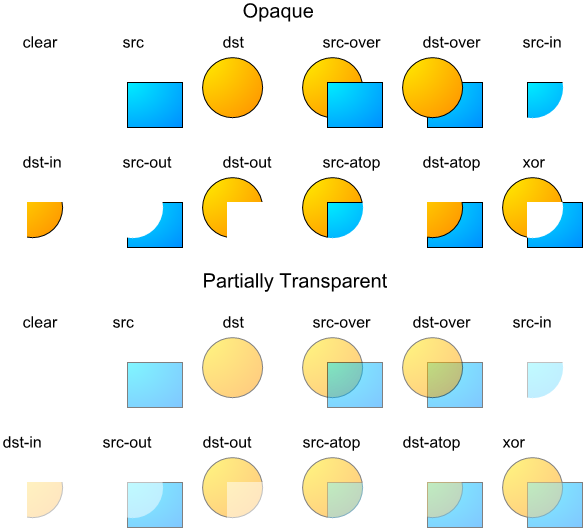
With all geometry utilities ready, we can now build the full canvas redraw function that assembles and places the information box for every visible bar.
Simplifying the Footprint Render Function and Building the Full Canvas Redraw with Information Box
In this version, the "RenderFootprint" function is simplified to handle only candle rendering, with all price level label drawing and information box logic moved into "RedrawCanvas" for centralized control. The redraw function now handles the complete per-bar pipeline — price level labels, diagonal imbalance coloring, and the new supersampled information box — all within a single loop over visible bars.
//--- Simplified and most logic moved to redraw canvas function

//+------------------------------------------------------------------+
//| Render footprint candle for a single bar                         |
//+------------------------------------------------------------------+
void RenderFootprint(int footprintIndex, int barIndex, datetime barTime, int ratesTotal)
  {
   //--- Validate the footprint index before accessing the array
   if(footprintIndex < 0 || footprintIndex >= ArraySize(barFootprints)) return;

   //--- Get the total price levels for this footprint
   int size = ArraySize(barFootprints[footprintIndex].priceLevels);
   //--- Skip rendering if no levels have been collected yet
   if(size == 0) return;

   //--- Pre-compute the minimum pixel spacing between adjacent price labels
   double minSpacing = minPriceLevelSpacing * priceLevelFontSize * _Point;

   //--- Draw the candle body and wicks behind the footprint labels
   RenderCandleWithTrendLines(barIndex, barTime);
  }

//+------------------------------------------------------------------+
//| Redraw entire canvas for all visible bars                        |
//+------------------------------------------------------------------+
void RedrawCanvas(int ratesTotal)
  {
   //--- Skip rendering if canvas dimensions are not yet valid
   if(currentChartWidth <= 0 || currentChartHeight <= 0) return;

   //--- Declare buffers for high, low, and time data needed during rendering
   double   highs[], lows[];
   datetime times[];

   //--- Abort if bar data cannot be fully retrieved
   if(CopyHigh(_Symbol, _Period, 0, ratesTotal, highs) != ratesTotal) return;
   if(CopyLow(_Symbol,  _Period, 0, ratesTotal, lows)  != ratesTotal) return;
   if(CopyTime(_Symbol, _Period, 0, ratesTotal, times)  != ratesTotal) return;

   //--- Clear the canvas to fully transparent before redrawing
   uint defaultColor = 0;
   mainCanvas.Erase(defaultColor);

   //--- Pre-compute the minimum label spacing for the current settings
   double minSpacing = minPriceLevelSpacing * priceLevelFontSize * _Point;

   //--- Iterate over every visible bar and render its footprint and info box
   for(int i = 0; i < visibleBarsCount; i++)
     {
      //--- Map the visible slot index back to an absolute bar index
      int barIndex = firstVisibleBarIndex - i;
      if(barIndex < 0 || barIndex >= ratesTotal) continue;

      //--- Convert bar index to the chronological buffer position
      int      bufferIndex = ratesTotal - 1 - barIndex;
      datetime barTime     = times[bufferIndex];

      //--- Look up the stored footprint data for this bar
      int footprintIndex = GetBarFootprintIndex(barTime);
      if(footprintIndex < 0) continue;

      int size = ArraySize(barFootprints[footprintIndex].priceLevels);
      if(size > 0)
        {
         //--- Prepare a display price array mirroring the sorted levels
         double displayPrices[];
         ArrayResize(displayPrices, size);

         //--- Copy raw level prices into the display array
         for(int j = 0; j < size; j++)
           {
            displayPrices[j] = barFootprints[footprintIndex].priceLevels[j].price;
           }

         if(!useStrictPricePositions)
           {
            //--- Spread overlapping price labels when strict positioning is disabled
            for(int j = 1; j < size; j++)
              {
               //--- Calculate vertical distance between adjacent labels
               double priceDiff = displayPrices[j - 1] - displayPrices[j];
               //--- Push the label down if it would overlap the one above
               if(priceDiff < minSpacing && priceDiff >= 0)
                 {
                  displayPrices[j] = displayPrices[j - 1] - minSpacing;
                 }
              }
           }

         //--- Declare text and color arrays for left and right column labels
         string leftTexts[];
         color  leftColors[];
         string rightTexts[];
         color  rightColors[];
         ArrayResize(leftTexts,   size);
         ArrayResize(leftColors,  size);
         ArrayResize(rightTexts,  size);
         ArrayResize(rightColors, size);

         //--- Populate label text and color for each price level
         for(int j = 0; j < size; j++)
           {
            double upVolume   = barFootprints[footprintIndex].priceLevels[j].upVolume;
            double downVolume = barFootprints[footprintIndex].priceLevels[j].downVolume;

            if(displayMode == DELTA)
              {
               //--- Compute signed delta and total volume for delta display mode
               double deltaValue = upVolume - downVolume;
               double total      = upVolume + downVolume;

               //--- Default delta color to the weakest down shade
               color deltaColor = downColor1;
               if(barFootprints[footprintIndex].maxDeltaValue > 0 && total > 0)
                 {
                  //--- Derive delta color from signed delta relative to bar maximum
                  deltaColor = GetVolumeColor(
                                 deltaValue >= 0,
                                 MathAbs(deltaValue) / barFootprints[footprintIndex].maxDeltaValue);
                 }

               //--- Default total volume color to the weakest shade
               color totalColor = volumeColor1;
               if(barFootprints[footprintIndex].maxTotalVolumeValue > 0)
                 {
                  //--- Derive total volume color from ratio to bar maximum
                  totalColor = GetTotalVolumeColor(total / barFootprints[footprintIndex].maxTotalVolumeValue);
                 }

               //--- Format delta with explicit sign and total as a plain integer
               leftTexts[j]   = StringFormat("%+.0f", deltaValue);
               leftColors[j]  = deltaColor;
               rightTexts[j]  = StringFormat("%.0f", total);
               rightColors[j] = totalColor;
              }
            else
              {
               //--- Display raw bid volume on the left and ask volume on the right
               leftTexts[j]   = StringFormat("%.0f", downVolume);
               leftColors[j]  = downColor1;
               rightTexts[j]  = StringFormat("%.0f", upVolume);
               rightColors[j] = upColor1;
              }
           }

         if(displayMode == BID_VS_ASK)
           {
            //--- Apply diagonal imbalance coloring across adjacent levels
            for(int j = 0; j < size - 1; j++)
              {
               //--- Get ask volume at the current level and bid at the level below
               double higherAsk = barFootprints[footprintIndex].priceLevels[j].upVolume;
               double lowerBid  = barFootprints[footprintIndex].priceLevels[j + 1].downVolume;

               //--- Highlight ask if it meets the significance threshold
               if(barFootprints[footprintIndex].maxAskValue > 0 &&
                  higherAsk / barFootprints[footprintIndex].maxAskValue >= 0.3)
                 {
                  //--- Compute ask-to-bid ratio and color accordingly
                  double ratio   = higherAsk / (lowerBid + 0.0001);
                  rightColors[j] = GetDiagonalVolumeColor(true, ratio);
                 }

               //--- Highlight bid if it meets the significance threshold
               if(barFootprints[footprintIndex].maxBidValue > 0 &&
                  lowerBid / barFootprints[footprintIndex].maxBidValue >= 0.3)
                 {
                  //--- Compute bid-to-ask ratio and color accordingly
                  double ratio        = lowerBid / (higherAsk + 0.0001);
                  leftColors[j + 1]   = GetDiagonalVolumeColor(false, ratio);
                 }
              }
           }

         //--- Configure the canvas font before drawing level labels
         mainCanvas.FontSet("Consolas", priceLevelFontSize, FW_NORMAL);

         //--- Compute horizontal layout anchors for this bar
         int centerX  = BarToXCoordinate(barIndex);
         int barWidth = GetBarWidth(currentChartScale);
         int gap      = MathMax(1, barWidth / 4);
         int xLeft    = centerX - gap;
         int xRight   = centerX + gap;

         //--- Draw left and right labels for every price level
         for(int j = 0; j < size; j++)
           {
            double displayPrice = displayPrices[j];
            //--- Convert the display price to a vertical canvas pixel position
            int yPosition = PriceToYCoordinate(displayPrice);

            //--- Draw the left column label right-aligned at the gap boundary
            mainCanvas.TextOut(xLeft,  yPosition, leftTexts[j],
                               ColorToARGB(leftColors[j],  255), TA_RIGHT | TA_VCENTER);
            //--- Draw the right column label left-aligned at the gap boundary
            mainCanvas.TextOut(xRight, yPosition, rightTexts[j],
                               ColorToARGB(rightColors[j], 255), TA_LEFT  | TA_VCENTER);
           }
        }

      if(showInfoBox)
        {
         //--- Retrieve the net delta and total volume for the info box content
         double delta       = barFootprints[footprintIndex].delta;
         double totalVolume = barFootprints[footprintIndex].totalUpVolume +
                              barFootprints[footprintIndex].totalDownVolume;

         //--- Skip info box rendering for bars with no volume
         if(totalVolume == 0) continue;

         //--- Retrieve pre-computed percentages and colors for this bar
         double upPercentage   = barFootprints[footprintIndex].upPercentage;
         double downPercentage = barFootprints[footprintIndex].downPercentage;
         color  boxColor       = barFootprints[footprintIndex].boxColor;
         color  textColor      = barFootprints[footprintIndex].textColor;

         //--- Format the three info box label strings
         string line1 = StringFormat("Δ: %.0f",             delta);
         string line2 = StringFormat("V: %.0f",             totalVolume);
         string line3 = StringFormat("↓%.0f%% ↑%.0f%%", downPercentage, upPercentage);

         //--- Determine horizontal and vertical anchor for the info box
         int    x      = BarToXCoordinate(barIndex);
         double highPrice = highs[bufferIndex];
         int    yHigh  = PriceToYCoordinate(highPrice);

         //--- Compute a scale-aware font size clamped to a readable range
         int fontSize = (int)(infoBoxBaseFontSize + currentChartScale * 1.5);
         fontSize     = MathMax(8, MathMin(18, fontSize));

         //--- Measure the bold delta label dimensions
         mainCanvas.FontSet("Arial Bold", (uint)fontSize, FW_BOLD);
         int textWidth1  = mainCanvas.TextWidth(line1);
         int textHeight1 = mainCanvas.TextHeight(line1);

         //--- Measure the normal volume and percentage label dimensions
         mainCanvas.FontSet("Arial", (uint)fontSize, FW_NORMAL);
         int textWidth2  = mainCanvas.TextWidth(line2);
         int textHeight2 = mainCanvas.TextHeight(line2);
         int textWidth3  = mainCanvas.TextWidth(line3);
         int textHeight3 = mainCanvas.TextHeight(line3);

         //--- Determine the box dimensions from the widest and tallest content
         int maxTextWidth    = MathMax(textWidth1, MathMax(textWidth2, textWidth3));
         int totalTextHeight = textHeight1 + textHeight2 + textHeight3 + 4;
         int rectWidth       = maxTextWidth    + infoBoxPaddingWidthPixels  * 2;
         int rectHeight      = totalTextHeight + infoBoxPaddingHeightPixels * 2;

         //--- Centre the box horizontally above the bar's high
         int xRect = x     - rectWidth / 2;
         int yRect = yHigh - rectHeight - infoBoxGapPixels;

         //--- Compute ARGB fill, border, and text colors with configured transparency
         uint  argbFill   = ColorToArgbWithOpacity(boxColor, backgroundTransparencyPercent);
         color borderColor = DarkenColor(boxColor, 0.7);
         uint  argbBorder = ColorToArgbWithOpacity(borderColor, borderTransparencyPercent);
         uint  argbText   = ColorToARGB(textColor, 255);

         //--- Determine the supersampling factor; disable when rounded corners are off
         int ssFactor      = enableRoundedCorners ? MathMax(1, supersamplingFactor) : 1;
         int scaledWidth   = rectWidth   * ssFactor;
         int scaledHeight  = rectHeight  * ssFactor;
         int scaledRadius  = cornerRadiusPixels      * ssFactor;
         int scaledThickness = borderThicknessPixels * ssFactor;

         //--- Declare temporary canvases for supersampled rendering
         CCanvas tempHighRes, tempLowRes;

         if(ssFactor > 1)
           {
            //--- Create the high-resolution canvas for supersampled drawing
            if(!tempHighRes.Create("temp_hi_" + IntegerToString(i),
                                   scaledWidth, scaledHeight, COLOR_FORMAT_ARGB_NORMALIZE)) continue;
            tempHighRes.Erase(0);
           }

         //--- Create the final low-resolution canvas that maps to screen pixels
         if(!tempLowRes.Create("temp_lo_" + IntegerToString(i),
                               rectWidth, rectHeight, COLOR_FORMAT_ARGB_NORMALIZE)) continue;
         tempLowRes.Erase(0);

         //--- Point the draw target to the appropriate canvas resolution
         CCanvas *drawCanvas   = (ssFactor > 1) ? &tempHighRes : &tempLowRes;
         int      drawWidth    = (ssFactor > 1) ? scaledWidth    : rectWidth;
         int      drawHeight   = (ssFactor > 1) ? scaledHeight   : rectHeight;
         int      drawRadius   = (ssFactor > 1) ? scaledRadius   : cornerRadiusPixels;
         int      drawThickness = (ssFactor > 1) ? scaledThickness : borderThicknessPixels;

         if(enableRoundedCorners)
           {
            //--- Draw the filled rounded rectangle background
            RenderRoundedRectangleFill(*drawCanvas, 0, 0, drawWidth, drawHeight, drawRadius, argbFill);
            //--- Overlay the rounded border stroke if thickness is non-zero
            if(borderThicknessPixels > 0)
               RenderRoundedRectangleBorder(*drawCanvas, 0, 0, drawWidth, drawHeight,
                                            drawRadius, drawThickness, argbBorder);
           }
         else
           {
            //--- Draw a plain filled rectangle background for the sharp-corner style
            drawCanvas.FillRectangle(0, 0, drawWidth - 1, drawHeight - 1, argbFill);
            if(borderThicknessPixels > 0)
              {
               //--- Draw the four border edges as anti-aliased lines
               drawCanvas.LineAA(0,          0,           drawWidth,  0,           argbBorder);
               drawCanvas.LineAA(drawWidth,  0,           drawWidth,  drawHeight,  argbBorder);
               drawCanvas.LineAA(drawWidth,  drawHeight,  0,          drawHeight,  argbBorder);
               drawCanvas.LineAA(0,          drawHeight,  0,          0,           argbBorder);
              }
           }

         if(ssFactor > 1)
           {
            //--- Downsample the high-resolution canvas to the screen-resolution canvas
            DownsampleBicubic(tempLowRes, tempHighRes, ssFactor);
           }

         //--- Set the horizontal text anchor to the centre of the box
         int textX = rectWidth / 2;
         //--- Start the vertical text cursor at the top padding offset
         int textY = infoBoxPaddingHeightPixels;

         //--- Draw the bold delta label centred at the top of the box
         tempLowRes.FontSet("Arial Bold", (uint)fontSize, FW_BOLD);
         tempLowRes.TextOut(textX, textY, line1, argbText, TA_CENTER | TA_TOP);
         textY += textHeight1 + 2;

         //--- Draw the normal volume label below the delta label
         tempLowRes.FontSet("Arial", (uint)fontSize, FW_NORMAL);
         tempLowRes.TextOut(textX, textY, line2, argbText, TA_CENTER | TA_TOP);
         textY += textHeight2 + 2;

         //--- Draw the percentage label at the bottom of the text block
         tempLowRes.TextOut(textX, textY, line3, argbText, TA_CENTER | TA_TOP);

         //--- Alpha-composite the completed box onto the main canvas pixel by pixel
         for(int dy = 0; dy < rectHeight; dy++)
           {
            for(int dx = 0; dx < rectWidth; dx++)
              {
               //--- Read the composited box pixel
               uint col = tempLowRes.PixelGet(dx, dy);
               //--- Blend it over the existing main canvas content
               BlendPixelSet(mainCanvas, xRect + dx, yRect + dy, col);
              }
           }

         //--- Release the high-resolution temporary canvas when supersampling was used
         if(ssFactor > 1) tempHighRes.Destroy();
         //--- Release the low-resolution composite canvas
         tempLowRes.Destroy();
        }
     }

   //--- Push the completed frame to the screen
   mainCanvas.Update();
  }
Here, we strip the "RenderFootprint" function back to its essential responsibility — validating the footprint index, confirming that at least one price level exists, and calling "RenderCandleWithTrendLines" to draw the candle body and wicks. The label preparation and drawing logic we previously had here has been moved into "RedrawCanvas" so that the information box and the price level labels share the same bar loop, eliminating redundant footprint lookups and keeping the rendering sequence consistent.
In "RedrawCanvas", we retain the same outer structure from the previous part — fetching high, low, and time arrays, erasing the canvas, and looping over visible bars — but now handle two major blocks per bar. In the first block, we build the "displayPrices" array, optionally spread overlapping labels using the new "minPriceLevelSpacing" multiplier, populate left and right text and color arrays per level based on the active display mode, apply diagonal imbalance coloring in bid versus ask mode, set the font with FontSet, compute the horizontal gap anchors, and draw each label pair with TextOut, exactly as we did in the last version.
The second block runs when "showInfoBox" is true and the bar has non-zero volume. We read the pre-computed "delta", "upPercentage", "downPercentage", "boxColor", and "textColor" fields directly from the footprint structure, then format three label strings — the signed delta prefixed with the Greek delta symbol, the total volume prefixed with V, and the down and up percentages with directional arrows. We compute a scale-aware font size by adding a scaled multiple of "currentChartScale" to "infoBoxBaseFontSize", clamping the result between 8 and 18 pixels to keep labels readable at any zoom level.
We then measure all three labels using TextWidth and TextHeight with both bold and normal font settings to determine the widest and tallest content, derive the box pixel dimensions by adding the configured padding on each side, and position the box centered horizontally above the bar's high price with "infoBoxGapPixels" of clearance. We assemble the fill and border ARGB values by calling "ColorToArgbWithOpacity" with the configured transparency percentages, and derive the border color by passing the box fill color to "DarkenColor".
When "enableRoundedCorners" is true, we apply the "supersamplingFactor": we create a high-resolution temporary canvas at the box dimensions multiplied by the factor, draw all geometry at that scaled resolution using "RenderRoundedRectangleFill" and "RenderRoundedRectangleBorder" with proportionally scaled radius and thickness values, then downsample the result back to screen resolution by calling "DownsampleBicubic" into a second low-resolution temporary canvas. When rounded corners are disabled, we skip the supersampling step entirely and draw the box directly at screen resolution using FillRectangle and LineAA for the border edges.
We then draw the three text labels onto the low-resolution canvas with TextOut — bold weight for the delta line and normal weight for volume and percentages — centering each horizontally and stacking them vertically with two-pixel gaps. Finally, we composite the completed box onto the main canvas pixel by pixel using "BlendPixelSet", release both temporary canvases with Destroy, and once all bars are processed, we push the completed frame to the screen with the Update method. We just need to update the tick event handler so the new changes take effect. Just that.
Updating the Calculation Event Handler to Initialize and Refresh Information Box Fields
The OnCalculate event handler carries over its full logic from the previous part with two targeted additions: the new information box fields in "BarFootprintData" are initialized when a new bar opens, and "CalculateBarColorsAndPercentages" is called after every volume update to keep the cached sentiment values current before the next redraw.
//+------------------------------------------------------------------+
//| Calculate custom indicator values on each tick                   |
//+------------------------------------------------------------------+
int OnCalculate(const int rates_total,
                const int prev_calculated,
                const datetime &time[],
                const double &open[],
                const double &high[],
                const double &low[],
                const double &close[],
                const long &tick_volume[],
                const long &volume[],
                const int &spread[])
  {
   //--- Require at least two bars for meaningful processing
   if(rates_total < 2) return 0;

   //--- Retrieve the open time of the forming bar
   datetime currentBarTime = time[rates_total - 1];
   //--- Detect a bar boundary by comparing against the last known bar time
   bool isNewBar = (currentBarTime != lastBarTime);

   if(isNewBar)
     {
      //--- Append a fresh footprint record for the newly opened bar
      int newSize = ArraySize(barFootprints);
      ArrayResize(barFootprints, newSize + 1);
      currentBarIndex = newSize;

      //--- Initialize all scalar fields of the new footprint entry
      barFootprints[currentBarIndex].time              = currentBarTime;
      barFootprints[currentBarIndex].totalUpVolume     = 0;
      barFootprints[currentBarIndex].totalDownVolume   = 0;
      barFootprints[currentBarIndex].boxColor          = upColor1;
      barFootprints[currentBarIndex].textColor         = upColor1;
      barFootprints[currentBarIndex].delta             = 0;
      barFootprints[currentBarIndex].upPercentage      = 0;
      barFootprints[currentBarIndex].downPercentage    = 0;
      //--- Clear the price levels array for the new bar
      ArrayResize(barFootprints[currentBarIndex].priceLevels, 0);

      if(newSize > maxBarsToRender * 2)
        {
         //--- Trim oldest entries when the array exceeds the render budget
         int toRemove = newSize - maxBarsToRender;
         for(int i = 0; i < toRemove; i++)
           {
            //--- Build the time string to locate related chart objects for deletion
            string timeString = TimeToString(barFootprints[i].time);
            ObjectsDeleteAll(0, objectPrefix + "Body_"      + timeString);
            ObjectsDeleteAll(0, objectPrefix + "UpperWick_" + timeString);
            ObjectsDeleteAll(0, objectPrefix + "LowerWick_" + timeString);
           }
         //--- Remove the oldest footprint records from the front of the array
         ArrayRemove(barFootprints, 0, toRemove);
         //--- Shift the current bar index to reflect the removed entries
         currentBarIndex -= toRemove;
        }

      //--- Commit the new bar time and seed the close price from the open
      lastBarTime    = currentBarTime;
      lastClosePrice = open[rates_total - 1];
      lastTickVolume = 0;
     }

   //--- Abort if the current bar index is out of bounds
   if(currentBarIndex < 0 || currentBarIndex >= ArraySize(barFootprints)) return rates_total;

   //--- Compute the volume increment since the last tick
   double volumeDiff = (double)(tick_volume[rates_total - 1] - lastTickVolume);
   //--- Advance the stored tick volume to the current tick
   lastTickVolume = tick_volume[rates_total - 1];

   //--- Flag whether data changed this tick, triggering a redraw
   bool dataChanged = false;

   if(volumeDiff > 0)
     {
      //--- Mark data as dirty so the canvas will be refreshed
      dataChanged = true;

      double currentClose = close[rates_total - 1];
      double upDiff       = 0.0;
      double downDiff     = 0.0;

      if(currentClose > lastClosePrice)
        {
         //--- Price moved up — attribute the full increment to the ask side
         upDiff         = volumeDiff;
         lastTradeAtAsk = true;
        }
      else if(currentClose < lastClosePrice)
        {
         //--- Price moved down — attribute the full increment to the bid side
         downDiff       = volumeDiff;
         lastTradeAtAsk = false;
        }
      else
        {
         //--- Price unchanged — carry volume to whichever side traded last
         if(lastTradeAtAsk) upDiff   = volumeDiff;
         else               downDiff = volumeDiff;
        }

      //--- Persist the close price for comparison on the next tick
      lastClosePrice = currentClose;

      //--- Snap the current close to its discrete price level
      double quantizedPrice = QuantizePriceToLevel(currentClose);
      //--- Accumulate the volume split into the matching price level entry
      UpdatePriceLevel(barFootprints[currentBarIndex], quantizedPrice, upDiff, downDiff);

      //--- Update the bar's cumulative up and down volume totals
      barFootprints[currentBarIndex].totalUpVolume   += upDiff;
      barFootprints[currentBarIndex].totalDownVolume += downDiff;

      //--- Recompute normalisation maximums after the volume update
      ComputeMaxValues(barFootprints[currentBarIndex]);
      //--- Re-sort levels so the highest prices render at the top
      SortPriceLevelsDescending(barFootprints[currentBarIndex]);
      //--- Refresh the info box colors and percentage fields
      CalculateBarColorsAndPercentages(barFootprints[currentBarIndex]);
     }

   //--- Render footprints for the most recent bars within the render budget
   int firstBar = MathMax(0, rates_total - maxBarsToRender);
   for(int i = firstBar; i < rates_total; i++)
     {
      datetime barTime       = time[i];
      int      footprintIndex = GetBarFootprintIndex(barTime);
      if(footprintIndex >= 0)
        {
         //--- Convert chronological index to reverse bar index for chart coordinates
         int barIndex = rates_total - 1 - i;
         RenderFootprint(footprintIndex, barIndex, barTime, rates_total);
        }
     }

   //--- Track whether chart geometry changed this tick
   bool hasChartChanged = false;

   //--- Sample the current chart geometry for comparison
   int    newChartWidth      = (int)ChartGetInteger(0, CHART_WIDTH_IN_PIXELS);
   int    newChartHeight     = (int)ChartGetInteger(0, CHART_HEIGHT_IN_PIXELS);
   int    newChartScale      = (int)ChartGetInteger(0, CHART_SCALE);
   int    newFirstVisibleBar = (int)ChartGetInteger(0, CHART_FIRST_VISIBLE_BAR);
   int    newVisibleBars     = (int)ChartGetInteger(0, CHART_VISIBLE_BARS);
   double newMinPrice        = ChartGetDouble(0, CHART_PRICE_MIN, 0);
   double newMaxPrice        = ChartGetDouble(0, CHART_PRICE_MAX, 0);

   if(newChartWidth != currentChartWidth || newChartHeight != currentChartHeight)
     {
      //--- Resize the canvas bitmap to match the new window dimensions
      mainCanvas.Resize(newChartWidth, newChartHeight);
      currentChartWidth  = newChartWidth;
      currentChartHeight = newChartHeight;
      hasChartChanged    = true;
     }

   if(newChartScale      != currentChartScale     ||
      newFirstVisibleBar != firstVisibleBarIndex   ||
      newVisibleBars     != visibleBarsCount       ||
      newMinPrice        != minVisiblePrice        ||
      newMaxPrice        != maxVisiblePrice)
     {
      //--- Sync all viewport state variables with the current chart values
      currentChartScale    = newChartScale;
      firstVisibleBarIndex = newFirstVisibleBar;
      visibleBarsCount     = newVisibleBars;
      minVisiblePrice      = newMinPrice;
      maxVisiblePrice      = newMaxPrice;
      hasChartChanged      = true;
     }

   //--- Redraw the canvas whenever geometry, new bars, or volume data changed
   datetime currentTime = TimeCurrent();
   if(hasChartChanged || rates_total > prev_calculated || dataChanged)
     {
      RedrawCanvas(rates_total);
      //--- Record the redraw timestamp for potential throttling use
      lastRedrawTime = currentTime;
     }

   //--- Trigger a chart refresh to display the updated canvas overlay
   ChartRedraw(0);

   return rates_total;
  }
When a new bar is detected, we initialize the five new fields introduced in the extended structure alongside the existing ones — setting "boxColor" and "textColor" to the neutral weakest shade, and zeroing "delta", "upPercentage", and "downPercentage" — so the information box always has clean starting values and never displays stale data from a previous bar on the first tick of a new one. The trimming logic for old bars, the time and close price seeding, and the bounds check on "currentBarIndex" all remain unchanged from the previous part.
In the volume processing block, the tick direction logic, price quantization, level update, cumulative total accumulation, "ComputeMaxValues" call, and "SortPriceLevelsDescending" call all remain exactly as before. The single addition here is a call to "CalculateBarColorsAndPercentages" after the sort, which recomputes and caches the bar-level delta, percentage split, box background color, and text color into the structure so they are ready for the information box rendering pass in "RedrawCanvas" without any recalculation at draw time.
We also add a footprint rendering loop that iterates over the most recent bars within the render budget, computing the reverse bar index from the chronological position and calling "RenderFootprint" for each bar that has a stored footprint, ensuring candle trend line objects are kept current after every tick. The geometry change detection, canvas resize, viewport state synchronization, conditional "RedrawCanvas" call, and final ChartRedraw all remain unchanged, completing the event handler with minimal additions that fully support the new information box without altering the existing tick processing flow. What remains is backtesting the program, and that is handled in the next section.
Backtesting
We did the testing, and below is the compiled visualization in a single Graphics Interchange Format (GIF) image.
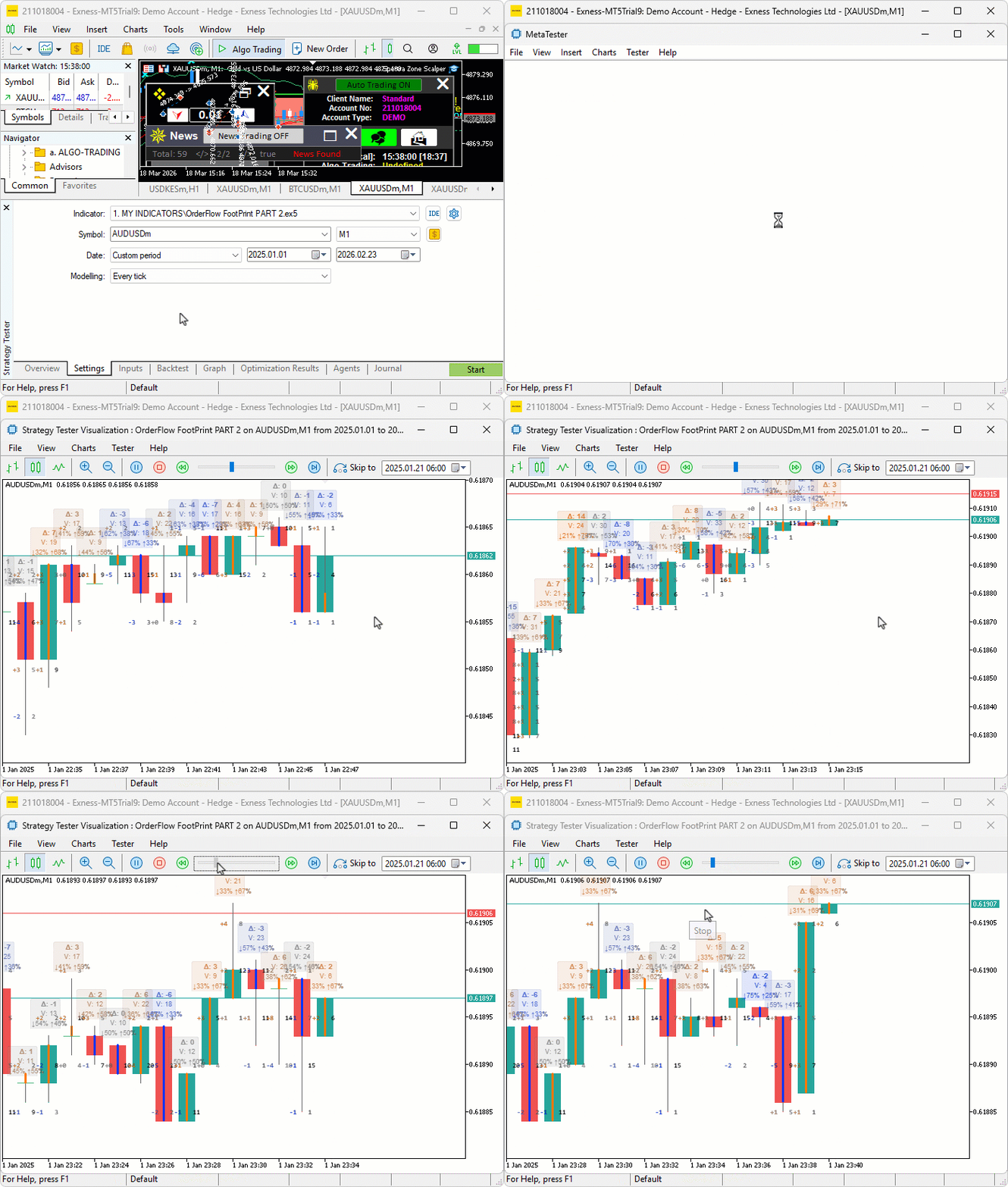
During testing, the information box updated correctly on every tick with the delta, volume, and percentage values reflecting the actual bid and ask accumulation at each price level, the box color shifted from weak to strong shades as one side dominated progressively across consecutive bars, and the rounded corners and semi-transparent background rendered cleanly above the candle wicks without obscuring the price level labels beneath.
Conclusion
In conclusion, we have extended the footprint indicator from a level-centric display into a combined per-level and per-bar tool by adding cached bar fields — "boxColor", "textColor", "delta", "upPercentage", and "downPercentage" — to the "BarFootprintData" structure, computing them once per tick via "CalculateBarColorsAndPercentages" to keep redraws lightweight. We built a complete rendering pipeline covering delta-intensity color mapping, percentage-based text intensity, rounded rectangle geometry using scanline quadrilateral fill and precise arc stroking, an optional supersampling and box-filter downsampling pass, and per-pixel Porter-Duff alpha compositing so the sentiment box overlays the footprint without obscuring price level detail. All drawing is centralized in "RedrawCanvas" while the "OnCalculate" event handler remains responsible only for per-tick updates and cache maintenance. After the article, you will be able to:
- Read the sentiment box color and delta value above each candle to instantly judge whether buyers or sellers dominated that bar in aggregate, using strongly colored boxes with high delta as confirmation signals and weakly colored boxes as indecision markers before committing to a directional trade
- Use the percentage split in the sentiment box to distinguish bars where one side barely edged out the other from bars with heavily lopsided participation, treating high-percentage dominance near key levels as stronger evidence of absorption or aggression than a narrow split at the same price
- Scan the sentiment box colors across consecutive bars as a visual heatmap to identify momentum building in one direction, entering in the direction of deepening color intensity and stepping aside or reversing when the color suddenly shifts to the opposite side
Happy trading!
Warning: All rights to these materials are reserved by MetaQuotes Ltd. Copying or reprinting of these materials in whole or in part is prohibited.
This article was written by a user of the site and reflects their personal views. MetaQuotes Ltd is not responsible for the accuracy of the information presented, nor for any consequences resulting from the use of the solutions, strategies or recommendations described.

 Coral Reefs Optimization (CRO)
 Developing Market Entropy Indicator: Trading System Based on Information Theory
 Price Action Analysis Toolkit Development (Part 65): Building an MQL5 System to Monitor and Analyze Manually Drawn Fibonacci Levels
 Introduction to MQL5 (Part 43): Beginner Guide to File Handling in MQL5 (V)

- Free trading apps
- Over 8,000 signals for copying
- Economic news for exploring financial markets
You agree to website policy and terms of use