

Introduction to MQL5 (Part 43): Beginner Guide to File Handling in MQL5 (V)
 2 192
2 192
 0
0

Introduction
You run an Expert Advisor in MT5, tune parameters, and accumulate runtime state—and then the terminal closes, the chart refreshes, or the EA is removed, and everything in memory is lost. The advisor restarts “from zero”: saved settings, computed values, and coordinated configurations disappear, which is especially painful when the same EA runs on several terminals and must rely on a single shared parameter set. What you need is a simple, fast, reproducible store that survives restarts and can be shared among terminals on the same PC. This article shows how to pack EA parameters into a simple MQL5 struct and persistently save and load it from a shared binary file (FILE COMMON + FILE BIN) without manual text conversion.
Understanding Structures in MQL5
This section will concentrate on understanding the fundamentals of structures in MQL5 and what they are. It's crucial to understand how structures function and why they are helpful in programming before we start dealing with them in files. Because we will utilize structures later on while working with binary files in MQL5, they are very significant for this article. When storing or retrieving data—especially in binary files—it must be organized consistently. To write related variables to a file and retrieve them back in the same structured format, structures offer a practical approach to group them together.
Later file operations will be simpler if you understand how structures are defined, how members are ordered, and how they are accessed. Because of this, we will first examine the basic ideas underlying structures before utilizing them in real-world file-based MQL5 applications.
What is a Structure in MQL5?
Programmers can group related variables into a single unit by creating a special data type called a structure (struct). Various data types, such as integers, floating-point numbers, booleans, strings, and even other structures, can be stored in each of the variables inside the structure, which are referred to as members.
You may already be familiar with arrays. But how are structures different from arrays? Arrays are used to store several values that share the same data type. For instance, an integer array can contain only integer values, and a double array can contain only double values. This makes arrays convenient when working with multiple pieces of similar data.
Example:double prices[3] = {1.1050, 1.1075, 1.1030};
In contrast, a structure enables you to combine variables of various data kinds into a single container. This implies that an integer, a double, a boolean, and a string can all be included in a structure's declaration.
Syntax:
struct StructName      // Name of the structure
  {
   double            member1;  // First member
   int               member2;  // Second member
   string            member3;  // Third member
  };
Another difference is the definition syntax. Arrays use square brackets for size; structures use the struct keyword and a member block. Square brackets are used to designate the size of arrays, and the struct keyword is used to define structures, which are then followed by a block listing all their members. A structure can be utilized throughout the program as a custom data type after it is specified. The dot operator can then be used to create variables of that structure type and access their members.
Creating a Structure Variable
How is a structural variable truly created in MQL5? Let's proceed step-by-step to make it easy to follow. You start by using the word struct. Why? Because struct tells MQL5 that a new data type, not just a normal variable, will be defined. This is similar to using int or double, except you're creating a special type here that can hold many linked data points.
struct Next, you give your structure a name. For example, let’s call it EAParameters. This name is how you will refer to the structure later when creating variables or working with its members.
struct EAParameters You open a curly brace { } after the name. Why are you using braces? Since you will list every member of the structure within them. These are the specific data fields that will be included in the structure. You conclude the curly brace with a semicolon. To inform MQL5 that the structure definition is finished, this semicolon is necessary.
struct EAParameters
  {

  };
You can now specify what makes up your structure. Every member has a name and a type. Each of them will conclude with a semicolon ; and go inside the braces.
struct EAParameters
  {
   double            TakeProfit;
   double            StopLoss;
   double            LotSize;
   int               RSI_Level;
   int               MaxTrades;
  };
Once the structure is defined, how do we actually use it? This is where structure variables come in. You declare a variable using the structure name, just like any other type:
struct EAParameters
  {
   double            TakeProfit;
   double            StopLoss;
   double            LotSize;
   int               RSI_Level;
   int               MaxTrades;
  };
EAParameters myEA;
Accessing Structure Members
Now that we have created a structure variable using EAParameters myEA;, the next question is, how do we actually use it? How do we get or set the individual values stored inside this structure? That’s where structure members come into play. A structure's members can be accessed using the dot operator (.). Despite being grouped together in the same structure, the variables are still independent. The dot operator provides direct access to any particular member, while the structure serves as a container to keep them together.
Example:myEA.TakeProfit = 50.0; myEA.StopLoss = 20.0; myEA.LotSize = 0.1; myEA.RSI_Level = 14; myEA.MaxTrades = 5;
Here’s what’s happening:
- myEA.TakeProfit = 50.0; assigns a value of 50.0 to the TakeProfit member.
- myEA.RSI_Level = 14; assigns 14 to the RSI_Level member.
- Each line accesses a specific member inside the myEA variable.
But it’s not just for writing values. You can also read values the same way:
struct EAParameters
  {
   double            TakeProfit;
   double            StopLoss;
   double            LotSize;
   int               RSI_Level;
   int               MaxTrades;
  };
EAParameters myEA;

myEA.TakeProfit = 50.0;
myEA.StopLoss = 20.0;
myEA.LotSize = 0.1;
myEA.RSI_Level = 14;
myEA.MaxTrades = 5;

Print("EA Take Profit is ", myEA.TakeProfit);
Print("EA Max Trades allowed: ", myEA.MaxTrades);
This will make it simple to examine or use the data contained in the structure by printing the current values stored in its members. All member kinds are compatible with the dot operator. EA parameters stay readable, well-organized, and simple to store or get from a file as a single structured record when members are accessed in this manner.
Simple vs. Complex Structures in MQL5
It's crucial to realize that different structures are handled differently in MQL5. You can choose how to use them, particularly when reading from or writing to files, by understanding the difference between simple and complex structures. Simple structures are those that don't have dynamic arrays, pointers, class objects, or strings. Only fundamental data types such as int, double, bool, and even nested simple structures are included. Why is this significant? Because simple structures can be passed to DLL methods and are simpler to keep in binary files, they are perfect for persistent EA parameters.
A structure that stores Take Profit, Stop Loss, Lot Size, and RSI Level as numbers, for instance, would be seen as straightforward. Only simple structures in MQL5 can be read back using FileReadStruct and written directly to a binary (.bin) file using operations like FileWriteStruct. Because the memory arrangement of complex structures is not fixed, they cannot be directly saved in binary files. In contrast, strings, objects, pointers, and dynamic arrays are examples of complex structures. Because of their unfixed memory layout, these are more difficult to store in binary files and cannot be supplied directly to DLL methods. Writing strings separately or controlling array sizes are examples of complex structures that require additional processing when saving to or reading from a file.
Here's a crucial lesson: you want your structure to be straightforward if your objective is to save EA settings in a file. To write and read the complete structure at once using binary files, keep all members as fixed-size data types. For instance, regardless of its value, an int variable constantly takes up 4 bytes in memory.
Example://+------------------------------------------------------------------+ //| Script program start function | //+------------------------------------------------------------------+ void OnStart() { int a = 10; int b = 1000; int c = -500000; Print("Size of a: ", sizeof(a), " bytes"); Print("Size of b: ", sizeof(b), " bytes"); Print("Size of c: ", sizeof(c), " bytes"); }
Output:
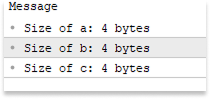
Complex structures are formed by variable-length types like strings, objects, pointers, and dynamic arrays. In contrast to fixed-size numeric types, a string's memory usage is determined by its length. The stored text is not returned by sizeof(string) in MQL5; it simply returns the reference's size. Because of this, writing complicated structures straight to binary files without controlling the string content is risky. To determine the string's actual length, utilize the StringLen() method.
Example:
//+------------------------------------------------------------------+
//| Script program start function                                    |
//+------------------------------------------------------------------+
void OnStart()
  {
   string s1 = "Hi";
   string s2 = "Hello, World!";
   string s3 = "This is a longer string";

   Print("Pointer size of s1: ", sizeof(s1), " bytes, actual length: ", StringLen(s1));
   Print("Pointer size of s2: ", sizeof(s2), " bytes, actual length: ", StringLen(s2));
   Print("Pointer size of s3: ", sizeof(s3), " bytes, actual length: ", StringLen(s3));
  }
Output:
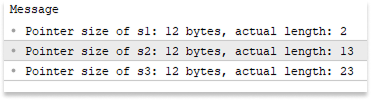
The most important lesson is that in MQL5, only basic structures may handle binary files. Your structure should stay away from strings, dynamic arrays, pointers, and class objects if you intend to keep parameters, session data, or any other persistent information in a binary file. The memory layout is fixed, predictable, and secure for file operations when simple structures are used.
Writing a Structure to a File
Working with expert advisors often has the drawback of losing all memory-stored variables when the EA is shut off. The program restarts with new values if the terminal is closed, the chart is updated, or the EA is eliminated. The EA can save crucial data before it ends and retrieve it when it restarts by storing a structure in a file. Rather than resetting its internal state every time it loads, this enables the program to preserve continuity between sessions. An EA might, for instance, write a structure to a binary file that contains trade settings, computed statistics, or other operational information. The EA just reads the structure from the file and keeps working with the same data when it runs again.
The creation of a basic external memory system for the program is another significant advantage of storing structures in files. The file becomes a durable storage area where data may be securely saved and retrieved whenever needed, rather than merely depending on transient variables inside the EA. When more Expert Advisors are involved, this concept gains even greater potency. For various EAs operating on different MetaTrader 5 terminals, a binary file with structured data might serve as a shared brain. Every EA can use the same configuration or decision data and read parameters from the same file.
CSV files, which are text-based and simple to examine in programs like Excel or any text editor, were covered in the previous article. CSV files are useful for exporting results for analysis or monitoring trade history, but they are not the best option for keeping structured EA data that needs to remain consistent over sessions. The primary cause is that a structure cannot be directly stored in CSV as a single item. While writing, each component of a structure must be independently transformed into text, and while reading, it must be processed back into its original type. This process increases the amount of code needed, is prone to errors, and may result in inconsistencies if the fields' type or order is not properly preserved. This degree of human management is ineffective and unstable for EAs that maintain parameter sets, collect runtime state, or are shared across several terminals.
For the preservation of structured EA data, binary files offer a better option. A structure with fixed-size members, in contrast to CSV, can be recorded straight into a binary file as a single block of memory and then recovered in its original layout without any conversion. This guarantees that each field's type and order are maintained, resulting in a quicker, safer, and less error-prone read/write procedure. Additionally, when using shared storage (FILE_COMMON), binary storage enables several terminals to refer to the same file, facilitating coordinated settings and shared parameter sets between sessions.
Although binary files cannot be read by humans, this feature actually increases reliability by decreasing the possibility of unintentional change. They are perfect for storing program configuration, runtime information, and EA parameters since they are smaller and quicker to read and write. This implies that we can design a structure in MQL5, give its members values, and then store it in a binary file to provide a permanent memory mechanism. The structure can be saved and then reloaded exactly as it was once all fields have values. This ensures continuity even when the terminal restarts, the chart is refreshed, or the EA is removed. This method serves as the basis for the series' more sophisticated systems, where dependable and consistent parameter storing is crucial.
Example:
input double  TP    = 50.0;
input double  SL    = 20.0;
input double  LOT   = 0.1;
input int     RSI   = 14;
input int     MAX_T = 5;

struct EAParameters
  {
   double            TakeProfit;
   double            StopLoss;
   double            LotSize;
   int               RSI_Level;
   int               MaxTrades;

  };


//+------------------------------------------------------------------+
//| Expert initialization function                                   |
//+------------------------------------------------------------------+
int OnInit()
  {
//---

//---
   return(INIT_SUCCEEDED);
  }
//+------------------------------------------------------------------+
//| Expert deinitialization function                                 |
//+------------------------------------------------------------------+
void OnDeinit(const int reason)
  {
//---
   EAParameters myEA;

   myEA.TakeProfit = TP;
   myEA.StopLoss = SL;
   myEA.LotSize = LOT;
   myEA.RSI_Level = RSI;
   myEA.MaxTrades = MAX_T;

  }
//+------------------------------------------------------------------+
//| Expert tick function                                             |
//+------------------------------------------------------------------+
void OnTick()
  {
//---

  }
//+------------------------------------------------------------------+
Explanation:
In this example, we first build a set of input variables that stand in for the Expert Advisor's default settings. When the EA is first opened or no previously saved data is accessible, these values serve as the initial setup. The EA uses these inputs as its working values during execution because there isn't a binary file on the first run.
Next, we first define a structure called EAParameters. Inside the structure, we declare several members who represent parameters an Expert Advisor might use, such as Take Profit, Stop Loss, lot size, an RSI level, and the maximum number of trades allowed. After defining the structure, we create a variable called myEA from that structure. Once the variable exists, we assign values to each member using the dot operator. At this point, the structure contains a complete set of parameters stored in memory.
To keep the data outside the program, the crucial question now becomes, how can we store this structure in a binary file? Opening a file where the structure will be written is the first step. The FileOpen function in MQL5 is used for this. This function establishes a link between the program and a file kept in the file directory of the terminal.
This is necessary because the program must know which file to write to and how to access it before writing data. If the file does not already exist, should it be created? Is it better to write data in binary format? These choices are made when the file is opened. A file handle, which functions as a reference to the file, is given to the program upon successful file opening. Other file functions that write the structure to the binary file then use this handle.
The procedure is:
- Define the structure
- Create a variable and assign member values
- Open a binary file with the FileOpen function
- Write the structure with the FileWriteStruct function
The relevant file-writing function can then be used to write the structure straight into the file.
Example:
input double  TP    = 50.0;
input double  SL    = 20.0;
input double  LOT   = 0.1;
input int     RSI   = 14;
input int     MAX_T = 5;

struct EAParameters
  {
   double            TakeProfit;
   double            StopLoss;
   double            LotSize;
   int               RSI_Level;
   int               MaxTrades;

  };

//+------------------------------------------------------------------+
//| Expert initialization function                                   |
//+------------------------------------------------------------------+
int OnInit()
  {
//---

//---
   return(INIT_SUCCEEDED);
  }
//+------------------------------------------------------------------+
//| Expert deinitialization function                                 |
//+------------------------------------------------------------------+
void OnDeinit(const int reason)
  {
//---
   EAParameters myEA;

   myEA.TakeProfit = TP;
   myEA.StopLoss = SL;
   myEA.LotSize = LOT;
   myEA.RSI_Level = RSI;
   myEA.MaxTrades = MAX_T;

   string file_name = "EA_parameters.bin";
   int handle = FileOpen(file_name, FILE_WRITE|FILE_BIN|FILE_COMMON);

   if(handle == INVALID_HANDLE)
     {
      Print("ERROR: Cannot open file for writing! Error: ", GetLastError());
      return;

     }

   else
      if(handle != INVALID_HANDLE)
        {
         Print("File successfully opened");

         int file_size = (int)FileSize(handle);

         if(file_size == 0)
           {
            FileWriteStruct(handle, myEA);
           }
         FileClose(handle);
        }

  }
//+------------------------------------------------------------------+
//| Expert tick function                                             |
//+------------------------------------------------------------------+
void OnTick()
  {
//---

  }
//+------------------------------------------------------------------+
Explanation:
When the Expert Advisor is going to terminate, MQL5's unique OnDeinit() event handler is triggered automatically. This may occur if the MetaTrader 5 terminal is closed, the chart is refreshed, or the EA is removed from the chart. OnDeinit() offers a last chance to carry out cleanup tasks or save crucial data because at this time, all data saved in memory will be destroyed. To ensure that the data can be restored the next time the EA is launched, it is utilized in this situation to store the current EA parameters to a file.
Next, a variable was created to store the file name where the data will be stored. "EA_parameters.bin" is assigned to file_name in this instance. This file is identified as binary by the .bin suffix. A binary file stores data as raw bytes exactly as they are in memory. Storing the file name in a variable makes repeated access simpler. This eliminates the need to continually type out the file name in numerous file actions by allowing opening, reading, or writing to the file by referring to the variable. A file handle is returned after the file is opened by a specific function. This handle allows the program to access and edit the file specified by the file name variable by acting as a reference. All subsequent file activities, such as writing or closing the file, will be performed using this handle.
Many flags are available to instruct the system on how to access the file when it is opened. The program will write data to the file, according to the first flag, FILE_WRITE. MetaTrader 5 will instantly create the file if it isn't already present. The software will be able to write data into it if it does exist. The file is handled as binary instead of text thanks to the FILE_BIN flag. This is essential for saving structures since it makes it possible to write the structure's raw memory straight into the file. Binary mode is necessary for functions like FileWriteStruct to properly store structured data.
The location of the file is decided by the third flag, FILE_COMMON. The flag stores the file in the shared directory that all MetaTrader terminals on the computer share, rather than in the file folder of the local terminal. This allows the same file to be accessed by several Expert Advisors operating on several MetaTrader 5 installations. This shared file can serve as a central storage site or even a basic type of shared memory between EAs in more sophisticated systems.

After FileOpen , the code checks whether the handle is valid. The file has been successfully opened and made available if the handle is valid. When the file is prepared for additional actions, a confirmation message is printed to the terminal. The file size, which shows how many bytes the file currently contains, is retrieved in the subsequent step. An integer variable contains this value. Because it enables the code to detect whether the file is empty or contains data, checking the file size is essential.
The if statement that follows determines if the file size is zero. If so, there is no prior data in the file, and it is empty. In this instance, the myEA structure is stored as the first record in the binary file after the code uses FileWriteStruct to write the structure to the file. If the file already contains saved structures, this check prevents the program from erasing existing data. This is a straightforward data integrity precaution, particularly when the file may be shared or utilized by several EAs. In this example, we only write the structure when the file is empty to keep things simple and focused on understanding the basics of saving and loading a structure. This avoids extra complexity like handling multiple records or updates, allowing you to clearly learn how structured data is written to and read from a file.
Using FileClose(), the file is finally closed. The file handle is released in this crucial phase, which also guarantees that all data written to the file is correctly flushed and saved to disk. Incomplete or damaged files may result from some data remaining in memory buffers and not being fully written if the file is not closed. Additionally, the resource is released when the file is closed, making it safe to access at a later time. By doing this, we guarantee that the data that has been stored will be consistent and readable the next time the file is opened.
Note: An error will occur when FileWriteStruct is used with a structure that contains a string. Because strings are dynamic and their memory size might fluctuate, this occurs. The method only supports basic structures composed of fixed-size data types since it writes fixed-size memory straight to a binary file.
Example:struct EAParameters { double TakeProfit; double StopLoss; double LotSize; int RSI_Level; int MaxTrades; string lll; };

Reading a Structure from a Binary File
We learned how to create a structure and write it to a binary file in the previous chapter, converting the file into a durable store for EA parameters. It makes sense to understand how to retrieve the structured data from the file now that we can store it. This is important since the EA or script can only utilize the stored parameters if it understands how to properly access them. The function only supports simple structures composed of fixed-size data types because it writes fixed-size memory straight to a binary file.
This chapter will describe how to read a previously saved structure using FileReadStruct, open a binary file, and confirm that it was successfully accessed. We will also examine how to ensure data integrity, confirm the read process, and securely close the file. You will be able to reopen your EA_parameters.bin file by the conclusion of this chapter, get the saved EA parameters, and include them in your MQL5 code to enable your Expert Advisor to employ permanent memory across sessions.
Example:
input double  TP    = 50.0;
input double  SL    = 20.0;
input double  LOT   = 0.1;
input int     RSI   = 14;
input int     MAX_T = 5;

struct EAParameters
  {
   double            TakeProfit;
   double            StopLoss;
   double            LotSize;
   int               RSI_Level;
   int               MaxTrades;

  };

string file_name = "EA_parameters.bin";
//+------------------------------------------------------------------+
//| Expert initialization function                                   |
//+------------------------------------------------------------------+
int OnInit()
  {
//---
   EAParameters myEA_read;

   if(FileIsExist(file_name,FILE_COMMON) == true)
     {
      int handle = FileOpen(file_name, FILE_READ|FILE_BIN|FILE_COMMON);

      if(handle == INVALID_HANDLE)
        {
         Print("ERROR: Cannot open file for reading! Error: ", GetLastError());
         return 0;

        }
      else
         if(handle != INVALID_HANDLE)
           {

            Print("File successfully opened for reading");
            Print("---- Printing File Content ----");

            FileReadStruct(handle, myEA_read);

            Print("Take Profit: ", myEA_read.TakeProfit);
            Print("Stop Loss: ", myEA_read.StopLoss);
            Print("LotSize: ", myEA_read.LotSize);
            Print("RSI LEVEL: ",  myEA_read.RSI_Level);
            Print("Max Trades: ",  myEA_read.MaxTrades);

            FileClose(handle);
           }
     }

//---
   return(INIT_SUCCEEDED);
  }
//+------------------------------------------------------------------+
//| Expert deinitialization function                                 |
//+------------------------------------------------------------------+
void OnDeinit(const int reason)
  {
//---
   EAParameters myEA;

   myEA.TakeProfit = TP;
   myEA.StopLoss = SL;
   myEA.LotSize = LOT;
   myEA.RSI_Level = RSI;
   myEA.MaxTrades = MAX_T;

   int handle = FileOpen(file_name, FILE_WRITE|FILE_BIN|FILE_COMMON);

   if(handle == INVALID_HANDLE)
     {
      Print("ERROR: Cannot open file to save new version! Error: ", GetLastError());
      return;
     }

   else
      if(handle != INVALID_HANDLE)
        {
         Print("File successfully opened");

         int file_size = (int)FileSize(handle);

         if(file_size == 0)
           {
            FileWriteStruct(handle, myEA);
           }
         FileClose(handle);
        }

  }
//+------------------------------------------------------------------+
//| Expert tick function                                             |
//+------------------------------------------------------------------+
void OnTick()
  {
//---

  }
Explanation:
A variable is given the file name to facilitate file reading and writing. This declaration is made available to all Expert Advisor event handlers, including OnInit and OnDeinit, by putting it in the global scope. This method keeps file usage consistent and does away with the necessity to redefine the file name in various code segments. The EA builds a structure during the initialization stage to store any data that might be loaded from the file. Next, it determines if the file actually exists. If so, the EA opens the file and loads the previously stored parameters into the structure. Instead of depending solely on the default input settings, this enables the EA to recover its previous configuration at restart.
If the file already exists, we open it in read mode using FileOpen with the appropriate flags. We open the file using the FileOpen function. The file name and a set of flags that specify the file's usage are needed for this function. We used FILE_READ, FILE_BIN, and FILE_COMMON in this instance. Here, the key distinction is that we are utilizing FILE_READ rather than FILE_WRITE. This indicates to MQL5 that we wish to read data from the file only.
The common flag puts the file in a shared directory so that several terminals can access it, while the binary flag enables the platform to process the file as raw memory instead of text. Log messages indicate that the file is ready and that its contents will be printed once it has opened properly. The structure is read from the file using FileReadStruct in the next line. The file handle and the structural variable myEA_read are the arguments passed to this function. It fills the members of myEA_read with the matching values in the same order and type as they were written after reading the raw memory from the file.
After the data has been read, the program uses Print statements to display each member of myEA_read. You may verify that the values were correctly read from the binary file by performing this. Because each line outputs the member name and its value, you can read the Take Profit, Stop Loss, Lot Size, RSI Level, and Max Trades exactly as they were saved. To verify the saved values, the program prints each structure member to the terminal after reading the data. To release the file handle and guarantee that the file can be safely read at a later time, the file is closed after this.
Output: 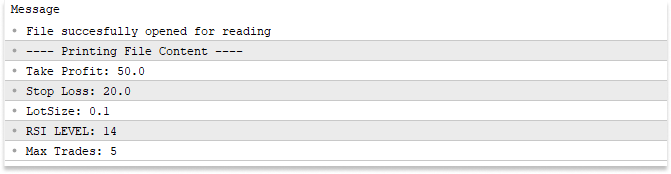
Conclusion
We have walked through a minimal, practical mechanism for persistent EA memory in MQL5. The key points are:
- Keep the parameter container a simple structure composed of fixed-size types (double, int, bool, nested simple structs). Avoid strings, dynamic arrays, pointers, and class objects for direct binary I/O.
- Save the struct as raw memory to a common binary file (for example, EA parameters.bin in FILE COMMON) using FileOpen(…, FILE WRITE|FILE BIN|FILE_COMMON) and FileWriteStruct().
- Read it back with FileOpen(…, FILE READ|FILE BIN|FILE_COMMON) and FileReadStruct(), making sure the reading structure has the same order and types of fields (names may differ).
- Always check for INVALID_HANDLE, handle FileSize if needed, and call FileClose() to prevent corruption.
Following these rules gives you a reproducible “persistent memory” artifact—a binary file and matching struct-based read/write routines—that multiple terminals can use to share EA parameters across sessions.
Warning: All rights to these materials are reserved by MetaQuotes Ltd. Copying or reprinting of these materials in whole or in part is prohibited.
This article was written by a user of the site and reflects their personal views. MetaQuotes Ltd is not responsible for the accuracy of the information presented, nor for any consequences resulting from the use of the solutions, strategies or recommendations described.

 Developing Market Entropy Indicator: Trading System Based on Information Theory
 Building a Research-Grounded Grid EA in MQL5: Why Most Grid EAs Fail and What Taranto Proved
 Creating Custom Indicators in MQL5 (Part 10): Enhancing the Footprint Chart with Per-Bar Volume Sentiment Information Box
 Neural Networks in Trading: Adaptive Detection of Market Anomalies (DADA)

- Free trading apps
- Over 8,000 signals for copying
- Economic news for exploring financial markets
You agree to website policy and terms of use