
Voodoo Black Magic
- Experts
-
Sivakumar Paul Suyambu
 Full Lifecycle: develop → optimize → deploy → monitor → reoptimize → repeat
 - Versão: 2.2
- Atualizado: 9 fevereiro 2026
- Ativações: 10
Voodoo Black Magic HFT EA – MT5 Forex & Gold/US30/DE40 Scalping Expert Advisor
Voodoo Black Magic is a high-frequency MT5 Expert Advisor (forex robot) designed for scalping Forex, Gold (XAUUSD) and US30/DE40 using fast pending orders and strict risk control.
This HFT scalping EA for MetaTrader 5 focuses on:
-
Breakout entries via buy stop / sell stop orders
-
EMA-based trend bias to avoid trading against the main move
-
Broker-safe execution (spread, stops, freeze level, margin checks)
-
Low-load trailing stop engine
-
Auto-cancel stale pending orders
-
Loss-streak pause to protect the account during bad phases
No grid, no martingale, no averaging – Voodoo Black Magic is built for traders who want a clean, controlled, automated trading system for intraday scalping and HFT-style breakout trading on MT5.
How Voodoo Black Magic Works?
Internal formulas and exact code logic are not disclosed – this is a conceptual overview for users.
-
Trend Direction via EMA Filter
-
The EA uses an Exponential Moving Average (EMA) as a directional filter.
-
If price is trading above the EMA → buy bias.
-
If price is trading below the EMA → sell bias.
-
-
Breakout via Pending Stop Orders
-
Instead of entering at market, the EA places pending stop orders at a configurable distance from current price.
-
When price breaks in the direction of the trend, the pending order is triggered into a position.
-
The opposite side pending order can be automatically cancelled to avoid hedging or conflicting positions.
-
-
Broker-Safety and Execution Filters
Before placing or modifying any order, the EA checks:-
Max spread (in points) – skips trades when spread is too high
-
Trade mode / session – trades only when the symbol is fully tradable
-
Stops and freeze levels – to avoid INVALID_STOPS/INVALID_PRICE errors
-
Margin availability – can auto-reduce lot size to fit available margin
-
-
Auto-Cancel Stale Pending Orders
-
Each pending order has a maximum lifetime (in seconds).
-
If not triggered within that time, it can be automatically deleted, so you don’t get random late fills when the setup is no longer valid.
-
-
Low-Load Trailing Stop Management
-
Once in a position, the EA can trail the Stop Loss based on:
-
Trailing distance (points)
-
Minimum improvement step
-
Time cooldown
-
Optional “trail only once per bar”
-
Optional spread cap for trailing
-
-
This keeps CPU/load low and avoids over-modifying stops.
-
-
Loss-Streak Pause Protection
-
You can enable a loss streak guard:
-
After N consecutive losing trades, the EA will pause new entries for a defined number of minutes.
-
Existing trades remain managed, but no fresh trades are opened during the pause window.
-
-
-
Time Window & Minutes Filter
-
You can limit trading to specific server time hours (e.g. London or NY session).
-
You can also allow new entries only every N minutes, which reduces over-trading and noise.
-
Main Features
-
🚀 HFT-style breakout logic using pending stop orders
-
📈 EMA trend filter to align trades with the main direction
-
🛡️ Broker-safe execution: spread cap, stops/freeze awareness, margin checks
-
🧹 Auto-cancel stale pending orders (time-based expiry)
-
🧠 Loss-streak pause – temporarily stop new entries after consecutive losses
-
⏰ Time window + N-minute filter for more control on when the EA trades
-
🎯 Low-load trailing stop with min step & optional spread cap
-
🔍 Debug logs for easier setup and troubleshooting
-
❌ No grid, no martingale, no arbitrage tricks
Works well on:
-
Gold (XAUUSD)
-
Major Forex pairs (EURUSD, GBPUSD, USDJPY, etc.)
-
Indices (like US30, DE40) where the broker provides good conditions
Always DEMO Test on your broker’s data before going live. HFT can not be Back Tested.
Recommended Usage (General Guidelines)
-
Platform: MetaTrader 5 (MT5)
-
Account Type: ECN / RAW / low-spread with fast execution
-
Timeframes:
-
Designed for lower timeframes (M1) for intraday scalping
-
-
VPS:
-
A stable VPS near your broker’s server is recommended for HFT-style operation.
-
-
Symbols:
-
Start with one or two symbols (e.g. XAUUSD, one major pair), then expand if you are comfortable.
-
Input Parameters – Detailed User Guide
🔹 1. TRADE SIZE & RISK
Lots
Fixed lot size per order.
-
Example: 0.10 = 0.10 lots per trade.
Adjust according to account size, symbol and risk tolerance.
StopLossPts
Stop Loss distance in points from the entry price.
-
Higher value = wider stop (more room, more risk per trade).
-
Lower value = tighter stop (less room, more frequent exits).
TakeProfitPts
Take Profit distance in points from entry price.
-
Defines the default target profit level for each trade.
MaxSlippagePts
Maximum allowed slippage (in points) during order execution.
-
If the market moves more than this value, the order may be rejected.
-
Set according to symbol volatility and broker execution quality.
MagicID
Unique ID used to tag trades from this EA.
-
Use different Magic numbers if you run multiple EAs or multiple instances on the same account.
🔹 2. ENTRY & SIGNAL
PendingDistancePts
Distance in points from current price where the pending stop orders are placed.
-
Larger value = more conservative breakout (waits for stronger move).
-
Smaller value = more aggressive entries (closer to current price).
EmaPeriod
Period of the EMA used as a trend/bias filter.
-
Lower values = more sensitive, more signals.
-
Higher values = smoother trend, fewer trades.
🔹 3. PENDING CLEANUP
AutoCancelPendings
-
true → automatically delete pending orders that are not triggered in time.
-
false → pending orders remain until triggered or manually removed.
DeleteAfterSeconds
Maximum age in seconds for pending orders (when AutoCancelPendings is true).
-
If a pending order is not triggered within this time, it is deleted.
🔹 4. BROKER SAFETY & EXECUTION
MaxSpreadPts
Maximum allowed spread (points) for new entries and some operations.
-
0 = disabled (no spread filter).
-
Helps avoid entering trades during high-spread conditions (e.g. news, rollover).
RetryCooldownSec
Minimum delay in seconds between entry retries for each side (buy/sell).
-
Prevents the EA from continuously trying to place orders when conditions are borderline.
AutoReduceLots
-
true → if margin is insufficient for the requested lots, EA tries to auto-reduce to a safe lot size.
-
false → if margin is not enough, the trade is simply skipped.
MarginCushion
Safety factor for margin calculation.
-
Example: 1.05 = requires about 5% more margin as a safety buffer.
-
Higher value = more conservative margin usage.
🔹 5. TIME FILTERS (SERVER TIME)
UseTimeWindow
-
true → EA opens new trades only between the configured StartHour:StartMinute and EndHour:EndMinute (broker server time).
-
false → no time-of-day restriction.
StartHour / StartMinute
Start of the allowed trading window (server time).
EndHour / EndMinute
End of the allowed trading window.
-
If Start and End are equal, it is treated as no restriction.
UseMinutesFilter
-
true → enables the MinutesStep filter.
-
false → EA can open trades at any minute (subject to other conditions).
MinutesStep
Used when UseMinutesFilter = true .
-
Example: 5 → EA only allows new entries at minutes 0, 5, 10, 15, …
-
Helps reduce over-trading and random clustering of trades.
🔹 6. LOSS STREAK PAUSE
UseLossStreakPause
-
true → enable loss-streak protection.
-
false → EA will not pause new entries after losses.
LossesInRowToPause
Number of consecutive losing trades required to trigger a pause.
-
Example: 3 → after 3 losing trades in a row, EA will start a pause period.
PauseMinutesAfterStreak
Length of the pause period (minutes) after a loss streak is triggered.
-
During this time, the EA will not open new trades (but continues managing current ones).
🔹 7. TRAILING & EXIT
TrailStopPts
Trailing Stop distance in points.
-
<=0 → trailing disabled.
-
Higher value = wider trailing stop (looser, safer from stop-outs).
-
Lower value = tighter trailing stop (locks profit faster, but may exit too early).
TrailCooldownSec
Minimum time (seconds) between trailing operations.
-
Reduces load and prevents over-frequent SL changes.
TrailMinStepPts
Minimum improvement (points) required to move the Stop Loss.
-
If the new SL is not at least this much better, the EA will skip the update.
TrailOnNewBarOnly
-
true → trailing can occur at most once per bar (per candle).
-
false → trailing is controlled only by time cooldown.
TrailSpreadCapPts
Maximum allowed spread (points) for trailing.
-
0 = disabled (no spread rule for trailing).
-
Helps maintain stable trailing behavior during spread spikes.
🔹 8. DIAGNOSTICS
DebugLogs
-
true → prints detailed debug messages in the Experts tab.
-
false → minimal output; cleaner logs.
Risk Warning
Trading Forex, Gold and CFDs with any MT5 EA, forex robot or HFT scalper involves significant risk.
Past performance in backtests or demo does not guarantee future results.
Always trade with capital you can afford to lose and begin with low risk until you fully understand how Voodoo Black Magic HFT EA behaves with your broker.
Voodoo Black Magic EA, MT5 Expert Advisor, MT5 EA, forex robot, HFT scalper, scalping EA, Gold XAUUSD robot, automated trading system, breakout EA, MetaTrader 5 trading robot, intraday scalper, pending order scalper.

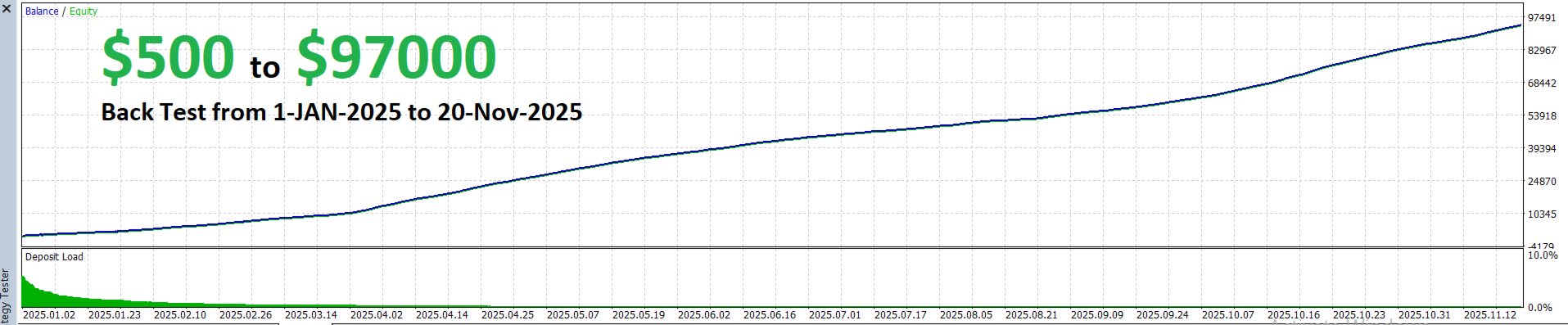
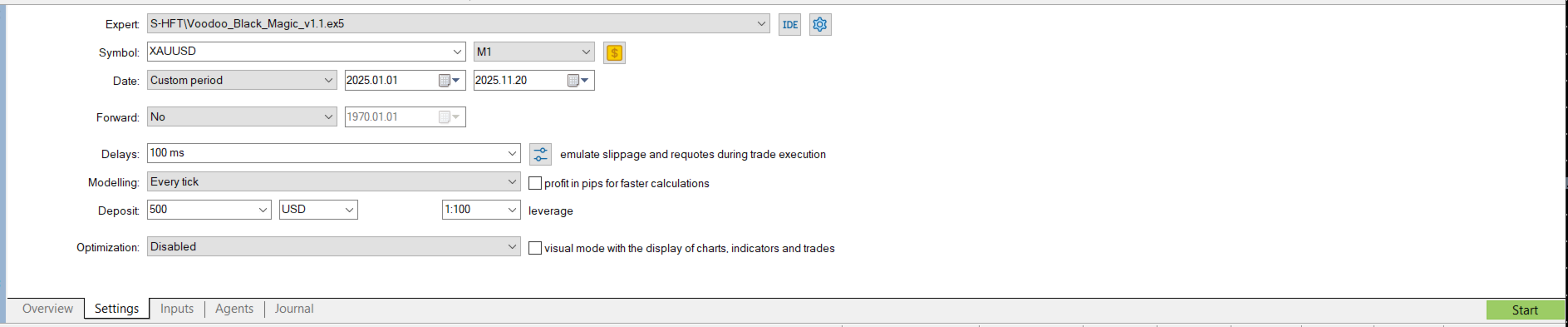












































The demo works perfectly, but in real-world use it's the complete opposite—not profitable at all; the configurations need to be reviewed. If any clients want proof, they can contact me.
It doesn't work with AXI IC TRADING VT MARKET BLACKBULL MARKET. I don't know how it works.