EA Circuit Breaker

대부분의 리스크 관리 도구는 계좌 전체를 봅니다. 계좌가 한도에 닿으면 아무 문제도 일으키지 않은 EA까지 포함해 전부 멈춥니다.

EA Circuit Breaker는 EA를 하나씩 다룹니다. 어떤 EA가 사용자가 그어 둔 선을 넘으면 그 EA만 처리되고, 계좌의 나머지는 그대로 돌아갑니다.

이 도구는 스스로 매매하지 않고, 조언을 하지 않으며, 신호를 보내지 않습니다.

헤징 계좌를 위한 도구입니다

어떤 거래가 어느 EA의 것인지 구분할 수 있는 것은 플랫폼이 각 거래를 별도의 포지션으로 유지하는 동안뿐이며, 헤징 계좌가 바로 그렇습니다. 네팅 계좌에서는 종목마다 하나의 포지션으로 합쳐져 매직 넘버가 아무것도 가리키지 못하게 되므로, 어떤 도구를 쓰더라도 구분할 수 없습니다. 이 도구는 시작할 때 계좌 유형을 읽고, 네팅 계좌에서는 관찰만 하며 그 사실을 화면에 표시합니다. 청산된 거래는 여전히 매직 넘버로 구분됩니다.

설정할 것이 없습니다

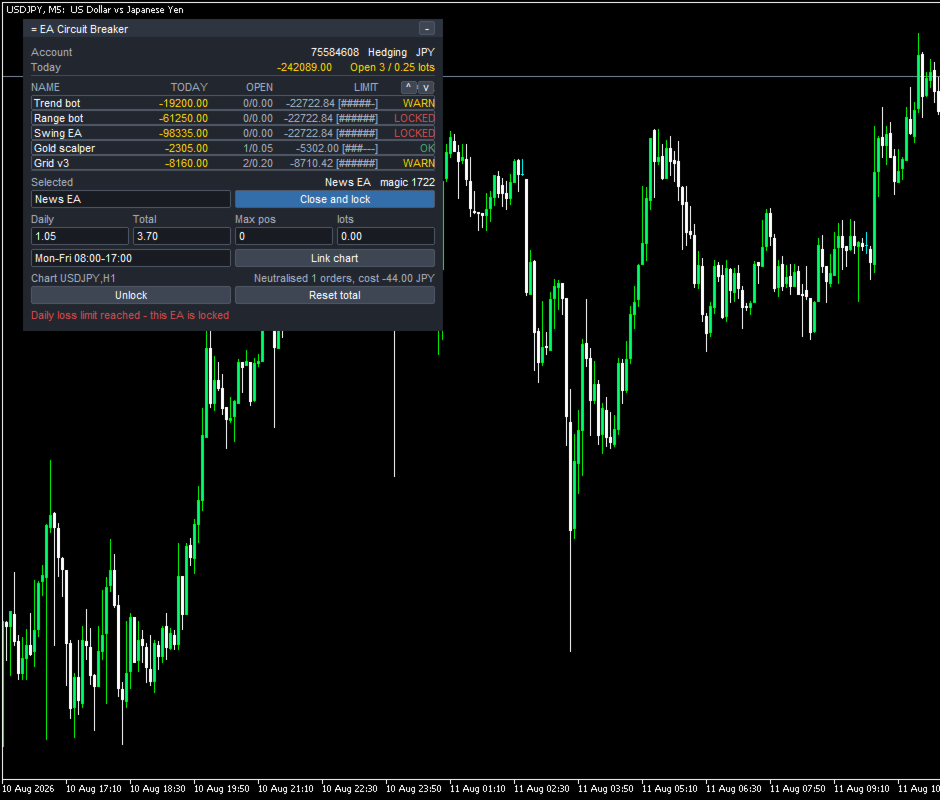
실행하면 표는 이미 채워져 있습니다. 보유 중인 포지션과 최근 30일의 내역을 읽어 찾아낸 매직 넘버를 모으고, EA마다 한 줄씩 만듭니다. 줄 이름은 그 EA의 주문 코멘트에서 가져오며, 원하는 대로 바꿀 수 있습니다. 새 EA는 거래를 하는 순간 나타납니다.

각 줄에 표시되는 것
- 오늘의 손익, 보유 포지션 수, 총 랏, 누적 손익
- 수수료와 스왑이 포함되어 있으며, 빼놓지 않습니다
- 설정한 한도와 그중 얼마를 썼는지
- 한도의 80퍼센트에서 노란색, 도달하면 빨간색

EA별로 설정할 수 있는 한도
- 일일 손실 한도. 잔고 또는 자산 대비 비율이나 금액으로 지정합니다
- 누적 손실 한도. 기준 날짜는 직접 초기화할 수 있습니다
- 최대 보유 포지션 수
- 최대 총 랏
- 동작 시간대. Mon-Fri 08:00-17:00 형식으로 씁니다

모든 EA는 기본 한도를 가지고 시작하므로 처음 1분부터 전부 감시됩니다. set 파일이 없고, 브로커에 맞춰 조정할 것도 없습니다.

EA가 선을 넘었을 때 일어나는 일

EA마다 세 가지 대응 중에서 고릅니다.

1. 알리기만 함(기본값). 해당 줄이 빨간색이 되고 이유가 표시됩니다. 알림, 단말 푸시, 소리는 선택 사항입니다. 매매에는 전혀 개입하지 않습니다. 설치한 그대로 두면 이렇게 동작합니다.

2. 청산하고 잠그기. 그 EA의 포지션을 청산하고 대기 주문을 취소합니다. 잠금이 걸려 있는 동안에는 그 EA가 다시 연 것도 청산합니다. EA는 자신이 멈춰졌다는 사실을 모르므로 계속 시도하고, 시도할 때마다 스프레드만큼 비용이 듭니다. 패널이 그 횟수와 누적 비용을 표시합니다. 계좌의 나머지에는 손대지 않습니다.

3. 차트 닫기. 그 EA가 돌아가는 차트를 닫아 EA를 단말에서 실제로 내립니다. 그 전에 템플릿을 저장하므로 원래대로 되돌릴 수 있습니다.

포지션 청산에는 알고리즘 트레이딩이 켜져 있어야 합니다. 차트를 닫는 것은 그렇지 않으므로, 3번은 알고리즘 트레이딩이 꺼져 있어도 동작합니다.

일일 한도와 동작 시간대로 인한 잠금은 지정한 초기화 시각에 저절로 풀립니다. 누적 손실 한도로 인한 잠금은 사용자가 직접 풀 때까지 유지되며, 두 단계 확인을 거칩니다.

할 수 없는 것
- 다른 EA를 비활성화할 수는 없습니다. MQL5에 그런 방법이 없고 Market은 DLL을 허용하지 않기 때문입니다. 할 수 있는 것은 그 EA가 연 것을 청산하고 계속 그렇게 하는 것, 또는 그 EA의 차트를 닫는 것 두 가지입니다.
- 2번 방식은 EA가 다시 열 때마다 스프레드만큼 비용이 듭니다. 위에 적은 그대로입니다.
- 네팅 계좌에서는 위에 적은 이유로 EA별 처리를 사용할 수 없습니다.
- 매직 넘버가 같은 EA 두 개는 한 줄로 표시됩니다. MetaTrader에 이를 구분할 방법이 없습니다.
- 수동 거래는 표시만 되고 처리 대상이 되지 않습니다.
- 차트 한 장을 차지하며, 두 번째 차트에서는 실행되지 않습니다. 사본 둘이 같은 EA를 두고 다투지 않도록 하기 위해서입니다.

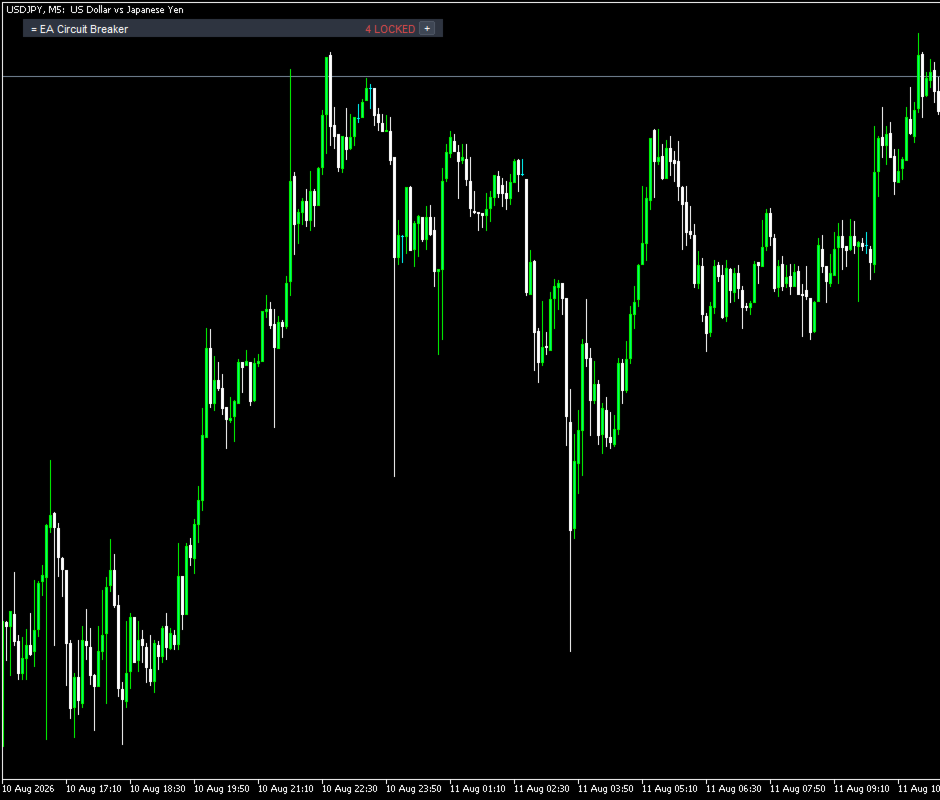
이름, 한도, 선택한 대응, 연결한 차트, 잠금 상태, 누적 결과의 기준 날짜는 계좌 번호별로 저장됩니다. 타임프레임을 바꾸거나 단말을 다시 시작해도 그대로 남습니다. 접어 둔 상태에서도 몇 개의 EA가 잠겼는지, 몇 개가 한도에 가까운지는 표시됩니다.

시험해 보는 방법

무료 데모는 전략 테스터에서 동작합니다. 테스터는 EA 하나에 차트 한 장이므로, 이 도구가 존재하는 이유인 여러 EA를 나누는 일이 그곳에서는 저절로 일어나지 않습니다. 데모가 의미를 갖도록, 테스터에서만 이 도구가 서로 다른 매직 넘버로 작은 연습 거래를 몇 건 열어 표에 줄이 생기게 합니다. 실계좌에서는 단 한 번도 주문을 내지 않으며, 그동안 Tester self-test를 표시하고, InpTesterDemo로 끌 수 있습니다.

테스터에서는 패널, 표, 숫자, 설정, 그리고 작은 한도를 넣었을 때 EA가 OK에서 WARN, LOCKED로 바뀌는 모습을 볼 수 있습니다. 그곳에서 볼 수 없는 것은 EA 하나가 멈추는 동안 나머지가 계속 거래하는 모습입니다. EA를 두세 개 돌리는 데모 계좌에서 확인해 보시기 바랍니다.

입력 파라미터

탐지: InpHistoryDays, InpIncludeManual
기본 한도: InpLimitBase, InpLimitUnit, InpDefaultDailyLimit, InpDefaultTotalLimit, InpDefaultMaxPos, InpDefaultMaxLots, InpIncludeFloating, InpWarnPercent, InpDayResetHour
대응: InpDefaultAction, InpConfirmActions, InpSaveTemplate, InpMaxCloseRetries
알림: InpAlertPopup, InpAlertPush, InpAlertSound
패널: InpPanelX, InpPanelY, InpPanelWidth, InpFont, InpFontSize, InpColorBg, InpColorHeader, InpColorText, InpColorOk, InpColorWarn, InpColorLock
테스터: InpTesterDemo, InpMagicSelf

동작 환경

MetaTrader 5와 헤징 계좌, 비어 있는 차트 한 장. 청산하려면 알고리즘 트레이딩이 켜져 있어야 합니다. DLL, 외부 서버, 인터넷 연결, 추가 파일을 사용하지 않습니다.

이 도구는 가격을 예측하지 않고, 무엇을 거래할지 알려주지 않으며, 결과에 대해 아무것도 주장하지 않습니다. 사용자가 정한 한도를 적용합니다.
추천 제품
BulkOp Trade Manager
Ahmed Jumaa Saif Ali Almheiri
BulkOp Trade Manager Trade faster. Manage smarter. Close with confidence. BulkOp Trade Manager is a powerful MT5 utility EA built for traders who need speed, control, and clean execution directly from the chart. It is designed for active manual traders, scalpers, gold traders, and anyone who wants to manage multiple positions with less delay and fewer clicks. Why BulkOp? Ultra-fast Buy and Sell execution One-click Bulk Close Profit One-click Bulk Close Loss Keyboard trading control Bulk order e
Bober Real MT5
Arnold Bobrinskii
4.88 (16)
Bober Real MT5 is a fully automatic Forex trading Expert Advisor. This robot was made in 2014 year and did a lot of profitbale trades during this period. So far over 7000% growth on my personal account. There was many updates but 2019 update is the best one. The robot can run on any instrument, but the results are better with EURGBP, GBPUSD, on the M5 timeframe. Robot doesn't show good results in tester or live account if you run incorrect sets. Set files for Live accounts availible only for cu
| Fully-automated Smart Money Concept (ICT) inspired trading solution with multi-strategy capabilities | Built by a grid trader >> for grid traders.  This is MT5 version, click  here  for  Blue CARA MT4  (settings and logics are same in both versions)     Real monitoring signal  -->  Cara Gold Intro Blue CARA EA   ('CARA') - short for  C omprehensive  A lgorithmic   R esponsive   A dvisor is a next-gen  multi-currency    multi-timeframe  EA base on the widely known (and perhaps the most popul
Talents ATR Scalper Utility (MT5) The Talents ATR Scalper Utility is a professional-grade trade execution and management tool built for MetaTrader 5. Inspired by the Biblical Parable of the Talents , this utility is designed to help traders multiply their potential with precision risk control, one-click simplicity, and advanced automation. Whether you’re scalping forex, gold, or indices, this tool delivers speed, consistency, and confidence. Key Features One-Click Trade Preview Click below price
Galaxy Elegance
Gezani Paulus Nkuna
G.X.L (GALAXY ELEGANCE) Product Overview G.X.L is an automated trading robot for MetaTrader 5 that operates based on price action analysis. The system processes real-time market data to identify trading opportunities. It provides information and recommendations aligned with user-defined trading preferences. Core Functionality The robot analyzes price movements without relying on traditional lagging indicators. It focuses on current market structure, including swing points and fractals, to determ
Echo Simulator Trader MT5
Frank William Jr Colbert
Echo Simulator Trader is a powerful hybrid simulation-to-live EA that runs thousands of pure price-action simulated trades in parallel with your live account. It opens simulated LONG and SHORT positions at regular intervals on multiple pairs, meticulously tracks their performance using your exact risk rules, and only activates real trading once simulated strategies pass your custom performance filters (Net Profit, Profit Factor, Win Rate, Drawdown, etc.). Built for complete control and proof-of
Manus Pro
Itumeleng Mohlouwa Kgotso Tladi
MANUS PRO EA The Trading Revolution You've Been Waiting For Are you TIRED of watching other traders make consistent profits while your account bleeds red?   The financial markets don't wait for anyone – and neither should you. MANUS PRO isn't just another Expert Advisor... it's your   TICKET TO FINANCIAL FREEDOM . Why MANUS PRO is Different (And Why Everyone's Talking About It) FOR BEGINNERS: Your Trading Mentor That Never Sleeps Zero Learning Curve   – Install, activate, and watch it wo
ProTrade EA
Jim Ariel Camarce Ignao
Key Features   Automated Candle Pattern Recognition 10 Professional Patterns : Detects Bullish/Bearish Engulfing, Hammer/Shooting Star, Morning/Evening Star, Piercing/Dark Cloud, and 6 additional professional candlestick patterns Smart Filtering : Combine multiple patterns with configurable confirmation logic Volume Confirmation : Optional volume filter to validate pattern strength Multi-Timeframe Analysis : Separate execution and bias timeframes for better timing   Trading Dashboard Int
RSI Grid MT5
Joseph Anthony Aya-ay Yutig
다른 EA를 무료로 받으세요!!! 다른 EA를 무료로 받으세요!!! 다른 EA를 무료로 받으세요!!! 다른 EA를 무료로 받으세요!!! 다른 EA를 무료로 받으세요!!! RSI Grid는 RSI 과매수 및 과매도 조건을 기반으로 하며 거래가 시장에서 손해를 보는 쪽에 있을 때 그리드를 엽니다. RSI는 기술 거래자들에게 강세 및 약세 가격 모멘텀에 대한 신호를 제공하며 종종 자산 가격 그래프 아래에 표시됩니다. 자산은 일반적으로 RSI가 70% 이상일 때 과매수 상태로 간주되고 30% 미만일 때 과매도 상태로 간주됩니다. 매개변수: 시간 필터 월요일 화요일 수요일 목요일 금요일 토요일 일요일 시작 시간 종료 시간 RSI 설정 RSI 기간 과매수 과매도 타임프레임 자산 관리 오토로트 최대 부지 이익을 취하다 그리드 크기 승수 후행 옵션 후행 정지 후행 단계 트레일 오프셋 파일 설정 v1.8 GBPUSD 세트 1 https:
Equity Protect Pro: 안심 거래를 위한 종합 계좌 보호 전문가 계좌 보호, 자산 보호, 포트폴리오 보호, 다중 전략 보호, 수익 보호, 수익 확보, 거래 보안, 위험 관리 프로그램, 자동 위험 관리, 자동 청산, 조건부 청산, 예약 청산, 동적 청산, 추적 손절매, 원클릭 종료, 원클릭 청산, 원클릭 복원 등의 기능을 찾고 있다면 Equity Protect Pro가 바로 필요한 프로그램입니다. 설정이 간편하고 사전 설정된 조건이 충족되면 모든 차트를 닫을 수 있으며 신호 구독 취소도 지원합니다(이는 모든 거래 프로그램도 중지됨을 의미합니다). 이 시점에서 새로운 주문이 생성되지 않으며 최종적으로 모든 주문이 종료되어 예상치 못한 손실을 효과적으로 방지하고 안심하고 거래할 수 있습니다. Equity Protect Pro (Technical Manual) Equity Protect Pro Demo Version for yo u to test   Equity Protect
Crash5 EA ,I s a automatic robot that has the level of professional decision when to take a trade without any emotion. The bot will help in your scalping decision making with its own TP (take profit) and SL (stop loss) with the trail stop when in profit. This is a trend based spike catching ,looking on whats happening in real time charts no repainting of any signals. The robot helps in making decisions on the candle stick pattern opened and closed lat price with the help of RSI ,MACD and the EMA
Mango Scalper
Mahmoud M A Alkhatib
Mango Scalper  is a fully automated scalping robot that uses a very Good and Smart breakout strategy, advanced money management and probabilistic analysis. Most effective in the price consolidation stages that occupy the bulk of the market time. Proven itself on real accounts with an excellent risk-to-reward ratio. Does not need forced optimization, which is the main factor of its reliability and guarantee of stable profit in the future. S uitable for both beginners and experienced traders.  
GU Liquidity Sniper
Wootthipong Chaiyaphum
Apex Reversal — M1 Precision Reversal Scalper Apex Reversal is a precision intraday scalper that trades reversals at Double Top and Double Bottom turning points on the 1-minute chart. Instead of chasing momentum, it waits for price to fail twice at the same level, confirms the rejection candle, and enters with a tight, structure-based stop and a fixed 2:1 reward target. Every trade is filtered by an event-based BOS / CHoCH market-structure engine on a higher timeframe, so the robot only takes re
Virtual Bot MT5
Szymon Palczynski
5 (1)
A real girder with "blood and bones". Virtual Bot  will open virtual trades, using them to monitor the market to determine the entry point(according to the inputs parameters), at which point Virtual Bot  will start opening real trades.    It is recommended to test this Expert on demo account or cent account.  Input Parameters input group           "..........Choice..........." ;         input start_enum      start= 2 ; //Start input uchar            starting_real_orders= 4 ; //Start opening rea
BTC M1 Scalper Pro is an automated trading solution engineered specifically for Bitcoin (BTCUSD / BTCUSDT) on the 1-Minute (M1) timeframe. The Expert Advisor uses an advanced ATR Volatility Breakout algorithm to capture high-velocity micro-trends. It systematically filters out market noise and wide spread conditions, executing trades with rapid precision and strict risk management. Engineered for Bitcoin M1: Optimized for the unique volatility and tick movement of BTCUSD. ATR Volatility Breakout
Easy Trade Executor는 MT5용 빠른 포지션 크기 계산, 주문 실행 및 거래 관리 도구입니다. Open Price, Stop Loss 및 Take Profit 레벨을 차트에 직접 배치하고, 포지션 크기를 자동으로 계산한 후 몇 번의 클릭만으로 리스크를 관리하면서 거래를 실행할 수 있습니다. 왜 Easy Trade Executor를 선택해야 할까요? Easy Trade Executor는 단순히 리스크를 계산하는 것을 넘어, 차트에서 직접 빠르고 효율적으로 거래를 관리하고자 하는 트레이더를 위해 설계되었습니다. 이 도구는 포지션 크기 계산, 주문 실행 및 거래 관리를 하나의 워크플로우로 통합하여 수동 계산이나 여러 터미널 창 사이를 오가는 대신 거래 자체에 집중할 수 있도록 도와줍니다. Easy Trade Executor의 주요 기능: 리스크 기반 자동 포지션 크기 계산; 차트에서 직접 Market Order 및 Pending Order 실행; 자동 거래 관리를 위한 T
This indicator was specifically designed for developers, quantitative traders, and mentors looking for total control over live price action, whether for educational purposes, testing strategies, or validating indicators without waiting for real market movements. The PCT Price Simulator generates a fully automated, customized offline chart ( _OTC ), allowing you to manipulate candle directions, test setup reactions, and validate trading strategies in seconds. Technical Highlights Total Independen
Demo version T Position Size Calculator   doesn't work in the strategy tester. The Strategy Tester does not support the processing of ChartEvent. It does not support most of the panel's functionality. Contact me for any questions or ideas for improvement or in case of a bug found. Control and manage your trading like a professional trader with T Position Size Calculator. T Position Size Calculator – an MT5 Expert Adviser, is a user-friendly custom tools (Dialog Panel and Three Lines, Order Line
ProTrader Auto Layer Smart Risk EA   MT5 Automated Trading | Smart Grid Strategy | Professional Risk Control   Auto-Layering . Smart Risk Control . Elite Automation for Serious Traders. IMPORTANT: This EA thrives on live market conditions , which means real trading results may differ from backtests. If using the strategy tester , kindly DM for detailed instructions. Launch Promo: Special Early Access Price – Limited Time Only! Price increases soon as we build user reviews & social proof! Abou
Introducing Neural Bitcoin Impulse - an innovative trading bot created using neural network training technology on voluminous market data sets. The built-in mathematical model of artificial intelligence searches for the potential impulse of each next market bar and uses the resulting patterns of divergence and convergence between the predictive indicators and the price to form high-precision reversal points for opening trading positions. The trading robot is based on the Neural Bar Impulse ind
Momentum Navigator
Itumeleng Mohlouwa Kgotso Tladi
Introducing the Momentum Navigator EA Your Path to Wealth and Smart Trading! Take charge of your financial future with Momentum Navigator EA , the ultimate expert advisor for MetaTrader 5. Designed to revolutionize your trading experience, this cutting-edge trading robot empowers you to navigate market trends with precision, efficiency, and confidence. Whether you're new to trading or an experienced professional, Momentum Navigator EA is your perfect partner in reaching financial success. Why
OverSeer MT5
Theo Karam
4 (2)
OverSeer:Your Thoughtful Trading Ally OverSeer isn’t just another Expert Advisor—it’s a carefully crafted companion for traders looking to navigate the complex world of index trading with a steady, conservative approach. Built through years of experimentation and learning, OverSeer helps you gain exposure to global markets while keeping your strategies grounded in realism. Why Choose OverSeer? OverSeer bridges thoughtful trading strategies and practical decision-making. Instead of trying to pr
Impuls Pro
Sergey Batudayev
EA의 전략은 스윙 트레이딩을 기반으로 하며 iPump 지표에 의해 계산된 날카로운 충동 이후의 항목이 있습니다. 앞서 언급했듯이 EA는 자동 지원으로 수동 거래를 열 수 있습니다. - 하락추세의 경우 ↓ 가격 조정 후 거래에 진입하고 자산이 과매수 영역에 들어가 추세를 따라 매도합니다. - 상승 추세 ↑의 경우 가격 조정 후 거래에 진입하고 자산이 과매도 영역에 빠지면 추세를 따라 매수합니다. 선택한 자산에서 거래할 때 고문은 추세를 고려하고 현재 추세에 따라 거래를 엽니다. 수익성이 없는 거래는 중지와 평균을 사용하여 마감할 수 있습니다. 두 번째 옵션은 확실히 더 수익성이 높지만 더 위험합니다. 장점 다양한 TF에 대한 레벨 분석을 위한 내장 레벨 표시기 차트에서 수동으로 평균화 수준을 선택하는 기능 많은 피라미드형 주문을 열어 이익을 배가할 수 있는 능력(주문 수는 스스로 제어할 수 있음) iPump 표시기의 역 신호를 기반으로 TP in% 설정에 대한 추가 기준 "손"
Bear vs Bull EA MT5
Nguyen Nghiem Duy
Bear vs Bull EA Is a automated adviser for daily operation of the FOREX currency market in a volatile and calm market. Suitable for both experienced traders and beginners. It works with any brokers, including American brokers, requiring FIFO to close primarily previously opened transactions. *In order to enable the panel, it is necessary to set the parameter DRAW_INFORMATION = true in the settings; - Recommendations Before using on real money, test the adviser with minimal risk on a cent tradi
개요 Quantum Einstein XAU는 MetaTrader 5에서 골드(XAUUSD)를 거래하기 위해 특별히 설계된 완전 자동화된 전문가 자문(Expert Advisor)입니다. 지능형 수익 확보 메커니즘, 내장 리스크 관리 및 브로커 과잉 활동 방지 기능을 갖춘 트렌드 검증 듀얼 바스켓 Smart DCA(달러 비용 평균화) 전략을 채택하고 있습니다. 이 EA는 두 개의 독립적인 바스켓——BUY와 SELL——을 동시에 운영하며, 각각 최대 15개의 DCA 레벨까지 확장할 수 있습니다. 각 레벨에서 로트 크기와 그리드 거리를 완전히 사용자 정의할 수 있습니다. 5분 Quantum Trend Filter는 EMA와 ADX를 사용하여 모든 진입을 검증하고, 지배적인 추세에 반대되는 새로운 포지션을 차단하여 신호 품질을 향상시키고 낙폭을 줄입니다. 주요 기능 듀얼 바스켓 Smart DCA 시스템 각각 최대 15개 DCA 레벨의 독립적인 BUY 및 SELL 바스켓 레벨별 사용자 정의 가
Viking Alpha DAX Ivar Edition
Valdeci Carlos Dos Passos Albuquerque
Viking Alpha DAX — Germany 40 Expert Advisor for MetaTrader 5 LAUNCH PROMO Only 10 copies at launch price. Price increases with each sale. Launch price: $297 Next price: $497 Final price: $997 Live Performance: FX Blue — Vikingtradingbots What Makes Viking Alpha DAX Different Most DAX robots fail for one simple reason: they treat the Germany 40 like a forex pair. It isn't. The DAX has a heartbeat — a specific rhythm tied to the Frankfurt Stock Exchange opening, the European session structure, an
Spread Analysis Utility MT5
AL MOOSAWI ABDULLAH JAFFER BAQER
• Please test the product in the Strategy Tester before purchasing to understand how it works. • If you face any issues, contact me via private message—I’m always available to help. • After purchase, send me a screenshot of your order to receive a   FREE EA   as a gift. Spread Analysis Utility MT5 – Monitor & Analyze Broker Spreads in Real Time! Do you want to track your broker's spread fluctuations with precision? Spread Analysis Utility MT5 gives you real-time insights into the spread behavio
FxS Zone Recovery EA
Churchill Sipho Mashinini
Overview FxS Zone Recovery EA for MT5 is an Expert Advisor that automates trading using a configurable Zone Recovery strategy. The Expert Advisor provides multiple market entry methods, configurable recovery parameters, trading session filters, and risk management features, allowing traders to adapt the strategy to different market conditions. Zone Recovery Strategy The Expert Advisor uses a Zone Recovery approach to manage open positions through configurable recovery levels and position sizing.
Trifecta Confluence
Alex Amuyunzu Raymond
Trifecta Confluence Trifecta Confluence — Trade Only When the Market Truly Agrees Most Expert Advisors fire on a single signal — one moving average cross, one oscillator spike, one candle pattern — and get chopped apart the moment the market goes quiet or erratic. Trifecta Confluence was built on a different premise: a trade is only worth taking when three independent, mathematically distinct dimensions of price behavior all point the same direction at the same time. The Three-Engine Core Every
Morning Range Breakout (Free Version) Morning Range Breakout (Free Version) is a straightforward trading advisor that implements a breakout strategy based on the morning range. It identifies the high and low within a specified time interval (e.g., 08:00–10:00 UTC) and opens a trade on a breakout upward or downward. The free version includes core functionality without restrictions. All parameters and messages are in English, per MQL5 Market requirements. Key Features Detects morning range based
이 제품의 구매자들이 또한 구매함
Trade Assistant MT5
Evgeniy Kravchenko
4.41 (215)
거래당 위험 계산, 라인을 사용한 손쉬운 신규 주문, 부분 청산 기능을 통한 주문 관리, 7가지 유형의 트레일링 스탑 및 기타 유용한 기능을 제공합니다. 추가 자료 및 지침 설치 지침   -   애플리케이션 지침   -   데모 계정용 애플리케이션 평가판 라인 기능       - 차트에 개시선, 손절매, 차익실현을 표시합니다. 이 기능을 사용하면 새로운 주문을 쉽게 하고 개봉 전에 추가 특성을 볼 수 있습니다. 위기 관리       -       위험 계산 기능은 설정된 위험과 손절매 주문의 크기를 고려하여 새 주문의 볼륨을 계산합니다. 이를 통해 손절매 크기를 설정하고 동시에 설정된 위험을 존중할 수 있습니다. 로트 계산 버튼 - 위험 계산을 활성화/비활성화합니다. 필요한 위험 값은 위험 필드에 0에서 100 사이의 백분율 또는 예금 통화로 설정됩니다. 설정 탭에서 위험 계산 옵션을 선택합니다. $ 통화, % 잔액, % 지분, % 자유 마진, % 사용자 정의, % AB 이전
Trade Manager EA에 오신 것을 환영합니다. 이 도구는 거래를 보다 직관적이고 정확하며 효율적으로 만들기 위해 설계된 궁극적인 리스크 관리 도구 입니다. 단순한 주문 실행 도구가 아닌, 원활한 거래 계획, 포지션 관리 및 리스크 제어를 위한 종합 솔루션입니다. 초보자부터 고급 트레이더, 빠른 실행이 필요한 스캘퍼에 이르기까지 Trade Manager EA는 외환, 지수, 상품, 암호화폐 등 다양한 시장에서 유연성을 제공합니다. Trade Manager EA를 사용하면 복잡한 계산은 이제 과거의 일이 됩니다. 시장을 분석하고 진입, 손절 및 익절 수준을 차트의 수평선으로 표시한 후 리스크를 설정하면, Trade Manager가 이상적인 포지션 크기를 즉시 계산하고 SL 및 TP 값을 실시간으로 표시합니다. 모든 거래가 간편하게 관리됩니다. 주요 기능: 포지션 크기 계산기 : 정의된 리스크에 따라 거래 크기를 즉시 결정합니다. 간단한 거래 계획 : 진입, 손절, 익절을 위한
================================================================================ POC BREAKOUT - V20.72. Full Professional Grade Toolkit ================================================================================ POC Breakout is a full MetaTrader 5 trading dashboard for discretionary traders who want breakout signals, Point of Control (POC) context, volume profiles, order flow, market structure, news, alerts, and advanced trade planning in one professional workspace. Attached directly to you
TradePanel MT5
Alfiya Fazylova
4.88 (166)
Trade Panel은 다기능 거래 도우미입니다. 이 애플리케이션에는 50개 이상의 수동 거래 기능이 포함되어 있으며 대부분의 거래 작업을 자동화할 수 있습니다. 구매하기 전에 데모 계정에서 데모 버전을 테스트할 수 있습니다. 데모 계정용 애플리케이션 체험판 다운로드: https://www.mql5.com/en/blogs/post/750865 . 전체 지침 여기 . 거래. 한 번의 클릭으로 거래를 수행할 수 있습니다: 리스크 자동 계산과 함께 예약 주문 및 포지션 열기. 한 번의 클릭으로 여러 주문 및 포지션 열기. 주문 그리드 열기. 예약 주문 및 포지션을 그룹별로 닫기. 포지션 방향 전환 (Buy 닫기 > Sell 열기, Sell 닫기 > Buy 열기). 포지션 잠금 (부족한 포지션을 열어 Buy와 Sell 포지션의 수량을 동일하게 만들기). 모든 포지션 한 번의 클릭으로 부분적으로 닫기. 모든 포지션의 테이크 프로핏과 스톱로스를 같은 가격 수준에 설정. 모든 포지션의 스톱로스를
베타 출시 Telegram to MT5 Signal Trader 는 곧 공식 알파 버전을 출시할 예정입니다. 일부 기능은 아직 개발 중이며, 작은 버그가 발생할 수 있습니다. 문제가 있으면 꼭 보고해 주세요. 여러분의 피드백은 소프트웨어 개선에 도움이 됩니다. Telegram to MT5 Signal Trader 는 Telegram 채널 또는 그룹의 거래 신호를 자동으로 MetaTrader 5 계정으로 복사하는 강력한 도구입니다. 공개 및 비공개 채널을 모두 지원하며, 여러 신호 제공자를 여러 MT5 계정에 연결할 수 있습니다. 소프트웨어는 빠르고 안정적으로 동작하며, 복사된 거래를 완벽히 제어할 수 있습니다. 인터페이스는 깔끔하며 대시보드와 차트가 시각적으로 구성되어 있고, 직관적인 네비게이션이 가능합니다. 여러 Signal Account를 관리하고, 공급자별 설정을 세밀하게 조정하며, 모든 동작을 실시간으로 모니터링할 수 있습니다. 필수 조건 MQL의 제한으로 인해 EA는 Te
Farmed Hedge Yield Farming | All Markets (Manual - Hybrid - Semi/Automated EA) MULTI-ASSET SUPPORT Trade any asset available on your broker - Forex: Major, Minor, Exotic pairs - Crypto: BTC, ETH, XRP, SOL, BNB - Stocks: Apple, Tesla, Amazon, Google, etc. - Commodities: Gold, Silver, Oil, Gas - Indices: US30, NAS100, SPX500, DAX40 - Any CFD your broker offers VERIFIED TRADING RESULTS - Farmed Hedge Yield Axi Copy:  https://www.mql5.com/en/signals/2356376 - Farmed Hedge Yield Exn Copy:   https:/
Exp COPYLOT CLIENT for MT5
Vladislav Andruschenko
3.97 (35)
MetaTrader 5용 전문 트레이드 복사기 MetaTrader 용 빠르고 전문적이며 신뢰할 수 있는 트레이드 복사기 입니다. COPYLOT 은 MT4와 MT5 터미널 간의 Forex 거래 복사를 지원하며, Hedge 및 Netting 계좌를 모두 지원합니다. COPYLOT MT5 버전 지원 구성: - MT5 Hedge → MT5 Hedge - MT5 Hedge → MT5 Netting - MT5 Netting → MT5 Hedge - MT5 Netting → MT5 Netting - MT4 → MT5 Hedge - MT4 → MT5 Netting MT4 버전 전체 설명 + DEMO + PDF 구매 방법 설치 방법 로그 파일 확인 방법 테스트 및 최적화 방법 Expforex의 모든 제품 MT4 터미널로도 거래를 복사할 수 있습니다(MT4 → MT4, MT5 → MT4): COPYLOT CLIENT for MT4 COPYLOT은 2개, 3개, 심지어 10개의 터미널과 동시에 작동할
Anchor Trade Manager
Kalinskie Gilliam
5 (6)
Anchor: The EA Manager Your EAs manage their own trades. Anchor manages the account around them. Anchor gives you one place to control your EAs, manage risk and decide when trading is allowed. Any EA, any vendor, any broker or symbol. No source-code changes required. The Problem Most EAs only know what they are doing. They cannot see when another EA is already trading, when several EAs open and are stacking risk or when the account has reached your loss limit. Even using just one EA, it may not
Telegram to MT5 Multi-Channel Copier 는 Telegram 채널의 트레이딩 신호를 자동으로 MetaTrader 5로 직접 복사합니다. 봇도, 브라우저 확장 프로그램도, 수동 복사도 필요 없습니다. Telegram에서 신호를 받으면 EA가 몇 초 안에 터미널에서 거래를 엽니다. 본 제품은 두 가지 구성 요소로 구성되어 있습니다: Telegram 채널을 감시하는 Windows 애플리케이션과 MT5 터미널에서 신호를 실행하는 이 Expert Advisor입니다. MT4 버전도 제공됩니다. 설정 가이드 및 애플리케이션 다운로드: https://www.mql5.com/en/blogs/post/768988 작동 방식 Windows 애플리케이션은 봇이 아닌 사용자 자신의 API 자격 증명을 사용하여 Telegram에 연결됩니다. 이는 프라이빗 및 VIP 채널을 포함하여 구독 중인 모든 채널, 그룹 또는 주제를 읽을 수 있음을 의미합니다. 신호를 감지하면 이를 파싱하여
Footprint Chart Pro — Professional OrderFlow EA for MetaTrader 5 Version 6.34 | Professional tool for real traders | Institutional-Grade Visualization DEMO USERS - PLEASE SELECT EVERY TICK / REAL TICK WHEN TESTING AND YOU HAVE DOWNLOADED HISTORICAL DATA. IF YOU SEE A WAITING SCREEN AND IT IS NOT DOWNLOADING, IT MEANS YOU HAVE LOW HISTORICAL DATA. TRY 1 MIN AND 5 MIN FIRST ON 1 DAY DATA. ONE DAY DATA SHOULD BE THE NEWEST AND MOST CURRENT DATE. PLEASE WAIT UNTIL THE MARKET HAS ROLLED OVER PERIOD.
Premium Trade Manager - 코치가 내장된 트레이딩 패널 Premium Trade Manager 는 차트 안에 트레이딩 코치를 심어놓은 도구입니다. 주문을 확정하기 전에, AI 트레이딩 코치 Max가 설정된 거래를 직접 읽고 명확한 판단을 내려줍니다. 스톱이 규율 있는 접근 방식에 맞는지, 리스크 크기가 합리적인지, 고영향 뉴스 이벤트가 몇 분 후에 있는지, 프롭 펌 한도에 근접했는지. 그 아래에는 완전한 실행 엔진이 있습니다. 원클릭 리스크 기반 진입, 차트에서 드래그로 세우고 거래가 진행되는 동안에도 계속 움직일 수 있는 플랜, 최대 4단계 분할 익절, 7가지 트레일링 방식, 실시간 프롭 펌 컴플라이언스, 뉴스 가드, 그리고 자체 비용을 평가하는 스프레드까지. 결정은 당신이 내립니다. Max가 두 번째 시선으로 확인합니다. 패널이 그 이후의 모든 것을 처리합니다. 구매 전에 직접 체험해 보세요. 브라우저에서 라이브 패널을 직접 클릭해볼 수 있습니다. 구매 전에 실제
파워 캔들 전략 스캐너 - 자체 최적화 다중 종목 설정 찾기 도구 파워 캔들 전략 스캐너는 마켓 워치에 등록된 모든 종목에 대해 파워 캔들 지표와 동일한 자체 최적화 엔진을 동시에 실행합니다. 하나의 패널에서 현재 통계적으로 거래 가능한 종목, 각 종목별 최적의 전략, 최적의 손절매/익절 조합을 알려주며, 새로운 신호가 발생하면 즉시 알림을 전송합니다. 이 도구는 Stein Investments 에코시스템의 일부입니다. 18개 이상의 도구와 함께 당신의 1대1 AI 트레이딩 멘토 Max.  항상 대기 중, 모든 인디케이터를 깊이 있게 이해, 무언가를 차근차근 생각해보고 싶은 순간에 도움을 줍니다.  https://stein.investments 에서 만나보세요 완벽한 시장 모니터링. 종목당 3,000건 이상의 자동 최적화. 2가지 알림 유형. 한 번의 클릭으로 차트를 전환하고 바로 거래하세요. 이 도구가 필요한 이유 대부분의 다중 종목 스캐너는 가격 변동만 보여줍니다. 티커별
Adam FTMO MT5
Vyacheslav Izvarin
5 (2)
ADAM EA Special Version for FTMO Please use ShowInfo= false for backtesting ! Our 1st EA created using ChatGPT technology Trade only GOOD and checked PROP FIRMS  Default parameters for Challenge $100,000 Tested on EURUSD and GBPUSD only  Use 15MIN Time Frame Close all deals and Auto-trading  before Weekend at 12:00 GMT+3  Friday For Prop Firms MUST use special Protector  https://www.mql5.com/en/market/product/94362 --------------------------------------------------------------------------------
YuClusters
Yury Kulikov
4.93 (43)
Attention: You can view the program operation in the free version  YuClusters DEMO .  YuClusters is a professional market analysis system. The trader has unique opportunities to analyze the flow of orders, trade volumes, price movements using various charts, profiles, indicators, and graphical objects. YuClusters operates on data based on Time&Sales or ticks information, depending on what is available in the quotes of a financial instrument. YuClusters allows you to build graphs by combining da
Welcome to ENTRY IN THE ZONE WITH SMC MULTI TIMEFRAME Entry In The Zone and SMC Multi Timeframe is a real-time market analysis tool based on Smart Money Concepts (SMC), designed to analyze market structure, price direction, and key trading zones. It supports both Single-Timeframe Analysis and Multi-Timeframe Analysis, providing a clearer view of the overall market structure across multiple timeframes, with real-time BUY / SELL signals that do not repaint. It is designed to help filter trading op
EA Auditor
Stephen J Martret
5 (4)
EA Auditor is an independent analysis tool for traders evaluating Expert Advisors and trading signals on MetaTrader 5. It audits backtest reports, reviews posted developer signals, and cross-verifies the two against each other to help traders assess strategies before committing capital. The MQL5 market offers a wide range of Expert Advisors from many developers, with varying approaches, quality, and transparency. EA Auditor provides a consistent, data-driven framework for reviewing them, answer
The product will copy all telegram signal to MT5 ( which you are member) , also it can work as remote copier.  Easy to set up, copy order instant, can work with almost signal formats, image signal,  s upport to translate other language to English Work with all type of channel or group, even channel have "Restrict Saving Content", work with  multi channel, multi MT5 Work as remote copier: with signal have ticket number, it will copy exactly via ticket number. Support to backtest signal. How to s
Timeless Charts
Samuel Manoel De Souza
5 (7)
Timeless Charts is an all-in-one trading utility for professional traders. It combines custom chart types such as Seconds Charts and Renko with advanced order flow analysis using Footprints , Clusters , Volume Profiles , VWAP studies, and anchored analysis tools for deeper market insight. Trading and position management are handled directly from the chart through an integrated trade management panel , while Market Replay and Virtual Accounts provide environments for practicing trading skills and
MetaTrader 5용 트레이딩 패널 — 차트와 키보드에서 실행하는 프로페셔널 원클릭 트레이딩 활동적인 트레이더를 위해 설계된 고급 Trading Panel로, MetaTrader 기본 인터페이스보다 훨씬 빠르고 직관적으로 포지션과 주문을 열고, 관리하고, 종료할 수 있습니다. 이 패널은 포지션 관리, 대기 주문 제어, 총수익 관리, 체결 속도를 하나의 전문적인 작업 공간에 통합하고 싶은 트레이더를 위한 솔루션입니다. 이것은 단순한 보조 유틸리티가 아닙니다. MetaTrader 5를 위한 진정한 trading cockpit입니다. 차트에서 직접 거래하고, 키보드로 빠르게 명령을 실행하며, 자동 계산과 시각적 가이드를 통해 수동 트레이딩을 더 빠르고, 더 명확하고, 더 편리하게 만들어 줍니다.  이 패널을 사용하면 차트에서 단 한 번의 클릭으로 거래를 실행할 수 있으며, 표준 MetaTrader 컨트롤보다 최대 30배 빠르게 거래 작업을 수행할 수 있습니다. 새로운 프리미엄 버전
고급 Telegram Bridge EA로 거래 신호를 향상시키세요 전문적이고 시각적으로 매력적인 실시간 거래 업데이트로 청중을 사로잡을 시간입니다. 데모를 보고 체험판을 받으려면 저에게 연락하세요 우리는 고객과 제공업체에 독특한 경험을 만드는 사용자 친화적인 기능에 상당한 투자를 했습니다.  SIGNAL BRIDGE는 다른 EA가 어려움을 겪는 Metatrader 로직을 우회하면서도 모든 비즈니스 케이스에 대해 100% 복사기 친화적인 신호를 전달할 수 있습니다! 우리의 Telegram Bridge EA는 자동화된 신호, 차트 스냅샷, 상세한 성과 보고서를 손가락 하나 까딱하지 않고도 Telegram 그룹에 직접 전달합니다. 기능 입력에 대한 자세한 설명이 포함된 매뉴얼은 여기를 확인하세요! 주요 기능 및 장점 포괄적인 거래 데이터 각 메시지에 표시할 내용을 결정하세요: 핍, 진입가, SL, TP, 랏, 위험 및 RR. 팔로워에게 완전한 투명성을 제공하세요. 새 주문 보내기,
Quant AI Agents
Ho Tuan Thang
5 (1)
Quant AI Agents are independent trading Expert Advisors. Instead of trading using a fixed strategy like other conventional EAs, Quant AI Agents   is a   multi-agent AI trading framework   that turns natural-language strategy prompts into live.  WANT THE SAME RESULTS AS MY LIVE SIGNAL?   Use the exact same brokers I do:   IC MARKETS , IC TRADING   .  Unlike the centralized stock market, Forex has no single, unified price feed.  Every broker sources liquidity from different providers, creating un
VirtualTradePad PRO SE MT5 — MetaTrader 5용 전문 트레이딩 컨트롤 센터 VirtualTradePad PRO SE 는 MetaTrader 5 용 프리미엄 차트 기반 트레이딩 패널이자 거래 관리 워크스페이스입니다. 더 빠른 주문 실행, 더 명확한 포지션 관리, 구조화된 거래 관리, 시각적인 레벨 계획, 그리고 차트에서 직접 작업하는 전문적인 워크플로를 원하는 트레이더를 위해 설계되었습니다. 이 제품은 단순한 BUY / SELL 패널이 아닙니다. PRO SE는 수동 트레이딩, 예약 주문, 포지션 관리, 부분 청산, 바스켓 손익 관리, 평균가 레벨, ATM 규칙, 신호 모니터링, 실시간 시장 정보, 전략 테스터 (Strategy Tester) 워크플로, VPS 중심 운용을 하나의 연결된 인터페이스로 통합합니다. MT4 버전 | 전체 설명 및 스크린샷 | 구입 방법 | 설치 방법 | 로그 파일을 얻는 방법 | 테스트 및 최적화 방법 | Expforex의 모든
Trade Manager DaneTrades
Levi Dane Benjamin
4.23 (30)
거래 관리자는 위험을 자동으로 계산하는 동시에 거래를 빠르게 시작하고 종료하는 데 도움을 줍니다. 과잉 거래, 복수 거래 및 감정 거래를 방지하는 데 도움이 되는 기능이 포함되어 있습니다. 거래를 자동으로 관리할 수 있으며 계정 성과 지표를 그래프로 시각화할 수 있습니다. 이러한 기능은 이 패널을 모든 수동 거래자에게 이상적으로 만들고 MetaTrader 5 플랫폼을 향상시키는 데 도움이 됩니다. 다중 언어 지원. MT4 버전  |  사용자 가이드 + 데모 트레이드 매니저는 전략 테스터에서 작동하지 않습니다. 데모를 보려면 사용자 가이드로 이동하세요. 위기 관리 % 또는 $를 기준으로 위험 자동 조정 고정 로트 크기 또는 거래량과 핍을 기반으로 한 자동 로트 크기 계산을 사용하는 옵션 RR, Pips 또는 Price를 사용한 손익분기점 손실 설정 추적 중지 손실 설정 목표 달성 시 모든 거래를 자동으로 마감하는 최대 일일 손실률(%)입니다. 과도한 손실로부터 계정을 보호하고 과도한
KT Equity Protector MT5
KEENBASE SOFTWARE SOLUTIONS
3.6 (5)
모든 MetaTrader 트레이더가 실행해 두어야 하지만, 아직 많은 사람이 사용하지 않는 단 하나의 EA. 대부분의 계좌는 전략이 틀려서 무너지는 것이 아닙니다. 좋지 않은 순간에 손실을 계속 방치하거나, 포지션을 더 키우거나, 주말까지 거래를 들고 가거나, 한 주 동안의 수익을 다시 시장에 돌려주거나, 단 한 번의 잘못된 클릭으로 prop firm의 일일 손실 한도를 잊어버리기 때문에 무너집니다. KT Equity Protector는 이런 일이 일어나지 않도록 막아주는 자동 계좌 보호 EA입니다. 차트 하나에만 설치하세요. 이해하기 쉬운 단계별 설정 마법사에서 일일 손실, 최대 드로다운, 수익 목표, equity 트레일링 스톱, 주말 전 청산 같은 규칙을 한 번만 설정하면 됩니다. 그 순간부터 EA는 전체 MetaTrader 계좌를 실시간으로 감시합니다. 모든 포지션. 모든 심볼. 모든 틱. 설정한 선이 넘어가는 즉시, EA는 사용자가 선택한 동작을 실행합니다. 알림, 손실 거래
Trader Evolution
Siarhei Vashchylka
5 (7)
" Trader Evolution " - A utility designed for traders who use wave and technical analysis in their work. One tab of the utility is capable of money management and opening orders, and the other can help in making Elliott wave and technical analysis. Manual (Be sure to read before purchasing) | Version for MT4 Advantages 1. Trading in a few clicks. Immediate and pending orders are available in the panel 2. Money management. The program automatically selects the appropriate lot size 3. Simplifies
Features   With MT5 to Interactive Brokers(IB) Trader, you can: 1. Load chart data from IB to MT5, and Analyze with all standard or customer Indicators. 2. Place Orders to IB Account Directly in MT5. 3. Make your Own EAs upon IB Securities by only making minus changes of the trading function. Usage 1) Installation Copy the "Mt5ToIBTraderEn.ex4" and sample files to [MT5 Data Folder]->MQL5->Experts.  2)  MT5 Settings Add the IP Address to the MT5 Allowed URLs in 'Tools->Options->Expert Adviso
MT5 to Telegram Signal Provider 는 사용하기 쉽고 완전히 커스터마이즈 가능한 유틸리티로, 특정 신호를 Telegram의 채팅, 채널 또는 그룹으로 전송하고, 귀하의 계정을 신호 제공자 로 만듭니다. 경쟁 제품과 달리 DLL 임포트를 사용하지 않습니다. [ 데모 ] [ 매뉴얼 ] [ MT4 버전 ] [ 디스코드 버전 ] [ 텔레그램 채널 ]  New: [ Telegram To MT5 ] 설정 단계별 사용자 가이드 가 제공됩니다. 텔레그램 API에 대한 지식은 필요하지 않습니다; 개발자가 제공하는 모든 것이 필요합니다. 주요 특징 구독자에게 보낸 주문 상세 정보를 커스터마이즈할 수 있습니다. 예를 들어, 브론즈, 실버, 골드와 같은 계층 구독 모델을 만들 수 있습니다. 골드 구독에서는 모든 신호를 받습니다. id, 심볼, 또는 코멘트로 주문을 필터링할 수 있습니다. 주문이 실행된 차트의 스크린샷이 포함됩니다 보낸 스크린샷에 닫힌 주문을 그려 추가 검증을 합니다
Patrex pro
Chioma Obunadike
5 (2)
Patrex Pro: Maximize Your Trading Potential Patrex Pro is an advanced trading bot designed to help traders optimize their trading strategies and maximize their potential returns. With its cutting-edge technology and user-friendly interface, Patrex Pro is the ultimate tool for traders seeking to elevate their trading game. Get MT4 Version Key Features: 1. Position Hedging: Patrex Pro allows users to hedge their positions based on their individual risk tolerance and market analysis. 2. Advanced R
EasyInsight AIO MT5
Alain Verleyen
4.92 (12)
EASY Insight AIO – 스마트하고 손쉬운 트레이딩을 위한 올인원 솔루션 개요 외환, 금, 암호화폐, 지수, 심지어 주식까지 — 전 시장을 몇 초 만에, 수동 차트 확인이나 복잡한 설치, 인디케이터 설정 없이 스캔할 수 있다고 상상해 보세요. EASY Insight AIO 는 AI 기반 트레이딩을 위한 궁극의 플러그 앤 플레이(Plug & Play) 데이터 내보내기 도구입니다. 단 하나의 깔끔한 CSV 파일로 전체 시장 스냅샷을 제공하며, ChatGPT, Claude, Gemini, Perplexity 등 다양한 AI 플랫폼에서 즉시 분석할 수 있습니다. 창 전환, 복잡함, 차트 오버레이는 더 이상 필요 없습니다. 자동으로 내보내지는 순수하고 구조화된 데이터 인사이트만으로, 반복적인 차트 감시 대신 데이터 기반의 스마트한 의사결정에 집중할 수 있습니다. 왜 EASY Insight AIO인가요? 진정한 올인원 • 별도의 설정, 인디케이터 설치, 차트 오버레이가 필요 없습
FUTURES ORDERFLOW FOOTPRINT CHART Professional OrderFlow EA for MetaTrader 5 Version 1.01| Professional tool for real traders | Institutional-Grade Visualization STRATEGY TESTER USERS - PLEASE SELECT EVERY REAL TICK WHEN TESTING AND YOU HAVE DOWNLOADED HISTORICAL DATA. IF YOU SEE A WAITING SCREEN AND IT IS NOT DOWNLOADING, IT MEANS YOU HAVE LOW HISTORICAL DATA. TRY 1 MIN AND 5 MIN FIRST ON 1 DAY DATA. ONE DAY DATA SHOULD BE THE NEWEST AND MOST CURRENT DATE. PLEASE WAIT UNTIL THE MARKET HAS ROL
제작자의 제품 더 보기
Drawdown Limit Guard는 손실이 설정한 금액에 도달했는지를 감시하고, 도달한 시점에 포지션을 청산하는 도구입니다. 매매 판단은 하지 않습니다. 일간 손실과 누적 손실을 감시하고, 상한에 가까워지면 경고를 내고, 상한에 도달하면 청산합니다. 동작은 이것뿐입니다. 일간 손실 상한과 누적 손실 상한을 설정합니다. 둘 중 하나만 써도 되고 둘 다 써도 됩니다. 상한에 도달하면 그 이후에 생긴 포지션을 청산하고 대기 주문을 삭제합니다. 상한에 도달한 시점에 이미 보유하고 있던 포지션은, 해당 옵션을 켠 경우에만 청산합니다. 먼저 말씀드릴 것 이 도구는 새 주문이 나가는 것 자체를 막을 수 없습니다. MetaTrader 5에는 신규 거래를 정지시키는 기능이 없고, MQL5 Market에서는 DLL 사용이 금지되어 있기 때문입니다. 그래서 상한에 도달한 뒤에 주문이 나간 경우에는, 체결된 직후에 청산하는 방식을 씁니다(동작 확인에서 약 0.25초). 그 주문에는 스프레
Trade Pause Scheduler는 지정한 시간대에만 자동매매를 멈춰 두는 도구입니다. 경제지표 발표 전후나 월요일 갭 등, 거래를 피하고 싶은 시간대를 미리 등록해 둡니다. 해당 시간대에 들어가면 새로 낸 대기 주문을 취소하고, 새로 잡은 포지션을 청산합니다. 시간대가 끝나면 원래 상태로 돌아갑니다. 도구 자체가 매매하지는 않습니다. 진입 판단도 하지 않고, 매매 신호도 내지 않습니다. 시간대 지정 방법 경제지표로 지정하기 중요도(높음만/높음과 보통/전체)와 대상 국가를 선택하고, 발표 몇 분 전부터 몇 분 후까지 멈출지를 지정합니다. 해당하는 지표는 MetaTrader 5에 내장된 경제지표 캘린더에서 자동으로 가져옵니다. 요일과 시각으로 지정하기 최대 3개까지 등록할 수 있습니다. 형식은 다음과 같습니다.   Mon-Fri 06:00-08:00 평일 6시부터 8시까지   Mon,Wed,Fri 09:30-10:15 월·수·금 9시 30분부터 10시 15분까지  
Risk Lock Trade Panel은 MetaTrader 5에서 수동으로 매매하기 위한 주문 패널입니다. 방향과 진입 시점은 사용자가 정하고, 패널은 계산을 맡아 손절을 붙인 주문을 내보낸 뒤 같은 창에서 포지션까지 관리합니다. 스스로 매매하지 않고, 조언을 하지 않으며, 신호도 보내지 않습니다. 랏은 사용자의 리스크에서 나옵니다 리스크는 잔고나 자기자본에 대한 비율로 지정할 수 있고, 계좌 통화 기준의 고정 금액으로도 지정할 수 있습니다. 손절 폭은 포인트로 입력하거나, 「Show line」을 눌러 차트 위의 손절선을 끌어서 정합니다. 선을 끄는 동안 손절 폭과 랏, 위험 금액이 움직일 때마다 다시 계산됩니다. 손절을 가깝게 두면 랏이 커지고, 멀리 두면 랏이 작아집니다. 그래도 위험 금액은 사용자가 정한 값 그대로입니다. 이 패널의 생각은 여기에 있습니다. 손절을 차트의 어디에 둘지는 사용자가 정하고, 크기는 그 결정을 따라갑니다. 손익비 프리셋은 손절 폭의 배수로
Most trade managers work on the orders they placed themselves, or on the symbol of the chart they sit on. This one works on the account. Trade Control Center puts every open position and every pending order on your account into one list - whoever opened them. Trades you placed by hand, from your phone, from another terminal, or from any EA all appear in the same table, across every symbol, and you can act on them from there. It does not open trades on its own, it does not give advice, and it d
필터:
리뷰 없음
리뷰 답변