Multiple Indicator Timeframe

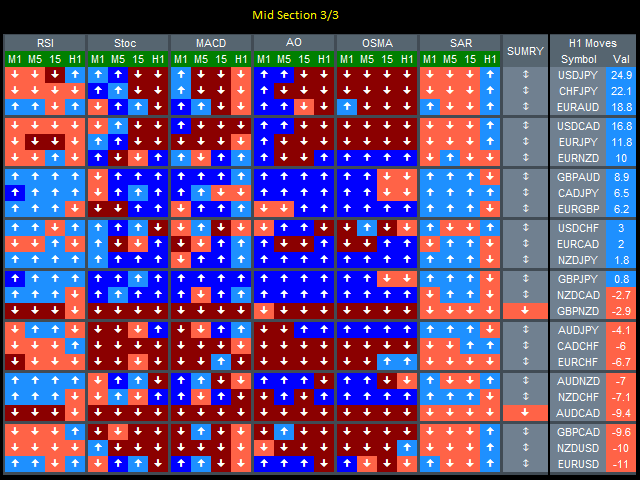
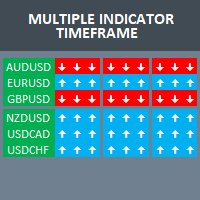
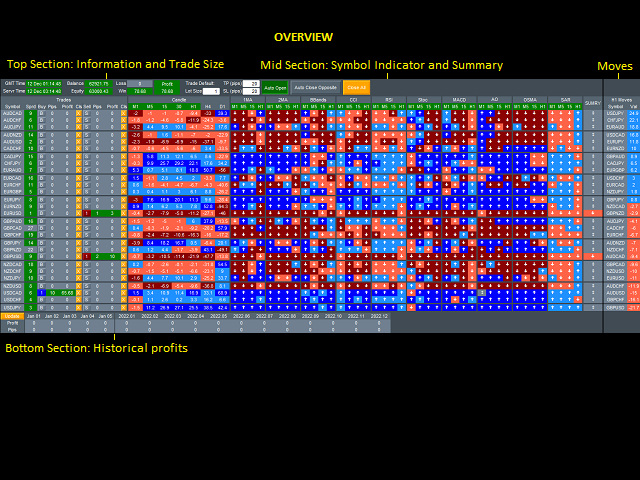
Build your own strategy by using this panel and specify indicator and multiple time frame to display and use in a summary calculation to generate a trade signal.

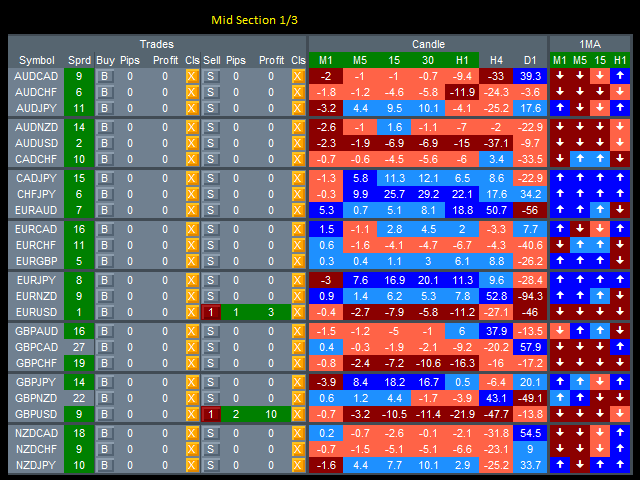
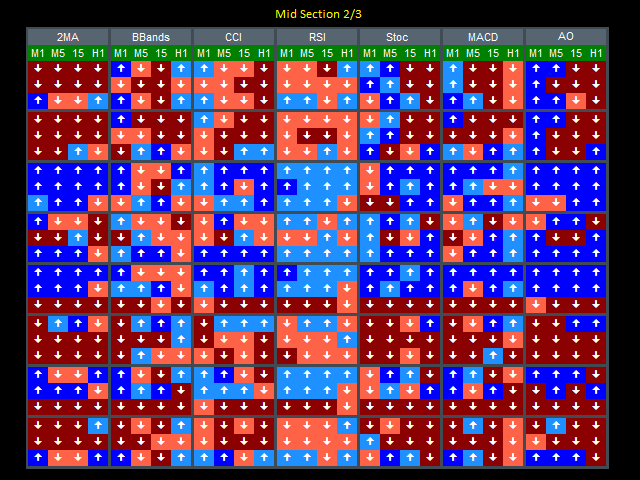
A panel or dashboard that display multiple Indicator in a multiple Time Frame. The user has an option to specify number of Indicator to enable or display on the dashboard. A maximum of 10 indicators can be enabled. Each indicator column can be selected from multiple lists of Indicator type.

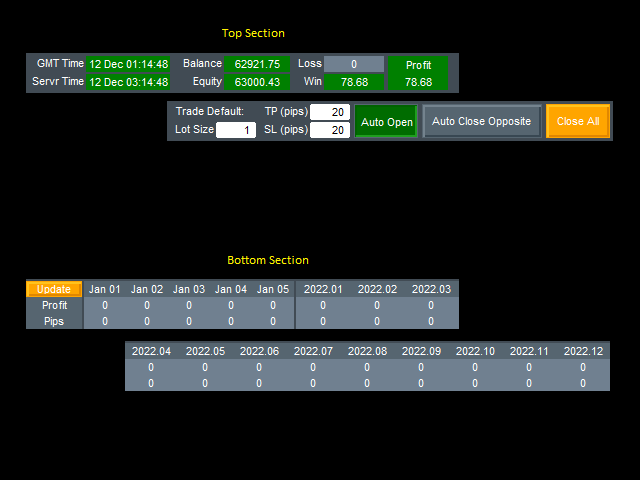
The user has an option which Time Frame of each selected indicator can be enabled and can be included in a criterion for calculating a summary signal for Buy or Sell. A button for Buy or Sell Order and Close Order are provided on each symbol for a manual trade entry.

An automatic order opening when the summary signal is activated and has an option to send an Alert and send notification or email is provided.
Recommended products
Ultimate Trader Panel
Marta Rodriguez Ruiz
Ok, let's go :) Never again open a trade exceeding your risk with this ea. Settings: Corner Boton: Here you can chose where to place the panel. Position X Position Y: Both are to fine the position Width buttons: Here you can chose the width of the buttons. Heigt buttons: To chose the high of the buttons. Font Size: Changes the font size. Border color: to change the border color of the buttons. Reverse color: to change color of the Reverse button. Partial color: to change color of the Partial but
DYJ NetPilot is an Expert Advisor (Utilities) developed for the MetaTrader platform, designed to optimize trade exits by dynamically calculating the weighted average price (Pmix) of all open positions and adjusting exit levels accordingly. Key Features: Pmix Calculation: Computes the weighted average price (Price Mix) of open positions, providing a clear reference point for trade management. Dynamic Exit Strategy: Identify the prevailing direction (long/short positions) within open orders and es
TrendCore Adaptive FX — Smart Expert Advisor for Confident and Adaptive Forex Trading TrendCore Adaptive FX   is a powerful, fully automated trading robot designed for consistent performance in the Forex market. It combines trend-based technical analysis, adaptive lot management, and solid capital protection strategies to ensure robust and efficient trading under real market conditions. Whether you're a professional trader or a long-term investor, this EA offers an intelligent solution to a
VoltArx Volatility
Alex Amuyunzu Raymond
VoltArx Volatility Engine - Institutional-Grade Breakout Algorithm Harness the power of volatility compression and explosive market breakouts with precision timing VoltArx Volatility Engine is a sophisticated multi-market trading system designed to identify and capitalize on high-probability volatility expansion events. Built on institutional research and advanced market microstructure analysis, VoltArx detects when markets are "coiling up" for explosive moves and positions you ahead of the bre
MTF TrendLine
Dmitrii Leshchev
Expert Advisor for manual construction of trend lines and their accompanying stop loss and take profit. After building, the EA remembers the levels, direction, and lot. When you touch the current price with the calculated price, an order with pre-selected parameters is opened. You can build and store up to 10 multidirectional levels from different timeframes. You can use it on any trading instrument. It works correctly with 4 and 5-digit prices. You can create trading strategies from several tra
MQL Trendline EA
Martin Eshleman
3 (2)
Summary This EA will trade semi-automatically based on trend lines or horizontal lines that are manually plotted on the chart by the user. It can handle any number of lines per chart and each line can have its own adjustable settings. This EA manages every line separately based on specific user 'keywords' set for each line. Since each line has it's own independent settings, this is why there are very few shared inputs in this EA. Doing it this way allows for a single EA to manage many lines and
FREE
This is the Free Version of "Quick Copier MT4" (Please check : https://www.mql5.com/en/market/product/34184) This free version is available to be used within 2 hours only, and it has limited features.  Please also check this product at fxina.hostingerapp.com. "Quick Copier" is designed to copy trading without any complicated settings. It copies master orders faster than "Just Copier". The copy can be done in one PC. One EA can be set as master (provider) or slave (receiver). The receiver lot ca
FREE
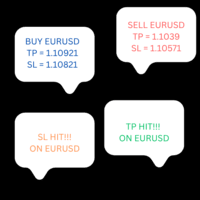
This product copies newly entered trades on MT4 and sends them to a telegram group or channel instantly. It also sends alerts on closed trades as TP Hit or SL Hit when they close with profit or loss. To use the product you first need to create a telegram bot and get the bot token. The bot token should be entered in the inputs on the token field. The chat ID to the telegram group/channel should be entered in the inputs on the chat_ID field. This product is suitable for instant sharing of trade si

TradeWise EA is a compact yet powerful tool loaded with robust features. It offers a 30-trades compounding challenge , Risk-Management, Performance Tracking, Break-Even Calculation, Automated SR Zones, Trailing Stop-loss by ATR or PIPS, Automatic Risk-to Reward Ratio based on Stop-loss, Easy Order Adjustments, Calculates Total Stop Loss and Take Profit, Automatic buy and sell orders on manually placed SR Zones, and more. These features are designed to cater to both scalpers and long-term traders
TradingPanelPlusCopier
Muhammad Faisal Sagala
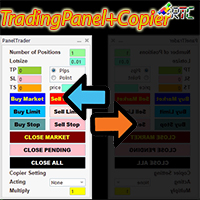
This TradingPanel has many advantages compared to similar trading panels including: 1. Open orders instantly (market) and pending at the desired price. 2. TakeProfit (TP), StopLoss(SL), and also TrailingStop(TS) settings which can be set in pip or point mode. 3. You can close only market orders, or only pending orders, or all orders of market type and also pending. 4. Also equipped with CopyTrade, where orders opened as master can be copied to the panel as a client where the lot scale value can
This tool automatically sets stop loss and take profit when opening orders. The information is displayed in the lower right corner of the terminal and displays the lot size, stop loss and take profit levels, as well as the current profit/loss in points for each open order. It is possible to close orders. to do this, double-click the desired order in the lower right corner and simply move it to the left. It also displays recommendations for the current instrument in the form of OPEN BUY, KEEP
FREE
QuantumGuard Pro - Intelligent Quantum Risk Management Trading System Core Features Five independent fund management groups for smart risk diversification Triple protection mechanism: profit target + drawdown protection + global risk control Professional trading panel for one-stop trade execution 24/7 real-time risk monitoring and protection Automatic display of average price lines for each group One-click close single group orders for precise control Order group highlighting for clear status o
ClickDrag draws lines and moves objects on the chart easily. Click and then Drag to start drawing a trend line. Moving the mouse horizontally draws a price line. Moving the mouse vertically draws a date line. Existing lines and objects can be moved by Click&Drag. Displays the price and time difference between the start point to end point. After start Click&Drag, Shake left and right to change the color. Shake up and down to delete. - What is Click & Drag ? 1. press the left mouse button (pre
FREE
Lot Partial Close
Zdravko Petrov
5 (1)
Lot Partial Close Closes your trades automatically by a specific size and at a specific target defined by you. Description: The Lot Partial close is a MetaTrader 4 Expert Advisor designed to automate trading strategies with a focus on managing multiple open orders of different sizes. This EA is versatile, allowing users to customize key parameters to meet their specific trading preferences. Key Features: Partial Close Functionality: The EA incorporates a partial close mechanism for the first t
Graphic rotator
Roger Perez Lugo
This indicator helps you control several pairs in a small workspace, therefore, it is not necessary to open several charts on the platform to do so. The indicator shows sequentially up to 6 different pairs, besides that each of these pairs has a button with which you can stop the indicator to observe the selected pair. Place the indicator on a chart to monitor several pairs and the rest of your space use it on the chart of the pair you wish to observe in detail.    MT5 version          Parameter
Power Bank
Sergey Kasirenko
5 (3)
Power Bank EA is a trend following system based on CCI Channel indicator that helps traders identify trend direction, overbought/oversold zones, and potential breakout areas using channel bands.  The EA can accurately detect the beginning of uptrends and downtrends and will control open trades in a martingale/grid style until it hits TP.   Recommended pairs:  All major pairs like eurusd; audusd; gbpusd; nzdusd and also minor pairs like audcad; nzdcad; eurnzd and eurcad including xauusd on m15 t
Quick Lines
Andrey Vasilenko
A simple tool for trading on trend and horizontal lines. A small panel of buttons on the chart allows you to set trigger lines in one click and track their status. Market orders open automatically when the price touches the lines. The order direction (Buy or Sell) is set by the line color when it is installed. Allows you to apply an unlimited number of lines, they will work as the price touches. You can create any graphic patterns: levels, channels, triangles, flags, grids, etc. The principle
Pending Orders Grid Complete System opens any combination of Buy Stop, Sell Stop, Buy Limit and Sell Limit pending orders and closes all existing pending orders. You will be able to Drag-and-Drop the Script on the chart and it will pick up the start price for the first position in the grid from the "Drop" point. Usually it should be in the area of Support/Resistance lines. Input Parameters Before placing all pending orders, the input window is opened allowing you to modify all input parameters:
The EA Bot strategy was developed with a foundation in market trends, support and resistance, and a hedging strategy. Additionally, it includes an auto-correction feature designed to mitigate risk during periods of high volatility and high-impact news. The EA Bot also incorporates a money management tool to ensure minimal trade entry during market vulnerability.
Profitstat premium version scans your trading history and displays performance on the chart. The premium version is far more flexible than the free one. The premium version contains the following features that you won't find in the free version: Ability to horizontally position the indicator as you prefer. Ability to display results in money or in pips with the option to hide or display one or both of them. An option to show stats for only the chart symbol. An option to only show data from a cer
Market Screener for MT4
Sergey Batudayev
5 (1)
This is a screener that allows to identify assets that are more than usually overbought (% growth) or oversold (% fall)  within a selected period of time (time frame). The market is ruled by the law, buy cheaper, sell more expensive,  but without an automatic scanner it is very difficult to identify assets overbought or oversold, say, within the current week, or the current hour, or month. There can be dozens or hundreds of instruments, sometimes it is simply not possible to physically analyze e
Discord Bot
Kyle Travis Mowery
MT4 Discord Utility gives traders a clean, reliable way to send live trade activity straight from MetaTrader 4 to Discord. It turns raw platform data into easy-to-read alerts, basket updates, daily summaries, and account snapshots, all from one lightweight utility. Built for traders who want better visibility and faster communication, it can report new baskets, stack adds, active positions, weekly and monthly summaries, and on-demand account status with simple chart buttons. Perfect for private
RainbowTrend
Sergey Rozhnov
4 (2)
A visual indicator of currency trends and strengths, featuring a histogram and table on the main chart, a currency trend chart, and an analysis block on an additional chart window. It analyzes 28 currency pairs made up of 8 major currencies (EUR, USD, GBP, JPY, AUD, CAD, CHF, and NZD). Indicator capabilities Determines the direction and strength of the trend of currencies and symbols and builds multi-colored histograms, tables, informing with digital values and graphs based on this Shows the re
Elliott Wave Helper MT4
Siarhei Vashchylka
5 (5)
Elliott Wave Helper - a panel for making elliott wave and technical analysis. Includes all known wave patterns, support and resistance levels, trend lines and cluster zones. Manual (Be sure to read before purchasing) | Version for MT5 Advantages 1. Making wave analysis and technical analysis in a few clicks 2. All Elliott wave patterns available, including triangle and combinations 3. All nine wave display styles, including a special circle font 4. E lements of technical analysis : trend lines,
Track All Gains RJS
Robert Jasinski-sherer
This Program will not execute any trades! Works on any chart and any time frame! This is the MT4 version. MT5 version: https://www.mql5.com/en/market/product/125598?source=Site+Market+My+Products+Page This EA will produce a comment box at the top left of the chart and show you your equity % difference throughout the day, week, month and year. Updating constantly in real time. The daily resets back to zero on open of a new market open day. The weekly resests back to zero at open of a new mar
MyHistoryDraw
Mohamed Hamed
5 (1)
This EA will make all the history trades appear on the chart,,  will make it easy to track each trade in history  separately , it will show each trade open price + time and closing price + time  simply download the EA to your MT4 platform, then apply it on any chart that belongs to any trades in mt4 history,  for example, if you have traded on GBPUSD in the history, open GBPUSD chart and apply the EA on it, it will automatically print all info on the chart about the trades ,, EA works per
FREE
Choose all the pairs that have positive swap in your broker Then, the EA will buy/sell before the triple swap takes place, and it will close the position after the triple swap is paid to you. It is recommended to test the EA at least 1 month in demo account so you can see the results. If you have any doubt or suggestion, don't hesitate to contact me! HOW TO USE Inputs swapDay = The day that the 3x swap is paid in your broker lots = The lot size that you want to use SL = stop loss in points (not
Trading Board is a Tool That Help you execute Sell and Buy Operation very smoothly. General Description : This Tool has this functions: The function of Send Buy or Sell orders. The function to close all orders in the current chart. Choose the volume you need to trade. Calculate of Stop loss and Take Profit with the number of points. Draw the Fibonacci retracement.
FREE
PerfectLine
Sergio D. Rocha
5 (2)
When drawing a trend line or other objects, there is a natural deviation when you place the object from a higher time frame, and then go to watch it in a lower time frame. PerfectLine is a technical indicator that solves this problem. Once you touch a line after drawing it, Perfect Line will find the exact spot in the lower time frame available for it's position and then rectifies where it should be. Perfect Line uses a five pixels pre-established tolerance, if a difference between the line's no
Heikinashi Zone Trader
Lorraine Pierce
4 (1)
!!!!FIFO COMPLIANT!!!! ONLY 5 COPIES LEFT AT $49 and Price goes up to $99 This is an automated or semi automated expert advisor.  This EA is based on trend...and there's nothing better than the heikin-ashi zone trade candles to show you price action trend. Download the Heikin Ashi Zone candles for   free here. It's recommended to use this EA as a semi automated trader. Example of semi automation: You look at higher time frames of the EURUSD and see it's in a down trend. So you open an M15 chart
Buyers of this product also purchase
Forex Trade Manager MT4
InvestSoft
4.98 (435)
Welcome to Trade Manager MT4 - the ultimate   risk management tool   designed to make trading more intuitive, precise, and efficient. This is not just an order placement tool; it's a comprehensive solution for seamless trade planning, position management, and enhanced control over risk. Whether you're a beginner taking your first steps, an advanced trader, or a scalper needing rapid executions, Trade Manager MT4 adapts to your needs, offering flexibility across all markets, from forex and indice
Copy Cat More Trade Copier MT4 is not just a simple local trade copier; it is a complete risk management and execution framework designed for today’s trading challenges. From prop firm challenges to personal portfolio management, it adapts to every situation with its blend of robust execution, capital protection, flexible configuration, and advanced trade handling. The copier works in both   Master (sender) and Slave (receiver)   modes, with real-time synchronization of market and pending orders
The product will copy all telegram signal to MT4   ( which you are member  ) , also it can work as remote copier.  Easy to set up, copy order instant, can work with almost signal formats, image signal, s upport to translate other language to English Work with all type of channel or group, even channel have "Restrict Saving Content", work with  multi channel, multi MT5 Work as remote copier: with signal have ticket number, it will copy exactly via ticket number. Support to backtest signal. How to
Exp COPYLOT CLIENT for MT4
Vladislav Andruschenko
4.65 (66)
Professional Trade Copier for MetaTrader 4 Fast, professional, and reliable trade copier for MetaTrader 4 . COPYLOT helps you copy Forex trades between MetaTrader 4 and MetaTrader 5 terminals with flexible synchronization for different account setups. COPYLOT MT4 version supports: MetaTrader 4 to MetaTrader 4 MetaTrader 5 Hedge to MetaTrader 4 MetaTrader 5 Netting to MetaTrader 4   MT5 version Full Description + DEMO + PDF How To Buy How To Install How to get Log Files How To Test and Optimize A
TradePanel MT4
Alfiya Fazylova
4.84 (94)
Trade Panel is a multi-functional trading assistant. The app contains over 50 trading functions for manual trading and allows you to automate most trading tasks. Attention! Discounts are valid until 05/05/2026. From 05/06/2026, the price will be $80. Before making a purchase, you can test the demo version on a demo account. Download the trial version of the application for a demonstration account: https://www.mql5.com/en/blogs/post/750865 . Full instructions here . Trade. Allows you to perform t
Edge Zone EA
FXsolutions
5 (1)
With this Expert Advisor you will follow the sound trading principle Buy Low and Sell High by default ! And you can do that even with a normal day job . You will be even able to trade on lower timeframes which you could never do without such an Expert Advisor. And the best thing is that you are in control! You can tell the Edge Zone EA where it has to enter and where it has to exit. And you can do that even many hours before the trade will occur . This EA is therefore an excellent assistant for
MultiOrder Assistent V3.0   - Your professional trading assistant for MetaTrader 4 The  MultiOrder Manager  is a powerful trading tool designed to optimize your trading while managing risk efficiently. With intuitive features and a user-friendly interface, this Tool is ideal for traders who want to manage multiple orders simultaneously without losing track.   Symbols: FX pairs, gold and cryptocurrencies Here you get a detailed description of the parameters and functions Manual     Features and
EasyTrade MT4
Alain Verleyen
5 (1)
Easy Trade – Smart, Simple, Powerful Trade Management Easy Trade is the all-in-one trade management solution for MetaTrader users who want to keep risk under control and execution ultra-smooth. Designed from scratch with trader feedback in mind, Easy Trade makes it easy to execute, monitor, and manage trades across multiple symbols – without overcomplicating your workflow. Whether you're scalping manually or managing a small portfolio of setups, Easy Trade keeps your focus where it belongs: on
Automatic profit locking when target profit is reached EquityTargetCloser   — is a utility expert advisor for MetaTrader 5 that automatically closes all market positions and deletes pending orders as soon as   equity exceeds the current balance by a specified profit amount . After all positions are closed, the target automatically increases: the new threshold = new balance + specified profit. The EA does not open trades, it only manages existing positions, helping to reliably lock in profit and
Take a Break
Eric Emmrich
5 (31)
News filter, equity guard & session control for all your EAs — one tool, full protection Take a Break has evolved from a basic news filter into a comprehensive account protection solution . It pauses your other Expert Advisors during news events or based on custom filters. When trading resumes, it automatically restores your entire chart setup , including all EA settings. Why traders choose Take a Break One news filter for all your EAs — no more relying on individual built-in filters that may o
Auto Trade Copier
Vu Trung Kien
4.76 (85)
Auto Trade Copier is designed to copy trades to multiple MT4, MT5 and cTrader accounts/terminals with 100% accuracy. The provider and receiver accounts must be on the same PC/VPS. With this tool, you can copy trades to receiver accounts on the same PC/VPS. All trading actions will be copied from provider to receiver perfectly. This version can be used on MT4 accounts only. For MT5 accounts, you must use Auto Trade Copier for MT5 . Reference: - For MT4 receiver, please download Trade Receiver Fre
The News Filter
Leolouiski Gan
5 (25)
This product filters all expert advisors and manual charts during news time. It is able to remove any of your EA during news and automatically reattach them after news ends. This product also comes with a complete  order management system that can handle your open positions and pending orders before the release of any news. Once you purchase The News Filter , you will no longer need to rely on built-in news filters for future expert advisors, as this product can filter them all from here onwards
Trade Manager MT4 DaneTrades
Levi Dane Benjamin
4.09 (11)
DaneTrades Trade Manager is a professional trade panel for MetaTrader 4, designed for fast, accurate execution with built‑in risk control. Place market or pending orders directly from the chart while the panel automatically calculates position size from your chosen risk, helping you stay consistent and avoid emotional decision‑making. The Trade Manager is built for manual traders who want structure: clear risk/reward planning, automation for repeatable management, and safeguards that help reduc
Telegram to MT4 Coppy
Sergey Batudayev
3.89 (9)
Telegram to MT4: The Ultimate Signal Copying Solution Streamline your trading with Telegram to MT4 , the cutting-edge utility designed to copy trading signals directly from Telegram channels and chats to your MetaTrader 4 platform—without the need for DLLs. This robust solution ensures seamless execution of signals with unparalleled precision and customization options, saving you time and boosting your efficiency. [ Instructions and DEMO ] [ FAQ ] [ How atach logs properly ] [Settings descrition
Work with gold and Japanese yen. Now working without pips! While you are trading,  Auto StopLoss Defender  doing all the routine work. "Must have" for scalping. Best way to save account balance in case of force majeure.(Internet connection loss, power outage, sharp change in price direction) The Utilite automatically adds a stop loss to open and pending orders that have no stoploss set. The anti-requote system is built into the Utilite. That means  the stop loss will be registered anyway! In the
VirtualTradePad mt4 Extra
Vladislav Andruschenko
4.85 (61)
Trading Panel for trading in 1 click.  Working with positions and orders!  Trading from the chart or the keyboard. Using our trading panel, you can trade in one click from the chart and perform trading operations 30 times faster than the standard MetaTrader control. Automatic calculations of parameters and functions that make life easier for a trader and help a trader conduct their trading activities much faster and more conveniently. Graphic tips and full information on trade deals on the chart
Crystal Trade Manager PRO – Advanced MT4 Risk & Trade Control System Overview Free :- https://www.mql5.com/en/market/product/150632 Crystal Trade Manager PRO (CTM) is a fully–featured trade execution and risk management utility for MetaTrader 4. It is built for traders who require disciplined execution, strong risk protection, and intelligent automation on MT4. The system manages risk, protects equity, enforces daily limits, automates SL/TP logic, and provides a fast one-click trade panel with p
News Filter EA MT4
Rashed Samir
5 (9)
News Filter EA: Advanced Algo Trading Assistant News Filter EA is an advanced algo trading assistant designed to enhance your trading experience. By using the   News Filter EA , you can integrate a Forex economic news filter into your existing expert advisor, even if you do not have access to its source code. In addition to the news filter, you can also specify   trading days   and   hours   for your expert. The News Filter EA also includes   risk management   and   equity protection   features
MT4 to Telegram Signal Provider   turns your trading account into a signal provider. Every trade action, whether manual, by EA or from your phone, is instantly sent as a message to Telegram. You can fully customize the format or use a ready-made template for quick setup. [ Demo ] [ Manual ] [ MT5 Version ] [ Discord Version ]  New: [ Telegram To MT5 ] Setup A step by step user guide is available. Key Features Ability to customize order details sent to subscribers You can create a tiered subs
Riskless Pyramid
Snapdragon Systems Ltd
5 (1)
Introduction This powerful MT4 trade mangement EA offers a way potentially to aggressively multiply trade profits in a riskfree manner. Once a trade has been entered with a defined stoploss and take profit target then the EA will add three pyramid add-on trades in order to increase the overall level of profit. The user sets the total combined profit target to be gained if everything works out. This can be specified either as a multiple of the original trade profit or as a total dollar amount. Fo
ManHedger MT4
Peter Mueller
5 (2)
THIS EA IS A SEMI-AUTO EA, IT NEEDS USER INPUT. Manual & Test Version Please TEST this product before   BUYING  and watch my video about it. Contact me for user support or bug reports, or if you want the MT5 version! MT5 Version I do not guarantee any profits or financial success using this EA. With this Expert Advisor, you can: Implement your own   Zone Recovery   strategy to capitalize on trending markets. Create   Grid   trading strategies, to profit from ranging markets. Place orders easil
Effortlessly manage multiple trading accounts The Local Trade Copier EA is a solution for individual traders or account managers who need to execute trade signals from external sources or who need to manage several accounts at the same time, without the need for a MAM or a PAMM account. It copies from up to 8 master accounts to unlimited slave accounts . [ Installation Guide | Update Guide | Troubleshooting | FAQ | All Products ] 100% self hosted Easy to install and use It can copy from MT4 to
Support and Resistance Dashboard for MT4 is a multi-timeframe and multi-symbol scanner and alert system that finds S/R zones and pivot points for all timeframes and symbols and alerts when price has interaction with them. If you are using support and resistance (or supply and demand) zones in your trading strategy, this dashboard and its alert and filtering system is a big time saver for you. Download demo version   (works on M 1,M5,M30,W1   timeframes) Full description of scanner parameters ->
Partial Close Manager is an easy-to-use but powerful tool which can automatically close a position partially at different price levels. Features: *Simple dashboard to manage up to 5 different TP and SL levels for up to 5 different positions per chart simultaneously. *The user can specify any amount of lots for up to 5 different TP and/or SL levels. *The TP and SL levels specified by the user are visualized on the chart by adjustable horizontal lines. The lines are labelled according to the curr
Coppy Master MT4
Sergey Batudayev
4 (3)
Coppy Master MT4   is a trade copier tool for MetaTrader 4 and MetaTrader 5 terminals. It supports copying in both directions: from MT4 to MT5, from MT5 to MT4, as well as between accounts of the same type MT4 to MT4. To work correctly, all terminals must be running on the same PC or VPS. [ Instruction  and Demo ]  For copying to MetaTrader 4, a separate version —   Coppy Master MT5   — is required. Main Features: Copying Modes Supports both Master and Receiver roles. Flexible setup for sending
Trader Evolution MT4
Siarhei Vashchylka
5 (2)
" Trader Evolution " - A utility designed for traders who use wave and technical analysis in their work. One tab of the utility is capable of money management and opening orders, and the other can help in making Elliott wave and technical analysis. Manual (Be sure to read before purchasing) | Version for MT5 Advantages 1. Trading in a few clicks. Immediate and pending orders are available in the panel 2. Money management. The program automatically selects the appropriate lot size 3. Simplifies
RSI Divergence Scanner is a multi-timeframe and multi-symbol dashboard and alert that checks all timeframes and symbols to find divergences between price chart and RSI indicator. This divergence scanner is integrated with support and resistance zones so you can check the RSI divergences in the most important areas of the chart to find trend reversals in the price chart. Download demo version   (works on M 1,M5,M30,W1 timeframes) Full description of scanner parameters ->   click here . How to get
Trade Copier Global
Laszlo Tormasi
5 (15)
Trade Copier Global: The name speaks for itself. This copier allows you to copy orders between MT4 terminals even if they are not installed on the same computer. Features Copying trades between MT4 terminals around the world with a short delay. Automatically recognizes symbol prefixes. Can connect many Slaves to the same Master. Supports pending and market orders. Supports partial order close (with limitations, see below) Can send messages and notifications to the Slaves from the Master Several
EchoTrade Telegram to MT4 Copier
Perpetual Chinemerem Vincent
5 (2)
EchoTrade Telegram to MT5 Copier Seamless, Instant, and Reliable Signal Copying - Direct from Telegram to MetaTrader 4! The product does not run in the strategy tester but you can get free trial version   here  for testing before purchase. Tired of manually executing trades from Telegram signals? EchoTrade automates the process, instantly copying trades from any Telegram channel or group directly into your MT5 account—accurately, efficiently, and without delay. Key Features: Universal Compatib
Comprehensive on chart trade panel with the unique ability to be controllable from mobile as well. Plus has a library of downloadable configuration, e.g. exit rules, extra panel buttons, pending order setup and more. Please see our product video. Works with all symbols not just currency pairs. Features On chart panel plus controllable from free app for Windows, iPhone and Android Built-in script engine with library of downloadable configuration, e.g. add 'Close All Trades in Profit' button, exit
Filter:
No reviews
Reply to review