MarginRiskVision

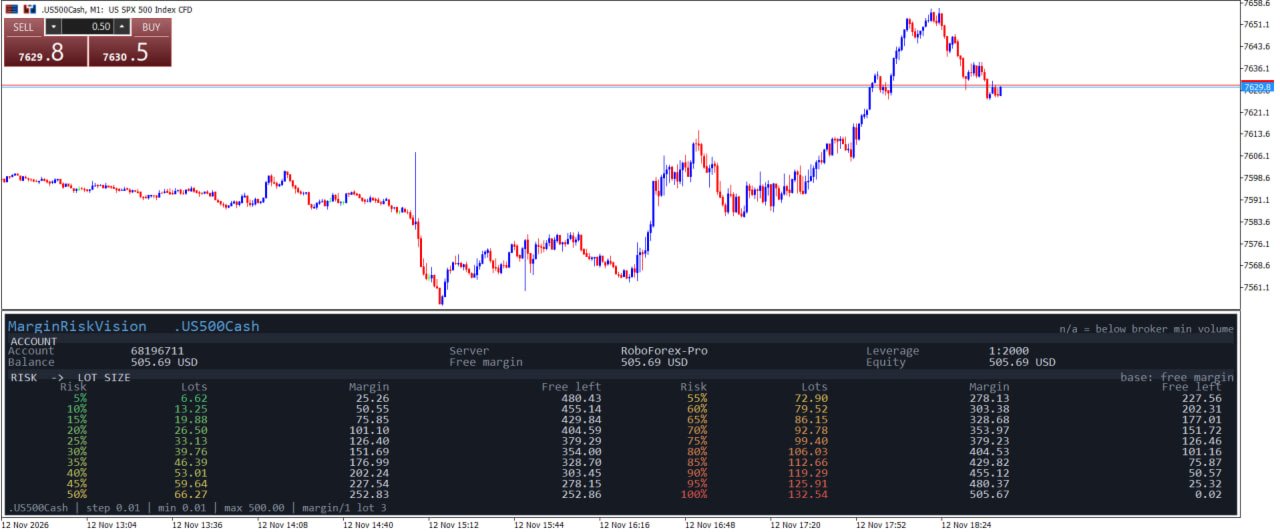
MarginRiskVision answers one question without leaving the chart: if I commit x% of my money to this symbol, how many lots is that, how much margin does it lock, and what is left afterwards.

The board lives in its own chart subwindow, under the price, and refreshes once per second. It never trades, never opens or modifies orders, and never touches your positions. It only reads account and symbol properties.

WHAT THE BOARD SHOWS ACCOUNT block - account number, server, leverage - balance, free margin, equity, in the account currency - free margin turns red when it is zero or negative RISK -> LOT SIZE table 20 rows, from 5% to 100% of the chosen base in 5% steps. For each row: - Lots: the volume that this risk amount buys on the current symbol - Margin: the margin that volume locks, in the account currency - Free left: free margin minus that margin

The lots column is highlighted, the risk column is coloured green to red as the percentage grows, and a row turns grey with "n/a" when the computed volume falls below the broker minimum.

Two table blocks are shown side by side when the subwindow is wide enough, otherwise a single column, so the board stays readable in a narrow window. HOW THE NUMBERS ARE BUILT - Base of the risk: free margin (default), balance or equity, selectable. - Volume: risk amount / margin per lot, rounded DOWN to the symbol volume step, clamped to the symbol minimum and maximum, and capped at the volume that free margin can actually carry. - Margin per lot comes from the broker itself, in this order: 1. the flat margin per lot published by the broker for the symbol, when it exists and is expressed in the account currency. This value does not depend on price at all, so the table stays still while the market moves; 2. otherwise the terminal margin calculation for one lot at the current price; 3. otherwise the contract size divided by the account leverage.

The footer states which case applies: "margin/1 lot 12.34 USD (flat)" or "(price)". If your broker publishes no flat value, the lot and margin columns follow the price, and the board tells you so. WHAT "RISK" MEANS HERE The percentage is a margin allocation: it is the share of your money you are willing to have locked as margin. It is NOT the amount you lose if the market goes against you - that loss depends on your stop loss distance and on the value of a point, and it can be larger or smaller than the margin. Use the table to size a position against your margin budget, then set the stop loss separately. DISPLAY - Runs in a separate subwindow (default height 310 px), resizes with the window. - The font is the largest one that fits the available space; the title line is measured so the tool name is never clipped, and it shrinks - or drops the symbol suffix - before it can be cut. - All layout and colour values are inputs: background, strips, border, text, labels, lots column, warning colour, and the three risk colours of the gradient. - Optional diagnostics in the journal for support (off by default). INPUTS Board - InpTitle - board title text - InpRiskBase - base of the risk amount: free margin, balance or equity - InpRefreshSec - refresh period in seconds - InpFont - font name (default Consolas) Layout - InpAutoFont - scale the font to the available space - InpFontSize - maximum font size - InpMinFontSize - minimum font size - InpTitleSize - title font size, 0 = automatic - InpRightPad - space reserved on the right, in pixels Colours - InpColBg, InpColStrip, InpColBorder, InpColText, InpColDim, InpColAccent, InpColWarn - InpColRiskLow, InpColRiskMid, InpColRiskHigh - risk gradient at 5%, 50% and 100% - InpRiskTheme - colour the risk rows by risk level Diagnostics - InpDebug - write diagnostics to the journal GOOD TO KNOW - Works on any symbol the terminal provides: forex, metals, indices, CFDs, and accounts in any deposit currency. - Values are estimates computed from the symbol specification and the account settings.

Brokers use different margin models (percentage, fixed, tiered), and some recalculate margin on open positions. The figure shown is the requirement for one new position of that volume at the moment of reading, not a guarantee of what the server will lock. - Hedging and netting accounts are both supported, because the calculation is done per position and not against your existing exposure. - No DLL, no web requests, no file access, no trading functions.

The program is read-only and uses a timer to refresh the board. DISCLAIMER This is a display tool. It does not trade, it does not manage risk for you, and it does not predict markets. Position sizing and margin decisions remain entirely yours, and no indicator can guarantee a result.

  • margin, free margin, lot size, position size, risk, money management, equity, panel, calculator, leverage

Recommended products
Daily Range Pace Dashboard
Ayivi Svenn Auguste Emmanuel O Mivedor
Which of your markets is actually moving today, and which ones are asleep? The Daily Range Pace Dashboard answers that in one glance, for up to 40 symbols. Columns Expected : the typical daily high-low of the last 20 days (median, so one news spike doesn't distort it). Today (or Week in weekly mode): the high-low so far. Used : today's range as a share of the expected range. Over 100% means today is already bigger than a typical day. Pace : today compared with a normal day at this same hour. 1.0
FREE
Order Management Script MT5
Christianiel Robles Faustino
Stop Guessing Your Lot Size. Trade With Defined Risk. Order Management Script  is a FREE risk-management utility that automatically calculates your lot size, Entry, Stop Loss, and Take Profit based on your predefined trading rules. No manual position-size calculations. No repeated SL/TP calculations. Just define your risk and trading setup. KEY FEATURES Automatic Lot Size Calculation Calculate the correct position size using: • Fixed monetary risk • Percentage of account equity Multip
FREE
Presentation The URL html and xml to csv is designed to get contents from URLs with html or xml content, and to download it to an output format as a txt or as a csv file. It enables to get the whole web sites page, starting with the http protocol, in a document for a further use and in additional with downloading directly on the MetaTrader applications and on the desktop. It is a good advantage for taking the most data from events and economic calendars, and also publications related to the inst
FREE
LT Round Numbers MT5
Thiago Duarte
4.86 (21)
Round numbers (or key levels) is an amazing strategy. These numbers are strong support and resistance levels. So what this indicator does is draw horizontal lines on the chart to help you find these levels. Configurations: Key levels in pips - distance between the lines. Color -   lines color. Style -   lines style. Width -  lines width. Display at background -  draw lines in front or back of candles. Selectable -  turn on or off the option to select the lines. Lines identification -  identifica
FREE
EA Health Monitor
Allan Aparece Ninal
EA Health Monitor is a free indicator for MetaTrader 5 that shows how each Expert Advisor on your account is doing. It groups the account history by magic number. Every EA gets its own row. Manual trades have a row of their own, and a total sits at the bottom. It only reads the account history and open positions. It never opens, changes or closes a trade. Standalone: Everything is built in. You do not need to buy or install any other product named on this page. Quick start Attach EA Health Monit
FREE
Professional Support and Resistance Indicator This indicator was developed as a market context study and analysis tool , designed to help identify potentially relevant areas on the chart through the combination of price action, volume, and higher-timeframe market structure . The indicator displays two layers of horizontal dashed lines , positioned at areas considered relevant for analysis. This allows traders to observe different support and resistance zones and evaluate their relationship with
FREE
Vitals MT5
Allan Aparece Ninal
Vitals shows the state of your trading account on a single screen: balance and margin, current risk, open positions, market ranges, results by period, and a statistics panel, arranged on one grid so the figures can be read at a glance rather than gathered from several terminal windows. Vitals is a display panel. It does not place, modify or close orders. Floating drawdown A history report records what a position earned. It does not record how far the account moved below its balance while that po
FREE
This Expert Advisor provides an advanced on-chart trading panel designed for discretionary traders. It simplifies position sizing, risk management, and trade execution directly from the chart without manual calculations. Key Features  On-chart trading panel  Fixed lot and balance percentage risk mode  Risk-based lot calculation using stop loss  Market and pending order execution  Partial close management  Break-even automation  Trailing stop control  Equity protection system  Daily loss lock  S
FREE
Simply deletes all objects from a chart, at once. Q: Shouldn't I remove the indicator(s) from the chart instead, if I want to get rid of those objects? A: Absolutely. There are rare cases though, when you might end up with residual objects that don't programatically get removed from your chart, due to bugs or some other reason. Q: Why use this script, when I can press Ctrl+B, list all objects, then manually select and delete each one? A: To save time, really. Maybe you have too many unwanted o
FREE
TradeVision Pro
Ian Nganga Comba
TradeVisonPro Forex Analyzer Pro MT5 Trading Account Analytics and Monitoring Dashboard TradeVisonPro Forex Analyzer Pro is a trading analytics and account monitoring solution designed for MetaTrader 5 users. The product organizes MT5 trading data in a structured web-based dashboard, allowing traders to review account information, monitor open positions, analyze trading history, track strategies, maintain a trading journal, and review performance statistics. TradeVisonPro Forex Analyzer Pro is d
FREE
Friend of the Trend: Your Trend Tracker Master the market with Friend of the Trend , the indicator that simplifies trend analysis and helps you identify the best moments to buy, sell, or wait. With an intuitive and visually striking design, Friend of the Trend analyzes price movements and delivers signals through a colorful histogram: Green Bars : Signal an uptrend, indicating buying opportunities. Red Bars : Alert to a downtrend, suggesting potential selling points. Orange Bars : Represent cons
FREE
Gold Session Levels Pro MT5 is a manual MetaTrader 5 indicator designed to display relevant intraday reference levels for XAUUSD. The indicator automatically calculates and draws the Asian range, its midpoint, the daily open, the London and New York opens, the previous trading day's high and low, and targets derived from the size of the Asian range. FEATURES - Dynamic Asian range while the configured session is active. - Range freezing after the configured Asian session close. - Asian range
FREE
Constructor Pro
Aleksei Sarychev
5 (2)
EA Constructor Pro Build the trading robot you want EA Constructor Pro is a free modular trading system builder for MetaTrader 5. It is not a single Expert Advisor with one predefined strategy. You decide how your robot should enter the market, which filters it should use, how trading volume should be calculated, how positions should be managed, whether Grid or Dollar Cost Averaging is required, how the basket should be closed and which risk limits should be applied. Change several modules or pa
FREE
Prop Firm Protector
Janitha Sandaruwan Amaradasa Wickramasingha Arachchilage
Prop Firm Protector - Complete Risk Management Suite (Most capable Protector in the market)  A comprehensive risk management tool designed to help traders monitor and manage their trading according to predefined rules and limits. --- Protection Features This EA provides automated monitoring and management across multiple risk categories: Symbol and Lot Management - Whitelist allowed symbols with automatic monitoring of unauthorized pairs - Maximum lot size enforcement with configurable act
FREE
Free Tabajara setup for B3. Trading WIN? See our Trend WIN B3 robot. Setup Tabajara was created by a Brazilian trader known as  "The OGRO of Wall Street" . The idea of this setup is to indicate to the trader the current trend of prices and  the type of operation should be looked for in the graph. Operation It does this through the positioning of the closing of the candles and the  vwap until 10:40am and after by the arithmetic mean of 20 periods painting the candles in 4 possible colors: Green
FREE
TradePulseMonitor for MetaTrader 4 & 5 OVERVIEW TradePulseMonitor is a real-time, on-chart dashboard that shows everything you need to know about your position on the current symbol: profit, risk, exposure, margin, swaps and historical performance . All data is consolidated in a compact panel in the lower-right corner of the chart, so you no longer need to keep switching to the Terminal window. All position, profit and risk figures refer to the symbol of the chart the indicator is attached to. P
FREE
Session Volume Profile with POC, Value Area and naked POC tracking — the market's auction map on your chart. • Sessions by any anchor TF (day by default): for each session the indicator computes POC (point of control), VAH/VAL (Value Area borders) and session high/low, and draws them as levels. • Naked POC: untested POCs from past sessions extend to the right until price finally touches them — magnets the market remembers. • Live profile histogram at the right edge of the chart: volume by price
FREE
Ninja MT5 Doctor
Atsushi Katayama
NINJA MT5 DOCTOR OVERVIEW NINJA MT5 Doctor is a free, non-trading MT5 environment-diagnostic utility that captures a one-time snapshot of the terminal, account, open charts, selected history and current host-chart symbol. It is an Expert Advisor-format utility, not a trading EA and not an indicator. The panel and input names are in English. WHAT IT CHECKS It reviews broker-server connection, terminal and account trading permissions, Doctor's own permission, trade mode and published sessions, quo
FREE
ichimoku indicator with alert; audible alert, email alert, push alert you can enable or disable the settings as you wish When there is a crossing of tenkansen and kijun you will get an alert When there is a cross between Senkouspan A and Senkouspan B you will get an alert Affordable sound settings possibility to modify the parameters of the ichimoku indicator
VFI Quantum
Nikita Berdnikov
5 (1)
Introducing VFI (Volume Flow Indicator) – a trading indicator that analyzes the relationship between volume and price movement to identify key trading opportunities. The indicator displays the strength and direction of volume flow, providing clear signals about potential entry and exit points. Signals are formed based on zero line crossovers, crossovers between the VFI line and its exponential moving average (EMA), and when the indicator exits overbought and oversold zones. Attention! This stra
FREE
Lts Trend Strength
Gabriel Garcia Bogo
Grid baskets rarely break in a quiet market. They break when a trend starts and nobody notices it in time. LTS Trend Strength is the market-regime filter from LTS - Legacy Trading System. In one look it tells you whether the market is ranging, in transition or in a strong trend, on your chart and on four higher timeframes at the same time. It is built on the same ADX and ATR principles we use to protect our Expert Advisors, and it is free. It is a market filter, not an entry signal: it tells yo
FREE
Daily Pivot Point Levels
Maria Luisa Aparecida Vicentim
Daily Pivot Point Levels Identify daily support and resistance levels with clarity, precision, and simplicity. Daily Pivot Point Levels is a customizable indicator for MetaTrader 5 that automatically calculates and displays the central Pivot Point (P), support levels (S), and resistance levels (R) using previous-day price data. Designed for traders who value objective price references, clean chart organization, and flexibility, the indicator offers different calculation methods and extensive vi
FREE
RiskManagerPRO
Mohammed Lamine Kasmi
5 (1)
Risk Manager PRO – Manual Trading Utility with Dynamic Lot Size Calculation Risk Manager PRO is a powerful yet simple utility for manual traders. It allows you to enter trades with calculated lot sizes based on your specified risk percentage and a visual stop-loss line. Just drag the red stop line to your desired level, input the risk %, and click Buy or Sell. Ideal for traders who want precise risk control without complex calculations. Features: Dynamic lot size calculation Visual stop-lo

FREE
️ Trade Manager oneclick  ( Reverse Trade,  Partial Close,  Breakeven, Close All Running Trade )   control – Smart Manual Trade Control for MT5 Trade Manager oneclick control is a powerful yet lightweight trade management utility built for manual traders who want precise control over their open positions — directly from the MT5 chart. This EA does not open or close trades automatically based on any strategy. It simply provides one-click management tools to handle your running trades efficient
FREE
TradingCraft Candle Countdown Know exactly when your candles close. TradingCraft Candle Countdown is a lightweight MetaTrader 5 indicator that displays the remaining time until candle closure, helping traders monitor multiple timeframes without switching charts. Key Features Real-time countdown next to the current candle Separate countdowns for H1, H4, and D1 candles Automatic text color adjustment for light and dark chart backgrounds Customizable colors, fonts, and display settings Lightweight
FREE
RoundNum Readme (Traders Club) 特徴: このツールはDOWやNIKKEIなど500や1000ポイントがラウンドナンバーの 指数を取引する際に表示するように開発しました。 もちろんメジャー通貨でも表示はされます。 更新頻度を制限しているのでチャート表示が遅くなるということは ありません。 XMでDOWを取引される場合、Main Levelsを10000 Sub Levelsを5000にしてください。 各パラメータの説明: Number to display lines:表示するライン数を設定します。 Main Levels:メインレベルをポイントで指定します。 Main Line Color:メインラインの色を設定します。 Main Line Style:メインラインで使用されるラインを設定します。 Show Sub Lines:サブラインを表示するか設定します。 Sub Levels:サブレベルをポイントで指定します。 Sub Line Color:サブラインの色を設定します。 Sub Line Style:サブラインで使用され
FREE
Trade Launch is an intuitive trading panel designed for traders who value speed and control when opening trades manually. It is displayed directly on the chart and allows you to manage all key order parameters in a single window. Key Features: Instant Order Placement:   Open Buy and Sell positions with a single button press. The button names dynamically display the current Ask and Bid prices. Built-in Risk Management:   Convenient fields for entering Lot volume, as well as Stop Loss (SL) and Tak
FREE
Price Ray
Keni Chetankumar Gajanan -
5 (7)
Price Ray indicator is a utility that will improve the way you trade. Primarily, it shows the Bid, Ask or Last price as a line ray which beams till the current candle, last visible chart candle or extended to all candle bars. The enhanced features in this indicator provide information in an area where you focus most, right next to the current candle. You can select text to be shown above or below the Price ray. The indicator is fully customizable, allowing it to fit any strategy requirements. Th
FREE
Ultimate MACD MTF Pro is a powerful, upgraded version of the classic MACD — redesigned for modern trading. This indicator gives you multi-timeframe MACD , dynamic histogram colors , signal cross markers , and smart line-color shifts based on momentum. Built for traders who want clean signals, early trend detection, and professional-grade visual clarity. Key Features Multi-Timeframe MACD (MTF) Easily switch between current chart timeframe or choose a higher timeframe (H1, H4, D1…). Great for
FREE
Bohemia Gold MT5
Vladislav Taska
4.83 (6)
Bohemia Gold MT5 is  Trend & Volatility EA trading system designed specifically for Gold (XAUUSD) . It combines higher-timeframe trend filtering , trend detection , volatility-based SL management , and advanced trade management to adapt market conditions. It uses style logic focused on trend strength, volatility, and capital protection. NOTE:   Based on backtests, I found better trading results with the following setup: D1/H4/H2 (Trend/ADX/ATR & trade). The SET file can be downloaded here … bohe
FREE
Buyers of this product also purchase
Trade Assistant MT5
Evgeniy Kravchenko
4.43 (216)
It helps to calculate the risk per trade, the easy installation of a new order, order management with partial closing functions, trailing stop of 7 types and other useful functions. Additional materials and instructions Installation instructions - Application instructions Line function -   shows on the chart the Opening line, Stop Loss, Take Profit. With this function it is easy to set a new order and see its additional characteristics before opening.   Risk management  - The risk calculation
Forex Trade Manager MT5
InvestSoft
4.98 (689)
Trade Manager MT5 is an advanced position size calculator and trade management tool for MetaTrader 5, designed to help traders plan trades faster, control risk more precisely, and manage open positions directly from the chart. It combines order placement, risk based lot calculation, Stop Loss and Take Profit management, Break Even, Trailing Stop, Partial Close, Equity Protection, and external trade management in one panel. Whether you trade forex, indices, metals, commodities, crypto, or future
FarmedHedge Pair Trading Dashboard
Tanapisit Tepawarapruek
5 (7)
Farmed Hedge Yield Farming | All Markets (Manual - Hybrid - Semi/Automated EA) VERIFIED TRADING RESULTS - Farmed Hedge Yield Axi Copy:  https://www.mql5.com/en/signals/2356376 - Farmed Hedge Yield Exn Copy:   https://www.mql5.com/en/signals/2356404 - Farmed Hedge Yield V Copy:  https://www.mql5.com/en/signals/2357156 IMPORTANT NOTICE: FarmedHedge is a MANUAL-FOCUSED TRADING UTILITY ,not a fully automated EA. Results shown on this Signal include manual trades and overall strategic management.
Telegram to MT5 MultiChannel Copier
Sergio Marquez Uroz
4.68 (22)
Telegram to MT5 Multi-Channel Copier   automatically copies trading signals from your Telegram and Discord channels straight to MetaTrader 5. No bots, no browser extensions, no manual copying. A signal arrives in Telegram or Discord and the EA opens the trade in your terminal within seconds. And before you copy a channel, the built-in backtester shows you what that channel would have done in your account. The product has two components: a Windows application that listens to your Telegram channel
Local Trade Copier EA MT5
Juvenille Emperor Limited
4.94 (150)
Local Trade Copier EA MT5 is a fast and flexible trade copier for copying and managing trades between multiple MetaTrader 5 accounts on the same Windows computer or Windows VPS. It combines local trade synchronization with Receiver-side controls for lot sizing, risk management, trade filtering, symbol mapping, trade management and account protection. Set up your Transmitter and Receiver terminals in about 1 minute and copy manual or EA trades between accounts at the same or different brokers. U
TradePanel MT5
Alfiya Fazylova
4.88 (173)
Trade Panel is a multi-functional trading assistant. The app contains over 50 trading functions for manual trading and allows you to automate most trading tasks. Application instructions: https://www.mql5.com/en/blogs/post/756482 Trial version of the application for a demo account: https://www.mql5.com/en/blogs/post/750865 How to install the application: https://www.mql5.com/en/blogs/post/756239 How to test the application in visual mode: https://www.mql5.com/en/blogs/post/770277 How to install
Copy Telegram signals with your own trading rules Telegram to MT5 Signal Trader automatically copies text-based trading signals from public and private Telegram channels and groups into MetaTrader 5. Manage multiple providers and MT5 accounts from one desktop app, with individual risk and trade settings for each provider . No Telegram bot or API setup needed for copying. Simply sign in with your own Telegram account by phone or QR code and select the channels or groups you have already joined. Y
EA Overfitter
Stephen J Martret
5 (4)
That backtest looks great. But will it still be making money tomorrow, next week, next month? EA Overfitter re-runs your EA on 100 price histories it has never seen. One score tells you if the edge is real. A backtest tells you what an EA did on one price history — the one that happened to occur. What you cannot tell from it is how much of that result was the strategy and how much was the particular path. EA Overfitter answers that. It builds up to 100 synthetic price histories your EA has n
Strategy Ledger Pro
Abdullah Uygar Tuna
5 (15)
Strategy Ledger Pro is a read-only account analysis panel for MetaTrader 5. It separates account results by Expert Advisor, strategy, symbol, and magic number, so you can see what each one really contributes. The panel is available in 11 languages: English, Français, Deutsch, Español, Italiano, Português, Русский, Türkçe, 中文, 日本語 and 한국어. Before you download the demo. The Market runs the demo of any paid product in the Strategy Tester only. This panel analyses the trades on your own account, and
Exp COPYLOT CLIENT for MT5
Vladislav Andruschenko
3.97 (35)
Professional Trade Copier for MetaTrader 5 Fast, professional, and reliable trade copier for MetaTrader . COPYLOT allows you to copy Forex trades between MT4 and MT5 terminals with support for Hedge and Netting accounts. COPYLOT MT5 version supports: - MT5 Hedge to MT5 Hedge - MT5 Hedge to MT5 Netting - MT5 Netting to MT5 Hedge - MT5 Netting to MT5 Netting - MT4 to MT5 Hedge - MT4 to MT5 Netting MT4 version Full Description +DEMO +PDF How To Buy How To Install How to get Log Files H
The product will copy all telegram signal to MT5 ( which you are member) , also it can work as remote copier.  Easy to set up, copy order instant, can work with almost signal formats, image signal,  s upport to translate other language to English Work with all type of channel or group, even channel have "Restrict Saving Content", work with  multi channel, multi MT5 Work as remote copier: with signal have ticket number, it will copy exactly via ticket number. Support to backtest signal. How to s
News Trade EA MT5
Konstantin Kulikov
4.55 (11)
Present to you the useful robot that I have been using for several years. It can be used in both semi-automatic mode and fully automatic mode. >>> Chat <<< The program contains flexible settings for trading on the news of the economic calendar. It cannot be checked in the strategy tester. Only real work. Download the latest archive of settings: https://www.mql5.com/en/blogs/post/747929 Signals monitoring: https://www.mql5.com/en/signals/author/test-standart When creating your own sets of setti
================================================================================ POC BREAKOUT - V20.72. Full Professional Grade Toolkit ================================================================================ POC Breakout is a full MetaTrader 5 trading dashboard for discretionary traders who want breakout signals, Point of Control (POC) context, volume profiles, order flow, market structure, news, alerts, and advanced trade planning in one professional workspace. Attached directly to you
Welcome to Entry In The Zone with SMC Multi Timeframe  —  COMPLETE SMC ANALYSIS SYSTEM — ALL IN ONE INDICATOR  Entry In The Zone with SMC Multi Timeframe  An indicator designed for market analysis based on Smart Money Concepts (SMC), displaying Market Structure, Key Zones (Order Blocks, Supply & Demand Zones, and Fair Value Gaps), Liquidity, and real-time BUY / SELL signals. It supports both Single-Timeframe and Multi-Timeframe analysis, along with the Confluence at Zone feature, which helps you
EA Auditor
Stephen J Martret
5 (7)
EA Auditor is an independent analysis tool for traders evaluating Expert Advisors and trading signals on MetaTrader 5. It audits backtest reports, reviews posted developer signals, and cross-verifies the two against each other to help traders assess strategies before committing capital. The MQL5 market offers a wide range of Expert Advisors from many developers, with varying approaches, quality, and transparency. EA Auditor provides a consistent, data-driven framework for reviewing them, answer
Telegram To MT5 Ultra
Mirel Daniel Gheonu
5 (5)
Telegram To MT5 — Signal Copier Turn the trading calls from your Telegram channels into real MT5 orders — automatically, on as many accounts as you like, with risk and rules fully under your control. Telegram To MT5 connects the VIP / signal channels you already follow on Telegram to your MetaTrader 5 terminal. A free companion desktop app reads the messages (even from channels that block bots), and this Expert Advisor executes them on your account — applying your own risk settings, symbol mappi
Telegram to MT5 Coppy
Sergey Batudayev
5 (10)
Telegram to MT5: The Ultimate Signal Copying Solution Simplify your trading with Telegram to MT5, the modern tool that copies trading signals directly from Telegram channels and chats to your MetaTrader 5 platform, without the need for DLLs. This powerful solution ensures precise signal execution, extensive customization options, saves time, and boosts your efficiency. [ Instructions and DEMO ] [ FAQ ] [ How atach logs properly ] [ Settings descrition ] Key Features Direct Telegram API Integrati
AW Shepherd Safety MT5
AW Trading Software Limited
5 (5)
AW Shepherd Safety EA is an Expert Advisor for managing open positions. The trader opens the first order from the panel, and from there the EA runs the basket on its own: it adds recovery orders with a trend filter, closes a side on TakeProfit, trailing or stop, and shows the close levels on the chart. Buys and sells are managed separately, and both sides can be open at the same time. A recovery order opens not just on a price step but once Parabolic SAR, two MAs or candle color show a reversal
HINN MagicEntry Extra
ALGOFLOW OÜ
4.74 (19)
HINN MAGIC ENTRY – the ultimate tool for entry and position management! SIMPLE. FASTEST. INTUITIVE. MAX AUTOMATED. Place orders by selecting a level directly on the chart! full description   ::  demo-version  :: 60-sec-video-description Key features: - Market, limit, and pending orders - Automatic lot size calculation - Automatic spread and commission accounting - Unlimited partitial take-profits  - Breakeven and trailing stop-loss and take-profit  functions - Invalidation leves - Intuitive, a
News Filter EA
Rashed Samir
5 (2)
News Filter EA: Advanced Algo Trading Assistant News Filter EA is an advanced algo trading assistant designed to enhance your trading experience. By using the News Filter EA , you can integrate a Forex economic news filter into your existing expert advisor, even if you do not have access to its source code. In addition to the news filter, you can also specify trading days and hours for your expert. The News Filter EA also includes risk management  and equity protection features. MT4 Version Ma
MT5 to Telegram Signal Provider turns your trading account into a signal provider. Every trade action, whether manual, by EA or from your phone, is instantly sent as a message to Telegram. You can fully customize the format or use a ready-made template for quick setup. [ Demo ] [ Manual ] [ MT4 Version ] [ Discord Version ]     New: [ Telegram To MT5 ] Setup A step by step user guide is available. Key Features Ability to customize order details sent to subscribers You can create a tiered subs
RETAILBERG FOOTPRINT CHART PRO — Order-Flow Workspace for MetaTrader 5 Version 7.00  |  Professional System  |  31 tools  |  One chart A full 150-page illustrated User Manual is included. Please read the full manual to understand this feature packed footprint chart elements and ui. https://www.mql5.com/en/blogs/post/777982 DEMO / STRATEGY TESTER — PLEASE READ FIRST
Timeless Charts
Samuel Manoel De Souza
5 (9)
Timeless Charts is an all-in-one trading utility for professional traders. It combines custom chart types such as Seconds Charts and Renko with advanced order flow analysis using Footprints , Clusters , Volume Profiles , VWAP studies, and anchored analysis tools for deeper market insight. Trading and position management are handled directly from the chart through an integrated trade management panel , while Market Replay and Virtual Accounts provide environments for practicing trading skills and
VirtualTradePad PRO SE MT5 — professional trading control center for MetaTrader 5 VirtualTradePad PRO SE is a premium chart-based trading panel and trade-management workspace for MetaTrader 5 . It is designed for traders who want faster execution, clearer position control, structured trade management, visual level planning and a professional workflow directly from the chart. This is not only a BUY / SELL panel. PRO SE combines manual trading, pending orders, position management, partial exits, b
Trader Evolution
Siarhei Vashchylka
5 (7)
" Trader Evolution " - A utility designed for traders who use wave and technical analysis in their work. One tab of the utility is capable of money management and opening orders, and the other can help in making Elliott wave and technical analysis. Manual (Be sure to read before purchasing) | Version for MT4 Advantages 1. Trading in a few clicks. Immediate and pending orders are available in the panel 2. Money management. The program automatically selects the appropriate lot size 3. Simplifies
Trade copier MT5
Alfiya Fazylova
4.61 (57)
Trade Copier is a professional utility designed to copy and synchronize trades between trading accounts. Copying occurs from the account / terminal of the supplier to the account / terminal of the recipient, which are installed on the same computer or VPS . Before buying, you can test the demo version on a demo account. Demo version here . Full instruction here . Main functionality and benefits: Supports copying MT5> MT5, MT4> MT5, MT5> MT4, including MT5 netting accounts. * Supports copying Dem
AW Trade Manager
AW Trading Software Limited
AW Trade Manager is a trade panel for MetaTrader 5 with a risk/reward tool on the chart. A trade is planned with Entry, Stop Loss and Take Profit lines dragged with the mouse: plates show price, distance and money, zones show profit and loss, and the volume is calculated from the risk. Before sending, the confirmation window shows the whole trade with risk, margin and the rules of the position. Manual and instruction -> HERE / Free LIVE Demo -> HERE To manage a position after the entry the panel
VirtualTradePad One Click Trading Panel
Vladislav Andruschenko
4.59 (74)
Trading Panel for MetaTrader 5 — professional one-click trading from chart and keyboard A powerful trading panel for active manual trading, designed to open, manage, and close trades far faster and more efficiently than the standard MetaTrader interface. This panel is built for traders who want full control over positions, pending orders, profit management, and trading execution inside one professional workspace. This is not just another utility. It is a complete trading cockpit for MetaTrader
On-Chart Trade Assistant & Risk Management Panel Ergotick Trade Manager gives you a complete set of trading tools directly on your MetaTrader 5 chart: a trade panel with lot size calculator, visual R:R tool, and daily loss limit protection; a separate statistics panel that tracks your performance and past trades; and an economic calendar you can toggle with one click. Built for scalpers, day traders, and prop firm traders. Ergotick Trade Manager is fast , light on resources , and stable , so it
RS Trade Copier - the ultra-fast local trade copier with a real graphical interface. Stop typing account numbers manually. No more 200+ cryptic inputs. A reliable and flexible tool for copying trading operations between multiple MT5 and MT4 terminals. It suits experienced traders, signal providers, and individual investors. It enables trade synchronization from one or multiple Providers to one or multiple Clients with high precision and minimal latency. It supports simple automatic configuration
More from author
PnlVision
Patrick Amenuveve Koudjo Johnson
PnLVision is a chart overlay for MetaTrader 5 that complements the built-in crosshair. The native crosshair shows the price and the time under the cursor. PnLVision adds the measurements that are usually calculated by hand. How it works Move the mouse over the chart. A compact text block follows the cursor and shows: - the symbol and the lot size used for the calculation; - the number of bars between the reference point and the cursor; - the distance in ticks and in pips; - the profit or loss th
FREE
Filter:
No reviews
Reply to review