Vitals MT5

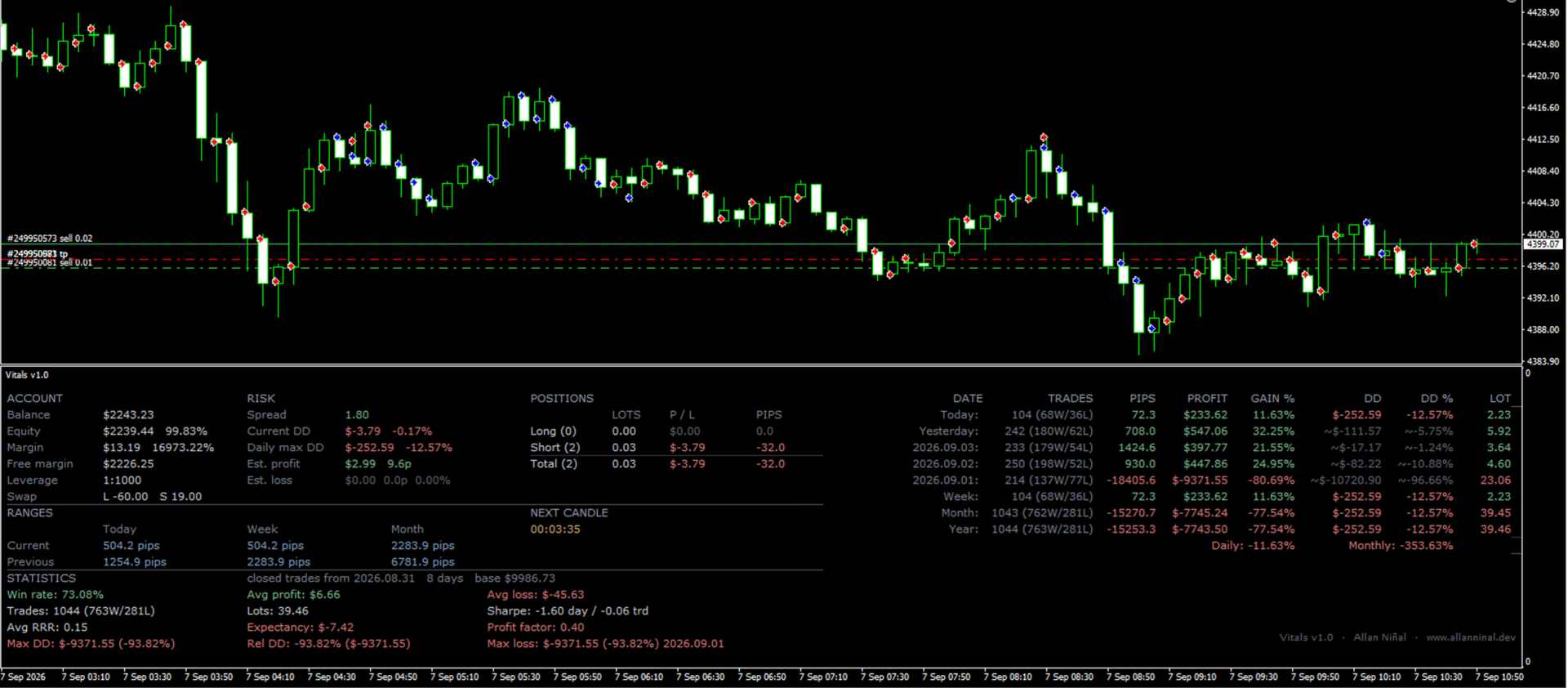
Vitals shows the state of your trading account on a single screen: balance and margin, current risk, open positions, market ranges, results by period, and a statistics panel, arranged on one grid so the figures can be read at a glance rather than gathered from several terminal windows.

Vitals is a display panel. It does not place, modify or close orders.

Floating drawdown

A history report records what a position earned. It does not record how far the account moved below its balance while that position was open, and that is the figure a daily loss limit measures at a proprietary trading firm.

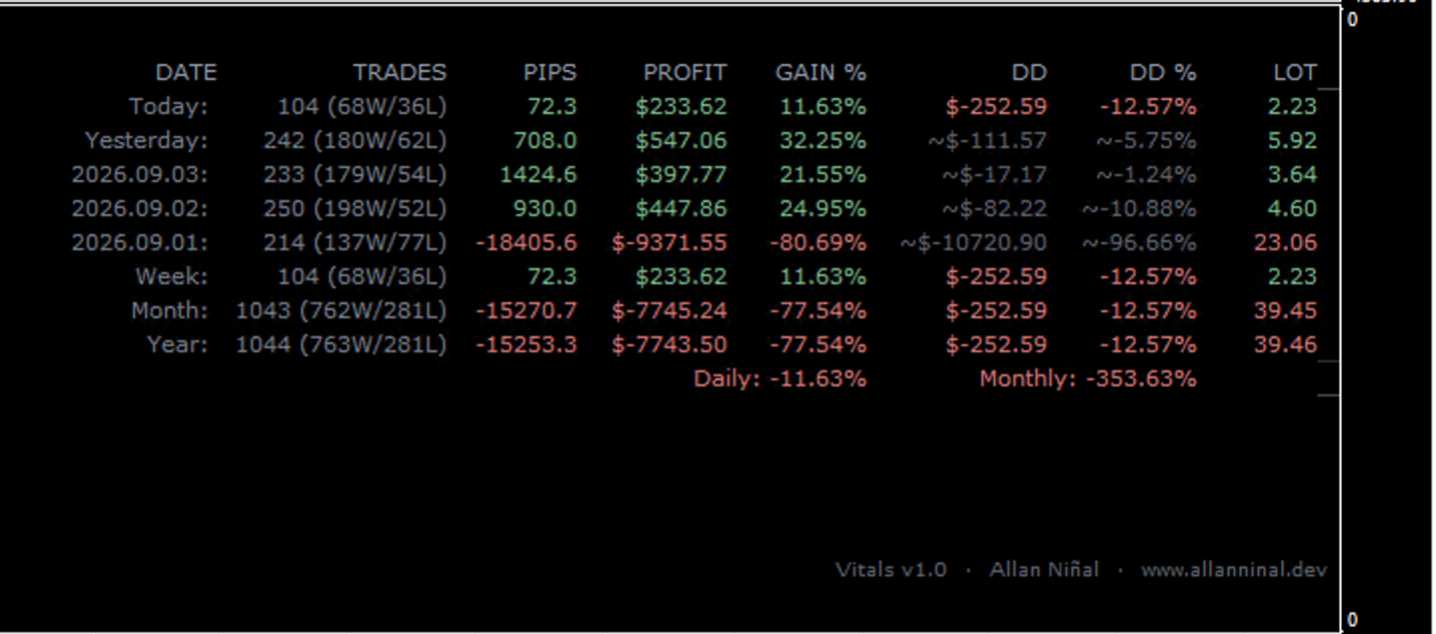
Vitals records it as it happens. The DD and DD % columns show the largest floating drawdown reached on each day: the lowest point equity fell below balance. Each value is written to a journal on disk as the day develops and is read back when the terminal restarts. The week, month and year rows show the deepest single day within that period, which is the figure a daily loss limit is compared against, rather than a total or an equity curve measurement.

Please note: MetaTrader does not store past floating equity, so this journal can only begin on the day the indicator is first attached. For earlier days the columns fall back to the drawdown of the closed trade curve, shown with a tilde and in a dimmed colour so the two measurements are not confused. Days with neither show a dash. No figure is estimated.

What the panel shows

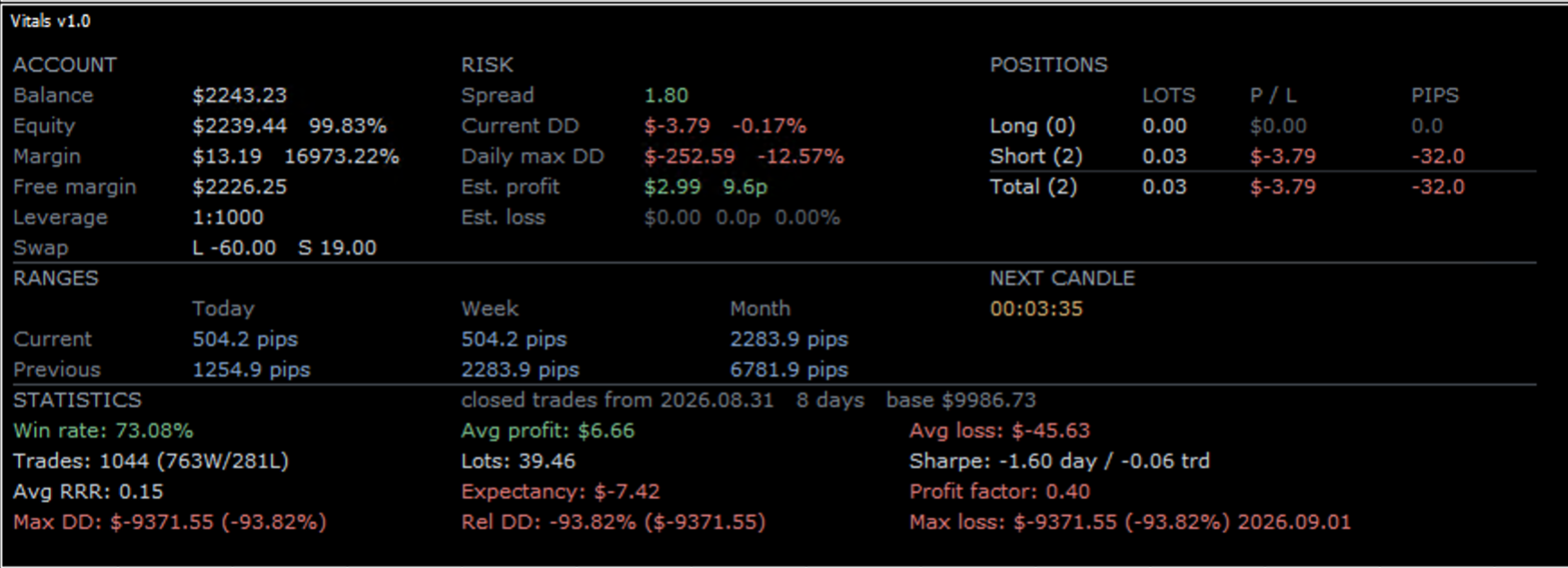
  • Account — balance, equity and equity as a percentage of balance, margin and margin level, free margin, leverage, and swap for long and short positions
  • Risk — spread, current floating drawdown, the largest floating drawdown so far today, and the value of the open stop losses and take profits in money, pips and percent
  • Positions — long, short and total, each shown by lots, profit and loss, and pips
  • Ranges — today, this week and this month against the preceding period, with a countdown to the next candle
  • History — today, yesterday, the three preceding trading days, week, month and year, each with the number of trades and the split of winners and losers, pips, profit, gain in percent, drawdown and lots, followed by the average daily and monthly gain
  • Statistics — win rate, average profit and average loss, number of trades and total lots, two Sharpe ratios, average risk to reward ratio, expectancy, profit factor, maximum and relative drawdown, and the worst single day with its date

Compact layout for small subwindows

With PanelDensity set to Auto, Vitals measures the height of its subwindow and selects a layout to match: the full panel where there is room, and a compact one where there is not. The compact layout retains the figures used while a position is open, which are equity, both drawdown values, position totals, and the today, yesterday, week, month and year rows. It omits the reference figures. The change is automatic, and a margin is applied so the layout does not alternate when the subwindow border rests near the boundary. The Full and Compact settings select one layout directly.

Colours

The colours are muted by design. The standard terminal colours are bright on a dark chart and can be tiring to read over a long session. Vitals keeps the same hues, so a gain and a loss are still distinguished immediately, at about half the intensity. Four levels of contrast separate headings, labels, values and inactive figures. The WhiteMode setting selects a separate palette prepared for white chart backgrounds.

Filters

Every figure on the panel can be restricted to a chosen set of orders: by the symbol of the chart, by magic number, by order comment, or from a starting date onwards. This allows one strategy to be measured on an account that runs several.

Inputs

  • ShowAccountOrderInfo (true) — show the Account, Risk and Positions sections
  • ShowProfitInfo (true) — show the history table
  • ShowTodayRanges (true) — show the Ranges section and the countdown to the next candle
  • ShowStatsPanel (true) — show the Statistics section
  • ShowRiskInfo (false) — show the position size for each level of risk
  • RiskStopLoss (0) — stop loss distance in pips used to calculate those position sizes
  • RiskLevels ("1,5,10,20,40,50,60,80,100") — the risk levels, as percentages of balance, separated by commas
  • PanelDensity (Auto) — Auto fits the layout to the height of the subwindow; Full and Compact select one directly
  • TopMargin (26) — distance from the top of the subwindow, so the heading clears the name the terminal draws there
  • FontSize (8) — sets the text size and the spacing of the whole layout
  • WhiteMode (false) — palette for white chart backgrounds
  • OnlyAttachedSymbol (false) — include only orders on the symbol of the chart
  • MagicNumber (-1) — include only orders with this magic number; -1 includes all orders
  • CommentFilter ("") — include only orders whose comment matches this text
  • StartDateFilter ("") — ignore all history before this date
  • RiskFreeRate (0.0) — annual risk free rate used in the Sharpe ratios

Notes

  • Vitals reads account data only. It does not place, modify or close orders, and it does not require permission to trade.
  • The statistics are calculated from the history the terminal has loaded. Set the account history to show all history for complete figures.
  • The drawdown journal is stored for each account number in the Files folder of the terminal, and remains available after a restart.
  • Attach the indicator to any chart. The panel opens in its own subwindow.
Recommended products
TRADE COMMANDER ULTIMATE MT5 Professional Trading, Risk Management and Account Protection Panel Trade Commander Ultimate MT5 is an all-in-one utility designed to help manual traders and Expert Advisor users execute, manage and protect trades from one professional black dashboard. It does not provide trading signals. It focuses on disciplined execution, position management and account-level risk control. IMPORTANT BEFORE USING ACCOUNT PROTECTION The Daily Profit Target and Daily Loss Limit must
FREE
AI One Click Risk Trade Panel
Fadi Hassan Khaled Ghanem
Place trades in one click with the lot size calculated from your risk. How it works Type your risk percent, stop loss in points and take profit as a multiple of the stop. The panel shows the lot size and the money at risk before you click. BUY and SELL open the order with SL and TP already attached. Management buttons move stops to break-even, close half or close all positions on the chart symbol. Key features Risk based lot size from balance, tick value and stop distance SL and TP attached to e
FREE
VolumeAnalysis
Musa Khunarikov
️ This is a FREE version of the tool. Developed by a practicing trader with 12 years of live trading experience (verified tax records, 51 Finam certificates). Looking for professional trading solutions (Volume Profile, SMC, Risk Manager)? Author's full lineup of PRO indicators: https://www.mql5.com/en/users/musa1994/seller Official website and portfolio: https://developer-mql4-mql5.netlify.app/ VolumeAnalysis is a professional library designed to integrate advanced volume analysis into y
FREE
MultiTimeframe Info Feed (MIF) Indicator Description: MultiTimeframe Info Feed (MIF) is a smart MQL5 indicator that displays a dynamic, real-time info panel directly on your chart, offering powerful insight into current market conditions. Key features include: Real-time display of Open, High, Low, Close, and live Tick price Tick Rate (ticks per second) for assessing market activity Auto-calculated Entry Price on new candle formation Signal direction detection (BUY / SELL) Price action pattern re
FREE
EA Health Monitor
Allan Aparece Ninal
EA Health Monitor is a free indicator for MetaTrader 5 that shows how each Expert Advisor on your account is doing. It groups the account history by magic number. Every EA gets its own row. Manual trades have a row of their own, and a total sits at the bottom. It only reads the account history and open positions. It never opens, changes or closes a trade. Standalone: Everything is built in. You do not need to buy or install any other product named on this page. Quick start Attach EA Health Monit
FREE
Relentless Trade Journal
Loysean Mappang Bandaay
Relentless Trade Journal — Free Trade Statistics for MetaTrader 5 Most trade journals flatter you. They add up your closing profits and skip the commission you paid on entry, so they show a rosier number than the truth. You think you are breaking even when you are actually losing to costs. Relentless Trade Journal shows you the honest picture, right on your chart. It is free. If it shows you one cost you were missing, an honest review helps other traders find it. It is a non-trading utility.
FREE
Smart Pip Meter MT5
Christianiel Robles Faustino
See Your Key Trading Measurements at a Glance Smart Pips Meter  is a free utility that displays important market measurements directly on your chart—so you can make faster trading decisions without manually calculating pip distances. WHAT IT SHOWS   ADR (Average Daily Range) See the current ADR pip value directly on your chart.   Current Candle Size Instantly see the size of the current candle in pips.   Previous Candle Size Quickly check the size of the last completed candle.  
FREE
FiT Panel Pro
Thonglak Janyakorn
Overview FiT Panel Pro is a professional-grade trade management panel designed for MetaTrader 5 traders who demand speed, precision, and full control over their trades. Built with a modern dark-theme UI, it combines one-click execution with advanced risk management, visual SL/TP drag lines, automatic Fibonacci-based levels, and comprehensive order management — all in a single, compact panel. Whether you are a scalper, day trader, or swing trader, FiT Panel Pro gives you the edge you need to exec
FREE
TRADE PANEL MASTER — Know Your Risk Before You Click Open your chart. See your panel. Trade with confidence. Before you click Buy or Sell, Trade Panel Master shows you  exactly what you risk, what you gain, and your R:R ratio —  in real time. No mental math. No surprises. FEATURES - Lot sizing with real-time margin display - SL & TP in 3 modes: Points / Money / Price - Au
FREE
Iranian stock market
Kourosh Hossein Davallou
5 (1)
Smart money is a powerful currency. This money is available to major investors who can identify, predict or even generate capital movements ahead of others. This money can flow into financial and capital markets and create dramatic price changes in various stocks. Therefore, detecting smart cash flow, which usually enters the market in a coherent manner and confronts the volume and value of transactions in a market with high returns, is one of the methods that some investors use to invest. But h
FREE
Free automatic Fibonacci is an indicator that automatically plots a Fibonacci retracement based on the number of bars you select on the BarsToScan setting in the indicator. The Fibonacci is automatically updated in real time as new highest and lowest values appears amongst the selected bars. You can select which level values to be displayed in the indicator settings. You can also select the color of the levels thus enabling the trader to be able to attach the indicator several times with differe
FREE
Trade assistant pro v8
Ahmed Mohammed Bakr Bakr
2 (1)
FREE FREE FREE Trade Assistant MT5 – Professional Trading & Risk Management Panel Trade Assistant MT5 is an advanced trading panel designed to help traders execute orders faster, safer, and more professionally . It simplifies manual trading by combining smart order management , precise risk control , and one-click execution , making it ideal for both beginners and advanced traders. This tool does not trade automatically . Instead, it empowers you with full control while applying professional-gra
FREE
Broker Clock and New York Session answers a question every MetaTrader user meets sooner or later: what time is it on my broker's server, and what time is it in New York? Broker servers run on many different clocks: UTC all year, GMT+2/+3 following US summer time, or GMT+2/+3 following European summer time. For a few weeks every spring and autumn, when the US and Europe change their clocks on different dates, a fixed offset is wrong by one hour. This indicator finds the right one for you. What it
FREE
no Trade operation, Robot Set auto SL to every manually Trade from a Phone Automatic Phone TradeManager Need just Set on 1 Symbol Auto BE Trigger is added that immediately sets a stop-loss for every () But does NOT calculate position size based on risk, allows the fixed  SL to   adjusted dynamically drag on Chart or Menu. It protects capital around the clock, reduces emotional mistakes, and ensures consistent risk management.
FREE
TradePulseMonitor for MetaTrader 4 & 5 OVERVIEW TradePulseMonitor is a real-time, on-chart dashboard that shows everything you need to know about your position on the current symbol: profit, risk, exposure, margin, swaps and historical performance . All data is consolidated in a compact panel in the lower-right corner of the chart, so you no longer need to keep switching to the Terminal window. All position, profit and risk figures refer to the symbol of the chart the indicator is attached to. P
FREE
Ninja MT5 Doctor
Atsushi Katayama
NINJA MT5 DOCTOR OVERVIEW NINJA MT5 Doctor is a free, non-trading MT5 environment-diagnostic utility that captures a one-time snapshot of the terminal, account, open charts, selected history and current host-chart symbol. It is an Expert Advisor-format utility, not a trading EA and not an indicator. The panel and input names are in English. WHAT IT CHECKS It reviews broker-server connection, terminal and account trading permissions, Doctor's own permission, trade mode and published sessions, quo
FREE
Exact Time — detailed time on the seconds chart. The utility shows the opening time of the selected candle. This is necessary when working with seconds charts. For example, it can be used on a seconds chart built using the Seconds Chart utility. Inputs Base corner — the chart corner to which an object Is attached. X distance — the horizontal distance from the chart corner. Y distance — the vertical distance from the chart corner. Text font — font name Font size — font size Color — text color
FREE
Trade With Price is a powerful and user-friendly MetaTrader 5 Expert Advisor designed to simplify and accelerate your trading execution. This EA provides a smart one-click trading panel that allows traders to instantly place BUY, SELL, and pending orders directly at the current market price—eliminating the need to calculate distances in pips. Key Features One-click BUY & SELL execution Place pending orders based on market price instead of pips Clean and intuitive trading panel interface
FREE
================================================================ MATRIX CONDITION MONITOR Live Trade Condition Panel for MetaTrader 5 Fully Automatic -- Works with ALL Matrix EAs ================================================================ NEVER MISS A TRADE SETUP AGAIN Matrix Condition Monitor is a free utility that attaches to any chart and automatically checks all 10 trade conditions in real time -- showing you exactly why a trade will or will not open, and alerting you the moment ever
FREE
The Candle Countdown Timer for MetaTrader 4 (also available for MT5) is a vital indicator designed to help you manage your trading time effectively. It keeps you updated about market open and close times by displaying the remaining time before the current candle closes and a new one forms. This powerful tool enables you to make well-informed trading decisions. Key Features: Asia Range: Comes with an option to extend the range. Broker Time, New York, London Time: Displays the current broker time
FREE
Most lot size calculators assume one pip is worth ten dollars. That assumption is wrong on gold, wrong on indices, wrong on JPY crosses, and wrong on every account not denominated in USD - which is to say, wrong exactly where oversizing hurts. This one asks your server instead. It reads the tick value, tick size, point size, volume step and margin requirements actually published for the symbol on your chart, so the number it gives you is the number your account will accept. How it works Attach i
FREE
TradeVision Pro
Ian Nganga Comba
TradeVisonPro Forex Analyzer Pro MT5 Trading Account Analytics and Monitoring Dashboard TradeVisonPro Forex Analyzer Pro is a trading analytics and account monitoring solution designed for MetaTrader 5 users. The product organizes MT5 trading data in a structured web-based dashboard, allowing traders to review account information, monitor open positions, analyze trading history, track strategies, maintain a trading journal, and review performance statistics. TradeVisonPro Forex Analyzer Pro is d
FREE
MGD Prop Risk Guard MT5
Massimo Giorgio Dagri
MGD Prop Risk Guard MT5 Professional Account Risk Monitoring for MetaTrader 5 — FREE MGD Prop Risk Guard MT5 is a free account risk monitoring utility designed to help traders stay informed about their daily loss limits, maximum drawdown, and available risk. Whether you trade manually, use Expert Advisors, or participate in proprietary trading firm challenges, MGD Prop Risk Guard provides a clear, real-time overview of your account's risk exposure. Monitor your trading risk directly from your MT
FREE
Position Selective Close MT5
Francisco Manuel Vicente Berardo
The Position Selective Close is a multi-symbol multi-timeframe script used to close simultaneously various positions.  General Description   The Position Selective Close   possesses   three operation modes (Intersection,   Union   and All) that control the way   as   four position features (symbol, magic number,   type   and profit) are used. The modes, available through the Selection Mode input parameter, relate to the features, available through the “Select by Feature” and “Feature” input pa
FREE
Fabii Memory Support Resistance
Fabien Georges Andre Guillemaud
Stop guessing which support and resistance zones matter: each one shows how many times price tested it. No repaint. Any pair, any timeframe. On your chart in 2 minutes. Free to test in the Strategy Tester. Get more indicators here Baselines, volatility filters and oscillators. No repaint. Why you need it You draw support and resistance by hand, and two traders never draw the same levels on the same chart. You do not know which levels deserve your attention. You place a stop behind a level tha
FREE
This Expert Advisor provides an advanced on-chart trading panel designed for discretionary traders. It simplifies position sizing, risk management, and trade execution directly from the chart without manual calculations. Key Features  On-chart trading panel  Fixed lot and balance percentage risk mode  Risk-based lot calculation using stop loss  Market and pending order execution  Partial close management  Break-even automation  Trailing stop control  Equity protection system  Daily loss lock  S
FREE
Follow The Line MT5
Oliver Gideon Amofa Appiah
4.6 (35)
This indicator obeys the popular maxim that: "THE TREND IS YOUR FRIEND" It paints a GREEN line for BUY and also paints a RED line for SELL. (you can change the colors). It gives alarms and alerts of all kinds. IT DOES NOT REPAINT and can be used for all currency pairs and timeframes. Yes, as easy and simple as that. Even a newbie can use it to make great and reliable trades. NB: For best results, get my other premium indicators for more powerful and reliable signals. Get them here: https://www.m
FREE
Short description : TheTrendHunterMax   is a LIMITED VERSION tool that can be used either as a trading robot for automated trading or just a signal provider for manual trading.  As an EA, it uses the techniques we usually employ in trading like determining the highs and lows on the trading chart. With this, it determines the trend convergence and divergence in the chart. Combined with the volatility, price movements, it analyzes the possible order type that can be most profitable. By default,
FREE
EA Master Version any Follow Copy Account  (Acc. Number)  need a open MT Terminal, download multiple times Step1:   Open Master MT5 Terminal    =  install master- Version   (on any Symbol just one Time) Step2:   Open Follower MT5 Terminal = install follower- Version  (on any Symbol just one Time) Step3:   all Trades from any Symbol or any Robot are copy now to follow- Terminal immediately for simple copy set on Chart and   Start   no optimization. This Robot is a Trade Copier for MT5 that automa
FREE
Key Features: 200+ Fully Implemented Patterns   across all categories Advanced Market Structure Analysis Smart Money Integration   (Wyckoff, Order Blocks, Liquidity) Professional Risk Management Multi-Timeframe Analysis AI-Powered Confidence Scoring Advanced Visualization Real-time Alerts Pattern Categories: Single Candle Patterns (Hammer, Doji, Marubozu, etc.) Multi-Candle Patterns (Engulfing, Stars, Harami, etc.) Chart Patterns (Head & Shoulders, Cup & Handle, Triangles, etc.) Harmonic Pattern
FREE
Buyers of this product also purchase
Trade Assistant MT5
Evgeniy Kravchenko
4.43 (216)
It helps to calculate the risk per trade, the easy installation of a new order, order management with partial closing functions, trailing stop of 7 types and other useful functions. Additional materials and instructions Installation instructions - Application instructions Line function -   shows on the chart the Opening line, Stop Loss, Take Profit. With this function it is easy to set a new order and see its additional characteristics before opening.   Risk management  - The risk calculation
Forex Trade Manager MT5
InvestSoft
4.98 (689)
Trade Manager MT5 is an advanced position size calculator and trade management tool for MetaTrader 5, designed to help traders plan trades faster, control risk more precisely, and manage open positions directly from the chart. It combines order placement, risk based lot calculation, Stop Loss and Take Profit management, Break Even, Trailing Stop, Partial Close, Equity Protection, and external trade management in one panel. Whether you trade forex, indices, metals, commodities, crypto, or future
FarmedHedge Pair Trading Dashboard
Tanapisit Tepawarapruek
5 (7)
Farmed Hedge Yield Farming | All Markets (Manual - Hybrid - Semi/Automated EA) VERIFIED TRADING RESULTS - Farmed Hedge Yield Axi Copy:  https://www.mql5.com/en/signals/2356376 - Farmed Hedge Yield Exn Copy:   https://www.mql5.com/en/signals/2356404 - Farmed Hedge Yield V Copy:  https://www.mql5.com/en/signals/2357156 IMPORTANT NOTICE: FarmedHedge is a MANUAL-FOCUSED TRADING UTILITY ,not a fully automated EA. Results shown on this Signal include manual trades and overall strategic management.
Telegram to MT5 MultiChannel Copier
Sergio Marquez Uroz
4.68 (22)
Telegram to MT5 Multi-Channel Copier   automatically copies trading signals from your Telegram and Discord channels straight to MetaTrader 5. No bots, no browser extensions, no manual copying. A signal arrives in Telegram or Discord and the EA opens the trade in your terminal within seconds. And before you copy a channel, the built-in backtester shows you what that channel would have done in your account. The product has two components: a Windows application that listens to your Telegram channel
Local Trade Copier EA MT5
Juvenille Emperor Limited
4.94 (150)
Local Trade Copier EA MT5 is a fast and flexible trade copier for copying and managing trades between multiple MetaTrader 5 accounts on the same Windows computer or Windows VPS. It combines local trade synchronization with Receiver-side controls for lot sizing, risk management, trade filtering, symbol mapping, trade management and account protection. Set up your Transmitter and Receiver terminals in about 1 minute and copy manual or EA trades between accounts at the same or different brokers. U
TradePanel MT5
Alfiya Fazylova
4.88 (172)
Trade Panel is a multi-functional trading assistant. The app contains over 50 trading functions for manual trading and allows you to automate most trading tasks. Application instructions: https://www.mql5.com/en/blogs/post/756482 Trial version of the application for a demo account: https://www.mql5.com/en/blogs/post/750865 How to install the application: https://www.mql5.com/en/blogs/post/756239 How to test the application in visual mode: https://www.mql5.com/en/blogs/post/770277 How to install
News Trade EA MT5
Konstantin Kulikov
4.55 (11)
Present to you the useful robot that I have been using for several years. It can be used in both semi-automatic mode and fully automatic mode. >>> Chat <<< The program contains flexible settings for trading on the news of the economic calendar. It cannot be checked in the strategy tester. Only real work. Download the latest archive of settings: https://www.mql5.com/en/blogs/post/747929 Signals monitoring: https://www.mql5.com/en/signals/author/test-standart When creating your own sets of setti
Copy Telegram signals with your own trading rules Telegram to MT5 Signal Trader automatically copies text-based trading signals from public and private Telegram channels and groups into MetaTrader 5. Manage multiple providers and MT5 accounts from one desktop app, with individual risk and trade settings for each provider . No Telegram bot or API setup needed for copying. Simply sign in with your own Telegram account by phone or QR code and select the channels or groups you have already joined. Y
Strategy Ledger Pro
Abdullah Uygar Tuna
5 (14)
Strategy Ledger Pro is a read-only account analysis panel for MetaTrader 5. It separates account results by Expert Advisor, strategy, symbol, and magic number, so you can see what each one really contributes. The panel is available in 11 languages: English, Français, Deutsch, Español, Italiano, Português, Русский, Türkçe, 中文, 日本語 and 한국어. Before you download the demo. The Market runs the demo of any paid product in the Strategy Tester only. This panel analyses the trades on your own account, and
================================================================================ POC BREAKOUT - V20.72. Full Professional Grade Toolkit ================================================================================ POC Breakout is a full MetaTrader 5 trading dashboard for discretionary traders who want breakout signals, Point of Control (POC) context, volume profiles, order flow, market structure, news, alerts, and advanced trade planning in one professional workspace. Attached directly to you
Exp COPYLOT CLIENT for MT5
Vladislav Andruschenko
3.97 (35)
Professional Trade Copier for MetaTrader 5 Fast, professional, and reliable trade copier for MetaTrader . COPYLOT allows you to copy Forex trades between MT4 and MT5 terminals with support for Hedge and Netting accounts. COPYLOT MT5 version supports: - MT5 Hedge to MT5 Hedge - MT5 Hedge to MT5 Netting - MT5 Netting to MT5 Hedge - MT5 Netting to MT5 Netting - MT4 to MT5 Hedge - MT4 to MT5 Netting MT4 version Full Description +DEMO +PDF How To Buy How To Install How to get Log Files H
The product will copy all telegram signal to MT5 ( which you are member) , also it can work as remote copier.  Easy to set up, copy order instant, can work with almost signal formats, image signal,  s upport to translate other language to English Work with all type of channel or group, even channel have "Restrict Saving Content", work with  multi channel, multi MT5 Work as remote copier: with signal have ticket number, it will copy exactly via ticket number. Support to backtest signal. How to s
EA Overfitter
Stephen J Martret
5 (3)
That backtest looks great. But will it still be making money tomorrow, next week, next month? EA Overfitter re-runs your EA on 100 price histories it has never seen. One score tells you if the edge is real. A backtest tells you what an EA did on one price history — the one that happened to occur. What you cannot tell from it is how much of that result was the strategy and how much was the particular path. EA Overfitter answers that. It builds up to 100 synthetic price histories your EA has n
Power Candles Strategy Scanner - Self-Optimizing Multi-Symbol Setup Finder Self-optimizing settings work one chart at a time, and finding where they pay off right now means opening chart after chart. Power Candles Strategy Scanner runs the same self-optimizing engine as the Power Candles indicator on every symbol in your Market Watch, side by side. One panel ranks where it pays off: the winning strategy per symbol, its optimized Stop Loss and Take Profit. An alert fires the moment a fresh signal
HINN MagicEntry Extra
ALGOFLOW OÜ
4.74 (19)
HINN MAGIC ENTRY – the ultimate tool for entry and position management! SIMPLE. FASTEST. INTUITIVE. MAX AUTOMATED. Place orders by selecting a level directly on the chart! full description   ::  demo-version  :: 60-sec-video-description Key features: - Market, limit, and pending orders - Automatic lot size calculation - Automatic spread and commission accounting - Unlimited partitial take-profits  - Breakeven and trailing stop-loss and take-profit  functions - Invalidation leves - Intuitive, a
Telegram To MT5 Ultra
Mirel Daniel Gheonu
5 (5)
Telegram To MT5 — Signal Copier Turn the trading calls from your Telegram channels into real MT5 orders — automatically, on as many accounts as you like, with risk and rules fully under your control. Telegram To MT5 connects the VIP / signal channels you already follow on Telegram to your MetaTrader 5 terminal. A free companion desktop app reads the messages (even from channels that block bots), and this Expert Advisor executes them on your account — applying your own risk settings, symbol mappi
Timeless Charts
Samuel Manoel De Souza
5 (9)
Timeless Charts is an all-in-one trading utility for professional traders. It combines custom chart types such as Seconds Charts and Renko with advanced order flow analysis using Footprints , Clusters , Volume Profiles , VWAP studies, and anchored analysis tools for deeper market insight. Trading and position management are handled directly from the chart through an integrated trade management panel , while Market Replay and Virtual Accounts provide environments for practicing trading skills and
VirtualTradePad One Click Trading Panel
Vladislav Andruschenko
4.59 (74)
Trading Panel for MetaTrader 5 — professional one-click trading from chart and keyboard A powerful trading panel for active manual trading, designed to open, manage, and close trades far faster and more efficiently than the standard MetaTrader interface. This panel is built for traders who want full control over positions, pending orders, profit management, and trading execution inside one professional workspace. This is not just another utility. It is a complete trading cockpit for MetaTrader
Anchor Trade Manager
Kalinskie Gilliam
5 (8)
Your EAs cannot see each other, but Anchor can. Anchor gives you one place to coordinate your EAs, manage risk, and decide when trading is allowed. It works alongside the trading bots you already use without any changes to them. The Problem One EA opens a trade. Then another starts trading. The next thing you know, you wake up to multiple grids built across your account. Each EA may be doing exactly what it was designed to do, but together they can place far more risk on your account than you in
Boleta Scalper Ultra
Nelson Lopes De Paula Neto
ScalperBoleta Ultra — Trading Panel for MetaTrader 5 ScalperBoleta Ultra is a manual trading panel developed for MetaTrader 5, focused on scalping and day trading. It centralizes order execution, position management, and risk control directly on the chart, providing greater convenience and operational efficiency. Main Features: Buy and Sell: Execute orders using on-screen buttons or keyboard shortcuts. Position Management: Fully or partially close open positions. Lot Size Control: Adjust trading
VirtualTradePad PRO SE MT5 — professional trading control center for MetaTrader 5 VirtualTradePad PRO SE is a premium chart-based trading panel and trade-management workspace for MetaTrader 5 . It is designed for traders who want faster execution, clearer position control, structured trade management, visual level planning and a professional workflow directly from the chart. This is not only a BUY / SELL panel. PRO SE combines manual trading, pending orders, position management, partial exits, b
Trade Indicator Assistant   is a powerful MT5 utility designed to turn indicators into automated trading systems. Its main feature is the ability to automatically detect an indicator’s   BUY and SELL signal buffers , without requiring you to know the buffer numbers, search through indicator settings, or modify the indicator source code. Bonus Indicator:   After purchasing Trade Indicator Assistant, contact me to receive   Trade Signal Pro   completely free as a bonus indicator. [Download Demo V
Trade Manager DaneTrades
Levi Dane Benjamin
4.13 (31)
DaneTrades Trade Manager is a professional trade panel for MetaTrader 5, designed for fast, accurate execution with built‑in risk control. Place market or pending orders directly from the chart while the panel automatically calculates position size from your chosen risk, helping you stay consistent and avoid emotional decision‑making. The Trade Manager is built for manual traders who want structure: clear risk/reward planning, automation for repeatable management, and safeguards that help reduc
Welcome to Entry In The Zone with SMC Multi Timeframe  —  COMPLETE SMC ANALYSIS SYSTEM — ALL IN ONE INDICATOR  Entry In The Zone with SMC Multi Timeframe  An indicator designed for market analysis based on Smart Money Concepts (SMC), displaying Market Structure, Key Zones (Order Blocks, Supply & Demand Zones, and Fair Value Gaps), Liquidity, and real-time BUY / SELL signals. It supports both Single-Timeframe and Multi-Timeframe analysis, along with the Confluence at Zone feature, which helps you
MT5 to Telegram Signal Provider turns your trading account into a signal provider. Every trade action, whether manual, by EA or from your phone, is instantly sent as a message to Telegram. You can fully customize the format or use a ready-made template for quick setup. [ Demo ] [ Manual ] [ MT4 Version ] [ Discord Version ]     New: [ Telegram To MT5 ] Setup A step by step user guide is available. Key Features Ability to customize order details sent to subscribers You can create a tiered subs
Seconds Chart MT5
Boris Sedov
4.61 (18)
Seconds Chart is a unique tool for creating second-based charts in MetaTrader 5 . With Seconds Chart , you can construct charts with timeframes set in seconds, providing unparalleled flexibility and precision in analysis that is unavailable with standard minute or hourly charts. For example, the S15 timeframe indicates a chart with candles lasting 15 seconds. You can use any indicators and Expert Advisors that support custom symbols. Working with them is just as convenient as on standard charts.
Advanced Dashboard Ultra
Mirel Daniel Gheonu
5 (6)
Stats Dashboard & Journal ULTRA for MT5   The Complete Trading Command Center: Analytics, Automation & News Intelligence.   Stats Dashboard ULTRA is the ultimate evolution of the analytics tool. It transforms MetaTrader 5 into a professional trading station, combining institutional-grade performance analysis with automated news   protection and advanced psychological metrics. Designed for manual traders and EA portfolio managers who demand total control.     NEW IN ULTRA VERSION    * News I
Trade copier MT5
Alfiya Fazylova
4.61 (57)
Trade Copier is a professional utility designed to copy and synchronize trades between trading accounts. Copying occurs from the account / terminal of the supplier to the account / terminal of the recipient, which are installed on the same computer or VPS . Before buying, you can test the demo version on a demo account. Demo version here . Full instruction here . Main functionality and benefits: Supports copying MT5> MT5, MT4> MT5, MT5> MT4, including MT5 netting accounts. * Supports copying Dem
DrawDown Limiter
Haidar Lionel Haj Ali
5 (23)
DrawDown Limiter v5.0 — Advanced Account Protection Controller DrawDown Limiter v5.0 is a client-side account protection controller designed to supervise your trading account and automatically react when configured risk, profit, news, schedule, rollover, or position limits are reached. It can monitor manual trades, automated strategies, multiple Expert Advisors, pending orders and floating positions from one dedicated chart. It can protect the complete account or be configured to supervise a spe
Telegram to MT5 Coppy
Sergey Batudayev
5 (10)
Telegram to MT5: The Ultimate Signal Copying Solution Simplify your trading with Telegram to MT5, the modern tool that copies trading signals directly from Telegram channels and chats to your MetaTrader 5 platform, without the need for DLLs. This powerful solution ensures precise signal execution, extensive customization options, saves time, and boosts your efficiency. [ Instructions and DEMO ] [ FAQ ] [ How atach logs properly ] [ Settings descrition ] Key Features Direct Telegram API Integrati
More from author
UT Bot Signal Alerts is a trend indicator for MetaTrader 5 that draws an ATR trailing stop line. It puts a buy or sell arrow on the bar where the close crosses it, with pop-up, sound, push and e-mail alerts. It is a charting tool. It places no trades and does not touch your orders. Arrows and alerts come from closed bars only. The arrow of a closed bar does not repaint. It is based on the UT Bot Alerts script known from TradingView and uses the same maths. Standalone: everything is built in. You
FREE
Gold Trend Sentinel
Allan Aparece Ninal
Gold Trend Sentinel is an Expert Advisor for XAUUSD on MetaTrader 5 that trades a trend rule on the H4 chart. It uses a fixed 0.01 lot (or the broker's minimum), a stop on every order and a trailing stop. It suits traders who want a simple, rule-based gold trend follower. This EA promises no profit. Gold can move against any trade. Every result below is a backtest, not live trading. Built for gold. Gold is what this EA was designed and tested on, and it works best there. The tested setting is XA
FREE
Risk Position Tool
Allan Aparece Ninal
Risk Position Tool is a free position size calculator for MetaTrader 5. Drag the entry, stop-loss and take-profit lines on the chart. It shows the lot for your risk, the money at the stop and target, the reward:risk ratio and the margin. It only calculates. It never places, changes or closes an order, so it is safe on any account. Standalone: Everything is built in. You do not need to buy or install any other product named on this page. Quick start Attach the indicator to the chart of the symbol
FREE
Divergence Signal Alerts is a free indicator for MetaTrader 5 that finds RSI and MACD divergences on the chart. It draws a line between the two price pivots. It puts an arrow on the bar where the divergence became known, and it can send alerts. Signals come from closed bars only. A pivot is known only a few bars after it forms. The arrow goes on that later bar and never moves or disappears. It places no orders. Quick start Attach the indicator to any chart and timeframe. It scans the last 2000 c
FREE
SMC Zones
Allan Aparece Ninal
SMC Zones is a free smart money concepts indicator for MetaTrader 5. It draws order blocks, fair value gaps and BOS / CHoCH structure lines on any symbol and timeframe, with alerts for new and touched zones. It is a charting tool. It draws zones and sends alerts; it places no trades and does not say when to buy or sell. Every zone is decided on a closed bar, so it does not repaint. Standalone: everything is built in. You do not need to buy or install any other product named on this page. Quick s
FREE
SuperTrend Signal Alerts is a free SuperTrend indicator for MetaTrader 5. It colours the trend line blue or red, puts a buy or sell arrow on every trend change and sends alerts, with optional EMA and RSI filters on the arrows. It places no trades and does not touch your orders. Arrows and alerts come from closed bars, so a signal never appears and then disappears. The calculation follows the SuperTrend indicator as published on TradingView. Standalone: everything is built in. You do not need to
FREE
Harmonic Signal Alerts is a free indicator for MetaTrader 5 that finds ABCD, Gartley and Bat patterns on the chart. When price reaches a pattern's potential reversal zone, it draws the XABCD lines, the zone and an arrow. It can also alert you. It works only from confirmed swings and from closed bars. A pattern is drawn on the bar where it became known. It is never moved or removed afterwards. Quick start Attach the indicator to a chart. It scans the last 3000 closed bars. Leave the swing bars (1
FREE
Range Filter Signals is a free indicator for MetaTrader 5. Its range filter line moves only when price travels further than its smoothed average range, so it stays flat in choppy price action and follows a real move. Buy and sell arrows mark the turns, with alerts. It places no orders. Everything comes from closed bars, so an arrow never appears and then disappears. Standalone: everything is built in. You do not need to buy or install any other product named on this page. Quick start Attach it t
FREE
Session Levels
Allan Aparece Ninal
Session Levels is a free MetaTrader 5 indicator that draws the Asia, London and New York session boxes, the previous day and week high and low, and today's open. It alerts you when a closed bar breaks a level. It places no trades. It shows levels, not entries, and alerts use closed bars only. Standalone: everything is built in. You do not need to buy or install any other product named on this page. Quick start Attach it to an M1 to H4 chart. The session boxes and levels are drawn for the last 5
FREE
SMC Zones MT4
Allan Aparece Ninal
SMC Zones MT4 is a free smart money concepts indicator for MetaTrader 4. It draws order blocks, fair value gaps and BOS / CHoCH structure lines on any symbol and timeframe, with alerts for new and touched zones. It is a charting tool. It draws zones and sends alerts; it places no trades and does not say when to buy or sell. Every zone is decided on a closed bar, so it does not repaint. Standalone: everything is built in. You do not need to buy or install any other product named on this page. Met
FREE
Gold Breakout Sentinel
Allan Aparece Ninal
Gold Breakout Sentinel is an Expert Advisor for MetaTrader 5 that trades XAUUSD on the H1 chart. It places pending stop orders at yesterday's high or low when a stochastic turn and a Bollinger Band filter agree. Every order has a fixed 0.01 lot and a fixed stop loss and take profit. The EA trades gold only. It is a rules-based daily breakout system, not a profit promise. My own tests found no proven edge. Built for gold. Gold is what this EA was designed and tested on, and it works best there. T
FREE
Signal Trader MT4
Allan Aparece Ninal
Signal Trader MT4 is an Expert Advisor for MetaTrader 4 that automates the closed-bar signals of five sources: UT Bot, SuperTrend, Range Filter, Half Trend and Price Action Levels. It sends each order with an ATR stop and a fixed 0.01 lot. It suits traders who want these signals executed by rule. Where it trades: by default, on any symbol, timeframe and source you choose. Only two settings are validated presets: XAUUSD H4 with SuperTrend and SOLUSD D1 with Price Action Levels. They passed my tes
FREE
Gann HiLo Swing
Allan Aparece Ninal
Gann HiLo Swing is a free indicator for MetaTrader 5 with two of W.D. Gann's tools: the HiLo Activator line and the 2-bar swing chart. It shows the trend side and the swings. An arrow and an alert mark the start of a new trend. Everything comes from closed bars , so nothing on the chart changes after its bar has closed. Quick start Attach the indicator to any chart. It draws on the price chart. Keep the HiLo period at 3 (Gann's own), or raise it for fewer trend changes. Read the line. Blue is an
FREE
Candlestick Signal Alerts is a free indicator for MetaTrader 5 that marks 13 classic candlestick patterns on the chart. Each gets an arrow and a short label on the bar that completes it, and the indicator can alert you when one appears. It is for traders who read candles and want the patterns found for them. It works on closed bars only. A mark appears when its bar has closed and never moves or disappears. It places no orders. Quick start Attach the indicator to any chart and timeframe. Marks ap
FREE
Divergence Signal Alerts MT4 is a free indicator for MetaTrader 4 that finds RSI and MACD divergences on the chart. It draws a line between the two price pivots. It puts an arrow on the bar where the divergence became known, and it can send alerts. Signals come from closed bars only. A pivot is known only a few bars after it forms. The arrow goes on that later bar and never moves or disappears. It places no orders. MetaTrader 4 edition: the same calculation and the same arrows as the MetaTrader
FREE
Range Filter Signals MT4 is a free indicator for MetaTrader 4. Its range filter line moves only when price travels further than its smoothed average range, so it stays flat in choppy price action and follows a real move. Buy and sell arrows mark the turns, with alerts. It places no orders. Everything comes from closed bars, so an arrow never appears and then disappears. Standalone: everything is built in. You do not need to buy or install any other product named on this page. MetaTrader 4 editio
FREE
UT Bot Signal Alerts MT4 is a trend indicator for MetaTrader 4 that draws an ATR trailing stop line. It puts a buy or sell arrow on the bar where the close crosses it, with pop-up, sound, push and e-mail alerts. It is a charting tool. It places no trades and does not touch your orders. Arrows and alerts come from closed bars only. The arrow of a closed bar does not repaint. It is based on the UT Bot Alerts script known from TradingView and uses the same maths. Standalone: everything is built in.
FREE
Harmonic Signal Alerts MT4 is a free indicator for MetaTrader 4 that finds ABCD, Gartley and Bat patterns on the chart. When price reaches a pattern's potential reversal zone, it draws the XABCD lines, the zone and an arrow. It can also alert you. It works only from swings that are already confirmed and from closed bars. A pattern is drawn on the bar where it became known. It is never moved or removed afterwards. MetaTrader 4 edition: the same calculation and the same arrows as the MetaTrader 5

FREE
Sequential Countdown is a free MetaTrader 5 indicator for traders who use the 9-13 sequential count. It numbers the setup (1 to 9) and the countdown (1 to 13) on the chart, marks each perfected 9, and alerts you on every 9 and 13. It counts closed bars only. A number never changes after its bar has closed, and nothing is drawn on the forming bar. It places no trades. Standalone: Everything is built in. You do not need to buy or install any other product named on this page. Quick start Attach it
FREE
Session Levels MT4
Allan Aparece Ninal
Session Levels MT4 is a free MetaTrader 4 indicator that draws the Asia, London and New York session boxes, the previous day and week high and low, and today's open. It alerts you when a closed bar breaks a level. It places no trades. It shows levels, not entries, and alerts use closed bars only. Standalone: everything is built in. You do not need to buy or install any other product named on this page. MetaTrader 4 edition: the same calculation, inputs, alerts and 7 buffers as the MetaTrader 5 v
FREE
SuperTrend Signal Alerts MT4 is a free SuperTrend indicator for MetaTrader 4. It colours the trend line blue or red, puts a buy or sell arrow on every trend change and sends alerts, with optional EMA and RSI filters on the arrows. It places no trades and does not touch your orders. Arrows and alerts come from closed bars, so a signal never appears and then disappears. The calculation follows the SuperTrend indicator as published on TradingView. Standalone: everything is built in. You do not need
FREE
Candlestick Signal Alerts MT4 is a free indicator for MetaTrader 4 that marks 13 classic candlestick patterns on the chart. Each gets an arrow and a short label on the bar that completes it, and the indicator can alert you when one appears. It is for traders who read candles and want the patterns found for them. It works on closed bars only. A mark appears when its bar has closed and never moves or disappears. It places no orders. MetaTrader 4 edition: the same calculation and the same arrows as
FREE
Sequential Countdown MT4 is a free MetaTrader 4 indicator for traders who use the 9-13 sequential count. It numbers the setup (1 to 9) and the countdown (1 to 13) on the chart, marks each perfected 9, and alerts you on every 9 and 13. It counts closed bars only. A number never changes after its bar has closed, and nothing is drawn on the forming bar. It places no trades. Standalone: Everything is built in. You do not need to buy or install any other product named on this page. MetaTrader 4 editi
FREE
Gann HiLo Swing MT4
Allan Aparece Ninal
Gann HiLo Swing MT4 is a free indicator for MetaTrader 4 with two of W.D. Gann's tools: the HiLo Activator line and the 2-bar swing chart. It shows the trend side and the swings. An arrow and an alert mark the start of a new trend. Everything comes from closed bars, so nothing on the chart changes after its bar has closed. MetaTrader 4 edition: the same calculation, lines and arrows as the MetaTrader 5 version. Only the arrow distance is set as a fraction of ATR, because MetaTrader 4 cannot shif
FREE
Prop Rules Monitor MT4 is a free indicator for MetaTrader 4 that shows how close a prop-firm account is to its daily loss limit and its max loss. It reads live equity, the way firms measure it. It warns you before a limit and when a limit is broken. It only watches. It never opens, closes or changes a trade, so it works without AutoTrading. Standalone: Everything is built in. You do not need to buy or install any other product named on this page. MetaTrader 4 edition: the same measurements, pane
FREE
EA Health Monitor
Allan Aparece Ninal
EA Health Monitor is a free indicator for MetaTrader 5 that shows how each Expert Advisor on your account is doing. It groups the account history by magic number. Every EA gets its own row. Manual trades have a row of their own, and a total sits at the bottom. It only reads the account history and open positions. It never opens, changes or closes a trade. Standalone: Everything is built in. You do not need to buy or install any other product named on this page. Quick start Attach EA Health Monit
FREE
EA Health Monitor MT4 is a free indicator for MetaTrader 4 that shows how each Expert Advisor on your account is doing. It groups the account history by magic number. Every EA gets its own row. Manual trades have a row of their own, and a total sits at the bottom. It only reads the account history and open positions. It never opens, changes or closes a trade. Standalone: Everything is built in. You do not need to buy or install any other product named on this page. MetaTrader 4 edition: the same
FREE
Prop Rules Monitor
Allan Aparece Ninal
Prop Rules Monitor is a free indicator for MetaTrader 5 that shows how close a prop-firm account is to its daily loss limit and its max loss. It reads live equity, the way firms measure it. It warns you before a limit and when a limit is broken. It only watches. It never opens, closes or changes a trade, so it works without Algo Trading. Standalone: Everything is built in. You do not need to buy or install any other product named on this page. Quick start Attach the indicator to any chart. Enter
FREE
Vitals
Allan Aparece Ninal
Vitals shows the state of your trading account on a single screen: balance and margin, current risk, open positions, market ranges, results by period, and a statistics panel, arranged on one grid so the figures can be read at a glance rather than gathered from several terminal windows. Vitals is a display panel. It does not place, modify or close orders. Floating drawdown A history report records what a position earned. It does not record how far the account moved below its balance while that po
FREE
UT Bot Scanner Pro MT4 is a scanner indicator for MetaTrader 4 that shows the UT Bot buy or sell side of many symbols and timeframes in one panel. It sends an alert when a new signal appears. The calculation is the same as in the free UT Bot Signal Alerts MT4 indicator, which covers one chart. The scanner runs it for a whole list, so you need not flip through charts. It places no orders. Cells use closed bars only, so a cell does not change after its bar has closed. Standalone: everything is bui
Filter:
No reviews
Reply to review