MarginRiskVision
- Utilitários
- Versão: 1.11

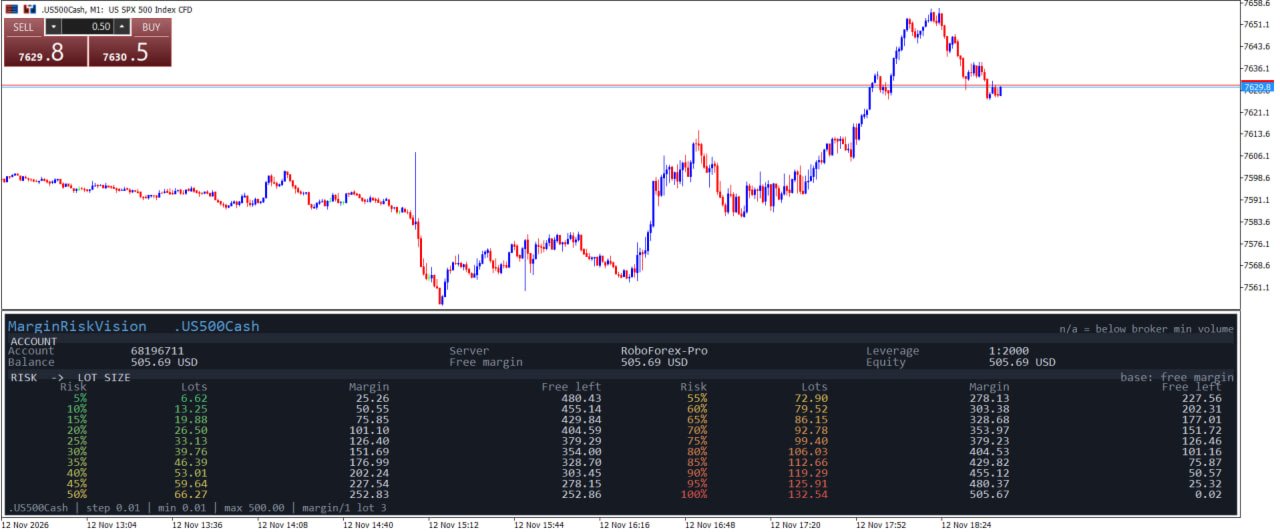
MarginRiskVision answers one question without leaving the chart: if I commit x% of my money to this symbol, how many lots is that, how much margin does it lock, and what is left afterwards.
The board lives in its own chart subwindow, under the price, and refreshes once per second. It never trades, never opens or modifies orders, and never touches your positions. It only reads account and symbol properties.
WHAT THE BOARD SHOWS ACCOUNT block - account number, server, leverage - balance, free margin, equity, in the account currency - free margin turns red when it is zero or negative RISK -> LOT SIZE table 20 rows, from 5% to 100% of the chosen base in 5% steps. For each row: - Lots: the volume that this risk amount buys on the current symbol - Margin: the margin that volume locks, in the account currency - Free left: free margin minus that margin
The lots column is highlighted, the risk column is coloured green to red as the percentage grows, and a row turns grey with "n/a" when the computed volume falls below the broker minimum.
Two table blocks are shown side by side when the subwindow is wide enough, otherwise a single column, so the board stays readable in a narrow window. HOW THE NUMBERS ARE BUILT - Base of the risk: free margin (default), balance or equity, selectable. - Volume: risk amount / margin per lot, rounded DOWN to the symbol volume step, clamped to the symbol minimum and maximum, and capped at the volume that free margin can actually carry. - Margin per lot comes from the broker itself, in this order: 1. the flat margin per lot published by the broker for the symbol, when it exists and is expressed in the account currency. This value does not depend on price at all, so the table stays still while the market moves; 2. otherwise the terminal margin calculation for one lot at the current price; 3. otherwise the contract size divided by the account leverage.
The footer states which case applies: "margin/1 lot 12.34 USD (flat)" or "(price)". If your broker publishes no flat value, the lot and margin columns follow the price, and the board tells you so. WHAT "RISK" MEANS HERE The percentage is a margin allocation: it is the share of your money you are willing to have locked as margin. It is NOT the amount you lose if the market goes against you - that loss depends on your stop loss distance and on the value of a point, and it can be larger or smaller than the margin. Use the table to size a position against your margin budget, then set the stop loss separately. DISPLAY - Runs in a separate subwindow (default height 310 px), resizes with the window. - The font is the largest one that fits the available space; the title line is measured so the tool name is never clipped, and it shrinks - or drops the symbol suffix - before it can be cut. - All layout and colour values are inputs: background, strips, border, text, labels, lots column, warning colour, and the three risk colours of the gradient. - Optional diagnostics in the journal for support (off by default). INPUTS Board - InpTitle - board title text - InpRiskBase - base of the risk amount: free margin, balance or equity - InpRefreshSec - refresh period in seconds - InpFont - font name (default Consolas) Layout - InpAutoFont - scale the font to the available space - InpFontSize - maximum font size - InpMinFontSize - minimum font size - InpTitleSize - title font size, 0 = automatic - InpRightPad - space reserved on the right, in pixels Colours - InpColBg, InpColStrip, InpColBorder, InpColText, InpColDim, InpColAccent, InpColWarn - InpColRiskLow, InpColRiskMid, InpColRiskHigh - risk gradient at 5%, 50% and 100% - InpRiskTheme - colour the risk rows by risk level Diagnostics - InpDebug - write diagnostics to the journal GOOD TO KNOW - Works on any symbol the terminal provides: forex, metals, indices, CFDs, and accounts in any deposit currency. - Values are estimates computed from the symbol specification and the account settings.
Brokers use different margin models (percentage, fixed, tiered), and some recalculate margin on open positions. The figure shown is the requirement for one new position of that volume at the moment of reading, not a guarantee of what the server will lock. - Hedging and netting accounts are both supported, because the calculation is done per position and not against your existing exposure. - No DLL, no web requests, no file access, no trading functions.
The program is read-only and uses a timer to refresh the board. DISCLAIMER This is a display tool. It does not trade, it does not manage risk for you, and it does not predict markets. Position sizing and margin decisions remain entirely yours, and no indicator can guarantee a result.
- margin, free margin, lot size, position size, risk, money management, equity, panel, calculator, leverage