Prop Swing Combo
- Experts
-
Abdullah Uygar Tuna
 IT professional focused on algorithmic trading, quantitative analysis and practical MetaTrader 5 tools. I publish what I test, including what does not work.
 - Version: 1.20
- Updated: 1 November 2026
- Activations: 5
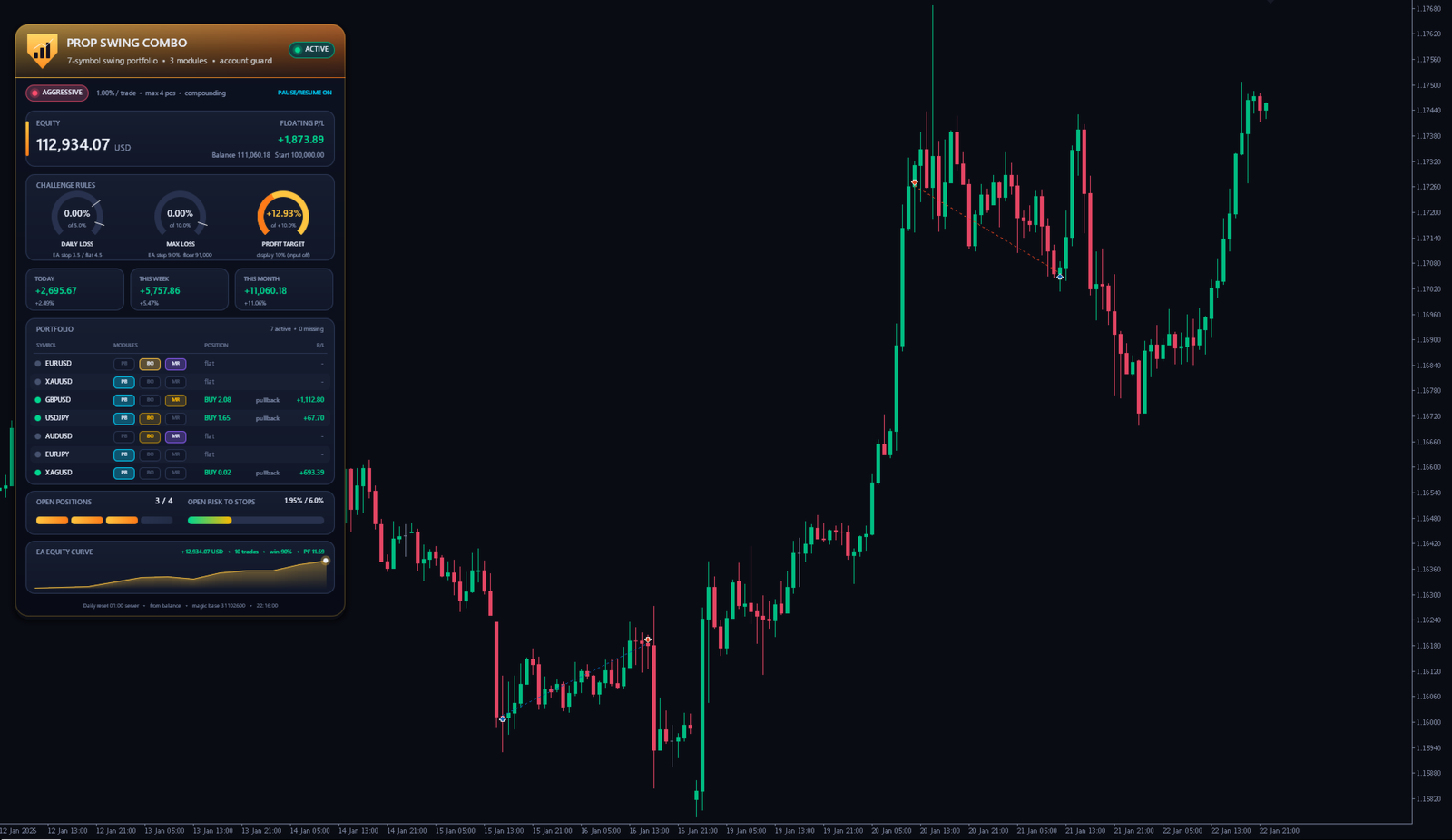
Prop Swing Combo is an automated Expert Advisor for MetaTrader 5. It trades a portfolio of 7 symbols from one chart: EURUSD, GBPUSD, USDJPY, AUDUSD, EURJPY, XAUUSD and XAGUSD. It was built for prop firm style challenge and funded accounts, where a daily loss limit and a maximum loss limit decide whether the account survives. Every trade has a stop loss, and an account guard checks the daily and the total loss all the time. It also has a separate Darwinex Zero mode for accounts that are judged by stable risk instead of loss limits.
Please read first
Prop Swing Combo does not guarantee that you pass any challenge, get funded or get any allocation, and it does not guarantee any profit. All figures below are backtests on historical data. Past results do not guarantee future results. The product is not affiliated with, endorsed by or connected to any prop firm, to Darwinex or to Darwinex Zero. Rules differ from firm to firm and can change, so please check the current rules of your own account, including whether Expert Advisors are allowed.
Recommended conditions
Attach the Expert Advisor to one chart only. The chart symbol and timeframe do not matter, because it trades all portfolio symbols itself. Your broker should offer the 7 symbols. Names with a suffix or prefix, and GOLD or SILVER instead of XAUUSD or XAGUSD, are found automatically, and the input SymbolOverrides lets you map a name by hand. Set StartingBalance to the size of your account, for example 100000. A virtual private server (VPS) is recommended, so the account guard keeps running. Please test the demo version in the Strategy Tester and then on a demo account first.
Trading logic
Each symbol uses one or two of three modules, with its own settings for each symbol. Trend pullback: the higher timeframe trend is read from two exponential moving averages, and a trade opens after the price pulls back into a zone of two faster averages and turns again. Trend breakout: a trade in the trend direction after a close beyond the range of the last bars. Mean reversion: when the trend strength (ADX) is low, the price closes outside a Bollinger Band and the RSI is extreme, a trade opens back towards the middle band and closes there or after a time limit. Signals are only taken on closed bars of H1 and higher timeframes. Only one position per symbol is open at a time.
Risk per trade and drawdown scaling
In the three presets the risk per trade is a percent of the current balance, so the lot grows after profits and shrinks after losses. When the balance falls more than 2% below its highest value, the risk is cut step by step, down to 40% of the normal risk at 6% below the peak, and it returns to normal as the balance recovers. The Custom mode can use a fixed risk based on the starting balance instead, and the scaling can be changed or switched off there.
Account rules guard (prop mode)
The daily loss is measured from the balance at the daily reset hour and includes open trades. At a daily loss of 3.5% no new trades are opened, at 4.5% all trades are closed, and trading resumes after the next reset. When the equity falls 9% below the starting balance, or 9% below the highest balance, all trades are closed and the Expert Advisor stops. Before each trade it checks that one more stop loss cannot cross these levels, together with the risk of the trades already open. An optional profit target closes everything and stops trading when it is reached. All levels can be changed in the inputs.
Pause and resume
With pause and resume on, the Expert Advisor keeps paper trading every module of every symbol in the background. When the average result of the last 20 paper trades of a module falls below minus 0.1 times the risk, real trading of that module pauses, and it resumes when the paper trades recover. In the tests this kept the equity of the Aggressive preset much closer to the starting balance in the first months, at the cost of some profit, so Auto turns it on for Aggressive only.
Darwinex Zero mode
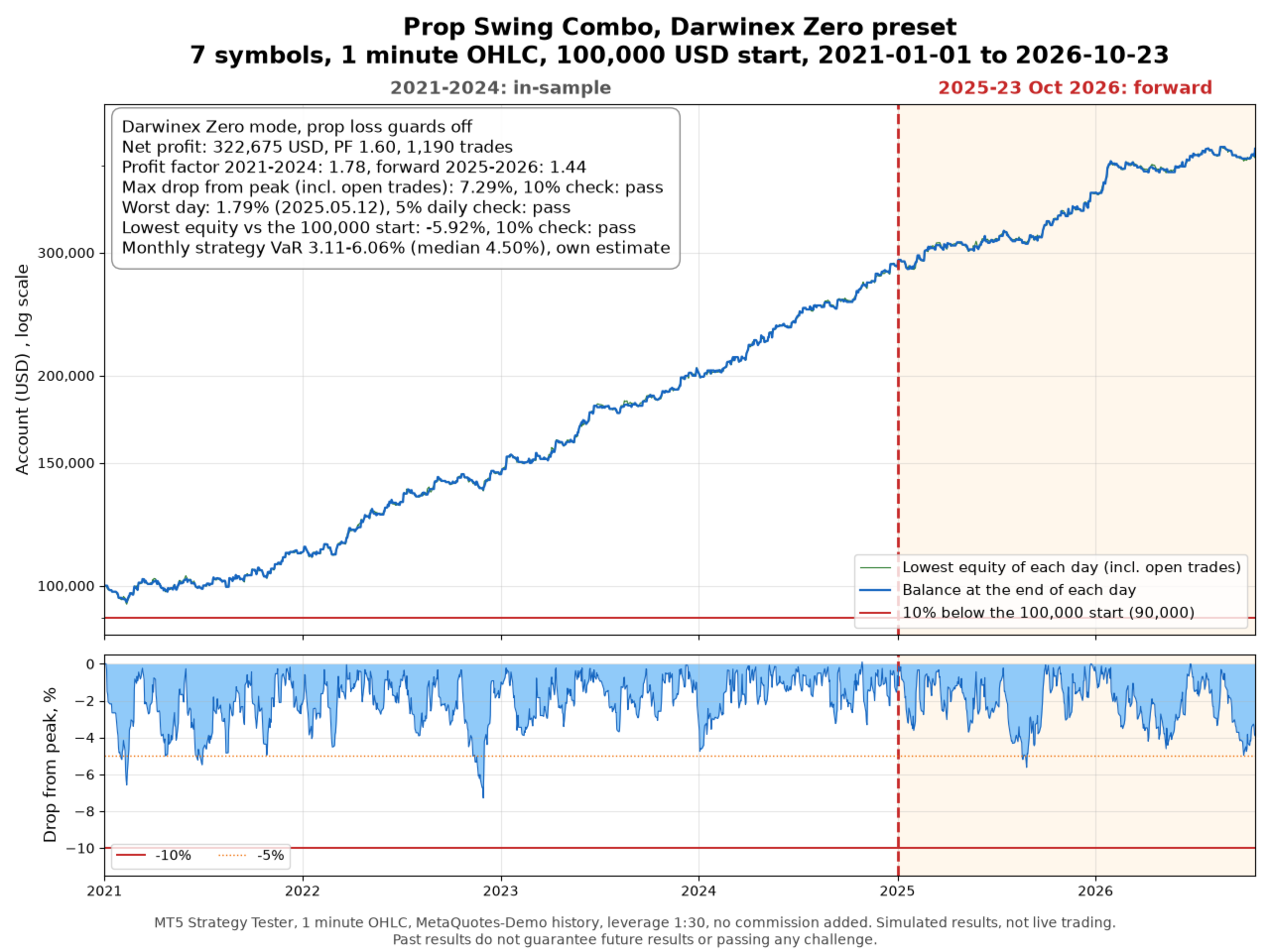
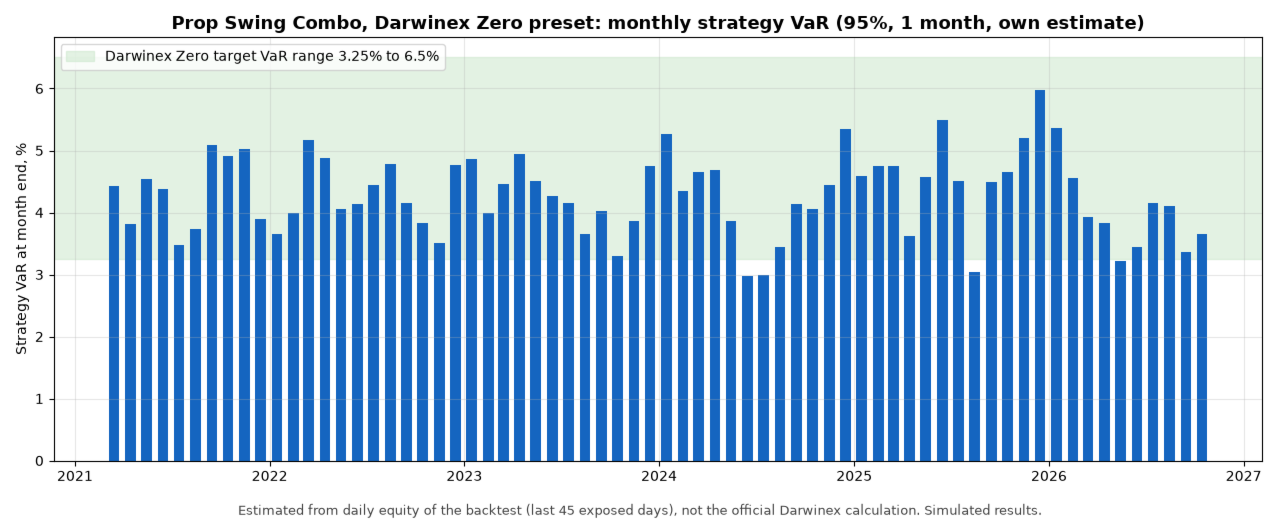
Set AccountMode to Darwinex Zero for a Darwinex Zero account. A DARWIN is rated on how stable the risk of the strategy is, and Darwinex scales the DARWIN to its own risk target, so a steady risk matters more than a high return. In this mode the prop loss guards are off by default (DZUseDailyGuard switches the daily guard back on), the risk per trade is a fixed percent of the current balance without drawdown scaling, an optional cap limits each position to a daily volatility (D1 ATR) in percent of the balance (the preset sets it to 2%, so it only acts in very volatile markets, because a tighter cap gave a less stable result in the tests), the number of open positions and the total risk at the stops are capped, and a safety stop closes everything at a set drop from the balance peak. Use the plain symbol names of Darwinex Zero and a leverage of 1:30 or less. In the test the Darwinex Zero preset (0.5% risk per trade, up to 6 positions, leverage 1:30) made 322,675 USD, profit factor 1.78 in 2021 to 2024 and 1.44 in 2025 to 2026, maximum drawdown 7.29%, with an estimated monthly strategy VaR between 3.11% and 6.06% (median 4.50%) at the 68 month ends, 67 of them inside the 3.25% to 6.5% range. This is my own estimate from the daily equity of the backtest, not the official Darwinex calculation, and it says nothing about a future D-Score or allocation.
What Prop Swing Combo does not use
No martingale, no grid, no hedging, no averaging down and no tick scalping.
Backtest results (simulated, not real trading)
Test data: MetaQuotes-Demo history, 1 January 2021 to 23 October 2026, 100,000 USD starting deposit, leverage 1:100 (Darwinex Zero mode 1:30), "1 minute OHLC" model. Prices from a prop firm server will differ. No commission was added in the tester; an estimate of 5 USD per lot for currencies and 0.0007% per side for metals is given for each preset.
How the settings were chosen: 10 symbols were optimised one by one with the genetic optimiser on 2021 to 2024, and each candidate had to stay stable when its inputs were moved a little. Seven symbols were kept and three were dropped. The period 2025 to 2026 was not used for the optimisation, but it was looked at when the symbols and the risk levels were chosen, so it is not a fully independent test. Extra strategy variants that looked good on 2021 to 2024 only were tested and rejected, because they lost most of their edge in 2025 to 2026.
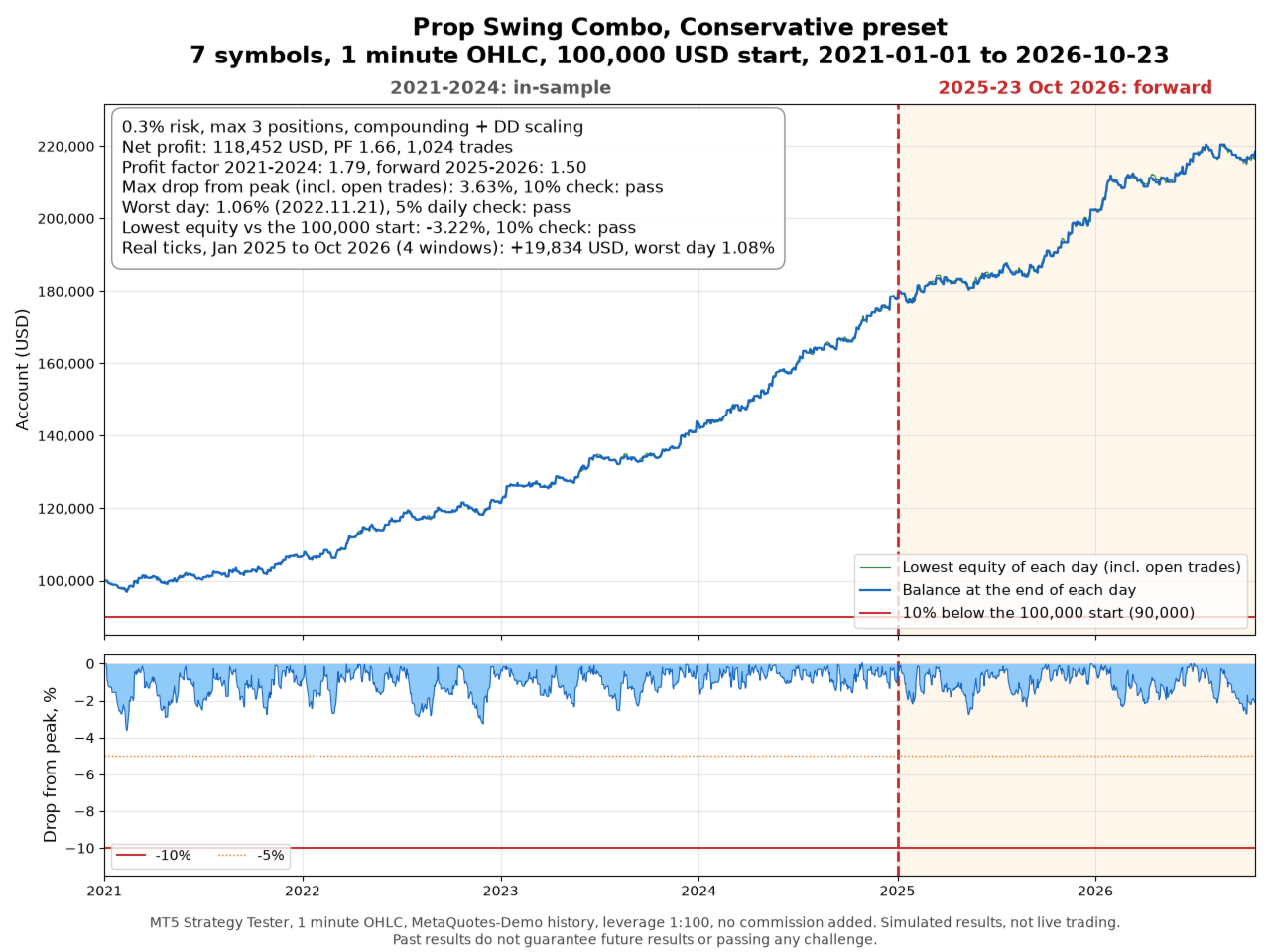
- Conservative, 0.3% risk per trade, up to 3 positions: net profit 118,452 USD, profit factor 1.79 in 2021 to 2024 and 1.50 in 2025 to 2026, maximum drawdown 3.63% from the peak, worst day 1.06%, lowest equity 3.22% below the start, 1,024 trades, estimated commission 3,868 USD.
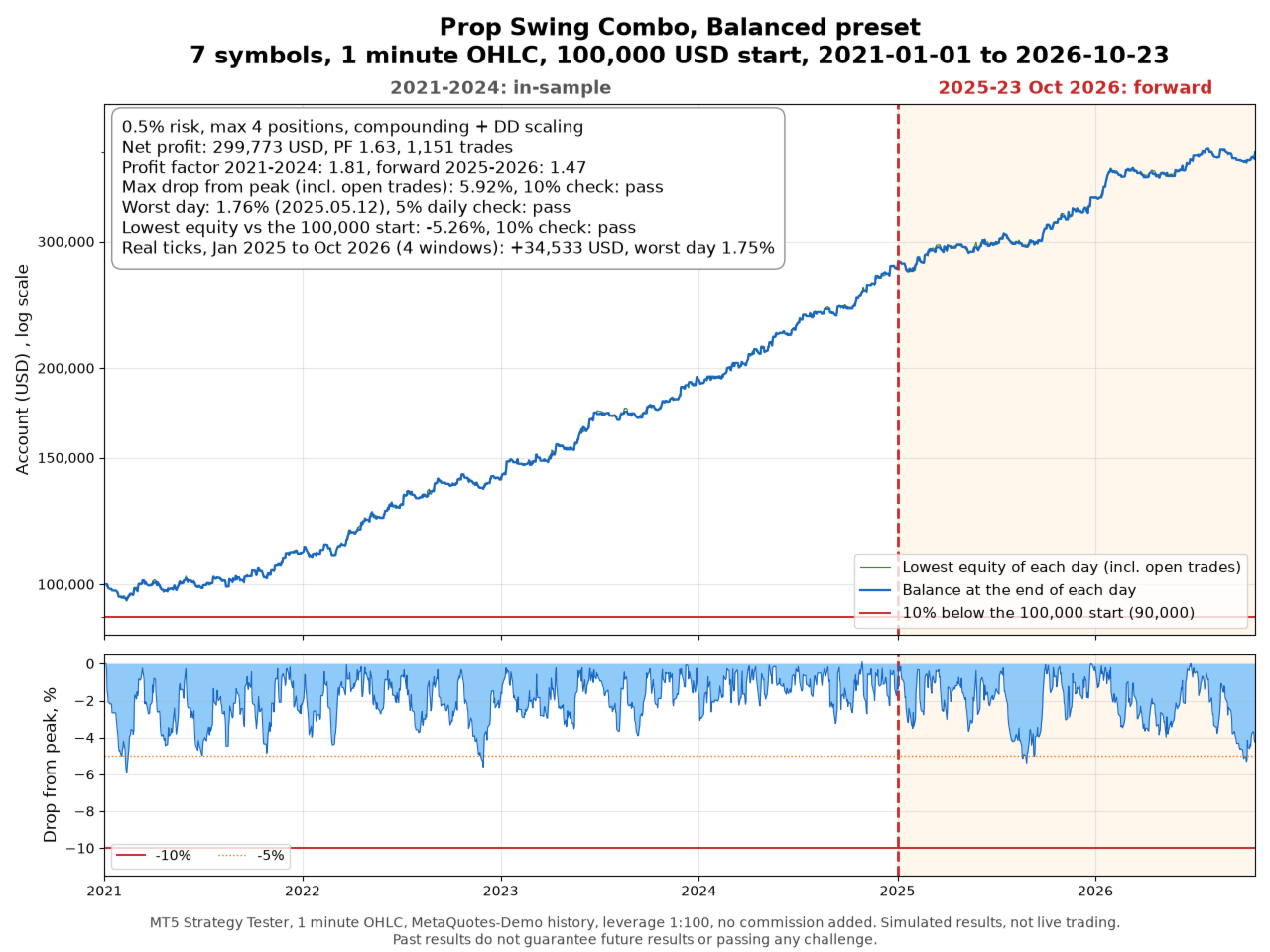
- Balanced, 0.5% risk per trade, up to 4 positions: net profit 299,773 USD, profit factor 1.81 in 2021 to 2024 and 1.47 in 2025 to 2026, maximum drawdown 5.92% from the peak, worst day 1.76%, lowest equity 5.26% below the start, 1,151 trades, estimated commission 10,093 USD.
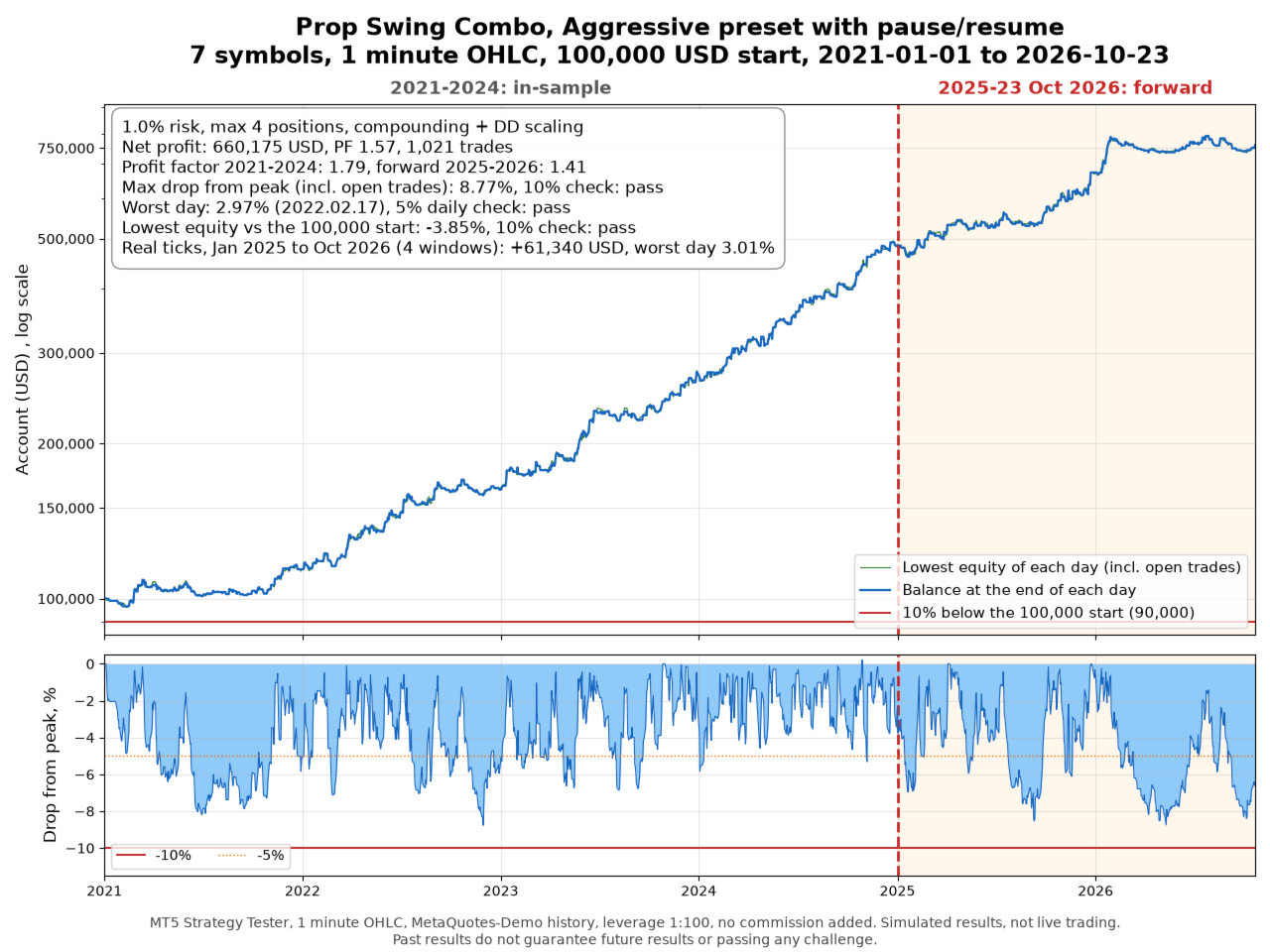
- Aggressive with pause and resume, 1.0% risk per trade, up to 4 positions: net profit 660,175 USD, profit factor 1.79 in 2021 to 2024 and 1.41 in 2025 to 2026, maximum drawdown 8.77% from the peak, worst day 2.97%, lowest equity 3.85% below the start, 1,021 trades, estimated commission 23,653 USD.
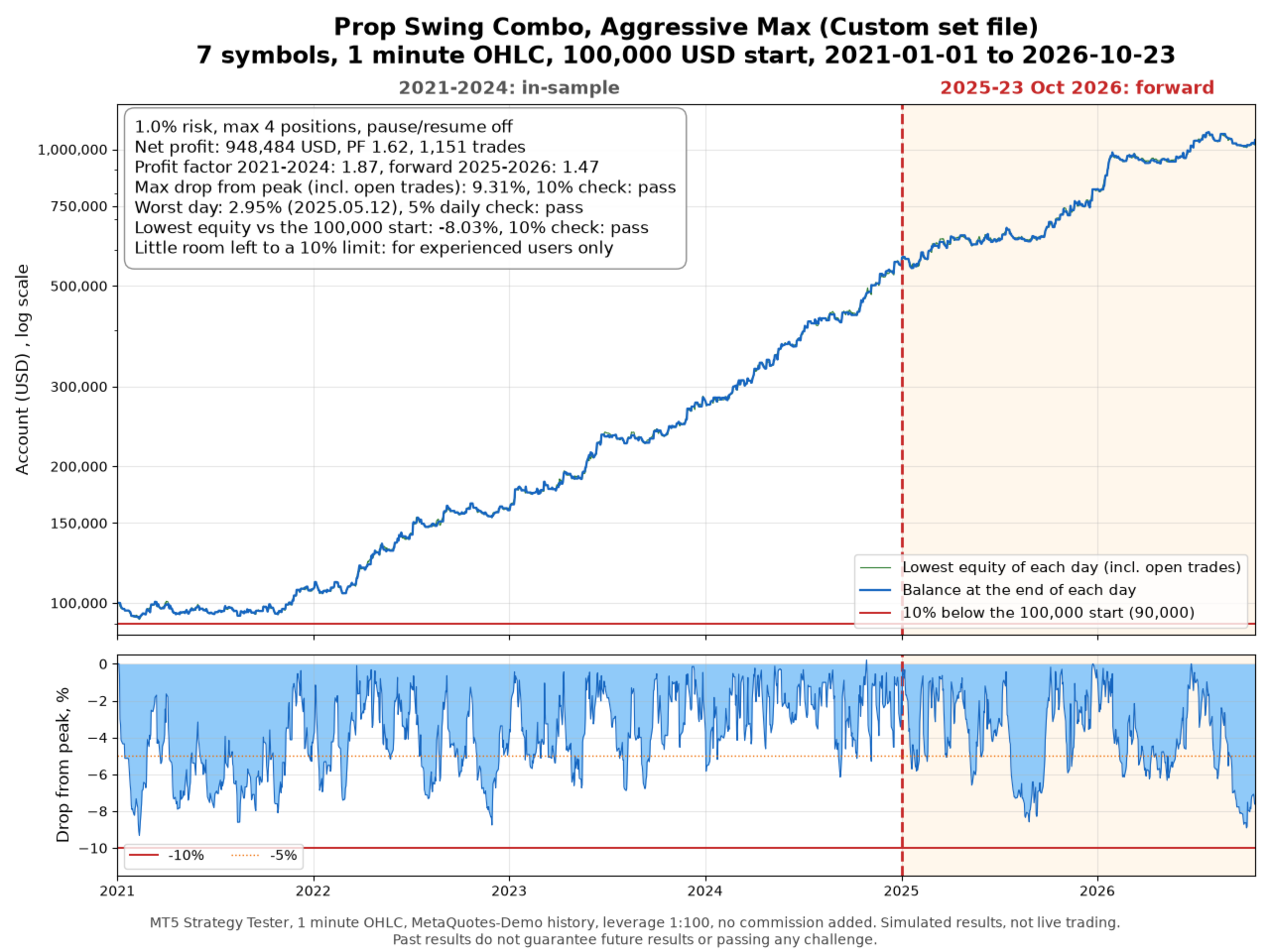
- Aggressive Max (Custom set file, pause and resume off), 1.0% risk per trade, up to 4 positions: net profit 948,484 USD, profit factor 1.87 in 2021 to 2024 and 1.47 in 2025 to 2026, maximum drawdown 9.31% from the peak, worst day 2.95%, lowest equity 8.03% below the start, 1,151 trades, estimated commission 32,374 USD.
Aggressive Max is the highest profit found that stayed inside a 10% limit in this test, but in 2021 its equity was 8.03% below the start, so it leaves little room. It is not one of the risk modes, only a set file for experienced users.
Net profit per calendar year in USD, 2021 to 2026 (2026 until 23 October). Conservative: +6,645, +14,837, +22,465, +33,698, +24,767, +15,601. Balanced: +10,368, +29,469, +54,195, +81,197, +70,040, +49,708. Aggressive: +14,019, +48,769, +112,579, +208,536, +188,474, +84,204. Aggressive Max: +7,090, +52,981, +123,714, +271,801, +260,451, +218,803.
The drawdown in this list is measured from the highest equity, including open trades. The account guard uses the highest closed balance, so a drawdown a little above 9% does not mean that the guard stopped trading.
The profits grow fast in the later years because the lot follows the balance. A funded account usually pays out its profits instead of keeping them, so a real account will not compound like this over six years. Please read the drawdown and the worst day as the risk level of a preset, not the final profit as a forecast.
In a second check, 1 January 2025 to 23 October 2026 was run again with "Every tick based on real ticks" in four windows, each starting fresh from 100,000 USD. Conservative made 19,834 USD on real ticks against 18,352 USD with 1 minute OHLC in the same windows, Balanced 34,533 against 35,372 USD, and Aggressive with pause and resume 61,340 against 57,938 USD, with a worst day of 3.01% and equity never more than 5.18% below a window start. All windows of all three presets stayed inside a 5% daily and a 10% maximum loss rule.
To see how long a target takes, a new start was simulated on the first trading day of every month, and a start failed if the equity fell 10% below it or one day lost 5% of it. A +10% target was reached after a median of 223 days (Conservative), 115 days (Balanced) and 67 days (Aggressive), and none of the 65 starts failed. With Aggressive, 9 starts reached +10% within 30 days and 28 within 60 days, so most starts need more than one month. The presets suit challenges without a short time limit better than fast challenges.
The equity charts in the screenshots are labelled "Prop Swing Combo, Conservative preset", "Balanced preset", "Aggressive preset with pause/resume", "Aggressive Max (Custom set file)" and "Darwinex Zero preset", each with "7 symbols, 1 minute OHLC, 100,000 USD start, 2021-01-01 to 2026-10-23". The dashed line marks 1 January 2025, and the red line marks a 10% maximum loss.
These tests have clear limits. The data is not from a prop firm server, and spreads, swaps, commission and slippage on your account will change the results. The optimiser chose the settings, so the results contain an element of chance. Other trades on the same account are not part of the tests, and the account guard only counts the trades of this Expert Advisor. A running challenge that is already in loss has less room than a new account.
The full test method and the set files are in my blog post: https://www.mql5.com/en/blogs/post/778903
Input parameters
The input names are given in English, as they appear in the Expert Advisor.
Main settings: AccountMode (Prop or Darwinex Zero), StartingBalance (account size, 0 uses the balance when it is first attached and remembers it), RiskMode (Conservative, Balanced, Aggressive or Custom), PauseResume (Auto turns it on for Aggressive only, On or Off), SymbolOverrides (manual symbol names, for example XAUUSD=GOLD.i;XAGUSD=SILVER), ShowDashboard (status panel on the chart).
Custom risk mode: CustomRiskPct (risk per trade in percent, up to 3), CustomMaxPositions (maximum open positions), CustomMaxPerSymbol, CustomRiskBase (starting balance or current balance), CustomDDScaleFrom, CustomDDScaleTo and CustomDDScaleMin (drawdown scaling, 0 is off).
Darwinex Zero mode: DZVolPct (daily volatility per position in percent of the balance), DZMaxTradeRiskPct (loss at the stop per trade), DZMaxPositions, DZMaxOpenRiskPct (total loss at the stops), DZMaxDDPct (safety stop from the balance peak, 0 is off), DZUseDailyGuard.
Account rules guard: DailyStopPct (no new trades from this daily loss), DailyFlatPct (close all trades at this daily loss), DailyReference (daily loss measured from the balance, or from the higher of balance and equity, at the reset), DayResetHour (reset hour in server time, please match your firm), MaxTotalDDPct (close all and stop at this loss), MaxOpenRiskPct (maximum total risk of all open trades), ProfitTargetPct (close all and stop at this profit, 0 is off).
Small accounts: AllowMinLot (open the minimum lot when the risk percent gives less), MinLotMaxRiskPct (only if that trade risks at most this percent). The presets set AllowMinLot to false, as in the tests.
Advanced: PortfolioOverride (own portfolio string, empty uses the built in portfolio), MagicBase (magic number base), TradeComment (comment of the trades).
Support
Questions and suggestions are welcome in the product comments or through private messages on MQL5.
Risk note
Trading currencies and metals on margin carries a high risk. A stop loss limits the loss of a single trade but cannot prevent losses, and gaps or slippage can make a loss larger than planned. The account guard works only while the terminal is running and connected. Please start on a demo account.