Vector Trend EA
- Experts
-
Carlos Dante Diaz
 Hi, I'm Carlos Díaz, a programmer and algorithmic trader from Argentina with more than 10 years of experience as a trader. I design, code and test all my Expert Advisors in MQL5, using MetaEditor and the MetaTrader 5 Strategy Tester.
 - Version: 1.0
- Activations: 15
Vector Trend EA
Trades with the trend and increases exposure only when the market is on your side
Tired of EAs that raise their risk right when they are losing? Vector Trend EA does the opposite: it always trades with a controlled base risk, and only scales up its investment after a win, within a short cycle and with a defined cap. Any loss ends the cycle and returns to the base risk.
What you get:
- Trend-following strategy with two trend filters and an optional momentum filter to avoid weak entries.
- Stop and target adapted to market volatility, with the target defined as a multiple of the stop (2:1, 3:1, 1.5:1, whatever you prefer).
- Configurable positive streak progression, with a safety cap.
- Risk as a % of balance (with automatic currency conversion) or fixed volume.
- Optional trailing stop, time filter and forced close by hour.
- Longs and shorts can be enabled separately.
- No indicators drawn on the chart: clean and lightweight.
How it works
1. Entry. The EA evaluates the signal at the open of each new candle. It combines two trend filters and, if you enable it, uses the momentum filter to confirm that the momentum supports the direction of the trade.
2. Stop and target. The stop distance is calculated from current volatility (ATR × multiplier). The take profit is a multiple of that stop: with RR_Ratio = 2, you earn twice what you risk if the trade reaches its target.
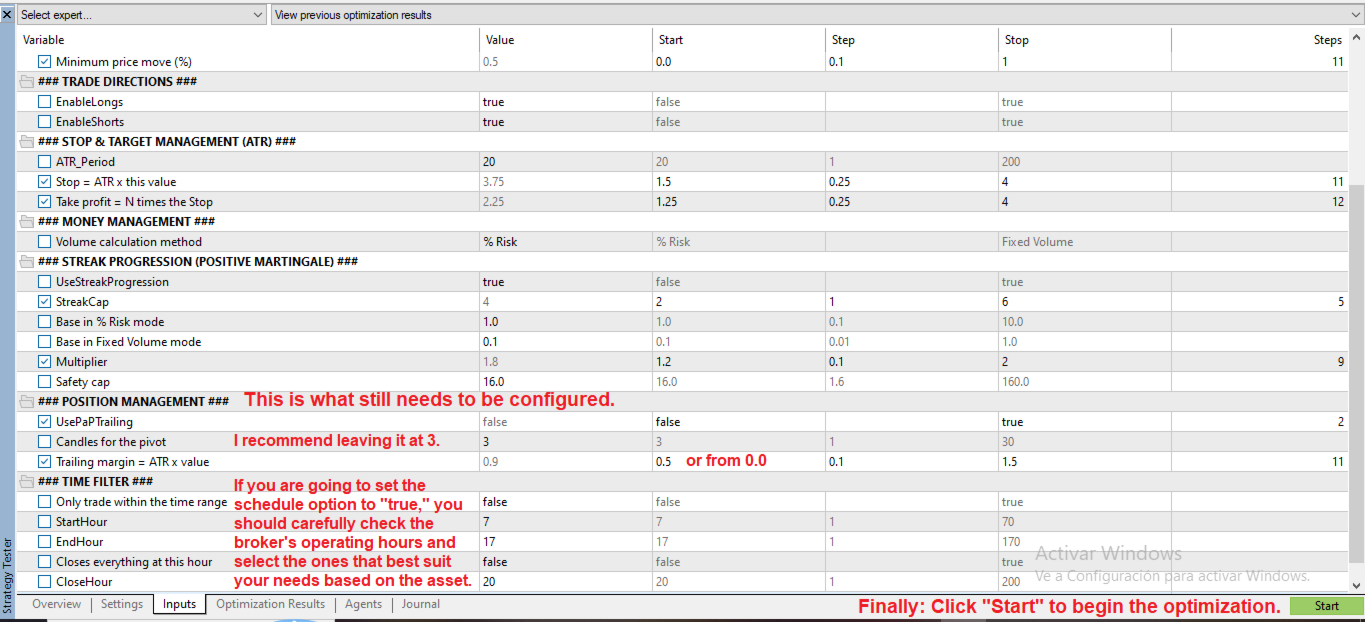
3. Optional trailing. It moves the stop following the lowest or highest point of the last N candles, with a configurable margin.
4. Time filter. You can limit the hours when entries are allowed and force the closing of all positions at a set hour.
Positive streak progression: how it works
The EA operates in two states: NORMAL and REINFORCED.
- NORMAL: every trade risks the base risk (1% by default).
- Activation: reinforcement is activated only by the loss → win pattern. In other words, after a loss, the first winning trade activates reinforcement.
- REINFORCED: while reinforcement is active, the risk is multiplied on each consecutive win, until the streak limit is reached. With a base risk of 1%, a multiplier of 1.4 and a streak limit of 3: level 1 = 1.4% and level 2 = 1.96%.
- Streak limit: once reached, the EA returns to NORMAL.
- Any loss ends the cycle and returns to NORMAL.
- Safety cap: the risk never exceeds the maximum value you set.
- A loss on a reinforced trade is larger than a loss in NORMAL state. Adjust the multiplier, limit and cap to your risk tolerance.
If you prefer fixed volume instead of a percentage, the progression works the same way, scaling the lots.
Example 1 — Streak limit = 3 | When the chain of reinforced trades produces profits (Initial capital $100,000 · Base risk 1% · Multiplier 1.4 · Ratio 2:1)
| # | State | Result | Risk | P/L | Capital |
|---|---|---|---|---|---|
| 1 | NORMAL | Loss | 1% | -$1,000 | $99,000 |
| 2 | NORMAL | Win (recover) | 1% | +$2,000 → activates reinforcement | $101,000 |
| 3 | REINFORCED (level 1) | Win | 1.4% | +$2,800 → scales up | $103,800 |
| 4 | REINFORCED (level 2) | Win | 1.96% | +$3,920 → limit reached, returns to normal | $107,720 |
| 5 | NORMAL | Win | 1% | +$2,000 (no previous loss, stays NORMAL) | $109,720 |
| 6 | NORMAL | Loss | 1% | -$1,000 | $108,720 |
| 7 | NORMAL | Win (recover) | 1% | +$2,000 → activates reinforcement | $110,720 |
| 8 | REINFORCED (level 1) | Win | 1.4% | +$2,800 → scales up | $113,520 |
| 9 | REINFORCED (level 2) | Win | 1.96% | +$3,920 → limit reached, returns to normal | $117,440 |
| 10 | NORMAL | Win | 1% | +$2,000 | $119,440 |
Result with progression: +$19,440 (+19.44%)
The same trade history with a fixed 1% risk: +$14,000 (+14%)
→ Same winning history, almost 39% more profit simply by making better use of the two recoveries.
Illustrative example with a simplified calculation based on the initial capital. It is not a result of the EA. In the real EA, risk is calculated on the current balance.
Momentum filter: how to read it
The filter uses MT5's Momentum indicator, which compares the current price with the price N candles ago:
- 100: the price did not change.
- 101: the price rose 1% over those N candles.
- 99: the price fell 1%.
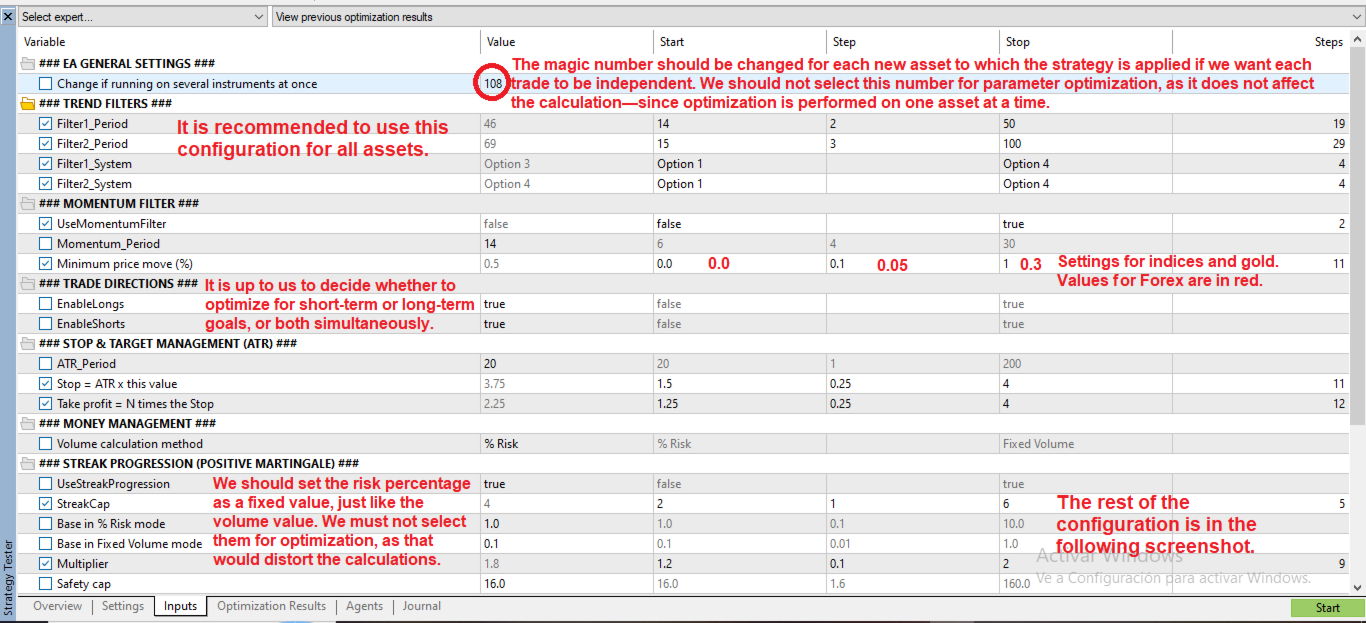
The Momentum_Minimum parameter is the minimum price move, in %, that must have occurred over those N candles. With 0.5, a buy requires the price to have risen at least 0.5% (momentum of 100.5 or more), and a sell requires it to have fallen at least 0.5%. With 0, the filter only requires the momentum to point in the direction of the trade.
Since each instrument moves differently, it is best to optimize this value per instrument. Approximate starting ranges:
| Parameter | Forex (e.g. EURUSD M15) | Gold / indices |
|---|---|---|
| Momentum_Period | from 6 to 30, step 4 | from 6 to 30, step 4 |
| Momentum_Minimum | from 0 to 0.30, step 0.05 | from 0 to 1.0, step 0.1 |
These are starting values, not a guarantee: adjust them to your instrument and timeframe. You can also include UseMomentumFilter (true/false) in the optimization, so the optimizer decides whether the filter helps or not.
Main parameters
- Trend filters (1 and 2): period and system (options 1 to 4), optimizable.
- Momentum filter: optional, with period and minimum price move.
- Directions: longs and shorts separately.
- Stop and target: ATR period, ATR multiplier and RR_Ratio .
- Money management: % risk or fixed volume, and streak progression (base, multiplier, limit and cap).
- Position: trailing with N pivot candles and margin.
- Time filter: entry time range and closing hour.
- Magic number: change it if you run the EA on several instruments at the same time.
Usage and optimization recommendations
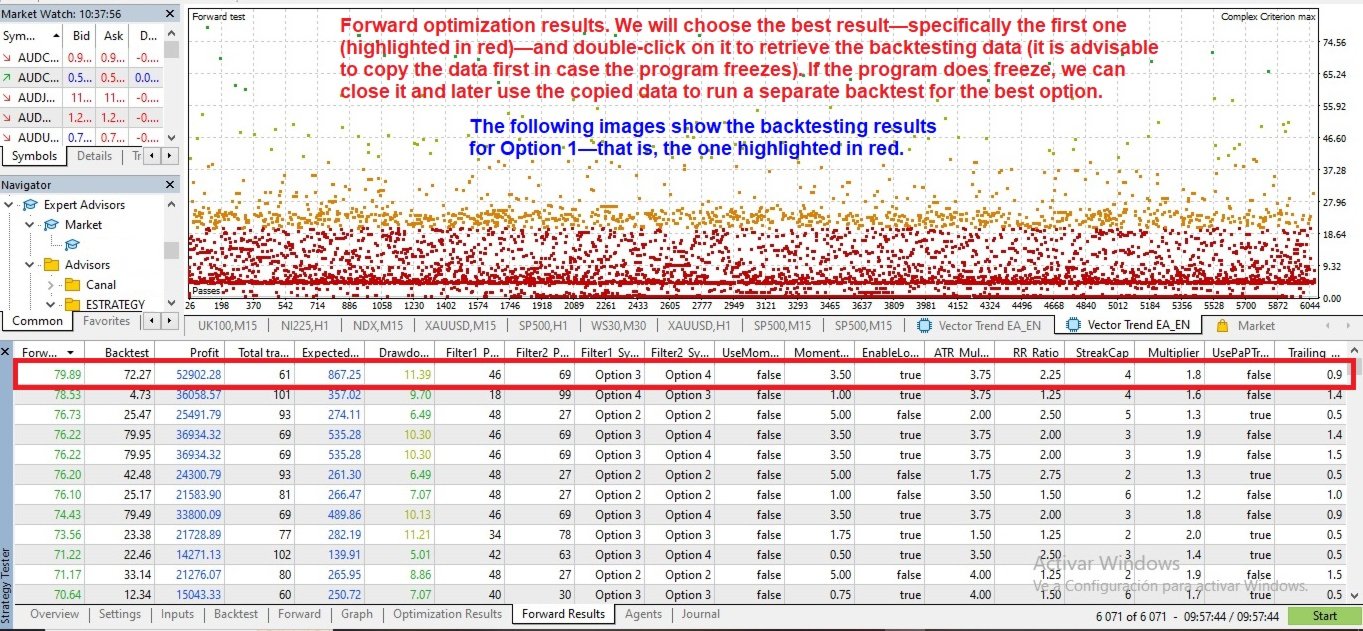
- Very fast optimization: you can test hundreds of combinations in just a few hours.
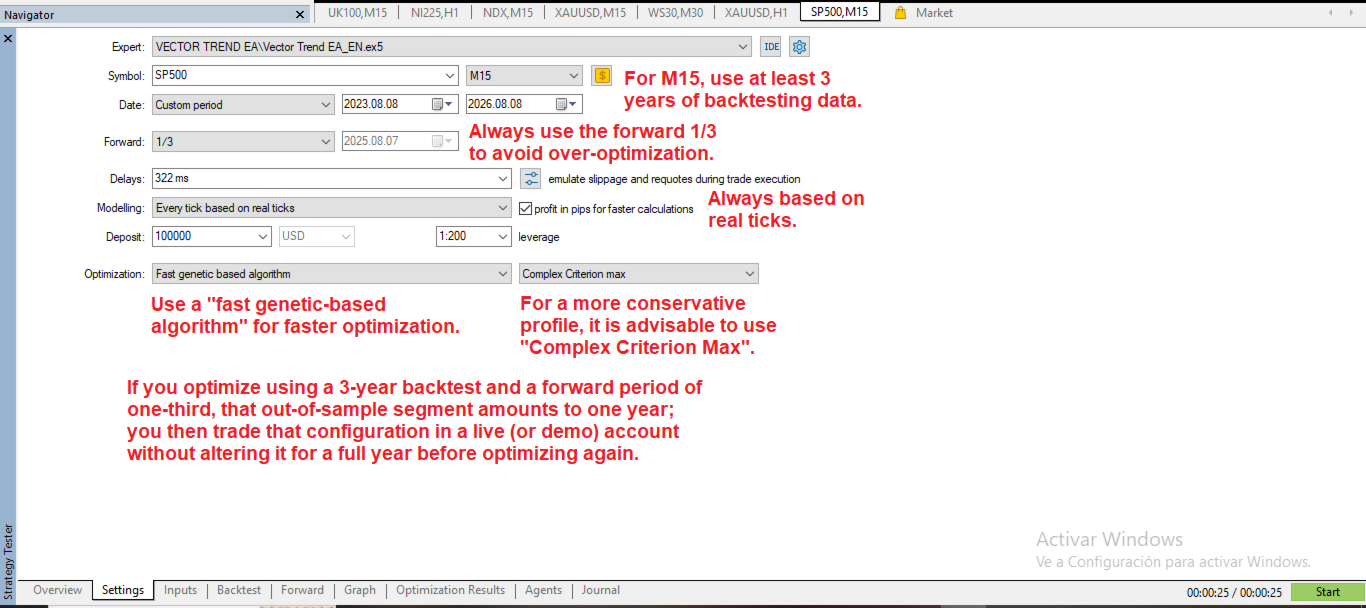
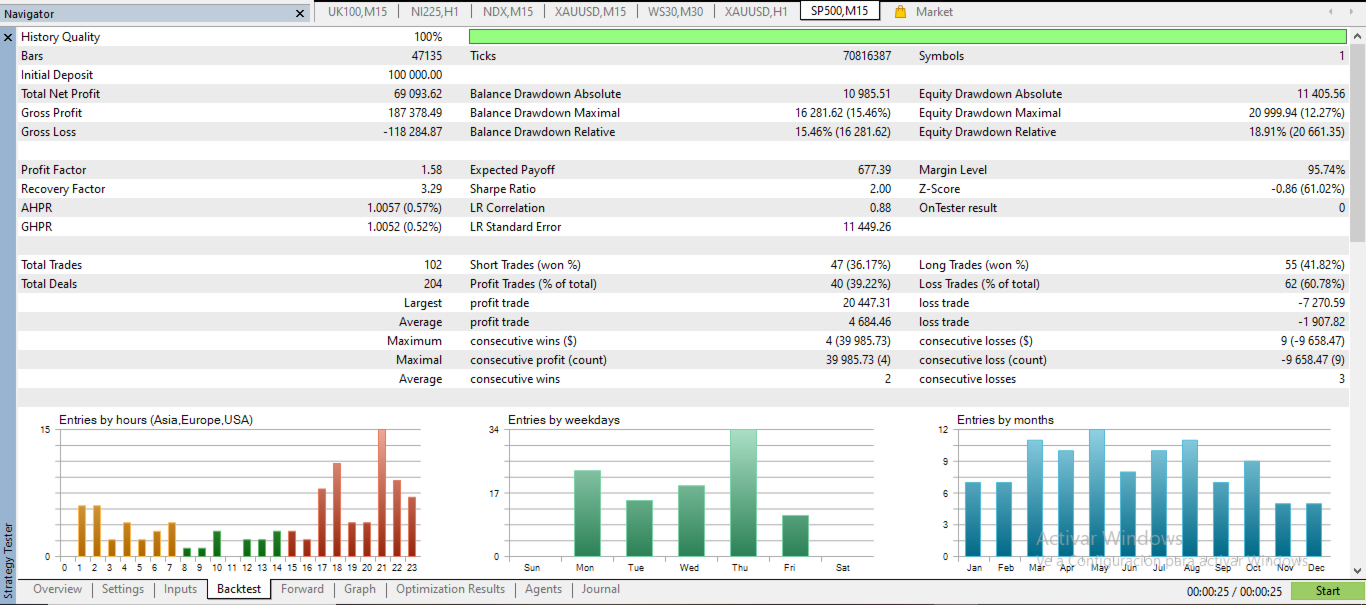
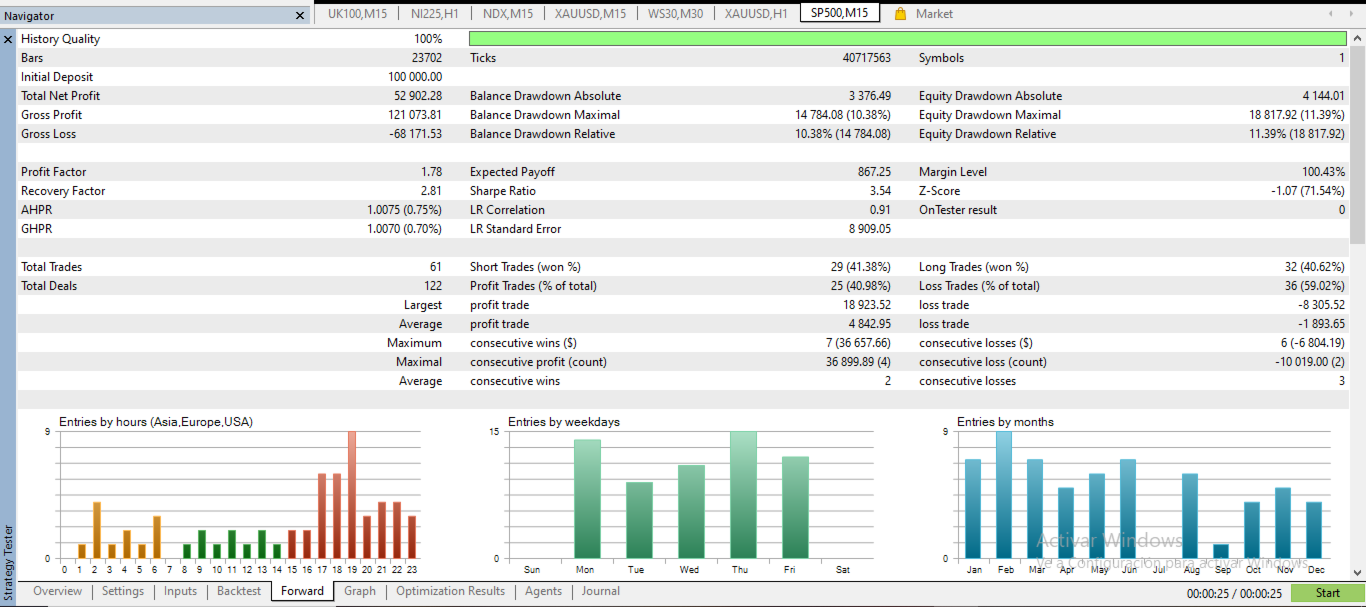
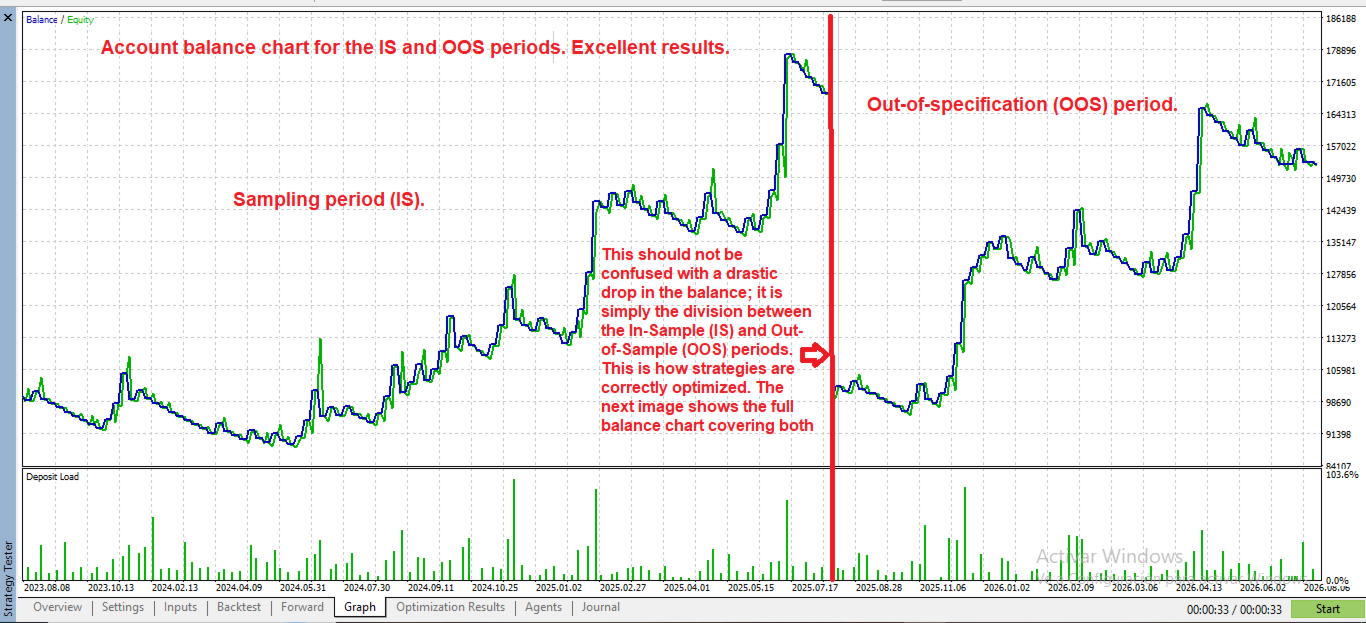
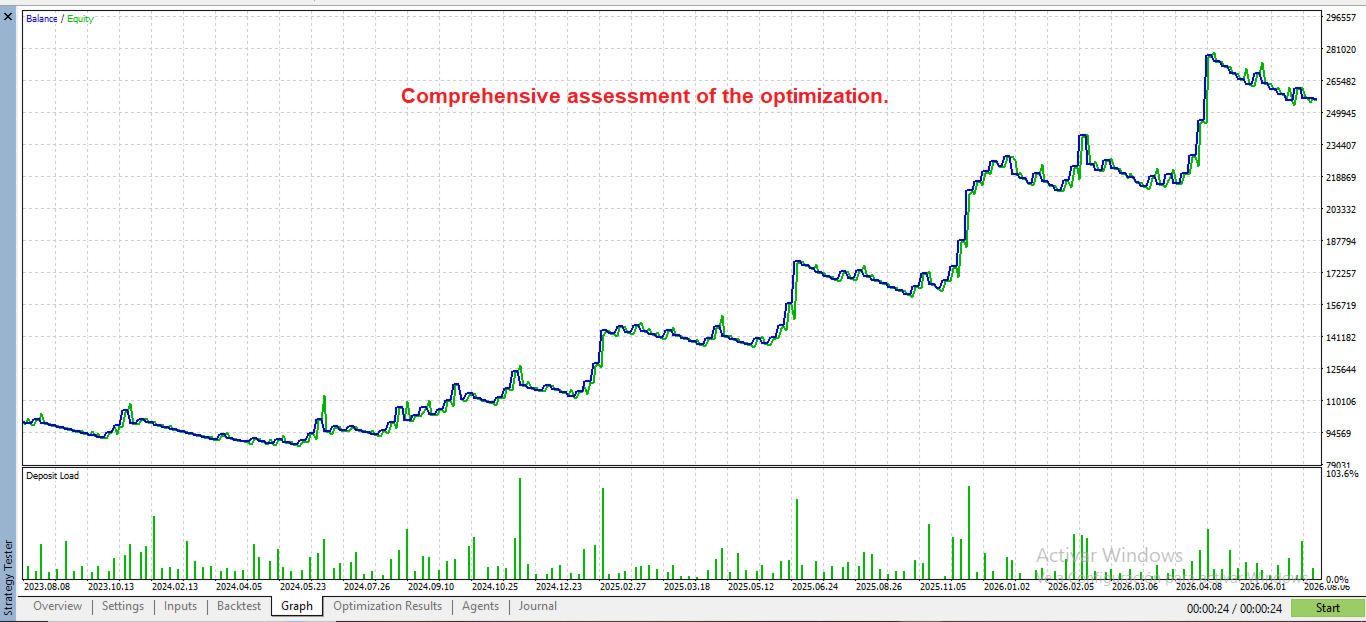
- In the screenshots I include an example configuration for parameter optimization, which works as a starting point for any instrument.
- Always use a forward period when optimizing, and then trade on a demo account for as long as the forward period lasted before going live.
- Start with both longs and shorts enabled. If, when you analyze the results, one side performs clearly worse than the other, you can optimize them separately or keep only the better one active.
- The EA is designed to be optimized with % risk. If on some instrument it does not work well that way (this is rare), use fixed volume. You can also choose it if you simply prefer to calculate with a fixed lot.
- Suggested modeling: "Every tick based on real ticks", fast genetic algorithm optimization and the "Complex Criterion max" criterion.
Risk warning: trading in financial markets involves a risk of loss. Past results do not guarantee future results. This EA does not promise profits.