RR Calculator Pro
- Utilities
- Version: 2.21
- Updated: 2 October 2026
- Activations: 5

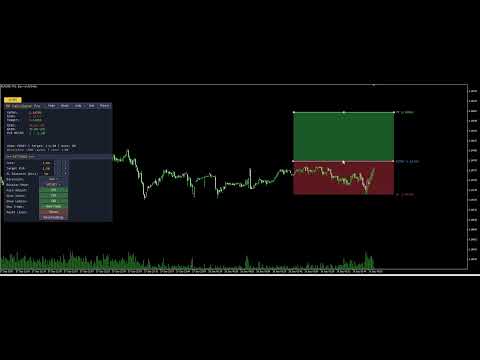
Interactive Risk/Reward planner with draggable Entry/SL/TP lines, auto-adjusting R:R ratio, colored zones behind price bars, on-line price labels, and a professional draggable panel with live in-panel settings.
Full Product Description
Overview
RR Calculator Pro is a professional trade-planning tool for MetaTrader 5 that turns your chart into an interactive Risk/Reward workbench. Instead of doing mental math or opening a separate calculator every time you plan a trade, you drag three price lines directly on the chart — Entry, Stop-Loss, and Take-Profit — and the tool instantly calculates and displays your risk, reward, R:R ratio, and money exposure in real time.
The tool combines a chart-integrated visual system (draggable price lines, colored risk/reward zones behind the candles, on-line price labels) with a professional draggable information panel that shows all the numbers in the format you prefer (pips, points, money, or account percentage).
Whether you trade forex, gold, indices, futures, or crypto, RR Calculator Pro removes the friction between "seeing a setup" and "sizing it properly." Every trade decision becomes visual, immediate, and quantitatively clear.
Understanding R:R — Why This Matters
The Risk-to-Reward Ratio (written 1 : X ) is the single most important number in trade management. It tells you how much profit you stand to make relative to the loss you accept if the trade goes against you.
- 1 : 1 — reward equals risk. Break-even long term unless win rate is above 50%.
- 1 : 2 — reward is twice the risk. You can lose 60% of trades and still be profitable.
- 1 : 3 — reward is three times the risk. You can lose 70% of trades and still profit.
Traders who consistently use good R:R ratios ( 1:2 or better) can sustain lower win rates and still grow their accounts. RR Calculator Pro makes this ratio explicit, editable, and visual — before you place the trade.
The Two Sides of R:R — Both Adjustable
In the notation 1 : X , the 1 represents your unit of risk (the SL distance) and X represents the reward multiple (the TP distance in units of R).
Most calculators only let you change X (the target R:R multiplier). RR Calculator Pro lets you adjust both sides independently:
- Target R:R button — changes X (moves the TP)
- SL Distance button — changes R itself (moves the SL, adjusts TP proportionally if auto-adjust is on)
This means you can prototype trades from either direction:
- Volatility-first: pick your SL distance based on market structure, then choose a target R:R
- Reward-first: fix your target R:R, then adjust SL distance to fit market conditions
Key Features
Three Draggable Price Lines
- Entry (blue): your intended entry price
- Stop-Loss (orange-red): where the trade thesis is invalidated
- Take-Profit (green): your target price
- Grab any line with the mouse and drag it — the others reposition intelligently to maintain your target R:R (or stay fixed if auto-adjust is off)
Colored Risk & Reward Zones Two rectangles are drawn between the price levels, showing at a glance:
- The Risk zone (Entry to SL) in dim red — the area of maximum loss
- The Reward zone (Entry to TP) in dim green — the area of maximum gain
The zones are drawn behind the price bars (using OBJPROP_BACK, the only way in MQL5 to achieve this effect), so they never obscure your candles. Colors and visibility are fully configurable.
On-Line Price Labels Each line carries its own text label at the right edge, showing what it represents and the current price:
ENTRY 1.08432 SL 1.08300 TP 1.08650
Labels move with the lines automatically and update as the chart scrolls.
Auto-Adjust Intelligence With auto-adjust on:
- Drag Entry → both SL and TP reposition to keep the same risk and target R:R
- Drag SL → TP repositions to maintain target R:R
- Drag TP → SL repositions to derive risk from the new reward
With auto-adjust off, each line moves independently for full manual control.
Four Display Modes Switch on the fly between:
- Pips — classic forex convention (5-digit brokers auto-detected)
- Points — raw broker units
- Money — risk and reward in your account currency
- Account % — risk and reward as a percentage of account balance (institutional style)
Direction Control The tool auto-detects Long vs Short from the SL position relative to Entry, but you can also force a specific direction (useful for planning both scenarios on the same chart before committing).
The Professional Panel
Draggable Panel The information panel starts in the corner you choose but can be moved anywhere on the chart by clicking and dragging its title bar. Position is saved automatically and restored when you reopen MT5.
Top-Row Buttons Five buttons in the panel title bar for the most-used actions:
- Hide — collapses the panel to a small toggle button
- Mode — cycles display modes (Pips → Points → Money → Percent)
- Auto — toggles auto-adjust on/off
- Set — opens the settings sub-panel
- Reset — resets lines to default positions around current price
Always-Visible Toggle Button When you hide the panel, a small [ ] RR button remains in the corner so you can bring the panel back with a single click. The toggle button label reflects the current state.
Settings Sub-Panel (11 rows) Click Set to open a rich configuration panel below the main panel:
- Lots — position size with [-] [+] presets
- Target R:R — reward multiplier with [-] [+] presets
- SL Distance (pts) — direct control over the risk unit
- Direction — cycle Auto / Long / Short
- Display Mode — cycle Pips / Points / Money / Percent
- Auto Adjust — ON / OFF toggle
- Show Zones — ON / OFF toggle
- Show Labels — ON / OFF toggle
- New Trade — recreates lines if missing, positions at current price
- Reset Lines — repositions existing lines to defaults
- Reset Settings — restores all runtime settings to your input defaults
All settings apply instantly, with no need to remove and re-add the indicator.
Chart Lines Are Preserved on Hide Unlike simpler tools, hiding the panel does not remove your Entry/SL/TP lines from the chart. Your trade plan stays visible and interactive even when the panel is minimized.
Two Status Lines Always visible at the bottom of the panel:
- Line 1: Mode: PIPS | Target: 1:2.00 | Auto: ON
- Line 2: Direction: LONG (auto) | Lots: 1.00
Full State Persistence
Everything you customize persists between MT5 restarts, per chart:
- Panel position and visibility
- Settings sub-panel visibility
- All runtime settings (Lots, Target R:R, Direction, Display Mode, Auto, Show Zones, Show Labels)
- Line prices (Entry, SL, TP) — your active trade plan is exactly where you left it
Each chart has its own state file (identified by ChartID), so you can plan different trades on different charts simultaneously without them interfering with each other.
Practical Trading Applications
Pre-Trade Sizing Before placing any order, drag the three lines to your planned levels. The panel immediately shows what you stand to lose in dollars (or your account currency), what you stand to gain, and the resulting R:R. If the ratio is below your minimum threshold (say, 1:1.5), you can either move the SL closer, extend the TP further, or skip the trade entirely — all without leaving the chart.
Position Sizing by Risk Percentage Set display mode to Percent and adjust lots until the "RISK" line reads your target percentage of account (e.g., 1.00%). Now your position is sized exactly to your risk rules, regardless of market volatility.
Trade Plan Documentation Capture a screenshot of the chart with the lines, zones, labels, and panel visible. It becomes an instant, self-explanatory trade plan for your journal or for sharing with mentors and communities.
"What If" Analysis Play with the SL distance and Target R:R settings to explore trade-off scenarios. Would a wider SL help you avoid stop-hunting but reduce your R:R? The tool answers this instantly, visually.
Comparing Long and Short Setups Set Direction to "Long", position your lines, note the numbers. Switch Direction to "Short" and see the same setup inverted. Useful for range-bound markets where either direction could work.
Full Input Parameter List
Trade Settings
- Position size (lots)
- Target R:R ratio
- Trade direction (Auto / Long / Short)
Display Settings
- Distance display mode (Pips / Points / Money / Percent)
- Enable auto-adjust R:R
Chart Lines
- Entry line color, Stop-loss color, Take-profit color
- Line width (1-5)
- Line extends left / right (bars)
Risk / Reward Zones
- Show colored fill zones (on/off)
- Risk zone color
- Reward zone color
- Draw zones behind price bars (on/off)
Price Labels
- Show price labels on lines (on/off)
- Label font size
- Label font name
Panel Settings
- Show info panel
- Initial panel corner (Top-Left, Top-Right, Bottom-Left, Bottom-Right)
- Panel X / Y offset (px)
- Font size
- Background, header, text, and accent colors
Persistence
- Save state between MT5 restarts
- Panel refresh interval (seconds)
Technical Specifications
- Platform: MetaTrader 5 (build 3815 or later)
- Type: Chart-window custom indicator (no separate window)
- CPU load: Minimal — line segments only recompute on new bars, not every tick
- Memory: Standard indicator footprint plus one small state file per chart (~500 bytes)
- No DLL dependencies — pure native MQL5
- No external network requests — fully offline
- File system access: state persistence file inside the MT5 sandbox only
- Compatible with: all account types (real, demo, netting, hedging)
- Broker support: universal — auto-detects tick value and tick size, falls back to contract size
- Language: all interface elements in English
Why RR Calculator Pro Over Free Alternatives
Basic R:R indicators have consistent limitations:
- Static text-only display — no draggable lines, forcing you to type prices manually
- Fixed R:R side — you can only adjust the reward, not the risk directly
- No colored zones — impossible to visualize risk and reward areas at a glance
- No on-line labels — you must open the tool's panel to see what each line represents
- Panel gets in the way — anchored to a specific corner, cannot be moved
- Lines vanish when panel is hidden — losing your active trade plan
- No state persistence — settings reset every time you restart MT5
- Cannot adjust settings live — requires removing and re-adding the indicator
- Broken alignment between visual elements — lines and zones drift out of sync when dragged
RR Calculator Pro addresses every one of these limitations. It is designed as a professional daily-use tool for traders who take position sizing seriously.
Support and Updates
- Free lifetime updates via the MQL5 Market
- Responsive support: contact via MQL5 profile messages
- Bug fixes prioritized within 48 hours
- Feature requests welcome — leave a comment on the product page
- Detailed change log with each release
Frequently Asked Questions
Q: Does the tool actually place trades? A: No. RR Calculator Pro is a visual planning tool. It calculates risk, reward, R:R, and money exposure, but it does not send orders to the broker. You use it to plan the trade, then place the order manually or through your preferred execution method.
Q: Does it work on all brokers? A: Yes. The money calculations use SYMBOL_TRADE_TICK_VALUE and SYMBOL_TRADE_TICK_SIZE , with a fallback to SYMBOL_TRADE_CONTRACT_SIZE . This covers forex, CFDs, futures, indices, metals, and crypto across all standard MT5 brokers.
Q: Can I use this in the Strategy Tester? A: Yes, the indicator loads and displays correctly in the Strategy Tester Visual Mode. However, the money and account-percent calculations use the live account values from your terminal, so results in the tester assume your current live account context.
Q: Do the lines disappear when I close and reopen the chart? A: No. Line prices are saved in the persistence file and restored on reload. If you want a fresh setup, click the New Trade button.
Q: What happens if I accidentally delete a line from the chart? A: Click New Trade in the settings panel. It recreates all three lines at the current price with default distances.
Q: How do I make my SL wider or narrower without touching the mouse? A: Open settings and use the SL Distance (pts) row. The [-] and [+] buttons cycle through preset distances (20, 50, 100, 200, 300, 500, 1000, 2000 points). If Auto Adjust is on, the TP repositions automatically to maintain your target R:R.
Q: Can I use multiple instances of the tool on different charts? A: Yes. Each chart runs an independent instance with its own state file, settings, and line positions. Plan different trades on different charts simultaneously.
Q: The zones sometimes look opaque — can I make them more transparent? A: MQL5 does not support alpha channels for chart objects (a known platform limitation). The workaround built into RR Calculator Pro is:
- Zones are drawn with OBJPROP_BACK = true so they appear behind the candles
- Default zone colors are dim (dark red / dark green) rather than saturated
- You can further tune the colors via the input parameters
Q: What is the difference between "New Trade" and "Reset Lines"? A: Reset Lines repositions existing lines to defaults around the current price. New Trade does the same, but also recreates the lines if any were accidentally deleted. Use New Trade when starting a fresh plan; use Reset Lines to quickly recentter around the current market.
Q: Can EAs read the current risk and reward values from this indicator? A: The indicator does not expose iCustom buffers because it does not compute values on price bars — it maintains state on chart-object positions. For automated trading, you would replicate the calculation logic inside your EA using the same formulas (which are all standard).
Getting Started
- Purchase and download from MQL5 Market
- The indicator installs automatically to your MetaTrader 5 terminal
- Drag RR_Calculator_Pro from the Navigator onto any chart
- Accept default settings — the tool immediately displays Entry, SL, and TP lines at current price with a 1:2 R:R and 100-point SL
- Drag any line to reposition it — watch the panel update in real time
- Click Set in the panel title bar to explore the settings
- Adjust lots and target R:R to match your risk rules
- Drag the panel to your preferred location
Within one minute of installation, you have a working, personalized trade-planning workspace.
Tags: risk reward, rr calculator, trade planner, position size, stop loss, take profit, money management, risk management, forex, futures, indices, crypto, professional indicator, interactive, draggable, chart tool
Version History
Version 2.20 — Current release
- Direct SL Distance control from settings panel (adjusts the "R" of the R:R ratio)
- Line-zone alignment fix: forced canonical time positions on all lines after any drag or setting change
- Auto-adjust intelligence improved for SL distance changes
- RefreshAllVisuals helper for consistent state across all interactions
Version 2.10 — Feature release
- Colored Risk and Reward zones drawn behind price bars
- On-line price labels showing each level's name and current price
- New Trade button — recreates lines if missing
- Show Zones and Show Labels toggles in settings panel
- Namespace separation between panel and line objects (fix: lines no longer disappear when panel is hidden)
Version 2.00 — Major release
- Professional draggable panel with title bar
- Settings sub-panel with live in-panel controls
- 4 display modes (Pips, Points, Money, Account Percent)
- 3 line direction options (Auto, Long, Short)
- Full state persistence between MT5 restarts
- Universal broker compatibility (forex, CFD, futures)
Version 1.00 — Initial release
- 3 draggable price lines (Entry, SL, TP)
- Auto-adjust R:R ratio
- Basic info panel with distance display
Recommended Product Metadata for MQL5 Market
Category: Indicators > Trading Tools Suggested price: 29 - 49 USD Free demo: Yes (30 days recommended) Product type: Indicator