RR Calculator Pro

RR Calculator Pro - Interactive Risk / Reward Trade Planner

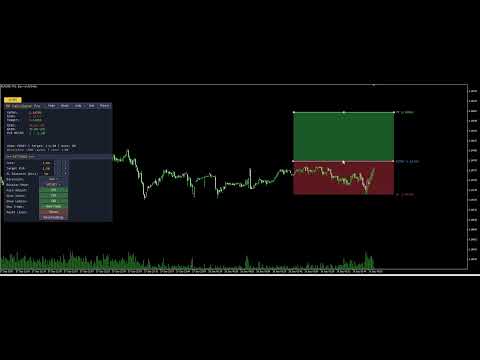
Interactive Risk/Reward planner with draggable Entry/SL/TP lines, auto-adjusting R:R ratio, colored zones behind price bars, on-line price labels, and a professional draggable panel with live in-panel settings.

Full Product Description

Overview

RR Calculator Pro is a professional trade-planning tool for MetaTrader 5 that turns your chart into an interactive Risk/Reward workbench. Instead of doing mental math or opening a separate calculator every time you plan a trade, you drag three price lines directly on the chart — Entry, Stop-Loss, and Take-Profit — and the tool instantly calculates and displays your risk, reward, R:R ratio, and money exposure in real time.

The tool combines a chart-integrated visual system (draggable price lines, colored risk/reward zones behind the candles, on-line price labels) with a professional draggable information panel that shows all the numbers in the format you prefer (pips, points, money, or account percentage).

Whether you trade forex, gold, indices, futures, or crypto, RR Calculator Pro removes the friction between "seeing a setup" and "sizing it properly." Every trade decision becomes visual, immediate, and quantitatively clear.

Understanding R:R — Why This Matters

The Risk-to-Reward Ratio (written 1 : X ) is the single most important number in trade management. It tells you how much profit you stand to make relative to the loss you accept if the trade goes against you.

  • 1 : 1 — reward equals risk. Break-even long term unless win rate is above 50%.
  • 1 : 2 — reward is twice the risk. You can lose 60% of trades and still be profitable.
  • 1 : 3 — reward is three times the risk. You can lose 70% of trades and still profit.

Traders who consistently use good R:R ratios ( 1:2 or better) can sustain lower win rates and still grow their accounts. RR Calculator Pro makes this ratio explicit, editable, and visual — before you place the trade.

The Two Sides of R:R — Both Adjustable

In the notation 1 : X , the 1 represents your unit of risk (the SL distance) and X represents the reward multiple (the TP distance in units of R).

Most calculators only let you change X (the target R:R multiplier). RR Calculator Pro lets you adjust both sides independently:

  • Target R:R button — changes X (moves the TP)
  • SL Distance button — changes R itself (moves the SL, adjusts TP proportionally if auto-adjust is on)

This means you can prototype trades from either direction:

  • Volatility-first: pick your SL distance based on market structure, then choose a target R:R
  • Reward-first: fix your target R:R, then adjust SL distance to fit market conditions

Key Features

Three Draggable Price Lines

  • Entry (blue): your intended entry price
  • Stop-Loss (orange-red): where the trade thesis is invalidated
  • Take-Profit (green): your target price
  • Grab any line with the mouse and drag it — the others reposition intelligently to maintain your target R:R (or stay fixed if auto-adjust is off)

Colored Risk & Reward Zones Two rectangles are drawn between the price levels, showing at a glance:

  • The Risk zone (Entry to SL) in dim red — the area of maximum loss
  • The Reward zone (Entry to TP) in dim green — the area of maximum gain

The zones are drawn behind the price bars (using OBJPROP_BACK, the only way in MQL5 to achieve this effect), so they never obscure your candles. Colors and visibility are fully configurable.

On-Line Price Labels Each line carries its own text label at the right edge, showing what it represents and the current price:

ENTRY 1.08432 SL 1.08300 TP 1.08650

Labels move with the lines automatically and update as the chart scrolls.

Auto-Adjust Intelligence With auto-adjust on:

  • Drag Entry → both SL and TP reposition to keep the same risk and target R:R
  • Drag SL → TP repositions to maintain target R:R
  • Drag TP → SL repositions to derive risk from the new reward

With auto-adjust off, each line moves independently for full manual control.

Four Display Modes Switch on the fly between:

  • Pips — classic forex convention (5-digit brokers auto-detected)
  • Points — raw broker units
  • Money — risk and reward in your account currency
  • Account % — risk and reward as a percentage of account balance (institutional style)

Direction Control The tool auto-detects Long vs Short from the SL position relative to Entry, but you can also force a specific direction (useful for planning both scenarios on the same chart before committing).

The Professional Panel

Draggable Panel The information panel starts in the corner you choose but can be moved anywhere on the chart by clicking and dragging its title bar. Position is saved automatically and restored when you reopen MT5.

Top-Row Buttons Five buttons in the panel title bar for the most-used actions:

  • Hide — collapses the panel to a small toggle button
  • Mode — cycles display modes (Pips → Points → Money → Percent)
  • Auto — toggles auto-adjust on/off
  • Set — opens the settings sub-panel
  • Reset — resets lines to default positions around current price

Always-Visible Toggle Button When you hide the panel, a small [ ] RR button remains in the corner so you can bring the panel back with a single click. The toggle button label reflects the current state.

Settings Sub-Panel (11 rows) Click Set to open a rich configuration panel below the main panel:

  • Lots — position size with [-] [+] presets
  • Target R:R — reward multiplier with [-] [+] presets
  • SL Distance (pts) — direct control over the risk unit
  • Direction — cycle Auto / Long / Short
  • Display Mode — cycle Pips / Points / Money / Percent
  • Auto Adjust — ON / OFF toggle
  • Show Zones — ON / OFF toggle
  • Show Labels — ON / OFF toggle
  • New Trade — recreates lines if missing, positions at current price
  • Reset Lines — repositions existing lines to defaults
  • Reset Settings — restores all runtime settings to your input defaults

All settings apply instantly, with no need to remove and re-add the indicator.

Chart Lines Are Preserved on Hide Unlike simpler tools, hiding the panel does not remove your Entry/SL/TP lines from the chart. Your trade plan stays visible and interactive even when the panel is minimized.

Two Status Lines Always visible at the bottom of the panel:

  • Line 1: Mode: PIPS | Target: 1:2.00 | Auto: ON
  • Line 2: Direction: LONG (auto) | Lots: 1.00

Full State Persistence

Everything you customize persists between MT5 restarts, per chart:

  • Panel position and visibility
  • Settings sub-panel visibility
  • All runtime settings (Lots, Target R:R, Direction, Display Mode, Auto, Show Zones, Show Labels)
  • Line prices (Entry, SL, TP) — your active trade plan is exactly where you left it

Each chart has its own state file (identified by ChartID), so you can plan different trades on different charts simultaneously without them interfering with each other.

Practical Trading Applications

Pre-Trade Sizing Before placing any order, drag the three lines to your planned levels. The panel immediately shows what you stand to lose in dollars (or your account currency), what you stand to gain, and the resulting R:R. If the ratio is below your minimum threshold (say, 1:1.5), you can either move the SL closer, extend the TP further, or skip the trade entirely — all without leaving the chart.

Position Sizing by Risk Percentage Set display mode to Percent and adjust lots until the "RISK" line reads your target percentage of account (e.g., 1.00%). Now your position is sized exactly to your risk rules, regardless of market volatility.

Trade Plan Documentation Capture a screenshot of the chart with the lines, zones, labels, and panel visible. It becomes an instant, self-explanatory trade plan for your journal or for sharing with mentors and communities.

"What If" Analysis Play with the SL distance and Target R:R settings to explore trade-off scenarios. Would a wider SL help you avoid stop-hunting but reduce your R:R? The tool answers this instantly, visually.

Comparing Long and Short Setups Set Direction to "Long", position your lines, note the numbers. Switch Direction to "Short" and see the same setup inverted. Useful for range-bound markets where either direction could work.

Full Input Parameter List

Trade Settings

  • Position size (lots)
  • Target R:R ratio
  • Trade direction (Auto / Long / Short)

Display Settings

  • Distance display mode (Pips / Points / Money / Percent)
  • Enable auto-adjust R:R

Chart Lines

  • Entry line color, Stop-loss color, Take-profit color
  • Line width (1-5)
  • Line extends left / right (bars)

Risk / Reward Zones

  • Show colored fill zones (on/off)
  • Risk zone color
  • Reward zone color
  • Draw zones behind price bars (on/off)

Price Labels

  • Show price labels on lines (on/off)
  • Label font size
  • Label font name

Panel Settings

  • Show info panel
  • Initial panel corner (Top-Left, Top-Right, Bottom-Left, Bottom-Right)
  • Panel X / Y offset (px)
  • Font size
  • Background, header, text, and accent colors

Persistence

  • Save state between MT5 restarts
  • Panel refresh interval (seconds)

Technical Specifications

  • Platform: MetaTrader 5 (build 3815 or later)
  • Type: Chart-window custom indicator (no separate window)
  • CPU load: Minimal — line segments only recompute on new bars, not every tick
  • Memory: Standard indicator footprint plus one small state file per chart (~500 bytes)
  • No DLL dependencies — pure native MQL5
  • No external network requests — fully offline
  • File system access: state persistence file inside the MT5 sandbox only
  • Compatible with: all account types (real, demo, netting, hedging)
  • Broker support: universal — auto-detects tick value and tick size, falls back to contract size
  • Language: all interface elements in English

Why RR Calculator Pro Over Free Alternatives

Basic R:R indicators have consistent limitations:

  1. Static text-only display — no draggable lines, forcing you to type prices manually
  2. Fixed R:R side — you can only adjust the reward, not the risk directly
  3. No colored zones — impossible to visualize risk and reward areas at a glance
  4. No on-line labels — you must open the tool's panel to see what each line represents
  5. Panel gets in the way — anchored to a specific corner, cannot be moved
  6. Lines vanish when panel is hidden — losing your active trade plan
  7. No state persistence — settings reset every time you restart MT5
  8. Cannot adjust settings live — requires removing and re-adding the indicator
  9. Broken alignment between visual elements — lines and zones drift out of sync when dragged

RR Calculator Pro addresses every one of these limitations. It is designed as a professional daily-use tool for traders who take position sizing seriously.

Support and Updates

  • Free lifetime updates via the MQL5 Market
  • Responsive support: contact via MQL5 profile messages
  • Bug fixes prioritized within 48 hours
  • Feature requests welcome — leave a comment on the product page
  • Detailed change log with each release

Frequently Asked Questions

Q: Does the tool actually place trades? A: No. RR Calculator Pro is a visual planning tool. It calculates risk, reward, R:R, and money exposure, but it does not send orders to the broker. You use it to plan the trade, then place the order manually or through your preferred execution method.

Q: Does it work on all brokers? A: Yes. The money calculations use SYMBOL_TRADE_TICK_VALUE and SYMBOL_TRADE_TICK_SIZE , with a fallback to SYMBOL_TRADE_CONTRACT_SIZE . This covers forex, CFDs, futures, indices, metals, and crypto across all standard MT5 brokers.

Q: Can I use this in the Strategy Tester? A: Yes, the indicator loads and displays correctly in the Strategy Tester Visual Mode. However, the money and account-percent calculations use the live account values from your terminal, so results in the tester assume your current live account context.

Q: Do the lines disappear when I close and reopen the chart? A: No. Line prices are saved in the persistence file and restored on reload. If you want a fresh setup, click the New Trade button.

Q: What happens if I accidentally delete a line from the chart? A: Click New Trade in the settings panel. It recreates all three lines at the current price with default distances.

Q: How do I make my SL wider or narrower without touching the mouse? A: Open settings and use the SL Distance (pts) row. The [-] and [+] buttons cycle through preset distances (20, 50, 100, 200, 300, 500, 1000, 2000 points). If Auto Adjust is on, the TP repositions automatically to maintain your target R:R.

Q: Can I use multiple instances of the tool on different charts? A: Yes. Each chart runs an independent instance with its own state file, settings, and line positions. Plan different trades on different charts simultaneously.

Q: The zones sometimes look opaque — can I make them more transparent? A: MQL5 does not support alpha channels for chart objects (a known platform limitation). The workaround built into RR Calculator Pro is:

  1. Zones are drawn with OBJPROP_BACK = true so they appear behind the candles
  2. Default zone colors are dim (dark red / dark green) rather than saturated
  3. You can further tune the colors via the input parameters

Q: What is the difference between "New Trade" and "Reset Lines"? A: Reset Lines repositions existing lines to defaults around the current price. New Trade does the same, but also recreates the lines if any were accidentally deleted. Use New Trade when starting a fresh plan; use Reset Lines to quickly recentter around the current market.

Q: Can EAs read the current risk and reward values from this indicator? A: The indicator does not expose iCustom buffers because it does not compute values on price bars — it maintains state on chart-object positions. For automated trading, you would replicate the calculation logic inside your EA using the same formulas (which are all standard).

Getting Started

  1. Purchase and download from MQL5 Market
  2. The indicator installs automatically to your MetaTrader 5 terminal
  3. Drag RR_Calculator_Pro from the Navigator onto any chart
  4. Accept default settings — the tool immediately displays Entry, SL, and TP lines at current price with a 1:2 R:R and 100-point SL
  5. Drag any line to reposition it — watch the panel update in real time
  6. Click Set in the panel title bar to explore the settings
  7. Adjust lots and target R:R to match your risk rules
  8. Drag the panel to your preferred location

Within one minute of installation, you have a working, personalized trade-planning workspace.

Tags: risk reward, rr calculator, trade planner, position size, stop loss, take profit, money management, risk management, forex, futures, indices, crypto, professional indicator, interactive, draggable, chart tool

Version History

Version 2.20 — Current release

  • Direct SL Distance control from settings panel (adjusts the "R" of the R:R ratio)
  • Line-zone alignment fix: forced canonical time positions on all lines after any drag or setting change
  • Auto-adjust intelligence improved for SL distance changes
  • RefreshAllVisuals helper for consistent state across all interactions

Version 2.10 — Feature release

  • Colored Risk and Reward zones drawn behind price bars
  • On-line price labels showing each level's name and current price
  • New Trade button — recreates lines if missing
  • Show Zones and Show Labels toggles in settings panel
  • Namespace separation between panel and line objects (fix: lines no longer disappear when panel is hidden)

Version 2.00 — Major release

  • Professional draggable panel with title bar
  • Settings sub-panel with live in-panel controls
  • 4 display modes (Pips, Points, Money, Account Percent)
  • 3 line direction options (Auto, Long, Short)
  • Full state persistence between MT5 restarts
  • Universal broker compatibility (forex, CFD, futures)

Version 1.00 — Initial release

  • 3 draggable price lines (Entry, SL, TP)
  • Auto-adjust R:R ratio
  • Basic info panel with distance display

Recommended Product Metadata for MQL5 Market

Category: Indicators > Trading Tools Suggested price: 29 - 49 USD Free demo: Yes (30 days recommended) Product type: Indicator


Önerilen ürünler
Free automatic Fibonacci is an indicator that automatically plots a Fibonacci retracement based on the number of bars you select on the BarsToScan setting in the indicator. The Fibonacci is automatically updated in real time as new highest and lowest values appears amongst the selected bars. You can select which level values to be displayed in the indicator settings. You can also select the color of the levels thus enabling the trader to be able to attach the indicator several times with differe
FREE
EA Claim Consistency Checker, bir EA satış sayfasından elle girilen değerlerin istatistiksel olarak kendi içinde tutarlı olup olmadığını denetleyen yerel bir MT5 yardımcı programıdır. Bir EA satış sayfasındaki veya tanıtım metnindeki başlıca değerleri doğrudan betik girdilerine yazarsınız: Profit Factor, kazanma oranı, kazanç/risk oranı veya ortalama kazanç/ortalama kayıp, işlem sayısı, maksimum düşüş, aylık getiri, beyan edilen dönem ve başlangıç sermayesi. Yardımcı program hiçbir rapor dosya
TradeGate
Alex Amuyunzu Raymond
TradeGate – Product Description / Brand Story “The gatekeeper for your trading success.” Overview: TradeGate is a professional MT5 validation and environment guard library designed for serious traders and EA developers who demand safety, reliability, and market-ready performance . In today’s fast-moving markets, even a small misconfiguration can cause EAs to fail initialization, skip trades, or be rejected by MQL5 Market. TradeGate acts as a smart gatekeeper , ensuring your EA only operates un
PropGuard OS — The Airbag for Your Prop-Trading Account Risk Manager | Trade Panel | Prop Firm EA | FTMO & Funding Pips Ready Be honest: How did you really lose your last challenge? Was it the strategy? Probably not. It was that one moment : The moment a small loss turned into a revenge trade. The moment you “just quickly” bent the rules. The moment your brain screamed “BUY” while your plan said “STOP”. You wouldn’t drive a car without a seatbelt. So why risk a $100,000 account without PropGuar
Custom Alerts: Birden Fazla Piyasayı Takip Edin ve Hiçbir Önemli Sinyali Kaçırmayın Genel Bakış Custom Alerts , birden fazla enstrümanı tek bir yerden takip etmek isteyen yatırımcılar için dinamik bir çözümdür. FX Power, FX Volume, FX Dynamic, FX Levels ve IX Power gibi önde gelen araçlarımızdan gelen verileri entegre ederek, Custom Alerts sizi grafikler arasında geçiş yapmak zorunda kalmadan önemli piyasa gelişmeleri hakkında otomatik olarak bilgilendirir. Artık broker’ınızın sunduğu tüm varl
AI Trade Analyzer   , indikatör formatında uygulanan akıllı bir piyasa analiz aracıdır. Program, grafikteki sinyalleri görselleştirir ve yatırımcının teknik göstergeler ve haber geçmişine dayanarak piyasa durumunu değerlendirmesine yardımcı olur. Ana fonksiyonları: 1. Teknik analiz: Popüler göstergeler için destek: EMA (kısa/uzun), Ichimoku, ADX, RSI, MACD, Stokastik, ATR, Bollinger Bantları, Pivot Noktaları, Fibonacci. Trendleri, farklılıkları ve temel seviyeleri belirlemek. 2. Haber geçmişiyle
Topos e fundos com fibo
Paulo Henrique Sanches Bonanni
PHSB_Tavan_Dip Piyasanın ekstrem seviyelerini ve mevcut piyasa yapısını daha net görün PHSB_Tavan_Dip , MetaTrader 5 için geliştirilmiş ve bir piyasa aralığı içerisindeki fiyat yapısının görsel olarak daha kolay anlaşılmasını amaçlayan bir göstergedir. Gösterge, aralığın temel ekstrem seviyelerini ve ara bölgelerini öne çıkarır. Tavan ve Dip seviyelerinin görsel olarak belirlenmesinin yanı sıra gösterge, diğer önemli bilgileri de tek bir arayüzde bir araya getirir. Böylece trader, analiz edilen
FREE
Price Retest MT5
Suvashish Halder
4.83 (6)
Introducing our exciting new Price Retest indicator! Get instant alerts when the price retests, giving you a powerful edge in your trading strategy. Remember to do your own analysis before making any moves in the market. MT4 Version -  https://www.mql5.com/en/market/product/118031 Join To Learn Market Depth -   https://www.mql5.com/en/channels/suvashishfx Here’s a detailed explanation of how the Price Retest indicator works, its components, and how you can incorporate it into your trading strat
FREE
PROMETHEUS TECHNICAN VERSION Free | By THE SONS A gift from The Sons — no strings, no trial, no expiry. Every trader deserves access to professional-grade market intelligence. That belief is why Prometheus Technical Version exists, and why it costs nothing. Consider it our handshake to the trading community. What You're Getting This is not a simplified tool dressed up as a gift. Prometheus Technican Version is a fully built, institutional-quality technical analysis indicator running a dual-model
FREE
The jcoworld OTE EA is an automated trading bot for MetaTrader 5 built on Smart Money Concepts (SMC) . It accurately identifies market impulse moves and automatically enters trades within the Optimal Trade Entry (OTE) zone (61.8% – 79.0% Fibonacci) as soon as a confirmation candle closes. Optimized for: XAUEUR, XAUUSD, and Major Forex Pairs Features: Automatic risk management, dynamic lot sizing & automated Stop Loss/Take Profit. Try for free: This demo version is 100% free! Pricing Plans for Fu
FREE
High Low Open Close
Alexandre Borela
4.98 (45)
Bu projeyi seviyorsanız, 5 yıldız incelemesi bırakın. Bu gösterge açık, yüksek, düşük ve belirtilen fiyatlar için çizer Dönem ve belirli bir zaman bölgesi için ayarlanabilir. Bunlar birçok kurumsal ve profesyonel tarafından görünen önemli seviyelerdir. tüccarlar ve daha fazla olabileceği yerleri bilmeniz için yararlı olabilir Aktif. Mevcut dönemler şunlardır: Önceki gün. Önceki Hafta. Önceki Ay. Previous Quarter. Önceki yıl. Veya: Mevcut gün. Hafta. Şimdi Ay. Şimdiki Mahallesi. Bugün yıl.
FREE
MT5 için NAS100 Auto SL ve TP Maker ile tanışın: MetaTrader 5'te Nasdaq 100 piyasasında gezinen yatırımcılar için vazgeçilmez bir yardımcı olan NAS100 Auto SL ve TP Maker ile StopLoss ve TakeProfit ayarlarını bir daha asla kaçırmayın. Bu araç, StopLoss ve TakeProfit seviyelerinin yönetimini otomatikleştirmek için sorunsuz bir çözüm arayanlar için tasarlanmıştır. Temel Özellikler: Zahmetsiz Otomasyon: StopLoss ve/veya TakeProfit olmadan Nasdaq 100 işlemlerini otomatik olarak izler. Kullanıcı ta
FREE
ZigZag WaveSize MT4'ün önceki sürümünün geliştirilmesi  ZigZag WaveSize MT4 ZigZag WaveSize -  noktalar cinsinden dalga uzunluğu bilgisi, seviyeler ve farklı uyarı mantığı eklenmiş değiştirilmiş standart ZigZag göstergesi Genel İyileştirmeler: MetaTrader 5 için kod uyarlaması Grafik nesneleriyle çalışmanın optimize edilmesi Yeni Özellikler: Ekstremumlarda yatay seviyeler Seviye tipi seçimi: yatay/ışınlar/bölümler Likid seviyeler filtresi (fiyat tarafından test edilmemiş) Kırılma için tampon: y
FREE
Reversal Composite Candles
MetaQuotes Ltd.
3.69 (16)
The idea of the system is to indentify the reversal patterns using the calculation of the composite candle. The reversal patterns is similar to the "Hammer" and "Hanging Man" patterns in Japanese candlestick analysis. But it uses the composite candle instead the single candle and doesn't need the small body of the composite candle to confirm the reversal. Input parameters: Range - maximal number of bars, used in the calculation of the composite candle. Minimum - minimal size of the composite can
FREE
Donchian Breakout And Rsi
Mattia Impicciatore
4.5 (2)
Genel Açıklama Bu gösterge, klasik Donchian Kanalı ’nın geliştirilmiş bir versiyonudur ve gerçek işlem için pratik işlevlerle zenginleştirilmiştir. Standart üç çizgiye (üst, alt ve orta çizgi) ek olarak sistem breakout (fiyat kırılımı) noktalarını tespit eder ve bunları grafikte oklarla görsel olarak gösterir. Ayrıca grafiği sadeleştirmek için mevcut trend yönünün tersindeki çizgi yalnızca görüntülenir. Gösterge şunları içerir: Görsel sinyaller : Kırılım sırasında renkli oklar Otomatik bildiriml
FREE
Nikkei225 Gap ContinuationEA
Francesc Jordi Mallol Nolden
Nikkei 225 Gap Continuation EA Automated opening-gap continuation strategy for the Nikkei 225 Nikkei 225 Gap Continuation EA is an automated trading system for MetaTrader 5 designed specifically for the Japanese stock index. It searches for significant opening gaps and enters only when price action confirms a possible continuation in the same direction. The strategy combines the opening gap, a configurable opening range and session VWAP confirmation. It also includes risk-based position sizing,
FREE
ADAM for FTMO 5
Vyacheslav Izvarin
5 (1)
ADAM EA Special Version for FTMO Please find new Version here  https://www.mql5.com/en/market/product/113326 Our 1st EA created using ChatGPT technology Trade only GOOD and checked PROP FIRMS  Default parameters for Challenge $100,000 Tested on EURUSD and GBPUSD only  Use 15MIN Time Frame Close all deals and Auto-trading  before Weekend at 12:00 GMT+3  Friday For Prop Firms MUST use special Protector  https://www.mql5.com/en/market/product/94362 -------------------------------------------------
UZFX - MetaTrader 5 (MT5) için Sadece Bekleyen Emirleri Sil komut dosyası, bekleyen tüm emirleri (Alış Limiti, Satış Limiti, Alış Durdurma, Satış Durdurma) işlem hesabından otomatik olarak kaldıran basit ama etkili bir araçtır. Bu komut dosyası, aktif piyasa pozisyonlarını etkilemeden bekleyen emirlerini anında temizlemek isteyen tüccarlar için idealdir. Diğer tüm MT4 / MT5 göstergelerime ve EA'larıma göz atın >> BURAYA Özellikler: Bekleyen tüm emirleri siler (Alış Limiti, Satış Limiti, Alış
FREE
This indicator automatically identifies liquidity levels using swing fractals and tracks when price sweeps through them. Works on any symbol and timeframe with full multi-timeframe support. Features: — Detects swing highs and lows via a fractal method (configurable bars left & right) on a selected timeframe. Active levels are displayed as rays extending to the right; swept levels turn into dashed lines ending at the sweep candle. — Plots Previous Day (PDhigh / PDlow), Previous Week (PWhigh / PWl
FREE
Chart Pro Classic Dark v1.00 Chart Pro Classic Dark is a professional MT5 chart styling and customization tool designed to give your charts a clean, modern, and professional dark appearance. Key Features Dark Black Background — Applies a clean black background to the chart. ️ Candlestick Chart — Automatically configures the chart to use candlesticks. Bullish Candles — Green/Lime bullish candles. Bearish Candles — White bearish candles. Grid Removal — Hides the chart grid for a clean
FREE
Inverse Liquidity Grab Ultimate EA
Stephen Muriithi Muraguri
5 (1)
This EA finds Fair Value Liquidity (FVL) on the chart, tracks when they get mitigated , and then looks for an inversion signal (price “fails” through the zone). When that inversion happens, it places a trade in the opposite direction of the original Liquidity gap (an Inverse FVG approach). It also lets you control when it trades using market sessions , and it can auto-close positions at New York open (all positions or profitable-only). Key advantages Clear, rule-based entries (no guessing): trad
FREE
Cybertrade Keltner Channels - MT5 Created by Chester Keltner, this is a volatility indicator used by technical analysis. It is possible to follow the trend of financial asset prices and generate support and resistance patterns. In addition, envelopes are a way of tracking volatility in order to identify opportunities to buy and sell these assets. It works on periods longer than the period visible on the chart. All values ​​are available in the form of buffers to simplify possible automations.
FREE
Rule Plotter Expert
Francisco Gomes Da Silva
5 (3)
Bu Uzman Danışman, Rule Plotter göstergesi içinde oluşturduğunuz stratejilerinizi test etmek ve çalıştırmak için tasarlanmıştır. Nasıl Kullanılır: Rule Plotter - Programlama bilgisi olmadan ticaret sistemi oluşturmak için araç göstergisini ücretsiz indirin. Ardından, Rule Plotter göstergisinin içindeki stratejilerinizi geliştirin. Son olarak, bu Uzman Danışmanı kullanarak oluşturduğunuz stratejileri çalıştırın. Parametreler: Strateji: Rule Plotter göstergisi içinde oluşturduğunuz ticaret sistemi
Pivot Point Fibo RSJ, Fibonacci oranlarını kullanarak günün destek ve direnç çizgilerini izleyen bir göstergedir. Bu muhteşem gösterge, Fibonacci oranlarını kullanarak Pivot Point üzerinden 7 seviyeye kadar destek ve direnç oluşturur. Fiyatların, bir operasyonun olası giriş/çıkış noktalarını algılamanın mümkün olduğu bu destek ve direncin her bir düzeyine uyması harika. Özellikleri 7 seviyeye kadar destek ve 7 seviye direnç Seviyelerin renklerini ayrı ayrı ayarlayın Girişler Pivot Tipi Pivo
FREE
Smart Close Manager v1.1 is a lightweight but powerful order-management utility designed for traders who need fast, safe, and precise control over their positions. This tool allows you to instantly close positions and delete pending orders based on smart filters such as symbol, direction, profit state, or order type. Perfect for scalpers, intraday traders, and anyone managing multiple orders. Key Features Close all orders with one click Close only BUY / only SELL positions Close only profitabl
RSI abcd
Francisco Gomes Da Silva
4.33 (3)
RSI ABCD Desen Bulucu: Teknik Strateji 1. Gösterge Nasıl Çalışır? Klasik RSI ile otomatik ABCD harmonik desen tespitini birleştirir. Temel Bileşenler Standart RSI (ayarlanabilir periyot) Tepe ve dip işaretleri (oklar) ABCD desenleri (yeşil/kırmızı çizgiler) Aşırı alım (70) ve aşırı satım (30) filtreleri 2. MT5 Kurulumu period = 14 ; // RSI periyodu size = 4 ; // Maksimum desen boyutu OverBought = 70 ; // Aşırı alım seviyesi OverSold = 30 ; // Aşırı satım seviyesi Filter = USE_FILTER_ YES ; // On
FREE
AutoPilot Trading Service for MetaTrader 5 is an advanced application designed to enhance the MT5 platform by automating and optimizing both manual and algorithmic trading activities. By integrating seamlessly into the (recommended but not mandatory) <terminal_directory>\MQL5\Services directory, this service not only supports the automation of trading strategies but also improves the execution of trades, whether they are initiated manually or through Expert Advisors (EAs). The AutoPilot Trading
FREE
-- Basit ama etkili. Tersine Dönüş Göstergesi - Nedir? SuperTrend mantığını üstel eğri teknolojisiyle birleştiren, trendi takip eden bir üst katman göstergesidir. Trend yönünü algılar, grafikte dinamik bir kanal çizer ve trend tersine döndüğünde gerçek zamanlı uyarılar gönderir. Nasıl çalışır? Gösterge, ATR ve SuperTrend faktörünü kullanarak üstel bir temel çizgi hesaplar. Fiyat bu temel çizginin üzerinde veya altında kapandığında, trendin tersine döndüğü teyit edilir. Yeşil ok, AL trendinin
FREE
The CandleStick Scanner is a tool that allow you to perform a   market scan   and search any candlestick pattern that you already created in the current chart, You can perform a quick search in the current chart (500 bars will be scanned),  This is a lite version of  CandleStick Factory for MT5 . The   full version   video can be found here :  https://www.youtube.com/watch?v=fq7pLXqVO94 The  full version  can be purchased here:   https://www.mql5.com/en/market/product/75434 How it works You can
FREE
Professional management and graphic tool
Mohsen Bin Abdul Rahman Bin Yahya Akrimi
Professional P/L Calculator & Risk-Reward Tool **The complete trading management solution combining two powerful tools in one!**   What You Get:   Advanced P/L Calculator - Real-time profit/loss tracking with percentage - Automatic break-even price calculation - Risk levels: -10%, -20% loss lines displayed on chart - Profit targets: +10%, +20% gain lines - Complete position breakdown (Buy/Sell lots, swap, net position) - Target price calculator - see P/L at any price level - Set SL/TP fo
Bu ürünün alıcıları ayrıca şunları da satın alıyor
Trade Assistant MT5
Evgeniy Kravchenko
4.43 (216)
It helps to calculate the risk per trade, the easy installation of a new order, order management with partial closing functions, trailing stop of 7 types and other useful functions. Additional materials and instructions Installation instructions - Application instructions - Trial version of the application for a demo account Line function -   shows on the chart the Opening line, Stop Loss, Take Profit. With this function it is easy to set a new order and see its additional characteristics bef
Trade Manager EA’ye hoş geldiniz! Ticaretin daha sezgisel, hassas ve verimli hale gelmesi için tasarlanmış nihai risk yönetim aracı ile tanışın. Bu sadece bir emir verme aracı değil; ticaret planlaması, pozisyon yönetimi ve risk kontrolü için kapsamlı bir çözüm. İster yeni başlayan bir yatırımcı olun, ister deneyimli bir trader ya da hızlı emir gerektiren bir scalper, Trade Manager EA ihtiyaçlarınıza uyum sağlar ve forex, endeksler, emtialar ve kripto paralar dahil tüm piyasalarda esneklik sunar
================================================================================ POC BREAKOUT - V20.72. Full Professional Grade Toolkit ================================================================================ POC Breakout is a full MetaTrader 5 trading dashboard for discretionary traders who want breakout signals, Point of Control (POC) context, volume profiles, order flow, market structure, news, alerts, and advanced trade planning in one professional workspace. Attached directly to you
Local Trade Copier EA MT5
Juvenille Emperor Limited
4.94 (149)
Local Trade Copier EA MT5, aynı Windows bilgisayarı veya Windows VPS üzerinde çalışan birden fazla MetaTrader 5 hesabı arasında işlemleri kopyalamak ve yönetmek için hızlı ve esnek bir işlem kopyalayıcıdır. Yerel işlem senkronizasyonunu, Receiver tarafında lot büyüklüğü, risk yönetimi, işlem filtreleme, sembol eşleştirme, işlem yönetimi ve hesap koruması kontrolleriyle birleştirir. Transmitter ve Receiver terminallerinizi yaklaşık 1 dakika içinde ayarlayın ve aynı veya farklı brokerlardaki hesa
TradePanel MT5
Alfiya Fazylova
4.88 (168)
Trade Panel, çok işlevli bir ticaret asistanıdır. Uygulama, manuel ticaret için 50'den fazla ticaret fonksiyonu içerir ve çoğu ticaret görevini otomatikleştirmeyi mümkün kılar. Uygulama talimatları + video talimatları: https://www.mql5.com/en/blogs/post/772292 Demo hesabı için uygulamanın deneme sürümü: https://www.mql5.com/en/blogs/post/750865 Uygulamayı nasıl kurulur: https://www.mql5.com/en/blogs/post/756239 Uygulamayı görsel modda nasıl test edilir: https://www.mql5.com/en/blogs/post/770277
Telegram sinyallerini kendi işlem kurallarınızla kopyalayın Telegram to MT5 Signal Trader , herkese açık ve özel Telegram kanallarındaki ve gruplarındaki metin tabanlı işlem sinyallerini otomatik olarak MetaTrader 5'e kopyalar. Tek bir masaüstü uygulamasından birden fazla sinyal sağlayıcısını ve MT5 hesabını yönetin; her sağlayıcı için ayrı risk ve işlem ayarları belirleyin. Sinyal kopyalamak için Telegram botu veya API kurulumu gerekmez. Kendi Telegram hesabınızla telefon numarası veya QR kod k
Strategy Ledger Pro , MetaTrader 5 için salt okunur bir hesap analiz panelidir. Hesap sonuçlarını Expert Advisor, strateji, sembol ve magic numarasına göre ayırır. Her özelliğin açıklandığı ayrıntılı kılavuz . MetaTrader tüm hesap için tek bir bakiye gösterir. Birden fazla Expert Advisor birlikte işlem yaptığında bu bakiye her birinin katkısını göstermez. Strategy Ledger Pro hesap geçmişini okur, kapanmış pozisyonları yeniden kurar, stratejilere atar ve sonuçları tek panelde sunar. Ürün emir a
Telegram to MT5 Multi-Channel Copier   , Telegram kanallarınızdaki alım-satım sinyallerini doğrudan MetaTrader 5'e otomatik kopyalar. Bot yok, tarayıcı uzantısı yok, elle kopyalama yok. Sinyal Telegram'a düşer ve EA birkaç saniye içinde terminalinizde işlemi açar. Ve bir kanalı kopyalamadan önce, yerleşik backtester o kanalın hesabınızda ne yapmış olacağını gösterir. Ürün iki bileşenden oluşur: Telegram kanallarınızı dinleyen bir Windows uygulaması ve sinyalleri MT5 terminalinizde yürüten bu Exp
Farmed Hedge Yield Farming | All Markets (Manual - Hybrid - Semi/Automated EA) VERIFIED TRADING RESULTS - Farmed Hedge Yield Axi Copy:  https://www.mql5.com/en/signals/2356376 - Farmed Hedge Yield Exn Copy:   https://www.mql5.com/en/signals/2356404 - Farmed Hedge Yield V Copy:  https://www.mql5.com/en/signals/2357156 IMPORTANT NOTICE: FarmedHedge is a MANUAL-FOCUSED TRADING UTILITY ,not a fully automated EA. Results shown on this Signal include manual trades and overall strategic management.
Premium Trade Manager - İçine Koç Yerleştirilmiş İşlem Paneli Premium Trade Manager , grafiğinizin içine bir trading koçu yerleştirir; altında tam bir yürütme motoru çalışır. İşlemi her zamanki gibi kurun, ardından yapay zeka trading koçunuz Max, o kurulumu tam olarak okusun ve canlı hesabınıza göre taahhüt etmeden önce size net bir değerlendirme sunsun: stop disiplinli bir yaklaşıma uyuyor mu, risk büyüklüğü makul mü, yüksek etkili bir haber dakikalar sonra mı geliyor, prop firm limitinize yakl
Exp COPYLOT CLIENT for MT5
Vladislav Andruschenko
3.97 (35)
MetaTrader 5 için profesyonel işlem kopyalayıcı MetaTrader için hızlı, profesyonel ve güvenilir bir işlem kopyalayıcı . COPYLOT , MT4 ve MT5 terminalleri arasında Forex işlemlerini kopyalamanıza olanak tanır ve Hedge ile Netting hesaplarını destekler. COPYLOT MT5 sürümü şunları destekler: - MT5 Hedge → MT5 Hedge - MT5 Hedge → MT5 Netting - MT5 Netting → MT5 Hedge - MT5 Netting → MT5 Netting - MT4 → MT5 Hedge - MT4 → MT5 Netting MT4 sürümü Tam açıklama + DEMO + PDF Nasıl satın alınır Nasıl kurul
Telegram To MT5 — Sinyal Kopyalayıcı Telegram kanallarınızdaki işlem çağrılarını gerçek MT5 emirlerine dönüştürün — otomatik olarak, istediğiniz kadar hesapta ve risk ile kurallar tamamen sizin kontrolünüzde. Telegram To MT5, Telegram'da zaten takip ettiğiniz VIP / sinyal kanallarını MetaTrader 5 terminalinize bağlar. Ücretsiz bir eşlik eden masaüstü uygulaması mesajları okur (botlara izin vermeyen kanallardan bile), ve bu Expert Advisor bunları hesabınızda yürütür — kendi risk ayarlarınızı, sem
The product will copy all telegram signal to MT5 ( which you are member) , also it can work as remote copier.  Easy to set up, copy order instant, can work with almost signal formats, image signal,  s upport to translate other language to English Work with all type of channel or group, even channel have "Restrict Saving Content", work with  multi channel, multi MT5 Work as remote copier: with signal have ticket number, it will copy exactly via ticket number. Support to backtest signal. How to s
Trade Manager DashPlus
Henry Lyubomir Wallace
4.85 (13)
DashPlus , MetaTrader 5 platformunda işlem verimliliğinizi ve etkinliğinizi artırmak için tasarlanmış gelişmiş bir işlem yönetim aracıdır. Risk hesaplama, emir yönetimi, gelişmiş ızgara sistemleri, grafik tabanlı araçlar ve performans analitiği gibi kapsamlı bir özellik yelpazesi sunar. Temel Özellikler 1. Kurtarma Izgarası Olumsuz piyasa koşullarında işlemleri yönetmek için ortalama alma ve esnek bir ızgara sistemi uygular. İşlem kurtarma çabalarını optimize etmek için stratejik giriş ve çıkış
25% discount on the release of the tool: only for the next 3 buyers Send a message to receive a demo version. AstroTrade Trading Assistant AstroTrade is a comprehensive multi-functional trading utility developed for the MetaTrader 5 platform. It integrates essential tools for trade execution, risk management, and technical monitoring into a single unified interface. The application is designed to assist traders in managing their daily operations through a visual and structured environment. Vi
FUTURES ORDERFLOW FOOTPRINT CHART Professional OrderFlow EA for MetaTrader 5 Version 1.01| Professional tool for real traders | Institutional-Grade Visualization STRATEGY TESTER USERS - PLEASE SELECT EVERY REAL TICK WHEN TESTING AND YOU HAVE DOWNLOADED HISTORICAL DATA. IF YOU SEE A WAITING SCREEN AND IT IS NOT DOWNLOADING, IT MEANS YOU HAVE LOW HISTORICAL DATA. TRY 1 MIN AND 5 MIN FIRST ON 1 DAY DATA. ONE DAY DATA SHOULD BE THE NEWEST AND MOST CURRENT DATE. PLEASE WAIT UNTIL THE MARKET HAS ROL
Timeless Charts
Samuel Manoel De Souza
5 (8)
Timeless Charts, profesyonel yatırımcılar için hepsi bir arada bir trading aracıdır. Saniye Grafikleri ve Renko gibi özel grafik türlerini, Footprints , Clusters , Hacim Profilleri , VWAP çalışmaları ve gelişmiş piyasa analizi sağlayan sabitlenmiş analiz araçlarıyla gelişmiş emir akışı analiziyle birleştirir. İşlem ve pozisyon yönetimi, entegre işlem yönetim paneli aracılığıyla doğrudan grafik üzerinden gerçekleştirilirken, Market Replay ve Sanal Hesaplar trading becerileri ve stratejileri üzeri
Trade Copier Ultimate
Janitha Sandaruwan Amaradasa Wickramasingha Arachchilage
5 (5)
Trade Copier Ultimate - Telegram to MT5 Signal Copier Trade Copier Ultimate automatically copies Telegram trading signals into MetaTrader 5. The EA can read signal messages, detect the symbol, order type, entry price, Stop Loss, Take Profit levels and selected update commands, then execute or manage the trade in MT5 using your lot and risk settings. It is more than a basic Telegram to MT5 copier. TCU also supports Bot API and user-account Bridge workflows, Discord signal routing, local MT5 to MT
Trade Dashboard simplifies how you open, manage, and control your trades, with built-in lot size calculation. It allows you to execute trades, manage risk, and control positions directly on the chart, with tools such as partial close, breakeven, and trailing stop. Designed to reduce manual work and help you stay focused on your trading decisions. A demo version is available for testing. Detailed explanations of features are provided within the MQL5 platform. Installation instructions are include
EA Overfitter
Stephen J Martret
5 (1)
That backtest looks great. But will it still be making money tomorrow, next week, next month? EA Overfitter re-runs your EA on 100 price histories it has never seen. One score tells you if the edge is real. A backtest tells you what an EA did on one price history — the one that happened to occur. What you cannot tell from it is how much of that result was the strategy and how much was the particular path. EA Overfitter answers that. It builds up to 100 synthetic price histories your EA has n
Trade Indicator Assistant   is a powerful MT5 utility designed to turn indicators into automated trading systems. Its main feature is the ability to automatically detect an indicator’s   BUY and SELL signal buffers , without requiring you to know the buffer numbers, search through indicator settings, or modify the indicator source code. Bonus Indicator:   After purchasing Trade Indicator Assistant, contact me to receive   Trade Signal Pro   completely free as a bonus indicator. [Download Demo V

Satın aldıktan sonra bana mesaj göndererek tam kullanım kılavuzu paketini + AI özelliklerini test etmek için 3 günlük OpenAI API denemesini + bir başka bonus hediyeyi alabilirsiniz Mevcut fiyat, Ağustos Yeniden Lansman Güncellemesi için sınırlı süreli indirimli fiyattır — fiyat artmadan önce sürümünüzü şimdi güvence altına alın. Sonraki fiyat: $340 Bu, piyasada şimdiye kadar denediğiniz veya gördüğünüz tüm trading panellerinden tamamen farklıdır. Şu anda perakende piyasasında bulunan en yenilik
HINN MAGIC ENTRY – the ultimate tool for entry and position management! SIMPLE. FASTEST. INTUITIVE. MAX AUTOMATED. Place orders by selecting a level directly on the chart! full description   ::  demo-version  :: 60-sec-video-description Key features: - Market, limit, and pending orders - Automatic lot size calculation - Automatic spread and commission accounting - Unlimited partitial take-profits  - Breakeven and trailing stop-loss and take-profit  functions - Invalidation leves - Intuitive, a
Trade Assistant 38 in 1
Makarii Gubaydullin
4.91 (23)
Çok Fonksiyonlu Araç: Lot Hesaplayıcı, Grid Emirleri, R/R Oranı, İşlem Yöneticisi, Arz ve Talep Bölgeleri, Fiyat Hareketi ve çok daha fazlası Demo Sürüm   |   Kullanım Kılavuzu İşlem Asistanı   strateji test cihazında çalışmaz :   Demo Sürümü BURADAN indirerek   aracı test edebilirsiniz. Herhangi bir sorunuz / iyileştirme fikriniz / bulunan bir hata için benimle iletişime geçin MT4 sürümüne ihtiyacınız varsa burada mevcuttur İşlem   sürecinizi basitleştirin, hızlandırın ve otomatikleştirin. Sta
Footprint Chart Pro — Professional OrderFlow EA for MetaTrader 5 Version 6.34 | Professional tool for real traders | Institutional-Grade Visualization DEMO USERS - PLEASE SELECT EVERY TICK / REAL TICK WHEN TESTING AND YOU HAVE DOWNLOADED HISTORICAL DATA. IF YOU SEE A WAITING SCREEN AND IT IS NOT DOWNLOADING, IT MEANS YOU HAVE LOW HISTORICAL DATA. TRY 1 MIN AND 5 MIN FIRST ON 1 DAY DATA. ONE DAY DATA SHOULD BE THE NEWEST AND MOST CURRENT DATE. PLEASE WAIT UNTIL THE MARKET HAS ROLLED OVER PERIOD.
Grid Manual MT5
Alfiya Fazylova
4.73 (22)
Grid Manual, sipariş ızgarasıyla çalışmak için kullanılan bir ticaret yardımcı programıdır. Yardımcı program evrenseldir, esnek ayarlara ve sezgisel bir arayüze sahiptir. Sadece kayıpların ortalaması yönünde değil, aynı zamanda kazanç artışı yönünde de bir emir ızgarası ile çalışır. Tüccarın bir emir ızgarası oluşturmasına ve eşlik etmesine gerek yoktur, bu yardımcı programı yapacaktır. Emri açmanız yeterlidir ve Grid manual otomatik olarak ona bir emir ızgarası oluşturacak ve kapanana kadar ona
Trade copier MT5
Alfiya Fazylova
4.6 (55)
Trade Copier, ticaret hesapları arasındaki işlemleri kopyalamak ve senkronize etmek için tasarlanmış profesyonel bir yardımcı programdır. Kopyalama, tedarikçinin hesabından/terminalinden alıcının aynı bilgisayarda veya vps'de kurulu olan hesabına/terminaline gerçekleşir. KAMPANYA - Eğer zaten "Trade copier MT5" aldıysanız, "Trade copier MT4"ü ücretsiz olarak alabilirsiniz (MT4 > MT5 ve MT4 < MT5 kopyalamalar için). Koşullar hakkında daha fazla bilgi almak için lütfen bizimle özel mesaj yoluyla i
Your EAs cannot see each other, but Anchor can. Anchor gives you one place to coordinate your EAs, manage risk, and decide when trading is allowed. It works alongside the trading bots you already use without any changes to them. The Problem One EA opens a trade. Then another starts trading. The next thing you know, you wake up to multiple grids built across your account. Each EA may be doing exactly what it was designed to do, but together they can place far more risk on your account than you in
Seconds Chart - MetaTrader 5 için saniye bazlı grafikler oluşturmanıza olanak sağlayan eşsiz bir araçtır. Seconds Chart sayesinde saniye cinsinden zaman dilimleriyle grafik oluşturabilir, standart dakika veya saatlik grafiklerde mümkün olmayan esneklik ve analiz hassasiyetine ulaşabilirsiniz. Örneğin, S15 zaman dilimi 15 saniyelik mum çubuklarını ifade eder. Desteklenen özel sembollerle herhangi bir gösterge ve danışman kullanabilirsiniz. Onlarla çalışmak, standart grafiklerde işlem yapmak kadar
Power Candles Strateji Tarayıcısı - Kendi Kendini Optimize Eden Çoklu Sembol Kurulum Bulucu Power Candles Strateji Tarayıcısı , Power Candles göstergesini çalıştıran aynı kendinden optimize edici motoru, Piyasa İzleyicinizdeki her sembol üzerinde yan yana çalıştırır. Tek bir panel, şu anda istatistiksel olarak hangi sembollerin işlem yapılabilir olduğunu, her birinde hangi stratejinin kazandığını, en uygun Stop Loss / Take Profit çiftini gösterir ve yeni bir sinyal geldiği anda size bildirim gön
Yazarın diğer ürünleri
VWAP Pro Anchored VWAP
Ernestq Alonso Leiva Araya
VWAP Pro - Anchored VWAP with Standard Deviation Bands Professional Anchored VWAP indicator with 3 configurable standard deviation bands. Auto-detects real vs tick volume for universal compatibility (Forex, Futures, Stocks, Indices, Crypto). 5 anchor periods: Daily, Weekly, Monthly, Quarterly, Yearly. Full Product Description Overview VWAP Pro is a professional-grade Anchored Volume Weighted Average Price indicator designed for traders who demand institutional-quality tools with full customizati


ScalperPro LX
Ernestq Alonso Leiva Araya
Category:   Expert Advisor (EA) · For MetaTrader 5 · Multi-CFD Mean Reversion A mean-reversion system operating on the 1-hour timeframe for CFDs (metals, indices, energy, crypto). It requires a minimum number of simultaneous technical confluences before trading and features a higher-timeframe trend filter and risk management specifically designed for funded accounts. Tradable assets:   XAUUSD, XAGUSD, SPX500, US30, US100, GER40, USOIL, PLATINUM, BTCUSD, ETHUSD, NATGAS (configurable via whitelist
Periods BB Pro - Multi-Timeframe Trend Bias Scanner Multi-timeframe trend bias scanner combining EMA trend, RSI momentum, and price strength into a composite 0-100 score per timeframe. Ranks up to 9 timeframes with 5-tier classification, consensus column, and a professional draggable panel. Full Product Description Overview Periods BB Pro is a professional multi-timeframe trend bias scanner that answers the single most important question a trader can ask before placing an order: "Which direction
Filtrele:
Değerlendirme yok
Değerlendirmeye yanıt