RR Calculator Pro

RR Calculator Pro - Interactive Risk / Reward Trade Planner

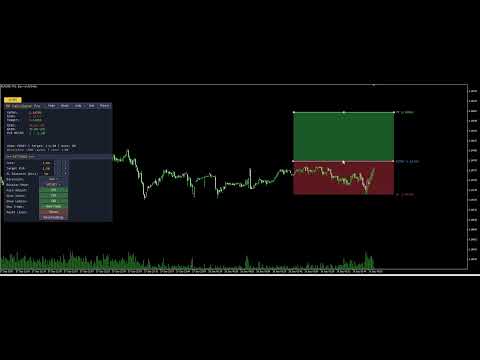
Interactive Risk/Reward planner with draggable Entry/SL/TP lines, auto-adjusting R:R ratio, colored zones behind price bars, on-line price labels, and a professional draggable panel with live in-panel settings.

Full Product Description

Overview

RR Calculator Pro is a professional trade-planning tool for MetaTrader 5 that turns your chart into an interactive Risk/Reward workbench. Instead of doing mental math or opening a separate calculator every time you plan a trade, you drag three price lines directly on the chart — Entry, Stop-Loss, and Take-Profit — and the tool instantly calculates and displays your risk, reward, R:R ratio, and money exposure in real time.

The tool combines a chart-integrated visual system (draggable price lines, colored risk/reward zones behind the candles, on-line price labels) with a professional draggable information panel that shows all the numbers in the format you prefer (pips, points, money, or account percentage).

Whether you trade forex, gold, indices, futures, or crypto, RR Calculator Pro removes the friction between "seeing a setup" and "sizing it properly." Every trade decision becomes visual, immediate, and quantitatively clear.

Understanding R:R — Why This Matters

The Risk-to-Reward Ratio (written 1 : X ) is the single most important number in trade management. It tells you how much profit you stand to make relative to the loss you accept if the trade goes against you.

  • 1 : 1 — reward equals risk. Break-even long term unless win rate is above 50%.
  • 1 : 2 — reward is twice the risk. You can lose 60% of trades and still be profitable.
  • 1 : 3 — reward is three times the risk. You can lose 70% of trades and still profit.

Traders who consistently use good R:R ratios ( 1:2 or better) can sustain lower win rates and still grow their accounts. RR Calculator Pro makes this ratio explicit, editable, and visual — before you place the trade.

The Two Sides of R:R — Both Adjustable

In the notation 1 : X , the 1 represents your unit of risk (the SL distance) and X represents the reward multiple (the TP distance in units of R).

Most calculators only let you change X (the target R:R multiplier). RR Calculator Pro lets you adjust both sides independently:

  • Target R:R button — changes X (moves the TP)
  • SL Distance button — changes R itself (moves the SL, adjusts TP proportionally if auto-adjust is on)

This means you can prototype trades from either direction:

  • Volatility-first: pick your SL distance based on market structure, then choose a target R:R
  • Reward-first: fix your target R:R, then adjust SL distance to fit market conditions

Key Features

Three Draggable Price Lines

  • Entry (blue): your intended entry price
  • Stop-Loss (orange-red): where the trade thesis is invalidated
  • Take-Profit (green): your target price
  • Grab any line with the mouse and drag it — the others reposition intelligently to maintain your target R:R (or stay fixed if auto-adjust is off)

Colored Risk & Reward Zones Two rectangles are drawn between the price levels, showing at a glance:

  • The Risk zone (Entry to SL) in dim red — the area of maximum loss
  • The Reward zone (Entry to TP) in dim green — the area of maximum gain

The zones are drawn behind the price bars (using OBJPROP_BACK, the only way in MQL5 to achieve this effect), so they never obscure your candles. Colors and visibility are fully configurable.

On-Line Price Labels Each line carries its own text label at the right edge, showing what it represents and the current price:

ENTRY 1.08432 SL 1.08300 TP 1.08650

Labels move with the lines automatically and update as the chart scrolls.

Auto-Adjust Intelligence With auto-adjust on:

  • Drag Entry → both SL and TP reposition to keep the same risk and target R:R
  • Drag SL → TP repositions to maintain target R:R
  • Drag TP → SL repositions to derive risk from the new reward

With auto-adjust off, each line moves independently for full manual control.

Four Display Modes Switch on the fly between:

  • Pips — classic forex convention (5-digit brokers auto-detected)
  • Points — raw broker units
  • Money — risk and reward in your account currency
  • Account % — risk and reward as a percentage of account balance (institutional style)

Direction Control The tool auto-detects Long vs Short from the SL position relative to Entry, but you can also force a specific direction (useful for planning both scenarios on the same chart before committing).

The Professional Panel

Draggable Panel The information panel starts in the corner you choose but can be moved anywhere on the chart by clicking and dragging its title bar. Position is saved automatically and restored when you reopen MT5.

Top-Row Buttons Five buttons in the panel title bar for the most-used actions:

  • Hide — collapses the panel to a small toggle button
  • Mode — cycles display modes (Pips → Points → Money → Percent)
  • Auto — toggles auto-adjust on/off
  • Set — opens the settings sub-panel
  • Reset — resets lines to default positions around current price

Always-Visible Toggle Button When you hide the panel, a small [ ] RR button remains in the corner so you can bring the panel back with a single click. The toggle button label reflects the current state.

Settings Sub-Panel (11 rows) Click Set to open a rich configuration panel below the main panel:

  • Lots — position size with [-] [+] presets
  • Target R:R — reward multiplier with [-] [+] presets
  • SL Distance (pts) — direct control over the risk unit
  • Direction — cycle Auto / Long / Short
  • Display Mode — cycle Pips / Points / Money / Percent
  • Auto Adjust — ON / OFF toggle
  • Show Zones — ON / OFF toggle
  • Show Labels — ON / OFF toggle
  • New Trade — recreates lines if missing, positions at current price
  • Reset Lines — repositions existing lines to defaults
  • Reset Settings — restores all runtime settings to your input defaults

All settings apply instantly, with no need to remove and re-add the indicator.

Chart Lines Are Preserved on Hide Unlike simpler tools, hiding the panel does not remove your Entry/SL/TP lines from the chart. Your trade plan stays visible and interactive even when the panel is minimized.

Two Status Lines Always visible at the bottom of the panel:

  • Line 1: Mode: PIPS | Target: 1:2.00 | Auto: ON
  • Line 2: Direction: LONG (auto) | Lots: 1.00

Full State Persistence

Everything you customize persists between MT5 restarts, per chart:

  • Panel position and visibility
  • Settings sub-panel visibility
  • All runtime settings (Lots, Target R:R, Direction, Display Mode, Auto, Show Zones, Show Labels)
  • Line prices (Entry, SL, TP) — your active trade plan is exactly where you left it

Each chart has its own state file (identified by ChartID), so you can plan different trades on different charts simultaneously without them interfering with each other.

Practical Trading Applications

Pre-Trade Sizing Before placing any order, drag the three lines to your planned levels. The panel immediately shows what you stand to lose in dollars (or your account currency), what you stand to gain, and the resulting R:R. If the ratio is below your minimum threshold (say, 1:1.5), you can either move the SL closer, extend the TP further, or skip the trade entirely — all without leaving the chart.

Position Sizing by Risk Percentage Set display mode to Percent and adjust lots until the "RISK" line reads your target percentage of account (e.g., 1.00%). Now your position is sized exactly to your risk rules, regardless of market volatility.

Trade Plan Documentation Capture a screenshot of the chart with the lines, zones, labels, and panel visible. It becomes an instant, self-explanatory trade plan for your journal or for sharing with mentors and communities.

"What If" Analysis Play with the SL distance and Target R:R settings to explore trade-off scenarios. Would a wider SL help you avoid stop-hunting but reduce your R:R? The tool answers this instantly, visually.

Comparing Long and Short Setups Set Direction to "Long", position your lines, note the numbers. Switch Direction to "Short" and see the same setup inverted. Useful for range-bound markets where either direction could work.

Full Input Parameter List

Trade Settings

  • Position size (lots)
  • Target R:R ratio
  • Trade direction (Auto / Long / Short)

Display Settings

  • Distance display mode (Pips / Points / Money / Percent)
  • Enable auto-adjust R:R

Chart Lines

  • Entry line color, Stop-loss color, Take-profit color
  • Line width (1-5)
  • Line extends left / right (bars)

Risk / Reward Zones

  • Show colored fill zones (on/off)
  • Risk zone color
  • Reward zone color
  • Draw zones behind price bars (on/off)

Price Labels

  • Show price labels on lines (on/off)
  • Label font size
  • Label font name

Panel Settings

  • Show info panel
  • Initial panel corner (Top-Left, Top-Right, Bottom-Left, Bottom-Right)
  • Panel X / Y offset (px)
  • Font size
  • Background, header, text, and accent colors

Persistence

  • Save state between MT5 restarts
  • Panel refresh interval (seconds)

Technical Specifications

  • Platform: MetaTrader 5 (build 3815 or later)
  • Type: Chart-window custom indicator (no separate window)
  • CPU load: Minimal — line segments only recompute on new bars, not every tick
  • Memory: Standard indicator footprint plus one small state file per chart (~500 bytes)
  • No DLL dependencies — pure native MQL5
  • No external network requests — fully offline
  • File system access: state persistence file inside the MT5 sandbox only
  • Compatible with: all account types (real, demo, netting, hedging)
  • Broker support: universal — auto-detects tick value and tick size, falls back to contract size
  • Language: all interface elements in English

Why RR Calculator Pro Over Free Alternatives

Basic R:R indicators have consistent limitations:

  1. Static text-only display — no draggable lines, forcing you to type prices manually
  2. Fixed R:R side — you can only adjust the reward, not the risk directly
  3. No colored zones — impossible to visualize risk and reward areas at a glance
  4. No on-line labels — you must open the tool's panel to see what each line represents
  5. Panel gets in the way — anchored to a specific corner, cannot be moved
  6. Lines vanish when panel is hidden — losing your active trade plan
  7. No state persistence — settings reset every time you restart MT5
  8. Cannot adjust settings live — requires removing and re-adding the indicator
  9. Broken alignment between visual elements — lines and zones drift out of sync when dragged

RR Calculator Pro addresses every one of these limitations. It is designed as a professional daily-use tool for traders who take position sizing seriously.

Support and Updates

  • Free lifetime updates via the MQL5 Market
  • Responsive support: contact via MQL5 profile messages
  • Bug fixes prioritized within 48 hours
  • Feature requests welcome — leave a comment on the product page
  • Detailed change log with each release

Frequently Asked Questions

Q: Does the tool actually place trades? A: No. RR Calculator Pro is a visual planning tool. It calculates risk, reward, R:R, and money exposure, but it does not send orders to the broker. You use it to plan the trade, then place the order manually or through your preferred execution method.

Q: Does it work on all brokers? A: Yes. The money calculations use SYMBOL_TRADE_TICK_VALUE and SYMBOL_TRADE_TICK_SIZE , with a fallback to SYMBOL_TRADE_CONTRACT_SIZE . This covers forex, CFDs, futures, indices, metals, and crypto across all standard MT5 brokers.

Q: Can I use this in the Strategy Tester? A: Yes, the indicator loads and displays correctly in the Strategy Tester Visual Mode. However, the money and account-percent calculations use the live account values from your terminal, so results in the tester assume your current live account context.

Q: Do the lines disappear when I close and reopen the chart? A: No. Line prices are saved in the persistence file and restored on reload. If you want a fresh setup, click the New Trade button.

Q: What happens if I accidentally delete a line from the chart? A: Click New Trade in the settings panel. It recreates all three lines at the current price with default distances.

Q: How do I make my SL wider or narrower without touching the mouse? A: Open settings and use the SL Distance (pts) row. The [-] and [+] buttons cycle through preset distances (20, 50, 100, 200, 300, 500, 1000, 2000 points). If Auto Adjust is on, the TP repositions automatically to maintain your target R:R.

Q: Can I use multiple instances of the tool on different charts? A: Yes. Each chart runs an independent instance with its own state file, settings, and line positions. Plan different trades on different charts simultaneously.

Q: The zones sometimes look opaque — can I make them more transparent? A: MQL5 does not support alpha channels for chart objects (a known platform limitation). The workaround built into RR Calculator Pro is:

  1. Zones are drawn with OBJPROP_BACK = true so they appear behind the candles
  2. Default zone colors are dim (dark red / dark green) rather than saturated
  3. You can further tune the colors via the input parameters

Q: What is the difference between "New Trade" and "Reset Lines"? A: Reset Lines repositions existing lines to defaults around the current price. New Trade does the same, but also recreates the lines if any were accidentally deleted. Use New Trade when starting a fresh plan; use Reset Lines to quickly recentter around the current market.

Q: Can EAs read the current risk and reward values from this indicator? A: The indicator does not expose iCustom buffers because it does not compute values on price bars — it maintains state on chart-object positions. For automated trading, you would replicate the calculation logic inside your EA using the same formulas (which are all standard).

Getting Started

  1. Purchase and download from MQL5 Market
  2. The indicator installs automatically to your MetaTrader 5 terminal
  3. Drag RR_Calculator_Pro from the Navigator onto any chart
  4. Accept default settings — the tool immediately displays Entry, SL, and TP lines at current price with a 1:2 R:R and 100-point SL
  5. Drag any line to reposition it — watch the panel update in real time
  6. Click Set in the panel title bar to explore the settings
  7. Adjust lots and target R:R to match your risk rules
  8. Drag the panel to your preferred location

Within one minute of installation, you have a working, personalized trade-planning workspace.

Tags: risk reward, rr calculator, trade planner, position size, stop loss, take profit, money management, risk management, forex, futures, indices, crypto, professional indicator, interactive, draggable, chart tool

Version History

Version 2.20 — Current release

  • Direct SL Distance control from settings panel (adjusts the "R" of the R:R ratio)
  • Line-zone alignment fix: forced canonical time positions on all lines after any drag or setting change
  • Auto-adjust intelligence improved for SL distance changes
  • RefreshAllVisuals helper for consistent state across all interactions

Version 2.10 — Feature release

  • Colored Risk and Reward zones drawn behind price bars
  • On-line price labels showing each level's name and current price
  • New Trade button — recreates lines if missing
  • Show Zones and Show Labels toggles in settings panel
  • Namespace separation between panel and line objects (fix: lines no longer disappear when panel is hidden)

Version 2.00 — Major release

  • Professional draggable panel with title bar
  • Settings sub-panel with live in-panel controls
  • 4 display modes (Pips, Points, Money, Account Percent)
  • 3 line direction options (Auto, Long, Short)
  • Full state persistence between MT5 restarts
  • Universal broker compatibility (forex, CFD, futures)

Version 1.00 — Initial release

  • 3 draggable price lines (Entry, SL, TP)
  • Auto-adjust R:R ratio
  • Basic info panel with distance display

Recommended Product Metadata for MQL5 Market

Category: Indicators > Trading Tools Suggested price: 29 - 49 USD Free demo: Yes (30 days recommended) Product type: Indicator


Produtos recomendados
Free automatic Fibonacci is an indicator that automatically plots a Fibonacci retracement based on the number of bars you select on the BarsToScan setting in the indicator. The Fibonacci is automatically updated in real time as new highest and lowest values appears amongst the selected bars. You can select which level values to be displayed in the indicator settings. You can also select the color of the levels thus enabling the trader to be able to attach the indicator several times with differe
FREE
EA Claim Consistency Checker é um utilitário MT5 local que verifica se os números digitados manualmente a partir da página de venda de um EA são estatisticamente coerentes entre si. Você digita diretamente nos parâmetros do script os valores de destaque da página de venda ou da descrição do EA: Profit Factor, taxa de acerto, razão ganho/risco ou ganho médio/perda média, número de operações, drawdown máximo, retorno mensal, período declarado e capital inicial. O utilitário não lê arquivos de re
TradeGate
Alex Amuyunzu Raymond
TradeGate – Product Description / Brand Story “The gatekeeper for your trading success.” Overview: TradeGate is a professional MT5 validation and environment guard library designed for serious traders and EA developers who demand safety, reliability, and market-ready performance . In today’s fast-moving markets, even a small misconfiguration can cause EAs to fail initialization, skip trades, or be rejected by MQL5 Market. TradeGate acts as a smart gatekeeper , ensuring your EA only operates un
PropGuard OS — The Airbag for Your Prop-Trading Account Risk Manager | Trade Panel | Prop Firm EA | FTMO & Funding Pips Ready Be honest: How did you really lose your last challenge? Was it the strategy? Probably not. It was that one moment : The moment a small loss turned into a revenge trade. The moment you “just quickly” bent the rules. The moment your brain screamed “BUY” while your plan said “STOP”. You wouldn’t drive a car without a seatbelt. So why risk a $100,000 account without PropGuar
Custom Alerts: Monitore vários mercados e não perca nenhuma oportunidade importante Visão geral Custom Alerts é uma solução dinâmica para traders que desejam monitorar configurações potenciais em vários instrumentos a partir de um único local. Integrando dados de nossas ferramentas principais — como FX Power, FX Volume, FX Dynamic, FX Levels e IX Power — o Custom Alerts notifica automaticamente sobre movimentos importantes do mercado, sem a necessidade de alternar entre diversos gráficos ou pe
O AI Trade Analyzer   é uma ferramenta inteligente de análise de mercado implementada no formato de indicador. O programa visualiza sinais no gráfico e ajuda o trader a avaliar a situação do mercado com base em indicadores técnicos e notícias de fundo. Principais funções: 1. Análise técnica: Suporte para indicadores populares: EMA (curto/longo), Ichimoku, ADX, RSI, MACD, Estocástico, ATR, Bandas de Bollinger, Pontos de Pivô, Fibonacci. Identificar tendências, divergências e níveis-chave. 2. Trab
Topos e fundos com fibo
Paulo Henrique Sanches Bonanni
PHSB_Topo_Fundo Uma visão mais clara dos extremos e da estrutura atual do mercado O PHSB_Topo_Fundo é um indicador desenvolvido para o MetaTrader 5 com o objetivo de facilitar a visualização da estrutura de preços dentro de uma faixa de mercado , destacando seus principais extremos e regiões intermediárias. Além da identificação visual de Topo e Fundo , o indicador reúne outras informações importantes em uma única interface, permitindo ao trader observar simultaneamente a faixa de preços analisa
FREE
Price Retest MT5
Suvashish Halder
4.83 (6)
Introducing our exciting new Price Retest indicator! Get instant alerts when the price retests, giving you a powerful edge in your trading strategy. Remember to do your own analysis before making any moves in the market. MT4 Version -  https://www.mql5.com/en/market/product/118031 Join To Learn Market Depth -   https://www.mql5.com/en/channels/suvashishfx Here’s a detailed explanation of how the Price Retest indicator works, its components, and how you can incorporate it into your trading strat
FREE
PROMETHEUS TECHNICAN VERSION Free | By THE SONS A gift from The Sons — no strings, no trial, no expiry. Every trader deserves access to professional-grade market intelligence. That belief is why Prometheus Technical Version exists, and why it costs nothing. Consider it our handshake to the trading community. What You're Getting This is not a simplified tool dressed up as a gift. Prometheus Technican Version is a fully built, institutional-quality technical analysis indicator running a dual-model
FREE
The jcoworld OTE EA is an automated trading bot for MetaTrader 5 built on Smart Money Concepts (SMC) . It accurately identifies market impulse moves and automatically enters trades within the Optimal Trade Entry (OTE) zone (61.8% – 79.0% Fibonacci) as soon as a confirmation candle closes. Optimized for: XAUEUR, XAUUSD, and Major Forex Pairs Features: Automatic risk management, dynamic lot sizing & automated Stop Loss/Take Profit. Try for free: This demo version is 100% free! Pricing Plans for Fu
FREE
High Low Open Close
Alexandre Borela
4.98 (45)
Se você gosta deste projeto, deixe uma revisão de 5 estrelas. Este indicador desenha os preços abertos, altos, baixos e finais para o especificado período e pode ser ajustado para um fuso horário específico. Estes são níveis importantes olhados por muitos institucional e profissional comerciantes e pode ser útil para você saber os lugares onde eles podem ser mais activa. Os períodos disponíveis são: Dia anterior. Semana anterior. Mês anterior. Quarto anterior. Ano anterior. Ou: Dia atual. Seman
FREE
Apresentamos o NAS100 Auto SL e TP Maker para MT5: Nunca mais perca a definição de StopLoss e TakeProfit com o nosso NAS100 Auto SL e TP Maker, um assistente indispensável para os traders que navegam no mercado Nasdaq 100 no MetaTrader 5. Esta ferramenta foi concebida para aqueles que procuram uma solução perfeita para automatizar a gestão dos níveis de StopLoss e TakeProfit. Caraterísticas principais: Automação sem esforço: Monitoriza automaticamente as transacções Nasdaq 100 sem StopLoss e/o
FREE
Desenvolvimento da versão anterior do indicador ZigZag WaveSize MT4 ZigZag WaveSize - indicador padrão ZigZag modificado com informações adicionais sobre o comprimento da onda em pontos, níveis e diferentes lógicas de alerta Melhorias gerais: Adaptação do código para MetaTrader 5 Otimizada a operação com objetos gráficos Novidades: Níveis horizontais nos extremos Seleção do tipo de níveis: horizontal/raios/segmentos Filtro de níveis líquidos (não quebrados pelo preço) Buffer para rupturas: aju
FREE
Reversal Composite Candles
MetaQuotes Ltd.
3.69 (16)
A ideia do sistema é a identificação de padrões de reversão utilizando o cálculo de candles compostos. Os padrões de reversão são semelhantes aos padrões "Martelo" e o " Homem Enforcado " da análise candlestick Japonesa, porém ele usa candles compostos em vez de uma única barra e não precisa do pequeno corpo numa composição para confirmar a reversão. Os parâmetros de entrada: Range - número máximo de barras, utilizada no cálculo de composição dos candles compostos . Minimum - tamanho mínimo dos
FREE
Donchian Breakout And Rsi
Mattia Impicciatore
4.5 (2)
Descrição geral Este indicador é uma versão aprimorada do Canal Donchian clássico, enriquecida com funções práticas para o trading real. Além das três linhas padrão (máxima, mínima e linha do meio), o sistema detecta breakouts e os mostra visualmente com setas no gráfico, exibindo apenas a linha oposta à direção da tendência atual para uma leitura mais limpa. O indicador inclui: Sinais visuais : setas coloridas nos breakouts Notificações automáticas : alerta pop-up, push e e-mail Filtro RSI : pa
FREE
Nikkei225 Gap ContinuationEA
Francesc Jordi Mallol Nolden
Nikkei 225 Gap Continuation EA Automated opening-gap continuation strategy for the Nikkei 225 Nikkei 225 Gap Continuation EA is an automated trading system for MetaTrader 5 designed specifically for the Japanese stock index. It searches for significant opening gaps and enters only when price action confirms a possible continuation in the same direction. The strategy combines the opening gap, a configurable opening range and session VWAP confirmation. It also includes risk-based position sizing,
FREE
ADAM for FTMO 5
Vyacheslav Izvarin
5 (1)
ADAM EA Special Version for FTMO Please find new Version here  https://www.mql5.com/en/market/product/113326 Our 1st EA created using ChatGPT technology Trade only GOOD and checked PROP FIRMS  Default parameters for Challenge $100,000 Tested on EURUSD and GBPUSD only  Use 15MIN Time Frame Close all deals and Auto-trading  before Weekend at 12:00 GMT+3  Friday For Prop Firms MUST use special Protector  https://www.mql5.com/en/market/product/94362 -------------------------------------------------
O script UZFX - Delete Only Pending Orders para MetaTrader 5 (MT5) é uma ferramenta simples mas eficaz que remove automaticamente todas as ordens pendentes (Buy Limit, Sell Limit, Buy Stop, Sell Stop) da conta de negociação. Este script é ideal para os negociadores que querem limpar as suas ordens pendentes instantaneamente sem afetar as posições activas no mercado. Veja todos os meus outros indicadores MT4/MT5 e EAs >> AQUI Caraterísticas: Elimina todas as ordens pendentes (Buy Limit, Sell L
FREE
This indicator automatically identifies liquidity levels using swing fractals and tracks when price sweeps through them. Works on any symbol and timeframe with full multi-timeframe support. Features: — Detects swing highs and lows via a fractal method (configurable bars left & right) on a selected timeframe. Active levels are displayed as rays extending to the right; swept levels turn into dashed lines ending at the sweep candle. — Plots Previous Day (PDhigh / PDlow), Previous Week (PWhigh / PWl
FREE
Chart Pro Classic Dark v1.00 Chart Pro Classic Dark is a professional MT5 chart styling and customization tool designed to give your charts a clean, modern, and professional dark appearance. Key Features Dark Black Background — Applies a clean black background to the chart. ️ Candlestick Chart — Automatically configures the chart to use candlesticks. Bullish Candles — Green/Lime bullish candles. Bearish Candles — White bearish candles. Grid Removal — Hides the chart grid for a clean
FREE
Inverse Liquidity Grab Ultimate EA
Stephen Muriithi Muraguri
5 (1)
This EA finds Fair Value Liquidity (FVL) on the chart, tracks when they get mitigated , and then looks for an inversion signal (price “fails” through the zone). When that inversion happens, it places a trade in the opposite direction of the original Liquidity gap (an Inverse FVG approach). It also lets you control when it trades using market sessions , and it can auto-close positions at New York open (all positions or profitable-only). Key advantages Clear, rule-based entries (no guessing): trad
FREE
Cybertrade Keltner Channels
Emanuel Andriato
4.67 (6)
Cybertrade Keltner Channels - MT5 Criado por Chester Keltner, esse é um indicador de volatilidade utilizado pela análise técnica. É possível seguir a tendência dos preços de ativos financeiros e gerar padrões de suporte e resistência. Além disso, os envelopes são uma forma de acompanhar a volatilidade, a fim de identificar oportunidades de compra e venda desses ativos. Funciona em períodos maiores do que o período visível no gráfico. Todos os valores estão disponíveis em forma de buffers para
FREE
Rule Plotter Expert
Francisco Gomes Da Silva
5 (3)
Este Expert Advisor foi projetado para testar e executar suas estratégias criadas dentro do indicador Rule Plotter . Como utilizar: Faça o download gratuito aqui mesmo no site do indicador Rule Plotter - ferramenta para criação de tradesystem sem saber programação . Em seguida, desenvolva suas estratégias do indicador Rule Plotter. Por fim, execute suas estratégias criadas usando este Expert Advisor. Parâmetros: Strategy O tradesystem criado dentro do indicador Rule Plotter. Lot: Volume negociad
O Pivot Point Fibo RSJ é um indicador que traça as linhas de suporte e resistência do dia usando as proporções   de Fibonacci. Este indicador espetacular cria até 7 níveis de suporte e resistência por meio do Pivot Point usando proporções de Fibonacci. É fantástico como os preços respeitam cada nível deste suporte e resistência, onde é possível perceber possíveis pontos de entrada / saída de uma operação. Recursos Até 7 níveis de suporte e 7 níveis de resistência Defina as cores dos níveis indi
FREE
Smart Close Manager v1.1 is a lightweight but powerful order-management utility designed for traders who need fast, safe, and precise control over their positions. This tool allows you to instantly close positions and delete pending orders based on smart filters such as symbol, direction, profit state, or order type. Perfect for scalpers, intraday traders, and anyone managing multiple orders. Key Features Close all orders with one click Close only BUY / only SELL positions Close only profitabl
RSI abcd
Francisco Gomes Da Silva
4.33 (3)
RSI ABCD Pattern Finder: Estratégia Técnica 1. Como o Indicador Funciona Combina o RSI clássico com detecção automática de padrões harmônicos ABCD . Componentes Principais RSI Padrão (período ajustável) Marcações de Topos e Fundos (setas) Padrões ABCD (linhas verdes/vermelhas) Filtros de Overbought (70) e Oversold (30) 2. Configuração no MT5 period = 14 ; // Período do RSI size = 4 ; // Tamanho máximo do padrão OverBought = 70 ; // Nível de sobrecompra OverSold = 30 ; // Nível de sobrevenda Filt
FREE
AutoPilot Trading Service for MetaTrader 5 is an advanced application designed to enhance the MT5 platform by automating and optimizing both manual and algorithmic trading activities. By integrating seamlessly into the (recommended but not mandatory) <terminal_directory>\MQL5\Services directory, this service not only supports the automation of trading strategies but also improves the execution of trades, whether they are initiated manually or through Expert Advisors (EAs). The AutoPilot Trading
FREE
-- Simples, mas eficaz. Indicador de inversão - O que é? Um indicador de sobreposição que segue tendências e combina a lógica SuperTrend com a tecnologia de curva exponencial. Ele detecta a direção da tendência, desenha um canal dinâmico no gráfico e envia alertas em tempo real quando a tendência se inverte. Como funciona? O indicador calcula uma linha de base exponencial usando ATR e um fator SuperTrend. Quando o preço fecha acima ou abaixo dessa linha de base, uma inversão de tendência é co
FREE
The CandleStick Scanner is a tool that allow you to perform a   market scan   and search any candlestick pattern that you already created in the current chart, You can perform a quick search in the current chart (500 bars will be scanned),  This is a lite version of  CandleStick Factory for MT5 . The   full version   video can be found here :  https://www.youtube.com/watch?v=fq7pLXqVO94 The  full version  can be purchased here:   https://www.mql5.com/en/market/product/75434 How it works You can
FREE
Professional management and graphic tool
Mohsen Bin Abdul Rahman Bin Yahya Akrimi
Professional P/L Calculator & Risk-Reward Tool **The complete trading management solution combining two powerful tools in one!**   What You Get:   Advanced P/L Calculator - Real-time profit/loss tracking with percentage - Automatic break-even price calculation - Risk levels: -10%, -20% loss lines displayed on chart - Profit targets: +10%, +20% gain lines - Complete position breakdown (Buy/Sell lots, swap, net position) - Target price calculator - see P/L at any price level - Set SL/TP fo
Os compradores deste produto também adquirem
Trade Assistant MT5
Evgeniy Kravchenko
4.43 (216)
Ajuda a calcular o risco por comércio, a fácil instalação de uma nova encomenda, gestão de encomendas com funções de fecho parcial, trailing stop de 7 tipos e outras funções úteis. Materiais e instruções adicionais Instruções de instalação   -   Instruções para a aplicação   -   Versão de teste da aplicação para uma conta de demonstração Função de linha Mostra no gráfico a linha de Abertura, Stop Loss, Take Profit. Com esta função é fácil definir uma nova ordem e ver as suas características ad
Bem-vindo ao Trade Manager EA—uma ferramenta de gestão de risco criada para tornar o trading mais intuitivo, preciso e eficiente. Não é apenas uma ferramenta para executar ordens, mas uma solução abrangente para planejamento de operações, gerenciamento de posições e controle de risco. Seja você um iniciante, trader avançado ou scalper que precisa de execução rápida, o Trade Manager EA adapta-se às suas necessidades, oferecendo flexibilidade em todos os mercados, desde forex e índices até commodi
================================================================================ POC BREAKOUT - V20.72. Full Professional Grade Toolkit ================================================================================ POC Breakout is a full MetaTrader 5 trading dashboard for discretionary traders who want breakout signals, Point of Control (POC) context, volume profiles, order flow, market structure, news, alerts, and advanced trade planning in one professional workspace. Attached directly to you
Local Trade Copier EA MT5
Juvenille Emperor Limited
4.94 (149)
Local Trade Copier EA MT5 é um copiador de operações rápido e flexível para copiar e gerenciar operações entre várias contas MetaTrader 5 no mesmo computador Windows ou Windows VPS. Ele combina a sincronização local de operações com controles no lado do Receiver para tamanho de lote, gerenciamento de risco, filtragem de operações, mapeamento de símbolos, gerenciamento de operações e proteção da conta. Configure seus terminais Transmitter e Receiver em aproximadamente 1 minuto e copie operações
TradePanel MT5
Alfiya Fazylova
4.88 (168)
Trade Panel é um assistente de negociação multifuncional. O aplicativo contém mais de 50 funções de negociação para trading manual e permite automatizar a maioria das tarefas de negociação. Instruções para o aplicativo + vídeo-instruções: https://www.mql5.com/pt/blogs/post/772421 Versão de teste do aplicativo para conta demo: https://www.mql5.com/pt/blogs/post/762547 Como instalar o aplicativo: https://www.mql5.com/pt/blogs/post/762548 Como testar o aplicativo no modo visual: https://www.mql5.co
Copie sinais do Telegram com suas próprias regras de negociação Telegram to MT5 Signal Trader copia automaticamente sinais de negociação em texto de canais e grupos públicos e privados do Telegram para o MetaTrader 5. Gerencie vários provedores e contas MT5 em um único aplicativo para desktop, com configurações individuais de risco e de negociação para cada provedor . Você não precisa de um bot do Telegram nem configurar uma API para copiar sinais. Basta entrar com sua própria conta do Telegram
Strategy Ledger Pro
Abdullah Uygar Tuna
5 (2)
Strategy Ledger Pro é um painel de análise de conta apenas de leitura para o MetaTrader 5. Separa os resultados da conta por Expert Advisor, estratégia, símbolo e número mágico. Manual  detalhado com cada função explicada. O MetaTrader mostra um único saldo para toda a conta. Quando vários Expert Advisors operam em conjunto, esse saldo não mostra o que cada um contribuiu. O Strategy Ledger Pro lê o histórico da conta, reconstrói as posições fechadas, atribui-as a estratégias e apresenta os res
O Telegram to MT5 Multi-Channel Copier copia automaticamente os sinais de trading dos seus canais de Telegram diretamente para o MetaTrader 5. Sem bots, sem extensões de navegador, sem copiar à mão. O sinal chega ao Telegram e o EA abre a operação no seu terminal em poucos segundos. E antes de copiar um canal, o backtester integrado mostra o que esse canal teria feito na sua conta. O produto inclui dois componentes: um aplicativo de Windows que escuta os seus canais de Telegram, e este Expert Ad
Farmed Hedge Yield Farming | All Markets (Manual - Hybrid - Semi/Automated EA) VERIFIED TRADING RESULTS - Farmed Hedge Yield Axi Copy:  https://www.mql5.com/en/signals/2356376 - Farmed Hedge Yield Exn Copy:   https://www.mql5.com/en/signals/2356404 - Farmed Hedge Yield V Copy:  https://www.mql5.com/en/signals/2357156 IMPORTANT NOTICE: FarmedHedge is a MANUAL-FOCUSED TRADING UTILITY ,not a fully automated EA. Results shown on this Signal include manual trades and overall strategic management.
Premium Trade Manager - O Painel de Operações com um Coach Integrado Premium Trade Manager coloca um coach de trading dentro do seu gráfico, com um motor de execução completo por baixo. Configure a operação da forma que sempre faz e deixe o Max, seu coach de trading com IA, ler exatamente esse setup em relação à sua conta ao vivo e dar um veredicto direto antes de confirmar: se o stop é disciplinado, se o risco faz sentido, se há um evento de alto impacto a minutos de distância, se você está pró
Exp COPYLOT CLIENT for MT5
Vladislav Andruschenko
3.97 (35)
Copiador profissional de operações para MetaTrader 5 Um copiador de operações rápido, profissional e confiável para MetaTrader . COPYLOT permite copiar operações de Forex entre terminais MT4 e MT5 com suporte para contas Hedge e Netting . A versão MT5 do COPYLOT oferece suporte a: - MT5 Hedge → MT5 Hedge - MT5 Hedge → MT5 Netting - MT5 Netting → MT5 Hedge - MT5 Netting → MT5 Netting - MT4 → MT5 Hedge - MT4 → MT5 Netting Versão MT4 Descrição completa + DEMO + PDF Como comprar Como instalar Como
Telegram To MT5 Ultra
Mirel Daniel Gheonu
5 (5)
Telegram To MT5 — Copiador de sinais Transforme as chamadas de trading dos seus canais do Telegram em ordens reais no MT5 — automaticamente, em quantas contas quiser, com o risco e as regras totalmente sob o seu controlo. O Telegram To MT5 liga os canais VIP / de sinais que já segue no Telegram ao seu terminal MetaTrader 5. Um aplicativo de desktop complementar gratuito lê as mensagens (mesmo de canais que bloqueiam bots), e este Expert Advisor executa-as na sua conta — aplicando as suas própria
The product will copy all telegram signal to MT5 ( which you are member) , also it can work as remote copier.  Easy to set up, copy order instant, can work with almost signal formats, image signal,  s upport to translate other language to English Work with all type of channel or group, even channel have "Restrict Saving Content", work with  multi channel, multi MT5 Work as remote copier: with signal have ticket number, it will copy exactly via ticket number. Support to backtest signal. How to s
Trade Manager DashPlus
Henry Lyubomir Wallace
4.85 (13)
DashPlus é uma ferramenta avançada de gerenciamento de operações projetada para melhorar a eficiência e a eficácia das suas transações na plataforma MetaTrader 5. Ela oferece um conjunto completo de funcionalidades, incluindo cálculo de risco, gestão de ordens, sistemas de grade avançados, ferramentas baseadas em gráficos e análise de desempenho. Principais Funcionalidades 1. Grade de Recuperação Implementa um sistema de grade flexível e de média para gerenciar operações em condições adversas de
Astro Trade MT5
Indra Maulana
5 (7)
25% discount on the release of the tool: only for the next 3 buyers Send a message to receive a demo version. AstroTrade Trading Assistant AstroTrade is a comprehensive multi-functional trading utility developed for the MetaTrader 5 platform. It integrates essential tools for trade execution, risk management, and technical monitoring into a single unified interface. The application is designed to assist traders in managing their daily operations through a visual and structured environment. Vi
FUTURES ORDERFLOW FOOTPRINT CHART Professional OrderFlow EA for MetaTrader 5 Version 1.01| Professional tool for real traders | Institutional-Grade Visualization STRATEGY TESTER USERS - PLEASE SELECT EVERY REAL TICK WHEN TESTING AND YOU HAVE DOWNLOADED HISTORICAL DATA. IF YOU SEE A WAITING SCREEN AND IT IS NOT DOWNLOADING, IT MEANS YOU HAVE LOW HISTORICAL DATA. TRY 1 MIN AND 5 MIN FIRST ON 1 DAY DATA. ONE DAY DATA SHOULD BE THE NEWEST AND MOST CURRENT DATE. PLEASE WAIT UNTIL THE MARKET HAS ROL
Timeless Charts
Samuel Manoel De Souza
5 (8)
Timeless Charts é um utilitário de trading tudo-em-um para traders profissionais. Ele combina tipos de gráficos personalizados, como Gráficos por Segundos e Renko , com análise avançada de fluxo de ordens utilizando Footprints , Clusters , Perfis de Volume , estudos VWAP e ferramentas de análise ancorada para uma visão mais profunda do mercado. O gerenciamento de ordens e posições é realizado diretamente no gráfico por meio de um painel integrado de gerenciamento de operações , enquanto o Market
Trade Copier Ultimate
Janitha Sandaruwan Amaradasa Wickramasingha Arachchilage
5 (5)
Trade Copier Ultimate - Telegram to MT5 Signal Copier Trade Copier Ultimate automatically copies Telegram trading signals into MetaTrader 5. The EA can read signal messages, detect the symbol, order type, entry price, Stop Loss, Take Profit levels and selected update commands, then execute or manage the trade in MT5 using your lot and risk settings. It is more than a basic Telegram to MT5 copier. TCU also supports Bot API and user-account Bridge workflows, Discord signal routing, local MT5 to MT
Trade Dashboard MT5
Fatemeh Ameri
4.94 (133)
Trade Dashboard simplifies how you open, manage, and control your trades, with built-in lot size calculation. It allows you to execute trades, manage risk, and control positions directly on the chart, with tools such as partial close, breakeven, and trailing stop. Designed to reduce manual work and help you stay focused on your trading decisions. A demo version is available for testing. Detailed explanations of features are provided within the MQL5 platform. Installation instructions are include
EA Overfitter
Stephen J Martret
5 (1)
That backtest looks great. But will it still be making money tomorrow, next week, next month? EA Overfitter re-runs your EA on 100 price histories it has never seen. One score tells you if the edge is real. A backtest tells you what an EA did on one price history — the one that happened to occur. What you cannot tell from it is how much of that result was the strategy and how much was the particular path. EA Overfitter answers that. It builds up to 100 synthetic price histories your EA has n
Trade Indicator Assistant   is a powerful MT5 utility designed to turn indicators into automated trading systems. Its main feature is the ability to automatically detect an indicator’s   BUY and SELL signal buffers , without requiring you to know the buffer numbers, search through indicator settings, or modify the indicator source code. Bonus Indicator:   After purchasing Trade Indicator Assistant, contact me to receive   Trade Signal Pro   completely free as a bonus indicator. [Download Demo V

Envie-me uma mensagem após a compra para receber o kit completo do manual + teste de 3 dias da API da OpenAI para testar os recursos de IA + Outro presente bônus O preço atual é um desconto limitado para a atualização de relançamento de agosto — garanta sua edição agora antes que o preço aumente. Próximo preço: $340 Isso é completamente diferente de qualquer painel de trading que você já experimentou ou viu no mercado. É um dos painéis de trading com tecnologia de IA mais inovadores disponíveis
HINN MagicEntry Extra
ALGOFLOW OÜ
4.74 (19)
HINN MAGIC ENTRY – the ultimate tool for entry and position management! SIMPLE. FASTEST. INTUITIVE. MAX AUTOMATED. Place orders by selecting a level directly on the chart! full description   ::  demo-version  :: 60-sec-video-description Key features: - Market, limit, and pending orders - Automatic lot size calculation - Automatic spread and commission accounting - Unlimited partitial take-profits  - Breakeven and trailing stop-loss and take-profit  functions - Invalidation leves - Intuitive, a
Trade Assistant 38 in 1
Makarii Gubaydullin
4.91 (23)
Ferramenta Multifuncional: Calculadora de Lote, Ordens Grid, Proporção R/R, Gerenciador de Negociações, Zonas de Oferta e Demanda, Price Action e muito mais Versão Demo   |   Manual do Usuário O Assistente de Trading   não funciona no testador de estratégias : você pode baixar a   Versão Demo AQUI  para testar a utilidade . Entre em contato   para qualquer dúvida  / ideias de melhoria / caso encontre um erro Se precisar de uma versão MT4, ela está disponível aqui Simplifique, acelere e automati
Footprint Chart Pro — Professional OrderFlow EA for MetaTrader 5 Version 6.34 | Professional tool for real traders | Institutional-Grade Visualization DEMO USERS - PLEASE SELECT EVERY TICK / REAL TICK WHEN TESTING AND YOU HAVE DOWNLOADED HISTORICAL DATA. IF YOU SEE A WAITING SCREEN AND IT IS NOT DOWNLOADING, IT MEANS YOU HAVE LOW HISTORICAL DATA. TRY 1 MIN AND 5 MIN FIRST ON 1 DAY DATA. ONE DAY DATA SHOULD BE THE NEWEST AND MOST CURRENT DATE. PLEASE WAIT UNTIL THE MARKET HAS ROLLED OVER PERIOD.
Grid Manual MT5
Alfiya Fazylova
4.73 (22)
"Grid Manual" é um painel comercial para trabalhar com uma grade de ordens. O utilitário é universal, possui configurações flexíveis e uma interface intuitiva. Ele trabalha com uma grade de ordens não apenas na direção da média das perdas, mas também na direção do aumento dos lucros. O trader não precisa criar e manter uma grade de ordens, tudo será feito pelo ""Grid Manual". Basta abrir um orden e o "Grid manual" criará automaticamente uma grade de ordens para ele e trabalhará com ele até que s
Trade copier MT5
Alfiya Fazylova
4.6 (55)
Trade Copier é um utilitário profissional projetado para copiar e sincronizar negociações entre contas de negociação. A cópia ocorre da conta / terminal do fornecedor para a conta / terminal do destinatário, instalada no mesmo computador ou vps. PROMOÇÃO - Se você já adquiriu o "Trade copier MT5", pode receber o "Trade copier MT4" gratuitamente (para cópia MT4 > MT5 e MT4 < MT5). Para obter informações mais detalhadas sobre os termos, por favor, entre em contato conosco através de mensagens priv
Anchor Trade Manager
Kalinskie Gilliam
5 (9)
Your EAs cannot see each other, but Anchor can. Anchor gives you one place to coordinate your EAs, manage risk, and decide when trading is allowed. It works alongside the trading bots you already use without any changes to them. The Problem One EA opens a trade. Then another starts trading. The next thing you know, you wake up to multiple grids built across your account. Each EA may be doing exactly what it was designed to do, but together they can place far more risk on your account than you in
Seconds Chart MT5
Boris Sedov
4.61 (18)
Seconds Chart - uma ferramenta exclusiva para criar gráficos de segundos no MetaTrader 5 . Com o Seconds Chart , você pode criar gráficos com períodos definidos em segundos, proporcionando flexibilidade e precisão ideais para análise, indisponíveis em gráficos padrão de minutos ou horas. Por exemplo, o período S15 indica um gráfico com velas de 15 segundos. Você pode usar qualquer indicador ou Expert Advisor com suporte a símbolos personalizados. Trabalhar com eles é tão conveniente quanto negoc
Power Candles Strategy Scanner - Localizador de configurações multissímbolo com auto-otimização O Power Candles Strategy Scanner utiliza o mesmo motor de auto-otimização que alimenta o indicador Power Candles — em todos os símbolos da sua lista de observação, lado a lado. Um painel indica-lhe quais os símbolos que são estatisticamente negociáveis neste momento, qual a estratégia vencedora para cada um, o par ideal de Stop Loss / Take Profit, e avisa-o assim que um novo sinal é emitido. Esta ferr
Mais do autor
VWAP Pro Anchored VWAP
Ernestq Alonso Leiva Araya
VWAP Pro - Anchored VWAP with Standard Deviation Bands Professional Anchored VWAP indicator with 3 configurable standard deviation bands. Auto-detects real vs tick volume for universal compatibility (Forex, Futures, Stocks, Indices, Crypto). 5 anchor periods: Daily, Weekly, Monthly, Quarterly, Yearly. Full Product Description Overview VWAP Pro is a professional-grade Anchored Volume Weighted Average Price indicator designed for traders who demand institutional-quality tools with full customizati


ScalperPro LX
Ernestq Alonso Leiva Araya
Category:   Expert Advisor (EA) · For MetaTrader 5 · Multi-CFD Mean Reversion A mean-reversion system operating on the 1-hour timeframe for CFDs (metals, indices, energy, crypto). It requires a minimum number of simultaneous technical confluences before trading and features a higher-timeframe trend filter and risk management specifically designed for funded accounts. Tradable assets:   XAUUSD, XAGUSD, SPX500, US30, US100, GER40, USOIL, PLATINUM, BTCUSD, ETHUSD, NATGAS (configurable via whitelist
Periods BB Pro - Multi-Timeframe Trend Bias Scanner Multi-timeframe trend bias scanner combining EMA trend, RSI momentum, and price strength into a composite 0-100 score per timeframe. Ranks up to 9 timeframes with 5-tier classification, consensus column, and a professional draggable panel. Full Product Description Overview Periods BB Pro is a professional multi-timeframe trend bias scanner that answers the single most important question a trader can ask before placing an order: "Which direction
Filtro:
Sem comentários
Responder ao comentário