Volume Profile Auction Matrix
- Utilities
-
Nguyen Thanh Trieu
 I am a software developer and trader focused on building practical trading tools for MetaTrader 5.
My work is centered on:
- Market structure analysis
- Price action logic
- Risk visualization
- Custom indicators and utilities - Version: 1.14
- Activations: 10
Volume Profile Auction Matrix
Volume Profile and Anchored VWAP Suite for MetaTrader 5
Most traders focus solely on time-based charts. But market movement is not determined by elapsed minutes. Price movement reflects a continuous auction where volume either accepts or rejects price levels. When price moves into an area without volume, it moves fast. When heavy volume trades at a price, the market finds fair value and consolidates.
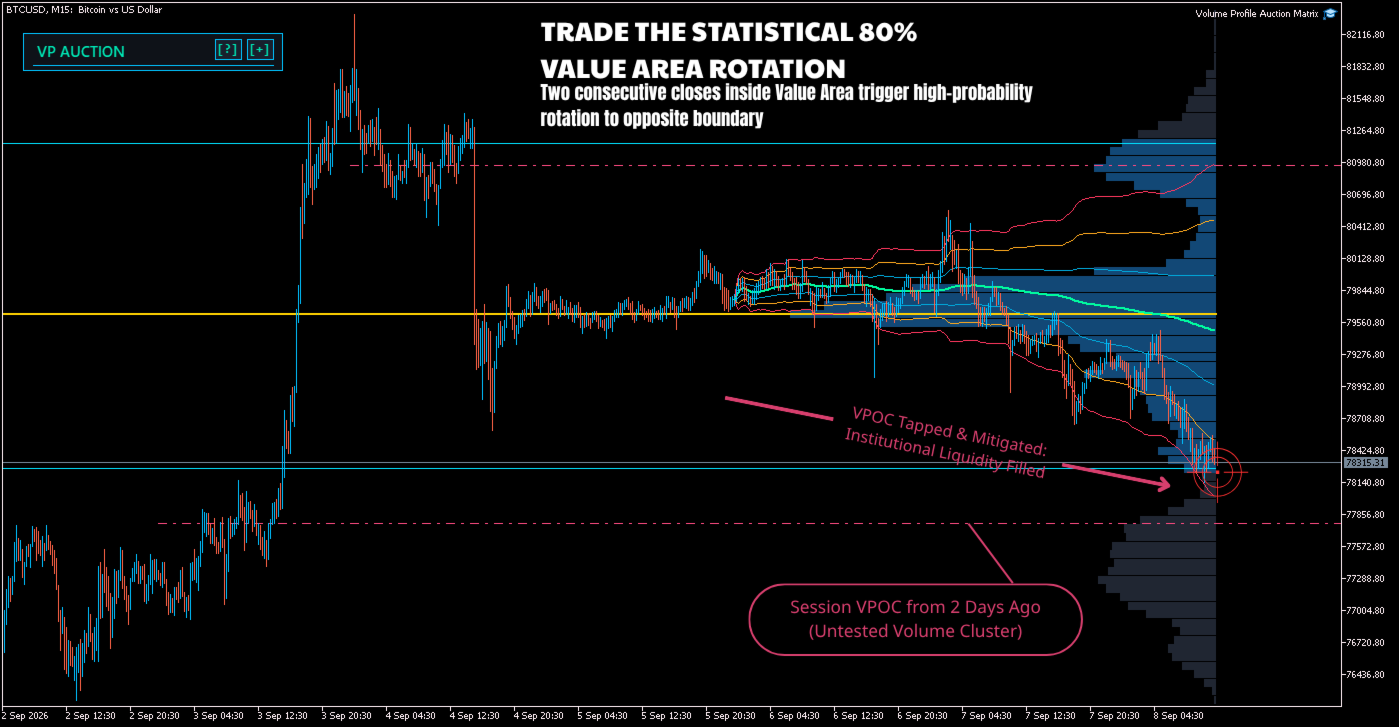
Volume Profile Auction Matrix brings institutional auction analysis to MetaTrader 5. It calculates Steidlmayer Volume Profiles, 70% Value Area boundaries, Points of Control, forward-projecting Virgin POC lines, and Anchored VWAP with statistical standard deviation bands. The interface is rendered directly onto a native chart canvas with zero lag and one-click controls.
Core Concepts
- Price as an Advertisement: Price moves to test where buyers and sellers are willing to do business. Volume confirms whether participants accept or reject that price.
- Point of Control (POC): The single price level where the highest volume was transacted during the measured period. It represents fair value for that auction.
- 70% Value Area: Based on the normal distribution, roughly 70% of total volume occurs within one standard deviation around the POC. Trading inside this range indicates balance. Trading outside indicates an imbalance or trend.
- The 80% Rule: If price opens or re-enters the Value Area and accepts for two consecutive bars, it has an established statistical tendency to rotate to the opposite side of that Value Area.
- Anchored VWAP: Institutions measure execution quality against VWAP. Anchoring VWAP from major session opens, swing highs/lows, or economic releases shows the cumulative volume-weighted cost basis of market participants.
Key Features
1. Volume Profile Engine
- Steidlmayer Value Area Calculation: Identifies the POC and builds the 70% Value Area outward in volume pairs, marking Value Area High (VAH) and Value Area Low (VAL).
- Volume Source Selection: Use Tick Volume on Forex and CFD instruments, or Real Volume on futures, stocks, and crypto where exchange volume is reported.
- Three Profile Modes:
- Visible Range (VPVR): Recalculates automatically as you zoom, scroll, or switch chart windows.
- Session Profile: Anchors to the start of each daily session (00:00 server time).
- Fixed Range: Move start and end pins directly on the chart to analyze specific consolidations, ranges, or impulsive moves.
- Profile Shape Detection:
- D-Shape: Symmetrical distribution indicating market balance and rotational conditions.
- P-Shape: Volume clustered near the highs, indicating short covering or aggressive buying.
- b-Shape: Volume clustered near the lows, indicating long liquidation or aggressive selling.
- B-Shape: Double distribution with two distinct value areas separated by low volume.
2. Multi-Anchored VWAP and Dispersion Bands
- Anchor Modes: Anchor to Daily, Weekly, or Monthly opens, swing highs and lows, or place the interactive pin on any specific candle (such as NFP, CPI, or central bank rate decisions).
- Volatility Dispersion Bands: Projects 1.0, 2.0, and 3.0 standard deviation bands based on cumulative volume-weighted variance.
- Performance Optimization: Uses decimated segment sampling on long historical anchors to ensure smooth chart performance.
3. Virgin POC (VPOC) Tracker
- Untested Points of Control from prior daily sessions often act as magnets when price trends back into old ranges.
- Draws horizontal forward rays from historical session POCs until price revisits and touches the level.
- Automatically cleans up lines once a level has been tested.
4. Canvas HUD Dashboard
- Built using MetaTrader 5 native CCanvas graphics, preventing chart lines, grid lines, or candles from clipping through the panel.
- Displays current auction structure, POC/VAH/VAL levels, VWAP spread in points and standard deviations, and tactical readouts.
- One-click buttons to cycle profile modes, toggle VWAP anchors, and switch bands or VPOC rays without opening the indicator settings.
- Click and drag the header to reposition the panel anywhere on the chart.
- Includes a centered loading badge during recalculations for clear visual feedback.
5. Alert System
- Alerts for Virgin POC retests, 80% rule activations, and price touching outer 2.0 or 3.0 standard deviation VWAP bands.
- Configurable for terminal popups, audio sounds, and mobile push notifications.
- Built-in debounce timer prevents duplicate alert spam on high-frequency market movement.
Trading Setups
Setup 1: Value Area Rotation (80% Rule)
When price breaks outside the Value Area but fails to find acceptance, look for a re-entry into the Value Area. If price accepts inside for two bars, trade the rotation back to the POC and the opposite Value Area boundary.
Setup 2: VWAP Mean Reversion
In balanced markets (D-shaped profiles), price moves reaching the 2.0 or 3.0 standard deviation VWAP bands represent statistical exhaustion. Look for rejection candles to trade the pullback back to the volume-weighted average price.
Setup 3: Virgin POC Retests
Unfinished institutional volume often gets re-tested days or weeks later. When price moves toward an unmitigated VPOC, use the level as a high-probability take-profit target or a reaction level for counter-trend entries.
Input Parameters
| Group | Parameter | Default | Description |
|---|---|---|---|
| Auction Profile | InpVPMode | Visible Range | Scope: Visible Range, Daily Session, or Fixed Range. |
| Auction Profile | InpVolType | Tick Volume | Tick Volume for Forex/CFDs, Real Volume for Futures/Crypto. |
| Auction Profile | InpTargetBins | 80 | Number of price bins for the profile histogram (20 to 300). |
| Auction Profile | InpValueAreaPct | 70.0% | Percentage of total volume inside the Value Area (68.2% to 70.0%). |
| Auction Profile | InpTrackVirginPOCs | true | Tracks and projects untested session POC levels. |
| Anchored VWAP | InpVWAPAnchorMode | Daily Open | Anchor period: Daily, Weekly, Monthly, Swing High/Low, or Interactive Pin. |
| Anchored VWAP | InpShowVWAPBands | true | Toggles standard deviation dispersion bands. |
| Anchored VWAP | InpBand1/2/3Multiplier | 1.0, 2.0, 3.0 | Multipliers for the 1st, 2nd, and 3rd standard deviation bands. |
| Theme & HUD | InpTheme | Cyber Obsidian | Color theme: Cyber Obsidian, Bloomberg Slate, or Stealth Monochrome. |
| Alert System | InpAlertPopup / Sound / Push | true / true / false | Notification options for VPOC tests, 80% rule triggers, and VWAP bands. |
| About | InpProfile | Author Link | Link to developer profile for updates and support. |
Supported Markets and Timeframes
- Instruments: Forex pairs (EURUSD, GBPUSD, USDJPY), Precious Metals (XAUUSD, XAGUSD), Indices (US30, NAS100, DAX40), Energy (USOIL), and Crypto (BTCUSD, ETHUSD).
- Timeframes: Works on all timeframes from M1 through D1. Intraday traders typically use M1, M5, and M15; swing traders use H1, H4, and D1.
- Accounts: Compatible with both standard broker accounts and prop firm evaluation accounts.
For technical questions, configuration help, or bug reports, send a message through the MQL5 community portal.