All Market Cockpit Indicator
- Indicators
- Version: 1.44
- Activations: 10

Multi-Market • Multi-Timeframe • Signal Scoring • Advanced Market Quality Analysis
Stop jumping from chart to chart trying to find the strongest trading opportunities.
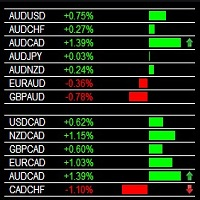
All Market Cockpit Indicator transforms your MetaTrader 4 terminal into a centralized multi-market trading intelligence dashboard, allowing you to scan and analyze multiple symbols and timeframes from one professional interface.
The cockpit is designed for traders who want structured market analysis, signal prioritization and faster decision-making without relying on dozens of open charts.
🔥 WHAT DOES ALL MARKET COCKPIT DO?
The indicator continuously organizes market conditions into a clear visual dashboard showing:
-
BUY signals
-
STRONG BUY signals
-
SELL signals
-
STRONG SELL signals
-
Signal scores
-
Signal freshness and age
-
Current / Act Now status
-
Valid but aged signals
-
Entry levels
-
Stop Loss levels
-
TP1, TP2 and TP3
-
Risk-to-reward information
-
Spread information
-
Multi-symbol strength
-
Multi-timeframe signal alignment
-
Optional advanced signal-quality filtering
-
Interactive chart analysis
Everything is designed to help answer one important question:
Which market setups deserve closer attention right now?
⭐ KEY FEATURES1. Multi-Market Signal Dashboard
Scan multiple markets from one centralized MT4 interface.
Instead of manually opening individual charts, the cockpit organizes your selected symbols into a structured market overview.
2. Multi-Timeframe Analysis
Analyze signals across multiple timeframes including:
M15 • H1 • H4 • D1
This allows you to see whether a market signal is isolated to one timeframe or supported across multiple timeframes.
3. BUY & SELL Signal Detection
The dashboard visually identifies:
🟢 BUY
🟢 STRONG BUY
🔴 SELL
🔴 STRONG SELL
Signal strength is displayed directly inside the dashboard so that important setups can be identified quickly.
4. Signal Scoring
Every displayed setup can include a numerical signal score.
For example:
Score 45
Score 75
Score 90
Score 100
A configurable minimum-score threshold allows traders to focus their dashboard on signals meeting their preferred strength level.
🧠 ADVANCED SIGNAL QUALITY ENGINEOne of the major features of V1.44 is the optional Advanced Signal Filter.
The Advanced Engine can be switched ON or OFF directly from the dashboard.
Advanced Engine ON
The original signals are additionally evaluated through the enabled confirmation layers.
Advanced Engine OFF
The dashboard can operate using the original signal logic without the optional advanced confirmation layer.
This gives traders control over whether they want:
Original Signals
or
Original Signals + Advanced Quality Filtering
🔬 ADVANCED CONFIRMATION LAYERSThe Advanced Signal Quality Engine can evaluate several additional market conditions.
Momentum
Checks whether market momentum supports the underlying signal direction.
Momentum PASS / FAIL
Relative Activity
Evaluates current market activity relative to its reference activity level.
This can help identify situations where a signal appears during stronger or weaker market participation.
Activity PASS / FAIL
Trend Regime
Evaluates the broader trend environment and regime conditions.
Trend Regime PASS / FAIL
Market Structure
Adds structural analysis to the signal-quality process.
Market Structure PASS / FAIL
Volatility Quality
Evaluates volatility conditions and whether they are suitable for the signal environment.
Volatility PASS / FAIL
🎯 CONFIGURABLE QUALITY THRESHOLDThe Advanced Engine includes a configurable minimum quality threshold.
For example:
MIN QUALITY: 75
A signal must meet the configured quality requirements before it qualifies through the enabled advanced layers.
This provides significantly more control than using a simple binary BUY/SELL indicator.
⏱️ SIGNAL AGE & FRESHNESSOne of the most important features of the cockpit is that it does not simply display a signal without context.
The dashboard shows signal age and status.
Examples include:
LIVE / ACT NOW
A current setup.
VALID / AGED
The signal remains valid but has been active for some time.
WATCH
A setup that may require additional observation.
INVALID
A setup that no longer satisfies the required conditions.
This helps prevent traders from treating an old signal as though it were a brand-new signal.
💰 ENTRY • STOP LOSS • TAKE PROFITFor qualifying signals, the dashboard can display:
ENTRY
STOP LOSS
TP1
TP2
TP3
along with the selected Risk-to-Reward ratio.
This gives the trader a complete setup overview before opening the corresponding chart.
📊 RISK-TO-REWARD DISPLAYThe cockpit clearly displays the configured R:R structure.
For example:
R:R 1:2.0
or
R:R 1:3.0
This allows traders to immediately understand the intended reward structure relative to the displayed stop-loss level.
🌐 MULTI-SYMBOL STRENGTH MATRIXThe Multi-Symbol Strength panel provides a compact overview of signals across multiple symbols and timeframes.
It can help you quickly identify:
-
Multi-timeframe agreement
-
Strong symbols
-
BUY concentration
-
SELL concentration
-
Best current setup
-
Relative signal strength
This is particularly useful when monitoring a larger watchlist.
🔍 DETAILED SIGNAL ANALYSISThe OPEN action provides a dedicated signal-analysis window before opening the chart.
The analysis can show:
-
Symbol
-
Timeframe
-
Direction
-
Signal type
-
Score
-
Signal status
-
Signal age
-
Spread
-
Advanced Engine status
-
Quality score
-
Quality grade
-
Momentum
-
Relative Activity
-
Trend Regime
-
Market Structure
-
Volatility Quality
-
Entry
-
Stop Loss
-
TP1
-
TP2
-
TP3
-
R:R
You can then choose:
CANCEL
or
OPEN CHART
This provides an additional review step before moving directly to the underlying MT4 chart.
📈 SELECT & CHART WORKFLOWThe dashboard provides interactive chart controls.
You can select a specific symbol/timeframe and then use the chart-action area to open the corresponding MT4 chart.
This creates a simple workflow:
SCAN → SELECT → ANALYZE → OPEN CHART → REVIEW
⚡ DESIGNED FOR FAST MARKET SCANNINGThe purpose of All Market Cockpit is not to force traders to take every signal.
Instead, it helps traders filter attention.
Rather than manually checking:
EURUSD → GBPUSD → USDJPY → USDCHF → AUDUSD → NZDUSD → EURJPY → ...
the dashboard provides a centralized view where qualifying setups can be compared much faster.
🖥️ PROFESSIONAL MT4 DASHBOARDThe interface is designed as a dedicated cockpit rather than a conventional indicator placed over a price chart.
The dashboard separates information into clear sections:
SYMBOL / TF / ACTIONS
Identify the market and timeframe.
TREND OVERVIEW
Quickly understand signal direction and state.
SIGNAL DETAILS
Review Entry, SL, TP and R:R.
PERFORMANCE METRICS
View active signals, BUY/SELL counts and average R:R.
MULTI-SYMBOL STRENGTH
Compare market conditions across symbols and timeframes.
SIGNAL QUALITY ENGINE
Inspect advanced confirmation layers.
🛠️ INDICATOR — NOT AN EAAll Market Cockpit Indicator V1.44 is an MT4 indicator, not an automated trading Expert Advisor.
It does not automatically execute trades.
Its purpose is to provide:
-
Market scanning
-
Signal analysis
-
Signal filtering
-
Setup comparison
-
Chart navigation
-
Decision-support information
The trader remains responsible for deciding whether and how to trade a setup.
👤 WHO IS THIS INDICATOR FOR?All Market Cockpit is suitable for traders who:
-
Monitor multiple forex pairs
-
Trade multiple timeframes
-
Want a centralized MT4 dashboard
-
Prefer visual signal organization
-
Want to compare market setups quickly
-
Use technical analysis
-
Want additional momentum confirmation
-
Monitor trend regimes
-
Consider market structure
-
Pay attention to volatility
-
Want signal-age information
-
Prefer structured trading workflows
A conventional workflow might require dozens of charts and constant manual switching.
All Market Cockpit provides a different approach:
One dashboard → many markets → multiple timeframes → ranked signals → detailed analysis → chart review
This can make the process of finding opportunities much more organized.
📋 FEATURE SUMMARY| Feature | Included |
| MetaTrader 4 | ✅ |
| MQL4 | ✅ |
| Multi-Market Dashboard | ✅ |
| Multi-Timeframe Analysis | ✅ |
| BUY Signals | ✅ |
| SELL Signals | ✅ |
| Strong BUY / SELL | ✅ |
| Signal Scoring | ✅ |
| Minimum Score Filter | ✅ |
| Signal Age | ✅ |
| Current / Act Now Status | ✅ |
| Valid / Aged Status | ✅ |
| Entry Levels | ✅ |
| Stop Loss | ✅ |
| TP1 / TP2 / TP3 | ✅ |
| R:R Display | ✅ |
| Spread Display | ✅ |
| Multi-Symbol Strength | ✅ |
| Advanced Signal Filter | ✅ |
| Momentum Layer | ✅ |
| Relative Activity Layer | ✅ |
| Trend Regime Layer | ✅ |
| Market Structure Layer | ✅ |
| Volatility Quality Layer | ✅ |
| Quality Score | ✅ |
| Quality Grade | ✅ |
| Interactive Chart Selection | ✅ |
| Detailed Signal Analysis Popup | ✅ |
| Open Selected Chart | ✅ |
| Automated Trade Execution | ❌ MT4 Indicator, Forex Indicator, Trading Dashboard, Multi Timeframe, Signal Indicator, Forex Signals, Buy Sell Indicator, Market Scanner, Trend Indicator, Momentum Indicator, Market Structure, Volatility, MQL4, MetaTrader 4 |