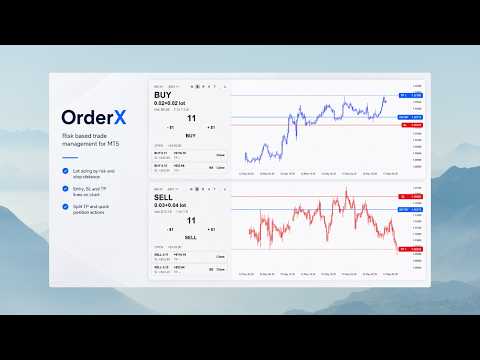
OrderX Risk Based Trade Manager for MT5
- Utilities
- Version: 1.3
- Updated: 17 August 2026
- Activations: 10

OrderX is a MetaTrader 5 utility for manual order placement, risk-based position sizing and trade management directly from the chart.
-
Website: https://orderx.quoc.app
-
Youtube: https://youtu.be/R0Es4O2qxxI
Main features
-
Calculate trading volume from a specified risk amount and the distance between Entry and Stop Loss.
-
Place market, limit and stop orders using chart-based Entry and Stop Loss levels.
-
Drag Entry, Stop Loss and Take Profit levels directly on the chart.
-
Use optional split Take Profit with separate low and high R:R targets.
-
Display open positions and pending orders for the current symbol.
-
Move eligible positions to breakeven.
-
Close open positions.
-
Delete pending orders.
-
Synchronize chart lines and interface state across timeframes of the same symbol.
-
Use a configurable Magic Number for new orders.
-
By default, manage only orders and positions that match the configured Magic Number.
Risk-based position sizing
OrderX calculates the trading volume from the selected risk amount and the distance between Entry and Stop Loss.
The risk amount is specified in the account currency.
The calculated volume is adjusted to the symbol minimum volume, maximum volume and volume step.
Order placement
OrderX determines the order type from the position of the Entry level relative to the current market price.
Depending on the Entry location, the utility can place:
-
market orders;
-
limit orders;
-
stop orders.
Stop Loss and optional Take Profit levels are included with the order request.
Split Take Profit
When Split TP is enabled and the calculated volume can be divided according to the symbol volume rules, OrderX can split the total volume into two separate orders.
The first part uses the lower R:R target and the second part uses the higher Take Profit target.
If the volume cannot be split into two valid order sizes, OrderX uses the available valid volume without forcing an invalid split.
Chart-based workflow
Entry, Stop Loss and Take Profit levels are displayed directly on the chart and can be moved interactively.
When Entry or Stop Loss is moved, the Take Profit level can be recalculated according to the configured R:R settings.
OrderX can synchronize its lines and interface state across different timeframes of the same symbol using the same Magic Number.
Position and pending order management
The panel displays managed open positions and pending orders for the current symbol.
When Magic Number filtering is enabled, only positions and orders matching the configured Magic Number are managed.
Available actions include:
-
move Stop Loss to breakeven;
-
close an open position;
-
delete a pending order.
Inputs
-
Risk per trade — risk amount in account currency.
-
Risk adjustment step — amount used when increasing or decreasing the risk from the panel.
-
High R:R target — higher Take Profit R:R target.
-
Low R:R target — lower Take Profit R:R target used in split mode.
-
Magic number for new orders — Magic Number assigned to orders placed by OrderX.
-
Manage only orders with this magic number — when enabled, OrderX manages only positions and pending orders matching the configured Magic Number.
Important
OrderX is a trade management utility.
It does not generate trading signals, predict market direction or automatically choose trading opportunities.
Entry, Stop Loss, Take Profit, risk settings and trading decisions are defined by the user.