AllChartsSyncChangerPro

  • Utilities
  • Hiroaki Ihara
    Hiroaki Ihara
    I'm a trader from Japan, and the tools I create are born directly from my own trading experiences. If you've ever thought, "I wish this were more convenient" or "I need something to make this less stressful," my tools are for you. I prioritize practical functionality over flashy design, building
  • Version: 12.1
  • Activations: 5

Whether you're a multi-timeframe analyst or trading from a single monitor, this tool has your back.


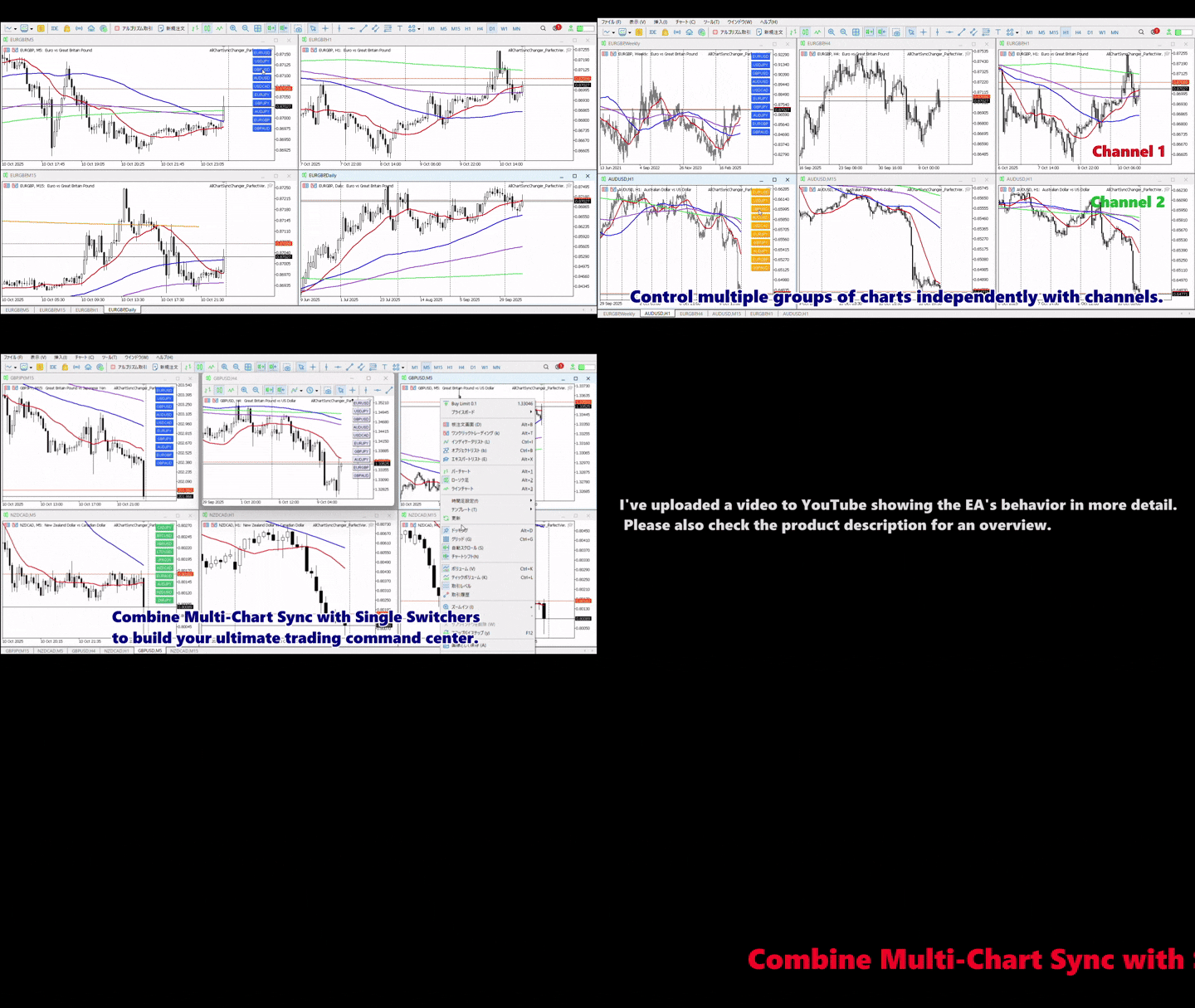
Turn your MT5 into an analysis command center — the ultimate chart sync & instant symbol switcher

Tired of switching charts one by one every time you change strategy?

Is your workspace a mess of currency pairs, indices, and commodities?

Wish you had a desktop-grade analysis setup, even without multiple monitors?

If any of that sounds familiar, All Charts Sync Changer+ is built to fix exactly that. It takes the busywork out of chart management, so you can spend that time on what actually matters: analysis and decision-making.


Channels: full control over your workspace

At the heart of this tool is its Channel system. Channels let you group your charts into independent teams — for example:

  • Channel 1: FX majors
  • Channel 2: Yen crosses
  • Channel 3: Indices & commodities

You can set up to 10 independent parent charts. A parent chart on Channel 1 only syncs the child charts assigned to that same channel — it has zero effect on any other channel.

That means you can finally organize your charts by strategy or asset class, cleanly and independently.


Two modes, both dead simple

Multi-Chart Sync Mode

Built for traders juggling multiple strategies or correlation analysis. Assign a channel to each strategy, set up a parent chart for each, and one click switches the parent chart itself — along with every child chart linked to it.

No more hunting through chart tabs. Less time managing charts means more time back in your analysis.

Single Switcher Mode

Perfect for laptops or single-monitor setups. Turn one chart window into a fast switcher across up to 10 symbols, all from a single click.

No need to pile up chart tabs — your indicators and settings stay exactly where you left them while you cycle through your watchlist.


Key features

  • One-click group switching: The Channel system lets you switch a parent chart and every linked child chart in a single click.
  • Timeframe stays put: Only the symbol changes — each chart keeps its own timeframe. Pair a daily chart with a 1-hour chart for multi-timeframe analysis, and swap the symbol on both without losing that setup.
  • Less clutter, more clarity: Fewer chart tabs means a cleaner, more readable screen — a real difference-maker if you're working with limited space.
  • Your analysis setup stays intact: Switching symbols never touches your indicators or chart settings.
  • Easy symbol management: Change your watchlist right from the EA's input parameters — no need to create new charts or reapply templates.

Setup takes about a minute

No complicated configuration — just three steps:

  • Set up the parent chart: Attach the EA to your main chart, set "Mode: True=Parent(親・ボタン表示) / False=Child(子・同期)" to true, and set "Sync Channel Number(同期チャネル番号)" to your channel number (e.g., 1). Then assign the symbols you want on each button.
  • Set up the child charts: Attach the EA to any chart you want synced, set "Mode: True=Parent(親・ボタン表示) / False=Child(子・同期)" to false, and set "Sync Channel Number(同期チャネル番号)" to the same channel number as the parent (e.g., 1).
  • Choose your button symbols: Use "Button 1 Symbol" through "Button 10 Symbol" to pick which symbols appear on the buttons.

Just make sure each group uses its own channel number — only child charts sharing that number will sync together. Parent charts never interfere with each other, even if they happen to share the same channel number.

That's it — your professional-grade sync setup is ready.

  • The trial version has been withdrawn, as it may have run into a conflict with MQL5 Market policy. In its place, we're now offering a 1-month rental so you can try it out before committing to a purchase.
  • Important: symbols that aren't showing in your MT5 "Symbols" window (Market Watch) won't switch. Make sure any symbol you plan to use is enabled and visible in Market Watch first.

Details that make the difference

  • UI that stays out of your way: Buttons sit neatly in the top-right corner of the chart — no separate window required. Combine it with MT5's built-in "shift chart from right edge" feature and the buttons never overlap your candles.
  • Wide symbol coverage: Choose from 70 symbols, including major FX pairs, gold (XAUUSD), Nikkei 225 (JPN225), S&P 500 (US500), crude oil (XTIUSD), and Bitcoin (BTCUSD).
  • Fully customizable layout: Adjust button position, size, color, and font size to match your own trading setup.
  • Automatic symbol normalization: Broker-specific suffixes like EURUSD.pro or GBPJPY_m are detected and handled automatically — no manual adjustment needed.

Who this is for

  • Traders monitoring multiple strategies or asset classes at once
  • Anyone doing regular multi-timeframe analysis
  • Traders tracking correlations across currency pairs or commodities
  • Laptop or single-monitor traders looking to maximize their setup
  • Traders who want their charts organized by strategy for deeper focus
  • Anyone looking to cut out repetitive chart management tasks

Every minute you're not spent hunting for the right chart, opening it, and rearranging your layout is a minute you get back for analysis.

Let All Charts Sync Changer Pro take the weight off your daily chart management.


Supported symbols

FX Majors: EURUSD, USDJPY, GBPUSD, AUDUSD, USDCAD, USDCHF, NZDUSD

FX Crosses & Exotics: AUDCAD, AUDCHF, AUDJPY, AUDNZD, CADCHF, CADJPY, CHFJPY, EURAUD, EURCHF, EURGBP, EURJPY, EURNOK, EURNZD, EURSEK, GBPAUD, GBPCAD, GBPCHF, GBPJPY, GBPNZD, MXNJPY, NZDCAD, NZDCHF, NZDJPY, NZDSGD, SGDJPY, TRYJPY, USDCNH, USDMXN, USDNOK, USDSEK, USDSGD, USDTRY, USDZAR, ZARJPY

Indices: AUS200, EU50, FRA40, GER40, HI50, HK50, JPN225, SPA35, UK100, US100, US30, US500

Commodities & Metals: NGAS, XAGUSD, XAUEUR, XAUUSD, XBRUSD, XPTUSD, XTIUSD

Crypto: ADAUSD, BCHUSD, BTCUSD, DOGEUSD, DOTUSD, ETHUSD, LINKUSD, LTCUSD, SOLUSD, XRPUSD

*More symbols will be added over time.


Disclaimer

Before purchasing or using this product (hereinafter, "this tool"), please be sure to read the following disclaimer and use it only after agreeing to its terms. By using this tool, you are deemed to have agreed to the following terms.

  • [No Investment Advice or Profit Guarantee] This tool is a utility software designed to streamline chart management and analysis. It does not include any order execution or automated trading functionality, and it does not guarantee future profits. All final investment decisions must be made at the user's own discretion and responsibility.
  • [Delays and Operational Errors Due to Communication or Environment] The chart switching and synchronization functions of this tool may experience delays depending on your PC specifications, memory capacity, internet connection, and MT5 server connectivity. The developer accepts no responsibility for any losses resulting from incorrect orders or settlement operations performed while a chart has not fully switched.
  • [Disclaimer Regarding Special Symbol Names and Quote Display] This tool includes a feature that automatically adapts to common broker-specific suffixes (e.g., EURUSD.pro). However, it may not be able to handle prefixes attached at the beginning of a symbol name (e.g., fx-EURUSD) or entirely different special symbol names (such as the difference between XAUUSD and GOLD). Additionally, due to MT5 specifications, the synchronization function will not work if the target symbol is not displayed in the "Market Watch" window. The developer is not liable for any malfunction arising from your broker's unique naming conventions or incomplete environment configuration.
  • [Conflicts or Interference with Other Tools] If this tool is used alongside other EAs (Expert Advisors), custom indicators that require heavy processing, or special scripts within your MT5 environment, instability or unexpected malfunctions may occur. Stable operation in combination with other tools cannot be guaranteed.
  • [Impact of MT5 Platform Updates] Due to specification changes or updates to MetaTrader 5 (MT5) by MetaQuotes, some or all functions of this tool may become unusable without prior notice in the future. The developer will make every effort to accommodate such updates, but permanent functionality cannot be guaranteed.
  • [Provided "As-Is"] This tool is provided on an "as-is" basis. While the developer has conducted thorough testing prior to release, this does not guarantee the complete absence of potential bugs or defects inherent to the nature of software.
  • [Unexpected Behavior Due to Configuration Errors] The developer is not responsible for any unexpected behavior, or resulting disadvantages, caused by user error in parameter settings, such as duplicate channel numbers or incorrect parent/child chart configurations.
  • [Limitation of Liability] To the maximum extent permitted by law, the developer shall not be liable for any direct, indirect, incidental, special, or consequential damages (including but not limited to loss of profit, data loss, or business interruption) arising from the use of, or inability to use, this tool.
  • [Refunds, Exchanges, and Support] Due to the nature of digital products, returns and refunds after purchase cannot be accepted in principle, for any reason whatsoever, including malfunctions dependent on the user's individual environment. Furthermore, the developer is under no obligation to provide free support for customization or troubleshooting tailored to individual environments.
  • [Copyright] The copyright of this tool belongs to the developer. Reverse engineering, decompiling, modification, redistribution, resale, and sharing among multiple users (license violation) are strictly prohibited. Legal action may be taken in the event that unauthorized use is discovered.
  • [No Support for Edition Changes or Upgrades] This tool is offered in multiple editions with differing features and specifications (e.g., Standard, Advanced, Professional). These are treated as entirely separate, independent products within our system. Therefore, we do not offer any service to migrate (upgrade) from one purchased edition to another via a difference payment or automatic update. If the features of a different edition become necessary, a new purchase will be required, and no refund or offset against the previously purchased product will be provided. Furthermore, even in the case of an accidental purchase of an edition other than the one intended, due to the nature of digital products, we cannot accommodate any exchange or refund for a different edition. Please be sure to fully review the specifications of each edition before purchasing, and make your selection at your own responsibility.

Recommended products
Volume Profile Utility
AL MOOSAWI ABDULLAH JAFFER BAQER
Volume Profile Discover where the market really trades. Make decisions based on volume, not guesswork. Volume Profile is a professional MetaTrader utility that analyzes trading activity across different price levels, allowing traders to identify where the highest concentration of market participation has occurred. Instead of focusing only on price movement over time, Volume Profile reveals the price levels where buyers and sellers have been most active, providing valuable insight into market str
Before installing the HeatMap indicator make sure you are using a broker that gives you access to the Depth of market (DOM) !! This indicator creates a heatmap on your chart allowing you to see the buy or sell limit orders easily and in real time. You have the possibility to change the setting and the colors of the HeatMap in order to adapt to all markets and all charts. Here is an example of a setting you can use with the NASDAQ100 on the AMPGlobal broker :  https://www.youtube.com/watch?v=x0Y
RSI Cortex Ai
Michael Prescott Burney
RSI Cortex AI for MT5 RSI Cortex AI is a MetaTrader 5 indicator designed to help traders analyze momentum using a multi-factor ranking model instead of relying only on a fixed RSI threshold approach. It combines momentum features, directional ranking, confidence scoring, and adaptive filtering into a clean TradingView-style workspace for chart-based analysis. What the indicator does RSI Cortex AI evaluates momentum using a broader feature set than a standard RSI line. It is designed to help trad
FREE
Trade Manger
Israr Hussain Shah
Here   our more valuable tools SMC Trend Trading   ,  Easy SMC Trading  ,  Institutional SMC Architect Volume Analysis Tools  ,  Volume flow Profile  ,  Market volume profile  , FVG with Volume  , Liquidity Heatmap Profile  ,  Volume Spread Analysis You Give an Instruction: When you run the script, a window pops up with a dropdown menu. You choose exactly what you want it to do from the list (e.g., "Close Profit Only" or "Delete Pending Orders"). It Scans Your Positions: The script then reads
HMA Scalper Pro EA
Vladimir Shumikhin
5 (2)
HMA Scalper Pro EA — Automated Trading Advisor Based on Hull Moving Average (HMA) for MetaTrader 5 OVERVIEW HMA Scalper Pro EA is a professional trading robot (Expert Advisor) for MetaTrader 5 that trades in the direction of the Hull Moving Average (HMA). The HMA indicator determines the current trend direction, and the EA opens trades in that direction, enhanced by Smart Risk capital management, adaptive grid trading, trailing stop, breakeven, and time filters. The EA supports both Netting a
CoPilot dashboard MT5
Frederic Jacques Collomb
CoPilot — Daily Trading Dashboard Know your numbers. Trade with clarity. MT4 version What is CoPilot? CoPilot is a professional-grade trading assistant that displays in real time all your daily performance statistics directly on the chart — with a live equity curve that updates trade by trade. Designed for active traders who need instant visibility into their session without leaving the chart, CoPilot aggregates every closed trade of the day across all symbols and presents them in a clean, color
Modern Dark Chart Theme for MT5 Upgrade your MetaTrader 5 chart into a clean, dark, professional trading workspace. Your chart is your trading office. It is where you analyze the market, test Expert Advisors, review setups, record videos, share screenshots, and make trading decisions. If your MT5 chart looks old, bright, noisy, or unprofessional, your trading environment can feel distracted before you even start your analysis. Modern Dark Chart Theme for MT5 helps you create a cleaner, darker,
FREE
RENKO PRICE ACTION ATR is an "Expert Advisor" developed through the construction of the Renko Chart where each BRICK has the size calculated through the ATR of the period selected by the user. Renko charts are designed to filter out minor price movements, thus making it easier for traders to focus on important trends. Due to its efficiency in detecting price trends, it is also possible to clearly identify supports and resistances as well as top and bottom divergences, thus making better use of t
The indicator builds current quotes, which can be compared with historical ones and on this basis make a price movement forecast. The indicator has a text field for quick navigation to the desired date. Options: Symbol - selection of the symbol that the indicator will display; SymbolPeriod - selection of the period from which the indicator will take data; IndicatorColor - indicator color; Inverse - true reverses quotes, false - original view; Next are the settings of the text field, in w
GDS Renko Pip ST Chart - Pip-Based Renko Chart Indicator for MetaTrader 5 GDS Renko Pip ST Chart is a pip-based Renko chart indicator for MetaTrader 5. It helps traders build and study cleaner Renko price movement using a practical fixed pip or point-based brick structure. This tool is designed as a Renko chart foundation for manual analysis. It does not predict the market, does not generate buy or sell signals and does not decide whether a trade should be opened. What Pip ST Chart Does Renko ch
FREE
VTB High Watermark Drawdown Lock EA for MT5 Advanced Equity Protection & Drawdown Management System VTB High Watermark Drawdown Lock is a professional risk management Expert Advisor designed to protect trading accounts, funded accounts, and proprietary trading challenges from excessive drawdown. Unlike traditional drawdown protection systems that calculate risk from the initial account balance, this EA uses a dynamic High Watermark (HWM) model that continuously protects both your original capita
Arrow Micro Scalper - an indicator designed for scalping and short-term trading, integrated into any chart and financial instrument (currency, crypto, stocks, metals). In its work, it uses wave analysis and a trend direction filter. It is recommended to use on time frames from M1 to H4. How to work with the indicator. The indicator contains 2 external parameters for changing the settings, the rest are already configured by default. Large arrows indicate a change in trend direction, blue - the
Crash 1000 Scalping Indicator for the Crash 1000 Deriv Synthetic Index. Introduction The Crash 1000 Scalping Indicator is a specialized tool designed for the Crash 1000 index on the Deriv Synthetic market. This indicator is particularly useful for scalping on the M1 timeframe, helping traders to identify precise entry and exit points for buy positions. It is designed to be non-repainting, providing clear signals with audible alerts and push notifications, and is compatible with mobile devices th
Was: $249  Now: $99   Market Profile defines a number of day types that can help the trader to determine market behaviour. A key feature is the Value Area, representing the range of price action where 70% of trading took place. Understanding the Value Area can give traders valuable insight into market direction and establish the higher odds trade. It is an excellent addition to any system you may be using. Inspired by Jim Dalton’s book “Mind Over Markets”, this indicator is designed to suit the
PROMOTION!! $499 until 1 Mar. After that, EA will be $1,050 Developed and tested for over 3 years, this is one of the safest EAs on the planet for trading the New York Open. Trading could never be easier.  Trade On NASDAQ US30 (Dow Jones Industrial Average) S&P 500  What Does The EA do? The EA will open a Buy Stop Order and a Sell Stop Order(With SL and TP) on either side of the market just a few seconds before the NY Open.  As soon as 1 of the 2 trades is triggered, the EA automatically delete
Money Flow Profile MT4  HERE Here our more valuable tools SMC Trend Trading   ,  Easy SMC Trading  ,  Institutional SMC Architect Volume Analysis Tools  ,  Volume flow Profile  ,  Market volume profile  , FVG with Volume  , Liquidity Heatmap Profile  ,  Volume Spread Analysis  Master Edition is a professional-grade analytical tool designed to visualize market structure through the lens of volume and money flow. Unlike standard volume indicators, this tool displays a Daily Volume Profile
MT5 Trade Copier Transmitter & Receiver EA A flexible MetaTrader 5 trade copier system designed to transmit and mirror positions across multiple broker accounts with accurate symbol mapping, including gold/XAU instruments. It supports reliable snapshot-based synchronization, position lifecycle tracking, and broker-specific symbol translation so trades can be copied even when brokers use different contract names or suffixes. Features Copies live positions from transmitter to receiver in near rea
Product Name: Smart Switch Dashboard STOP WASTING SECONDS. SECONDS COST MONEY. Are you losing trades because you're fumbling through the Market Watch? Is your workspace messy and slowing you down? In trading, Speed is everything. If you aren't organized, you are losing money to traders who are. Smart Switch Dashboard is not just a tool—it is your COMMAND CENTER . Designed for serious Scalpers and Day Traders who demand Speed, Precision, and Zero Lag. DOMINATE YOUR WORKFLOW 1. ULTRA-FAST SY
Trading Utility for Forex Currency Pairs Only not for Gold  Functions Auto Lot Calculation based on Risk Auto stoploss  Auto TakeProfit Breakeven Auto Close Half % Close in percentage with respect to the PIPs Pending Orders BuyLimit Sell Limit with distances BuyStop Sell Stop    with distances Trading Informations Risk in percentage For Multiple trades Combine Takeprofit and Combine Stoplosses
Key Features: 200+ Fully Implemented Patterns   across all categories Advanced Market Structure Analysis Smart Money Integration   (Wyckoff, Order Blocks, Liquidity) Professional Risk Management Multi-Timeframe Analysis AI-Powered Confidence Scoring Advanced Visualization Real-time Alerts Pattern Categories: Single Candle Patterns (Hammer, Doji, Marubozu, etc.) Multi-Candle Patterns (Engulfing, Stars, Harami, etc.) Chart Patterns (Head & Shoulders, Cup & Handle, Triangles, etc.) Harmonic Pattern
FREE
MACD Sniper Pro
Noppawat Tumjai
MACD Sniper Pro is an advanced automated trading system designed for traders seeking high-precision entries and robust risk management. By combining the classic momentum of MACD Crossover with a strict ADX Volatility Filter and Dynamic ATR Management , this EA completely eliminates emotional trading and filters out dangerous flat/sideways markets. Unlike standard MACD indicators that suffer during consolidation, MACD Sniper Pro verifies trend strength before entering and protects your capital us
FREE
DRS Semi Automated
Enrique Alexander Madera Pimentel
DRS Semi Automated: Fair Value Gap Trading Inspired by the DRS strategy made by SMT FX. To learn more, visit their website. Key Features: 1. Fair Value Gap Detection: Identifies bullish and bearish Fair Value Gaps on the 5-minute timeframe. 2. Customizable Trading Sessions: Trade London, New York, or both sessions with adjustable start times. 3. Risk Management: Set risk percentage and choose between equity-based or fixed balance risk calculation. 4. Bias Selection: Manually select bullish or
FRATO Smart GEX Gamma Exposure 0DTE Dashboard
Francisco Felipe Alves Da Silva Rocha
Elevate your trading to the institutional level with   FRATO Smart GEX . This is not just another lagging technical indicator. It is a quantitative intelligence tool that reads the positioning of large Market Makers through real-time   GEX (Gamma Exposure)   and   Open Interest (OI)   analysis. Understand where big players are pushing the price and identify support and resistance zones that are invisible on a standard candle chart! KEY FEATURES: Real-Time GEX Analysis:   Visualize Call Wall
Price Magnet — Price Density and Attraction Levels Indicator Price Magnet is a professional analytical tool designed to identify key support and resistance levels based on statistical Price Density. The indicator analyzes a specified historical period and detects price levels where the market spent the most time. These zones act as “magnets,” attracting price action or forming a structural base for potential reversals. Unlike traditional Volume Profile tools, Price Magnet focuses on price-time d
Power Candles Strategy Scanner - Self-Optimizing Multi-Symbol Setup Finder Power Candles Strategy Scanner runs the same self-optimizing engine that powers the Power Candles indicator - on every symbol in your Market Watch, side by side. One panel tells you which symbols are statistically tradable right now, which strategy wins on each, the optimal Stop Loss / Take Profit pair, and pings you the moment a fresh signal fires. This tool is part of the Stein Investments ecosystem - 18+ tools plus Max
Painel Nelogica ChartTrading
Tiago Silvano Souza Felipe
Painel Profit is an operational trading panel for MetaTrader 5 created to make manual execution and visual order management easier directly on the chart. The operating principle is simple: the trader selects the symbol, timeframe, volume, entry type, and exit strategy. Based on these commands, the panel sends or organizes the trade through the interface, displaying the entry, take profit, and stop loss levels on the chart for visual monitoring. This product is not a signal robot and does not mak
Axilgo PipPiper CoPilot
Theory Y Technologies Pty Ltd
5 (2)
Axilgo Pip Piper CoPilot Elevate your trading game with the Axilgo Pip Piper CoPilot, the first in our revolutionary Pip Piper Series. This all-inclusive toolset is meticulously crafted for serious traders, focusing on key areas such as Risk Management, Trade Management, Prop Firm Rule Compliance, and Advanced Account Management . With CoPilot, you’re not just investing in a tool—you’re gaining a strategic partner in the intricate world of trading. Important Notice: To ensure you receive the fu
FREE
Smart ATR Grid Pro
Syamsurizal Dimjati
SMART ATR GRID PRO++ – Adaptive Grid Intelligence Suite is a next-generation, institutional-grade grid trading indicator engineered for traders who demand precision, adaptability, and comprehensive market structure analysis. By seamlessly integrating   Adaptive Volatility Grid System ,   KAMA Candle Trend Filtering ,   Multi-Factor Trend Detection (ADX + EMA20/50) ,   Dynamic Heatmap Zone Engine , and   Real-Time Market Regime Classification , this indicator delivers a complete decision-making
UR Gamma MT5
Krzysztof Jan Debski
UR Gamma MT5 (powered by similar calculations found in Machine Learning systems) UR Gamma MT5   is a cutting-edge financial analysis tool that offers a new and improved take on the classic WaveTrend indicator. By incorporating advanced Digital Signal Processing techniques, UR Gamma addresses some of the limitations of traditional WaveTrend algorithms and provides a more accurate, robust and dynamic approach to identifying and measuring trends in price action. Advantages of using UR Gamma MT5 :
Trades History Visualizer is a MetaTrader 5 indicator that displays your trading history directly on the chart, providing a clear visual representation of past trades with additional information. Key Features: Visual trade history display with entry arrows Entry, Stop Loss, and Take Profit horizontal lines Color-coded connector lines between entry and exit points (green for profit, red for loss) Risk-Reward ratio display for each closed trade Profit/Loss amount display option Pip display option
Buyers of this product also purchase
Trade Assistant MT5
Evgeniy Kravchenko
4.43 (214)
It helps to calculate the risk per trade, the easy installation of a new order, order management with partial closing functions, trailing stop of 7 types and other useful functions. Additional materials and instructions Installation instructions - Application instructions - Trial version of the application for a demo account Line function -   shows on the chart the Opening line, Stop Loss, Take Profit. With this function it is easy to set a new order and see its additional characteristics bef
Forex Trade Manager MT5
InvestSoft
4.98 (668)
Trade Manager MT5 is an advanced position size calculator and trade management tool for MetaTrader 5, designed to help traders plan trades faster, control risk more precisely, and manage open positions directly from the chart. It combines order placement, risk based lot calculation, Stop Loss and Take Profit management, Break Even, Trailing Stop, Partial Close, Equity Protection, and external trade management in one panel. Whether you trade forex, indices, metals, commodities, crypto, or future
TradePanel MT5
Alfiya Fazylova
4.88 (162)
Trade Panel is a multi-functional trading assistant. The app contains over 50 trading functions for manual trading and allows you to automate most trading tasks. Before making a purchase, you can test the demo version on a demo account. Download the trial version of the application for a demonstration account: https://www.mql5.com/en/blogs/post/750865 . Full instructions here . Trade. Allows you to perform trading operations in one click: Open pending orders and positions with automatic risk cal
Beta Release The Telegram to MT5 Signal Trader is nearly at the official alpha release. Some features are still under development and you may encounter minor bugs. If you experience issues, please report them, your feedback helps improve the software for everyone. Telegram to MT5 Signal Trader is a powerful tool that automatically copies trading signals from Telegram channels or groups directly to your MetaTrader 5 account. It supports both public and private Telegram channels, and you can conn
================================================================================ POC BREAKOUT - V20.72. Full Professional Grade Toolkit ================================================================================ POC Breakout is a full MetaTrader 5 trading dashboard for discretionary traders who want breakout signals, Point of Control (POC) context, volume profiles, order flow, market structure, news, alerts, and advanced trade planning in one professional workspace. Attached directly to you
Trade Manager DaneTrades
Levi Dane Benjamin
4.23 (30)
DaneTrades Trade Manager is a professional trade panel for MetaTrader 5, designed for fast, accurate execution with built‑in risk control. Place market or pending orders directly from the chart while the panel automatically calculates position size from your chosen risk, helping you stay consistent and avoid emotional decision‑making. The Trade Manager is built for manual traders who want structure: clear risk/reward planning, automation for repeatable management, and safeguards that help reduc
YuClusters
Yury Kulikov
4.93 (43)
Attention: You can view the program operation in the free version  YuClusters DEMO .  YuClusters is a professional market analysis system. The trader has unique opportunities to analyze the flow of orders, trade volumes, price movements using various charts, profiles, indicators, and graphical objects. YuClusters operates on data based on Time&Sales or ticks information, depending on what is available in the quotes of a financial instrument. YuClusters allows you to build graphs by combining da
FarmedHedge Pair Trading Dashboard
Tanapisit Tepawarapruek
5 (3)
Farmed Hedge Yield Farming | All Markets (Manual - Hybrid - Semi/Automated EA) MULTI-ASSET SUPPORT Trade any asset available on your broker - Forex: Major, Minor, Exotic pairs - Crypto: BTC, ETH, XRP, SOL, BNB - Stocks: Apple, Tesla, Amazon, Google, etc. - Commodities: Gold, Silver, Oil, Gas - Indices: US30, NAS100, SPX500, DAX40 - Any CFD your broker offers VERIFIED TRADING RESULTS - Farmed Hedge Yield Axi Copy:  https://www.mql5.com/en/signals/2356376 - Farmed Hedge Yield Exn Copy:   https:/
Anchor Trade Manager
Kalinskie Gilliam
5 (6)
Anchor: The EA Manager Run your full EA portfolio without conflicts, without stacked risk, and without watching every chart yourself. Anchor coordinates up to 64 Expert Advisors on a single account, including daily loss protection built for prop firm rules. Attach Anchor to any chart. Type your EA names and magic numbers in one line. Click OK. Anchor begins coordinating immediately. Built for portfolios. Built for prop firms. Built for discipline. The Problem Running multiple EAs on the same acc
Footprint Chart Pro — Professional OrderFlow EA for MetaTrader 5 Version 6.34 | Professional tool for real traders | Institutional-Grade Visualization DEMO USERS - PLEASE SELECT EVERY TICK / REAL TICK WHEN TESTING AND YOU HAVE DOWNLOADED HISTORICAL DATA. IF YOU SEE A WAITING SCREEN AND IT IS NOT DOWNLOADING, IT MEANS YOU HAVE LOW HISTORICAL DATA. TRY 1 MIN AND 5 MIN FIRST ON 1 DAY DATA. ONE DAY DATA SHOULD BE THE NEWEST AND MOST CURRENT DATE. PLEASE WAIT UNTIL THE MARKET HAS ROLLED OVER PERIOD.
Unlimited Trade Copier Pro MT5 is a tool to copy trade remotely to multiple MT4, MT5 and cTrader accounts at different computers/locations over internet. This is an ideal solution for you if you are a signal provider and want to copy your trades to other receivers globally on your own rules. One provider can copy trades to multiple receivers and one receiver can get trade from multiple providers as well. The provider can even set the subscription expiry for each receiver, so that receiver will n
EasyInsight AIO MT5
Alain Verleyen
4.92 (12)
EASY Insight AIO – All-In-One Power for AI-Driven Trading Want to skip the setup and start scanning the entire market – Forex, Gold, Crypto, Indices, and even Stocks – in seconds? EASY Insight AIO is the complete plug-and-play solution for AI-powered trade analysis. It includes all core Stein Investments indicators built-in and automatically exports clean, structured CSV files – perfect for backtesting, AI prompts, and live market decision-making. No need to install or configure indicators manu
Welcome to ENTRY IN THE ZONE WITH SMC MULTI TIMEFRAME Entry In The Zone with  SMC Multi Timeframe  is a professional trading indicator built on Smart Money Concepts (SMC), combining market structure analysis with a No Repaint BUY / SELL signal system in a single indicator. It helps traders understand market structure more clearly, identify key price zones, and focus on higher-quality trading opportunities. By combining Multi-Timeframe Analysis, Points of Interest (POIs), and real-time signals, t
HINN Lazy Trader
ALGOFLOW OÜ
5 (1)
LIMITED SUMMER SALE -40% ! ONLY $470 insead of $790!  Maximum real discount! ONLY UNTIL 08/22 The core idea: using the user interface, you configure the parameters the chart must meet before entering a position (or positions), choose which entry models to use, and set the rules for when trading and planning should end. Lazy Trader  handles the rest: it  takes over all the routine chart watching and execution! full description  :: 3 key videos [1] ->  [2]   ->  [3] What can it do? - Understand
EA Auditor
Stephen J Martret
5 (4)
EA Auditor is an independent analysis tool for traders evaluating Expert Advisors and trading signals on MetaTrader 5. It audits backtest reports, reviews posted developer signals, and cross-verifies the two against each other to help traders assess strategies before committing capital. The MQL5 market offers a wide range of Expert Advisors from many developers, with varying approaches, quality, and transparency. EA Auditor provides a consistent, data-driven framework for reviewing them, answer
ManHedger MT5
Peter Mueller
4.83 (6)
THIS EA IS A SEMI-AUTO EA, IT NEEDS USER INPUT. Manual & Test Version Please TEST this product before BUYING  and watch my video about it. The price of the ManHedger will increase to 250$ after 20 copies sold. Contact me for user support or bug reports or if you want the MT4 version! MT4 Version  I do not guarantee any profits or financial success using this EA. With this Expert Advisor, you can: Implement your own Zone Recovery strategy to capitalize on trending markets. Create Grid trading s
FUTURES ORDERFLOW FOOTPRINT CHART Professional OrderFlow EA for MetaTrader 5 Version 1.01| Professional tool for real traders | Institutional-Grade Visualization STRATEGY TESTER USERS - PLEASE SELECT EVERY REAL TICK WHEN TESTING AND YOU HAVE DOWNLOADED HISTORICAL DATA. IF YOU SEE A WAITING SCREEN AND IT IS NOT DOWNLOADING, IT MEANS YOU HAVE LOW HISTORICAL DATA. TRY 1 MIN AND 5 MIN FIRST ON 1 DAY DATA. ONE DAY DATA SHOULD BE THE NEWEST AND MOST CURRENT DATE. PLEASE WAIT UNTIL THE MARKET HAS ROL
The product will copy all telegram signal to MT5 ( which you are member) , also it can work as remote copier.  Easy to set up, copy order instant, can work with almost signal formats, image signal,  s upport to translate other language to English Work with all type of channel or group, even channel have "Restrict Saving Content", work with  multi channel, multi MT5 Work as remote copier: with signal have ticket number, it will copy exactly via ticket number. Support to backtest signal. How to s
Quant AI Agents
Ho Tuan Thang
5 (1)
Quant AI Agents are independent trading Expert Advisors. Instead of trading using a fixed strategy like other conventional EAs, Quant AI Agents   is a   multi-agent AI trading framework   that turns natural-language strategy prompts into live.  WANT THE SAME RESULTS AS MY LIVE SIGNAL?   Use the exact same brokers I do:   IC MARKETS , IC TRADING   .  Unlike the centralized stock market, Forex has no single, unified price feed.  Every broker sources liquidity from different providers, creating un
Premium Trade Manager - The Trade Panel With a Coach Built In Premium Trade Manager puts a trading coach inside your chart, with a full execution engine underneath it. Set the trade up the way you always do, then let Max, your AI trading coach, read that exact setup against your live account and give you a straight verdict before you commit: is the stop disciplined, is the risk sane, is a high-impact release minutes away, are you near a prop-firm limit. Below sits the engine that runs everything
MT5 to Telegram Signal Provider turns your trading account into a signal provider. Every trade action, whether manual, by EA or from your phone, is instantly sent as a message to Telegram. You can fully customize the format or use a ready-made template for quick setup. [ Demo ] [ Manual ] [ MT4 Version ] [ Discord Version ]     New: [ Telegram To MT5 ] Setup A step by step user guide is available. Key Features Ability to customize order details sent to subscribers You can create a tiered subs
Grid Manual MT5
Alfiya Fazylova
4.73 (22)
Grid Manual is a trading panel for working with grid strategies. The utility is universal, has flexible settings and an intuitive interface. It works with a grid of orders not only in the direction of averaging losses, but also in the direction of increasing profits. The trader does not need to create and maintain a grid of orders, the utility will do it. It is enough to open an order and the "Grid manual" will automatically create a grid of orders for it and will accompany it until the close. F
TradeMirror is a local order replication tool designed for MT4/MT5 platforms, supporting real-time trading synchronization. Tutorial Please click the Trademirror Tutorial link to view more tutorials. Product Advantages Aligned with the high standards of security, stability, and privacy protection for financial software, we have optimized three core dimensions: Intuitive graphical interface for user-friendly operation Enhanced privacy protection to meet sensitive data isolation requirements in fi
Trade Copier Pro MT5
Vu Trung Kien
3.67 (3)
Trade Copier Pro MT5 is a tool to copy trade remotely to multiple MT4, MT5 and cTradfer accounts at different computers/locations over internet. This is an ideal solution for you if you are a signal provider and want to copy your trades to other receivers globally on your own rules. One provider can copy trades to multiple receivers and one receiver can get trade from multiple providers as well. The provider can even set the subscription expiry for each receiver, so that receiver will not be abl
My Chart Generator
Trade The Volume Waves Single Member P.C.
What if your chart adapted to the market instead of the clock?   THE PROBLEM IT SOLVES   Instead of trying to find the best indicator that fits your timeframe chart, build a chart and find the most appropriate indicator.   My Chart Generator is a MetaTrader 5 background service that builds  live, fully historical three types of custom charts :1. Range/Volume Balanced chart, 2.  Range/Volume Absorption chart and 3. Constant Volume chart from any symbol — Forex pairs, crypto, indices, commodities,
AI Agents Supervisor
Ho Tuan Thang
5 (1)
AI Agent Supervisor is NOT an Expert Advisor. AI Agent Supervisor   is a   multi-agent AI risk & portfolio supervisor   that watches every EA on your account and intervenes in real time.  WANT AN AI PORTFOLIO MANAGER WATCHING YOUR FLEET 24/7?   Run your fleet on the same brokers I do:   IC MARKETS , IC TRADING   .  Unlike the centralized stock market, Forex has no single, unified price feed.  Every broker sources liquidity from different providers, creating unique data streams. The Supervisor r
Signal Trading View to MT5 Pro
Mirel Daniel Gheonu
4.5 (2)
Signal TradingView to MT5 Pro  Instant professional execution between TradingView and MetaTrader 5 Automate your trading strategy with the most robust communication bridge between TradingView alerts and real execution in MT5. Designed for traders who demand speed, flexibility, and impeccable risk management, this Expert Advisor transforms any alert message into a precise market or limit order.   Install and TEST the TRIAL version HERE STRENGTHS AND ADVANTAGES Universal Parsing Engine (Propriet
Ultimate Extractor
Clifton Creath
5 (8)
Ultimate Extractor - Professional Trading Analytics for MT5 *****this is the local HTML version of Ultimate Extractor. !!!!!it is not compatible with Cloud!!!! For the online version please reach out to me directly****** Ultimate EA manager also now available when you use cloud pro and above for free!! Ultimate Extractor transforms your MetaTrader 5 trading history into actionable insights with comprehensive analytics, interactive charts, and real-time performance tracking. What It Does Automa
Trader Evolution
Siarhei Vashchylka
5 (7)
" Trader Evolution " - A utility designed for traders who use wave and technical analysis in their work. One tab of the utility is capable of money management and opening orders, and the other can help in making Elliott wave and technical analysis. Manual (Be sure to read before purchasing) | Version for MT4 Advantages 1. Trading in a few clicks. Immediate and pending orders are available in the panel 2. Money management. The program automatically selects the appropriate lot size 3. Simplifies
Trade Manager DashPlus
Henry Lyubomir Wallace
4.85 (13)
DashPlus is an advanced trade management tool designed to enhance your trading efficiency and effectiveness on the MetaTrader 5 platform. It offers a comprehensive suite of features, including risk calculation, order management, advanced grid systems, chart-based tools, and performance analytics. Key Features 1. Recovery Grid Implements an averaging and flexible grid system to manage trades during adverse market conditions. Allows for strategic entry and exit points to optimize trade recovery
Filter:
No reviews
Reply to review