Lorentzian Classification EA
- Uzmanlar
-
Michael Prescott Burney
 Ben, MetaTrader 5 için yüksek performanslı ve risk odaklı işlem sistemleri geliştiren profesyonel bir trader ve Expert Advisor geliştiricisiyim. Avantajım, gerçek piyasa deneyimiyle şekillendi—drawdown süreçlerinden geçerek, stratejilerimi geliştirerek ve canlı piyasa koşullarında çalışan disiplinli
 - Sürüm: 1.0
- Etkinleştirmeler: 20
MetaTrader 5 için geliştirilmiş bu uzman Lorenz sınıflandırma aracı, özelleştirilebilir bir kural sistemi kullanarak piyasa verilerini analiz eder ve işlemleri otomatikleştirir. Lorenz mesafesi (KNN) sınıflandırmasını, çekirdek regresyonu yoluyla ek doğrulamayı, piyasa filtrelemesini ve özelleştirilebilir işlem yönetimi özelliklerini bir araya getirir.
Bu otomatik işlem sistemi, tek bir teknik göstergeye değil, birden fazla teknik göstergeye dayalı otomatik işlemleri keşfetmek, test etmek ve kullanmak isteyen yatırımcılar için tasarlanmıştır. Sistem, piyasa özelliklerine göre geçmiş ve güncel piyasa verilerini analiz eder ve yeni emirleri işleme almadan önce önceden tanımlanmış filtreler ve işlem parametreleri uygular.
Ana özellikler
- Lorenz mesafesine dayalı KNN sınıflandırma çerçevesi
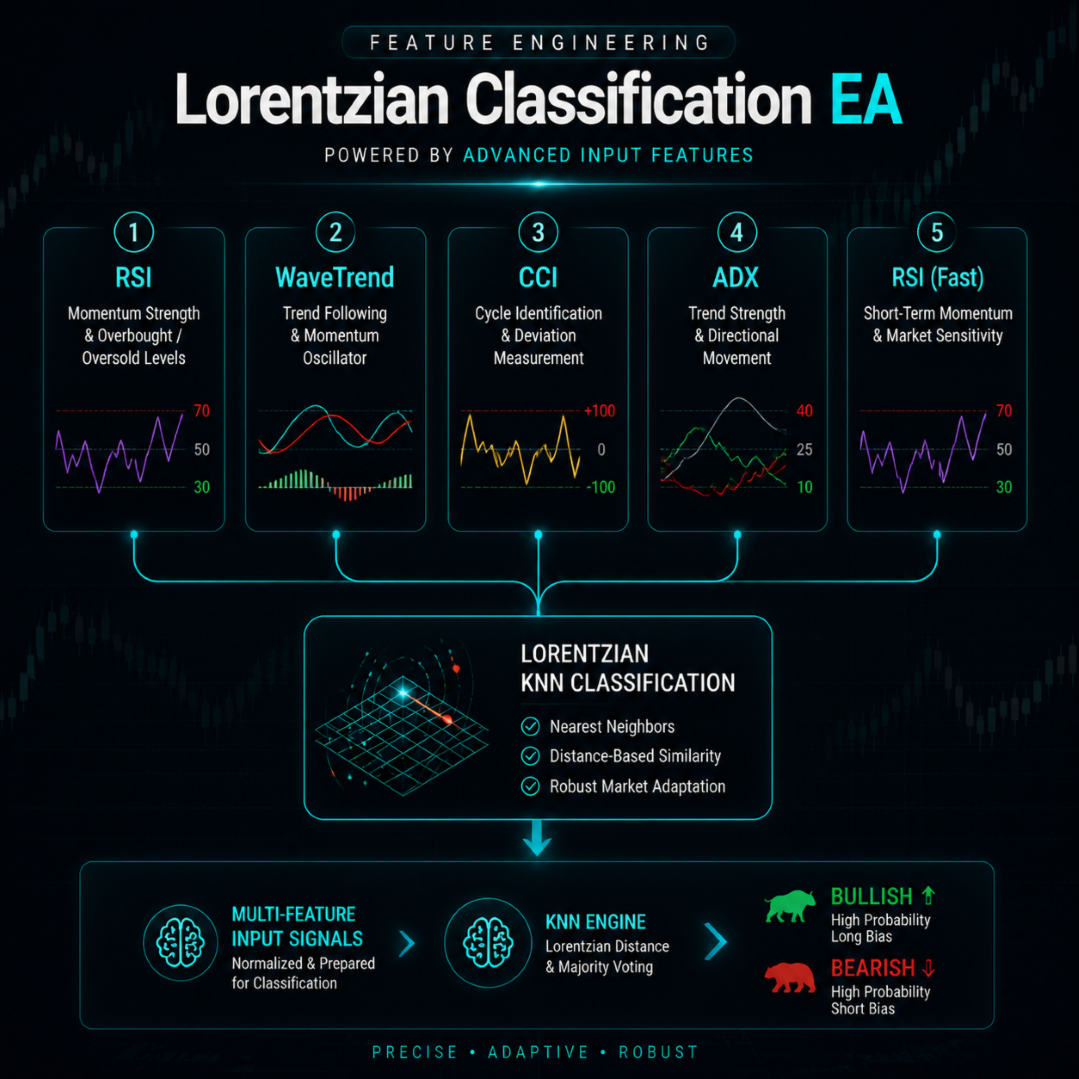
- RSI, WaveTrend, CCI, ADX ve diğer desteklenen parametreleri kullanarak veri işleme iş akışlarını özelleştirebilirsiniz.
- Daha ileri doğrulama, ikinci dereceden rasyonel fonksiyon ve Gauss dağılımına dayalı olarak tahmin edilen çekirdek regresyonu kullanılarak gerçekleştirildi.
- Volatilite, kalıplar, ADX, EMA, SMA, işlem seansları, spreadler ve temel veriler temelinde özel filtreler kullanabilirsiniz.
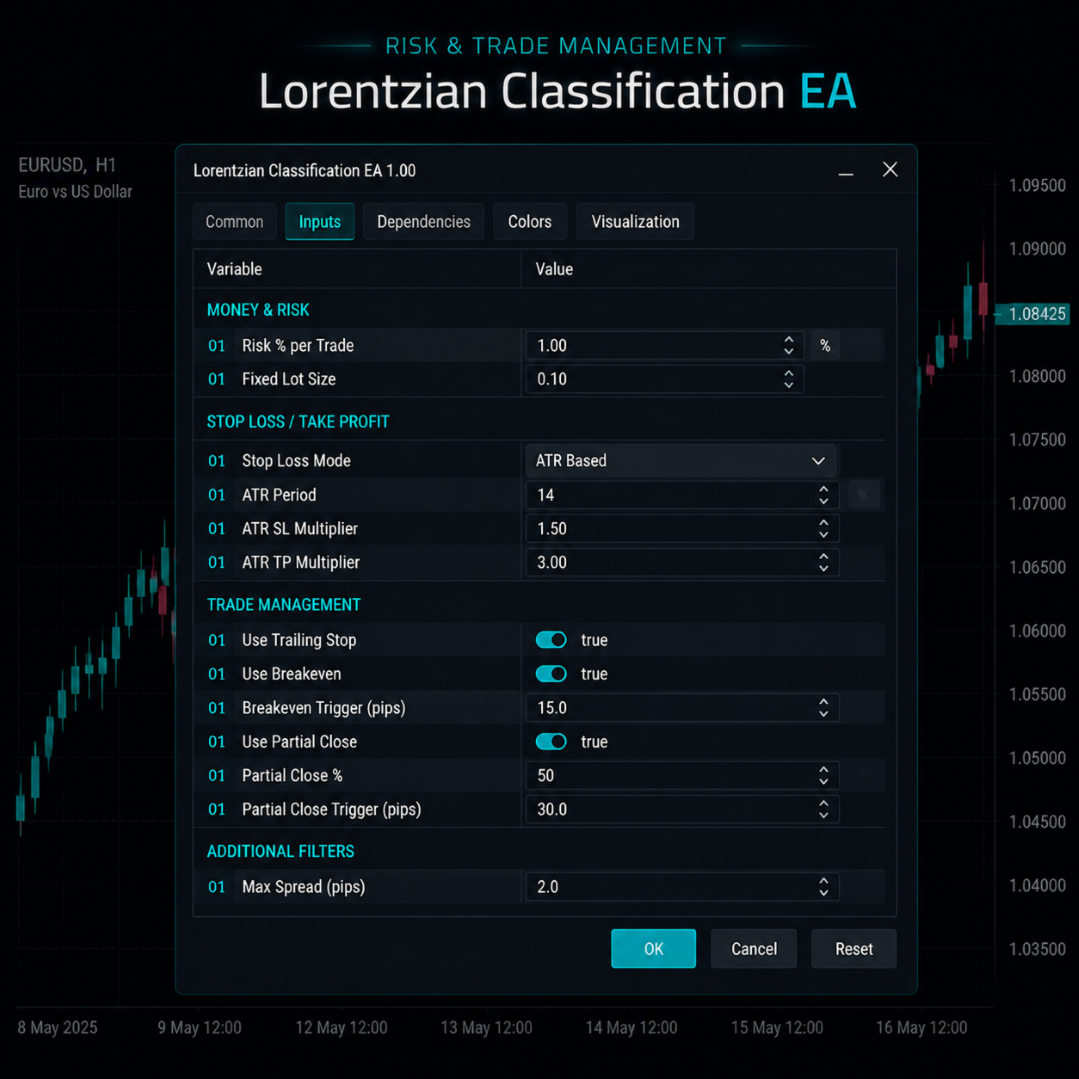
- Sabit hacimli opsiyonlar için risk tabanlı pozisyon büyüklüğü yönetimi
- ATR veya sabit mesafeye dayalı stop-loss ve take-profit stratejileri.
- Diğer yapılandırma seçenekleri: Zarar durdurma, Başabaş noktası, Kısmi tasfiye, Pozisyon limiti.
- Farklı EA örneklerini ayırt etmek için benzersiz bir sihirli sayı girin.
- Şemada ek kontrol panelleri ve sinyal göstergeleri de yer almaktadır.
- Bunlardan yedisi, başlangıç ayarları da dahil olmak üzere yapılandırma dosyaları içeriyor.
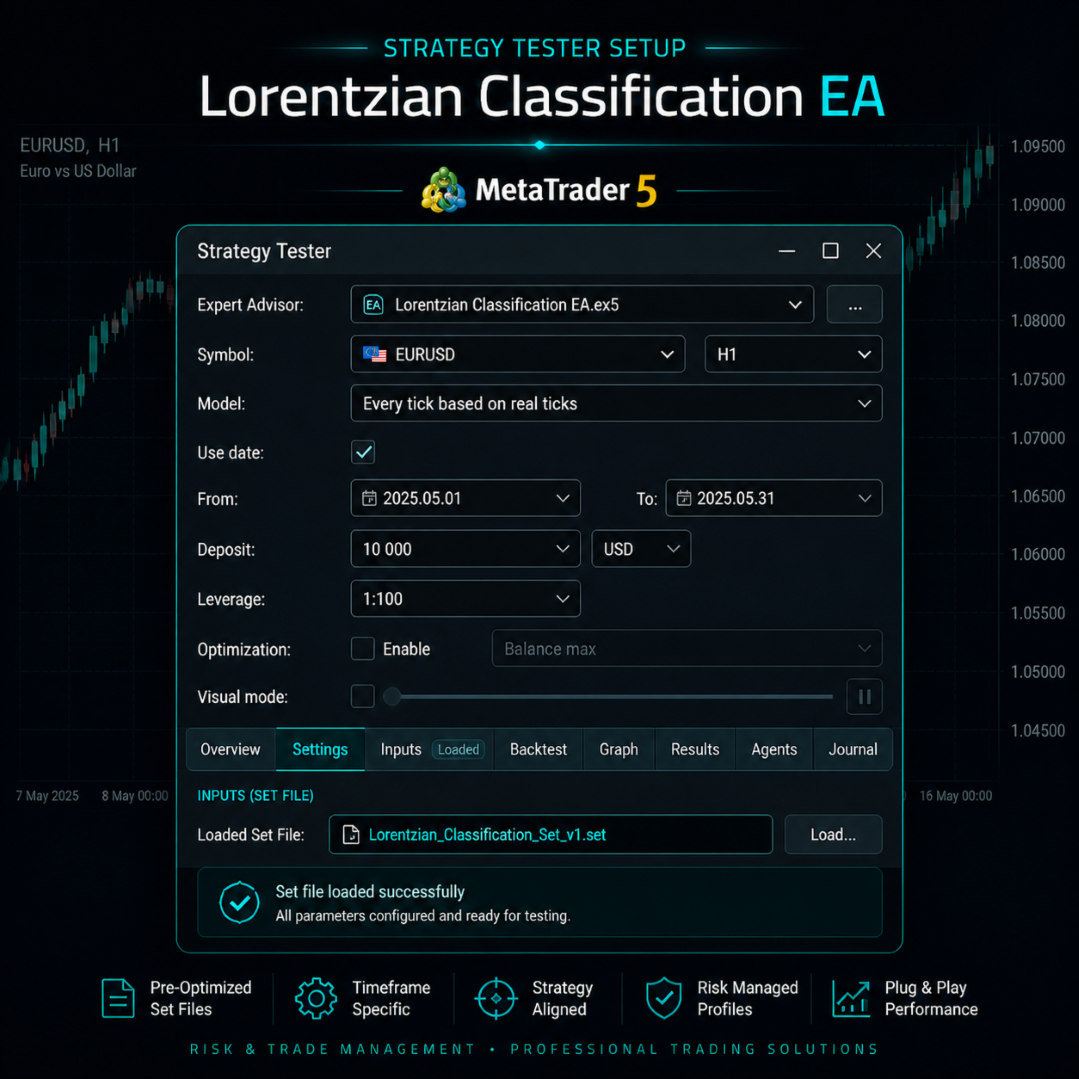
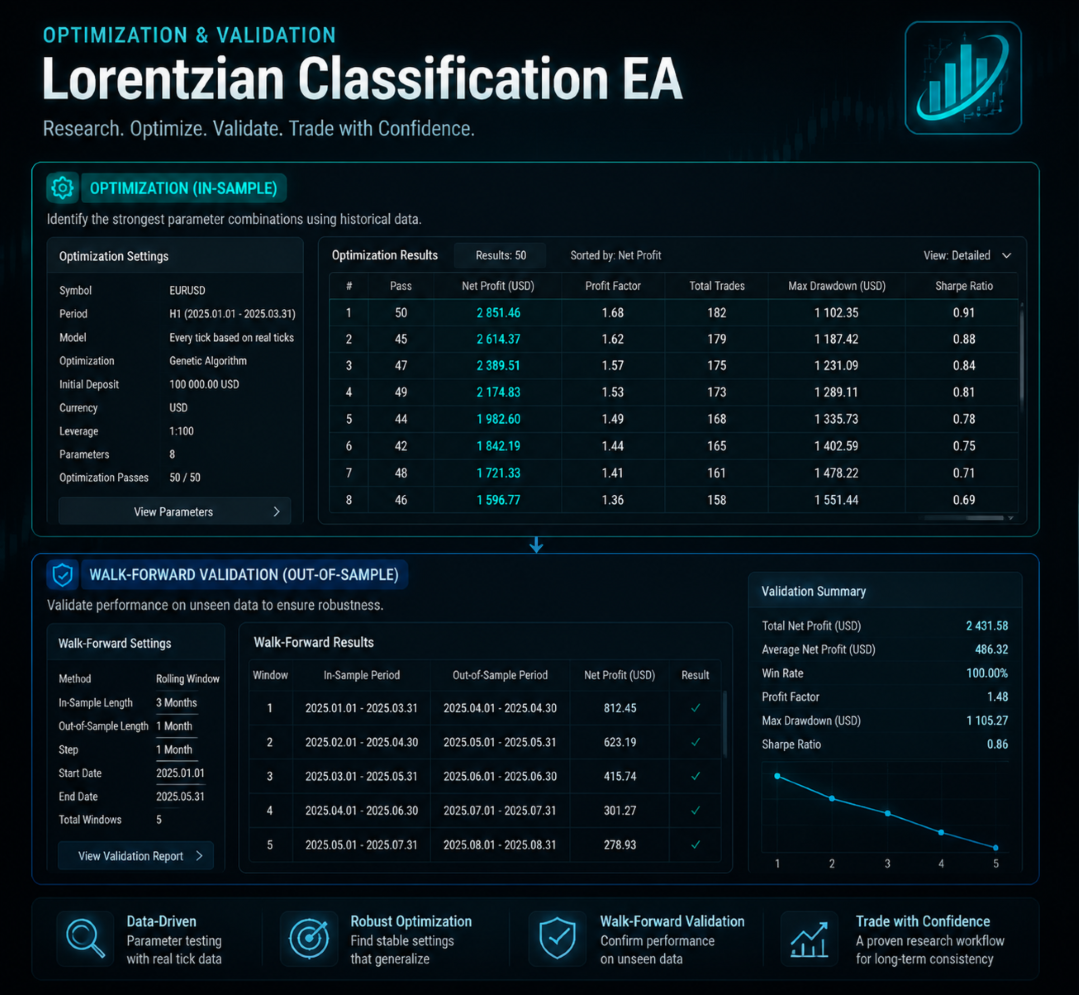
- Bu program, MetaTrader 5 Strateji Test Cihazının parametrelerini keşfetmek, test etmek ve doğrulamak amacıyla özel olarak geliştirilmiştir.
genetik yapı
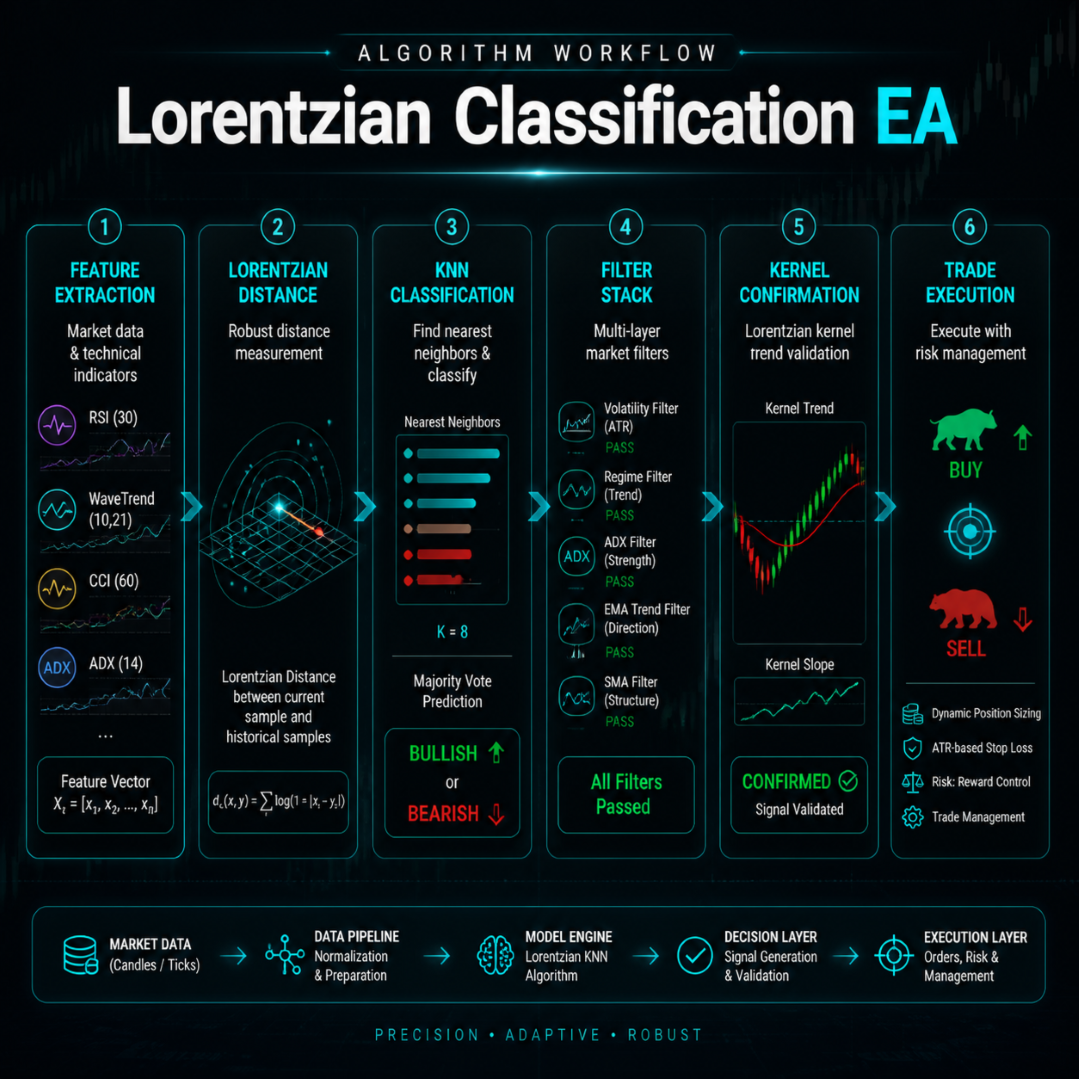
Belirli kriterleri karşılayan her kapanış fiyatı için, Uzman Danışman (EA), seçilen teknik göstergelere dayanarak piyasa özelliklerinin dahili bir temsilini oluşturur. Mevcut yapılandırmaya bağlı olarak, bu göstergeler RSI, WaveTrend, CCI, ADX ve değişken parametrelere sahip RSI varyantlarını içerebilir. Yapılandırılmış bir mesafe hesaplama yöntemi kullanarak, EA bu temsilleri mevcut geçmiş verilerle karşılaştırarak benzer piyasa koşullarını matematiksel olarak belirler.
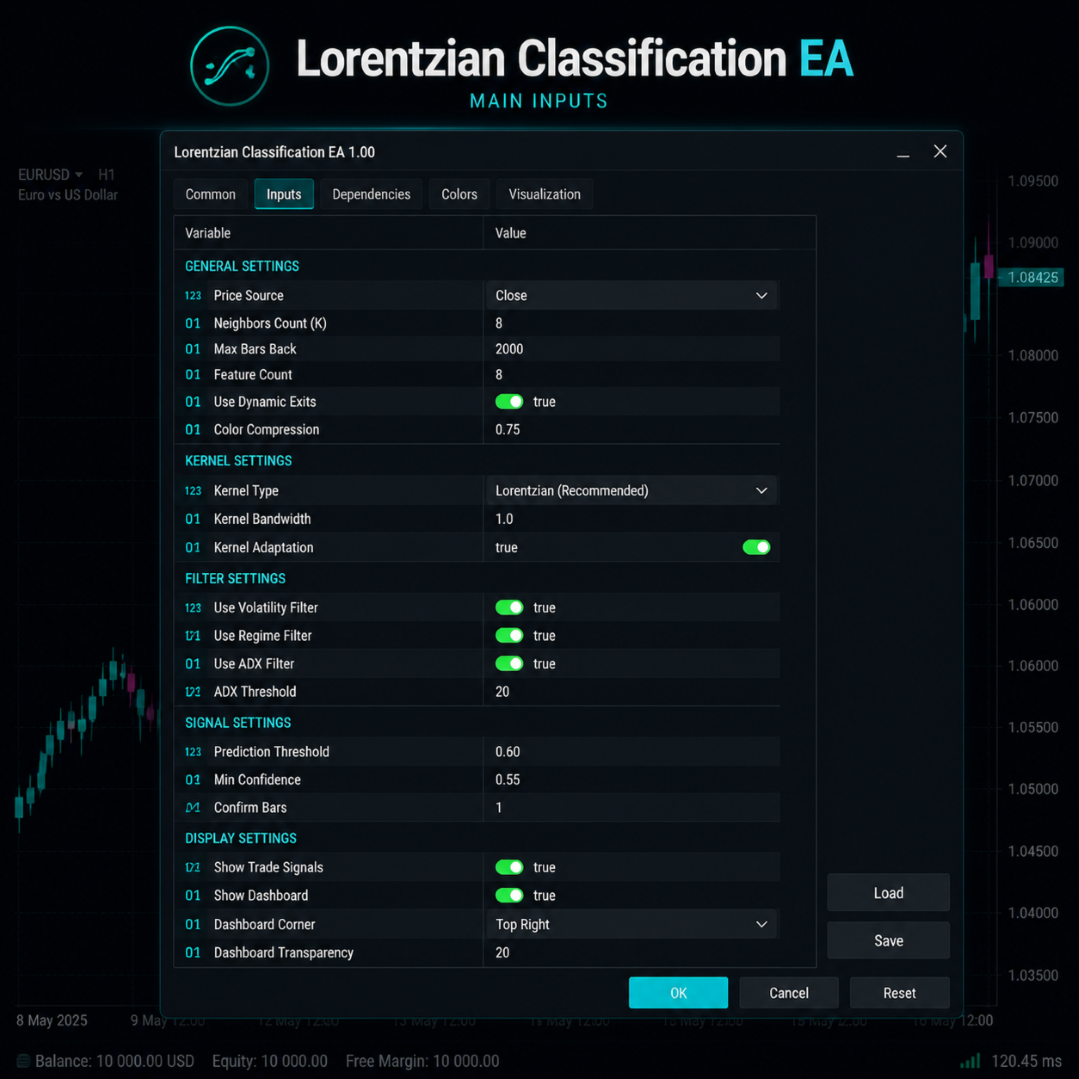
Seçilen parametreler ve grafik geçmişi izin veriyorsa, KNN algoritması 2.000'e kadar geçmiş mum çubuğu formasyonunu değerlendirebilir. Bu algoritma, bitişik geçmiş mum çubuklarını sıralamak için Lorenz mesafesini kullanır ve en benzer formasyonlara dayalı olarak dahili bir yönsel sıralama oluşturur.
Lorenz mesafesi, değişkenler arasındaki farkları karşılaştırmak için kullanılan matematiksel bir yöntemdir. Öklid mesafesi hesaplamasına kıyasla, değişkenler arasındaki aşırı farkların göreceli önemini azaltır. Lorenz mesafesi hesaplama yönteminin bu doğal özelliği, daha iyi işlem sonuçları veya oynaklık karşısında tam istikrarı garanti etmez.
Nihai sıralama sonucu, danışman tarafından işlem değerlendirme sürecinde kullanılan dahili bir analiz değeridir ve gelecekteki fiyat dalgalanmalarının bir tahmini, yatırım tavsiyesi veya garantisi niteliği taşımaz.
Radyoaktif bozunmanın doğrulanması
Sınıflandırma sonuçlarına ek olarak, danışmanlar çekirdek regresyonuna dayalı tamamlayıcı doğrulama tekniklerini kullanabilirler. İkinci dereceden rasyonel çekirdekler ve Gauss çekirdek tahmini, belirli yönelimlere sahip pazar bağlamlarının analizine olanak tanır.
Birincil filtre etkinleştirildiğinde, işlem danışmanı sistemi, yeni bir pozisyon açılmadan önce sıralama sonuçlarının belirli kriterleri karşılaması gerektiğini belirtebilir. Örneğin, varsayılan olarak, uzun pozisyon değerlendirmek için yükseliş trendi, kısa pozisyon değerlendirmek için ise düşüş trendi gereklidir.
Bu özelliği etkinleştirmek, çekirdek tabanlı mantığın çıktı kontrolü için giriş parametresi olarak kullanılmasını sağlar. Hiçbir filtre, model veya doğrulama yöntemi, olumsuz fiyat dalgalanmalarına, yatay hareketlere, kayıplara veya sermaye kayıplarına karşı tam koruma sağlayamaz.
Özellikler ve filtreler
Bu sınıflandırma modeli aynı anda beş adede kadar teknik özelliği temsil edebilir. Bu özelliklerin türü ve süresi yapılandırılabilir. Özelliklerin türünde veya süresinde yapılacak herhangi bir değişiklik, benzerlik hesaplamaları için kullanılan bilgileri etkiler ve evrimsel algoritmanın performansında önemli değişikliklere yol açabilir.
Sınıflandırma sürecinde içsel indüksiyon koşulları belirlendikten sonra, potansiyel hedef nesnelerin önceden tanımlanmış bir dizi seçim kriterini karşılaması gerekir. Mevcut seçim kriterleri şunlardır:
- Değişken filtre
- Standart piyasa filtresi
- ADX filtresi
- EMA trend filtresi
- SMA trend filtresi
- İşlem oturumu filtresi
- Maksimum difüzyon filtresi
- Ana regresyon filtresi
Filtreler, mevcut piyasa koşulları istediğiniz kriterleri karşılamıyorsa işlemleri engellemek için ayrı ayrı özelleştirilebilir. Filtreler, giriş sürecine önceden tanımlanmış kurallar uygulamak için kullanışlı olsa da, riski tamamen ortadan kaldırmaz, işlem kalitesini iyileştirmez veya yüksek getiri garantisi vermez.
İşletme Yönetimi
Lorenz Rating Uzman Danışmanı (EA), işlem operasyonlarını yönetmek için özelleştirilebilir özellikler sunar. Kullanıcılar, sabit veya riske dayalı pozisyon büyüklükleri arasında seçim yapabilir ve EA'nın giriş verilerine ve ilgili işlem aracı için aracı kurumun gereksinimlerine bağlı olarak ATR veya sabit bir mesafeye dayalı olarak stop-loss ve take-profit mantığını tanımlayabilirler.
| işlev | Yapılandırmanın atanması |
|---|---|
| İş kapsamı | Bir partinin veya bileşenin sabit miktarı, risk değerlendirmesine göre hesaplanabilir. |
| Dur ve koru | Zarar durdurma ve kar alma seviyelerini ATR'ye veya sabit bir mesafeye göre ayarlayabilirsiniz. |
| İş ilanlarına getirilen kısıtlamalar | İşe alınacak kişi sayısı, belirli kısıtlamalara bağlı olarak sınırlı olabilir. |
| Dinamik zarar noktası ve başabaş noktası | Bu, seçtiğiniz kurallara göre etkinliğin konumunu değiştiren ek bir özelliktir. |
| Kısmi kapanma | Belirli koşullar karşılandığında yerleştirme konumunu azaltacak bir özellik ekleyin. |
| İlk mantık | Bu özelliği etkinleştirerek, stop-loss, take-profit, işlem süresi, takip eden stop-loss, başabaş noktası, kısmi tasfiye veya temel varlık koşullarına göre stop-loss'unuzu özelleştirebilirsiniz. |
Zarar durdurma, kar alma, takip eden stop loss, başabaş noktası ve kısmi tasfiye gibi özellikler, işlem platformunun çalışma durumuna, aracı kurum kurallarına, piyasa likiditesine, fiyat dalgalanmalarına ve işlem koşullarına bağlıdır. Bu özellikler, bir emrin istenilen fiyattan gerçekleştirileceğini garanti etmez.
Yapılandırma dosyası etkinleştirildi.
Bu ürün, araştırma ve test amaçlı tasarlanmış yedi başlangıç yapılandırma profili içermektedir. Bu ayarlar performans önerisi niteliğinde değildir ve herhangi bir hesap, aracı kurum, işlem aracı veya piyasa koşulu için en uygun performansı garanti etmez.
| plan | Bunu araştırmalar için bir başlangıç noktası olarak öneriyorum. |
|---|---|
| Saç Derisi Durulama Suyu M15 | M15 zaman dilimi haftalık değerlendirmesinin hızını artırın. |
| M30 Gün İçi İşlemleri | Lütfen değerlendirmeyi M30 saat dilimine göre, gün içinde tamamlayın. |
| H1 Salıncak | Birinci yarıyıl takviminin ön değerlendirmesi. |
| Pozisyon H4 | Örneğin, H4 gibi daha uzun bir zaman dilimi kullanarak konumlandırma stillerini değerlendirin. |
| Organ D1 | İşe başladığımız ilk günden itibaren uzun vadeli bir değerlendirme yapmayı planlıyoruz. |
| Altın Uzmanı H1 XAUUSD | Bu yılın ilk yarısına yönelik XAUUSD anketi için ön hazırlıklar devam ediyor. |
| H4 Muhafazakar/Girişimci Hesap | Araştırma amaçlı olarak genellikle daha uzun zaman aralıkları ve daha katı parametreler kullanılır. |
Portföy isimleri yalnızca örnekleme amacıyla verilmiştir ve uygunlukları, güvenlikleri, proje finansmanı için uygunlukları, risk seviyeleri veya beklenen getirileri garanti etmez. Bir portföyü kullanmadan önce, beklentilerle tutarlı olduğundan emin olmak için lütfen onu aracı kurumun geçmiş performans verileriyle karşılaştırın.
göçmenlik prosedürleri
Potansiyel alım veya satım emirleri, yalnızca tanımlanmış sınıflandırma kriterlerini karşılamaları ve tüm filtrelerin etkinleştirilmesi durumunda değerlendirilir. Mevcut yapılandırmaya bağlı olarak, bu kriterler arasında trend uyumu, kabul edilebilir spread, aktif işlem saatleri, piyasa yapılandırma gereksinimleri ve çekirdek regresyon testi yer alabilir.
Akıllı işlem sistemleri, yalnızca sabit fiyat trendlerine tepki vermekle kalmayıp, değişen piyasa koşullarını da izleyecek şekilde yapılandırılabilir. Hassas çalışma şekilleri, seçilen giriş parametrelerine ve mevcut piyasa verilerine bağlıdır.
Pozisyon yönetimi, stop-loss emirleri, hedef fiyatlar, pozisyon tutma süreleri, takip eden stop-loss emirleri, başabaş noktaları, kısmi tasfiyeler ve çekirdek tabanlı takas mekanizmaları gibi parametreler kullanılarak gerçekleştirilebilir. Giriş ve çıkış mantığının tanımlanması, emrin terminal tarafından iletilmesi, aracı kurum tarafından kabul edilmesi veya istenen fiyattan gerçekleştirilmesi garantisini vermez.
Kontrol Paneli ve Görüntüleme Araçları
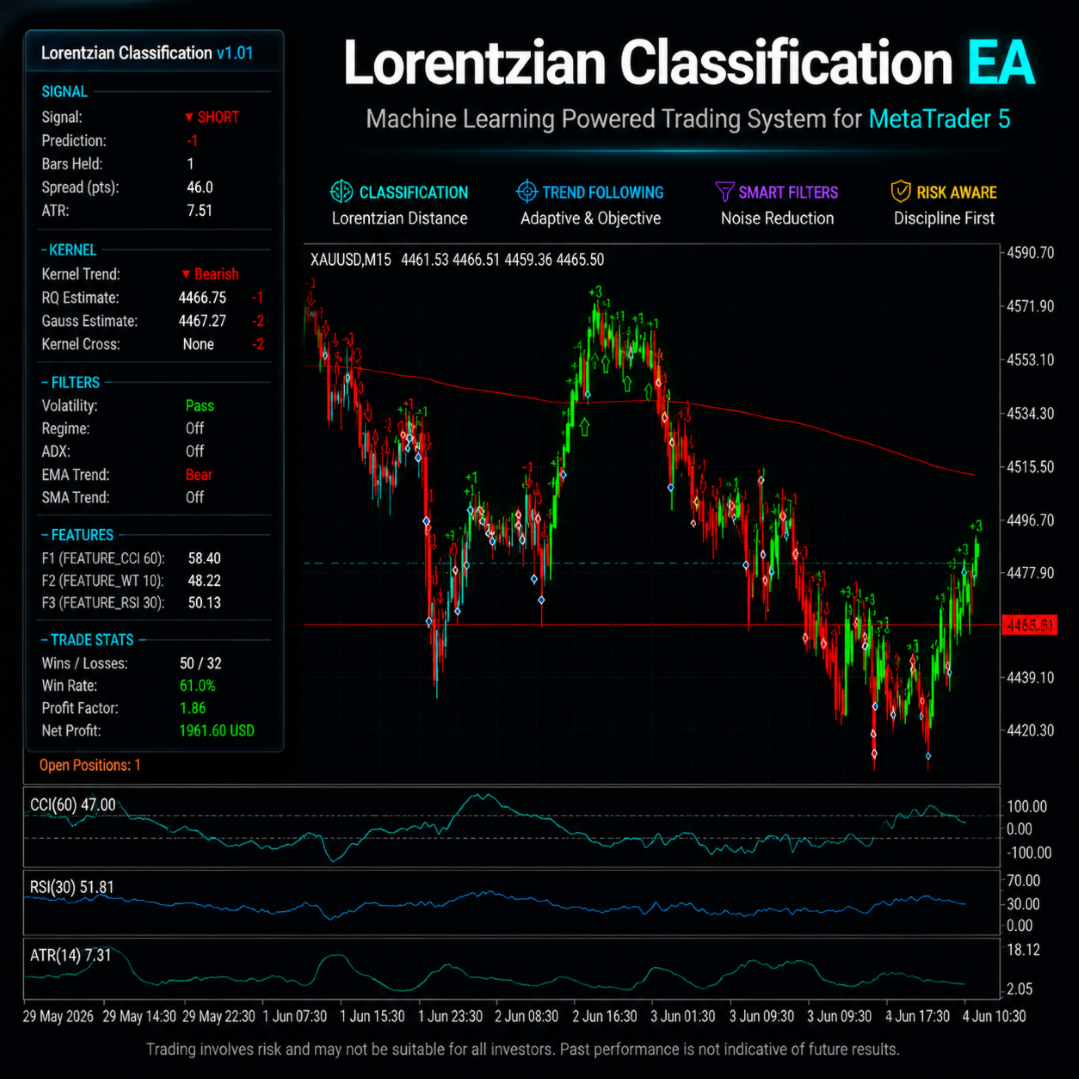
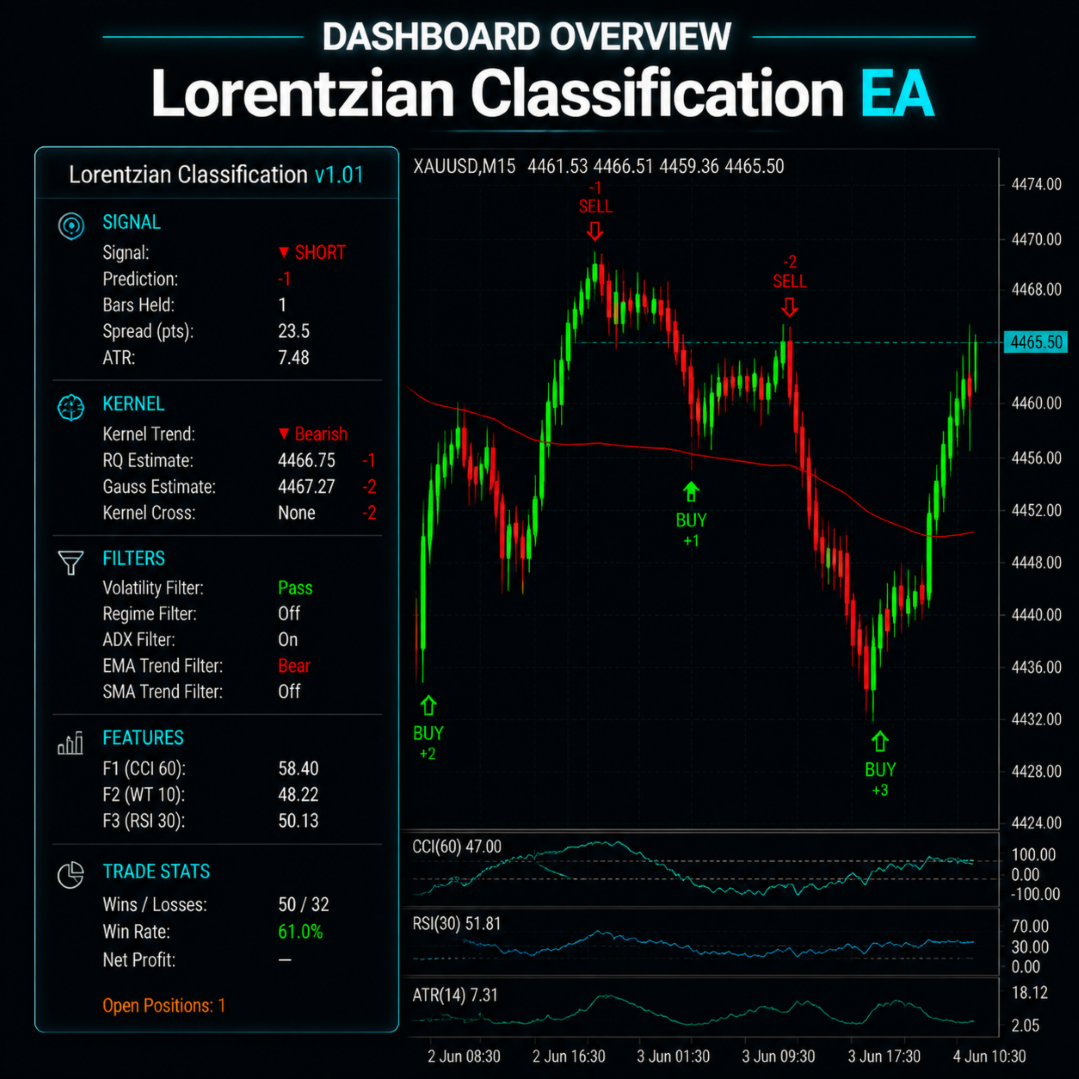
Bu işlem danışmanlık aracı, gerçek zamanlı analiz için ek grafikler sunar. Mevcut ayarlarınıza bağlı olarak, dahili sinyallerin durumunu, sıralanmış sonuçları, ana durumu, filtre durumunu, benzersiz değerleri, spread bilgilerini, pozisyon detaylarını ve lansmandan bu yana kaydedilen dahili istatistikleri görüntüleyebilir.
Grafikteki ek işaretleyicileri kullanarak Uzman Danışman (EA) işlem geçmişini görüntüleyebilirsiniz. Panelde ve grafikte görüntülenen değerler yalnızca bilgilendirme amaçlıdır ve temel işlem mantığını etkilemez. Örneğin test ortamlarında veya VPS'lerde, görüntülemeye ihtiyaç duymuyorsanız paneli devre dışı bırakabilirsiniz.
Test ve yapılandırma
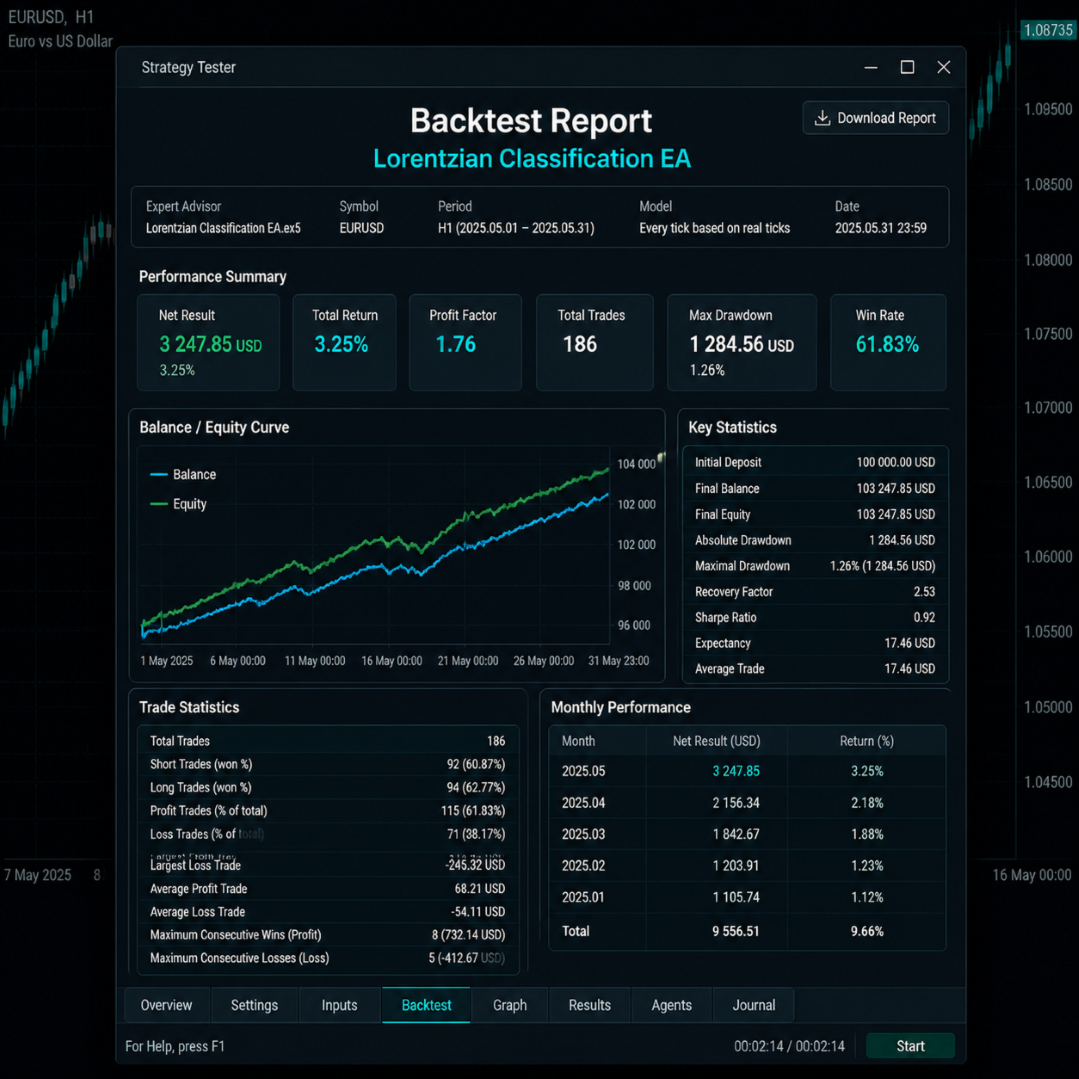
Canlı işlemlerde bir Uzman Danışman (EA) kullanmadan önce, onu MetaTrader 5 Strateji Test Cihazı ve aracı kurumunuz tarafından sağlanan yüksek kaliteli verilerle test edin. Yeterli veri mevcutsa, "Tüm fiyatlar canlı fiyatlara dayanmaktadır" seçeneğini seçebilirsiniz. Test sonuçları simülasyonlardır ve spreadler, komisyonlar, gecelik faiz, kayma, likidite, işlem süreleri, emir reddi, fiyat farklılıkları, aracı kurum şart ve koşulları ve veri tutarsızlıkları gibi faktörler nedeniyle gerçek sonuçlardan önemli ölçüde farklılık gösterebilir.
Parametre ayarlaması sırasında, aynı anda değiştirilebilen parametre sayısı sınırlıdır ve sonuçlar hem örneklem içi hem de örneklem dışı olmak üzere birden fazla dönem üzerinden değerlendirilir. Bu adım adım test yöntemi, parametre seçimi için kullanılmayan veriler kullanılarak bile parametre kararlılığını doğrular. Bununla birlikte, optimizasyon gelecekteki performansı garanti etmez ve nihai parametreler geçmiş verilere çok benzer olabilir.
Temel iş süreçleri
- ABD Çevre Koruma Ajansı (EPA), sınıflandırma hesaplamalarının amaçlandığı gibi doğru bir şekilde yapılmasını sağlamak için yeterli tarihsel veriye ihtiyaç duymaktadır.
- Tek bir hesapta birden fazla EA örneği kullanıyorsanız, lütfen benzersiz bir "sihirli numara" kullanın.
- Aracı kurum kodu, soneki, numarası, sözleşme büyüklüğü, minimum işlem adımı boyutu, minimum işlem hacmi, stop-loss seviyesi, kaldıraç, teminat gereksinimleri, gecelik ücretler ve işlem saatleri değişiklik gösterebilir.
- Kısa işlem süreleri, yüksek spreadler ve yüksek oynaklık ile karakterize edilen finansal araçlar (altın dahil), özellikle aracı kurum işlem koşullarına karşı hassastır.
- Gerçek zamanlı emir hareketleri, geçmiş veriler, spreadler, emir gerçekleştirme hızı ve işlem araçlarının özellikleri nedeniyle önceki test sonuçlarından farklılık gösterebilir.
- Gerçek üretim ortamında uygulamadan önce sonuçların bir demo testi yapılarak doğrulanması önerilir.
- VPS, terminalin kullanılabilirliğini sağlamaya yardımcı olsa da, bağlantıyı, aracı kurum hizmetlerini, emir gerçekleştirmeyi veya hızla değişen piyasa koşullarına karşı korumayı garanti etmez.
Önemli risklerin iletilmesi
Forex, değerli metaller, CFD'ler (Fark Sözleşmeleri), kripto paralar ve diğer kaldıraçlı ürünlerde işlem yapmak önemli riskler içerir ve yatırılan sermayenin tamamının veya bir kısmının kaybına yol açabilir. Lorenz Ranking'in Uzman Danışmanları (EA'lar) otomatik işlem araçlarıdır ve yatırım tavsiyesi, garantili kar, doğru sıralama, kesin giriş noktaları, belirli başarı oranları, maksimum kayıp limitleri, sermaye gereksinimlerine uyum veya gelecekteki karlılık garantisi sağlamaz. Makine öğrenme yöntemleri, geçmiş benzerlik hesaplamaları, teknik göstergeler, çekirdek fonksiyon değerlendirmeleri, filtreler ve optimize ediciler gelecekteki piyasa trendlerini tahmin edemez veya riski ortadan kaldıramaz. EA'lar kayıplara, ardışık kayıplara ve sermaye azaltımlarına neden olabilir. Geçmiş testler, optimizasyon sonuçları, profiller, demo hesap sonuçları ve geçmiş performans bilgileri, gelecekteki sonuçları gerçek zamanlı olarak güvenilir bir şekilde tahmin edemez. Piyasa koşulları, veri kalitesi, spreadler, komisyonlar, gecelik ücretler, kayma, likidite, fiyat farklılıkları, işlem süreleri, aracı kurum kaynakları, kaldıraç, marj gereksinimleri ve hesap ayarları sonuçları önemli ölçüde etkileyebilir. Zarar durdurma, kar alma, takip eden stoplar, başabaş noktaları ve kısmi tasfiyeler gibi özellikler, işlem fiyatlarının doğruluğunu garanti etmez. Her zaman kapsamlı testler yapmak, uygun ve muhafazakar risk parametreleri kullanmak ve yalnızca kaybetmeyi göze alabileceğiniz fonları yatırmak çok önemlidir.