
Alpha Trade Master
- Experts
-
Mohamed Hashem Mohamed Hashem
 We didn't come to the MQL5 Market simply to publish another Expert Advisor.
We came to introduce ourselves through one.
Welcome to the official home of the Alpha Trade Master Team. - Version: 5.25
- Updated: 14 October 2026
- Activations: 10
ALPHA TRADE MASTER – THE COMPLETE TRADING ECOSYSTEM
Alpha Trade Master is not a conventional Expert Advisor. It is an adaptive SMC Trading Operating System engineered for serious traders, investors, and Prop-Firm challengers.
⭐ Why Alpha Trade Master is Different
- ✔ No Grid
- ✔ No Martingale
- ✔ Adaptive Learning Core
- ✔ Smart Money Concepts (SMC)
- ✔ Multi-Asset DNA Profiles
- ✔ Built-in Risk Manager
- ✔ Prop-Firm Ready
- ✔ Interactive On-Chart UI
- ✔ Local Trading Memory
- ✔ Autonomous Neural Execution
Alpha Trade Master represents years of institutional quantitative research and Smart Money Concepts (SMC) architecture. Every single component has been engineered for maximum precision, capital preservation, and robust operational execution.
Unlike traditional retail bots that rely on lagging indicators and clunky input settings, Alpha Trade Master is a complete Smart Money Concepts (SMC) operating system. It maps the market structure, identifies liquidity pools, and executes trades with hedge-fund discipline.
What truly sets Alpha Trade Master apart is its Stunning On-Chart Interactive UI. You never have to open the complex MetaTrader settings window. Everything from risk management to visual indicators is controlled via sleek, interactive panels right on your chart.
🎛️ 1. THE MAIN DASHBOARD
Everything you need, exactly where you need it.
──────────────────────────────
Technical Details
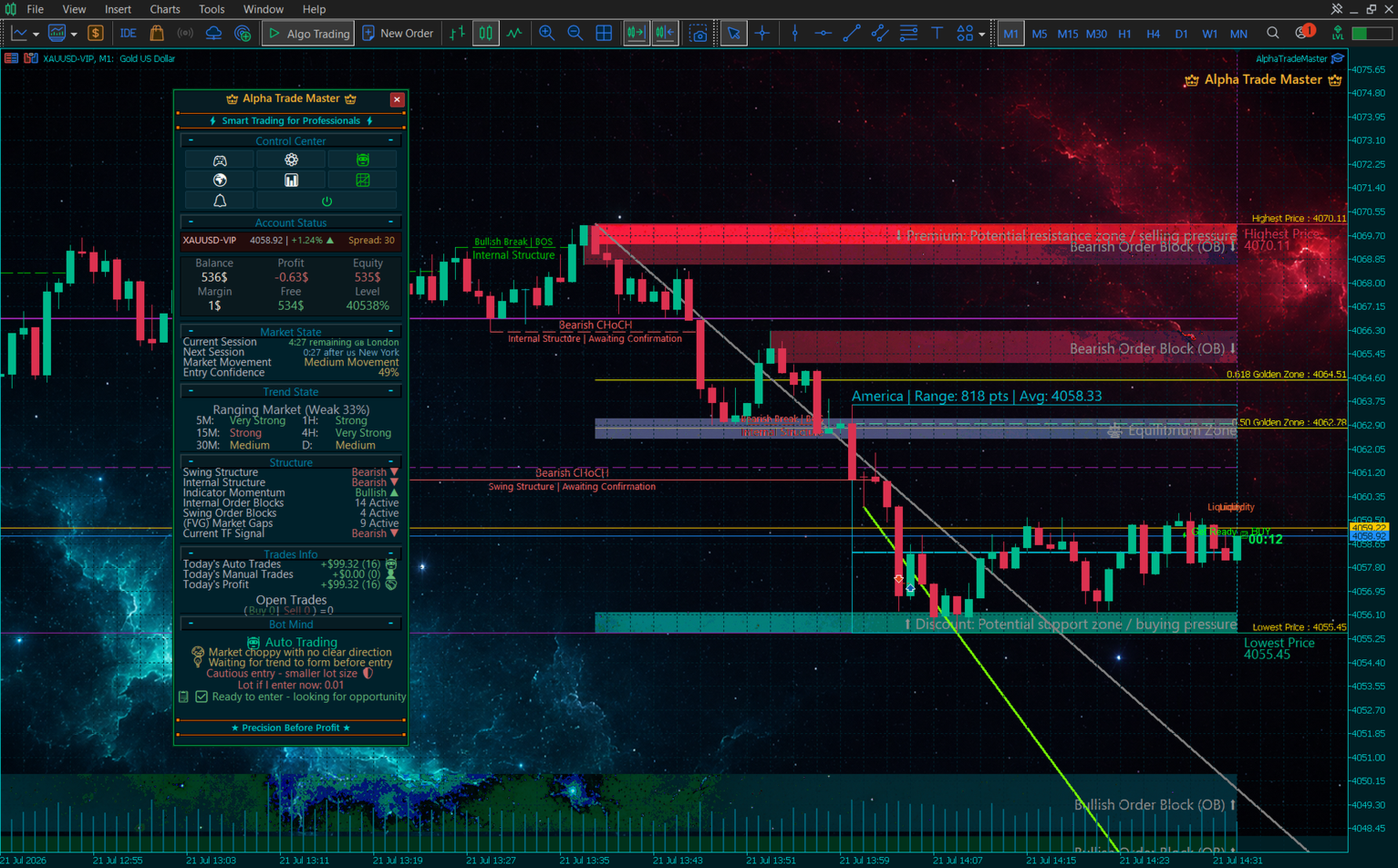
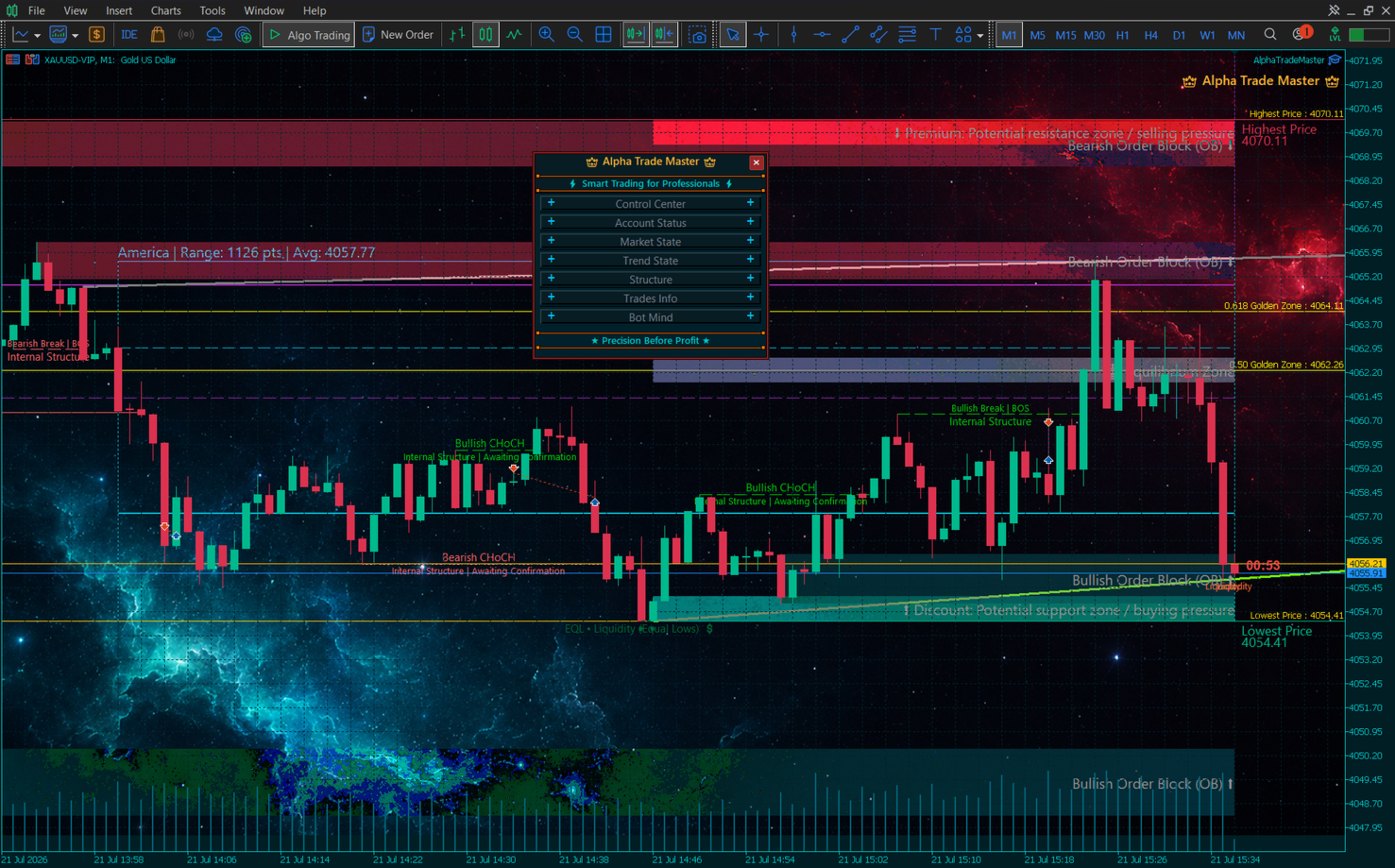
- ⚡ Smart Accordion UI (Space Saver): We know chart visibility is vital. The entire main dashboard and control panels feature a dynamic collapse/expand (Accordion) design. With a single click, hide the panels to focus fully on the price action.
- Account Status: Live monitoring of your Balance, Equity, Margin, Free Margin, and Margin Level perfectly centered for maximum visibility.
- Live Spread Tracker: A golden Spread tracker has been seamlessly integrated into the main control bar for split-second awareness, featuring a "High Spread!" warning alert.
- Trend State & Multi-Timeframe Matrix: Instantly shows the overall trend direction (Bullish/Bearish) along with its combined strength average. It breaks down the trend strength across 6 different timeframes (5M, 15M, 30M, 1H, 4H, D) in real-time.
- SMC Market Pulse: At a glance, view the exact live state of the Smart Money Concepts data. It tracks Swing Structure, Internal Structure, active OBs, active FVGs, and the exact Current Trading Signal.
- Dynamic Reactive Borders: The main dashboard border actively breathes and reacts to the live market! It dynamically shifts color to reflect the instant price direction.
📈 2. THE ACCOUNT STATUS & PERFORMANCE PANEL
Your personal trading journal and performance auditor.
──────────────────────────────
Technical Details
- In-Depth Statistical Analysis: Instantly view your Net Profit, Profit Factor, Win Rate (%), Total Trades, Winning Trades, and Losing Trades. The numbers dynamically change color (Green/Yellow/Red) based on your performance health.
- Performance Period Filtering: Toggle your statistics between Daily, Weekly, and Monthly views to track your exact consistency over time.
- Core Metrics: The bot automatically tracks and displays your "Best Performing Symbol" and "Worst Performing Symbol" along with their respective profit/loss values.
- Protection & Targets Summary: A clean dashboard view displaying the exact point distances for your Stop Loss, Break Even, Trailing Stop, and your TP1/TP2/TP3 levels.
🧠 3. THE ADAPTIVE ENGINE PANEL (INTENT REVEAL)
Complete transparency into the core evaluation matrix.
──────────────────────────────
Technical Details
- 🧠 Dynamic Evaluation Matrix: Rigid entry rules have been completely replaced by a Probabilistic Matrix. The bot calculates a "Confidence Score" (0% to 100%) for every move by weighing Smart Money Concepts, Trend Strength, MTF alignments, and Volatility before entering any trade.
- Real-Time Intent: The bot actively talks to you through the panel, explaining its exact trading intention before taking action. Whether it says "Market is ranging with no clear direction," or "Waiting for trend alignment before entry," you know its algorithmic motives instantly.
- Live Risk Dashboard & Confidence Score: Displays a dynamic confidence percentage (e.g., 85%) for the current setup. Based on market momentum, the bot explicitly tells you if its current risk state is Aggressive, Balanced, or Defensive.
- Algorithmic Bias & Phase Tracking: Visually breaks down whether the current institutional order flow is Bullish, Bearish, or Neutral, while simultaneously tracking multi-stage analysis progress (Analysis -> Evaluation -> Check -> Prepare -> Active).
- Transparent Blocking Reasons (No Silent Stops): If the bot refuses to trade, it explicitly tells you why! Whether it's "High Spread Detected," "Smart News Avoidance," "Daily Loss Limit Reached," or "Dynamic Cycle Pause".
🧬 4. THE ADAPTIVE LEARNING ENGINE
An engine that refines its strategy based on historical data.
──────────────────────────────
Technical Details
- Trade Memory Logging: The bot saves up to 1,000 previous trades in its internal .dat memory file, creating a deep historical database of its own performance on your specific broker and symbol.
- Signal Performance Tracking: Every time a trade closes, the core analyzes which signals triggered it (e.g., FVG, Order Block, Liquidity Sweep). It recalculates the Win Rate and Average Profit for EVERY specific signal.
- Dynamic Weight Adjustment: If the bot realizes that "Fair Value Gaps" are winning 80% of the time on Gold, but "Order Blocks" are failing, it automatically increases the "Weight" of FVGs and decreases the weight of OBs for future trades. It adapts its own strategy over time!
🌍 5. THE MACRO MARKET PANEL
Economic and session tracking directly on your chart.
──────────────────────────────
Technical Details
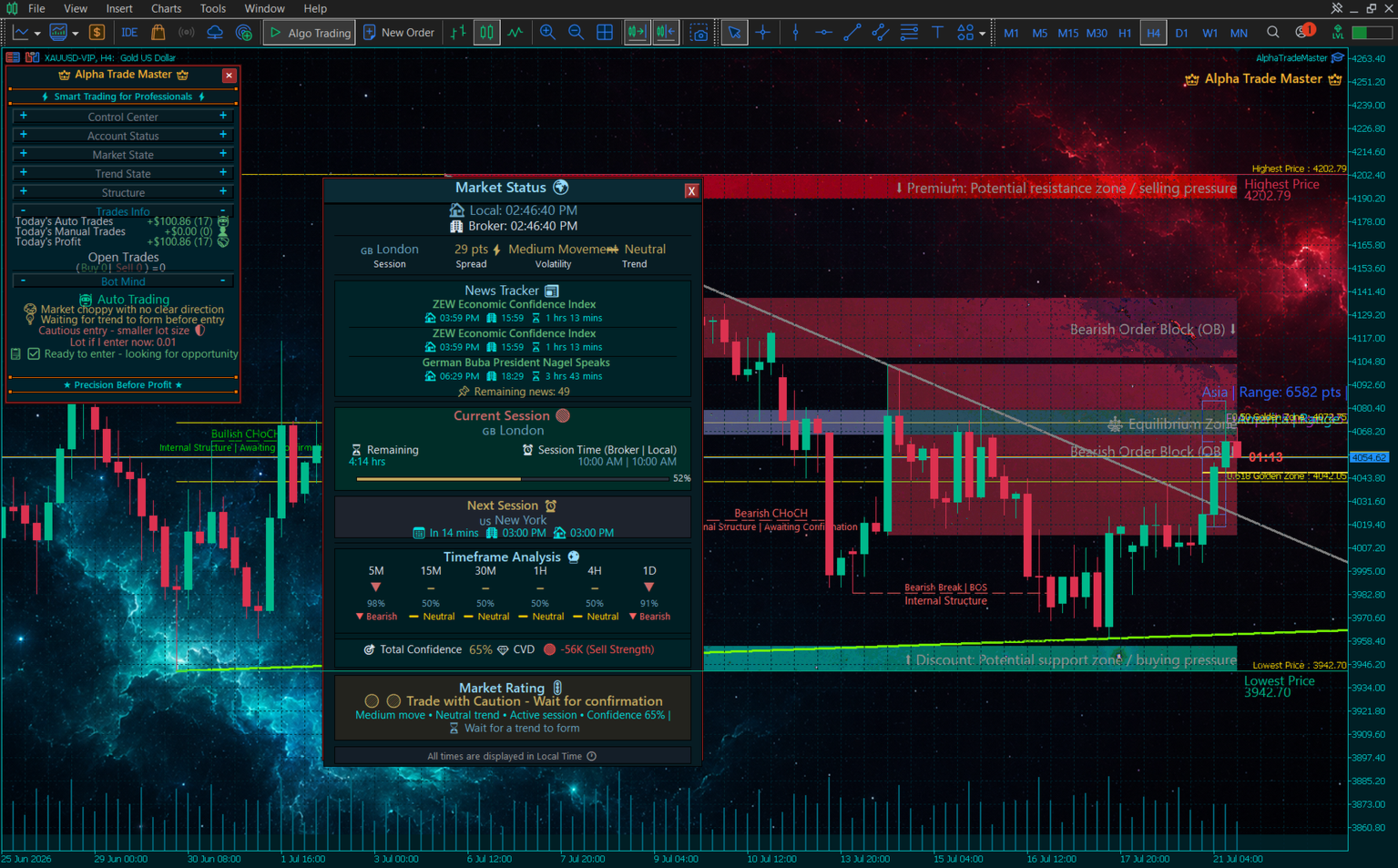
- Live Economic Calendar: Automatically loads high-impact news events directly onto your chart. It shows the exact upcoming news titles, countdown timers, and pauses the bot automatically.
- Global Sessions Tracker: Visually tracks the current active trading session (London, New York, Asian) complete with a live Progress Bar showing how much time is left in the session.
- Multi-Timeframe (MTF) Dashboard: A matrix displaying the Trend, Trend Strength, and AI Prediction across 6 different timeframes simultaneously (M5, M15, M30, H1, H4, D1).
- Market Rating & Lot Advice: The algorithm calculates a "Market Confidence" score and a "CVD (Cumulative Volume Delta)" value. Based on this, it gives you a live "Market Rating" and advises you exactly on what Lot Size is safe to use in current conditions!
🤖 6. AUTO TRADING MENU
Take full control over how the algorithm engages the market autonomously.
──────────────────────────────
Technical Details
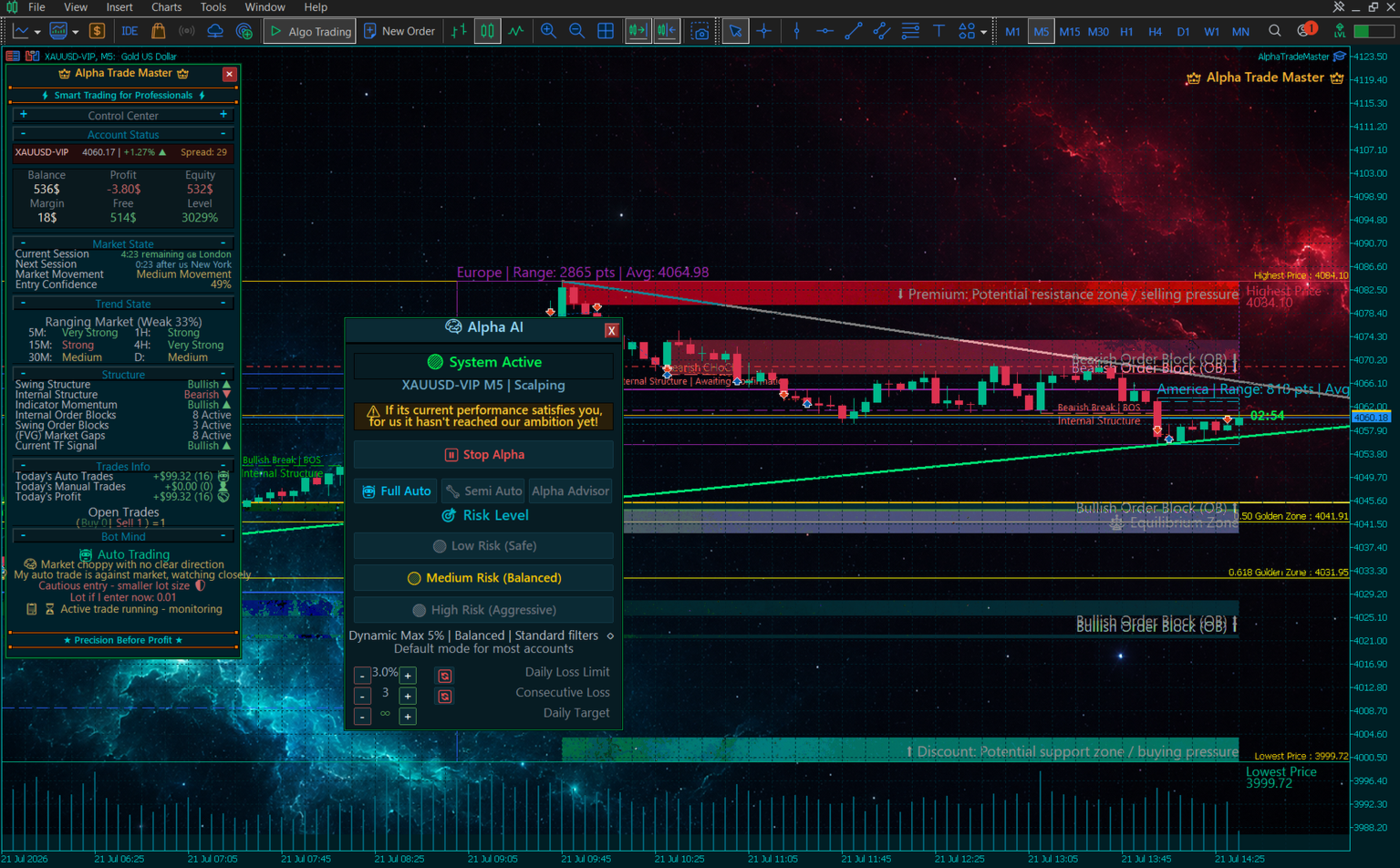
- 🗂️ Unified Modular Interface: No more cluttered screens! We completely rebuilt the Auto-Trading architecture into unified, logical modules. It’s a seamless experience that guides you from risk selection to execution without overwhelming your chart.
- 🧬 Asset Personalities (DNA Profiles): Alpha Trade Master now recognizes exactly what it is trading. It features fully segregated logic profiles for different asset classes (Metals, Crypto, Indices, and Forex), dynamically adjusting spread tolerances and risk behavior per asset.
- ⚡ Hit & Run Scalping (Time-Frame Tiering): The system dynamically shifts its trading style based on your chosen timeframe. Switch to M1/M5 for rapid momentum Hit and Run scalping, or H1/H4 for Swing trends.
- 👨💼 The Consultant (Advisor) Menu: Want advice instead of trades? Activate 'Analysis Only' mode where the bot provides deep market insights, probabilities, and analytical advice on the chart without forcefully taking trades on your behalf.
- 🔓 Custom Lot Sizing & Capital Scaling: You can now select any custom lot size via the Auto-Trading menu, switch to "Manual Lot", and the engine will execute its auto-trades using the exact lot volume you specified. Furthermore, the bot has been configured to dynamically scale its operations according to your true capital size.
- Master Switch & Modes: Toggle Alpha ON/OFF, and choose between "Full Auto" (Full Control) or "Semi-Auto" (Customize Settings Manually).
- Pre-defined Risk Profiles: Instantly switch between "Low Risk (Safe)", "Medium Risk (Balanced)", and "High Risk (Aggressive)". Each profile alters the lot sizing, TP distance, and filtering strictness.
- Cooldown System & Daily Targets: Set a precise cooldown period between trades, and establish a specific Daily Target. Once hit, the bot rests.
💰 7. TRADE & RISK SETTINGS
Protecting your capital is the highest priority.
──────────────────────────────
Technical Details
- 🚫 Anti-Scalp Machine Gun Filter: New logic prevents the bot from opening multiple rapid-fire trades within the same candle, effectively stopping over-trading during sudden high-impact volatility spikes.
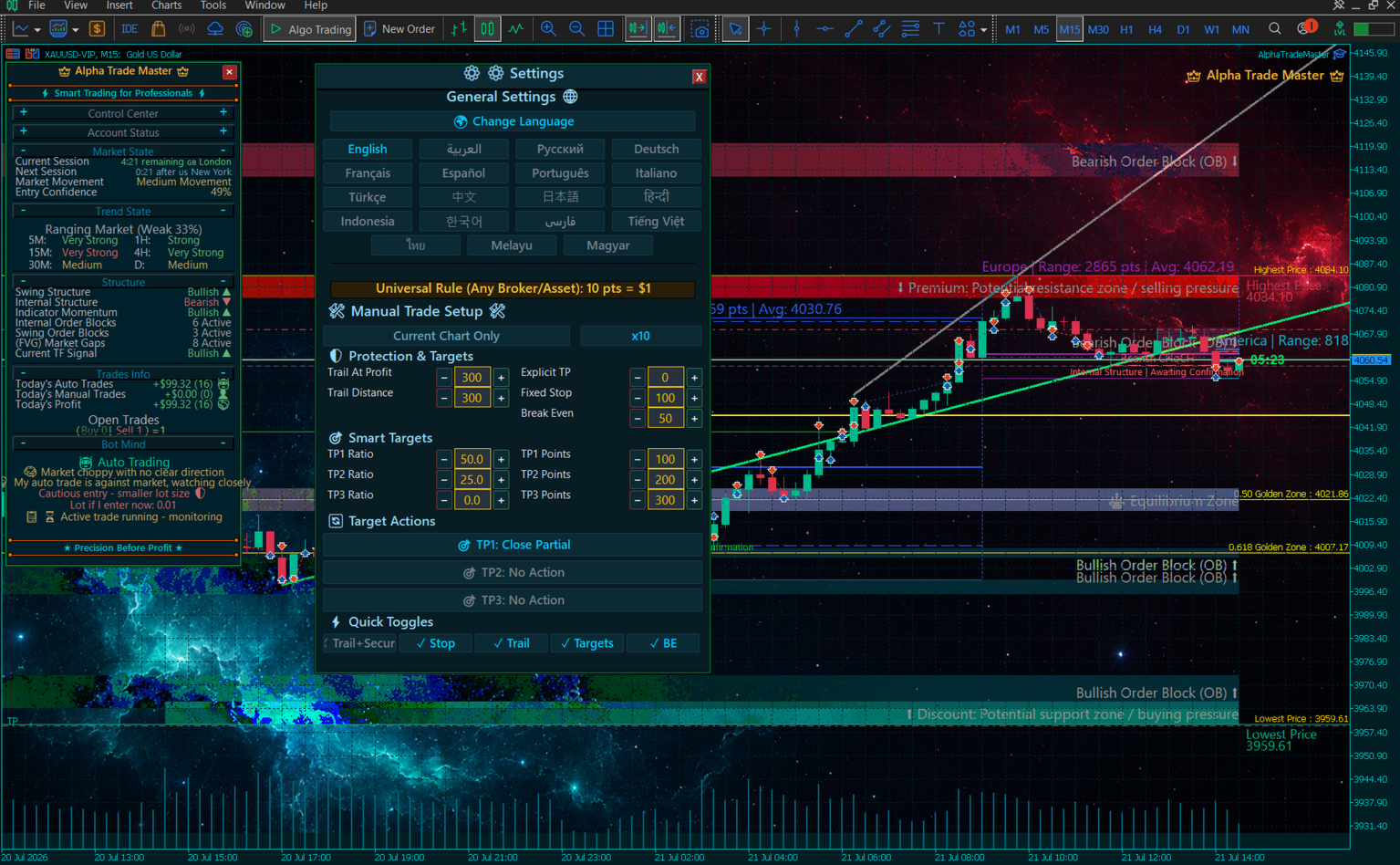
- 🌍 Global Multi-Lingual Engine (19 Languages): Change the language of the entire UI directly from the chart! Supported languages: English, Arabic, Russian, German, French, Spanish, Portuguese, Italian, Turkish, Chinese, Japanese, Hindi, Indonesian, Korean, Persian, Vietnamese, Thai, Malay, and Hungarian.
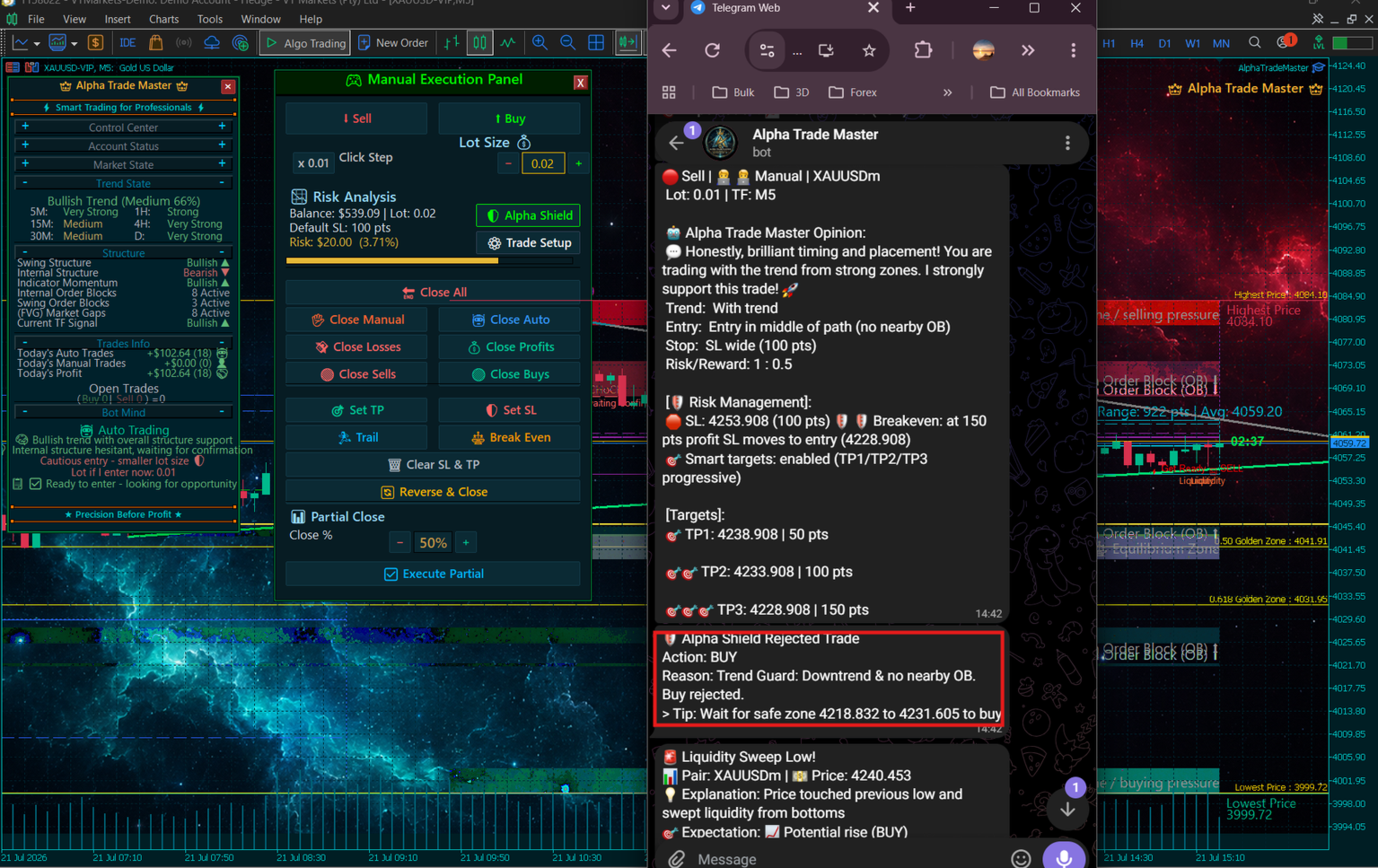
- 🛡️ The "Alpha Shield" (Auto-Protection Engine): A self-aware, dynamic risk protocol that monitors market structure and dynamically intervenes to protect your equity.
- 🧠 Smart Time-Based Close & Trail+Lock: Proactively cuts dead trades early. The "Trail+Lock" system secures profits aggressively in volatile conditions.
- Smart Targets Action Engine: Define specific behaviors for Target 1, Target 2, and Target 3. Set their distance in points and ratios (%), and assign actions like "Close Partial", "Move SL to Break Even", or "Move SL to TP1" when hit.
- Quick Toggles Row: Instantly toggle ON/OFF Break Even, Smart Targets, Trailing Stop, Fixed SL, and Trail+Lock with a single click.
📊 8. CHARTING & SMC INDICATOR MENU (THE ANALYST)
This menu transforms your MetaTrader into an analytical terminal.
──────────────────────────────
Technical Details
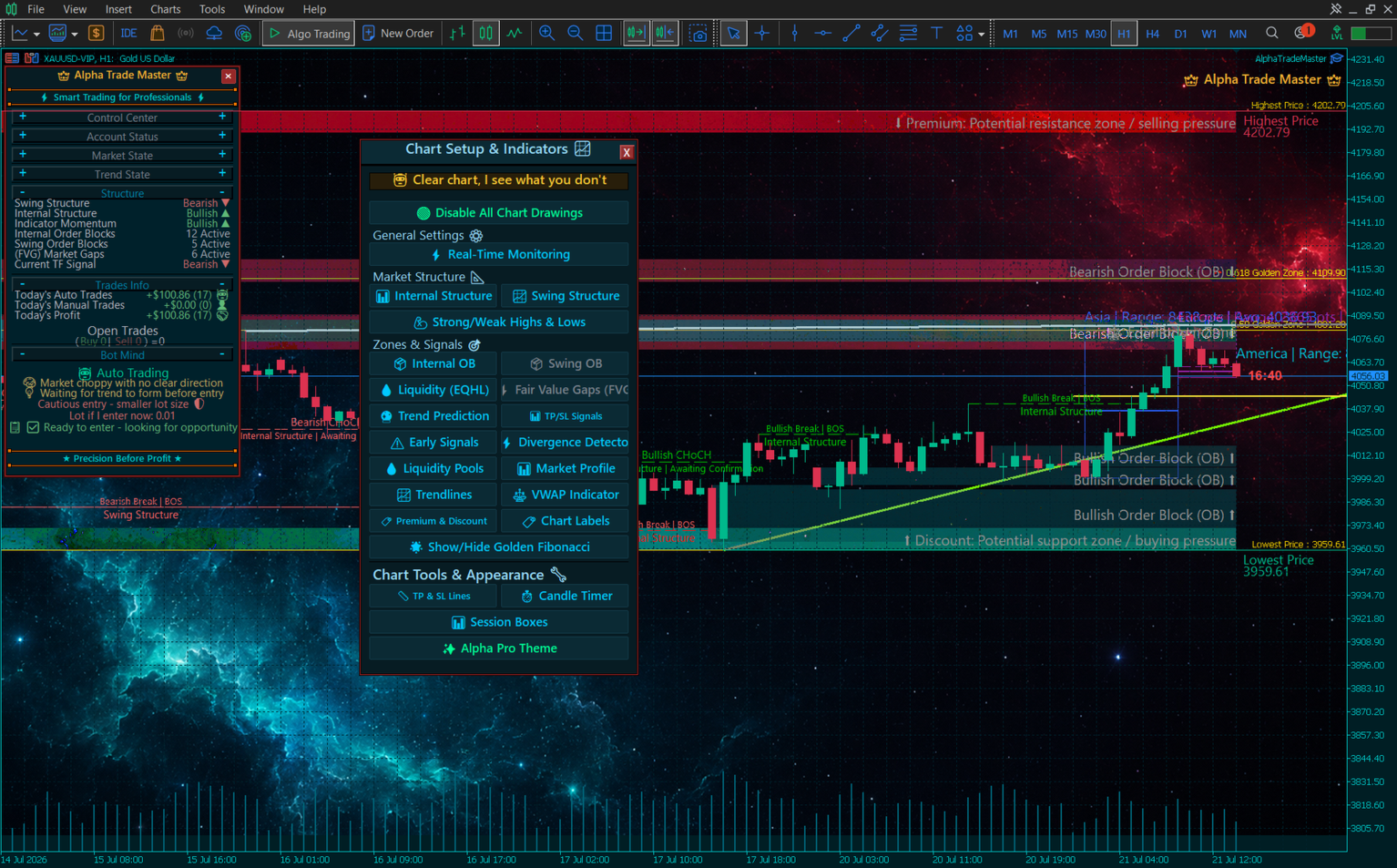
- Market Structure Engine: Toggle between Real-Time Monitoring and Historical Depth. Display Internal vs. Swing Structure, and map Strong/Weak Highs and Lows automatically.
- Institutional Zones: Reveal hidden Order Blocks (Swing vs. Internal), Fair Value Gaps (FVG), and detect Equal Highs/Lows (EQHL) where liquidity is resting.
- Visual Detectors: With a single click, activate the MACD Divergence Detector, Liquidity Pools Detection, Volume/Market Profile, Dynamic Trendlines, and the VWAP Indicator.
- Precision Entry Signals: Activate "Entry Signal Boxes" to see exact TP/SL zones before trades happen, and "Early Get Ready Signals" to prepare for upcoming moves.
- Visual Aesthetics: Toggle Premium/Discount Zones, Golden Fibonacci Zones, Session Trading Boxes, a Candle Timer, and instantly apply the sleek "Alpha Pro Theme" to your chart.
⚡ 9. MANUAL EXECUTION PANEL
A complete trade execution desk designed to give hybrid-traders ultimate control.
──────────────────────────────
Technical Details
- Live Risk Calculator & Progress Bar: Before you click Buy or Sell, the panel displays your dynamic Stop Loss in points, exact Risk in Dollars ($), and Risk Percentage (%). A visual Risk Progress Bar ensures you never over-leverage.
- Granular Exit Controls (Panic Buttons): Instantly execute: Close All, Close Manual, Close Auto, Close Winners, Close Losers, Close Buys, or Close Sells.
- Trade Management: With a single click, set universal Take Profits, Stop Losses, activate Trailing Stops, move SL to Break-Even (BE), or clear all SL/TP levels.
- Instant Position Reversal & Partial Close: Caught on the wrong side? The "Reverse" button flips your position. The Partial Close System lets you precisely close a percentage (e.g., 50%) to secure profits while letting runners ride.
📱 10. NOTIFICATIONS & ROUTING MENU
A triple-layered alert routing system that keeps you connected anywhere, anytime.
──────────────────────────────
Technical Details
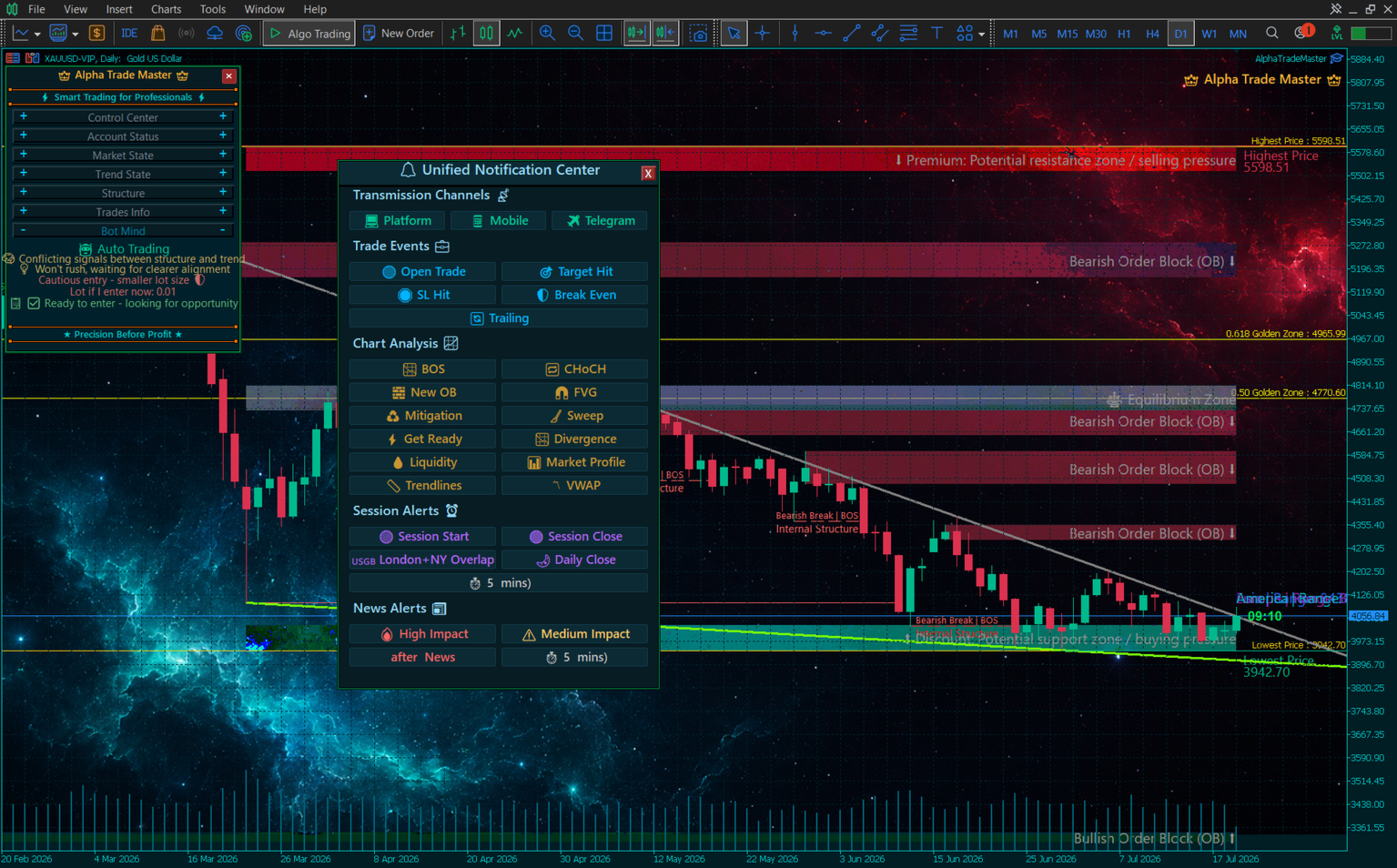
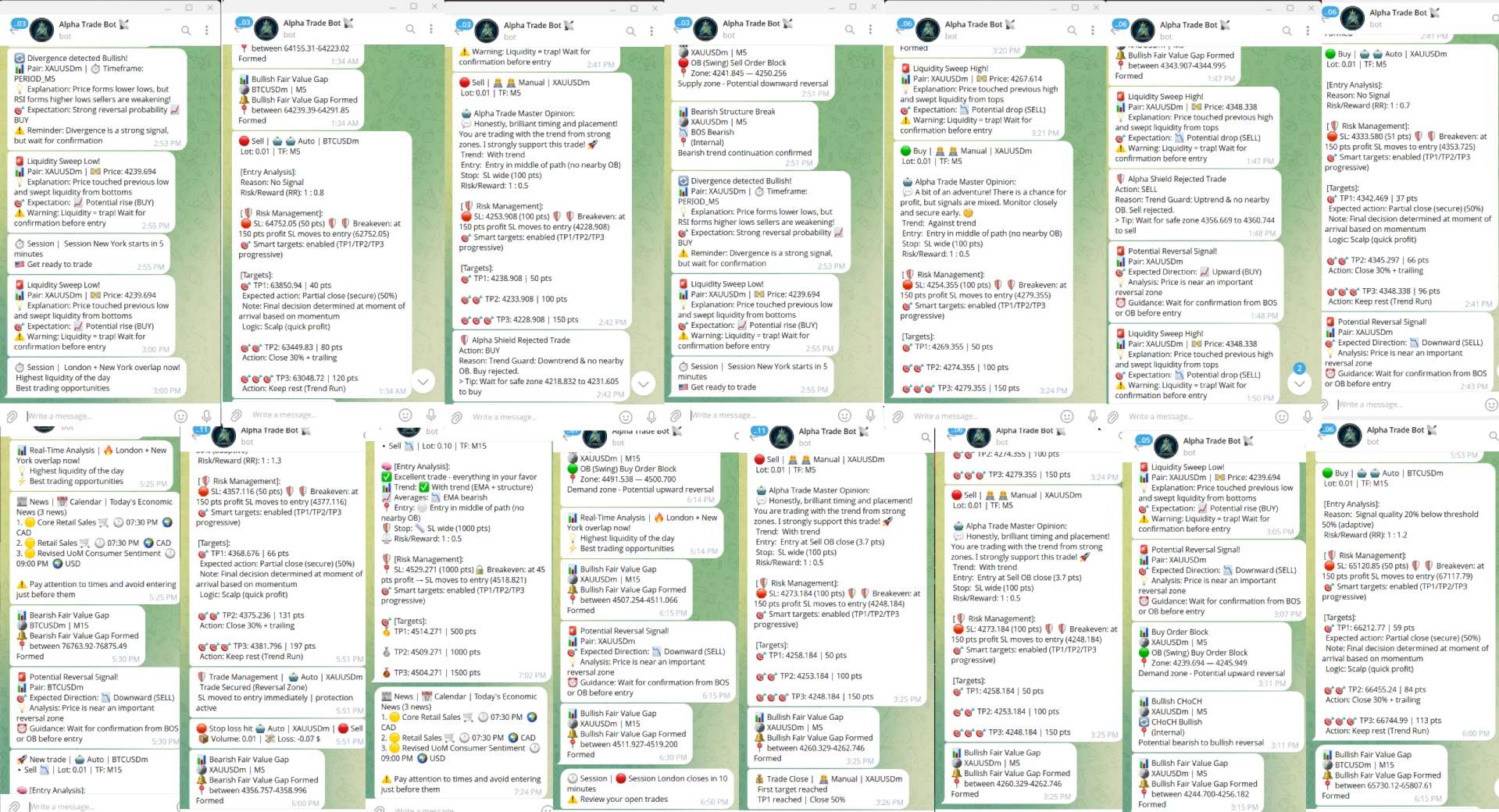
- Transmission Channels: Choose exactly how you want to receive alerts: MT5 Terminal Pop-ups, Mobile Push Notifications, or formatted Telegram Messages.
- Trade Event Alerts: Toggle notifications for specific trade events such as: Trade Opened, Target Hit, SL Hit, Break Even Activated, and Trailing Stop updates.
- SMC & Chart Analysis Alerts: Don't stare at the chart! Get instantly notified when specific market structures form: BOS, CHoCH, New OB, FVG, Mitigation, Liquidity Sweep.
- Session & News Alerts: Be notified before trading sessions open/close (e.g., London/NY Overlap). You can even set a custom "Minutes Before" timer.
- Early 'Get Ready' Signals: The bot will ping your phone moments before an expected breakout or setup occurs so you can prepare.
📱 FULL MOBILE PUSH & TELEGRAM ROUTING
To experience the true power of this alert system, Alpha Trade Master includes an enterprise-grade notification router. By enabling MetaTrader Push Notifications or linking your private Telegram Bot API token in terminal settings, you receive beautifully formatted, real-time alerts directly on your smartphone for:
- Trade Execution: Instant alerts for BOTH Auto and Manual trades! Get notified when a trade opens, hits Break Even, activates Trailing Stop, or closes in profit.
- SMC & Technicals: Live alerts when a new FVG forms, a BOS happens, or institutional liquidity is swept.
- Macro Events: Countdown alerts before London/NY sessions open and warnings right before High-Impact news events drop.
- Emergency & Protection: Real-time pings for Alpha Shield interventions and daily target achievements.
🏆 11. PROP-FIRM READY
We know that Prop Firms require strict discipline. Alpha Trade Master is explicitly engineered with built-in compliance protocols:
- Daily Drawdown & Consecutive Loss Limits: Set your firm's maximum daily loss limit and consecutive loss limits. If hit, the bot locks itself.
- Hard Equity Stop (Overall Drawdown): Protects your overall account limit by instantly closing all positions.
- News Filter Integration: Automatically pauses trading before and after high-impact news events.
🧠 A MESSAGE FROM THE DEVELOPERS
We kindly ask for your patience when using the Alpha Trade Master auto-trading engine. What you are using is not a static, rigid algorithm with hardcoded rules; it is an adaptive experience engine that lives within your terminal and gains experience day by day.
We could easily have built a "get-rich-quick" bot that generates astronomical profits in a single day, only to turn suicidal and wipe out your entire account balance the next minute. However, we will never be satisfied with building a bot solely for immediate, reckless profits at the expense of your capital safety. Because our primary goal is absolute precision and capital preservation, we have designed this engine to grow and evolve.
You do not own a normal bot. You possess an engine that actively records every single winning and losing trade, analyzing the specific market conditions of your broker, and learning from its mistakes every single day. The more trading days that pass, the deeper its experience becomes regarding the specific assets and timeframes you choose to trade.
Proof of Concept: Your Bot's Memory
To verify our claims, you can visually see the bot's expanding knowledge base. Please navigate to the following path on your computer:
File -> Open Data Folder -> Up to Terminal -> Common -> Files -> AlphaTrade_TradeMemory_V5.dat
We highly recommend copying and backing up this file every week or month. This file embodies the bot's accumulated trading experience and data feedback with you. As the days increase and the file grows, you will notice an adaptation and improvement in its auto-trading execution.
Therefore, we ask for your patience and trust in its current performance phase. When you finally see the word "Warning" disappear from the Auto-Trading menu, know that the engine has gathered enough data, and we have reached far beyond our initial goal.
🚫 WHY ARE THERE NO .SET FILES OR MANUAL F7 INPUTS?
We often get asked: "Where are the .set files or custom F7 input parameters for this EA?"
Unlike traditional, outdated MetaTrader bots, Alpha Trade Master does not rely on clunky .set files or static F7 input configurations. It is a self-adapting ecosystem. The engine automatically detects the exact asset you attach it to (Forex Major, Gold, Bitcoin, Indices) and dynamically injects the optimal risk limits, spread filters, and ATR multipliers into its core.
⚡ Why are manual F7 input settings strictly omitted?
Alpha Trade Master is engineered as a multi-engine neural trading operating system. For the bot to achieve peak precision, its core components — including the MarketBrain, SmartSL/TP engines, Narrative Engine, Regime Classifier, and Risk Guards — must operate in absolute algorithmic harmony. Introducing static manual inputs or arbitrary human intervention into the F7 window disrupts this delicate mathematical balance. Human tampering forces conflicting logic into the neural feedback loop, distorts dynamic risk calculations, and degrades trading accuracy. By making every parameter 100% dynamic and self-governing, Alpha Trade Master protects your capital from human error and ensures seamless, state-of-the-art execution.
Furthermore, any button you click or risk parameter you tweak directly on the on-chart Dashboard is instantly auto-saved into the bot's custom memory matrix. There is nothing to load from the F7 window. It is truly plug-and-play!
💾 HOW TO BACKUP & TRANSFER YOUR BOT TO A NEW PC
Alpha Trade Master creates its own advanced memory ecosystem. If you ever change your computer or VPS, you don't have to lose your bot's intelligence, stats, or custom UI settings!
1. Core Settings & Language:
Go to File -> Open Data Folder -> MQL5 -> Files. Copy AlphaTrade_Settings.dat (saves all your UI dashboard risk settings and toggles) and AlphaTrade_Language.txt (saves your preferred interface language).
2. Performance Statistics:
In the same folder, copy AlphaTradeStats.dat . This ensures you never lose your historical win rate, profit factor, and total trades data displayed on the dashboard.
3. Active Trade Memory & News Cache:
Copy MetaStore_OpenTrades.dat (crucial for the bot to remember and safely re-attach to your currently open trades after a VPS restart) and MetaStore_News_Cache.csv (caches economic events for lightning-fast loading).
👑 THE INSTITUTIONAL TRADING STANDARD
Alpha Trade Master is designed to operate autonomously with maximum security and privacy. Every calculation, SMC structural mapping, and memory adaptation runs directly within your local MetaTrader 5 terminal at microsecond speed — ensuring zero third-party dependency, minimal latency, and institutional-grade reliability.
Alpha Trade Master Team
📊 RECOMMENDED SETUP & SPECIFICATIONS
- Recommended Assets: XAUUSD (Gold), EURUSD, GBPUSD, BTCUSD, US100 / NAS100.
- Primary Timeframe: M5 (Optimized for market structure and intraday momentum).
- Minimum Deposit: $50 (Recommended: $500 or higher for proper proportional risk scaling).
- Account Type: ECN, Raw Spread, or Low-Commission accounts with tight spreads.
- Leverage: 1:100 to 1:500.
- VPS: A low-latency Virtual Private Server (VPS) is strongly recommended for seamless 24/5 continuous trading.
⚠️ Risk Disclaimer:
Trading foreign exchange, commodities, cryptocurrencies, and CFDs carries a high level of risk and may not be suitable for all investors. The high degree of leverage can work against you as well as for you. Past performance of any trading robot or strategy is not indicative of future results. Always test automated systems on a demo environment or with appropriate risk capital.

































Great Expert Advisor! Well-programmed, detailed, and one of the best Smart Money Concepts (SMC) EAs I’ve come across. I’m still testing it, and the results have been brilliant so far. Thanks to the developer for creating such an excellent EA. Keep up the great work!