AlienTrader Pro
- Utilities
-
FENCHELL CAPITAL Ltd.
 Welcome to Our MQL5 Profile!
We are the creators of AlienTrader Pro, an intuitive tool designed to simplify and elevate your manual trading experience on MetaTrader 4 and 5. - Version: 1.3
- Updated: 11 February 2025
- Activations: 5
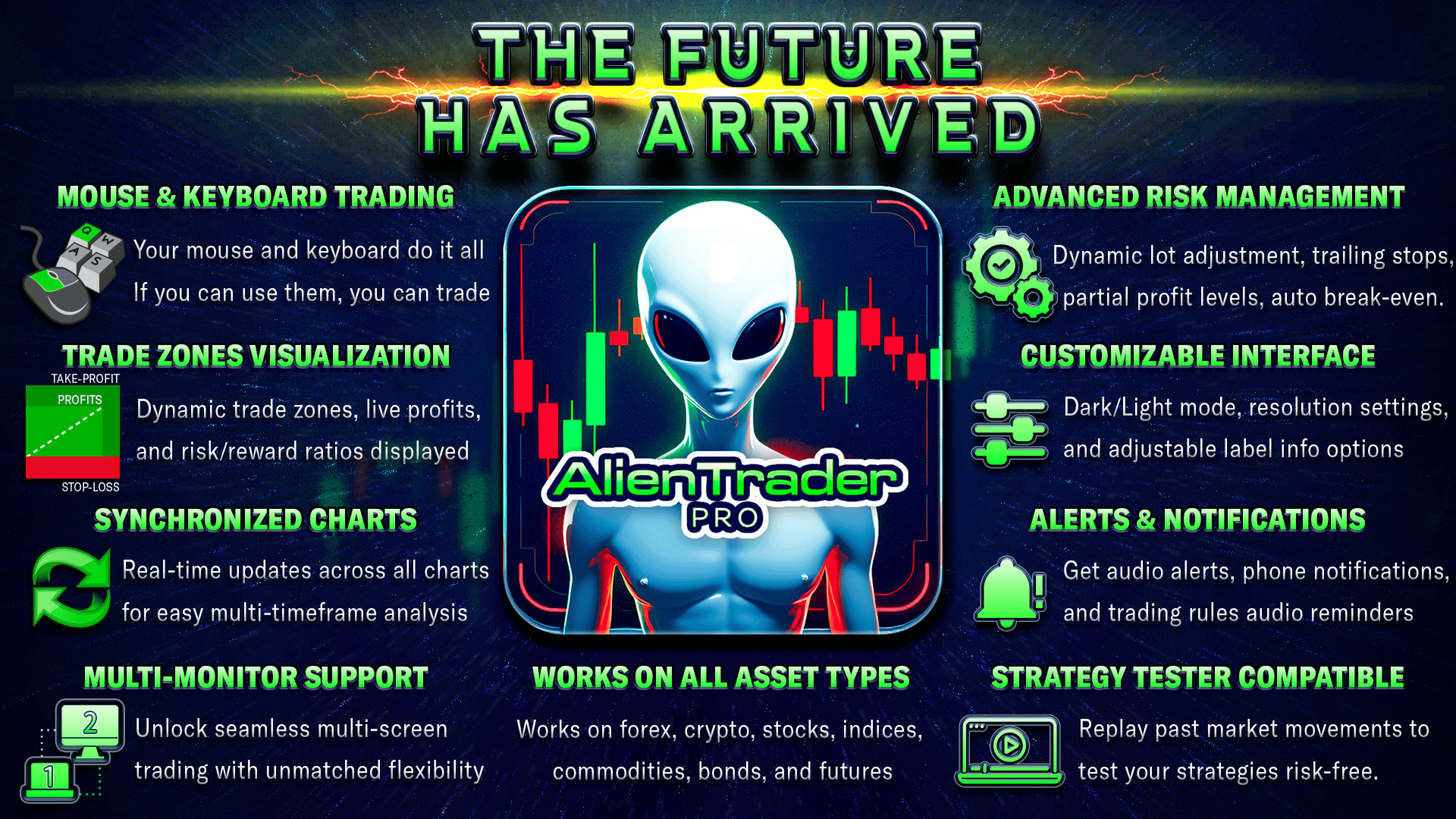
AlienTrader Pro - The Future Has Arrived.
AlienTrader Pro is a manual trading tool designed to simplify trading in MetaTrader 4 and 5. With intuitive hotkeys, direct chart interactions, and advanced visual features, AlienTrader Pro allows you to turn ideas into trades—swiftly and directly on your chart.
Key Benefits:
- Speed: Place trades with a single key press.
- Precision: Manage trades directly from the chart.
- Clarity: Visualize trade zones, risk/reward ratios, and real-time profits.
- Customization: Adapt lot sizes, stop-loss strategies, and display themes to your preferences.
- Confidence: Reduce errors and streamline workflows for better focus.
Your Chart, Your Rules
AlienTrader Pro transforms your trading chart into a sleek, interactive space. Instantly visualize your positions, execute trades directly from the chart, and enjoy the freedom to trade your way. Whether you're scalping quick moves or riding long-term swing trades, AlienTrader Pro adapts to your style, making trading intuitive and uniquely yours.
Hotkeys & Cursor: The Ultimate Trading Duo
AlienTrader Pro combines the speed of hotkeys with the precision of cursor-based actions, giving you complete control over your trading. Open trades, set orders, and manage positions directly from your chart—perfect for beginners and seasoned traders alike.
See an opportunity? Point, press—it’s done.
With AlienTrader Pro, trade as you think—minimal effort, optimal speed.
One Key, One Solution – AlienTrader Simplifies Your Trading
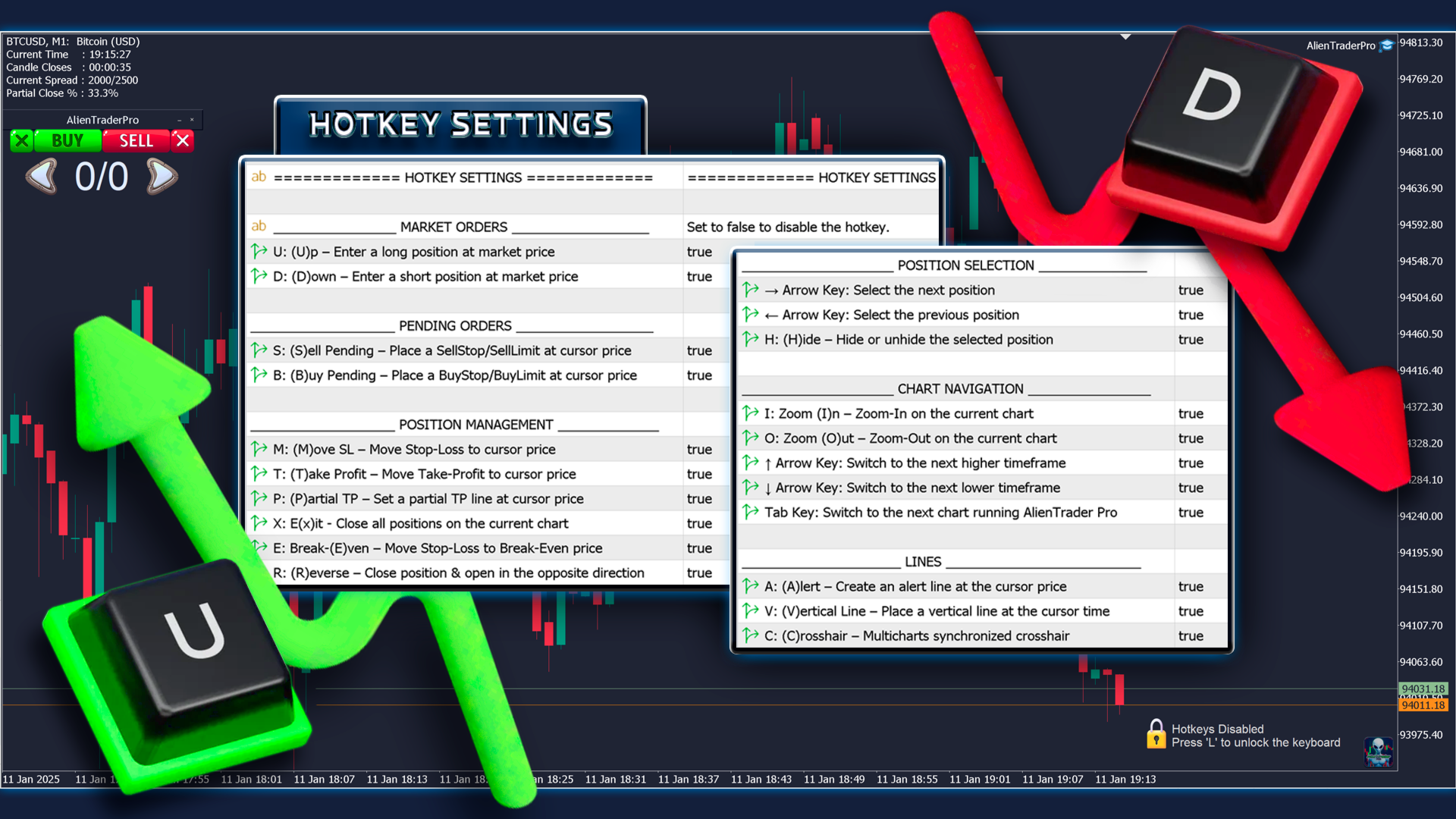
AlienTrader Pro’s hotkeys are designed to feel natural, with no need for complex memorization. Each key follows a simple logic, ensuring your actions are smooth and intuitive:
Market direction:
- Going up? Press U (U for “Up”) to open a buy order at the market price.
- Heading down? Press D (D for “Down”) to open a sell order at the market price.
Placing a pending order:
- Want to sell? Position your cursor and press S (S for “Sell”).
- Ready to buy? Place the cursor and press B (B for “Buy”).
Adding a line to your chart:
- Create an alert line by pressing A (A for “Alert”).
- Add a vertical line with V (V for “Vertical”).
Adjusting the zoom:
- Zoom-In? Press I (I for “Zoom-In”).
- Zoom-Out? Press O (O for “Zoom-Out”).
And so much more! Explore the full range of hotkeys in the User Guide.
Every key is designed to be intuitive, simplifying your actions and making your trading smoother.
AlienTrader Pro — an intuitive approach where every action finds its solution in a single key.
Upgraded Visual Trading Interface
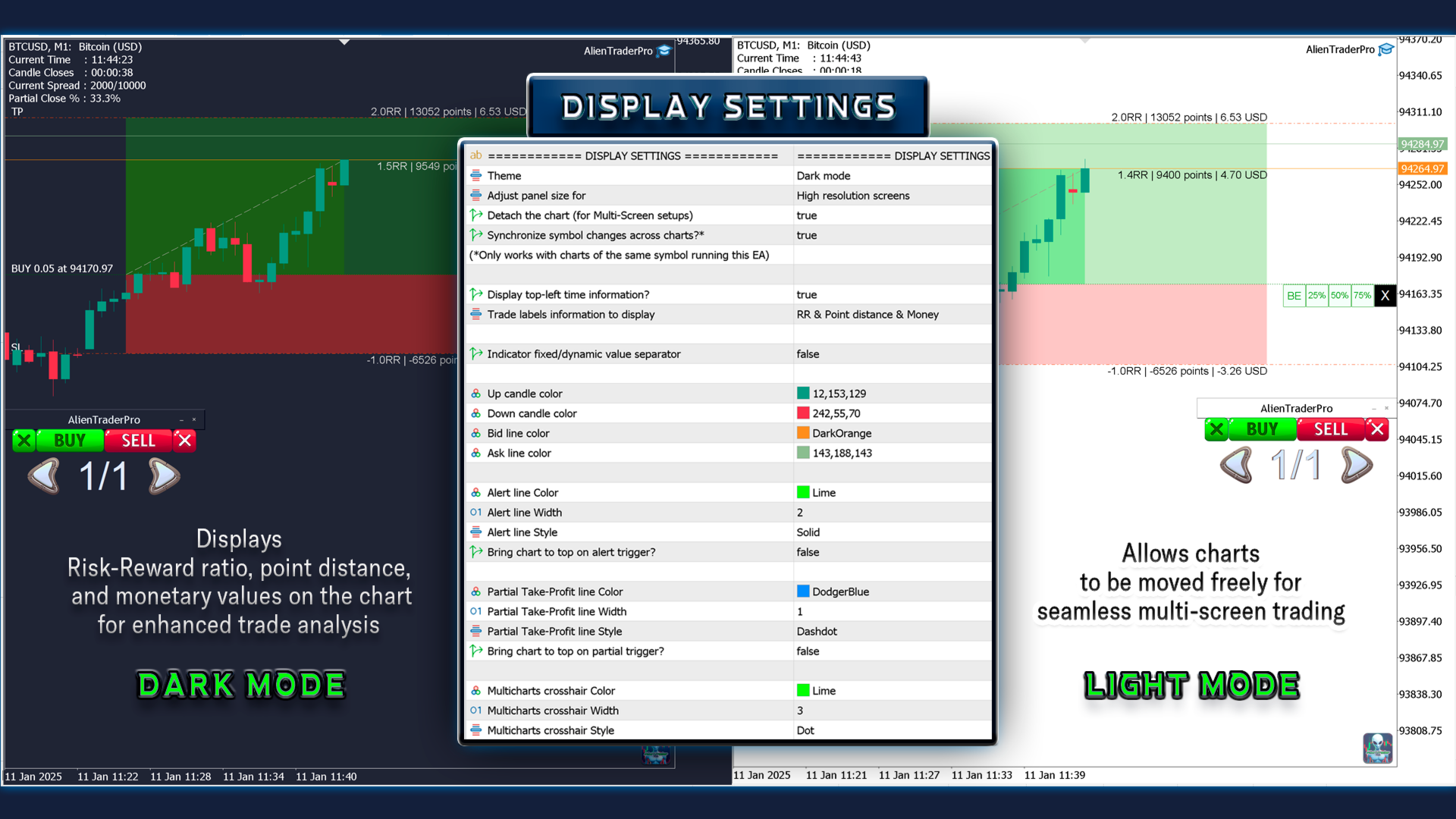
Aesthetic Upgrade: AlienTrader Pro brings a TradingView-inspired color palette and multi-chart synchronization for effortless analysis. Switch between dark and light modes, adjust for any screen size, and see all your trades and visuals synchronized in real-time.
Dark Mode/Light Mode: Choose your perfect visual setting, whether you prefer the calm of dark mode or the clarity of light mode.
Resolution Settings: Whether you're on a bustling trading floor or a compact laptop, AlienTrader Pro adapts with three resolution settings tailored to any screen size for optimal usability.
A New Dimension for Your Charts
With AlienTrader Pro, multi-timeframe analysis becomes effortless. Synchronize your trades, visuals, and symbols across all charts representing the same instrument for a seamless and coherent experience. Explore multiple timeframes with ease: everything stays perfectly aligned.
- Trades and Visual Elements: View your positions, alert lines (Alert Lines), vertical lines (Vertical Lines), and partial Take-Profit levels on all charts for the same symbol. Move a line on one chart, and it updates automatically everywhere.
- Synchronized Crosshair: Activate the Crosshair with the C key for instant synchronization across all charts of the same symbol, making your multi-timeframe analysis more precise and effective.
- Symbol Synchronization: Change the symbol on one chart, and all other charts displaying the same symbol will update automatically, with no manual adjustments needed.
- Detached Charts: Enable the option to detach a chart from the MetaTrader platform, allowing you to move it freely—even to a second screen. Perfect for multi-screen setups, this feature significantly enhances your comfort and productivity.
AlienTrader Pro is more than just a tool; it rewrites the rules. Designed for traders who demand excellence and refuse to settle, it breaks free from the constraints of a single screen and rigid layouts. Give your charts the space they deserve, synchronize your timeframes across multiple screens, and rediscover the pleasure of a workspace optimized for trading.
AlienTrader Pro: designed for those who seek to push the boundaries of what’s possible.
See Your Trades Come to Life
Real-time visualizations turn complex data into clear insights. Trade zones, Risk/Reward ratios, and dynamic profit labels keep your decisions informed and your strategy sharp.
Trade Zones Visualization: Rectangles mark your risk and reward zones, while a dynamic line connects your entry price to the current price, visually displaying your real-time profits. Every decision is informed at a glance.
RR-Focused Labels:
- Take-Profit Label: Clearly shows your Risk/Reward ratio, keeping you focused on the metrics that matter most.
- Live-Profit Label: Positioned at the current price, it updates with every tick to display your profit or loss in terms of Risk/Reward—encouraging smarter decisions based on percentages rather than raw monetary values.
*Prefer points or monetary amounts? No problem, those can be displayed too.*
This visual system transforms your chart into a clear and interactive trading canvas, aligning your focus on the essential metrics of success.
Complex data becomes elegantly simple, helping you trade with clarity and confidence.
Money Management Mastery
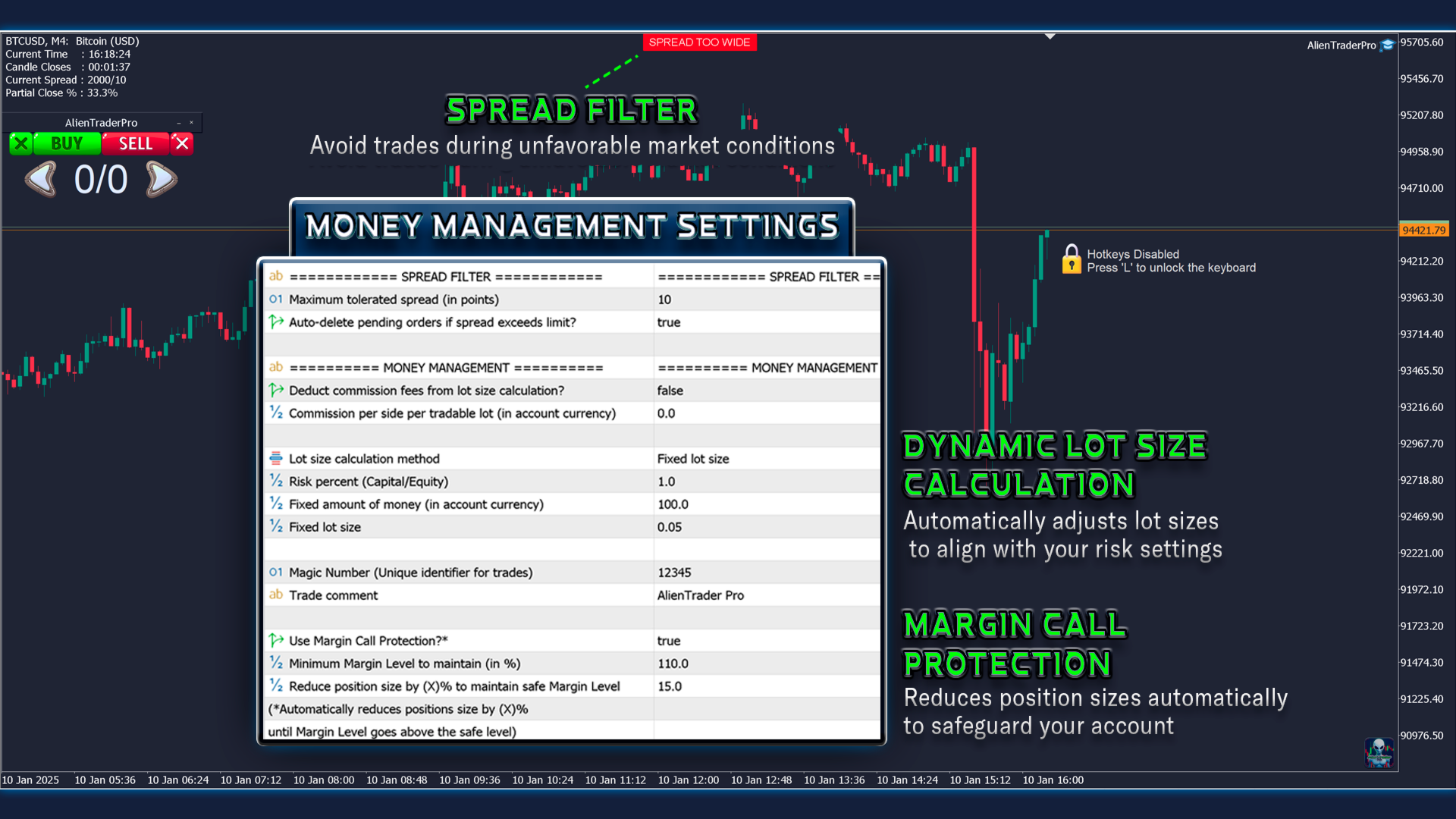
Automatic Lot Sizing: Manage risk like a pro with four customizable methods:
- A percentage of your account balance.
- A percentage of your equity.
- A fixed monetary risk amount.
- A predefined lot size.
Optionally include commission fees and spread for even more precise risk management.
Never Miss an Opportunity
Dynamic Lot Adjustment: Used for all Stop-Loss methods except Micro-Entry, AlienTrader Pro smoothly resizes the lot size when margin constraints prevent a full-sized order. Lot sizes are adjusted incrementally to ensure your trade fits within the available margin and executes without interruption.
Dynamic Stop-Loss Adjustment: Specifically for the Micro-Entry Stop-Loss method, AlienTrader Pro prioritizes maintaining your desired lot size by gradually widening the Stop-Loss distance. This adjustment secures the tightest possible Stop-Loss placement while ensuring your trade is executed at the volume you need.
With AlienTrader Pro, you can trade confidently and seize every opportunity, knowing your tool is designed to adapt to every condition.
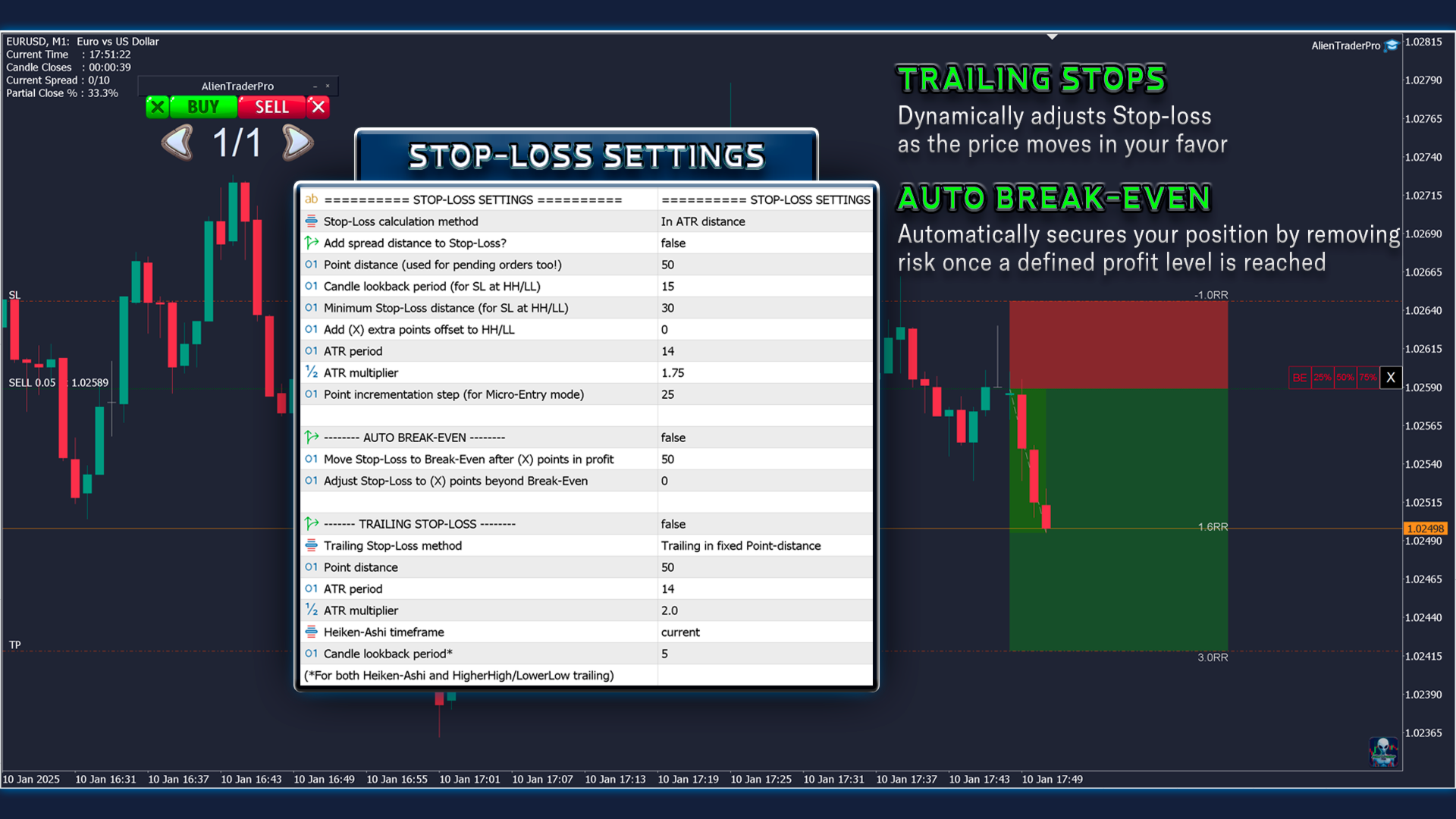
Advanced Stop-Loss Options:
- Cursor-Price: Set your Stop-Loss directly at a price level selected on the chart.
- Point-Distance: Define the Stop-Loss by a fixed number of points away from your entry.
- LowerLow/HigherHigh: Automatically set your Stop-Loss below the recent low or above the recent high.
- ATR-Based: Use the Average True Range to dynamically calculate your Stop-Loss based on market volatility.
- Micro-Entry Method: Ideal for scalpers, enabling the smallest tradable Stop-Loss positions.
Spread Adjustment Option: Add spread to your Stop-Loss for both buy and sell positions with a single toggle, ensuring precise placement tailored to current market conditions.
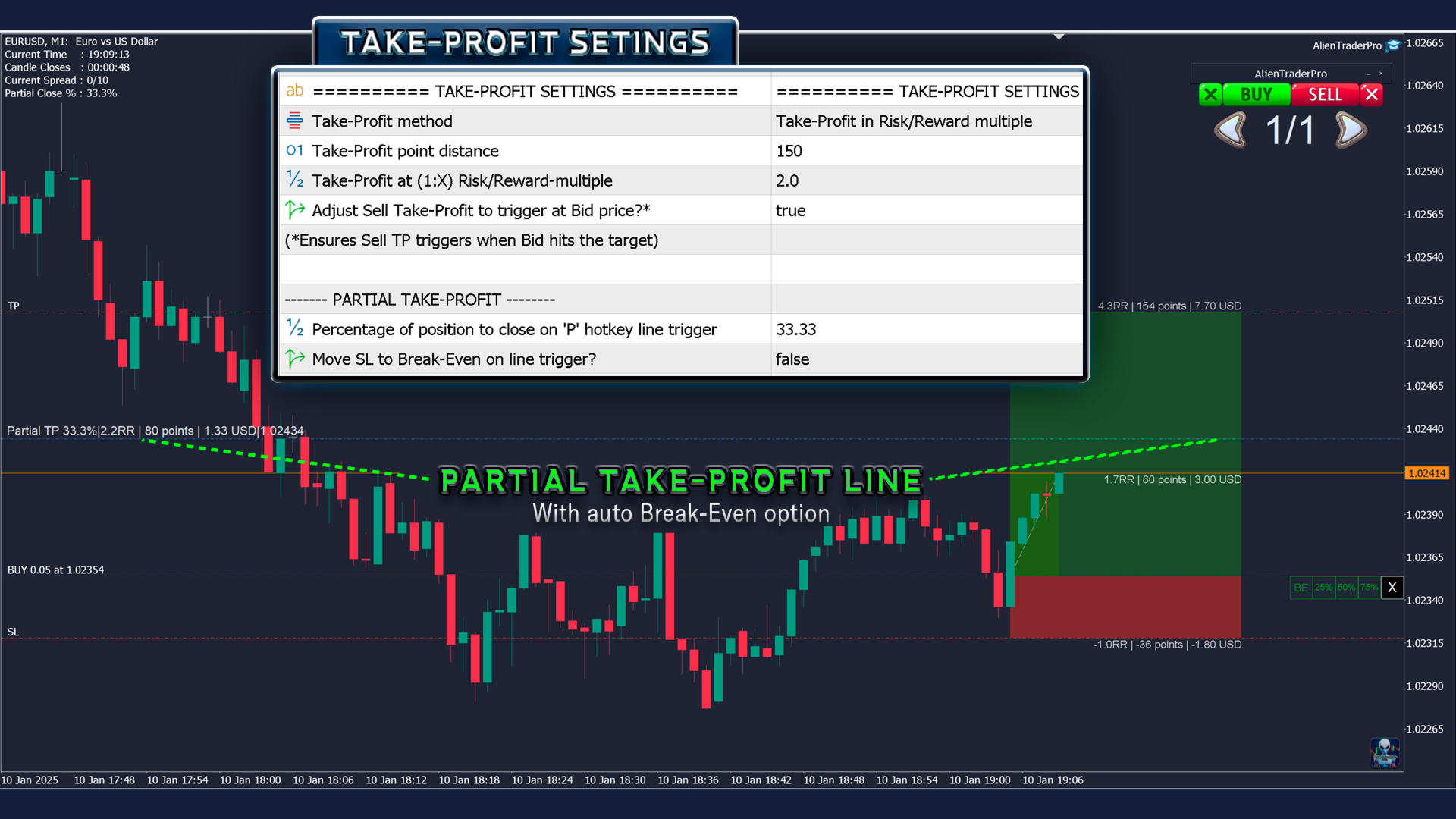
Take-Profit Tactics:
- Point Distance: Define your Take-Profit by a fixed number of points from the entry.
- Risk-Reward Ratio: Set your Take-Profit based on a calculated ratio of risk to reward, ensuring alignment with your trading strategy.
Spread Adjustment Option: Dedicated option to account for the spread on sell positions, ensuring your Take-Profit triggers precisely when the Bid price reaches your target. Trade with accuracy and control, no matter your approach.
Essential Protection Mechanisms – Everything You Need
Spread Filter: Avoid getting caught in unfavorable spreads. This feature disables trading when the spread widens excessively, safeguarding your capital against sudden market movements and news spikes.
Margin Call Protection: A built-in safety net that automatically reduces your position size if your margin level approaches the margin call threshold. This proactive measure prevents your broker from issuing a margin call, keeping your account secure and your trades active.
Auto-Break-even: Secure your trades effortlessly. Once your trade moves into profit, this feature automatically adjusts your stop-loss to the break-even point, eliminating risk while keeping potential gains in play.
Trailing Stops: Maximize your profits while minimizing downside risk with advanced trailing stop functionalities:
- Fixed Points: Keep your stop-loss at a constant distance from the price.
- ATR-Based Trailing: Adjust dynamically based on market volatility using the Average True Range (ATR).
- Heiken Ashi-Based Trailing: Follow trends with stop-loss levels based on Heiken Ashi candle patterns.
- Higher Highs/Lower Lows: Automatically trail below the most recent higher low (Buy) or above the latest lower high (Sell).
These methods ensure your trades are protected while adapting to changing market conditions.
Staged Profit Protection: Incrementally secure your profits with Partial Take-Profit levels, reducing risk while staying engaged in market opportunities.
Unique Trade Identifiers: Automatically manage and track your trades with unique Magic Numbers, keeping your portfolio organized and secure.
One-Cancels-the-Other (OCO) Orders: Enhance efficiency and safety by automatically canceling other pending orders when one is executed, preventing conflicting positions.
Securities & Alerts - Your Trading Co-Pilot
Keyboard Locked Icon: To ensure no accidental trades and protect your capital, a visual lock icon is displayed on the chart when hotkeys are disabled.
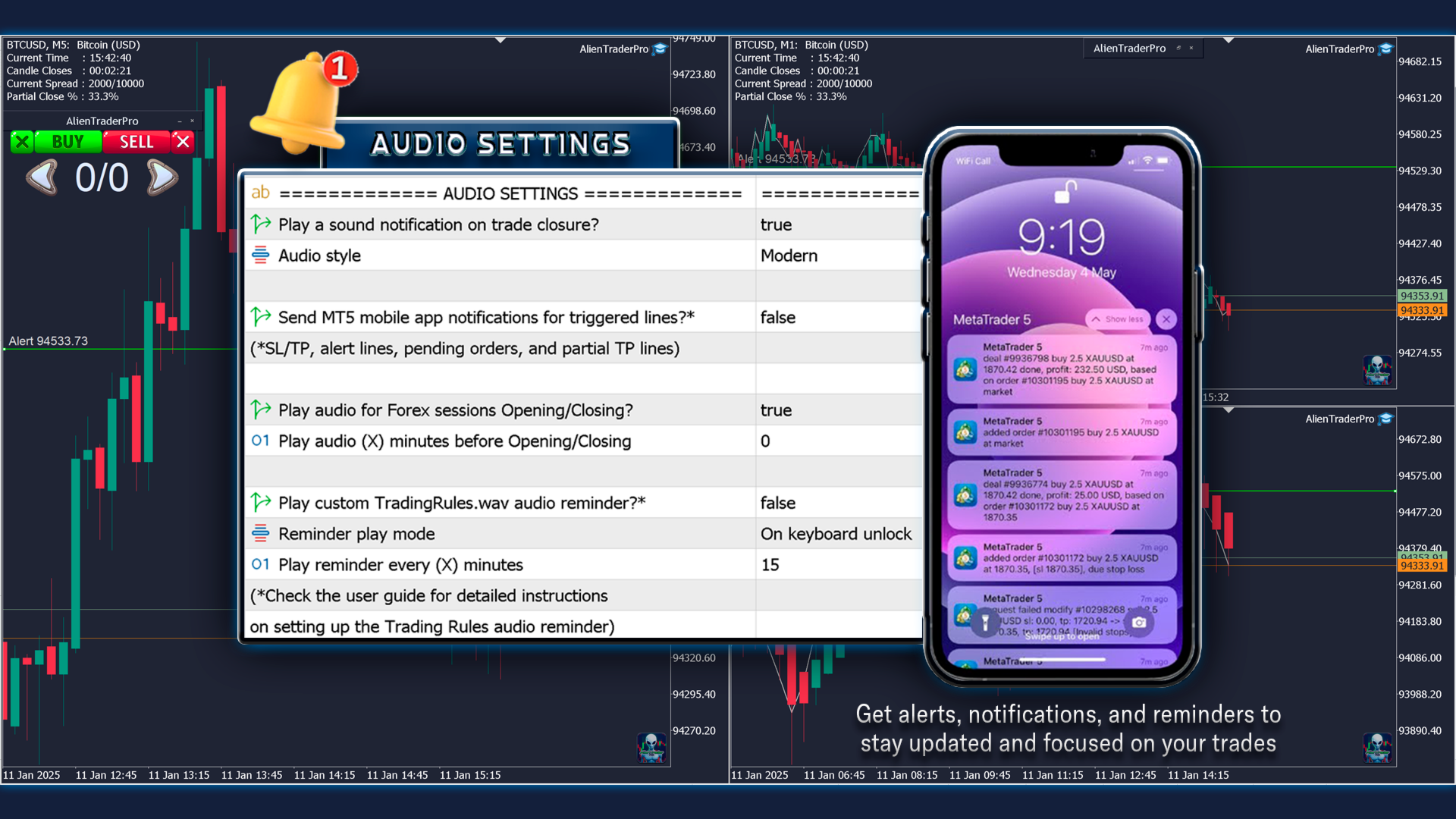
Custom Trading Rule Alerts: Like your personal trading coach, AlienTrader Pro plays your pre-set trading rule audio files, helping you stay disciplined and stick to your trading plan.
Forex Session Alerts: Stay ahead of the market with timely audio reminders for the start and end of forex trading sessions. These alerts ensure you’re always prepared for the most active and volatile trading periods, helping you stay ahead of the market.
Phone notifications: No need to spend your day in front of the charts. AlienTrader Pro monitors the charts for you and provides timely alerts on your phone and chart whenever an alert, pending order, or partial take-profit level is triggered. Stay connected, stay ready—anytime, anywhere.
Backtesting & Strategy Optimization:
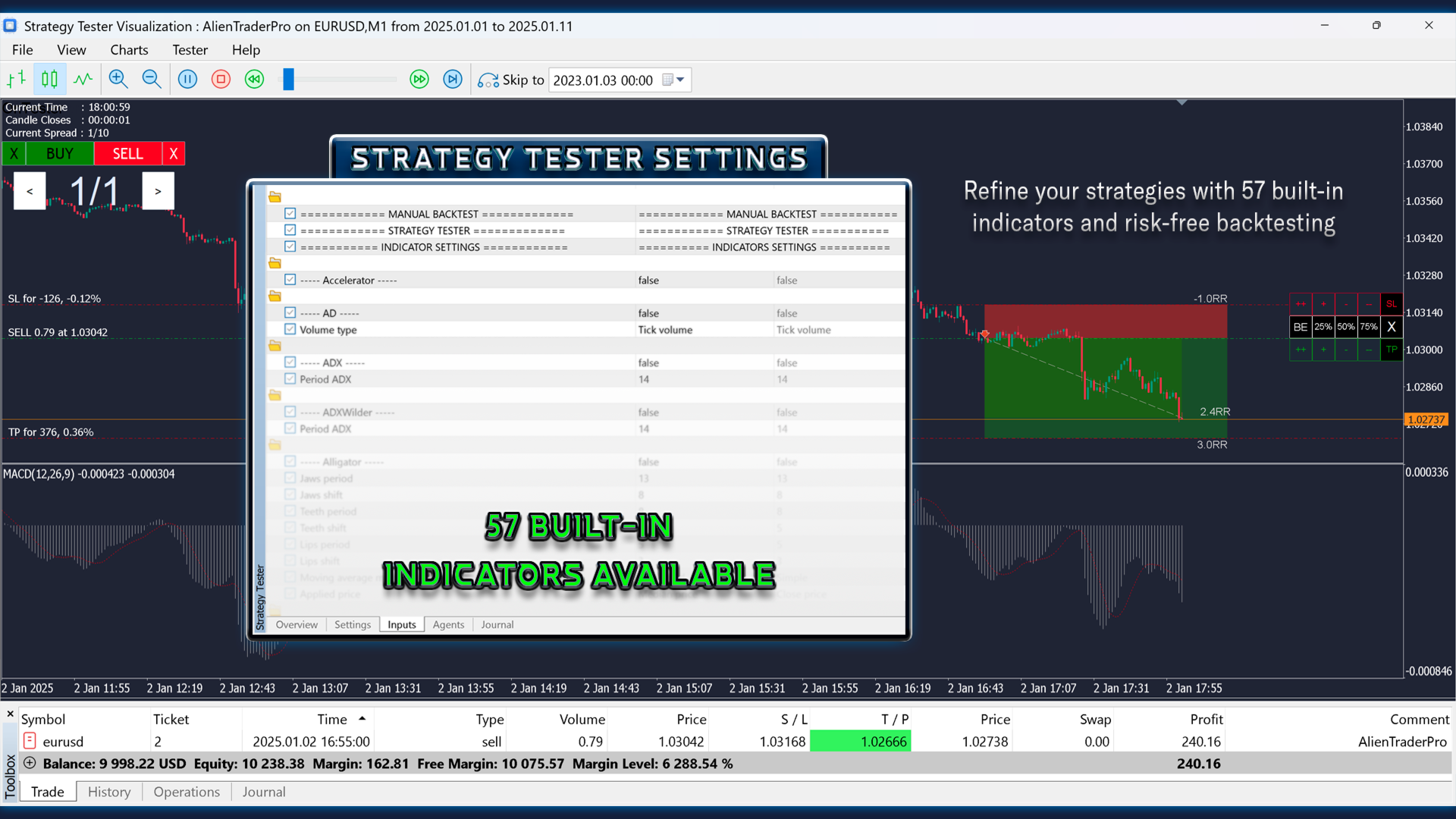
Strategy Tester Compatibility: AlienTrader Pro goes beyond live manual trading—it lets you replay past market history on the Strategy Tester to backtest and refine your strategies with ease.
57 Built-In Indicators: Access 57 built-in indicators in MT5, tailored to enhance any trading style. Toggle them on or off directly in the Strategy Tester for risk-free simulations and precision refinements.
Frequently Asked Questions (FAQ)
Is AlienTrader Pro compatible with all asset types?
Yes, AlienTrader Pro works with any trading instrument available in your MetaTrader terminal, including forex pairs, commodities, indices, stocks, and cryptocurrencies.
Is AlienTrader Pro compatible with all brokers and account types?
AlienTrader Pro works with any broker offering MetaTrader 4 or 5. For optimal performance, we recommend brokers with tight spreads and reliable execution.
Does AlienTrader Pro work on macOS and Linux?
Yes, AlienTrader Pro operates within MetaTrader 4 and MetaTrader 5. If your MetaTrader terminal runs on macOS or Linux, AlienTrader Pro will function seamlessly. For installation guidance, refer to our .
Can I customize the hotkeys?
AlienTrader Pro includes default hotkeys designed to be intuitive and easy to use. They are not customizable to ensure simplicity and optimal compatibility across all setups.
Do I get updates after purchasing?
Yes, all future updates, including new features and improvements, are completely free for existing customers.
What is your refund policy?
Refunds are subject to the marketplace’s refund policy where you purchased AlienTrader Pro. Please refer to their terms.
How do I get support if I have questions?
If you’ve already purchased AlienTrader Pro: Support is available exclusively through the "Comment" tab on the product page. Feel free to post your questions or concerns there, and we’ll be happy to assist you.
If you haven’t purchased it yet: You can post your questions in the comment section of the "User Guide" or send us a private message through our profile.
Enjoy Trading Your Way — With AlienTrader Pro
Ready to experience a fresh approach to trading designed for your comfort?
Discover how streamlined trading can be with AlienTrader Pro. Intuitive tools, seamless chart interactions, and smart hotkeys empower you to trade your way—free of unnecessary complexity.
Try AlienTrader Pro's unique approach today and explore a new way to approach trading.
Disclaimer: The features and functionalities described do not guarantee profits or error-free operation. Trading involves risk, and past performance is not indicative of future results.