The MetaTrader 5 platform update will be released on Thursday, August 4, 2022. The update will feature the following changes:
Terminal: Added automatic opening of a tutorial during the first connection to a trading account. This will assist beginners in learning trading basics and in exploring platform features. The tutorial is divided into several sections, each of which provides brief information on a specific topic. The topic completion progress is shown with a blue line.
Terminal: Fixed 'Close profitable'/'Close losing' bulk operations. Previously, the platform used opposite positions if they existed. For example, if you had two losing Buy positions for EURUSD and one profitable Sell position for EURUSD, all three positions would be closed during the 'Close losing' bulk operation. Buy and Sell would be closed by a 'Close by' operation, while the remaining Buy would be closed by a normal operation. Now the commands operate properly: they only close the selected positions, either profitable or losing.
Terminal: Fixed display of negative historical prices. Such prices will appear correctly for all timeframes.
Terminal: Optimized and significantly reduced system resource consumption by the terminal.
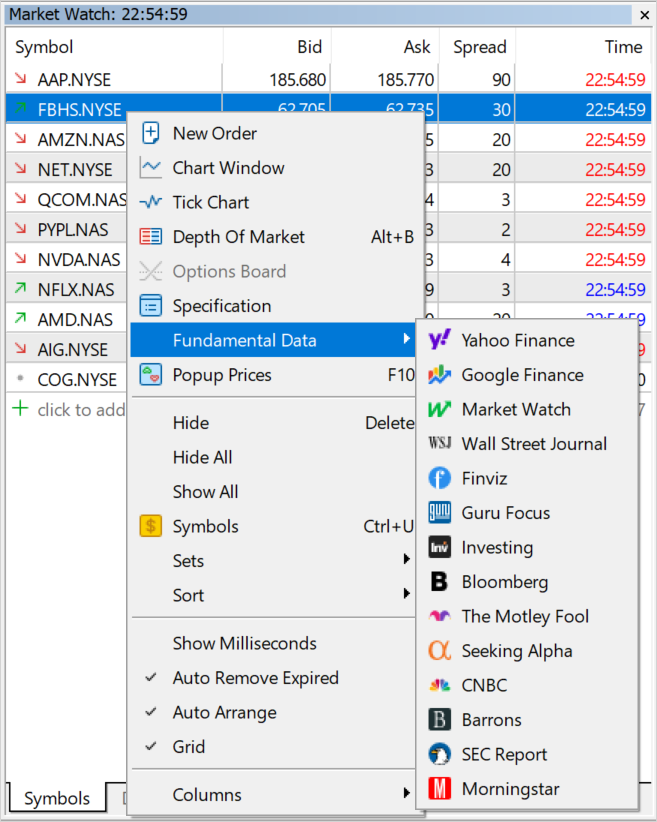
Terminal: Updated fundamental database for trading instruments. The number of data aggregators available for exchange instruments has been expanded to 15. Users will be able to access information on even more tickers via the most popular economic aggregators.
About 7,000 securities and more than 2,000 ETFs are listed on the global exchange market. Furthermore, exchanges provide futures and other derivatives. The MetaTrader 5 platform offers access to a huge database of exchange instruments. To access the relevant fundamental data, users can switch to the selected aggregator's website in one click directly from the Market Watch. For convenience, the platform includes a selection of information sources for each financial instrument.
Terminal: Fixed Stop Loss and Take Profit indication in the new order placing window. For FIFO accounts, stop levels will be automatically set in accordance with the stop levels of existing open positions for the same instrument. This procedure is required to comply with the FIFO rule.
We continue expanding algorithmic trading and machine learning capabilities in the MetaTrader 5 platform. Previously, we have added new data types: matrices and vectors, which eliminate the need to use arrays for data processing. More than 70 methods have been added to MQL5 for operations with these data types. The new methods enable linear algebra and statistics calculations in a single operation. Multiplication, transformation and systems of equations can be implemented easily, without extra coding. The latest update includes mathematical functions.
Mathematical functions were originally designed to perform relevant operations on scalar values. From this build and onward, most of the functions can be applied to matrices and vectors. These include MathAbs, MathArccos, MathArcsin, MathArctan, MathCeil, MathCos, MathExp, MathFloor, MathLog, MathLog10, MathMod, MathPow, MathRound, MathSin, MathSqrt, MathTan, MathExpm1, MathLog1p, MathArccosh, MathArcsinh, MathArctanh, MathCosh, MathSinh, and MathTanh. Such operations imply element-wise handling of matrices and vectors. Example:
For MathMod and MathPow, the second element can be either a scalar or a matrix/vector of the appropriate size.
The following example shows how to calculate the standard deviation by applying math functions to a vector.
//+------------------------------------------------------------------+//| Script program start function |//+------------------------------------------------------------------+voidOnStart()
{
//--- Use the initializing function to populate the vector
vector r(10, ArrayRandom); // Array of random numbers from 0 to 1//--- Calculate the average valuedouble avr=r.Mean(); // Array mean value
vector d=r-avr; // Calculate an array of deviations from the meanPrint("avr(r)=", avr);
Print("r=", r);
Print("d=", d);
vector s2=MathPow(d, 2); // Array of squared deviationsdouble sum=s2.Sum(); // Sum of squared deviations//--- Calculate standard deviation in two waysdouble std=MathSqrt(sum/r.Size());
Print(" std(r)=", std);
Print("r.Std()=", r.Std());
}
/*
avr(r)=0.5300302133243813
r=[0.8346201971495713,0.8031556138798182,0.6696676534318063,0.05386516922513505,0.5491195410016175,0.8224433118686484,...
d=[0.30458998382519,0.2731254005554369,0.1396374401074251,-0.4761650440992462,0.01908932767723626,0.2924130985442671, ...
std(r)=0.2838269732183663
r.Std()=0.2838269732183663
*///+------------------------------------------------------------------+//| Fills the vector with random values |//+------------------------------------------------------------------+void ArrayRandom(vector& v)
{
for(ulong i=0; i<v.Size(); i++)
v[i]=double(MathRand())/32767.;
}
MQL5: Added support in template functions for notations matrix<double>, matrix<float>, vector<double>, vector<float> instead of the corresponding matrix, matrixf, vector and vectorf types.
MQL5: Improved mathematical functions for operations with the float type. The newly implemented possibility to apply mathematical functions to 'float' matrix and vectors has enabled an improvement in mathematical functions applied to 'float' scalars. Previously, these function parameters were unconditionally cast to the 'double' type, then the corresponding implementation of the mathematical function was called, and the result was cast back to the 'float' type. Now the operations are implemented without extra type casting.
The following example shows the difference in the mathematical sine calculations:
//+------------------------------------------------------------------+//| Script program start function |//+------------------------------------------------------------------+voidOnStart()
{
//--- Array of random numbers from 0 to 1
vector d(10, ArrayRandom);
for(ulong i=0; i<d.Size(); i++)
{
double delta=MathSin(d[i])-MathSin((float)d[i]);
Print(i,". delta=",delta);
}
}
/*
0. delta=5.198186103783087e-09
1. delta=8.927621308885136e-09
2. delta=2.131878673594656e-09
3. delta=1.0228555918923021e-09
4. delta=2.0585739779477308e-09
5. delta=-4.199390279957527e-09
6. delta=-1.3221741035351897e-08
7. delta=-1.742922250969059e-09
8. delta=-8.770715820283215e-10
9. delta=-1.2543186267421902e-08
*///+------------------------------------------------------------------+//| Fills the vector with random values |//+------------------------------------------------------------------+void ArrayRandom(vector& v)
{
for(ulong i=0; i<v.Size(); i++)
v[i]=double(MathRand())/32767.;
}
MQL5: Added Activation and Derivative methods for matrices and vectors:
AF_ELU
Exponential Linear Unit
AF_EXP
Exponential
AF_GELU
Gaussian Error Linear Unit
AF_HARD_SIGMOID
Hard Sigmoid
AF_LINEAR
Linear
AF_LRELU
Leaky REctified Linear Unit
AF_RELU
REctified Linear Unit
AF_SELU
Scaled Exponential Linear Unit
AF_SIGMOID
Sigmoid
AF_SOFTMAX
Softmax
AF_SOFTPLUS
Softplus
AF_SOFTSIGN
Softsign
AF_SWISH
Swish
AF_TANH
Hyperbolic Tangent
AF_TRELU
Thresholded REctified Linear Unit
The neural network activation function determines how the weighted input signal sum is converted into a node output signal at the network level. The selection of the activation function has a big impact on the neural network performance. Different parts of the model can use different activation functions. In addition to all known functions, MQL5 also offers derivatives. Derivative functions enable fast calculation of adjustments based on the error received in learning.
MQL5: Added Loss function for matrices and vectors. It has the following parameters:
LOSS_MSE
Mean Squared Error
LOSS_MAE
Mean Absolute Error
LOSS_CCE
Categorical Crossentropy
LOSS_BCE
Binary Crossentropy
LOSS_MAPE
Mean Absolute Percentage Error
LOSS_MSLE
Mean Squared Logarithmic Error
LOSS_KLD
Kullback-Leibler Divergence
LOSS_COSINE
Cosine similarity/proximity
LOSS_POISSON
Poisson
LOSS_HINGE
Hinge
LOSS_SQ_HINGE
Squared Hinge
LOSS_CAT_HINGE
Categorical Hinge
LOSS_LOG_COSH
Logarithm of the Hyperbolic Cosine
LOSS_HUBER
Huber
The loss function evaluates the quality of model predictions. The model construction targets the minimization of the function value at each stage. The approach depends on the specific dataset. Also, the loss function can depend on weight and offset. The loss function is one-dimensional and is not a vector since it provides a general evaluation of the neural network.
Added matrix::CompareByDigits and vector::CompareByDigits methods for matrices and vectors. They compare the elements of two matrices/vectors up to significant digits.
Added support for MathMin and MathMax functions for strings. The functions will use lexicographic comparison: letters are compared alphabetically, case sensitive.
MQL5: The maximum number of OpenCL objects has been increased from 256 to 65536. OpenCL object handles are created in an MQL5 program using the CLContextCreate, CLBufferCreate and CLProgramCreate functions. The previous limit of 256 handles was not enough for the efficient use of machine learning methods.
MQL5: Added ability to use OpenCL on graphical card without 'double' support. Previously, only GPUs supporting double were allowed in MQL5 programs, although many tasks allow calculations using float. The float type is initially considered native for parallel computing, as it takes up less space. Therefore, the old requirement has been lifted.
To set the mandatory use of GPUs with double support for specific tasks, use the CL_USE_GPU_DOUBLE_ONLY in the CLContextCreate call.
int cl_ctx;
//--- Initializing the OpenCL contextif((cl_ctx=CLContextCreate(CL_USE_GPU_DOUBLE_ONLY))==INVALID_HANDLE)
{
Print("OpenCL not found");
return;
}
MQL5: Fixed operation of the CustomBookAdd function. Previously, a non-zero value in the MqlBookInfo::volume_real field prevented the function from creating a Market Depth snapshot. The check is now performed as follows:
The transmitted data is validated: type, price and volume data must be specified for each element. Also, MqlBookInfo.volume and MqlBookInfo.volume_real must not be zero or negative. If both volumes are negative, this will be considered an error. You can specify any of the volume types or both of them, while the system will use the one that is indicated or is positive:
volume=-1 && volume_real=2 — volume_real=2 will be used,
volume=3 && volume_real=0 — volume=3 will be used.
Increased-precision volume MqlBookInfo.volume_real has a higher priority than MqlBookInfo.volume. Therefore, if both values are specified and are valid, volume_real will be used.
If any of the Market Depth elements is described incorrectly, the system will discard the transferred state completely.
MQL5: Fixed operation of the CalendarValueLast function. Due to an error, successive function calls after changes in the Economic Calendar (the 'change' parameter was set a new value after the call) could skip some events when using the currency filter.
CalendarValueLast(change, result, "", "EUR")
MQL5: Fixed ArrayBSearch function behavior. If multiple identical elements are found, a link to the first result will be returned, rather than a random one.
MQL5: Fixed checks for template function visibility within a class. Due to an error, class template functions declared as private/protected appeared to be public.
MetaEditor: Fixed errors and ambiguous behavior of MetaAssist.
MetaEditor: Added support for the %terminal% macros which indicates the path to the terminal installation directory. For example, %terminal%\MQL5\Experts.
MetaEditor: Improved display of arrays in the debugger.
MetaEditor: Increased buffer for copying values from the debugger.
MetaEditor: Improved error hints.
MetaEditor: Added indication of relative paths in the *.mproj project file. Previously, absolute paths were used, which resulted in compilation errors in case the project was moved.
MetaEditor: Added automatic embedding of BMP resources as globally available 32-bit bitmap arrays in projects. This eliminates the need to call ResourceReadImage inside the code to read the graphical resource.
'levels.bmp'as'uint levels[18990]'
MetaEditor: Improved reading of extended BMP file formats.
MetaEditor: Updated UI translations.
Fixed errors reported in crash logs.
The update will be available through the Live Update system.
The MetaTrader 5 platform update will be released on Friday, September 16, 2022
We have implemented a new account trading report. The report reflects monthly growth rates, profit graphs, equity diagrams, radar charts for general account statuses and other metrics to help users in gauging trading performance.
In addition, we have implemented new MQL5 functions for working with matrices and vectors. All new features, fixes and performance improvements are described in detail below.
Terminal: Added new account trading performance report. It is similar to the already familiar Signals reports in terms of statistics availability and data presentation. The following performance data will be available in the platform:
Graphs and tables visualizing monthly growth metrics
Equity chart
Radar chart which enables quick account state evaluation
Trading statistics by instrument
A variety of additional metrics for trading analysis
The report can be viewed directly in the platform, without the need to export it to a file. To open it, select Reports in the View menu.
Terminal: Fixed options board filling for Call and Put contracts with unmatching quantity or symbol type.
Terminal: Fixed position selection in the Trade dialog during Close by operations. The error occurred for opposite order lists sorted by any column other than the ticket.
Terminal: Accelerated platform logging.
Terminal: Fixed display of comments on custom symbol charts.
MQL5: Fixed CArrayList::LastIndexOf function operation. Previously, it always returned -1 instead of the index of the last found element.
MQL5: Added new matrix and vector method - Assign. It replaces matrix/vector elements with the passed matrix/vector or array data.
The last two values enable the simultaneous selection of multiple bar parameters: Open, High, Low, Close and time.
If multiple data types are selected (only available for matrices), the order of the rows in the matrix will correspond to the order of values in the enumeration.
MQL5: Fixed display of Text Label objects. When using OBJPROP_XOFFSET and OBJPROP_YOFFSET properties, a wrong image fragment could be displayed on the chart.
MQL5: Fixed error when changing a constant parameter which has been passed to a function as an object pointer reference.
The const specifier declares a variable as a constant to prevent it from being changed during program execution. It only allows one-time variable initialization during declaration. An example of constant variables in the OnCalculate function:
intOnCalculate (constint rates_total, // price[] array sizeconstint prev_calculated, // bars processed on previous callconstint begin, // meaningful data starts atconstdouble& price[] // array for calculation
);
The below example contains a compiler error which allowed an implicit pointer casting for reference parameters:
class A {};
const A *a = new A;
void foo( const A*& b )
{
b = a;
}
voidOnStart()
{
A *b;
foo(b); // not allowed
Print( a,":",b );
}
The compiler will detect such illegal operations and will return the relevant error.
MetaEditor: Fixed display of complex number references in the debugger.
MetaEditor: Improved MQL5 Cloud Protector. Previously, file protection could fail under certain conditions.
Fixed errors reported in crash logs.
The update will be available through the Live Update system.
New MetaTrader 5 Web Terminal
We have released a revised MetaTrader 5 Web Terminal which features an updated interface and a redesigned core. The new interface is similar to the terminal version for iPad:
It also features a plethora of new functions:
Ability to request real accounts with the detailed registration form and document submission options
Support for price data subscriptions and the ability to receive delayed quotes
More analytical objects with convenient management options
Convenient configuration of instruments in the Market Watch, along with the daily price change data
Simplified interface to assist beginners in getting started with the terminal: removed chart context menu and top menu; all chart control commands, objects and indicators are available on the left-hand side and top panels, while other commands can be accessed through the hamburger menu
The MetaTrader 5 platform update will be released on Friday, November 4, 2022.
The update introduces the new Web Terminal with full support for mobile devices. Now its interface automatically adapts to the user screen size.
In addition, we have improved the task manager for a more accurate monitoring of consumed resources and have added the OpenCL tab for managing available devices. The new OpenCL manager enables explicit specification of devices to be used for faster calculations.
We continue to expand platform capabilities in working with matrices and vectors. MQL5 features new functions for operations with price ticks and for data exchange between matrices and vectors. It also provides expanded assignment methods.
In addition, we have implemented multiple fixes and improvements in all platform components. All new features, fixes and performance improvements are described in detail below.
Mobile version of the web platform
The new Web Terminal provides full-featured support for mobile devices. The interface will automatically adapt to the screen size, enabling efficient operations from iOS and Android phones and tablets:
Also, the Web Terminal features a lot of fixes and improvements.
Added recognition of system and third-party DLL threads.
Added display of kernel mode operating time. An increase in this metric compared to the time spent in user mode can indicate system-level issues: drivers problems, hardware errors or slow hardware. For further details, please read the Microsoft Documentation.
Added display of user mode operating time.
Terminal: New OpenCL tab in terminal settings for managing available devices. The new OpenCL manager enables explicit specification of devices to be used for calculations.
Terminal: Added indication of Stop Loss and Take Profit levels in the Depth of Market for accounts operating in FIFO mode (the mode can be enabled on the broker's side).
According to the FIFO rule, positions for each instrument can only be closed in the same order in which they were opened. To ensure FIFO-compliant position closing by stop levels, the following logic has been implemented on the client terminal side:
If multiple positions exist for the same instrument, the placing of stop levels for any of the positions causes the same levels to be placed for all other positions as well. Accordingly, if a level triggers, all positions will be closed in a FIFO-compliant order.
Now, when the user opens the Depth of Market for an instrument which already has open positions for, the levels of existing positions (if any) are automatically specified in the Stop Loss and Take Profit fields.
Terminal: Fixed deletion of Stop Loss and Take Profit levels using X buttons in the Toolbox\Trade window. The error occurred when the quick trading function was disabled. A click on the button will open a trading dialog with an empty value of the relevant level.
Terminal: Fixed graph captions and final commission calculations in the trading report. The section could show incorrect Profit in report statistics and incorrect values in Equity and Balance graph tooltips.
MQL5: Added vector and matrix methods CopyTicks and CopyTicksRange. They enable easy copying of tick data arrays into vectors and matrices.
The copied data type is specified in the 'flags' parameter using the ENUM_COPY_TICKS enumeration. The following values are available:
COPY_TICKS_INFO = 1, // ticks resulting from Bid and/or Ask changes
COPY_TICKS_TRADE = 2, // ticks resulting from Last and Volume changes
COPY_TICKS_ALL = 3, // all ticks having changes
COPY_TICKS_TIME_MS = 1<<8, // time in milliseconds
COPY_TICKS_BID = 1<<9, // Bid price
COPY_TICKS_ASK = 1<<10, // Ask price
COPY_TICKS_LAST = 1<<11, // Last price
COPY_TICKS_VOLUME = 1<<12, // volume
COPY_TICKS_FLAGS = 1<<13, // tick flags
If multiple data types are selected (only available for matrices), the order of the rows in the matrix will correspond to the order of values in the enumeration.
Each array, vector or matrix refers to a memory buffer which contains the elements of that object. The Swap method actually swaps pointers to these buffers without writing the elements to memory. Therefore, a matrix remains a matrix, and a vector remains a vector. Swapping a matrix and a vector will result in a one-row matrix with vector elements and a vector with matrix elements in a flat representation (see the Flat method).
//+------------------------------------------------------------------+//| Script program start function |//+------------------------------------------------------------------+voidOnStart()
{
//---
matrix a= {{1, 2, 3}, {4, 5, 6}};
Print("a before Swap: \n", a);
matrix b= {{5, 10, 15, 20}, {25, 30, 35, 40}, {45, 50, 55, 60}};
Print("b before Swap: \n", b);
//--- swap matrix pointers
a.Swap(b);
Print("a after Swap: \n", a);
Print("b after Swap: \n", b);
/*
a before Swap:
[[1,2,3]
[4,5,6]]
b before Swap:
[[5,10,15,20]
[25,30,35,40]
[45,50,55,60]]
a after Swap:
[[5,10,15,20]
[25,30,35,40]
[45,50,55,60]]
b after Swap:
[[1,2,3]
[4,5,6]]
*/
vector v=vector::Full(10, 7);
Print("v before Swap: \n", v);
Print("b before Swap: \n", b);
v.Swap(b);
Print("v after Swap: \n", v);
Print("b after Swap: \n", b);
/*
v before Swap:
[7,7,7,7,7,7,7,7,7,7]
b before Swap:
[[1,2,3]
[4,5,6]]
v after Swap:
[1,2,3,4,5,6]
b after Swap:
[[7,7,7,7,7,7,7,7,7,7]]
*/
}
The Swap() method also enables operations with dynamic arrays (fixed-sized arrays cannot be passed as parameters). The array can be of any dimension but of an agreed size, which means that the total size of a matrix or vector must be a multiple of the array's zero dimension. The array's zero dimension is the number of elements contained at the first index. For example, for a dynamic three-dimensional array 'double array[][2][3]', the zero dimension is the product of the second and third dimension sizes: 2x3=6. So, such an array can only be used in the Swap method with matrices and vectors whose total size is a multiple of 6: 6, 12, 18, 24, etc.
Consider the following example:
//+------------------------------------------------------------------+//| Script program start function |//+------------------------------------------------------------------+voidOnStart()
{
//--- fill the 1x10 matrix with the value 7.0
matrix m= matrix::Full(1, 10, 7.0);
Print("matrix before Swap:\n", m);
//--- try to swap the matrix and the arraydouble array_small[2][5]= {{1, 2, 3, 4, 5}, {6, 7, 8, 9, 10}};
Print("array_small before Swap:");
ArrayPrint(array_small);
if(m.Swap(array_small))
{
Print("array_small after Swap:");
ArrayPrint(array_small);
Print("matrix after Swap: \n", m);
}
else// the matrix size is not a multiple of the first array dimension
{
Print("m.Swap(array_small) failed. Error ", GetLastError());
}
/*
matrix before Swap:
[[7,7,7,7,7,7,7,7,7,7]]
array_small before Swap:
[,0] [,1] [,2] [,3] [,4]
[0,] 1.00000 2.00000 3.00000 4.00000 5.00000
[1,] 6.00000 7.00000 8.00000 9.00000 10.00000
m.Swap(array_small) failed. Error 4006
*///--- use a larger matrix and retry the swap operationdouble array_static[3][10]= {{1, 2, 3, 4, 5, 6, 7, 8, 9, 10},
{2, 4, 6, 8, 10, 12, 14, 16, 18, 20},
{3, 6, 9, 12, 15, 18, 21, 24, 27, 30}
};
Print("array_static before Swap:");
ArrayPrint(array_static);
if(m.Swap(array_static))
{
Print("array_static after Swap:");
ArrayPrint(array_static);
Print("matrix after Swap: \n", m);
}
else// a static array cannot be used to swap with a matrix
{
Print("m.Swap(array_static) failed. Error ", GetLastError());
}
/*
array_static before Swap:
[,0] [,1] [,2] [,3] [,4] [,5] [,6] [,7] [,8] [,9]
[0,] 1.00000 2.00000 3.00000 4.00000 5.00000 6.00000 7.00000 8.00000 9.00000 10.00000
[1,] 2.00000 4.00000 6.00000 8.00000 10.00000 12.00000 14.00000 16.00000 18.00000 20.00000
[2,] 3.00000 6.00000 9.00000 12.00000 15.00000 18.00000 21.00000 24.00000 27.00000 30.00000
m.Swap(array_static) failed. Error 4006
*///--- another attempt to swap an array and a matrixdouble array_dynamic[][10]; // dynamic arrayArrayResize(array_dynamic, 3); // set the first dimension sizeArrayCopy(array_dynamic, array_static);
//--- now use a dynamic array for swapif(m.Swap(array_dynamic))
{
Print("array_dynamic after Swap:");
ArrayPrint(array_dynamic);
Print("matrix after Swap: \n", m);
}
else// no error
{
Print("m.Swap(array_dynamic) failed. Error ", GetLastError());
}
/*
array_dynamic after Swap:
[,0] [,1] [,2] [,3] [,4] [,5] [,6] [,7] [,8] [,9]
[0,] 7.00000 7.00000 7.00000 7.00000 7.00000 7.00000 7.00000 7.00000 7.00000 7.00000
matrix after Swap:
[[1,2,3,4,5,6,7,8,9,10,2,4,6,8,10,12,14,16,18,20,3,6,9,12,15,18,21,24,27,30]]
*/
}
MQL5: Added LossGradient method for vectors and matrices. This method calculates a vector or matrix of partial derivatives of the loss function on predicted values. In linear algebra, such a vector is referred to as a gradient and is used in machine learning.
MQL5: Fixed selection of the appropriate class method depending on the method and object constness.
MetaEditor: Increased allowable length of comments in commits to MQL5 Storage. Detailed comments when committing changes to the repository are considered good practice when working in large projects, but previously the comment length has been limited to 128 characters. The allowed length is now up to 260 characters.
MetaTester: Increased sensitivity of the testing speed switch in visual mode.
Fixed errors reported in crash logs.
The update will be available through the Live Update system.
The MetaTrader 5 platform update will be released on Friday, November 11, 2022. The update provides the following changes:
MetaTrader 5 Client Terminal build 3500
Terminal: A new command has been added to the context menu of the Trade and History sections, to enable access to the new trading report.
The trading report provides the following performance data:
Graphs and tables visualizing monthly growth metrics
Equity chart
Radar chart which enables quick account state evaluation
Trading statistics by instrument
A variety of additional metrics for trading analysis
Terminal: Fixed initial deposit calculations in the trading report.
Terminal: Fixed setting of Stop Loss and Take Profit levels when using using the quick trading panel in the chart and Market Watch. The levels could be inherited from previously opened positions even when the inheritance was not required (the relevant functionality is implemented for FIFO-based accounts).
Terminal: Updated user interface translations.
MQL5: Fixed a compiler bug which enabled access to a structure field using a constant string with the field name value.
The MetaTrader 5 platform update will be released on Friday, November 25, 2022.
In this update, we have implemented 2FA/TOTP authentication in MetaTrader 5 trading terminals using Google Authenticator and have added OpenCL error reporting.
Other fixes and updated features improve the overall platform operational stability. All new features are described in detail below.
Terminal: Added 2FA/TOTP authentication using Google Authenticator and similar apps.
The 2FA/TOTP authentication protects a trading account from unauthorized access even if its login and password are leaked. Authentication using Time-based One-time Password Algorithm (TOTP) can be implemented using various mobile apps. The most popular of them are Google Authenticator, Microsoft Authenticator, LastPass Authenticator and Authy. Now you can connect to your account in the MetaTrader 5 client terminal using one-time passwords generated by such Authenticator apps.
To enable the two-factor authentication option, connect to your account and execute the "Enable 2FA/TOTP" command in the account context menu. Run the Authenticator app on your mobile device, click "+" to add your trading account and scan the QR code from the terminal. Enter the generated code in the "One-time password" field and click "Enable 2FA". A secret will be registered for your account on the broker's trading server.
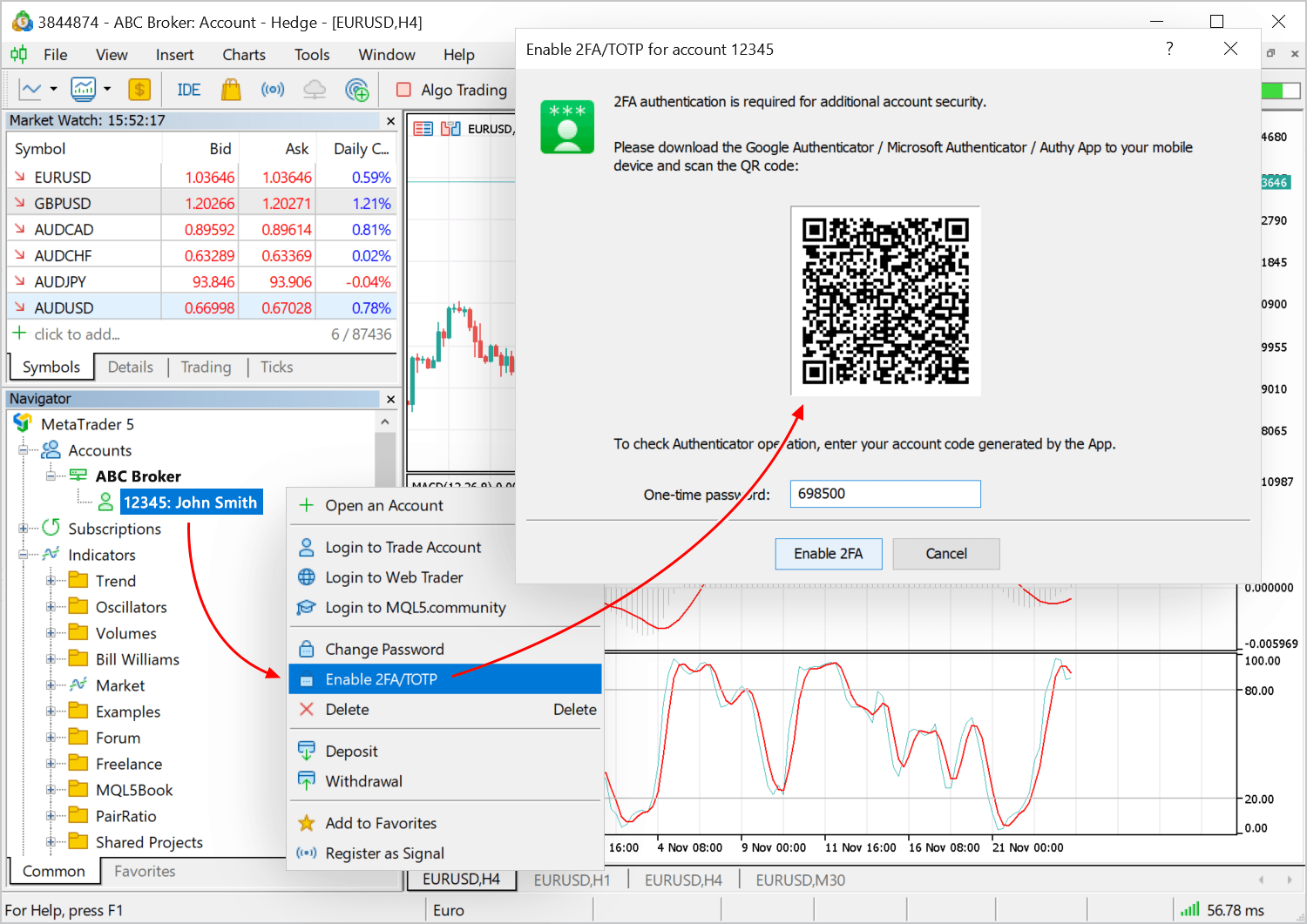
The saved secret will be used in the Authenticator app to generate an OTP code every time you connect to your account. Each password is valid for 30 seconds. After that a new one is generated.
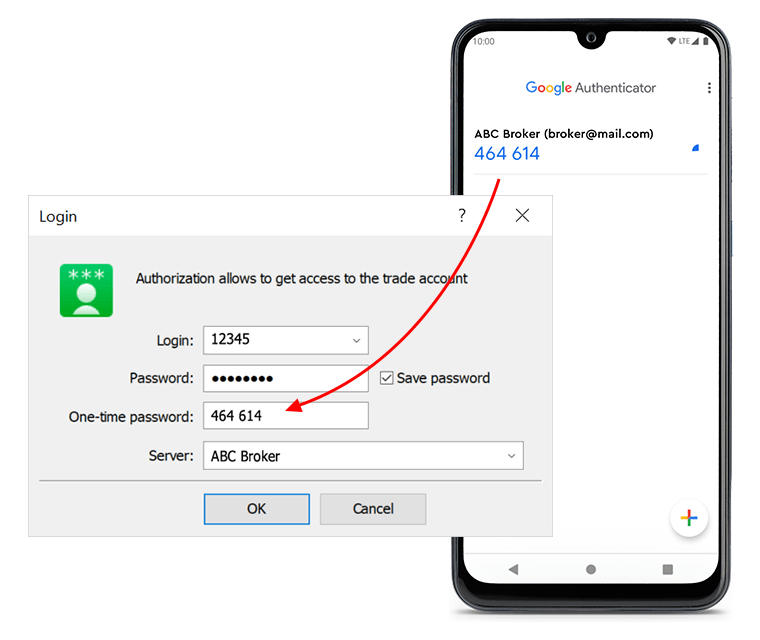
If you decide to remove the stored secret from the Authenticator app, you should first disable 2FA/TOTP authentication using the appropriate account context menu command. If the new 2FA/TOTP authentication method is not available on your account, please contact your broker.
MQL5: Fixed operation of the CopyTicks function for custom trading instruments. When working with custom symbols, previous session's initial ticks could be returned instead of requested data, under certain conditions.
MQL5: Added new enumeration values to get the last OpenCL error code and text description.
When using CL_ERROR_DESCRIPTION, an error code should be passed as the handle parameter in CLGetInfoString. If CL_LAST_ERROR is passed instead of the error code, the function will return the last error description.
Example:
//--- get the code of the last OpenCL errorintcode = (int)CLGetInfoInteger(0,CL_LAST_ERROR);
string desc; // to get the text description of the error//--- use the error code to get the text description of the errorif(!CLGetInfoString(code,CL_ERROR_DESCRIPTION,desc))
desc = "cannot get OpenCL error description, " + (string)GetLastError();
Print(desc);
//--- to get the description of the last OpenCL error without receiving the code, pass CL_LAST_ERROR if(!CLGetInfoString(CL_LAST_ERROR,CL_ERROR_DESCRIPTION, desc))
desc = "cannot get OpenCL error description, " + (string)GetLastError();
Print(desc);
The MetaTrader 5 platform update will be released on Friday, December 9, 2022.
This update provides multiple improvements in the Web Terminal. In particular, it features 2FA/TOTP authentication using Google Authenticator and other similar apps. The Market Watch now has more price data: maximum and minimum Bid/Ask values, as well as session Open and Close prices.
Multiple fixes and updated features improve the overall platform operational stability. These new features, along with other changes, are described in detail below.
MetaTrader 5 Web Terminal build 3540
Added support for 2FA/TOTP authentication using Google Authenticator and similar apps.
The 2FA/TOTP authentication protects a trading account from unauthorized access even if its login and password are leaked. Authentication using Time-based One-time Password Algorithm (TOTP) can be implemented using various mobile apps. The most popular of them are Google Authenticator, Microsoft Authenticator, LastPass Authenticator and Authy. Now you can connect to your account in the MetaTrader 5 client terminal using one-time passwords generated by such Authenticator apps.
To enable the two-factor authentication option, connect to your account via MetaTrader 5 Web Terminal. Then click on your account in the menu and select "Enable 2FA/TOTP" in the newly opened dialog. Run the Authenticator app on your mobile device, click "+" to add your trading account and scan the QR code from the terminal. Enter the generated code in the "One-time password" field and click "Enable 2FA". A secret will be registered for your account on the broker's trading server.
The saved secret will be used in the Authenticator app to generate an OTP code every time you connect to your account. Each password is valid for 30 seconds. After that a new one is generated.
A backup code is also displayed in the QR code dialog for linking to the generator. Save it in a secure place. If you lose access to your linked device, the code will allow you to add your account to the Authenticator app again.
If you decide to remove the stored secret from the Authenticator app, you should first disable 2FA/TOTP authentication using the appropriate account menu command. If the new 2FA/TOTP authentication method is not available on your account, please contact your broker.
Expanded the amount of data displayed in the Market Watch. Now, in addition to the current Bid/Ask prices and the price change percentage, you can see:
Maximum and minimum Bid/Ask price for the current trading session
Open prices of the current trading session and close prices of the previous trading session
Use the context menu to customize the displayed information:
Added risk notification display when a corresponding setting is enabled on the broker's side. Some regulators require that traders read and accept the notification before trading.
Fixed display of the top toolbar on iPhone models featuring a notch at the top of the screen. Previously, it occasionally could cover the panel buttons.
Fixed display of the account final financial parameters (profit, equity, etc.) in the Google Chrome browser. Sometimes, they were not updated.
MetaTrader 5 Client Terminal build 3540
Terminal: Optimized and greatly accelerated the demo account opening dialog.
Terminal: Updated translations of the user interface.
MQL5: Added new methods to the COpenCL class of the Standard Library:
BufferFromMatrix — filling the device buffer with data from the matrix
BufferToMatrix — reading data from the device buffer into the matrix
ContextCreate — creating the device context (the first part of the Initialize method)
ProgramCreate — creating a program based on the OpenCL source code (the second part of the Initialize method)
ContextClean — releasing all data belonging to the device context (similar to the Shutdown method but without removing the context)
GetDeviceInfoInteger — receiving an integer device property
GetKernelInfoInteger — receiving an integer kernel property
GetDeviceInfo — receiving any single integer device property not present in the ENUM_OPENCL_PROPERTY_INTEGER enumeration
GetDeviceInfo usage example:
long preferred_workgroup_size_multiple=OpenCL.GetDeviceInfo(0x1067);
MQL5: Added the TERMINAL_CPU_NAME and TERMINAL_OS_VERSION values to the ENUM_TERMINAL_INFO_STRING enumeration. They allow receiving the user's CPU and OS names.
MQL5: Fixed operation of the "table_or_sql" parameter in the DatabasePrint and DatabaseExport functions. Now it is able to pass a table name in addition to a SQL query.
MetaEditor: Fixed the check for the maximum number of displayable columns in the database. Up to 64 columns can now be displayed.
MetaEditor: Fixed operation of breakpoints in short constructions like IF[ if(cond) break; ].
Fixes based on crash logs.
The update will be available through the Live Update system.
Forum on trading, automated trading systems and testing trading strategies
MetaTrader 5 Platform build 3390: Float in OpenCL and in mathematical functions, Activation and Loss methods for machine learning
MetaQuotes, 2022.07.14 17:28
The MetaTrader 5 platform update will be released on Thursday, August 4, 2022. The update will feature the following changes:

About 7,000 securities and more than 2,000 ETFs are listed on the global exchange market. Furthermore, exchanges provide futures and other derivatives. The MetaTrader 5 platform offers access to a huge database of exchange instruments. To access the relevant fundamental data, users can switch to the selected aggregator's website in one click directly from the Market Watch. For convenience, the platform includes a selection of information sources for each financial instrument.We continue expanding algorithmic trading and machine learning capabilities in the MetaTrader 5 platform. Previously, we have added new data types: matrices and vectors, which eliminate the need to use arrays for data processing. More than 70 methods have been added to MQL5 for operations with these data types. The new methods enable linear algebra and statistics calculations in a single operation. Multiplication, transformation and systems of equations can be implemented easily, without extra coding. The latest update includes mathematical functions.
Mathematical functions were originally designed to perform relevant operations on scalar values. From this build and onward, most of the functions can be applied to matrices and vectors. These include MathAbs, MathArccos, MathArcsin, MathArctan, MathCeil, MathCos, MathExp, MathFloor, MathLog, MathLog10, MathMod, MathPow, MathRound, MathSin, MathSqrt, MathTan, MathExpm1, MathLog1p, MathArccosh, MathArcsinh, MathArctanh, MathCosh, MathSinh, and MathTanh. Such operations imply element-wise handling of matrices and vectors. Example:
For MathMod and MathPow, the second element can be either a scalar or a matrix/vector of the appropriate size.
The following example shows how to calculate the standard deviation by applying math functions to a vector.
MQL5: Improved mathematical functions for operations with the float type. The newly implemented possibility to apply mathematical functions to 'float' matrix and vectors has enabled an improvement in mathematical functions applied to 'float' scalars. Previously, these function parameters were unconditionally cast to the 'double' type, then the corresponding implementation of the mathematical function was called, and the result was cast back to the 'float' type. Now the operations are implemented without extra type casting.
The following example shows the difference in the mathematical sine calculations:
The neural network activation function determines how the weighted input signal sum is converted into a node output signal at the network level. The selection of the activation function has a big impact on the neural network performance. Different parts of the model can use different activation functions. In addition to all known functions, MQL5 also offers derivatives. Derivative functions enable fast calculation of adjustments based on the error received in learning.
The loss function evaluates the quality of model predictions. The model construction targets the minimization of the function value at each stage. The approach depends on the specific dataset. Also, the loss function can depend on weight and offset. The loss function is one-dimensional and is not a vector since it provides a general evaluation of the neural network.
To set the mandatory use of GPUs with double support for specific tasks, use the CL_USE_GPU_DOUBLE_ONLY in the CLContextCreate call.
volume=-1 && volume_real=2 — volume_real=2 will be used,
volume=3 && volume_real=0 — volume=3 will be used.
Increased-precision volume MqlBookInfo.volume_real has a higher priority than MqlBookInfo.volume. Therefore, if both values are specified and are valid, volume_real will be used.
If any of the Market Depth elements is described incorrectly, the system will discard the transferred state completely.
The update will be available through the Live Update system.
Forum on trading, automated trading systems and testing trading strategies
New MetaTrader 5 platform build 3440: New trading account report
MetaQuotes, 2022.09.14 13:33
The MetaTrader 5 platform update will be released on Friday, September 16, 2022
We have implemented a new account trading report. The report reflects monthly growth rates, profit graphs, equity diagrams, radar charts for general account statuses and other metrics to help users in gauging trading performance.
In addition, we have implemented new MQL5 functions for working with matrices and vectors. All new features, fixes and performance improvements are described in detail below.
The report can be viewed directly in the platform, without the need to export it to a file. To open it, select Reports in the View menu.
Example:
The copied data type is specified in the rates_mask parameter using the ENUM_COPY_RATES enumeration. The following values are available:
COPY_RATES_HIGH
COPY_RATES_LOW
COPY_RATES_CLOSE
COPY_RATES_TIME
COPY_RATES_VOLUME_TICK
COPY_RATES_VOLUME_REAL
COPY_RATES_SPREAD
COPY_RATES_OHLC
COPY_RATES_OHLCT
If multiple data types are selected (only available for matrices), the order of the rows in the matrix will correspond to the order of values in the enumeration.
MQL5: Fixed error when changing a constant parameter which has been passed to a function as an object pointer reference.
The const specifier declares a variable as a constant to prevent it from being changed during program execution. It only allows one-time variable initialization during declaration. An example of constant variables in the OnCalculate function:
The below example contains a compiler error which allowed an implicit pointer casting for reference parameters:
The compiler will detect such illegal operations and will return the relevant error.The update will be available through the Live Update system.
New MetaTrader 5 Web Terminal
We have released a revised MetaTrader 5 Web Terminal which features an updated interface and a redesigned core. The new interface is similar to the terminal version for iPad:
It also features a plethora of new functions:
Try the new web terminal at www.mql5.com right now. It will soon become available for your brokers.
Forum on trading, automated trading systems and testing trading strategies
New MetaTrader 5 platform build 3490: Mobile Web Terminal version and new matrix methods in MQL5
MetaQuotes, 2022.10.14 16:29
The MetaTrader 5 platform update will be released on Friday, November 4, 2022.
The update introduces the new Web Terminal with full support for mobile devices. Now its interface automatically adapts to the user screen size.
In addition, we have improved the task manager for a more accurate monitoring of consumed resources and have added the OpenCL tab for managing available devices. The new OpenCL manager enables explicit specification of devices to be used for faster calculations.
We continue to expand platform capabilities in working with matrices and vectors. MQL5 features new functions for operations with price ticks and for data exchange between matrices and vectors. It also provides expanded assignment methods.
In addition, we have implemented multiple fixes and improvements in all platform components. All new features, fixes and performance improvements are described in detail below.
Mobile version of the web platform
The new Web Terminal provides full-featured support for mobile devices. The interface will automatically adapt to the screen size, enabling efficient operations from iOS and Android phones and tablets:
Also, the Web Terminal features a lot of fixes and improvements.
The new MetaTrader 5 Web Terminal supports the full set of trading functions. It enables users to:
MetaTrader 5 Client Terminal build 3490
According to the FIFO rule, positions for each instrument can only be closed in the same order in which they were opened. To ensure FIFO-compliant position closing by stop levels, the following logic has been implemented on the client terminal side:
If multiple positions exist for the same instrument, the placing of stop levels for any of the positions causes the same levels to be placed for all other positions as well. Accordingly, if a level triggers, all positions will be closed in a FIFO-compliant order.
Now, when the user opens the Depth of Market for an instrument which already has open positions for, the levels of existing positions (if any) are automatically specified in the Stop Loss and Take Profit fields.
The copied data type is specified in the 'flags' parameter using the ENUM_COPY_TICKS enumeration. The following values are available:
If multiple data types are selected (only available for matrices), the order of the rows in the matrix will correspond to the order of values in the enumeration.
Now the matrix can be assigned a one-dimensional array or vector:
The result will be a one-row matrix.
Also, a matrix can now be assigned to a vector (matrix smoothing will be performed):
Each array, vector or matrix refers to a memory buffer which contains the elements of that object. The Swap method actually swaps pointers to these buffers without writing the elements to memory. Therefore, a matrix remains a matrix, and a vector remains a vector. Swapping a matrix and a vector will result in a one-row matrix with vector elements and a vector with matrix elements in a flat representation (see the Flat method).
The Swap() method also enables operations with dynamic arrays (fixed-sized arrays cannot be passed as parameters). The array can be of any dimension but of an agreed size, which means that the total size of a matrix or vector must be a multiple of the array's zero dimension. The array's zero dimension is the number of elements contained at the first index. For example, for a dynamic three-dimensional array 'double array[][2][3]', the zero dimension is the product of the second and third dimension sizes: 2x3=6. So, such an array can only be used in the Swap method with matrices and vectors whose total size is a multiple of 6: 6, 12, 18, 24, etc.
Consider the following example:
The update will be available through the Live Update system.
Forum on trading, automated trading systems and testing trading strategies
MetaTrader 5 Platform update build 3500: Improvements and fixes
MetaQuotes, 2022.11.10 16:20
The MetaTrader 5 platform update will be released on Friday, November 11, 2022. The update provides the following changes:
MetaTrader 5 Client Terminal build 3500The trading report provides the following performance data:
MetaTrader 5 WebTerminal build 3500
The update will be available through the Live Update system.
Forum on trading, automated trading systems and testing trading strategies
MetaTrader 5 Platform update build 3510: Web Terminal improvements
MetaQuotes, 2022.11.17 14:53
The MetaTrader 5 platform update will be released on Friday, November 18, 2022. The update provides the following changes:
MetaTrader 5 WebTerminal build 3510
Operations can be sorted by the main parameters, such as date, ticket, symbol and volume, among others.
MetaTrader 5 Client Terminal build 3510
Result:
"class A const * const [][2][3]"The update will be available through the Live Update system.
Forum on trading, automated trading systems and testing trading strategies
New MetaTrader 5 platform build 3520: 2FA/TOTP authentication using Google Authenticator
MetaQuotes, 2022.11.24 16:46
The MetaTrader 5 platform update will be released on Friday, November 25, 2022.
In this update, we have implemented 2FA/TOTP authentication in MetaTrader 5 trading terminals using Google Authenticator and have added OpenCL error reporting.
Other fixes and updated features improve the overall platform operational stability. All new features are described in detail below.
The 2FA/TOTP authentication protects a trading account from unauthorized access even if its login and password are leaked. Authentication using Time-based One-time Password Algorithm (TOTP) can be implemented using various mobile apps. The most popular of them are Google Authenticator, Microsoft Authenticator, LastPass Authenticator and Authy. Now you can connect to your account in the MetaTrader 5 client terminal using one-time passwords generated by such Authenticator apps.
To enable the two-factor authentication option, connect to your account and execute the "Enable 2FA/TOTP" command in the account context menu. Run the Authenticator app on your mobile device, click "+" to add your trading account and scan the QR code from the terminal. Enter the generated code in the "One-time password" field and click "Enable 2FA". A secret will be registered for your account on the broker's trading server.

The saved secret will be used in the Authenticator app to generate an OTP code every time you connect to your account. Each password is valid for 30 seconds. After that a new one is generated.

If you decide to remove the stored secret from the Authenticator app, you should first disable 2FA/TOTP authentication using the appropriate account context menu command. If the new 2FA/TOTP authentication method is not available on your account, please contact your broker.When obtaining the last OpenCL error via CLGetInfoInteger, the handle parameter is ignored. Error descriptions: https://registry.khronos.org/OpenCL/specs/3.0-unified/html/OpenCL_API.html#CL_SUCCESS.
For an unknown error code, the string "unknown OpenCL error N" is returned, where N is the error code.
Example:
A text error description can be obtained using CLGetInfoString. Error descriptions: https://registry.khronos.org/OpenCL/specs/3.0-unified/html/OpenCL_API.html#CL_SUCCESS.
When using CL_ERROR_DESCRIPTION, an error code should be passed as the handle parameter in CLGetInfoString. If CL_LAST_ERROR is passed instead of the error code, the function will return the last error description.
Example: The internal enumeration name is passed as the error description. Its explanation can be found at https://registry.khronos.org/OpenCL/specs/3.0-unified/html/OpenCL_API.html#CL_SUCCESS. For example, the CL_INVALID_KERNEL_ARGS value means "Returned when enqueuing a kernel when some kernel arguments have not been set or are invalid."
The update will be available through the Live Update system.
Forum on trading, automated trading systems and testing trading strategies
New MetaTrader 5 platform build 3540: 2FA/TOTP authentication and improved Market Watch in Web Terminal
MetaQuotes, 2022.12.09 10:21
The MetaTrader 5 platform update will be released on Friday, December 9, 2022.
This update provides multiple improvements in the Web Terminal. In particular, it features 2FA/TOTP authentication using Google Authenticator and other similar apps. The Market Watch now has more price data: maximum and minimum Bid/Ask values, as well as session Open and Close prices.
Multiple fixes and updated features improve the overall platform operational stability. These new features, along with other changes, are described in detail below.
MetaTrader 5 Web Terminal build 3540
The 2FA/TOTP authentication protects a trading account from unauthorized access even if its login and password are leaked. Authentication using Time-based One-time Password Algorithm (TOTP) can be implemented using various mobile apps. The most popular of them are Google Authenticator, Microsoft Authenticator, LastPass Authenticator and Authy. Now you can connect to your account in the MetaTrader 5 client terminal using one-time passwords generated by such Authenticator apps.
To enable the two-factor authentication option, connect to your account via MetaTrader 5 Web Terminal. Then click on your account in the menu and select "Enable 2FA/TOTP" in the newly opened dialog. Run the Authenticator app on your mobile device, click "+" to add your trading account and scan the QR code from the terminal. Enter the generated code in the "One-time password" field and click "Enable 2FA". A secret will be registered for your account on the broker's trading server.
The saved secret will be used in the Authenticator app to generate an OTP code every time you connect to your account. Each password is valid for 30 seconds. After that a new one is generated.
A backup code is also displayed in the QR code dialog for linking to the generator. Save it in a secure place. If you lose access to your linked device, the code will allow you to add your account to the Authenticator app again.
If you decide to remove the stored secret from the Authenticator app, you should first disable 2FA/TOTP authentication using the appropriate account menu command. If the new 2FA/TOTP authentication method is not available on your account, please contact your broker.
Use the context menu to customize the displayed information:
MetaTrader 5 Client Terminal build 3540
GetDeviceInfo usage example:
Result:
The update will be available through the Live Update system.