EA Hedger MT5

3

Have you bought a trading advisor, subscribed to a signal, or are you trading manually ?! Don't forget about risk management.
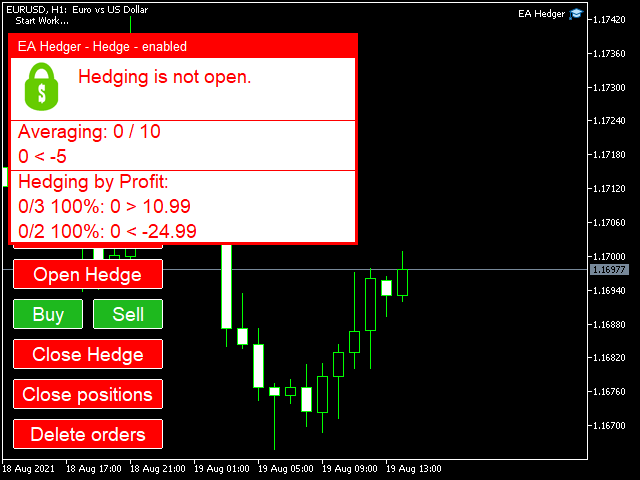
EA Hedger is a professional trading utility with many settings that allows you to manage risks using hedging.
Hedging is a trading technique that involves opening opposite positions to those already open positions. With the help of hedging, the position can be completely or partially blocked (locked).
For example, you have three open positions on your account:

EURUSD buy 0.10
EURUSD buy 0.20
GBPUSD buy 0.20
If you want to cut the risk in half (50%), when you activate the hedge, the following positions will be opened:

EURUSD sell 0.15 Hedge
GBPUSD sell 0.10 Hedge

When EA Hedger comes in handy
I. Do you want to reduce the drawdown, protect the deposit from losses ?! Hedge a position by determining the amount of allowable drawdown or minimum values ​​of profit or equity. 
II. Is your position open in the right direction and making a profit ?! Protect profits from price reversals, hedge the position when the profit target is reached. Step-by-step hedging will help to reduce the lead position as profit targets are met.
III. The market froze in one place and is trading in the corridor ?! Take advantage of this! Hedge a position when the price moves against your position and close the hedge on profit or if the price continues to move in favor of your main position.

The advantage of hedging is non-interference in the main trade – hedging is performed in parallel and orders of other trading robots are not affected.

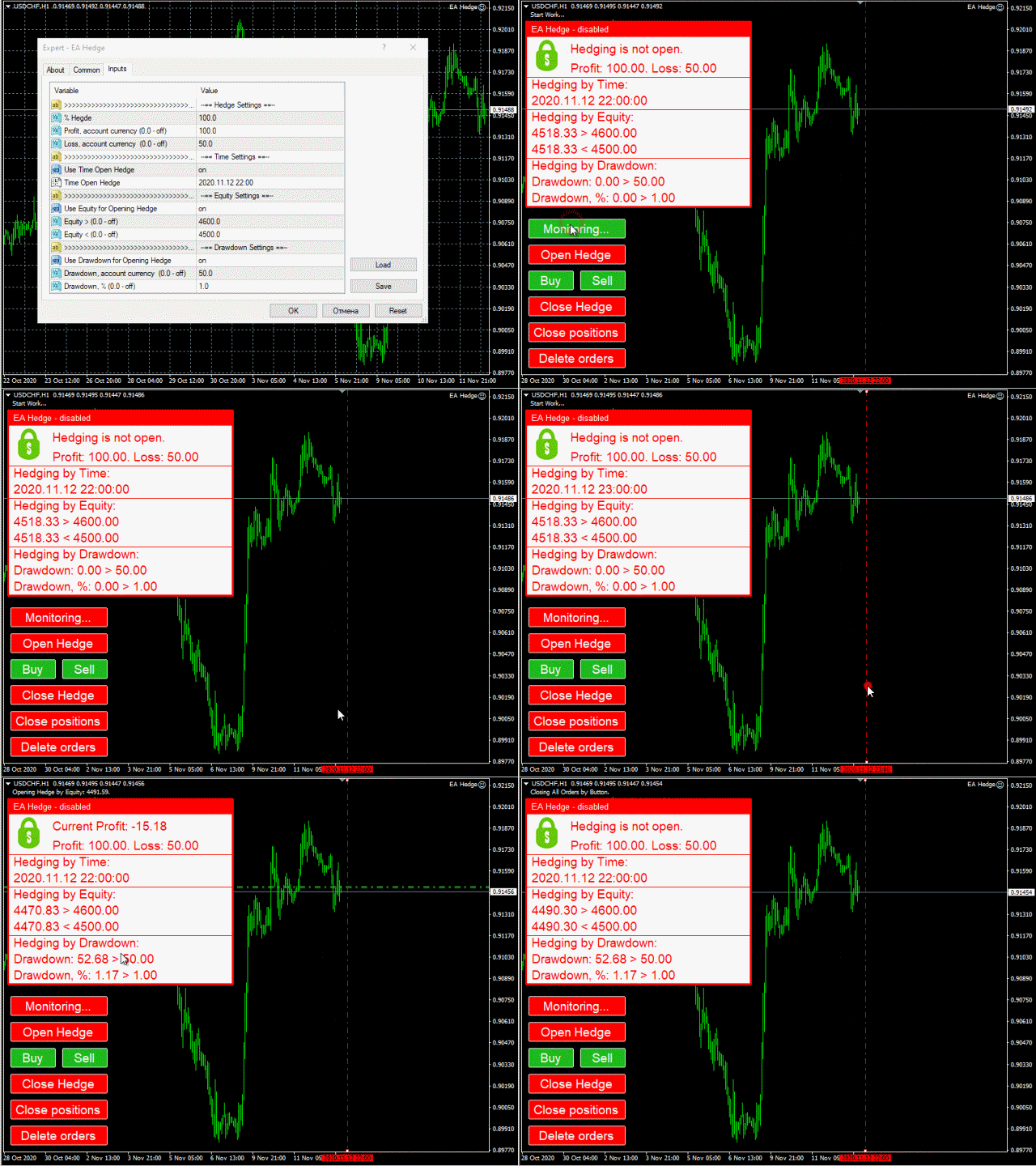
EA Hedger allows you to hedge when one of the following custom events occurs:

Clicked the "Open Hedge" button
The specified time has come, for example, the time before the news release or the time before the market closes (gap protection)
The amount of profit increased or decreased to the specified value
Equity has increased or decreased to the specified value
The size of the Equity drawdown amounted to the specified value, the value can be specified in% or in the deposit currency
Equity has increased or decreased by a specified percentage
The specified amount of the main lots has been reached
The specified drawdown on the balance has been reached
Hedging of each order immediately or at a certain distance from the order opening price
The hedging process can be split into several steps for this hedging condition " > " and " < " can be specified using a semicolon-separated list of values. Download the demo version and run tests at a low speed to see how it works.

Hedge orders can be closed using the "Close Hedge" button or pre-set closing conditions:

    • Profit - the total profit of hedge orders has reached the specified value
    • Loss - total loss of hedge orders (be sure to indicate a minus)
    • Trailing - allows you to move the stop after profit at a specified distance
    • BreakEven - allows you to move the stop by a specified value when a specified profit size is reached
    The Averaging function allows you to average Hedge orders with specified steps and a specified number of times (I recommend limiting the number of steps).
    “Auto Restart” mode - this mode automatically updates the conditions for opening hedge orders after the previous hedge orders are closed and, if necessary, a repeated hedge will be performed.
    The "Hedging Balance" function allows you to maintain a hedging balance and in case of opening or closing positions, hedging will increase or decrease.

    Using the "Only Include" and "Exclude" parameters and the "Buy" / "Sell" buttons, you can define a basket of orders to watch. If you leave the parameters empty, then all open trades will be included in the basket, except for trades with hedge order magic.
    You can include or exclude orders from observation by the following criteria: symbol, magic or a comment.

    Why is it profitable to buy this product:
    • Reliability - the advisor is thoroughly checked and tested
    • Availability - the cost of the advisor is only $ 2.75 per month or $ 0.09 per day - this is less than the spread.
    • Support – in the discussion you will be able to ask questions to the seller and get advice
    • Development - you can write your wishes for the product and, if possible, they will be added
    • Updates - upcoming updates will be available to you

      Avis 3
      JeanMarc2222
      1493
      JeanMarc2222 2023.03.03 22:23 
       

      It's a fantastic tool, where we can avoid losses in many cases- Stop losses are past - now we lock and avoid losses. Sergey is very friendly and helpful

      Produits recommandés
      Auto Breakeven MT5
      Volodymyr Hrybachov
      A utility for automatically setting breakeven levels, transfers trades to breakeven   when passing a given distance   . Allows you to minimize risks. Created by a professional trader for traders.       Utility       works with any market orders opened manually by a trader or using advisors. Can filter trades by magic number. The utility can work with any number of orders simultaneously. MT4 version https://www.mql5.com/ru/market/product/57076 WHAT THE UTILITY CAN DO: install virtulnoe levels   b
      Talents ATR Scalper Utility (MT5) The Talents ATR Scalper Utility is a professional-grade trade execution and management tool built for MetaTrader 5. Inspired by the Biblical Parable of the Talents , this utility is designed to help traders multiply their potential with precision risk control, one-click simplicity, and advanced automation. Whether you’re scalping forex, gold, or indices, this tool delivers speed, consistency, and confidence. Key Features One-Click Trade Preview Click below price
      Margin Call Shield – Defend Your Margin on Your Terms Margin Call Shield is a tool for MetaTrader 5 traders who want to decide for themselves which open positions are closed during margin call situations before the platform does so automatically based on its internal rules. By default, the broker or platform decides which positions to close, often using undisclosed algorithms. Margin Call Shield lets you set this order according to your own strategy. Why Was Margin Call Shield Created? In a mar
      Auto SLTP Maker MT5  is an assistant for all those who forget to set StopLoss and/or TakeProfit in deal parameters, or trade on a very fast market and fail to place them in time. This tool automatically tracks trades without StopLoss and/or TakeProfit and checks what level should be set in accordance with the settings. The tool works both with market and pending orders. The type of orders to work with can be set in the parameters. It can track either trades for the instrument it runs on, or all
      Breakevan Utility
      Jose Luis Thenier Villa
      BreakEvan Utility  Is a simple tool in a panel with this utilities: This utility will draw a Golden Line in the chart applied showing the breakeven price, considering all the positions opened for that specific symbol. Also the information panel shows: Balance Breakeven Price for that chart Force Breakeven (for that symbol) as ON/OFF Force Breakeven Global (takes into account all trades opened) as ON/OFF Total Lots opened for Symbol Total Lots opened Global And two buttons: Force Breakeven: Whe
      Account Protector Metatrader 5
      Emmanuel Lovski Ijeawele Maduagwuna
      Account Protector Meta Trader 5 This utility prevents risk of ruin per trading cycle.  Retail forex trading accounts are designed with   stop out levels   that make it impossible to quickly restore lost trading capital   (to initial levels)   in the event of a human or algorithm trader  " blowing"   an account. This hampers the efforts of a trader who after growing an account investment to a multiple of its initial value, suddenly suffers irreparable loss because of several trade entry mishaps.
      Expert TP SL v04 - Professional Trading Assistant with AI Motivation System Advanced manual trading tool with automatic risk management, overtrading protection, and intelligent psychological support for disciplined trading. PRODUCT OVERVIEW Expert TP SL v04 is a comprehensive trading assistant designed for manual traders who want to maintain emotional discipline while automating risk calculations. This isn't just another order placement tool - it's a complete trading psychology system that pr
      VirtualStopsMT5
      Viktor Shpakovskiy
      A utility for managing open positions using virtual (invisible to the broker) stops. Virtual stop loss and virtual take profit can be freely moved around the chart. If the price touches the virtual stop line (TP, SL, TS), the EA will close all orders of the same direction on the current chart. Closing orders by virtual take profit is possible only if there is a profit. With the help of the built-in trading simulator, you can, in the strategy tester, see how the adviser works. Parameters Block
      Demo version T Position Size Calculator   doesn't work in the strategy tester. The Strategy Tester does not support the processing of ChartEvent. It does not support most of the panel's functionality. Contact me for any questions or ideas for improvement or in case of a bug found. Control and manage your trading like a professional trader with T Position Size Calculator. T Position Size Calculator – an MT5 Expert Adviser, is a user-friendly custom tools (Dialog Panel and Three Lines, Order Line
      Total trade manager allows you to manage your trade to maximise your profits and minimise your losses. This is an essential for traders that are looking for consistency within their trading.  The features: Partial Stop Loss: This feature allows you to close a partial percentage of your trade once it goes into negative. So if your stop loss is 20 pips, you could close 75% of your trade at 10 pips and let the remainder of the position to continue running. Auto Stop Loss: This means that once you p
      Core function Intelligent transaction management one-click opening and closing operation, which supports user-defined lots to set multiple closing modes: all closing, closing by direction and closing by profit and loss status. Professional risk control, real-time risk monitoring and spread control to avoid high-cost trading environment. Visual control panel has an intuitive graphical interface, and all functions can be operated with one button to display position information, profit and loss sta
      FREE
      RiskCopilot
      Carlos Adrian Feged Zapata
      FRANÇAIS RiskCopilot Utility - Votre Assistant de Trading Intelligent "Voyez Votre Risque. Maîtrisez Votre Trading." RiskCopilot Utility est la solution ultime de gestion des risques et de dimensionnement des positions pour MetaTrader 5. Cet assistant de trading complet fournit des calculs en temps réel, des outils d'évaluation des risques avancés et des analyses professionnelles sans contrôler vos décisions de trading. Parfait pour les traders débutants et professionnels recherchant une g
      Trailing Stop Manager PRO — Gestion professionnelle du stop suiveur (MT5) Trailing Stop Manager PRO est un Expert Advisor pour MetaTrader 5 qui automatise la gestion du stop suiveur sur vos positions ouvertes. Il peut gérer toutes les positions du compte ou uniquement celles filtrées par symbole et/ou MagicNumber. L’EA intègre plusieurs fonctions : trailing stop fixe en pips, trailing basé sur l’ATR, break-even automatique, clôture partielle et un tableau de bord visuel. Objectif de l’outil Stan
      SL TP Manager Utility MT5
      AL MOOSAWI ABDULLAH JAFFER BAQER
      SL-TP Manager Utility for MT5 - Professional Risk Management Tool Advanced Position Protection & Profit Management SL-TP Manager Utility is a powerful, intuitive tool designed for traders who want precise control over their risk management. This utility provides a sleek interface for setting, modifying, and managing your Stop Loss, Take Profit, and Trailing Stop levels with just a few clicks. Key Features: Dual Mode Operation: Set values in pips or absolute price with a simple toggle Independent
      Trade Mate
      Sotirios Apostolos Adaloglou
      Trade Mate is the trading tool for manual traders who want to take their trading to the next level. Packed with advanced features like automatic trailing stop loss, lot size calculation, pending orders, partial close, open trade management, and daily drawdown protection(makes it easier to stick to your daily equity risk).  Trade Mate offers everything you need to trade with precision and confidence. Don't settle for less - try Trade Mate today and see the difference for yourself! Check it on You
      Virgilio is a multifunction control panel consisting of several panels, each of which performs one of the most useful functions used by traders. Its aesthetic is unique, designed to blend into any working environment and offer a user experience that makes work even more enjoyable. Its operativity is simple and intuitive, developed with attention to details to be as userfriendly as possible. Its main panel displays all the basic account and chart data. The first panel offers the user the possib
      Turbo Close All
      Phami Thanh Hoang
      Turbo Close All is a powerful and versatile script designed to help traders quickly and efficiently manage their trading positions and pending orders on MetaTrader 5. With its advanced features and customizable settings, this script is an essential tool for traders who want to streamline their trading process and maintain control over their positions and orders. Key Features: Comprehensive Closing Options: Turbo Close All allows you to close all market positions and/or delete pending orders bas
      Bober Real MT5
      Arnold Bobrinskii
      4.76 (17)
      Bober Real MT5 is a fully automatic Forex trading Expert Advisor. This robot was made in 2014 year and did a lot of profitbale trades during this period. So far over 7000% growth on my personal account. There was many updates but 2019 update is the best one. The robot can run on any instrument, but the results are better with EURGBP, GBPUSD, on the M5 timeframe. Robot doesn't show good results in tester or live account if you run incorrect sets. Set files for Live accounts availible only for cu
      Automatic TP and SL
      Dushshantha Rajkumar Jayaraman
      TradeGuard    by Chart Walker TradeGuard is a MT5 Expert Advisor (EA) designed to enhance your trading experience by automating key aspects of trade management. This EA excels in efficiently managing Take Profit (TP) and Stop Loss (SL) levels, offering a seamless and intelligent approach to trailing stops. One of TradeGuard's standout features is its Smart Trailing Stop, which dynamically adjusts the trailing distance based on market conditions. This adaptive approach helps maximize profits dur
      Trailing Stop Utility MT5 for automatic closing of deals by trailing stop levels.  Allows you to take the maximum from the profit. Created by a professional trader for traders.   Utility   works with any market orders opened manually by a trader or using advisors. Can filter trades by magic number. The utility can work with any number of orders simultaneously. WHAT THE UTILITY CAN DO: Set virtual   trailing stop   levels from 1 pip Set real   trailing stop   levels W ork with each order separat
      Grid Builder 5
      Oleg Remizov
      5 (1)
      The   Grid Builder MT5   utility is designed for placing a grid of pending orders of any complexity and will be an excellent tool in the hands of a trader who trades grid trading strategies. The tool has numerous settings that allow you to quickly and easily build a grid of orders with the specified parameters. All types of pending orders are supported: Buy Stop; Buy Limit; Sell Stop; Sell Limit. The script also allows you to delete a previously placed grid of orders in one click. If the "Delete
      This EA is there to take your trade closing stress away. Quickly close as many trades as you have opened at the click of a button, INCLUDING PENDING ORDERS. This works on the MT5 platform whether it be currencies, Indices, stocks or Deriv synthetic indices. I have saved it under utilities as it is a utility, however, to install this, you have to save the file in you "EA" folder. That is; Go to "File", then "Open Data Folder", "MQL5" and then "Experts". Paste this file there. Restart MT5 and you'
      L'utilitaire fonctionne avec des lignes horizontales : Prof1, Prof2, Loss1, Loss2 . Ces lignes, qui ont des noms strictement fixes, sont dessinées par le trader indépendamment sur n'importe quel graphique de son terminal. Il existe des options permettant de créer toutes les lignes à la fois ou de sélectionner l'une des quatre. Le but des lignes devient évident lorsqu’on regarde leurs noms. Les lignes Prof1 et Prof2 indiquent les niveaux de Take Profit de la transaction, mais sont présentées sou
      Trading panel for manual trading. Has a fairly wide functionality. Allows you to automatically calculate the order size, open both market and pending orders. It has a wide range of options for closing orders, it is possible to partially close orders, close orders after reaching a certain profit or loss, separately close profitable and unprofitable, buy and sell, as well as pending orders. The panel also contains a simple implementation of a grid of pending orders, reverse and lock functions, tr
      TP & SL Calculator Indicator for MT5 The Take Profit & Stop Loss Calculator Indicator is an effective risk and capital management tool designed for MetaTrader 5. It helps traders easily determine and set take profit (TP) and stop loss (SL) levels directly on the chart. This indicator improves trading efficiency through its dedicated control panel, which includes: Creating and managing TP and SL levels for both Buy and Sell positions Calculating trade volume in lots Displaying the Risk-to-Reward
      FREE
      TradePilotmt5
      Hossein Khalil Alishir
      TradePilot Expert Advisor (EA) for MetaTrader 5 TradePilot is a professional and user-friendly Expert Advisor (EA) for MetaTrader 5 (MT5) . It simplifies automated trading , risk management , and trade execution with a smart trading panel . Perfect for beginners and experienced traders looking for a reliable trade manager EA with automated lot size calculation and smart position management. Key Advantages User-Friendly Trading Panel: Customizable panel with buttons and hotkeys for fast ex
      L'utilitaire Close Buttons est un utilitaire MQL5 compact et flexible pour la gestion manuelle des positions et des ordres en attente, directement depuis le graphique. Ce panneau vous permet de clôturer des groupes d'ordres et des positions sur le symbole actuel ou un groupe de symboles sélectionnés en un seul clic. Il fonctionne avec tous les ordres, ainsi qu'avec une liste spécifiée de numéros magiques ou des ordres manuels. Le panneau peut être réduit ou déplacé sur l'écran. Les thèmes clair
      This utility (as an advisor) allows you to open and close positions in a couple of clicks. The control panel , in the form of graphical objects, allows you to manage orders without the help of third-party programs. Program Features: 1. There is a lot selection option. Either the usual fixed or a percentage of the deposit. 2. Horizontal lines, by including which you can easily determine for yourself the desired Stop Loss and Take Profit to open a future position. 3. This program can close
      OFFRE DE LANCEMENT : 99 $(Le prix passera à 199$ après les 10 premières ventes) Turtle Six Pattern Pro : L'Évolution du Suivi de Tendance pour Bitcoin Cet Expert Advisor (EA) n'est pas une simple copie des règles des Tortues ("Turtle Trading"). Il s'agit d'une restructuration complète du système légendaire, modernisée spécifiquement pour la haute volatilité du Bitcoin (BTCUSD) . Nous avons combiné la classique Cassure du Canal de Donchian (Donchian Breakout) avec un Filtre de Structure de Mar
      Introducing Neural Bitcoin Impulse - an innovative trading bot created using neural network training technology on voluminous market data sets. The built-in mathematical model of artificial intelligence searches for the potential impulse of each next market bar and uses the resulting patterns of divergence and convergence between the predictive indicators and the price to form high-precision reversal points for opening trading positions. The trading robot is based on the Neural Bar Impulse ind
      Les acheteurs de ce produit ont également acheté
      Bienvenue sur Trade Manager EA, l’outil ultime de gestion des risques conçu pour rendre le trading plus intuitif, précis et efficace. Ce n’est pas seulement un outil d’exécution d’ordres ; c’est une solution complète pour la planification des trades, la gestion des positions et le contrôle des risques. Que vous soyez débutant, trader expérimenté ou scalpeur ayant besoin d’une exécution rapide, Trade Manager EA s’adapte à vos besoins, offrant une flexibilité sur tous les marchés, des devises et i
      Ultimate Extractor
      Clifton Creath
      5 (7)
      Ultimate Extractor - Professional Trading Analytics for MT5 Ultimate Extractor transforms your MetaTrader 5 trading history into actionable insights with comprehensive analytics, interactive charts, and real-time performance tracking. What It Does Automatically analyzes your MT5 trading history across all Expert Advisors and generates detailed HTML reports with interactive visualizations. Tracks live performance metrics including open positions, floating P/L, and drawdown in real-time. Supports
      Version Bêta Le Telegram to MT5 Signal Trader est presque prêt pour la sortie officielle en version alpha. Certaines fonctionnalités sont encore en développement et vous pourriez rencontrer de petits bugs. Si vous rencontrez des problèmes, merci de les signaler, vos retours aident à améliorer le logiciel pour tout le monde. Le prix augmentera après 20 ventes. Copies restantes à $90:   2/20 . Telegram to MT5 Signal Trader est un outil puissant qui copie automatiquement les signaux de trading de
      Smart Stop Scanner – Analyse multi-actifs des stop-loss basée sur la structure réelle du marché Vue d’ensemble Smart Stop Scanner offre une surveillance professionnelle des niveaux de stop-loss sur de nombreux marchés. Le système identifie automatiquement les zones de stop les plus pertinentes à partir de la structure réelle du marché, des ruptures importantes et de la logique du price action, puis affiche toutes les informations dans un panneau clair, cohérent et optimisé pour les écrans haut
      Copy Cat More Trade Copier MT5 (Chat Copieur MT5) est un copieur de trades local et un framework complet de gestion des risques et d'exécution conçu pour les défis commerciaux d'aujourd'hui. Des défis de prop firms à la gestion de portefeuille personnel, il s'adapte à chaque situation avec une combinaison d'exécution robuste, de protection du capital, de configuration flexible et de gestion avancée des trades. Le copieur fonctionne à la fois en mode Master (expéditeur) et Slave (récepteur), avec
      Smart Stop Manager – Exécution automatique du stop-loss avec une précision professionnelle Présentation Smart Stop Manager est la couche d’exécution de la gamme Smart Stop, conçue pour les traders qui recherchent une gestion du stop-loss structurée, fiable et entièrement automatisée sur plusieurs positions ouvertes. Il surveille en continu toutes les opérations actives, calcule le niveau de stop optimal à l’aide de la logique de structure de marché Smart Stop, puis met à jour les stops automat
      Trade Manager DashPlus
      Henry Lyubomir Wallace
      5 (11)
      DashPlus est un outil de gestion de trading avancé conçu pour améliorer l'efficacité et la performance de vos transactions sur la plateforme MetaTrader 5. Il offre un ensemble complet de fonctionnalités, incluant le calcul des risques, la gestion des ordres, des systèmes de grilles avancés, des outils basés sur les graphiques et des analyses de performance. Fonctionnalités principales 1. Grille de récupération Implémente un système de grille flexible et de moyenne pour gérer les transactions dan
      MT5 to Telegram Signal Provider est un utilitaire facile à utiliser et entièrement personnalisable qui permet l'envoi de signaux spécifiés vers un chat, un canal ou un groupe Telegram, transformant ainsi votre compte en fournisseur de signaux. Contrairement à la plupart des produits concurrents, il n'utilise pas d'importations DLL. [ Démonstration ] [ Manuel ] [ Version MT4 ] [ Version Discord ] [ Canal Telegram ]  New: [ Telegram To MT5 ] Configuration Un guide utilisateur étape par étape est
      Exp COPYLOT CLIENT for MT5
      Vladislav Andruschenko
      3.82 (34)
      Le copieur commercial pour MT5 est un copieur commercial pour la plate-forme МetaТrader 5   . Il copie les transactions de change   entre       tous les comptes   MT5   -   MT5, MT4   -   MT5 pour la version COPYLOT MT5 (ou MT4   -   MT4 MT5   -   MT4 pour la version COPYLOT MT4) Copieur fiable ! Version MT4 Description complète   +DEMO +PDF Comment acheter Comment installer     Comment obtenir des fichiers journaux     Comment tester et optimiser     Tous les produits de Expforex Vous pouvez
      Trade Manager DaneTrades
      Levi Dane Benjamin
      4.33 (27)
      Trade Manager pour vous aider à entrer et sortir rapidement des transactions tout en calculant automatiquement votre risque. Y compris des fonctionnalités pour vous aider à éviter le sur-trading, le trading de vengeance et le trading émotionnel. Les transactions peuvent être gérées automatiquement et les mesures de performances du compte peuvent être visualisées dans un graphique. Ces fonctionnalités rendent ce panneau idéal pour tous les traders manuels et contribuent à améliorer la plateforme
      EasyInsight AIO MT5
      Alain Verleyen
      4.91 (11)
      EASY Insight AIO – La solution tout-en-un pour un trading intelligent et sans effort Présentation Imaginez pouvoir analyser l’ensemble du marché — Forex, Or, Crypto, Indices et même Actions — en quelques secondes, sans aucune analyse manuelle de graphiques, sans installation complexe ni configuration d’indicateurs. EASY Insight AIO est votre outil d’exportation ultime, prêt à l’emploi, pour un trading alimenté par l’IA. Il fournit une vue d’ensemble du marché dans un fichier CSV propre — prêt
      Panneau de trading pour trader en 1 clic.   Travailler avec des positions et des commandes!   Trading à partir du graphique ou du clavier. Avec notre panneau de trading, vous pouvez exécuter des transactions en un seul clic directement depuis le graphique et effectuer des opérations de trading 30 fois plus rapidement qu'avec le contrôle MetaTrader standard. Les calculs automatiques des paramètres et des fonctions rendent le trading plus rapide et plus pratique pour les traders. Des conseils grap
      Telegram to MT5 Coppy
      Sergey Batudayev
      5 (7)
      Télégramme vers MT5 :   la solution ultime pour copier des signaux Simplifiez votre trading avec Telegram vers MT5, l'outil moderne qui copie les signaux de trading directement des canaux et chats Telegram vers votre plateforme MetaTrader 5, sans DLL. Cette solution puissante garantit une exécution précise des signaux, de nombreuses options de personnalisation, un gain de temps et une efficacité accrue. [ Instructions and DEMO ] Caractéristiques principales Intégration directe de l'API Telegram
      Trade Assistant 38 in 1
      Makarii Gubaydullin
      4.91 (22)
      Ultimate Trade Assistant MT5 — Assistant de Trading Multifonction Plus de 66 outils professionnels intégrés pour gérer, analyser et automatiser vos opérations de trading. Cet assistant regroupe la gestion du risque, le contrôle des positions, les ordres intelligents et l’analyse du marché dans un seul tableau de bord clair et efficace. Convient pour Forex, actions, indices, crypto et autres instruments financiers. Pourquoi les traders choisissent cet outil Ouverture et gestion rapides des positi
      Copieur ->Interaction d'interface pratique et rapide, les utilisateurs peuvent l'utiliser immédiatement       ->>>> Recommandé pour une utilisation sur des ordinateurs Windows ou VPS Windows Caractéristiques: Paramètres de copy trading diversifiés et personnalisés : 1. Différents modes de lot peuvent être définis pour différentes sources de signaux 2. Différentes sources de signaux peuvent être définies pour le copy trading avant et arrière 3. Les signaux peuvent être définis avec des commentai
      MT5 To Tradovate
      Laurent Xavier Richer
      MT5 → Tradovate Bridge (Prop-Firm Ready) Mirror your MT5 trades into Tradovate in real time—perfect for running your favorite indices/gold EA on MT5 while meeting the rules of top prop firms like Apex , etc. What it does Live mirroring: Replicates MT5 market executions (open/close) to Tradovate as market orders. Symbol routing:  Map your chart (e.g., US100/USTEC) to the right futures contract (MNQ/NQ/MES/ES/…); roll-aware (quarterly/monthly). Position cap: Limit how many MT5 positions are mirro
      The product will copy all telegram signal to MT5 ( which you are member) , also it can work as remote copier.  Easy to set up, copy order instant, can work with almost signal formats, image signal,  s upport to translate other language to English Work with all type of channel or group, even channel have "Restrict Saving Content", work with  multi channel, multi MT5 Work as remote copier: with signal have ticket number, it will copy exactly via ticket number. Support to backtest signal. How to s
      Auto Trade Copier is designed to copy trades to multiple MT4, MT5 and cTrader accounts/terminals with 100% accuracy. The provider and receiver accounts must be on the same PC/VPS. With this tool, you can copy trades to receiver accounts on the same PC/VPS. All trading actions will be copied from provider to receiver perfectly. This version can be used on MT5 accounts only. For MT4 accounts, you must use Auto Trade Copier (for MT4). Reference: - For MT4 receiver, please download Trade Receiver Fr
      Custom Alerts AIO : Surveillez tous les marchés à la fois — sans aucune configuration Présentation Custom Alerts AIO est une solution de surveillance du marché prête à l’emploi, sans configuration nécessaire. Tous les indicateurs requis — FX Power, FX Volume, FX Dynamic, FX Levels, IX Power — sont directement intégrés. Aucun graphique n’est affiché, ce qui rend cet outil idéal pour la génération d’alertes en temps réel. Il prend en charge toutes les classes d’actifs proposées par votre courtie
      EasyTrade MT5
      Alain Verleyen
      5 (2)
      Easy Trade – Gestion des transactions intelligente, simple et puissante Easy Trade est la solution tout-en-un pour la gestion des transactions destinée aux utilisateurs de MetaTrader souhaitant garder le contrôle du risque et assurer une exécution fluide. Conçu dès le départ avec les retours des traders, Easy Trade facilite l'exécution, la surveillance et la gestion des transactions sur plusieurs symboles – sans complexifier votre flux de travail. Que vous pratiquiez le scalping manuel ou que
      Entry In The Zone and SMC Multi Timeframe   est un outil d’analyse de marché en temps réel développé sur la base des Smart Money Concepts (SMC). Il est conçu pour aider les traders à analyser la structure du marché de manière systématique et à obtenir une vision plus claire de la direction globale du marché. Le système analyse automatiquement les Points de Retournement, les Zones Clés et la Market Structure sur plusieurs unités de temps, tout en affichant les Points of Interest (POI), les signa
      Le Local Trade Copier EA est une solution pour les commerçants individuels ou les gestionnaires de compte qui ont besoin d'exécuter des signaux commerciaux à partir de sources externes ou qui ont besoin de gérer plusieurs comptes en même temps, sans avoir besoin d'un compte MAM ou PAMM. Il copie jusqu'à 8 comptes maîtres vers un nombre illimité de comptes esclaves [ Guide d'installation | Guide de mise à jour | Dépannage | FAQ | Tous les produits ] 100% auto-hébergé Facile à installer et à util
      EmoGuardian
      Samuel Bandi Roccatello
      5 (5)
      Évitez le surtrading, le FOMO et les comportements compulsifs, en imposant des limites de risque avancées à votre compte de trading à l'aide d'EmoGuardian. Ajoutez automatiquement   des Stop Loss aux positions, gérez les pertes d'EA, chargez/déchargez automatiquement les EA. Limitez le risque par position, par tradedd, par Time Range, par jour. Les options de gestion des risques ont été développées pour lutter spécifiquement contre les comportements compulsifs qui conduisent les traders à faire
      Custom Alerts MT5
      Daniel Stein
      5 (8)
      Custom Alerts : Surveillez plusieurs marchés sans jamais manquer une configuration clé Présentation Custom Alerts est une solution dynamique pour les traders qui souhaitent surveiller plusieurs instruments de manière centralisée. En intégrant les données de nos outils phares — comme FX Power, FX Volume, FX Dynamic, FX Levels et IX Power — Custom Alerts vous alerte automatiquement des mouvements importants du marché sans avoir à surveiller plusieurs graphiques ou risquer de manquer des opportun
      News Filter EA: Advanced Algo Trading Assistant News Filter EA is an advanced algo trading assistant designed to enhance your trading experience. By using the News Filter EA , you can integrate a Forex economic news filter into your existing expert advisor, even if you do not have access to its source code. In addition to the news filter, you can also specify trading days and hours for your expert. The News Filter EA also includes risk management  and equity protection features. MT4 Version KEY
      Prenez le contrôle de votre routine de trading sans effort avec le Trades Time Manager révolutionnaire. Cet outil puissant automatise l'exécution des ordres à des moments précis, transformant votre approche de trading. Créez des listes de tâches personnalisées pour diverses actions commerciales, de l'achat à la définition des commandes, le tout sans intervention manuelle. Guide d'installation et d'entrées de Trades Time Manager Si vous souhaitez recevoir des notifications sur l'EA, ajoutez notre
      Tick Charts
      Vasily Kravtsov
      4 (1)
      A Tick Chart app. It lets you create real-time tick charts, based on number of ticks per candle. You can choose the amount of ticks per candle, and the amount of ticks to load. Supports showing trade history and trade levels.   When you add this EA to an instrument it automatically generates a custom symbol with the _Tick added to the name. The tick chart should open automatically. Make sure the timeframe of the tick chart is set to M1. You can apply your own templates and indicators, just like
      Advanced trading tool: One click smart orders that execute under your conditions Developed by trader for trading community:  position size calculator (lot size), open position after price action, strategy builder, set and forget trading, mobile notifications Risk Management -  Risk percentage position size calculator, gain percentage, target risk reward ratio, spread and commissions are included in calculations 7 Advanced order types  - Set and forget trading with price action automation (OCO,
      Consultez instantanément l'historique de vos transactions clôturées par jour et par semaine, vos transactions ouvertes actuelles et votre exposition au forex sur un seul graphique ! Utilisez la carte thermique pour identifier les transactions rentables et où se situe votre baisse actuelle au sein de votre portefeuille de trading. Boutons de fermeture rapide Utilisez les boutons de fermeture rapide pour clôturer chaque transaction sur un seul symbole, clôturer des transactions individuelles en
      The News Filter MT5
      Leolouiski Gan
      4.74 (19)
      Ce produit filtre tous les conseillers experts et les graphiques manuels pendant les heures de publication des actualités, de sorte que vous n'avez pas à vous soucier des pics de prix soudains qui pourraient détruire vos configurations de trading manuelles ou les transactions entrées par d'autres conseillers experts. Ce produit est également livré avec un système de gestion des ordres complet qui peut gérer vos positions ouvertes et vos ordres en attente avant la publication de toute actualité.
      Plus de l'auteur
      EA Action
      Sergej Chukhista
      EA Action is a non-mechanical trading robot based on the algorithm of continuous adaptation to the current market situation. EA Action is the result of many years of research in the Forex market. The EA uses mathematical methods, probability theory methods and technical analysis to analyze the market. EA Action is quite simple and easy to use. The EA is not overloaded with settings. EA Action trading robot can work on any Deposit. For effective work it is enough to Deposit from $ 100, which al
      EA SpreadBack
      Sergej Chukhista
      Have you ever thought about how much money you pay to the broker in the form of a spread? If you calculate the size of the paid spread for all the transactions opened on your account, then the amount can be impressive. With active trading, the size of the paid environment may exceed the size of the deposit. You give your deposit to a broker. The spread can negate all the results of the trading system, as it eats up a significant part of the profit. Have you noticed that when you open a position,
      EA Hedger
      Sergej Chukhista
      4 (4)
      EA Hedger   est un utilitaire de trading professionnel avec de nombreux paramètres qui vous permet de gérer les risques en utilisant la couverture. La couverture est une technique de trading qui consiste à ouvrir des positions opposées à celles déjà ouvertes. A l'aide d'une couverture, la position peut être totalement ou partiellement bloquée (verrouillée). Pourquoi est-il rentable d'acheter ce produit : Fiabilité   - le conseiller est soigneusement vérifié et testé Utilité   - l'Expert Advisor
      Compare Symbols Specifications is a utility indicator that is a summary interactive table of the analyzed parameters. Trading conditions in the market are constantly changing and tracking these changes is a time-consuming task. This tool allows you to compare the trading conditions of all symbols in a matter of seconds, and choose for trading those symbols that meet the requirements of the trading system. This tool will be useful to all traders and will help them to have up-to-date information
      Filtrer:
      Bruce Raymond Cameron Lyon
      258
      Bruce Raymond Cameron Lyon 2024.04.11 07:42 
       

      L'utilisateur n'a laissé aucun commentaire sur la note

      Vahram Manukyan
      362
      Vahram Manukyan 2023.06.05 13:57 
       

      No documentation. I was hoping to get this tool to open a hedging position once I am down x% of my equity and start protecting the account from that point. But it keeps opening a position every time I open one. so when it moves to my favor i loose with the tools open position. So you just don't lose but you don't win either! Maybe I am not using it the way I should but that is again because of the luck of documentation. Nothing is intuitive. every single parameter is confusing.

      Sergej Chukhista
      40942
      Réponse du développeur Sergej Chukhista 2023.06.05 15:28
      The product description contains a brief guide. Have you read it? No other documentation is promised anywhere. Why didn't you consult me before buying? 2023.06.04 I offered you my consultation. Why didn't you consult me? I provide consultations as quickly as possible, on the same day. My help is individual and better than any guide. You yourself refused my help, and without having studied and tested the product to a sufficient extent, you began to use it. The utility performs its functions correctly. Your review and rating is related to your actions, not to the product.

      JeanMarc2222
      1493
      JeanMarc2222 2023.03.03 22:23 
       

      It's a fantastic tool, where we can avoid losses in many cases- Stop losses are past - now we lock and avoid losses. Sergey is very friendly and helpful

      Répondre à l'avis