EA Performance Guard by Magic Number
- Utilities
-
Kazuma Uezono
 MQL5 / MQL4 / Pine Script v6 developer and active trader.
Seller on the MQL5 Market (indicators for MT4/MT5).
Services:
- TradingView Pine Script to MT5/MT4 conversion (bar-by-bar matching, with tester report)
- MT4 to MT5 migration - Version: 1.3
- Updated: 17 November 2026
- Activations: 5
EA Performance Guard watches every EA on your MetaTrader 5 account separately, by its magic number. When one EA reaches a limit you set (drawdown, daily loss, or a drop in its recent results: losing streak, profit factor, average trade, equity curve below its moving average), it stops only that EA: it closes that EA's positions, deletes its pending orders and closes any new trade that EA opens while it is stopped. Your other EAs keep running.
This is a tool that applies the rules you set. It never opens trades, gives no buy or sell signals and is not a trading strategy. It does not prevent losses and does not judge whether an EA is good: it acts only when the numbers you chose are reached, and the result can be worse than the limit (gaps, slippage, delays). Choosing the limits is your decision.
Who it is for: traders who run several EAs on one account (for example on a VPS) and want each EA to have its own loss limit and its own "stop it when its results drop" rule, instead of one limit for the whole account.
Features
- Automatic detection: every magic number found in the account history, open positions and pending orders gets its own row. Manual trades (magic 0) are optional. You can limit the guard to a list of symbols.
- Loss limits per EA: maximum drawdown (money or %) and daily loss (money). Floating P/L can be included.
- Performance limits per EA (they start only after a minimum number of closed trades, default 20): losing streak, profit factor of the last N trades, average result of the last N trades below 0, and the EA's closed-trade equity curve below its moving average.
- Per-EA overrides in one text input: other limits for some magic numbers, warning only for some, or leave some out.
- Action: stop the EA (close, delete pending orders, close new trades while stopped) or warning only (no trading action).
- Optional terminal global variable EPG_BLOCK_<magic> = 1 while an EA is stopped, for EAs whose code you can edit.
- Resume: after N days, at the start of the next day, only by hand (panel button), or never automatically.
- The stop state is kept when the terminal restarts (file and global variables).
- Panel with one row per EA and Stop / Resume buttons, CSV log, popup / push / email alerts.
- No DLL, no WebRequest, no outside server.
Main Inputs
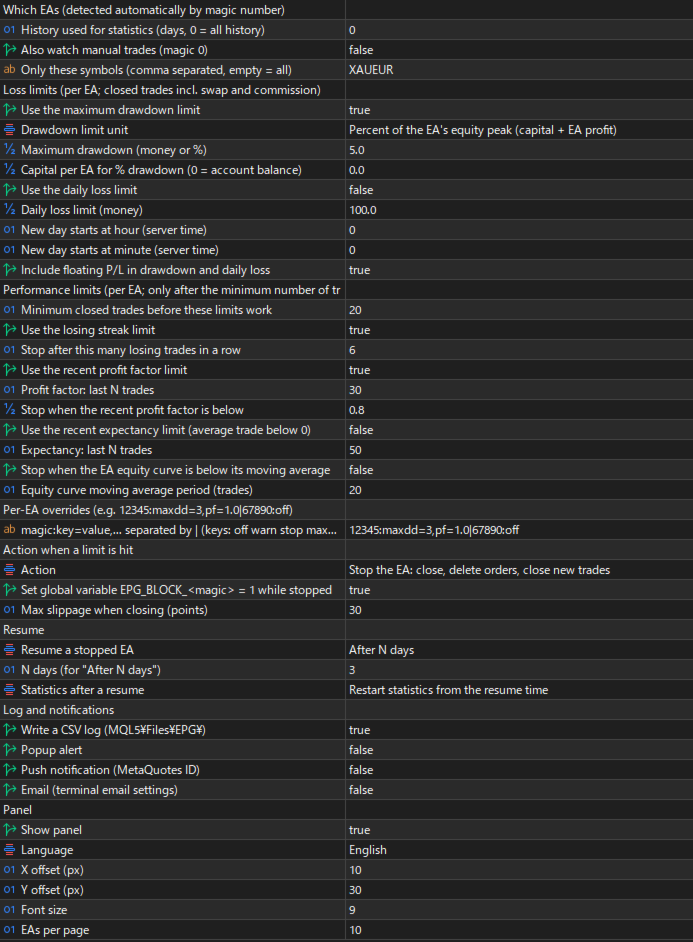
- Which EAs: history used for statistics (days, 0 = all), also watch manual trades (magic 0), symbol list (empty = all).
- Loss limits: maximum drawdown on/off (default on), unit money or % (default %), value (default 5), capital per EA for % (0 = automatic, see below), daily loss on/off (default off) and amount, start of a new day (hour and minute, server time), include floating P/L (default on).
- Performance limits: minimum closed trades (default 20); losing streak on/off and count (default on, 6); profit factor on/off, last N trades and minimum (default on, 30, 0.8); expectancy on/off and last N trades (default off, 50); equity curve below MA on/off and period (default off, 20).
- Per-EA overrides: one line of text (format below).
- Action: stop the EA or warning only (default: warning only), global variable on/off (default on), maximum slippage for closing (points).
- Resume: rule (default: by hand only), N days (default 3), statistics after a resume (restart from the resume time, or keep the full history).
- Log and notifications: CSV log (default on), popup (default on), push, email.
- Panel: show, language (auto, English, Japanese), position, font size, EAs per page.
How It Works
- Statistics per EA come from the closed trades in the account history, including swap and commission. The magic number of the opening deal decides which EA a trade belongs to. One closing deal is one trade: a partial close counts as one trade, and the rest counts again when it is closed.
- Stop conditions (each one can be turned on or off):
- Maximum drawdown: the highest point of the EA's closed P/L minus its current value (closed P/L, plus floating P/L if included). In %, it is divided by the capital plus that highest point. Capital = your input, or if 0: account balance minus this EA's closed P/L.
- Daily loss: P/L of the trades closed since the start of today, plus the whole floating P/L of the EA's open positions if included (also positions opened before today). "Today" starts at the hour and minute you set in server time (default 00:00 server time), not at midnight of your computer.
- Losing streak: losing trades in a row (a trade at exactly 0 ends the streak).
- Profit factor: gross profit / gross loss of the last N trades. Not checked while those trades have no loss.
- Expectancy: the average result of the last N trades is below 0.
- Equity curve below MA: the EA's cumulative closed P/L is below its simple moving average over the last N trades.
- Drawdown and daily loss work from the first trade. The other four start after the minimum number of closed trades.
- The guard checks about every 1 to 2 seconds and right after each trade event.
- Stopping an EA: the guard closes that EA's positions and deletes its pending orders. If the market is closed, the freeze level blocks or the broker rejects, it tries again. While the EA is stopped, any new position or pending order with its magic number is closed or deleted; these trades are logged as "blocked" and are not counted in the EA's statistics. Other magic numbers are never touched.
- Warning only: the row shows WARN, the event is logged and alerts are sent, but nothing is closed or deleted. The warning stays until the resume rule clears it.
- Stop button on the panel (click twice within 5 seconds): stops the EA by hand, also in warning-only mode. An EA stopped by hand is resumed only by hand.
- Resume: after N days, at the start of the next day, only by hand, or never automatically. The Resume button (click twice) works in every case.
- Statistics after a resume: "Restart" counts only the trades after the resume, so the performance limits wait again for the minimum number of trades. "Keep" keeps the full history, but the judgement starts again from the resume time: drawdown and daily loss are measured from the values at the resume, the losing streak counts only new losses, and profit factor, expectancy and MA wait for new trades (the smaller of N and the minimum trades). The panel can still show a longer streak that includes older trades.
- Override format: magic:key=value,key=value, with | between EAs. Example: 12345:maxdd=3,pf=1.0|67890:off|24680:warn,losses=8. Keys: off (do not watch), warn (warning only), stop (stop even in warning-only mode), maxdd (same unit as the global setting), daily, losses, pf, pfn (N for profit factor), expn (N for expectancy), ma (MA period), min (minimum trades), cap (capital for %). A value above 0 turns that limit on for this EA, 0 turns it off. Use | between EAs: text after a ; can be cut off when the inputs are saved to a .set file. A wrong entry shows an error and the guard does not start.
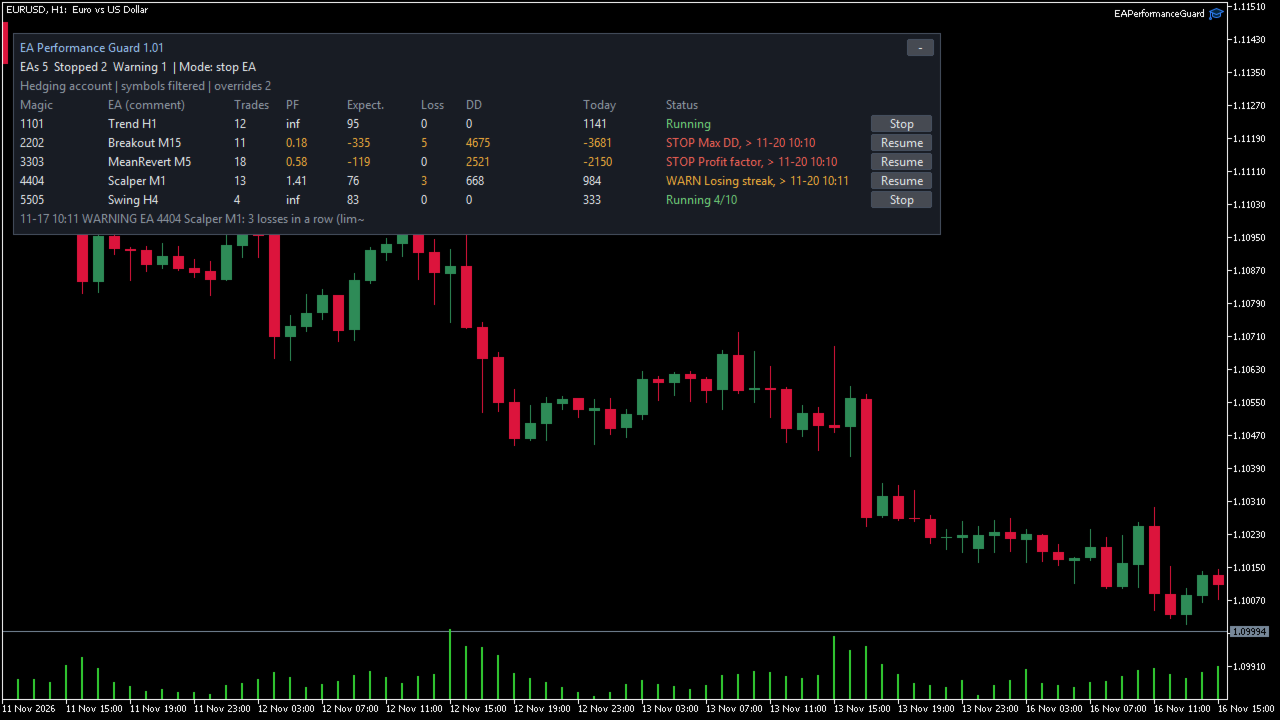
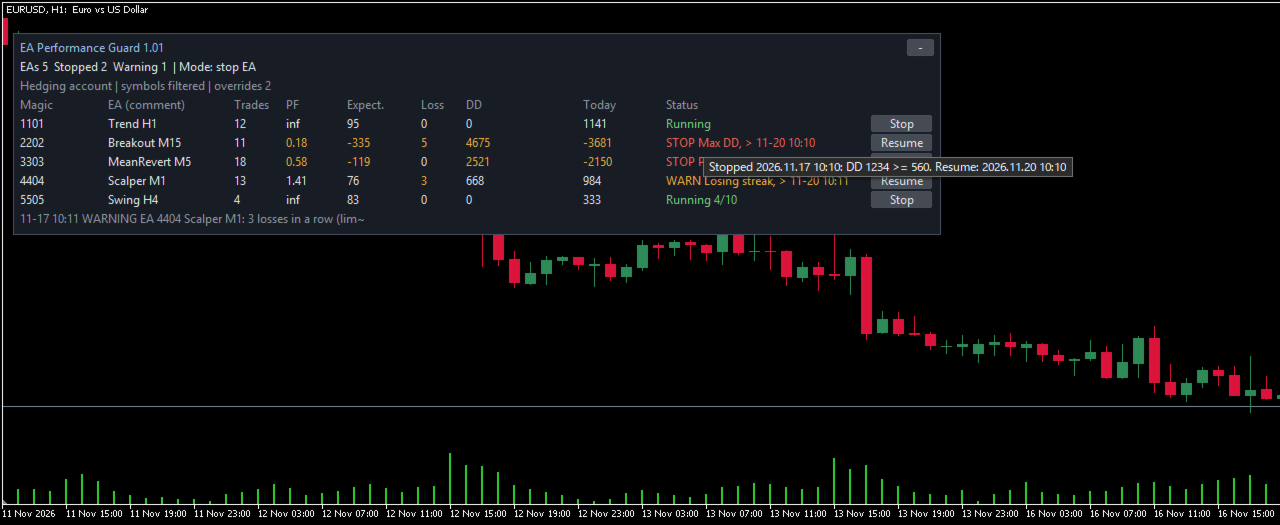
- Panel: magic number, EA name (from the order comment, if any), trades, profit factor, expectancy, current losing streak, drawdown, today, status (Running, WARN, STOP, CLOSING, with the resume time) and a Stop / Resume button. Hover over a value for details. Collapse button and pages.
- CSV log: MQL5\Files\EPG\EPG_log_<account>.csv with server time, magic, name, event (STOP, WARN, RESUME, POSITION_CLOSED, BLOCKED_CLOSED, ORDER_DELETED, CLOSE_FAIL, DELETE_FAIL), reason, detail, the statistics at that moment and the result.
- Global variable: EPG_BLOCK_<magic> is 1 while that EA is stopped and 0 after it is resumed. It is deleted when the guard is removed from its chart. Your own EA can skip new entries while GlobalVariableGet("EPG_BLOCK_12345") == 1.
Notes and Limits
- Warning only is the default. When you attach the guard, it reads the account history and judges every EA in it: with the default history (0 = all), EAs from the past that no longer trade are judged too, and an EA that is already beyond a limit (for example an open drawdown from the past, or 6 losses in a row at the end of its history) shows WARN and sends an alert. Check that everything works as you intend, then switch Action to "Stop the EA": from then on, an EA beyond a limit is stopped at once and its positions are closed. EAs that show WARN at that moment are also stopped at once, so resume first the ones you do not want to stop.
- The guard cannot switch another EA off. A stopped EA keeps running on its chart; if it keeps opening trades, each one is closed at once and each close costs spread and commission. Remove a stopped EA from its chart, or make your EA read EPG_BLOCK_<magic>.
- Hedging accounts are recommended. On a netting account, EAs that trade the same symbol share one position, which has the magic number of the deal that opened it: they cannot be measured or stopped separately, and closing that position also closes the volume added by other EAs.
- All amounts are in the account currency (for example USD or JPY), not in pips or points.
- Losses can go beyond the limit: the guard acts only after a limit is reached, and gaps, slippage, a closed market, rejected orders or a lost connection can delay the close or give a worse price.
- It works only while MetaTrader 5 is running and connected. Closing needs Algo Trading ON (toolbar button) and allowed in the EA settings. A VPS is recommended.
- Run one copy per account. A second copy in the same terminal waits and the panel says so. Two terminals logged in to the same account cannot see each other, so both would act.
- EAs are told apart only by magic number. EAs that share a magic number are treated as one EA; EAs that use magic 0 are treated as manual trades.
- Close-by: one close-by is counted as one trade. When positions of two different EAs are closed by each other, the trade is counted for the EA on whose side the broker booked the profit or loss.
- Trades closed by the guard while an EA is stopped are recognised by the comment the guard puts on the close. If the broker removes or changes that comment, such trades can count in the EA's statistics again after a resume.
- The EA name comes from the order comment. It can be empty or changed by the broker.
- Statistics over few trades change a lot; that is why the performance limits wait for a minimum number of trades. A stop on these limits does not mean that the EA is bad or that it would have lost.
- Strategy Tester: there are no other EAs in the tester, so the guard finds no EA trades and only the panel can be checked there. Test it on a demo account together with your EAs.
Compatibility and Support
- MetaTrader 5 only (hedging accounts recommended). Attach it to one chart of any symbol; it watches all symbols of the account unless you set a symbol list.
- No DLL and no outside server. Files are written only in MQL5\Files\EPG\.
- Panel in English or Japanese (automatic from the terminal language).
- Support through MQL5 messages, reply within 3 business days: installation, settings and bug reports. We cannot tell you which limits to use or which EAs to run or stop, and we do not give market views or trade decisions.
Disclaimer
- This product is a software tool, not investment advice. It does not recommend any EA, symbol or setting. Trading leveraged products carries a high risk of loss. No profit is promised or implied, and it is not guaranteed that any loss is avoided or kept within your limits. Test on a demo account first. Your settings and your trading are your own responsibility.