News Pause Guard

  • Utilities
  • Kazuma Uezono
    Kazuma Uezono
    MQL5 / MQL4 / Pine Script v6 developer and active trader.
    Seller on the MQL5 Market (indicators for MT4/MT5).
    Services:
    - TradingView Pine Script to MT5/MT4 conversion (bar-by-bar matching, with tester report)
    - MT4 to MT5 migration
  • Version: 1.2
  • Activations: 5
News Pause Guard is a utility for managing your own trades around the high-impact releases you choose in the MetaTrader 5 built-in economic calendar. For each selected release it sets a "news window" from N minutes before to M minutes after the release time. During that window it can, if you turn these options on, close positions opened inside the window, act on open positions before the window, and delete pending orders and put them back afterwards. It also publishes terminal global variables so that your other EAs can pause themselves.

This is a trade-management tool. It does not trade the news: it never opens a position or places a new order on a real or demo account, it gives no buy or sell signals, and it is not a trading strategy. It cannot prevent losses, slippage or gaps around a release. Whether and how you trade remains your decision.

With the default settings it changes nothing in your account: it only shows the panel and publishes the global variables. Every action that closes, modifies or deletes is OFF until you turn it on.

Features
- Events from the MT5 built-in calendar: currencies (automatic from the chart symbol and the positions and orders in scope, a manual list, or both), importance (high only, or medium and high), and keywords to include or skip.
- News window: starts N minutes before and ends M minutes after the release (default 15 / 15). Overlapping windows of the same currency are joined.
- Optional actions (all OFF by default):
- Close positions opened inside the window (by hand or by any EA in scope).
- Before the window, for open positions: close all, close only those in profit, or move the stop loss to break-even (+ X pips). Can start X minutes before the window.
- Delete pending orders during the window, and optionally restore them after the window.
- Scope: symbols that use the event currency, only the chart symbol, or all symbols; an optional symbol list; all trades, manual trades only (magic 0), listed magic numbers, or all except listed magic numbers.
- Global variables for your own EAs (names below).
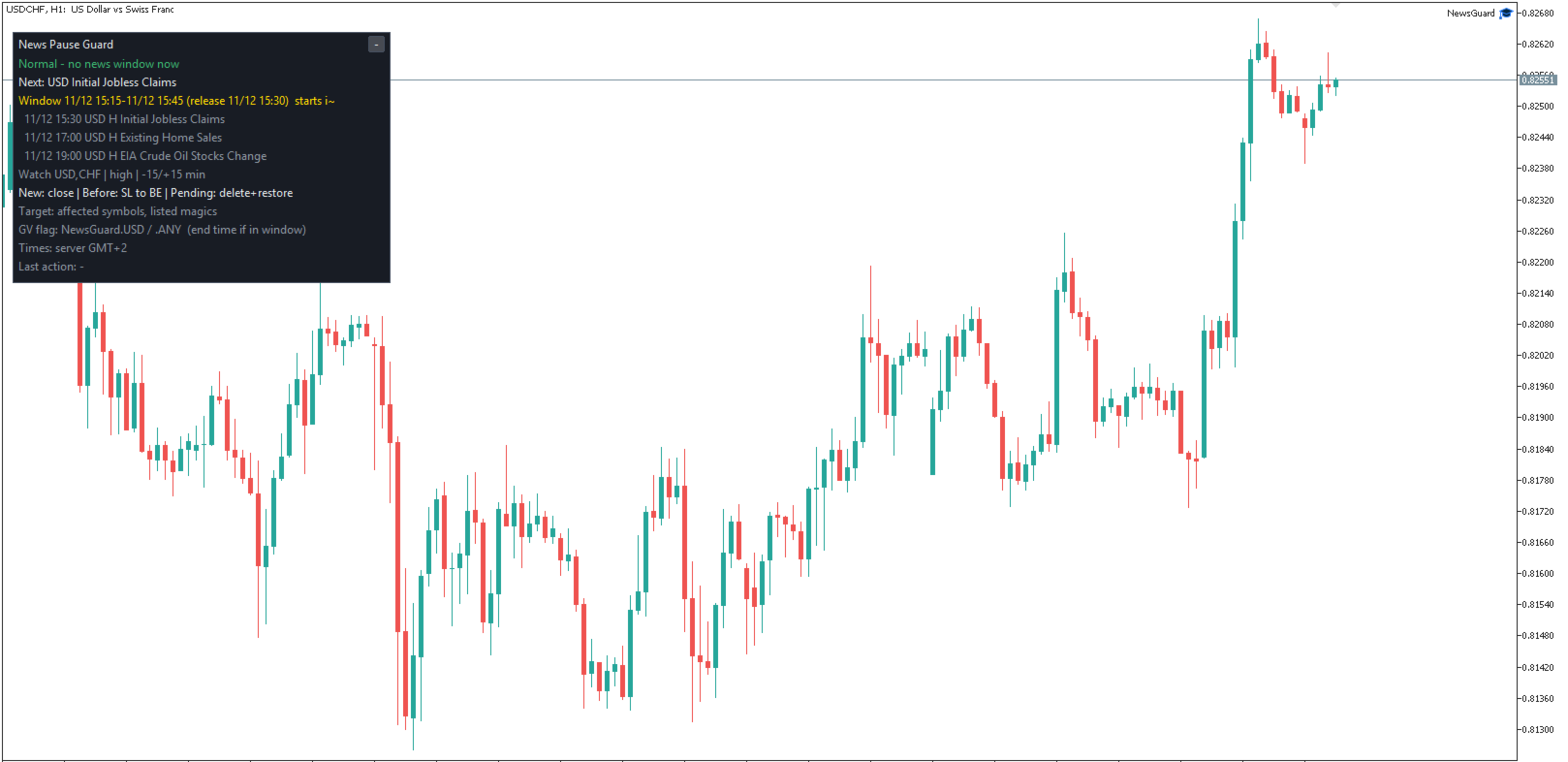
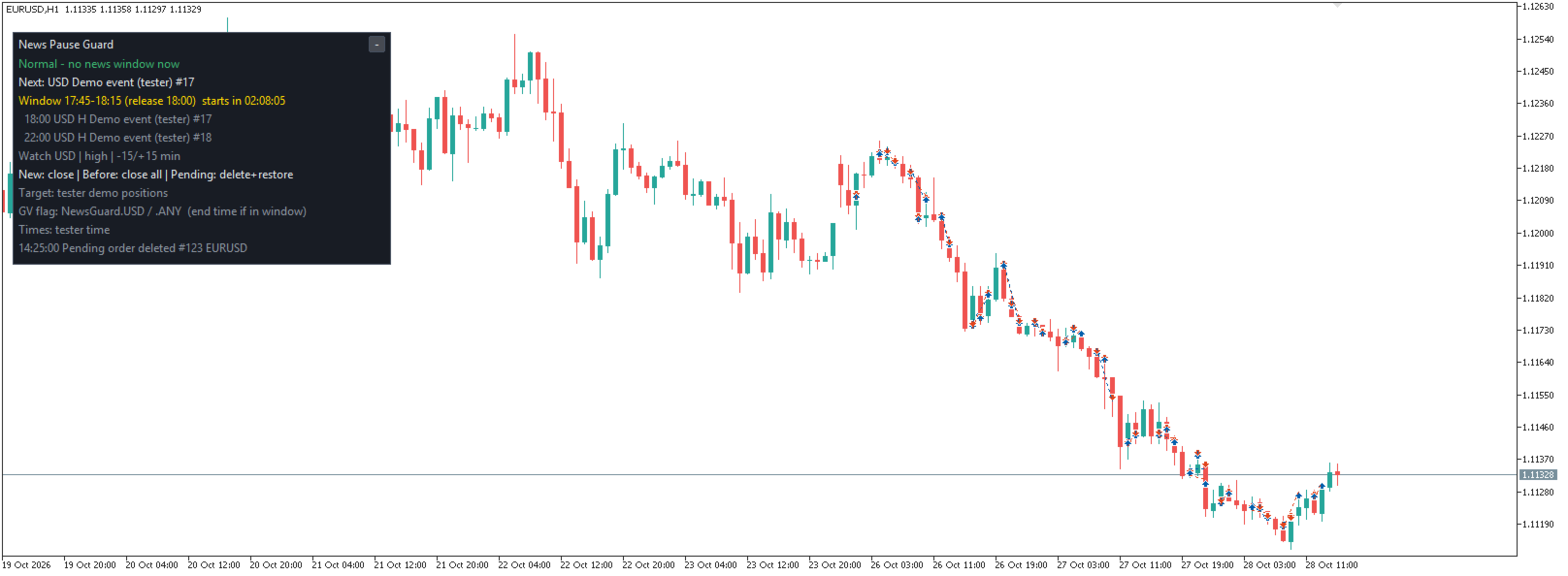
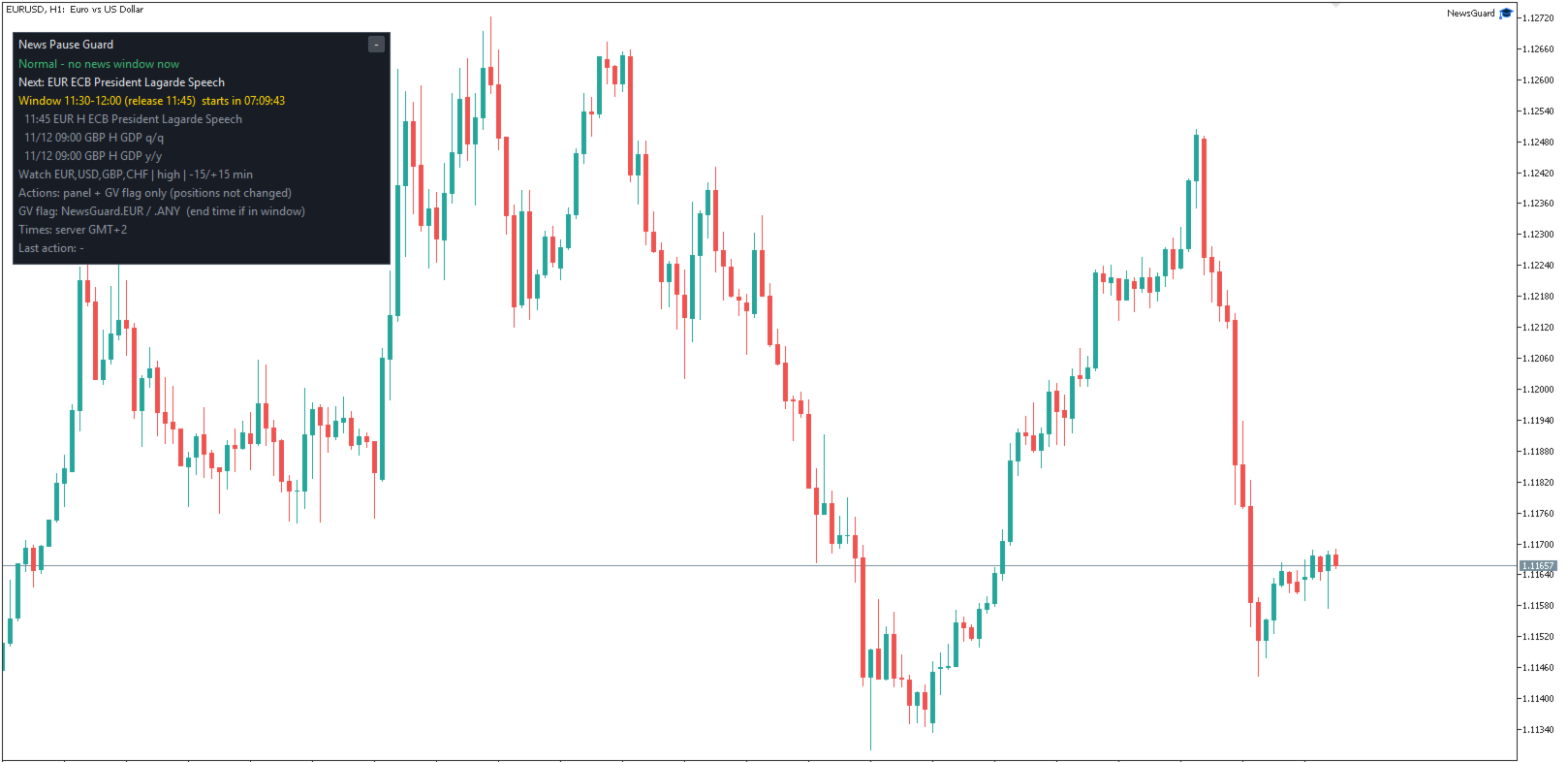
- Panel: next matching release, its window and a countdown, upcoming events, the active settings, the last action, and the reason when the EA cannot act (for example Algo Trading is off). English or Japanese (automatic from the terminal language); times in server or computer time.
- Optional popup alerts and push notifications when a window starts or positions are closed.

Main Inputs
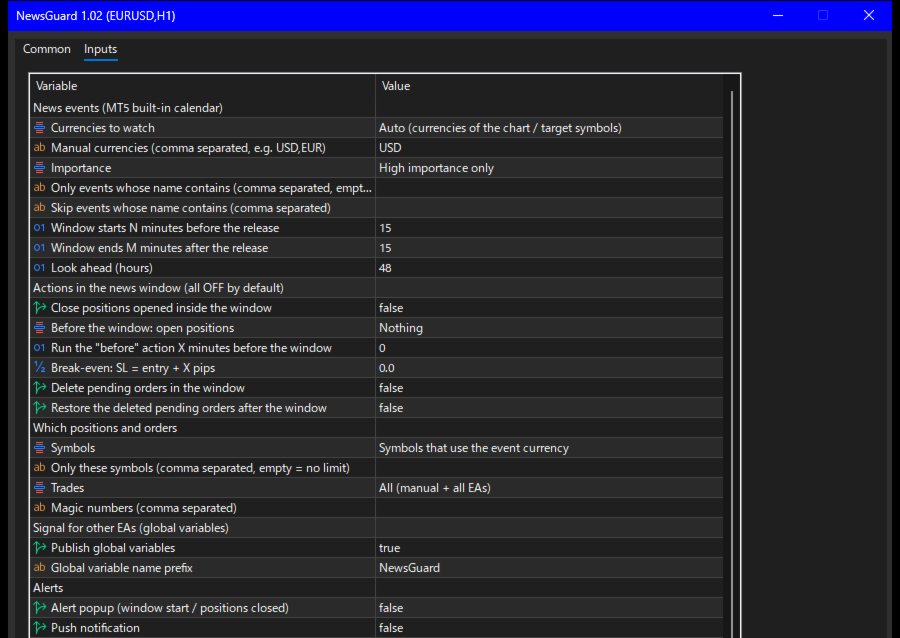
- News events: currency mode, manual currencies, importance, include / skip keywords, minutes before, minutes after, look-ahead hours (default 48).
- Actions in the news window: close new positions, before-window action, lead minutes, break-even offset, delete pending orders, restore pending orders.
- Which positions and orders: symbol scope, symbol list, trade (magic number) filter, magic list.
- Signal for other EAs: on / off, name prefix (default "NewsGuard").
- Alerts, Panel (language, time display, number of events 0-10, corner, offsets, font size), Orders (max slippage for closing, pip size), Strategy Tester demo, journal.
- 34 inputs in 8 groups.

How It Works
- The calendar is read for each watched currency and refreshed every few minutes. Events without an exact time (all-day or tentative) are not used. Times follow the broker's server time.
- Importance is the rating of the MT5 calendar. It can differ from other calendars.
- Keywords are matched against the event name in the terminal language and against the calendar's English event code (for example "nonfarm payrolls"). Enter English keywords if your terminal uses another language.
- "Opened inside the window" means the position's open time is at or after the window start.
- "Close only those in profit" decides once per window. Positions not in profit are left as they are.
- Break-even moves the stop loss only when the price is far enough from the entry (profit and the broker's stop level). Otherwise the position is left as it is and the panel says so.
- Restore: only pending orders placed before the window are restored, with the same type, price, SL, TP and expiry. A restored order gets a new ticket. It is not restored if it has expired, the price has already passed it, or the broker rejects it, and it is not placed twice if the same order already exists.
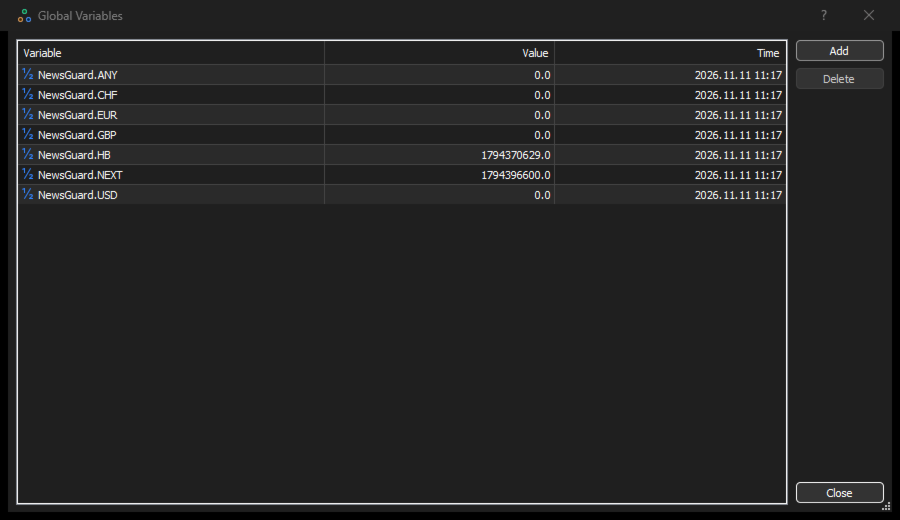
- Global variables (terminal, updated every second):
- NewsGuard.<CURRENCY> (for example NewsGuard.USD) and NewsGuard.ANY: the window end time (server time, seconds) while a window is active, otherwise 0.
- NewsGuard.NEXT: the start of the next window. NewsGuard.HB: the last update time (shows that the EA is running).
- In your EA: pause while GlobalVariableGet("NewsGuard.ANY") > TimeTradeServer().

Notes and Limits
- Not a guarantee. Orders are sent at the times of the calendar. Fast markets, spreads, slippage, requotes, rejected orders, a closed market or a lost connection can give worse prices or leave an order not done. A release that comes earlier or later than the calendar time, or a change in the calendar, is followed only after the next refresh.
- The EA works only while MetaTrader 5 is running, connected and Algo Trading is ON (toolbar button) and allowed in the EA settings.
- "Close positions opened inside the window" also closes positions you open by hand inside the window, if they are in scope. Use the magic number filter if you want to keep manual trades.
- On a netting account, volume added to an existing position is not a new position, so it is not closed by this option.
- The EA cannot stop another EA from sending orders. If another EA keeps opening trades inside the window, each one is closed and each one costs spread and commission. Use the global variables to make your own EAs wait.
- Several charts can run the EA. Restore records are shared, and if the chart that deleted the orders is closed, another chart with restore turned on takes over after about a minute. The restored orders are placed once.
- Panel size: about 390 pixels wide and 220 to 260 pixels high with 3 upcoming events at 100% screen scaling (font 9); larger with a bigger font, more events or higher screen scaling. It has a collapse button. On a chart that is lower than the panel, a bottom-corner panel is moved up to the top edge.
- Currencies of a symbol come from its base and profit currency. Gold and most CFDs use their quote currency (often USD). Symbols without a known currency use USD. Use the manual list if you want other currencies.
- Strategy Tester: the calendar is not available there, so the EA runs a demonstration with simulated events (named "Demo event (tester)") and small demo positions and pending orders on the chart symbol, to show the closing, break-even and pending-order functions. The tester report shows only this demonstration and is not a trading result (the demonstration stops opening trades after a small loss). With very small deposits (for example 10 USD) there may be no demo trades, because even the minimum lot needs more margin. On gold and indices in "Open prices only" mode on D1 / W1 there may also be no demo trades. The demonstration never runs on a real or demo account.

Compatibility and Support
- MetaTrader 5 only. Attach it to one chart. With the default scope it handles the positions and orders of every symbol that uses a watched currency, not only the chart symbol.
- No DLLs and no outside server. The calendar data comes from the MT5 terminal.
- Try all settings on a demo account first.
- Support through MQL5 messages, reply within 3 business days: installation, settings and bug reports. Questions about which releases to trade, market views or trade decisions cannot be answered.
- No result of your trading is promised or implied.
Recommended products
Click Trading
Jawad Tauheed
5 (3)
One Click Trading – Auto TP SL Developer TraderLinkz Version 1.00 Category Utility What it does Adds missing TP and SL to your manual trades and pending orders Sets them once per ticket Lets you move TP and SL afterward Works on hedging and netting accounts Scans on every tick and reacts on trade events Why you want it You place faster entries You get consistent risk and exit targets You reduce fat finger errors You keep full manual control Quick start Attach the EA to any chart Keep TP and SL e
FREE
Grid Trading EA is a semi-automated one-click trading EA for both Normal Trading and Grid/Martingale Trading . Normal Trading Simply click Buy or Sell directly from the chart. The EA will automatically manage trades by: Setting Stop Loss and Take Profit Managing Trailing Stop Grid / Martingale Trading (For Hedging Account Type Only) When Grid Trading mode is enabled, the EA will automatically open additional grid orders at specified distances while increasing the lot size based on your settings.
LotCalculatorPro
Reynaldo Jr Audencial Pascual
LotCalculatorPro + Smart Trading Panel LotCalculatorPro is a powerful all-in-one trading assistant designed to simplify risk management, lot size calculation, and trade execution directly from your chart. This tool helps traders control risk, calculate precise lot sizes, and manage trades automatically with smart features like break-even, partial close, and daily profit/loss protection. It is ideal for Forex traders, prop firm traders, and risk-focused traders who want a clean and efficient trad
Imagine flying a real aircraft without ever stepping into a flight simulator. That's what trading is like. You have to simulate your strategy before you can take it to a live market. It is good if you can simulate things speedily before even stepping into any live market, or before coming up with an automated system.  People don't have all day to stare at a higher timeframe chart until the entry signal finally arrives. That's why I built this so that you can simulate your strategy with speed. Th
FREE
Intenza Prop & Equity Guard is a professional account risk monitor and protection system for MT5 traders. Daily loss and drawdown tracking, hard equity floor, trailing profit lock, optional auto-close on breach, full trade journal with calendar, statistics and branded HTML/CSV reports. Single .ex5, no DLL. Everything you need to see, respect, and enforce your risk limits, all in one unified panel. Why Intenza Prop & Equity Guard? Most risk tools either just display numbers or blindly close trad
CYGNIX RISK GLADIATOR — Professional Trade Manager & Risk Guardian for MT5 Guard every position. Manage every trade. Sleep at night. Cygnix Risk Gladiator is a professional-grade position management Expert Advisor that watches every open trade on your account and automatically applies institutional-level risk controls in real time. It does not generate signals — it protects, manages, and exits trades opened by you, your strategies, or any other EA. Built for IC Markets and fully compatible w
Prop Firm Shield Full
Pablo Adolfo Cantos
Prop Firm Shield is a risk management panel for MetaTrader 5, built for prop firm traders who need control over their daily limits. You configure each limit and the tool watches the account around the clock, acting automatically when a limit is reached: closing positions, deleting pending orders and blocking new trading until the next day. Features: - Daily Take Profit - three modes: fixed USD, percent of the day-start balance, or target balance - Daily Stop Loss - three modes: fixed USD, percen
Tick Volume Chart is a unique tool for building charts based on tick volumes in MetaTrader 5 . With Tick Volume Chart , you can create charts where each candle is formed not by time, but by a specified number of ticks. This gives you perfect precision in analyzing market activity, which is unattainable on standard time-based charts. You can use any indicators and Expert Advisors that support custom symbols. Working with the resulting charts is just as convenient as with standard ones. Unlike sta
VTB High Watermark Drawdown Lock EA for MT5 Advanced Equity Protection & Drawdown Management System VTB High Watermark Drawdown Lock is a professional risk management Expert Advisor designed to protect trading accounts, funded accounts, and proprietary trading challenges from excessive drawdown. Unlike traditional drawdown protection systems that calculate risk from the initial account balance, this EA uses a dynamic High Watermark (HWM) model that continuously protects both your original capita
Expert TP SL v04
Mikhail Ostashov
Expert TP SL v04 - Professional Trading Assistant with AI Motivation System Advanced manual trading tool with automatic risk management, overtrading protection, and intelligent psychological support for disciplined trading. PRODUCT OVERVIEW Expert TP SL v04 is a comprehensive trading assistant designed for manual traders who want to maintain emotional discipline while automating risk calculations. This isn't just another order placement tool - it's a complete trading psychology system that pr
Trade Assistant 38 in 1
Makarii Gubaydullin
4.91 (23)
Multifunctional tool: Lot Calculator, Grid Orders, R/R ratio, Trade Manager, Supply and Demand zones, Price Action and much more Demo version   |   User manual Trade Assistant   doesn't work in the strategy tester : you can download the   Demo Version HERE  to test the utility . Contact me   for any questions  / ideas for improvement / in case of a bug found If you need a MT4 version, it is available here Simplify, speed up and automate your trading   process . Expand the standard terminal capa
Ultimate Pro Trading Panel — All-In-One Manual & Grid Trading Dashboard Pro Trading Panel   is an all-in-one on-chart control panel that gives discretionary and semi-automated traders a complete toolkit for entries, exits, risk management, and grid trading — without leaving the chart. Every function is visual, draggable, and updates in real time. If you want to test this utility feel free to download the basic preview version of this tool here:  https://www.mql5.com/en/market/product/181435 Who
GridZone Alpha
Gooi Meng Liang
GridZone Alpha: The Ultimate Semi-Automated Grid & Zone Manager GridZone Alpha is an advanced, interactive trading panel designed for the modern manual trader. Stop staring at the charts waiting for the perfect entry, and stop relying on rigid, fully automated bots that cannot read market context. With GridZone Alpha, you provide the human analysis by identifying your support, resistance, or supply/demand zones. Once confirmed, the Limit Order Engine takes over, instantly deploying a precision,
Bohemia Gold MT5
Vladislav Taska
4.83 (6)
Bohemia Gold MT5 is  Trend & Volatility EA trading system designed specifically for Gold (XAUUSD) . It combines higher-timeframe trend filtering , trend detection , volatility-based SL management , and advanced trade management to adapt market conditions. It uses style logic focused on trend strength, volatility, and capital protection. NOTE:   Based on backtests, I found better trading results with the following setup: D1/H4/H2 (Trend/ADX/ATR & trade). The SET file can be downloaded here … bohe
FREE
NAS100 Auto Sl And TP MT5
Moustapha Boulouz
5 (2)
Introducing NAS100 Auto SL and TP Maker for MT5: Never miss setting StopLoss and TakeProfit again with our NAS100 Auto SL and TP Maker, an indispensable assistant for traders navigating the Nasdaq 100 market on MetaTrader 5. This tool is designed for those who seek a seamless solution to automate the management of StopLoss and TakeProfit levels. Key Features: Effortless Automation: Automatically monitors Nasdaq 100 trades without StopLoss and/or TakeProfit. Dynamically adjusts levels based on u
FREE
This tool will perform Trailing stop loss and Break even management for orders. Helps you limit or reduce the time spend watching orders on the screen, especially when you need to go to sleep. Just add this EA to 1 chart, you can manage all pairs. You can filter orders by comment, magic number, symbol and order ticket number. When Breakeven it can add shift/offset pips (to cover the commission...). You can try in strategy tester before purchase. The EA will add Buy and Sell alternately, so you
Your stop is already on the MT5 chart. What lot size keeps your loss within the risk you chose? Easy Trade Executor (ETE) shows the lot, loss at the stop, profit at take profit and required margin. After entry, you set the rules: move to breakeven, Close 50% or start a trailing stop. The panel carries out each action according to your rules. Open it and go from sizing the lot to closing the trade in a few clicks on your MT5 chart. See the lot and key order numbers before you click Send Lot from
Recovery Assistant Pro for MT5 Manual Recovery Trading Assistant Recovery Assistant Pro is a Manual Trading Assistant EA for Recovery trade calculations and management. Helps calculate the appropriate Lot Size. Designed to calculate Recovery trade parameters based on floating loss and the selected Target USD. Simplifies Recovery calculations that would otherwise require manual calculation. The trading panel provides direct access to the main Recovery functions from the chart. Includes a Recov
Advance Trade Manager
Jose Rodrgues Chaves
ADVANCE TRADE MANAGER A complete, tabbed trade-management dashboard for MetaTrader 5 that puts every routine trade operation on one compact panel. No more hunting through menus — open, protect, scale and manage positions from a single interface. The panel is a pure GUI overlay . It never touches your existing chart objects, indicators, arrows or manual lines. All chart objects it creates use the dedicated EGF_Z_ (zones) prefix, and trigger lines use the panel's own object names — so nothing else
Ultra Prokit Tool
Francis Muchai Waweru
ULTRA PRO TOOLKIT EA Draw it. Size it. Execute it. Most charts are buried under tools that refuse to talk to each other. You mark a level in one place, work out your lot size somewhere else, then hand-type an order and hope you remembered the stop. Ultra Pro Toolkit EA puts the entire workflow on one panel: sketch your market structure, tell it how many dollars you are willing to lose, and let it handle the arithmetic and the order routing. ️ This is a manual trading cockpit, not a signal
Crash5 EA ,I s a automatic robot that has the level of professional decision when to take a trade without any emotion. The bot will help in your scalping decision making with its own TP (take profit) and SL (stop loss) with the trail stop when in profit. This is a trend based spike catching ,looking on whats happening in real time charts no repainting of any signals. The robot helps in making decisions on the candle stick pattern opened and closed lat price with the help of RSI ,MACD and the EMA
RADAH Dashboard is an advanced performance analytics utility for MetaTrader 5, designed to transform your account history into a clear, organized and interactive trading performance overview. It does not open, modify or close trades. Its purpose is exclusively analytical, allowing you to review the performance of the entire account, a specific symbol, or a strategy identified by its Magic Number. Chart View Visualize your trading performance through an integrated balance/equity performance c
FREE
Pattern Recognition EA
Claudiu-georgian Zavera
Pattern Recognition EA - From Learn to Earn. The market repeats itself. This EA finds every past repeat of the current candle sequence - and lets history vote the direction. ONE SHAPE. EVERY REPEAT IN HISTORY VOTES. The last N candles on your signal timeframe form a shape. The EA scans the history you choose - a fixed number of bars or everything your broker provides - for the SAME shape, and checks what happened next, every single time. Only when enough repeats exist AND a clear majority of t
Key Benefits at a Glance: Lorentzian ML signal generation Majority voting across 3 timeframes Automatic market regime detection Smart equity recovery with group profit targets 1% risk‑based adaptive lot sizing ATR‑based dynamic SL/TP & trailing Emergency drawdown cut Live on‑chart info panel Hybrid Lorentzian Gold ML EA v2.0 – Intelligent Adaptive Trading for XAUUSD Next‑Gen Machine Learning Core A Lorentzian KNN classifier analyzes 5 normalized features (RSI, WaveTren
FREE
Risk Ruler
AL MOOSAWI ABDULLAH JAFFER BAQER
Risk Ruler Plan every trade with precision before you enter the market. Risk Ruler is a professional on-chart position sizing and risk management tool for MetaTrader that helps traders calculate the optimal trade size based on their predefined risk. By simply dragging the Entry, Stop Loss, and Take Profit lines directly on the chart, all essential trading calculations update instantly, allowing you to make informed decisions before placing a trade. Designed for both manual and professional trade
Automated Timeframe cycling with Symbols centered.  Force every timeframe onto one clock window, so the story you see on Daily is the same story you are slicing on H4, H1, and M1.  Traders usually flip timeframes and lose the span. A Daily chart shows a few weeks, then M15 shows a few hours, and the eye treats them as different markets. This indicator locks the window to N bars of the highest enabled timeframe — default 10 Daily — and maps every lower timeframe to that same stretch. You stay ins
FREE
Zone Commander – HexTrade Manager: plan, place and manage your trades on the chart Draw the trade on the chart, check risk and targets in your account currency, place it with one click — and let Zone Commander take care of the rest: partial close at TP1 and TP2, break-even, trailing stop, several positions at once and a daily loss limit. Panel and messages in 8 languages: English, German, Spanish, Portuguese, French, Italian, Russian, Turkish. PLAN Drag ENTRY, STOP and TP1 / TP2 / TP3 individual
Equity Master Stop v2 MT5
Frank William Jr Colbert
Trading tool combining a sophisticated equity stop-loss, dynamic take-profit management (Breakeven & Trailing), and symbol-group-based closing logic. It is a complete risk management and trade supervision tool. Features: All features of `Equity Master Stop v1` (floating profit/loss limits, exit protection, skip hours). Take-Profit Override: Can force a TP on any order to lock in a `MAX_FLOATING_PROFIT`. Step Breakeven: Locks in increasing amounts of profit as a trade moves favorably (e.g., aft
ApeX Journal MT5
Korakot Santithammarak
View User Manual       ApeX Trade Manager MT5  →     ApeX Journal MT5  →     ApeX Indicator SMC MT5  →     ApeX Indicator ICT Concepts MT5  →     ApeX Indicator Volume Profile MT5  →    ApeX Indicator ICT Macros MT5  → Your broker keeps a list of your trades. It does not keep a record of your trading. ApeX Journal turns the history already sitting in MetaTrader into the journal you keep meaning to write. Powered by ApeX Journal A complete trading journal, built directly inside MetaTrader 5.
️ Trade Manager oneclick  ( Reverse Trade,  Partial Close,  Breakeven, Close All Running Trade )   control – Smart Manual Trade Control for MT5 Trade Manager oneclick control is a powerful yet lightweight trade management utility built for manual traders who want precise control over their open positions — directly from the MT5 chart. This EA does not open or close trades automatically based on any strategy. It simply provides one-click management tools to handle your running trades efficient
FREE
Buyers of this product also purchase
Trade Assistant MT5
Evgeniy Kravchenko
4.43 (216)
It helps to calculate the risk per trade, the easy installation of a new order, order management with partial closing functions, trailing stop of 7 types and other useful functions. Additional materials and instructions Installation instructions - Application instructions Line function -   shows on the chart the Opening line, Stop Loss, Take Profit. With this function it is easy to set a new order and see its additional characteristics before opening.   Risk management  - The risk calculation
FarmedHedge Pair Trading Dashboard
Tanapisit Tepawarapruek
5 (7)
Farmed Hedge Yield Farming | All Markets (Manual - Hybrid - Semi/Automated EA) VERIFIED TRADING RESULTS - Farmed Hedge Yield Axi Copy:  https://www.mql5.com/en/signals/2356376 - Farmed Hedge Yield Exn Copy:   https://www.mql5.com/en/signals/2356404 - Farmed Hedge Yield V Copy:  https://www.mql5.com/en/signals/2357156 IMPORTANT NOTICE: FarmedHedge is a MANUAL-FOCUSED TRADING UTILITY ,not a fully automated EA. Results shown on this Signal include manual trades and overall strategic management.
Forex Trade Manager MT5
InvestSoft
4.98 (689)
Trade Manager MT5 is an advanced position size calculator and trade management tool for MetaTrader 5, designed to help traders plan trades faster, control risk more precisely, and manage open positions directly from the chart. It combines order placement, risk based lot calculation, Stop Loss and Take Profit management, Break Even, Trailing Stop, Partial Close, Equity Protection, and external trade management in one panel. Whether you trade forex, indices, metals, commodities, crypto, or future
Telegram to MT5 MultiChannel Copier
Sergio Marquez Uroz
4.68 (22)
Telegram to MT5 Multi-Channel Copier   automatically copies trading signals from your Telegram and Discord channels straight to MetaTrader 5. No bots, no browser extensions, no manual copying. A signal arrives in Telegram or Discord and the EA opens the trade in your terminal within seconds. And before you copy a channel, the built-in backtester shows you what that channel would have done in your account. The product has two components: a Windows application that listens to your Telegram channel
Local Trade Copier EA MT5
Juvenille Emperor Limited
4.94 (150)
Local Trade Copier EA MT5 is a fast and flexible trade copier for copying and managing trades between multiple MetaTrader 5 accounts on the same Windows computer or Windows VPS. It combines local trade synchronization with Receiver-side controls for lot sizing, risk management, trade filtering, symbol mapping, trade management and account protection. Set up your Transmitter and Receiver terminals in about 1 minute and copy manual or EA trades between accounts at the same or different brokers. U
TradePanel MT5
Alfiya Fazylova
4.88 (173)
Trade Panel is a multi-functional trading assistant. The app contains over 50 trading functions for manual trading and allows you to automate most trading tasks. Application instructions: https://www.mql5.com/en/blogs/post/756482 Trial version of the application for a demo account: https://www.mql5.com/en/blogs/post/750865 How to install the application: https://www.mql5.com/en/blogs/post/756239 How to test the application in visual mode: https://www.mql5.com/en/blogs/post/770277 How to install
News Trade EA MT5
Konstantin Kulikov
4.55 (11)
Present to you the useful robot that I have been using for several years. It can be used in both semi-automatic mode and fully automatic mode. >>> Chat <<< The program contains flexible settings for trading on the news of the economic calendar. It cannot be checked in the strategy tester. Only real work. Download the latest archive of settings: https://www.mql5.com/en/blogs/post/747929 Signals monitoring: https://www.mql5.com/en/signals/author/test-standart When creating your own sets of setti
Copy Telegram signals with your own trading rules Telegram to MT5 Signal Trader automatically copies text-based trading signals from public and private Telegram channels and groups into MetaTrader 5. Manage multiple providers and MT5 accounts from one desktop app, with individual risk and trade settings for each provider . No Telegram bot or API setup needed for copying. Simply sign in with your own Telegram account by phone or QR code and select the channels or groups you have already joined. Y
Exp COPYLOT CLIENT for MT5
Vladislav Andruschenko
3.97 (35)
Professional Trade Copier for MetaTrader 5 Fast, professional, and reliable trade copier for MetaTrader . COPYLOT allows you to copy Forex trades between MT4 and MT5 terminals with support for Hedge and Netting accounts. COPYLOT MT5 version supports: - MT5 Hedge to MT5 Hedge - MT5 Hedge to MT5 Netting - MT5 Netting to MT5 Hedge - MT5 Netting to MT5 Netting - MT4 to MT5 Hedge - MT4 to MT5 Netting MT4 version Full Description +DEMO +PDF How To Buy How To Install How to get Log Files H
EA Overfitter
Stephen J Martret
5 (3)
That backtest looks great. But will it still be making money tomorrow, next week, next month? EA Overfitter re-runs your EA on 100 price histories it has never seen. One score tells you if the edge is real. A backtest tells you what an EA did on one price history — the one that happened to occur. What you cannot tell from it is how much of that result was the strategy and how much was the particular path. EA Overfitter answers that. It builds up to 100 synthetic price histories your EA has n
================================================================================ POC BREAKOUT - V20.72. Full Professional Grade Toolkit ================================================================================ POC Breakout is a full MetaTrader 5 trading dashboard for discretionary traders who want breakout signals, Point of Control (POC) context, volume profiles, order flow, market structure, news, alerts, and advanced trade planning in one professional workspace. Attached directly to you
The product will copy all telegram signal to MT5 ( which you are member) , also it can work as remote copier.  Easy to set up, copy order instant, can work with almost signal formats, image signal,  s upport to translate other language to English Work with all type of channel or group, even channel have "Restrict Saving Content", work with  multi channel, multi MT5 Work as remote copier: with signal have ticket number, it will copy exactly via ticket number. Support to backtest signal. How to s
Power Candles Strategy Scanner - Self-Optimizing Multi-Symbol Setup Finder Self-optimizing settings work one chart at a time, and finding where they pay off right now means opening chart after chart. Power Candles Strategy Scanner runs the same self-optimizing engine as the Power Candles indicator on every symbol in your Market Watch, side by side. One panel ranks where it pays off: the winning strategy per symbol, its optimized Stop Loss and Take Profit. An alert fires the moment a fresh signal
Timeless Charts
Samuel Manoel De Souza
5 (9)
Timeless Charts is an all-in-one trading utility for professional traders. It combines custom chart types such as Seconds Charts and Renko with advanced order flow analysis using Footprints , Clusters , Volume Profiles , VWAP studies, and anchored analysis tools for deeper market insight. Trading and position management are handled directly from the chart through an integrated trade management panel , while Market Replay and Virtual Accounts provide environments for practicing trading skills and
Welcome to Entry In The Zone with SMC Multi Timeframe  —  COMPLETE SMC ANALYSIS SYSTEM — ALL IN ONE INDICATOR  Entry In The Zone with SMC Multi Timeframe  An indicator designed for market analysis based on Smart Money Concepts (SMC), displaying Market Structure, Key Zones (Order Blocks, Supply & Demand Zones, and Fair Value Gaps), Liquidity, and real-time BUY / SELL signals. It supports both Single-Timeframe and Multi-Timeframe analysis, along with the Confluence at Zone feature, which helps you
Anchor Trade Manager
Kalinskie Gilliam
5 (8)
Your EAs cannot see each other, but Anchor can. Anchor gives you one place to coordinate your EAs, manage risk, and decide when trading is allowed. It works alongside the trading bots you already use without any changes to them. The Problem One EA opens a trade. Then another starts trading. The next thing you know, you wake up to multiple grids built across your account. Each EA may be doing exactly what it was designed to do, but together they can place far more risk on your account than you in
EA Auditor
Stephen J Martret
5 (7)
EA Auditor is an independent analysis tool for traders evaluating Expert Advisors and trading signals on MetaTrader 5. It audits backtest reports, reviews posted developer signals, and cross-verifies the two against each other to help traders assess strategies before committing capital. The MQL5 market offers a wide range of Expert Advisors from many developers, with varying approaches, quality, and transparency. EA Auditor provides a consistent, data-driven framework for reviewing them, answer
Trade Dashboard MT5
Fatemeh Ameri
4.94 (135)
Trade Dashboard simplifies how you open, manage, and control your trades, with built-in lot size calculation. It allows you to execute trades, manage risk, and control positions directly on the chart, with tools such as partial close, breakeven, and trailing stop. Designed to reduce manual work and help you stay focused on your trading decisions. A demo version is available for testing. Detailed explanations of features are provided within the MQL5 platform. Installation instructions are include
MT5 to Telegram Signal Provider turns your trading account into a signal provider. Every trade action, whether manual, by EA or from your phone, is instantly sent as a message to Telegram. You can fully customize the format or use a ready-made template for quick setup. [ Demo ] [ Manual ] [ MT4 Version ] [ Discord Version ]     New: [ Telegram To MT5 ] Setup A step by step user guide is available. Key Features Ability to customize order details sent to subscribers You can create a tiered subs
RETAILBERG FOOTPRINT CHART PRO — Order-Flow Workspace for MetaTrader 5 Version 7.00  |  Professional System  |  31 tools  |  One chart A full 150-page illustrated User Manual is included. Please read the full manual to understand this feature packed footprint chart elements and ui. https://www.mql5.com/en/blogs/post/777982 DEMO / STRATEGY TESTER — PLEASE READ FIRST
VirtualTradePad PRO SE MT5 — professional trading control center for MetaTrader 5 VirtualTradePad PRO SE is a premium chart-based trading panel and trade-management workspace for MetaTrader 5 . It is designed for traders who want faster execution, clearer position control, structured trade management, visual level planning and a professional workflow directly from the chart. This is not only a BUY / SELL panel. PRO SE combines manual trading, pending orders, position management, partial exits, b
Trader Evolution
Siarhei Vashchylka
5 (7)
" Trader Evolution " - A utility designed for traders who use wave and technical analysis in their work. One tab of the utility is capable of money management and opening orders, and the other can help in making Elliott wave and technical analysis. Manual (Be sure to read before purchasing) | Version for MT4 Advantages 1. Trading in a few clicks. Immediate and pending orders are available in the panel 2. Money management. The program automatically selects the appropriate lot size 3. Simplifies
AW Trade Manager
AW Trading Software Limited
AW Trade Manager is a trade panel for MetaTrader 5 with a risk/reward tool on the chart. A trade is planned with Entry, Stop Loss and Take Profit lines dragged with the mouse: plates show price, distance and money, zones show profit and loss, and the volume is calculated from the risk. Before sending, the confirmation window shows the whole trade with risk, margin and the rules of the position. Manual and instruction -> HERE / Free LIVE Demo -> HERE To manage a position after the entry the panel
VirtualTradePad One Click Trading Panel
Vladislav Andruschenko
4.59 (74)
Trading Panel for MetaTrader 5 — professional one-click trading from chart and keyboard A powerful trading panel for active manual trading, designed to open, manage, and close trades far faster and more efficiently than the standard MetaTrader interface. This panel is built for traders who want full control over positions, pending orders, profit management, and trading execution inside one professional workspace. This is not just another utility. It is a complete trading cockpit for MetaTrader
COPYLATOR – MT5 Trade Copier Key Highlights Multi-Sender / Multi-Receiver Trade Replication – supports one-to-many, many-to-one, and many-to-many configurations, with complete real-time copying of market orders, pending orders, SL, and TP. Advanced drawdown protection – closing, blocking, pending-order deletion, manual and automatic reset mechanisms. Automatic symbol mapping – finds correct symbols, alerts if missing, allows manual override. Hedging & Netting support – auto-detected, no manual s
On-Chart Trade Assistant & Risk Management Panel Ergotick Trade Manager gives you a complete set of trading tools directly on your MetaTrader 5 chart: a trade panel with lot size calculator, visual R:R tool, and daily loss limit protection; a separate statistics panel that tracks your performance and past trades; and an economic calendar you can toggle with one click. Built for scalpers, day traders, and prop firm traders. Ergotick Trade Manager is fast , light on resources , and stable , so it
Master Your Trading Discipline   Stop losing your hard-earned gains to overtrading and emotional decisions. The Discipline Tool is your ultimate trading assistant, ensuring strict risk management in real-time. Key Protection Features: Advanced Drawdown Defense : Automatically halts trading if your daily drawdown exceeds a preset threshold (percentage or dollar amount). Real-Time Equity Lock : Safeguard profits by referencing peak equity, ensuring drawdown stays within control. Hard Profit Target
Dealer Panel
Mian Rameez Ali
Dealer's Panel No signal decides anything here — a hand does. One click, and the panel calculates what's underneath: lot size from risk, target from a 30-step balance ladder that remembers exactly how far an account has climbed. Toggle between market and pending without touching an input field. Set a stop, and the take-profit can write itself — a fixed share of the balance, translated into price with no arithmetic left for the trader to get wrong. One trade live at a time; it won't let a seco
Astro Trade MT5
Indra Maulana
5 (8)
25% discount on the release of the tool: only for the next 3 buyers Send a message to receive a demo version. AstroTrade Trading Assistant AstroTrade is a comprehensive multi-functional trading utility developed for the MetaTrader 5 platform. It integrates essential tools for trade execution, risk management, and technical monitoring into a single unified interface. The application is designed to assist traders in managing their daily operations through a visual and structured environment. Vi
Bneu Prop Firm Pass System
Marvinson Salavia Caballero
5 (1)
BNEU PROP FIRM PASS SYSTEM v2.37 PRODUCT OVERVIEW Bneu Prop Firm Pass System is a professional risk management and account protection utility for MetaTrader 5. Attach to any chart and configure your account rules. The system monitors daily loss, maximum drawdown, profit target, trading days, open risk, margin usage, news events, pending orders, weekend restrictions, and rollover restrictions from one dashboard. It includes a 5-tab premium dashboard, prop firm presets, custom rules, Risk Sentine
More from author
Elliott Wave Auto Count for MetaTrader 4 labels Elliott waves automatically on four degrees at the same time: the base degree and the three degrees above it. It follows the rules and guidelines of "Elliott Wave Principle" (Frost & Prechter), and for the current wave it shows a price x time target zone and an invalidation level. It is meant for MT4 traders who use Elliott wave analysis and want a rule-based starting count, with the alternate count and the invalidation level always visible. It is
Fibo Price Time Zones combines Fibonacci price levels with Fibonacci time targets and draws them on the chart as boxes (price x time zones). Where boxes from several waves and from up to two higher timeframes overlap, the area is emphasized in three levels. It is meant for traders who already use Fibonacci retracements and extensions and also want to see roughly when a level is worth watching, without drawing every tool by hand. It is a display tool only: it gives no buy or sell signals and doe
Supply & Demand Zones marks supply and demand zones on a MetaTrader 5 chart with one fixed, fully published rule: a strong bar (body at least X times ATR) that leaves a short "base" of small-body bars behind it. The base becomes a demand zone when the strong bar is bullish and closes above it, or a supply zone when the strong bar is bearish and closes below it. Each zone shows its state: fresh, touched with a count, or broken. It is meant for traders who draw these zones by hand and want them d
FREE
RSI AutoScale is a clean, lightweight RSI for traders who use both TradingView and MetaTrader 5 and want the two charts to look the same. WHAT IT SHOWS - RSI (Wilder smoothing): the same values as the standard RSI, with any applied price. - Signal line on the RSI: SMA, EMA, SMMA or LWMA, with its own period. - Levels: upper, middle and lower lines (70 / 50 / 30 by default). They use MT5's native levels, so they reach the right edge and their values appear on the scale. - Zone fills: the middle
FREE
Stoch RSI Band Fill is a Stochastic RSI indicator for MetaTrader 5. MT5 does not include a built-in Stoch RSI, so this indicator adds one. It follows the same calculation steps as the built-in Stoch RSI on TradingView and uses the same layout: K and D lines, 80 / 50 / 20 levels and a shaded band between the upper and lower levels. CALCULATION, STEP BY STEP 1. RSI of the selected price (default: close, length 14), smoothed with Wilder's method (RMA). The first average is the simple average of the
FREE
Pivot Points Six Types with Level Alerts is a TV-compatible pivot point indicator for MetaTrader 5. It uses the same formulas and the same period boundaries as the "Pivot Points Standard" indicator that comes with TradingView, and it draws the levels the same way: short horizontal lines that start at the first bar of each period, with "R1 (price)" style labels in orange (#FB8C00). SIX CALCULATION TYPES The levels are calculated from the high, low and close of the previous period. - Traditional
FREE
Supertrend Trend Fill with Change Alerts is a TV-compatible Supertrend for MetaTrader 5. It uses the same calculation as the "Supertrend" indicator built into TradingView and draws it the same way: a green line below price in an up trend, a red line above price in a down trend, and a light fill between the line and the middle of each candle body. Supertrend shows the direction of the trend. It is a charting aid, not a buy or sell signal, and it does not predict where price will go. HOW IT IS C
FREE
MACD Four Color Histogram is a MACD for MetaTrader 5 that uses the same formula and the same look as the built-in MACD on TradingView. It is made for traders who use both platforms and want the MACD on each chart to read the same way. HOW IT DIFFERS FROM THE MT5 STANDARD MACD - MT5 standard MACD: the histogram is the MACD line itself, and the signal line is an SMA. - This indicator: three parts, as on TradingView. MACD line, signal line, and histogram = MACD - signal. The histogram has 4 colors.
FREE
VWAP Band Fills with Anchored VWAP is a TV-compatible VWAP for MetaTrader 5. It uses the same formula as the built-in "VWAP" indicator of TradingView (Pine ta.vwap), offers the same inputs - anchor period, source, offset, standard deviation or percentage bands #1 to #3 - and draws it the same way: a blue VWAP line, green / olive / teal bands and light fills between them. An optional anchored VWAP starts from a vertical line that you drag to any bar. HOW IT IS CALCULATED For every bar of the cu
FREE
Prior Day Week Month Levels with Touch Alerts draws the previous day, week and month high and low on your MetaTrader 5 chart as clean horizontal lines with labels at the right edge, in the style of TradingView. It can also show the previous day's close and today's open. LEVELS - PDH / PDL: previous day high and low (blue #2962FF, solid) - PWH / PWL: previous week high and low (orange #FF9800, dashed) - PMH / PML: previous month high and low (purple #9C27B0, dash-dot) - PDC: previous day close (
FREE
Candle Countdown Tag with Spread shows how long the current candle has left, in a small colored tag right next to the last candle - the way TradingView shows its bar countdown. The same tag can also show the current spread, the time left of up to two more timeframes and the open time of the next candle. It is a display tool for MetaTrader 5: no alerts, no signals, no trading. WHAT IT SHOWS - Time left of the chart timeframe: mm:ss under one hour, hh:mm:ss under one day, "2d 04:15:30" for longe
FREE
Do you mark supply and demand zones by hand and get a slightly different result every time? This free MetaTrader 4 indicator draws them with one fixed rule that is written out in full below, so you can check every zone yourself. The idea: a strong candle (body at least X times ATR) leaves a "base" of 1 to 10 small candles right before it. A bullish strong candle that closes above the base turns it into a demand zone; a bearish one that closes below it turns it into a supply zone. The indicator
FREE
This is the MetaTrader 4 edition of RSI AutoScale. It draws the standard Wilder RSI with a signal line, a shaded band between the levels, colored areas where the RSI leaves that band, and a choice of three scales. It is meant for traders who use TradingView and MetaTrader 4 side by side and want the RSI pane to look much the same on both. HOW IT LOOKS ON MT4 - RSI line: the same values as MT4's built-in RSI for the same period and applied price. - Signal line: a moving average of the RSI (SMA, E
FREE
Supertrend Trend Fill with Change Alerts MT4 brings a TV-compatible Supertrend to MetaTrader 4. If you also use TradingView, you know its built-in "Supertrend": a green line under price while the trend is up, a red line over price while it is down, and a soft colored band between the line and the candles. This MT4 indicator reproduces that calculation and that look. What it is for: seeing the current trend direction and where it would flip. What it is not: a buy or sell signal or a forecast. A
FREE
A MetaTrader 4 MACD built to read like the MACD you see on TradingView: a MACD line, a signal line, and a histogram of the gap between them, colored in four shades. If you switch between the two platforms during the day, the MACD pane on your MT4 chart will look and behave the way you are used to. WHY NOT THE MT4 BUILT-IN MACD? MT4's own MACD draws the MACD line as gray bars and smooths the signal line with an SMA. There is no separate histogram and no color change. This indicator calculates the
FREE
MetaTrader 4 ships with a Stochastic and an RSI, but not with a Stochastic RSI. This indicator fills that gap for MT4 users and is built to be TV-compatible: it follows the calculation of the Stoch RSI that comes with TradingView, and the pane looks the way TradingView users expect - a blue K line, an orange D line, dashed 80 and 20 levels, a dotted 50 line and a light band between 80 and 20. WHAT APPEARS IN THE SUBWINDOW - K and D lines. The Data Window lists only K and D. - Upper band (80) a
FREE
Pivot Points Six Types with Level Alerts MT4 brings TV-compatible pivot points to MetaTrader 4. If you also chart on TradingView, you know its built-in "Pivot Points Standard". This MT4 indicator reproduces it: the same six calculation methods, the same period choices from one day to ten years, and the same look - an orange (#FB8C00) line for each level, starting at the beginning of each period, labelled like "S2 (1.08345)". WHICH LEVELS EACH METHOD GIVES Method | Levels drawn | Note Tradition
FREE
Prior Day Week Month Levels with Touch Alerts MT4 puts yesterday's, last week's and last month's high and low on your MetaTrader 4 chart, drawn the way TradingView users are used to seeing them: thin horizontal lines with a short label and price at the right edge. Optional extras: previous day close and today's open, and an alert when price touches a line. WHAT YOU SEE Line | Meaning | Default look PDH | previous day high | blue #2962FF, solid PDL | previous day low | blue #2962FF, solid PWH |
FREE
VWAP Band Fills with Anchored VWAP MT4 brings the VWAP of TradingView to MetaTrader 4. If you use TradingView's built-in "VWAP", you will find the same inputs here (Anchor Period, Source, Offset, Bands Calculation Mode, Bands Multiplier #1 to #3, Hide VWAP on 1D or Above), the same formula (Pine ta.vwap) and the same colors - plus an anchored VWAP that starts wherever you drag a vertical line. THE FORMULA Within each anchor period, bar by bar: VWAP = sum(source x tick volume) / sum(tick volume
FREE
Candle Countdown Tag with Spread MT4 puts a TradingView-style countdown on your MT4 chart: a small tag beside the last candle that tells you when the bar closes, together with the current spread. Optional extra lines show the time left of two more timeframes and when the next candle opens. Nothing else - it does not trade, alert or give signals. ONE TAG, UP TO FIVE LINES Line | Example | Setting Chart timeframe | 12:41 | on by default Extra timeframe 1 | H4 02:12:41 | off (choose a timeframe t
FREE
Dow Structure MTF shows the Dow theory trend of five timeframes at once in MetaTrader 4, using the pullback low / rally high method that is common among Japanese traders. For each timeframe it shows whether the trend is up, down or range, which price would change it, and how far the current price is from that price. Only closed bars are used, so a confirmed result does not change afterwards (no repaint). It is meant for traders who check the trend structure of several timeframes by hand and wan
Fibo Price Time Zones for MetaTrader 4 combines Fibonacci price levels with Fibonacci time targets and draws them on the chart as boxes (price x time zones). Where boxes from several waves and from up to two higher timeframes overlap, the area is emphasized in three levels. It is meant for MT4 traders who already use Fibonacci retracements and extensions and also want to see roughly when a level is worth watching. It is a display tool only: it gives no buy or sell signals and does not place ord
Time Average Lines draws four averages measured by time, not by the number of bars, so each line keeps the same length of time when you switch timeframes: a time moving average, a TWAP, a same-time-of-day average and a time-based EMA. For the same-time average, the rest of today is shown as a dotted path that joins the past averages; the path is a summary of the past, not a forecast. It is meant for intraday traders who want averages that mean the same thing on M1 and on M15, and who want to co
Auto Trendline Channel MTF draws trendlines, parallel channels and horizontal support / resistance automatically from confirmed swing highs and lows in MetaTrader 4, and records for each line the touch count, close breaks, wick breaks and retests. A table shows, for the chart timeframe and two higher timeframes, the nearest line above and below the price, the distance to it and the Dow theory direction. It is meant for traders who draw trendlines and levels by hand and want them drawn by fixed,
Currency Strength Meter for MetaTrader 4 combines the 28 pairs of the 8 major currencies (USD, EUR, JPY, GBP, AUD, NZD, CAD, CHF) into one strength line per currency, with a ranking table for the chart timeframe, M15, H1, H4 and D1. The full formula is published below. It is meant for MT4 traders who compare currencies before choosing which pair to look at, and who want to know exactly how the numbers are made. It is an analysis aid: it does not tell you when to buy or sell and does not show fu
Trade History Stats Panel for MetaTrader 4 reads the closed trades in your own account history and sums them up in a panel on the chart: number of trades, win rate, profit factor, average P/L per trade, drawdown of the closed-trade curve, holding time, buy / sell, and tables by month, symbol, weekday and hour. It is meant for traders who want to look back at their own past trades, like a trading journal that fills itself in, and to check the numbers by period, symbol or magic number. It never p
Prop Challenge Loss Tracker for MetaTrader 4 shows, in a panel on the chart, how much room is left before the daily loss limit and the maximum loss limit of a funded-account (prop) challenge are reached, and sends staged alerts as the limits are used up. It is meant for traders taking a prop challenge who want to see their remaining loss room at a glance, set to the rules of their own program. It is a display and alert tool only: it never opens, modifies or closes any order. Whether a limit is
Market Structure Liquidity Map for MetaTrader 4 draws smart money concepts (SMC) style market structure on the chart: swing labels, break of structure (BOS), change of character (CHoCH), equal highs and lows, previous day and week levels, liquidity sweeps and unfilled fair value gaps (FVG), with a small table for the chart timeframe and two higher timeframes. It is meant for MT4 traders who read structure and liquidity by hand and want the same levels drawn the same way every time. It is a disp
Divergence Detector for MetaTrader 4 finds regular and hidden divergences between price swings and one oscillator of your choice (RSI, MACD histogram, Stochastic %K, OBV, CCI or Momentum) and draws them on the price chart and in the indicator window, with a small table for four other timeframes. It is meant for MT4 traders who look for divergences by eye and want them found by fixed, visible rules on closed bars. It is a display tool only: it gives no buy or sell signals and does not place orde
Multi Symbol Market Scanner Panel shows up to 30 symbols in one table on your MT4 chart: trend direction, RSI and ATR% on M15, H1, H4 and D1, plus today's range, distance from yesterday's high or low and a simple H1 / H4 swing structure. Click a symbol name to switch the chart to it. It is meant for MT4 traders who watch many forex pairs, metals or indices and want one overview instead of opening many charts. It is a display tool only: it gives no buy or sell signals, does not rank symbols to t
Filter:
No reviews
Reply to review