News Filter Guard

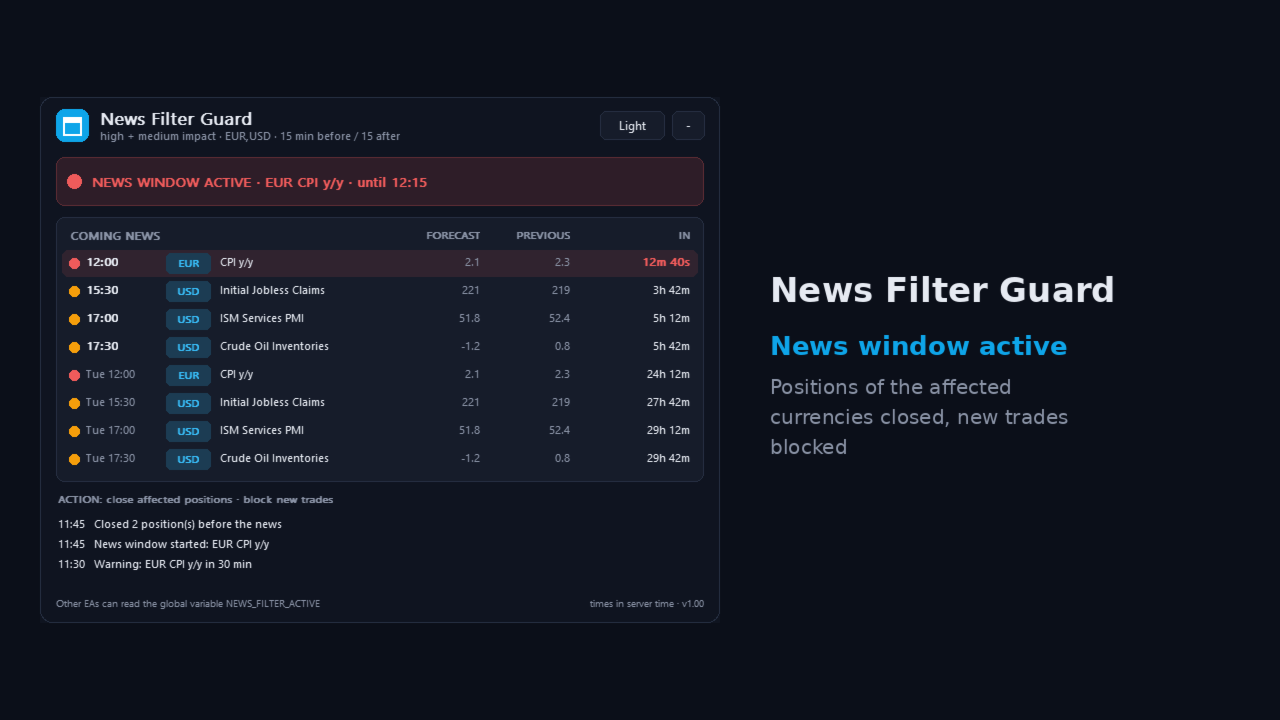
News Filter Guard protects your account during high impact news. It reads the economic calendar that is built into MetaTrader 5, warns you before important news and can close trades, delete pending orders and block new trades during the news window. It works next to any EA or manual trading.

Why

Big news like NFP, CPI or interest rate decisions can cause large spikes and slippage. Many prop firms also do not allow trading around high impact news. News Filter Guard watches the calendar for you.

Features

  • Uses the built-in MT5 economic calendar - no web request, no DLL, no extra setup
  • Choose high impact only, or high and medium impact news
  • Currencies: automatic (the currencies of the chart symbol), your own list, or all
  • Keyword filters: only news containing words (e.g. CPI, Payrolls, Rate) or ignore news containing words
  • News window: set minutes before and after the news
  • Action when the window starts: alert only, close trades of the affected currencies, or close all trades
  • Delete pending orders when the window starts
  • Block mode: trades opened during the news window are closed
  • Warning a set time before the news, as pop-up and/or push notification to your phone
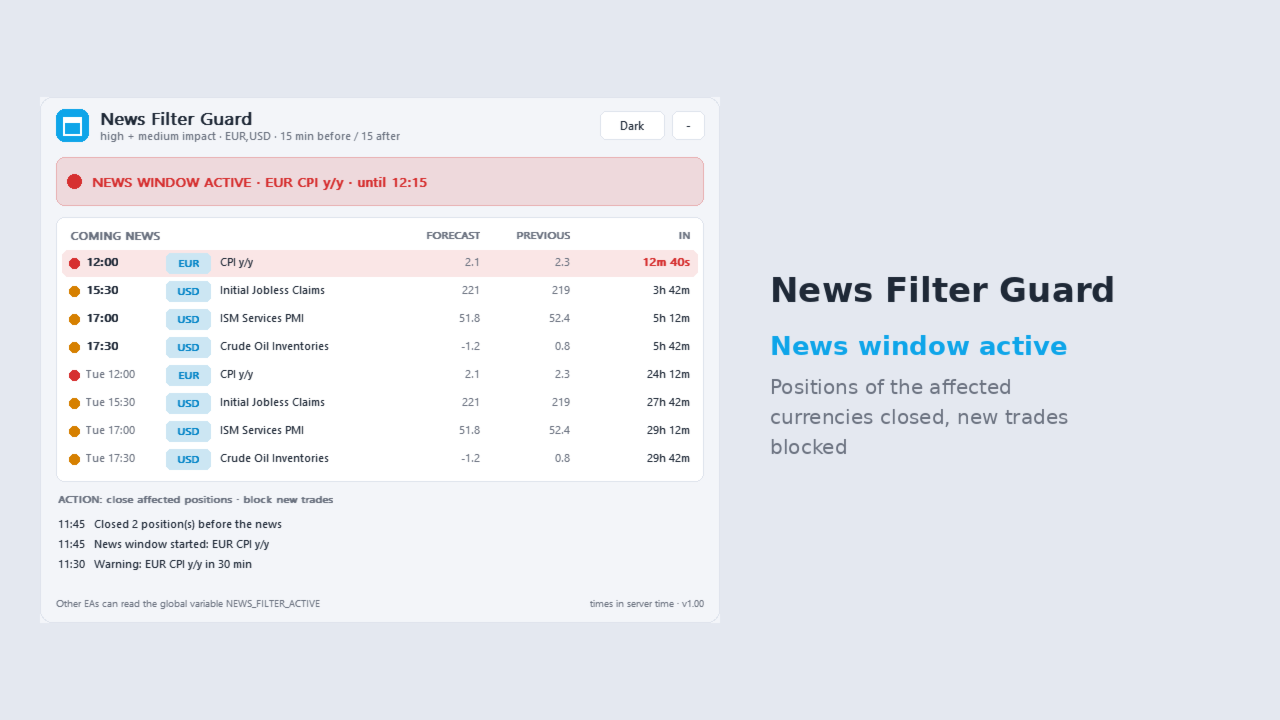
  • Panel with a countdown to the next news and a list of the coming events
  • Sets the global variable NEWS_FILTER_ACTIVE = 1 during the window, so your own EAs can read it and pause
  • Dark and light theme, can be minimised

How to use

  • Attach the EA to one chart. It watches the whole account.
  • Choose the action. Start with "alert only" and check the list of events, then switch to closing if you want.
  • Enable Algo Trading if you use a closing action.

Important

  • The economic calendar is not available in the Strategy Tester. In the tester the EA uses sample events so you can see how it works.
  • Calendar times come from MetaQuotes. Please check that your terminal has an internet connection so the calendar is updated.

Questions or problems? Send me a private message, I am happy to help.

Recommended products
OG2 Trading Assistant is a comprehensive trading panel for MetaTrader 5, designed to simplify the manual and semi-automated management of your positions directly from the chart. Key features: Risk management: automatic position size calculation based on a defined risk amount Automatic break-even: secures your positions once a specific risk/reward ratio is reached Partial Take Profit: closes part of the position at a first target while letting the remainder run to a second target Trai
SMG Guard Pro
Tanawut Wongmanee
Smart Money Guardian The Ultimate Trade Manager & Equity Protection Expert Transform your manual trading with professional-grade discipline. Smart Money Guardian is not just a tool; it is your "Digital CEO" that manages every trade with mathematical precision, protecting your capital from emotional decisions and unexpected market volatility. ️ Why Choose Smart Money Guardian? Most manual traders fail due to a lack of exit discipline and poor risk management. This EA solves that by automating
Reselling the E-mini Nasdaq (ENQ) Level 1 futures dataset sourced from CQG Data Factory. This dataset covers only ENQ futures and excludes other trading instruments. The dataset spans the period from January 1, 2020, to April 30, 2026, with a total compressed file size of 37.5 GB. No data is available outside of this specific timeframe. The official price on the CQG Data Factory website is $2,081.70. This dataset contains only Level 1 tick-by-tick quote and volume information; it does not in
FREE
Chart Navigator Pro
ELITE FOREX TRADERS LLC
Introducing the   Elite Chart Navigator   — your ultimate MetaTrader 5 Expert Advisor designed to revolutionize multi-symbol trading with seamless chart navigation and superior usability. Product Overview The   Elite Chart Navigator EA   is a sophisticated trading utility enabling rapid switching between multiple trading pairs through an intuitive on-chart button interface. Built for professional traders managing numerous instruments, this EA dramatically improves workflow efficiency, ensuring
Managing Trades With Moving Average EA : Many Traders like using Moving Averages for trend confirmation , and timing Entry and Exits . ​ With Semi- Automatic Moving Average EA we provide effective way to manage open trades as per your Moving average strategy and uses MA as trailing stop loss.  ​ EA considers only closing price of candle therefore avoids stop outs caused by sudden  price fluctuations and helps to stay in trend longer.  ​ You can decide which MA to use and various settings of MA 
Quick start (2 minutes) Drag the utility onto the chart of the symbol you trade. "Allow Algo Trading" can stay off: it never sends orders. The mini HUD shows the live spread. Click Open for the full panel. Tabs on top: Session · Trades · News . Small pills below choose the view. News › Broker profile : how far your broker widens the spread on NFP, CPI and rate decisions, ready after about one minute. Details › HTML report : a one-page summary you can open in any browser. Unsure what a value mea
Bneu AI Sentinel Pro
Marvinson Salavia Caballero
``` Bneu AI Sentinel — AI Risk Enforcement for MetaTrader 5 Sentinel is a risk management utility for MetaTrader 5 that monitors all trades on your account from any EA or manual trading. The utility enforces configurable limits through a 6-layer protection system, uses cloud-based analysis to detect trading behavior patterns, and includes a kill switch that closes all positions when limits are breached. What It Does Sentinel runs alongside all your EAs and manual trading. It monitors every
QUANITION EA PERFORMANCE DASHBOARD PRO — your trading on one screen. Which robot is carrying the account, which one is bleeding, and what the months behind them look like, drawn over your chart. A balance is an average, and averages hide things. This reads your closed trades and splits that single number back apart, by Magic Number. This is the free edition. It runs on a live chart, on your real account, not only in the Strategy Tester. FIRST USE In MT5, sign in to your MQL5 account under Tools
FREE
Professional Trade Panel — All-in-One Smart Trading Tool This is a professional visual trading panel designed for the MetaTrader platform. It consolidates the most frequently used trading operations into a single compact and draggable interface, significantly improving execution efficiency and reducing the risk of misoperations. Core Features One-Click Close All: Close all open positions on the current symbol with a single click. The button displays real-time total floating profit and loss s
Galaxy X Quantum Edge
Gezani Paulus Nkuna
GALAXY X [QUANTUM EDGE] is an advanced MetaTrader 5 automated trading robot designed around the Smart Money Concepts (SMC) strategy, using market structure, swing points, order blocks, Fair Value Gaps (FVG), liquidity/sweep confirmations, and trend analysis to identify potential high-quality trading opportunities. The robot is designed to adapt to changing market conditions by monitoring volatility and market regimes, adjusting its trading frequency and risk exposure accordingly, while incorpora
Max Lot Limiter with Auto Close Automated Risk Management for MetaTrader 5 Max Lot Limiter with Auto Close is an automated risk management Expert Advisor designed for MetaTrader 5. The EA continuously monitors the combined trading volume of open positions across all symbols on your trading account. When the configured maximum total lot limit is exceeded, the EA automatically initiates an emergency closing procedure and attempts to close ALL open positions on the account, regardless of whether th
ScalpZone Straddle Hunter
M Vicky Mosafan
5 (3)
SCALPZONE QUANTUM HUNTER EA v5.00 — Institutional Breakout & Volatility Engine for Gold (XAUUSD) ScalpZone Quantum Hunter v5.00 is a fully automated quantitative trading system engineered specifically for Gold (XAUUSD). It combines an Adaptive M15 Donchian Range Channel engine, an Institutional H1 Trend Momentum Filter, and a 5-Stage Precision Profit Ratchet to capture high-velocity breakout moves while protecting capital against noise and whipsaws. Why ScalpZone Quantum Hunter v5.00? Unlike co
Your model is only as good as your data — and in machine learning, data preparation is 80% of the work. The unglamorous, error-prone 80%: aligning timeframes, engineering features, building labels without leaking the future, flagging news events, measuring true spread. Most quant projects die here, quietly, before the first model ever trains. Multi-TF Data Grabber PRO does that 80% for you in one click — and exports it as a clean, deterministic, ML-ready CSV. This is the professional pipeline b
Buffer Reader For MT5
Mounir Cheikh
2.67 (3)
The Buffer Reader will help you to check and export the custom indicators buffers data for your current chart and timeframe. You can select the number of buffer and historical bars to read/export. The data can be exported in a CSV format and the files will be stored in the folder:   \MQL5\Files . How it works Put the number of buffers to read in the Buffers_Total input parameter. Put the number of rows to display in the Rows_Total. Choose the CSV separator in the parameter. Copy the correct nam
FREE
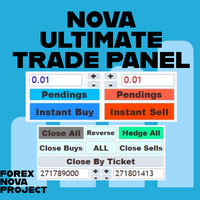
I think you want to use many beautiful features of the Metatrader platform in one place and without missing out. We have designed a trading panel just for you. Meet all the magical features you missed. Nova Ultimate Trade Panel offers you the best and convenient trading experience! It is an auxiliary panel that works extremely fast and is coded to fulfill all your requests. You can easily use it in all your trade transactions and take advantage of all its features at the highest level. D
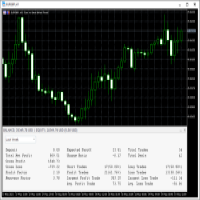
This   Trading Statistics Indicator   gives you an overview of your trade statistics for a selected period. You can set different periodsand filter for Symbols and magics to analyse your trading success. You can also create charts for Balance/Equity, MFE and MAE Periods: Total Time Today Yesterday This Week Last Week This Month Last Month This Year Last Year This Trading Statistics Indicator is still work in progress. In the next versions I will add telegram and email notifications and some more
Account PL Performance Dashboard Pro Know exactly where you stand — at a glance. Account PL Performance Dashboard Pro is a clean, professional on-chart performance panel that shows your closed trade results broken down by multiple time periods — all in one place, updated in real time on every tick. Stop switching to the History tab or running reports. Everything you need to track your daily, weekly, and long-term performance is right on your chart — always visible, always current. What It Sho
Professional MT5 to Telegram trade notifier with real-time trade alerts, partial/full close reports, scheduled performance statistics, multi-year monthly reports, quarterly/yearly summaries, Max Drawdown, Profit Factor, Win Rate, and transparent MT5/TWR-style calculations. Falqonea Telegram Trade Notifier MT5 is a professional MetaTrader 5 to Telegram notification and reporting utility. It helps traders, EA users, signal providers, PAMM managers, copy-trade providers, money managers, portfolio m
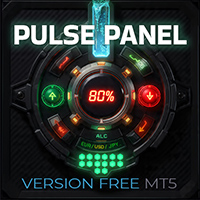
PulsePanel FREE – The exact same clean, professional and powerful dashboard as the Pro, completely free so you can test it thoroughly before upgrading. Limited to USDCHF and GBPNZD , this free edition gives you full, unrestricted access to every core feature: What You Get in the FREE Version One-click instant execution (buy/sell) Real-time currency strength meter Precise momentum scanner Watchlist with trend, momentum and conviction Live position tracking: net P&L, dynamic risk/reward ratio, sto
FREE
Custom Alerts MT5
Daniel Stein
5 (9)
Custom Alerts: Monitor Multiple Markets and Never Miss a Key Setup Overview Custom Alerts is a dynamic solution for traders who want a consolidated way to track potential setups across multiple instruments. By integrating data from our flagship tools—such as FX Power, FX Volume, FX Dynamic, FX Levels, and IX Power— Custom Alerts automatically notifies you of crucial market developments without juggling multiple charts or missing prime opportunities. With support for all asset classes your brok
TrendSync MTF Dashboard
Juliano Guzlinki Pacheco
TrendSync MTF Dashboard displays the trend direction of up to 10 timeframes, chosen by the user, in a single panel on the chart. It helps the trader check whether the timeframes agree before making a decision. Each timeframe is shown as UP, DOWN or NEUTRAL, with its own color. A summary line called SYNC shows how many timeframes point in the same direction. The indicator can also send an alert when the timeframes align. Selecting the timeframes Up to 10 timeframes can be enabled, from M1 to MN1.
FREE
Free Windows Telegram Bridge Required SENDORIQ Telegram Signal Copier MT5 requires the free SENDORIQ Telegram Bridge for both Bot API and MTProto operation. The Bridge is installed separately on Windows x64 and must run while Telegram messages are received. The SENDORIQ Control Center is not required. The MQL5 Market product is the MetaTrader 5 Expert Advisor. The free Bridge receives messages from authorized Telegram sources, applies source profiles and deterministic parsing, and transfers vali
One Man Army Pro
Steven David Macswayne
Thank you for checking out One Man Army Pro USE THE DEMO FEATURE - Start with $10000 with 0.02 lots on any pair and any time frame and watch the profit come in. **PAIRS**      Look for ranging pairs Such as USD Pairs **Timeframe**   15 m (Recommended) **Lots**       0.05 for every $ 1000 in your account **LIVE SIGNAL COMING SOON** Come trade with us: https://discord.gg/KrZ8rqWEJ5 Variables: (See Screenshots for a recommended settings)  Mode_Of_Strategy: Use only Strategy_4 – This is the lat
One Click Complete Hedge Protection
AL MOOSAWI ABDULLAH JAFFER BAQER
The trading limiter that stops you from breaking your own daily loss and trade limits. • Please test the product in the Strategy Tester before purchasing to understand how it works. • If you face any issues, contact me via private message—I’m always available to help. • After purchase, send me a screenshot of your order to receive a   FREE EA   as a gift. News is thirty seconds away. You have six positions open across four pairs, some long, some short. You do not want to close them — you have
BVCandleStream
Katsura Yamanouchi
Product name: BVCandleStream Overview Background service that automatically creates custom tick-based symbols (equal-tick bars) for scalping and price action analysis. It converts raw ticks of standard symbols into custom bars with a fixed number of ticks per bar, so you can apply any standard MT5 indicators or EAs to these synthetic tick charts. Key Features 1. Tick-Based Bar Generation Monitors the symbol of the open chart and automatically groups ticks into bars at the specified count ( InpT
FREE
BreakoutMatrix Pro
Nadjib Amari
5 (2)
BreakoutMatrix Pro — Institutional-Grade Breakout System BreakoutMatrix Pro is an automated, institutional-grade breakout trading system designed to capitalize on market momentum. While it is highly optimized as a Gold (XAU/USD) trading machine, its universal architecture allows it to adapt to any major symbol. Forget endless optimization. The core strategy relies on a single master input: The Volatility Scale Factor . Backtest Highlights (Jan 2025 – March 2026) - XAUUSD 1H - Screenshots atta
NTS Investor Reader
Janitha Sandaruwan Amaradasa Wickramasingha Arachchilage
Read-only trade export tool for MT5 investor accounts NTS Investor Reader is a lightweight companion EA for NTS Local Copier . It runs on an read-only / investor login and writes your open positions to the shared file in the same format used by the NTS Local Copier Master. No trade execution. No OrderSend. No copying logic. It simply reads open positions and outputs them for the Slave EA to follow. What it does Reads all open MT5 positions safely from an investor account. Writes them to the shar
FREE
Easy Cal EA
Miss Supasiri Benjakunya
Hello :') I am a trader who trades many currency pairs: Forex, Metals, Indices. And I trade multiple timeframes using demand supply zones. As a result, each trade I have to recalculate lot sizes because my stop loss distance is not the same depending on the zone size. So I created this EA to help calculate each of my trades. By choosing whether to set the risk as a dollar amount or Percent Risk and then drag Entry line, SL line, TP line to the desired prices. The EA will automatically calculat
CurrencyTrader
Antonio Renteria Arce
This tool has been designed for macroeconomic investors. It allows you to observe and operate currency indices that are more uncorrelated instruments than currencies, that do not share the same noise level as pairs and are totally uncorrelated with each other. CurrencyTrader is a tool that allows you to trade the DXY, EURX, JPYX, GBPX, CADX, AUDX, CHFX and NZDX currency indices Currently I use this tool for my swintrading in darwinex  MACRO for MetaTrader 5 - Antonio Renteria Arce I have left
Daily Trading Limiter
AL MOOSAWI ABDULLAH JAFFER BAQER
5 (8)
• Please test the product in the Strategy Tester before purchasing to understand how it works. • If you face any issues, contact me via private message—I’m always available to help. • After purchase, send me a screenshot of your order to receive a FREE EA as a gift. Daily Trading Limiter — the rule you cannot break Every trader knows the number. Three trades. Two percent. One bad day and stop. And every trader has watched themselves take the fourth trade anyway. The problem was never knowing th


Buyers of this product also purchase
Trade Assistant MT5
Evgeniy Kravchenko
4.43 (216)
It helps to calculate the risk per trade, the easy installation of a new order, order management with partial closing functions, trailing stop of 7 types and other useful functions. Additional materials and instructions Installation instructions - Application instructions Line function -   shows on the chart the Opening line, Stop Loss, Take Profit. With this function it is easy to set a new order and see its additional characteristics before opening.   Risk management  - The risk calculation
FarmedHedge Pair Trading Dashboard
Tanapisit Tepawarapruek
5 (7)
Farmed Hedge Yield Farming | All Markets (Manual - Hybrid - Semi/Automated EA) VERIFIED TRADING RESULTS - Farmed Hedge Yield Axi Copy:  https://www.mql5.com/en/signals/2356376 - Farmed Hedge Yield Exn Copy:   https://www.mql5.com/en/signals/2356404 - Farmed Hedge Yield V Copy:  https://www.mql5.com/en/signals/2357156 IMPORTANT NOTICE: FarmedHedge is a MANUAL-FOCUSED TRADING UTILITY ,not a fully automated EA. Results shown on this Signal include manual trades and overall strategic management.
Forex Trade Manager MT5
InvestSoft
4.98 (689)
Trade Manager MT5 is an advanced position size calculator and trade management tool for MetaTrader 5, designed to help traders plan trades faster, control risk more precisely, and manage open positions directly from the chart. It combines order placement, risk based lot calculation, Stop Loss and Take Profit management, Break Even, Trailing Stop, Partial Close, Equity Protection, and external trade management in one panel. Whether you trade forex, indices, metals, commodities, crypto, or future
Telegram to MT5 MultiChannel Copier
Sergio Marquez Uroz
4.68 (22)
Telegram to MT5 Multi-Channel Copier   automatically copies trading signals from your Telegram and Discord channels straight to MetaTrader 5. No bots, no browser extensions, no manual copying. A signal arrives in Telegram or Discord and the EA opens the trade in your terminal within seconds. And before you copy a channel, the built-in backtester shows you what that channel would have done in your account. The product has two components: a Windows application that listens to your Telegram channel
Local Trade Copier EA MT5
Juvenille Emperor Limited
4.94 (150)
Local Trade Copier EA MT5 is a fast and flexible trade copier for copying and managing trades between multiple MetaTrader 5 accounts on the same Windows computer or Windows VPS. It combines local trade synchronization with Receiver-side controls for lot sizing, risk management, trade filtering, symbol mapping, trade management and account protection. Set up your Transmitter and Receiver terminals in about 1 minute and copy manual or EA trades between accounts at the same or different brokers. U
TradePanel MT5
Alfiya Fazylova
4.88 (172)
Trade Panel is a multi-functional trading assistant. The app contains over 50 trading functions for manual trading and allows you to automate most trading tasks. Application instructions: https://www.mql5.com/en/blogs/post/756482 Trial version of the application for a demo account: https://www.mql5.com/en/blogs/post/750865 How to install the application: https://www.mql5.com/en/blogs/post/756239 How to test the application in visual mode: https://www.mql5.com/en/blogs/post/770277 How to install
News Trade EA MT5
Konstantin Kulikov
4.55 (11)
Present to you the useful robot that I have been using for several years. It can be used in both semi-automatic mode and fully automatic mode. >>> Chat <<< The program contains flexible settings for trading on the news of the economic calendar. It cannot be checked in the strategy tester. Only real work. Download the latest archive of settings: https://www.mql5.com/en/blogs/post/747929 Signals monitoring: https://www.mql5.com/en/signals/author/test-standart When creating your own sets of setti
Copy Telegram signals with your own trading rules Telegram to MT5 Signal Trader automatically copies text-based trading signals from public and private Telegram channels and groups into MetaTrader 5. Manage multiple providers and MT5 accounts from one desktop app, with individual risk and trade settings for each provider . No Telegram bot or API setup needed for copying. Simply sign in with your own Telegram account by phone or QR code and select the channels or groups you have already joined. Y
================================================================================ POC BREAKOUT - V20.72. Full Professional Grade Toolkit ================================================================================ POC Breakout is a full MetaTrader 5 trading dashboard for discretionary traders who want breakout signals, Point of Control (POC) context, volume profiles, order flow, market structure, news, alerts, and advanced trade planning in one professional workspace. Attached directly to you
Exp COPYLOT CLIENT for MT5
Vladislav Andruschenko
3.97 (35)
Professional Trade Copier for MetaTrader 5 Fast, professional, and reliable trade copier for MetaTrader . COPYLOT allows you to copy Forex trades between MT4 and MT5 terminals with support for Hedge and Netting accounts. COPYLOT MT5 version supports: - MT5 Hedge to MT5 Hedge - MT5 Hedge to MT5 Netting - MT5 Netting to MT5 Hedge - MT5 Netting to MT5 Netting - MT4 to MT5 Hedge - MT4 to MT5 Netting MT4 version Full Description +DEMO +PDF How To Buy How To Install How to get Log Files H
The product will copy all telegram signal to MT5 ( which you are member) , also it can work as remote copier.  Easy to set up, copy order instant, can work with almost signal formats, image signal,  s upport to translate other language to English Work with all type of channel or group, even channel have "Restrict Saving Content", work with  multi channel, multi MT5 Work as remote copier: with signal have ticket number, it will copy exactly via ticket number. Support to backtest signal. How to s
EA Overfitter
Stephen J Martret
5 (3)
That backtest looks great. But will it still be making money tomorrow, next week, next month? EA Overfitter re-runs your EA on 100 price histories it has never seen. One score tells you if the edge is real. A backtest tells you what an EA did on one price history — the one that happened to occur. What you cannot tell from it is how much of that result was the strategy and how much was the particular path. EA Overfitter answers that. It builds up to 100 synthetic price histories your EA has n
Power Candles Strategy Scanner - Self-Optimizing Multi-Symbol Setup Finder Self-optimizing settings work one chart at a time, and finding where they pay off right now means opening chart after chart. Power Candles Strategy Scanner runs the same self-optimizing engine as the Power Candles indicator on every symbol in your Market Watch, side by side. One panel ranks where it pays off: the winning strategy per symbol, its optimized Stop Loss and Take Profit. An alert fires the moment a fresh signal
Timeless Charts
Samuel Manoel De Souza
5 (9)
Timeless Charts is an all-in-one trading utility for professional traders. It combines custom chart types such as Seconds Charts and Renko with advanced order flow analysis using Footprints , Clusters , Volume Profiles , VWAP studies, and anchored analysis tools for deeper market insight. Trading and position management are handled directly from the chart through an integrated trade management panel , while Market Replay and Virtual Accounts provide environments for practicing trading skills and
VirtualTradePad One Click Trading Panel
Vladislav Andruschenko
4.59 (74)
Trading Panel for MetaTrader 5 — professional one-click trading from chart and keyboard A powerful trading panel for active manual trading, designed to open, manage, and close trades far faster and more efficiently than the standard MetaTrader interface. This panel is built for traders who want full control over positions, pending orders, profit management, and trading execution inside one professional workspace. This is not just another utility. It is a complete trading cockpit for MetaTrader
Anchor Trade Manager
Kalinskie Gilliam
5 (8)
Your EAs cannot see each other, but Anchor can. Anchor gives you one place to coordinate your EAs, manage risk, and decide when trading is allowed. It works alongside the trading bots you already use without any changes to them. The Problem One EA opens a trade. Then another starts trading. The next thing you know, you wake up to multiple grids built across your account. Each EA may be doing exactly what it was designed to do, but together they can place far more risk on your account than you in
Welcome to Entry In The Zone with SMC Multi Timeframe  —  COMPLETE SMC ANALYSIS SYSTEM — ALL IN ONE INDICATOR  Entry In The Zone with SMC Multi Timeframe  An indicator designed for market analysis based on Smart Money Concepts (SMC), displaying Market Structure, Key Zones (Order Blocks, Supply & Demand Zones, and Fair Value Gaps), Liquidity, and real-time BUY / SELL signals. It supports both Single-Timeframe and Multi-Timeframe analysis, along with the Confluence at Zone feature, which helps you
VirtualTradePad PRO SE MT5 — professional trading control center for MetaTrader 5 VirtualTradePad PRO SE is a premium chart-based trading panel and trade-management workspace for MetaTrader 5 . It is designed for traders who want faster execution, clearer position control, structured trade management, visual level planning and a professional workflow directly from the chart. This is not only a BUY / SELL panel. PRO SE combines manual trading, pending orders, position management, partial exits, b
Trade Indicator Assistant   is a powerful MT5 utility designed to turn indicators into automated trading systems. Its main feature is the ability to automatically detect an indicator’s   BUY and SELL signal buffers , without requiring you to know the buffer numbers, search through indicator settings, or modify the indicator source code. Bonus Indicator:   After purchasing Trade Indicator Assistant, contact me to receive   Trade Signal Pro   completely free as a bonus indicator. [Download Demo V
EA Auditor
Stephen J Martret
5 (7)
EA Auditor is an independent analysis tool for traders evaluating Expert Advisors and trading signals on MetaTrader 5. It audits backtest reports, reviews posted developer signals, and cross-verifies the two against each other to help traders assess strategies before committing capital. The MQL5 market offers a wide range of Expert Advisors from many developers, with varying approaches, quality, and transparency. EA Auditor provides a consistent, data-driven framework for reviewing them, answer
Trade Manager DaneTrades
Levi Dane Benjamin
4.13 (31)
DaneTrades Trade Manager is a professional trade panel for MetaTrader 5, designed for fast, accurate execution with built‑in risk control. Place market or pending orders directly from the chart while the panel automatically calculates position size from your chosen risk, helping you stay consistent and avoid emotional decision‑making. The Trade Manager is built for manual traders who want structure: clear risk/reward planning, automation for repeatable management, and safeguards that help reduc
MT5 to Telegram Signal Provider turns your trading account into a signal provider. Every trade action, whether manual, by EA or from your phone, is instantly sent as a message to Telegram. You can fully customize the format or use a ready-made template for quick setup. [ Demo ] [ Manual ] [ MT4 Version ] [ Discord Version ]     New: [ Telegram To MT5 ] Setup A step by step user guide is available. Key Features Ability to customize order details sent to subscribers You can create a tiered subs
RETAILBERG FOOTPRINT CHART PRO — Order-Flow Workspace for MetaTrader 5 Version 7.00  |  Professional System  |  31 tools  |  One chart A full 150-page illustrated User Manual is included. Please read the full manual to understand this feature packed footprint chart elements and ui. https://www.mql5.com/en/blogs/post/777982 DEMO / STRATEGY TESTER — PLEASE READ FIRST
Trader Evolution
Siarhei Vashchylka
5 (7)
" Trader Evolution " - A utility designed for traders who use wave and technical analysis in their work. One tab of the utility is capable of money management and opening orders, and the other can help in making Elliott wave and technical analysis. Manual (Be sure to read before purchasing) | Version for MT4 Advantages 1. Trading in a few clicks. Immediate and pending orders are available in the panel 2. Money management. The program automatically selects the appropriate lot size 3. Simplifies
DrawDown Limiter
Haidar Lionel Haj Ali
5 (23)
DrawDown Limiter v5.0 — Advanced Account Protection Controller DrawDown Limiter v5.0 is a client-side account protection controller designed to supervise your trading account and automatically react when configured risk, profit, news, schedule, rollover, or position limits are reached. It can monitor manual trades, automated strategies, multiple Expert Advisors, pending orders and floating positions from one dedicated chart. It can protect the complete account or be configured to supervise a spe
RS Trade Copier - the ultra-fast local trade copier with a real graphical interface. Stop typing account numbers manually. No more 200+ cryptic inputs. A reliable and flexible tool for copying trading operations between multiple MT5 and MT4 terminals. It suits experienced traders, signal providers, and individual investors. It enables trade synchronization from one or multiple Providers to one or multiple Clients with high precision and minimal latency. It supports simple automatic configuration
Trade Dashboard MT5
Fatemeh Ameri
4.94 (135)
Trade Dashboard simplifies how you open, manage, and control your trades, with built-in lot size calculation. It allows you to execute trades, manage risk, and control positions directly on the chart, with tools such as partial close, breakeven, and trailing stop. Designed to reduce manual work and help you stay focused on your trading decisions. A demo version is available for testing. Detailed explanations of features are provided within the MQL5 platform. Installation instructions are include
On-Chart Trade Assistant & Risk Management Panel Ergotick Trade Manager gives you a complete set of trading tools directly on your MetaTrader 5 chart: a trade panel with lot size calculator, visual R:R tool, and daily loss limit protection; a separate statistics panel that tracks your performance and past trades; and an economic calendar you can toggle with one click. Built for scalpers, day traders, and prop firm traders. Ergotick Trade Manager is fast , light on resources , and stable , so it
Zentral Trading Manager
Ray Zeanrik Parreno Fredeluces
5 (4)
Zentral Manager Your Command Center for Precision Trading — Now Stronger than Ever Take control of your trades like never before. Zentral Trading Manager is your all-in-one manual trading panel for MetaTrader 5 — built for scalpers, day traders, and serious strategy execution. Fully compatible with both Mac and Windows laptops. High-DPI safe. No more layout issues. Key Features (Latest 2025 Update): • One-Click Close – Instantly close Buy/Sell, winning/losing trades, or even half positions with
Master Your Trading Discipline   Stop losing your hard-earned gains to overtrading and emotional decisions. The Discipline Tool is your ultimate trading assistant, ensuring strict risk management in real-time. Key Protection Features: Advanced Drawdown Defense : Automatically halts trading if your daily drawdown exceeds a preset threshold (percentage or dollar amount). Real-Time Equity Lock : Safeguard profits by referencing peak equity, ensuring drawdown stays within control. Hard Profit Target
More from author
Trading Sessions Board shows the forex market sessions (Sydney, Tokyo, London, New York), the ICT killzones, a candle timer and the spread in one clean panel. Free to use. What you see Which sessions are open right now, with a countdown to the next open and close Session overlaps (for example London / New York) highlighted ICT killzones (Asian, London open, New York AM, London close, New York PM) in New York time Candle timer: time left until the current candle closes Current spread in points To
FREE
EA Performance Board shows the results of every Expert Advisor on your account in one clear panel on the chart. Each EA is identified by its magic number. Manual trades get their own row. What you see - Six summary tiles: net result, win rate, profit factor, number of closed trades, maximum drawdown of closed trades, open profit/loss. - A table with one row per EA: trades, win rate, profit factor, net result with bar, average win, average loss, maximum drawdown, longest loss streak, open profit
PnL Calendar Board shows your closed trading results as a calendar on the chart. Green days made money, red days lost money. The stronger the colour, the bigger the result. What you see - A month grid with the net result and number of trades for every day. - Week totals on the right side of each row. - Six summary tiles: month net result, trading days, best day, worst day, win rate of the days, average per trading day. - A bar chart of all 12 months of the year. Click a bar to open that month.
Risk Limit Board keeps an eye on the limits of your account, for example the rules of a prop-firm challenge. It shows how much of each limit is already used and warns you in time. What you see - A status strip: all limits OK, warning or limit reached. - Four gauges: today, this week, drawdown from the equity peak, margin level. Each gauge shows the value, the amount in account currency and how much of the limit is used, with a marker at the warning level. - The equity curve of the current day w
Trading Hours Board sorts your closed trades by weekday and hour and shows the result as a heat map. You see at once which hours bring profit and which hours cost money. What you see - A heat map weekday x hour. Choose what it shows: net result, win rate, number of trades or average trade. - Bars by hour and by weekday. - Six tiles: best hour, worst hour, best weekday, worst weekday, trades analysed, time basis. - Click a cell for details: trades, win rate, net result, profit factor, average tr
Exposure Board
Hussein Mohammad
Exposure Board shows what is open on your account right now and how much is at risk. It is made for traders who run several EAs or many positions at the same time. What you see - Six tiles: open positions, floating profit/loss, result if all stop losses are hit, positions without stop loss, margin used with margin level, largest currency exposure. - A table by symbol or by EA: positions, long and short lots, net lots, floating result, result at stop loss, positions without stop loss (marked), m
Prop Firm Guard protects your account from breaking the rules of a prop firm challenge or your own risk plan. It watches the whole account – all symbols, all EAs and manual trades – from one chart. What it does Daily loss limit: measured from the balance at the start of the trading day (or the higher of balance and equity, as many prop firms do). Maximum drawdown: static from the initial account size or trailing from the highest equity. Daily profit target (optional): locks in a good day and pau
Market Scanner Board shows the trend of many symbols on four timeframes in one clear table, so you see in seconds where the market is moving and where it is quiet. What you see for every symbol Price and day change in % Trend on M15, H1, H4 and D1: UP, DOWN or FLAT (price and fast EMA above or below the slow EMA) Trend bar: how many timeframes agree RSI on H1 (overbought and oversold values are coloured) RANGE: today's range in % of the average daily range (ATR D1). Values above 100 % are highli
Trade Manager Panel lets you open trades with one click and the correct lot size. You choose the risk in percent and the stop loss distance; the panel calculates the lot, sets stop loss and take profit with the order and manages the position for you. Order Risk in % of equity with + / – buttons, shown in money. Stop loss distance in points, take profit as a multiple of the risk (R). Lot size calculated from risk and stop loss, rounded to the broker's lot step. BUY and SELL buttons with live pric
Trade Signal to Telegram and Discord sends your trades automatically to a Telegram channel, group or chat, and to a Discord channel. Perfect for signal providers, trading groups, or simply to follow your own account on the phone. What is sent New trades: symbol, direction, entry price, stop loss, take profit and lot size Optional chart picture with every new trade Closed and partly closed trades with the result in pips and money Stop loss and take profit changes (for example "SL moved to break-e
Seconds Range Tick Chart builds second bars, range bars or tick bars from the real ticks of your broker and shows them on an own chart in MetaTrader 5. You can use all your indicators and EAs on this chart, like on any other chart. Bar types Seconds bars: for example 5, 10, 15 or 30 seconds (1 to 3600 seconds) - a closer look than M1 for scalping and entries Range bars: every bar has the same size in points - filters noise and shows clean trends Tick bars: a new bar after every N ticks - bars fo
Filter:
No reviews
Reply to review