YazanPro Pattern Scanner Trader
- Experts
-
Yazan Adnan Ramadan Ibrahim
 Algorithmic trader and MQL5 developer based in Jordan. I build Expert Advisors for MetaTrader 5 focused on gold (XAUUSD) and major FX pairs: multi-module confluence systems, short-hold scalping tools and manual trade panels. Each product is tested in the Strategy Tester on real ticks with
- Version: 1.3
- Updated: 2 November 2026
- Activations: 10
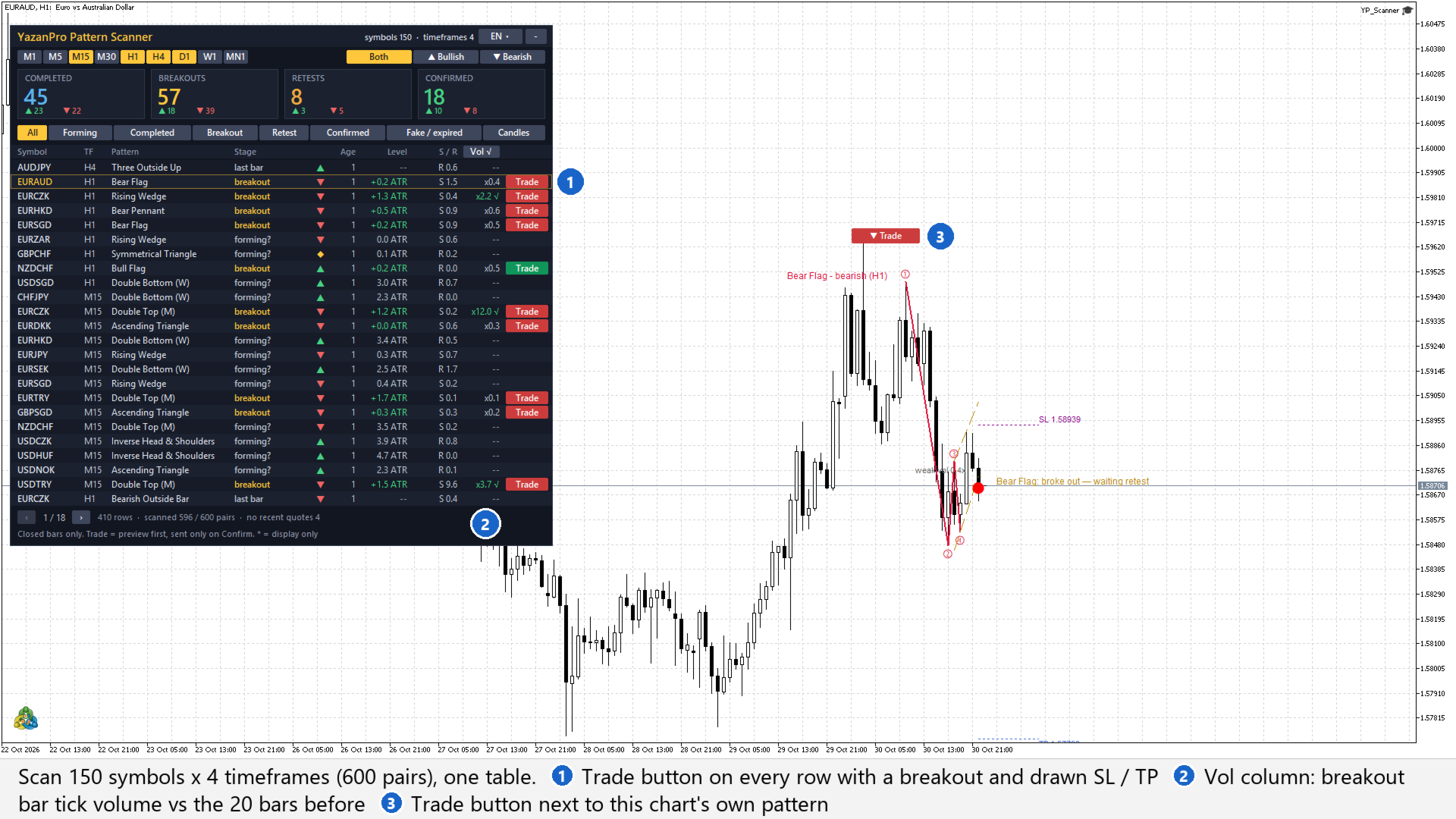
YazanPro Pattern Scanner Trader is a MetaTrader 5 Expert Advisor for placing chart-pattern trades by hand. It scans up to 150 symbols on your timeframes, lists every pattern with its stage, and puts a Trade button on each row with a breakout. One click prepares the order from the drawn pattern: side, stop loss, take profit and the lot for your risk. Nothing is sent until you press Confirm.
It is an order tool with a scanner, not a strategy. On a live chart it never opens a trade by itself.
The Trade button
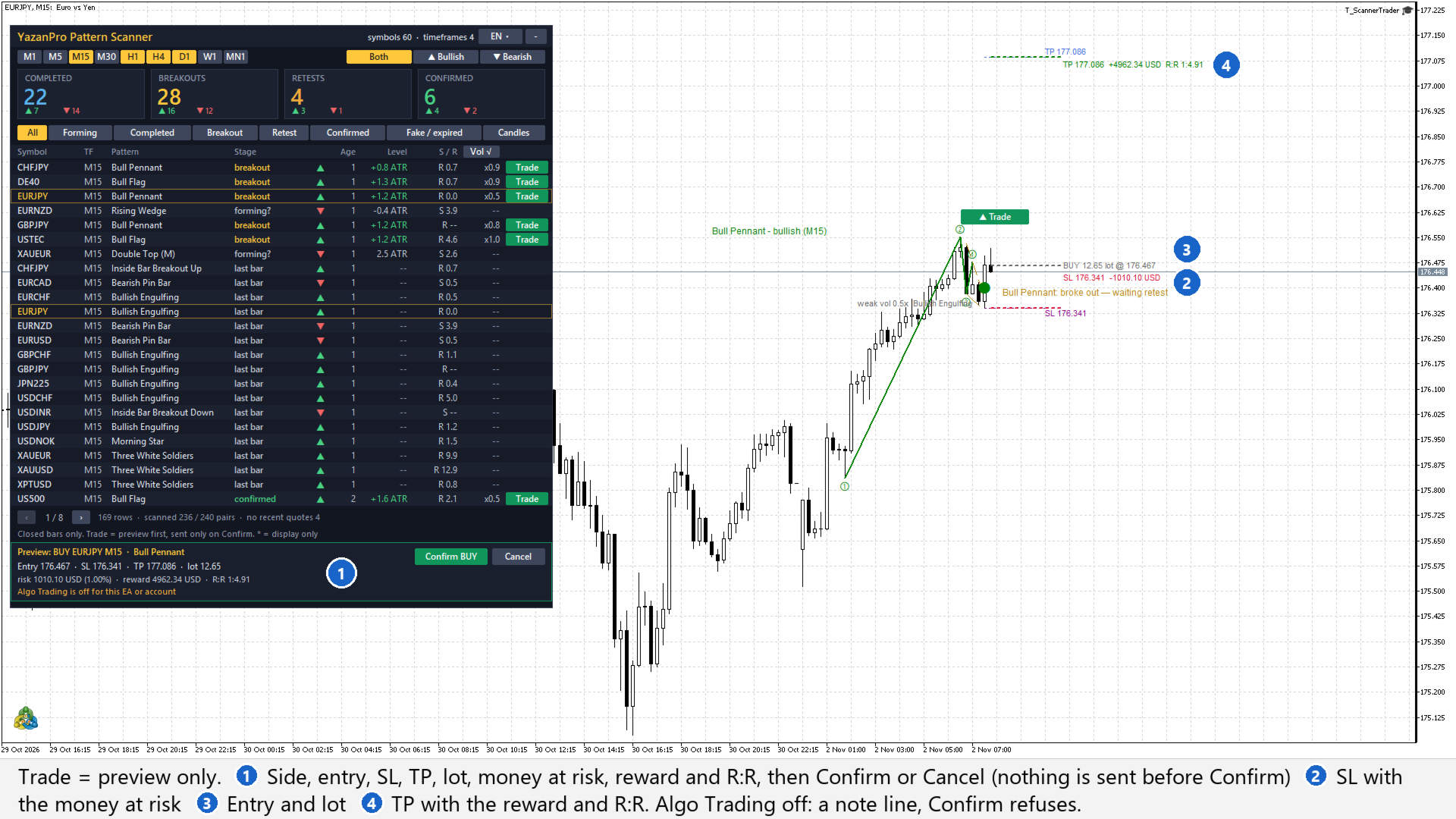
- Click Trade on a row, or the Trade button next to the pattern drawn on the chart.
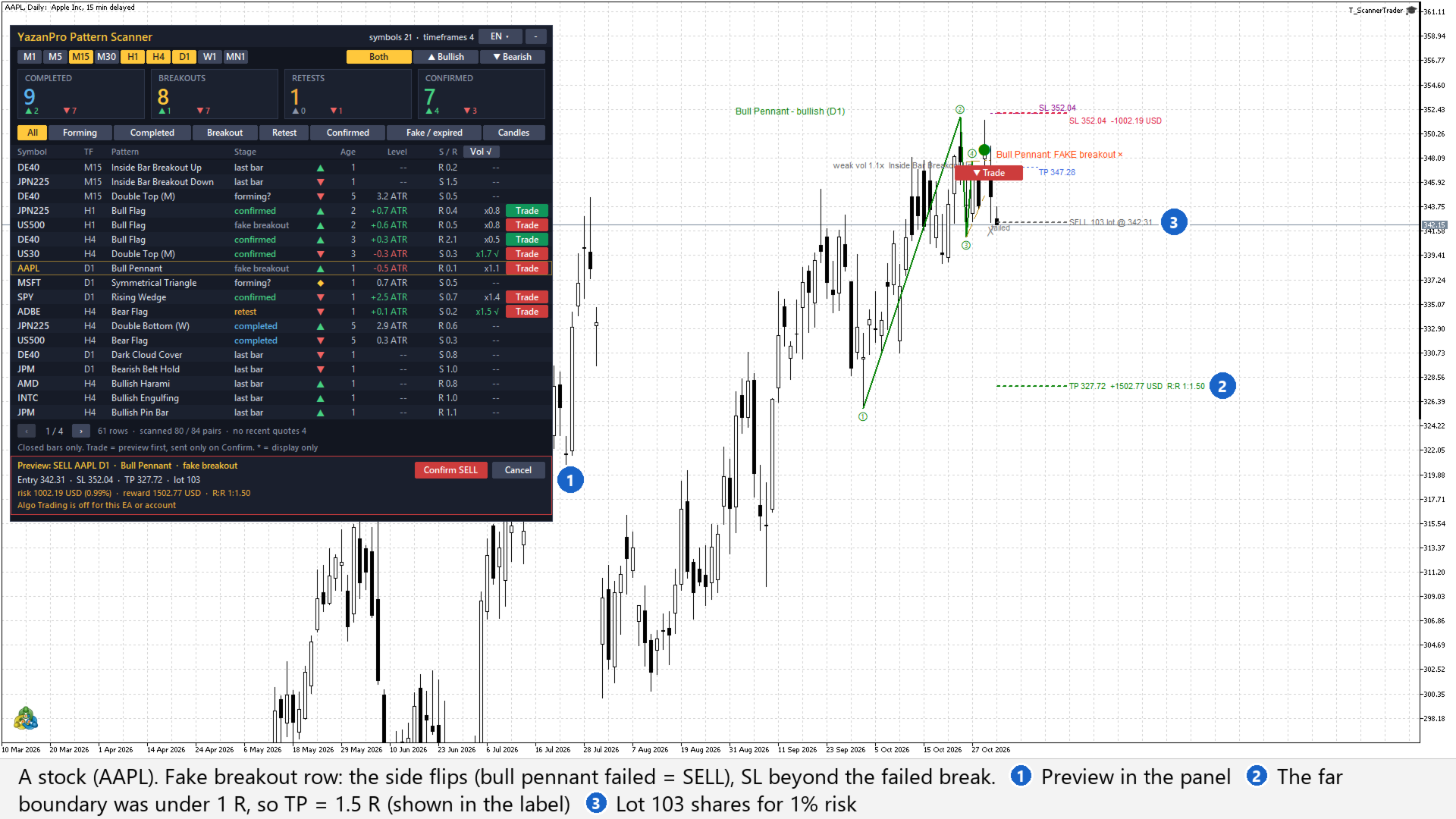
- The preview shows the side, entry, SL, TP, lot, the money at risk (and its % of the base), the reward and the R:R. On the chart of that symbol the three levels are drawn as lines with their amounts.
- Confirm sends a market order with that SL and TP. Cancel clears the preview.
- Confirm checks everything again at the current price. If the pattern changed in the meantime, you get a new preview, not an order.
Which rows can be traded
- Breakout, retest and confirmed rows: the side of the breakout. SL and TP are the stop and target guides drawn on the chart.
- Fake breakout rows: the opposite side (a bear flag whose breakdown failed gives a BUY). Stop beyond the extreme of the failed breakout, target at the far boundary of the pattern; 1.5 R instead when that boundary is less than 1 R away (the preview says so).
- Forming, completed, expired rows and candlestick rows have no Trade button.
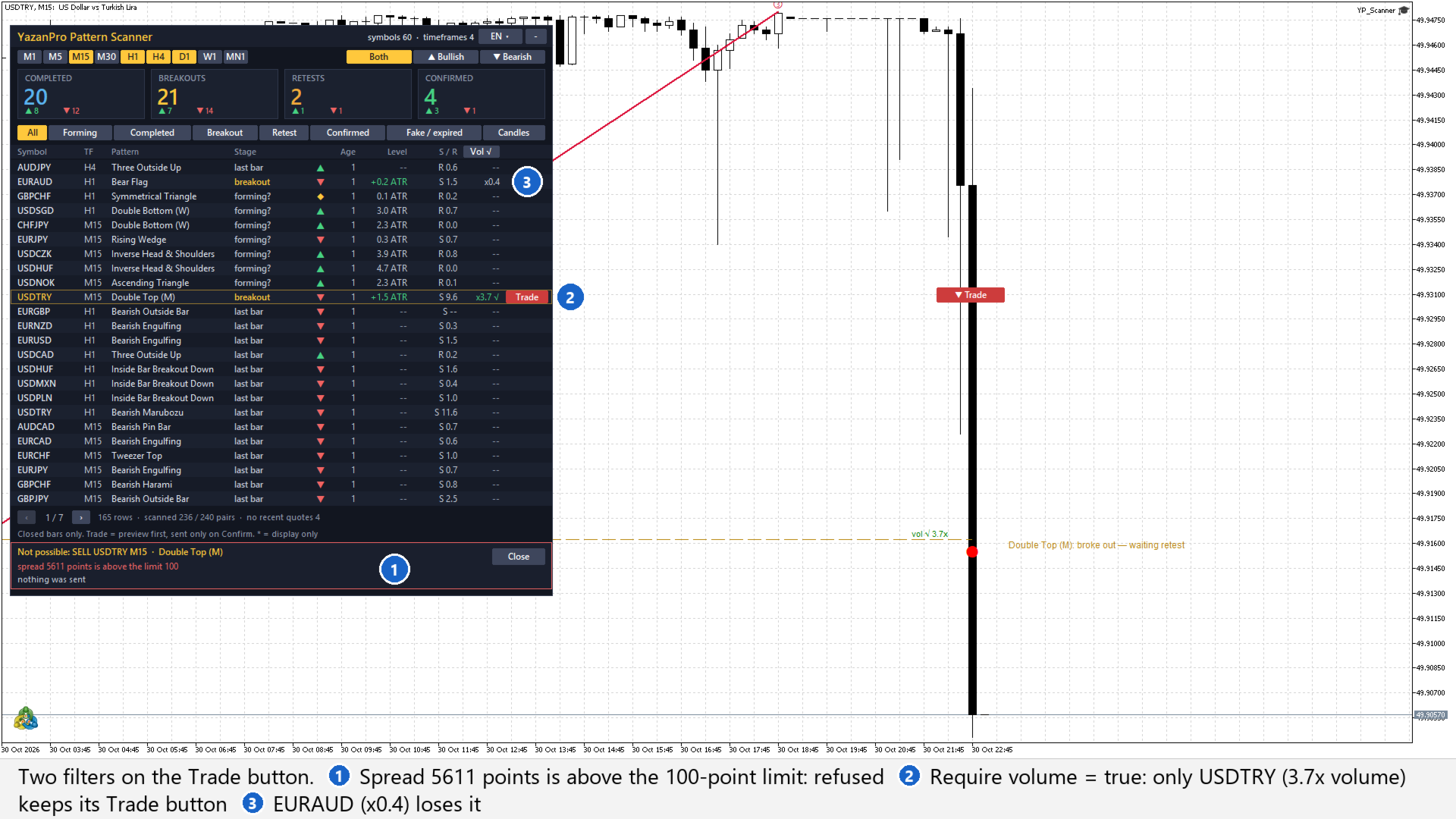
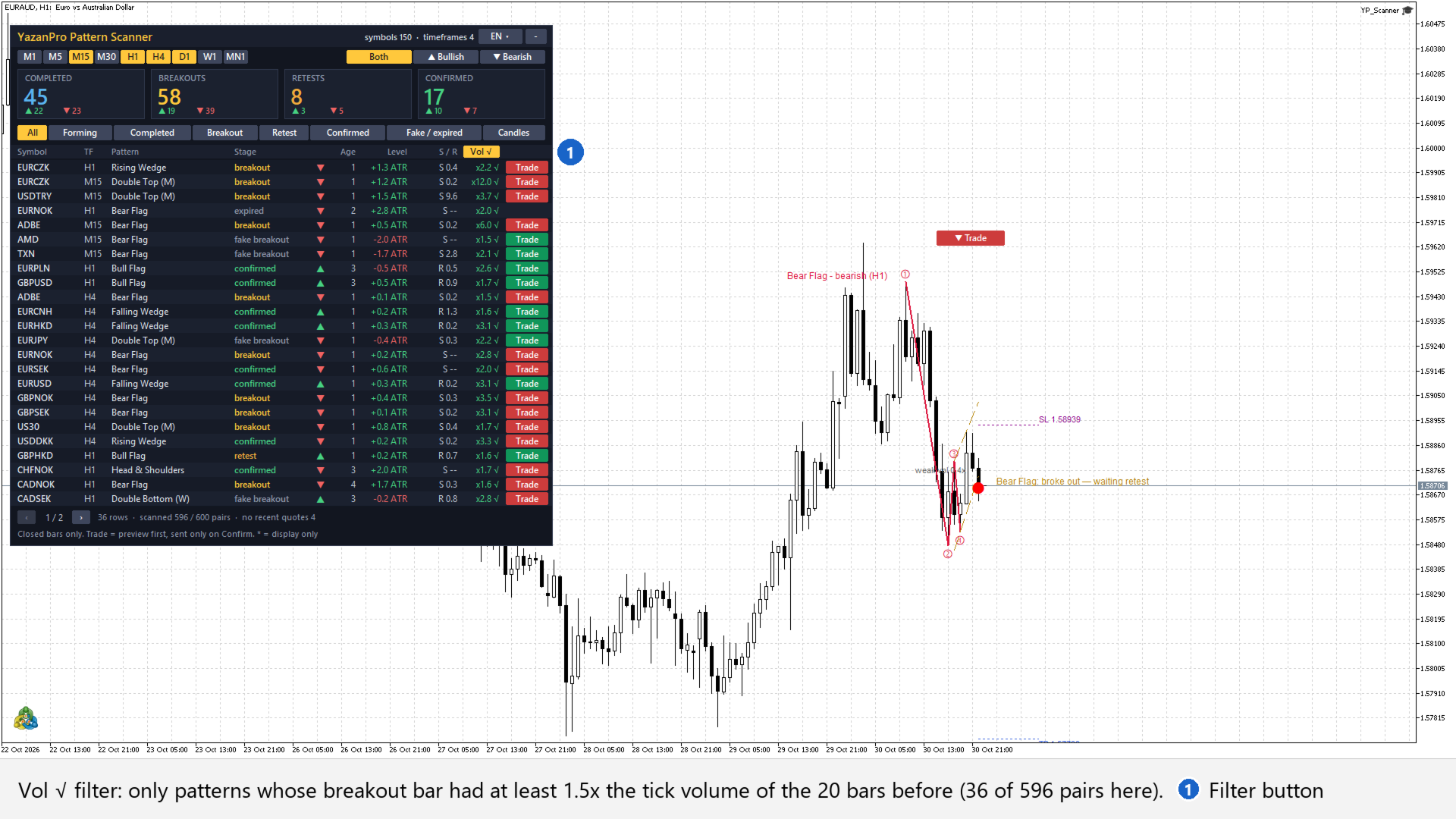
- Optional: Trade button only when the breakout bar had confirmed volume (the Vol column).
Lot size
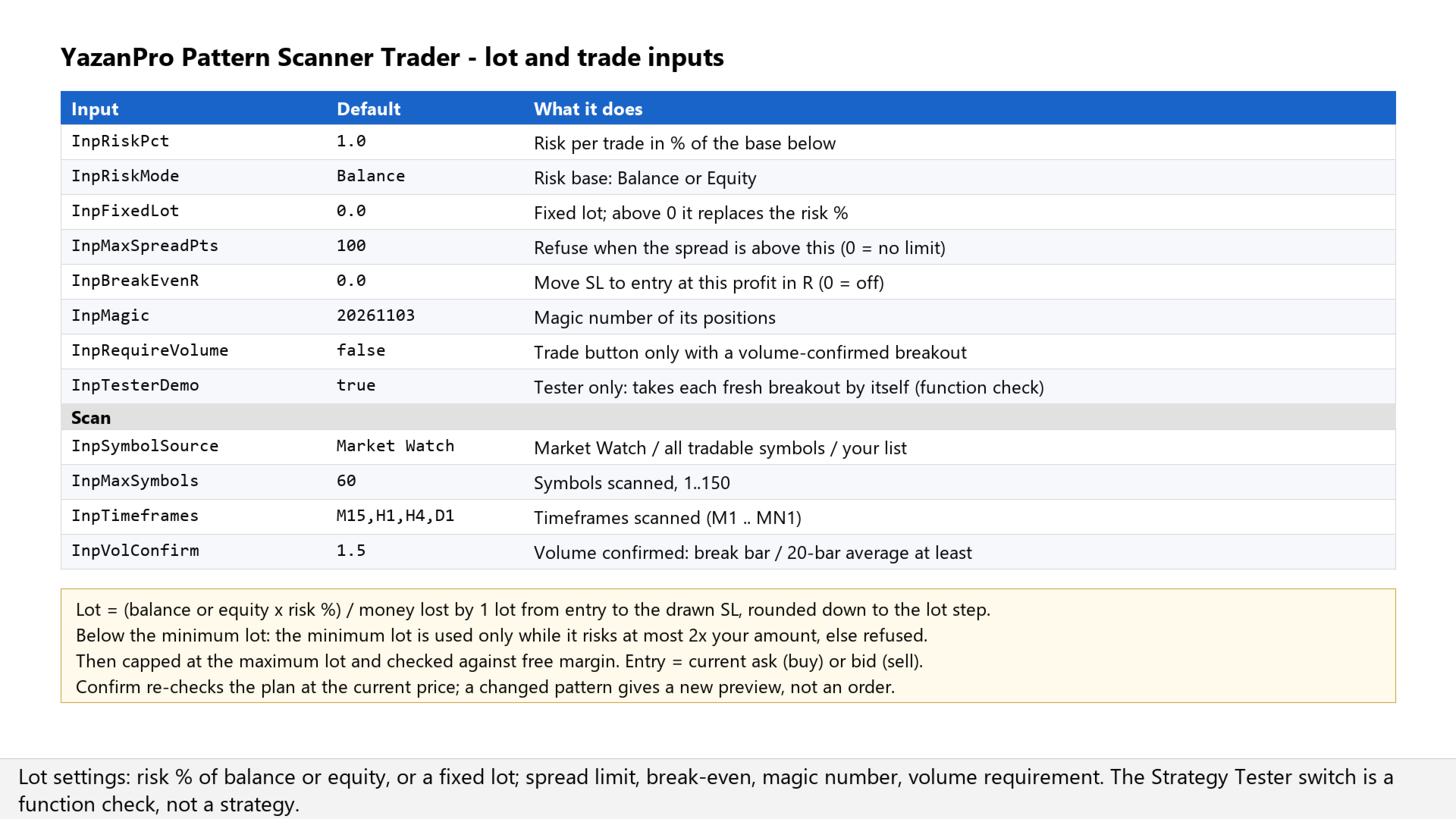
- Lot = (balance or equity x your risk %) / the money one lot loses from the entry to the SL, rounded down to the lot step. Or a fixed lot of your choice.
- The loss per lot comes from the terminal's own profit calculation for that symbol, so it works the same for forex, metals, indices and stocks.
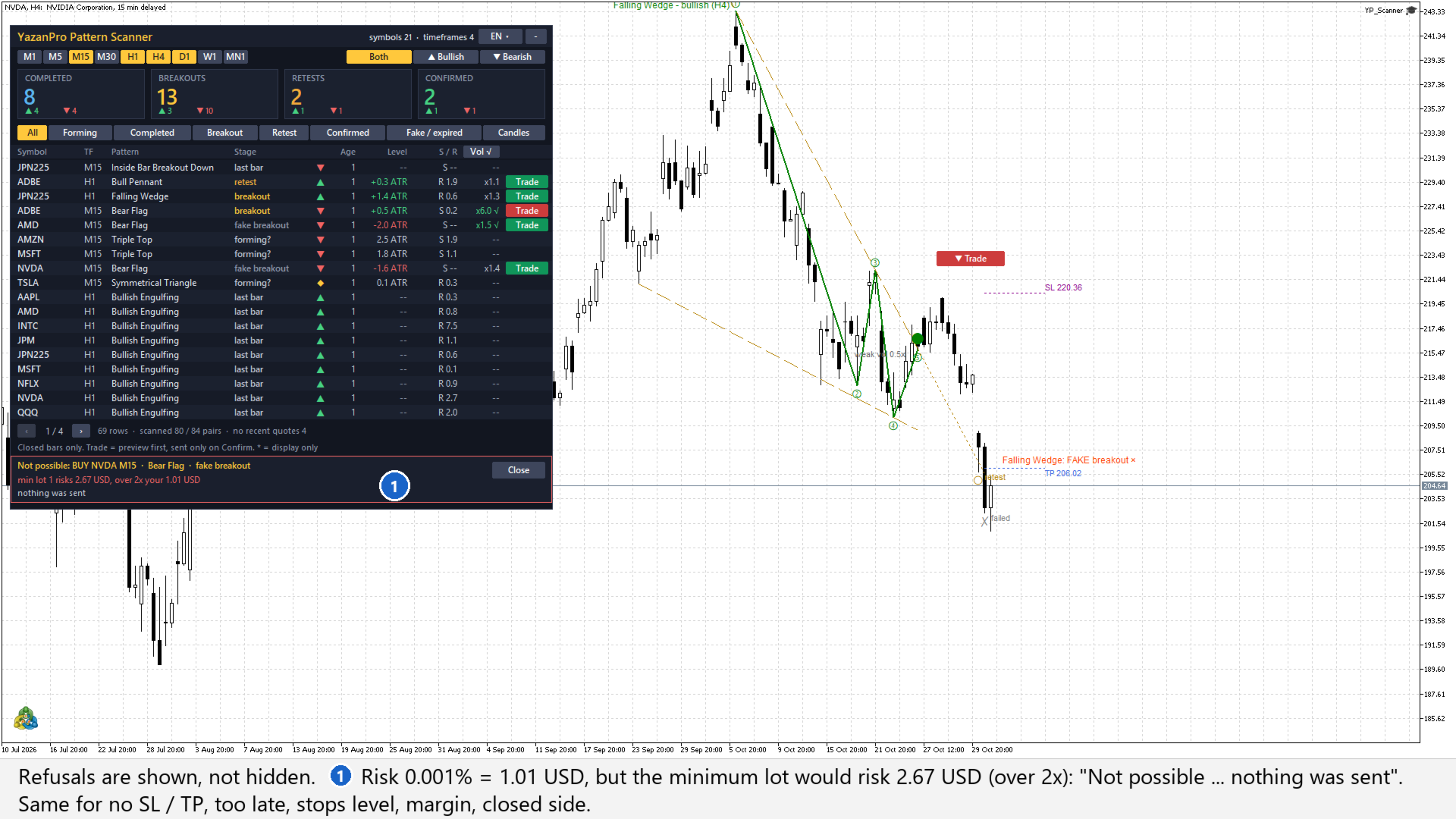
- Below the minimum lot: the minimum lot is used only while it risks at most 2x your amount; otherwise the trade is refused.
- Capped at the maximum lot and checked against your free margin.
What it refuses (shown in the panel, nothing is sent)
- No breakout with SL and TP on the row, or a side the symbol does not allow.
- Price already past the SL or the TP.
- SL or TP inside the broker's stops level.
- Spread above your limit.
- Minimum lot would risk more than 2x your amount, or not enough free margin.
- Algo Trading off for the EA or the account: the preview is still shown, Confirm refuses.
After the order
- Optional break-even: the SL moves to the entry once the trade is the chosen number of R in profit (positions with its magic number, while the EA runs).
- Positions carry their own magic number (20261103 by default) and the comment "YP Scanner" with the timeframe.
The scanner
- Market Watch, every tradable symbol of the server, or your own list; up to 150 symbols on any of M1 to MN1.
- Chart patterns with their stage: forming, completed, breakout, retest, confirmed, fake, expired. Double and triple tops and bottoms, head and shoulders, triangles, wedges, flags and pennants; rectangles, channels and cup and handle for display.
- 40 candlestick patterns on the last closed bar, the nearest support and resistance, the breakout volume.
- Filters by stage, direction and volume, count tiles, pages, a click on a row opens that chart; alerts and push notifications.
- Closed bars only. Light on the terminal: a few pairs per timer tick, each pair only on its own new bar.
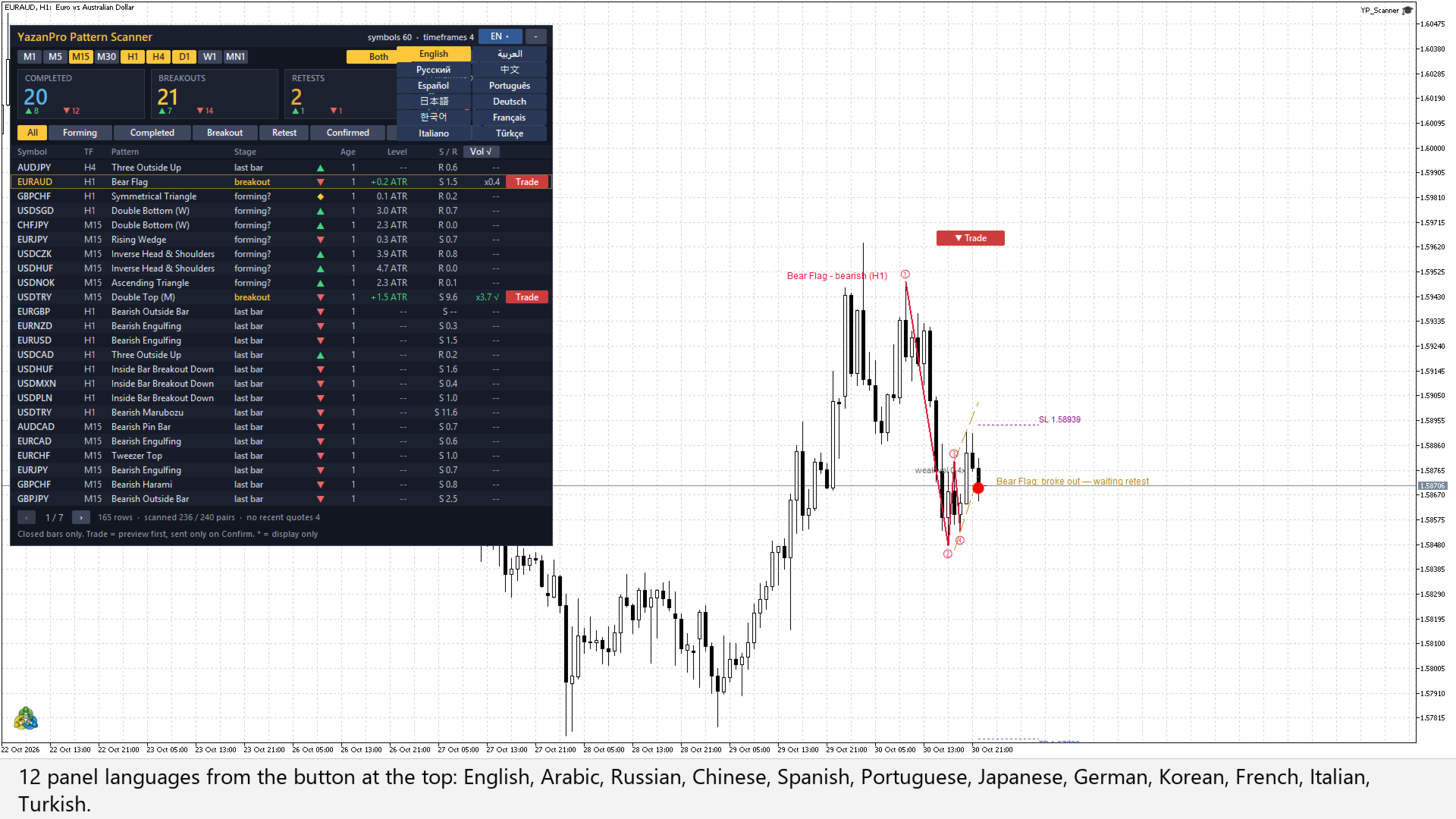
- 12 panel languages.
Who it is for
Traders who already trade chart patterns by hand and want the scan, the stop, the target and the lot in one place, with a check before every order.
How it reads the charts
- It reads closed bars only. A stage is decided on the bar that closed and does not change while the next bar is forming.
- The SL and TP are the guides of the pattern as drawn. The TP is a projection of the pattern, not a forecast.
- The seller's lab tested trading chart-pattern matches mechanically and found no edge: every strong match on 6 markets (H1, 2024-2026) gave 328 trades with a profit factor of 0.98, and a random side on the same entries did the same. Treat each Trade button as a prepared order, not as a signal.
- Strategy Tester: the scan runs on the tested symbol only. With "Strategy Tester: take each fresh breakout" on, it takes each fresh breakout and fake breakout by itself through the same checks, one position at a time. That mode exists to show the order path works in the tester; it is not a strategy and its result says nothing about future trades.
- No profit, accuracy or win-rate is claimed.
Inputs
Scan
- Symbols to scan: Market Watch (or: All tradable symbols on the server, Custom list)
- Custom list: symbols, comma separated: empty
- Max symbols scanned (1..150): 60
- Timeframes, comma separated (M1 M5 M15 M30 H1 H4 D1 W1 MN1): M15,H1,H4,D1
- Chart patterns with their stage: true
- Candlestick patterns on the last closed bar: true
- Nearest support / resistance column: true
- Symbol/timeframe pairs evaluated per timer tick (1..20): 8
- Volume confirmed: break bar tick volume / 20-bar average at least: 1.5
Table
- Stage filter shown first: All stages
- Direction filter shown first: Both directions
- Table rows per page (5..30): 18
- Click on a row: Switch this chart to it (or: Open it in a new chart)
Display
- Panel language: English (12 languages; also switchable on the panel)
- Panel X / Y, pixels from the top-left corner: 10 / 30
- Draw the pattern of this chart's symbol and timeframe: true
Alerts
- Alert: pattern completed (waiting for the breakout): true
- Alert: breakout: true
- Alert: retest of the broken line: true
- Alert: confirmed after the retest: false
- Alert: candlestick pattern: false
- Also send a push notification: false
Trade
- Risk per trade, % of the base below: 1.0
- Risk base: Balance (or: Equity)
- Fixed lot (> 0 = used instead of the risk %): 0.0
- Max spread in points (0 = no limit): 100
- Move the SL to the entry at this profit in R (0 = off): 0.0
- Magic number: 20261103
- Trade button only when the break bar volume is confirmed (Vol column): false
- Strategy Tester: take each fresh breakout / fake breakout by itself: true
Quick start
- Attach the EA to any chart and allow Algo Trading for it (needed for Confirm only).
- Set your risk per trade in the inputs (1% of the balance by default).
- Pick the timeframes and a stage filter, for example Breakout.
- Click Trade on a row. Read the preview: lot, risk in money, R:R.
- Confirm, or Cancel.
FAQ
Does it trade by itself?
Not on a live chart. Every order needs your Confirm. Only in the Strategy Tester does the demo switch let it take breakouts alone.
Why is there no Trade button on a row?
The row is not a breakout, retest, confirmed or fake breakout with a stop and a target, or "Trade button only when the break bar volume is confirmed" is on and the volume was below the bar.
Why does the preview say "Not possible"?
One of the checks failed; the line under it says which one (spread, stops level, minimum lot, margin, too late). Nothing was sent.
The row is for another symbol. Where are the lines?
The panel preview works for any row. The lines are drawn only on a chart of that symbol: click the row to switch the chart, then press Trade again.
Does it manage the trade?
Only the optional break-even. SL and TP sit on the broker's server, so the position stays protected if the terminal closes.
Does it repaint?
Stages are decided on closed bars. A "Forming?" pattern can change because its newest point is not confirmed yet; it has no Trade button.
What about the symbols it adds to Market Watch?
In "All tradable symbols" and list mode it adds the symbols it needs and takes them out again when it is removed; MetaTrader may keep a symbol while it still holds its data.
Trading carries a high risk of loss. This EA does not predict prices and does not guarantee any result. Chart patterns often fail, and the seller's own tests found no edge in trading them mechanically. Every order is your decision; check the preview before Confirm and use a risk you can afford to lose.