Nexus Chart Trader Advanced

O Nexus Chart Trader is an institutional-grade manual trading and risk management utility designed for active discretionary traders, scalpers, and execution managers who demand absolute speed, precision, and real-time risk visibility on MetaTrader 5.

Built entirely in 100% native MQL5 without slow external dependencies or heavy DLLs, Nexus Chart Trader guarantees sub-millisecond execution response times, multi-asset compatibility (Forex, Indices, Commodities, and Cryptocurrencies), and intelligent account type adaptation.


🌟 Key Features & Essential Advantages

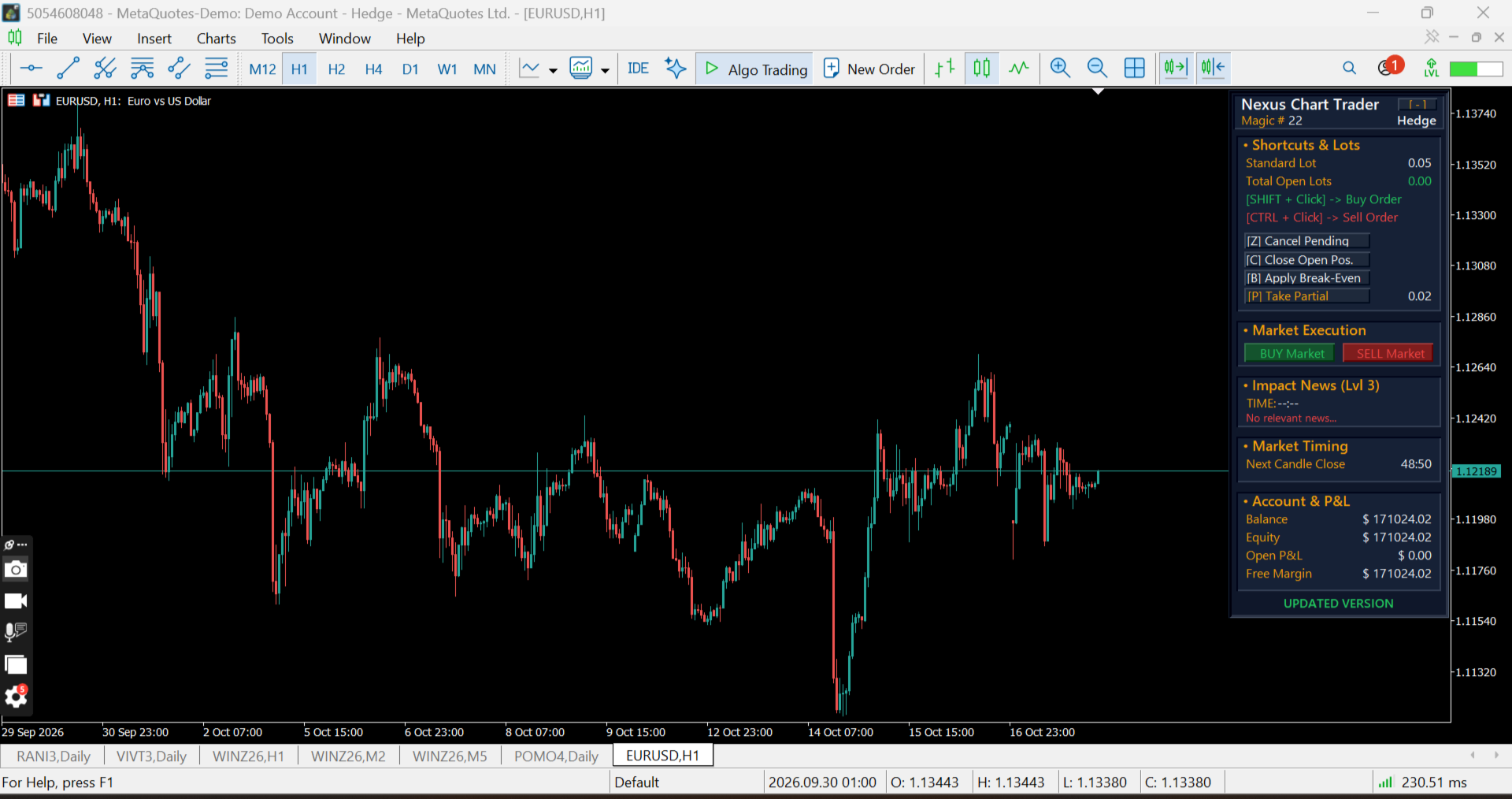
Interactive Hotkeys and On-Chart Mouse Orders: Place Limit or Stop Buy and Sell orders directly on the chart using customizable modifier keys (Shift, Ctrl, or direct Click).

Ghost Order Preview & Financial Risk Overlay: Hover over any price level to preview exact order entries, Stop Loss, and Take Profit levels with automated monetary risk/reward calculations in your account currency.

Automatic Account Mode Detection: Automatically detects whether your broker account operates in Hedge or Netting mode, seamlessly adapting execution logic.

Weighted Average Price Lines (Hedge Mode): Automatically calculates and plots dynamic weighted average lines when scaling into multiple positions on the same symbol.

Smart Break-Even Engine: Instantly moves Stop Losses to a weighted break-even price plus your custom offset points with a single hotkey.

Universal Partial Close: Scale out of active trades gradually and efficiently across both Netting and Hedge environments.

Emergency Controls: Instant keyboard shortcuts to cancel all pending orders or close all open positions immediately during high volatility events.

Integrated Economic Calendar: Built-in tracker displaying upcoming high-impact financial news events, release schedules, and headlines directly on the panel.

Candle Close Countdown: Real-time timer showing the exact time remaining before the current bar closes across any timeframe.

Customizable Modern Dark UI: Fully draggable panel featuring a collapsable <code>[-]</code> mode and comprehensive color customization options.


⚙️ Input Parameters Guide

Mouse Shortcuts (Orders)

Modifier key to place a Buy order (<code>SHIFT</code>, <code>CTRL</code>, or <code>CLICK</code>).

Modifier key to place a Sell order (<code>SHIFT</code>, <code>CTRL</code>, or <code>CLICK</code>).


Keyboard Shortcuts (Actions)

Hotkey to cancel all active pending orders (Default: <code>Z</code>).

Hotkey to close all open positions on the current symbol (Default: <code>C</code>).

Hotkey to Apply Break-Even on the current symbol (Default: <code>B</code>).

Hotkey to close Take Partial Profit on the current symbol (Default: <code>P</code>).


Risk & Lot Management

Default lot size for standard order execution.

Lot volume to close when executing partial profits.

Default Stop Loss distance (Pips for Forex / Points for Indices).

Default Take Profit distance (Pips for Forex / Points for Indices).

Added distance above/below entry when applying Break-Even.

Maximum allowed slippage in points.

Unique EA Magic Number for order tracking.


Calendar & Layout Settings

Minimum importance level for calendar alerts (Level 1, 2, or 3).

Initial panel alignment when launching on the chart (Left or Right side).

Full color customization palette for dark mode styling.


📌 Important Note on Chart Setup

⚠️ Enable Object Descriptions: To ensure that all price labels, risk values, and ghost order details (SL/TP projections and weighted average lines) render clearly on the chart, make sure the "Show object descriptions" option is enabled in your MetaTrader 5 chart properties:

    Right-click on your chart ➔ Select "Properties" (F8) ➔ Go to the "Show" tab ➔ Check "Show object descriptions".


💻 Specifications & Requirements

Platform: MetaTrader 5 (MT5)

Account Types: Hedge & Netting (Auto-detected)

Supported Instruments: Forex, Stock Indices, Commodities, Energies, and Cryptocurrencies

DLL Requirements: None (100% Native MQL5)


❓ Frequently Asked Questions (FAQ)</h2>

Q: Does Nexus Chart Trader run automated strategies?

A: No, Nexus Chart Trader is a professional manual trading and risk control utility designed to assist discretionary traders with ultra-fast execution and precise on-chart risk management.
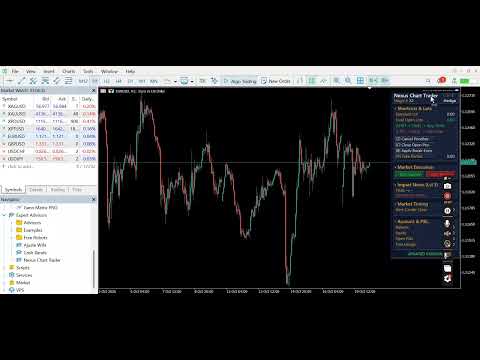

Q: Will it work on index futures like US30, DAX, US500, HK50, BTCUSD?
A: Yes! Simply set <code>InpIsForexMode = false</code> in the input parameters, and the utility will automatically switch from Forex pips to direct contract point calculations.
Recommended products
Cybertrade Auto Fibonacci
Emanuel Andriato
4.9 (10)
Cybertrade Auto Fibonacci retraction and projection  - MT5 Auto Fibonacci is an indicator that automatically plots the Fibonacci retracement and projection based on the number of bars you select in the indicator setting. You can customize nine different levels of retraction and three levels of projection. It works on periods longer than the period visible on the chart. All values ​​are available in the form of buffers to simplify possible automations. This indicator is the same one we use in ou
FREE
Technical and Professional Description of the Indicator Price Structure, Fibonacci, Financial Volume, and Interest Zone Indicator This indicator was developed based on in-depth studies of price structure, Fibonacci levels, financial volume behavior, and the identification of market interest zones . Its primary purpose is to transform these different analytical elements into a structured visual tool, allowing users to identify key levels and areas of greater structural relevance on the chart in a
FREE
RRtoolBox
David Ruiz Moreno
RRtoolbox - Professional Tools: Risk:Reward Trading Tool (SL/TP Horizontals + Pending orders + Diagonals), Alerts set on trend lines (for alerts on diagonal levels), SelfManagement (BE, partials...), close/cancelling by time, Statistics, Info and trading on chart. One-Click Trading with Visual Risk:Reward Management RRtoolbox is a comprehensive trading panel that combines one-click order execution,  statistics and  powerful visual Risk:Reward tools, alerts set with trendlines, on chart butt
Marca Dagua
Erison Francisco De Sales
3 (1)
Adiciona marca d'água com nome do ativo em negociação. Pode ser ajustado definindo tamanho da fonte e coloração do texto. Testado com vários ativos do mercado B3 e Forex  Adione ao gráfico e configure de acordo com a necessidade. Caso tenha problemas sinta-se a-vontade para nos avisar e providenciaremos a correção logo que possível. ______________________________
FREE
Auto SL/TP Manager Never leave a manual trade unprotected again! Have you ever opened a position in a hurry and forgotten to set your Stop Loss or Take Profit? The "Auto SL/TP Manager" is your essential safety net. This Expert Advisor monitors your account 24/7 and automatically applies your predefined risk (SL) and profit (TP) levels to any open positions that are missing them. This is the perfect tool for manual traders , scalpers , or anyone who wants to ensure every trade is protected accord
Amazing Edge Maker
Satendra Kumar Gupta
Amazing XAU Edge Maker Overview Amazing XAU Edge Maker is an Expert Advisor for MetaTrader 5 designed to automate trading using configurable entry methods, position management, and risk management tools. It is optimized for XAU/USD (Gold) but can also be configured for other symbols supported by your broker. The EA combines signal-based trading with flexible trade management, allowing traders to customize its behavior according to their trading strategy. Main Features Trading Modes Signal Tradin
Utility for show on charts the visual informations about: - a vertical line at start of each bar of selected timeframe - a vertical line at start of each day - a vertical line at start of each week - vertical lines at start / end of trading sessions selected - bid / ask prices, spread, money value for each point (of 1 standard lot) and last tick time recived" You can enable / disable each information and set the color for each line
FREE
Boletovisc MT5
Alex De Mesquita Felix
Boletovisc MT5 Boletovisc MT5 is a manual trading, position management and technical analysis panel developed for MetaTrader 5. The tool brings execution, protection, position management and market analysis features into a single interface, allowing the user to control trades directly from the chart. Boletovisc does not automatically open trades based on Trend V2 . Buy, sell, hold and close decisions remain under the user's control. Main Features Market Buy and Sell directly from the panel. Conf
Account and Market Dashboard
Ezekiel Bronal Nyangweso
Advanced Account Dashboard & Risk Monitor (MT5) This script provides a real-time on-chart dashboard for monitoring account performance, risk exposure, and execution conditions in MetaTrader 5. It is designed for traders who want clear visibility of account health and risk awareness during live trading or VPS operation. The script does not open trades and does not interfere with any strategy logic . Key Features Account Metrics Live equity, balance, and floating profit/loss Open position count an
FREE
Price Ray
Keni Chetankumar Gajanan -
5 (7)
Price Ray indicator is a utility that will improve the way you trade. Primarily, it shows the Bid, Ask or Last price as a line ray which beams till the current candle, last visible chart candle or extended to all candle bars. The enhanced features in this indicator provide information in an area where you focus most, right next to the current candle. You can select text to be shown above or below the Price ray. The indicator is fully customizable, allowing it to fit any strategy requirements. Th
FREE
Auto SL & TP for Manual Trades – MT5 Application Overview Auto SL & TP for Manual Trades is a simple and practical Expert Advisor for the MetaTrader 5 platform that automatically applies Stop Loss and Take Profit levels to manually opened trades as well as pending orders. The EA is designed primarily for traders who execute trades manually but want the assurance that every position is immediately protected with predefined Stop Loss and Take Profit levels. The Expert Advisor works in points and
The same chart, read in the same order, every day. Structure, the nearest zone, where you sit in the range and which way the trend points — on screen at once, always in the same form. BUYER BONUS — SMC Nexus Scanner Pro. A multi-symbol scanner built on this indicator's data: one panel shows the trend side, active order blocks and BOS / CHoCH for many symbols at once. It comes at no extra cost — after your purchase, message me on MQL5 and I will send it. Fifteen layers under one panel: market st
Gerenciador de ordens manuais
Rodrigo Oliveira Malaquias
Robot Manual Order Manager is a tool that allows you to automatically include Stop Loss, Breakeven, Take Profit and partials in open trades. Be it a market order or a limit order. Besides, it automatically conducts your trade, moving your stop or ending trades, according to the parameters you choose. To make your operations more effective, the Manual Orders Manager Robot has several indicators that can be configured to work on your trade. Among the options you can count on the features: Conducti
SLTrailingATR
Motohiro Umehara
SLTrailingATR — User Guide Overview SLTrailingATR is a professional risk management Expert Advisor that automatically manages Stop Loss for your existing positions using M1 timeframe ATR . It will: Set an initial Stop Loss automatically Trail Stop Loss as the trade moves in your favor Never move Stop Loss against your position This EA does NOT open trades . It works perfectly with manual trading, signal services, and any other Expert Advisor. ️ Key Features Feature Description Initial S
FREE
Risk Calculator Veqrix
Jose Luis Heredia Padilla
Risk Calculator Veqrix  Risk Calculator Veqrix is a risk calculation, visual trade planning, and manual order execution tool for MetaTrader 5. The EA automatically calculates the trade volume using the configured risk, entry price, and distance to the Stop Loss. It also displays the planned trade directly on the chart and distributes the total volume across up to three Take Profit targets. This tool does not generate trading signals . The user selects the direction, configures the levels, and
FREE
Advanced Risk Return Tool
Felipe Monteiro Rodrigues
Advanced Risk Return Tool is a visual Risk/Return planning and management utility for MetaTrader 5. The tool allows you to create and manage Buy and Sell structures directly on the chart, visually positioning Entry, Target and Stop levels while displaying information such as the Risk/Return ratio, distance in pips, volume and financial values. The structures are interactive and can be adjusted directly with the mouse, making trade planning and visual monitoring easier. Main Features Visual Risk/
FREE
XBOOT BOLETA PRO Professional Manual Trading Panel for MetaTrader 5 XBOOT Boleta Pro is a complete trading panel designed for traders who execute manual trades and want greater speed, organization, and control during every trading session. More than a standard Buy and Sell panel, XBOOT Boleta Pro combines powerful trading tools into a single interface, helping traders analyze the market, manage risk, execute orders, and monitor trading performance without leaving the chart. Its purpose is to sim
General Description Auto SL/TP Manager is a professional utility for MetaTrader 5 designed to automate the management of Stop Loss and Take Profit levels on open positions. The levels are calculated based on monetary risk values defined by the user, rather than fixed pip distances. This tool helps maintain consistent risk discipline without manual intervention. Main Functionality The EA continuously monitors all open positions and automatically applies Stop Loss and Take Profit levels when they
This is a common, simple and easy to use but effective tool to manage trading risks for all traders. It also help trader places stop loss and take profit levels at the same time the order is filled. How to set the expert advisor's parameters to support your trading style? Lots size. Fixed lots size - For traders who prefered to trade with fixed lots size, they can input the lots size in 'User lots' menu in the expert advisor's properties. The input value should be from the 'Minimum Volume' to th
Position Manager Pro is a trade management tool for manual traders. It doesn't generate entry signals. You open trades the way you always do, and the EA manages them after that: moving stops, taking partial profits, closing on your indicator's signal and watching your risk. What it does Automated exit management Break-even: moves the stop loss to entry plus a lock-in you choose once the trade reaches your profit trigger. Trailing stop: starts at a set profit and trails at a fixed distance in min
Summary of the Advanced Account Monitoring for MT5 The Advanced Account Monitoring for MT5 is a powerful tool designed for advanced account monitoring, offering traders detailed insights into their trading performance. This indicator provides a comprehensive dashboard to track drawdowns, profits, and trading volumes across different timeframes. Below is an overview of its key functions: Account and Robot Monitoring The indicator allows users to monitor either the entire account or a specific Ex
Prop Firm Guard Pro
Shanawaz Mohammed Nabi Rasool Pinjori
Prop Firm Guard Pro protects a prop firm challenge or funded account from breaking its risk rules. It watches the whole account every second and, when a rule is broken, closes the positions, deletes pending orders and blocks new trades for as long as the rule requires. It works with manual trading and with any other Expert Advisor on the same account. It never opens trades on a live chart. Rules it enforces Daily loss limit - measured from the balance, the equity or the higher of the two at the
MultiSymbolsWpr Indice x IBOV
Israel Goncalves Moraes De Souza
O Indicador identifica relação do Índice com a soma dos principais ativos, funciona para qualquer mercado do mund o, possui um oscilador WPR com a soma dos principais ativos escolhidos, indicando a antecipação do movimento em relação ao Índice. Características WPR com a soma dos papéis escolhidos - branco WPR do papel atual - vermelho Canal de Tendência O indicador pode indicar movimento de entradas, sendo: cruzamento das linhas cruzamento da linha Multi Symbols no -50 cruzamento entre os canai
FREE
Discover RETRACEMENT and DEFENSE zones automatically plotted based on the day's HIGH and LOW with the Maximum and Minimum Fibonacci Retracement Full indicator In this indicator, the retracement levels will be adjusted automatically according to the day's high and low , allowing the trader to analyze key retracement points, such as the Golden Zones (61.8%) . The Fibonacci technical retracement indicator is considered essential by many and forms the basis for market movement predictions. The to
LT Round Numbers MT5
Thiago Duarte
4.86 (21)
Round numbers (or key levels) is an amazing strategy. These numbers are strong support and resistance levels. So what this indicator does is draw horizontal lines on the chart to help you find these levels. Configurations: Key levels in pips - distance between the lines. Color -   lines color. Style -   lines style. Width -  lines width. Display at background -  draw lines in front or back of candles. Selectable -  turn on or off the option to select the lines. Lines identification -  identifica
FREE
Official BlueDigitsFx Ecosystem Access Get infrastructure updates, workflow resources, product releases, and ecosystem access through the official BlueDigitsFx ecosystem. Telegram Ecosystem Website BlueDigitsFx Precision Order Flow MT5 — Complete Order Flow Analysis Suite for MetaTrader 5 Professional session-based market structure framework combining Value Areas, Point of Control, auction context and structured decision support for serious MT5 traders. Identify where value is located Monitor
Orvanta Solana Rhythm
Carlos Eduardo Penteriche
Orvanta Solana Rhythm Version 3.03 candidate for MetaTrader 5 Configurable intraday components with optional incorporated ONNX inference. Inference runs locally, without an external Python service, news feed or API subscription. It does not retrain online. Revised execution Position sizing uses broker monetary profit calculations, volume-step precision, directional volume limits and a final entry-to-stop risk check. New entries are checked against broker trading sessions. Default planned r
Fortuno MT5
Sandy Mirelle Dos Santos Almeida
Disponível gratuitamente por tempo limitado! Gostou? avalie para nos ajudar a melhorar :)      Fortuno é um robô de negociação para MetaTrader 5, projetado para operar estrategicamente com base no indicador RSI (Índice de Força Relativa). Ideal para traders que buscam negociações precisas e disciplinadas com lógica clara de entrada e saída, o Fortuno oferece desempenho automatizado em gráficos de 5 minutos, com foco em períodos de sobrecompra e sobrevenda. Principais características:
Regression Channel Pro
Hipolito Garcia Gilvan
Regression Channel Pro is an advanced trend-following indicator that automatically draws a dynamic linear regression channel on your chart and generates precise buy and sell signals based on price interaction with the channel boundaries. Unlike most signal indicators, Regression Channel Pro uses a multi-confirmation logic that reduces signal repaint by up to 90%, giving you reliable, actionable entries in real time. HOW IT WORKS The indicator ca
FREE
Buyers of this product also purchase
Trade Assistant MT5
Evgeniy Kravchenko
4.43 (216)
It helps to calculate the risk per trade, the easy installation of a new order, order management with partial closing functions, trailing stop of 7 types and other useful functions. Additional materials and instructions Installation instructions - Application instructions Line function -   shows on the chart the Opening line, Stop Loss, Take Profit. With this function it is easy to set a new order and see its additional characteristics before opening.   Risk management  - The risk calculation
Forex Trade Manager MT5
InvestSoft
4.98 (687)
Trade Manager MT5 is an advanced position size calculator and trade management tool for MetaTrader 5, designed to help traders plan trades faster, control risk more precisely, and manage open positions directly from the chart. It combines order placement, risk based lot calculation, Stop Loss and Take Profit management, Break Even, Trailing Stop, Partial Close, Equity Protection, and external trade management in one panel. Whether you trade forex, indices, metals, commodities, crypto, or future
Local Trade Copier EA MT5
Juvenille Emperor Limited
4.94 (149)
Local Trade Copier EA MT5 is a fast and flexible trade copier for copying and managing trades between multiple MetaTrader 5 accounts on the same Windows computer or Windows VPS. It combines local trade synchronization with Receiver-side controls for lot sizing, risk management, trade filtering, symbol mapping, trade management and account protection. Set up your Transmitter and Receiver terminals in about 1 minute and copy manual or EA trades between accounts at the same or different brokers. U
Telegram to MT5 MultiChannel Copier
Sergio Marquez Uroz
4.65 (20)
Telegram to MT5 Multi-Channel Copier   automatically copies trading signals from your Telegram and Discord channels straight to MetaTrader 5. No bots, no browser extensions, no manual copying. A signal arrives in Telegram or Discord and the EA opens the trade in your terminal within seconds. And before you copy a channel, the built-in backtester shows you what that channel would have done in your account. The product has two components: a Windows application that listens to your Telegram channel
================================================================================ POC BREAKOUT - V20.72. Full Professional Grade Toolkit ================================================================================ POC Breakout is a full MetaTrader 5 trading dashboard for discretionary traders who want breakout signals, Point of Control (POC) context, volume profiles, order flow, market structure, news, alerts, and advanced trade planning in one professional workspace. Attached directly to you
FarmedHedge Pair Trading Dashboard
Tanapisit Tepawarapruek
5 (6)
Farmed Hedge Yield Farming | All Markets (Manual - Hybrid - Semi/Automated EA) VERIFIED TRADING RESULTS - Farmed Hedge Yield Axi Copy:  https://www.mql5.com/en/signals/2356376 - Farmed Hedge Yield Exn Copy:   https://www.mql5.com/en/signals/2356404 - Farmed Hedge Yield V Copy:  https://www.mql5.com/en/signals/2357156 IMPORTANT NOTICE: FarmedHedge is a MANUAL-FOCUSED TRADING UTILITY ,not a fully automated EA. Results shown on this Signal include manual trades and overall strategic management.
Copy Telegram signals with your own trading rules Telegram to MT5 Signal Trader automatically copies text-based trading signals from public and private Telegram channels and groups into MetaTrader 5. Manage multiple providers and MT5 accounts from one desktop app, with individual risk and trade settings for each provider . No Telegram bot or API setup needed for copying. Simply sign in with your own Telegram account by phone or QR code and select the channels or groups you have already joined. Y
TradePanel MT5
Alfiya Fazylova
4.88 (170)
Trade Panel is a multi-functional trading assistant. The app contains over 50 trading functions for manual trading and allows you to automate most trading tasks. Application instructions: https://www.mql5.com/en/blogs/post/756482 Trial version of the application for a demo account: https://www.mql5.com/en/blogs/post/750865 How to install the application: https://www.mql5.com/en/blogs/post/756239 How to test the application in visual mode: https://www.mql5.com/en/blogs/post/770277 How to install
Master Your Trading Discipline   Stop losing your hard-earned gains to overtrading and emotional decisions. The Discipline Tool is your ultimate trading assistant, ensuring strict risk management in real-time. Key Protection Features: Advanced Drawdown Defense : Automatically halts trading if your daily drawdown exceeds a preset threshold (percentage or dollar amount). Real-Time Equity Lock : Safeguard profits by referencing peak equity, ensuring drawdown stays within control. Hard Profit Target
Power Candles Strategy Scanner - Self-Optimizing Multi-Symbol Setup Finder Self-optimizing settings work one chart at a time, and finding where they pay off right now means opening chart after chart. Power Candles Strategy Scanner runs the same self-optimizing engine as the Power Candles indicator on every symbol in your Market Watch, side by side. One panel ranks where it pays off: the winning strategy per symbol, its optimized Stop Loss and Take Profit. An alert fires the moment a fresh signal
Exp COPYLOT CLIENT for MT5
Vladislav Andruschenko
3.97 (35)
Professional Trade Copier for MetaTrader 5 Fast, professional, and reliable trade copier for MetaTrader . COPYLOT allows you to copy Forex trades between MT4 and MT5 terminals with support for Hedge and Netting accounts. COPYLOT MT5 version supports: - MT5 Hedge to MT5 Hedge - MT5 Hedge to MT5 Netting - MT5 Netting to MT5 Hedge - MT5 Netting to MT5 Netting - MT4 to MT5 Hedge - MT4 to MT5 Netting MT4 version Full Description +DEMO +PDF How To Buy How To Install How to get Log Files H
Entry In The Zone with SMC Multi Timeframe is a real-time market analysis tool based on Smart Money Concepts (SMC), designed to analyze market structure, price direction, and key trading zones. It supports both Single-Timeframe and Multi-Timeframe Analysis, providing a clearer view of overall market structure across multiple timeframes, with real-time BUY / SELL signals designed with a strict focus on No-Repaint principles.   The signals are designed to help filter unclear setups and evaluate tr
EasyInsight AIO MT5
Alain Verleyen
4.92 (12)
EASY Insight AIO – All-In-One Power for AI-Driven Trading Want to skip the setup and start scanning the entire market – Forex, Gold, Crypto, Indices, and even Stocks – in seconds? EASY Insight AIO is the complete plug-and-play solution for AI-powered trade analysis. It includes all core Stein Investments indicators built-in and automatically exports clean, structured CSV files – perfect for backtesting, AI prompts, and live market decision-making. No need to install or configure indicators manu
The product will copy all telegram signal to MT5 ( which you are member) , also it can work as remote copier.  Easy to set up, copy order instant, can work with almost signal formats, image signal,  s upport to translate other language to English Work with all type of channel or group, even channel have "Restrict Saving Content", work with  multi channel, multi MT5 Work as remote copier: with signal have ticket number, it will copy exactly via ticket number. Support to backtest signal. How to s
Copy Cat More Trade Copier MT5 is a local trade copier and a complete risk management and execution framework designed for today’s trading challenges. From prop firm challenges to personal portfolio management, it adapts to every situation with a blend of robust execution, capital protection, flexible configuration, and advanced trade handling. The copier works in both Master (sender) and Slave (receiver) modes, with real-time synchronization of market and pending orders, trade modifications, pa
Trade Indicator Assistant   is a powerful MT5 utility designed to turn indicators into automated trading systems. Its main feature is the ability to automatically detect an indicator’s   BUY and SELL signal buffers , without requiring you to know the buffer numbers, search through indicator settings, or modify the indicator source code. Bonus Indicator:   After purchasing Trade Indicator Assistant, contact me to receive   Trade Signal Pro   completely free as a bonus indicator. [Download Demo V
Signal Trading View to MT5 Pro
Mirel Daniel Gheonu
4.5 (2)
Signal TradingView to MT5 Pro  Instant professional execution between TradingView and MetaTrader 5 Automate your trading strategy with the most robust communication bridge between TradingView alerts and real execution in MT5. Designed for traders who demand speed, flexibility, and impeccable risk management, this Expert Advisor transforms any alert message into a precise market or limit order.   Install and TEST the TRIAL version HERE STRENGTHS AND ADVANTAGES Universal Parsing Engine (Propriet
Grid Manual MT5
Alfiya Fazylova
4.73 (22)
Grid Manual is a trading panel for working with grid strategies. The utility is universal, has flexible settings and an intuitive interface. It works with a grid of orders not only in the direction of averaging losses, but also in the direction of increasing profits. The trader does not need to create and maintain a grid of orders, the utility will do it. It is enough to open an order and the "Grid manual" will automatically create a grid of orders for it and will accompany it until the close. F
The Patch
Mian Rameez Ali
The Patch It never opens a trade. It walks behind the ones that did. Every open position, every pending order — checked twice a second for the one thing that's easy to forget: a stop, a target. Found bare, it doesn't ask. It writes the missing number in, measured in points from wherever the position began, and moves on to the next. No strategy, no opinion on direction. Just the quiet assumption that nothing should ever sit on the market unprotected — not because someone decided it shouldn't,
Seconds Chart MT5
Boris Sedov
4.61 (18)
Seconds Chart is a unique tool for creating second-based charts in MetaTrader 5 . With Seconds Chart , you can construct charts with timeframes set in seconds, providing unparalleled flexibility and precision in analysis that is unavailable with standard minute or hourly charts. For example, the S15 timeframe indicates a chart with candles lasting 15 seconds. You can use any indicators and Expert Advisors that support custom symbols. Working with them is just as convenient as on standard charts.
Telegram to MT5 Coppy
Sergey Batudayev
5 (10)
Telegram to MT5: The Ultimate Signal Copying Solution Simplify your trading with Telegram to MT5, the modern tool that copies trading signals directly from Telegram channels and chats to your MetaTrader 5 platform, without the need for DLLs. This powerful solution ensures precise signal execution, extensive customization options, saves time, and boosts your efficiency. [ Instructions and DEMO ] [ FAQ ] [ How atach logs properly ] [ Settings descrition ] Key Features Direct Telegram API Integrati
EA Overfitter
Stephen J Martret
5 (1)
That backtest looks great. But will it still be making money tomorrow, next week, next month? EA Overfitter re-runs your EA on 100 price histories it has never seen. One score tells you if the edge is real. A backtest tells you what an EA did on one price history — the one that happened to occur. What you cannot tell from it is how much of that result was the strategy and how much was the particular path. EA Overfitter answers that. It builds up to 100 synthetic price histories your EA has n
VirtualTradePad One Click Trading Panel
Vladislav Andruschenko
4.59 (74)
Trading Panel for MetaTrader 5 — professional one-click trading from chart and keyboard A powerful trading panel for active manual trading, designed to open, manage, and close trades far faster and more efficiently than the standard MetaTrader interface. This panel is built for traders who want full control over positions, pending orders, profit management, and trading execution inside one professional workspace. This is not just another utility. It is a complete trading cockpit for MetaTrader
Anchor Trade Manager
Kalinskie Gilliam
5 (9)
Your EAs cannot see each other, but Anchor can. Anchor gives you one place to coordinate your EAs, manage risk, and decide when trading is allowed. It works alongside the trading bots you already use without any changes to them. The Problem One EA opens a trade. Then another starts trading. The next thing you know, you wake up to multiple grids built across your account. Each EA may be doing exactly what it was designed to do, but together they can place far more risk on your account than you in
Trade Dashboard MT5
Fatemeh Ameri
4.94 (135)
Trade Dashboard simplifies how you open, manage, and control your trades, with built-in lot size calculation. It allows you to execute trades, manage risk, and control positions directly on the chart, with tools such as partial close, breakeven, and trailing stop. Designed to reduce manual work and help you stay focused on your trading decisions. A demo version is available for testing. Detailed explanations of features are provided within the MQL5 platform. Installation instructions are include
Floor Watch
Syed Tauqeer Hussain Shah
Floor Watch One number, watched every thirty seconds: how far equity has fallen since the day began — or since its highest point, if it's told to trail the peak instead of the open. Cross the line and it doesn't argue. Every open position closes, every pending order vanishes, and anything that slips through afterward gets shut the moment it appears. Not asked. Removed. The floor holds until the clock turns 5 AM Pakistan time — then, and only then, does the day start over. One rule. No except
MT5 to Telegram Signal Provider turns your trading account into a signal provider. Every trade action, whether manual, by EA or from your phone, is instantly sent as a message to Telegram. You can fully customize the format or use a ready-made template for quick setup. [ Demo ] [ Manual ] [ MT4 Version ] [ Discord Version ]     New: [ Telegram To MT5 ] Setup A step by step user guide is available. Key Features Ability to customize order details sent to subscribers You can create a tiered subs
RETAILBERG FOOTPRINT CHART PRO — Order-Flow Workspace for MetaTrader 5 Version 7.00  |  Professional System  |  31 tools  |  One chart A full 150-page illustrated User Manual is included. Please read the full manual to understand this feature packed footprint chart elements and ui. https://www.mql5.com/en/blogs/post/777982 DEMO / STRATEGY TESTER — PLEASE READ FIRST
The MT5 to Discord Signal Provider is a user-friendly, fully customizable utility designed for sending trading signals directly to Discord. This tool transforms your trading account into an efficient signal provider. Customize message formats to suit your style! For ease of use, select from pre-designed templates and choose which message elements to include or exclude. [ Demo ] [ Manual ] [ MT4 Version ] [ Telegram Version ]  New: [ Telegram To MT5 ] Setup Follow our detailed user guide for eas
Buy once. Get all my MT4 and MT5 indicators - available now and released in the future - at no extra cost. Contact me after purchase for instructions to receive them. The price is planned to rise by 50$ after every 10 purchases, up to 999$. The Market price at checkout applies. Keep the indicator you trust. Automate the work around it. Your signal. Your rules. Your execution. Already have an MT5 indicator you rely on, but still need to watch the chart, wait for a signal, calculate the lot, plac
More from author
ATR MultiTF PRO is a professional volatility and Volume Profile tool for MT5. It projects Daily, Weekly, and Monthly ATR expansion bands alongside institutional Volume Profile metrics (POC, VAH, VAL) on your chart to identify exhaustion, mean-reversion, and high-probability setups. MAIN FEATURES: - Multi-Timeframe ATR Bands: Plots 1D, 1W, and 1M Fibonacci-based ATR expansion zones simultaneously. - Integrated Volume Profile Filter: Tracks POC, VAH, and VAL using customizable lookback periods (
Filter:
No reviews
Reply to review