Abj Ea Dashboard

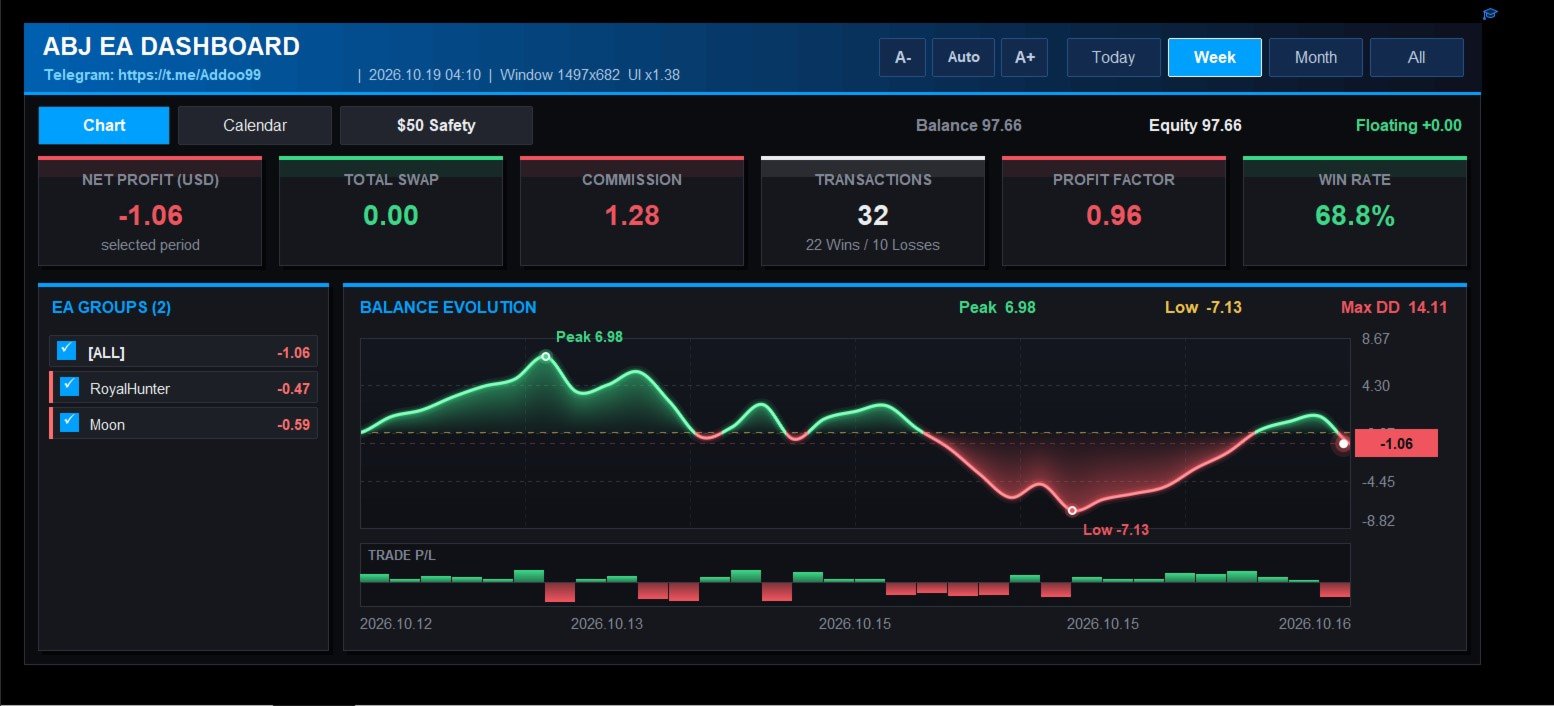
ABJ EA DASHBOARD turns your account history into a clean, full-window dashboard on your chart. You can see which Expert Advisors or strategies make money and which lose, without opening the History tab or using spreadsheets.

The tool is display-only. It never opens, closes or modifies a trade.

Main features

  • Fills the whole chart window. The layout, fonts and buttons scale automatically when you resize or maximize the chart. The A-, Auto and A+ buttons let you adjust the size by hand.
  • Automatic grouping by EA. Trades are grouped by their comment, so the results of each EA or strategy appear separately. Names that differ only by a suffix or number are merged into one group.
  • Group filter. Tick or untick any group, and the stat cards, chart and calendar update at once.
  • Stat cards. Net profit, total swap, commission, number of transactions (wins and losses), profit factor and win rate.
  • Balance evolution chart. A smooth line with a gradient area, a zero line, and markers for the peak, the low and the latest value. Peak, low and maximum drawdown are shown above the chart.
  • Trade P/L bars. A strip under the chart shows each trade’s result as a green or red bar.
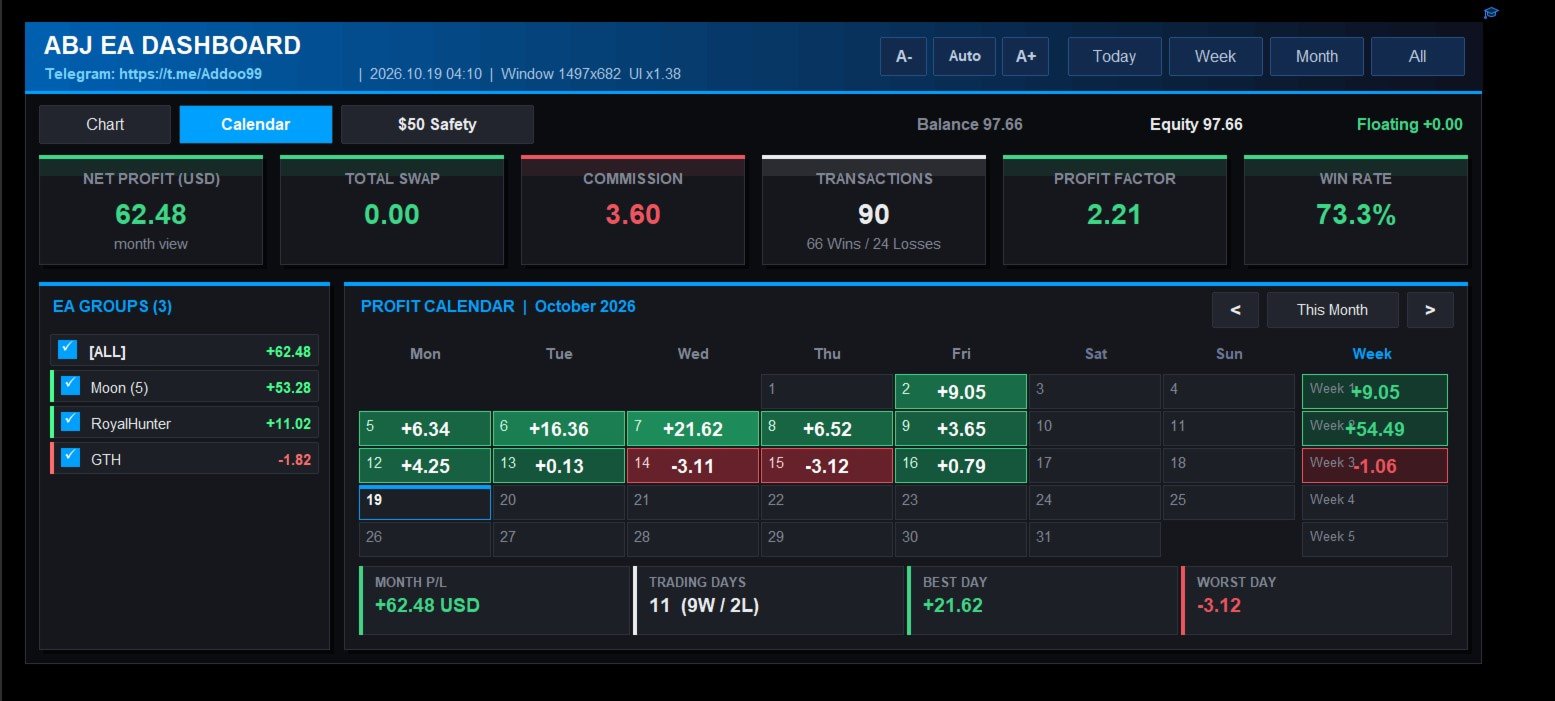
  • Profit calendar. A month view with the net profit or loss and trade count for each day, colour-shaded by size. It has weekly totals, month navigation, and a summary of month P/L, trading days, best day and worst day.
  • Period tabs. Switch between Today, Week, Month and All.
  • Small-account safety check. It replays your history on a virtual small account (default $50, 0.01 lot) and rates each EA as SAFE, RISKY or UNSAFE. The rating is based on drawdown, worst day, losing streak and the balance needed to survive.
  • Live account bar. Balance, equity and floating profit are always visible.

How to use

  1. Attach the indicator to any chart.
  2. Make sure your account history is loaded in the terminal.
  3. Use the tabs to switch between Chart, Calendar and the Safety check. Click the group list to filter.

Important notes

  • The dashboard reads the trade history of the connected account. The Strategy Tester has no real account history, so the dashboard looks empty there. Test it on a demo or live account.
  • Grouping depends on trade comments. Trades with no comment are grouped as “(no comment)”.
  • The safety check uses closed trades only. It does not include floating drawdown, and it is a historical estimate, not a guarantee of future results.

Input parameters

Layout

  • InpMargin : gap between the dashboard and the window edge, in pixels.
  • InpMinW , InpMinH : smallest dashboard width and height allowed.
  • InpScaleBoost : extra scale multiplier on top of the automatic fit (1.0 = automatic).
  • InpRefreshSec : how often the data refreshes, in seconds.

Grouping

  • InpDelimiters : characters that end the EA name in a trade comment.
  • InpStripTrailingDigits : remove trailing numbers from the name.
  • InpMinPrefixLen : minimum length of a name that other names can be merged into.

Chart

  • InpSmoothChart : use the smooth anti-aliased chart. Turn it off to use the simpler chart.
  • InpMaxColumns : detail level of the simpler chart.

Small-account safety check

  • InpTestBalance : size of the virtual account.
  • InpTestLot : lot size used on the virtual account.
  • InpScaleToTestLot : rescale every trade to that lot size.
  • InpMaxDDPct : maximum drawdown allowed, in percent.
  • InpMaxDayLossPct : daily loss in percent that counts as a “bad day”.
  • InpMinTrades : minimum number of trades needed before a group can be rated SAFE.
Recommended products
Quick Order Closer
Danny Giovanni Romero Lozano
Demo Version Here : https://www.mql5.com/en/market/product/170598 The fastest on the entire platform, try it with 50 open trades or more This Expert Advisor provides a fast and intuitive way to manage and close open trading positions directly from the chart using a clean button-based interface. With a single click, traders can instantly close positions based on different conditions, improving execution speed and overall trade management efficiency. Key Features Close all open positions instant
MT5 To Telegram Signal EA
Olaoluwa Oluwaseun Bamitale
MT5 Trade To Telegram MT5 Trade To Telegram is a professional trade signal bridge for MetaTrader 5. It monitors trades, positions, and pending orders placed on your MT5 account and sends clean, structured signal updates to your Telegram bot, group, channel, or private chat. It is designed for traders, signal providers, educators, account managers, and trading communities who need fast trade communication with flexible TP/SL handling, inverse signal mode, live target monitoring, and a modern on-
Smart Risk Manager
Abderrahmane Benali
5 (1)
Smart Risk Manager – Master Your Trades with Precision and Confidence Take complete control of your manual trading with Smart Risk Manager , a professional all-in-one trade and risk management Expert Advisor for MetaTrader 5 . Designed for traders who value speed, precision, and capital protection, it simplifies every step of trade execution while ensuring your risk remains under control. Whether you trade Forex, Gold, Indices, or Cryptocurrencies , Smart Risk Manager helps you execute trades w
DCA Buddy
Karim Abdelwahab
DCA Buddy: Advanced Price Visualiser Take control of your multi-position trading with DCA Buddy , an advanced indicator for MetaTrader 5. It provides a clear and accurate visualisation of the average break-even price for all your open trades on the current chart symbol. This powerful tool goes beyond simple averages, correctly handling both one-sided and complex hedged scenarios, and features a sophisticated alert system to notify you precisely when your net position achieves its goals. Core Fun
FREE
You place the stop; the panel works out the size. Risk Lock Trade Panel is a manual trading panel for MetaTrader 5 that sizes every order from the risk you set, sends it with the stop already attached, and manages the position from the same window. It does not open trades on its own, does not give advice, and does not send signals. Enter your risk as a percent of balance or equity, or as a fixed amount, and set the stop distance in points - or press Show line and drag the stop line on the chart
CChart
Rong Bin Su
Overview In the fast-paced world of forex and financial markets, quick reactions and precise decision-making are crucial. However, the standard MetaTrader 5 terminal only supports a minimum of 1-minute charts, limiting traders' sensitivity to market fluctuations. To address this issue, we introduce the Second-Level Chart Candlestick Indicator , allowing you to effortlessly view and analyze market dynamics from 1 second to 30 seconds on a sub-chart. Key Features Support for Multiple Second-Level
Akihiko
Dragan Drenjanin
2.5 (2)
Akihiko is a sophisticated trading robot distinguished by its minimalist user interface, designed to deliver powerful functionality with simplicity at its core. To further enhance its capabilities, I’m excited to announce the release of version 19, a significant update that refines its performance and usability. This robot integrates a versatile strategy, blending multiple options to adapt to diverse market conditions. It employs carefully crafted rules for initiating both long and short positi
AutoLot Trade Panel
Fabian Maurice Schwarz
AutoLot Trade Panel is a chart-based MT5 trading panel for manual traders who want faster order execution, automatic lot size calculation, live risk display, visual SL/TP planning and position management directly on the chart. Quick Start Guide: https://www.mql5.com/en/blogs/post/769949 ! Free Demo Available ! A free demo version is available so you can test the panel workflow, AutoLot calculation and Visual Tool before purchasing the full version. Demo Version: https://www.mql5.com/en/mar
ProBridger
Marius Ovidiu Sunzuiana
How Traders and Analysts Can Use the Data Export Bridge to Improve Their Analytics The MQL Data Export Bridge unlocks a new level of analytical power by transforming MetaTrader into a real‑time data provider for any external research environment. Here are the most impactful ways different users can apply the bridge to enhance their trading performance. Build Predictive Models with Machine Learning Who benefits: Quantitative traders, data scientists, algorithm developers How it helps: Export t
Effortlessly take control of your trading routine with the revolutionary Trades Time Manager. This potent tool automates order execution at designated times, transforming your trading approach. Craft personalized task lists for diverse trading actions, from buying to setting orders, all without manual intervention. Trades Time Manager Installation & Inputs Guide If you want to get notifications about the EA add our URL to MT4/MT5 terminal (see screenshot). MT4 Version   https://www.mql5.com/en/m
THIS RISK MANAGER WILL HELP YOU IN YOUR DAILLY TRADING, BY CALCULATING THE RISK AND THE LOTS, AND SET STOPLOSS, AND TAKE PROFIT, AND CAN CLOSE TRADES FOR YOU. RISK PERCENTAGE CASHRISK LOTS STOPLOSS TAKE PROFIT SELL AND BUY BUTTONS LOSE IN PROFIT BUTTON WICH WILL CLOSE ALL TRADES IN PROFIT SET BY THE USER CLOSE ON PROFIT BUTTON WICH WILL CLOSE ALL TRADES WHEN THE EQUALITY IS IN PROFIT SET BY THE USER AS WELL CLOSE TRADES BUTTON
Prop Max Daily Loss Manager — Daily Risk Management Assistant for Prop Trading Firms Prop Max Daily Loss Manager is a MetaTrader 5 utility designed for traders taking Challenges or trading on Funded accounts with prop companies (such as FTMO). The tool automatically monitors daily risk and helps avoid violating the established maximum daily loss limit. Key Features Automatic closure of all trades when the specified daily loss level is reached; Alert notifications when the limit is triggered; Fle
TrendLine Pending Order Tool
Marcelo Guimaraes de Lima
This utility opens orders when the candle touches the manually placed trend line, as if it were a more articulated pending order.  It can be used on any asset, when it opens the order it eliminates the line it touched and create Arrow. In this case, it is used for price reversal operations, it opens a sell order when the bullish candle touches the bottom-up line and opens a buy order when the bearish candle touches the top-down line.  You can adjust the stop loss and takeprofit, this utility is
FREE
Haven MT5 to Telegram 2.0 — Publish MT5 Trades to Telegram Haven MT5 to Telegram is a utility for automatically publishing MetaTrader 5 trading events to Telegram. It tracks position openings and closings, Stop Loss and Take Profit changes, partial closes, and pending order events. Messages can also include chart screenshots, Trade ID, and trade results. User Guide   |   My other products ->  HERE . What's New in Haven MT5 to Telegram  2.0 Version 2.0 introduces a new interface and a redesigned
Forex Trade Manager Pro MT5 Trade Manager MT5 is a comprehensive trade management utility for MetaTrader 5 that gives you complete control over every aspect of your position from the moment you plan a trade to the moment you close it. It is built for traders who take risk seriously, from the beginner building discipline to the professional scalper who needs instant execution across multiple positions. The tool attaches to any chart and presents a clean, compact panel. You mark your intended entr
The utility is designed to display on the chart the margin zones built on the basis of margin requirements for futures of the Chicago Mercantile exchange (CME). These margin zones are good levels of resistance and support, as seen in the screenshots. How to use To trade on margin zones, use the following rules: buy after the day has closed above one of the zones to the next zone; sell after the day has closed below one of the zones to the next zone; after opening a sell trade, place limit sell
Ronin Shield - Daily Loss Limiter & Account Guard (MT5) When your loss limit is hit, your trading day is over. A utility built to stop the "just one more trade" moment during prop firm challenges. Attach it to just one chart and it protects the whole account: every symbol and every position, including manual trades and other EAs. No need to open a chart for each symbol. No external DLLs. No web requests. ============================== THREE PROTECTION LINES ============================== 1.
EchoTrade Telegram to MT5 Copier
Perpetual Chinemerem Vincent
5 (2)
EchoTrade Telegram to MT5 Copier Seamless, Instant, and Reliable Signal Copying - Direct from Telegram to MetaTrader 5! The product does not run in the strategy tester but you can get free trial version here  for testing before purchase. Tired of manually executing trades from Telegram signals? EchoTrade automates the process, instantly copying trades from any Telegram channel or group directly into your MT5 account—accurately, efficiently, and without delay. Key Features: Universal Compatibi
Notify To Telegram MT5 Expert Advisor will send notifications via Telegram when orders are opened/modified/closed on your MetaTrader 5 account. Send message to person, channel or group chat.  Easy to customize message.  Support custom message for all languages Support full Emoji.  Parameters Telegram Bot Token - create bot on Telegram and get token. Telegram Chat ID    - input your Telegram   user ID,   group /   channel ID, use comma to input multi chat ID as chat_id_1, chat_id_1 Magic number f
Manual Trade Risk Manager is a complete on-chart trade manager for MetaTrader 5. It does not open trades and makes no market prediction - it is a money- and risk-management layer for manual trades or trades opened by another EA. Clickable panel (manual): show the correct lot size for a chosen risk percent, set breakeven now, close 50% or close the whole position with one click. Automatic engine (every tick): breakeven after your trigger, staged partial close at up to three profit levels, trailin
Trade Assistant MT5 — Trade Manager for Prop Firms Trade Manager for MT5 that calculates position size, manages risk, visualises your trade setup in real time and protects your account with built-in daily loss and trade limits — everything you need to trade with consistency and pass your prop firm challenge. > Trade Tab — Position Sizing & Execution **Automatic lot calculation** Enter your risk as a percentage of account balance or as a fixed dollar amount and the panel instantly calculates t
Click Sent Order
Supanat Wiboonpanit
This program is a GUI for issuing orders that can be done more quickly. Faster TP SL setting This program is not an automated trading platform. Trading is risky, please manage your risk. We do not accept any responsibility. It should be tried with Demo before using it with Real. Normally, the setting sets the risk to 1:1 to shift manually or to enter the risk to x:1, where x can be entered and everything can move freely. Thank you to all customers who have purchased our products. We would like t
Volume Delta Grid EA
Gopal Goswami
5 (1)
Volume Delta Grid EA The Volume Delta Grid EA is an advanced, automated trading system for MetaTrader 5 that merges institutional-style order flow concepts—specifically Relative Volume (RVOL) and Volume Delta —with dynamic grid and basket management strategies. Rather than relying on lagging price oscillators, this EA identifies high-probability breakout and trend-continuation zones by analyzing intra-bar buying and selling pressure. It then manages the trades using a highly customizable grid
FREE
Flight Recorder for MT5 Trade Execution Trade Lifecycle Forensics is a read-only monitoring utility. Attach one instance before the trading activity you want to observe. The utility watches account-wide trade transactions generated by manual trading and other Expert Advisors, then connects related request, order, deal, position, and pending-order evidence into reviewable records. The utility does not open, modify, cancel, or close trades. It has no trading buttons and does not control other
AO Trade
Ka Lok Louis Wong
The AO Trade system is specifically tailored for trend trading, leveraging auction or news times as reference points for comparison with other specific order times to anticipate market trends. **All time parameters utilized in the EA are based on your terminal time. Different brokers may operate on different GMT time zones, which can further vary due to Daylight Saving Time adjustments.** **Kindly ensure thorough verification of time settings aligned with your terminal before implementation.**
Trade Dashboard MT5
Fatemeh Ameri
4.94 (135)
Trade Dashboard simplifies how you open, manage, and control your trades, with built-in lot size calculation. It allows you to execute trades, manage risk, and control positions directly on the chart, with tools such as partial close, breakeven, and trailing stop. Designed to reduce manual work and help you stay focused on your trading decisions. A demo version is available for testing. Detailed explanations of features are provided within the MQL5 platform. Installation instructions are include
Virtual Basket TP SL Manager
Moh Nugraha Kusuma
5 (1)
"Manage multiple positions as a single unit with hidden targets." The Virtual Basket TP SL Manager is a professional MetaTrader 5 utility designed to automate the closing of positions based on the total profit or loss of a group of orders (a "basket"). By utilizing Virtual Levels , all Take Profit (TP) and Stop Loss (SL) targets are stored locally within the EA's memory and are not sent to the broker's server, keeping your strategy safe from stop-hunting and price manipulation. Key Features Virt
FREE
Protect your funded accounts and personal capital with military-grade precision. This utility continuously monitors your floating equity against your daily starting balance. The moment your custom drawdown threshold is breached, it instantly liquidates all open positions, deletes pending orders, and completely unloads from the chart. Stop revenge trading and never fail a prop firm evaluation due to a margin breach again.
FREE
Discipline Trading is a professional behavioral risk management Expert Advisor for MetaTrader 5 designed to help traders eliminate overtrading, emotional decisions, and rule violations. This EA does not generate trading signals and does not promise profits . Its sole purpose is to enforce discipline by applying predefined trading rules automatically. Key Features Daily Trade Limit Automatically blocks new trades once the daily trade limit is reached. Discipline Score System Tracks trader be
Gann Box MT5
Frederic Jacques Collomb
The Gann Box indicator is a powerful and versatile tool designed to help traders identify and exploit key market levels. This indicator draws a rectangle on the chart, which is automatically divided into several zones with strategic levels 0, 0.25, 0.50, 075, 1 . When the price touches one of these levels, alerts are triggered, providing valuable assistance for trading decisions. You instantly know the evolution of the market in relation to the zone you have drawn. To draw a zone, simply draw a
Buyers of this product also purchase
Trade Assistant MT5
Evgeniy Kravchenko
4.43 (216)
It helps to calculate the risk per trade, the easy installation of a new order, order management with partial closing functions, trailing stop of 7 types and other useful functions. Additional materials and instructions Installation instructions - Application instructions Line function -   shows on the chart the Opening line, Stop Loss, Take Profit. With this function it is easy to set a new order and see its additional characteristics before opening.   Risk management  - The risk calculation
Forex Trade Manager MT5
InvestSoft
4.98 (687)
Trade Manager MT5 is an advanced position size calculator and trade management tool for MetaTrader 5, designed to help traders plan trades faster, control risk more precisely, and manage open positions directly from the chart. It combines order placement, risk based lot calculation, Stop Loss and Take Profit management, Break Even, Trailing Stop, Partial Close, Equity Protection, and external trade management in one panel. Whether you trade forex, indices, metals, commodities, crypto, or future
Local Trade Copier EA MT5
Juvenille Emperor Limited
4.94 (149)
Local Trade Copier EA MT5 is a fast and flexible trade copier for copying and managing trades between multiple MetaTrader 5 accounts on the same Windows computer or Windows VPS. It combines local trade synchronization with Receiver-side controls for lot sizing, risk management, trade filtering, symbol mapping, trade management and account protection. Set up your Transmitter and Receiver terminals in about 1 minute and copy manual or EA trades between accounts at the same or different brokers. U
Telegram to MT5 MultiChannel Copier
Sergio Marquez Uroz
4.65 (20)
Telegram to MT5 Multi-Channel Copier   automatically copies trading signals from your Telegram and Discord channels straight to MetaTrader 5. No bots, no browser extensions, no manual copying. A signal arrives in Telegram or Discord and the EA opens the trade in your terminal within seconds. And before you copy a channel, the built-in backtester shows you what that channel would have done in your account. The product has two components: a Windows application that listens to your Telegram channel
================================================================================ POC BREAKOUT - V20.72. Full Professional Grade Toolkit ================================================================================ POC Breakout is a full MetaTrader 5 trading dashboard for discretionary traders who want breakout signals, Point of Control (POC) context, volume profiles, order flow, market structure, news, alerts, and advanced trade planning in one professional workspace. Attached directly to you
FarmedHedge Pair Trading Dashboard
Tanapisit Tepawarapruek
5 (6)
Farmed Hedge Yield Farming | All Markets (Manual - Hybrid - Semi/Automated EA) VERIFIED TRADING RESULTS - Farmed Hedge Yield Axi Copy:  https://www.mql5.com/en/signals/2356376 - Farmed Hedge Yield Exn Copy:   https://www.mql5.com/en/signals/2356404 - Farmed Hedge Yield V Copy:  https://www.mql5.com/en/signals/2357156 IMPORTANT NOTICE: FarmedHedge is a MANUAL-FOCUSED TRADING UTILITY ,not a fully automated EA. Results shown on this Signal include manual trades and overall strategic management.
Copy Telegram signals with your own trading rules Telegram to MT5 Signal Trader automatically copies text-based trading signals from public and private Telegram channels and groups into MetaTrader 5. Manage multiple providers and MT5 accounts from one desktop app, with individual risk and trade settings for each provider . No Telegram bot or API setup needed for copying. Simply sign in with your own Telegram account by phone or QR code and select the channels or groups you have already joined. Y
Strategy Ledger Pro
Abdullah Uygar Tuna
5 (11)
Strategy Ledger Pro is a read-only account analysis panel for MetaTrader 5. It separates account results by Expert Advisor, strategy, symbol, and magic number, so you can see what each one really contributes. The panel is available in 11 languages: English, Français, Deutsch, Español, Italiano, Português, Русский, Türkçe, 中文, 日本語 and 한국어. Before you download the demo. The Market runs the demo of any paid product in the Strategy Tester only. This panel analyses the trades on your own account, and
TradePanel MT5
Alfiya Fazylova
4.88 (170)
Trade Panel is a multi-functional trading assistant. The app contains over 50 trading functions for manual trading and allows you to automate most trading tasks. Application instructions: https://www.mql5.com/en/blogs/post/756482 Trial version of the application for a demo account: https://www.mql5.com/en/blogs/post/750865 How to install the application: https://www.mql5.com/en/blogs/post/756239 How to test the application in visual mode: https://www.mql5.com/en/blogs/post/770277 How to install
Master Your Trading Discipline   Stop losing your hard-earned gains to overtrading and emotional decisions. The Discipline Tool is your ultimate trading assistant, ensuring strict risk management in real-time. Key Protection Features: Advanced Drawdown Defense : Automatically halts trading if your daily drawdown exceeds a preset threshold (percentage or dollar amount). Real-Time Equity Lock : Safeguard profits by referencing peak equity, ensuring drawdown stays within control. Hard Profit Target
Power Candles Strategy Scanner - Self-Optimizing Multi-Symbol Setup Finder Self-optimizing settings work one chart at a time, and finding where they pay off right now means opening chart after chart. Power Candles Strategy Scanner runs the same self-optimizing engine as the Power Candles indicator on every symbol in your Market Watch, side by side. One panel ranks where it pays off: the winning strategy per symbol, its optimized Stop Loss and Take Profit. An alert fires the moment a fresh signal
Exp COPYLOT CLIENT for MT5
Vladislav Andruschenko
3.97 (35)
Professional Trade Copier for MetaTrader 5 Fast, professional, and reliable trade copier for MetaTrader . COPYLOT allows you to copy Forex trades between MT4 and MT5 terminals with support for Hedge and Netting accounts. COPYLOT MT5 version supports: - MT5 Hedge to MT5 Hedge - MT5 Hedge to MT5 Netting - MT5 Netting to MT5 Hedge - MT5 Netting to MT5 Netting - MT4 to MT5 Hedge - MT4 to MT5 Netting MT4 version Full Description +DEMO +PDF How To Buy How To Install How to get Log Files H
Entry In The Zone with SMC Multi Timeframe is a real-time market analysis tool based on Smart Money Concepts (SMC), designed to analyze market structure, price direction, and key trading zones. It supports both Single-Timeframe and Multi-Timeframe Analysis, providing a clearer view of overall market structure across multiple timeframes, with real-time BUY / SELL signals designed with a strict focus on No-Repaint principles.   The signals are designed to help filter unclear setups and evaluate tr
Telegram To MT5 Ultra
Mirel Daniel Gheonu
5 (5)
Telegram To MT5 — Signal Copier Turn the trading calls from your Telegram channels into real MT5 orders — automatically, on as many accounts as you like, with risk and rules fully under your control. Telegram To MT5 connects the VIP / signal channels you already follow on Telegram to your MetaTrader 5 terminal. A free companion desktop app reads the messages (even from channels that block bots), and this Expert Advisor executes them on your account — applying your own risk settings, symbol mappi
EasyInsight AIO MT5
Alain Verleyen
4.92 (12)
EASY Insight AIO – All-In-One Power for AI-Driven Trading Want to skip the setup and start scanning the entire market – Forex, Gold, Crypto, Indices, and even Stocks – in seconds? EASY Insight AIO is the complete plug-and-play solution for AI-powered trade analysis. It includes all core Stein Investments indicators built-in and automatically exports clean, structured CSV files – perfect for backtesting, AI prompts, and live market decision-making. No need to install or configure indicators manu
The product will copy all telegram signal to MT5 ( which you are member) , also it can work as remote copier.  Easy to set up, copy order instant, can work with almost signal formats, image signal,  s upport to translate other language to English Work with all type of channel or group, even channel have "Restrict Saving Content", work with  multi channel, multi MT5 Work as remote copier: with signal have ticket number, it will copy exactly via ticket number. Support to backtest signal. How to s
Copy Cat More Trade Copier MT5 is a local trade copier and a complete risk management and execution framework designed for today’s trading challenges. From prop firm challenges to personal portfolio management, it adapts to every situation with a blend of robust execution, capital protection, flexible configuration, and advanced trade handling. The copier works in both Master (sender) and Slave (receiver) modes, with real-time synchronization of market and pending orders, trade modifications, pa
Trade Indicator Assistant   is a powerful MT5 utility designed to turn indicators into automated trading systems. Its main feature is the ability to automatically detect an indicator’s   BUY and SELL signal buffers , without requiring you to know the buffer numbers, search through indicator settings, or modify the indicator source code. Bonus Indicator:   After purchasing Trade Indicator Assistant, contact me to receive   Trade Signal Pro   completely free as a bonus indicator. [Download Demo V
HINN MagicEntry Extra
ALGOFLOW OÜ
4.74 (19)
HINN MAGIC ENTRY – the ultimate tool for entry and position management! SIMPLE. FASTEST. INTUITIVE. MAX AUTOMATED. Place orders by selecting a level directly on the chart! full description   ::  demo-version  :: 60-sec-video-description Key features: - Market, limit, and pending orders - Automatic lot size calculation - Automatic spread and commission accounting - Unlimited partitial take-profits  - Breakeven and trailing stop-loss and take-profit  functions - Invalidation leves - Intuitive, a
Signal Trading View to MT5 Pro
Mirel Daniel Gheonu
4.5 (2)
Signal TradingView to MT5 Pro  Instant professional execution between TradingView and MetaTrader 5 Automate your trading strategy with the most robust communication bridge between TradingView alerts and real execution in MT5. Designed for traders who demand speed, flexibility, and impeccable risk management, this Expert Advisor transforms any alert message into a precise market or limit order.   Install and TEST the TRIAL version HERE STRENGTHS AND ADVANTAGES Universal Parsing Engine (Propriet
Trade copier MT5
Alfiya Fazylova
4.61 (57)
Trade Copier is a professional utility designed to copy and synchronize trades between trading accounts. Copying occurs from the account / terminal of the supplier to the account / terminal of the recipient, which are installed on the same computer or VPS . Before buying, you can test the demo version on a demo account. Demo version here . Full instruction here . Main functionality and benefits: Supports copying MT5> MT5, MT4> MT5, MT5> MT4, including MT5 netting accounts. * Supports copying Dem
Grid Manual MT5
Alfiya Fazylova
4.73 (22)
Grid Manual is a trading panel for working with grid strategies. The utility is universal, has flexible settings and an intuitive interface. It works with a grid of orders not only in the direction of averaging losses, but also in the direction of increasing profits. The trader does not need to create and maintain a grid of orders, the utility will do it. It is enough to open an order and the "Grid manual" will automatically create a grid of orders for it and will accompany it until the close. F
The Patch
Mian Rameez Ali
The Patch It never opens a trade. It walks behind the ones that did. Every open position, every pending order — checked twice a second for the one thing that's easy to forget: a stop, a target. Found bare, it doesn't ask. It writes the missing number in, measured in points from wherever the position began, and moves on to the next. No strategy, no opinion on direction. Just the quiet assumption that nothing should ever sit on the market unprotected — not because someone decided it shouldn't,
Seconds Chart MT5
Boris Sedov
4.61 (18)
Seconds Chart is a unique tool for creating second-based charts in MetaTrader 5 . With Seconds Chart , you can construct charts with timeframes set in seconds, providing unparalleled flexibility and precision in analysis that is unavailable with standard minute or hourly charts. For example, the S15 timeframe indicates a chart with candles lasting 15 seconds. You can use any indicators and Expert Advisors that support custom symbols. Working with them is just as convenient as on standard charts.
Telegram to MT5 Coppy
Sergey Batudayev
5 (10)
Telegram to MT5: The Ultimate Signal Copying Solution Simplify your trading with Telegram to MT5, the modern tool that copies trading signals directly from Telegram channels and chats to your MetaTrader 5 platform, without the need for DLLs. This powerful solution ensures precise signal execution, extensive customization options, saves time, and boosts your efficiency. [ Instructions and DEMO ] [ FAQ ] [ How atach logs properly ] [ Settings descrition ] Key Features Direct Telegram API Integrati
EA Overfitter
Stephen J Martret
5 (1)
That backtest looks great. But will it still be making money tomorrow, next week, next month? EA Overfitter re-runs your EA on 100 price histories it has never seen. One score tells you if the edge is real. A backtest tells you what an EA did on one price history — the one that happened to occur. What you cannot tell from it is how much of that result was the strategy and how much was the particular path. EA Overfitter answers that. It builds up to 100 synthetic price histories your EA has n
VirtualTradePad One Click Trading Panel
Vladislav Andruschenko
4.59 (74)
Trading Panel for MetaTrader 5 — professional one-click trading from chart and keyboard A powerful trading panel for active manual trading, designed to open, manage, and close trades far faster and more efficiently than the standard MetaTrader interface. This panel is built for traders who want full control over positions, pending orders, profit management, and trading execution inside one professional workspace. This is not just another utility. It is a complete trading cockpit for MetaTrader
Anchor Trade Manager
Kalinskie Gilliam
5 (9)
Your EAs cannot see each other, but Anchor can. Anchor gives you one place to coordinate your EAs, manage risk, and decide when trading is allowed. It works alongside the trading bots you already use without any changes to them. The Problem One EA opens a trade. Then another starts trading. The next thing you know, you wake up to multiple grids built across your account. Each EA may be doing exactly what it was designed to do, but together they can place far more risk on your account than you in
Floor Watch
Syed Tauqeer Hussain Shah
Floor Watch One number, watched every thirty seconds: how far equity has fallen since the day began — or since its highest point, if it's told to trail the peak instead of the open. Cross the line and it doesn't argue. Every open position closes, every pending order vanishes, and anything that slips through afterward gets shut the moment it appears. Not asked. Removed. The floor holds until the clock turns 5 AM Pakistan time — then, and only then, does the day start over. One rule. No except
MT5 to Telegram Signal Provider turns your trading account into a signal provider. Every trade action, whether manual, by EA or from your phone, is instantly sent as a message to Telegram. You can fully customize the format or use a ready-made template for quick setup. [ Demo ] [ Manual ] [ MT4 Version ] [ Discord Version ]     New: [ Telegram To MT5 ] Setup A step by step user guide is available. Key Features Ability to customize order details sent to subscribers You can create a tiered subs
More from author
Abj Sweep EA
Abdellah Afkir
Abj Sweep EA is a professional Smart Money Concepts (SMC) Expert Advisor for MetaTrader 5, built to identify high-probability liquidity sweep opportunities and execute trades with advanced risk management. It combines market structure analysis, institutional concepts, and automated trade management into a single multi-currency trading system. —-FOR SET FILE CLICK HERE —-EURUSD 1M —-Check EA live performance———————— -Server: Exness-MT5Trial15 -Login: 474003403 -Investor Password: Aa12345@ ———————
Filter:
No reviews
Reply to review