Telegram Signal Bridge AI
- Utilities
- Version: 1.13
- Updated: 13 October 2026
- Activations: 5

Telegram Signal Bridge connects YOUR Telegram bot to YOUR MetaTrader 5 terminal. Signals posted in your channels or groups are read, understood and traded with the risk, filters and limits that you choose. Nothing is sent to the developer and nothing runs on a third-party server: the EA talks only to Telegram and, if you switch it on, to the AI service of your own account.
YOUR CHANNELS, YOUR RULES
- Create a bot with the official BotFather, paste its token and add the bot to your channels or groups.
- Works with any signal channel you follow and any symbol of your broker, including aliases (GOLD = XAUUSD) and broker suffixes.
- Confirm mode: every signal waits for your EXECUTE or SKIP click. Auto mode: trades are placed instantly.
READS REAL SIGNAL MESSAGES
- BUY / SELL / LONG / SHORT, market, Limit and Stop, entry price or range, Stop Loss, up to 5 Take Profits.
- Different formats, decimal commas and labels such as TP1, Target, Entry and SL.
- Duplicate protection, sanity checks and a maximum signal age, so old posts are never traded.
OPTIONAL AI READER (YOUR OWN KEY)
- Switch it on to read free-form messages that the built-in rules cannot parse.
- Choose Anthropic, OpenAI or any OpenAI-compatible service and paste your own API key. The fees are billed by your provider to you.
- The AI only extracts the signal fields. Lot size, risk, limits and all safety checks stay inside the EA, and every price returned by the AI must exist in the original message.
- Hourly request limit keeps your cost under control. Off by default.
RISK AND MONEY MANAGEMENT
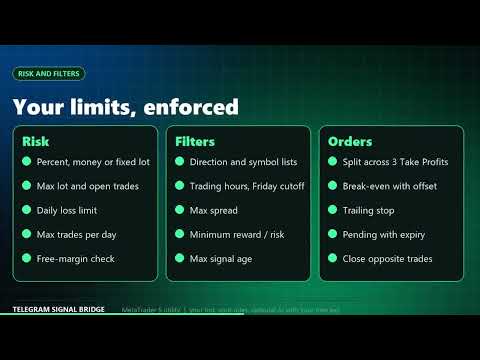
- Lot from risk in percent of balance, risk in money, or a fixed lot. Correct on any account currency and symbol.
- Maximum lot, maximum open trades, maximum trades per day, daily loss limit and a free-margin check.
- Optional default SL and reward-to-risk TP for signals that have none.
FILTERS
- Allowed direction, symbol white list and black list, trading hours and a Friday cutoff.
- Maximum spread and minimum reward-to-risk.
- Pick the symbols to trade or block in a clickable list inside the panel (Market Watch symbols).
ORDER MANAGEMENT
- Split the lot across up to 3 Take Profits, break-even with offset after TP1, trailing stop.
- Pending orders with expiry, close opposite trades on the same symbol, slippage control.
MODERN ON-CHART PANEL
- Dashboard with today's signals, traded and skipped counts, P/L, last signal and activity.
- Live settings tab: change mode, risk, limits, hours, AI and language on the fly without opening the inputs.
- Log and info tabs, pause, close all and minimize buttons, dark and light themes.
12 INTERFACE LANGUAGES
- English, Lithuanian, Russian, Chinese, Spanish, Portuguese, Japanese, German, Korean, French, Italian and Turkish.
- Switch the language any time in the Settings tab.
NOTIFICATIONS
- Terminal alert, push notification to the MetaTrader mobile app and optional trade reports to your own Telegram chat.
SETUP IN 4 STEPS
- Create a bot with BotFather and paste the token into the Bot token input.
- In MetaTrader 5 open Tools - Options - Expert Advisors, enable WebRequest and add https://api.telegram.org (and your AI service address if you use one).
- Add your bot to your channel or group as an administrator, or forward signals to the bot.
- Attach the EA to any chart, enable Algo Trading and start in Confirm mode on a demo account.
HOW TO ADD THE TELEGRAM MODULE
- Open Telegram, find the official BotFather, send /newbot, choose a name and a username ending in bot. BotFather replies with a token: copy it.
- Open the EA inputs (F7 on the chart) and paste the token into Bot token.
- In MetaTrader 5 open Tools - Options - Expert Advisors, tick Allow WebRequest for listed URL and add https://api.telegram.org.
- Add the bot to the channel or group that posts the signals. Channel: make the bot an administrator. Group: add the bot as a member and, in BotFather, use /setprivacy to disable privacy mode so it can read all messages. You can also simply forward signals to the bot in a private chat.
- Attach the EA to a chart and enable Algo Trading. The panel shows ONLINE when the connection works. Post or forward a message and watch it appear in the activity log.
- Optional: leave Allowed chats empty to read every chat the bot sees, or enter chat IDs to read only chosen chats. The chat ID of every recognised signal is written to the Experts journal.
- The bot only receives messages posted after it was added. Signals older than the maximum signal age are ignored.
SUPPORT AND UPDATES
- We keep updating the product according to customer needs and always take customer feedback into account. Suggestions are welcome in the comments.
- Questions are answered within 48 hours.
INPUT PARAMETERS
- Inp_BotToken - Telegram bot token from BotFather.
- Inp_AllowedChats - optional list of allowed chat IDs.
- Inp_MaxAgeMin - ignore signals older than N minutes.
- Inp_AutoTrade - trade automatically or ask for confirmation.
- Inp_RiskMode / Inp_RiskPercent / Inp_RiskMoney / Inp_FixedLot - risk settings.
- Inp_Whitelist / Inp_Blacklist / Inp_DirFilter - symbol and direction filters.
- Inp_HourFrom / Inp_HourTo / Inp_FridayCutoff - trading hours.
- Inp_AllowNoSL / Inp_DefaultSLPts / Inp_DefaultRR - defaults for signals without SL or TP.
- Inp_AiProvider / Inp_AiKey / Inp_AiMode / Inp_AiMaxPerHour - optional AI reader with your own key.
- Inp_Language / Inp_Theme - panel language and theme.
NOTES
- The EA reads only the chats your bot can see. No signals are included; you choose where they come from.
- Multi-TP split orders open separate positions, so use a hedging account.
- WebRequest does not work in the Strategy Tester, so the EA stays idle there.
- Trading involves risk and you are responsible for the signals you follow. This tool does not guarantee any result. Please test on a demo account first.