Trade Mirror Local Copier
- Utilities
- Version: 2.0
- Activations: 5

Trade Mirror is a fast local trade copier for MetaTrader 5. Attach it as Provider to the account you trade on and as Receiver to every account that should follow. Trades are copied between terminals on the same computer within a fraction of a second, with no server, no subscription and no DLL. It copies trades but cannot guarantee any result.
HOW IT WORKS
- The Provider shares its open positions through a small file in the common MetaTrader folder. Every Receiver terminal on the same computer reads it about ten times per second.
- Open, close, partial close, stop loss and take profit changes are copied automatically. Typical copy time is about 0.1 to 0.5 seconds.
- One Provider can feed many Receivers and can close all copies on them with one click. Channel names let you run several independent links on one computer.
COPYING
- Copies positions and pending orders: open, close, partial close, and price, SL and TP changes.
- Reverse mode opens the opposite direction and swaps stop loss and take profit.
- Stop loss and take profit can be copied as the same price or as the same distance from the entry, which suits brokers with different quotes.
- Optional safety stop loss and take profit when the provider trade has none, plus break-even and trailing stop on the copies.
- Trades that were already open when the Receiver started are ignored unless you choose to copy them. A copy that you closed is never reopened.
LOT SIZE
- Five lot modes: multiplier, fixed lot, balance ratio, equity ratio and risk percent of equity based on the stop loss.
- Extra lot factor for chosen symbols, maximum lot per trade, maximum total lots and maximum copied positions.
- Choose to skip the trade or use the minimum lot when the calculated lot is too small.
- Lot step, minimum and maximum of the receiving symbol are always respected.
SYMBOLS AND FILTERS
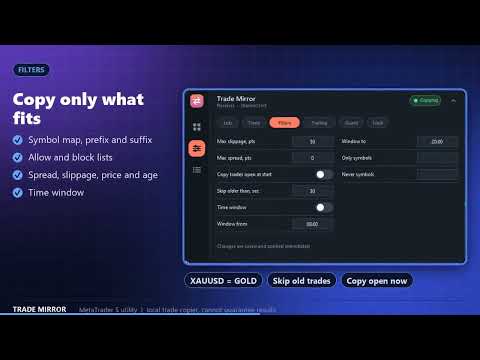
- Symbol mapping with prefix and suffix removal and adding, and a custom map such as XAUUSD=GOLD.
- Allow and block lists for symbols, direction filter (buy only or sell only) and a time window in server time.
- Maximum spread, maximum slippage, maximum price move since the provider opened and a maximum trade age.
- On the Provider you can share only chosen magic numbers and symbols, or also manual trades.
PROTECTION
- Daily loss limit, daily profit target and maximum drawdown stop new copies and can close all copies.
- Minimum margin level before a new copy is opened, and a free margin check for every trade.
- Detects a stopped or disconnected Provider and can close the copies after a chosen time.
- Alerts by pop-up, sound or push notification, and optionally for every copied trade.
PANEL
- Modern minimalist panel: draggable, minimizable, five themes and six accent colors.
- Live settings editor: change lots, filters and protection without restarting. Settings are saved per account.
- Dashboard with link status, last and average copy time, copied positions and pending orders, a receivers list on the Provider, an event log and a Copy open trades now button.
IMPORTANT INFORMATION
- Trade Mirror copies trades but cannot guarantee any result. Copied trades can differ from the original in price, size and result.
- It works while the terminals, the computer and the connection to the broker are running. Slippage, requotes, different spreads and broker rules can change the outcome.
- Receiver accounts must be hedging accounts. Provider and Receivers must run on the same computer under the same Windows user.
- Test on demo accounts first. You are responsible for your trading decisions and any losses. The developer is not responsible for losses.
SETUP
- On the account you trade on, attach Trade Mirror to any chart and set Mode to Provider.
- On each following account, open its own terminal, attach Trade Mirror, set Mode to Receiver and use the same Channel name.
- Enable Algo Trading in every terminal. Symbol and timeframe do not matter.
- Support and updates: we keep developing the product based on customer needs and always take customer feedback into account. Questions are answered within 48 hours.
KEY SETTINGS
- Mode and Channel - provider or receiver, and the shared channel name.
- Lot mode and Lot value - how the copied size is calculated.
- Reverse, Copy SL, Copy TP and SL/TP mode.
- Symbol prefix, suffix and map - match different symbol names.
- Filters - spread, slippage, price move, trade age, time window.
- Protection - daily loss, margin level, provider offline, alerts.
NOTES
- Works with hedging accounts. The Provider can be any account type.
- Settings can be changed in the panel at any time and are saved per account.
- Trading involves risk and you are responsible for your decisions. Test on a demo account first.