Account Guardian Risk Manager
- Utilities
- Version: 1.30
- Activations: 5

Account Guardian is an account protection utility for MetaTrader 5. It watches your whole account and enforces your own rules: daily, weekly and monthly loss limits, maximum drawdown, news windows, trading hours, discipline limits and trade protection. When a rule is hit it blocks or closes trades and alerts you. It never opens trades and works with manual trading and with any Expert Advisor.
HOW IT PROTECTS YOU
- It watches every open position and order of the account, or only the magic numbers you choose.
- At 50 and 75 percent of a limit it warns you, at 90 percent it blocks new trades, and at 100 percent it closes everything and locks until the next reset (all steps are adjustable).
- A trade opened while a block is active is closed immediately. Your other Expert Advisors are not modified or removed from the charts.
LIMITS AND RULES
- Daily loss limit and daily profit target in percent or money, plus weekly and monthly loss limits.
- Maximum drawdown (static or trailing), total profit target, equity floor and equity target.
- Profit giveback guard: locks the day when profit falls back a chosen share from its daily peak.
- Margin level guard that blocks new trades or closes everything when the margin level gets too low.
- Presets for common prop firm style limits (5/10, 4/8, 3/6, trailing). Always check the rules of your own firm.
DISCIPLINE AND TRADE PROTECTION
- Limits for open positions, positions per symbol, total lots, lot per trade, new trades per day and per hour.
- Pause after losing trades or after a losing streak, to stop revenge trading.
- Maximum risk per trade, total open risk and maximum floating loss per trade.
- Auto stop loss and take profit, break-even, trailing stop and closing of trades without a stop loss.
- Allowed and blocked symbol lists.
NEWS AND TRADING HOURS
- News filter built on the MetaTrader 5 economic calendar, no external server needed.
- Choose importance, minutes before and after, keywords to include or ignore, and optionally close trades before news.
- Two trading windows, trading days, Friday stop, rollover pause and maximum trade duration.
- Upcoming events list inside the panel.
PANEL AND STATISTICS
- Modern minimalist panel: draggable, minimizable, five themes and six accent colors.
- Limit lines on the chart show the price where each limit would be reached.
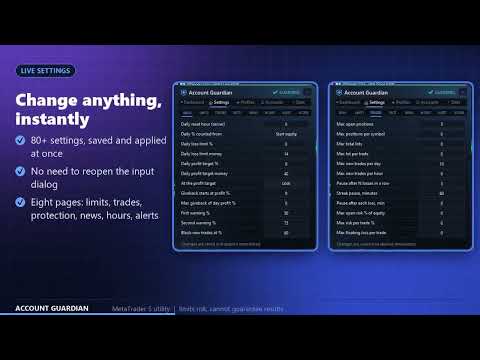
- Live settings editor with 80+ settings, saved and applied at once, plus profiles you can save and load.
- Statistics: profit factor, expectancy, win rate, drawdown, best and worst days, breakdown by symbol and weekday.
- Profit calendar with colored days, and a summary of all accounts that run Account Guardian on the same computer.
ALERTS AND TELEGRAM
- Pop-up, sound, push notification and e-mail alerts, plus a daily report.
- Telegram with your own bot: alerts and commands /status, /pause, /resume and /closeall (with confirmation). Only your chat is accepted.
- Telegram needs your own bot token and chat id. Add api.telegram.org to the allowed addresses in Tools, Options, Expert Advisors.
12 INTERFACE LANGUAGES
- English, Lithuanian, Russian, Chinese, Spanish, Portuguese, Japanese, German, Korean, French, Italian and Turkish.
- Switch the language with one click on the panel.
IMPORTANT RISK INFORMATION
- Account Guardian limits risk but cannot guarantee any result. It never opens trades.
- It works only while the terminal, your computer and your internet connection are running. It cannot prevent gaps, slippage, requotes or broker restrictions.
- Closing and blocking happen after a rule is reached, so the final result can differ from the limit you set.
- Test on a demo account first. You alone are responsible for your trading decisions, your settings and any losses. The developer is not liable for losses.
SETUP
- Attach Account Guardian to any one chart and enable Algo Trading. Symbol and timeframe do not matter.
- Open the Settings tab on the panel to review the limits. The news filter is off by default.
- The first start sets your starting balance for drawdown. Use the Starting balance setting for a challenge account.
- Support and updates: we keep improving the product according to customer needs and always take customer feedback into account. Questions are answered within 48 hours.
SETTINGS GROUPS
- Daily limits and warnings - reset hour, loss and profit targets, warning steps.
- Drawdown and account limits - presets, drawdown, weekly and monthly loss, equity floor, margin level.
- Trade and exposure rules - positions, lots, trades per day and hour, pauses, risk per trade.
- Trade protection - auto SL and TP, break-even, trailing, maximum trade duration.
- News filter - importance, minutes, keywords, currencies.
- Trading hours - two windows, trading days, Friday stop, rollover pause.
- Alerts and Telegram - pop-up, sound, push, e-mail, Telegram bot and commands.
- Scope and panel - magic numbers, symbol lists, theme, accent color, chart lines, account summary.
NOTES
- Works on hedging and netting accounts. It guards the whole account or only the magic numbers you set.
- Settings can be changed on the panel at any time and are saved per account.
- Trading involves risk and you are responsible for your decisions. Please test on a demo account first.