Manuel Gold Assistant

MGA – Manual Gold Assistant

A Different Way to Manage Difficult XAUUSD Exposure

What if a difficult position did not always have to be immediately realized as a loss, but could instead be frozen, reduced, and managed progressively when the market offers new opportunities?

MGA – Manuel Gold Assistant is a complete manual trading environment developed primarily for XAUUSD.

It combines, within a single interface:

market analysis, position management, risk management, hedging, progressive exposure reduction, Break Even management, basket targets, support and resistance, multi-timeframe trend lines, and decision-support tools.

But MGA’s main difference becomes most apparent when the market does not behave as expected.

EDGE – Freeze Exposure Before Deciding

When exposure becomes difficult to manage, MGA allows the trader to use EDGE to neutralize or significantly reduce the remaining directional exposure.

The objective is simple:

temporarily limit the directional evolution of the existing exposure and give the trader time to reassess the situation.

A hedge does not eliminate the existing loss.

Instead, it can approximately freeze the current situation, subject to spread, commissions, swaps, execution differences, and other trading costs.

From there, MGA provides an additional management mechanism.

REDUCE – Turn Available Profits Into Debt Reduction

The REDUCE button is one of MGA’s core functions.

When some positions become profitable while others remain in loss, MGA can use the available floating profit as a budget to reduce the opposite exposure.

The logic is:

AVAILABLE PROFIT → REDUCE → DEBT REDUCTION → GROSS VOLUME REDUCTION → POTENTIALLY FREED MARGIN

MGA analyzes BUY and SELL exposure separately.

If the available budget is not sufficient to completely close the next losing position, MGA can calculate the portion of volume that can actually be reduced.

Exposure can therefore be reduced progressively.

A favorable directional move may generate new floating profit.

That profit can then be used to reduce another portion of the remaining debt.

The trader can then decide whether to protect the newly achieved level.

REDUCE + EDGE – Reduce and Protect Progress

After a reduction, MGA can rebuild a hedge based on the remaining exposure.

The process can therefore become:

EDGE → WAIT → AVAILABLE PROFIT → REDUCE → LOWER EXPOSURE → RE-EDGE

Each reduction can potentially decrease the gross volume still tied up in the basket.

Under certain market conditions, this may allow a highly congested situation to be managed as a sequence of waiting periods, favorable price movements, and progressive reductions, rather than requiring the entire exposure to be resolved in a single operation.

However, recovery is never guaranteed.

The market may continue moving unfavorably, trading costs may increase, and sufficient reduction opportunities may never appear.

MGA provides the management mechanism. The trader keeps control of the decisions and the risk.

REDUCE Without EDGE – Reduce and Keep Directional Exposure

The same reduction engine can also be used without immediately rebuilding the hedge.

The trader can therefore choose between two approaches:

REDUCE + EDGE
Reduce exposure and then protect the newly achieved level.

REDUCE WITHOUT EDGE
Reduce exposure while intentionally keeping directional exposure.

The decision remains entirely manual.

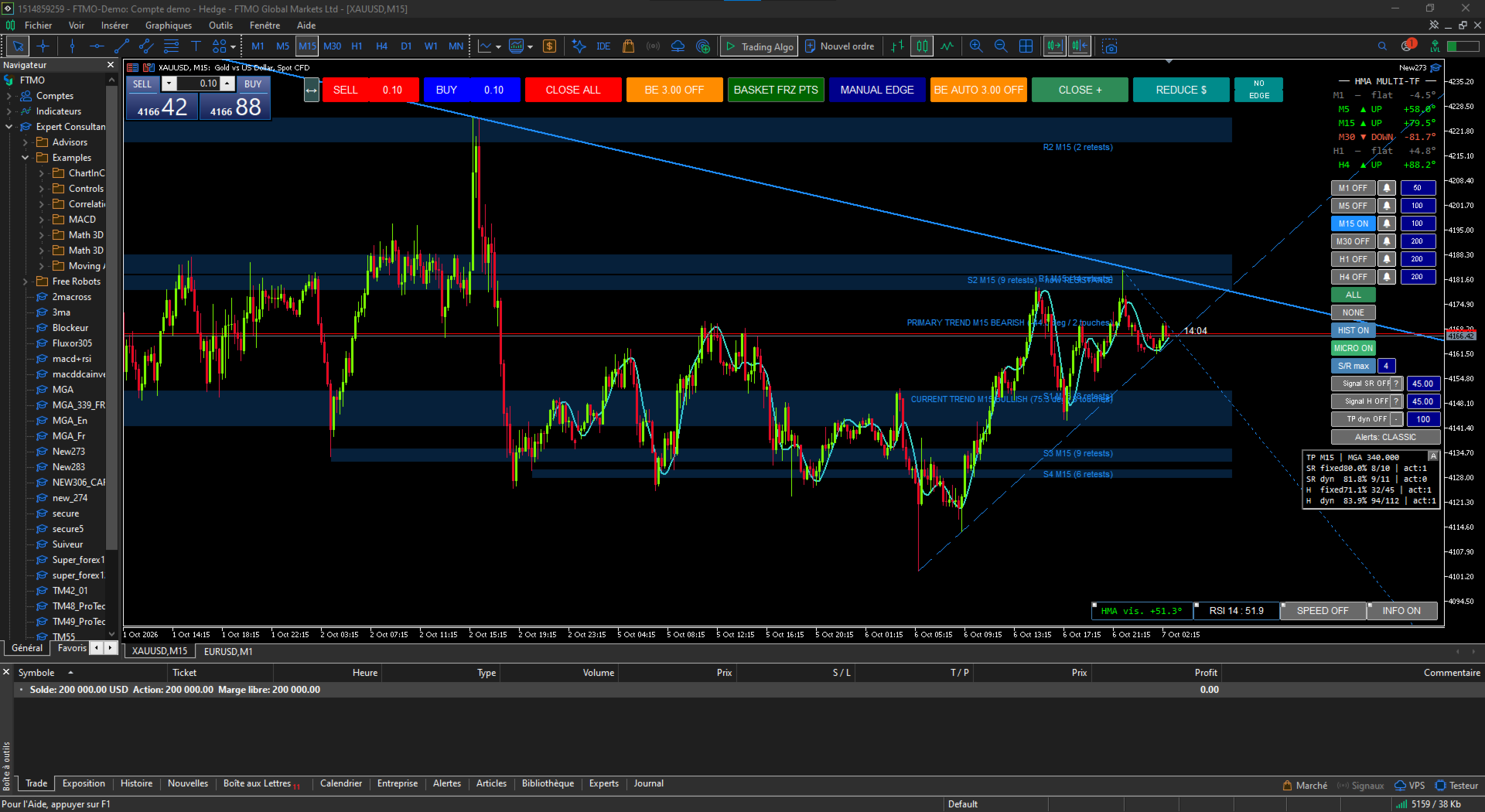
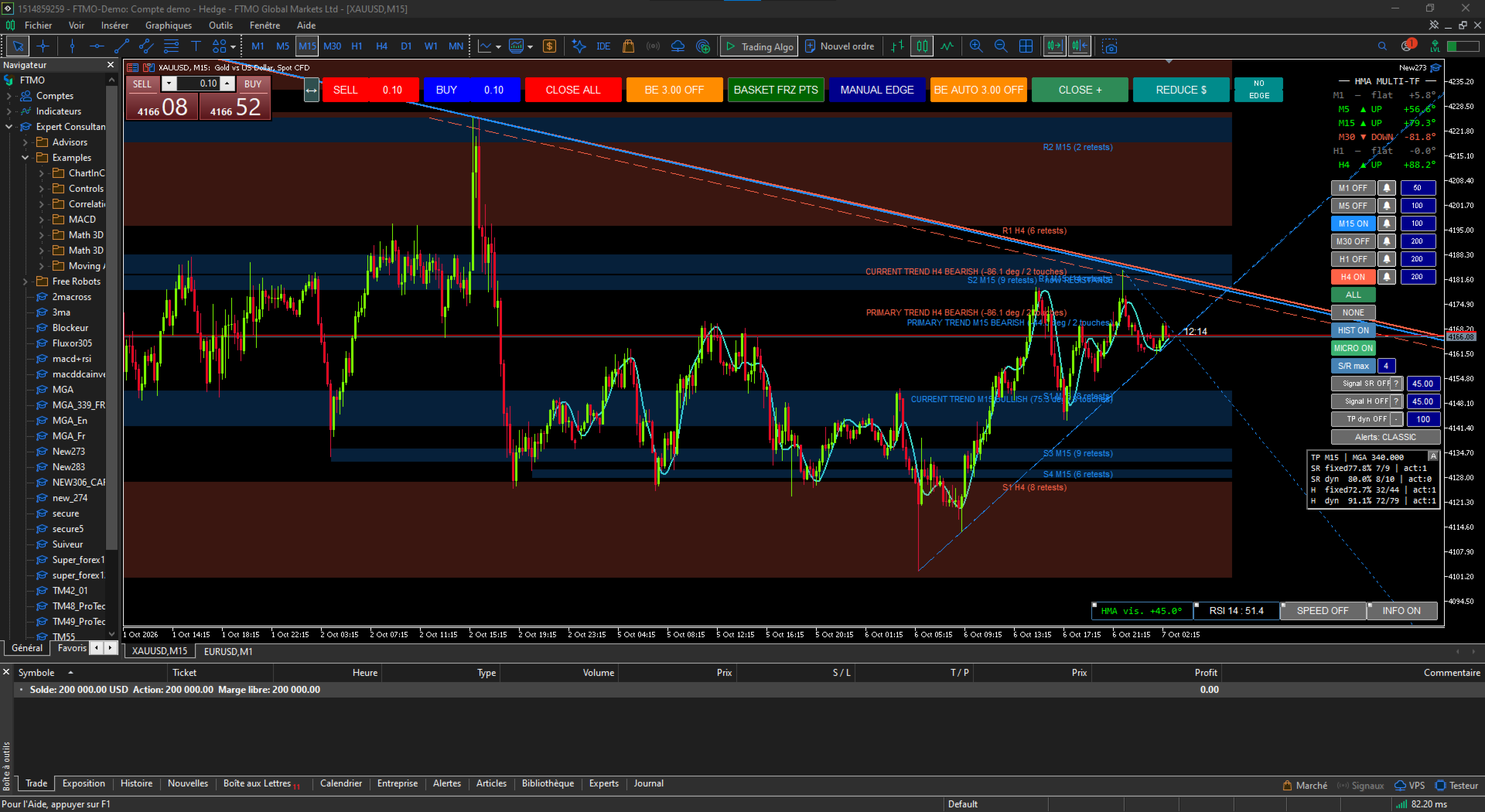
Complete Visual Market Analysis

MGA is not only a position-management tool.

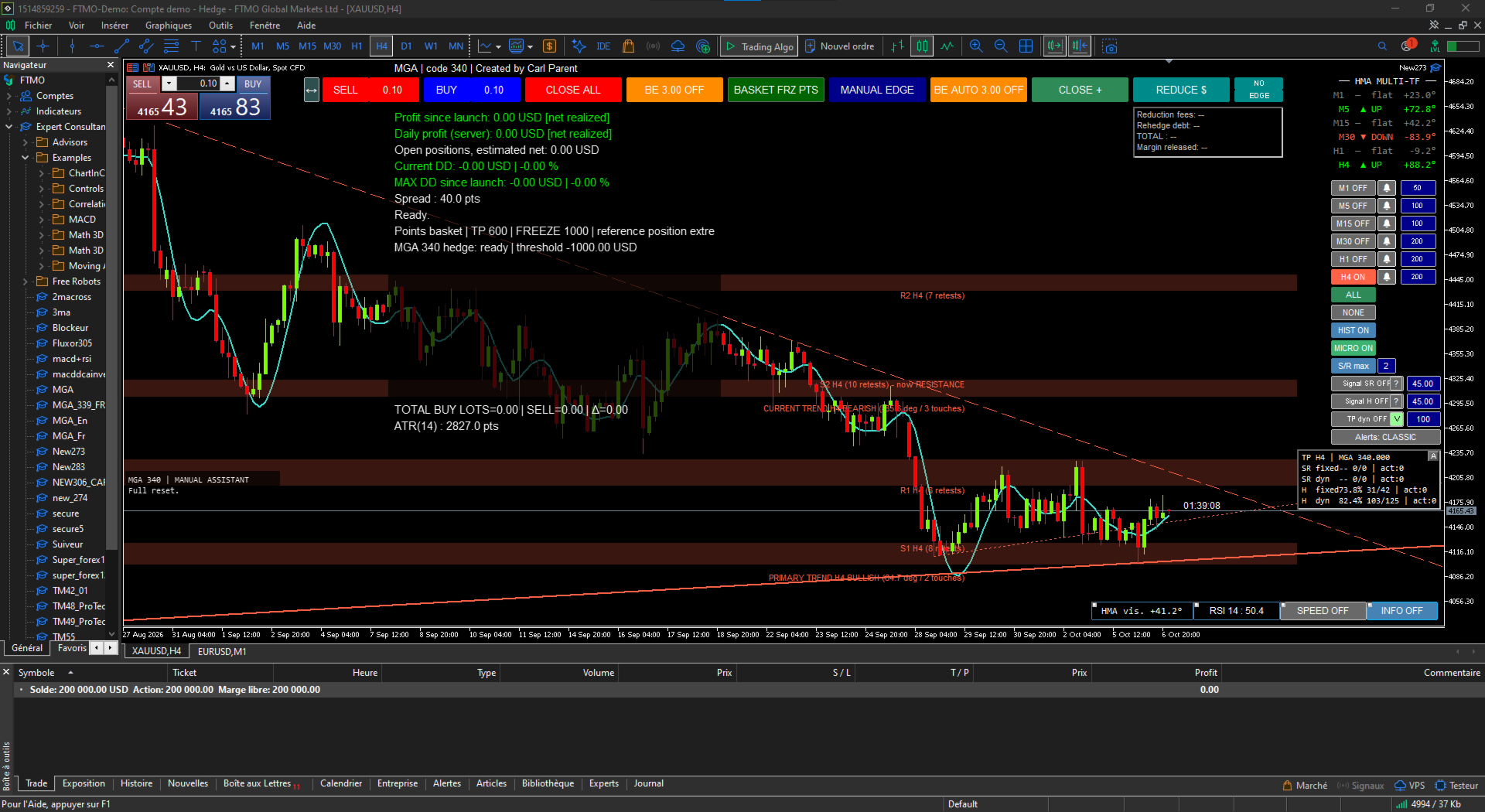
Its graphical environment displays multiple analytical elements directly on the chart to make market structure easier to interpret.

Automatic and adaptive support and resistance zones help identify the main areas currently being respected or tested by price.

Automatic trend lines, main trends, corrections, accelerations, and micro-trends provide an additional view of market structure.

One of MGA’s useful features is its multi-timeframe approach.

For example, a trader working on an M15 chart can also display important zones coming from H1 or H4.

This makes it easier to immediately recognize when a short-term price area also corresponds to a stronger higher-timeframe structure.

MGA supports several timeframes, including:

M1, M5, M15, M30, H1 and H4.

The goal is not to predict the market, but to make important market zones easier to see, compare, and evaluate.

BUY / SELL Signals – Decision Support, Not a Prediction

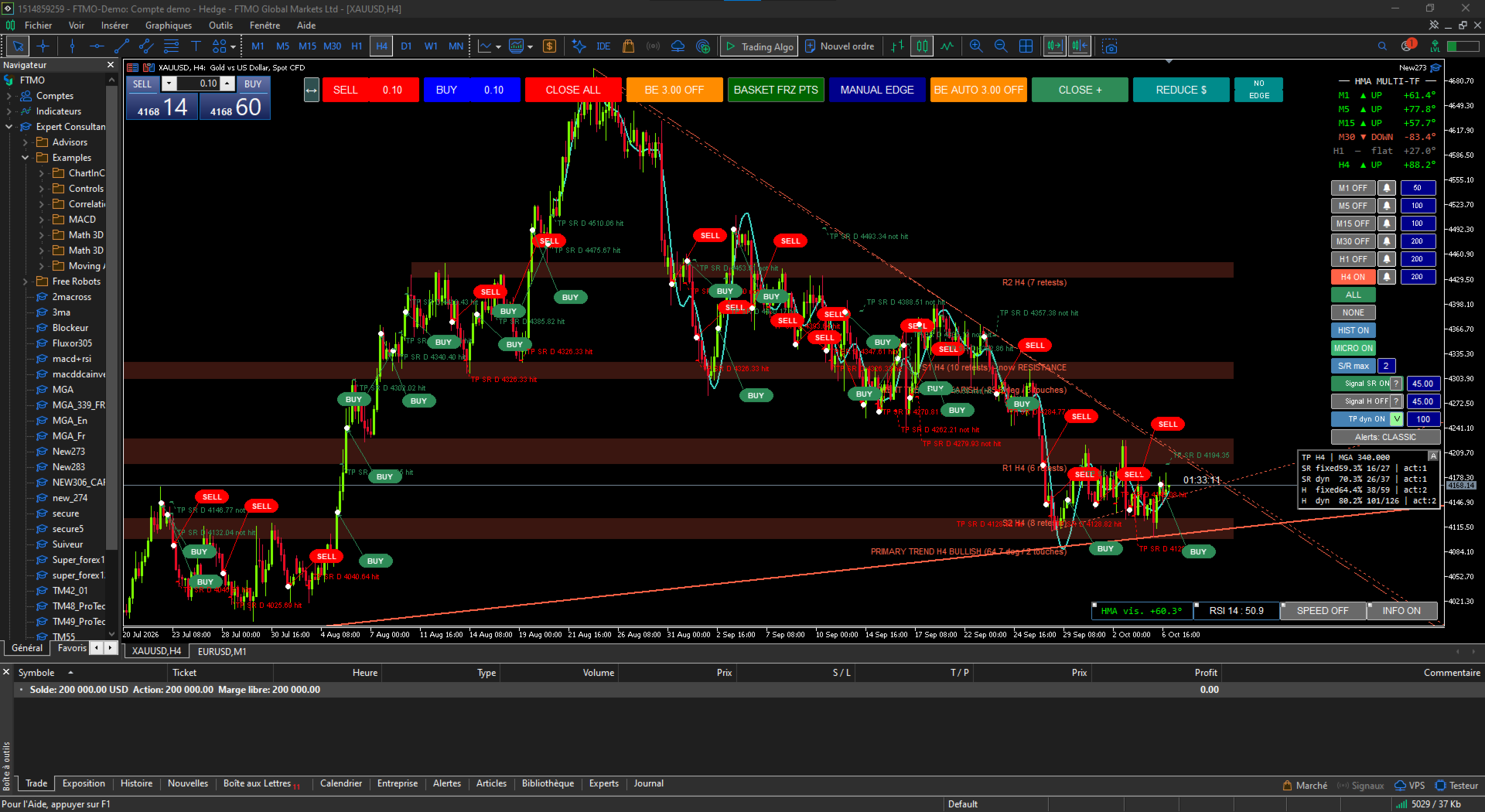
MGA can display BUY and SELL signal bubbles when a combination of technical conditions is detected.

These signals may use information derived from market structure, momentum, support and resistance, trend behavior, and configured confirmation rules.

They should be considered context and momentum indicators, not trading commands or market predictions.

Signals can be used across multiple timeframes.

During MGA development and observation, higher timeframes — particularly H4 — may produce more stable signals than very short timeframes.

However, these observations remain hypothetical and can vary depending on the market period, volatility, parameters, and trading conditions.

A BUY or SELL signal never guarantees that the expected move will occur.

Dynamic TP – A Target That Can Adapt to Momentum

MGA also includes a visual dynamic Take Profit system.

Its objective is not necessarily to keep the same fixed target indefinitely.

When market momentum begins to weaken, particularly through information derived from the HMA and movement strength, the target can progressively move closer to current price.

The idea is to account for a possible slowdown or reversal instead of always maintaining a target that may have become less realistic.

MGA can also display statistics showing how many observed TP levels were subsequently reached by price.

These statistics are descriptive only.

They represent historical observations and do not constitute a certified backtest, a prediction, or a guarantee of future performance.

HMA, Momentum and Market Strength

MGA also displays information related to the HMA, including its slope and the distance between price and the moving average.

These measurements provide another visual indication of:

movement strength, acceleration, slowdown, and potential changes in momentum.

They complement the support, resistance, and trend structures already displayed on the chart.

Complete Position Management

MGA includes several tools that allow traders to adapt position management to their own trading style.

Break Even can be activated manually or automatically.

Basket management can use targets expressed in either points or monetary value, depending on the selected mode.

The trader can also work without an automatic basket target when manual exit management is preferred.

Trailing functions, equity protection, exposure freezing, re-hedging, and other management tools are available directly from the MGA trading cockpit.

Designed for Manual Trading

MGA does not replace the trader.

It does not automatically decide when to buy or sell.

Instead, it provides an infrastructure designed to help the trader:

ANALYZE → DECIDE → PROTECT → REDUCE → REASSESS

The trader remains in control of the trading decisions.

Prop Firm Trading

MGA may also be useful in a Prop Firm environment, where drawdown control, exposure management, and available margin can be just as important as entry quality.

However, every Prop Firm has its own rules regarding hedging, Expert Advisors, trade-management tools, daily loss limits, and maximum drawdown.

Users must always verify that MGA and their intended trading method comply with the rules of their specific program.

MGA does not guarantee that a drawdown limit will not be exceeded.

Mandatory Requirement – MT5 Hedging Account

MGA requires a MetaTrader 5 account operating in HEDGING mode.

This account architecture is required to simultaneously maintain BUY and SELL positions and to properly use:

EDGE, exposure freezing, re-hedging, and progressive exposure reduction.

Accounts operating exclusively in NETTING mode cannot use MGA’s complete architecture.

MGA is developed primarily for XAUUSD.

ANALYZE. DECIDE. PROTECT. REDUCE. REGAIN FLEXIBILITY.

MGA – Manuel Gold Assistant
A complete analysis and position-management environment for manual XAUUSD trading.
おすすめのプロダクト
Local Trade Copier by RWBTradeLab Local Trade Copier copies trades between MetaTrader 5 terminals that run on the same computer or VPS. One file is both sides: an input sets it to MASTER, which sends its trades, or to CLIENT, which copies them. Overview Attach the program to a chart on the account whose trades are to be copied and set the role to MASTER. Attach it to a chart on every account that should follow and set the role to CLIENT, each with its own Client ID. Give all of them the same
FREE
Copy your MT5 trades to accounts anywhere in the world with the   MetaToolsLab Master EA . Unlike local copiers that only work between terminals on the   same   PC or VPS, MetaToolsLab uses a secure cloud relay — so you can broadcast your trades to followers across   different computers, VPS providers, brokers, and continents , with   sub-second delivery   and   no broker passwords . Whether you're a signal provider, a multi-account trader, or an account manager, the Master EA installs in about
FREE
CopyTrader Pro FAST MT5 — FREE Real-Time Trade Copier | MT4 ↔ MT5 Cross-Platform | 20ms Latency CopyTrader Pro FAST is a professional trade copier Expert Advisor that copies trades between MetaTrader terminals in real time using a high-speed file-based communication system. No VPS, no network setup, no DLL — just attach and copy. FREE VERSION : Copies up to 1 trade at a time. Upgrade to the full version, Copy Trader Pro FAST MT5 , for unlimited copying. Key Features 20ms refresh rate — in

FREE
Opening EA - Start Edition Is a tool to trade the OpeningStrategy! The Opening EA is a semi-automated EA for MetaTrader 5! This means that the trader must actively start the EA using the Start button and stop it using the Stop button. This EA pursues an opening strategy which, at the start of trading, e.g. on the DAX or Nasdaq, etc., opens a trading channel with predefined TP's (TakeProfit). Two pending orders with the same lot size are set at the beginning. As soon as one of the pending order
FREE
Demo copier of deals from MetaTrader 5 to MetaTrader 5 ( MetaTrader 4<->MetaTrader 4 version is available ; with both versions, you can copy MetaTrader 5<->MetaTrader 4, MetaTrader 4<->MetaTrader 5, MetaTrader 5<->MetaTrader 5, MetaTrader 4<->MetaTrader 4). Works only in the mode of hedging. Spread filter. Select the best price (start copying positions with a profit or loss). Configure the lot size, fixed or ratio-based (provider signals can be copied with an increased lot). Configure order copy
FREE
RelicusRoad CopyTrader は MetaTrader 5 向けの無料のトレードコピーツール( trade copier )です。同じパソコン上のMT5端末間でトレードをコピーするので、1つの口座で取引し、他の口座にはそれぞれ独自のロット数とリスクで追従させることができます。 フルバージョンで、機能制限も試用期間もありません。 1つの口座で取引し、残りは追従させる。 MetaTrader 4: RelicusRoad CopyTrader MT4 仕組み 1つの端末が リーダー (Leader)として動作し、保有しているオーダーを共有します。任意の数の端末が フォロワー (Follower)として動作し、それらをミラーリングします。端末は チャンネル 名でペアリングされるため、同じマシン上で複数の独立したコピーグループを同時に運用できます。 コピー処理は200ミリ秒のタイマーで実行されるため、フォロワーは自分のチャート上のティックを待たずに新しいオーダーに反応します。 セットアップ手順 1. すべての端末を 同じパソコン または同じVPS上で実行してください。異なる2台
FREE
Profit & Loss Display - MT5 Panel On chart panel to display profit and loss per product over specified time period View P/L for EA trades only or also with manual trades Note this is a panel, not an indicator or algorithm, it simply displays profit and loss from account history //---- Install ----// After download, attach indicator to chart from the markets folder which is in navigator window (Cntrl N) //---- Study ----// Set target profit for product per week/specified period Set loss limi
FREE
TRADE PANEL MASTER — Know Your Risk Before You Click Open your chart. See your panel. Trade with confidence. Before you click Buy or Sell, Trade Panel Master shows you  exactly what you risk, what you gain, and your R:R ratio —  in real time. No mental math. No surprises. FEATURES - Lot sizing with real-time margin display - SL & TP in 3 modes: Points / Money / Price - Au
FREE
The Dual MACD & Stochastic Expert Advisor (EA)  is a fully automated trading system that utilizes two  MACD (Moving Average Convergence Divergence) indicators along with the  Stochastic Oscillator  to identify high-probability trading opportunities. By combining trend confirmation from MACD with momentum analysis from Stochastic, this EA provides precise entry and exit points for optimized trading performance. Key Features: • Dual MACD Strategy – Uses two MACD indicators with different setting
FREE
Copy your MT5 trades to accounts anywhere in the world with the   MetaToolsLab Slave EA . Unlike local copiers that only work between terminals on the   same   PC or VPS, MetaToolsLab uses a secure cloud relay — so you can broadcast your trades to followers across   different computers, VPS providers, brokers, and continents , with   sub-second delivery   and   no broker passwords . Whether you're a signal provider, a multi-account trader, or an account manager, the Slave EA installs in about a
FREE
MAGIC PROTECTOR — Advanced Equity Protection EA Magic Protector   is a utility built for traders who want better control over daily, weekly, or monthly risk exposure. The EA continuously monitors trading performance based on your selected protection period and helps prevent further losses or overtrading once your defined limits are reached. It can work with either the entire account or only trades belonging to a specific Magic Number, making it suitable for traders running multiple Expert Ad
FREE
Free Slave Version – Remote Trade Receiver MT5. This is the FREE Slave version of our professional Remote Trade Copier system. It allows you to receive trades from a Master account running our full Copy Trade solution. Designed for simplicity and reliability, this version is read-only and cannot send trades or operate independently. Key Features: One-click setup – simply connect to the Master. Fast and accurate order copying. Supports all symbols, order types, and brokers. Minimal resource us
FREE
Eagle Trade Copier MetaTrader 4 と MetaTrader 5 用のローカル・トレードコピー:同じパソコンまたは VPS 上で、MT4 から MT5、MT5 から MT4、または同じプラットフォームのターミナル間でコピーします。各銘柄は最初のコピーの前に確認され、各コピーは手動注文と同じように確認されます。 チャート上のダッシュボードが、口座、接続、すべてのコピーをリアルタイムで表示します。 Eagle Trade Copier は、同じパソコンまたは VPS で動いている MetaTrader ターミナル間で、ポジションと待機注文をコピーします。1 つのファイルで 3 つの役割:コピー元の口座では Transmitter、コピーする各口座では Receiver、同じ口座内で取引を増やすには Self Copier。最初のコピーの前に接続とコピー元口座のすべての銘柄をテストし、チャート上のパネルが問題点と直し方を表示します。 ここが違う - ブローカーによって同じ銘柄の名前が異なります(EURUSD、EURUSD.r、EURUSDm、GOLD と
FREE
SmartEntry EA
Saksit Pawapootanont
Overview SmartEntry EA gives traders full control over any trading symbol — Gold (XAUUSD), Indices, Crypto, and Forex — with both manual and automated entry modes. The EA automatically detects the symbol type and adjusts pip/unit calculations accordingly. The built-in panel allows real-time control of every feature without restarting the EA.   Key Features Auto HG Trigger •   Automatically detects bullish M1 candles exceeding a configurable size threshold •   Mode 1 — HG Sure-Fire: Opens BUY an
FREE
# MiniBull Board **Version 1.14 — MetaTrader 5 indicator (separate window)** **11 languages: English, Turkish, Russian, Chinese, Spanish, Portuguese, Japanese, German, French, Italian, Korean** — automatically in the language of your MetaTrader terminal, or chosen with a single input. MiniBull Board is a compact watch-list dashboard for MetaTrader 5. For every symbol you choose it shows where the price stands today, this week and this month: the current price, the day / week / month opening
FREE
Exit Vector MT5 Type: Expert Advisor (position management utility) Price: Free Exit Vector MT5 is a trade exit manager for MetaTrader 5. It monitors existing open positions and requests closure when an individual position reaches a configured gain or loss amount. It does not open positions or generate trade entry signals. Main functions - Independent thresholds for a positive and negative floating result per position. - Default levels: +1,500 and -450 in account currency. - Multi-symbol moni
FREE
Эксперт  MACD_LevelTrader MT5   создан для торговле валютной пары XAUUSD. Данная версия это наработки того, что можно извлечь  из  индикатора MACD и Moving Average.  Важно   перед тестированием изменить настройку с 1000 на 5000                       Offset in points UP from SMA200 for sell              5000                       Offset in points DOWN from SMA200 for buy        5000   Тайм фрейм  М5. Два варианта логики, П араметр  true=вход по уровню  MACD +   SMA200, false=вход по MACD  Тестиру
FREE
お使いの取引口座で マイナスのロックポジション(損失を抱えた両建て) が発生し、今後どうすればよいか分からなくなっていませんか? BUY(買い)とSELL(売り)のポジション が同時に保有され、 全体の損失 が数十件もの取引に分散している一方で、すべてを一度に決済することは避けたい状況です。価格は上下に動いているものの、状況はほとんど改善しません。取引口座が罠にはまったように感じられるでしょう。ポジションを保有し続けるべきか、それとも 大きな損失を確定させてすべて決済するべきか 。これは、 ロック取引(両建て) を利用する多くのトレーダーが直面する問題です。 この問題に対処するため、私は VR Unlock Smart を開発しました。これは MetaTrader 5 向けのエキスパートアドバイザー(EA)であり、 マイナスのロックポジションを段階的に解除する ことを目的としています。このEAは保有中のポジションを自動的に分析し、適切な組み合わせを選択して、 ナンピン(平均取得価格の調整) と ポジションの部分決済 を活用します。ロック全体を一度に決済するのではなく、市場の値動きを利用
FREE
Advanced Trade Mirror   is a powerful Forex tool designed for traders who need instant, seamless trade replication across multiple terminals on the same machine. With lightning-fast execution, it ensures zero lag in copying trades, maintaining precision and efficiency in high-speed trading environments. Get the Trade Mirror Master here:  https://www.mql5.com/en/market/product/133891 Specification: Master ID: Identity value of master terminal, please use a unique value to prevent duplicated mas
FREE
Fast CopyTrade LAN — Local Trade Copier for MetaTrader 5 Overview Fast CopyTrade LAN is a fast, DLL-free local trade copier for MetaTrader 5. It instantly copies trades between MT5 accounts on the same PC — copying OPEN, PARTIAL, MOD (SL/TP) and CLOSE from a Provider to one or more Receivers. This copy trader uses the MT5 Files folder for secure local messaging, requires no external files, no DLLs, and is fully Market-compliant. Advantages Fastest local copy trading with very low latency Market
FREE
VERSIONE INGLESE (ENGLISH VERSION) ️ ATTENTION: IMPORTANT NOTE ABOUT THE VERSION AND STRATEGY TESTER RESULTS Due to the strict restrictions and memory limitations imposed by the MQL5 automatic validator, which often rejects algorithms with highly complex protection logics, the version downloadable directly here from the Market serves as a validation/demo setup. To download the FULL, UNRESTRICTED, and REAL production version of the algorithm (.ex5 file), please connect to our official GitHub re
FREE
TradeInfos
Dustin Ricardo Pierenz
Track your spread and all position PnLs (Buy & Sell) in real-time – stay in control of your trades at a glance! Features: Real-time spread display (in pips) Total Buy position PnL Total Sell position PnL Clean, non-intrusive display layout Works with all symbols and timeframes Perfect for: Scalpers needing quick spread awareness Day traders monitoring long/short performance Risk managers optimizing exposure No need to switch tabs or rely on external tools — everything you need is visible at
FREE
MT5 History Checker Can you trust the historical data behind your MT5 backtest? MT5 History Checker is a diagnostic utility designed to identify missing periods and coverage problems in the historical data supplied by your MetaTrader 5 broker. Select the symbol and date range you want to examine and run the checker. The utility analyses the available history and provides a clear PASS, WARNING or FAIL result. What it checks Historical tick-hour coverage M1 historical-data coverage Missing periods
FREE
URGENT: PLEASE READ BEFORE DOWNLOADING This EA is ONLY the "Receiver" (Slave) part of the copy trade system. IT WILL NOT WORK ON ITS OWN! To successfully copy trades, you MUST have the "Master" (Sender) EA installed on your provider account. GET THE REQUIRED "MASTER" EA HERE:   AW Trade Copier Master Unlock lightning-fast trade replication across multiple MetaTrader 5 accounts on the same PC or VPS. The AW Local Trade Copier is designed for speed, reliability, and ease of use
FREE
SL Manager
Gabriel Paul Ange Perrin
SL Manager は MetaTrader 5 用のトレード管理ユーティリティです。選択した時間帯の間、保有ポジションの ストップロス を外し、時間帯の終了時に元に戻します。目的は、例えば日次ロールオーバーや流動性の低いセッション終了時など、スプレッドの急拡大だけでストップが発動してしまうのを防ぐことです。 なぜ時間帯なのか 日次ロールオーバーの前後には、多くのブローカーが数分間スプレッドを広げます。買いは Bid で、売りは Ask で決済されるため、チャート上の価格がほとんど動いていなくても、スプレッドが広がるとストップに達することがあります。 SL Manager は、この短い間、ブローカー側にストップがない状態でポジションをやり過ごし、時間帯が終わったところで価格を確認します。時間帯の開始と終了はあなたが決めます。時間帯内の薄い流動性による短い値動きでストップに触れることはありませんが、その間はストップがまったくない状態です。 機能 ユーティリティは毎秒時刻をチェックします。時間帯が始まると(既定はサーバー時間の 23:00 から 01:00 )、ストップロスを持つすべての
FREE
MetaTrader 5のチャート上で直接、クリーンで高速なリアルタイムの平均利益(Average Win)追跡を実現。 ごちゃごちゃした画面や、重くてラグのあるダッシュボードとはお別れです。InnovaDashのSimple Average Win Trackerは、必要なデータを必要な場所に正確に提供する超軽量ウィジェットです。 なぜ平均利益を追跡するのか? 平均的な勝ちトレードの金額($)を知ることは、リスクリワードレシオを構築する上で不可欠です。平均損失と組み合わせることで、この指標は目標を達成するたびにあなたの優位性がどれだけの利益をもたらすかを正確に教えてくれます。 InnovaDashエコシステム このウィジェットは、InnovaDash分析エンジンの無料サンプルです。MT5のチャートを散らかすことなく、すべての指標を一度に確認したいと思いませんか? innovadash.com にアクセスして口座を接続し、フルダッシュボードをロック解除してください。50以上の高度な指標を同時に追跡し、カスタム日付範囲でデータをフィルタリングし、特定のシンボルを分析し、コメントでフ
FREE
Just downloaded it? Message me after you download it and I will help you set it up, step by step, free. Free. One click to switch the chart to another symbol. TrueRisk Symbol Changer puts your symbols on the chart as buttons, each with today's % change in green or red. Click one and the chart switches to it, keeping your timeframe, your template and your other indicators. One row of timeframe buttons (M1 to MN) does the same for the timeframe. No more right-click, Symbols, find, drag. MT4 versio
FREE
Discover the power of automated trading with **SimpleTradeGioeste**, an Expert Advisor (EA) designed to optimize your trading operations in the Forex market. This innovative EA combines advanced trading strategies with proven technical indicators, offering an unparalleled trading experience. video backtest :  https://youtu.be/OPqqIbu8d3k?si=xkMX6vwOdfmfsE-A ****Strengths**** - **Multi-Indicator Strategy**: SimpleTradeGioeste employs an integrated approach that combines four main technical ind
FREE
Tandem は MetaTrader 用のローカル・トレードコピーツールです。同じパソコンや VPS で動いている端末どうしで取引をコピーします。MT4 から MT4、MT4 から MT5、MT5 から MT5、そして MT5 から MT4 にも対応しています。プラットフォームごとに一つずつバージョンがあり、両者は連携して動きます。 マスター側とスレーブ側を一つのエキスパートアドバイザーにまとめました。各端末のチャートに設定し、取引する口座では MASTER をクリック、それに追従させる口座は SLAVE のままにしておきます。チャンネル番号がそろっていれば、スレーブは通常 1 秒もかからずにマスターの取引を拾います。やり取りは端末の共通フォルダにある小さなファイルを通して行うので、DLL もサーバーも Windows 側の設定も要りません。各端末でアルゴリズム取引を許可し、すべての端末を同じ Windows ユーザーで動かしてください。 コピーされるのは、成行ポジションと待機注文、そのストップロスとテイクプロフィット、後から行ったストップや待機注文価格の変更、部分決済と全決済です。
FREE
Place trades in one click with the lot size calculated from your risk. How it works Type your risk percent, stop loss in points and take profit as a multiple of the stop. The panel shows the lot size and the money at risk before you click. BUY and SELL open the order with SL and TP already attached. Management buttons move stops to break-even, close half or close all positions on the chart symbol. Key features Risk based lot size from balance, tick value and stop distance SL and TP attached to e
FREE
このプロダクトを購入した人は以下も購入しています
Trade Assistant MT5
Evgeniy Kravchenko
4.43 (216)
取引 ごとのリスクの 計算、新規注文 の 簡単 な 設置、部分的 な 決済機能 を 持 つ 注文管理、 7 種類 のトレーリングストップなど 、便利 な 機能 を 備 えています 。 追加の資料と説明書 インストール手順   -   アプリケーションの手順   ライン機能 チャート上にオープニングライン、ストップロス、テイクプロフィットを表示します。この機能により、新規注文を簡単に設定することができ、注文を出す前にその特徴を確認することができます。   リスク計算 リスク計算機能は、設定されたリスクとストップロス注文のサイズを考慮して、新規注文のボリュームを計算します。ストップロスの大きさを自由に設定できると同時に、設定したリスクを守ることができます。 Lot calc ボタン - リスク 計算 を 有効 / 無効 にします 。 Risk フィールドでは 、必要 なリスクの 値 を 0 から 100 までのパーセンテージまたは 預金通貨 で 設定 します 。 設定」 タブで 、 リスク 計算 の 種類 を 選択 します :「 $ 通貨」、「 % 残高」、「 % エクイティ 」、「
Trade Manager EAへようこそ。これは、取引をより直感的、正確、そして効率的にするために設計された究極の リスク管理ツール です。これは単なるオーダー実行ツールではなく、包括的な取引計画、ポジション管理、リスク管理のためのソリューションです。初心者から上級者、迅速な実行を必要とするスキャルパーまで、Trade Manager EAはあらゆるニーズに対応し、為替、指数、商品、暗号通貨などさまざまな市場で柔軟に対応します。 Trade Manager EAを使用すると、複雑な計算が過去のものになります。市場を分析し、エントリーポイント、ストップロス、テイクプロフィットのレベルをチャート上のラインでマークし、リスクを設定するだけで、Trade Managerが最適なポジションサイズを即座に計算し、SLとTPをピップ、ポイント、口座通貨でリアルタイムに表示します。すべての取引が簡単かつ効果的に管理されます。 主な機能: ポジションサイズ計算機 :定義されたリスクに基づいて取引サイズを瞬時に決定します。 簡単な取引計画 :エントリー、ストップロス、テイクプロフィットを設定するためのド
Farmed Hedge Yield Farming | All Markets (Manual - Hybrid - Semi/Automated EA) VERIFIED TRADING RESULTS - Farmed Hedge Yield Axi Copy:  https://www.mql5.com/en/signals/2356376 - Farmed Hedge Yield Exn Copy:   https://www.mql5.com/en/signals/2356404 - Farmed Hedge Yield V Copy:  https://www.mql5.com/en/signals/2357156 IMPORTANT NOTICE: FarmedHedge is a MANUAL-FOCUSED TRADING UTILITY ,not a fully automated EA. Results shown on this Signal include manual trades and overall strategic management.
Telegram to MT5 Multi-Channel Copier   は、 Telegram と Discord チャンネルのトレードシグナルを MetaTrader 5 へ自動コピーします。ボット不要、ブラウザ拡張不要、手動コピー不要。Telegram や Discord にシグナルが届くと、EA が数秒であなたのターミナルに注文を出します。 さらに、チャンネルをコピーする前に、内蔵バックテスターでそのチャンネルがあなたの口座でどう動いたかを確認できます。 製品は 2 つのコンポーネントで構成されます:Telegram チャンネルを監視する Windows アプリと、MT5 ターミナルでシグナルを執行する本 EA です。MT4 版もあります   こちら . 購入前にお試しください:   アプリは無料でダウンロードできます。ご自身のチャンネルを接続し、各シグナルがどのように読み取られるかをご確認ください。Backtest タブと実際の取引には、購入またはレンタルした EA が必要です。このページの無料デモはストラテジーテスターでのみ動作し、テスターでは Telegram と D
Local Trade Copier EA MT5
Juvenille Emperor Limited
4.94 (150)
Local Trade Copier EA MT5 は、同一の Windows PC または Windows VPS 上で稼働する複数の MetaTrader 5 口座間で、取引をコピーおよび管理するための高速で柔軟なトレードコピーツールです。 ローカルでの取引同期に加え、Receiver 側でロットサイズ、リスク管理、取引フィルター、シンボルマッピング、取引管理、口座保護を個別に設定できます。 Transmitter と Receiver のターミナルは約 1分 で設定でき、同一ブローカーまたは異なるブローカーの口座間で、手動取引や EA による取引をコピーできます。適切な条件下では、ローカルの MetaTrader ターミナル間で取引情報を 0.5秒未満 で同期できます。実際の約定速度は、ブローカーのレイテンシー、ネットワーク状況、PC/VPS の性能、ターミナルの負荷によって異なります。 ご購入前に無料デモをお試しください Local Trade Copier EA MT5 の完全機能版無料デモ を、MT5 デモ口座で 1回につき4時間 テストできます。 Local Trad
EA Overfitter
Stephen J Martret
5 (4)
That backtest looks great. But will it still be making money tomorrow, next week, next month? EA Overfitter re-runs your EA on 100 price histories it has never seen. One score tells you if the edge is real. A backtest tells you what an EA did on one price history — the one that happened to occur. What you cannot tell from it is how much of that result was the strategy and how much was the particular path. EA Overfitter answers that. It builds up to 100 synthetic price histories your EA has n
TradePanel MT5
Alfiya Fazylova
4.89 (174)
Trade Panelは多機能なトレーディングアシスタントです。アプリには手動取引用の50以上のトレーディング機能が搭載されており、ほとんどの取引作業を自動化することができます。 アプリの説明書: https://www.mql5.com/en/blogs/post/756482 デモ口座用アプリの試用版: https://www.mql5.com/en/blogs/post/750865 アプリのインストール方法: https://www.mql5.com/en/blogs/post/756239 アプリをビジュアルモードでテストする方法: https://www.mql5.com/en/blogs/post/770277 VPSのMetaTraderにアプリをインストールする方法: https://www.mql5.com/en/blogs/post/770190 取引。 ワンクリックで取引操作を行うことができます: リスクを自動計算して指値注文やポジションを開く。 複数の注文やポジションをワンクリックで開く。 注文のグリッドを開く。 保留中の注文やポジションをグループごとに閉じる
自分の取引ルールで Telegram のシグナルをコピー Telegram to MT5 Signal Trader は、Telegram の公開・非公開チャンネルやグループから、テキスト形式の取引シグナルを MetaTrader 5 へ自動でコピーします。1つのデスクトップアプリで複数の配信者と MT5 口座を管理し、 配信者ごとにリスクと取引設定を個別に指定 できます。 シグナルのコピーに Telegram ボットや API 設定は必要ありません。 電話番号または QR コードでご自身の Telegram アカウントにログインし、すでに参加しているチャンネルやグループを選ぶだけです。ボットの作成や、Telegram API トークン、API ID、API hash の入力は不要です。 ポジションサイズを選び、複数の利確水準に分けて決済し、建値へのストップ移動やトレーリングストップを自動化できます。配信者のシグナルを受け取りながら、実際の取引方法は自分で管理できます。 本製品は、この MT5 エキスパートアドバイザ(EA)と、必須の Windows 連携アプリで構成されます。 インス
Strategy Ledger Pro
Abdullah Uygar Tuna
5 (17)
日本語に対応しました。 Strategy Ledger Pro は、MetaTrader 5 用の読み取り専用の口座分析パネルです。口座の成績をエキスパートアドバイザー(EA)、戦略、銘柄、マジックナンバーごとに分け、それぞれが実際にどれだけ貢献しているかを明らかにします。 パネルは 11 言語に対応しています:English、Français、Deutsch、Español、Italiano、Português、Русский、Türkçe、中文、日本語、한국어。 デモをダウンロードする前に。 Market では、有料製品のデモはストラテジーテスター内でのみ実行されます。このパネルはご自身の口座の取引を分析しますが、ストラテジーテスターには読み取る口座履歴がないため、デモは空のパネルで起動し、その旨を表示します。これはデモの仕組みによるもので、製品の制限ではありません。 この説明内の動画では、実口座でのパネルの動作をご覧いただけます。 すべての機能を解説した詳しい マニュアル (英語)と、情報交換やお知らせのための AureusAI Trading Suite グループをご用意し
Exp COPYLOT CLIENT for MT5
Vladislav Andruschenko
3.97 (35)
MetaTrader 5 用のプロフェッショナル取引コピー機 MetaTrader 向けの高速・高性能・信頼性の高い 取引コピー機 です。 COPYLOT は、MT4 と MT5 のターミナル間で Forex 取引をコピーでき、 Hedge 口座と Netting 口座の両方に対応しています。 COPYLOT MT5 版の対応構成: - MT5 Hedge → MT5 Hedge - MT5 Hedge → MT5 Netting - MT5 Netting → MT5 Hedge - MT5 Netting → MT5 Netting - MT4 → MT5 Hedge - MT4 → MT5 Netting MT4 版 完全な説明 + DEMO + PDF 購入方法 インストール方法 ログファイルの取得方法 テストと最適化の方法 Expforex のすべての製品 MT4 ターミナルへのコピーも可能です(MT4 → MT4、MT5 → MT4): COPYLOT CLIENT for MT4 COPYLOT は、2台、3台、さらには10台のターミナル間で同時に動作できる、プロフェッ
News Trade EA MT5
Konstantin Kulikov
4.55 (11)
僕自身が数年間使っている便利なロボットをご紹介します。半自動モードでも完全自動モードでもお使いいただけます。 >>> Chat <<< 当プログラムは経済指標カレンダーで発表されるニュースをもとにした取引の柔軟な設定が可能です。戦略テスターでは確認不可です。実際の取引のみです。 最新の設定アーカイブをダウンロードしてください: https://www.mql5.com/en/blogs/post/747929 シグナルモニタリング: https://www.mql5.com/en/signals/author/test-standart 当該エキスパート・アドバイザーのためのカスタマイズ設定セットを作る場合は、ブログの全パラメータの説明を参照してください :   https://www.mql5.com/en/blogs/post/748545 。 基本的なデフォルト設定について 一つのチャートからGBPとの通貨ペア(GBPUSD、EURGBP、GBPJPY、GBPCAD、GBPAUD、GBPCHF)で取引をします。GBPは最もボラティリティの高い通貨のため、取引が成功するチ
Power Candles Strategy Scanner:自己最適化するマルチシンボル・セットアップファインダー わずかな動きのたびに鳴るスキャナーは、やがて無視されるようになります。慌ただしいローソク足の確定ひとつでアラートが次々と届き、本当にトレードしたい唯一のセットアップがノイズに埋もれてしまう。 Power Candles Strategy Scanner は、自己最適化する Power Candles エンジンを Market Watch のすべてのシンボルで動かし、あなた自身のフィルターを通過したものだけを知らせます。基準は、直近の確定足の強さ、セットアップのリスクリワード、リアルタイムのスプレッド、そしてあなたがトレードする資産クラスです。シンボルがリストに入った瞬間、スキャナーがあなたを呼びます。フィルターで外したものはすべて静かなまま。同じローソク足の確定で出たヒットは、すべて1通のメッセージにまとめて届きます。 購入前にパネルとすべてのフィルターをご覧ください。 スクリーンショット、全機能のツアー、Power Candles との連携ワークフロー: stein.
================================================================================ POC BREAKOUT - V20.72. Full Professional Grade Toolkit ================================================================================ POC Breakout is a full MetaTrader 5 trading dashboard for discretionary traders who want breakout signals, Point of Control (POC) context, volume profiles, order flow, market structure, news, alerts, and advanced trade planning in one professional workspace. Attached directly to you
The product will copy all telegram signal to MT5 ( which you are member) , also it can work as remote copier.  Easy to set up, copy order instant, can work with almost signal formats, image signal,  s upport to translate other language to English Work with all type of channel or group, even channel have "Restrict Saving Content", work with  multi channel, multi MT5 Work as remote copier: with signal have ticket number, it will copy exactly via ticket number. Support to backtest signal. How to s
Unlimited Trade Copier Pro MT5 is a tool to copy trade remotely to multiple MT4, MT5 and cTrader accounts at different computers/locations over internet. This is an ideal solution for you if you are a signal provider and want to copy your trades to other receivers globally on your own rules. One provider can copy trades to multiple receivers and one receiver can get trade from multiple providers as well. The provider can even set the subscription expiry for each receiver, so that receiver will n
MetaTrader 5 用の order block・BOS・ChoCH エキスパートアドバイザー、Telegram 通知付き SMC Trade Pilot MT5 はチャート上の市場構造を読み取り、シグナルを Telegram に送信します。構造のブレイク(BOS)と性格の変化(ChoCH)を表示し、 強度スコア付きの order block を描画し、fair value gap(FVG)と liquidity sweep を追跡し、point of control、value area high、value area low を含む volume profile を表示し、マルチタイムフレームパネル、コンフルエンススコア、kill zone セッションを備えたコンパクトなダッシュボードにまとめます。 確定と同時に表示し、その後に確認 ブレイクはローソク足の確定と同時に PENDING と表示されます。確認を待たずに表示され、新たな高値または安値が確認した時点で確定に変わります。設定した本数のローソク足で自動的に期限切れとなり、価格が無効化した場合は消えます。送信する通知は設定
VirtualTradePad PRO SE MT5 — MetaTrader 5向けプロフェッショナル取引コントロールセンター VirtualTradePad PRO SE は、 MetaTrader 5 向けのプレミアムなチャートベースの取引パネルであり、トレード管理ワークスペースです。より速い執行、明確なポジション管理、構造化されたトレード管理、視覚的なレベル計画、そしてチャート上で完結するプロフェッショナルなワークフローを求めるトレーダー向けに設計されています。 これは単なる BUY / SELL パネルではありません。PRO SE は、手動取引、予約注文、ポジション管理、部分決済、バスケット損益管理、平均化レベル、ATMルール、シグナル監視、リアルタイム市場情報、ストラテジーテスター (Strategy Tester) ワークフロー、VPS向け運用を、1つの連携されたインターフェースに統合します。 MT4版 | 完全な説明とスクリーンショット | 購入方法 | インストール方法 | ログファイルの取得方法 | テストと最適化の方法 | Expforex のすべての製品 PRO
Timeless Charts
Samuel Manoel De Souza
5 (9)
Timeless Charts is an all-in-one trading utility for professional traders. It combines custom chart types such as Seconds Charts and Renko with advanced order flow analysis using Footprints , Clusters , Volume Profiles , VWAP studies, and anchored analysis tools for deeper market insight. Trading and position management are handled directly from the chart through an integrated trade management panel , while Market Replay and Virtual Accounts provide environments for practicing trading skills and
Equity Protect Pro: 安心取引のための総合的な口座保護エキスパート 口座保護、資産保護、ポートフォリオ保護、マルチ戦略保護、利益保護、利益確定、取引セキュリティ、リスク管理プログラム、自動リスク管理、自動決済、条件付き決済、スケジュール決済、動的決済、トレーリングストップロス、ワンクリッククローズ、ワンクリック決済、ワンクリック復元などの機能をお探しなら、Equity Protect Pro が最適なプログラムです。 設定は簡単で、事前設定された条件に達すると、すべてのチャートを閉じることができ、シグナルサブスクリプションのキャンセルもサポートします(これは、すべての取引プログラムも停止することを意味します)。この時点で、新しい注文は生成されなくなり、最終的にすべての注文が閉じられ、予期せぬ損失を効果的に防止し、安心して取引できるようになります。 Equity Protect Pro (Technical Manual) Equity Protect Pro Demo Version for yo u to test   Equity Protect Pro MT4
HINN MAGIC ENTRY – the ultimate tool for entry and position management! SIMPLE. FASTEST. INTUITIVE. MAX AUTOMATED. Place orders by selecting a level directly on the chart! full description   ::  demo-version  :: 60-sec-video-description Key features: - Market, limit, and pending orders - Automatic lot size calculation - Automatic spread and commission accounting - Unlimited partitial take-profits  - Breakeven and trailing stop-loss and take-profit  functions - Invalidation leves - Intuitive, a
Strategy Builder offers an incredible amount of functionality. It combines a trade panel with configurable automation (covert indicators into an EA), real-time statistics (profit & draw down) plus automatic optimization of SL, TP/exit, trading hours, indicator inputs. Multiple indicators can be combined into an single alert/trade signal and can include custom indicators, even if just have ex4 file or purchased from Market. The system is easily configured via a CONFIG button and associated pop-u
News Filter EA: Advanced Algo Trading Assistant News Filter EA is an advanced algo trading assistant designed to enhance your trading experience. By using the News Filter EA , you can integrate a Forex economic news filter into your existing expert advisor, even if you do not have access to its source code. In addition to the news filter, you can also specify trading days and hours for your expert. The News Filter EA also includes risk management  and equity protection features. MT4 Version Ma
Trade copier MT5
Alfiya Fazylova
4.61 (57)
Trade Copierは、取引口座間の取引をコピーして同期するように設計された専門的なユーティリティです。 コピーは、同じコンピューターまたはvps にインストールされている、サプライヤーのアカウント/端末から受信者のアカウント/端末に行われます。 購入する前に、デモ アカウントでデモ バージョンをテストできます。 デモ版 こちら 。 詳細な説明は こちら 。 主な機能と利点: MT5ネッティングアカウントを含む、MT5> MT5、MT4> MT5、MT5> MT4のコピーをサポートします。 高いコピー速度(0.5秒未満)。 ベンダーモードと受信者モードは同じ製品内に実装されています。 チャートから直接リアルタイムでコピーを制御できる、簡単で直感的なインターフェイス。 接続が切断されたり、端末が再起動されたりしても、設定と位置が失われることはありません。 コピーするシンボルを選択できます。また、受信者のシンボルを置き換えることもできます(例:EURUSD> USDJPY)。 各シンボルごとにコピーの個別設定を行うことができます。 バックコピーをサポートします。 特定の注文のみのコピー
MetaTrader 5 用トレーディングパネル — チャートとキーボードから行うプロフェッショナルなワンクリック取引 アクティブトレーダーのために設計された高機能 Trading Panel。標準の MetaTrader 操作よりも、はるかに速く、直感的に、そして効率的に取引を実行できます。 本パネルは、ポジション管理、未決注文管理、利益コントロール、執行スピードをひとつのプロフェッショナルなワークスペースに集約した実践的なソリューションです。 これは単なる補助ツールではありません。MetaTrader 5 のための本格的な trading cockpit です。チャートから直接操作し、キーボードで素早くコマンドを実行し、自動計算や視覚的なガイドを活用することで、手動トレードをより速く、より明確に、より快適にします。 このパネルを使えば、チャート上からワンクリックで注文を実行でき、標準の MetaTrader コントロールと比べて最大 30 倍速く取引操作を行うことができます。 新しいプレミアム版が利用可能です: VirtualTradePad PRO SE で取引ワークフローを強
Trade Dashboard simplifies how you open, manage, and control your trades, with built-in lot size calculation. It allows you to execute trades, manage risk, and control positions directly on the chart, with tools such as partial close, breakeven, and trailing stop. Designed to reduce manual work and help you stay focused on your trading decisions. A demo version is available for testing. Detailed explanations of features are provided within the MQL5 platform. Installation instructions are include
Telegram To MT5 — シグナルコピア Telegram チャンネルのトレードコールを、実際の MT5 注文に変換します — 自動で、好きなだけの口座に対応し、リスクとルールは完全にあなたの管理下に置けます。 Telegram To MT5 は、あなたが Telegram で既にフォローしている VIP / シグナルチャンネルを MetaTrader 5 端末に接続します。無料の付属デスクトップアプリがメッセージを読み取り(ボットを禁止しているチャンネルでも可能)、この EA があなたの口座でそれらを執行します — あなた自身のリスク設定、シンボルマッピング、テイクプロフィット処理、セッションおよびニュースフィルターを適用します。 これはシグナルコピアであり、ブラックボックス戦略ではありません。どのチャンネルを信頼するか、各トレードのロットと管理方法をあなたが決めます。 ステップバイステップの設定と付属アプリのインストールガイド 仕組み [あなたの Telegram チャンネル] -> [付属デスクトップアプリ] -> [MT5 + この EA] -> 注文 付属デスクトッ
Trade Manager DashPlus
Henry Lyubomir Wallace
4.85 (13)
DashPlus は、MetaTrader 5プラットフォーム上での取引効率と効果を向上させるために設計された高度なトレード管理ツールです。リスク計算、注文管理、高度なグリッドシステム、チャートベースのツール、パフォーマンス分析など、包括的な機能を提供します。 主な機能 1. リカバリーグリッド 逆境の市場環境下で取引を管理するための平均化および柔軟なグリッドシステムを実装します。 取引回復のための戦略的なエントリーおよびエグジットポイントを可能にします。 2. スタックグリッド 強い市場の動きの中でポジションを追加することで、有利な取引での潜在的なリターンを最大化するように設計されています。 トレンド市場で利益を得られるよう、勝ち取引を拡大します。 3. 損益(P&L)ライン チャート上に直接、潜在的な利益と損失のシナリオを視覚的に表示します。 設定を調整し、P&Lラインをドラッグして、実行前にさまざまな取引結果を評価します。 4. バスケットモード 同じシンボルでの複数ポジションの管理を簡素化し、それらを単一の集約ポジションにまとめます。 平均価格に基づいて、ストップロスやテイクプ
素晴らしい信号を見つけましたが、プロバイダーの敷地が小さすぎますか?より大きなポジションボリュームが必要ですが、ターミナルの設定が悪すぎますか? Signal Lot Manager は、必要な量の重複注文によってプロバイダーのポジション量を増やします。 ロットサイズと注文をコピーするシグナルの名前を設定するだけです。 Signal Lot Manager は、端末上で注文を複製するためのロット乗数ユーティリティです。ソースは、任意のアドバイザー、手動取引、個別の取引シグナルを選択できます。簡単なセットアップで幅広い機能を備え、高速性と信頼性も備えています。 Sign Lot Manager インストールおよび入力ガイド EA に関する通知を受け取りたい場合は、URL を MT4/MT5 ターミナルに追加してください (スクリーンショットを参照)。 MT4のバージョン     https://www.mql5.com/en/market/product/34864 MT5のバージョン     https://www.mql5.com/en/market/product/41610 一
ScalperBoleta Ultra — MetaTrader 5用トレーディングパネル ScalperBoleta Ultra は、MetaTrader 5向けに開発された裁量取引用パネルです。スキャルピングやデイトレードを中心に、注文執行、ポジション管理、リスク管理の機能をチャート上に集約し、取引操作の利便性と効率を高めます。 主な機能: 買い注文・売り注文: パネル上のボタンまたはキーボードショートカットから注文を実行できます。 ポジション管理: 保有ポジションの全決済または部分決済に対応します。 ロット管理: パネルから取引数量を直接調整できます。 ストップロスとテイクプロフィット: 損失制限と利益確定の目標価格を設定できます。 ブレークイーブン(Break Even): ストップロスをエントリー価格に移動し、オフセット値も設定できます。 トレーリングストップ: 設定された条件に従い、価格の変動に合わせてストップロスを自動調整します。 1日の損失制限: 設定された1日の損失上限に達すると、取引を制限する仕組みです。 ローソク足タイマー: 現在のローソク足の残り時間と値幅をチャ
Trade Manager は、リスクを自動的に計算しながら、取引を迅速に開始および終了するのに役立ちます。 過剰取引、復讐取引、感情的な取引を防止する機能が含まれています。 取引は自動的に管理され、アカウントのパフォーマンス指標はグラフで視覚化できます。 これらの機能により、このパネルはすべてのマニュアル トレーダーにとって理想的なものとなり、MetaTrader 5 プラットフォームの強化に役立ちます。多言語サポート。 MT4バージョン  |  ユーザーガイド + デモ Trade Manager はストラテジー テスターでは機能しません。 デモについてはユーザーガイドをご覧ください。 危機管理 % または $ に基づくリスクの自動調整 固定ロットサイズを使用するか、ボリュームとピップに基づいた自動ロットサイズ計算を使用するオプション RR、Pips、または価格を使用した損益分岐点ストップロス設定トレーリングストップロス設定 目標に達したときにすべての取引を自動的に終了するための 1 日あたりの最大損失 (%)。 過度のドローダウンからアカウントを保護し、オーバートレードを防ぎます
フィルタ:
レビューなし
レビューに返信