Telegram Trade and Pattern Tool

Telegram Trade and Pattern Tool


Full-functionality demo account with all features


Telegram Trade and Pattern Tool is a candlestick-pattern and margin monitoring panel with remote trading control through Telegram. It scans charts across multiple symbols and timeframes at once, sends alerts with screenshots — down to a real-time signal for an abnormally large candle — and lets you react right there, in the same chat: open a trade, close a position, set or move a stop, all without opening the terminal.

Who it's for

For traders who can't keep the terminal open all day but want to: - not miss a forming pattern or a sudden volatility spike — and act on it right from their phone if they decide to; - not miss an approaching margin call; - close a position or move a stop from their phone in 10 seconds, without opening MetaTrader; - lock exposure quickly before news, without fumbling with volumes on the go.

Pattern monitoring — the core of the product

The EA scans charts whether or not you're looking at the terminal, and sends a Telegram alert with a ready-made chart screenshot. It runs in one of two modes:

  • "Monitor" ( Inp_EnablePatternMonitoring = true ) — full mode: pattern scanning, margin control, accepting trading commands. Only ONE copy in this mode is allowed per terminal at a time (protects against a second copy accidentally duplicating alerts or competing for Telegram commands).
  • "Screenshoter" ( Inp_EnablePatternMonitoring = false ) — lightweight mode, no pattern scanning and no trading commands, just screenshots on demand ( /screenshot , /swing , /marginview ). You can run as many copies as you like — handy to keep one per symbol chart you want screenshot access to, without touching the main "Monitor". If the hidden service chart isn't available in this mode, some features honestly fall back to a text report instead of failing.

Which patterns it looks for

  • Doji — body close to zero relative to the candle's range (the threshold is configurable), both wicks noticeable — a sign of market indecision.
  • Pin Bar — small body, one long "tail" — price refusing to go further in one direction.
  • Hammer — small body near the top of the range, a long lower wick — a reversal signal.
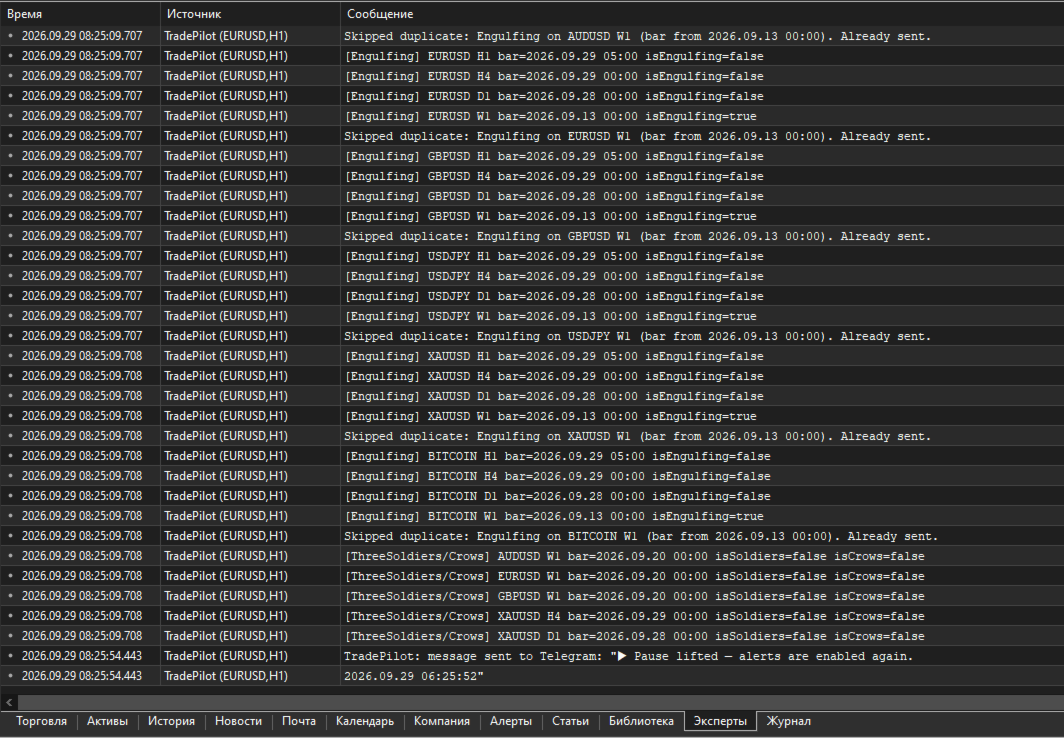
  • Engulfing — a candle fully covers one or more previous candles (how many is configurable). There's a mode to search on a CLOSED candle, in REAL TIME on a still-forming one, or both — the real-time mode fires earlier, before the bar closes, at the cost of somewhat more false positives.
  • Inside Bar — a candle entirely within the previous candle's range — volatility compression before a possible breakout.
  • Three Soldiers / Crows — three candles in a row moving the same direction with no significant wicks — a strong impulse.

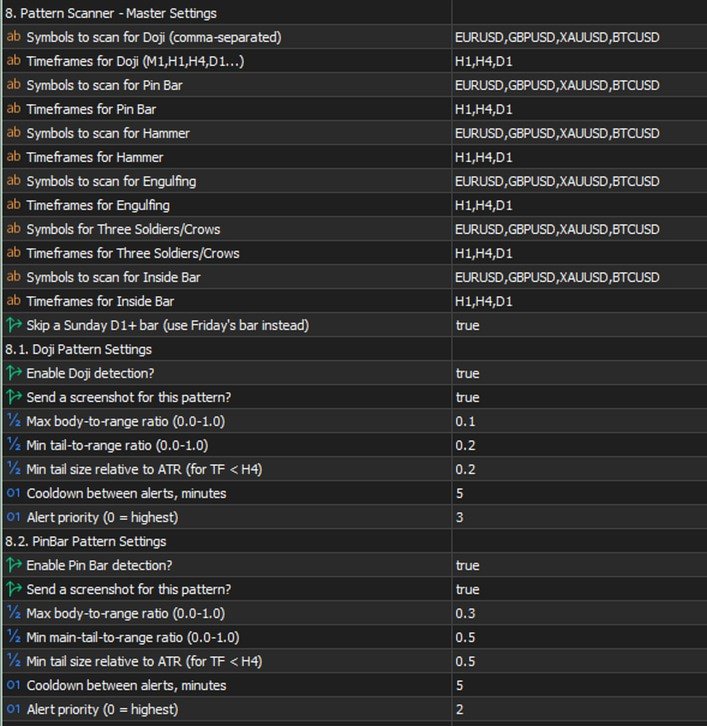
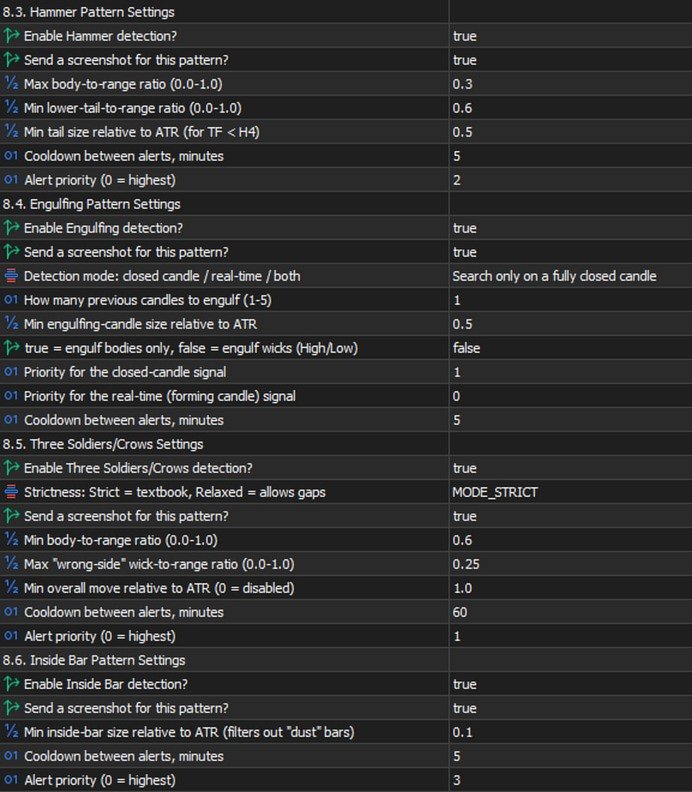
Each pattern has its own settings: which symbols and timeframes to scan, whether it's enabled at all, whether to send a screenshot along with the text, geometric thresholds (body/wick share of the candle's range), a minimum size relative to ATR (so it doesn't react to "dust" in a quiet market), a cooldown between repeat alerts for the same symbol/timeframe, and a priority in the shared send queue (0 is highest; critical margin alerts always jump the queue).

Multi-timeframe confluence

If the same pattern type fires independently on SEVERAL timeframes within a short time window (configurable), that's a confirming, stronger signal, and the EA automatically raises its priority. Not a fresh check from scratch — just cross-referencing detections that were already found, at essentially no extra cost.

⚡ Emergency signal — an abnormally large candle

Separate from the candlestick patterns: a real-time candle-size scanner. If the CURRENT, still-forming candle on a chosen timeframe has already grown more than N times (configurable) the normal candle size (measured by ATR), the alert fires IMMEDIATELY — it doesn't wait for the bar to close. If the candle keeps growing, a follow-up alert with the updated size arrives, so you can see the move is still going, not that it stalled.

This is exactly where "monitoring + trading in one chat" pays off fully: you get a signal about a sharp spike, decide to act, and right in the same chat, without switching apps, type /buy SYMBOL RISK 1% SL ... and you're in the trade while the move is still relevant. No need to run to the terminal to check what happened and then separately open a position — it's all in one place.

On-chart summary

A compact panel directly on the terminal chart — the most recent signals across every watched symbol/timeframe at a glance, no need to scroll back through the chat history ( Inp_EnableOnChartSummary ).

Margin control

  • Configurable levels: margin call, stop out, breakeven, full liquidation, profit target — calculated from the account's current state and drawn as lines directly on the chart, with alerts as price approaches them.
  • /marginview CUR|SYMBOL ( /mv ) — on demand, sends a screenshot with an automatically chosen scale so ALL levels and the current price fit into one picture. Works not just for the symbol of the chart the EA runs on, but for any symbol with an open position. For a fully locked symbol (BUY=SELL, zero net volume) it honestly explains that no levels exist, because there's nothing for price movement to act on — instead of returning silent emptiness.

Two-way control through Telegram

Commands split into informational and trading ones. Several commands have short forms — faster to type when a decision needs to happen in seconds (for example, right after a sharp-candle signal).

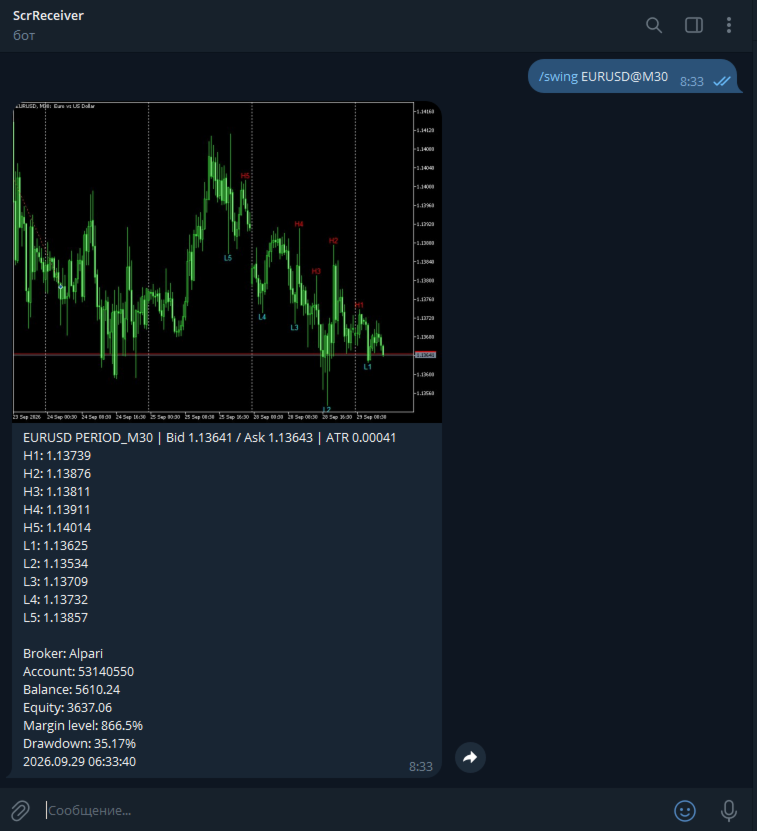
Informational (always available): - /status ( /st ) — account status. - /positions [FILTER] ( /pos ) — open positions, with short reference numbers N1, N2... for use in other commands. - /pending [FILTER] ( /pnd ) — pending orders, numbers P1, P2... - /exposure ( /exp ) — net volume and margin load per symbol. - /swing SYMBOL [depth] ( /sw ) — a screenshot with the last 5 swing highs and 5 swing lows labeled on the chart. - /marginview CUR|SYMBOL ( /mv ) — see the margin section above. - /screenshot ( /ss ) — a screenshot of the current chart on demand. - /pause , /pause N ( /pa ) / /resume ( /re ) — pause automatic alerts without touching trading commands. - /help ( /h ) — command list; tap any specific command with no arguments for detailed help on it.

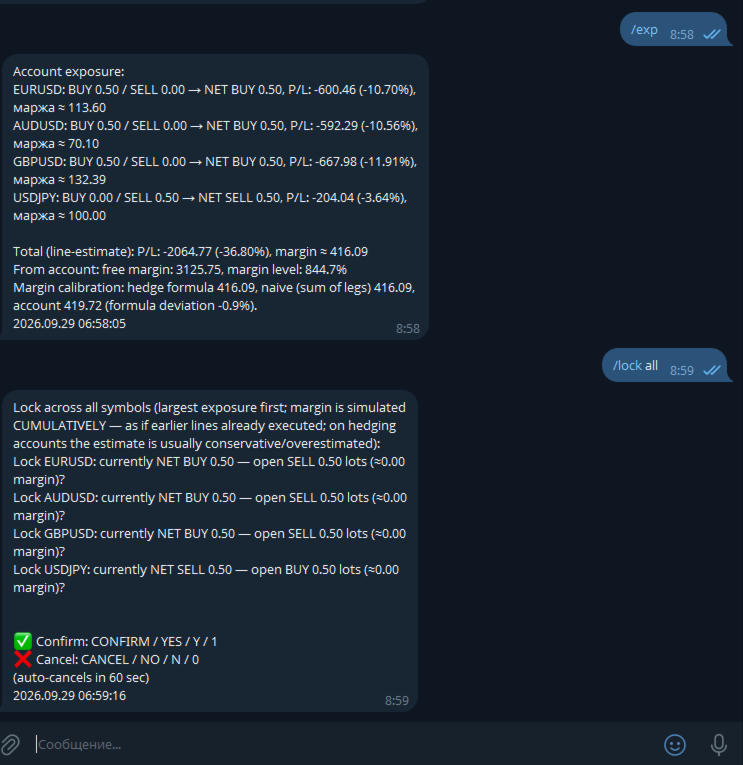
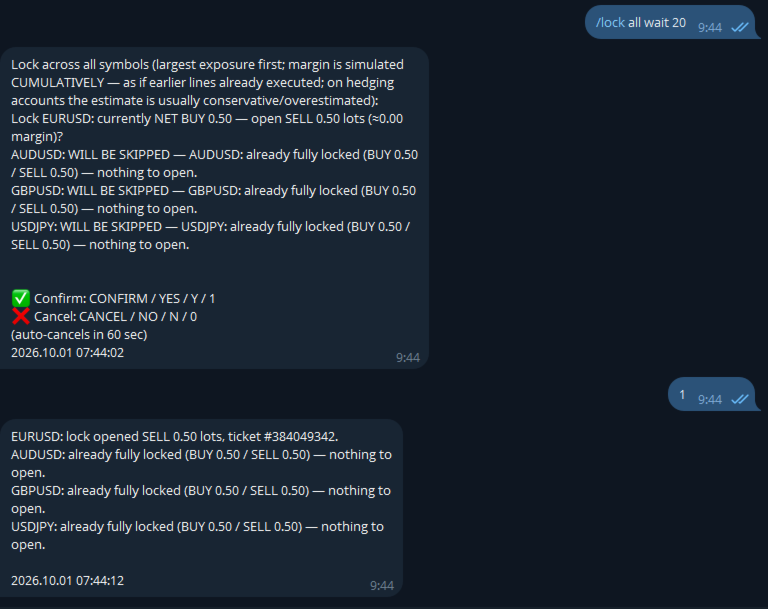
Trading (require a separate opt-in in settings): - /close ( /cl ) — close position(s). - /set SL|TP|BE <ref> <price or expression> — set or remove a stop/take-profit, or move to breakeven. - /shift SL|TP <ref> UP|DOWN <points> ( /sh ) — moves an ALREADY-SET stop/take-profit by N points relative to its current value (unlike /set , which sets an absolute price) — no need to check where the stop currently sits yourself. With a filter, each position shifts from its OWN current level — handy for grids/martingale. - /del SL|TP|PENDING <ref> — remove a stop/take-profit or delete a pending order. - /buy / /sell — a market entry or a pending order. - /lock SYMBOL / /lock ALL — instantly opens an opposite position, zeroing net volume. The spread check is deliberately not applied to /lock — locking is a defensive action taken precisely because the market is stressed, and spread widens in exactly those moments. - /undo — reverts the last command that changed an SL/TP ( /set , /shift , /del , moving to breakeven), within 10 minutes of it. One step back, requires its own confirmation with an explicit irreversibility warning. Closing positions and opening new trades are not reversible. - /enable <password> / /disable — emergency toggle for trading and bulk commands even if they're disabled in settings. Scenario: you forgot to enable Inp_EnableTelegramTrading , stepped away from your computer, and now urgently need to adjust trades remotely. The password is a separate setting ( Inp_EmergencyPassword , empty by default — the feature is off), the override is session-only (resets on restart), three wrong attempts in a row trigger a 5-minute lockout.

Shared command language: - A reference to a position/order — a short N/P-number (from /positions / /pending ) or a filter ( ALL , PROFIT , LOSS , BUY , SELL , VOL>x , a symbol name) — one command can touch several positions. - A price is a number or an expression like LOW1-1.5ATR / HIGH2+50P (a swing level with an ATR or point buffer). - Volume is a number or RISK 1% (the lot size is calculated from the risk % and the distance to the stop, with the calculation shown in the preview before confirmation). - Every operation: preview → confirm/cancel word → execution, with an auto-cancel timeout. Confirmation words are configurable ( Inp_ConfirmKeywordYes/No , defaulting to only CONFIRM / YES and CANCEL / NO — no short Y / N / 1 / 0 ).

Usage examples

⚡ EMERGENCY: XAUUSD H1 — abnormally large candle (3.4x ATR)! → while the move is still relevant, right in the same chat: /buy XAUUSD RISK 1% SL LOW1-0.5ATR → the bot calculates volume from 1% risk and the distance to the stop, shows the calculated lot size in the preview, waits for confirmation /pos PROFIT → lists only profitable positions, numbered N1, N2... /close N1 → preview "close #12345 XAUUSD BUY 0.10, P/L +42.10?" → confirm → closed /set TP N1 HIGH1+20P → take-profit 20 points above the last swing high /lock XAUUSD → instantly opens an opposite position, zeroing net volume on gold /shift SL N1 UP 50 → pulls an already-set stop 50 points up (manual trailing) /undo → "Undo: SET SL by filter 'XAUUSD': ... THIS ACTION CANNOT BE UNDONE" → confirm → stops revert to their values from before the command /mv → a chart screenshot with an auto-picked scale, showing the current price and all margin levels at once

Settings — by group

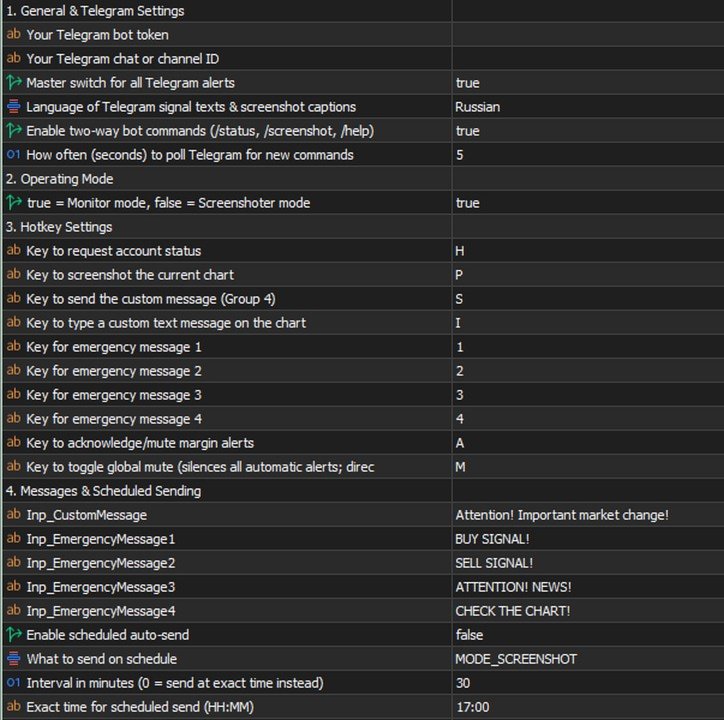
  • Telegram — General: bot token, chat ID, the master alert switch.
  • Mode: "Monitor" vs "Screenshoter" ( Inp_EnablePatternMonitoring ).
  • Emergency messages: 4 configurable template phrases with chart hotkeys in the terminal — if the bot is connected to a channel/group with subscribers, one keypress, no typing needed, instantly broadcasts a ready-made warning to the whole audience (each phrase's text is whatever you want — "closing everything", "news coming, don't enter", "re-entry", etc.).
  • Margin control: on/off, which of the five levels to calculate and show, line colors and styles.
  • Per-pattern groups (Doji/Pin Bar/Hammer/Engulfing/Inside Bar/Three Soldiers): for each — symbols and timeframes, enabled, screenshot yes/no, geometric thresholds, minimum ATR, cooldown, priority.
  • Emergency signal: enabled, the ATR multiplier for an "abnormal" candle, timeframe, ATR period, priority.
  • Confluence: time window, minimum number of confirming timeframes, how much to raise priority.
  • Shared geometric thresholds: minimum body/wick share of the candle's range — a "flat line" candle filter applied before all the detectors.
  • Chart appearance: arrow and label colors per pattern, the summary panel.
  • Screenshots: quality, mode (candles/bars), delays before capturing.
  • Alert pause: the default duration for /pause .
  • Telegram commands: enable reading commands, poll interval.
  • Telegram trading: master switch, bulk commands, operation confirmation, confirm/cancel words, timeout, the /undo window, the /enable emergency password.
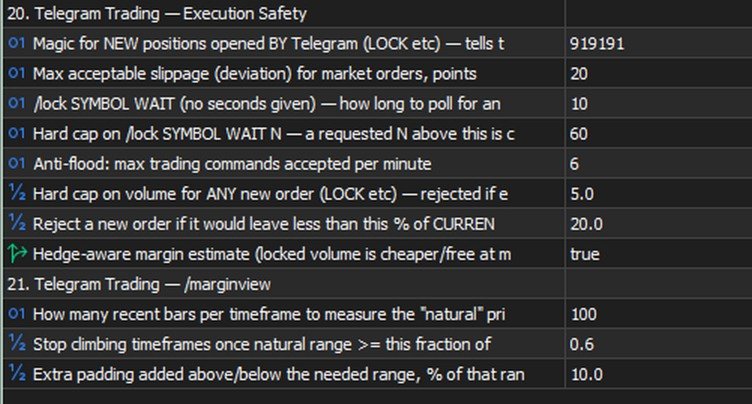
  • Execution safety: magic number for new positions, slippage, minimum free margin left after a trade, a per-order volume cap.
  • /marginview : how many bars to use for scale-fitting, the "natural range" threshold, padding around the picture's edges.

Tips and recommendations

  • Start with Inp_ConfirmTradingOperations = true (the default) — so every operation requires explicit confirmation, giving you time to catch a typo before it actually executes.
  • Check LOW/HIGH ± ATR expressions with /swing SYMBOL before using them in a real trading command.
  • For grids/martingale, use VOL>x filters in /close / /set , or a plain symbol filter in /shift / /undo .
  • Keep Inp_EnableBulkTradingCommands off until you've tested single-position operations.
  • Tune the emergency signal ( Inp_EmergencyCandleSizeATR ) to your instruments' real volatility — too low an ATR multiplier floods you with false positives, too high and you'll miss genuinely sharp moves.
  • If you set Inp_EmergencyPassword for /enable , pick something that can't be guessed in three tries.

Cautions

  • /undo is irreversible on its own — if something ELSE changed the same SL/TP after your command (another command, a manual edit in the terminal), the preview will warn you, but the revert will still restore the value from BEFORE your command, not undo that later change.
  • /enable lifts TWO safeguards at once — the general trading ban and the bulk-commands ban. Treat it as an emergency exit, not a way to bypass Inp_EnableTelegramTrading=false just because you haven't decided on the setting yet.
  • /lock doesn't check the spread — a deliberate trade-off, a lock needs to work even with a wide spread ahead of news; at an extreme gap it will execute at whatever price is available.
  • Bulk operations ( ALL , a symbol filter) affect several trades with one command — the preview shows the exact list before execution, check it.

Known limitations (honestly, no hiding)

  • Market /buy / /sell and pending orders are already supported; some rare parameter combinations may not be covered yet.
  • WebRequest to Telegram is a synchronous call (a limitation of MQL5 itself), so a brief delay in the alert queue is possible when the Telegram API is unavailable.
  • With several copies of the EA on one terminal, only the one in "Monitor" mode accepts commands (Telegram delivers updates to a single requester — the offset cursor is shared per bot).
  • There's no automatic trailing yet (the EA moving a stop on its own, on a timer) — only manual /shift . A version with a choice of algorithm (fixed step / ATR / fractals / Fibonacci) is being worked out.
Recommended products
Crystal Trade Manager – Advanced MT5 Risk and Trade Control Utility Overview Crystal Trade Manager (CTM) is a professional MetaTrader 5 utility designed for risk management, trade automation, and instant execution control. It provides traders with an integrated system for protecting equity, managing daily drawdowns, controlling lot sizes, and applying automation features such as automatic SL/TP, break-even, and trailing stop. The tool is suitable for manual traders, prop-firm challenge particip
Manual Trade Panel PRO for MT5 Product name **Manual Trade Panel PRO for MT5** Short description Advanced manual trading panel for MetaTrader 5 with BUY/SELL and BUY LIMIT/SELL LIMIT execution, balance-based lot sizing, automatic SL/TP, Break Even, trailing stop, partial close, candle timer, and open position pips counter. Full sales description **Manual Trade Panel PRO for MT5** is an advanced Expert Advisor designed for manual and semi-automatic trading in MetaTrader 5. The EA creates a c
TAQ Magic Keys v6.0 Auto Trade Manager is an advanced trade management tool for MetaTrader 5 (MT5) , featuring one-click trade management functions and an integrated Position Size Calculator . New Feature In V6.0 — FNR1R1 Function Key The new FNR1R1 Function Key provides an automated 1:3 Risk Reward trade management system , allowing traders to manage an open position through three predefined profit targets. Set your initial Stop Loss, and the system automatically calculates: TP1 = 1:1 Risk R
ZyloFx Partial Close Manager
Rosa Lina Martinez Jimenez
IMPORTANT: After purchasing this product, please send me a private message to receive the installation guide, setup instructions, and direct product support. ZyloFx Partial Close Manager is a professional trade management Expert Advisor for MetaTrader 5, designed to help traders manage open positions with automatic partial closes and optional break-even protection. This EA does not open trades automatically. Its main purpose is to manage existing positions according to the user’s selected sett
Time in Trade
Denis Diakonov
Time in Trade Expert Advisor applies the strategy of opening pending orders at the specified time, and also uses winter and summer time with automatic switching. When a signal occurs, the trading robot opens pending orders with equal volumes for buying and selling. The timeframe used for trading is 5 minutes. The trigger for a pending order is a sharp price change depending on: opening / closing of trading sessions; release of important economic indicators; time intervals with the maximum number
Horizontal Line Trade Assistant EA  Semi-Automated Trading Assistant      IMPORTANT :     On the main/purchased program a user can click on the Horizontal line and change it to Buy or Sell, and drag by double clicking on it. Please keep in mind that this option is not available on demo version, due to some restrictions/limitations of Strategy Tester, some Object related operations are not available in the  Strategy Tester. But, it will not prevent you from Testing, please drop an Object to chart
SPICA CLICK TRADE CONTROL MT5 Spica Click Trade Control is a complete one-click trading panel for MT5 — built for traders who want speed without giving up control. Every trade shows you the exact lot size, dollar risk, and reward before you click Buy or Sell. Manage open positions with breakeven, trailing stops, and partial closes. Protect your whole account with automatic equity-based shutoffs. All from a clean, tabbed panel that stays out of your way until you need it. KEY FEATURES Trading
Trade Assistant MT5 PRO   is a professional trading panel for   MetaTrader 5   designed to make manual trading faster, clearer, and more disciplined. It helps traders manage the entire trade workflow directly from the chart: risk calculation, lot size calculation, Buy/Sell execution, Entry / Stop Loss / Take Profit planning, breakeven, trailing stop, partial close, and pending order management. This product does not generate signals and does not promise guaranteed profit. Its purpose is practica
Synchronizer
PATRICK PAARSCH
This Expert Advisor monitors all open positions across all symbols in MetaTrader 5. Whenever a Stop Loss (SL) or Take Profit (TP) is manually set or adjusted on any position, the EA automatically applies that value to all other open positions , regardless of symbol or order type (Buy/Sell). This ensures consistent and synchronized SL and TP levels across your account. Perfect for mobile trading via tablet or smartphone!
Trading Panel SL TP
Sirojiddin Sobitov
MQL5 Trading Panel SL TP — это мощный инструмент, призванный помочь трейдерам эффективно управлять своими позициями на платформе MetaTrader 5. Эта торговая панель предоставляет простой в использовании интерфейс для установки уровней Stop Loss (SL) и Take Profit (TP) для открытых позиций. MQL5 Trading Panel SL TP обладает широкими возможностями настройки и может быть адаптирована к конкретным потребностям отдельных трейдеров. Панель можно изменять в размере, перемещать и настраивать с помощью ра
* Super Assistant is an useful management tool that helps traders perform management tasks on MT4/MT5 account remotely via Telegram such as: - Get info (account, details of positions, pending orders, floating PL, price, economic news, etc) - Open trade (open instantly with preset parameters) - Manage trade (set SLTP automatically, break-even mode, max risk, close time every day, etc) - Close trade (close all, buy, sell, win positions by one click, set awaiting close by PL, time) - Set up notifi
GS trade report
Aleksander Gladkov
5 (1)
3 in 1 : Report + monitoring + sending messages (Telegram, ...) to optimize trading and use of advisors. Monitoring: Panel on the chart Sending messages to Telegram Sending messages to Email Sending Notifications Sending pop-up messages Sound notifications when the established Profit/Loss levels are exceeded Monitoring is activated by pressing the Start button. Profit for the period by currency pairs, hours and Magic number for the current account. Forms four tables: by symbols, by magic number
Lock and Peel Pro Advanced Risk Manager
Muhammad Hassan Muhammad Ahmad Atiyah
Advanced Breakeven & Partial Close Manager MT5 Script – One-Click Trade Management Overview Advanced Breakeven & Partial Close Manager is a trade management script for MetaTrader 5. It works only on existing open positions and applies actions strictly based on user-defined rules. The script runs once per attachment and performs only the actions explicitly enabled in the inputs. It does not run in the background, does not trade automatically, and does not generate signals. Core Functionality The
TradePilot Dashboard
Augusto Martins Lopes
TradePilot Dashboard Summary Graphical panel for MT5 with order management buttons (Buy/Sell/Close/SL/TP), margin check, and log control. Easy to use and testable on demo accounts. No profit promises. Full Description TradePilot Dashboard is an Expert Advisor with a graphical interface (Controls) for manual and semi-automated order management in MetaTrader 5. It provides a visual panel with buttons, editable fields, and safety checks (free margin) to help traders operate directly from the chart
Bring the TradingView experience to your MetaTrader 5! Magic Entry Pro is a professional visual trading assistant designed for manual traders, scalpers, and Prop Firm funded traders. It allows you to execute trades with lightning speed, calculate risk automatically, and visually project your Stop Loss and Take Profit zones directly on the chart before you open a position. Tired of manually calculating lot sizes or guessing your Risk-to-Reward (RR) ratio? Magic Entry does it all in seconds! KE
This is a utility designed to automatically set the stop loss levels of orders according to the specified condition. Two price levels serve as the condition for setting stop loss: Trigger level - when this level is reached, an order is placed. The stop loss value of an order. It is possible to enable or disable traling stop loss. Input parameters Order type for execution - type of orders to be processed by the expert. It can either be BUY, SELL or auto-select. Trigger Level Points - level to pl
Risk calculator for MetaTrader 5. Precision Position Calculator is a MetaTrader 5 utility that helps calculate trade volume based on the risk configured by the user. The panel allows the user to work with Entry, Stop Loss and up to three Take Profit levels directly on the chart. Main description Precision Position Calculator is a utility for MetaTrader 5 designed to help calculate the volume of a trade before opening it. The panel allows the user to configure risk, select the order type, set th
FREE
Risk Control Utility MT5 designed for manual trading. It helps to calculate and control your risks, transfer transactions to breakeven and accompany positions with trailing stop. Easy to set up and use. It can be used for calculating a trading lot, calculating stop loss and take profit levels. Works with currency pairs, CFDs, stocks, indices, futures, cryptocurrencies Displays   volume,   potential loss and profit before   placing an order Ability to set the expiration time of a pending order Tr
Algosphere Terminal is a professional one-click trading panel for MetaTrader 5. Execute BUY and SELL orders instantly with predefined Stop Loss and Take Profit in points. Features include adjustable lot sizes with quick presets, live spread monitoring with color alerts, trailing stop with configurable activation, breakeven function, and position management tools. Choose from four elegant themes: Obsidian, Emerald, Frost, and Neon. Settings are saved between sessions. Works on Forex, Indices, and
Hello, Every one  Close All Button A script to close all market positions and/or pending orders. ----------------------------------------------------------------------------------- This is Close All    market positions and/or pending orders button  You can close all orders in 1 second by one click  Download for Demo Account: Download on Demo Account:  Close All in 1s v1.4 Only Demo.ex5 - Google Drive Free version:  https://www.mql5.com/en/market/product/74159 For send Trade notification to Your
HotKeys MT5
Alexey Valeev
This utility provides the ability to use hot keys in manual trading instantly responding to the current market situation. You can assign hot keys to open/close positions by their type, open/close all positions on the current chart and remove all orders on the current chart. You can also assign hot keys for five predefined trade volumes and switch between them if necessary with no need to change the volume manually from time to time. It is also possible to set the auto calculation of a trade volu
AKCAP Hotkey Tool
AK Capital Markets Limited
5 (3)
Special offer for the next 10 copies Are you tired of manually navigating through menus and inputting data every time you want to execute a trade or open an order on Meta Trader? Our hotkey tool is here to make your life easier and boost your trading efficiency. Our tool is natively coded for lightning-fast performance and comes loaded with all the features you could possibly want. From pending orders and OCO orders to trailing and multiple buckets, it has everything a scalper could need. And
Trade Panel MetaTrader 5 - feature-rich tool that adds the desired and highly-demanded functions to the terminal to enhance trading experience. Orders execution with one click You can open and close orders easily, using the panel. Buttons to open Market, Limit and Stop orders in both buy and sell directions are located on the Main tab, while there are multiple options to close already existing positions and cancel orders: Close/cancel all Close/cancel buy and sell positions/orders separately Clo
SmartRiskManager
Juergen Josef Wonke
One click. Everything under control. SmartTradePanel is a lightweight, fast trade panel for MT5. You trade and manage risk in USD (not pips), place pending orders with visual confirmation, start trailing only when your trigger is activated – and keep your chart clean. The panel always stays in the foreground, is DPI-friendly, and remembers your settings for each symbol. Main functions • One-click trading & closing BUY / SELL Close all BUY / SELL Close only winners / only losers Close HAL
Spread and Swap monitor
Hennadii Stanilevych
5 (1)
The indicator is intended for determining the spread and swap size, the distance for setting stop orders and stop losses from the current price allowed and the risk per 1 point in the deposit currency. The indicator informs a trader about possible additional expenses and profits connected with transferring a position to the next trade session of the financial instrument. It also informs about the spread size and the distance of pending orders, stop loss and trailing from the current price. In ad
Session Breakout Executor is a deterministic MetaTrader 5 Expert Advisor for executing a defined session-range breakout workflow with OCO pending orders. The strategy, risk gates and lifecycle states are visible in a professional dashboard, while automatic entry is disabled by default. MAIN FEATURES • Configurable session range construction • Guarded manual arming before order placement • Broker-aware pending-order validation • OCO sibling cancellation after one side activates • Spread, permiss
Managing every trade manually can be stressful and often leads to errors. Smart Pro Manager MT5 is a utility designed to simplify and automate trade management directly from the chart, allowing you to focus solely on entry decisions. Once you open a position with a simple click on   BUY   or   SELL , the system automatically takes care of all the management: Automatically sets   Stop Loss   and   Take Profit   Moves   Stop Loss to   BreakEven   (with buffer) Dynamically manages   Traili
Quantum Breakout System
Joshua Johnathan Chung
Quantum Breakout System: Algorithmic Trading Utility for Gold (XAUUSD) The Quantum Breakout System is an automated trading utility built for MetaTrader 5, designed specifically to assist traders in managing breakout strategies on Gold (XAUUSD). Utilizing core elements from the SwingMaster architecture, the Quantum Breakout System focuses on dynamic order placement at key market support and resistance levels. Rather than relying solely on market orders, the EA places calculated pending limit
FREE
Tired of manually adjusting stop-loss and take-profit levels for multiple positions across different pairs? The Manage Multiple Positions Expert Advisor is your solution. MT4 Version -  https://www.mql5.com/en/market/product/120916/ This powerful tool streamlines your trading experience by allowing you to manage multiple positions on a single pair with ease. Modify stop-loss and take-profit levels for all open positions on a specific pair with a single click. Plus, the EA provides clear visibili
Virtual TP SL TS
Andrei Sviatlichny
Make your Take Profit, Stop Loss, and Trailing Stop levels invisible to the broker! Main option: STEALTH MODE Virtual Trailing Stop Virtual Take Profit Virtual Breakeven Virtual Stop Loss Virtual Orders Lifetime WARNING: The Expert Advisor does not place orders by itself. You must open orders yourself (including through the Expert panel) or use a third-party Expert on another chart of the same currency pair. Please specify the Magic number "-1" in the Expert settings for the Expert to process th
Buyers of this product also purchase
Trade Assistant MT5
Evgeniy Kravchenko
4.43 (216)
It helps to calculate the risk per trade, the easy installation of a new order, order management with partial closing functions, trailing stop of 7 types and other useful functions. Additional materials and instructions Installation instructions - Application instructions - Trial version of the application for a demo account Line function -   shows on the chart the Opening line, Stop Loss, Take Profit. With this function it is easy to set a new order and see its additional characteristics bef
Forex Trade Manager MT5
InvestSoft
4.98 (685)
Trade Manager MT5 is an advanced position size calculator and trade management tool for MetaTrader 5, designed to help traders plan trades faster, control risk more precisely, and manage open positions directly from the chart. It combines order placement, risk based lot calculation, Stop Loss and Take Profit management, Break Even, Trailing Stop, Partial Close, Equity Protection, and external trade management in one panel. Whether you trade forex, indices, metals, commodities, crypto, or future
Telegram to MT5 MultiChannel Copier
Sergio Marquez Uroz
4.61 (18)
Telegram to MT5 Multi-Channel Copier   automatically copies trading signals from your Telegram channels straight to MetaTrader 5. No bots, no browser extensions, no manual copying. A signal arrives in Telegram and the EA opens the trade in your terminal within seconds. And before you copy a channel, the built-in backtester shows you what that channel would have done in your account. The product has two components: a Windows application that listens to your Telegram channels, and this Expert Advi
================================================================================ POC BREAKOUT - V20.72. Full Professional Grade Toolkit ================================================================================ POC Breakout is a full MetaTrader 5 trading dashboard for discretionary traders who want breakout signals, Point of Control (POC) context, volume profiles, order flow, market structure, news, alerts, and advanced trade planning in one professional workspace. Attached directly to you
TradePanel MT5
Alfiya Fazylova
4.88 (170)
Trade Panel is a multi-functional trading assistant. The app contains over 50 trading functions for manual trading and allows you to automate most trading tasks. Application instructions: https://www.mql5.com/en/blogs/post/756482 Trial version of the application for a demo account: https://www.mql5.com/en/blogs/post/750865 How to install the application: https://www.mql5.com/en/blogs/post/756239 How to test the application in visual mode: https://www.mql5.com/en/blogs/post/770277 How to install
Copy Telegram signals with your own trading rules Telegram to MT5 Signal Trader automatically copies text-based trading signals from public and private Telegram channels and groups into MetaTrader 5. Manage multiple providers and MT5 accounts from one desktop app, with individual risk and trade settings for each provider . No Telegram bot or API setup needed for copying. Simply sign in with your own Telegram account by phone or QR code and select the channels or groups you have already joined. Y
FarmedHedge Pair Trading Dashboard
Tanapisit Tepawarapruek
5 (5)
Farmed Hedge Yield Farming | All Markets (Manual - Hybrid - Semi/Automated EA) VERIFIED TRADING RESULTS - Farmed Hedge Yield Axi Copy:  https://www.mql5.com/en/signals/2356376 - Farmed Hedge Yield Exn Copy:   https://www.mql5.com/en/signals/2356404 - Farmed Hedge Yield V Copy:  https://www.mql5.com/en/signals/2357156 IMPORTANT NOTICE: FarmedHedge is a MANUAL-FOCUSED TRADING UTILITY ,not a fully automated EA. Results shown on this Signal include manual trades and overall strategic management.
Exp COPYLOT CLIENT for MT5
Vladislav Andruschenko
3.97 (35)
Professional Trade Copier for MetaTrader 5 Fast, professional, and reliable trade copier for MetaTrader . COPYLOT allows you to copy Forex trades between MT4 and MT5 terminals with support for Hedge and Netting accounts. COPYLOT MT5 version supports: - MT5 Hedge to MT5 Hedge - MT5 Hedge to MT5 Netting - MT5 Netting to MT5 Hedge - MT5 Netting to MT5 Netting - MT4 to MT5 Hedge - MT4 to MT5 Netting MT4 version Full Description +DEMO +PDF How To Buy How To Install How to get Log Files H
Footprint Chart Pro — Professional OrderFlow EA for MetaTrader 5 Version 6.34 | Professional tool for real traders | Institutional-Grade Visualization DEMO USERS - PLEASE SELECT EVERY TICK / REAL TICK WHEN TESTING AND YOU HAVE DOWNLOADED HISTORICAL DATA. IF YOU SEE A WAITING SCREEN AND IT IS NOT DOWNLOADING, IT MEANS YOU HAVE LOW HISTORICAL DATA. TRY 1 MIN AND 5 MIN FIRST ON 1 DAY DATA. ONE DAY DATA SHOULD BE THE NEWEST AND MOST CURRENT DATE. PLEASE WAIT UNTIL THE MARKET HAS ROLLED OVER PERIOD.
Power Candles Strategy Scanner - Self-Optimizing Multi-Symbol Setup Finder Self-optimizing settings work one chart at a time, and finding where they pay off right now means opening chart after chart. Power Candles Strategy Scanner runs the same self-optimizing engine as the Power Candles indicator on every symbol in your Market Watch, side by side. One panel ranks where it pays off: the winning strategy per symbol, its optimized Stop Loss and Take Profit. An alert fires the moment a fresh signal
Grid Manual MT5
Alfiya Fazylova
4.73 (22)
Grid Manual is a trading panel for working with grid strategies. The utility is universal, has flexible settings and an intuitive interface. It works with a grid of orders not only in the direction of averaging losses, but also in the direction of increasing profits. The trader does not need to create and maintain a grid of orders, the utility will do it. It is enough to open an order and the "Grid manual" will automatically create a grid of orders for it and will accompany it until the close. F
HINN MagicEntry Extra
ALGOFLOW OÜ
4.74 (19)
HINN MAGIC ENTRY – the ultimate tool for entry and position management! SIMPLE. FASTEST. INTUITIVE. MAX AUTOMATED. Place orders by selecting a level directly on the chart! full description   ::  demo-version  :: 60-sec-video-description Key features: - Market, limit, and pending orders - Automatic lot size calculation - Automatic spread and commission accounting - Unlimited partitial take-profits  - Breakeven and trailing stop-loss and take-profit  functions - Invalidation leves - Intuitive, a
Signal Trading View to MT5 Pro
Mirel Daniel Gheonu
4.5 (2)
Signal TradingView to MT5 Pro  Instant professional execution between TradingView and MetaTrader 5 Automate your trading strategy with the most robust communication bridge between TradingView alerts and real execution in MT5. Designed for traders who demand speed, flexibility, and impeccable risk management, this Expert Advisor transforms any alert message into a precise market or limit order.   Install and TEST the TRIAL version HERE STRENGTHS AND ADVANTAGES Universal Parsing Engine (Propriet
The News Filter MT5
Leolouiski Gan
4.78 (23)
This product filters   all expert advisors and manual charts   during news time.  It is able to remove any of your EA during news and automatically reattach them after news ends. This product also comes with a complete  order management system   that can handle your open positions and pending orders before the release of any news. Once you purchase   The News Filter , you will no longer need to rely on built-in news filters for future expert advisors, as this product can filter them all from her
Copy your MT5 trades to Interactive Brokers You keep using MT5. Every order you open or close is sent to your IB account. In real time. No coding. No changes to your strategy or EA. Try it first Rent 1 month: $30. Test on a live or paper account. What it does Real-time copying: same direction, reverse, or one side only. Map any MT5 symbol to any IB symbol. Set a lot ratio for each. Forex, Futures, Stocks, CFDs, Metals and Crypto. Position sync: both accounts checked, any difference fixed. Optio
Welcome to ENTRY IN THE ZONE AND SMC MULTI TIMEFRAME  SPECIAL BENEFIT FOR OUR MQL5 CUSTOMERS  FREE ACCESS TO THE NEW TOOL —COMING SOON —   Learn More on Our Official Website : https://www.fableedge.net Entry In The Zone and SMC Multi Timeframe is a real-time market analysis tool based on Smart Money Concepts (SMC), designed to analyze market structure, price direction, and key trading zones. It supports both Single-Timeframe Analysis and Multi-Timeframe Analysis, providing a clearer view of the
Premium Trade Manager - The Trade Panel With a Coach Built In Premium Trade Manager puts a trading coach inside your chart, with a full execution engine underneath it. Set the trade up the way you always do, then let Max, your AI trading coach, read that exact setup against your live account and give you a straight verdict before you commit: is the stop disciplined, is the risk sane, is a high-impact release minutes away, are you near a prop-firm limit. Below sits the engine that runs everything
Anchor Trade Manager
Kalinskie Gilliam
5 (9)
Your EAs cannot see each other, but Anchor can. Anchor gives you one place to coordinate your EAs, manage risk, and decide when trading is allowed. It works alongside the trading bots you already use without any changes to them. The Problem One EA opens a trade. Then another starts trading. The next thing you know, you wake up to multiple grids built across your account. Each EA may be doing exactly what it was designed to do, but together they can place far more risk on your account than you in
Trade Indicator Assistant   is a powerful MT5 utility designed to turn indicators into automated trading systems. Its main feature is the ability to automatically detect an indicator’s   BUY and SELL signal buffers , without requiring you to know the buffer numbers, search through indicator settings, or modify the indicator source code. Bonus Indicator:   After purchasing Trade Indicator Assistant, contact me to receive   Trade Signal Pro   completely free as a bonus indicator. [Download Demo V
Quant Panel
Kevin Craig E Gittins
QUANT PANEL Independent per-algo analytics, protected MT5 history and professional PDF reporting Quant Panel is built for traders who run several Expert Advisors or strategies on one MT5 account and need to know how each algo is actually performing. Instead of treating the terminal as one combined portfolio, Quant Panel groups closed positions by EA comment or magic number and calculates every strategy independently. It gives you one clear dashboard for comparing algos, finding weak systems and
MT5 to Telegram Signal Provider turns your trading account into a signal provider. Every trade action, whether manual, by EA or from your phone, is instantly sent as a message to Telegram. You can fully customize the format or use a ready-made template for quick setup. [ Demo ] [ Manual ] [ MT4 Version ] [ Discord Version ]     New: [ Telegram To MT5 ] Setup A step by step user guide is available. Key Features Ability to customize order details sent to subscribers You can create a tiered subs
YuClusters
Yury Kulikov
4.93 (43)
Attention: You can view the program operation in the free version  YuClusters DEMO .  YuClusters is a professional market analysis system. The trader has unique opportunities to analyze the flow of orders, trade volumes, price movements using various charts, profiles, indicators, and graphical objects. YuClusters operates on data based on Time&Sales or ticks information, depending on what is available in the quotes of a financial instrument. YuClusters allows you to build graphs by combining da
DrawDown Limiter
Haidar Lionel Haj Ali
5 (23)
DrawDown Limiter v5.0 — Advanced Account Protection Controller DrawDown Limiter v5.0 is a client-side account protection controller designed to supervise your trading account and automatically react when configured risk, profit, news, schedule, rollover, or position limits are reached. It can monitor manual trades, automated strategies, multiple Expert Advisors, pending orders and floating positions from one dedicated chart. It can protect the complete account or be configured to supervise a spe
VirtualTradePad One Click Trading Panel
Vladislav Andruschenko
4.59 (74)
Trading Panel for MetaTrader 5 — professional one-click trading from chart and keyboard A powerful trading panel for active manual trading, designed to open, manage, and close trades far faster and more efficiently than the standard MetaTrader interface. This panel is built for traders who want full control over positions, pending orders, profit management, and trading execution inside one professional workspace. This is not just another utility. It is a complete trading cockpit for MetaTrader
Smart Stop Scanner – Multi-Asset Stop-Loss Intelligence for Modern Traders Overview The Smart Stop Scanner brings professional stop-loss monitoring to every chart. It analyzes market structure, detects meaningful breakouts, and identifies the most relevant protective levels across Forex, Gold, Indices, Metals, Crypto, and more. All results appear inside one clean, DPI-aware dashboard designed for clarity, speed, and instant decision-making. This tool is part of the Stein Investments ecosystem
Trade Dashboard MT5
Fatemeh Ameri
4.94 (135)
Trade Dashboard simplifies how you open, manage, and control your trades, with built-in lot size calculation. It allows you to execute trades, manage risk, and control positions directly on the chart, with tools such as partial close, breakeven, and trailing stop. Designed to reduce manual work and help you stay focused on your trading decisions. A demo version is available for testing. Detailed explanations of features are provided within the MQL5 platform. Installation instructions are include
Binance Quotes Updater
Andrey Khatimlianskii
5 (1)
This service is designed to stream online cryptocurrency quotes   from the Binance exchange to your MetaTrader 5 terminal. You will find it perfectly suitable if you want to see the quotes of cryptocurrencies in real time — in the Market watch window and on the MetaTrader 5 charts. After running the service, you will have fully featured and automatically updated  cryptocurrency charts in your MetaTrader 5. You can apply templates, color schemes, technical indicators and any non-trading tools to
News Filter EA
Rashed Samir
5 (2)
News Filter EA: Advanced Algo Trading Assistant News Filter EA is an advanced algo trading assistant designed to enhance your trading experience. By using the News Filter EA , you can integrate a Forex economic news filter into your existing expert advisor, even if you do not have access to its source code. In addition to the news filter, you can also specify trading days and hours for your expert. The News Filter EA also includes risk management  and equity protection features. MT4 Version Ma
Prop Guardian Risk Manager MT5 – Drawdown, Risk & Hedge Protection for Prop Firm and Managed Accounts Prop Guardian Risk Manager is a professional risk-control utility for MetaTrader 5, designed for prop firm traders, money managers and anyone who wants strict account-level risk protection. It does not generate trading signals, strategy entries or trading decisions. Instead, it runs in the background, monitors your account risk and can automatically block new exposure, close managed positions or
Mentfx Mmanage mt5
Anton Jere Calmes
4.25 (8)
The added video will showcase all functionality, effectiveness, and uses of the trade manager. Drag and Drop Trade Manager. Draw your entry and have the tool calculate the rest. Advanced targeting and close portions of a trade directly available in tool (manage trades while you sleep). Market order or limit order on either side with factored spread. Just draw the entry, the tool does the rest. Hotkey setup to make it simple. Draw where you want to enter, and the stop loss, the tool calculates al
More from author
Pivot Points MTF — Multi-Method Multi-Timeframe Pivot Panel **Four pivot systems. Three timeframes. One draggable, collapsible panel. Switch on the fly, right on the chart, without touching Inputs.** Pivot points are one of the oldest tools in trading — originally used by floor traders to plan their session before the open, still used today by day traders, prop desks, and algo systems alike as objective, non-repainting reference levels: everyone looking at the same OHLC data arrives at the s
FREE
MarginVisualizer
Vladimir Ershov
5 (2)
I s a professional visual radar for your trading account. The indicator calculates and displays the key mathematical levels of your open positions directly on the chart in real-time (fully accounting for commissions and swaps). No more blind spots or mental math: you will clearly see exactly where your desired profit will be reached and where the broker will forcefully close your account. Key Features Complete Margin Level Map: Automatic calculation and drawing of Margin Call, Stop Out, "Loc
FREE
LockMaster
Vladimir Ershov
LockMaster — See Every Outcome Before You Touch a Locked Position Do you love untangling complex locks — or are you forced to? Either way, this tool is for you! Managing a hedge lock (opposing Buy and Sell positions on the same pair) is one of the trickiest situations in manual trading. Which leg do you close first? What happens to your Break-Even, Margin Call and Stop Out levels if you unwind one side now — or wait for a Take Profit to hit? Guessing wrong costs money. LockMaster removes the gue
FREE
MRM Bot PRO
Vladimir Ershov
MRM Combine v2.10 — торговая станция для тех, кто торгует на грани Ознакомительная версия для демо-счетов с полным функционалом Видим линии маржин-колла и стоп-аута заранее! Еще не открыли сделку, а уже видим, где сольемся! Не верите??? Большинство risk-менеджеров для MT5 умеют одно: показать текущий margin call и stop out по факту открытых позиций. Это прошлое время. Вы уже в сделке, уже несёте риск, и единственное, что вам остаётся — реагировать. MRM Combine устроен иначе: он считает будущее
Filter:
No reviews
Reply to review