Telegram Trade and Pattern Tool

Telegram Trade and Pattern Tool


Full-functionality demo account with all features


Telegram Trade and Pattern Tool is a candlestick-pattern and margin monitoring panel with remote trading control through Telegram. It scans charts across multiple symbols and timeframes at once, sends alerts with screenshots — down to a real-time signal for an abnormally large candle — and lets you react right there, in the same chat: open a trade, close a position, set or move a stop, all without opening the terminal.

Who it's for

For traders who can't keep the terminal open all day but want to: - not miss a forming pattern or a sudden volatility spike — and act on it right from their phone if they decide to; - not miss an approaching margin call; - close a position or move a stop from their phone in 10 seconds, without opening MetaTrader; - lock exposure quickly before news, without fumbling with volumes on the go.

Pattern monitoring — the core of the product

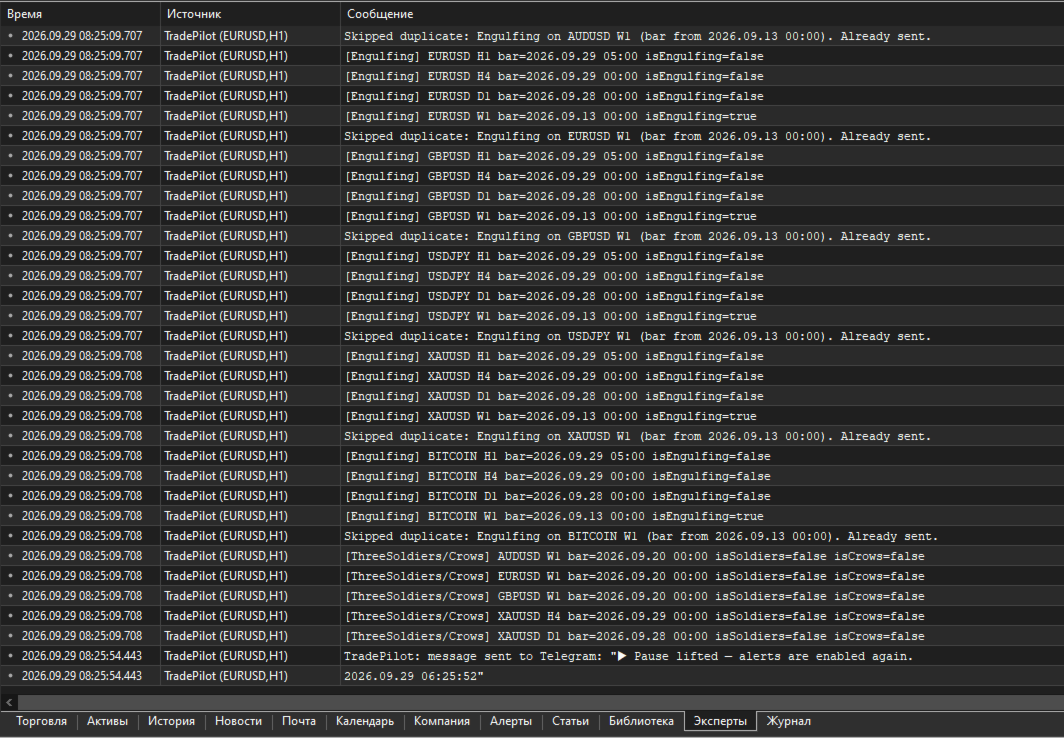
The EA scans charts whether or not you're looking at the terminal, and sends a Telegram alert with a ready-made chart screenshot. It runs in one of two modes:

  • "Monitor" ( Inp_EnablePatternMonitoring = true ) — full mode: pattern scanning, margin control, accepting trading commands. Only ONE copy in this mode is allowed per terminal at a time (protects against a second copy accidentally duplicating alerts or competing for Telegram commands).
  • "Screenshoter" ( Inp_EnablePatternMonitoring = false ) — lightweight mode, no pattern scanning and no trading commands, just screenshots on demand ( /screenshot , /swing , /marginview ). You can run as many copies as you like — handy to keep one per symbol chart you want screenshot access to, without touching the main "Monitor". If the hidden service chart isn't available in this mode, some features honestly fall back to a text report instead of failing.

Which patterns it looks for

  • Doji — body close to zero relative to the candle's range (the threshold is configurable), both wicks noticeable — a sign of market indecision.
  • Pin Bar — small body, one long "tail" — price refusing to go further in one direction.
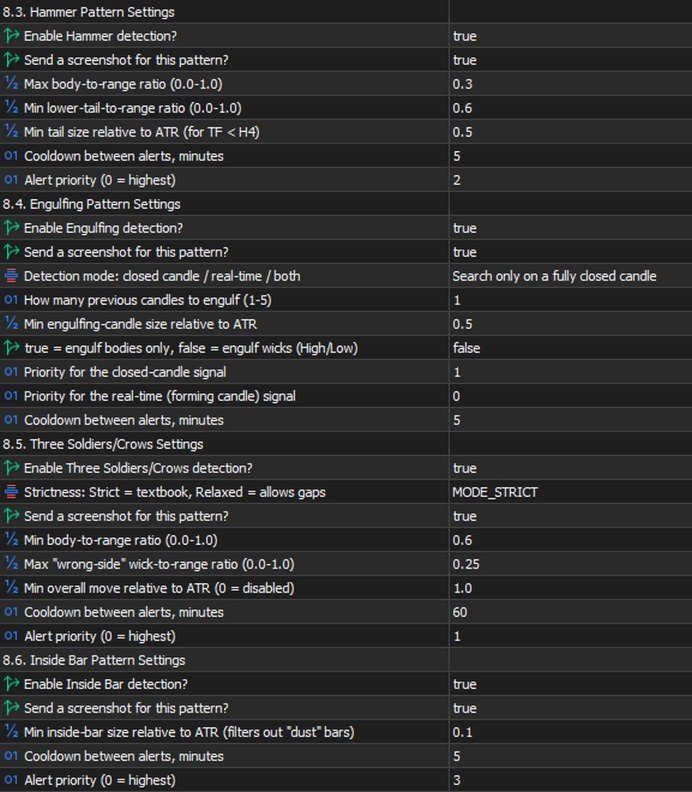
  • Hammer — small body near the top of the range, a long lower wick — a reversal signal.
  • Engulfing — a candle fully covers one or more previous candles (how many is configurable). There's a mode to search on a CLOSED candle, in REAL TIME on a still-forming one, or both — the real-time mode fires earlier, before the bar closes, at the cost of somewhat more false positives.
  • Inside Bar — a candle entirely within the previous candle's range — volatility compression before a possible breakout.
  • Three Soldiers / Crows — three candles in a row moving the same direction with no significant wicks — a strong impulse.

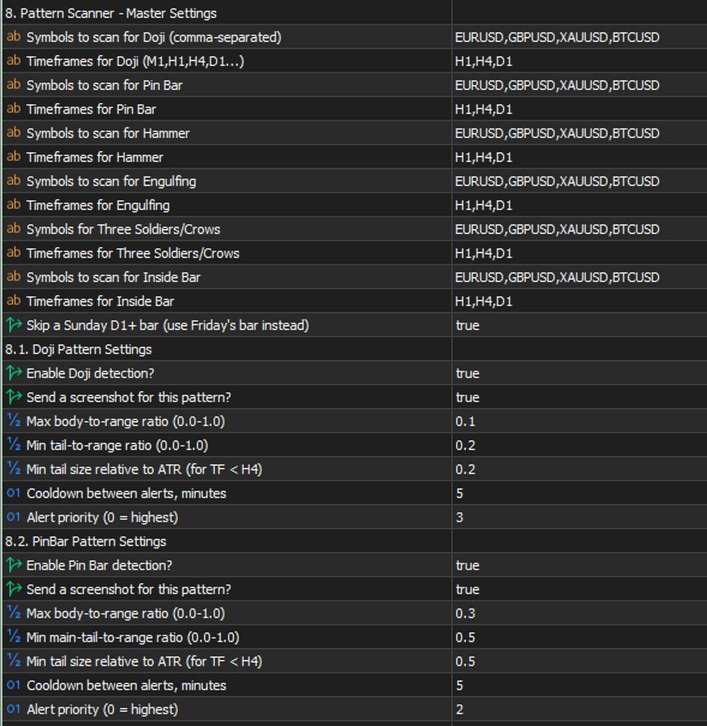
Each pattern has its own settings: which symbols and timeframes to scan, whether it's enabled at all, whether to send a screenshot along with the text, geometric thresholds (body/wick share of the candle's range), a minimum size relative to ATR (so it doesn't react to "dust" in a quiet market), a cooldown between repeat alerts for the same symbol/timeframe, and a priority in the shared send queue (0 is highest; critical margin alerts always jump the queue).

Multi-timeframe confluence

If the same pattern type fires independently on SEVERAL timeframes within a short time window (configurable), that's a confirming, stronger signal, and the EA automatically raises its priority. Not a fresh check from scratch — just cross-referencing detections that were already found, at essentially no extra cost.

⚡ Emergency signal — an abnormally large candle

Separate from the candlestick patterns: a real-time candle-size scanner. If the CURRENT, still-forming candle on a chosen timeframe has already grown more than N times (configurable) the normal candle size (measured by ATR), the alert fires IMMEDIATELY — it doesn't wait for the bar to close. If the candle keeps growing, a follow-up alert with the updated size arrives, so you can see the move is still going, not that it stalled.

This is exactly where "monitoring + trading in one chat" pays off fully: you get a signal about a sharp spike, decide to act, and right in the same chat, without switching apps, type /buy SYMBOL RISK 1% SL ... and you're in the trade while the move is still relevant. No need to run to the terminal to check what happened and then separately open a position — it's all in one place.

On-chart summary

A compact panel directly on the terminal chart — the most recent signals across every watched symbol/timeframe at a glance, no need to scroll back through the chat history ( Inp_EnableOnChartSummary ).

Margin control

  • Configurable levels: margin call, stop out, breakeven, full liquidation, profit target — calculated from the account's current state and drawn as lines directly on the chart, with alerts as price approaches them.
  • /marginview CUR|SYMBOL ( /mv ) — on demand, sends a screenshot with an automatically chosen scale so ALL levels and the current price fit into one picture. Works not just for the symbol of the chart the EA runs on, but for any symbol with an open position. For a fully locked symbol (BUY=SELL, zero net volume) it honestly explains that no levels exist, because there's nothing for price movement to act on — instead of returning silent emptiness.

Two-way control through Telegram

Commands split into informational and trading ones. Several commands have short forms — faster to type when a decision needs to happen in seconds (for example, right after a sharp-candle signal).

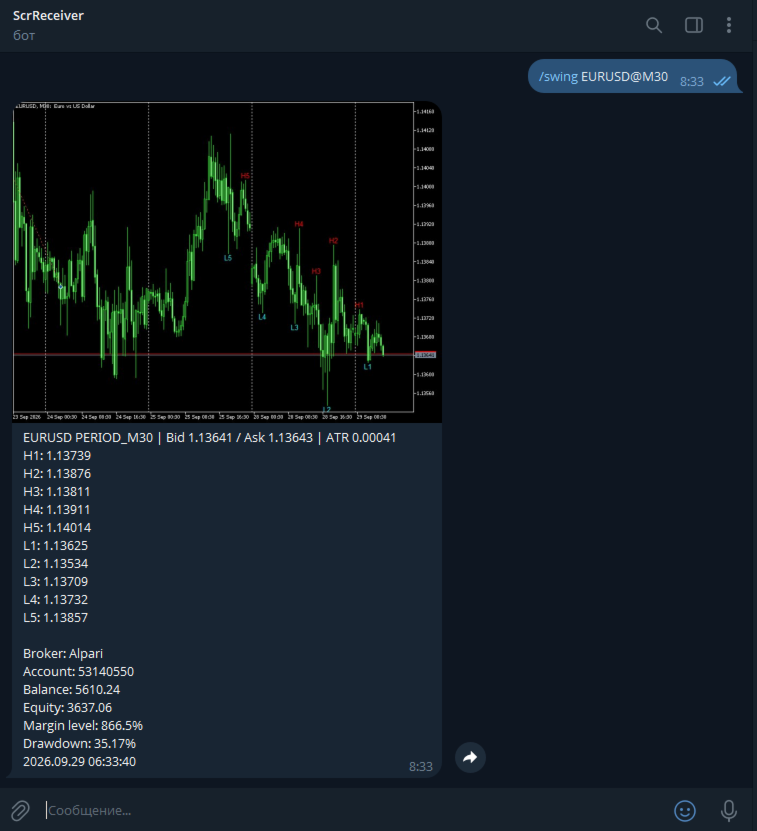
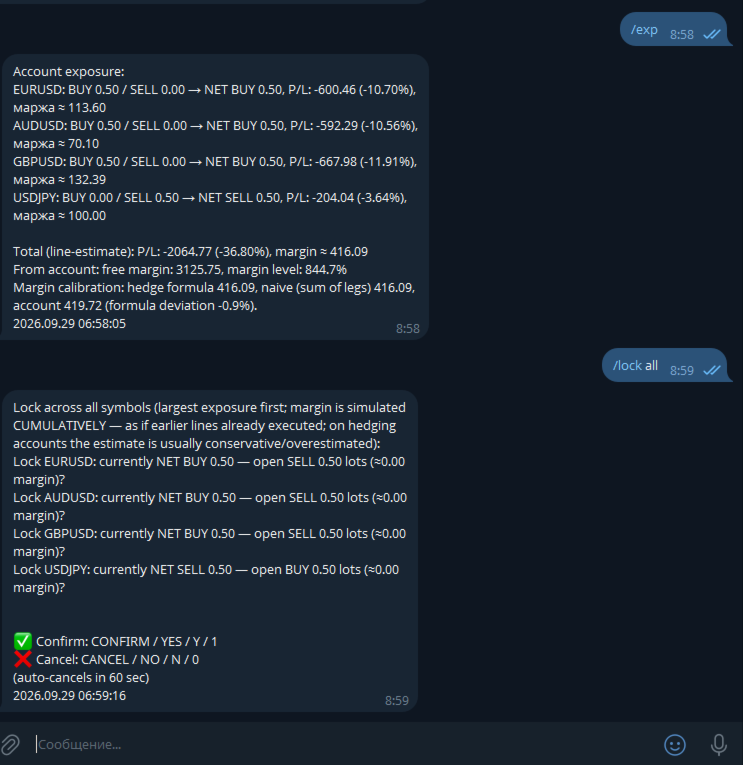
Informational (always available): - /status ( /st ) — account status. - /positions [FILTER] ( /pos ) — open positions, with short reference numbers N1, N2... for use in other commands. - /pending [FILTER] ( /pnd ) — pending orders, numbers P1, P2... - /exposure ( /exp ) — net volume and margin load per symbol. - /swing SYMBOL [depth] ( /sw ) — a screenshot with the last 5 swing highs and 5 swing lows labeled on the chart. - /marginview CUR|SYMBOL ( /mv ) — see the margin section above. - /screenshot ( /ss ) — a screenshot of the current chart on demand. - /pause , /pause N ( /pa ) / /resume ( /re ) — pause automatic alerts without touching trading commands. - /help ( /h ) — command list; tap any specific command with no arguments for detailed help on it.

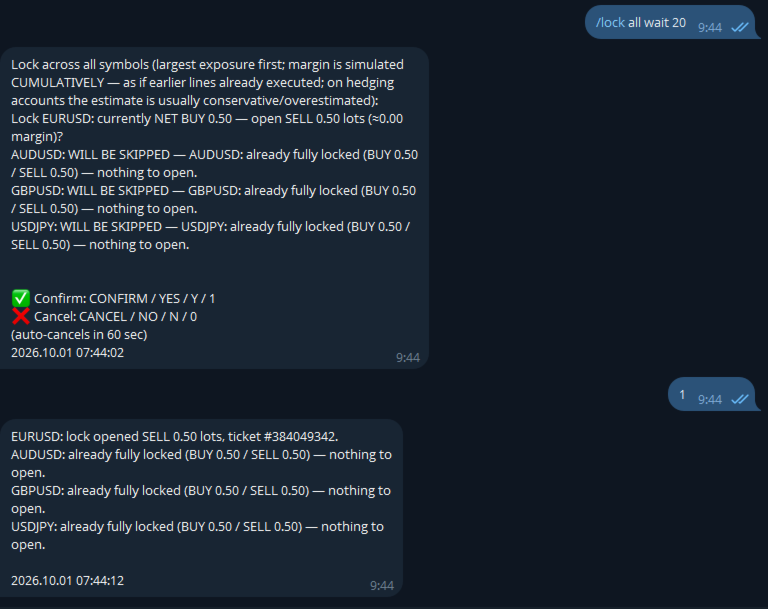
Trading (require a separate opt-in in settings): - /close ( /cl ) — close position(s). - /set SL|TP|BE <ref> <price or expression> — set or remove a stop/take-profit, or move to breakeven. - /shift SL|TP <ref> UP|DOWN <points> ( /sh ) — moves an ALREADY-SET stop/take-profit by N points relative to its current value (unlike /set , which sets an absolute price) — no need to check where the stop currently sits yourself. With a filter, each position shifts from its OWN current level — handy for grids/martingale. - /del SL|TP|PENDING <ref> — remove a stop/take-profit or delete a pending order. - /buy / /sell — a market entry or a pending order. - /lock SYMBOL / /lock ALL — instantly opens an opposite position, zeroing net volume. The spread check is deliberately not applied to /lock — locking is a defensive action taken precisely because the market is stressed, and spread widens in exactly those moments. - /undo — reverts the last command that changed an SL/TP ( /set , /shift , /del , moving to breakeven), within 10 minutes of it. One step back, requires its own confirmation with an explicit irreversibility warning. Closing positions and opening new trades are not reversible. - /enable <password> / /disable — emergency toggle for trading and bulk commands even if they're disabled in settings. Scenario: you forgot to enable Inp_EnableTelegramTrading , stepped away from your computer, and now urgently need to adjust trades remotely. The password is a separate setting ( Inp_EmergencyPassword , empty by default — the feature is off), the override is session-only (resets on restart), three wrong attempts in a row trigger a 5-minute lockout.

Shared command language: - A reference to a position/order — a short N/P-number (from /positions / /pending ) or a filter ( ALL , PROFIT , LOSS , BUY , SELL , VOL>x , a symbol name) — one command can touch several positions. - A price is a number or an expression like LOW1-1.5ATR / HIGH2+50P (a swing level with an ATR or point buffer). - Volume is a number or RISK 1% (the lot size is calculated from the risk % and the distance to the stop, with the calculation shown in the preview before confirmation). - Every operation: preview → confirm/cancel word → execution, with an auto-cancel timeout. Confirmation words are configurable ( Inp_ConfirmKeywordYes/No , defaulting to only CONFIRM / YES and CANCEL / NO — no short Y / N / 1 / 0 ).

Usage examples

⚡ EMERGENCY: XAUUSD H1 — abnormally large candle (3.4x ATR)! → while the move is still relevant, right in the same chat: /buy XAUUSD RISK 1% SL LOW1-0.5ATR → the bot calculates volume from 1% risk and the distance to the stop, shows the calculated lot size in the preview, waits for confirmation /pos PROFIT → lists only profitable positions, numbered N1, N2... /close N1 → preview "close #12345 XAUUSD BUY 0.10, P/L +42.10?" → confirm → closed /set TP N1 HIGH1+20P → take-profit 20 points above the last swing high /lock XAUUSD → instantly opens an opposite position, zeroing net volume on gold /shift SL N1 UP 50 → pulls an already-set stop 50 points up (manual trailing) /undo → "Undo: SET SL by filter 'XAUUSD': ... THIS ACTION CANNOT BE UNDONE" → confirm → stops revert to their values from before the command /mv → a chart screenshot with an auto-picked scale, showing the current price and all margin levels at once

Settings — by group

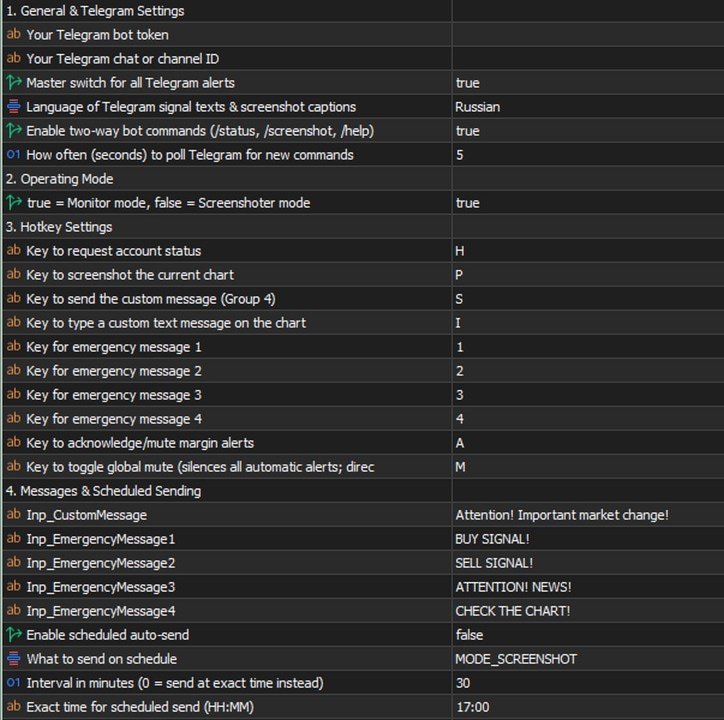
  • Telegram — General: bot token, chat ID, the master alert switch.
  • Mode: "Monitor" vs "Screenshoter" ( Inp_EnablePatternMonitoring ).
  • Emergency messages: 4 configurable template phrases with chart hotkeys in the terminal — if the bot is connected to a channel/group with subscribers, one keypress, no typing needed, instantly broadcasts a ready-made warning to the whole audience (each phrase's text is whatever you want — "closing everything", "news coming, don't enter", "re-entry", etc.).
  • Margin control: on/off, which of the five levels to calculate and show, line colors and styles.
  • Per-pattern groups (Doji/Pin Bar/Hammer/Engulfing/Inside Bar/Three Soldiers): for each — symbols and timeframes, enabled, screenshot yes/no, geometric thresholds, minimum ATR, cooldown, priority.
  • Emergency signal: enabled, the ATR multiplier for an "abnormal" candle, timeframe, ATR period, priority.
  • Confluence: time window, minimum number of confirming timeframes, how much to raise priority.
  • Shared geometric thresholds: minimum body/wick share of the candle's range — a "flat line" candle filter applied before all the detectors.
  • Chart appearance: arrow and label colors per pattern, the summary panel.
  • Screenshots: quality, mode (candles/bars), delays before capturing.
  • Alert pause: the default duration for /pause .
  • Telegram commands: enable reading commands, poll interval.
  • Telegram trading: master switch, bulk commands, operation confirmation, confirm/cancel words, timeout, the /undo window, the /enable emergency password.
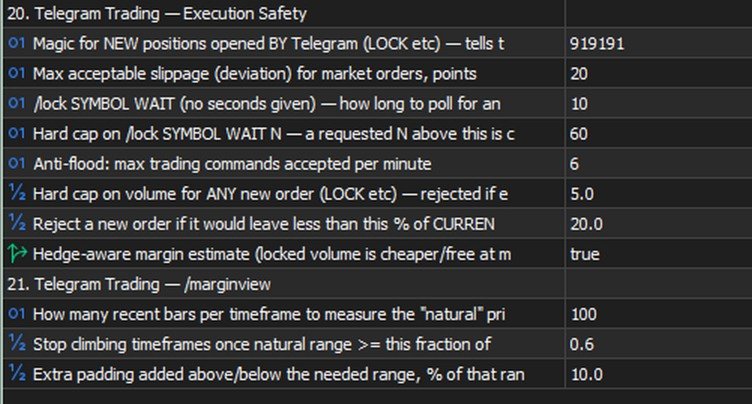
  • Execution safety: magic number for new positions, slippage, minimum free margin left after a trade, a per-order volume cap.
  • /marginview : how many bars to use for scale-fitting, the "natural range" threshold, padding around the picture's edges.

Tips and recommendations

  • Start with Inp_ConfirmTradingOperations = true (the default) — so every operation requires explicit confirmation, giving you time to catch a typo before it actually executes.
  • Check LOW/HIGH ± ATR expressions with /swing SYMBOL before using them in a real trading command.
  • For grids/martingale, use VOL>x filters in /close / /set , or a plain symbol filter in /shift / /undo .
  • Keep Inp_EnableBulkTradingCommands off until you've tested single-position operations.
  • Tune the emergency signal ( Inp_EmergencyCandleSizeATR ) to your instruments' real volatility — too low an ATR multiplier floods you with false positives, too high and you'll miss genuinely sharp moves.
  • If you set Inp_EmergencyPassword for /enable , pick something that can't be guessed in three tries.

Cautions

  • /undo is irreversible on its own — if something ELSE changed the same SL/TP after your command (another command, a manual edit in the terminal), the preview will warn you, but the revert will still restore the value from BEFORE your command, not undo that later change.
  • /enable lifts TWO safeguards at once — the general trading ban and the bulk-commands ban. Treat it as an emergency exit, not a way to bypass Inp_EnableTelegramTrading=false just because you haven't decided on the setting yet.
  • /lock doesn't check the spread — a deliberate trade-off, a lock needs to work even with a wide spread ahead of news; at an extreme gap it will execute at whatever price is available.
  • Bulk operations ( ALL , a symbol filter) affect several trades with one command — the preview shows the exact list before execution, check it.

Known limitations (honestly, no hiding)

  • Market /buy / /sell and pending orders are already supported; some rare parameter combinations may not be covered yet.
  • WebRequest to Telegram is a synchronous call (a limitation of MQL5 itself), so a brief delay in the alert queue is possible when the Telegram API is unavailable.
  • With several copies of the EA on one terminal, only the one in "Monitor" mode accepts commands (Telegram delivers updates to a single requester — the offset cursor is shared per bot).
  • There's no automatic trailing yet (the EA moving a stop on its own, on a timer) — only manual /shift . A version with a choice of algorithm (fixed step / ATR / fractals / Fibonacci) is being worked out.
추천 제품
Risk Panel - Click to Trade Risk Panel - Click to Trade is a manual trade execution utility for MetaTrader 5. It provides a chart-based interface for preparing and placing buy and sell orders with risk-based position sizing. Features Adjustable risk percentage based on account equity. ATR-based stop-loss calculation. Take-profit calculation using a configurable risk-to-reward ratio. Buy and Sell trade controls. Order placement through a dedicated trade button. Spread limit and trade deviation se
Position Sizer: the exact lot size, every single time. Most blown accounts start with the wrong position size, not the wrong trade. Position Sizer is an on-chart panel for MetaTrader 5 that does the math for you: choose how much you want to risk, drag the Stop Loss to your level, read the exact lot size, and send the order with one click. After that it helps you manage the trade until it is closed. It is a trade-management tool, not a robot: it never opens trades by itself and gives no signals.
Crystal Trade Manager – Advanced MT5 Risk and Trade Control Utility Overview Crystal Trade Manager (CTM) is a professional MetaTrader 5 utility designed for risk management, trade automation, and instant execution control. It provides traders with an integrated system for protecting equity, managing daily drawdowns, controlling lot sizes, and applying automation features such as automatic SL/TP, break-even, and trailing stop. The tool is suitable for manual traders, prop-firm challenge particip
Maria Trade Manager는 MetaTrader 5 차트 위에서 바로 쓰는 수동 트레이더용 트레이딩 데스크입니다. BUY 또는 SELL을 클릭하기 전에 패널이 차트에 거래 계획을 그려 줍니다: 진입가, 손절(스탑로스)과 익절(테이크프로핏) 구간이 위험 금액, 보상 금액, 손익비(리스크:리워드)와 함께 표시됩니다. 라인을 드래그해 계획을 바꾼 뒤 클릭 한 번으로 주문을 여세요. 거래가 열린 뒤에도 패널은 본전 이동, 트레일링 스탑, 부분 익절, 일일 가드로 포지션을 계속 보호합니다. 패널에는 TRADE, PROTECT, STATS 세 개의 탭이 있습니다. 패널이 적용하는 모든 규칙은 패널 화면이나 입력 항목에서 확인할 수 있습니다. 버전 3.0의 새 기능 일일 가드가 브로커 크레딧과 보너스를 무시합니다 - 본인의 자금만 계산하므로, 크레딧 때문에 수익 목표가 바로 작동하거나 손실이 가려지는 일이 없습니다. TP1이 MT5와 MT5에서 똑같이 작동합니다 - 수동으로 일부 청산한
Manual Trade Panel PRO for MT5 Product name **Manual Trade Panel PRO for MT5** Short description Advanced manual trading panel for MetaTrader 5 with BUY/SELL and BUY LIMIT/SELL LIMIT execution, balance-based lot sizing, automatic SL/TP, Break Even, trailing stop, partial close, candle timer, and open position pips counter. Full sales description **Manual Trade Panel PRO for MT5** is an advanced Expert Advisor designed for manual and semi-automatic trading in MetaTrader 5. The EA creates a c
ZyloFx Partial Close Manager
Rosa Lina Martinez Jimenez
IMPORTANT: After purchasing this product, please send me a private message to receive the installation guide, setup instructions, and direct product support. ZyloFx Partial Close Manager is a professional trade management Expert Advisor for MetaTrader 5, designed to help traders manage open positions with automatic partial closes and optional break-even protection. This EA does not open trades automatically. Its main purpose is to manage existing positions according to the user’s selected sett
Time in Trade
Denis Diakonov
Time in Trade Expert Advisor는 지정된 시간에 지정가 주문을 여는 전략을 적용하고 자동 전환과 함께 겨울 및 여름 시간도 사용합니다. 신호가 발생하면 거래 로봇은 구매 및 판매를 위해 동일한 수량의 대기 중인 주문을 엽니다. 거래에 사용되는 시간은 5분입니다. 지정가 주문의 트리거는 다음에 따라 급격한 가격 변동입니다. 거래 세션의 시작/마감; 중요한 경제 지표 발표; 최대 거래자 수의 시간 간격. 사용자는 다음 설정을 사용할 수 있습니다. Open Price - BID 및 AKS 가격을 기준으로 주문 개시 수준을 설정합니다. Stop Loss - 원하지 않는 가격 변동이 있을 경우 손절 레벨; Trailing - 부동 손절매 수준; Volume - 고정 거래량(위험 = 0인 경우에만 유효) RISK - 위험 수준(%): 0 - 설정된 위험이 없습니다. 고정 볼륨이 적용됩니다. 1 이상 - 무료 자금의 위험 수준 %. HOUR_n - 지정된 시간(서버 시간)에
TAQ Magic Keys v6.0 Auto Trade Manager is an advanced trade management tool for MetaTrader 5 (MT5) , featuring one-click trade management functions and an integrated Position Size Calculator . New Feature In V6.0 — FNR1R1 Function Key The new FNR1R1 Function Key provides an automated 1:3 Risk Reward trade management system , allowing traders to manage an open position through three predefined profit targets. Set your initial Stop Loss, and the system automatically calculates: TP1 = 1:1 Risk R
Horizontal Line Trade Assistant EA  Semi-Automated Trading Assistant      IMPORTANT :     On the main/purchased program a user can click on the Horizontal line and change it to Buy or Sell, and drag by double clicking on it. Please keep in mind that this option is not available on demo version, due to some restrictions/limitations of Strategy Tester, some Object related operations are not available in the  Strategy Tester. But, it will not prevent you from Testing, please drop an Object to chart
Trade Assistant MT4/MT5 PRO 는 MetaTrader 4/5용 전문 트레이딩 패널입니다. 빠르고 편리하며 시각적으로 명확하게 거래를 제어하고 싶은 트레이더를 위해 제작되었습니다. 이 제품은 반복적인 수동 작업을 줄이고, 주문 실행과 관리 속도를 높이며, 리스크 관리를 표준화하고, 수동 트레이딩을 더 규율 있게 만들어 줍니다. 이 도구는 트레이더 대신 매매 신호를 찾지 않으며, 마법 같은 결과를 약속하지도 않습니다. 역할은 훨씬 더 실용적입니다. 차트 위에서 바로 사용할 수 있는 편리한 트레이딩 인프라를 제공하는 것입니다. 진입 지점, 거래 아이디어, 시장 논리는 트레이더가 직접 선택합니다. Trade Assistant MT4/MT5 PRO는 그 아이디어를 명확한 리스크, 포지션 크기, Stop Loss, Take Profit, Breakeven, Trailing Stop, 포지션 관리가 포함된 정확한 거래 계획으로 빠르게 전환하도록 도와줍니다. 매번 포지션 크기를
MQL5 Trading Panel SL TP — это мощный инструмент, призванный помочь трейдерам эффективно управлять своими позициями на платформе MetaTrader 5. Эта торговая панель предоставляет простой в использовании интерфейс для установки уровней Stop Loss (SL) и Take Profit (TP) для открытых позиций. MQL5 Trading Panel SL TP обладает широкими возможностями настройки и может быть адаптирована к конкретным потребностям отдельных трейдеров. Панель можно изменять в размере, перемещать и настраивать с помощью ра
* Super Assistant is an useful management tool that helps traders perform management tasks on MT4/MT5 account remotely via Telegram such as: - Get info (account, details of positions, pending orders, floating PL, price, economic news, etc) - Open trade (open instantly with preset parameters) - Manage trade (set SLTP automatically, break-even mode, max risk, close time every day, etc) - Close trade (close all, buy, sell, win positions by one click, set awaiting close by PL, time) - Set up notifi
GS trade report
Aleksander Gladkov
5 (1)
3 in 1 : Report + monitoring + sending messages (Telegram, ...) to optimize trading and use of advisors. Monitoring: Panel on the chart Sending messages to Telegram Sending messages to Email Sending Notifications Sending pop-up messages Sound notifications when the established Profit/Loss levels are exceeded Monitoring is activated by pressing the Start button. Profit for the period by currency pairs, hours and Magic number for the current account. Forms four tables: by symbols, by magic number
This Expert Advisor monitors all open positions across all symbols in MetaTrader 5. Whenever a Stop Loss (SL) or Take Profit (TP) is manually set or adjusted on any position, the EA automatically applies that value to all other open positions , regardless of symbol or order type (Buy/Sell). This ensures consistent and synchronized SL and TP levels across your account. Perfect for mobile trading via tablet or smartphone!
FREE
Lock and Peel Pro Advanced Risk Manager
Muhammad Hassan Muhammad Ahmad Atiyah
Advanced Breakeven & Partial Close Manager MT5 Script – One-Click Trade Management Overview Advanced Breakeven & Partial Close Manager is a trade management script for MetaTrader 5. It works only on existing open positions and applies actions strictly based on user-defined rules. The script runs once per attachment and performs only the actions explicitly enabled in the inputs. It does not run in the background, does not trade automatically, and does not generate signals. Core Functionality The
TradePilot Dashboard
Augusto Martins Lopes
TradePilot Dashboard 요약 MT5용 그래픽 패널로, 주문 관리 버튼(Buy/Sell/Close/SL/TP), 마진 확인, 로그 제어 기능을 제공합니다. 사용이 간편하며 데모 계정에서 테스트 가능. 수익을 보장하지 않습니다. 상세 설명 TradePilot Dashboard는 MetaTrader 5에서 수동 및 반자동 주문 관리를 위한 그래픽 인터페이스(Controls)를 갖춘 전문가 어드바이저(Expert Advisor)입니다. 버튼, 입력 필드, 마진 확인 기능이 포함된 시각적 패널을 제공하여 트레이더가 차트에서 직접 빠르게 거래할 수 있도록 도와줍니다. 주요 기능 • 40개 이상의 버튼과 다양한 입력 필드(거래량, 핍, 트레일링, 반대 SL 등)를 갖춘 반응형 패널 • Trade.mqh(CTrade) 라이브러리를 사용하여 시장가 및 지정가 주문(Buy, Sell, BuyStop, SellStop) 실행 • 주문 전 자유 마진 확인(ACCOUNT_MARGIN_FRE
Manual trade and group management
Gayan Indika Honnanthara Acharige
GTM Panel Pro 는 MetaTrader 5용 수동 거래 관리 도구입니다. 하나의 차트에서 네 개의 독립된 거래 그룹(A, B, C, D)과 네 개의 대기 주문 슬롯(L1~L4)을 운영할 수 있으며, 각각 고유한 랏, 손절, 목표가, 본전, 트레일링 스탑, 매직 넘버를 가집니다. CLOSE를 누르면 현재 가리키는 그룹만 처리됩니다. 2.53 버전에는 본인 API 키를 사용하는 선택형 AI 어시스턴트, 텔레그램 음성 메시지, 14개 언어의 HELP 창, 진입 체크리스트, 가격 알림, 차트 위 자유 목표 상자, 그리고 거래에 반응하는 애니메이션 로봇이 추가되었습니다.          수동 도구입니다 - 클릭하지 않으면 아무 거래도 일어나지 않습니다. 내부에 전략이나 자동매매 로봇이 없습니다. 패널은 요청한 거래를 열고, 보호하고, 닫을 뿐입니다. AI 어시스턴트는 작업을 제안만 할 수 있으며, 거래를 열거나 닫거나 변경하는 모든 작업은 패널에서 APPLY를 누르거나 텔레그램에서
Bring the TradingView experience to your MetaTrader 5! Magic Entry Pro is a professional visual trading assistant designed for manual traders, scalpers, and Prop Firm funded traders. It allows you to execute trades with lightning speed, calculate risk automatically, and visually project your Stop Loss and Take Profit zones directly on the chart before you open a position. Tired of manually calculating lot sizes or guessing your Risk-to-Reward (RR) ratio? Magic Entry does it all in seconds! KE
This is a utility designed to automatically set the stop loss levels of orders according to the specified condition. Two price levels serve as the condition for setting stop loss: Trigger level - when this level is reached, an order is placed. The stop loss value of an order. It is possible to enable or disable traling stop loss. Input parameters Order type for execution - type of orders to be processed by the expert. It can either be BUY, SELL or auto-select. Trigger Level Points - level to pl
Close exactly the trades you want, in one click. Smart Close Panel puts six buttons on your chart: close all, only the winners, only the losers, only buy, only sell, or delete pending orders. Each button shows how many trades it will close and their profit, before you click. When the market turns fast, closing trades one by one in the Trade tab is slow and easy to get wrong. With this panel you take the profit of all winning trades, or cut all losing trades, in one second. THE SIX BUTTONS Close
Risk Control Utility MT5 designed for manual trading. It helps to calculate and control your risks, transfer transactions to breakeven and accompany positions with trailing stop. Easy to set up and use. It can be used for calculating a trading lot, calculating stop loss and take profit levels. Works with currency pairs, CFDs, stocks, indices, futures, cryptocurrencies Displays   volume,   potential loss and profit before   placing an order Ability to set the expiration time of a pending order Tr
Algosphere Terminal은 MetaTrader 5용 전문 원클릭 트레이딩 패널로 효율성을 추구하는 트레이더를 위해 설계되었습니다. 포인트 단위로 사전 정의된 손절매와 이익실현으로 BUY 및 SELL 주문을 복잡한 조작 없이 즉시 실행할 수 있습니다. 주요 기능으로는 빠른 프리셋 버튼이 포함된 조정 가능한 랏 크기, 컬러 알림이 있는 실시간 스프레드 모니터링, 구성 가능한 활성화 조건이 있는 트레일링 스탑, 원클릭 손익분기 기능 및 포괄적인 포지션 관리 도구가 있습니다. Obsidian, Emerald, Frost, Neon 네 가지 우아하고 전문적인 테마 중에서 선택하세요. 모든 설정은 세션 간에 자동 저장되며 다음 시작 시 복원됩니다. 외환 통화쌍, 주가지수 및 CFD 등 다양한 거래 상품에서 작동합니다. 직관적인 인터페이스로 거래 결정에 집중할 수 있습니다.
Hello, Every one  Close All Button A script to close all market positions and/or pending orders. ----------------------------------------------------------------------------------- This is Close All    market positions and/or pending orders button  You can close all orders in 1 second by one click  Download for Demo Account: Download on Demo Account:  Close All in 1s v1.4 Only Demo.ex5 - Google Drive Free version:  https://www.mql5.com/en/market/product/74159 For send Trade notification to Your
This utility provides the ability to use hot keys in manual trading instantly responding to the current market situation. You can assign hot keys to open/close positions by their type, open/close all positions on the current chart and remove all orders on the current chart. You can also assign hot keys for five predefined trade volumes and switch between them if necessary with no need to change the volume manually from time to time. It is also possible to set the auto calculation of a trade volu
AKCAP Hotkey Tool
AK Capital Markets Limited
5 (3)
Special offer for the next 10 copies Are you tired of manually navigating through menus and inputting data every time you want to execute a trade or open an order on Meta Trader? Our hotkey tool is here to make your life easier and boost your trading efficiency. Our tool is natively coded for lightning-fast performance and comes loaded with all the features you could possibly want. From pending orders and OCO orders to trailing and multiple buckets, it has everything a scalper could need. And
XAU Symmetry Protocol MT5 A disciplined XAUUSD system with a fixed, rule-based execution routine and state-driven protective management. XAU Symmetry Protocol MT5 is built for one purpose: to apply the same repeatable decision routine to gold on every session, without discretion and without escalation. It works from a single chart, needs no indicator to be installed, and behaves identically on any timeframe because it reacts to ticks rather than to candle closes. The system is deliberately narro
Lotwise Risk Console works out the lot size from the risk you choose and the stop loss line you drag on the chart. You click Buy or Sell, and the manager can then look after the open position: break-even, partial closes, trailing, time exit. It never opens a trade by itself. It takes the lot calculation off your hands for every order. Example on a 10,000 USD account: 1 % risk and a stop of 191 points give 0.51 lot on EURUSD. The panel shows the money at risk (97.41 USD) and the possible gain at
OneClick Risk Manager — Manual Trading Assistant OneClick Risk Manager is a manual trading panel for MetaTrader 5. It does not trade on its own — you stay in control and open, close and manage every position with one click. Its job is to do the math for you: position size, risk, partial take-profits, break-even and trailing, so you can trade fast and precisely without manual calculations. Works on any symbol — XAUUSD (gold), US100/NAS100, US30/DJ30, FX pairs and more. The panel is fully scalable
SmartRiskManager
Juergen Josef Wonke
One click. Everything under control. SmartTradePanel is a lightweight, fast trade panel for MT5. You trade and manage risk in USD (not pips), place pending orders with visual confirmation, start trailing only when your trigger is activated – and keep your chart clean. The panel always stays in the foreground, is DPI-friendly, and remembers your settings for each symbol. Main functions • One-click trading & closing BUY / SELL Close all BUY / SELL Close only winners / only losers Close HAL
Spread and Swap monitor
Hennadii Stanilevych
5 (1)
The indicator is intended for determining the spread and swap size, the distance for setting stop orders and stop losses from the current price allowed and the risk per 1 point in the deposit currency. The indicator informs a trader about possible additional expenses and profits connected with transferring a position to the next trade session of the financial instrument. It also informs about the spread size and the distance of pending orders, stop loss and trailing from the current price. In ad
이 제품의 구매자들이 또한 구매함
Trade Assistant MT5
Evgeniy Kravchenko
4.43 (216)
거래당 위험 계산, 라인을 사용한 손쉬운 신규 주문, 부분 청산 기능을 통한 주문 관리, 7가지 유형의 트레일링 스탑 및 기타 유용한 기능을 제공합니다. 추가 자료 및 지침 설치 지침   -   애플리케이션 지침   라인 기능       - 차트에 개시선, 손절매, 차익실현을 표시합니다. 이 기능을 사용하면 새로운 주문을 쉽게 하고 개봉 전에 추가 특성을 볼 수 있습니다. 위기 관리       -       위험 계산 기능은 설정된 위험과 손절매 주문의 크기를 고려하여 새 주문의 볼륨을 계산합니다. 이를 통해 손절매 크기를 설정하고 동시에 설정된 위험을 존중할 수 있습니다. 로트 계산 버튼 - 위험 계산을 활성화/비활성화합니다. 필요한 위험 값은 위험 필드에 0에서 100 사이의 백분율 또는 예금 통화로 설정됩니다. 설정 탭에서 위험 계산 옵션을 선택합니다. $ 통화, % 잔액, % 지분, % 자유 마진, % 사용자 정의, % AB 이전 일, % AB 이전 주, % AB 이전
Farmed Hedge Yield Farming | All Markets (Manual - Hybrid - Semi/Automated EA) VERIFIED TRADING RESULTS - Farmed Hedge Yield Axi Copy:  https://www.mql5.com/en/signals/2356376 - Farmed Hedge Yield Exn Copy:   https://www.mql5.com/en/signals/2356404 - Farmed Hedge Yield V Copy:  https://www.mql5.com/en/signals/2357156 IMPORTANT NOTICE: FarmedHedge is a MANUAL-FOCUSED TRADING UTILITY ,not a fully automated EA. Results shown on this Signal include manual trades and overall strategic management.
Trade Manager EA에 오신 것을 환영합니다. 이 도구는 거래를 보다 직관적이고 정확하며 효율적으로 만들기 위해 설계된 궁극적인 리스크 관리 도구 입니다. 단순한 주문 실행 도구가 아닌, 원활한 거래 계획, 포지션 관리 및 리스크 제어를 위한 종합 솔루션입니다. 초보자부터 고급 트레이더, 빠른 실행이 필요한 스캘퍼에 이르기까지 Trade Manager EA는 외환, 지수, 상품, 암호화폐 등 다양한 시장에서 유연성을 제공합니다. Trade Manager EA를 사용하면 복잡한 계산은 이제 과거의 일이 됩니다. 시장을 분석하고 진입, 손절 및 익절 수준을 차트의 수평선으로 표시한 후 리스크를 설정하면, Trade Manager가 이상적인 포지션 크기를 즉시 계산하고 SL 및 TP 값을 실시간으로 표시합니다. 모든 거래가 간편하게 관리됩니다. 주요 기능: 포지션 크기 계산기 : 정의된 리스크에 따라 거래 크기를 즉시 결정합니다. 간단한 거래 계획 : 진입, 손절, 익절을 위한
Telegram to MT5 Multi-Channel Copier   는 Telegram 및 Discord 채널의 트레이딩 시그널을 MetaTrader 5로 자동 복사합니다. 봇도, 브라우저 확장도, 수동 복사도 필요 없습니다. Telegram이나 Discord에 시그널이 도착하면 EA가 몇 초 안에 터미널에서 주문을 실행합니다. 그리고 채널을 복사하기 전에, 내장 백테스터가 그 채널이 내 계좌에서 어떤 결과를 냈을지 보여줍니다. 제품은 두 가지 구성 요소로 이루어집니다: Telegram 채널을 수신하는 Windows 애플리케이션과, MT5 터미널에서 시그널을 실행하는 본 EA입니다. MT4 버전도 제공됩니다   여기 . 구매 전에 사용해 보세요:   애플리케이션은 무료로 다운로드할 수 있습니다. 본인의 채널을 연결하고 각 시그널이 어떻게 읽히는지 확인하세요. Backtest 탭과 실제 거래에는 구매하거나 임대한 EA가 필요합니다. 이 페이지의 무료 데모는 전략 테스터에서만 실행되며
EA Overfitter
Stephen J Martret
5 (4)
That backtest looks great. But will it still be making money tomorrow, next week, next month? EA Overfitter re-runs your EA on 100 price histories it has never seen. One score tells you if the edge is real. A backtest tells you what an EA did on one price history — the one that happened to occur. What you cannot tell from it is how much of that result was the strategy and how much was the particular path. EA Overfitter answers that. It builds up to 100 synthetic price histories your EA has n
TradePanel MT5
Alfiya Fazylova
4.89 (174)
Trade Panel은 다기능 거래 도우미입니다. 이 애플리케이션에는 50개 이상의 수동 거래 기능이 포함되어 있으며 대부분의 거래 작업을 자동화할 수 있습니다. 앱 사용 설명서: https://www.mql5.com/en/blogs/post/756482 데모 계정용 앱 체험판: https://www.mql5.com/en/blogs/post/750865 앱 설치 방법: https://www.mql5.com/en/blogs/post/756239 시각 모드에서 앱 테스트 방법: https://www.mql5.com/en/blogs/post/770277 VPS MetaTrader에 앱 설치 방법: https://www.mql5.com/en/blogs/post/770190 거래. 한 번의 클릭으로 거래를 수행할 수 있습니다: 리스크 자동 계산과 함께 예약 주문 및 포지션 열기. 한 번의 클릭으로 여러 주문 및 포지션 열기. 주문 그리드 열기. 예약 주문 및 포지션을 그룹별로 닫기. 포지션
News Trade EA MT5
Konstantin Kulikov
4.55 (11)
제가 몇 년 동안 사용하고 있는 유용한 로봇을 소개드립니다. 반자동뿐만 아니라 자동 모드로도 사용할 수 있습니다. >>> Chat <<< 본 프로그램에는 경제 캘린더의 뉴스별로 유연한 거래 설정이 포함되어 있습니다. 전략 테스터에서 확인할 수 없습니다. 진짜 작업뿐입니다. 최신 설정 아카이브 다운로드: https://www.mql5.com/en/blogs/post/747929 신호 모니터링: https://www.mql5.com/en/signals/author/test-standart 이 전문가를 위해 고유 설정 세트를 만들 때 블로그의 모든 매개변수에 대한 설명을 참조하십시오: https://www.mql5.com/en/blogs/post/748545 . 기본 설정 설명 작업은 한 차트에서 GBP(GBPUSD, EURGBP, GBPJPY, GBPCAD, GBPAUD, GBPCHF)와 쌍으로 이루어집니다. GBP는 가장 변동성이 큰 통화로서 거래 수행 시 거래를 성공적으로
내 거래 규칙에 맞춰 Telegram 신호 복사 Telegram to MT5 Signal Trader 는 공개 및 비공개 Telegram 채널과 그룹의 텍스트 기반 거래 신호를 MetaTrader 5로 자동 복사합니다. 하나의 데스크톱 앱에서 여러 신호 제공자와 MT5 계좌를 관리하고, 제공자마다 위험 관리 및 거래 설정을 개별적으로 지정 할 수 있습니다. 신호 복사에는 Telegram 봇이나 API 설정이 필요하지 않습니다. 전화번호 또는 QR 코드로 본인의 Telegram 계정에 로그인한 후, 이미 가입한 채널이나 그룹을 선택하면 됩니다. 봇을 만들거나 Telegram API 토큰, API ID 또는 API 해시를 입력할 필요가 없습니다. 포지션 크기를 선택하고, 여러 익절 목표에 청산 물량을 배분하며, 손익분기점 이동과 트레일링 스톱을 자동화하세요. 제공자의 신호를 따르면서도 실제 거래 방식은 직접 설정할 수 있습니다. 이 제품은 MT5 Expert Advisor와 필수 Win
================================================================================ POC BREAKOUT - V20.72. Full Professional Grade Toolkit ================================================================================ POC Breakout is a full MetaTrader 5 trading dashboard for discretionary traders who want breakout signals, Point of Control (POC) context, volume profiles, order flow, market structure, news, alerts, and advanced trade planning in one professional workspace. Attached directly to you
The product will copy all telegram signal to MT5 ( which you are member) , also it can work as remote copier.  Easy to set up, copy order instant, can work with almost signal formats, image signal,  s upport to translate other language to English Work with all type of channel or group, even channel have "Restrict Saving Content", work with  multi channel, multi MT5 Work as remote copier: with signal have ticket number, it will copy exactly via ticket number. Support to backtest signal. How to s
다음 업데이트 — 버전 2.52 곧 출시! [신규] 시장 분석 및 트레이딩 워크플로를 향상시키기 위해 설계된 4가지 주요 신규 기능을 기대해 주세요. 트레이딩 요구 사항을 충족하도록 설계된 4가지 새로운 기능으로 시장 분석을 한 단계 더 발전시킵니다. 다음 기능을 소개합니다: 1. TRADE OVERVIEW DASHBOARD 2. CONFLUENCE AT ZONE 3. STRONG & WEAK HIGH/LOW 4. OTE 1. TRADE OVERVIEW DASHBOARD 시장 전체 상황을 더 쉽게 파악할 수 있도록 도와주는 대시보드입니다. 트레이딩 의사결정을 지원하는 가이드를 제공하며, 하나의 화면에서 시장을 분석하고 체계적으로 트레이딩을 계획할 수 있도록 도와줍니다. 멀티 타임프레임 시장 개요 (Multi-Timeframe Market Overview) 시장 방향과 가격 구조를 더욱 명확하게 파악 시장 상황을 빠르게 확인 체계적인 시장 분석 및 진입 계획을 위한 가이드 2. CO
EA Auditor
Stephen J Martret
5 (7)
EA Auditor is an independent analysis tool for traders evaluating Expert Advisors and trading signals on MetaTrader 5. It audits backtest reports, reviews posted developer signals, and cross-verifies the two against each other to help traders assess strategies before committing capital. The MQL5 market offers a wide range of Expert Advisors from many developers, with varying approaches, quality, and transparency. EA Auditor provides a consistent, data-driven framework for reviewing them, answer
EA Portfolio Control & Cloud Monitoring for MetaTrader 5 Your EAs manage trades. KONTROL_01 manages your EAs. A control system for traders running multiple Expert Advisors on the same account. Coordinate EA activity, manage trading risks and monitor your setup remotely. A detailed User Manual is available via DM after purchase. IN PRACTICE Multiple EAs. No coordination. Your EAs trade independently, unaware of each other's activity. KONTROL_01 coordinates them, limits simultaneous activity a
News Filter EA
Rashed Samir
5 (2)
News Filter EA: Advanced Algo Trading Assistant News Filter EA is an advanced algo trading assistant designed to enhance your trading experience. By using the News Filter EA , you can integrate a Forex economic news filter into your existing expert advisor, even if you do not have access to its source code. In addition to the news filter, you can also specify trading days and hours for your expert. The News Filter EA also includes risk management  and equity protection features. MT4 Version Ma
MT5 to Telegram Signal Provider 는 사용하기 쉽고 완전히 커스터마이즈 가능한 유틸리티로, 특정 신호를 Telegram의 채팅, 채널 또는 그룹으로 전송하고, 귀하의 계정을 신호 제공자 로 만듭니다. 경쟁 제품과 달리 DLL 임포트를 사용하지 않습니다. [ 데모 ] [ 매뉴얼 ] [ MT4 버전 ] [ 디스코드 버전 ] [ 텔레그램 채널 ]  New: [ Telegram To MT5 ] 설정 단계별 사용자 가이드 가 제공됩니다. 텔레그램 API에 대한 지식은 필요하지 않습니다; 개발자가 제공하는 모든 것이 필요합니다. 주요 특징 구독자에게 보낸 주문 상세 정보를 커스터마이즈할 수 있습니다. 예를 들어, 브론즈, 실버, 골드와 같은 계층 구독 모델을 만들 수 있습니다. 골드 구독에서는 모든 신호를 받습니다. id, 심볼, 또는 코멘트로 주문을 필터링할 수 있습니다. 주문이 실행된 차트의 스크린샷이 포함됩니다 보낸 스크린샷에 닫힌 주문을 그려 추가 검증을 합니다
Trader Evolution
Siarhei Vashchylka
5 (7)
" Trader Evolution " - A utility designed for traders who use wave and technical analysis in their work. One tab of the utility is capable of money management and opening orders, and the other can help in making Elliott wave and technical analysis. Manual (Be sure to read before purchasing) | Version for MT4 Advantages 1. Trading in a few clicks. Immediate and pending orders are available in the panel 2. Money management. The program automatically selects the appropriate lot size 3. Simplifies
VirtualTradePad PRO SE MT5 — MetaTrader 5용 전문 트레이딩 컨트롤 센터 VirtualTradePad PRO SE 는 MetaTrader 5 용 프리미엄 차트 기반 트레이딩 패널이자 거래 관리 워크스페이스입니다. 더 빠른 주문 실행, 더 명확한 포지션 관리, 구조화된 거래 관리, 시각적인 레벨 계획, 그리고 차트에서 직접 작업하는 전문적인 워크플로를 원하는 트레이더를 위해 설계되었습니다. 이 제품은 단순한 BUY / SELL 패널이 아닙니다. PRO SE는 수동 트레이딩, 예약 주문, 포지션 관리, 부분 청산, 바스켓 손익 관리, 평균가 레벨, ATM 규칙, 신호 모니터링, 실시간 시장 정보, 전략 테스터 (Strategy Tester) 워크플로, VPS 중심 운용을 하나의 연결된 인터페이스로 통합합니다. MT4 버전 | 전체 설명 및 스크린샷 | 구입 방법 | 설치 방법 | 로그 파일을 얻는 방법 | 테스트 및 최적화 방법 | Expforex의 모든
AW Trade Manager
AW Trading Software Limited
AW Trade Manager는 차트에 손익비(리스크/리워드) 도구를 갖춘 MetaTrader 5용 거래 패널입니다. 거래는 마우스로 끌어 놓는 Entry, Stop Loss, Take Profit 선으로 계획합니다: 라벨에는 가격, 거리, 금액이 표시되고, 구역은 수익과 손실을 보여 주며, 거래량은 리스크를 기준으로 계산됩니다. 주문을 보내기 전에 확인 창에서 리스크, 증거금, 포지션 규칙을 포함한 거래 전체를 보여 줍니다. 매뉴얼과 사용 설명 -> 여기 / 무료 LIVE 데모 -> 여기 진입 후 포지션 관리를 위해 패널에는 손익분기 이동, 트레일링, 부분 청산, 시간 기준 청산, 숨김 레벨 기능이 있습니다. 이 기능들은 Rules 탭에서 모든 신규 거래에 켜거나, 포지션 창에서 개별 포지션에만 켤 수 있습니다. 개별 거래보다 상위 수준에서는 계좌 리스크 한도, 바스켓, 예약 작업, 알림, MT5 경제 캘린더가 작동합니다. 장점: 차트 위의 거래 계획: 라벨, 구역, R:R이 표시
Local Trade Copier EA 는 외부 소스에서 거래 신호를 실행해야 하거나 MAM 또는 PAMM 계정 없이 동시에 여러 계정을 관리해야 하는 개인 거래자 또는 계정 관리자를 위한 솔루션입니다. 최대 8개의 마스터 계정에서 무제한 슬레이브 계정으로 복사합니다. [ 설치 가이드 | 업데이트 가이드 | 문제 해결 | 자주하는 질문 | 모든 제품 ] 100% 자체 호스팅 설치 및 사용이 간편함 설치 프로그램, 구성 파일, 서버, 메모리 파이프 또는 DLL이 사용되지 않음 EA를 영원히 사용하기 위한 1000번의 활성화 로컬 실행, 네트워크 대기 시간 없음 필요한 모든 기능을 구현합니다. 최대 8개의 마스터 계정 및 무제한 슬레이브 계정 모든 브로커 및 DD/NDD/ECN/STP 실행과 함께 작동 다른 계정 통화를 사용하는 계정에서 작동 라이브 계정과 데모 계정 간에 구분 없이 작동 마스터 및 슬레이브 계정에서 기호 이름의 접미사 지원 매직 넘버 및 주문 댓글로 필터링 다른 거래
RETAILBERG FOOTPRINT CHART PRO — Order-Flow Workspace for MetaTrader 5 Version 7.00  |  Professional System  |  31 tools  |  One chart A full 150-page illustrated User Manual is included. Please read the full manual to understand this feature packed footprint chart elements and ui. https://www.mql5.com/en/blogs/post/777982 DEMO / STRATEGY TESTER — PLEASE READ FIRST
Power Candles Strategy Scanner: 스스로 최적화하는 멀티 심볼 셋업 파인더 작은 움직임마다 울리는 스캐너는 결국 무시하게 됩니다. 분주한 캔들 마감 한 번에 알림이 연달아 쏟아지고, 정작 실제로 거래하는 단 하나의 셋업은 소음에 묻혀 버립니다. Power Candles Strategy Scanner 는 스스로 최적화하는 Power Candles 엔진을 Market Watch의 모든 심볼에서 실행하고, 당신이 직접 정한 필터를 통과한 것만 알려줍니다. 기준은 마지막 확정 캔들의 강도, 셋업의 손익비, 실시간 스프레드, 그리고 당신이 거래하는 자산군입니다. 심볼이 리스트에 들어오면 스캐너가 당신을 부릅니다. 필터로 걸러낸 것은 모두 조용히 남아 있고, 같은 캔들 마감에서 나온 모든 신호는 하나의 메시지로 도착합니다. 구매 전에 패널과 모든 필터를 확인하세요. 스크린샷, 전체 기능 투어, Power Candles와 함께 쓰는 워크플로: stein.investment
AW Shepherd Safety MT5
AW Trading Software Limited
5 (5)
AW Shepherd Safety EA는 열린 포지션을 관리하는 EA입니다. 첫 주문은 트레이더가 패널에서 열고, 이후에는 EA가 바스켓을 직접 관리합니다: 추세 필터를 거쳐 복구 주문을 추가하고, TakeProfit, 트레일링 또는 손절로 해당 측을 청산하며, 청산 수준을 차트에 표시합니다. 매수와 매도는 따로 관리되며 양 측을 동시에 열어 둘 수 있습니다. 복구 주문은 가격 간격만으로 열리지 않고, Parabolic SAR, 두 개의 MA 또는 캔들 색상 기준으로 포지션 방향으로의 반전이 확인된 뒤에 열립니다. Orders Magic number가 일치하면 수동으로 또는 다른 EA가 연 포지션도 EA가 넘겨받아 관리합니다. EA가 포지션을 관리하는 방식: 1 트레이더가 Open Buy 또는 Open Sell 버튼으로 Order Size 필드의 거래량만큼 첫 주문을 엽니다. 2 가격이 포지션에 불리한 방향으로 Minimal step between recovery orders만큼 움
Dealer's Panel No signal decides anything here — a hand does. One click, and the panel calculates what's underneath: lot size from risk, target from a 30-step balance ladder that remembers exactly how far an account has climbed. Toggle between market and pending without touching an input field. Set a stop, and the take-profit can write itself — a fixed share of the balance, translated into price with no arithmetic left for the trader to get wrong. One trade live at a time; it won't let a seco
Close by percentage MT5
Konstantin Kulikov
5 (1)
Hello friends. I wrote this utility specifically for use in my profile with a large number of Expert Advisors and sets ("Joint_profiles_from_grid_sets"   https://www.mql5.com/en/blogs/post/747929 ). Now, in order to limit losses on the account, there is no need to change the "Close_positions_at_percentage_of_loss" parameter on each chart. Just open   one   additional chart, attach this utility and set the desired percentage for closing all trades on the account. The utility has the following fu
Astro Trade MT5
Indra Maulana
5 (8)
25% discount on the release of the tool: only for the next 3 buyers Send a message to receive a demo version. AstroTrade Trading Assistant AstroTrade is a comprehensive multi-functional trading utility developed for the MetaTrader 5 platform. It integrates essential tools for trade execution, risk management, and technical monitoring into a single unified interface. The application is designed to assist traders in managing their daily operations through a visual and structured environment. Vi
Bneu Prop Firm Pass System
Marvinson Salavia Caballero
5 (1)
BNEU PROP FIRM PASS SYSTEM v2.37 PRODUCT OVERVIEW Bneu Prop Firm Pass System is a professional risk management and account protection utility for MetaTrader 5. Attach to any chart and configure your account rules. The system monitors daily loss, maximum drawdown, profit target, trading days, open risk, margin usage, news events, pending orders, weekend restrictions, and rollover restrictions from one dashboard. It includes a 5-tab premium dashboard, prop firm presets, custom rules, Risk Sentine
Anchor Trade Manager
Kalinskie Gilliam
5 (8)
Your EAs cannot see each other, but Anchor can. Anchor gives you one place to coordinate your EAs, manage risk, and decide when trading is allowed. It works alongside the trading bots you already use without any changes to them. The Problem One EA opens a trade. Then another starts trading. The next thing you know, you wake up to multiple grids built across your account. Each EA may be doing exactly what it was designed to do, but together they can place far more risk on your account than you in
REVDEN AI Desk: REVDEN의 시장 컨텍스트 위에서, 당신만의 AI와 나누는 하나의 대화로 트레이딩을 운영하세요 하나의 대화로 트레이딩을 운영한다고 상상해 보세요. REVDEN AI Desk 는 이를 MetaTrader 5로 가져옵니다. 당신만의 AI에게 시장을 어떻게 읽는지 물으면, AI는 당신이 거래하는 종목에 대한 REVDEN의 전체 컨텍스트, 즉 각 종목의 상태와 리스크 현황, 예정된 발표를 바탕으로 답합니다. AI의 제안은 진입, 스톱, 타겟, 리스크를 갖추고 도착하며, 맞는 제안을 당신이 승인합니다. 규칙도 같은 방식으로 바뀝니다. 무엇을 바꿀지 적으면 AI가 새 룰북의 초안을 작성하고, 받아들일지 버릴지는 당신이 정합니다. 대화를 둘러싸고 시장 전체가 하나의 화면에 펼쳐집니다. 데스크와 설정 가이드를 확인하세요. 모든 화면, 모든 설정, 그리고 당신만의 AI와 함께하는 첫 단계: stein.investments/products/revden-ai-desk 당신
오늘 손실 한도까지 얼마나 남았을까요? 차트 하나에 RiskGuard를 설치하면 오늘의 손실, 설정한 한도, 남은 금액을 볼 수 있습니다. 직접 연 거래와 다른 EA가 연 거래를 함께 감시합니다. 처음 실행하면 모니터링만 합니다. 데모 계좌에서 처음 시작하기 차트 하나에 RiskGuard를 추가하세요. 처음에는 포지션을 청산하지 않고 계좌만 감시합니다. 일일 손실 한도를 정한 뒤 보호 설정 미리보기에서 대상 포지션과 대기 주문 수를 확인하세요. 대상이 맞으면 MT5와 EA에서 알고리즘 거래를 허용하고 보호 시작을 누르세요. 보호 일시정지를 누르면 새 청산 요청이 중단됩니다. 하루 손실 한도 정하기 하루 시작 잔액이 10,000이고 한도를 2%로 정하면 계좌 통화 기준 한도는 200입니다. 현재 손실이 120이면 80이 남습니다. 청산한 거래의 손익과 보유 중인 포지션의 평가손익을 함께 계산합니다. 전날부터 보유한 포지션도 포함하며 입출금은 별도로 반영합니다. 한도에 도달하면 선택한
AW Equity Protection MT5
AW Trading Software Limited
3.5 (2)
유틸리티의 작업은 예금의 감소를 방지하기 위해 모든 상품에 대한 다른 조언자의 작업을 분석하는 것입니다. 지정된 매개변수를 초과하는 경우 "자본 보호"는 포지션을 잠그고 닫고 이에 대한 알림을 보낼 수 있습니다.   "주식 보호   "는   현재 기호 또는 모든 기호에 대해 작동할 수 있습니다. 내장된 기능을 사용하면 보류 중인 위치를 제거하고 귀하의 계정에서 작업하는 다른 조언자를 닫을 수도 있습니다. 기회: 계정에서 작업이 시작되면 모든 유형의 알림을 보냅니다. 계정의 모든 상품을 작업하려면 하나의 차트에 업로드하는 것으로 충분합니다. 선택한 매직 넘버 또는 전체, 현재 기호 또는 모든 기호에 대해 작업합니다. 손실을 차단, 종료하거나 손실에 대해 알려줄 수 있습니다. 필요한 경우 모든 기호 또는 현재 기호에서 다른 조언자를 비활성화합니다. StopLoss 및 TakeProfit뿐만 아니라 보류 주문도 삭제할 수 있습니다. 패널에서 수동으로 작업을 수행할 수 있는 기능을 갖춘
제작자의 제품 더 보기
MarginVisualizer
Vladimir Ershov
5 (2)
I s a professional visual radar for your trading account. The indicator calculates and displays the key mathematical levels of your open positions directly on the chart in real-time (fully accounting for commissions and swaps). No more blind spots or mental math: you will clearly see exactly where your desired profit will be reached and where the broker will forcefully close your account. Key Features Complete Margin Level Map: Automatic calculation and drawing of Margin Call, Stop Out, "Loc
FREE
MTF Pult
Vladimir Ershov
MTF Pult is a "timeframe remote control" for MetaTrader 4. A transparent panel with mini-charts of all other timeframes appears right on top of your chart. Trade on M15 and you instantly see M1, M5, M30, H1, H4, D1 and more, without switching the chart. Drag the panel anywhere, stretch it to any size, collapse it to a thin strip and switch between four view modes. The indicator never trades: it does not open, close or modify orders. Who it's for Traders who work with several timeframes at once a
FREE
Pivot Points MTF — Multi-Method Multi-Timeframe Pivot Panel **Four pivot systems. Three timeframes. One draggable, collapsible panel. Switch on the fly, right on the chart, without touching Inputs.** Pivot points are one of the oldest tools in trading — originally used by floor traders to plan their session before the open, still used today by day traders, prop desks, and algo systems alike as objective, non-repainting reference levels: everyone looking at the same OHLC data arrives at the s
FREE
LockMaster
Vladimir Ershov
LockMaster — See Every Outcome Before You Touch a Locked Position Do you love untangling complex locks — or are you forced to? Either way, this tool is for you! Managing a hedge lock (opposing Buy and Sell positions on the same pair) is one of the trickiest situations in manual trading. Which leg do you close first? What happens to your Break-Even, Margin Call and Stop Out levels if you unwind one side now — or wait for a Take Profit to hit? Guessing wrong costs money. LockMaster removes the gue
FREE
MRM Bot PRO
Vladimir Ershov
MRM Combine v2.10 — торговая станция для тех, кто торгует на грани Ознакомительная версия для демо-счетов с полным функционалом Видим линии маржин-колла и стоп-аута заранее! Еще не открыли сделку, а уже видим, где сольемся! Не верите??? Большинство risk-менеджеров для MT5 умеют одно: показать текущий margin call и stop out по факту открытых позиций. Это прошлое время. Вы уже в сделке, уже несёте риск, и единственное, что вам остаётся — реагировать. MRM Combine устроен иначе: он считает будущее
필터:
리뷰 없음
리뷰 답변